This drive doesn't define in driveOffset.txt Please input drive offset #288

Closed
opened 2026-01-29 16:13:41 +00:00 by claunia · 3 comments
Owner

Originally created by @60fpshacksrock on GitHub (Apr 24, 2021).

Originally assigned to: @mnadareski on GitHub.

Before You Submit

  • Remember to try the latest WIP build to see if the issue has already been addressed.
  • Is it copy protection related? If so, report the issue here instead.
  • .NET Core 3.1 and .NET 5.0 have known issues, please try using another build to reproduce the error
  • Check multiple discs to help narrow down the issue
  • Check the Options to see if changing any of those affects your issue.

If all of those fail, then continue...

Version
What version are you using?

https://github.com/SabreTools/MPF/releases/tag/2.0

Build
version 2.0-7a2061a3

Describe the issue
Unsure what to input. I am using an LG portable slim DVD drive.

To Reproduce
Steps to reproduce the behavior:

  1. Go to 'System/Media Type'
  2. Click on 'Sega CD / Mega CD'
  3. Scroll down to 'Start Dumping'
  4. See error: This drive doesn't define in driveOffset.txt Please input drive offset

Expected behavior
Dump the disc

Screenshots
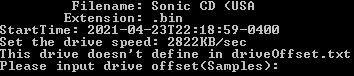
mef

Additional context
Outputs a bunch a text files whether I input a value or not. I am not sure what kind or type of offset it wants .

Originally created by @60fpshacksrock on GitHub (Apr 24, 2021). Originally assigned to: @mnadareski on GitHub. **Before You Submit** - Remember to try the [latest WIP build](https://ci.appveyor.com/project/mnadareski/mpf/build/artifacts) to see if the issue has already been addressed. - Is it copy protection related? If so, report the issue [here](https://github.com/mnadareski/BurnOutSharp/issues) instead. - .NET Core 3.1 and .NET 5.0 have known issues, please try using another build to reproduce the error - Check multiple discs to help narrow down the issue - Check the Options to see if changing any of those affects your issue. If all of those fail, then continue... **Version** What version are you using? https://github.com/SabreTools/MPF/releases/tag/2.0 **Build** version 2.0-7a2061a3 **Describe the issue** Unsure what to input. I am using an LG portable slim DVD drive. **To Reproduce** Steps to reproduce the behavior: 1. Go to 'System/Media Type' 2. Click on 'Sega CD / Mega CD' 3. Scroll down to 'Start Dumping' 4. See error: This drive doesn't define in driveOffset.txt Please input drive offset<Samples> **Expected behavior** Dump the disc **Screenshots** ![mef](https://user-images.githubusercontent.com/59340087/115944267-bbe54280-a482-11eb-9990-7786d8b42568.png) **Additional context** Outputs a bunch a text files whether I input a value or not. I am not sure what kind or type of offset it wants .
claunia added the bug label 2026-01-29 16:13:41 +00:00
Author
Owner

@mnadareski commented on GitHub (Apr 24, 2021):

This is not an issue with MPF. Your drive is incompatible with DiscImageCreator, most likely. Please see the GitHub for that tool as linked from the main page.

@mnadareski commented on GitHub (Apr 24, 2021): This is not an issue with MPF. Your drive is incompatible with DiscImageCreator, most likely. Please see the GitHub for that tool as linked from the main page.
Author
Owner

@60fpshacksrock commented on GitHub (Apr 24, 2021):

Thanks, will check it out. Do you know of any program that help to find the drive offset?

@60fpshacksrock commented on GitHub (Apr 24, 2021): Thanks, will check it out. Do you know of any program that help to find the drive offset?
Author
Owner

@mnadareski commented on GitHub (Jun 15, 2021):

EAC has a relatively good explanation: https://www.exactaudiocopy.de/en/index.php/overview/basic-technology/offset-technology/

@mnadareski commented on GitHub (Jun 15, 2021): EAC has a relatively good explanation: https://www.exactaudiocopy.de/en/index.php/overview/basic-technology/offset-technology/
Sign in to join this conversation.
1 Participants
Notifications
Due Date
No due date set.
Dependencies

No dependencies set.

Reference: SabreTools/MPF#288