[Problem] DVD Video with Xbox game gets detected as Xbox #398

Closed
opened 2026-01-29 16:15:46 +00:00 by claunia · 3 comments
Owner

Originally created by @FoxhackDN on GitHub (Feb 7, 2022).

Originally assigned to: @mnadareski on GitHub.

Version
What version are you using?

  • [* ] Stable release (2.3)

Build
What runtime version are you using?

  • [* ] .NET Framework 4.8 running on (Windows 10)

Describe the issue
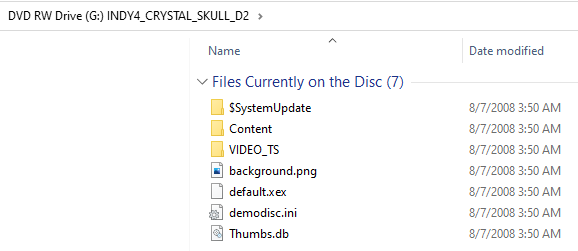
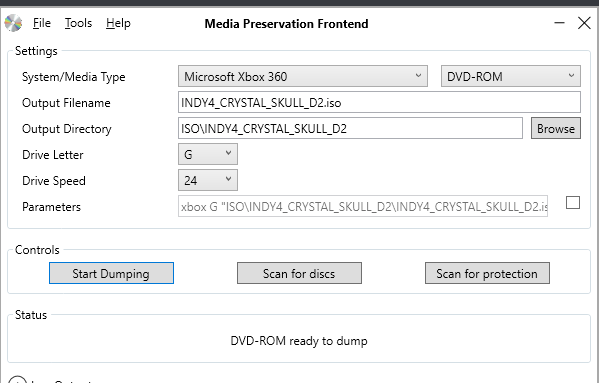
The MPF frontend detected a DVD Video disc (Indiana Jones in the Kingdom of the Crystal Skull, Disc 2 / Special Features) with an Xbox executable and folder as an Xbox 360 disc.

To Reproduce
Steps to reproduce the behavior:

  1. Insert disc into drive
  2. Click Detect Disc (or have the program do it automatically)
  3. Take a drink

Expected behavior
In theory it should detect the VIDEO_TS folder and autoselect DVD Video, but since it sees an Xbox executable, it probably goes for Xbox 360 instead.

Screenshots
image
image

Additional context
I'm not certain if this also happens with DVDs with Xbox demos. I'll update this if I find a disc to test.

Originally created by @FoxhackDN on GitHub (Feb 7, 2022). Originally assigned to: @mnadareski on GitHub. **Version** What version are you using? - [* ] Stable release (2.3) **Build** What runtime version are you using? - [* ] .NET Framework 4.8 running on (Windows 10) **Describe the issue** The MPF frontend detected a DVD Video disc (Indiana Jones in the Kingdom of the Crystal Skull, Disc 2 / Special Features) with an Xbox executable and folder as an Xbox 360 disc. **To Reproduce** Steps to reproduce the behavior: 1. Insert disc into drive 2. Click Detect Disc (or have the program do it automatically) 3. Take a drink **Expected behavior** In theory it should detect the VIDEO_TS folder and autoselect DVD Video, but since it sees an Xbox executable, it probably goes for Xbox 360 instead. **Screenshots** ![image](https://user-images.githubusercontent.com/71686027/152710785-07c7c1d7-879c-4d44-aefa-1cca65458b39.png) ![image](https://user-images.githubusercontent.com/71686027/152710795-731b23dc-f175-4768-a1ee-cb743a8a7cc4.png) **Additional context** I'm not certain if this also happens with DVDs with Xbox demos. I'll update this if I find a disc to test.
claunia added the help wantedbug labels 2026-01-29 16:15:46 +00:00
Author
Owner

@mnadareski commented on GitHub (Feb 10, 2022):

I'm leaving this open but asking for help. I can't think of any reasonable way to determine if it's just an X360 game that happens to have the $SystemUpdate folder on it or if it's a DVD-Video that has a bonus X360 demo.

@mnadareski commented on GitHub (Feb 10, 2022): I'm leaving this open but asking for help. I can't think of any reasonable way to determine if it's just an X360 game that happens to have the `$SystemUpdate` folder on it or if it's a DVD-Video that has a bonus X360 demo.
Author
Owner

@FoxhackDN commented on GitHub (Feb 10, 2022):

That's theoretically easy. Standard Xbox discs should have very little data in the VIDEO_TS folder. A demo disc I have hand has like, 13 MB of data in there.

Even the smallest DVD video would normally have like 500 MB there.

@FoxhackDN commented on GitHub (Feb 10, 2022): That's theoretically easy. Standard Xbox discs should have very little data in the VIDEO_TS folder. A demo disc I have hand has like, 13 MB of data in there. Even the smallest DVD video would normally have like 500 MB there.
Author
Owner

@mnadareski commented on GitHub (Feb 11, 2022):

Confirming from a second source that 500MB seems like a reasonable cutoff.

@mnadareski commented on GitHub (Feb 11, 2022): Confirming from a second source that 500MB seems like a reasonable cutoff.
Sign in to join this conversation.
1 Participants
Notifications
Due Date
No due date set.
Dependencies

No dependencies set.

Reference: SabreTools/MPF#398