Blank window when running MPF #435

Closed
opened 2026-01-29 16:16:24 +00:00 by claunia · 0 comments
Owner

Originally created by @ironsniper1 on GitHub (Jun 23, 2022).

Originally assigned to: @mnadareski on GitHub.

Before You Submit

  • Remember to try the latest WIP build to see if the issue has already been addressed.
  • Is it copy protection related? If so, report the issue here instead.
  • .NET Core 3.1 and .NET 5.0 have known issues, please try using another build to reproduce the error
  • Check multiple discs to help narrow down the issue
  • Check the Options to see if changing any of those affects your issue.

If all of those fail, then continue...

Version
What version are you using?

  • Stable release (version here)
  • WIP release (version here)

Build
What runtime version are you using?

  • .NET Framework 4.7.2 running on (Operating System)
  • [ X] .NET Framework 4.8 running on (Operating System)
  • .NET Core 3.1 running on (Operating System)

Describe the issue
A clear and concise description of what the bug is.

To Reproduce
Steps to reproduce the behavior:

  1. Go to '...'
  2. Click on '....'
  3. Scroll down to '....'
  4. See error

Expected behavior
A clear and concise description of what you expected to happen.

Screenshots
If applicable, add screenshots to help explain your problem.

Additional context
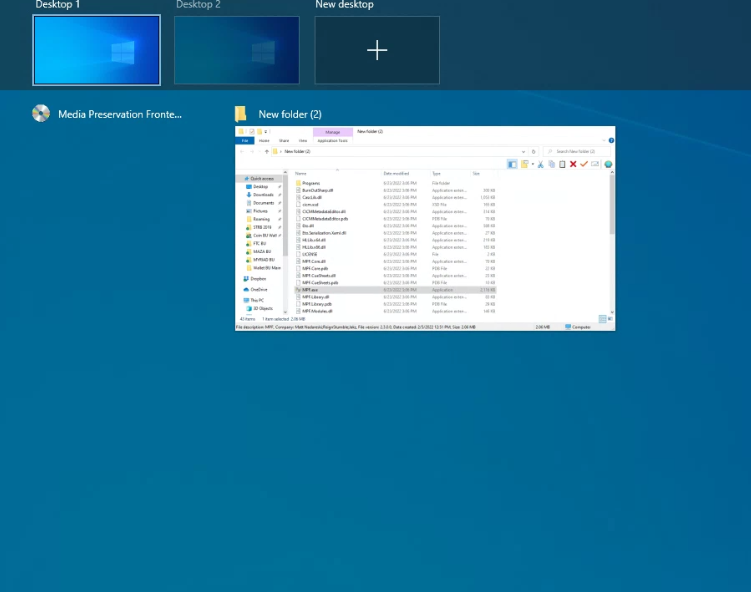
when trying to run MPF the icon shows on the task bar but the window does not show, it is not minimized as i cannot maximize it or anything
mpfissue

Originally created by @ironsniper1 on GitHub (Jun 23, 2022). Originally assigned to: @mnadareski on GitHub. **Before You Submit** - Remember to try the [latest WIP build](https://ci.appveyor.com/project/mnadareski/mpf/build/artifacts) to see if the issue has already been addressed. - Is it copy protection related? If so, report the issue [here](https://github.com/mnadareski/BurnOutSharp/issues) instead. - .NET Core 3.1 and .NET 5.0 have known issues, please try using another build to reproduce the error - Check multiple discs to help narrow down the issue - Check the Options to see if changing any of those affects your issue. If all of those fail, then continue... **Version** What version are you using? - [X] Stable release (version here) - [ ] WIP release (version here) **Build** What runtime version are you using? - [ ] .NET Framework 4.7.2 running on (Operating System) - [ X] .NET Framework 4.8 running on (Operating System) - [ ] .NET Core 3.1 running on (Operating System) **Describe the issue** A clear and concise description of what the bug is. **To Reproduce** Steps to reproduce the behavior: 1. Go to '...' 2. Click on '....' 3. Scroll down to '....' 4. See error **Expected behavior** A clear and concise description of what you expected to happen. **Screenshots** If applicable, add screenshots to help explain your problem. **Additional context** when trying to run MPF the icon shows on the task bar but the window does not show, it is not minimized as i cannot maximize it or anything ![mpfissue](https://user-images.githubusercontent.com/39129373/175396735-67ec83b5-db26-47e8-86a4-1f7954b112a2.PNG)
claunia added the bug label 2026-01-29 16:16:24 +00:00
Sign in to join this conversation.
1 Participants
Notifications
Due Date
No due date set.
Dependencies

No dependencies set.

Reference: SabreTools/MPF#435