mirror of
https://github.com/aaru-dps/Aaru.git
synced 2026-02-04 00:54:33 +00:00
[ISO9660] "Error reading file: The filename, directory name, or volume label syntax is incorrect." extracting filesystem from image using Amiga CD encoding #743

Reference in New Issue
Block a user
Delete Branch "%!s()"
Deleting a branch is permanent. Although the deleted branch may continue to exist for a short time before it actually gets removed, it CANNOT be undone in most cases. Continue?
Originally created by @TheRogueArchivist on GitHub (Jun 5, 2021).
Prerequisites
Check and fill as appropriate:
Description
When extracting the filesystem from a CD image created for the Amiga CD, Aaru mid-extraction stops with the error "Error reading file: The filename, directory name, or volume label syntax is incorrect.". When viewing the ISO through archive.org, it seems to render the text correctly. Example of how the folder name appears in Windows Explorer:
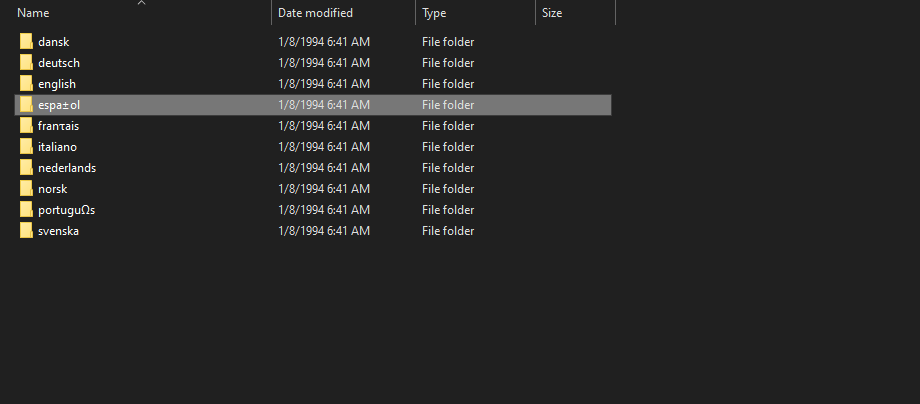
Exact command line used:
aaru fs extract .\NetworkCD.aaruf 0Output of command execution with debug output enabled
https://pastebin.com/u5QkN62w
Image
https://archive.org/details/simple-networking-tools-for-amiga-cd-weird-science-1994
@claunia commented on GitHub (Jun 5, 2021):
That's not a correct ISO name.
The folder is named "ESPAÑOL" with bytes 0x45 0x53 0x50 0x41 0xD1 0x4F 0x4C that corresponds to Windows-1252 codepage that violates the ISO9660 standard.
When there's not a Joliet extension the codepage used is ASCII where the byte 0xD1 is not defined and therefore gets converted to ? a character not supported in Windows for filenames.
You should set up the namespace as Romeo, then it will work (default codepage for Romeo is Windows-1252 so you don't need to specify it.)