Failed To open dropdown menu in navbar #487

Closed
opened 2026-01-29 16:40:59 +00:00 by claunia · 6 comments
Owner

Originally created by @lmtr0 on GitHub (May 10, 2020).

Originally assigned to: @GregorBiswanger on GitHub.

Failed To open dropdown menu in bootstrap navbar

Versions:

=> ElectronNET.CLI Version: 7.30.2.0
=> .Net core 3.1 and node 13.11.0

Target:

Windows,
Linux,
Mac

details:

Hello I add a dropdown menu with bootstrap, when I test it in the browser it works normally, but when I open in the electronNET "browser" it just don't work

the code is:

<nav class="navbar navbar-expand-lg navbar-light bg-light">
  <a class="navbar-brand" href="#">Navbar</a>
  <button class="navbar-toggler" type="button" data-toggle="collapse" data-target="#navbarSupportedContent" aria-controls="navbarSupportedContent" aria-expanded="false" aria-label="Toggle navigation">
    <span class="navbar-toggler-icon"></span>
  </button>

  <div class="collapse navbar-collapse" id="navbarSupportedContent">
    <ul class="navbar-nav mr-auto">
      <li class="nav-item active">
        <a class="nav-link" href="#">Home <span class="sr-only">(current)</span></a>
      </li>
      <li class="nav-item">
        <a class="nav-link" href="#">Link</a>
      </li>
      <li class="nav-item dropdown">
        <a class="nav-link dropdown-toggle" href="#" id="navbarDropdown" role="button" data-toggle="dropdown" aria-haspopup="true" aria-expanded="false">
          Dropdown
        </a>
        <div class="dropdown-menu" aria-labelledby="navbarDropdown">
          <a class="dropdown-item" href="#">Action</a>
          <a class="dropdown-item" href="#">Another action</a>
          <div class="dropdown-divider"></div>
          <a class="dropdown-item" href="#">Something else here</a>
        </div>
      </li>
      <li class="nav-item">
        <a class="nav-link disabled" href="#" tabindex="-1" aria-disabled="true">Disabled</a>
      </li>
    </ul>
    <form class="form-inline my-2 my-lg-0">
      <input class="form-control mr-sm-2" type="search" placeholder="Search" aria-label="Search">
      <button class="btn btn-outline-success my-2 my-sm-0" type="submit">Search</button>
    </form>
  </div>
</nav>
Originally created by @lmtr0 on GitHub (May 10, 2020). Originally assigned to: @GregorBiswanger on GitHub. # Failed To open dropdown menu in bootstrap navbar ## Versions: => ElectronNET.CLI Version: 7.30.2.0 => .Net core 3.1 and node 13.11.0 ## Target: Windows, Linux, Mac ## details: Hello I add a dropdown menu with bootstrap, when I test it in the browser it works normally, but when I open in the electronNET "browser" it just don't work the code is: ``` <nav class="navbar navbar-expand-lg navbar-light bg-light"> <a class="navbar-brand" href="#">Navbar</a> <button class="navbar-toggler" type="button" data-toggle="collapse" data-target="#navbarSupportedContent" aria-controls="navbarSupportedContent" aria-expanded="false" aria-label="Toggle navigation"> <span class="navbar-toggler-icon"></span> </button> <div class="collapse navbar-collapse" id="navbarSupportedContent"> <ul class="navbar-nav mr-auto"> <li class="nav-item active"> <a class="nav-link" href="#">Home <span class="sr-only">(current)</span></a> </li> <li class="nav-item"> <a class="nav-link" href="#">Link</a> </li> <li class="nav-item dropdown"> <a class="nav-link dropdown-toggle" href="#" id="navbarDropdown" role="button" data-toggle="dropdown" aria-haspopup="true" aria-expanded="false"> Dropdown </a> <div class="dropdown-menu" aria-labelledby="navbarDropdown"> <a class="dropdown-item" href="#">Action</a> <a class="dropdown-item" href="#">Another action</a> <div class="dropdown-divider"></div> <a class="dropdown-item" href="#">Something else here</a> </div> </li> <li class="nav-item"> <a class="nav-link disabled" href="#" tabindex="-1" aria-disabled="true">Disabled</a> </li> </ul> <form class="form-inline my-2 my-lg-0"> <input class="form-control mr-sm-2" type="search" placeholder="Search" aria-label="Search"> <button class="btn btn-outline-success my-2 my-sm-0" type="submit">Search</button> </form> </div> </nav> ```
claunia added the bug label 2026-01-29 16:40:59 +00:00
Author
Owner

@lmtr0 commented on GitHub (May 13, 2020):

UPDATE:
is not just the navbar, all the external javascript files doesn't load. I have test it like this

in java.js:

var hasfoundthefile = "IEIE";
function HasChange() {
    $("#Testing").text("This has change")
}

in index.razor:

<button onclick="HasChange()">Test external javascript file</button>
<p id="Testing">Something</p>

when i click the button it was supposed to change the text but it doesn't do anything
I have put the script tag in _Host.razor refering to this file
I have also test it puting the file in the host/bin/ and refering by the full path, but it still dosent work.
SOMEBODY HELP ME

@lmtr0 commented on GitHub (May 13, 2020): UPDATE: is not just the navbar, all the external javascript files doesn't load. I have test it like this in java.js: ``` var hasfoundthefile = "IEIE"; function HasChange() { $("#Testing").text("This has change") } ``` in index.razor: ``` <button onclick="HasChange()">Test external javascript file</button> <p id="Testing">Something</p> ``` when i click the button it was supposed to change the text but it doesn't do anything I have put the script tag in _Host.razor refering to this file I have also test it puting the file in the host/bin/ and refering by the full path, but it still dosent work. SOMEBODY HELP ME
Author
Owner

@GregorBiswanger commented on GitHub (May 13, 2020):

please create a prototype that I can test locally

@GregorBiswanger commented on GitHub (May 13, 2020): please create a prototype that I can test locally
Author
Owner

@GregorBiswanger commented on GitHub (May 15, 2020):

Duplicate of #400

@GregorBiswanger commented on GitHub (May 15, 2020): Duplicate of #400
Author
Owner

@lmtr0 commented on GitHub (May 16, 2020):

Thank you very much

@lmtr0 commented on GitHub (May 16, 2020): Thank you very much
Author
Owner

@romuloteixeira commented on GitHub (May 10, 2021):

Hi,
I used this solution and worked for me.
https://github.com/ElectronNET/Electron.NET/issues/329#issuecomment-546612899

Example:
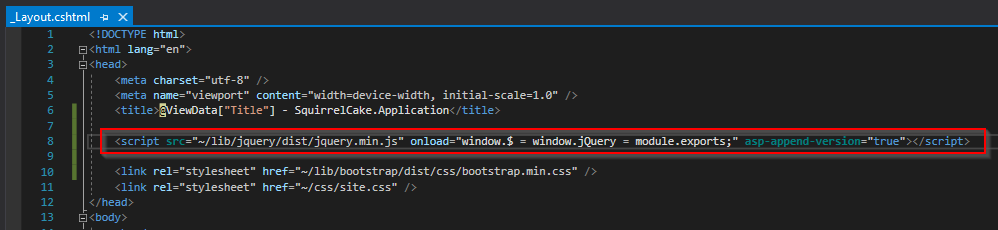
image

@romuloteixeira commented on GitHub (May 10, 2021): Hi, I used this solution and worked for me. [https://github.com/ElectronNET/Electron.NET/issues/329#issuecomment-546612899](url) Example: ![image](https://user-images.githubusercontent.com/40904138/117655398-eaeff980-b18e-11eb-91a6-1811cc11becf.png)
Author
Owner

@lmtr0 commented on GitHub (May 10, 2021):

Oh, I didn't thought about that. I totally makes sense, It would take from the root directly! thanks

@lmtr0 commented on GitHub (May 10, 2021): Oh, I didn't thought about that. I totally makes sense, It would take from the root directly! thanks
Sign in to join this conversation.
1 Participants
Notifications
Due Date
No due date set.
Dependencies

No dependencies set.

Reference: starred/Electron.NET#487