mirror of
https://github.com/ElectronNET/Electron.NET.git
synced 2026-09-21 14:35:16 +00:00
How to use js library in electron app #558

Reference in New Issue
Block a user
Delete Branch "%!s()"
Deleting a branch is permanent. Although the deleted branch may continue to exist for a short time before it actually gets removed, it CANNOT be undone in most cases. Continue?
Originally created by @gpgpublickey on GitHub (Aug 19, 2020).
Hello guys could you please explain how to achieve this?
I'm adding two js files from cdn in my _Host.cshtml, but at time to use the methods exposed by this libraries I have this result:

The library that I'm trying to use is called toastr (https://github.com/CodeSeven/toastr). but I can't find the way to be able to use it in the electron application.
This is the < head > of my _Host.cshtml:
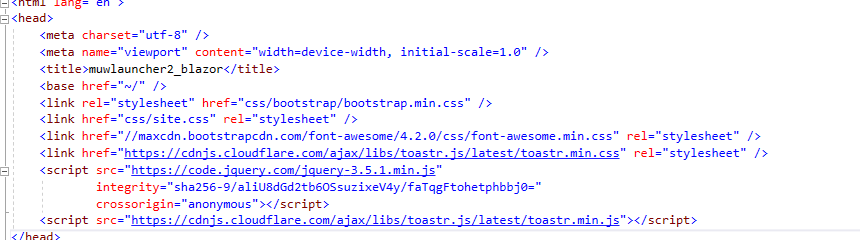
Is weird because if I open localhost + port in my real web browser works fine but from electron, it is not working
@gpgpublickey commented on GitHub (Aug 22, 2020):
To solve this:
electron FAQ answer :
http://electron.atom.io/docs/faq/
I can not use jQuery/RequireJS/Meteor/AngularJS in Electron.
Due to the Node.js integration of Electron, there are some extra symbols inserted into the DOM like module, exports, require. This causes problems for some libraries since they want to insert the symbols with the same names.
To solve this, you can turn off node integration in Electron:
// In the main process.
let win = new BrowserWindow({
<head> <script> window.nodeRequire = require; delete window.require; delete window.exports; delete window.module; </script> <script type="text/javascript" src="jquery.js"></script> </head>webPreferences: {
nodeIntegration: false } });
But if you want to keep the abilities of using Node.js and Electron APIs, you have to rename the symbols in the page before including other libraries: