How to set name of desktop app? #78

Closed
opened 2026-01-29 16:30:05 +00:00 by claunia · 12 comments
Owner

Originally created by @yoDon on GitHub (Nov 28, 2017).

Originally assigned to: @robertmuehsig on GitHub.

How does one build a desktop application with a name other than ElectronNET.Host?

Originally created by @yoDon on GitHub (Nov 28, 2017). Originally assigned to: @robertmuehsig on GitHub. How does one build a desktop application with a name other than ElectronNET.Host?
claunia added the Feature label 2026-01-29 16:30:05 +00:00
Author
Owner

@yoDon commented on GitHub (Nov 28, 2017):

On Windows, it's easy to just rename the top level built *.exe but OSX embeds the app name multiple places underneath the top level ElectronNET.Host.app folder making manual renaming after the build tricky and error-prone

@yoDon commented on GitHub (Nov 28, 2017): On Windows, it's easy to just rename the top level built *.exe but OSX embeds the app name multiple places underneath the top level ElectronNET.Host.app folder making manual renaming after the build tricky and error-prone
Author
Owner

@robertmuehsig commented on GitHub (Dec 1, 2017):

This is more or less covered by this issue https://github.com/ElectronNET/Electron.NET/issues/18

I guess I can continue to work next week on this project.

@robertmuehsig commented on GitHub (Dec 1, 2017): This is more or less covered by this issue https://github.com/ElectronNET/Electron.NET/issues/18 I guess I can continue to work next week on this project.
Author
Owner

@robertmuehsig commented on GitHub (Feb 19, 2018):

With the 0.0.9 release of the CLI you should be able to pass through the name to the electron-packager like this:

build /target osx /electron-params "--name=foobar"

Feel free to comment on this issue if this don't work for you.

@robertmuehsig commented on GitHub (Feb 19, 2018): With the 0.0.9 release of the CLI you should be able to pass through the name to the electron-packager like this: build /target osx /electron-params "--name=foobar" Feel free to comment on this issue if this don't work for you.
Author
Owner

@R00iBaard commented on GitHub (Jun 13, 2018):

Hey, running 0.0.9 and doesn't seem to be working.

dotnet electronize build /target osx /electron-params "--name=foobar"

It runs the following after above :
>electron-packager . --platform=win32 --arch=x64 --name=DeviceManagement --out="C:\Users\ABCXYZ\DeviceManagement\bin\desktop" --overwrite Packaging app for platform win32 x64 using electron v1.7.11 WARNING: Found 'electron' but not as a devDependency, pruning anyway

Sadly inside the dir it still creates ElectronNet.Host.exe
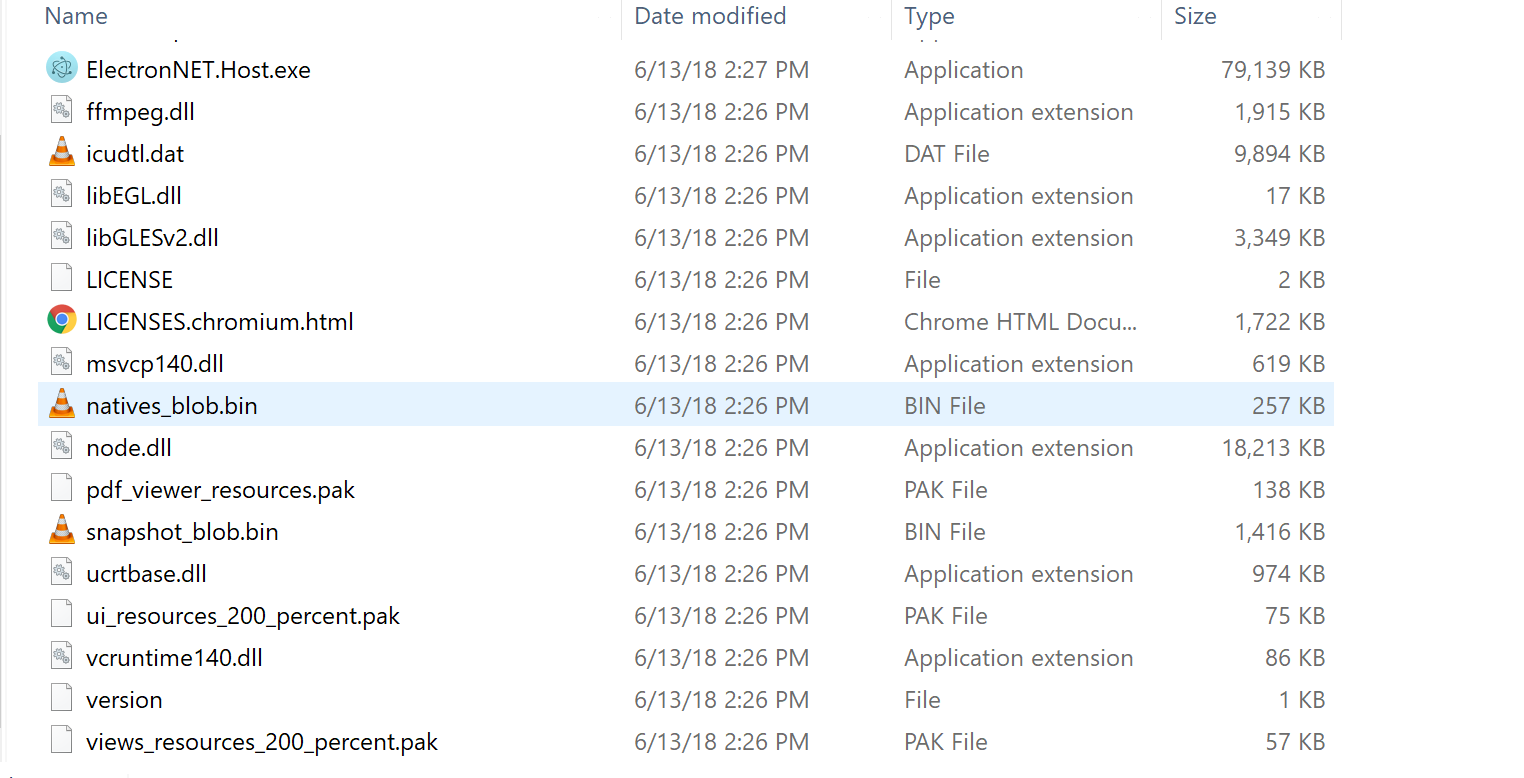
screen shot 2018-06-13 at 2 32 22 pm

@R00iBaard commented on GitHub (Jun 13, 2018): Hey, running 0.0.9 and doesn't seem to be working. `dotnet electronize build /target osx /electron-params "--name=foobar"` It runs the following after above : `>electron-packager . --platform=win32 --arch=x64 --name=DeviceManagement --out="C:\Users\ABCXYZ\DeviceManagement\bin\desktop" --overwrite Packaging app for platform win32 x64 using electron v1.7.11 WARNING: Found 'electron' but not as a devDependency, pruning anyway` Sadly inside the dir it still creates ElectronNet.Host.exe <img width="762" alt="screen shot 2018-06-13 at 2 32 22 pm" src="https://user-images.githubusercontent.com/11412240/41351502-d91da72e-6f16-11e8-9fab-6e6d49f6cee5.png">
Author
Owner

@amedora commented on GitHub (Oct 15, 2018):

Hey, running 0.0.9 and doesn't seem to be working.

dotnet electronize build /target osx /electron-params "--name=foobar"

It runs the following after above :
>electron-packager . --platform=win32 --arch=x64 --name=DeviceManagement --out="C:\Users\ABCXYZ\DeviceManagement\bin\desktop" --overwrite Packaging app for platform win32 x64 using electron v1.7.11 WARNING: Found 'electron' but not as a devDependency, pruning anyway

Sadly inside the dir it still creates ElectronNet.Host.exe

I found a solution.
You may use "--executable-name=foobar" instead of "--name=foobar" 👍

@amedora commented on GitHub (Oct 15, 2018): > Hey, running 0.0.9 and doesn't seem to be working. > > `dotnet electronize build /target osx /electron-params "--name=foobar"` > > It runs the following after above : > `>electron-packager . --platform=win32 --arch=x64 --name=DeviceManagement --out="C:\Users\ABCXYZ\DeviceManagement\bin\desktop" --overwrite Packaging app for platform win32 x64 using electron v1.7.11 WARNING: Found 'electron' but not as a devDependency, pruning anyway` > > Sadly inside the dir it still creates ElectronNet.Host.exe I found a solution. You may use "--executable-name=foobar" instead of "--name=foobar" :+1:
Author
Owner

@mpnow commented on GitHub (Mar 9, 2019):

I'm running 0.0.11. I tried both "--executable-name=foobar" and "--name=foobar" on OSX but in both cases, it still produces the file named as electron.net.host.

Example of full command used:
electronize build /target osx /electron-params "--name=foobar"

Anyone have a solution?

@mpnow commented on GitHub (Mar 9, 2019): I'm running 0.0.11. I tried both "--executable-name=foobar" and "--name=foobar" on OSX but in both cases, it still produces the file named as electron.net.host. Example of full command used: `electronize build /target osx /electron-params "--name=foobar"` Anyone have a solution?
Author
Owner

@netpoetica commented on GitHub (May 28, 2019):

I'm with ya'll on this... this doesn't seem to work either with --name or --executable name. I found some strange behavior like, if I use spaces, like "--name=My JSON Project" the name would be JSON. But if I change it to "--name=my-json-project" then it just remains electron.net.host

--executable-name seems to do nothing at all

@netpoetica commented on GitHub (May 28, 2019): I'm with ya'll on this... this doesn't seem to work either with --name or --executable name. I found some strange behavior like, if I use spaces, like "--name=My JSON Project" the name would be JSON. But if I change it to "--name=my-json-project" then it just remains electron.net.host --executable-name seems to do nothing at all
Author
Owner

@GregorBiswanger commented on GitHub (May 28, 2019):

Hi, with the new Electron.NET version 5.22.12 you can set your application name with the electron.manifest.json file:
https://github.com/ElectronNET/Electron.NET/blob/master/ElectronNET.WebApp/electron.manifest.json

Set the productName value for the builded binary name.

On runtime for the window use SetTitle-Method:

var browserWindow = await Electron.WindowManager.CreateWindowAsync(new BrowserWindowOptions
            {
                Width = 1152,
                Height = 940
            });


browserWindow.SetTitle(Configuration["DemoTitleInSettings"])
@GregorBiswanger commented on GitHub (May 28, 2019): Hi, with the new Electron.NET version 5.22.12 you can set your application name with the **electron.manifest.json** file: https://github.com/ElectronNET/Electron.NET/blob/master/ElectronNET.WebApp/electron.manifest.json Set the `productName` value for the builded binary name. On runtime for the window use SetTitle-Method: ``` var browserWindow = await Electron.WindowManager.CreateWindowAsync(new BrowserWindowOptions { Width = 1152, Height = 940 }); browserWindow.SetTitle(Configuration["DemoTitleInSettings"]) ```
Author
Owner

@netpoetica commented on GitHub (May 28, 2019):

@GregorBiswanger I'm excited for this change :) I just spent a good while bringing an ElectronNET 0.0.11 application to 5.x only to have to rollback due to other errors. I will post or solve issues separately.

Is there any way to do this in 0.0.x versions?

@netpoetica commented on GitHub (May 28, 2019): @GregorBiswanger I'm excited for this change :) I just spent a good while bringing an ElectronNET 0.0.11 application to 5.x only to have to rollback due to other errors. I will post or solve issues separately. Is there any way to do this in 0.0.x versions?
Author
Owner

@GregorBiswanger commented on GitHub (May 28, 2019):

Maybe this helps with a blank?

electronize build /target osx /electron-params "--name='My JSON Project'"

Normally version 5 did not have any "breaking changes" except the electron.manifest.json file. It's best to delete the old one and run "electronize init" again. Please also update the CLI version to 5.22.12.

@GregorBiswanger commented on GitHub (May 28, 2019): Maybe this helps with a blank? `electronize build /target osx /electron-params "--name='My JSON Project'"` Normally version 5 did not have any "breaking changes" except the **electron.manifest.json** file. It's best to delete the old one and run "`electronize init`" again. Please also update the CLI version to 5.22.12.
Author
Owner

@jadhavrani123 commented on GitHub (Feb 26, 2020):

When I install ElectronNet exe then it install with electron.net.host name how to change that folder name?

@jadhavrani123 commented on GitHub (Feb 26, 2020): When I install ElectronNet exe then it install with electron.net.host name how to change that folder name?
Author
Owner

@jadhavrani123 commented on GitHub (Feb 26, 2020):

When I install new exe then it not install properly but old exe always open old exe

@jadhavrani123 commented on GitHub (Feb 26, 2020): When I install new exe then it not install properly but old exe always open old exe
Sign in to join this conversation.
1 Participants
Notifications
Due Date
No due date set.
Dependencies

No dependencies set.

Reference: starred/Electron.NET#78