Problem with placement of large files and database file. #862

Closed
opened 2026-01-29 16:50:30 +00:00 by claunia · 3 comments
Owner

Originally created by @IgorVolod on GitHub (Mar 30, 2023).

Originally assigned to: @GregorBiswanger on GitHub.

  • ElectronNET.API 23.6.1:
  • .net 6:
  • all available platforms:
    Hello!.
    I just started using the electron net, its work satisfies me quite well. I have a question that probably has obvious answers, but I didn't find any.
    I stumbled over migrating a database from a server to a local machine. I dug on the stack and the git, I could not find clear recommendations.
    After installing the application, the first time you run EF, it creates a new database. If you run the installation of the application again, then during the installation process the entire working directory is cleared and the database is deleted. I need to keep her.
    Question: Any recommendations on how to deploy a database? so that it remains even after deleting the application. I couldn't find.
    From electron's manual: app.getPath(appData)
    and a word of caution: it is not recommended to write large files here, as some environments may back up this directory to cloud storage.
    Lead me on the right path!
    The second question is about storing video files. Same problem. The video stream is being written in the process, now the video files are saved in wwwroot\Videostream
    and are also deleted when the application is reinstalled. They're big.
    If you can help, thank you very much! So that I do not invent a bicycle that can suddenly break down. I understand that the question is not about the work of electron net, so if you delete it, I won't be offended.)
Originally created by @IgorVolod on GitHub (Mar 30, 2023). Originally assigned to: @GregorBiswanger on GitHub. * **ElectronNET.API 23.6.1**: * **.net 6**: * **all available platforms**: Hello!. I just started using the electron net, its work satisfies me quite well. I have a question that probably has obvious answers, but I didn't find any. I stumbled over migrating a database from a server to a local machine. I dug on the stack and the git, I could not find clear recommendations. After installing the application, the first time you run EF, it creates a new database. If you run the installation of the application again, then during the installation process the entire working directory is cleared and the database is deleted. I need to keep her. Question: Any recommendations on how to deploy a database? so that it remains even after deleting the application. I couldn't find. From electron's manual: app.getPath(appData) and a word of caution: it is not recommended to write large files here, as some environments may back up this directory to cloud storage. Lead me on the right path! The second question is about storing video files. Same problem. The video stream is being written in the process, now the video files are saved in wwwroot\Videostream\ and are also deleted when the application is reinstalled. They're big. If you can help, thank you very much! So that I do not invent a bicycle that can suddenly break down. I understand that the question is not about the work of electron net, so if you delete it, I won't be offended.)
claunia added the question label 2026-01-29 16:50:30 +00:00
Author
Owner

@GregorBiswanger commented on GitHub (Mar 30, 2023):

It's great to hear that you're enjoying Electron.NET! I'll do my best to help you with your questions.

It sounds like you're looking for a local database? These are often only file-based and you can create these local database files externally from your application so that the data is available again after deletion. SQLite is suitable for this. It can be used with C# and also with the Entity Framework.

Deploying a database (SQLite solution):

To use SQLite in your Electron.NET project, first, add the Microsoft.EntityFrameworkCore.Sqlite NuGet package:

dotnet add package Microsoft.EntityFrameworkCore.Sqlite

Update your DbContext to use SQLite, and make sure the connection string includes the path to the SQLite database file stored in the userData folder:

using Microsoft.EntityFrameworkCore;
using ElectronNET.API;

public class MyDbContext : DbContext
{
    private string _connectionString;

    public MyDbContext()
    {
        var userDataPath = Electron.App.GetPathAsync(PathName.userData).Result;
        var dbPath = Path.Combine(userDataPath, "MyDatabase.db");
        _connectionString = $"Data Source={dbPath}";
    }

    protected override void OnConfiguring(DbContextOptionsBuilder optionsBuilder)
    {
        optionsBuilder.UseSqlite(_connectionString);
    }
}

In this example, the connection string is built at runtime by getting the path to the userData folder and combining it with the name of the SQLite database file. The resulting connection string is used to configure the DbContext for SQLite.

Now, your application should use an SQLite database in the userData folder. This database file will persist even when the application is deleted and can continue to be used upon reinstallation.

Storing video files:

For video files, you can also use the userData folder or another dedicated folder outside of the application's working directory to store them. You could create a subdirectory within the userData folder specifically for video files. Here's an example of how to do this in your Electron.NET application:

using ElectronNET.API;
using System.IO;

// Get the path to the userData folder
var userDataPath = await Electron.App.GetPathAsync(PathName.userData);

// Create a subdirectory for video files
var videoFolderPath = Path.Combine(userDataPath, "VideoFiles");
Directory.CreateDirectory(videoFolderPath);

// Use the videoFolderPath variable to save and access video files
...

I hope this guide helps you. If you have any more questions, please don't hesitate to ask.

@GregorBiswanger commented on GitHub (Mar 30, 2023): It's great to hear that you're enjoying Electron.NET! I'll do my best to help you with your questions. It sounds like you're looking for a local database? These are often only file-based and you can create these local database files externally from your application so that the data is available again after deletion. SQLite is suitable for this. It can be used with C# and also with the Entity Framework. ## Deploying a database (SQLite solution): To use SQLite in your Electron.NET project, first, add the `Microsoft.EntityFrameworkCore.Sqlite` NuGet package: `dotnet add package Microsoft.EntityFrameworkCore.Sqlite` Update your DbContext to use SQLite, and make sure the connection string includes the path to the SQLite database file stored in the `userData` folder: ``` using Microsoft.EntityFrameworkCore; using ElectronNET.API; public class MyDbContext : DbContext { private string _connectionString; public MyDbContext() { var userDataPath = Electron.App.GetPathAsync(PathName.userData).Result; var dbPath = Path.Combine(userDataPath, "MyDatabase.db"); _connectionString = $"Data Source={dbPath}"; } protected override void OnConfiguring(DbContextOptionsBuilder optionsBuilder) { optionsBuilder.UseSqlite(_connectionString); } } ``` In this example, the connection string is built at runtime by getting the path to the userData folder and combining it with the name of the SQLite database file. The resulting connection string is used to configure the DbContext for SQLite. Now, your application should use an SQLite database in the userData folder. This database file will persist even when the application is deleted and can continue to be used upon reinstallation. ## Storing video files: For video files, you can also use the `userData` folder or another dedicated folder outside of the application's working directory to store them. You could create a subdirectory within the userData folder specifically for video files. Here's an example of how to do this in your Electron.NET application: ``` using ElectronNET.API; using System.IO; // Get the path to the userData folder var userDataPath = await Electron.App.GetPathAsync(PathName.userData); // Create a subdirectory for video files var videoFolderPath = Path.Combine(userDataPath, "VideoFiles"); Directory.CreateDirectory(videoFolderPath); // Use the videoFolderPath variable to save and access video files ... ``` I hope this guide helps you. If you have any more questions, please don't hesitate to ask.
Author
Owner

@IgorVolod commented on GitHub (Mar 31, 2023):

Good afternoon
Thanks a lot for the solution!
In 15 minutes, I replaced the target DBMS and the corresponding provider, msSQL was replaced with SQLit.
The build is complete and the project is running, the database is now located in the UserData directory. This is cool!
I'm using the MVC concept, and I'm loading data onto the page via ajax post() requests in json format. An error occurred when loading multiple points to plot multiple curves on a graph. The source of the error is that not all arrays are returned in the responses of the controller methods, and this happens not constantly, but periodically (graphs can be built or built, but not all curves).
Weird error..., I don't think it's related to the switch to SQLite, now I'm trying to isolate the reason for this behavior. As there is an understanding, I will definitely let you know where this problem occurs.

@IgorVolod commented on GitHub (Mar 31, 2023): Good afternoon Thanks a lot for the solution! In 15 minutes, I replaced the target DBMS and the corresponding provider, msSQL was replaced with SQLit. The build is complete and the project is running, the database is now located in the UserData directory. This is cool! I'm using the MVC concept, and I'm loading data onto the page via ajax post() requests in json format. An error occurred when loading multiple points to plot multiple curves on a graph. The source of the error is that not all arrays are returned in the responses of the controller methods, and this happens not constantly, but periodically (graphs can be built or built, but not all curves). Weird error..., I don't think it's related to the switch to SQLite, now I'm trying to isolate the reason for this behavior. As there is an understanding, I will definitely let you know where this problem occurs.
Author
Owner

@IgorVolod commented on GitHub (Mar 31, 2023):

The problem is solved, the problem was in my JS, when calling synchronous and asynchronous functions at the same time, the fall of the synchronous one led to the cancellation of the asynchronous function call. Making all js functions asynchronous solved the problem.
I was debugging, and some shortcomings were discovered (maybe only me):

  1. Before starting the build, I have to run the command: chcp 65001
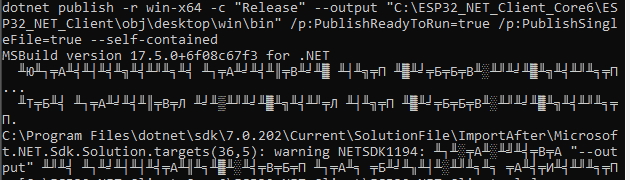
    It switches the character encoding in the Windows console to UTF-8 (code page 65001)
    Otherwise:
    1

  2. I couldn't run the app in debug mode unless I run the "Rebuild app" command before launching. Otherwise, the message in the application window:


Error.
An error occurred while processing your request.


VS debugging breaks at the line:

public MDBContext() => Database.EnsureCreated();
System.TypeInitializationException
   HResult=0x80131534
   Message = The type initializer for 'Microsoft.Data.Sqlite.SqliteConnection' threw an exception.
   Source = Microsoft.Data.Sqlite
Inner Exception 1:
TargetInvocationException: Exception has been thrown by the target of an invocation.
Inner Exception 2:
DllNotFoundException: Unable to load DLL 'e_sqlite3' or one of its dependencies: The specified module could not be found. (0x8007007E)

All these problems do not cause me any particular inconvenience, I report them for the sake of information.

@IgorVolod commented on GitHub (Mar 31, 2023): The problem is solved, the problem was in my JS, when calling synchronous and asynchronous functions at the same time, the fall of the synchronous one led to the cancellation of the asynchronous function call. Making all js functions asynchronous solved the problem. I was debugging, and some shortcomings were discovered (maybe only me): 1. Before starting the build, I have to run the command: chcp 65001 It switches the character encoding in the Windows console to UTF-8 (code page 65001) Otherwise: ![1](https://user-images.githubusercontent.com/129322210/229163283-abc900be-f6e1-449f-babd-cd3787d1aa58.jpg) 2. I couldn't run the app in debug mode unless I run the "Rebuild app" command before launching. Otherwise, the message in the application window: *** Error. An error occurred while processing your request. *** VS debugging breaks at the line: ```C# public MDBContext() => Database.EnsureCreated(); ``` ``` System.TypeInitializationException HResult=0x80131534 Message = The type initializer for 'Microsoft.Data.Sqlite.SqliteConnection' threw an exception. Source = Microsoft.Data.Sqlite Inner Exception 1: TargetInvocationException: Exception has been thrown by the target of an invocation. Inner Exception 2: DllNotFoundException: Unable to load DLL 'e_sqlite3' or one of its dependencies: The specified module could not be found. (0x8007007E) ``` All these problems do not cause me any particular inconvenience, I report them for the sake of information.
Sign in to join this conversation.
1 Participants
Notifications
Due Date
No due date set.
Dependencies

No dependencies set.

Reference: starred/Electron.NET#862