Add ability to create rpm services #85

Open
opened 2026-01-29 16:28:56 +00:00 by claunia · 10 comments
Owner

Originally created by @Mikalai on GitHub (Aug 14, 2020).

RPM service requires .service file that should be placed in /etc/systemd/system/ but it is not clear how to specify this using dotnet-packaging.

Originally created by @Mikalai on GitHub (Aug 14, 2020). RPM service requires .service file that should be placed in /etc/systemd/system/ but it is not clear how to specify this using dotnet-packaging.
Author
Owner

@qmfrederik commented on GitHub (Aug 17, 2020):

You can deploy files to any location by setting the LinuxPath attribute:

    <Content Include="my.service" CopyToPublishDirectory="PreserveNewest" LinuxFileMode="1755">
      <LinuxPath>/etc/systemd/system/my.service</LinuxPath>
    </Content>
@qmfrederik commented on GitHub (Aug 17, 2020): You can deploy files to any location by setting the `LinuxPath` attribute: ```xml <Content Include="my.service" CopyToPublishDirectory="PreserveNewest" LinuxFileMode="1755"> <LinuxPath>/etc/systemd/system/my.service</LinuxPath> </Content> ```
Author
Owner

@Mikalai commented on GitHub (Aug 18, 2020):

@qmfrederik Thanks a lot, that works.
Maybe you can also clarify if it is possible to specify custom bash script after rpm package is installed or maybe there is a document with all the features that can be used? For example is it possible to call
systemclt daemon-reload and systemctl enable .service and start ?
Also when building rpm package with rpmbuild on centos it is possible to call
dotnet publish -c release -r rhel-x64 --self-contained
And when rpm package is build it doesn't have any dependencies. When rpm is build with dotnet packaging during installation

dotnet-host            
dotnet-hostfxr-3.1 
dotnet-runtime-3.1

are needed to be installed.

@Mikalai commented on GitHub (Aug 18, 2020): @qmfrederik Thanks a lot, that works. Maybe you can also clarify if it is possible to specify custom bash script after rpm package is installed or maybe there is a document with all the features that can be used? For example is it possible to call ```systemclt daemon-reload``` and ```systemctl enable .service and start``` ? Also when building rpm package with rpmbuild on centos it is possible to call ```dotnet publish -c release -r rhel-x64 --self-contained``` And when rpm package is build it doesn't have any dependencies. When rpm is build with dotnet packaging during installation ``` dotnet-host dotnet-hostfxr-3.1 dotnet-runtime-3.1 ``` are needed to be installed.
Author
Owner

@marinovdh commented on GitHub (Jan 13, 2021):

I'm also figuring out how to get the service disabled/restarted from the package with the preinst and postinst scripts. But I can't find how it's been done. I see the code internally but I don't see how to trigger it with dotnet deb or dotnet msbuild with the right parameters. Does anyone know?

@marinovdh commented on GitHub (Jan 13, 2021): I'm also figuring out how to get the service disabled/restarted from the package with the preinst and postinst scripts. But I can't find how it's been done. I see the code internally but I don't see how to trigger it with `dotnet deb` or `dotnet msbuild` with the right parameters. Does anyone know?
Author
Owner

@atauenis commented on GitHub (Jan 13, 2021):

@marinovdh

    <PreInstallScript>
      <![CDATA[
#the bash preinst script
      ]]>
    </PreInstallScript>
    <PostInstallScript>
      <![CDATA[
#the bash postinst script
      ]]>
    </PostInstallScript>

Also it is need to the csproj file have UNIX line endings.

@atauenis commented on GitHub (Jan 13, 2021): @marinovdh ``` <PreInstallScript> <![CDATA[ #the bash preinst script ]]> </PreInstallScript> <PostInstallScript> <![CDATA[ #the bash postinst script ]]> </PostInstallScript> ``` Also it is need to the csproj file have UNIX line endings.
Author
Owner

@marinovdh commented on GitHub (Jan 13, 2021):

@atauenis Thanks for the info. I tried putting the above script in my .csproj (within the <project> tag) but then I can't build the project. Is this the right place to put it?

image

Also, I code in Visual Studio 2019 (v16.8.3) on a Windows machine. So I don't have UNIX line endings locally. My build server is on Linux so there it won't be a problem. But could that be a (different) issue?

@marinovdh commented on GitHub (Jan 13, 2021): @atauenis Thanks for the info. I tried putting the above script in my .csproj (within the `<project>` tag) but then I can't build the project. Is this the right place to put it? ![image](https://user-images.githubusercontent.com/1062972/104430056-888f3f80-5586-11eb-9e87-b72d7f4e80d0.png) Also, I code in Visual Studio 2019 (v16.8.3) on a Windows machine. So I don't have UNIX line endings locally. My build server is on Linux so there it won't be a problem. But could that be a (different) issue?
Author
Owner

@Skovvart commented on GitHub (Jan 13, 2021):

@marinovdh I am fairly sure these are properties that should be inside a <PropertyGroup> block. E.g.

<Project>
	<PropertyGroup>
		<PreInstallScript>
			<![CDATA[
	#the bash preinst script
	      ]]>
		</PreInstallScript>
		<PostInstallScript>
			<![CDATA[
	#the bash postinst script
	      ]]>
		</PostInstallScript>
	</PropertyGroup>

I am also fairly certain that you will still need to have Linux file endings in the CDATA blocks regardless that you're on windows, as the contents will be put into a file that needs to be interpreted by Linux.

@Skovvart commented on GitHub (Jan 13, 2021): @marinovdh I am fairly sure these are properties that should be inside a `<PropertyGroup>` block. E.g. ```xml <Project> <PropertyGroup> <PreInstallScript> <![CDATA[ #the bash preinst script ]]> </PreInstallScript> <PostInstallScript> <![CDATA[ #the bash postinst script ]]> </PostInstallScript> </PropertyGroup> ``` I am also fairly certain that you will still need to have Linux file endings in the `CDATA` blocks regardless that you're on windows, as the contents will be put into a file that needs to be interpreted by Linux.
Author
Owner

@atauenis commented on GitHub (Jan 13, 2021):

Line endings can be easily changed in any text editor when the .csproj is closed in Visual Studio. For example, AkelPad or Geany. VS 2019 correctly understand both UNIX-style and DOS-style line endings.

@atauenis commented on GitHub (Jan 13, 2021): Line endings can be easily changed in any text editor when the .csproj is closed in Visual Studio. For example, AkelPad or Geany. VS 2019 correctly understand both UNIX-style and DOS-style line endings.
Author
Owner

@marinovdh commented on GitHub (Jan 14, 2021):

@Skovvart Thanks, putting it in a PropertyGroup in my .csproj did the trick.

I also changed my line endings to UNIX style (with Geany) like @atauenis suggested. Only I don't see any changes in my created .deb package. My .deb file contains the data.tar file. What I expected was that the data.tar would now contain a file postinst and preinst in the root, but it's nowhere to be found in the file. What am I missing here?

@marinovdh commented on GitHub (Jan 14, 2021): @Skovvart Thanks, putting it in a `PropertyGroup` in my .csproj did the trick. I also changed my line endings to UNIX style (with Geany) like @atauenis suggested. Only I don't see any changes in my created .deb package. My .deb file contains the data.tar file. What I expected was that the `data.tar` would now contain a file `postinst` and `preinst` in the root, but it's nowhere to be found in the file. What am I missing here?
Author
Owner

@atauenis commented on GitHub (Jan 14, 2021):

Not all archivers for Windows can correctly display .deb package content.
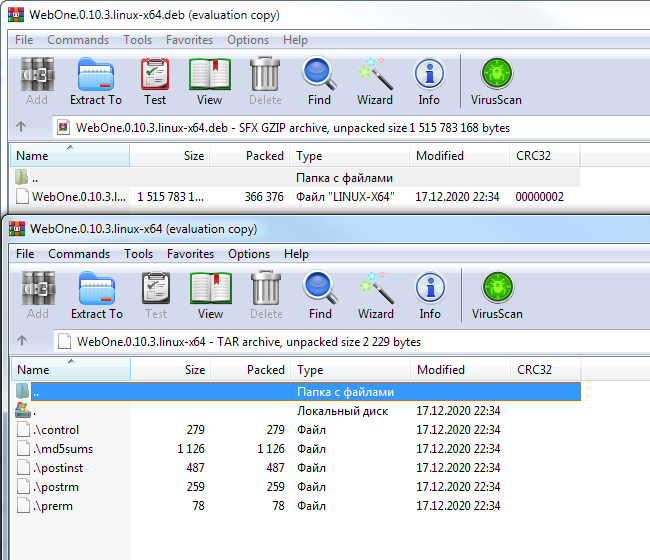
7-zip (and its plugin for Total Commander) only sees what will be installed (e.g. /usr/share/myapp/ or the data.tar).
WinRAR, however, can only see control files including scripts (or the control.tar).
WinRAR-deb

@atauenis commented on GitHub (Jan 14, 2021): Not all archivers for Windows can correctly display [.deb](https://manpages.debian.org/buster/dpkg-dev/deb.5.en.html) package content. 7-zip (and its plugin for Total Commander) only sees what will be installed (e.g. `/usr/share/myapp/` or the `data.tar`). WinRAR, however, can only see control files including scripts (or the `control.tar`). ![WinRAR-deb](https://user-images.githubusercontent.com/4800266/104583452-30356c00-5672-11eb-91a6-e6e8f4c7a840.png)
Author
Owner

@marinovdh commented on GitHub (Jan 14, 2021):

Aah! That explains a lot. Thanks. I use 7zip and wasn't aware that this archiver doesn't show all files. Thanks. 👍

@marinovdh commented on GitHub (Jan 14, 2021): Aah! That explains a lot. Thanks. I use 7zip and wasn't aware that this archiver doesn't show all files. Thanks. 👍
Sign in to join this conversation.
1 Participants
Notifications
Due Date
No due date set.
Dependencies

No dependencies set.

Reference: starred/dotnet-packaging#85