mirror of
https://github.com/radzenhq/radzen-blazor.git
synced 2026-02-04 05:35:44 +00:00
DataGrid filter behaviour changed in 3.19.0 : in FilterMode.Simple grid only shows rows that are equal to the entered text #449
Closed
opened 2026-01-29 17:37:32 +00:00 by claunia
·
3 comments
No Branch/Tag Specified
master
accessibility
spreadsheet
responsive-ordinal-scale
v8.7.5
v8.7.4
8.7.3
v8.7.2
v8.7.1
v8.7.0
v8.6.5
v8.6.4
v8.6.3
v8.6.2
v8.6.1
v8.6.0
v8.5.2
v8.5.1
v8.5.0
v8.4.3
v8.4.2
v8.4.1
v8.4.0
v8.3.9
v8.3.8
v8.3.7
v8.3.6
v8.3.5
v8.3.4
v8.3.3
v8.3.2
v8.3.1
v8.3.0
v8.2.2
v8.2.1
v8.2.0
v8.1.8
v8.1.7
v8.1.6
v8.1.5
v8.1.4
v8.1.3
8.1.2
v8.1.1
v8.1.0
v8.0.4
v8.0.3
v8.0.2
v8.0.1
v8.0.0
v7.4.3
v7.4.2
v7.4.1
v7.4.0
v7.3.6
v7.3.5
v7.3.4
v7.3.3
v7.3.2
v7.3.1
v7.3.0
v7.2.3
v7.2.2
v7.2.1
v7.2.0
v7.1.8
v7.1.7
v7.1.6
v7.1.5
v7.1.4
v7.1.3
v7.1.2
v7.1.1
v7.1.0
v7.0.8
v7.0.7
v7.0.6
v7.0.5
v7.0.4
v7.0.3
v7.0.2
v7.0.1
v7.0.0
v6.6.4
v6.6.3
v6.6.2
v6.6.1
v6.6.0
v6.5.4
v6.5.2
v6.5.1
v6.5.0
v6.4.1
v6.4.0
v6.3.4
v6.3.3
v6.3.2
v6.3.1
v6.3.0
v6.2.10
v6.2.9
v6.2.8
v6.2.7
v6.2.6
v6.2.5
v6.2.4
v6.2.3
v6.2.2
v6.2.1
v6.2.0
v6.1.6
v6.1.5
v6.1.4
v6.1.3
v6.1.2
v6.1.1
v6.1.0
v6.0.20
v6.0.19
v6.0.18
v6.0.17
v6.0.16
v6.0.15
v6.0.14
v6.0.13
v6.0.12
v6.0.11
v6.0.10
v6.0.9
v6.0.8
v6.0.7
v6.0.6
v6.0.5
v6.0.4
v6.0.3
v6.0.2
v6.0.1
v6.0.0
v5.9.9
v5.9.8
v5.9.7
v5.9.6
v5.9.5
v5.9.4
v5.9.3
v5.9.2
v5.9.1
v5.9.0
v5.8.0
v5.7.10
v5.7.9
v5.7.8
v5.7.7
v5.7.6
v5.7.5
v5.7.4
v5.7.3
v5.7.2
v5.7.1
v5.7.0
v5.6.15
v5.6.14
v5.6.13
v5.6.12
v5.6.11
v5.6.10
v5.6.9
v5.6.8
v5.6.7
v5.6.6
v5.6.5
v5.6.4
v5.6.3
v5.6.2
v5.6.1
v5.6.0
v5.5.5
v5.5.4
v5.5.3
v5.5.2
v5.5.1
v5.5.0
v5.4.0
v5.3.5
v5.3.3
v5.3.2
v5.3.1
v5.3.0
v5.2.12
v5.2.11
v5.2.10
v5.2.9
v5.2.8
v5.2.7
v5.2.6
v5.2.5
5.2.4
v5.2.3
v5.2.2
v5.2.1
v5.2.0
v5.1.11
v5.1.10
v5.1.9
v5.1.8
v5.1.7
v5.1.6
v5.1.5
v5.1.4
v5.1.3
v5.1.2
v5.1.1
v5.1.0
v5.0.9
v5.0.8
v5.0.7
v5.0.6
v5.0.5
v5.0.4
v5.0.3
v5.0.2
v5.0.1
v5.0.0
v4.34.3
v4.34.2
v4.34.1
v4.34.0
v4.33.3
v4.33.2
v4.33.1
v4.33.0
v4.32.11
v4.32.10
v4.32.9
v4.32.8
v4.32.7
v4.32.5
v4.32.4
v4.32.3
v4.32.2
v4.32.1
v4.32.0
v4.31.7
v4.31.6
v4.31.5
v4.31.4
v4.31.3
v4.31.2
v4.31.1
v4.31.0
v4.30.3
v4.30.2
v4.30.1
v4.30.0
v4.29.9
v4.29.8
v4.29.7
v4.29.6
v4.29.5
v4.29.4
v4.29.3
v4.29.2
v4.29.1
v4.29.0
v4.28.11
v4.28.9
v4.28.8
v4.28.7
v4.28.6
v4.28.5
v4.28.4
v4.28.3
v4.28.2
v4.28.1
v4.28.0
v4.27.1
v4.27.0
v4.26.1
v4.26.0
v4.25.12
v4.25.11
v4.25.10
v4.25.9
v4.25.8
v4.25.7
v4.25.6
v4.25.5
v4.25.4
v4.25.3
v4.25.2
v4.25.1
v4.25.0
v4.24.7
v4.24.6
v4.24.5
v4.24.4
v4.24.3
v4.24.2
v4.24.1
v4.24.0
v4.23.9
v4.23.8
v4.23.7
v4.23.6
v4.23.5
v4.23.3
v4.23.4
v4.23.2
v4.23.1
v4.23.0
v4.22.1
v4.22.0
v4.21.4
v4.21.3
v4.21.2
v4.21.1
v4.21.0
v4.20.4
v4.20.3
v4.20.2
v4.20.1
v4.20.0
v4.19.1
v4.19.0
v4.18.1
v4.18.0
v4.17.1
v4.17.0
v4.16.4
v4.16.3
v4.16.2
v4.16.1
v4.16.0
v4.15.14
v4.15.13
v4.15.12
v4.15.11
v4.15.10
v4.15.9
v4.15.8
v4.15.7
v4.15.6
v4.15.5
v4.15.4
v4.15.3
v4.15.2
v4.15.1
v4.15.0
v4.14.4
v4.14.3
v4.14.2
v4.14.1
v4.14.0
v4.13.6
v4.13.5
v4.13.3
v4.13.4
v4.13.2
v4.13.1
v4.13.0
v4.12.1
v4.12.0
v4.11.2
v4.11.1
v4.11.0
v4.10.4
v4.10.3
v4.10.2
v4.10.1
v4.10.0
v4.9.2
v4.9.1
v4.9.0
v4.8.4
v4.8.3
v4.8.2
v4.8.1
v4.8.0
v4.7.14
v4.7.13
v4.7.12
v4.7.11
v4.7.10
v4.7.9
v4.7.8
v4.7.7
v4.7.6
v4.7.5
v4.7.4
v4.7.3
v4.7.2
v4.7.1
v4.7.0
v4.6.7
v4.6.6
v4.6.5
v4.6.4
v4.6.3
v4.6.2
v4.6.1
v4.6.0
v4.5.3
v4.5.2
v4.5.1
v4.5.0
v4.4.9
v4.4.8
v4.4.7
v4.4.6
v4.4.5
v4.4.4
v4.4.3
v4.4.2
v4.4.1
v4.4.0
v4.3.10
v4.3.9
v4.3.8
v4.3.7
4.3.6
v4.3.5
v4.3.4
v4.3.3
v4.3.2
v4.3.0
v4.3.1
v4.2.3
v4.2.2
v4.2.1
v4.2.0
v4.1.14
v4.1.15
v4.1.13
v4.1.12
v4.1.11
v4.1.10
v4.1.9
v4.1.8
v4.1.7
v4.1.6
v4.1.5
v4.1.4
v4.1.3
v4.1.2
v4.1.1
v4.1.0
v4.0.0
v3.20.12
v3.20.11
v3.20.10
v3.20.9
v3.20.8
v3.20.7
v3.20.6
v3.20.5
v3.20.4
v3.20.3
v3.20.2
v3.20.1
v3.20.0
v3.19.12
v3.19.11
v3.19.10
v3.19.9
v3.19.8
v3.19.7
v3.19.6
v3.19.5
v3.19.4
v3.19.3
v3.19.2
v3.19.1
v3.19.0
v3.18.16
v3.18.15
v3.18.14
v3.18.13
v3.18.12
v3.18.11
v3.18.10
v3.18.9
v3.18.8
v3.18.7
v3.18.6
v3.18.5
v3.18.4
v3.18.3
v3.18.2
v3.18.1
v3.18.0
v3.17.3
v3.17.1
v3.17.2
v3.17.0
v3.16.7
v3.16.6
v3.16.5
v3.16.4
v3.16.3
v3.16.2
v3.16.1
v3.16.0
v3.15.6
v3.15.5
v3.15.4
v3.15.3
v3.15.2
v3.15.1
v3.15.0
v3.14.12
v3.14.11
v3.14.10
v3.14.9
v3.14.8
v3.14.7
v3.14.6
v3.14.5
v3.14.4
v3.14.3
v3.14.2
v3.14.1
v3.14.0
v3.13.12
v3.13.11
v3.13.10
v3.13.9
v3.13.8
v3.13.7
v3.13.6
v3.13.5
v3.13.4
v3.13.3
v3.13.2
v3.13.1
v3.13.0
v3.12.5
v3.12.4
v3.12.2
v3.12.3
v3.12.1
v3.12.0
v3.11.12
v3.11.11
v3.11.10
v3.11.9
v3.11.8
v3.11.7
v3.11.6
v3.11.5
v3.11.4
v3.11.3
v3.11.2
v3.11.1
v3.11.0
v3.10.2
v3.10.1
v3.10.0
v3.9.10
v3.9.9
v3.9.8
v3.9.7
v3.9.6
v3.9.5
v3.9.4
v3.9.3
v3.9.2
v3.9.1
v3.9.0
v3.8.2
v3.8.1
v3.8.0
v3.7.3
v3.7.2
v3.7.1
v3.7.0
v3.6.8
v3.6.7
v3.6.6
v3.6.5
v3.6.4
v3.6.3
v3.6.2
v3.6.1
v3.6.0
v3.5.3
v3.5.2
v3.5.1
v3.5.0
v3.4.2
v3.4.1
v3.4.0
v3.3.2
v3.3.1
v3.3.0
v3.2.9
v3.2.8
v3.2.7
v3.2.6
v3.2.4
v3.2.3
v3.2.2
v3.2.1
v3.2.0
v3.1.11
v3.1.10
v3.1.9
v3.1.8
v3.1.7
v3.1.6
v3.1.5
v3.1.4
v3.1.3
v3.1.2
v3.1.1
v3.1.0
v3.0.10
v3.0.9
v3.0.8
v3.0.7
v3.0.5
v3.0.4
v3.0.3
v3.0.2
v3.0.1
v3.0.0
No Label
Milestone
No items
No Milestone
Projects
Clear projects
No project

Notifications
Due Date
No due date set.
Dependencies
No dependencies set.
Reference: starred/radzen-blazor#449
Reference in New Issue
Block a user
Blocking a user prevents them from interacting with repositories, such as opening or commenting on pull requests or issues. Learn more about blocking a user.
Delete Branch "%!s()"
Deleting a branch is permanent. Although the deleted branch may continue to exist for a short time before it actually gets removed, it CANNOT be undone in most cases. Continue?
Originally created by @AndreZinner on GitHub (Jun 28, 2022).
in version 3.18.x the normal behaviour for a DataGrid in FilterMode.Simple was:
rows are displayed, if the text entered by the user is contained within the value of the property of the corresponding column.
in version 3.19.0 (and later) the text entered by the user must be equal to make the row appear in the resulting list.
Is there any new property introduced to the datagrid hat I can set, to get back the old behaviour?
(which is of course the normal way a user expects a column filtering feature)
@enchev commented on GitHub (Jun 28, 2022):
Everything works normally on our demo:
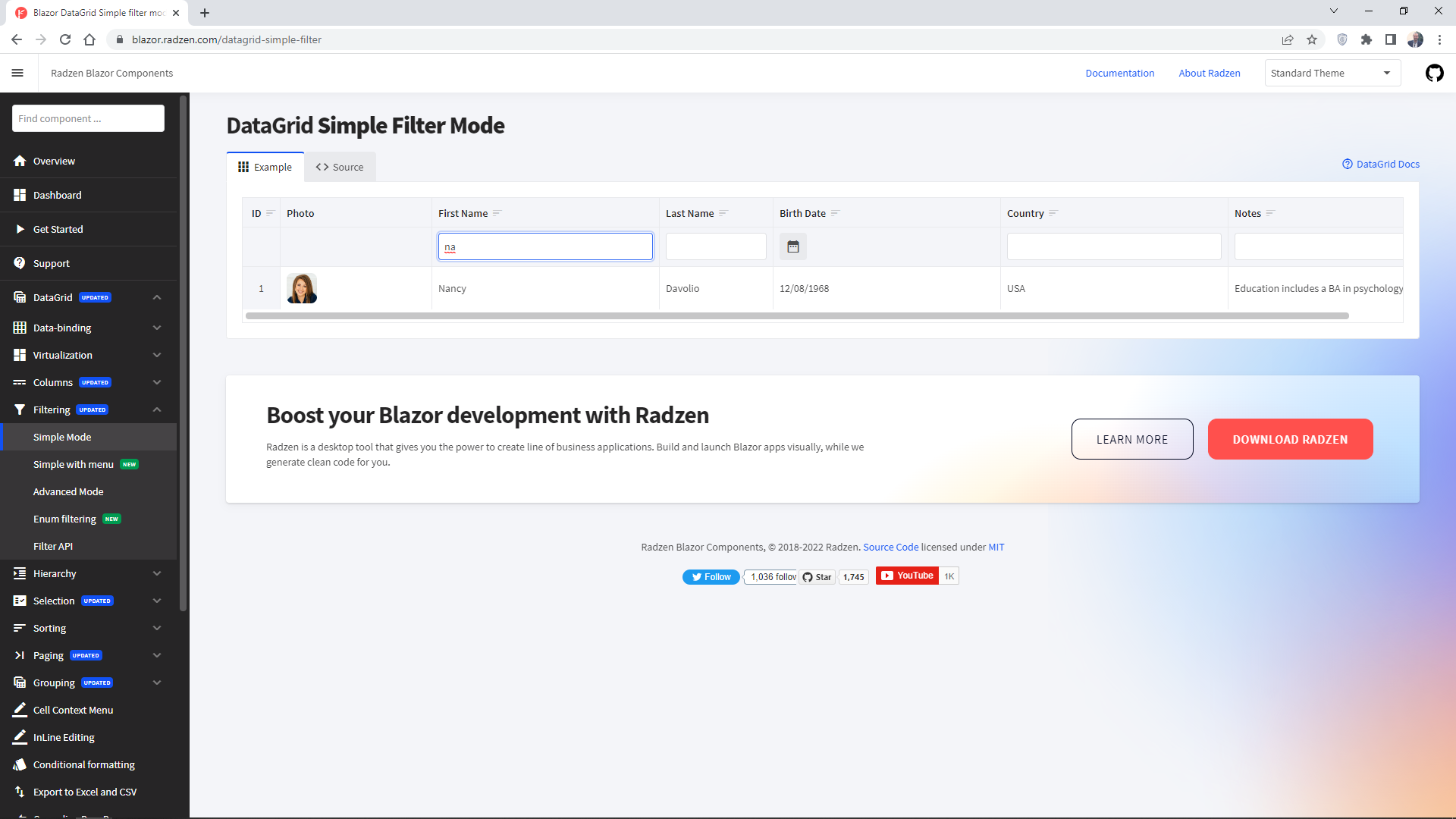
@AndreZinner commented on GitHub (Jun 29, 2022):
Yes, on your demo it does.
But in my app the behaviour changes as soon as I go from 3.18.x to 3.19.0. (without any further changes!).
When I use FilterMode.SimpleWithMenu I can observe, that in 3.18.x the default filter condition is "CONTAINS".
When I use 3.19.0 the grid and it is displayed on page loading for a fraction of a second I can see "A" (=filter condion "contains") on the filter button. Then the condition changes to "=" (= filter condition "is equal").
So you definitly changed some defaults, probably by introducing the enum filter.
@AndreZinner commented on GitHub (Jun 29, 2022):
Further information: the column the working as expected when I set FilterOperator="FilterOperator.Contains".
So I suppose that this was the default in 3.18.x.
(But it is of course very anoying when I must add that to all my columns in all my grid ....)
And in 3.19.x (at least for some value types) the default changed to FilterOperator.Equals.