mirror of
https://github.com/radzenhq/radzen-blazor.git
synced 2026-02-03 21:29:20 +00:00
[RadzenDataGrid] InsertRow() does not work in certain situations #709
Closed
opened 2026-01-29 17:41:57 +00:00 by claunia
·
12 comments
No Branch/Tag Specified
master
accessibility
spreadsheet
responsive-ordinal-scale
v8.7.5
v8.7.4
8.7.3
v8.7.2
v8.7.1
v8.7.0
v8.6.5
v8.6.4
v8.6.3
v8.6.2
v8.6.1
v8.6.0
v8.5.2
v8.5.1
v8.5.0
v8.4.3
v8.4.2
v8.4.1
v8.4.0
v8.3.9
v8.3.8
v8.3.7
v8.3.6
v8.3.5
v8.3.4
v8.3.3
v8.3.2
v8.3.1
v8.3.0
v8.2.2
v8.2.1
v8.2.0
v8.1.8
v8.1.7
v8.1.6
v8.1.5
v8.1.4
v8.1.3
8.1.2
v8.1.1
v8.1.0
v8.0.4
v8.0.3
v8.0.2
v8.0.1
v8.0.0
v7.4.3
v7.4.2
v7.4.1
v7.4.0
v7.3.6
v7.3.5
v7.3.4
v7.3.3
v7.3.2
v7.3.1
v7.3.0
v7.2.3
v7.2.2
v7.2.1
v7.2.0
v7.1.8
v7.1.7
v7.1.6
v7.1.5
v7.1.4
v7.1.3
v7.1.2
v7.1.1
v7.1.0
v7.0.8
v7.0.7
v7.0.6
v7.0.5
v7.0.4
v7.0.3
v7.0.2
v7.0.1
v7.0.0
v6.6.4
v6.6.3
v6.6.2
v6.6.1
v6.6.0
v6.5.4
v6.5.2
v6.5.1
v6.5.0
v6.4.1
v6.4.0
v6.3.4
v6.3.3
v6.3.2
v6.3.1
v6.3.0
v6.2.10
v6.2.9
v6.2.8
v6.2.7
v6.2.6
v6.2.5
v6.2.4
v6.2.3
v6.2.2
v6.2.1
v6.2.0
v6.1.6
v6.1.5
v6.1.4
v6.1.3
v6.1.2
v6.1.1
v6.1.0
v6.0.20
v6.0.19
v6.0.18
v6.0.17
v6.0.16
v6.0.15
v6.0.14
v6.0.13
v6.0.12
v6.0.11
v6.0.10
v6.0.9
v6.0.8
v6.0.7
v6.0.6
v6.0.5
v6.0.4
v6.0.3
v6.0.2
v6.0.1
v6.0.0
v5.9.9
v5.9.8
v5.9.7
v5.9.6
v5.9.5
v5.9.4
v5.9.3
v5.9.2
v5.9.1
v5.9.0
v5.8.0
v5.7.10
v5.7.9
v5.7.8
v5.7.7
v5.7.6
v5.7.5
v5.7.4
v5.7.3
v5.7.2
v5.7.1
v5.7.0
v5.6.15
v5.6.14
v5.6.13
v5.6.12
v5.6.11
v5.6.10
v5.6.9
v5.6.8
v5.6.7
v5.6.6
v5.6.5
v5.6.4
v5.6.3
v5.6.2
v5.6.1
v5.6.0
v5.5.5
v5.5.4
v5.5.3
v5.5.2
v5.5.1
v5.5.0
v5.4.0
v5.3.5
v5.3.3
v5.3.2
v5.3.1
v5.3.0
v5.2.12
v5.2.11
v5.2.10
v5.2.9
v5.2.8
v5.2.7
v5.2.6
v5.2.5
5.2.4
v5.2.3
v5.2.2
v5.2.1
v5.2.0
v5.1.11
v5.1.10
v5.1.9
v5.1.8
v5.1.7
v5.1.6
v5.1.5
v5.1.4
v5.1.3
v5.1.2
v5.1.1
v5.1.0
v5.0.9
v5.0.8
v5.0.7
v5.0.6
v5.0.5
v5.0.4
v5.0.3
v5.0.2
v5.0.1
v5.0.0
v4.34.3
v4.34.2
v4.34.1
v4.34.0
v4.33.3
v4.33.2
v4.33.1
v4.33.0
v4.32.11
v4.32.10
v4.32.9
v4.32.8
v4.32.7
v4.32.5
v4.32.4
v4.32.3
v4.32.2
v4.32.1
v4.32.0
v4.31.7
v4.31.6
v4.31.5
v4.31.4
v4.31.3
v4.31.2
v4.31.1
v4.31.0
v4.30.3
v4.30.2
v4.30.1
v4.30.0
v4.29.9
v4.29.8
v4.29.7
v4.29.6
v4.29.5
v4.29.4
v4.29.3
v4.29.2
v4.29.1
v4.29.0
v4.28.11
v4.28.9
v4.28.8
v4.28.7
v4.28.6
v4.28.5
v4.28.4
v4.28.3
v4.28.2
v4.28.1
v4.28.0
v4.27.1
v4.27.0
v4.26.1
v4.26.0
v4.25.12
v4.25.11
v4.25.10
v4.25.9
v4.25.8
v4.25.7
v4.25.6
v4.25.5
v4.25.4
v4.25.3
v4.25.2
v4.25.1
v4.25.0
v4.24.7
v4.24.6
v4.24.5
v4.24.4
v4.24.3
v4.24.2
v4.24.1
v4.24.0
v4.23.9
v4.23.8
v4.23.7
v4.23.6
v4.23.5
v4.23.3
v4.23.4
v4.23.2
v4.23.1
v4.23.0
v4.22.1
v4.22.0
v4.21.4
v4.21.3
v4.21.2
v4.21.1
v4.21.0
v4.20.4
v4.20.3
v4.20.2
v4.20.1
v4.20.0
v4.19.1
v4.19.0
v4.18.1
v4.18.0
v4.17.1
v4.17.0
v4.16.4
v4.16.3
v4.16.2
v4.16.1
v4.16.0
v4.15.14
v4.15.13
v4.15.12
v4.15.11
v4.15.10
v4.15.9
v4.15.8
v4.15.7
v4.15.6
v4.15.5
v4.15.4
v4.15.3
v4.15.2
v4.15.1
v4.15.0
v4.14.4
v4.14.3
v4.14.2
v4.14.1
v4.14.0
v4.13.6
v4.13.5
v4.13.3
v4.13.4
v4.13.2
v4.13.1
v4.13.0
v4.12.1
v4.12.0
v4.11.2
v4.11.1
v4.11.0
v4.10.4
v4.10.3
v4.10.2
v4.10.1
v4.10.0
v4.9.2
v4.9.1
v4.9.0
v4.8.4
v4.8.3
v4.8.2
v4.8.1
v4.8.0
v4.7.14
v4.7.13
v4.7.12
v4.7.11
v4.7.10
v4.7.9
v4.7.8
v4.7.7
v4.7.6
v4.7.5
v4.7.4
v4.7.3
v4.7.2
v4.7.1
v4.7.0
v4.6.7
v4.6.6
v4.6.5
v4.6.4
v4.6.3
v4.6.2
v4.6.1
v4.6.0
v4.5.3
v4.5.2
v4.5.1
v4.5.0
v4.4.9
v4.4.8
v4.4.7
v4.4.6
v4.4.5
v4.4.4
v4.4.3
v4.4.2
v4.4.1
v4.4.0
v4.3.10
v4.3.9
v4.3.8
v4.3.7
4.3.6
v4.3.5
v4.3.4
v4.3.3
v4.3.2
v4.3.0
v4.3.1
v4.2.3
v4.2.2
v4.2.1
v4.2.0
v4.1.14
v4.1.15
v4.1.13
v4.1.12
v4.1.11
v4.1.10
v4.1.9
v4.1.8
v4.1.7
v4.1.6
v4.1.5
v4.1.4
v4.1.3
v4.1.2
v4.1.1
v4.1.0
v4.0.0
v3.20.12
v3.20.11
v3.20.10
v3.20.9
v3.20.8
v3.20.7
v3.20.6
v3.20.5
v3.20.4
v3.20.3
v3.20.2
v3.20.1
v3.20.0
v3.19.12
v3.19.11
v3.19.10
v3.19.9
v3.19.8
v3.19.7
v3.19.6
v3.19.5
v3.19.4
v3.19.3
v3.19.2
v3.19.1
v3.19.0
v3.18.16
v3.18.15
v3.18.14
v3.18.13
v3.18.12
v3.18.11
v3.18.10
v3.18.9
v3.18.8
v3.18.7
v3.18.6
v3.18.5
v3.18.4
v3.18.3
v3.18.2
v3.18.1
v3.18.0
v3.17.3
v3.17.1
v3.17.2
v3.17.0
v3.16.7
v3.16.6
v3.16.5
v3.16.4
v3.16.3
v3.16.2
v3.16.1
v3.16.0
v3.15.6
v3.15.5
v3.15.4
v3.15.3
v3.15.2
v3.15.1
v3.15.0
v3.14.12
v3.14.11
v3.14.10
v3.14.9
v3.14.8
v3.14.7
v3.14.6
v3.14.5
v3.14.4
v3.14.3
v3.14.2
v3.14.1
v3.14.0
v3.13.12
v3.13.11
v3.13.10
v3.13.9
v3.13.8
v3.13.7
v3.13.6
v3.13.5
v3.13.4
v3.13.3
v3.13.2
v3.13.1
v3.13.0
v3.12.5
v3.12.4
v3.12.2
v3.12.3
v3.12.1
v3.12.0
v3.11.12
v3.11.11
v3.11.10
v3.11.9
v3.11.8
v3.11.7
v3.11.6
v3.11.5
v3.11.4
v3.11.3
v3.11.2
v3.11.1
v3.11.0
v3.10.2
v3.10.1
v3.10.0
v3.9.10
v3.9.9
v3.9.8
v3.9.7
v3.9.6
v3.9.5
v3.9.4
v3.9.3
v3.9.2
v3.9.1
v3.9.0
v3.8.2
v3.8.1
v3.8.0
v3.7.3
v3.7.2
v3.7.1
v3.7.0
v3.6.8
v3.6.7
v3.6.6
v3.6.5
v3.6.4
v3.6.3
v3.6.2
v3.6.1
v3.6.0
v3.5.3
v3.5.2
v3.5.1
v3.5.0
v3.4.2
v3.4.1
v3.4.0
v3.3.2
v3.3.1
v3.3.0
v3.2.9
v3.2.8
v3.2.7
v3.2.6
v3.2.4
v3.2.3
v3.2.2
v3.2.1
v3.2.0
v3.1.11
v3.1.10
v3.1.9
v3.1.8
v3.1.7
v3.1.6
v3.1.5
v3.1.4
v3.1.3
v3.1.2
v3.1.1
v3.1.0
v3.0.10
v3.0.9
v3.0.8
v3.0.7
v3.0.5
v3.0.4
v3.0.3
v3.0.2
v3.0.1
v3.0.0
No Label
Milestone
No items
No Milestone
Projects
Clear projects
No project

Notifications
Due Date
No due date set.
Dependencies
No dependencies set.
Reference: starred/radzen-blazor#709
Reference in New Issue
Block a user
Blocking a user prevents them from interacting with repositories, such as opening or commenting on pull requests or issues. Learn more about blocking a user.
Delete Branch "%!s()"
Deleting a branch is permanent. Although the deleted branch may continue to exist for a short time before it actually gets removed, it CANNOT be undone in most cases. Continue?
Originally created by @robertmclaws on GitHub (Jan 29, 2023).
Describe the Bug
We have been migrating our grids to
RadzenDataGridfromRadzenGrid. After getting everything else working, it appears thatRadzenDataGrid.InsertRow()is not functioning. We have implemented everything from this example and cannot find any differences.Steps to Reproduce
Expected Behavior
I expect it to behave like the previous RadzenGrid and put a new row in the table and put that row into Edit Mode, just as in this example:

Screenshots
This is what the screen looks like after you click the button in our reproduction project. Confirmed that the breakpoint has been hit at the method has been called. No rows are added, and no additional errors are listed in the Console.
Environment
Additional context
This is currently blocking us from moving to Production.
@enchev commented on GitHub (Jan 30, 2023):
I've replaced RadzenDataGrid and RadzenDataGridColumn with RadzenGrid and RadzenGridColumn however the insert didn't worked again.


@robertmclaws commented on GitHub (Jan 30, 2023):
Thanks for looking into it! Odd. I wonder if it's a .NET 7 thing? I'll roll it back to .NET 6 and see if it works.
The last version of Radzen.Blazor that I can guarantee it worked in for RadzenGrid was 3.6.8.
If you want to set those changes as a Pull Request on my repro project, I'll pull it down and see if I can roll back to the last verison / runtime it worked in.
@enchev commented on GitHub (Jan 31, 2023):
didn't worked with 3.6.8 as well - pull request submitted.
@robertmclaws commented on GitHub (Feb 1, 2023):
I believe I have identified the problem. The code previously worked on .NET 5.0 with version 3.8.6. I was able to reproduce it locally in an older version of BurnRate.
In previous iterations, calling
await gridInstance.InsertRow(item);was sufficient to get the Grid into Edit mode. The record was only committed to the underlying List if it was actually edited.Instead, I'm now having to call:
...and simply remove the blank item from the collection if it is deleted before it is persisted.
I will push an update that shows the codebase working, as well as a repo of it working the way it is supposed to on .NET 5.0. I will update this thread when those two branches have been pushed.
@robertmclaws commented on GitHub (Feb 1, 2023):
Here's the working version on .NET 7 that bypasses gridinstance.InsertRow():
187555826eHere's a repro of a working version on .NET 5 + Radzen 3.6.8:
bfd06d45a2I'd really like it to work the way it did in .NET 5. Hope this helps track the problem down. Thanks so much!
@enchev commented on GitHub (Feb 1, 2023):
Try latest Radzen.Blazor with .NET 5 - if it works then the problem is caused by a change in the EF DbSet. We've not changed anything related to insert.
@robertmclaws commented on GitHub (Feb 2, 2023):
OK, I spent quite a bit of time rolling through different versions.
.NET 5 + latest: Working
.NET 6 + latest: Working
.NET 7 + latest: Working
.NET 7 + latest [Initial Checkin]: Still not working
Diff between initial version and working version: https://github.com/CloudNimble/RadzenDataGridProblem/compare/initial-version...dotnet7?expand=1
(Focus on the CloudNimbleGrid.razor change)
It looks like setting some of the properties in the original might be causing the problem:
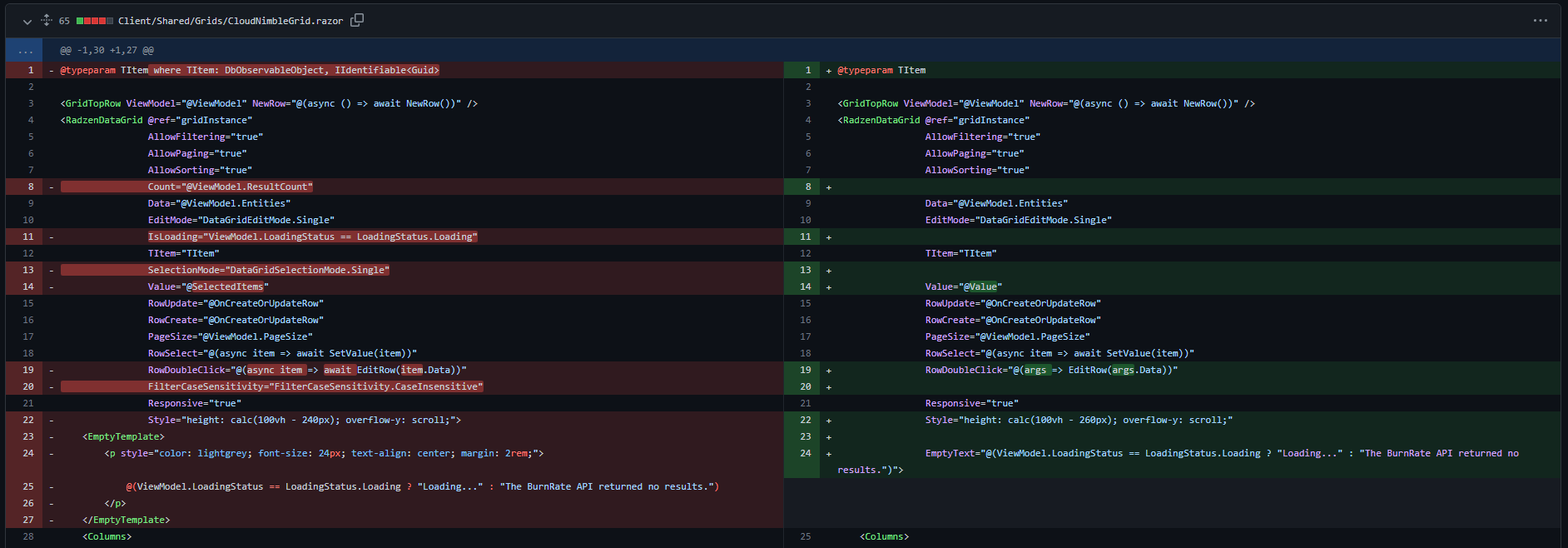
If you could look into what could be causing the problem from that, I will continue to try to narrow it down on this end tomorrow. Thanks!
@robertmclaws commented on GitHub (Feb 3, 2023):
So I figured out what the problem is. Because the datasource we're using is remote, when the data is loaded well after the Grid is rendered, it's not refreshing the Grid with the new data. We had to set our custom grid wrapper to watch the ViewModel for when the LoadingStatus changed, and call gridInstance.Reload().
@enchev I would suggest that you folks add a RadzenDataGrid.Refresh() method that makes it clear you are just going to update the rendering from the existing data, not reload the underlying data source.
I'll go ahead and close this now. If any future readers want to see the fix, let me know.
@DoubleBullet commented on GitHub (Feb 15, 2024):
I have the very same problem and it's very frustrating. I thought the problem was with me and my code, but thankfully, I did a series of tests to figure out that the problem was the insert method.
Strangely, the insert works the first time but doesn't work the second time I call the insert method.
My project is using .NET 8, so I assume it shares the same underlying issue as with .NET 7.
I need to get this fixed for a project I am working on for a client.
Any attempts at fixing this issue would be very much appreciated :)
@DoubleBullet commented on GitHub (Feb 18, 2024):
I can confirm that this problem only happens when the data source is remote and has changed.
What is the best way to work around this problem?
@DoubleBullet commented on GitHub (Feb 28, 2024):
Hello @robertmclaws , I'm interested in having this fixed. Did you manage to find a workaround for .NET 7/8?
@DoubleBullet commented on GitHub (Apr 17, 2024):
Will this ever be fixed?