mirror of
https://github.com/radzenhq/radzen-blazor.git
synced 2026-02-04 05:35:44 +00:00
Radzen Dropdown does not return selected items #759
Closed
opened 2026-01-29 17:42:58 +00:00 by claunia
·
2 comments
No Branch/Tag Specified
master
accessibility
spreadsheet
responsive-ordinal-scale
v8.7.5
v8.7.4
8.7.3
v8.7.2
v8.7.1
v8.7.0
v8.6.5
v8.6.4
v8.6.3
v8.6.2
v8.6.1
v8.6.0
v8.5.2
v8.5.1
v8.5.0
v8.4.3
v8.4.2
v8.4.1
v8.4.0
v8.3.9
v8.3.8
v8.3.7
v8.3.6
v8.3.5
v8.3.4
v8.3.3
v8.3.2
v8.3.1
v8.3.0
v8.2.2
v8.2.1
v8.2.0
v8.1.8
v8.1.7
v8.1.6
v8.1.5
v8.1.4
v8.1.3
8.1.2
v8.1.1
v8.1.0
v8.0.4
v8.0.3
v8.0.2
v8.0.1
v8.0.0
v7.4.3
v7.4.2
v7.4.1
v7.4.0
v7.3.6
v7.3.5
v7.3.4
v7.3.3
v7.3.2
v7.3.1
v7.3.0
v7.2.3
v7.2.2
v7.2.1
v7.2.0
v7.1.8
v7.1.7
v7.1.6
v7.1.5
v7.1.4
v7.1.3
v7.1.2
v7.1.1
v7.1.0
v7.0.8
v7.0.7
v7.0.6
v7.0.5
v7.0.4
v7.0.3
v7.0.2
v7.0.1
v7.0.0
v6.6.4
v6.6.3
v6.6.2
v6.6.1
v6.6.0
v6.5.4
v6.5.2
v6.5.1
v6.5.0
v6.4.1
v6.4.0
v6.3.4
v6.3.3
v6.3.2
v6.3.1
v6.3.0
v6.2.10
v6.2.9
v6.2.8
v6.2.7
v6.2.6
v6.2.5
v6.2.4
v6.2.3
v6.2.2
v6.2.1
v6.2.0
v6.1.6
v6.1.5
v6.1.4
v6.1.3
v6.1.2
v6.1.1
v6.1.0
v6.0.20
v6.0.19
v6.0.18
v6.0.17
v6.0.16
v6.0.15
v6.0.14
v6.0.13
v6.0.12
v6.0.11
v6.0.10
v6.0.9
v6.0.8
v6.0.7
v6.0.6
v6.0.5
v6.0.4
v6.0.3
v6.0.2
v6.0.1
v6.0.0
v5.9.9
v5.9.8
v5.9.7
v5.9.6
v5.9.5
v5.9.4
v5.9.3
v5.9.2
v5.9.1
v5.9.0
v5.8.0
v5.7.10
v5.7.9
v5.7.8
v5.7.7
v5.7.6
v5.7.5
v5.7.4
v5.7.3
v5.7.2
v5.7.1
v5.7.0
v5.6.15
v5.6.14
v5.6.13
v5.6.12
v5.6.11
v5.6.10
v5.6.9
v5.6.8
v5.6.7
v5.6.6
v5.6.5
v5.6.4
v5.6.3
v5.6.2
v5.6.1
v5.6.0
v5.5.5
v5.5.4
v5.5.3
v5.5.2
v5.5.1
v5.5.0
v5.4.0
v5.3.5
v5.3.3
v5.3.2
v5.3.1
v5.3.0
v5.2.12
v5.2.11
v5.2.10
v5.2.9
v5.2.8
v5.2.7
v5.2.6
v5.2.5
5.2.4
v5.2.3
v5.2.2
v5.2.1
v5.2.0
v5.1.11
v5.1.10
v5.1.9
v5.1.8
v5.1.7
v5.1.6
v5.1.5
v5.1.4
v5.1.3
v5.1.2
v5.1.1
v5.1.0
v5.0.9
v5.0.8
v5.0.7
v5.0.6
v5.0.5
v5.0.4
v5.0.3
v5.0.2
v5.0.1
v5.0.0
v4.34.3
v4.34.2
v4.34.1
v4.34.0
v4.33.3
v4.33.2
v4.33.1
v4.33.0
v4.32.11
v4.32.10
v4.32.9
v4.32.8
v4.32.7
v4.32.5
v4.32.4
v4.32.3
v4.32.2
v4.32.1
v4.32.0
v4.31.7
v4.31.6
v4.31.5
v4.31.4
v4.31.3
v4.31.2
v4.31.1
v4.31.0
v4.30.3
v4.30.2
v4.30.1
v4.30.0
v4.29.9
v4.29.8
v4.29.7
v4.29.6
v4.29.5
v4.29.4
v4.29.3
v4.29.2
v4.29.1
v4.29.0
v4.28.11
v4.28.9
v4.28.8
v4.28.7
v4.28.6
v4.28.5
v4.28.4
v4.28.3
v4.28.2
v4.28.1
v4.28.0
v4.27.1
v4.27.0
v4.26.1
v4.26.0
v4.25.12
v4.25.11
v4.25.10
v4.25.9
v4.25.8
v4.25.7
v4.25.6
v4.25.5
v4.25.4
v4.25.3
v4.25.2
v4.25.1
v4.25.0
v4.24.7
v4.24.6
v4.24.5
v4.24.4
v4.24.3
v4.24.2
v4.24.1
v4.24.0
v4.23.9
v4.23.8
v4.23.7
v4.23.6
v4.23.5
v4.23.3
v4.23.4
v4.23.2
v4.23.1
v4.23.0
v4.22.1
v4.22.0
v4.21.4
v4.21.3
v4.21.2
v4.21.1
v4.21.0
v4.20.4
v4.20.3
v4.20.2
v4.20.1
v4.20.0
v4.19.1
v4.19.0
v4.18.1
v4.18.0
v4.17.1
v4.17.0
v4.16.4
v4.16.3
v4.16.2
v4.16.1
v4.16.0
v4.15.14
v4.15.13
v4.15.12
v4.15.11
v4.15.10
v4.15.9
v4.15.8
v4.15.7
v4.15.6
v4.15.5
v4.15.4
v4.15.3
v4.15.2
v4.15.1
v4.15.0
v4.14.4
v4.14.3
v4.14.2
v4.14.1
v4.14.0
v4.13.6
v4.13.5
v4.13.3
v4.13.4
v4.13.2
v4.13.1
v4.13.0
v4.12.1
v4.12.0
v4.11.2
v4.11.1
v4.11.0
v4.10.4
v4.10.3
v4.10.2
v4.10.1
v4.10.0
v4.9.2
v4.9.1
v4.9.0
v4.8.4
v4.8.3
v4.8.2
v4.8.1
v4.8.0
v4.7.14
v4.7.13
v4.7.12
v4.7.11
v4.7.10
v4.7.9
v4.7.8
v4.7.7
v4.7.6
v4.7.5
v4.7.4
v4.7.3
v4.7.2
v4.7.1
v4.7.0
v4.6.7
v4.6.6
v4.6.5
v4.6.4
v4.6.3
v4.6.2
v4.6.1
v4.6.0
v4.5.3
v4.5.2
v4.5.1
v4.5.0
v4.4.9
v4.4.8
v4.4.7
v4.4.6
v4.4.5
v4.4.4
v4.4.3
v4.4.2
v4.4.1
v4.4.0
v4.3.10
v4.3.9
v4.3.8
v4.3.7
4.3.6
v4.3.5
v4.3.4
v4.3.3
v4.3.2
v4.3.0
v4.3.1
v4.2.3
v4.2.2
v4.2.1
v4.2.0
v4.1.14
v4.1.15
v4.1.13
v4.1.12
v4.1.11
v4.1.10
v4.1.9
v4.1.8
v4.1.7
v4.1.6
v4.1.5
v4.1.4
v4.1.3
v4.1.2
v4.1.1
v4.1.0
v4.0.0
v3.20.12
v3.20.11
v3.20.10
v3.20.9
v3.20.8
v3.20.7
v3.20.6
v3.20.5
v3.20.4
v3.20.3
v3.20.2
v3.20.1
v3.20.0
v3.19.12
v3.19.11
v3.19.10
v3.19.9
v3.19.8
v3.19.7
v3.19.6
v3.19.5
v3.19.4
v3.19.3
v3.19.2
v3.19.1
v3.19.0
v3.18.16
v3.18.15
v3.18.14
v3.18.13
v3.18.12
v3.18.11
v3.18.10
v3.18.9
v3.18.8
v3.18.7
v3.18.6
v3.18.5
v3.18.4
v3.18.3
v3.18.2
v3.18.1
v3.18.0
v3.17.3
v3.17.1
v3.17.2
v3.17.0
v3.16.7
v3.16.6
v3.16.5
v3.16.4
v3.16.3
v3.16.2
v3.16.1
v3.16.0
v3.15.6
v3.15.5
v3.15.4
v3.15.3
v3.15.2
v3.15.1
v3.15.0
v3.14.12
v3.14.11
v3.14.10
v3.14.9
v3.14.8
v3.14.7
v3.14.6
v3.14.5
v3.14.4
v3.14.3
v3.14.2
v3.14.1
v3.14.0
v3.13.12
v3.13.11
v3.13.10
v3.13.9
v3.13.8
v3.13.7
v3.13.6
v3.13.5
v3.13.4
v3.13.3
v3.13.2
v3.13.1
v3.13.0
v3.12.5
v3.12.4
v3.12.2
v3.12.3
v3.12.1
v3.12.0
v3.11.12
v3.11.11
v3.11.10
v3.11.9
v3.11.8
v3.11.7
v3.11.6
v3.11.5
v3.11.4
v3.11.3
v3.11.2
v3.11.1
v3.11.0
v3.10.2
v3.10.1
v3.10.0
v3.9.10
v3.9.9
v3.9.8
v3.9.7
v3.9.6
v3.9.5
v3.9.4
v3.9.3
v3.9.2
v3.9.1
v3.9.0
v3.8.2
v3.8.1
v3.8.0
v3.7.3
v3.7.2
v3.7.1
v3.7.0
v3.6.8
v3.6.7
v3.6.6
v3.6.5
v3.6.4
v3.6.3
v3.6.2
v3.6.1
v3.6.0
v3.5.3
v3.5.2
v3.5.1
v3.5.0
v3.4.2
v3.4.1
v3.4.0
v3.3.2
v3.3.1
v3.3.0
v3.2.9
v3.2.8
v3.2.7
v3.2.6
v3.2.4
v3.2.3
v3.2.2
v3.2.1
v3.2.0
v3.1.11
v3.1.10
v3.1.9
v3.1.8
v3.1.7
v3.1.6
v3.1.5
v3.1.4
v3.1.3
v3.1.2
v3.1.1
v3.1.0
v3.0.10
v3.0.9
v3.0.8
v3.0.7
v3.0.5
v3.0.4
v3.0.3
v3.0.2
v3.0.1
v3.0.0
No Label
Milestone
No items
No Milestone
Projects
Clear projects
No project

Notifications
Due Date
No due date set.
Dependencies
No dependencies set.
Reference: starred/radzen-blazor#759
Reference in New Issue
Block a user
Blocking a user prevents them from interacting with repositories, such as opening or commenting on pull requests or issues. Learn more about blocking a user.
Delete Branch "%!s()"
Deleting a branch is permanent. Although the deleted branch may continue to exist for a short time before it actually gets removed, it CANNOT be undone in most cases. Continue?
Originally created by @PouryaMontakhab on GitHub (Mar 4, 2023).
Hello guys. I have created an asp.net core application which in, I have used the RadZen dropdown. everything is ok and the component is rendered successfully but when the user clicks on the item and selects them, I am not able to get the selected values. Here is a brief of my code :
this is the razor file which the RadZen dropdown exists there.
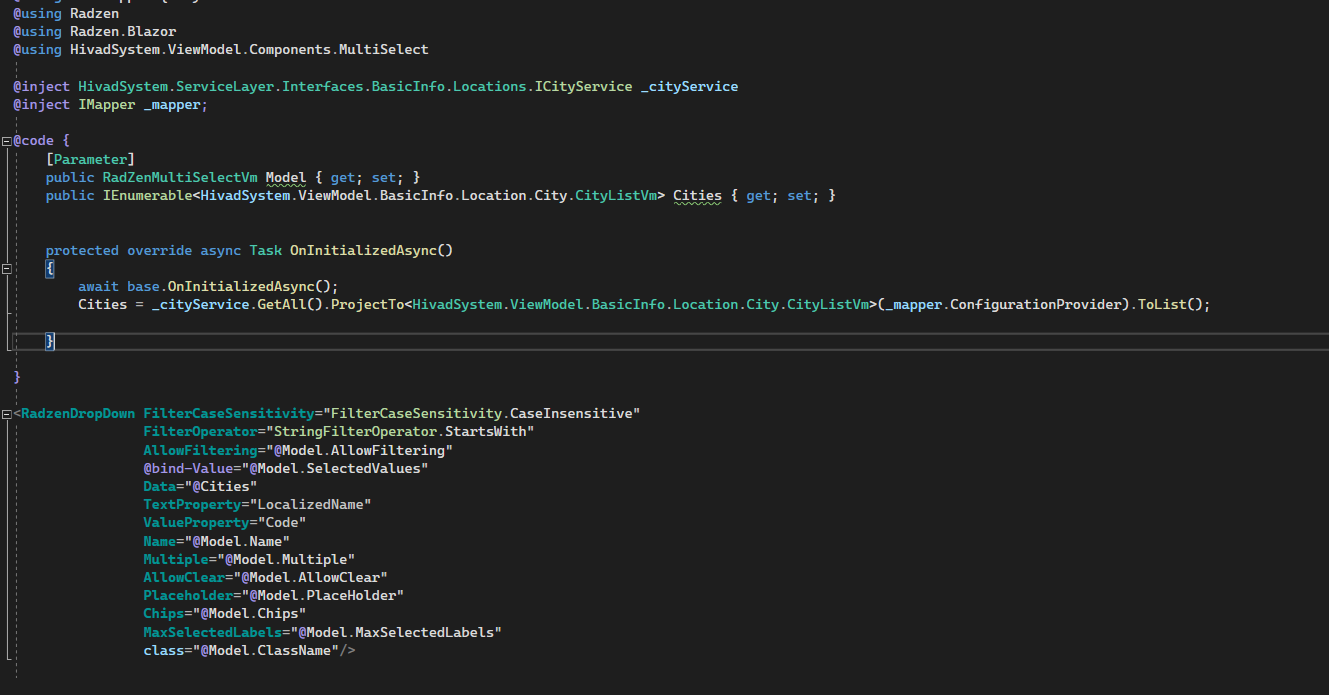
here is also my .cshtml file which I have wrapped in the razor file in order to use it somewhere else.

I called it this way:

as you can see in this image, everything is ok 👍
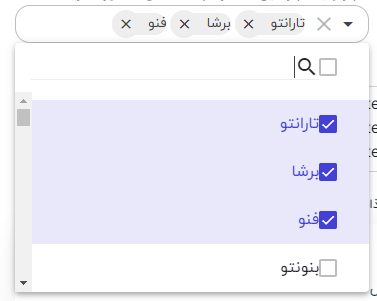
but when I try to get

Model.SelectedValues(that I have bonded it in the razor file) when the form is submitted. nothing there on the list.@PouryaMontakhab commented on GitHub (Mar 5, 2023):
I also read that the selected items data type and data list should have the same data type as well so I have changed the selected items data type, unfortunately, it did not work.
@akorchev commented on GitHub (Mar 6, 2023):
I am not sure if Blazor components support your scenario. You can try using the built-in InputSelect and see if it makes a difference. Also I see you have opened a forum thread as well - will close this issue as I don't think there is anything actionable on our side.