Permission Denied when executing extracted executable file from Tar #424

Closed
opened 2026-01-29 22:11:44 +00:00 by claunia · 14 comments
Owner

Originally created by @lmtr0 on GitHub (Nov 3, 2020).

Hello I ran this code to extract an executable out of a tarfile and when I tried running it the terminal returns:

zsh: permission denied: ./main

Can you help me?

Originally created by @lmtr0 on GitHub (Nov 3, 2020). Hello I ran this code to extract an executable out of a tarfile and when I tried running it the terminal returns: ```Shell zsh: permission denied: ./main ``` Can you help me?
Author
Owner

@lmtr0 commented on GitHub (Nov 3, 2020):

I used tar.bz2 compression and the code is:

static void UnPack(string tarFileName, string targetDir)
        {
            if (TarArchive.IsTarFile(tarFileName))
            {
                Console.WriteLine($"{tarFileName} is not a tar file");
                return;
            }

            Directory.CreateDirectory(targetDir);
            TarReader archive = TarReader.Open(File.OpenRead(tarFileName));
            while (archive.MoveToNextEntry())
            {
                if (archive.Entry.IsDirectory)
                    Directory.CreateDirectory(Path.Join(targetDir, archive.Entry.Key));
                else
                {
                    using (FileStream fs = File.Open(archive.Entry.Key, FileMode.CreateNew))
                        archive.WriteEntryTo(fs);
                }

                Console.WriteLine($"extracted: {archive.Entry.Key}");
                FileInfo f = new FileInfo(Directory.GetCurrentDirectory() + "/" + archive.Entry.Key);

            }
            Console.WriteLine("DONE");
        }
@lmtr0 commented on GitHub (Nov 3, 2020): I used tar.bz2 compression and the code is: ```CSharp static void UnPack(string tarFileName, string targetDir) { if (TarArchive.IsTarFile(tarFileName)) { Console.WriteLine($"{tarFileName} is not a tar file"); return; } Directory.CreateDirectory(targetDir); TarReader archive = TarReader.Open(File.OpenRead(tarFileName)); while (archive.MoveToNextEntry()) { if (archive.Entry.IsDirectory) Directory.CreateDirectory(Path.Join(targetDir, archive.Entry.Key)); else { using (FileStream fs = File.Open(archive.Entry.Key, FileMode.CreateNew)) archive.WriteEntryTo(fs); } Console.WriteLine($"extracted: {archive.Entry.Key}"); FileInfo f = new FileInfo(Directory.GetCurrentDirectory() + "/" + archive.Entry.Key); } Console.WriteLine("DONE"); } ```
Author
Owner

@adamhathcock commented on GitHub (Nov 3, 2020):

That's likely because your executable file you made main does not have permissions to execute. Nothing to do with sharpcompress

@adamhathcock commented on GitHub (Nov 3, 2020): That's likely because your executable file you made `main` does not have permissions to execute. Nothing to do with sharpcompress
Author
Owner

@lmtr0 commented on GitHub (Nov 3, 2020):

thats the problem, when i extract it with the built in Archive extractor, It works

@lmtr0 commented on GitHub (Nov 3, 2020): thats the problem, when i extract it with the built in Archive extractor, It works
Author
Owner

@lmtr0 commented on GitHub (Nov 3, 2020):

I search it a little more and saw that Sharcompress alters the permissions on a file

@lmtr0 commented on GitHub (Nov 3, 2020): I search it a little more and saw that Sharcompress alters the permissions on a file
Author
Owner

@lmtr0 commented on GitHub (Nov 3, 2020):

This is the executable outputted by the compiler

image

This is the executable after compression and decompression

image

@lmtr0 commented on GitHub (Nov 3, 2020): ## This is the executable outputted by the compiler ![image](https://user-images.githubusercontent.com/57605930/97985454-0bda2b00-1db7-11eb-9bf2-97b174212b48.png) ## This is the executable after compression and decompression ![image](https://user-images.githubusercontent.com/57605930/97985555-30ce9e00-1db7-11eb-9124-1d6bd19a26da.png)
Author
Owner

@adamhathcock commented on GitHub (Nov 3, 2020):

I don't think Sharpcompress does the right thing in setting or preserving the permissions of a file

@adamhathcock commented on GitHub (Nov 3, 2020): I don't think Sharpcompress does the right thing in setting or preserving the permissions of a file
Author
Owner

@lmtr0 commented on GitHub (Nov 3, 2020):

Can i remove this?

@lmtr0 commented on GitHub (Nov 3, 2020): Can i remove this?
Author
Owner

@lmtr0 commented on GitHub (Nov 3, 2020):

@adamhathcock is there any configuration for me to remove this, this configuration kind of messed up all my program configuration

@lmtr0 commented on GitHub (Nov 3, 2020): @adamhathcock is there any configuration for me to remove this, this configuration kind of messed up all my program configuration
Author
Owner

@lmtr0 commented on GitHub (Nov 3, 2020):

Also Something that doesn't make any sense:
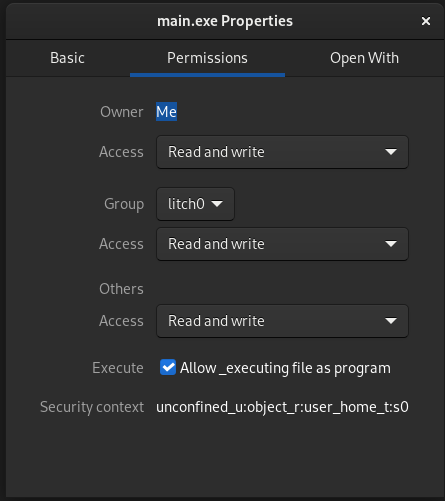
when I unpack the windows app version the permission is leaved as default:
image

@lmtr0 commented on GitHub (Nov 3, 2020): Also Something that doesn't make any sense: when I unpack the windows app version the permission is leaved as default: ![image](https://user-images.githubusercontent.com/57605930/97996769-efde8580-1dc6-11eb-87c8-7d5a0957964d.png)
Author
Owner

@lmtr0 commented on GitHub (Nov 3, 2020):

Here is what I did

            while (archive.MoveToNextEntry())
            {
                if (archive.Entry.IsDirectory)
                    Directory.CreateDirectory(Path.Join(targetDir, archive.Entry.Key));
                else
                {
                    string path = Path.Join(targetDir, archive.Entry.Key);
                    using (FileStream fs = File.Open(path, FileMode.Create, FileAccess.Write, FileShare.Inheritable))
                    {
                        archive.WriteEntryTo(fs);
                    }
                    FileInfo info = new FileInfo(path);
                    if (
                        (
                        RuntimeInformation.IsOSPlatform(OSPlatform.Linux) ||
                        RuntimeInformation.IsOSPlatform(OSPlatform.OSX)   ||
                        RuntimeInformation.IsOSPlatform(OSPlatform.FreeBSD) 
                        )
                        && info.Exists && info.Extension == string.Empty
                        )
                    {
                        ProcessStartInfo pinfo = new ProcessStartInfo("/usr/bin/chmod");
                        pinfo.Arguments = $" +x {path} ; echo \" DONE\"";
                        pinfo.UseShellExecute = true;
                        Process p = Process.Start(pinfo);
                        p.WaitForExit();
                        Console.WriteLine("Permission to execute was written");
                    }

                    Console.WriteLine((info.Attributes & FileAttributes.System) != 0);
                    Console.WriteLine(info.Attributes);
                    Console.WriteLine($"Extension {info.Extension}");
                }

                Console.WriteLine($"extracted: {archive.Entry.Key}");
                FileInfo f = new FileInfo(Directory.GetCurrentDirectory() + "/" + archive.Entry.Key);

            }
@lmtr0 commented on GitHub (Nov 3, 2020): Here is what I did ```CSharp while (archive.MoveToNextEntry()) { if (archive.Entry.IsDirectory) Directory.CreateDirectory(Path.Join(targetDir, archive.Entry.Key)); else { string path = Path.Join(targetDir, archive.Entry.Key); using (FileStream fs = File.Open(path, FileMode.Create, FileAccess.Write, FileShare.Inheritable)) { archive.WriteEntryTo(fs); } FileInfo info = new FileInfo(path); if ( ( RuntimeInformation.IsOSPlatform(OSPlatform.Linux) || RuntimeInformation.IsOSPlatform(OSPlatform.OSX) || RuntimeInformation.IsOSPlatform(OSPlatform.FreeBSD) ) && info.Exists && info.Extension == string.Empty ) { ProcessStartInfo pinfo = new ProcessStartInfo("/usr/bin/chmod"); pinfo.Arguments = $" +x {path} ; echo \" DONE\""; pinfo.UseShellExecute = true; Process p = Process.Start(pinfo); p.WaitForExit(); Console.WriteLine("Permission to execute was written"); } Console.WriteLine((info.Attributes & FileAttributes.System) != 0); Console.WriteLine(info.Attributes); Console.WriteLine($"Extension {info.Extension}"); } Console.WriteLine($"extracted: {archive.Entry.Key}"); FileInfo f = new FileInfo(Directory.GetCurrentDirectory() + "/" + archive.Entry.Key); } ```
Author
Owner

@lmtr0 commented on GitHub (Nov 3, 2020):

On linux, mac and FreeBSD(I believe, I have to check this info thought) the executable doesn' t have an extension, so I check for this and just give the file permission, But i would be cool If It can do it automatically

@lmtr0 commented on GitHub (Nov 3, 2020): On linux, mac and FreeBSD(I believe, I have to check this info thought) the executable doesn' t have an extension, so I check for this and just give the file permission, But i would be cool If It can do it automatically
Author
Owner

@adamhathcock commented on GitHub (Nov 4, 2020):

Thanks for posting your solution

@adamhathcock commented on GitHub (Nov 4, 2020): Thanks for posting your solution
Author
Owner

@lmtr0 commented on GitHub (Nov 4, 2020):

I am looking for something more cross platform, because this only work on Unix-like system, and I didn't test it on apple's systems, And I am Also looking for a solution for windows

@lmtr0 commented on GitHub (Nov 4, 2020): I am looking for something more cross platform, because this only work on Unix-like system, and I didn't test it on apple's systems, And I am Also looking for a solution for windows
Author
Owner

@lmtr0 commented on GitHub (Nov 10, 2020):

This seems to be the only option

@lmtr0 commented on GitHub (Nov 10, 2020): This seems to be the only option
Sign in to join this conversation.
1 Participants
Notifications
Due Date
No due date set.
Dependencies

No dependencies set.

Reference: starred/sharpcompress#424