mirror of
https://github.com/microsoft/terminal.git
synced 2026-09-25 08:24:54 +00:00
Feature Request: Start with multiple tabs open #1039
Closed
opened 2026-01-30 22:14:40 +00:00 by claunia
·
44 comments
No Branch/Tag Specified
main
dev/duhowett/stop-using-projection-for-control-innards
dev/duhowett/fhl-2026/remove-paste-hairpin-handler
dev/duhowett/win7-wpf-termcontrol-squash
dev/lhecker/20226-present-leaks
dev/duhowett/wpf-1-autoscroll-to-interactivity
dev/duhowett/wpf-3-swapchain-handle
dev/duhowett/wpf-2-midi-audio-timer
dev/migrie/overview-for-pr
dev/migrie/b/markdown-paste
dev/duhowett/padding-in-atlas
fix/german-split-pane-tooltip
release-1.25
dev/cazamor/sui-rejuv/fix-spaces
dev/migrie/per-window-final
dev/cazamor/selfhost/2026-08-31
dev/migrie/b/independent-animations
dev/pabhoj/wtcli
dev/cazamor/conhost/bugfix-a11y-find
dev/cazamor/conhost/bugfix-a11y-find-1.24
dev/lhecker/theme-quality-test
dev/lhecker/theme-quality
dev/cazamor/selfhost/sui-rejuv
dev/cazamor/fix/search-selection-off-by-one
dev/duhowett/even-more-builtin-glyphs
dev/crutkas/kitty-pr1
dev/cazamor/toast/activity
release-1.24
users/GitHubPolicyService/d8615b98-f5fa-4462-bf7f-c44a1cc12096
dev/cazamor/selfhost/2026-06-18
dev/migrie/f/new-profile-subcommand
dev/cazamor/sui-rejuv/profiles-v2
dev/duhowett/asan-for-all
dev/cazamor/sui-rejuv/profiles-new
dev/cazamor/sui-rejuv/expander-groups-new
dev/cazamor/auto-save/refresh-settings
feature/llm
dev/cazamor/auto-save/model/json-manager
dev/cazamor/auto-save/settings-model
dev/migrie/s/snippet-params
users/merlinbot/1es-pt-auto-baselining-pr
niels9001/inactive-tab-foreground
dev/cazamor/selfhost/2026-05-20-home
dev/duhowett/fzf-vcxproj
dev/cazamor/selfhost/2026-05-20
dev/cazamor/selfhost/2026-05-19
dev/cazamor/selfhost/2026-05-18
niels9001/fontweight-fixes
niels9001/page-transitions
dev/duhowett/fhl-2026/rewrite-paste-and-dragdrop-handling-writeinputstring
dev/migrie/f/overview-view
dev/cazamor/selfhost/2026-05-13
dev/cazamor/selfhost/2026-05-13-sui
dev/yeelam/f/BuildTest
dev/duhowett/hax/our-own-tabview
dev/cazamor/bugfix/close-scratchpad
dev/cazamor/selfhost/2026-05-05
dev/cazamor/selfhost/2026-05-04-workspaces
dev/cazamor/selfhost/2026-05-04
dev/lhecker/20149-hotfix
dev/lhecker/osc-7-wsl
dev/migrie/workspaces-real
dev/migrie/fhl-spring-2026/quake-4
dev/lhecker/pwsh-5.1
dev/cazamor/sui/dropdown-page
dev/cazamor/selfhost/2026-04-08
dev/cazamor/selfhost/2026-04-06
dev/migrie/fhl-spring-2026/confirmCloseOn
dev/cazamor/confirmCloseOn/dont-ask-me-again
dev/lhecker/inproc-conpty
dev/duhowett/powershell-module-supercharger
dev/cazamor/a11y/vt-seq-prototype
dev/migrie/fhl-spring26/osc777-2
dev/migrie/fhl-spring26/2/notification-infrastructure
dev/migrie/fhl-spring-2026/side-tabs
dev/cazamor/copilot/playground
dev/migrie/fhl-spring-2026/quake-3.5
dev/migrie/fhl-spring26/osc777
dev/migrie/fhl-spring26/unpackaged-notify
dev/migrie/fhl-spring26/bellStyle-notification
dev/migrie/fhl-spring26/activity-notifications
dev/migrie/fhl-spring-2026/x-open
dev/migrie/fhl-spring-2026/quake-5
dev/migrie/fhl-spring26/nextTab-filter
dev/duhowett/atlas-draw-d2d-dots-curlies-consistently
dev/lhecker/14165-conhost-font-size
dev/lhecker/ottosson-by-default
dev/duhowett/hax/unix-pty
dev/duhowett/hax/cmake
dev/lhecker/generate-256-colors
dev/lhecker/dcs-perf
dev/lhecker/1410-large-scrollback
dev/cazamor/selfhost/2026-02-10
dev/lhecker/11509-kitty-keyboard-protocol-wip
dev/cazamor/selfhost/2026-01-29
dev/lhecker/benchcat-fix
dev/duhowett/eoy-25/allow-set-foreground
release-1.23
dev/cazamor/bot/deprecate-area-atlasengine
dev/cazamor/selfhost/2026-01-20
dev/cazamor/selfhost/2026-01-12
dev/cazamor/spec/auto-save
dev/duhowett/fhl-2024/asciicast-recorder
dev/duhowett/eoy-25/underline-colors-in-atlas-bug
dev/duhowett/hax/serial-port-support
dev/duhowett/connection-utf8
dev/lhecker/fused-event
dev/lhecker/18928-wip
dev/duhowett/fhl-2024/clang
dev/duhowett/vt-cache-changes
dev/cazamor/uia-leak
release-1.22
dev/cazamor/selfhost/11-18-v3
dev/cazamor/selfhost/11-18
dev/duhowett/fhl-2025/bitmap-fonts
dev/duhowett/server-2025-vms
dev/duhowett/cant-believe-gotta-do-this-shit
dev/lhecker/dark-mode
dev/cazamor/sui/invert-cursor-color
dev/duhowett/fhl-2025/wt-command-palette-cmdpal-integration
dev/duhowett/fhl-2025/wt-json-relative-icons
dev/lhecker/fucking-service-locator
dev/duhowett/unicode-17
dev/duhowett/multi-blern
dev/lhecker/wellp2-alt
dev/duhowett/wellp2
dev/lhecker/1860-horizontal-scrollbar
dev/lhecker/fix-window-count
dev/cazamor/sui/tab-color-old
dev/duhowett/hax/conhost-icon
dev/duhowett/hax/sui-color-chip-border
dev/duhowett/hax/terminalsettings-as-a-lib-/with-types-merged-into-tsm
dev/pabhoj/page_control_input_cleanup
dev/duhowett/padding-in-atlas-rebase-20250729
dev/lhecker/attach-thread-input
dev/duhowett/portable-shader-members
msbuildcache-reenable
dev/cazamor/selfhost/1.24-2025-06-10
dev/cazamor/upgrade-settings-containers
dev/cazamor/sui/ext-page/powershell-stub
dev/cazamor/selfhost/1.24-2025-05-15
dev/pabhoj/sui_action_overhaul
dev/cazamor/selfhost/1.24-2025-05-06
dev/cazamor/selfhost/1.24-2025-04-29
dev/cazamor/sui/ext-page/lazy-load-objects
dev/cazamor/sui/ext-page/badge
dev/cazamor/selfhost/1.24
dev/lhecker/sdk-26100
dev/duhowett/testing
dev/jadelaga/VS-Pty.Net-1.22
dev/duhowett/fhl-2025/what-if-no-content-ids
dev/lhecker/18584-part2
dev/lhecker/get-lang-id
dev/duhowett/hax/clogs
release-1.21
dev/pabhoj/featurellm_fix_paste
dev/lhecker/grapheme-backup
dev/jadelaga/VS-Pty.netFixes
dev/lhecker/atlas-engine-compute-shader
dev/migrie/s/ai-providers
dev/lhecker/animated-cursor-wip
dev/pabhoj/featurellm_timeout
dev/lhecker/dark-mode-alt
dev/duhowett/osc-strided-table
dev/lhecker/bugbash
dev/pabhoj/featurellm_improve_parsing
dev/duhowett/coast-to-coast
dev/lhecker/curly-improvements
dev/duhowett/net8
dev/duhowett/onebranch-custom-pool
dev/lhecker/renderer-overhaul-2nd-attempt
dev/lhecker/cleanup
dev/cazamor/sui/confirmation-announcements
dev/lhecker/winconpty-cleanup
dev/duhowett/learn/rewrite-highlights
dev/migrie/b/no-nesting-when-searching
release-1.20
dev/duhowett/sel-2-spans
dev/lhecker/7118-cursor-color
dev/lhecker/remove-glyph-width
dev/lhecker/igfw-scroll-region
dev/lhecker/17656-win32im-double-encoding
dev/duhowett/fhl-2024/merge-idls
dev/duhowett/feed-forward-variables
dev/lhecker/remove-chrome-math
dev/duhowett/copylink
dev/duhowett/applicableactions
gh-readonly-queue/main/pr-17566-de50310295b7d92ed3d51f07974a2a945776bf9d
dev/lhecker/atlas-engine-stride-copy
dev/migrie/b/bump-nuget-in-c
dev/migrie/f/992-redux-redux
dev/migrie/f/filter-weight-input-too
dev/migrie/f/disable-nesting
dev/migrie/f/local-snippets-cleaner
dev/migrie/s/1553-mouse-bindings
selfhost-1.22-bugbash-2024-06-04
selfhost/1.22-bugbash-2024-06-04
dev/lhecker/15689-tab-drag-crash-fix
dev/migrie/f/sxnui-font-size-change
dev/migrie/f/local-snippets-on-action-refactor
dev/migrie/f/just-local-snippets
dev/migrie/save-input-patches
dev/migrie/f/md-pane-official
dev/migrie/base-pane
dev/migrie/fhl/tasks-pane
release-1.19
dev/migrie/b/17130-clear-marks-2
dev/migrie/b/17075-its-me-the-killer
dev/duhowett/i-figured-out-why-sometimes-the-publish-build-failed
dev/duhowett/nuget-publication-with-aad-app-id
selfhost-1.20
dev/duhowett/graph
dev/migrie/b/15803-activate-dont-copypasta
dev/duhowett/is-pgo-broken-because-of-sui-being-slower
dev/migrie/b/remove-terminaltab
dev/migrie/fhl/md-pane
dev/migrie/fhl/local-tasks-2024
dev/migrie/fhl/2024-inline-notebook
dev/duhowett/interface-projects
dev/duhowett/dead-loc
release-1.18
dev/migrie/fhl/2024-spring-merge-base
dev/duhowett/hax/l9
inbox
dev/migrie/14073-on-main
dev/duhowett/hax/conhost_dump_replay
user/lhecker/atlas-engine-srgb
dev/migrie/fhl/sxnui-tooltips-3
dev/migrie/7718-notifications-experiments
dev/migrie/fhl/7718-notifications
dev/migrie/fhl/7718-notifications-reboot
dev/lhecker/remove-gsl
dev/lhecker/16575-TerminateProcess
dev/lhecker/window-thread-climate-control
dev/lhecker/client-context-input-output-mode
dev/lhecker/ring-buffer-input-buffer
release-1.17
dev/lhecker/propsheet-fontdlg-refactor
dev/lhecker/renderer-overhaul
dev/pabhoj/test
dev/duhowett/chop
dev/lhecker/til-ulong-cleanup
dev/lhecker/til-env-cleanup
dev/migrie/f/16005-a11y-pane
dev/cazamor/a11y/fastpass
dev/migrie/b/15487-push-cwd
dev/migrie/b/15536-or-15219-idk
dev/duhowett/move-timers-down-into-core-interactivity-etc
dev/migrie/b/15812-broadcast-paste-two
dev/migrie/fhl-fall-2023/11162-quake-III-arena
dev/migrie/fhl-fall-2023/1620-automatic-tab-progress
dev/migrie/fhl-fall-2023/9992-quake-II
dev/migrie/fhl-fall-2023/9992-default-quake-settings
dev/migrie/fhl-fall-2023/9992-window-name-settings
dev/migrie/fhl-fall-2023/oceans
dev/lhecker/ColorScheme-improvements
dev/migrie/search-v2-v3
dev/migrie/pr-15717/its-dangerous-to-go-alone
dev/migrie/f/4768-taskbar-icons
dev/migrie/f/3121-tooltips
dev/duhowett/sticky-control
dev/duhowett/fix-tracing-2
dev/migrie/b/add-support-for-vsc-marks
dev/migrie/f/1860-this-is-literally-what-less-is-for
dev/migrie/s/5916-draft
dev/lhecker/tracy
dev/migrie/s/north-star
dev/cazamor/tag-youre-it
dev/migrie/f/12336-let-it-mellow
dev/migrie/f/now-with-more-compat-settings
dev/migrie/f/compatibility-sui
dev/duhowett/hax/wpf-atlas
dev/duhowett/fgb
dev/migrie/b/15487-relative-paths-are-hard
dev/lhecker/colrv1
loc-update
dev/migrie/fhl/dyndep-csharp
dev/migrie/fhl/dyndep
dev/migrie/fhl-clickable-send-input
dev/migrie/f/cwd-hijinks-5506-15173
dev/lhecker/openconsole-async-start
1.17
dev/migrie/bump-scratch
dev/migrie/f/3726-restartConnection
dev/migrie/b/cxn-restarting-attempt-1-backport
dev/migrie/b/9053-part-3-the-actual-doing-of-the-thing
dev/migrie/b/13388-focus-logger
dev/migrie/b/9053-part-4-i-guess-defterm
dev/migrie/oop/3/of-the-silmarils
of-the-darkening-of-valinor
dev/migrie/fhl/notebook-proto-000
dev/migrie/f/narrator-buddy
dev/migrie/mux-2.8.2-march-2023
dev/migrie/f/roast-mutton
dev/migrie/f/12861-preview-input
dev/lhecker/clang-tidy
dev/migrie/f/3121-wE-dOnT-hAvE-dEv-DaYs
dev/duhowett/compiler-compliance
dev/duhowett/i-have-a-burning-hatred-for-ntstatus-of-later-so-why-not-fix-it
dev/duhowett/shorthand-namespaces
dev/duhowett/rename-all-dlls
dev/duhowett/errordialog
dev/lhecker/gsl-narrow
dev/migrie/b/11522-dumb-idea
release-1.16
dev/miniksa/env
dev/duhowett/hax/embed-everything
dev/migrie/b/13388-attempt-003
dev/migrie/b/14512-test-research
dev/migrie/b/13388-attempt-002
dev/migrie/b/14464-copyOnSelect-moving-text
dev/migrie/s/thema-schema-for-1.16
dev/migrie/s/theme-pair-schema
dev/migrie/b/13388-experiments-1
dev/cazamor/spec/a11y-vt-seq
dev/migrie/b/14557-empty-folder-dropdown
dev/cazamor/spec/a11y-vt-seq-v2
release-1.15
dev/migrie/f/process-model-v3-test-0
dev/lhecker/vsconfig
dev/migrie/s/5000-presentation
dev/lhecker/5907-startup-perf
dev/lhecker/winrt-file-api-benchmark
dev/duhowett/128-bit-compiler
dev/migrie/fhl/more-shell-integration
dev/migrie/b/13388-experiments-0
dev/lhecker/til-to-ulong-improvements
dev/migrie/s/markdown-notebooks
dev/cazamor/a11y/nav-by-page
dev/cazamor/a11y/system-menu-support
dev/duhowett/no-private-registry-keys
dev/cazamor/wpf/uia-expose-enable-events
dev/cazamor/wpf/uia-events
extendAISpec
dev/migrie/fhl/clickSendInput
dev/migrie/fhl/save-command
dev/migrie/b/theme.profile
dev/migrie/b/13943-a-test-for-this
dev/migrie/oop/2/endgame
dev/duhowett/hax/merge_idl
dev/migrie/oop/2/infinity-war
dev/migrie/spellbot-cve
dev/cazamor/a11y-sev3/new-profile-announcement
dev/migrie/fhl/upside-down-mode
release-1.14
dev/migrie/f/9458-startupInfoToTerminal
dev/migrie/fhl/5916-triggers
dev/migrie/b/13523-context-menu
dev/migrie/b/6523-endpaint-outside-lock
dev/migrie/b/12413-OnUnhandledException
dev/lhecker/render-snapshot
dev/cazamor/1.15/scroll-to-point
dev/migrie/mux-2.8-aug-2022
dev/lhecker/lock-console-guard
dev/migrie/f/1504-final
dev/pabhoj/sui_follow_ups
dev/migrie/f/til-winrt.h
dev/cazamor/color-picker-redesign
dev/migrie/fhl/vscode-autocomplete-prototype
dev/migrie/f/1504-prototype
dev/migrie/oop/2/loki
dev/migrie/oop/2/wandavision
dev/migrie/b/8698-YOURE-OUT-OF-ORDER
fabricbot-configuration-migration
dev/migrie/b/12788-did-it-work
dev/migrie/b/localtests-ci-2022
dev/cazamor/1.14/replace-compareInBounds
dev/pabhoj/preview_string
dev/cazamor/ks/switchSelectionEndpoint
dev/migrie/oop/2/COM-ISwapChainProvider-attempt-1
dev/migrie/b/dxd-marker
release-1.13
dev/migrie/b/13066-for-defterm
dev/cazamor/revert-dwm
dev/migrie/b/13066-sw_flash_repeatedly
dev/migrie/b/no-cloaky-cloak
dev/migrie/f/apples-to-oranges
dev/migrie/f/no-custom-caption-btns
dev/migrie/f/10509-mica-and-transparent-titlebars
dev/migrie/b/12911-wpf-focus-fg
dev/migrie/titebar-colors
dev/lhecker/4015-cursor
dev/migrie/fhl/rgb-rainbow-window-frame
dev/migrie/fhl/scroll-marks-prototype
release-1.12
dev/miniksa/compliance
dev/migrie/f/default-icons
dev/migrie/fhl/10175-web-search-for-text
dev/migrie/fhl/menu-complete-prototype
dev/migrie/b/2988-merged-prototypes
dev/migrie/b/2988-niksa-msgs-prototype
dev/migrie/fhl/9583-colorSelection
dev/migrie/b/10609-sui-leak
dev/migrie/b/32-attempt-3
dev/migrie/release-1.12-rejuv-attempt-2
dev/migrie/demo-for-presentation
dev/migrie/b/32-but-im-here-for-12567
dev/duhowett/conpty_first_frame_blug
dev/migrie/b/11092-unfocused-acrylic-settings
dev/migrie/localtests-in-ci
dev/migrie/b/12356-attempt-2
dev/migrie/b/12353-with-null
dev/migrie/b/12387-trim-spaces
dev/migrie/b/5033-bad-start
dev/lhecker/12351-broken-locales
dev/migrie/b/8663-input-to-oem-crash
dev/migrie/b/11743-win10-opacity-is-hard
dev/migrie/f/ctrl-click-elevate
dev/migrie/b/12196-shim-localization
dev/lhecker/issue-4015-til-rect
dev/cazamor/eim/mvvm
dev/migrie/f/--elevate
dev/migrie/b/11668-i-think
dev/migrie/b/11994-wsl-mangline
dev/migrie/eim/3475-action-xmacros
dev/migrie/eim/incremental-build-000
dev/cazamor/a11y/fake-uia-data
dev/migrie/f/non-terminal-content-elevation-warning
dev/migrie/f/632-on-warning-dialog
dev/lhecker/rgba
dev/migrie/b/8480-keybindings-in-tabs
release-1.11
dev/migrie/b/11561-dead-ends
dev/migrie/oct-21-roadmap-update
dev/migrie/fhl/adaptive-card-extension
dev/cazamor/test/11440
dev/migrie/f/warning-dlg-automation
dev/migrie/b/1.12-crash-on-exit
dev/migrie/b/11146-next-tab-in-cmdpal
release-1.10
dev/migrie/5ff9a24-and-75e2b5f
dev/duhowtt/hax/cpal-jumplist-async
dev/lelian/actionid/1
dev/migrie/f/just-elevated-state
dev/lhecker/terminal-settings-cleanup
dev/migrie/gh-10824
dev/pabhoj/cursor_light
dev/migrie/oop/wandavision
dev/migrie/oop/endgame
dev/migrie/oop/infinity-war
dev/lhecker/app-state-actually-hidden
dev/migrie/b/6160-dynamic-default-warning
dev/mgirie/b/more-nchhittest-ideas
dev/migrie/b/9320-interfacial-separation
cinnamon/fhl/find-contextmenu
dev/lhecker/wsl-distro-generator-cleanup
dev/migrie/b/10875-but-more-clever
dev/migrie/b/broken-globalsummon-overloading
dev/duhowett/hax/rle-row
dev/migrie/fhl-2021/cmdpal-select-list
dev/migrie/fhl-2021/differential-pixel-shading
dev/duhowett/hax/no-writable-glyphat
dev/migrie/fhl-2021/more-shader-variables
dev/migrie/titlebar-shenannigans
dev/miniksa/win10_font_matching
dev/lhecker/conhost-oom
dev/migrie/b/10332-less-snappy-scrolling
dev/migrie/b/7422-1px-top-border
release-1.9
dev/cazamor/move-scratch
release-1.8
dev/miniksa/manifest_2
release-1.6
release-1.7
dev/migrie/oop/the-whole-thing
dev/migrie/oop/connection-factory
dev/migrie/f/quake-dropdown-2
dev/miniksa/rle2
dev/migrie/f/quake-toCurrent-experiments-2
dev/migrie/f/quake-toCurrent-experiments
dev/migrie/f/quake-dropdown
dev/cazamor/actions-page/template
dev/duhowett/hax/cursor_stamp_foreground_background
dev/migrie/f/1860-hey-might-was-well-hack-during-a-hackathon
dev/migrie/oop-terminal.control-split-control
dev/duhowett/hax/build-with-wholearchive
dev/cazamor/spec/tsm-actions-temp
dev/migrie/oop-tear-apart-control
dev/migrie/oop-scratch-3
dev/cazamor/sui/bugfix-reload-crash
dev/migrie/f/xmacro
dev/cazamor/sui/proto/profile-nav-view
dev/migrie/f/name-windows
dev/migrie/dol/messing-with-shaders-take-1
release-1.5
dev/cazamor/sui/inheritance-hyperlinks-test
dev/migrie/r/commandline-lib-002
dev/migrie/f/com.fabrikam.toaster
dev/cazamor/adaptive-cards-prototype
dev/migrie/f/commandline-lib
dev/miniksa/zipzoom2
dev/migrie/f/remote-commandlines
dev/migrie/f/632-elevated-profiles
dev/migrie/oop-broker-000
dev/migrie/fix-pr-7015
dev/duhowett/clang
dev/miniksa/input_tests_2
dev/miniksa/input2
dev/migrie/oop-rpc-000
release-1.4
dev/migrie/oop-mixed-elevation-1
dev/migrie/oop-window-content-1
cinnamon/open-json
dev/miniksa/input_tests
dev/duhowett/hax/tsm-graphviz
dev/miniksa/input
dev/duhowett/hax/caption_buttons
release-1.3
dev/cazamor/a11y/expand-line-under-viewport
dev/cazamor/acc/ch/word-nav-perf
dev/cazamor/spec/settings-ui-architecture-draft
dev/duhowett/hax/tap_upgrade
dev/migrie/f/pane-exit-animation
release-1.2
dev/migrie/move-lib-up-and-dll-down
release-1.1
dev/migrie/f/branch-2-backup
dev/migrie/f/settings-getters-only
dev/duhowett/hax/command_palette_search
dev/migrie/f/6856-let-terminalpage-expandcommands
dev/migrie/f/theming-2020
dev/migrie/oop-scratch-4
dev/duhowett/hax/punchout
dev/migrie/s/action-ids
dev/migrie/f/lets-just-generate-these
dev/migrie/oop-scratch-2
dev/miniksa/dcomp
dev/miniksa/gotta_go_fast_spsc
dev/miniksa/gotta_go_fast
dev/miniksa/perf_skip_checks
dev/miniksa/perf_buffer_dig
dev/migrie/s/1203-cursorTextColor
dev/migrie/f/fix-intellisense-i-guess-backup
release-1.0
dev/migrie/f/execute-commandlines
dev/migrie/f/2046-Command-Palette-v2
dev/migrie/b/6421-passthrough-alt
dev/migrie/b/moving-focus-is-hard
dev/miniksa/set
dev/migrie/f/1203-phase-1
dev/migrie/f/get-localtests-in-ci
dev/cazamor/drag-panes
dev/cazamor/tile-background
release-0.11
dev/duhowett/dev/duhowett/hax/appstate_remember
dev/duhowett/hax/wpf_win_8_hax
dev/migrie/b/3088-weird-exact-wrap-resize
release-0.10
dev/migrie/b/4591-custom-scaling-bug
dev/duhowett/hax/attr_smuggling
dev/migrie/b/5161-mingw-vim-fix
dev/miniksa/dx_bitmap
dev/migrie/b/1503-try-messing-with-cooked-read
dev/duhowett/eyebeam
dev/migrie/b/5113-experiments
dev/duhowett/hax-selection-exclusive
dev/migrie/f/more-vt-renderer-tracing
dev/miniksa/bitmap
dev/duhowett/wprp
dev/miniksa/bitmap-mad-with-power
dev/migrie/f/resize-quirk
dev/migrie/f/reflow-buffer-on-resize-002
wpf-renderer-revert
dev/miniksa/draw
release-0.9
dev/miniksa/tabs-color-fix
dev/miniksa/4309
dev/migrie/f/just-wrapping
dev/migrie/b/3490-try-another-resize-algo
release-0.8
dev/migrie/b/3490-a-simpler-resize
dev/migrie/b/3490-resize-down
dev/miniksa/4254
dev/migrie/f/conpty-wrapped-lines-2
dev/migrie/b/be-better-at-hiding
dev/migrie/f/3327-xaml-theming-proto
dev/miniksa/gardening2
release-0.7
dev/duhowett/conpty-flags
dev/migrie/f/603-vintage-opacity
dev/migrie/PR#3181-comments
dev/duhowett/font-64
release-0.5
dev/migrie/b/663-paste-lf-always
dev/migrie/b/2011-reordered-fallthrough-strings
dev/migrie/b/411-init-tab-stops
dev/migrie/b/json-patching-is-hard
dev/migrie/b/2455-try-getting-tests-working
dev/migrie/b/1223-change-256-table
dev/migrie/f/2171-openterm.cmd
dev/migrie/f/drag-panes
dev/migrie/f/2046-command-palette
release-0.3
dev/miniksa/manager
dev/migrie/f/non-terminal-panes
dev/migrie/f/passthrough-2019
dev/miniksa/shared_pch
dev/migrie/f/1897-less-duplicated-work
release-0.2
dev/cazamor/mcs/viewport-selection
dev/duhowett/version_hack
v1.25.1912.0
v1.24.11911.0
v1.25.1322.0
v1.24.11321.0
v1.25.1241.0
v1.25.1171.0
v1.25.923.0
v1.24.10921.0
v1.25.622.0
v1.24.10621.0
v1.24.10212.0
v1.23.20211.0
v1.24.3504.0
v1.23.13503.0
v1.24.2812.0
v1.23.12811.0
v1.24.2682.0
v1.23.12681.0
v1.24.2372.0
v1.23.12371.0
v1.23.12102.0
v1.22.12111.0
v1.23.11752.0
v1.22.11751.0
v1.22.11141.0
v1.23.11132.0
v1.23.10732.0
v1.22.10731.0
v1.21.10351.0
v1.22.10352.0
v1.23.10353.0
v1.22.3232.0
v1.21.3231.0
v1.22.2912.0
v1.21.2911.0
v1.22.2702.0
v1.21.2701.0
v1.22.2362.0
v1.21.2361.0
v1.21.1772.0
v1.20.11781.0
v1.21.1382.0
v1.20.11381.0
v1.21.1272.0
v1.20.11271.0
v1.20.11215.0
v1.19.11213.0
v1.20.10822.0
v1.19.10821.0
v1.20.10572.0
v1.19.10573.0
v1.20.10303.0
v1.19.10302.0
v1.18.10301.0
v1.20.10293.0
v1.19.10292.0
v1.18.10291.0
v1.18.3181.0
v1.19.3172.0
v1.19.2831.0
v1.18.2822.0
v1.19.2682.0
v1.18.2681.0
v1.18.1462.0
v1.17.11461.0
v1.18.1421.0
v1.17.11391.0
v1.17.11043.0
v1.16.10261.0
v1.17.1023
v1.16.10231.0
v1.15.3465.0
v1.16.3463.0
v1.15.2712.0
v1.15.2874.0
v1.16.2641.0
v1.16.2523.0
v1.15.2524.0
v1.15.2282.0
v1.14.2281.0
v1.14.1962.0
v1.15.2002.0
v1.15.2001.0
v1.15.1862.0
v1.14.1861.0
v1.14.1451.0
v1.14.1432.0
v1.13.11431.0
v1.13.10983.0
v1.12.10982.0
v1.13.10733.0
v1.12.10732.0
v1.13.10395.0
v1.12.10393.0
v1.13.10336.0
v1.12.10334.0
v1.12.3472.0
v1.11.3471.0
v1.12.2931.0
v1.12.2922.0
v1.11.2921.0
v1.11.2731.0
v1.10.2714.0
v1.11.2421.0
v1.10.2383.0
v1.10.1933.0
v1.9.1942.0
v1.9.1523.0
v1.8.1521.0
v1.9.1445.0
v1.8.1444.0
v1.8.1092.0
v1.7.1091.0
v1.8.1032.0
v1.7.1033.0
v1.7.572.0
v1.6.10571.0
v1.5.10411.0
v1.6.10412.0
v1.6.10272.0
v1.5.10271.0
v1.5.3242.0
v1.4.3243.0
v1.5.3142.0
v1.4.3141.0
v1.4.2652.0
v1.3.2651.0
v1.3.2382.0
v1.2.2381.0
v1.1.2233.0
v1.2.2234.0
v1.1.2021.0
v1.2.2022.0
v1.1.1812.0
v1.0.1811.0
v1.1.1671.0
v1.0.1401.0
v0.11.1333.0
v0.11.1251.0
v0.11.1191.0
v0.11.1111.0
v0.11.1121.0
v0.10.781.0
v0.10.761.0
v0.9.433.0
v0.8.10261.0
v0.8.10091.0
v0.7.3451.0
v0.7.3382.0
v0.7.3291.0
v0.7.3252.0
v0.6.3181.0
v0.6.2951.0
v0.6.2911.0
v0.5.2762.0
v0.5.2761.0
v0.5.2681.0
v0.5.2661.0
v0.3.2321.0
v0.4.2342.0
v0.4.2382.0
v0.3.2171.0
v0.3.2142.0
v0.2.1831.0
v0.2.1715.0
v0.2.1703.0
v0.1.1621.0
v0.1.1581.0
v0.1.1502.0
v0.1.1431.0
v0.1.1361.0
v0.1.1093.0
v0.1.1161.0
v0.1.1204.0
experiment-master
v0.1.1025.0
experiment-OutsideBuild
broken-tabstops
RS2-final
v0.1.1002.0
experiment-rel-windows-inbox
experiment-f-ServerApp
v0.1.1211.0
1904.29002
1810.02002
1708.14008
Labels
Clear labels
⛺ Reserved
A11yCO
A11yMAS
A11ySev1
A11ySev2
A11ySev3
A11yTTValidated
A11yUsable
A11yVoiceAccess
A11yWCAG
Area-Accessibility
Area-AtlasEngine
Area-AzureShell
Area-Build
Area-Build
Area-Chat
Area-CmdPal
Area-CodeHealth
Area-Commandline
Area-CookedRead
Area-DefApp
Area-Extensibility
Area-Fonts
Area-GroupPolicy
Area-i18n
Area-Input
Area-Interaction
Area-Interop
Area-Localization
Area-Output
Area-Performance
Area-Portable
Area-Quality
Area-Remoting
Area-Rendering
Area-Schema
Area-Server
Area-Settings
Area-SettingsUI
Area-ShellExtension
Area-ShellExtension
Area-ShellExtension
Area-Suggestions
Area-Suggestions
Area-TerminalConnection
Area-TerminalControl
Area-Theming
Area-UserInterface
Area-VT
Area-Windowing
Area-WPFControl
AutoMerge
Blocking-Ingestion
Culprit-Centennial
Culprit-WinUI
Disability-All
Disability-Blind
Disability-LowVision
Disability-Mobility
External-Blocked-WinUI3
Fixed
Gathering-Data
good first issue
HCL-E+D
HCL-WindowsTerminal
Help Wanted
Impact-Compatibility
Impact-Compliance
Impact-Correctness
Impact-Visual
In-PR
InclusionBacklog
InclusionBacklog-Windows TerminalWin32
InclusionCommitted-202206
Issue-Bug
Issue-Docs
Issue-Feature
Issue-Feature
Issue-Question
Issue-Samples
Issue-Scenario
Issue-Task
Needs-Attention
Needs-Author-Feedback
Needs-Bisect
Needs-Discussion
Needs-Repro
Needs-Tag-Fix
Needs-Tag-Fix
Needs-Triage
No-Recent-Activity
Priority-0
Priority-1
Priority-2
Priority-3
Product-Cmd.exe
Product-Colortool
Product-Colortool
Product-Colortool
Product-Conhost
Product-Conpty
Product-Meta
Product-Powershell
Product-Terminal
Product-WSL
pull-request
Resolution-Answered
Resolution-By-Design
Resolution-Duplicate
Resolution-External
Resolution-Fix-Available
Resolution-Fix-Committed
Resolution-No-Repro
Resolution-Won't-Fix
Severity-Blocking
Severity-Crash
Severity-DataLoss
spam
this-will-be-a-breaking-change
Tracking-External
WindowsTerminal_Win32
Work-Item
zAskModeBug
zInbox-Bug
Mirrored from GitHub Pull Request
Milestone
No items
No Milestone
Projects
Clear projects
No project

Notifications
Due Date
No due date set.
Dependencies
No dependencies set.
Reference: starred/terminal#1039
Reference in New Issue
Block a user
Blocking a user prevents them from interacting with repositories, such as opening or commenting on pull requests or issues. Learn more about blocking a user.
Delete Branch "%!s()"
Deleting a branch is permanent. Although the deleted branch may continue to exist for a short time before it actually gets removed, it CANNOT be undone in most cases. Continue?
Originally created by @afalk42 on GitHub (May 13, 2019).
When editing the profiles.json settings file, it is currently not possible to specify more than one defaultProfile. As a result, it is not possible to have the Terminal automatically start up with more than one tab. It would be extremely convenient, to be able to specify the 3 or 4 most commonly used command-line environments to all open up in separate tabs every time Terminal is started. This would e.g. give users the ability to always open up a Command Prompt, PowerShell, and Ubuntu shell all at the same time.
@DHowett-MSFT commented on GitHub (May 14, 2019):
I'll repurpose this one to be the main feature request tracker for starting with multiple tabs.
@mdtauk commented on GitHub (May 14, 2019):
If this is more of a niche issue, perhaps there could be a json file in a folder to enter a list of profiles to load on startup? Or perhaps it could remember the last session before the app was closed?
@afalk42 commented on GitHub (May 14, 2019):
@mdtauk there is already the ability to add multiple profiles to the profiles.json configuration file, but you can currently only specify one of them as your defaultProfile, which is why you can only start with one tab
@mdtauk commented on GitHub (May 14, 2019):
Yes I am aware of the profiles.json, and I am sure that will get a GUI in the settings for the app soon.
But you could change defaultProfile to have a list of profiles I suppose.
Maybe in the GUI there could be an option in each profile's customisation page:
[✔] Include this profile when starting Windows Terminal
@Kryptos-FR commented on GitHub (May 14, 2019):
I'd rather have those settings spit into two different files:
profiles.jsonis portable between machine (and maybe users), while the default(s) could be user dependent (sodefaultProfiles.json?).@zadjii-msft commented on GitHub (May 14, 2019):
Lets try to reel things in before the discussion gets out of hand - a couple things mentioned here deserve their own threads to discuss them.
This is now #766
This is #641
I'm all for adding a setting for which tabs/panes & profiles to open with, though we'll probably need to keep "default profile" as a single profile GUID.
@glen-84 commented on GitHub (May 22, 2019):
I don't think that this is necessary if #766 is implemented. It would be more than covered by session resumption features.
There's only one small edge case that I can think of:
However:
@afalk42 Would #766 support your use case?
@afalk42 commented on GitHub (May 22, 2019):
Hi @glen-84
Yes, this would be sufficient for my narrow use case.
But think about the analogy with multi-tabbed web browsers for a moment: there we typically give users the choice of starting a new session either with a fixed list of tabs, or with the same tabs that were available when the browser was closed.
So in an ideal world I would love to see both #756 and #766 implemented.
But if time constraints only allow for one, then #766 appears to be more useful to more users due to simplicity of usage.
@WSLUser commented on GitHub (May 29, 2019):
I would second this. Whichever is the easier to tackle first should get out the door but the terminal is becoming a browser for CLI stuff basically (we have tabs just like an actual browser and can select different "websites" aka console apps) and thus needs to act as one accordingly.
@gregchamblin commented on GitHub (Jul 3, 2019):
I would think the easiest way to implement this, and feel free to correct me if I am thinking to simplistically here, is to make defaultProfile a list, and iterate over it. If that is one tab or twelve.
I could also see a usefulness instead of opening with multiple profiles, just make one Hotkey open multiple profiles. Then, I could setup multiple (hidden?) profiles for each project I am working on. To me, this method would be preferred.
@joe-mills commented on GitHub (Jul 17, 2019):
I would like a higher level grouping like a terminal workspace that reflects the project I'm working on in VS Code e.g. I would open a tab for dotnet API, ubuntu Angular, dotnet STS server etc.
It seems like that's the kind of thing that could be developed as a Windows Terminal extension and installed from the terminal extension store.
@WSLUser commented on GitHub (Jul 17, 2019):
@joe-mills that sounds like a separate feature request and would require Windows Terminal to implement an API similar to VS Code to enable extensions. This is doable but effort. I wouldn't even consider trying to implement that until we at least have a stable v1 out the door. You'd constantly be having to change the way the API behaves until everything is settled down enough to know, "this is our baseline".
@joe-mills commented on GitHub (Jul 17, 2019):
@WSLUser yes I guess I was just agreeing that profile groups would be nice but thinking its probably too early to start adding these kind of quality of life features in before v1.
It seemed like the extensions community was a great proving ground for features in vscode and the terminal app does lend itself to some kind of extension management system. Really enjoying the terminal right now though.
@DHowett-MSFT commented on GitHub (Oct 8, 2019):
from @zadjii-msft in https://github.com/microsoft/terminal/issues/3037#issuecomment-537940097
@ItsMeBrianD commented on GitHub (Oct 24, 2019):
To throw in my two cents on the comment above, I found this thread looking for a way to launch 3 tabs in a single shortcut, while opening another with a separate shortcut. For my dev environment I need to have 3+ cli programs running [klink (kitty cli), iisexpress, and ngrok], and I've just configured these to each be separate tabs, it would be great if I could create a shortcut to open those three, and another to open my WSL tab, so I don't have to choose one or the other.
@danielniccoli commented on GitHub (Nov 12, 2019):
@gregchamblin Yeah, this would suffice in my opinion.
Simply something like that:
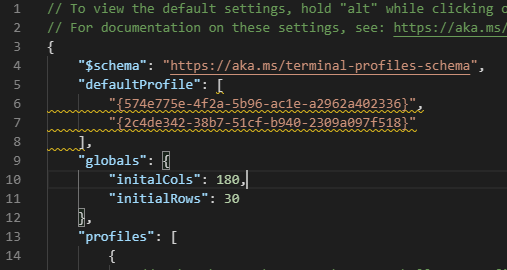
I think that renaming the setting
defaultProfiletodefaultProfilesand have them accept a list of profiles should be the first thing to to. This should be a quick fix (said the amateur programmer 😛).For bullet points two and three, I think we should move a few terms around. What today is considered a profile, I would rename to shell. Then I would use profiles to combine multiple shells. In a profile you could either define all of those things mentioned in the bullet points, or tell Terminal to open the last session.
The dropdown should be changed to display profiles, but also shells. Shells should be hidable from the list, in case they are only used in profiles.
With the quick concept I described above, this would not be possible as a shell is just the pure look and feel of exactly the described shell. You would not be able to nest a shell in a shell, that wouldn't make sense anymore. And profiles cannot be nested in themselves.
A quick example
That's only a quick and rough idea.
tabLayoutandwindowLayoutI decided to define theshellsonly in theprofilesection, instead of in thetabLayoutsection. That way theshellsalways has the same place regardles of what you're configuring. It also allows for quick reordering shells while keeping the layout you defined.@bormm commented on GitHub (Jan 9, 2020):
I want to extend the "shell" and multiple profiles discussion with my use case:
I want to open multiple powershell core windows with only one difference: they should have a different startup directory. I don't think that the current structure of profiles that contain all settings are appropriate for that, because that would produce a lot of duplicated settings. Maybe they is some need for profile or shell inheritance, so the "pwsh - directory A" and "pwsh - directory B" can inherit from the "pwsh - default" profile/shell.
Of course that would be an other complex issue, but I wanted to mention such use case for multiple startup "profiles".
@zadjii-msft commented on GitHub (Jan 9, 2020):
@bormm I think we're planning on using some derivative of the commandline args functionality described in #3495/#4023 to help enable this functionality. With the wt commandline, you'll be able to do something like
wt new-tab -p pwsh -d path/A/ ; new-tab -p pwsh -d /another/pathand open two tabs inpath/A/and/another/path. Does that sound like what you're looking for?@bormm commented on GitHub (Jan 13, 2020):
@zadjii-msft No, because I want be able to open a tab with this directory at any time also in a existing WT instance. But I was mentioned to that ticket, what would be match my requirements: #3818
@zadjii-msft commented on GitHub (Jan 13, 2020):
Ah okay, yea that's the issue you should follow. I've been working on #607 for a while now, so maybe I'm a little prone to thinking that it'll solve everything 😝
@WSLUser commented on GitHub (Jan 13, 2020):
Having more than one way to support a feature or subset of a feature can't be a bad thing. That just gives people choices. In some cases, the use of wt.exe may be good enough and easier to do. In other cases #3818 may be the better option in which your current work might help speed up the process of resolving.
@ladal1 commented on GitHub (Feb 19, 2020):
I have to agree with @WSLUser that more solutions are better, since @DHowett-MSFT forwarded me to the command-line args in my issue I have started using them, but it does feels more like a good hack around the problem, rather then a full solution. You lose a some comforts that terminal has (live tile in start menu, starting with simply searching terminal and pressing enter etc...)
@zadjii-msft commented on GitHub (Feb 19, 2020):
I think commandline args is more of a stop-gap for now - we're not intending on that being the singular long term solution to this problem. The idea I'm working with (at least in my own head) is to use the commandline args from #4023 to implement this functionality. Possibly as some combination of letting a profile use the arguments to launch multiple tabs/panes at once, and/or letting the user set a
startupCommandlineto override thedefaultProfileon first launch@zadjii-msft commented on GitHub (May 22, 2020):
Okay I've been noodling on this a bit.
I'm not totally sure that we should have "grouped profiles" - a profile that specifies a bunch of other profiles. That might lead to some unnecessary confusion, especially around the mixing of a "shell" profile and a "group" profile. There's a few scenarios we're looking at here:
So I think the first one could be satisfied with a
defaultLaunchCommandlineinstead of adefaultProfile, and when that's present, uses that when there's no commandline provided at runtime.The second will be satisfied by adding "a action that can run a bunch of actions" #5970. Then the user can just run a bunch of things when they press a keybinding.
The third will be satisfied by the "new tab menu customization" #5888 that will let users slam arbitrary actions into that menu. These menu actions could include the "run a bunch of actions" action that is used in the second.
Granted, all this is a showerthought, that needs to be linked to the right threads. Maybe we don't want
defaultLaunchCommandline, butdefaultActions, that uses a bunch of actions instead of a commandline?@xmha97 commented on GitHub (Jun 18, 2020):
+1
@7ranceaddic7 commented on GitHub (Aug 28, 2020):
Where is this? What is required to move it forward?
@zadjii-msft commented on GitHub (Aug 28, 2020):
Nothing really. Someone needs to probably take my last comment in this thread and turn that into a formal spec (just to make sure the team's on board with the proposed implementation). Once that's approved, it's probably trivial to implement the
defaultLaunchCommandline. The #1571 half of this might be harder to implement, but it's already got an approved spec, so that's not a big concern.Really the main thing that this is blocked on is dev time. There's only so many engineers on the team and there's 1000+ issues on the backlog.
@7ranceaddic7 commented on GitHub (Aug 28, 2020):
New to this, but I would really appreciate this feature. So, I'll mull it over and advance this.
(google: feature specifications, I did say I was new, but not afraid to jump in the deep-end. )
Thank you for the response.
@joe-mills commented on GitHub (Aug 28, 2020):
I'm now just using a shortcut for each project with the wt args I need to open all of the tabs in the right profile, layout, starting directories etc. It works well.
@alexbalez commented on GitHub (Sep 15, 2020):
I did this as well to replicate this functionality.
C:\Users[name]\AppData\Local\Microsoft\WindowsApps\wt.exe ; new-tab -p "Ubuntu"; focus-tab -t 0
That will start with two tabs: one with Powershell focused and Ubuntu in the background.
@GordonSmith commented on GitHub (Jan 5, 2021):
Formal Spec: Enhance
defaultProfileto support both astring(current) and astring array(opening 1 tab per item) proposed.All the other comments are "over engineering" and should be moved to new issues?
@zadjii-msft commented on GitHub (Jan 5, 2021):
What if I want to open with multiple panes, not just multiple tabs? How would I specify that then?
If
defaultProfilewas an array of profiles, then what happens when I click the new tab button? Which profile is opened?I don't think these kinds of questions are "over engineering" 😄
@GordonSmith commented on GitHub (Jan 5, 2021):
@zadjii-msft multiple panes would be a different issue request surely.
Clicking the newTab button could open a new terminal matching the one to its left (but yes I do take your point :)).
But this is an issue opened May 2019 with what appears to be a straightforward request "Start with multiple tabs open" and its frustrating when it gets derailed with additional capabilities (panes).
...rant over...
@zadjii-msft commented on GitHub (Jan 5, 2021):
Ah but see, part of my job is to make sure we design holistic solutions to problems. When there's such a obvious follow up feature, then it makes sense to think of not how to just solve the issue at hand, but also the follow up, in a single design. I don't want to have to build a solution for opening with multiple tabs, then build a solution for opening with multiple panes, then a solution for tabs, panes, and other actions, if it's clear from the onset where we want this feature to go.
We've only got so many engineers on the team, so there's only so much we can work on at a time. This is still in-scope for 2.0, so don't worry, be patient! This will come SoonTM
@joe-mills commented on GitHub (Jan 5, 2021):
Tabs contain panes so surely its a necessary part of the original "Start with multiple tabs open". I think it gets confusing because currently profiles don't support multiple shells. The little plus button or launcher opens a profile as a tab or a pane which only makes sense when a profile is a single shell.
All of the wt arguments to configure how a tab and panes open are already available for what most want, it seems like its more of a UI challenge.
@GordonSmith commented on GitHub (Jan 5, 2021):
@joe-mills if you can specify several panes for a single profile, then that will just work? If not then I would suggest making that a different issue.
Formal Spec II:
homeProfiles, an optional string array of profile guids which will open as individual tabs on terminal launch.defaultProfile).@joe-mills commented on GitHub (Jan 5, 2021):
@GordonSmith I guess this might sound like a stupid question but what is a profile supposed to represent?
@zadjii-msft commented on GitHub (Jan 8, 2021):
Discussion that I had with @DHowett that I don't want to forget:
"startupActions": "new-tab ; split-pane -p PowerShell"today. This would be a "proceedural" style solution"startupLayout": { "tabs": [ {"panes": { "profile": "PowerShell", "size": 0.50 }, { "profile": "Ubuntu", "size": 0.50 } } ] }. (typing that out did feel gross though)@Don-Vito commented on GitHub (Jan 11, 2021):
@zadjii-msft - what should be the behavior of
startupActions(and of additional approaches) when we get command line arguments as well:startupActions. If so@zadjii-msft commented on GitHub (Jan 12, 2021):
I'd expect that not by providing commandline args, that would override the
startupActions. Sowt new-tabwould still just open a single tab with the default profile, even if there's a longerstartupActionsset. That way you could still manually get a specific layout, even withstartupActionsset. I'm thinking maybe some tool out there wants to ship a helper script to open a WT window with some pre-configured tabs. By overriding thestartupActionswith the commandline that's passed in, we allow this scenario to still work as expected.We had discussed limiting
startupActionsto the actions that are also commandline subcommands, because those are the ones that we know will work during startup.I believe we also at one point discussed that
startupActionsshould also use the implicitnew-tab- if the first command isn'tnew-tab, we should insert one at the start.@Don-Vito commented on GitHub (Jan 12, 2021):
Makes sense! If I you are OK with it, I will try to add something like this.. Sounds straightforward (famous last words).
@Makishima commented on GitHub (Jan 12, 2021):
Just want to show up my case:
I'm interested in to start wt with few tabs - wsl and PS but when hit 'New tab' I'm often want to open just new wsl only
@zadjii-msft commented on GitHub (Mar 26, 2021):
You know,
startupActionsis a perfectly good answer to this problem. I don't think this needs to be left open any longer.@maicol07 commented on GitHub (Mar 26, 2021):
There are actually two issues: