mirror of
https://github.com/microsoft/terminal.git
synced 2026-09-25 16:34:42 +00:00
Restore previously closed session's state (Buffer contents) #1279
Closed
opened 2026-01-30 22:20:51 +00:00 by claunia
·
62 comments
No Branch/Tag Specified
main
dev/duhowett/stop-using-projection-for-control-innards
dev/duhowett/fhl-2026/remove-paste-hairpin-handler
dev/duhowett/win7-wpf-termcontrol-squash
dev/lhecker/20226-present-leaks
dev/duhowett/wpf-1-autoscroll-to-interactivity
dev/duhowett/wpf-3-swapchain-handle
dev/duhowett/wpf-2-midi-audio-timer
dev/migrie/overview-for-pr
dev/migrie/b/markdown-paste
dev/duhowett/padding-in-atlas
fix/german-split-pane-tooltip
release-1.25
dev/cazamor/sui-rejuv/fix-spaces
dev/migrie/per-window-final
dev/cazamor/selfhost/2026-08-31
dev/migrie/b/independent-animations
dev/pabhoj/wtcli
dev/cazamor/conhost/bugfix-a11y-find
dev/cazamor/conhost/bugfix-a11y-find-1.24
dev/lhecker/theme-quality-test
dev/lhecker/theme-quality
dev/cazamor/selfhost/sui-rejuv
dev/cazamor/fix/search-selection-off-by-one
dev/duhowett/even-more-builtin-glyphs
dev/crutkas/kitty-pr1
dev/cazamor/toast/activity
release-1.24
users/GitHubPolicyService/d8615b98-f5fa-4462-bf7f-c44a1cc12096
dev/cazamor/selfhost/2026-06-18
dev/migrie/f/new-profile-subcommand
dev/cazamor/sui-rejuv/profiles-v2
dev/duhowett/asan-for-all
dev/cazamor/sui-rejuv/profiles-new
dev/cazamor/sui-rejuv/expander-groups-new
dev/cazamor/auto-save/refresh-settings
feature/llm
dev/cazamor/auto-save/model/json-manager
dev/cazamor/auto-save/settings-model
dev/migrie/s/snippet-params
users/merlinbot/1es-pt-auto-baselining-pr
niels9001/inactive-tab-foreground
dev/cazamor/selfhost/2026-05-20-home
dev/duhowett/fzf-vcxproj
dev/cazamor/selfhost/2026-05-20
dev/cazamor/selfhost/2026-05-19
dev/cazamor/selfhost/2026-05-18
niels9001/fontweight-fixes
niels9001/page-transitions
dev/duhowett/fhl-2026/rewrite-paste-and-dragdrop-handling-writeinputstring
dev/migrie/f/overview-view
dev/cazamor/selfhost/2026-05-13
dev/cazamor/selfhost/2026-05-13-sui
dev/yeelam/f/BuildTest
dev/duhowett/hax/our-own-tabview
dev/cazamor/bugfix/close-scratchpad
dev/cazamor/selfhost/2026-05-05
dev/cazamor/selfhost/2026-05-04-workspaces
dev/cazamor/selfhost/2026-05-04
dev/lhecker/20149-hotfix
dev/lhecker/osc-7-wsl
dev/migrie/workspaces-real
dev/migrie/fhl-spring-2026/quake-4
dev/lhecker/pwsh-5.1
dev/cazamor/sui/dropdown-page
dev/cazamor/selfhost/2026-04-08
dev/cazamor/selfhost/2026-04-06
dev/migrie/fhl-spring-2026/confirmCloseOn
dev/cazamor/confirmCloseOn/dont-ask-me-again
dev/lhecker/inproc-conpty
dev/duhowett/powershell-module-supercharger
dev/cazamor/a11y/vt-seq-prototype
dev/migrie/fhl-spring26/osc777-2
dev/migrie/fhl-spring26/2/notification-infrastructure
dev/migrie/fhl-spring-2026/side-tabs
dev/cazamor/copilot/playground
dev/migrie/fhl-spring-2026/quake-3.5
dev/migrie/fhl-spring26/osc777
dev/migrie/fhl-spring26/unpackaged-notify
dev/migrie/fhl-spring26/bellStyle-notification
dev/migrie/fhl-spring26/activity-notifications
dev/migrie/fhl-spring-2026/x-open
dev/migrie/fhl-spring-2026/quake-5
dev/migrie/fhl-spring26/nextTab-filter
dev/duhowett/atlas-draw-d2d-dots-curlies-consistently
dev/lhecker/14165-conhost-font-size
dev/lhecker/ottosson-by-default
dev/duhowett/hax/unix-pty
dev/duhowett/hax/cmake
dev/lhecker/generate-256-colors
dev/lhecker/dcs-perf
dev/lhecker/1410-large-scrollback
dev/cazamor/selfhost/2026-02-10
dev/lhecker/11509-kitty-keyboard-protocol-wip
dev/cazamor/selfhost/2026-01-29
dev/lhecker/benchcat-fix
dev/duhowett/eoy-25/allow-set-foreground
release-1.23
dev/cazamor/bot/deprecate-area-atlasengine
dev/cazamor/selfhost/2026-01-20
dev/cazamor/selfhost/2026-01-12
dev/cazamor/spec/auto-save
dev/duhowett/fhl-2024/asciicast-recorder
dev/duhowett/eoy-25/underline-colors-in-atlas-bug
dev/duhowett/hax/serial-port-support
dev/duhowett/connection-utf8
dev/lhecker/fused-event
dev/lhecker/18928-wip
dev/duhowett/fhl-2024/clang
dev/duhowett/vt-cache-changes
dev/cazamor/uia-leak
release-1.22
dev/cazamor/selfhost/11-18-v3
dev/cazamor/selfhost/11-18
dev/duhowett/fhl-2025/bitmap-fonts
dev/duhowett/server-2025-vms
dev/duhowett/cant-believe-gotta-do-this-shit
dev/lhecker/dark-mode
dev/cazamor/sui/invert-cursor-color
dev/duhowett/fhl-2025/wt-command-palette-cmdpal-integration
dev/duhowett/fhl-2025/wt-json-relative-icons
dev/lhecker/fucking-service-locator
dev/duhowett/unicode-17
dev/duhowett/multi-blern
dev/lhecker/wellp2-alt
dev/duhowett/wellp2
dev/lhecker/1860-horizontal-scrollbar
dev/lhecker/fix-window-count
dev/cazamor/sui/tab-color-old
dev/duhowett/hax/conhost-icon
dev/duhowett/hax/sui-color-chip-border
dev/duhowett/hax/terminalsettings-as-a-lib-/with-types-merged-into-tsm
dev/pabhoj/page_control_input_cleanup
dev/duhowett/padding-in-atlas-rebase-20250729
dev/lhecker/attach-thread-input
dev/duhowett/portable-shader-members
msbuildcache-reenable
dev/cazamor/selfhost/1.24-2025-06-10
dev/cazamor/upgrade-settings-containers
dev/cazamor/sui/ext-page/powershell-stub
dev/cazamor/selfhost/1.24-2025-05-15
dev/pabhoj/sui_action_overhaul
dev/cazamor/selfhost/1.24-2025-05-06
dev/cazamor/selfhost/1.24-2025-04-29
dev/cazamor/sui/ext-page/lazy-load-objects
dev/cazamor/sui/ext-page/badge
dev/cazamor/selfhost/1.24
dev/lhecker/sdk-26100
dev/duhowett/testing
dev/jadelaga/VS-Pty.Net-1.22
dev/duhowett/fhl-2025/what-if-no-content-ids
dev/lhecker/18584-part2
dev/lhecker/get-lang-id
dev/duhowett/hax/clogs
release-1.21
dev/pabhoj/featurellm_fix_paste
dev/lhecker/grapheme-backup
dev/jadelaga/VS-Pty.netFixes
dev/lhecker/atlas-engine-compute-shader
dev/migrie/s/ai-providers
dev/lhecker/animated-cursor-wip
dev/pabhoj/featurellm_timeout
dev/lhecker/dark-mode-alt
dev/duhowett/osc-strided-table
dev/lhecker/bugbash
dev/pabhoj/featurellm_improve_parsing
dev/duhowett/coast-to-coast
dev/lhecker/curly-improvements
dev/duhowett/net8
dev/duhowett/onebranch-custom-pool
dev/lhecker/renderer-overhaul-2nd-attempt
dev/lhecker/cleanup
dev/cazamor/sui/confirmation-announcements
dev/lhecker/winconpty-cleanup
dev/duhowett/learn/rewrite-highlights
dev/migrie/b/no-nesting-when-searching
release-1.20
dev/duhowett/sel-2-spans
dev/lhecker/7118-cursor-color
dev/lhecker/remove-glyph-width
dev/lhecker/igfw-scroll-region
dev/lhecker/17656-win32im-double-encoding
dev/duhowett/fhl-2024/merge-idls
dev/duhowett/feed-forward-variables
dev/lhecker/remove-chrome-math
dev/duhowett/copylink
dev/duhowett/applicableactions
gh-readonly-queue/main/pr-17566-de50310295b7d92ed3d51f07974a2a945776bf9d
dev/lhecker/atlas-engine-stride-copy
dev/migrie/b/bump-nuget-in-c
dev/migrie/f/992-redux-redux
dev/migrie/f/filter-weight-input-too
dev/migrie/f/disable-nesting
dev/migrie/f/local-snippets-cleaner
dev/migrie/s/1553-mouse-bindings
selfhost-1.22-bugbash-2024-06-04
selfhost/1.22-bugbash-2024-06-04
dev/lhecker/15689-tab-drag-crash-fix
dev/migrie/f/sxnui-font-size-change
dev/migrie/f/local-snippets-on-action-refactor
dev/migrie/f/just-local-snippets
dev/migrie/save-input-patches
dev/migrie/f/md-pane-official
dev/migrie/base-pane
dev/migrie/fhl/tasks-pane
release-1.19
dev/migrie/b/17130-clear-marks-2
dev/migrie/b/17075-its-me-the-killer
dev/duhowett/i-figured-out-why-sometimes-the-publish-build-failed
dev/duhowett/nuget-publication-with-aad-app-id
selfhost-1.20
dev/duhowett/graph
dev/migrie/b/15803-activate-dont-copypasta
dev/duhowett/is-pgo-broken-because-of-sui-being-slower
dev/migrie/b/remove-terminaltab
dev/migrie/fhl/md-pane
dev/migrie/fhl/local-tasks-2024
dev/migrie/fhl/2024-inline-notebook
dev/duhowett/interface-projects
dev/duhowett/dead-loc
release-1.18
dev/migrie/fhl/2024-spring-merge-base
dev/duhowett/hax/l9
inbox
dev/migrie/14073-on-main
dev/duhowett/hax/conhost_dump_replay
user/lhecker/atlas-engine-srgb
dev/migrie/fhl/sxnui-tooltips-3
dev/migrie/7718-notifications-experiments
dev/migrie/fhl/7718-notifications
dev/migrie/fhl/7718-notifications-reboot
dev/lhecker/remove-gsl
dev/lhecker/16575-TerminateProcess
dev/lhecker/window-thread-climate-control
dev/lhecker/client-context-input-output-mode
dev/lhecker/ring-buffer-input-buffer
release-1.17
dev/lhecker/propsheet-fontdlg-refactor
dev/lhecker/renderer-overhaul
dev/pabhoj/test
dev/duhowett/chop
dev/lhecker/til-ulong-cleanup
dev/lhecker/til-env-cleanup
dev/migrie/f/16005-a11y-pane
dev/cazamor/a11y/fastpass
dev/migrie/b/15487-push-cwd
dev/migrie/b/15536-or-15219-idk
dev/duhowett/move-timers-down-into-core-interactivity-etc
dev/migrie/b/15812-broadcast-paste-two
dev/migrie/fhl-fall-2023/11162-quake-III-arena
dev/migrie/fhl-fall-2023/1620-automatic-tab-progress
dev/migrie/fhl-fall-2023/9992-quake-II
dev/migrie/fhl-fall-2023/9992-default-quake-settings
dev/migrie/fhl-fall-2023/9992-window-name-settings
dev/migrie/fhl-fall-2023/oceans
dev/lhecker/ColorScheme-improvements
dev/migrie/search-v2-v3
dev/migrie/pr-15717/its-dangerous-to-go-alone
dev/migrie/f/4768-taskbar-icons
dev/migrie/f/3121-tooltips
dev/duhowett/sticky-control
dev/duhowett/fix-tracing-2
dev/migrie/b/add-support-for-vsc-marks
dev/migrie/f/1860-this-is-literally-what-less-is-for
dev/migrie/s/5916-draft
dev/lhecker/tracy
dev/migrie/s/north-star
dev/cazamor/tag-youre-it
dev/migrie/f/12336-let-it-mellow
dev/migrie/f/now-with-more-compat-settings
dev/migrie/f/compatibility-sui
dev/duhowett/hax/wpf-atlas
dev/duhowett/fgb
dev/migrie/b/15487-relative-paths-are-hard
dev/lhecker/colrv1
loc-update
dev/migrie/fhl/dyndep-csharp
dev/migrie/fhl/dyndep
dev/migrie/fhl-clickable-send-input
dev/migrie/f/cwd-hijinks-5506-15173
dev/lhecker/openconsole-async-start
1.17
dev/migrie/bump-scratch
dev/migrie/f/3726-restartConnection
dev/migrie/b/cxn-restarting-attempt-1-backport
dev/migrie/b/9053-part-3-the-actual-doing-of-the-thing
dev/migrie/b/13388-focus-logger
dev/migrie/b/9053-part-4-i-guess-defterm
dev/migrie/oop/3/of-the-silmarils
of-the-darkening-of-valinor
dev/migrie/fhl/notebook-proto-000
dev/migrie/f/narrator-buddy
dev/migrie/mux-2.8.2-march-2023
dev/migrie/f/roast-mutton
dev/migrie/f/12861-preview-input
dev/lhecker/clang-tidy
dev/migrie/f/3121-wE-dOnT-hAvE-dEv-DaYs
dev/duhowett/compiler-compliance
dev/duhowett/i-have-a-burning-hatred-for-ntstatus-of-later-so-why-not-fix-it
dev/duhowett/shorthand-namespaces
dev/duhowett/rename-all-dlls
dev/duhowett/errordialog
dev/lhecker/gsl-narrow
dev/migrie/b/11522-dumb-idea
release-1.16
dev/miniksa/env
dev/duhowett/hax/embed-everything
dev/migrie/b/13388-attempt-003
dev/migrie/b/14512-test-research
dev/migrie/b/13388-attempt-002
dev/migrie/b/14464-copyOnSelect-moving-text
dev/migrie/s/thema-schema-for-1.16
dev/migrie/s/theme-pair-schema
dev/migrie/b/13388-experiments-1
dev/cazamor/spec/a11y-vt-seq
dev/migrie/b/14557-empty-folder-dropdown
dev/cazamor/spec/a11y-vt-seq-v2
release-1.15
dev/migrie/f/process-model-v3-test-0
dev/lhecker/vsconfig
dev/migrie/s/5000-presentation
dev/lhecker/5907-startup-perf
dev/lhecker/winrt-file-api-benchmark
dev/duhowett/128-bit-compiler
dev/migrie/fhl/more-shell-integration
dev/migrie/b/13388-experiments-0
dev/lhecker/til-to-ulong-improvements
dev/migrie/s/markdown-notebooks
dev/cazamor/a11y/nav-by-page
dev/cazamor/a11y/system-menu-support
dev/duhowett/no-private-registry-keys
dev/cazamor/wpf/uia-expose-enable-events
dev/cazamor/wpf/uia-events
extendAISpec
dev/migrie/fhl/clickSendInput
dev/migrie/fhl/save-command
dev/migrie/b/theme.profile
dev/migrie/b/13943-a-test-for-this
dev/migrie/oop/2/endgame
dev/duhowett/hax/merge_idl
dev/migrie/oop/2/infinity-war
dev/migrie/spellbot-cve
dev/cazamor/a11y-sev3/new-profile-announcement
dev/migrie/fhl/upside-down-mode
release-1.14
dev/migrie/f/9458-startupInfoToTerminal
dev/migrie/fhl/5916-triggers
dev/migrie/b/13523-context-menu
dev/migrie/b/6523-endpaint-outside-lock
dev/migrie/b/12413-OnUnhandledException
dev/lhecker/render-snapshot
dev/cazamor/1.15/scroll-to-point
dev/migrie/mux-2.8-aug-2022
dev/lhecker/lock-console-guard
dev/migrie/f/1504-final
dev/pabhoj/sui_follow_ups
dev/migrie/f/til-winrt.h
dev/cazamor/color-picker-redesign
dev/migrie/fhl/vscode-autocomplete-prototype
dev/migrie/f/1504-prototype
dev/migrie/oop/2/loki
dev/migrie/oop/2/wandavision
dev/migrie/b/8698-YOURE-OUT-OF-ORDER
fabricbot-configuration-migration
dev/migrie/b/12788-did-it-work
dev/migrie/b/localtests-ci-2022
dev/cazamor/1.14/replace-compareInBounds
dev/pabhoj/preview_string
dev/cazamor/ks/switchSelectionEndpoint
dev/migrie/oop/2/COM-ISwapChainProvider-attempt-1
dev/migrie/b/dxd-marker
release-1.13
dev/migrie/b/13066-for-defterm
dev/cazamor/revert-dwm
dev/migrie/b/13066-sw_flash_repeatedly
dev/migrie/b/no-cloaky-cloak
dev/migrie/f/apples-to-oranges
dev/migrie/f/no-custom-caption-btns
dev/migrie/f/10509-mica-and-transparent-titlebars
dev/migrie/b/12911-wpf-focus-fg
dev/migrie/titebar-colors
dev/lhecker/4015-cursor
dev/migrie/fhl/rgb-rainbow-window-frame
dev/migrie/fhl/scroll-marks-prototype
release-1.12
dev/miniksa/compliance
dev/migrie/f/default-icons
dev/migrie/fhl/10175-web-search-for-text
dev/migrie/fhl/menu-complete-prototype
dev/migrie/b/2988-merged-prototypes
dev/migrie/b/2988-niksa-msgs-prototype
dev/migrie/fhl/9583-colorSelection
dev/migrie/b/10609-sui-leak
dev/migrie/b/32-attempt-3
dev/migrie/release-1.12-rejuv-attempt-2
dev/migrie/demo-for-presentation
dev/migrie/b/32-but-im-here-for-12567
dev/duhowett/conpty_first_frame_blug
dev/migrie/b/11092-unfocused-acrylic-settings
dev/migrie/localtests-in-ci
dev/migrie/b/12356-attempt-2
dev/migrie/b/12353-with-null
dev/migrie/b/12387-trim-spaces
dev/migrie/b/5033-bad-start
dev/lhecker/12351-broken-locales
dev/migrie/b/8663-input-to-oem-crash
dev/migrie/b/11743-win10-opacity-is-hard
dev/migrie/f/ctrl-click-elevate
dev/migrie/b/12196-shim-localization
dev/lhecker/issue-4015-til-rect
dev/cazamor/eim/mvvm
dev/migrie/f/--elevate
dev/migrie/b/11668-i-think
dev/migrie/b/11994-wsl-mangline
dev/migrie/eim/3475-action-xmacros
dev/migrie/eim/incremental-build-000
dev/cazamor/a11y/fake-uia-data
dev/migrie/f/non-terminal-content-elevation-warning
dev/migrie/f/632-on-warning-dialog
dev/lhecker/rgba
dev/migrie/b/8480-keybindings-in-tabs
release-1.11
dev/migrie/b/11561-dead-ends
dev/migrie/oct-21-roadmap-update
dev/migrie/fhl/adaptive-card-extension
dev/cazamor/test/11440
dev/migrie/f/warning-dlg-automation
dev/migrie/b/1.12-crash-on-exit
dev/migrie/b/11146-next-tab-in-cmdpal
release-1.10
dev/migrie/5ff9a24-and-75e2b5f
dev/duhowtt/hax/cpal-jumplist-async
dev/lelian/actionid/1
dev/migrie/f/just-elevated-state
dev/lhecker/terminal-settings-cleanup
dev/migrie/gh-10824
dev/pabhoj/cursor_light
dev/migrie/oop/wandavision
dev/migrie/oop/endgame
dev/migrie/oop/infinity-war
dev/lhecker/app-state-actually-hidden
dev/migrie/b/6160-dynamic-default-warning
dev/mgirie/b/more-nchhittest-ideas
dev/migrie/b/9320-interfacial-separation
cinnamon/fhl/find-contextmenu
dev/lhecker/wsl-distro-generator-cleanup
dev/migrie/b/10875-but-more-clever
dev/migrie/b/broken-globalsummon-overloading
dev/duhowett/hax/rle-row
dev/migrie/fhl-2021/cmdpal-select-list
dev/migrie/fhl-2021/differential-pixel-shading
dev/duhowett/hax/no-writable-glyphat
dev/migrie/fhl-2021/more-shader-variables
dev/migrie/titlebar-shenannigans
dev/miniksa/win10_font_matching
dev/lhecker/conhost-oom
dev/migrie/b/10332-less-snappy-scrolling
dev/migrie/b/7422-1px-top-border
release-1.9
dev/cazamor/move-scratch
release-1.8
dev/miniksa/manifest_2
release-1.6
release-1.7
dev/migrie/oop/the-whole-thing
dev/migrie/oop/connection-factory
dev/migrie/f/quake-dropdown-2
dev/miniksa/rle2
dev/migrie/f/quake-toCurrent-experiments-2
dev/migrie/f/quake-toCurrent-experiments
dev/migrie/f/quake-dropdown
dev/cazamor/actions-page/template
dev/duhowett/hax/cursor_stamp_foreground_background
dev/migrie/f/1860-hey-might-was-well-hack-during-a-hackathon
dev/migrie/oop-terminal.control-split-control
dev/duhowett/hax/build-with-wholearchive
dev/cazamor/spec/tsm-actions-temp
dev/migrie/oop-tear-apart-control
dev/migrie/oop-scratch-3
dev/cazamor/sui/bugfix-reload-crash
dev/migrie/f/xmacro
dev/cazamor/sui/proto/profile-nav-view
dev/migrie/f/name-windows
dev/migrie/dol/messing-with-shaders-take-1
release-1.5
dev/cazamor/sui/inheritance-hyperlinks-test
dev/migrie/r/commandline-lib-002
dev/migrie/f/com.fabrikam.toaster
dev/cazamor/adaptive-cards-prototype
dev/migrie/f/commandline-lib
dev/miniksa/zipzoom2
dev/migrie/f/remote-commandlines
dev/migrie/f/632-elevated-profiles
dev/migrie/oop-broker-000
dev/migrie/fix-pr-7015
dev/duhowett/clang
dev/miniksa/input_tests_2
dev/miniksa/input2
dev/migrie/oop-rpc-000
release-1.4
dev/migrie/oop-mixed-elevation-1
dev/migrie/oop-window-content-1
cinnamon/open-json
dev/miniksa/input_tests
dev/duhowett/hax/tsm-graphviz
dev/miniksa/input
dev/duhowett/hax/caption_buttons
release-1.3
dev/cazamor/a11y/expand-line-under-viewport
dev/cazamor/acc/ch/word-nav-perf
dev/cazamor/spec/settings-ui-architecture-draft
dev/duhowett/hax/tap_upgrade
dev/migrie/f/pane-exit-animation
release-1.2
dev/migrie/move-lib-up-and-dll-down
release-1.1
dev/migrie/f/branch-2-backup
dev/migrie/f/settings-getters-only
dev/duhowett/hax/command_palette_search
dev/migrie/f/6856-let-terminalpage-expandcommands
dev/migrie/f/theming-2020
dev/migrie/oop-scratch-4
dev/duhowett/hax/punchout
dev/migrie/s/action-ids
dev/migrie/f/lets-just-generate-these
dev/migrie/oop-scratch-2
dev/miniksa/dcomp
dev/miniksa/gotta_go_fast_spsc
dev/miniksa/gotta_go_fast
dev/miniksa/perf_skip_checks
dev/miniksa/perf_buffer_dig
dev/migrie/s/1203-cursorTextColor
dev/migrie/f/fix-intellisense-i-guess-backup
release-1.0
dev/migrie/f/execute-commandlines
dev/migrie/f/2046-Command-Palette-v2
dev/migrie/b/6421-passthrough-alt
dev/migrie/b/moving-focus-is-hard
dev/miniksa/set
dev/migrie/f/1203-phase-1
dev/migrie/f/get-localtests-in-ci
dev/cazamor/drag-panes
dev/cazamor/tile-background
release-0.11
dev/duhowett/dev/duhowett/hax/appstate_remember
dev/duhowett/hax/wpf_win_8_hax
dev/migrie/b/3088-weird-exact-wrap-resize
release-0.10
dev/migrie/b/4591-custom-scaling-bug
dev/duhowett/hax/attr_smuggling
dev/migrie/b/5161-mingw-vim-fix
dev/miniksa/dx_bitmap
dev/migrie/b/1503-try-messing-with-cooked-read
dev/duhowett/eyebeam
dev/migrie/b/5113-experiments
dev/duhowett/hax-selection-exclusive
dev/migrie/f/more-vt-renderer-tracing
dev/miniksa/bitmap
dev/duhowett/wprp
dev/miniksa/bitmap-mad-with-power
dev/migrie/f/resize-quirk
dev/migrie/f/reflow-buffer-on-resize-002
wpf-renderer-revert
dev/miniksa/draw
release-0.9
dev/miniksa/tabs-color-fix
dev/miniksa/4309
dev/migrie/f/just-wrapping
dev/migrie/b/3490-try-another-resize-algo
release-0.8
dev/migrie/b/3490-a-simpler-resize
dev/migrie/b/3490-resize-down
dev/miniksa/4254
dev/migrie/f/conpty-wrapped-lines-2
dev/migrie/b/be-better-at-hiding
dev/migrie/f/3327-xaml-theming-proto
dev/miniksa/gardening2
release-0.7
dev/duhowett/conpty-flags
dev/migrie/f/603-vintage-opacity
dev/migrie/PR#3181-comments
dev/duhowett/font-64
release-0.5
dev/migrie/b/663-paste-lf-always
dev/migrie/b/2011-reordered-fallthrough-strings
dev/migrie/b/411-init-tab-stops
dev/migrie/b/json-patching-is-hard
dev/migrie/b/2455-try-getting-tests-working
dev/migrie/b/1223-change-256-table
dev/migrie/f/2171-openterm.cmd
dev/migrie/f/drag-panes
dev/migrie/f/2046-command-palette
release-0.3
dev/miniksa/manager
dev/migrie/f/non-terminal-panes
dev/migrie/f/passthrough-2019
dev/miniksa/shared_pch
dev/migrie/f/1897-less-duplicated-work
release-0.2
dev/cazamor/mcs/viewport-selection
dev/duhowett/version_hack
v1.25.1912.0
v1.24.11911.0
v1.25.1322.0
v1.24.11321.0
v1.25.1241.0
v1.25.1171.0
v1.25.923.0
v1.24.10921.0
v1.25.622.0
v1.24.10621.0
v1.24.10212.0
v1.23.20211.0
v1.24.3504.0
v1.23.13503.0
v1.24.2812.0
v1.23.12811.0
v1.24.2682.0
v1.23.12681.0
v1.24.2372.0
v1.23.12371.0
v1.23.12102.0
v1.22.12111.0
v1.23.11752.0
v1.22.11751.0
v1.22.11141.0
v1.23.11132.0
v1.23.10732.0
v1.22.10731.0
v1.21.10351.0
v1.22.10352.0
v1.23.10353.0
v1.22.3232.0
v1.21.3231.0
v1.22.2912.0
v1.21.2911.0
v1.22.2702.0
v1.21.2701.0
v1.22.2362.0
v1.21.2361.0
v1.21.1772.0
v1.20.11781.0
v1.21.1382.0
v1.20.11381.0
v1.21.1272.0
v1.20.11271.0
v1.20.11215.0
v1.19.11213.0
v1.20.10822.0
v1.19.10821.0
v1.20.10572.0
v1.19.10573.0
v1.20.10303.0
v1.19.10302.0
v1.18.10301.0
v1.20.10293.0
v1.19.10292.0
v1.18.10291.0
v1.18.3181.0
v1.19.3172.0
v1.19.2831.0
v1.18.2822.0
v1.19.2682.0
v1.18.2681.0
v1.18.1462.0
v1.17.11461.0
v1.18.1421.0
v1.17.11391.0
v1.17.11043.0
v1.16.10261.0
v1.17.1023
v1.16.10231.0
v1.15.3465.0
v1.16.3463.0
v1.15.2712.0
v1.15.2874.0
v1.16.2641.0
v1.16.2523.0
v1.15.2524.0
v1.15.2282.0
v1.14.2281.0
v1.14.1962.0
v1.15.2002.0
v1.15.2001.0
v1.15.1862.0
v1.14.1861.0
v1.14.1451.0
v1.14.1432.0
v1.13.11431.0
v1.13.10983.0
v1.12.10982.0
v1.13.10733.0
v1.12.10732.0
v1.13.10395.0
v1.12.10393.0
v1.13.10336.0
v1.12.10334.0
v1.12.3472.0
v1.11.3471.0
v1.12.2931.0
v1.12.2922.0
v1.11.2921.0
v1.11.2731.0
v1.10.2714.0
v1.11.2421.0
v1.10.2383.0
v1.10.1933.0
v1.9.1942.0
v1.9.1523.0
v1.8.1521.0
v1.9.1445.0
v1.8.1444.0
v1.8.1092.0
v1.7.1091.0
v1.8.1032.0
v1.7.1033.0
v1.7.572.0
v1.6.10571.0
v1.5.10411.0
v1.6.10412.0
v1.6.10272.0
v1.5.10271.0
v1.5.3242.0
v1.4.3243.0
v1.5.3142.0
v1.4.3141.0
v1.4.2652.0
v1.3.2651.0
v1.3.2382.0
v1.2.2381.0
v1.1.2233.0
v1.2.2234.0
v1.1.2021.0
v1.2.2022.0
v1.1.1812.0
v1.0.1811.0
v1.1.1671.0
v1.0.1401.0
v0.11.1333.0
v0.11.1251.0
v0.11.1191.0
v0.11.1111.0
v0.11.1121.0
v0.10.781.0
v0.10.761.0
v0.9.433.0
v0.8.10261.0
v0.8.10091.0
v0.7.3451.0
v0.7.3382.0
v0.7.3291.0
v0.7.3252.0
v0.6.3181.0
v0.6.2951.0
v0.6.2911.0
v0.5.2762.0
v0.5.2761.0
v0.5.2681.0
v0.5.2661.0
v0.3.2321.0
v0.4.2342.0
v0.4.2382.0
v0.3.2171.0
v0.3.2142.0
v0.2.1831.0
v0.2.1715.0
v0.2.1703.0
v0.1.1621.0
v0.1.1581.0
v0.1.1502.0
v0.1.1431.0
v0.1.1361.0
v0.1.1093.0
v0.1.1161.0
v0.1.1204.0
experiment-master
v0.1.1025.0
experiment-OutsideBuild
broken-tabstops
RS2-final
v0.1.1002.0
experiment-rel-windows-inbox
experiment-f-ServerApp
v0.1.1211.0
1904.29002
1810.02002
1708.14008
Labels
Clear labels
⛺ Reserved
A11yCO
A11yMAS
A11ySev1
A11ySev2
A11ySev3
A11yTTValidated
A11yUsable
A11yVoiceAccess
A11yWCAG
Area-Accessibility
Area-AtlasEngine
Area-AzureShell
Area-Build
Area-Build
Area-Chat
Area-CmdPal
Area-CodeHealth
Area-Commandline
Area-CookedRead
Area-DefApp
Area-Extensibility
Area-Fonts
Area-GroupPolicy
Area-i18n
Area-Input
Area-Interaction
Area-Interop
Area-Localization
Area-Output
Area-Performance
Area-Portable
Area-Quality
Area-Remoting
Area-Rendering
Area-Schema
Area-Server
Area-Settings
Area-SettingsUI
Area-ShellExtension
Area-ShellExtension
Area-ShellExtension
Area-Suggestions
Area-Suggestions
Area-TerminalConnection
Area-TerminalControl
Area-Theming
Area-UserInterface
Area-VT
Area-Windowing
Area-WPFControl
AutoMerge
Blocking-Ingestion
Culprit-Centennial
Culprit-WinUI
Disability-All
Disability-Blind
Disability-LowVision
Disability-Mobility
External-Blocked-WinUI3
Fixed
Gathering-Data
good first issue
HCL-E+D
HCL-WindowsTerminal
Help Wanted
Impact-Compatibility
Impact-Compliance
Impact-Correctness
Impact-Visual
In-PR
InclusionBacklog
InclusionBacklog-Windows TerminalWin32
InclusionCommitted-202206
Issue-Bug
Issue-Docs
Issue-Feature
Issue-Feature
Issue-Question
Issue-Samples
Issue-Scenario
Issue-Task
Needs-Attention
Needs-Author-Feedback
Needs-Bisect
Needs-Discussion
Needs-Repro
Needs-Tag-Fix
Needs-Tag-Fix
Needs-Triage
No-Recent-Activity
Priority-0
Priority-1
Priority-2
Priority-3
Product-Cmd.exe
Product-Colortool
Product-Colortool
Product-Colortool
Product-Conhost
Product-Conpty
Product-Meta
Product-Powershell
Product-Terminal
Product-WSL
pull-request
Resolution-Answered
Resolution-By-Design
Resolution-Duplicate
Resolution-External
Resolution-Fix-Available
Resolution-Fix-Committed
Resolution-No-Repro
Resolution-Won't-Fix
Severity-Blocking
Severity-Crash
Severity-DataLoss
spam
this-will-be-a-breaking-change
Tracking-External
WindowsTerminal_Win32
Work-Item
zAskModeBug
zInbox-Bug
Mirrored from GitHub Pull Request
Milestone
No items
No Milestone
Projects
Clear projects
No project

Notifications
Due Date
No due date set.
Dependencies
No dependencies set.
Reference: starred/terminal#1279
Reference in New Issue
Block a user
Blocking a user prevents them from interacting with repositories, such as opening or commenting on pull requests or issues. Learn more about blocking a user.
Delete Branch "%!s()"
Deleting a branch is permanent. Although the deleted branch may continue to exist for a short time before it actually gets removed, it CANNOT be undone in most cases. Continue?
Originally created by @zadjii-msft on GitHub (May 23, 2019).
Originally assigned to: @lhecker on GitHub.
Lets talk about restoring the state of the terminal here.
This could arise in two scenarios I'm thinking of:
1 is certainly harder than 2.
Restoring the buffer contents wouldn't be impossible, but restoring the actual state of the running executable might be impossible. IIRC @malxau has a long email from his work on yori that is relevant to this discussion.
We could certainly restore the buffer contents from file, then display some sort of message saying [Restored from previous session]. That's not that hard.
@binarycrusader commented on GitHub (May 24, 2019):
I think there are possible security considerations with this. With that in mind, making restoring previous output seems an opt-in rather than opt-out feature seems prudent. On Windows of course if the user's profile is BitLocker-protected, maybe it's less of an issue, but regardless worth considering.
I did enjoy this feature of Terminal.app for the few years I used a mac some time ago.
@malxau commented on GitHub (May 24, 2019):
Firstly, welcome to github and the terminal project, @BEAClerbois!
Just adding to the record some of the information @zadjii-msft is referring to, I tried to implement save/restore of state as part of Yori, which is a CMD-like shell. This was opt-in due to the security/privacy issue that @binarycrusader mentioned, and is enabled with an environment variable. See http://www.malsmith.net/yori/guide/#env_yoriautorestart .
In that context, save/restore meant saving both terminal state as well as shell state. Terminal state includes things like the size and position of the window, its contents, colors, and fonts.
Shell state includes things like current directory, environment, and in this case, aliases and command history.
But the real challenge is how to reason about multi-process relationships. One example was given previously: suppose the user launches a CMD window, and within that launches Powershell. Even if both
CMD and Powershell were capable of saving their state, the restoration process needs to include a) terminal state; b) a CMD process with its state; c) a Powershell process with its state; d) somehow get the CMD process to wait for the Powershell process to terminate. (d) is very unnatural because on the running system the parent can only reason about the child via a handle or PID, and here neither are known until the child is running. It's possible that I'm not thinking creatively enough, but this sounds a bit like a cyclic dependency, because on the one hand the parent process should be fully restored before the child can accept user input and terminate itself, but on the other hand, the parent process can't really know what to wait for until the child is present.
A clearer example of the same effect would be opening CMD and within that executing "vim foo". The terminal will know about the existence of the vim process, but the meaning of "foo" depends on the current directory that vim was launched from, and that information has to come either from vim or from the parent process, and CMD needs to wait for vim. Recovering things accurately would require coordination from three different programs.
When the multi-process relationship is outside the console, things get messier still. The specific case that affected Yori users which I couldn't see how to handle is the Virtual Filesystem for Git agent, because launching a shell with a correct current directory does not mean the user can interact with the files there unless the agent is running. But the agent can be launched via any mechanism which may be completely unrelated to the console, so there's no knowledge indicating it must be restored. In the context of restoring a recently closed tab this may not be so problematic.
Obviously this is in addition to restoring state which depends on OS configuration which may not be present - having network shares, authentication, a particular IP address, a USB device attached - things that might change between attempting a save and a restore.
@zadjii-msft commented on GitHub (May 24, 2019):
Thanks @malxau for the great explanation. As we can see, restoring shell state is a neigh-impossible thing to do totally correct (and why I wanted this to have it's own thread separate from #766).
However buffer content is not impossible to restore. Lets make it opt-in, in addition to opting-in to general window state restore being tracked in #766.
@malxau commented on GitHub (May 24, 2019):
After sleeping on it, I started remembering even nastier cases about process relationships. Consider pipes: "type foo | more" means saving the state of the "type" command and the "more" command and somehow recreating the pipe. This looks like another cyclic dependency: pipes are normally created by the parent, which carefully hands one end to the child and closes it; but here we need some kind of resumable identifier that describes a pipe between two processes and can recreate that. The "type" command, in turn, needs to know where it was within its source stream to resume from; in this example with a source file that's at least possible.
When the source stream is dynamic, finding that point becomes somewhat meaningless. Suppose the command was "tasklist | more" - where should tasklist resume from? Its source stream has completely changed.
Agree with "neigh-impossible", and this feels like something where if we tried to solve it, it would end up being Windows-specific and a large part of the terminal effort is better interoperability with other platforms. It seems to me like if there was a push to solve this on other platforms we can contribute to the conversation, but going it alone doesn't seem like the right thing to do. Users would be left with an experience that only works for some programs, some of the time.
@jamieghassibi commented on GitHub (Apr 4, 2020):
@malxau While all the complications make saving state difficult, I don't feel simply saving the tabs, tab names, panes, and their respective directories should be relatively simple.
Having different session setups could also be possible as an argument to wt, for example I could type win+r
wt session footo open the foo session. Saving could be accomplished viawt session -s foo.Thinking about the above suggestion, it may be easier to add a section to the options JSON that let's users describe a session layout.
@malxau commented on GitHub (Apr 4, 2020):
@JamieGhassibi How would the terminal obtain the directory that is active within the shell processes?
I can see how this would work if the session is defined in config, but to capture the current state into the config still sounds like it's depending on capturing state from the terminal and from all of the command line processes executing within it.
@Chris-Dickerson commented on GitHub (May 7, 2020):
I would like to see allowing a definition of tabs to be opened on startup (much like other Windows terminal applications).
As far as restoring state, I accept what happens in the terminal to be volatile. If I want the output, I capture it with the commands executed.
@nmoinvaz commented on GitHub (May 21, 2020):
It would be great if the Terminal could remember:
The actual contents of the buffer are not as important. When I restart my computer or accidentally close the Terminal app, I just want to get back to where I was as quickly as possible.
@zadjii-msft commented on GitHub (May 22, 2020):
@nmoinvaz So those two might be generically impossible for the Terminal to solve.
powershell/pwshandbashalready save the command history on exit.cmdis the one notorious exception, and it's not about to be updated to add that support, since that constantly burns us. See https://github.com/microsoft/terminal/issues/217#issuecomment-404240443.@lukaseder commented on GitHub (Jul 1, 2020):
To me, this is just like how browsers allow for reopening tabs. In fact, a terminal kinda is a browser. And while restoring the session might not be easy, restoring the path (and things like the tab title: https://docs.microsoft.com/en-us/windows/terminal/tutorials/tab-title) definitely
is(things are never as easy as we users think) seems to be. For my use-cases, that would already be enough@danyalasif commented on GitHub (Aug 1, 2020):
Came here looking for a save last open tabs feature. I have been using Cmder which has a option to open all last closed tabs just like in a browser, it's a really handy feature let's you get to work where you left. I don't think it restores the history of each shell but just restoring tabs and the directory I was on is massive, just like a browser doesn't save the tab state and open the website like it was when last time you loaded (it refreshes it and opens it anew)
@diallobakary4 commented on GitHub (Sep 6, 2020):
Me I mostly worry the tab colors 🙈😊
@portexe commented on GitHub (Sep 9, 2020):
I created #7574 because I really think that the ability to save the current session is extremely important. There are many scenarios when I as a developer could have really benefited from it. Let's say you have several servers that need to be running in order for your app to work, and you're running them all from your command line through different tabs. It's a huge pain to open these tabs and then
cdto each location every time you re-boot your computer or run updates.What would be fantastic is the ability to save the state of the terminal (ie. the tabs and each of their locations) in a config. That way when you open your terminal, you can simply run a command like:
terminal-open savedConfigNameand your session will be restored.@portexe commented on GitHub (Sep 9, 2020):
Regarding your first point, I believe simply being able to add the location to a config file manually would suffice. There are already a lot of settings that require manual editing of JSON, so this could very well be similar in that way. Perhaps an array of file system locations, and for each item in the array, a tab would be opened to that location.
@aleksey-hoffman commented on GitHub (Oct 25, 2020):
@zadjii-msft, @DHowett guys, why does it take years to implement such simple, highly requested, important features? Don't you want this feature yourself?
Just like @nmoinvaz, @lukaseder, @danyalasif said above, no one asks for a complex system that messes with security, all we need is the ability to restore 2 basic properties for each tab onAppLoad event:
tab: { cwd: String, commands: Array<string> }.It literally takes only 15 minutes to figure out the logic + a few hours to implement it:
settings: { startupAction: ('restore-last-state'|null) }globalStore: { state: { tabs: Array<object> } }globalStore: { state: { tabs: [{ tab: { cwd: String, commands: Array<string> } }] } }storageData.stateand set it toglobalStore.statesettings.jsonglobalStorestorageData.jsonmain@DHowett commented on GitHub (Oct 25, 2020):
@aleksey-hoffman we await your pull request! Thanks!
@zadjii-msft commented on GitHub (Oct 25, 2020):
If it'll only take a few hours to implement, then I look forward to the PR 😉
@portexe commented on GitHub (Oct 25, 2020):
Can't wait for your PR! @aleksey-hoffman
@aleksey-hoffman commented on GitHub (Oct 25, 2020):
@DHowett @zadjii-msft @portexe seriously, with the sarcasm, guys? I meant it would take you a few hours because you already know the structure of the project and how everything works. Obviously it would take me longer than that, because I would have to learn the whole codebase in order to not mess anything up. I'm busy working on my own stuff and don't have time to learn how this project works.
I've laid out the whole restoring logic for you above. At first, it doesn't have to be any more complex than this. I use a similar system in my own app and I know that it works perfectly. Just add some error handlers and adapt the logic to your codebase, and it's done.
If you are just going to take questions and advice with sarcasm, I don't really wanna participate
@DHowett commented on GitHub (Oct 25, 2020):
@aleksey-hoffman it’s just... it’s generally considered poor form to find a feature request and gesticulate wildly about how “easy” it would be or how the maintainers are ignoring a common use case or something. We all want this feature! It’s just that we’ve spent the past year and change getting Terminal up and running and shippable before we come back and focus on the lower priority nice-to-haves.
Things like competent terminal emulation, performance and reliability, a UI people can understand, a robust configuration model, and a settings UI (popular request, even if some folks prefer JSON) have been prioritized ahead of other things like this and “well does the bold font actually look bold.”
In general, these decisions come down not to lack of knowledge or understanding of the problem space but of hours in the day for my team—which was up until quite recently only four people—to get work done. 😄
@zadjii-msft commented on GitHub (Oct 25, 2020):
You've provided a gross over-simplification of how this feature would need to work. Let's break it down.
vimopen, how would the Terminal differentiate that input from the input at the prompt line? The Terminal really can't which is why restoring command history is usually the responsibility of the shell application, not the Terminal.globalStoreyou've mentioned above. We've been trying to avoid writing to the user'ssettings.jsonfile, since that's been a minefield in the past, but that leaves us without a good way of storing non-user-facing application state. We've got #7972 open though tracking how we might want to do this in the future.All this together makes this feature a lot more work than just "a few hours", even for someone who's deeply familiar with the codebase. We're all very passionate about this project, and very excited to make it the best application we can, including this feature. Collaboration is a key part of that, and we're happy to accept community feedback and contributions. However, suggesting that something is something like this is "easy" is incredibly dismissive of all the hard work that is being done.
@aleksey-hoffman commented on GitHub (Oct 25, 2020):
@DHowett I get it, we have to prioritize, but I'd argue this feature is way more important / time saving / desirable than the features like "is bold text really bold".
@zadjii-msft I don't know mate, I feel like you are overcomplicating this a bit.
You're saying the commands cannot be distinguished when you're using
vim, but I'm talking about regular commands, not all people usevim, and if you do, there are other ways to distinguish real commands, e.g. create akeydownlistener and record key presses. The functions that paste text (ctrl + v and via mouse) can also record the commands (e.g. extracting it from the clipboard API).Isn't there a workaround for this? Why would it even need to extract CWD from somewhere if all commands are entered in plain text? The app could just parse all entered commands and check if any of them change the directory e.g.
doesChangeDir(['cd *', '.. *'], command). If the command changes directory e.g.cd C:\test, write it to storage and, on the next launch, runcd C:\. Would that not work?I disagree, I think most users just want to re-open the app, press
up-arrowa few times and pressenterrather than typing the path of the project directory and all the commands manually every single time. And the support for buffers can be added later.I don't see why creating a shared memory store is a problem, Create 1 file with 1 class for storing shared data. Create a single instance and import it in every file that needs it.
And as for the
settings.json, I don't get the point. You are storing all user settings insettings.jsonbut you don't want to store this particular user setting in there because there's already too many user settings? So opacity is good enough to be stored in there, but thelaunchActionis not, for some reason? That's what the filesettings.jsonis for, is it not?Okay, until you implement the IPC, create a function that sends all opened terminal processes
taskkill /pid PROCESS_PID. Isn't that the same thing as closing the window manually by clicking on the X? If somehow Windows Terminal processes get closed forcefully even without the/fflag, then make this feature experimental and add a warning saying "all windows will get forcefully closed" before executing the function.I don't see why it's a problem to store all the windows data on the drive and then restore it on launch. When a window is closed, do not delete that data so it can be restored on next launch. On the next launch, programmatically create all the windows, open all their tabs, and set all other data (panes, colors, etc):
@Sven65 commented on GitHub (Oct 27, 2020):
I look forward to this PR, it'd make it way easier to launch my development environment(s).
Maybe it should be looked at from the direction of the workspace feature in VSCode?
Something along the lines of a window per "workspace", containing the different terminals and their history?
@zadjii-msft commented on GitHub (Oct 27, 2020):
The best way we have to prioritize features is based off of community feedback. Right now, the best way of tracking that is through reactions on issues - not the best metric, no, but definitely something measurable. Just sorting by 👍's, this issue is below 12 other requests, 5 of which we're hoping to get done in 2.0. This one just simply didn't make the cut.
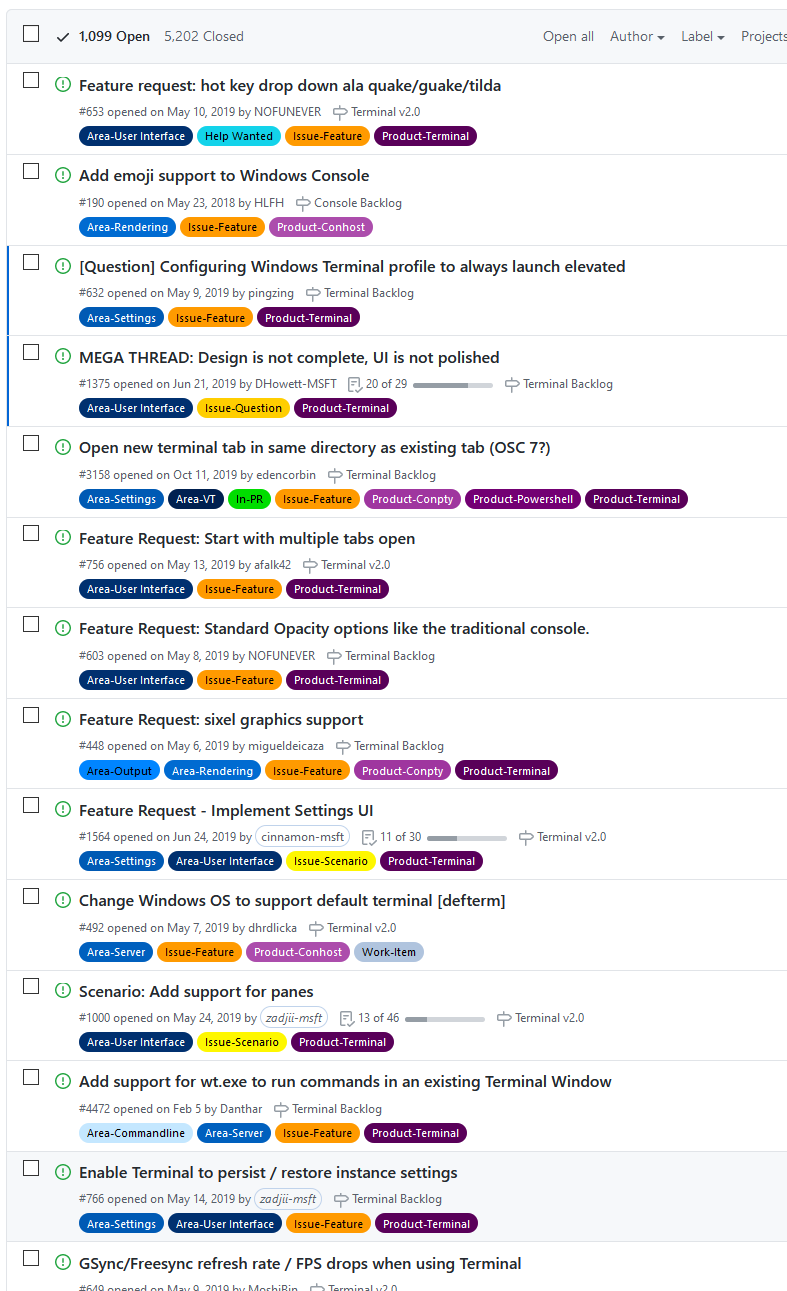
The simple fact of the matter is that we have to design a solution that will work in all cases. If only 20% of people use VIM, and our heuristic for detecting commands doesn't work when the user is using VIM, that means that the solution just won't work in 20% of cases. That's not a solution - that's a hack, and not something we'd be comfortable shipping to our users.
cd,pushd/popd,Set-Locationfor cmd & powershell, or the user could be using something like#keep, or something like FAR manager where the user is using arrow keys (or even the mouse!) to navigate the filesystem. That's without considering the use of text editors, or scenarios like WSL, docker, or ssh, where the path inside the distro/container/remote machine aren't the same as on the outside. There's just no way of doing this heuristically from input.Fortunately, this isn't really an issue! Modern shells (read: not
cmd.exe) all persist the command history themselves, so they'll all persist the history across reboots for you! The Terminal doesn't even need to get involved.settings.jsonfile, because in the past we've messed up the formatting of people's settings files, and people were greatly displeased with this, which is why we're introducing a second file to store this state. It's not terribly challenging, but this is just another piece of the puzzle that will take "a few hours" to implement, debug, write tests for, etc.taskkill'ing all the Terminal processes, then none of them would have the chance to store the state of the open windows, entirely ruining any chance to restore the state of these open windows, and the whole point of the feature. I'd rather make sure that we implement this right the first time, rather than ship a half-baked hack and have people start taking a dependency on that behavior.I'm looking forward to working on this, but it's probably not going to land until post 2.0. We're already going to have to work on serializing the state of a terminal tab as a part of #1256. Plus, we're already in the process of developing the IPC functionality as a part of #5000. So a lot of the hard problems that need to be solved before we can address this issue are already in progress!
(Frankly, most of this discussion is better off in #766 - this thread was supposed to specifically be the thread about restoring buffer contents, not window state)
@aleksey-hoffman commented on GitHub (Oct 27, 2020):
@zadjii-msft well, then I suppose my estimates of "a few hours" were off, I based it on my own experience, but I didn't consider the fact that in my app I already had the IPC, the system for writing to storage, etc. and, for some reason, I assumed that all of those systems were also already in place in the Windows Terminal. Thanks for clarification.
@111andre111 commented on GitHub (Oct 27, 2020):
@zadjii-msft
This is a very interesting information about the likes measurement.
Didn't know that one.
https://docs.github.com/en/free-pro-team@latest/github/managing-your-work-on-github/sorting-issues-and-pull-requests
Just want to make folks aware of this other issue which is quite high in ranking already:
https://github.com/microsoft/terminal/issues/766
using the sort thumbs up emoji
https://github.com/microsoft/terminal/issues?q=is%3Aissue+is%3Aopen+sort%3Areactions-%2B1-desc
So I have voted now for both as until this is done terminal is a cool project, but until that I need to stick with other projects like Babun, CMDer or Conemu, as at least just reopening my last opened tabs is quite essential for me as well otherwise I always need to remember what was last opened which is quite difficult sometimes for me when it comes to having open more than 20 tabs.
@zadjii-msft commented on GitHub (Oct 27, 2020):
For those looking for a workaround, I use an action like the following:
and then I invoke that from the command palette each morning after a Windows Update. That sets up the dev environment I usually use, with 4 tabs, and a bunch of panes in each. Customize as needed for your own profiles/environments. It's definitely not the same as "restore state" or "start with multiple tabs open", but it gets the job done.
@malxau commented on GitHub (Oct 27, 2020):
@zadjii-msft I don't think the shells can really restore command history in this case meaningfully. They can save command history, but once multiple tabs/panes are active, the shell has no idea which pane is which. The naive thing they'll do is terminate all the shells and all append to .bash_history etc in random order, and on restore each pane will have command history from all the other panes in an undefined order. I don't see how to do this without ascribing each tab/pane some form of identity, having shells persist state related to that identity, and communicating that identity back to the shell on restore.
If that identity did exist though, it would allow shells to save/restore things like the environment, current directory, aliases or other shell state, etc, which seems useful.
@111andre111 commented on GitHub (Oct 27, 2020):
Saving a command history per tab isn't even what I would expect, because this is a very shell dependent behaviour.
Enough would be for me to recover the opened tabs plus ideally the saved last directory used in the particular tab.
My assumption is that now that we have the environment variables
WT_PROFILE_IDandWT_SESSION.That would be very enough already, as I am not expecting more from ConEmu.
So saving history per tab would already over scope of a beginning of this feature and in my opinion an enhancement already.
In my opinion writing this state to settings.json is not the right place.
Better would be something like SQLite or some alternative.
Thank you all for kicking this discussion off.
@zadjii-msft commented on GitHub (Oct 27, 2020):
@malxau You're not wrong here. We're not the first terminal emulator that's allowed multiple concurrent instances, however, so I'm thinking that this is more of an issue that shells just simply haven't found the right solution for yet. We've got the
WT_SESSIONvariable that we use for terminal instances, though I wouldn't want anyone taking a dependency on anything like that, especially considering it wouldn't work in something liketmux. If there was a way of identifying unique terminal instances that worked across emulators and shells to help coordinate the restoring of history to the correct terminal instance, I'd be all ears 😄@Cisien commented on GitHub (Nov 19, 2020):
Speaking for myself, I would be happy if the terminal app just remembered and restored the tabs and separate processes (including elevation state with prompt). The buffer isn't important to me.
@sarim commented on GitHub (Jan 13, 2021):
Huh, comments above reminds me of myself ~15yrs ago, when I thought I can do everything easily :P
Kidding aside, This issue seems to be describing multiple features together. Maybe it should be broken down into smaller parts and implemented one by one. Saving state, buffer, command list etc... doesn't seem necessary to me and maybe pushed further down the list.
First implementation should be just saving
[{guid: cwd}].First issue is to get CWD from both WSL linux shells and from windows shells. Conemu and Mintty relies on Escape codes from PROMPT to get it. Relevant conemu doc link
This is what I do in my bashrc.
I guess Windows Terminal needs to do the same. Although I have no idea how multiple windows should be handled. I never open my terminal in multiple tabs in multiple windows :P
If extension support (#4000) was here, I might've tried to make an extension that listens to that ANSI Escape code and generates a command line with tabs and CWD.
@nmoinvaz commented on GitHub (Jan 13, 2021):
I would like to mention that these features don't have to be supported for all shells. It would be okay to say, support some of them only for PowerShell, where certain information can be more easily obtained to make the feature work.
@mingwandroid commented on GitHub (Feb 15, 2021):
I agree that saving and restoring state is very complicated and I'd not like to attempt to implement it.
However, I think an "undo close tab/window" function with a grace period could be implemented much more simply. You just keep everything running for the grace period and if an "undo close" event happens you just recreate the graphical components.
I know I said "just" a lot, and of course it'd be difficult work, still I think this would be a hugely useful feature for those of us who hit "close window" by mistake and I believe the end result (processes still running, ssh connections active etc) is a better end result (for this use-case).
Cheers.
@christophe-calmejane commented on GitHub (Apr 15, 2021):
@zadjii-msft
That's where you see the limit of using 👍's as a metric to sort priorities :)
Some features are hard to clearly express (for the end-user) and even harder to specify for the developer. Took me a bit to find this thread, just to realize after having read it all the way... that it's not the one to thumb up.
Like most people, all I need is Terminal to restore all my open tabs and their CWD (don't even need the last commands) when windows decides to reboot my computer for some updates, so I can resume my work as fast as possible with the usual 10 tabs (10 different folders) I've open during my daily sessions. A feature that most Terminal apps (especially on macOS) have.
Maybe start simple with just the last tabs (opt-in like Chrome) and associated CWD, and later add buffers, commands,... as option.
@steelx commented on GitHub (Apr 16, 2021):
is there any solution on this ? atleast remember 1 tab ?
@zadjii-msft commented on GitHub (Apr 16, 2021):
Nope, there aren't any updates yet. When there are, we'll make sure to post here. In the meantime, might I recommend the Subscribe button?

That way you'll be notified of any updates to this thread, without needlessly pinging everyone on this thread ☺️
We're working on storing "application state" over in #8771, which is one of the prerequisites for doing this.
For reference, I workaround this with a command in the command palette. I like to do like the following each time I boot up the Terminal in the morning:
(you could probably make it shorter by replacing
new-tab/split-panewithnt/sp, respectively).I add that to the
keybindings/actions. This creates a new command in the Command Palette named "Good Morning". That opens up a few tabs & panes, running various build environments. I like having it in a command rather thanstartupActions, because I only really want this in one terminal window, not every single one I launch. It's personal taste.You could repeat this for multiple different "session"s if you wanted. That way you could have layouts pre-defined for various different dev environments.
We're also tracking adding commands to the new tab dropdown in #1571.
@soroshsabz commented on GitHub (Jun 4, 2021):
I think session functionality and management is very beyond than session restoration, and I think Windows Terminal must have focus to design and implement great session concept and functionalities about that, like tmux (#10331).
I think it is important to make session is umbrella for all features in terminal like
@MarkIngramUK commented on GitHub (Jun 4, 2021):
I would settle for remembering which tabs were open, what their custom titles were, and what their custom colours were. A bonus would be the current directories in each shell, but the main thing that annoys me is having to restart my machine for whatever reason, then open Terminal, re-open my tabs, rename my tabs, apply colours to my tabs...
@rf-0 commented on GitHub (Aug 7, 2021):
How come emoji support is #2...? I guess I'm missing its use case...
It sounds like this feature would be more important than quite a few from that list. Also, agree with @MarkIngramUK
@ykoehler commented on GitHub (Oct 15, 2021):
In the same idea, I would like to be able to "obtain" the wt command to execute to open up my tab exactly the same way (with same panes and panes size, etc). From there I could paste that into an shortcut icon and create different layout for each icons to open with. So if somehow we could dump a wt command output that I re-run and get a window with same tab/pane and size that would be appreciated, in this case, I do not care about running command in those, but I get you would have to support it.
@Darkster1 commented on GitHub (Oct 25, 2021):
What to do if a terminal closed, but left the session running (cmd.exe + subprocess) the application status is perfectly 'running' but the parent window from cmd.exe disapeared (for some reason it asked, close all tabs?, clicked cancel, a moment later terminal was gone but processes still UP) and they're actually still up noticing a WT_SESSION in processExplorer but how to reconnect (the settings are probably ignored).
@gerhard4 commented on GitHub (Feb 15, 2023):
I'm surprised that nobody has mentioned that yet, but iTerm2 for macOS does pretty much what one would expect from such a feature. It's one of the very few things that I miss from the Mac on Windows. The GitHub project: https://github.com/gnachman/iTerm2
@111andre111 commented on GitHub (Feb 16, 2023):
Now I am not really an OS specialist, but I think iTerm2 is not really a good example as it goes back to macOS which basically only has to hold sessions that go back either to zsh or bash. I think Terminal has to fill much more gaps because under a Windows there is an extremely broad spectrum of terminal sessions possible starting from MinGW sessions, Cygwin sessions, bash sessions, Powershell sessions, CMD sessions (which even don't really have a state and you would need to work around lots of things if it's even possible to save the CMD buffer separately). So I think that request is a whole other beast than what iTerm2 has to fulfill.
For Windows you need to compare to a completely other set of shells like e.g. Babun which has been discontinued, cmder or MobaXterm. Lots of these shells base on the initial work that has been done with ConEmu. If you look to all these shell's issue collections you will find out that there have been happening lots of struggles around lots of issues. And the chorus is that some of these shells specialized only on a possible subset of possible shells like e.g. Cygwin sessions or SSH sessions....
Please correct me if I am wrong.
@gerhard4 commented on GitHub (Feb 16, 2023):
I know that I don't know enough -- by a long shot -- to correct you or to tell you that you're wrong :)
However, sometimes perfect can be the enemy of good (or better). Tools that have to work with a multitude of environments sometimes support features only for a subset of supported environments. If Terraform, for example, only supported features that are supported by all cloud environments it supports, it would not be very useful. Sometimes it makes sense to support features only for a subset of supported environments. In this case, if it can be done, say, for Bash and PowerShell, that would be a huge win for many if not most (or even an overwhelming majority of) users.
(FWIW, iTerm2 supports tcsh, zsh, bash, and fish.)
@christophe-calmejane commented on GitHub (Feb 16, 2023):
Agreed!
Only support for bash/powershell is enough for me (for now).
It really is a pain when windows decides to reboot by itself (crash, update, ...) and I loose the 10 shells I have opened because I work on many projects at the same time.
On the other hand, when my mac reboots, I always get back right where I was.
Please consider partial support.
@mmseng commented on GitHub (Oct 22, 2023):
Just expressing my use case: As an IT Pro, I frequently have 8-10 PowerShell 5.1 or 7+ tabs open in terminal. I don't "pre-plan" what's going to happen in these tabs, and I don't waste time customizing each tab with titles or colors. I just open them as I need them to work on different tasks/projects in parallel. So "losing" the content of these tabs when I come back to my PC when either the PC has restarted for Windows updates, or Terminal has mysteriously restarted (I assume for a forced update of some sort?) is very disruptive.
All of this would be solved (for me personally) if only the buffer contents would be restored, as I could easily look and see what I was doing last in each tab and what the most recent command output was. To a lesser degree, restoring the tab's "local" command history would suffice as well, as I could then just use the up arrow to see what the last command was in any given tab.
Currently when these Terminal restarts happen, the number, position, and client of each tab are successfully restored, but that is not enough to get me back on track. Ostensibly I could manually customize the title of every tab just in case this happens, which might help a little, but even then it wouldn't tell me exactly what I was doing in that tab or what state I had left that tab's task in. Plus, during a work day I will have opened and closed dozens (maybe hundreds) of tabs, so customizing tabs just in case would be a huge waste of time. Restoration of the buffer/command history is really what's needed.
@gerhard4 commented on GitHub (Oct 22, 2023):
Re mmseng's comment:
For me, it's more the buffer than the command history. The buffer contains the output and the commands. If the output of a command changed over time, rerunning the commands might not help getting the information back about what happened.
Lateral thought: an on-disk rotating buffer with a maximum lifetime (24h? configurable?) on disk for every tab that contains everything visible on screen would be helpful, too, and would give me most of what the feature of this issue could give me.
@mmseng commented on GitHub (Oct 23, 2023):
Wholeheartedly agreed. The buffer is far more important; I would even go so far as to call it precious.
At the risk of repeating drama from above, from an outside perspective, either item seems relatively simple (compared to something like preservation of state), as both buffer and command history are mostly just plain text and the rendering thereof. The command history implementation already even lends itself to this purpose, since you can technically manually edit it.
I know it's always way more complicated than it seems; I only mentioned the above because, as much as I'd like to see this implemented for the good of all, I would personally be willing to implement a custom solution that, at the very least, dumped buffer history to a file along with some sort of identifier as to the tab it belonged to (e.g. name the file after the tab title and date), if it allowed me to recover my work in these instances. Of course, I would have no idea how to develop such a hack myself, and the logic for when to dump that data does not immediately come to mind.
@plutonium-239 commented on GitHub (Jan 8, 2024):
Is this being worked on?
I see that PR #8771 was opened in 2021 but then it got closed without a reason? (last comment was just a discussion on changes)
@zadjii-msft commented on GitHub (Jan 8, 2024):
Yep, I believe @lhecker's been working on this for a bit now.
#8771 was more specifically a PR to implement #766. This issue is more specifically "restore buffer contents", while #766 was more generally "restore various elements of the Terminal's state".
#8771 ended up resurrected as #10513 which then was used by #10972 to store the window position, size (but notably, not the buffer content)
@soroshsabz commented on GitHub (Mar 29, 2024):
@zadjii-msft Did you know how to use this feature?
@zadjii-msft commented on GitHub (Mar 29, 2024):
This only just merged hours ago, so it's not available yet outside of just building the code from
maindirectly. Tonight's canary build should have this, though, our canary pipeline has been having some publishing issues this week.It should be enabled if you have
"firstWindowPreference": "persistedWindowLayout"enabled in your settings.@ylluminate commented on GitHub (Jun 13, 2024):
Is this supposed to be available in 1.20.11381.0? When I have the
"firstWindowPreference": "persistedWindowLayout"set, I still lose buffer / tab history upon restart, even though it does restart the sessions... My expectation from the parent request is that all of my history for various shells from PowerShell and cmd.exe to Ubuntu 24.04, etc. is all retained in perpetuity between Windows Terminal restarts...@zadjii-msft commented on GitHub (Jun 13, 2024):
Nope. This was added in 1.21.
@mmseng commented on GitHub (Jun 13, 2024):
I've been using it in the 1.21 Windows Terminal Preview. It does work as expected (for a certain definition of expected), however the vast majority of the times when I need it is when Windows updates reboot the machine, or when the machine otherwise reboots while Terminal is open, and from what I've seen I don't believe it's been working in these cases (I haven't been tracking it closely enough to make a more confident statement). As I recall, the failure due to Windows update reboots is an open issue.
@edswangren commented on GitHub (Sep 10, 2024):
this thread is so Windows. I don't mean to throw any shade at the devs and designers here, it's just that feeling of "@#(^#@^&" when my OS knocks me down with nagging and unwanted reboots only to hit me again by stealing more of my time, for years and years while my macs have never once hurt me this way. My mac picks me up when I'm down (<3 u my silver fox)
But seriously the comment above regarding that bastard known as perfection is 100% right. I mean, at least you can stop worrying about privacy, right? we've all used 11.
...well thanks for the hard work, that should serve as catharsis for now.
@aschekatihin commented on GitHub (May 17, 2025):
There should be ability to opt out of this behavior in settings. It is a bit distracting least to say.
@mmseng commented on GitHub (May 17, 2025):
You can:
However that also disables reopening your various tabs in the first place. It's not something that affects me personally, but I can definitely see why the buffer history preservation would be annoying, and why someone would still want to preserve their array of tabs between sessions without the buffer history.
I agree. Preserving tabs seems like a pre-requisite for preserving buffer history, but preserving buffer history shouldn't be required just to preserve tabs (after all that's how it worked before the introduction of buffer history). I'll also point out that the first posts in this issue discussed making the buffer restoration feature opt-in (or opt-out). But in the current state it is neither; it's just getting a free ride when you opt in to that existing "restore your tabs" setting.
I would probably recommend making a new issue for this, since this issue is closed.
@aschekatihin commented on GitHub (May 23, 2025):
Thank you @mmseng , you go everything perfectly right!
I guess I have to use this setting for now and lose ability to have custom terminals layout.
@ylluminate commented on GitHub (May 23, 2025):
Is someone going to open a new issue/ticket as per @mmseng's suggestion? I was thinking about opening one, but I really stepped away from using Terminal in Windows quite a lot and I think it would be better that someone else who uses Windows more heavily vs macOS might want to give this important issues some love.
@zadjii-msft commented on GitHub (May 24, 2025):
Sounds like that request (be able to restore layout, but not buffer state) is tracked more-or-less in #18757