On windows 10 (19044.2604, 21H2), windows terminal from v1.16.2023.0 to v1.17.1023 doesn't work. #19520

Closed
opened 2026-01-31 06:45:50 +00:00 by claunia · 27 comments
Owner

Originally created by @eubnara on GitHub (Mar 10, 2023).

Windows Terminal version

1.16.10261

Windows build number

10.0.19044.2604

Other Software

No response

Steps to reproduce

Install windows terminal from v1.16.2023.0 to v1.17.1023 on windows 10 (19044.2604).

Expected Behavior

can execute windows terminal.

Actual Behavior

Nothing happened after executing wt.exe or WindowsTerminal.exe.

Originally created by @eubnara on GitHub (Mar 10, 2023). ### Windows Terminal version 1.16.10261 ### Windows build number 10.0.19044.2604 ### Other Software _No response_ ### Steps to reproduce Install windows terminal from v1.16.2023.0 to v1.17.1023 on windows 10 (19044.2604). ### Expected Behavior can execute windows terminal. ### Actual Behavior Nothing happened after executing `wt.exe` or `WindowsTerminal.exe`.
Author
Owner

@eubnara commented on GitHub (Mar 10, 2023):

I already did below:

Add-AppPackage -Path .\Microsoft.VCLibs.x64.14.00.Desktop.appx
@eubnara commented on GitHub (Mar 10, 2023): I already did below: ``` Add-AppPackage -Path .\Microsoft.VCLibs.x64.14.00.Desktop.appx ```
Author
Owner

@zadjii-msft commented on GitHub (Mar 10, 2023):

  • Does the Terminal work from the Start Menu? From the Run dialog/? (If you installed from the Store, does hitting "launch" in the Store app work?)
  • Is the App Execution Alias for wt.exe enabled in the Windows Settings app?
  • Can you open a cmd.exe window and share the output of where wt?
  • Are you on an N SKU of Windows?
@zadjii-msft commented on GitHub (Mar 10, 2023): * Does the Terminal work from the Start Menu? From the Run dialog/? (If you installed from the Store, does hitting "launch" in the Store app work?) * Is the App Execution Alias for `wt.exe` enabled in the Windows Settings app? * Can you open a `cmd.exe` window and share the output of `where wt`? * Are you on an N SKU of Windows?
Author
Owner

@eubnara commented on GitHub (Mar 10, 2023):

Does the Terminal work from the Start Menu? From the Run dialog/? (If you installed from the Store, does hitting "launch" in the Store app work?)

=> It is installed by via github method. I executed it with wt.exe or WindowsTerminal.exe. Double clicking msixbundle does not work. So I unzipped and extracted it.

like this way
❯ unzip Microsoft.WindowsTerminal_Win10_1.16.10261.0_8wekyb3d8bbwe.msixbundle
Archive:  Microsoft.WindowsTerminal_Win10_1.16.10261.0_8wekyb3d8bbwe.msixbundle
 extracting: CascadiaPackage_1.16.10261.0_ARM64.msix  
 extracting: CascadiaPackage_1.16.10261.0_x64.msix  
 extracting: CascadiaPackage_1.16.10261.0_x86.msix  
  inflating: AppxMetadata/AppxBundleManifest.xml  
  inflating: AppxBlockMap.xml        
  inflating: [Content_Types].xml     
  inflating: AppxSignature.p7x       

/tmp/wt 
❯ unzip CascadiaPackage_1.16.10261.0_x64.msix
Archive:  CascadiaPackage_1.16.10261.0_x64.msix
  inflating: BuildInfo.xml           
  inflating: CascadiaCode.ttf        
  inflating: CascadiaCodeItalic.ttf  
  inflating: CascadiaMono.ttf        
  inflating: CascadiaMonoItalic.ttf  
  inflating: concrt140_app.dll       
  inflating: cpprest142_2_10.dll     
  inflating: defaults.json           
  inflating: elevate-shim.exe        
 extracting: Images/LargeTile.scale-100.png  
 extracting: Images/LargeTile.scale-100_contrast-black.png  
 extracting: Images/LargeTile.scale-125.png  
 extracting: Images/LargeTile.scale-100_contrast-white.png  
 extracting: Images/LargeTile.scale-125_contrast-black.png  
 extracting: Images/LargeTile.scale-125_contrast-white.png  
 extracting: Images/LargeTile.scale-150.png  
 extracting: Images/LargeTile.scale-150_contrast-black.png  
 extracting: Images/LargeTile.scale-150_contrast-white.png  
 extracting: Images/LargeTile.scale-200_contrast-black.png  
 extracting: Images/LargeTile.scale-200.png  
 extracting: Images/LargeTile.scale-200_contrast-white.png  
 extracting: Images/LargeTile.scale-400.png  
 extracting: Images/LargeTile.scale-400_contrast-black.png  
 extracting: Images/LargeTile.scale-400_contrast-white.png  
 extracting: Images/LockScreenLogo.scale-100.png  
 extracting: Images/LockScreenLogo.scale-100_contrast-black.png  
 extracting: Images/LockScreenLogo.scale-125.png  
 extracting: Images/LockScreenLogo.scale-100_contrast-white.png  
 extracting: Images/LockScreenLogo.scale-125_contrast-white.png  
 extracting: Images/LockScreenLogo.scale-125_contrast-black.png  
 extracting: Images/LockScreenLogo.scale-150.png  
 extracting: Images/LockScreenLogo.scale-150_contrast-black.png  
 extracting: Images/LockScreenLogo.scale-150_contrast-white.png  
 extracting: Images/LockScreenLogo.scale-200_contrast-black.png  
 extracting: Images/LockScreenLogo.scale-200.png  
 extracting: Images/LockScreenLogo.scale-400.png  
 extracting: Images/LockScreenLogo.scale-200_contrast-white.png  
 extracting: Images/LockScreenLogo.scale-400_contrast-white.png  
 extracting: Images/LockScreenLogo.scale-400_contrast-black.png  
 extracting: Images/SmallTile.scale-100.png  
 extracting: Images/SmallTile.scale-100_contrast-black.png  
 extracting: Images/SmallTile.scale-125.png  
 extracting: Images/SmallTile.scale-100_contrast-white.png  
 extracting: Images/SmallTile.scale-125_contrast-white.png  
 extracting: Images/SmallTile.scale-150.png  
 extracting: Images/SmallTile.scale-125_contrast-black.png  
 extracting: Images/SmallTile.scale-150_contrast-black.png  
 extracting: Images/SmallTile.scale-150_contrast-white.png  
 extracting: Images/SmallTile.scale-200.png  
 extracting: Images/SmallTile.scale-200_contrast-white.png  
 extracting: Images/SmallTile.scale-200_contrast-black.png  
 extracting: Images/SmallTile.scale-400_contrast-black.png  
 extracting: Images/SmallTile.scale-400.png  
 extracting: Images/Square150x150Logo.scale-100.png  
 extracting: Images/SmallTile.scale-400_contrast-white.png  
 extracting: Images/Square150x150Logo.scale-100_contrast-black.png  
 extracting: Images/Square150x150Logo.scale-100_contrast-white.png  
 extracting: Images/Square150x150Logo.scale-125.png  
 extracting: Images/Square150x150Logo.scale-125_contrast-white.png  
 extracting: Images/Square150x150Logo.scale-150.png  
 extracting: Images/Square150x150Logo.scale-125_contrast-black.png  
 extracting: Images/Square150x150Logo.scale-150_contrast-white.png  
 extracting: Images/Square150x150Logo.scale-150_contrast-black.png  
 extracting: Images/Square150x150Logo.scale-200.png  
 extracting: Images/Square150x150Logo.scale-200_contrast-black.png  
 extracting: Images/Square150x150Logo.scale-200_contrast-white.png  
 extracting: Images/Square150x150Logo.scale-400_contrast-black.png  
 extracting: Images/Square150x150Logo.scale-400.png  
 extracting: Images/Square44x44Logo.scale-100.png  
 extracting: Images/Square150x150Logo.scale-400_contrast-white.png  
 extracting: Images/Square44x44Logo.scale-100_contrast-black.png  
 extracting: Images/Square44x44Logo.scale-100_contrast-white.png  
 extracting: Images/Square44x44Logo.scale-125_contrast-black.png  
 extracting: Images/Square44x44Logo.scale-125.png  
 extracting: Images/Square44x44Logo.scale-125_contrast-white.png  
 extracting: Images/Square44x44Logo.scale-150.png  
 extracting: Images/Square44x44Logo.scale-150_contrast-white.png  
 extracting: Images/Square44x44Logo.scale-150_contrast-black.png  
 extracting: Images/Square44x44Logo.scale-200.png  
 extracting: Images/Square44x44Logo.scale-200_contrast-black.png  
 extracting: Images/Square44x44Logo.scale-400.png  
 extracting: Images/Square44x44Logo.scale-200_contrast-white.png  
 extracting: Images/Square44x44Logo.scale-400_contrast-white.png  
 extracting: Images/Square44x44Logo.targetsize-16.png  
 extracting: Images/Square44x44Logo.scale-400_contrast-black.png  
 extracting: Images/Square44x44Logo.targetsize-16_altform-unplated.png  
 extracting: Images/Square44x44Logo.targetsize-16_altform-unplated_contrast-black.png  
 extracting: Images/Square44x44Logo.targetsize-16_altform-unplated_contrast-white.png  
 extracting: Images/Square44x44Logo.targetsize-16_contrast-black.png  
 extracting: Images/Square44x44Logo.targetsize-16_contrast-white.png  
 extracting: Images/Square44x44Logo.targetsize-20_altform-unplated.png  
 extracting: Images/Square44x44Logo.targetsize-20.png  
 extracting: Images/Square44x44Logo.targetsize-20_altform-unplated_contrast-white.png  
 extracting: Images/Square44x44Logo.targetsize-20_altform-unplated_contrast-black.png  
 extracting: Images/Square44x44Logo.targetsize-20_contrast-black.png  
 extracting: Images/Square44x44Logo.targetsize-20_contrast-white.png  
 extracting: Images/Square44x44Logo.targetsize-24_altform-unplated.png  
 extracting: Images/Square44x44Logo.targetsize-24.png  
 extracting: Images/Square44x44Logo.targetsize-24_altform-unplated_contrast-black.png  
 extracting: Images/Square44x44Logo.targetsize-24_contrast-black.png  
 extracting: Images/Square44x44Logo.targetsize-24_altform-unplated_contrast-white.png  
 extracting: Images/Square44x44Logo.targetsize-256.png  
 extracting: Images/Square44x44Logo.targetsize-24_contrast-white.png  
 extracting: Images/Square44x44Logo.targetsize-256_altform-unplated.png  
 extracting: Images/Square44x44Logo.targetsize-256_altform-unplated_contrast-black.png  
 extracting: Images/Square44x44Logo.targetsize-256_contrast-black.png  
 extracting: Images/Square44x44Logo.targetsize-256_altform-unplated_contrast-white.png  
 extracting: Images/Square44x44Logo.targetsize-256_contrast-white.png  
 extracting: Images/Square44x44Logo.targetsize-30.png  
 extracting: Images/Square44x44Logo.targetsize-30_altform-unplated_contrast-black.png  
 extracting: Images/Square44x44Logo.targetsize-30_altform-unplated.png  
 extracting: Images/Square44x44Logo.targetsize-30_altform-unplated_contrast-white.png  
 extracting: Images/Square44x44Logo.targetsize-30_contrast-black.png  
 extracting: Images/Square44x44Logo.targetsize-32.png  
 extracting: Images/Square44x44Logo.targetsize-30_contrast-white.png  
 extracting: Images/Square44x44Logo.targetsize-32_altform-unplated_contrast-black.png  
 extracting: Images/Square44x44Logo.targetsize-32_altform-unplated.png  
 extracting: Images/Square44x44Logo.targetsize-32_contrast-black.png  
 extracting: Images/Square44x44Logo.targetsize-32_altform-unplated_contrast-white.png  
 extracting: Images/Square44x44Logo.targetsize-32_contrast-white.png  
 extracting: Images/Square44x44Logo.targetsize-36.png  
 extracting: Images/Square44x44Logo.targetsize-36_altform-unplated.png  
 extracting: Images/Square44x44Logo.targetsize-36_altform-unplated_contrast-white.png  
 extracting: Images/Square44x44Logo.targetsize-36_altform-unplated_contrast-black.png  
 extracting: Images/Square44x44Logo.targetsize-36_contrast-white.png  
 extracting: Images/Square44x44Logo.targetsize-36_contrast-black.png  
 extracting: Images/Square44x44Logo.targetsize-40.png  
 extracting: Images/Square44x44Logo.targetsize-40_altform-unplated.png  
 extracting: Images/Square44x44Logo.targetsize-40_altform-unplated_contrast-white.png  
 extracting: Images/Square44x44Logo.targetsize-40_altform-unplated_contrast-black.png  
 extracting: Images/Square44x44Logo.targetsize-40_contrast-black.png  
 extracting: Images/Square44x44Logo.targetsize-48.png  
 extracting: Images/Square44x44Logo.targetsize-40_contrast-white.png  
 extracting: Images/Square44x44Logo.targetsize-48_altform-unplated_contrast-black.png  
 extracting: Images/Square44x44Logo.targetsize-48_altform-unplated.png  
 extracting: Images/Square44x44Logo.targetsize-48_altform-unplated_contrast-white.png  
 extracting: Images/Square44x44Logo.targetsize-48_contrast-black.png  
 extracting: Images/Square44x44Logo.targetsize-60.png  
 extracting: Images/Square44x44Logo.targetsize-60_altform-unplated.png  
 extracting: Images/Square44x44Logo.targetsize-48_contrast-white.png  
 extracting: Images/Square44x44Logo.targetsize-60_altform-unplated_contrast-white.png  
 extracting: Images/Square44x44Logo.targetsize-60_altform-unplated_contrast-black.png  
 extracting: Images/Square44x44Logo.targetsize-60_contrast-black.png  
 extracting: Images/Square44x44Logo.targetsize-60_contrast-white.png  
 extracting: Images/Square44x44Logo.targetsize-64.png  
 extracting: Images/Square44x44Logo.targetsize-64_altform-unplated_contrast-black.png  
 extracting: Images/Square44x44Logo.targetsize-64_altform-unplated.png  
 extracting: Images/Square44x44Logo.targetsize-64_contrast-black.png  
 extracting: Images/Square44x44Logo.targetsize-64_altform-unplated_contrast-white.png  
 extracting: Images/Square44x44Logo.targetsize-72.png  
 extracting: Images/Square44x44Logo.targetsize-64_contrast-white.png  
 extracting: Images/Square44x44Logo.targetsize-72_altform-unplated.png  
 extracting: Images/Square44x44Logo.targetsize-72_altform-unplated_contrast-black.png  
 extracting: Images/Square44x44Logo.targetsize-72_contrast-black.png  
 extracting: Images/Square44x44Logo.targetsize-72_contrast-white.png  
 extracting: Images/Square44x44Logo.targetsize-72_altform-unplated_contrast-white.png  
 extracting: Images/Square44x44Logo.targetsize-80_altform-unplated.png  
 extracting: Images/Square44x44Logo.targetsize-80.png  
 extracting: Images/Square44x44Logo.targetsize-80_altform-unplated_contrast-black.png  
 extracting: Images/Square44x44Logo.targetsize-80_altform-unplated_contrast-white.png  
 extracting: Images/Square44x44Logo.targetsize-80_contrast-white.png  
 extracting: Images/Square44x44Logo.targetsize-80_contrast-black.png  
 extracting: Images/Square44x44Logo.targetsize-96_altform-unplated.png  
 extracting: Images/Square44x44Logo.targetsize-96.png  
 extracting: Images/Square44x44Logo.targetsize-96_altform-unplated_contrast-black.png  
 extracting: Images/Square44x44Logo.targetsize-96_contrast-black.png  
 extracting: Images/Square44x44Logo.targetsize-96_altform-unplated_contrast-white.png  
 extracting: Images/Square44x44Logo.targetsize-96_contrast-white.png  
 extracting: Images/StoreLogo.scale-100_contrast-black.png  
 extracting: Images/StoreLogo.scale-100.png  
 extracting: Images/StoreLogo.scale-125.png  
 extracting: Images/StoreLogo.scale-100_contrast-white.png  
 extracting: Images/StoreLogo.scale-125_contrast-white.png  
 extracting: Images/StoreLogo.scale-125_contrast-black.png  
 extracting: Images/StoreLogo.scale-150.png  
 extracting: Images/StoreLogo.scale-150_contrast-black.png  
 extracting: Images/StoreLogo.scale-200.png  
 extracting: Images/StoreLogo.scale-150_contrast-white.png  
 extracting: Images/StoreLogo.scale-200_contrast-white.png  
 extracting: Images/StoreLogo.scale-200_contrast-black.png  
 extracting: Images/StoreLogo.scale-400_contrast-black.png  
 extracting: Images/StoreLogo.scale-400.png  
 extracting: Images/StoreLogo.scale-400_contrast-white.png  
  inflating: Images/terminal_contrast-black.ico  
 extracting: Images/Wide310x150Logo.scale-100.png  
  inflating: Images/terminal_contrast-white.ico  
 extracting: Images/Wide310x150Logo.scale-100_contrast-white.png  
 extracting: Images/Wide310x150Logo.scale-100_contrast-black.png  
 extracting: Images/Wide310x150Logo.scale-125.png  
 extracting: Images/Wide310x150Logo.scale-125_contrast-black.png  
 extracting: Images/Wide310x150Logo.scale-125_contrast-white.png  
 extracting: Images/Wide310x150Logo.scale-150.png  
 extracting: Images/Wide310x150Logo.scale-150_contrast-white.png  
 extracting: Images/Wide310x150Logo.scale-200.png  
 extracting: Images/Wide310x150Logo.scale-150_contrast-black.png  
 extracting: Images/Wide310x150Logo.scale-200_contrast-black.png  
 extracting: Images/Wide310x150Logo.scale-400.png  
 extracting: Images/Wide310x150Logo.scale-200_contrast-white.png  
 extracting: Images/Wide310x150Logo.scale-400_contrast-black.png  
 extracting: Images/Wide310x150Logo.scale-400_contrast-white.png  
  inflating: Microsoft.Terminal.Control.dll  
  inflating: Microsoft.Terminal.Control.winmd  
  inflating: Microsoft.Terminal.Remoting.dll  
  inflating: Microsoft.Terminal.Remoting.winmd  
  inflating: Microsoft.Terminal.Settings.Editor.dll  
  inflating: Microsoft.Terminal.Settings.Editor.winmd  
  inflating: Microsoft.Terminal.Settings.Model.dll  
  inflating: Microsoft.Terminal.Settings.Model.winmd  
  inflating: Microsoft.Terminal.TerminalConnection.winmd  
  inflating: Microsoft.UI.Xaml.dll   
  inflating: Microsoft.UI.Xaml.winmd  
 extracting: Microsoft.UI.Xaml/Assets/NoiseAsset_256X256_PNG.png  
  inflating: msvcp140_1_app.dll      
  inflating: msvcp140_2_app.dll      
  inflating: msvcp140_app.dll        
  inflating: NOTICE.html             
  inflating: OpenConsole.exe         
  inflating: OpenConsoleProxy.dll    
 extracting: ProfileIcons/pwsh-preview.scale-125.png  
 extracting: ProfileIcons/pwsh-preview.scale-100.png  
 extracting: ProfileIcons/pwsh-preview.scale-150.png  
 extracting: ProfileIcons/pwsh-preview.scale-200.png  
 extracting: ProfileIcons/pwsh.scale-100.png  
 extracting: ProfileIcons/pwsh.scale-125.png  
 extracting: ProfileIcons/pwsh.scale-200.png  
 extracting: ProfileIcons/pwsh.scale-150.png  
 extracting: ProfileIcons/%7B0caa0dad-35be-5f56-a8ff-afceeeaa6101%7D.scale-100.png  
 extracting: ProfileIcons/%7B550ce7b8-d500-50ad-8a1a-c400c3262db3%7D.scale-100.png  
 extracting: ProfileIcons/%7B0caa0dad-35be-5f56-a8ff-afceeeaa6101%7D.scale-200.png  
 extracting: ProfileIcons/%7B550ce7b8-d500-50ad-8a1a-c400c3262db3%7D.scale-200.png  
 extracting: ProfileIcons/%7B574e775e-4f2a-5b96-ac1e-a2962a402336%7D.scale-200.png  
 extracting: ProfileIcons/%7B574e775e-4f2a-5b96-ac1e-a2962a402336%7D.scale-100.png  
 extracting: ProfileIcons/%7B61c54bbd-c2c6-5271-96e7-009a87ff44bf%7D.scale-100.png  
 extracting: ProfileIcons/%7B9acb9455-ca41-5af7-950f-6bca1bc9722f%7D.scale-100.png  
 extracting: ProfileIcons/%7B61c54bbd-c2c6-5271-96e7-009a87ff44bf%7D.scale-200.png  
 extracting: ProfileIcons/%7Bb453ae62-4e3d-5e58-b989-0a998ec441b8%7D.scale-100.png  
 extracting: ProfileIcons/%7B9acb9455-ca41-5af7-950f-6bca1bc9722f%7D.scale-200.png  
 extracting: ProfileIcons/%7Bb453ae62-4e3d-5e58-b989-0a998ec441b8%7D.scale-200.png  
  inflating: resources.pri           
  inflating: TerminalApp.dll         
  inflating: TerminalApp.winmd       
  inflating: TerminalAzBridge.exe    
  inflating: TerminalConnection.dll  
  inflating: TerminalThemeHelpers.dll  
  inflating: vcamp140_app.dll        
  inflating: vccorlib140_app.dll     
  inflating: vcomp140_app.dll        
  inflating: vcruntime140_1_app.dll  
  inflating: vcruntime140_app.dll    
  inflating: WindowsTerminal.exe     
  inflating: WindowsTerminalShellExt.dll  
  inflating: wt.exe                  
  inflating: AppxManifest.xml        
replace AppxBlockMap.xml? [y]es, [n]o, [A]ll, [N]one, [r]ename: A
  inflating: AppxBlockMap.xml        
  inflating: [Content_Types].xml     
  inflating: AppxMetadata/CodeIntegrity.cat  
  inflating: AppxSignature.p7x

And I executed wt.exe or WindowsTerminal.exe as it is.

Is the App Execution Alias for wt.exe enabled in the Windows Settings app?

=> No.

Can you open a cmd.exe window and share the output of where wt?

=> Actually, there is no output at all. Nothing happened. I think it is terminated right away without any error.

Are you on an N SKU of Windows?

=> Yes. Intel(R) Xeon(R) Gold 6248R CPU and used it in vdi environment.

@eubnara commented on GitHub (Mar 10, 2023): > Does the Terminal work from the Start Menu? From the Run dialog/? (If you installed from the Store, does hitting "launch" in the Store app work?) => It is installed by [via github method](https://github.com/microsoft/terminal#via-github). I executed it with `wt.exe` or `WindowsTerminal.exe`. Double clicking `msixbundle` does not work. So I unzipped and extracted it. <details><summary> like this way </summary> ``` ❯ unzip Microsoft.WindowsTerminal_Win10_1.16.10261.0_8wekyb3d8bbwe.msixbundle Archive: Microsoft.WindowsTerminal_Win10_1.16.10261.0_8wekyb3d8bbwe.msixbundle extracting: CascadiaPackage_1.16.10261.0_ARM64.msix extracting: CascadiaPackage_1.16.10261.0_x64.msix extracting: CascadiaPackage_1.16.10261.0_x86.msix inflating: AppxMetadata/AppxBundleManifest.xml inflating: AppxBlockMap.xml inflating: [Content_Types].xml inflating: AppxSignature.p7x /tmp/wt ❯ unzip CascadiaPackage_1.16.10261.0_x64.msix Archive: CascadiaPackage_1.16.10261.0_x64.msix inflating: BuildInfo.xml inflating: CascadiaCode.ttf inflating: CascadiaCodeItalic.ttf inflating: CascadiaMono.ttf inflating: CascadiaMonoItalic.ttf inflating: concrt140_app.dll inflating: cpprest142_2_10.dll inflating: defaults.json inflating: elevate-shim.exe extracting: Images/LargeTile.scale-100.png extracting: Images/LargeTile.scale-100_contrast-black.png extracting: Images/LargeTile.scale-125.png extracting: Images/LargeTile.scale-100_contrast-white.png extracting: Images/LargeTile.scale-125_contrast-black.png extracting: Images/LargeTile.scale-125_contrast-white.png extracting: Images/LargeTile.scale-150.png extracting: Images/LargeTile.scale-150_contrast-black.png extracting: Images/LargeTile.scale-150_contrast-white.png extracting: Images/LargeTile.scale-200_contrast-black.png extracting: Images/LargeTile.scale-200.png extracting: Images/LargeTile.scale-200_contrast-white.png extracting: Images/LargeTile.scale-400.png extracting: Images/LargeTile.scale-400_contrast-black.png extracting: Images/LargeTile.scale-400_contrast-white.png extracting: Images/LockScreenLogo.scale-100.png extracting: Images/LockScreenLogo.scale-100_contrast-black.png extracting: Images/LockScreenLogo.scale-125.png extracting: Images/LockScreenLogo.scale-100_contrast-white.png extracting: Images/LockScreenLogo.scale-125_contrast-white.png extracting: Images/LockScreenLogo.scale-125_contrast-black.png extracting: Images/LockScreenLogo.scale-150.png extracting: Images/LockScreenLogo.scale-150_contrast-black.png extracting: Images/LockScreenLogo.scale-150_contrast-white.png extracting: Images/LockScreenLogo.scale-200_contrast-black.png extracting: Images/LockScreenLogo.scale-200.png extracting: Images/LockScreenLogo.scale-400.png extracting: Images/LockScreenLogo.scale-200_contrast-white.png extracting: Images/LockScreenLogo.scale-400_contrast-white.png extracting: Images/LockScreenLogo.scale-400_contrast-black.png extracting: Images/SmallTile.scale-100.png extracting: Images/SmallTile.scale-100_contrast-black.png extracting: Images/SmallTile.scale-125.png extracting: Images/SmallTile.scale-100_contrast-white.png extracting: Images/SmallTile.scale-125_contrast-white.png extracting: Images/SmallTile.scale-150.png extracting: Images/SmallTile.scale-125_contrast-black.png extracting: Images/SmallTile.scale-150_contrast-black.png extracting: Images/SmallTile.scale-150_contrast-white.png extracting: Images/SmallTile.scale-200.png extracting: Images/SmallTile.scale-200_contrast-white.png extracting: Images/SmallTile.scale-200_contrast-black.png extracting: Images/SmallTile.scale-400_contrast-black.png extracting: Images/SmallTile.scale-400.png extracting: Images/Square150x150Logo.scale-100.png extracting: Images/SmallTile.scale-400_contrast-white.png extracting: Images/Square150x150Logo.scale-100_contrast-black.png extracting: Images/Square150x150Logo.scale-100_contrast-white.png extracting: Images/Square150x150Logo.scale-125.png extracting: Images/Square150x150Logo.scale-125_contrast-white.png extracting: Images/Square150x150Logo.scale-150.png extracting: Images/Square150x150Logo.scale-125_contrast-black.png extracting: Images/Square150x150Logo.scale-150_contrast-white.png extracting: Images/Square150x150Logo.scale-150_contrast-black.png extracting: Images/Square150x150Logo.scale-200.png extracting: Images/Square150x150Logo.scale-200_contrast-black.png extracting: Images/Square150x150Logo.scale-200_contrast-white.png extracting: Images/Square150x150Logo.scale-400_contrast-black.png extracting: Images/Square150x150Logo.scale-400.png extracting: Images/Square44x44Logo.scale-100.png extracting: Images/Square150x150Logo.scale-400_contrast-white.png extracting: Images/Square44x44Logo.scale-100_contrast-black.png extracting: Images/Square44x44Logo.scale-100_contrast-white.png extracting: Images/Square44x44Logo.scale-125_contrast-black.png extracting: Images/Square44x44Logo.scale-125.png extracting: Images/Square44x44Logo.scale-125_contrast-white.png extracting: Images/Square44x44Logo.scale-150.png extracting: Images/Square44x44Logo.scale-150_contrast-white.png extracting: Images/Square44x44Logo.scale-150_contrast-black.png extracting: Images/Square44x44Logo.scale-200.png extracting: Images/Square44x44Logo.scale-200_contrast-black.png extracting: Images/Square44x44Logo.scale-400.png extracting: Images/Square44x44Logo.scale-200_contrast-white.png extracting: Images/Square44x44Logo.scale-400_contrast-white.png extracting: Images/Square44x44Logo.targetsize-16.png extracting: Images/Square44x44Logo.scale-400_contrast-black.png extracting: Images/Square44x44Logo.targetsize-16_altform-unplated.png extracting: Images/Square44x44Logo.targetsize-16_altform-unplated_contrast-black.png extracting: Images/Square44x44Logo.targetsize-16_altform-unplated_contrast-white.png extracting: Images/Square44x44Logo.targetsize-16_contrast-black.png extracting: Images/Square44x44Logo.targetsize-16_contrast-white.png extracting: Images/Square44x44Logo.targetsize-20_altform-unplated.png extracting: Images/Square44x44Logo.targetsize-20.png extracting: Images/Square44x44Logo.targetsize-20_altform-unplated_contrast-white.png extracting: Images/Square44x44Logo.targetsize-20_altform-unplated_contrast-black.png extracting: Images/Square44x44Logo.targetsize-20_contrast-black.png extracting: Images/Square44x44Logo.targetsize-20_contrast-white.png extracting: Images/Square44x44Logo.targetsize-24_altform-unplated.png extracting: Images/Square44x44Logo.targetsize-24.png extracting: Images/Square44x44Logo.targetsize-24_altform-unplated_contrast-black.png extracting: Images/Square44x44Logo.targetsize-24_contrast-black.png extracting: Images/Square44x44Logo.targetsize-24_altform-unplated_contrast-white.png extracting: Images/Square44x44Logo.targetsize-256.png extracting: Images/Square44x44Logo.targetsize-24_contrast-white.png extracting: Images/Square44x44Logo.targetsize-256_altform-unplated.png extracting: Images/Square44x44Logo.targetsize-256_altform-unplated_contrast-black.png extracting: Images/Square44x44Logo.targetsize-256_contrast-black.png extracting: Images/Square44x44Logo.targetsize-256_altform-unplated_contrast-white.png extracting: Images/Square44x44Logo.targetsize-256_contrast-white.png extracting: Images/Square44x44Logo.targetsize-30.png extracting: Images/Square44x44Logo.targetsize-30_altform-unplated_contrast-black.png extracting: Images/Square44x44Logo.targetsize-30_altform-unplated.png extracting: Images/Square44x44Logo.targetsize-30_altform-unplated_contrast-white.png extracting: Images/Square44x44Logo.targetsize-30_contrast-black.png extracting: Images/Square44x44Logo.targetsize-32.png extracting: Images/Square44x44Logo.targetsize-30_contrast-white.png extracting: Images/Square44x44Logo.targetsize-32_altform-unplated_contrast-black.png extracting: Images/Square44x44Logo.targetsize-32_altform-unplated.png extracting: Images/Square44x44Logo.targetsize-32_contrast-black.png extracting: Images/Square44x44Logo.targetsize-32_altform-unplated_contrast-white.png extracting: Images/Square44x44Logo.targetsize-32_contrast-white.png extracting: Images/Square44x44Logo.targetsize-36.png extracting: Images/Square44x44Logo.targetsize-36_altform-unplated.png extracting: Images/Square44x44Logo.targetsize-36_altform-unplated_contrast-white.png extracting: Images/Square44x44Logo.targetsize-36_altform-unplated_contrast-black.png extracting: Images/Square44x44Logo.targetsize-36_contrast-white.png extracting: Images/Square44x44Logo.targetsize-36_contrast-black.png extracting: Images/Square44x44Logo.targetsize-40.png extracting: Images/Square44x44Logo.targetsize-40_altform-unplated.png extracting: Images/Square44x44Logo.targetsize-40_altform-unplated_contrast-white.png extracting: Images/Square44x44Logo.targetsize-40_altform-unplated_contrast-black.png extracting: Images/Square44x44Logo.targetsize-40_contrast-black.png extracting: Images/Square44x44Logo.targetsize-48.png extracting: Images/Square44x44Logo.targetsize-40_contrast-white.png extracting: Images/Square44x44Logo.targetsize-48_altform-unplated_contrast-black.png extracting: Images/Square44x44Logo.targetsize-48_altform-unplated.png extracting: Images/Square44x44Logo.targetsize-48_altform-unplated_contrast-white.png extracting: Images/Square44x44Logo.targetsize-48_contrast-black.png extracting: Images/Square44x44Logo.targetsize-60.png extracting: Images/Square44x44Logo.targetsize-60_altform-unplated.png extracting: Images/Square44x44Logo.targetsize-48_contrast-white.png extracting: Images/Square44x44Logo.targetsize-60_altform-unplated_contrast-white.png extracting: Images/Square44x44Logo.targetsize-60_altform-unplated_contrast-black.png extracting: Images/Square44x44Logo.targetsize-60_contrast-black.png extracting: Images/Square44x44Logo.targetsize-60_contrast-white.png extracting: Images/Square44x44Logo.targetsize-64.png extracting: Images/Square44x44Logo.targetsize-64_altform-unplated_contrast-black.png extracting: Images/Square44x44Logo.targetsize-64_altform-unplated.png extracting: Images/Square44x44Logo.targetsize-64_contrast-black.png extracting: Images/Square44x44Logo.targetsize-64_altform-unplated_contrast-white.png extracting: Images/Square44x44Logo.targetsize-72.png extracting: Images/Square44x44Logo.targetsize-64_contrast-white.png extracting: Images/Square44x44Logo.targetsize-72_altform-unplated.png extracting: Images/Square44x44Logo.targetsize-72_altform-unplated_contrast-black.png extracting: Images/Square44x44Logo.targetsize-72_contrast-black.png extracting: Images/Square44x44Logo.targetsize-72_contrast-white.png extracting: Images/Square44x44Logo.targetsize-72_altform-unplated_contrast-white.png extracting: Images/Square44x44Logo.targetsize-80_altform-unplated.png extracting: Images/Square44x44Logo.targetsize-80.png extracting: Images/Square44x44Logo.targetsize-80_altform-unplated_contrast-black.png extracting: Images/Square44x44Logo.targetsize-80_altform-unplated_contrast-white.png extracting: Images/Square44x44Logo.targetsize-80_contrast-white.png extracting: Images/Square44x44Logo.targetsize-80_contrast-black.png extracting: Images/Square44x44Logo.targetsize-96_altform-unplated.png extracting: Images/Square44x44Logo.targetsize-96.png extracting: Images/Square44x44Logo.targetsize-96_altform-unplated_contrast-black.png extracting: Images/Square44x44Logo.targetsize-96_contrast-black.png extracting: Images/Square44x44Logo.targetsize-96_altform-unplated_contrast-white.png extracting: Images/Square44x44Logo.targetsize-96_contrast-white.png extracting: Images/StoreLogo.scale-100_contrast-black.png extracting: Images/StoreLogo.scale-100.png extracting: Images/StoreLogo.scale-125.png extracting: Images/StoreLogo.scale-100_contrast-white.png extracting: Images/StoreLogo.scale-125_contrast-white.png extracting: Images/StoreLogo.scale-125_contrast-black.png extracting: Images/StoreLogo.scale-150.png extracting: Images/StoreLogo.scale-150_contrast-black.png extracting: Images/StoreLogo.scale-200.png extracting: Images/StoreLogo.scale-150_contrast-white.png extracting: Images/StoreLogo.scale-200_contrast-white.png extracting: Images/StoreLogo.scale-200_contrast-black.png extracting: Images/StoreLogo.scale-400_contrast-black.png extracting: Images/StoreLogo.scale-400.png extracting: Images/StoreLogo.scale-400_contrast-white.png inflating: Images/terminal_contrast-black.ico extracting: Images/Wide310x150Logo.scale-100.png inflating: Images/terminal_contrast-white.ico extracting: Images/Wide310x150Logo.scale-100_contrast-white.png extracting: Images/Wide310x150Logo.scale-100_contrast-black.png extracting: Images/Wide310x150Logo.scale-125.png extracting: Images/Wide310x150Logo.scale-125_contrast-black.png extracting: Images/Wide310x150Logo.scale-125_contrast-white.png extracting: Images/Wide310x150Logo.scale-150.png extracting: Images/Wide310x150Logo.scale-150_contrast-white.png extracting: Images/Wide310x150Logo.scale-200.png extracting: Images/Wide310x150Logo.scale-150_contrast-black.png extracting: Images/Wide310x150Logo.scale-200_contrast-black.png extracting: Images/Wide310x150Logo.scale-400.png extracting: Images/Wide310x150Logo.scale-200_contrast-white.png extracting: Images/Wide310x150Logo.scale-400_contrast-black.png extracting: Images/Wide310x150Logo.scale-400_contrast-white.png inflating: Microsoft.Terminal.Control.dll inflating: Microsoft.Terminal.Control.winmd inflating: Microsoft.Terminal.Remoting.dll inflating: Microsoft.Terminal.Remoting.winmd inflating: Microsoft.Terminal.Settings.Editor.dll inflating: Microsoft.Terminal.Settings.Editor.winmd inflating: Microsoft.Terminal.Settings.Model.dll inflating: Microsoft.Terminal.Settings.Model.winmd inflating: Microsoft.Terminal.TerminalConnection.winmd inflating: Microsoft.UI.Xaml.dll inflating: Microsoft.UI.Xaml.winmd extracting: Microsoft.UI.Xaml/Assets/NoiseAsset_256X256_PNG.png inflating: msvcp140_1_app.dll inflating: msvcp140_2_app.dll inflating: msvcp140_app.dll inflating: NOTICE.html inflating: OpenConsole.exe inflating: OpenConsoleProxy.dll extracting: ProfileIcons/pwsh-preview.scale-125.png extracting: ProfileIcons/pwsh-preview.scale-100.png extracting: ProfileIcons/pwsh-preview.scale-150.png extracting: ProfileIcons/pwsh-preview.scale-200.png extracting: ProfileIcons/pwsh.scale-100.png extracting: ProfileIcons/pwsh.scale-125.png extracting: ProfileIcons/pwsh.scale-200.png extracting: ProfileIcons/pwsh.scale-150.png extracting: ProfileIcons/%7B0caa0dad-35be-5f56-a8ff-afceeeaa6101%7D.scale-100.png extracting: ProfileIcons/%7B550ce7b8-d500-50ad-8a1a-c400c3262db3%7D.scale-100.png extracting: ProfileIcons/%7B0caa0dad-35be-5f56-a8ff-afceeeaa6101%7D.scale-200.png extracting: ProfileIcons/%7B550ce7b8-d500-50ad-8a1a-c400c3262db3%7D.scale-200.png extracting: ProfileIcons/%7B574e775e-4f2a-5b96-ac1e-a2962a402336%7D.scale-200.png extracting: ProfileIcons/%7B574e775e-4f2a-5b96-ac1e-a2962a402336%7D.scale-100.png extracting: ProfileIcons/%7B61c54bbd-c2c6-5271-96e7-009a87ff44bf%7D.scale-100.png extracting: ProfileIcons/%7B9acb9455-ca41-5af7-950f-6bca1bc9722f%7D.scale-100.png extracting: ProfileIcons/%7B61c54bbd-c2c6-5271-96e7-009a87ff44bf%7D.scale-200.png extracting: ProfileIcons/%7Bb453ae62-4e3d-5e58-b989-0a998ec441b8%7D.scale-100.png extracting: ProfileIcons/%7B9acb9455-ca41-5af7-950f-6bca1bc9722f%7D.scale-200.png extracting: ProfileIcons/%7Bb453ae62-4e3d-5e58-b989-0a998ec441b8%7D.scale-200.png inflating: resources.pri inflating: TerminalApp.dll inflating: TerminalApp.winmd inflating: TerminalAzBridge.exe inflating: TerminalConnection.dll inflating: TerminalThemeHelpers.dll inflating: vcamp140_app.dll inflating: vccorlib140_app.dll inflating: vcomp140_app.dll inflating: vcruntime140_1_app.dll inflating: vcruntime140_app.dll inflating: WindowsTerminal.exe inflating: WindowsTerminalShellExt.dll inflating: wt.exe inflating: AppxManifest.xml replace AppxBlockMap.xml? [y]es, [n]o, [A]ll, [N]one, [r]ename: A inflating: AppxBlockMap.xml inflating: [Content_Types].xml inflating: AppxMetadata/CodeIntegrity.cat inflating: AppxSignature.p7x ``` </details> And I executed `wt.exe` or `WindowsTerminal.exe` as it is. > Is the App Execution Alias for wt.exe enabled in the Windows Settings app? => No. > Can you open a cmd.exe window and share the output of where wt? => Actually, there is no output at all. Nothing happened. I think it is terminated right away without any error. > Are you on an N SKU of Windows? => Yes. `Intel(R) Xeon(R) Gold 6248R CPU` and used it in vdi environment.
Author
Owner

@zadjii-msft commented on GitHub (Mar 12, 2023):

Are you on an N SKU of Windows?

=> Yes. Intel(R) Xeon(R) Gold 6248R CPU and used it in vdi environment.

Curious. I thought we fixed all our N Sku bugs, but maybe not. If you install the Media Feature Pack, does the Terminal work/? That's an easy way to rule that out as the source of the issue.

@zadjii-msft commented on GitHub (Mar 12, 2023): > > Are you on an N SKU of Windows? > > => Yes. `Intel(R) Xeon(R) Gold 6248R CPU` and used it in vdi environment. Curious. I thought we fixed all our N Sku bugs, but maybe not. If you install the [Media Feature Pack](https://www.microsoft.com/en-us/software-download/mediafeaturepack), does the Terminal work/? That's an easy way to rule that out as the source of the issue.
Author
Owner

@eubnara commented on GitHub (Mar 12, 2023):

image I don't know why but it says updates cannot be applied. Sadly, I failed to install Media Feature Pack you suggested.
@eubnara commented on GitHub (Mar 12, 2023): <img width="729" alt="image" src="https://user-images.githubusercontent.com/12639125/224546278-9041ffc1-7750-4f4f-94c7-d677eda2a273.png"> I don't know why but it says updates cannot be applied. Sadly, I failed to install Media Feature Pack you suggested.
Author
Owner

@zadjii-msft commented on GitHub (Mar 14, 2023):

Hmm. Okay, couple more follow ups:

  • Are you trying to run the Terminal as admin/?
  • Does wt.exe new-tab ; new-tab work? Or maybe even wt.exe --help?
  • Does anything get logged to the Event Viewer when you open the Terminal?

We may need you to try and get a dump, if the Terminal is truly crashing.

@zadjii-msft commented on GitHub (Mar 14, 2023): Hmm. Okay, couple more follow ups: * Are you trying to run the Terminal as admin/? * Does `wt.exe new-tab ; new-tab` work? Or maybe even `wt.exe --help`? * Does anything get logged to the Event Viewer when you open the Terminal? We may need you to try and get a dump, if the Terminal is truly crashing.
Author
Owner

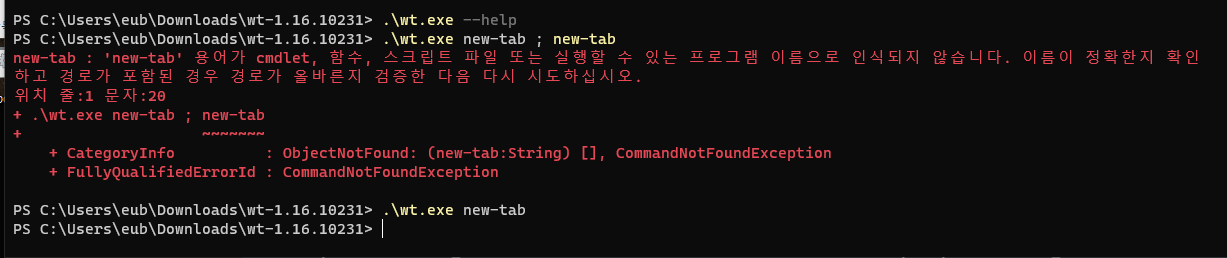
@eubnara commented on GitHub (Mar 15, 2023):

Are you trying to run the Terminal as admin/?

No, but it doesn't work even though I run command prompt as administrator.
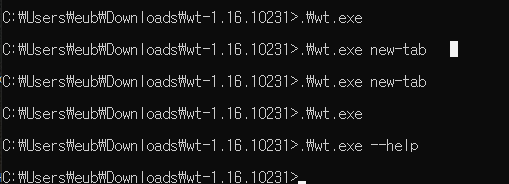
image

Does wt.exe new-tab ; new-tab work? Or maybe even wt.exe --help?

=> Nothing happen
image

Does anything get logged to the Event Viewer when you open the Terminal?

I don't know where logs are in Event Viewer. Could you help me?

@eubnara commented on GitHub (Mar 15, 2023): > Are you trying to run the Terminal as admin/? No, but it doesn't work even though I run command prompt as administrator. ![image](https://user-images.githubusercontent.com/12639125/225234223-466cd6ef-ef7c-4914-af7b-992ecb111895.png) > Does wt.exe new-tab ; new-tab work? Or maybe even wt.exe --help? => Nothing happen ![image](https://user-images.githubusercontent.com/12639125/225233884-fc49074c-3ea9-41ad-abec-1610d2b95bf3.png) > Does anything get logged to the Event Viewer when you open the Terminal? I don't know where logs are in Event Viewer. Could you help me?
Author
Owner

@eubnara commented on GitHub (Mar 15, 2023):

There is no error in Event viewer related to Windows Terminal.
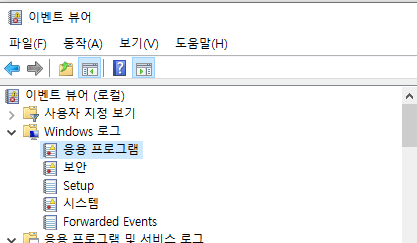
Windows Log > application
image

@eubnara commented on GitHub (Mar 15, 2023): There is no error in Event viewer related to Windows Terminal. `Windows Log > application` ![image](https://user-images.githubusercontent.com/12639125/225238283-bb4442f3-db38-4fb9-8cc5-329d0d56de18.png)
Author
Owner

@eubnara commented on GitHub (Mar 15, 2023):

Windows Terminal works until v1.15.3465.0. Is there any special changes since v1.16?

@eubnara commented on GitHub (Mar 15, 2023): Windows Terminal works until `v1.15.3465.0`. Is there any special changes since `v1.16`?
Author
Owner

@zadjii-msft commented on GitHub (Mar 16, 2023):

Alrighty, since we have no idea what's going on here - let's see if we can automatically capture a dump.

Can you follow the steps in Capture automatically to set up automatic crash dump captures/? Then, try opening the Terminal. When that fails, if it crashes, it'll create a dump. Then, try sharing the dump with us?

@zadjii-msft commented on GitHub (Mar 16, 2023): Alrighty, since we have no idea what's going on here - let's see if we can automatically capture a dump. Can you follow the steps in [Capture automatically](https://github.com/microsoft/terminal/wiki/Toubleshooting-Tips#capture-automatically) to set up automatic crash dump captures/? Then, try opening the Terminal. When that fails, if it crashes, it'll create a dump. Then, try sharing the dump with us?
Author
Owner

@eubnara commented on GitHub (Mar 19, 2023):

I followed the steps in Capture automatically but no dump is made.

@eubnara commented on GitHub (Mar 19, 2023): I followed the steps in [Capture automatically](https://github.com/microsoft/terminal/wiki/Toubleshooting-Tips#capture-automatically) but no dump is made.
Author
Owner

@zadjii-msft commented on GitHub (Mar 22, 2023):

Okay, another thing to test.

Can you capture an ETL trace, following these steps?

That'll tell us definitively if the Terminal is started at all. If it is, then that might give us a place to narrow it down. If Terminal isn't started, then... oof.

@zadjii-msft commented on GitHub (Mar 22, 2023): Okay, another thing to test. Can you capture an ETL trace, following [these steps](https://github.com/microsoft/terminal/wiki/Toubleshooting-Tips#capturing-a-debug-etl-trace)? That'll tell us definitively if the Terminal is started at all. If it is, then that _might_ give us a place to narrow it down. If Terminal isn't started, then... oof.
Author
Owner

@eubnara commented on GitHub (Mar 23, 2023):

I captured etl file but windows terminal is not executed. Should I send you the etl file through email?

@eubnara commented on GitHub (Mar 23, 2023): I captured etl file but windows terminal is not executed. Should I send you the etl file through email?
Author
Owner

@eubnara commented on GitHub (Mar 23, 2023):

Or I capture screenshot on PerfView? I tried to open the etl file. I'm not familiar to this tool.

image

@eubnara commented on GitHub (Mar 23, 2023): Or I capture screenshot on PerfView? I tried to open the etl file. I'm not familiar to this tool. ![image](https://user-images.githubusercontent.com/12639125/227085721-375e6fd3-9278-4e60-bf4b-7cc5f4cdd081.png)
Author
Owner

@carlos-zamora commented on GitHub (Mar 29, 2023):

Hi @eubnara. We think this is a bug that's fixed in 1.16.2026. Can you please check if that's the case?

@carlos-zamora commented on GitHub (Mar 29, 2023): Hi @eubnara. We think this is a bug that's fixed in 1.16.2026. Can you please check if that's the case?
Author
Owner

@eubnara commented on GitHub (Mar 31, 2023):

Sadly, I don't think so. I encountered the same issue with 1.16.10231. (also failed with 1.16.10261.)

@eubnara commented on GitHub (Mar 31, 2023): Sadly, I don't think so. I encountered the same issue with 1.16.10231. (also failed with 1.16.10261.)
Author
Owner

@zadjii-msft commented on GitHub (Sep 6, 2023):

Looping back on this.

Can you maybe try downloading the .zip1 from https://github.com/microsoft/terminal/releases/tag/v1.18.1462.0, and running windowsterminal.exe directly/? If that really does nothing, then there might be something in
image
in event viewer. I'm honestly not well versed in Event Viewer though.


  1. the correct one for your arch, of course ↩︎

@zadjii-msft commented on GitHub (Sep 6, 2023): Looping back on this. * This doesn't seem like it's the other admin crashes we're seeing circa 1.17 (the IPackageStatics ones) * No dump is generated, which makes it seeem like Terminal isn't _crashing_, it's just failing to launch. * I really don't _think_ this is the N SKU thing. I thought we patched that all up by now. * which was: #13751 * fixed in ce26137128f2ccd28b1ac21a249c100c88b740a9, * in https://github.com/microsoft/terminal/tree/v1.15.2874.0 * NOT in https://github.com/microsoft/terminal/tree/v1.16.2641.0 * does look like it was in https://github.com/microsoft/terminal/tree/v1.17.1023.0 * so it's not that Can you maybe try downloading the `.zip`[^1] from https://github.com/microsoft/terminal/releases/tag/v1.18.1462.0, and running `windowsterminal.exe` directly/? If that really does nothing, then there might be something in ![image](https://github.com/microsoft/terminal/assets/18356694/563b7127-89fd-4c10-9ae8-e0619c4e6b45) in event viewer. I'm honestly not well versed in Event Viewer though. [^1]: the correct one for your arch, of course
Author
Owner

@microsoft-github-policy-service[bot] commented on GitHub (Sep 10, 2023):

This issue has been automatically marked as stale because it has been marked as requiring author feedback but has not had any activity for 4 days. It will be closed if no further activity occurs within 3 days of this comment.

@microsoft-github-policy-service[bot] commented on GitHub (Sep 10, 2023): This issue has been automatically marked as stale because it has been marked as requiring author feedback but has not had any activity for **4 days**. It will be closed if no further activity occurs **within 3 days of this comment**.
Author
Owner

@eubnara commented on GitHub (Sep 11, 2023):

Thanks for reply. I will try it tomorrow!

@eubnara commented on GitHub (Sep 11, 2023): Thanks for reply. I will try it tomorrow!
Author
Owner

@eubnara commented on GitHub (Sep 12, 2023):

@zadjii-msft
It works with https://github.com/microsoft/terminal/releases/tag/v1.18.1462.0.
Thanks a lot!

I'm curious that why the version is not 1.18.1462.0 on terminal?
image

@eubnara commented on GitHub (Sep 12, 2023): @zadjii-msft It works with https://github.com/microsoft/terminal/releases/tag/v1.18.1462.0. Thanks a lot! I'm curious that why the version is not 1.18.1462.0 on terminal? ![image](https://github.com/microsoft/terminal/assets/12639125/b2971a07-6de0-4c94-b839-da7184667a59)
Author
Owner

@D-Maxwell commented on GitHub (Sep 28, 2023):

The issue is still present on my machine from 1.17 to the release mentioned above.

@D-Maxwell commented on GitHub (Sep 28, 2023): The issue is still present on my machine from 1.17 to the release mentioned above.
Author
Owner

@zadjii-msft commented on GitHub (Sep 28, 2023):

I'm curious that why the version is not 1.18.1462.0

Oh, technically the Terminal version numbers in the packaged version use the app package catalog to generate that string. For the unpackaged builds, since we obviously can't use the package version, we instead just stamp the "timestamp" into the build. So 1.18.1462.0 == 1.18.239526002 == the second build on the 26th of May of 2023


@D-Maxwell if you're still seeing this with 1.18 Stable / 1.19 Preview (which came out this week), can you grab dumps using these steps and send them to us? That'd be helpful.

Actually, in that case, I might just have you file a new thread, since whatever issue OP was seeing is clearly gone by 1.18. I don't want to cross pollute this solved thread with notes from a new regression 😉

@zadjii-msft commented on GitHub (Sep 28, 2023): > I'm curious that why the version is not 1.18.1462.0 Oh, technically the Terminal version numbers in the _packaged_ version use the app package catalog to generate that string. For the unpackaged builds, since we obviously can't use the package version, we instead just stamp the "timestamp" into the build. So 1.18.1462.0 == 1.18.239526002 == the second build on the 26th of May of 2023 ---- @D-Maxwell if you're still seeing this with 1.18 Stable / 1.19 Preview (which came out this week), can you grab dumps using [these steps](https://github.com/microsoft/terminal/wiki/Toubleshooting-Tips#capture-automatically) and send them to us? That'd be helpful. Actually, in that case, I might just have you file a new thread, since _whatever issue_ OP was seeing is clearly gone by 1.18. I don't want to cross pollute this _solved_ thread with notes from a _new_ regression 😉
Author
Owner

@D-Maxwell commented on GitHub (Sep 29, 2023):

I've managed to spot a windows error being logged. These were the details that accompanied it.

Log Name:      Application
Source:        Application Error
Date:          29/09/2023 19:34:19
Event ID:      1000
Task Category: (100)
Level:         Error
Keywords:      Classic
User:          N/A
Computer:      DESKTOP-K7GSR62
Description:
Faulting application name: WindowsTerminal.exe, version: 1.19.2309.25002, time stamp: 0x65122df0
Faulting module name: ucrtbase.dll, version: 10.0.19041.789, time stamp: 0x2bd748bf
Exception code: 0xc0000409
Fault offset: 0x000000000007286e
Faulting process ID: 0x40e4
Faulting application start time: 0x01d9f2fb2d0fa58e
Faulting application path: C:\Program Files\WindowsApps\Microsoft.WindowsTerminalPreview_1.19.2682.0_x64__8wekyb3d8bbwe\WindowsTerminal.exe
Faulting module path: C:\Windows\System32\ucrtbase.dll
Report ID: fec10e7a-277a-43c4-9811-3046903a79b7
Faulting package full name: 
Faulting package-relative application ID: 
Event Xml:
<Event xmlns="http://schemas.microsoft.com/win/2004/08/events/event">
  <System>
    <Provider Name="Application Error" />
    <EventID Qualifiers="0">1000</EventID>
    <Version>0</Version>
    <Level>2</Level>
    <Task>100</Task>
    <Opcode>0</Opcode>
    <Keywords>0x80000000000000</Keywords>
    <TimeCreated SystemTime="2023-09-29T17:34:19.1837810Z" />
    <EventRecordID>125556</EventRecordID>
    <Correlation />
    <Execution ProcessID="0" ThreadID="0" />
    <Channel>Application</Channel>
    <Computer>DESKTOP-K7GSR62</Computer>
    <Security />
  </System>
  <EventData>
    <Data>WindowsTerminal.exe</Data>
    <Data>1.19.2309.25002</Data>
    <Data>65122df0</Data>
    <Data>ucrtbase.dll</Data>
    <Data>10.0.19041.789</Data>
    <Data>2bd748bf</Data>
    <Data>c0000409</Data>
    <Data>000000000007286e</Data>
    <Data>40e4</Data>
    <Data>01d9f2fb2d0fa58e</Data>
    <Data>C:\Program Files\WindowsApps\Microsoft.WindowsTerminalPreview_1.19.2682.0_x64__8wekyb3d8bbwe\WindowsTerminal.exe</Data>
    <Data>C:\Windows\System32\ucrtbase.dll</Data>
    <Data>fec10e7a-277a-43c4-9811-3046903a79b7</Data>
    <Data>
    </Data>
    <Data>
    </Data>
  </EventData>
</Event>

As for where wt, this is what is returned (which I assume to be correct) :
C:\Users\*username*\AppData\Local\Microsoft\WindowsApps\wt.exe

Note


I just tried installing Terminal Preview in place of the stable Terminal app, which made no difference, except for my settings and tweaks requiring to be manually made once more.
This error occurs whenever I launch Terminal (Preview or Stable) through its alias, wt or wt.exe.
Terminal launches as expected from the AppsFolder shell shortcut.
This, in effect, prevents any script file from running as the terminal window refuses to neither open nor run the file's contents ; as well as rendering any custom shortcuts unusable, such as one to which a hotkey is bound, which is meant to run an elevated instance of the Terminal app (something which a UWP shortcut can not do as the corresponding checkbox is grayed out for some reason).

Do these details satisfy your query @zadjii-msft ?

@D-Maxwell commented on GitHub (Sep 29, 2023): I've managed to spot a windows error being logged. These were the details that accompanied it. ```xml Log Name: Application Source: Application Error Date: 29/09/2023 19:34:19 Event ID: 1000 Task Category: (100) Level: Error Keywords: Classic User: N/A Computer: DESKTOP-K7GSR62 Description: Faulting application name: WindowsTerminal.exe, version: 1.19.2309.25002, time stamp: 0x65122df0 Faulting module name: ucrtbase.dll, version: 10.0.19041.789, time stamp: 0x2bd748bf Exception code: 0xc0000409 Fault offset: 0x000000000007286e Faulting process ID: 0x40e4 Faulting application start time: 0x01d9f2fb2d0fa58e Faulting application path: C:\Program Files\WindowsApps\Microsoft.WindowsTerminalPreview_1.19.2682.0_x64__8wekyb3d8bbwe\WindowsTerminal.exe Faulting module path: C:\Windows\System32\ucrtbase.dll Report ID: fec10e7a-277a-43c4-9811-3046903a79b7 Faulting package full name: Faulting package-relative application ID: Event Xml: <Event xmlns="http://schemas.microsoft.com/win/2004/08/events/event"> <System> <Provider Name="Application Error" /> <EventID Qualifiers="0">1000</EventID> <Version>0</Version> <Level>2</Level> <Task>100</Task> <Opcode>0</Opcode> <Keywords>0x80000000000000</Keywords> <TimeCreated SystemTime="2023-09-29T17:34:19.1837810Z" /> <EventRecordID>125556</EventRecordID> <Correlation /> <Execution ProcessID="0" ThreadID="0" /> <Channel>Application</Channel> <Computer>DESKTOP-K7GSR62</Computer> <Security /> </System> <EventData> <Data>WindowsTerminal.exe</Data> <Data>1.19.2309.25002</Data> <Data>65122df0</Data> <Data>ucrtbase.dll</Data> <Data>10.0.19041.789</Data> <Data>2bd748bf</Data> <Data>c0000409</Data> <Data>000000000007286e</Data> <Data>40e4</Data> <Data>01d9f2fb2d0fa58e</Data> <Data>C:\Program Files\WindowsApps\Microsoft.WindowsTerminalPreview_1.19.2682.0_x64__8wekyb3d8bbwe\WindowsTerminal.exe</Data> <Data>C:\Windows\System32\ucrtbase.dll</Data> <Data>fec10e7a-277a-43c4-9811-3046903a79b7</Data> <Data> </Data> <Data> </Data> </EventData> </Event> ``` As for `where wt`, this is what is returned (which I assume to be correct) : `C:\Users\*username*\AppData\Local\Microsoft\WindowsApps\wt.exe` > *Note* > I just tried installing Terminal Preview in place of the stable Terminal app, which made no difference, except for my settings and tweaks requiring to be manually made once more. > This error occurs whenever I launch Terminal (Preview or Stable) through its alias, `wt` or `wt.exe`. > Terminal launches as expected from the AppsFolder shell shortcut. > This, in effect, prevents any script file from running as the terminal window refuses to neither open nor run the file's contents ; as well as rendering any custom shortcuts unusable, such as one to which a hotkey is bound, which is meant to run an elevated instance of the Terminal app (something which a UWP shortcut can not do as the corresponding checkbox is grayed out for some reason). Do these details satisfy your query @zadjii-msft ?
Author
Owner

@D-Maxwell commented on GitHub (Sep 29, 2023):

https://github.com/microsoft/terminal/issues/14219#issuecomment-1423347537

Following your advice after searching for issues related to error code 0xc0000409, I can confirm version 1.16.10261.0 is unaffected by this issue.
Both the alias and files now open as expected.

Hopefully there exists a way to reproduce this "fix" on later versions. Even though this is Windows we're talking about, I would not fancy having up to date packages without them breaking. (not implying anything, I will be looking forward to a solution, that is all)

@D-Maxwell commented on GitHub (Sep 29, 2023): https://github.com/microsoft/terminal/issues/14219#issuecomment-1423347537 Following your advice after searching for issues related to error code `0xc0000409`, I can confirm version 1.16.10261.0 is unaffected by this issue. Both the alias and files now open as expected. Hopefully there exists a way to reproduce this "fix" on later versions. Even though this is Windows we're talking about, I would not fancy having up to date packages without them breaking. (not implying anything, I will be looking forward to a solution, that is all)
Author
Owner

@zadjii-msft commented on GitHub (Sep 29, 2023):

Alas, that report ID isn't enough for me to be able to find the stack on my end. We'd really need a crash dump, or sometimes filing /feedback with the Feedback Hub can help.

I'd suspect it's unrelated to #14219, unless you've got elevate: true somewhere in your settings file.

This feels a bit like #15583. Actually, #14219 might be that too...

@zadjii-msft commented on GitHub (Sep 29, 2023): Alas, that report ID isn't enough for me to be able to find the stack on my end. We'd really need a crash dump, or sometimes filing /feedback with the Feedback Hub can help. ~I'd suspect it's unrelated to #14219, unless you've got `elevate: true` somewhere in your settings file.~ This feels a _bit_ like #15583. Actually, #14219 might be that too...
Author
Owner

@microsoft-github-policy-service[bot] commented on GitHub (Sep 29, 2023):

Hi there!

Can you please send us feedback with the Feedback Hub with this issue? Make sure to click the "Start recording" button, then reproduce the issue before submitting the feedback. Once it's submitted, paste the link here so we can more easily find your crash information on the back end?

Thanks!

image

image

image

@microsoft-github-policy-service[bot] commented on GitHub (Sep 29, 2023): Hi there!<br><br>Can you please send us feedback with the [Feedback Hub](https://support.microsoft.com/en-us/windows/send-feedback-to-microsoft-with-the-feedback-hub-app-f59187f8-8739-22d6-ba93-f66612949332) with this issue? Make sure to click the "Start recording" button, then reproduce the issue before submitting the feedback. Once it's submitted, paste the link here so we can more easily find your crash information on the back end?<br><br>Thanks!<br><br>![image](https://user-images.githubusercontent.com/18356694/140811502-a068f78b-89d2-4587-925a-73e19652b830.png)<br><br>![image](https://user-images.githubusercontent.com/18356694/140811557-cdc22a0f-fa6a-4f6a-953e-73b51f5548a3.png)<br><br>![image](https://user-images.githubusercontent.com/18221333/62478649-6de55400-b760-11e9-806e-5aab7e085a9f.png) <!-- Policy app identification https://img.shields.io/static/v1?label=PullRequestIssueManagement. -->
Author
Owner

@microsoft-github-policy-service[bot] commented on GitHub (Oct 3, 2023):

This issue has been automatically marked as stale because it has been marked as requiring author feedback but has not had any activity for 4 days. It will be closed if no further activity occurs within 3 days of this comment.

@microsoft-github-policy-service[bot] commented on GitHub (Oct 3, 2023): This issue has been automatically marked as stale because it has been marked as requiring author feedback but has not had any activity for **4 days**. It will be closed if no further activity occurs **within 3 days of this comment**. <!-- Policy app identification https://img.shields.io/static/v1?label=PullRequestIssueManagement. -->
Sign in to join this conversation.
1 Participants
Notifications
Due Date
No due date set.
Dependencies

No dependencies set.

Reference: starred/terminal#19520