mirror of
https://github.com/microsoft/terminal.git
synced 2026-09-25 08:24:54 +00:00
Run As Administrator #2639
Closed
opened 2026-01-30 23:00:49 +00:00 by claunia
·
52 comments
No Branch/Tag Specified
main
dev/duhowett/stop-using-projection-for-control-innards
dev/duhowett/fhl-2026/remove-paste-hairpin-handler
dev/duhowett/win7-wpf-termcontrol-squash
dev/lhecker/20226-present-leaks
dev/duhowett/wpf-1-autoscroll-to-interactivity
dev/duhowett/wpf-3-swapchain-handle
dev/duhowett/wpf-2-midi-audio-timer
dev/migrie/overview-for-pr
dev/migrie/b/markdown-paste
dev/duhowett/padding-in-atlas
fix/german-split-pane-tooltip
release-1.25
dev/cazamor/sui-rejuv/fix-spaces
dev/migrie/per-window-final
dev/cazamor/selfhost/2026-08-31
dev/migrie/b/independent-animations
dev/pabhoj/wtcli
dev/cazamor/conhost/bugfix-a11y-find
dev/cazamor/conhost/bugfix-a11y-find-1.24
dev/lhecker/theme-quality-test
dev/lhecker/theme-quality
dev/cazamor/selfhost/sui-rejuv
dev/cazamor/fix/search-selection-off-by-one
dev/duhowett/even-more-builtin-glyphs
dev/crutkas/kitty-pr1
dev/cazamor/toast/activity
release-1.24
users/GitHubPolicyService/d8615b98-f5fa-4462-bf7f-c44a1cc12096
dev/cazamor/selfhost/2026-06-18
dev/migrie/f/new-profile-subcommand
dev/cazamor/sui-rejuv/profiles-v2
dev/duhowett/asan-for-all
dev/cazamor/sui-rejuv/profiles-new
dev/cazamor/sui-rejuv/expander-groups-new
dev/cazamor/auto-save/refresh-settings
feature/llm
dev/cazamor/auto-save/model/json-manager
dev/cazamor/auto-save/settings-model
dev/migrie/s/snippet-params
users/merlinbot/1es-pt-auto-baselining-pr
niels9001/inactive-tab-foreground
dev/cazamor/selfhost/2026-05-20-home
dev/duhowett/fzf-vcxproj
dev/cazamor/selfhost/2026-05-20
dev/cazamor/selfhost/2026-05-19
dev/cazamor/selfhost/2026-05-18
niels9001/fontweight-fixes
niels9001/page-transitions
dev/duhowett/fhl-2026/rewrite-paste-and-dragdrop-handling-writeinputstring
dev/migrie/f/overview-view
dev/cazamor/selfhost/2026-05-13
dev/cazamor/selfhost/2026-05-13-sui
dev/yeelam/f/BuildTest
dev/duhowett/hax/our-own-tabview
dev/cazamor/bugfix/close-scratchpad
dev/cazamor/selfhost/2026-05-05
dev/cazamor/selfhost/2026-05-04-workspaces
dev/cazamor/selfhost/2026-05-04
dev/lhecker/20149-hotfix
dev/lhecker/osc-7-wsl
dev/migrie/workspaces-real
dev/migrie/fhl-spring-2026/quake-4
dev/lhecker/pwsh-5.1
dev/cazamor/sui/dropdown-page
dev/cazamor/selfhost/2026-04-08
dev/cazamor/selfhost/2026-04-06
dev/migrie/fhl-spring-2026/confirmCloseOn
dev/cazamor/confirmCloseOn/dont-ask-me-again
dev/lhecker/inproc-conpty
dev/duhowett/powershell-module-supercharger
dev/cazamor/a11y/vt-seq-prototype
dev/migrie/fhl-spring26/osc777-2
dev/migrie/fhl-spring26/2/notification-infrastructure
dev/migrie/fhl-spring-2026/side-tabs
dev/cazamor/copilot/playground
dev/migrie/fhl-spring-2026/quake-3.5
dev/migrie/fhl-spring26/osc777
dev/migrie/fhl-spring26/unpackaged-notify
dev/migrie/fhl-spring26/bellStyle-notification
dev/migrie/fhl-spring26/activity-notifications
dev/migrie/fhl-spring-2026/x-open
dev/migrie/fhl-spring-2026/quake-5
dev/migrie/fhl-spring26/nextTab-filter
dev/duhowett/atlas-draw-d2d-dots-curlies-consistently
dev/lhecker/14165-conhost-font-size
dev/lhecker/ottosson-by-default
dev/duhowett/hax/unix-pty
dev/duhowett/hax/cmake
dev/lhecker/generate-256-colors
dev/lhecker/dcs-perf
dev/lhecker/1410-large-scrollback
dev/cazamor/selfhost/2026-02-10
dev/lhecker/11509-kitty-keyboard-protocol-wip
dev/cazamor/selfhost/2026-01-29
dev/lhecker/benchcat-fix
dev/duhowett/eoy-25/allow-set-foreground
release-1.23
dev/cazamor/bot/deprecate-area-atlasengine
dev/cazamor/selfhost/2026-01-20
dev/cazamor/selfhost/2026-01-12
dev/cazamor/spec/auto-save
dev/duhowett/fhl-2024/asciicast-recorder
dev/duhowett/eoy-25/underline-colors-in-atlas-bug
dev/duhowett/hax/serial-port-support
dev/duhowett/connection-utf8
dev/lhecker/fused-event
dev/lhecker/18928-wip
dev/duhowett/fhl-2024/clang
dev/duhowett/vt-cache-changes
dev/cazamor/uia-leak
release-1.22
dev/cazamor/selfhost/11-18-v3
dev/cazamor/selfhost/11-18
dev/duhowett/fhl-2025/bitmap-fonts
dev/duhowett/server-2025-vms
dev/duhowett/cant-believe-gotta-do-this-shit
dev/lhecker/dark-mode
dev/cazamor/sui/invert-cursor-color
dev/duhowett/fhl-2025/wt-command-palette-cmdpal-integration
dev/duhowett/fhl-2025/wt-json-relative-icons
dev/lhecker/fucking-service-locator
dev/duhowett/unicode-17
dev/duhowett/multi-blern
dev/lhecker/wellp2-alt
dev/duhowett/wellp2
dev/lhecker/1860-horizontal-scrollbar
dev/lhecker/fix-window-count
dev/cazamor/sui/tab-color-old
dev/duhowett/hax/conhost-icon
dev/duhowett/hax/sui-color-chip-border
dev/duhowett/hax/terminalsettings-as-a-lib-/with-types-merged-into-tsm
dev/pabhoj/page_control_input_cleanup
dev/duhowett/padding-in-atlas-rebase-20250729
dev/lhecker/attach-thread-input
dev/duhowett/portable-shader-members
msbuildcache-reenable
dev/cazamor/selfhost/1.24-2025-06-10
dev/cazamor/upgrade-settings-containers
dev/cazamor/sui/ext-page/powershell-stub
dev/cazamor/selfhost/1.24-2025-05-15
dev/pabhoj/sui_action_overhaul
dev/cazamor/selfhost/1.24-2025-05-06
dev/cazamor/selfhost/1.24-2025-04-29
dev/cazamor/sui/ext-page/lazy-load-objects
dev/cazamor/sui/ext-page/badge
dev/cazamor/selfhost/1.24
dev/lhecker/sdk-26100
dev/duhowett/testing
dev/jadelaga/VS-Pty.Net-1.22
dev/duhowett/fhl-2025/what-if-no-content-ids
dev/lhecker/18584-part2
dev/lhecker/get-lang-id
dev/duhowett/hax/clogs
release-1.21
dev/pabhoj/featurellm_fix_paste
dev/lhecker/grapheme-backup
dev/jadelaga/VS-Pty.netFixes
dev/lhecker/atlas-engine-compute-shader
dev/migrie/s/ai-providers
dev/lhecker/animated-cursor-wip
dev/pabhoj/featurellm_timeout
dev/lhecker/dark-mode-alt
dev/duhowett/osc-strided-table
dev/lhecker/bugbash
dev/pabhoj/featurellm_improve_parsing
dev/duhowett/coast-to-coast
dev/lhecker/curly-improvements
dev/duhowett/net8
dev/duhowett/onebranch-custom-pool
dev/lhecker/renderer-overhaul-2nd-attempt
dev/lhecker/cleanup
dev/cazamor/sui/confirmation-announcements
dev/lhecker/winconpty-cleanup
dev/duhowett/learn/rewrite-highlights
dev/migrie/b/no-nesting-when-searching
release-1.20
dev/duhowett/sel-2-spans
dev/lhecker/7118-cursor-color
dev/lhecker/remove-glyph-width
dev/lhecker/igfw-scroll-region
dev/lhecker/17656-win32im-double-encoding
dev/duhowett/fhl-2024/merge-idls
dev/duhowett/feed-forward-variables
dev/lhecker/remove-chrome-math
dev/duhowett/copylink
dev/duhowett/applicableactions
gh-readonly-queue/main/pr-17566-de50310295b7d92ed3d51f07974a2a945776bf9d
dev/lhecker/atlas-engine-stride-copy
dev/migrie/b/bump-nuget-in-c
dev/migrie/f/992-redux-redux
dev/migrie/f/filter-weight-input-too
dev/migrie/f/disable-nesting
dev/migrie/f/local-snippets-cleaner
dev/migrie/s/1553-mouse-bindings
selfhost-1.22-bugbash-2024-06-04
selfhost/1.22-bugbash-2024-06-04
dev/lhecker/15689-tab-drag-crash-fix
dev/migrie/f/sxnui-font-size-change
dev/migrie/f/local-snippets-on-action-refactor
dev/migrie/f/just-local-snippets
dev/migrie/save-input-patches
dev/migrie/f/md-pane-official
dev/migrie/base-pane
dev/migrie/fhl/tasks-pane
release-1.19
dev/migrie/b/17130-clear-marks-2
dev/migrie/b/17075-its-me-the-killer
dev/duhowett/i-figured-out-why-sometimes-the-publish-build-failed
dev/duhowett/nuget-publication-with-aad-app-id
selfhost-1.20
dev/duhowett/graph
dev/migrie/b/15803-activate-dont-copypasta
dev/duhowett/is-pgo-broken-because-of-sui-being-slower
dev/migrie/b/remove-terminaltab
dev/migrie/fhl/md-pane
dev/migrie/fhl/local-tasks-2024
dev/migrie/fhl/2024-inline-notebook
dev/duhowett/interface-projects
dev/duhowett/dead-loc
release-1.18
dev/migrie/fhl/2024-spring-merge-base
dev/duhowett/hax/l9
inbox
dev/migrie/14073-on-main
dev/duhowett/hax/conhost_dump_replay
user/lhecker/atlas-engine-srgb
dev/migrie/fhl/sxnui-tooltips-3
dev/migrie/7718-notifications-experiments
dev/migrie/fhl/7718-notifications
dev/migrie/fhl/7718-notifications-reboot
dev/lhecker/remove-gsl
dev/lhecker/16575-TerminateProcess
dev/lhecker/window-thread-climate-control
dev/lhecker/client-context-input-output-mode
dev/lhecker/ring-buffer-input-buffer
release-1.17
dev/lhecker/propsheet-fontdlg-refactor
dev/lhecker/renderer-overhaul
dev/pabhoj/test
dev/duhowett/chop
dev/lhecker/til-ulong-cleanup
dev/lhecker/til-env-cleanup
dev/migrie/f/16005-a11y-pane
dev/cazamor/a11y/fastpass
dev/migrie/b/15487-push-cwd
dev/migrie/b/15536-or-15219-idk
dev/duhowett/move-timers-down-into-core-interactivity-etc
dev/migrie/b/15812-broadcast-paste-two
dev/migrie/fhl-fall-2023/11162-quake-III-arena
dev/migrie/fhl-fall-2023/1620-automatic-tab-progress
dev/migrie/fhl-fall-2023/9992-quake-II
dev/migrie/fhl-fall-2023/9992-default-quake-settings
dev/migrie/fhl-fall-2023/9992-window-name-settings
dev/migrie/fhl-fall-2023/oceans
dev/lhecker/ColorScheme-improvements
dev/migrie/search-v2-v3
dev/migrie/pr-15717/its-dangerous-to-go-alone
dev/migrie/f/4768-taskbar-icons
dev/migrie/f/3121-tooltips
dev/duhowett/sticky-control
dev/duhowett/fix-tracing-2
dev/migrie/b/add-support-for-vsc-marks
dev/migrie/f/1860-this-is-literally-what-less-is-for
dev/migrie/s/5916-draft
dev/lhecker/tracy
dev/migrie/s/north-star
dev/cazamor/tag-youre-it
dev/migrie/f/12336-let-it-mellow
dev/migrie/f/now-with-more-compat-settings
dev/migrie/f/compatibility-sui
dev/duhowett/hax/wpf-atlas
dev/duhowett/fgb
dev/migrie/b/15487-relative-paths-are-hard
dev/lhecker/colrv1
loc-update
dev/migrie/fhl/dyndep-csharp
dev/migrie/fhl/dyndep
dev/migrie/fhl-clickable-send-input
dev/migrie/f/cwd-hijinks-5506-15173
dev/lhecker/openconsole-async-start
1.17
dev/migrie/bump-scratch
dev/migrie/f/3726-restartConnection
dev/migrie/b/cxn-restarting-attempt-1-backport
dev/migrie/b/9053-part-3-the-actual-doing-of-the-thing
dev/migrie/b/13388-focus-logger
dev/migrie/b/9053-part-4-i-guess-defterm
dev/migrie/oop/3/of-the-silmarils
of-the-darkening-of-valinor
dev/migrie/fhl/notebook-proto-000
dev/migrie/f/narrator-buddy
dev/migrie/mux-2.8.2-march-2023
dev/migrie/f/roast-mutton
dev/migrie/f/12861-preview-input
dev/lhecker/clang-tidy
dev/migrie/f/3121-wE-dOnT-hAvE-dEv-DaYs
dev/duhowett/compiler-compliance
dev/duhowett/i-have-a-burning-hatred-for-ntstatus-of-later-so-why-not-fix-it
dev/duhowett/shorthand-namespaces
dev/duhowett/rename-all-dlls
dev/duhowett/errordialog
dev/lhecker/gsl-narrow
dev/migrie/b/11522-dumb-idea
release-1.16
dev/miniksa/env
dev/duhowett/hax/embed-everything
dev/migrie/b/13388-attempt-003
dev/migrie/b/14512-test-research
dev/migrie/b/13388-attempt-002
dev/migrie/b/14464-copyOnSelect-moving-text
dev/migrie/s/thema-schema-for-1.16
dev/migrie/s/theme-pair-schema
dev/migrie/b/13388-experiments-1
dev/cazamor/spec/a11y-vt-seq
dev/migrie/b/14557-empty-folder-dropdown
dev/cazamor/spec/a11y-vt-seq-v2
release-1.15
dev/migrie/f/process-model-v3-test-0
dev/lhecker/vsconfig
dev/migrie/s/5000-presentation
dev/lhecker/5907-startup-perf
dev/lhecker/winrt-file-api-benchmark
dev/duhowett/128-bit-compiler
dev/migrie/fhl/more-shell-integration
dev/migrie/b/13388-experiments-0
dev/lhecker/til-to-ulong-improvements
dev/migrie/s/markdown-notebooks
dev/cazamor/a11y/nav-by-page
dev/cazamor/a11y/system-menu-support
dev/duhowett/no-private-registry-keys
dev/cazamor/wpf/uia-expose-enable-events
dev/cazamor/wpf/uia-events
extendAISpec
dev/migrie/fhl/clickSendInput
dev/migrie/fhl/save-command
dev/migrie/b/theme.profile
dev/migrie/b/13943-a-test-for-this
dev/migrie/oop/2/endgame
dev/duhowett/hax/merge_idl
dev/migrie/oop/2/infinity-war
dev/migrie/spellbot-cve
dev/cazamor/a11y-sev3/new-profile-announcement
dev/migrie/fhl/upside-down-mode
release-1.14
dev/migrie/f/9458-startupInfoToTerminal
dev/migrie/fhl/5916-triggers
dev/migrie/b/13523-context-menu
dev/migrie/b/6523-endpaint-outside-lock
dev/migrie/b/12413-OnUnhandledException
dev/lhecker/render-snapshot
dev/cazamor/1.15/scroll-to-point
dev/migrie/mux-2.8-aug-2022
dev/lhecker/lock-console-guard
dev/migrie/f/1504-final
dev/pabhoj/sui_follow_ups
dev/migrie/f/til-winrt.h
dev/cazamor/color-picker-redesign
dev/migrie/fhl/vscode-autocomplete-prototype
dev/migrie/f/1504-prototype
dev/migrie/oop/2/loki
dev/migrie/oop/2/wandavision
dev/migrie/b/8698-YOURE-OUT-OF-ORDER
fabricbot-configuration-migration
dev/migrie/b/12788-did-it-work
dev/migrie/b/localtests-ci-2022
dev/cazamor/1.14/replace-compareInBounds
dev/pabhoj/preview_string
dev/cazamor/ks/switchSelectionEndpoint
dev/migrie/oop/2/COM-ISwapChainProvider-attempt-1
dev/migrie/b/dxd-marker
release-1.13
dev/migrie/b/13066-for-defterm
dev/cazamor/revert-dwm
dev/migrie/b/13066-sw_flash_repeatedly
dev/migrie/b/no-cloaky-cloak
dev/migrie/f/apples-to-oranges
dev/migrie/f/no-custom-caption-btns
dev/migrie/f/10509-mica-and-transparent-titlebars
dev/migrie/b/12911-wpf-focus-fg
dev/migrie/titebar-colors
dev/lhecker/4015-cursor
dev/migrie/fhl/rgb-rainbow-window-frame
dev/migrie/fhl/scroll-marks-prototype
release-1.12
dev/miniksa/compliance
dev/migrie/f/default-icons
dev/migrie/fhl/10175-web-search-for-text
dev/migrie/fhl/menu-complete-prototype
dev/migrie/b/2988-merged-prototypes
dev/migrie/b/2988-niksa-msgs-prototype
dev/migrie/fhl/9583-colorSelection
dev/migrie/b/10609-sui-leak
dev/migrie/b/32-attempt-3
dev/migrie/release-1.12-rejuv-attempt-2
dev/migrie/demo-for-presentation
dev/migrie/b/32-but-im-here-for-12567
dev/duhowett/conpty_first_frame_blug
dev/migrie/b/11092-unfocused-acrylic-settings
dev/migrie/localtests-in-ci
dev/migrie/b/12356-attempt-2
dev/migrie/b/12353-with-null
dev/migrie/b/12387-trim-spaces
dev/migrie/b/5033-bad-start
dev/lhecker/12351-broken-locales
dev/migrie/b/8663-input-to-oem-crash
dev/migrie/b/11743-win10-opacity-is-hard
dev/migrie/f/ctrl-click-elevate
dev/migrie/b/12196-shim-localization
dev/lhecker/issue-4015-til-rect
dev/cazamor/eim/mvvm
dev/migrie/f/--elevate
dev/migrie/b/11668-i-think
dev/migrie/b/11994-wsl-mangline
dev/migrie/eim/3475-action-xmacros
dev/migrie/eim/incremental-build-000
dev/cazamor/a11y/fake-uia-data
dev/migrie/f/non-terminal-content-elevation-warning
dev/migrie/f/632-on-warning-dialog
dev/lhecker/rgba
dev/migrie/b/8480-keybindings-in-tabs
release-1.11
dev/migrie/b/11561-dead-ends
dev/migrie/oct-21-roadmap-update
dev/migrie/fhl/adaptive-card-extension
dev/cazamor/test/11440
dev/migrie/f/warning-dlg-automation
dev/migrie/b/1.12-crash-on-exit
dev/migrie/b/11146-next-tab-in-cmdpal
release-1.10
dev/migrie/5ff9a24-and-75e2b5f
dev/duhowtt/hax/cpal-jumplist-async
dev/lelian/actionid/1
dev/migrie/f/just-elevated-state
dev/lhecker/terminal-settings-cleanup
dev/migrie/gh-10824
dev/pabhoj/cursor_light
dev/migrie/oop/wandavision
dev/migrie/oop/endgame
dev/migrie/oop/infinity-war
dev/lhecker/app-state-actually-hidden
dev/migrie/b/6160-dynamic-default-warning
dev/mgirie/b/more-nchhittest-ideas
dev/migrie/b/9320-interfacial-separation
cinnamon/fhl/find-contextmenu
dev/lhecker/wsl-distro-generator-cleanup
dev/migrie/b/10875-but-more-clever
dev/migrie/b/broken-globalsummon-overloading
dev/duhowett/hax/rle-row
dev/migrie/fhl-2021/cmdpal-select-list
dev/migrie/fhl-2021/differential-pixel-shading
dev/duhowett/hax/no-writable-glyphat
dev/migrie/fhl-2021/more-shader-variables
dev/migrie/titlebar-shenannigans
dev/miniksa/win10_font_matching
dev/lhecker/conhost-oom
dev/migrie/b/10332-less-snappy-scrolling
dev/migrie/b/7422-1px-top-border
release-1.9
dev/cazamor/move-scratch
release-1.8
dev/miniksa/manifest_2
release-1.6
release-1.7
dev/migrie/oop/the-whole-thing
dev/migrie/oop/connection-factory
dev/migrie/f/quake-dropdown-2
dev/miniksa/rle2
dev/migrie/f/quake-toCurrent-experiments-2
dev/migrie/f/quake-toCurrent-experiments
dev/migrie/f/quake-dropdown
dev/cazamor/actions-page/template
dev/duhowett/hax/cursor_stamp_foreground_background
dev/migrie/f/1860-hey-might-was-well-hack-during-a-hackathon
dev/migrie/oop-terminal.control-split-control
dev/duhowett/hax/build-with-wholearchive
dev/cazamor/spec/tsm-actions-temp
dev/migrie/oop-tear-apart-control
dev/migrie/oop-scratch-3
dev/cazamor/sui/bugfix-reload-crash
dev/migrie/f/xmacro
dev/cazamor/sui/proto/profile-nav-view
dev/migrie/f/name-windows
dev/migrie/dol/messing-with-shaders-take-1
release-1.5
dev/cazamor/sui/inheritance-hyperlinks-test
dev/migrie/r/commandline-lib-002
dev/migrie/f/com.fabrikam.toaster
dev/cazamor/adaptive-cards-prototype
dev/migrie/f/commandline-lib
dev/miniksa/zipzoom2
dev/migrie/f/remote-commandlines
dev/migrie/f/632-elevated-profiles
dev/migrie/oop-broker-000
dev/migrie/fix-pr-7015
dev/duhowett/clang
dev/miniksa/input_tests_2
dev/miniksa/input2
dev/migrie/oop-rpc-000
release-1.4
dev/migrie/oop-mixed-elevation-1
dev/migrie/oop-window-content-1
cinnamon/open-json
dev/miniksa/input_tests
dev/duhowett/hax/tsm-graphviz
dev/miniksa/input
dev/duhowett/hax/caption_buttons
release-1.3
dev/cazamor/a11y/expand-line-under-viewport
dev/cazamor/acc/ch/word-nav-perf
dev/cazamor/spec/settings-ui-architecture-draft
dev/duhowett/hax/tap_upgrade
dev/migrie/f/pane-exit-animation
release-1.2
dev/migrie/move-lib-up-and-dll-down
release-1.1
dev/migrie/f/branch-2-backup
dev/migrie/f/settings-getters-only
dev/duhowett/hax/command_palette_search
dev/migrie/f/6856-let-terminalpage-expandcommands
dev/migrie/f/theming-2020
dev/migrie/oop-scratch-4
dev/duhowett/hax/punchout
dev/migrie/s/action-ids
dev/migrie/f/lets-just-generate-these
dev/migrie/oop-scratch-2
dev/miniksa/dcomp
dev/miniksa/gotta_go_fast_spsc
dev/miniksa/gotta_go_fast
dev/miniksa/perf_skip_checks
dev/miniksa/perf_buffer_dig
dev/migrie/s/1203-cursorTextColor
dev/migrie/f/fix-intellisense-i-guess-backup
release-1.0
dev/migrie/f/execute-commandlines
dev/migrie/f/2046-Command-Palette-v2
dev/migrie/b/6421-passthrough-alt
dev/migrie/b/moving-focus-is-hard
dev/miniksa/set
dev/migrie/f/1203-phase-1
dev/migrie/f/get-localtests-in-ci
dev/cazamor/drag-panes
dev/cazamor/tile-background
release-0.11
dev/duhowett/dev/duhowett/hax/appstate_remember
dev/duhowett/hax/wpf_win_8_hax
dev/migrie/b/3088-weird-exact-wrap-resize
release-0.10
dev/migrie/b/4591-custom-scaling-bug
dev/duhowett/hax/attr_smuggling
dev/migrie/b/5161-mingw-vim-fix
dev/miniksa/dx_bitmap
dev/migrie/b/1503-try-messing-with-cooked-read
dev/duhowett/eyebeam
dev/migrie/b/5113-experiments
dev/duhowett/hax-selection-exclusive
dev/migrie/f/more-vt-renderer-tracing
dev/miniksa/bitmap
dev/duhowett/wprp
dev/miniksa/bitmap-mad-with-power
dev/migrie/f/resize-quirk
dev/migrie/f/reflow-buffer-on-resize-002
wpf-renderer-revert
dev/miniksa/draw
release-0.9
dev/miniksa/tabs-color-fix
dev/miniksa/4309
dev/migrie/f/just-wrapping
dev/migrie/b/3490-try-another-resize-algo
release-0.8
dev/migrie/b/3490-a-simpler-resize
dev/migrie/b/3490-resize-down
dev/miniksa/4254
dev/migrie/f/conpty-wrapped-lines-2
dev/migrie/b/be-better-at-hiding
dev/migrie/f/3327-xaml-theming-proto
dev/miniksa/gardening2
release-0.7
dev/duhowett/conpty-flags
dev/migrie/f/603-vintage-opacity
dev/migrie/PR#3181-comments
dev/duhowett/font-64
release-0.5
dev/migrie/b/663-paste-lf-always
dev/migrie/b/2011-reordered-fallthrough-strings
dev/migrie/b/411-init-tab-stops
dev/migrie/b/json-patching-is-hard
dev/migrie/b/2455-try-getting-tests-working
dev/migrie/b/1223-change-256-table
dev/migrie/f/2171-openterm.cmd
dev/migrie/f/drag-panes
dev/migrie/f/2046-command-palette
release-0.3
dev/miniksa/manager
dev/migrie/f/non-terminal-panes
dev/migrie/f/passthrough-2019
dev/miniksa/shared_pch
dev/migrie/f/1897-less-duplicated-work
release-0.2
dev/cazamor/mcs/viewport-selection
dev/duhowett/version_hack
v1.25.1912.0
v1.24.11911.0
v1.25.1322.0
v1.24.11321.0
v1.25.1241.0
v1.25.1171.0
v1.25.923.0
v1.24.10921.0
v1.25.622.0
v1.24.10621.0
v1.24.10212.0
v1.23.20211.0
v1.24.3504.0
v1.23.13503.0
v1.24.2812.0
v1.23.12811.0
v1.24.2682.0
v1.23.12681.0
v1.24.2372.0
v1.23.12371.0
v1.23.12102.0
v1.22.12111.0
v1.23.11752.0
v1.22.11751.0
v1.22.11141.0
v1.23.11132.0
v1.23.10732.0
v1.22.10731.0
v1.21.10351.0
v1.22.10352.0
v1.23.10353.0
v1.22.3232.0
v1.21.3231.0
v1.22.2912.0
v1.21.2911.0
v1.22.2702.0
v1.21.2701.0
v1.22.2362.0
v1.21.2361.0
v1.21.1772.0
v1.20.11781.0
v1.21.1382.0
v1.20.11381.0
v1.21.1272.0
v1.20.11271.0
v1.20.11215.0
v1.19.11213.0
v1.20.10822.0
v1.19.10821.0
v1.20.10572.0
v1.19.10573.0
v1.20.10303.0
v1.19.10302.0
v1.18.10301.0
v1.20.10293.0
v1.19.10292.0
v1.18.10291.0
v1.18.3181.0
v1.19.3172.0
v1.19.2831.0
v1.18.2822.0
v1.19.2682.0
v1.18.2681.0
v1.18.1462.0
v1.17.11461.0
v1.18.1421.0
v1.17.11391.0
v1.17.11043.0
v1.16.10261.0
v1.17.1023
v1.16.10231.0
v1.15.3465.0
v1.16.3463.0
v1.15.2712.0
v1.15.2874.0
v1.16.2641.0
v1.16.2523.0
v1.15.2524.0
v1.15.2282.0
v1.14.2281.0
v1.14.1962.0
v1.15.2002.0
v1.15.2001.0
v1.15.1862.0
v1.14.1861.0
v1.14.1451.0
v1.14.1432.0
v1.13.11431.0
v1.13.10983.0
v1.12.10982.0
v1.13.10733.0
v1.12.10732.0
v1.13.10395.0
v1.12.10393.0
v1.13.10336.0
v1.12.10334.0
v1.12.3472.0
v1.11.3471.0
v1.12.2931.0
v1.12.2922.0
v1.11.2921.0
v1.11.2731.0
v1.10.2714.0
v1.11.2421.0
v1.10.2383.0
v1.10.1933.0
v1.9.1942.0
v1.9.1523.0
v1.8.1521.0
v1.9.1445.0
v1.8.1444.0
v1.8.1092.0
v1.7.1091.0
v1.8.1032.0
v1.7.1033.0
v1.7.572.0
v1.6.10571.0
v1.5.10411.0
v1.6.10412.0
v1.6.10272.0
v1.5.10271.0
v1.5.3242.0
v1.4.3243.0
v1.5.3142.0
v1.4.3141.0
v1.4.2652.0
v1.3.2651.0
v1.3.2382.0
v1.2.2381.0
v1.1.2233.0
v1.2.2234.0
v1.1.2021.0
v1.2.2022.0
v1.1.1812.0
v1.0.1811.0
v1.1.1671.0
v1.0.1401.0
v0.11.1333.0
v0.11.1251.0
v0.11.1191.0
v0.11.1111.0
v0.11.1121.0
v0.10.781.0
v0.10.761.0
v0.9.433.0
v0.8.10261.0
v0.8.10091.0
v0.7.3451.0
v0.7.3382.0
v0.7.3291.0
v0.7.3252.0
v0.6.3181.0
v0.6.2951.0
v0.6.2911.0
v0.5.2762.0
v0.5.2761.0
v0.5.2681.0
v0.5.2661.0
v0.3.2321.0
v0.4.2342.0
v0.4.2382.0
v0.3.2171.0
v0.3.2142.0
v0.2.1831.0
v0.2.1715.0
v0.2.1703.0
v0.1.1621.0
v0.1.1581.0
v0.1.1502.0
v0.1.1431.0
v0.1.1361.0
v0.1.1093.0
v0.1.1161.0
v0.1.1204.0
experiment-master
v0.1.1025.0
experiment-OutsideBuild
broken-tabstops
RS2-final
v0.1.1002.0
experiment-rel-windows-inbox
experiment-f-ServerApp
v0.1.1211.0
1904.29002
1810.02002
1708.14008
Labels
Clear labels
⛺ Reserved
A11yCO
A11yMAS
A11ySev1
A11ySev2
A11ySev3
A11yTTValidated
A11yUsable
A11yVoiceAccess
A11yWCAG
Area-Accessibility
Area-AtlasEngine
Area-AzureShell
Area-Build
Area-Build
Area-Chat
Area-CmdPal
Area-CodeHealth
Area-Commandline
Area-CookedRead
Area-DefApp
Area-Extensibility
Area-Fonts
Area-GroupPolicy
Area-i18n
Area-Input
Area-Interaction
Area-Interop
Area-Localization
Area-Output
Area-Performance
Area-Portable
Area-Quality
Area-Remoting
Area-Rendering
Area-Schema
Area-Server
Area-Settings
Area-SettingsUI
Area-ShellExtension
Area-ShellExtension
Area-ShellExtension
Area-Suggestions
Area-Suggestions
Area-TerminalConnection
Area-TerminalControl
Area-Theming
Area-UserInterface
Area-VT
Area-Windowing
Area-WPFControl
AutoMerge
Blocking-Ingestion
Culprit-Centennial
Culprit-WinUI
Disability-All
Disability-Blind
Disability-LowVision
Disability-Mobility
External-Blocked-WinUI3
Fixed
Gathering-Data
good first issue
HCL-E+D
HCL-WindowsTerminal
Help Wanted
Impact-Compatibility
Impact-Compliance
Impact-Correctness
Impact-Visual
In-PR
InclusionBacklog
InclusionBacklog-Windows TerminalWin32
InclusionCommitted-202206
Issue-Bug
Issue-Docs
Issue-Feature
Issue-Feature
Issue-Question
Issue-Samples
Issue-Scenario
Issue-Task
Needs-Attention
Needs-Author-Feedback
Needs-Bisect
Needs-Discussion
Needs-Repro
Needs-Tag-Fix
Needs-Tag-Fix
Needs-Triage
No-Recent-Activity
Priority-0
Priority-1
Priority-2
Priority-3
Product-Cmd.exe
Product-Colortool
Product-Colortool
Product-Colortool
Product-Conhost
Product-Conpty
Product-Meta
Product-Powershell
Product-Terminal
Product-WSL
pull-request
Resolution-Answered
Resolution-By-Design
Resolution-Duplicate
Resolution-External
Resolution-Fix-Available
Resolution-Fix-Committed
Resolution-No-Repro
Resolution-Won't-Fix
Severity-Blocking
Severity-Crash
Severity-DataLoss
spam
this-will-be-a-breaking-change
Tracking-External
WindowsTerminal_Win32
Work-Item
zAskModeBug
zInbox-Bug
Mirrored from GitHub Pull Request
Milestone
No items
No Milestone
Projects
Clear projects
No project

Notifications
Due Date
No due date set.
Dependencies
No dependencies set.
Reference: starred/terminal#2639
Reference in New Issue
Block a user
Blocking a user prevents them from interacting with repositories, such as opening or commenting on pull requests or issues. Learn more about blocking a user.
Delete Branch "%!s()"
Deleting a branch is permanent. Although the deleted branch may continue to exist for a short time before it actually gets removed, it CANNOT be undone in most cases. Continue?
Originally created by @mohammedha on GitHub (Jul 8, 2019).
Originally assigned to: @DHowett-MSFT on GitHub.
Seems there is an issue running the terminal "As Administrator"
Error: Windows cannot find "C:\Program Files\WindowsApps\Microsoft.WindowsTerminal_0.2.1831.0_x64__8wekyb3d8bbwe\WindowsTerminal.exe" Make sure you've typed the name correctly, then try again
@zadjii-msft commented on GitHub (Jul 8, 2019):
@DHowett-MSFT I could've swore we had a duplicate issue sitting around somewhere for this, but I can't find it now. Do you remember what causes this?
@mohammedha commented on GitHub (Jul 9, 2019):
Ahh man, sorry if it is a duplicate.
there is no reason, start the app fine but r-click and start as admin fails, windows UAC prompt for admin password twice then you get the error.
@ghost commented on GitHub (Jul 11, 2019):
I'm also currently experiencing this issue. I searched for terminal in the taskbar

Then I was prompted to enter my admin credentials twice! One admin prompt after another. Then when I finished entering my credentials the second time this error message popped up:
I just installed the terminal today.
Terminal Version:
Version: 0.2.1831.0
OS Version:
Windows 10 Pro
10.0.18362 Build 18362
@ghost commented on GitHub (Jul 11, 2019):
Also as a suggestion instead of running the WHOLE terminal as admin from the taskbar, perhaps have alternatives?
For example:
When opening a new tab prompt the user or have some UI asking if they want to open the new instance as an administrator?
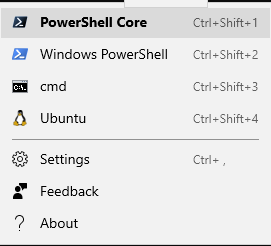
Or just right click on the terminal to open up a admin tab from the exact same directory. (That would be very useful for powershell-core since it doesn't have nice functionality like sudo)
@fcharlie commented on GitHub (Jul 14, 2019):
Windows Terminal support running in admin mode may not be a good behavior, which means that all shells in other tabs opened from Ctrl+T may be administrator privilege. As far as I know, Windows Terminal does not implement any code from the Administrator to the restricted user. In fact, what Windows lacks is the kind of privilege implementation that does not require UI interaction, like sudo.
But implementing sudo can also be cumbersome. The flow of runas verb is roughly as follows (if anything is wrong, please remind me):
PROC_THREAD_ATTRIBUTE_PARENT_PROCESS, and uses the handle retrieved in step 3.EXTENDED_STARTUPINFO_PRESENTand the results of steps 1 and 4.We can draw a simple conclusion. In fact,
runasis actually a normal process that initiates an RPC request to a high-privileged process. The high-privilege process (AppInfo service) creates an Administrator process and sets its parent process as a normal process.AppInfo does not currently support setting up a working directory, input and output (although calling CreateProcessAsUser) when launching the administrator process. This is a problem that needs to be solved to enable sudo support to run in Windows Terminal. (ShellExecuteEx SEE_MASK_NO_CONSOLE not work)
SHELLEXECUTEINFOW:
See: https://docs.microsoft.com/en-us/windows/win32/api/processthreadsapi/nf-processthreadsapi-updateprocthreadattribute
Attributes inherited from the specified process include handles, the device map, processor affinity, priority, quotas, the process token, and job object. (Note that some attributes such as the debug port will come from the creating process, not the process specified by this handle.)
@DHowett-MSFT commented on GitHub (Jul 15, 2019):
This is definitely a windows platform issue. I'm assigning it to myself to follow up with the team that owns it and close this out. Thanks.
@FranklinYu commented on GitHub (Jul 17, 2019):
I like @YMba9g8j9CJp0wLoQf5y’s proposal of authorizing a tab with escalated privilege. I’m from ConEmu where we can create a tab with or without admin privilege. When creating an admin tab I will be prompted with UAC (for good).
@cking22001 commented on GitHub (Jul 17, 2019):
Is this not just normal behavior of Windows store applications? This looks like the Preview app recently released.
But I do need a way to run elevated shells. It does not seem possible to do that today (open tabs as admin).
@DHowett-MSFT commented on GitHub (Jul 29, 2019):
Hey, we're not sure there's anything we can do about this. Would you mind filing feedback in the "Developer Platform > App Deployment" category? That'll help get it routed to the right team, and collects some very useful diagnostic information.
@DHowett-MSFT commented on GitHub (Jul 29, 2019):
Linking: this is also #1538
@musm commented on GitHub (Oct 28, 2019):
Even though I agree with the decision. It does make it quite painful to use
chocolateywithout having the explicitly run in admin mode. (@Arcitec commented on GitHub (Dec 6, 2019):
@musm I just have this in my PowerShell 6 config:
function GoAdmin { start-process pwsh –verb runAs }(replace
pwshwithpowershellif you are using the old powershell)So whenever I need to install/update packages via chocolatey I type
GoAdmin(in Windows Terminal's hosted PowerShell), which takes me to a separate Admin powershell window. There I can run all chocolatey admin commands. Then I simply close the admin window, and typerefreshenvin my Windows Terminal session to update all PATH variables. It's pretty easy.I would definitely like a way to launch
wt(Windows Terminal) instead of directly going to a "bare" pwsh, but that doesn't seem possible. But it's a minor gripe. Meh. :-)@hudo commented on GitHub (Feb 20, 2020):
Im still getting an error when I want to start WT (0.9.433.0) as admin:
Happens on several machines, with latest WT and Windows (v10.0.18363.657).
Don't quite understand why is this issue closed and what's the workaround.
@mohammedha commented on GitHub (Feb 20, 2020):
Actually it never worked, the last comment I got was, it is a Windows issue and they will raise it with the team.
@FranklinYu commented on GitHub (Feb 21, 2020):
I don’t think so. It’s more like “you should raise it with the team”.
@hudo commented on GitHub (Feb 21, 2020):
Im sure they're not thinking of releasing Win Terminal v1 with one of the most important functionality broken.
Too bad since it makes current pre-release versions of WT unusable.
@CraigHead commented on GitHub (Feb 27, 2020):
This will pop a new powershell window with administrator. Not exactly what we want but it's a work around. Create a new profile with the following command line.
"commandline": "powershell.exe -Command \"Start-Process powershell.exe -Verb RunAs\"",@A9G-Data-Droid commented on GitHub (Mar 13, 2020):
Why is this closed? There still need to be an elevate tab feature.
@DHowett-MSFT commented on GitHub (Mar 13, 2020):
This is being tracked in a bunch of other issues on this repository, that's why.
@FranklinYu commented on GitHub (Mar 15, 2020):
@DHowett-MSFT Thanks. Which issue should we follow? I don’t think it’s mentioned above.
@mian-muhammad commented on GitHub (Mar 25, 2020):
In windows where is this config file located?
@FranklinYu commented on GitHub (Apr 2, 2020):
@mian-muhammad I think he meant PowerShell profile. https://docs.microsoft.com/en-us/powershell/module/microsoft.powershell.core/about/about_profiles
@Steffen-Jens commented on GitHub (Apr 17, 2020):
I found a workaround. You can use chocolatey to install a package called sudo (choco install -y sudo). Then you can use sudo as expected.
@FranklinYu commented on GitHub (Apr 19, 2020):
It seems like I can currently open the terminal as administrator; at least it works on my machine. It would be even better if we can create a tab as administrator like ConEmu (which is discussed in #632), but there is currently no point to re-open this issue.
Other related pending feature requests:
sudowhich @Pens99 might be interested inHope this help everyone following this thread.
@danstur commented on GitHub (Apr 28, 2020):
@DHowett-MSFT Which issue should we follow and star to get this resolved? The only other referenced issue I can see is #1538 which is also closed.
I'm sure Microsoft's stance can't be that everybody should have administrative rights on their standard user instead of using a separate admin account if they want to use modern Windows apps. This is after all contrary to standard security practices.
@DHowett-MSFT commented on GitHub (May 2, 2020):
@danstur Best I can offer for that concern is #4217. We're pursuing a fix with the team who owns app deployment. The issue is that apps are installed globally, but only registered per-user. This was some infrastructure that was built for Windows 8 that has only very slowly evolved to support even running standard win32 applications like Terminal. #1386 tracks us getting out of the package and distributing as something more traditional for enterprise customers and folks who are having trouble with the package deployment engine.
@danstur commented on GitHub (May 4, 2020):
@DHowett-MSFT Thanks for the issues, glad to hear that it's being tracked.
To clarify: If I install the application via the options mentioned in #1386 will I then be able to run it as a different user or would that still not work? I wouldn't mind having to register the app (does that mean running
Add-AppxPackage?) with the other users.@DHowett-MSFT commented on GitHub (May 5, 2020):
That should work fine. You'll need to Add-AppxPackage as those users, yes. 😄
@SirStumfy commented on GitHub (May 21, 2020):
Glad to see its being tacked.
This need to be resolved, as now in any Windows environment set up with separate admin and user accounts (as it should be) the terminal is not usable for admins if installed from the (recommended) MS Store
@Mr-Sawyer commented on GitHub (May 22, 2020):
A workaround that worked for me was logging in as the admin user in the local machine and "install" again the terminal from the Store. Then, when logged as a standard user, I could run the terminal as an administrator
@SirStumfy commented on GitHub (May 23, 2020):
Yes the problem seems to be Store registers the app for current user only. That is fine for most apps (actually thats how most apps should be installed anyway) but is not good for administrative apps like terminals.
@zadjii-msft commented on GitHub (May 26, 2020):
Hey future me: the store registration issue is being tracked internally with MSFT:20356613 and discussed at length in #4217
@ghost commented on GitHub (Jul 1, 2020):
Hello,
I ran into this issue as well on my regular account. The solution is to install the Terminal app again while signed into an administrator account. Then you'll be able to run as admin on your regular account.
@kathodion commented on GitHub (Jul 2, 2020):
Same here. problem seems not to be solved
@jt-github commented on GitHub (Jul 8, 2020):
I have yet another less-than-perfect workaround which doesn't allow opening a tab running as administrator, but it does allow opening a PowerShell window as Administrator from an existing (non-admin) tab:
https://github.com/jt-github/elevate
This works the same way as adding the profile as suggested by @CraigHead above:
"commandline": "powershell.exe -Command \"Start-Process powershell.exe -Verb RunAs\"",Except that my my version is executed by running the
elevatecommand.@A9G-Data-Droid commented on GitHub (Jul 8, 2020):
@jt-github That's like sudo.
See here: https://github.com/pldmgg/Sudo
@jt-github commented on GitHub (Jul 8, 2020):
Exactly, only
sudois way cooler than mine but mine is so dead simple that it's easy to understand and use.@BanterBoy commented on GitHub (Aug 14, 2020):
Like many of you, I have also run into this issue, so I created the following functions in order to open an Admin shell from either powershell.exe, pwsh.exe or Microsoft terminal
I hope someone finds them useful. I have added them to my PowerShell Profiles, so they are always available.
@smallzeh13 commented on GitHub (Aug 27, 2020):
This worked for me as well, its super annoying but on a corp network thats pretty much the only way that has worked for me. If you don't have local admin this app is pretty much a bust for elevated privs on a corp network.
@clowg commented on GitHub (Sep 7, 2020):
Nah, that didn't work for me :(
@hsrizvi commented on GitHub (Sep 8, 2020):
So i figured it out.
You have to have it installed in BOTH the administrator account and also in the main account, but also the administrative account must be signed in for it to work. By this, i mean that the computer has to be logged into administrator, then switch the user (not sign out) and log into the other account. This will allow the app to run in administrator mode.
I'm guessing store apps installed on both accounts cannot be run as administrator unless an administrator account is logged into.
@AndrewLane commented on GitHub (Sep 23, 2020):
This works for me. 👍
@williamt31 commented on GitHub (Jan 30, 2021):
Still having the issue documented above. Tried current 1.5x and preview 1.6 as of today and either I get one UAC cred prompt and nothing happens or two cred prompts and an error like screenshot-ted above saying couldn't find file.
Note, I'm not even going to try the fix listed just above. The whole reason I have UAC setup is so that I DON'T login with administrator unless I have to fix my regular account. I'm most certainly not going to leave a profile running just so I can try a new terminal. If it gets fixed, I'll come back and try again.
@eandersons commented on GitHub (Jan 30, 2021):
I am currently not on Windows so I cannot double check this, but if I recall correctly I could run Terminal as an administrator without logging into administrative profile. Only thing I had to do once to be able to run Terminal as a privileged user was installing it in administrator account.
@brybalicious commented on GitHub (Feb 18, 2021):
This is awesome - adds registry keys to run any of the Windows Terminal shells as administrator, from the right-click context menu in Windows File Explorer
@ntaken commented on GitHub (Mar 29, 2021):
Do not think that this issue should be considered closed. It really limits the usefulness of windows terminal in a corporate environment (where you have a user account and one administrator account).
@zadjii-msft commented on GitHub (Mar 29, 2021):
@ntaken The thread that's following that subject most closely these days is #4217.
@ntaken commented on GitHub (Mar 29, 2021):
Thanks. I get lost in the GitHub forest sometimes...
@chrismedinapy commented on GitHub (Apr 15, 2021):
This actually help me!.. very nice work around
@re4s0n4 commented on GitHub (Apr 25, 2021):
I think everyone is missing the point. At the top someone mentioned installing with Chocolatey. I have this same problem. I believe it's because my workstation is quite long in the tooth. It's been through a few feature updates, and a while back I tried to compile a early iteration from source. Then I uninstalled it for whatever reason and tried to install it with Chocolatey. One thing let to another and probably encountered the elevation issue you all are talking about. I think there are some artifacts from previous installs causing the problem, but I don't know of a registry key, or appdata folder I can wipe out. I thought it was simply a biproduct of being a Store App (Appx), like you were all saying. Store installs in user context. After talking to people on Twitter (Jeff Hicks I think), I spun up a brand new vm and installed WT from the store. Elevation works just fine. Unless anyone here has any bright ideas, I have reserved myself to biting the bullet and rebuilding my workstation, but never a great time for that. So at the moment I cannot use the new hotness (Windows Terminal). :-(
@ZilvinasJonaitis commented on GitHub (May 22, 2021):
Did not work for me. However, I have found another work around.
Run Windows built-in PowerShell as Administrator (Win+X, A) and leave it open, then run Windows Terminal as Administrator. If no need, one can exit original PowerShell session.
@UberKluger commented on GitHub (Jun 9, 2021):
@BanterBoy
The line
had me wondering if powershell syntax had changed or maybe it was just a typo (yes, I am your 1 confused 😕). It took me a while to realise that it was neither. Though the definition of
Test-IsAdminhas no parameters, there is nothing stopping parameters being supplied and then ignored. So the line is effectivelywith a clever little reminder about what type is being returned. This comment is basically an explanation for anybody else who might be wondering about it (or maybe it's just me).
Though I appreciate the benefits of self-documenting code, the use of a personal mnemonic (I can't remember seeing it before) that, to a casual observer, seems like a syntax error might be better avoided on public forums, particularly where code snippets tend to be short. In this case,
Test-IsAdminwas defined (and its return value well described) less than 1/2 a page before, so a localised reminder about what it returns didn't provide much improved clarity but the form of the reminder was actually a bit of a distraction (at least it was for me). So the 😕 isn't a mark of disapproval, more of a 'Hmm, I wonder what's happening here. What am I missing?' (the sort of thing that could itself end up as a question on stack overflow). Maybe a 🤔 (thinking) would have been better. After all, I did learn something.