mirror of
https://github.com/microsoft/terminal.git
synced 2026-09-25 00:15:10 +00:00
Bug Report: Control+Space not sent to terminal emulator. #4005
Closed
opened 2026-01-30 23:35:27 +00:00 by claunia
·
54 comments
No Branch/Tag Specified
main
dev/duhowett/stop-using-projection-for-control-innards
dev/duhowett/fhl-2026/remove-paste-hairpin-handler
dev/duhowett/win7-wpf-termcontrol-squash
dev/lhecker/20226-present-leaks
dev/duhowett/wpf-1-autoscroll-to-interactivity
dev/duhowett/wpf-3-swapchain-handle
dev/duhowett/wpf-2-midi-audio-timer
dev/migrie/overview-for-pr
dev/migrie/b/markdown-paste
dev/duhowett/padding-in-atlas
fix/german-split-pane-tooltip
release-1.25
dev/cazamor/sui-rejuv/fix-spaces
dev/migrie/per-window-final
dev/cazamor/selfhost/2026-08-31
dev/migrie/b/independent-animations
dev/pabhoj/wtcli
dev/cazamor/conhost/bugfix-a11y-find
dev/cazamor/conhost/bugfix-a11y-find-1.24
dev/lhecker/theme-quality-test
dev/lhecker/theme-quality
dev/cazamor/selfhost/sui-rejuv
dev/cazamor/fix/search-selection-off-by-one
dev/duhowett/even-more-builtin-glyphs
dev/crutkas/kitty-pr1
dev/cazamor/toast/activity
release-1.24
users/GitHubPolicyService/d8615b98-f5fa-4462-bf7f-c44a1cc12096
dev/cazamor/selfhost/2026-06-18
dev/migrie/f/new-profile-subcommand
dev/cazamor/sui-rejuv/profiles-v2
dev/duhowett/asan-for-all
dev/cazamor/sui-rejuv/profiles-new
dev/cazamor/sui-rejuv/expander-groups-new
dev/cazamor/auto-save/refresh-settings
feature/llm
dev/cazamor/auto-save/model/json-manager
dev/cazamor/auto-save/settings-model
dev/migrie/s/snippet-params
users/merlinbot/1es-pt-auto-baselining-pr
niels9001/inactive-tab-foreground
dev/cazamor/selfhost/2026-05-20-home
dev/duhowett/fzf-vcxproj
dev/cazamor/selfhost/2026-05-20
dev/cazamor/selfhost/2026-05-19
dev/cazamor/selfhost/2026-05-18
niels9001/fontweight-fixes
niels9001/page-transitions
dev/duhowett/fhl-2026/rewrite-paste-and-dragdrop-handling-writeinputstring
dev/migrie/f/overview-view
dev/cazamor/selfhost/2026-05-13
dev/cazamor/selfhost/2026-05-13-sui
dev/yeelam/f/BuildTest
dev/duhowett/hax/our-own-tabview
dev/cazamor/bugfix/close-scratchpad
dev/cazamor/selfhost/2026-05-05
dev/cazamor/selfhost/2026-05-04-workspaces
dev/cazamor/selfhost/2026-05-04
dev/lhecker/20149-hotfix
dev/lhecker/osc-7-wsl
dev/migrie/workspaces-real
dev/migrie/fhl-spring-2026/quake-4
dev/lhecker/pwsh-5.1
dev/cazamor/sui/dropdown-page
dev/cazamor/selfhost/2026-04-08
dev/cazamor/selfhost/2026-04-06
dev/migrie/fhl-spring-2026/confirmCloseOn
dev/cazamor/confirmCloseOn/dont-ask-me-again
dev/lhecker/inproc-conpty
dev/duhowett/powershell-module-supercharger
dev/cazamor/a11y/vt-seq-prototype
dev/migrie/fhl-spring26/osc777-2
dev/migrie/fhl-spring26/2/notification-infrastructure
dev/migrie/fhl-spring-2026/side-tabs
dev/cazamor/copilot/playground
dev/migrie/fhl-spring-2026/quake-3.5
dev/migrie/fhl-spring26/osc777
dev/migrie/fhl-spring26/unpackaged-notify
dev/migrie/fhl-spring26/bellStyle-notification
dev/migrie/fhl-spring26/activity-notifications
dev/migrie/fhl-spring-2026/x-open
dev/migrie/fhl-spring-2026/quake-5
dev/migrie/fhl-spring26/nextTab-filter
dev/duhowett/atlas-draw-d2d-dots-curlies-consistently
dev/lhecker/14165-conhost-font-size
dev/lhecker/ottosson-by-default
dev/duhowett/hax/unix-pty
dev/duhowett/hax/cmake
dev/lhecker/generate-256-colors
dev/lhecker/dcs-perf
dev/lhecker/1410-large-scrollback
dev/cazamor/selfhost/2026-02-10
dev/lhecker/11509-kitty-keyboard-protocol-wip
dev/cazamor/selfhost/2026-01-29
dev/lhecker/benchcat-fix
dev/duhowett/eoy-25/allow-set-foreground
release-1.23
dev/cazamor/bot/deprecate-area-atlasengine
dev/cazamor/selfhost/2026-01-20
dev/cazamor/selfhost/2026-01-12
dev/cazamor/spec/auto-save
dev/duhowett/fhl-2024/asciicast-recorder
dev/duhowett/eoy-25/underline-colors-in-atlas-bug
dev/duhowett/hax/serial-port-support
dev/duhowett/connection-utf8
dev/lhecker/fused-event
dev/lhecker/18928-wip
dev/duhowett/fhl-2024/clang
dev/duhowett/vt-cache-changes
dev/cazamor/uia-leak
release-1.22
dev/cazamor/selfhost/11-18-v3
dev/cazamor/selfhost/11-18
dev/duhowett/fhl-2025/bitmap-fonts
dev/duhowett/server-2025-vms
dev/duhowett/cant-believe-gotta-do-this-shit
dev/lhecker/dark-mode
dev/cazamor/sui/invert-cursor-color
dev/duhowett/fhl-2025/wt-command-palette-cmdpal-integration
dev/duhowett/fhl-2025/wt-json-relative-icons
dev/lhecker/fucking-service-locator
dev/duhowett/unicode-17
dev/duhowett/multi-blern
dev/lhecker/wellp2-alt
dev/duhowett/wellp2
dev/lhecker/1860-horizontal-scrollbar
dev/lhecker/fix-window-count
dev/cazamor/sui/tab-color-old
dev/duhowett/hax/conhost-icon
dev/duhowett/hax/sui-color-chip-border
dev/duhowett/hax/terminalsettings-as-a-lib-/with-types-merged-into-tsm
dev/pabhoj/page_control_input_cleanup
dev/duhowett/padding-in-atlas-rebase-20250729
dev/lhecker/attach-thread-input
dev/duhowett/portable-shader-members
msbuildcache-reenable
dev/cazamor/selfhost/1.24-2025-06-10
dev/cazamor/upgrade-settings-containers
dev/cazamor/sui/ext-page/powershell-stub
dev/cazamor/selfhost/1.24-2025-05-15
dev/pabhoj/sui_action_overhaul
dev/cazamor/selfhost/1.24-2025-05-06
dev/cazamor/selfhost/1.24-2025-04-29
dev/cazamor/sui/ext-page/lazy-load-objects
dev/cazamor/sui/ext-page/badge
dev/cazamor/selfhost/1.24
dev/lhecker/sdk-26100
dev/duhowett/testing
dev/jadelaga/VS-Pty.Net-1.22
dev/duhowett/fhl-2025/what-if-no-content-ids
dev/lhecker/18584-part2
dev/lhecker/get-lang-id
dev/duhowett/hax/clogs
release-1.21
dev/pabhoj/featurellm_fix_paste
dev/lhecker/grapheme-backup
dev/jadelaga/VS-Pty.netFixes
dev/lhecker/atlas-engine-compute-shader
dev/migrie/s/ai-providers
dev/lhecker/animated-cursor-wip
dev/pabhoj/featurellm_timeout
dev/lhecker/dark-mode-alt
dev/duhowett/osc-strided-table
dev/lhecker/bugbash
dev/pabhoj/featurellm_improve_parsing
dev/duhowett/coast-to-coast
dev/lhecker/curly-improvements
dev/duhowett/net8
dev/duhowett/onebranch-custom-pool
dev/lhecker/renderer-overhaul-2nd-attempt
dev/lhecker/cleanup
dev/cazamor/sui/confirmation-announcements
dev/lhecker/winconpty-cleanup
dev/duhowett/learn/rewrite-highlights
dev/migrie/b/no-nesting-when-searching
release-1.20
dev/duhowett/sel-2-spans
dev/lhecker/7118-cursor-color
dev/lhecker/remove-glyph-width
dev/lhecker/igfw-scroll-region
dev/lhecker/17656-win32im-double-encoding
dev/duhowett/fhl-2024/merge-idls
dev/duhowett/feed-forward-variables
dev/lhecker/remove-chrome-math
dev/duhowett/copylink
dev/duhowett/applicableactions
gh-readonly-queue/main/pr-17566-de50310295b7d92ed3d51f07974a2a945776bf9d
dev/lhecker/atlas-engine-stride-copy
dev/migrie/b/bump-nuget-in-c
dev/migrie/f/992-redux-redux
dev/migrie/f/filter-weight-input-too
dev/migrie/f/disable-nesting
dev/migrie/f/local-snippets-cleaner
dev/migrie/s/1553-mouse-bindings
selfhost-1.22-bugbash-2024-06-04
selfhost/1.22-bugbash-2024-06-04
dev/lhecker/15689-tab-drag-crash-fix
dev/migrie/f/sxnui-font-size-change
dev/migrie/f/local-snippets-on-action-refactor
dev/migrie/f/just-local-snippets
dev/migrie/save-input-patches
dev/migrie/f/md-pane-official
dev/migrie/base-pane
dev/migrie/fhl/tasks-pane
release-1.19
dev/migrie/b/17130-clear-marks-2
dev/migrie/b/17075-its-me-the-killer
dev/duhowett/i-figured-out-why-sometimes-the-publish-build-failed
dev/duhowett/nuget-publication-with-aad-app-id
selfhost-1.20
dev/duhowett/graph
dev/migrie/b/15803-activate-dont-copypasta
dev/duhowett/is-pgo-broken-because-of-sui-being-slower
dev/migrie/b/remove-terminaltab
dev/migrie/fhl/md-pane
dev/migrie/fhl/local-tasks-2024
dev/migrie/fhl/2024-inline-notebook
dev/duhowett/interface-projects
dev/duhowett/dead-loc
release-1.18
dev/migrie/fhl/2024-spring-merge-base
dev/duhowett/hax/l9
inbox
dev/migrie/14073-on-main
dev/duhowett/hax/conhost_dump_replay
user/lhecker/atlas-engine-srgb
dev/migrie/fhl/sxnui-tooltips-3
dev/migrie/7718-notifications-experiments
dev/migrie/fhl/7718-notifications
dev/migrie/fhl/7718-notifications-reboot
dev/lhecker/remove-gsl
dev/lhecker/16575-TerminateProcess
dev/lhecker/window-thread-climate-control
dev/lhecker/client-context-input-output-mode
dev/lhecker/ring-buffer-input-buffer
release-1.17
dev/lhecker/propsheet-fontdlg-refactor
dev/lhecker/renderer-overhaul
dev/pabhoj/test
dev/duhowett/chop
dev/lhecker/til-ulong-cleanup
dev/lhecker/til-env-cleanup
dev/migrie/f/16005-a11y-pane
dev/cazamor/a11y/fastpass
dev/migrie/b/15487-push-cwd
dev/migrie/b/15536-or-15219-idk
dev/duhowett/move-timers-down-into-core-interactivity-etc
dev/migrie/b/15812-broadcast-paste-two
dev/migrie/fhl-fall-2023/11162-quake-III-arena
dev/migrie/fhl-fall-2023/1620-automatic-tab-progress
dev/migrie/fhl-fall-2023/9992-quake-II
dev/migrie/fhl-fall-2023/9992-default-quake-settings
dev/migrie/fhl-fall-2023/9992-window-name-settings
dev/migrie/fhl-fall-2023/oceans
dev/lhecker/ColorScheme-improvements
dev/migrie/search-v2-v3
dev/migrie/pr-15717/its-dangerous-to-go-alone
dev/migrie/f/4768-taskbar-icons
dev/migrie/f/3121-tooltips
dev/duhowett/sticky-control
dev/duhowett/fix-tracing-2
dev/migrie/b/add-support-for-vsc-marks
dev/migrie/f/1860-this-is-literally-what-less-is-for
dev/migrie/s/5916-draft
dev/lhecker/tracy
dev/migrie/s/north-star
dev/cazamor/tag-youre-it
dev/migrie/f/12336-let-it-mellow
dev/migrie/f/now-with-more-compat-settings
dev/migrie/f/compatibility-sui
dev/duhowett/hax/wpf-atlas
dev/duhowett/fgb
dev/migrie/b/15487-relative-paths-are-hard
dev/lhecker/colrv1
loc-update
dev/migrie/fhl/dyndep-csharp
dev/migrie/fhl/dyndep
dev/migrie/fhl-clickable-send-input
dev/migrie/f/cwd-hijinks-5506-15173
dev/lhecker/openconsole-async-start
1.17
dev/migrie/bump-scratch
dev/migrie/f/3726-restartConnection
dev/migrie/b/cxn-restarting-attempt-1-backport
dev/migrie/b/9053-part-3-the-actual-doing-of-the-thing
dev/migrie/b/13388-focus-logger
dev/migrie/b/9053-part-4-i-guess-defterm
dev/migrie/oop/3/of-the-silmarils
of-the-darkening-of-valinor
dev/migrie/fhl/notebook-proto-000
dev/migrie/f/narrator-buddy
dev/migrie/mux-2.8.2-march-2023
dev/migrie/f/roast-mutton
dev/migrie/f/12861-preview-input
dev/lhecker/clang-tidy
dev/migrie/f/3121-wE-dOnT-hAvE-dEv-DaYs
dev/duhowett/compiler-compliance
dev/duhowett/i-have-a-burning-hatred-for-ntstatus-of-later-so-why-not-fix-it
dev/duhowett/shorthand-namespaces
dev/duhowett/rename-all-dlls
dev/duhowett/errordialog
dev/lhecker/gsl-narrow
dev/migrie/b/11522-dumb-idea
release-1.16
dev/miniksa/env
dev/duhowett/hax/embed-everything
dev/migrie/b/13388-attempt-003
dev/migrie/b/14512-test-research
dev/migrie/b/13388-attempt-002
dev/migrie/b/14464-copyOnSelect-moving-text
dev/migrie/s/thema-schema-for-1.16
dev/migrie/s/theme-pair-schema
dev/migrie/b/13388-experiments-1
dev/cazamor/spec/a11y-vt-seq
dev/migrie/b/14557-empty-folder-dropdown
dev/cazamor/spec/a11y-vt-seq-v2
release-1.15
dev/migrie/f/process-model-v3-test-0
dev/lhecker/vsconfig
dev/migrie/s/5000-presentation
dev/lhecker/5907-startup-perf
dev/lhecker/winrt-file-api-benchmark
dev/duhowett/128-bit-compiler
dev/migrie/fhl/more-shell-integration
dev/migrie/b/13388-experiments-0
dev/lhecker/til-to-ulong-improvements
dev/migrie/s/markdown-notebooks
dev/cazamor/a11y/nav-by-page
dev/cazamor/a11y/system-menu-support
dev/duhowett/no-private-registry-keys
dev/cazamor/wpf/uia-expose-enable-events
dev/cazamor/wpf/uia-events
extendAISpec
dev/migrie/fhl/clickSendInput
dev/migrie/fhl/save-command
dev/migrie/b/theme.profile
dev/migrie/b/13943-a-test-for-this
dev/migrie/oop/2/endgame
dev/duhowett/hax/merge_idl
dev/migrie/oop/2/infinity-war
dev/migrie/spellbot-cve
dev/cazamor/a11y-sev3/new-profile-announcement
dev/migrie/fhl/upside-down-mode
release-1.14
dev/migrie/f/9458-startupInfoToTerminal
dev/migrie/fhl/5916-triggers
dev/migrie/b/13523-context-menu
dev/migrie/b/6523-endpaint-outside-lock
dev/migrie/b/12413-OnUnhandledException
dev/lhecker/render-snapshot
dev/cazamor/1.15/scroll-to-point
dev/migrie/mux-2.8-aug-2022
dev/lhecker/lock-console-guard
dev/migrie/f/1504-final
dev/pabhoj/sui_follow_ups
dev/migrie/f/til-winrt.h
dev/cazamor/color-picker-redesign
dev/migrie/fhl/vscode-autocomplete-prototype
dev/migrie/f/1504-prototype
dev/migrie/oop/2/loki
dev/migrie/oop/2/wandavision
dev/migrie/b/8698-YOURE-OUT-OF-ORDER
fabricbot-configuration-migration
dev/migrie/b/12788-did-it-work
dev/migrie/b/localtests-ci-2022
dev/cazamor/1.14/replace-compareInBounds
dev/pabhoj/preview_string
dev/cazamor/ks/switchSelectionEndpoint
dev/migrie/oop/2/COM-ISwapChainProvider-attempt-1
dev/migrie/b/dxd-marker
release-1.13
dev/migrie/b/13066-for-defterm
dev/cazamor/revert-dwm
dev/migrie/b/13066-sw_flash_repeatedly
dev/migrie/b/no-cloaky-cloak
dev/migrie/f/apples-to-oranges
dev/migrie/f/no-custom-caption-btns
dev/migrie/f/10509-mica-and-transparent-titlebars
dev/migrie/b/12911-wpf-focus-fg
dev/migrie/titebar-colors
dev/lhecker/4015-cursor
dev/migrie/fhl/rgb-rainbow-window-frame
dev/migrie/fhl/scroll-marks-prototype
release-1.12
dev/miniksa/compliance
dev/migrie/f/default-icons
dev/migrie/fhl/10175-web-search-for-text
dev/migrie/fhl/menu-complete-prototype
dev/migrie/b/2988-merged-prototypes
dev/migrie/b/2988-niksa-msgs-prototype
dev/migrie/fhl/9583-colorSelection
dev/migrie/b/10609-sui-leak
dev/migrie/b/32-attempt-3
dev/migrie/release-1.12-rejuv-attempt-2
dev/migrie/demo-for-presentation
dev/migrie/b/32-but-im-here-for-12567
dev/duhowett/conpty_first_frame_blug
dev/migrie/b/11092-unfocused-acrylic-settings
dev/migrie/localtests-in-ci
dev/migrie/b/12356-attempt-2
dev/migrie/b/12353-with-null
dev/migrie/b/12387-trim-spaces
dev/migrie/b/5033-bad-start
dev/lhecker/12351-broken-locales
dev/migrie/b/8663-input-to-oem-crash
dev/migrie/b/11743-win10-opacity-is-hard
dev/migrie/f/ctrl-click-elevate
dev/migrie/b/12196-shim-localization
dev/lhecker/issue-4015-til-rect
dev/cazamor/eim/mvvm
dev/migrie/f/--elevate
dev/migrie/b/11668-i-think
dev/migrie/b/11994-wsl-mangline
dev/migrie/eim/3475-action-xmacros
dev/migrie/eim/incremental-build-000
dev/cazamor/a11y/fake-uia-data
dev/migrie/f/non-terminal-content-elevation-warning
dev/migrie/f/632-on-warning-dialog
dev/lhecker/rgba
dev/migrie/b/8480-keybindings-in-tabs
release-1.11
dev/migrie/b/11561-dead-ends
dev/migrie/oct-21-roadmap-update
dev/migrie/fhl/adaptive-card-extension
dev/cazamor/test/11440
dev/migrie/f/warning-dlg-automation
dev/migrie/b/1.12-crash-on-exit
dev/migrie/b/11146-next-tab-in-cmdpal
release-1.10
dev/migrie/5ff9a24-and-75e2b5f
dev/duhowtt/hax/cpal-jumplist-async
dev/lelian/actionid/1
dev/migrie/f/just-elevated-state
dev/lhecker/terminal-settings-cleanup
dev/migrie/gh-10824
dev/pabhoj/cursor_light
dev/migrie/oop/wandavision
dev/migrie/oop/endgame
dev/migrie/oop/infinity-war
dev/lhecker/app-state-actually-hidden
dev/migrie/b/6160-dynamic-default-warning
dev/mgirie/b/more-nchhittest-ideas
dev/migrie/b/9320-interfacial-separation
cinnamon/fhl/find-contextmenu
dev/lhecker/wsl-distro-generator-cleanup
dev/migrie/b/10875-but-more-clever
dev/migrie/b/broken-globalsummon-overloading
dev/duhowett/hax/rle-row
dev/migrie/fhl-2021/cmdpal-select-list
dev/migrie/fhl-2021/differential-pixel-shading
dev/duhowett/hax/no-writable-glyphat
dev/migrie/fhl-2021/more-shader-variables
dev/migrie/titlebar-shenannigans
dev/miniksa/win10_font_matching
dev/lhecker/conhost-oom
dev/migrie/b/10332-less-snappy-scrolling
dev/migrie/b/7422-1px-top-border
release-1.9
dev/cazamor/move-scratch
release-1.8
dev/miniksa/manifest_2
release-1.6
release-1.7
dev/migrie/oop/the-whole-thing
dev/migrie/oop/connection-factory
dev/migrie/f/quake-dropdown-2
dev/miniksa/rle2
dev/migrie/f/quake-toCurrent-experiments-2
dev/migrie/f/quake-toCurrent-experiments
dev/migrie/f/quake-dropdown
dev/cazamor/actions-page/template
dev/duhowett/hax/cursor_stamp_foreground_background
dev/migrie/f/1860-hey-might-was-well-hack-during-a-hackathon
dev/migrie/oop-terminal.control-split-control
dev/duhowett/hax/build-with-wholearchive
dev/cazamor/spec/tsm-actions-temp
dev/migrie/oop-tear-apart-control
dev/migrie/oop-scratch-3
dev/cazamor/sui/bugfix-reload-crash
dev/migrie/f/xmacro
dev/cazamor/sui/proto/profile-nav-view
dev/migrie/f/name-windows
dev/migrie/dol/messing-with-shaders-take-1
release-1.5
dev/cazamor/sui/inheritance-hyperlinks-test
dev/migrie/r/commandline-lib-002
dev/migrie/f/com.fabrikam.toaster
dev/cazamor/adaptive-cards-prototype
dev/migrie/f/commandline-lib
dev/miniksa/zipzoom2
dev/migrie/f/remote-commandlines
dev/migrie/f/632-elevated-profiles
dev/migrie/oop-broker-000
dev/migrie/fix-pr-7015
dev/duhowett/clang
dev/miniksa/input_tests_2
dev/miniksa/input2
dev/migrie/oop-rpc-000
release-1.4
dev/migrie/oop-mixed-elevation-1
dev/migrie/oop-window-content-1
cinnamon/open-json
dev/miniksa/input_tests
dev/duhowett/hax/tsm-graphviz
dev/miniksa/input
dev/duhowett/hax/caption_buttons
release-1.3
dev/cazamor/a11y/expand-line-under-viewport
dev/cazamor/acc/ch/word-nav-perf
dev/cazamor/spec/settings-ui-architecture-draft
dev/duhowett/hax/tap_upgrade
dev/migrie/f/pane-exit-animation
release-1.2
dev/migrie/move-lib-up-and-dll-down
release-1.1
dev/migrie/f/branch-2-backup
dev/migrie/f/settings-getters-only
dev/duhowett/hax/command_palette_search
dev/migrie/f/6856-let-terminalpage-expandcommands
dev/migrie/f/theming-2020
dev/migrie/oop-scratch-4
dev/duhowett/hax/punchout
dev/migrie/s/action-ids
dev/migrie/f/lets-just-generate-these
dev/migrie/oop-scratch-2
dev/miniksa/dcomp
dev/miniksa/gotta_go_fast_spsc
dev/miniksa/gotta_go_fast
dev/miniksa/perf_skip_checks
dev/miniksa/perf_buffer_dig
dev/migrie/s/1203-cursorTextColor
dev/migrie/f/fix-intellisense-i-guess-backup
release-1.0
dev/migrie/f/execute-commandlines
dev/migrie/f/2046-Command-Palette-v2
dev/migrie/b/6421-passthrough-alt
dev/migrie/b/moving-focus-is-hard
dev/miniksa/set
dev/migrie/f/1203-phase-1
dev/migrie/f/get-localtests-in-ci
dev/cazamor/drag-panes
dev/cazamor/tile-background
release-0.11
dev/duhowett/dev/duhowett/hax/appstate_remember
dev/duhowett/hax/wpf_win_8_hax
dev/migrie/b/3088-weird-exact-wrap-resize
release-0.10
dev/migrie/b/4591-custom-scaling-bug
dev/duhowett/hax/attr_smuggling
dev/migrie/b/5161-mingw-vim-fix
dev/miniksa/dx_bitmap
dev/migrie/b/1503-try-messing-with-cooked-read
dev/duhowett/eyebeam
dev/migrie/b/5113-experiments
dev/duhowett/hax-selection-exclusive
dev/migrie/f/more-vt-renderer-tracing
dev/miniksa/bitmap
dev/duhowett/wprp
dev/miniksa/bitmap-mad-with-power
dev/migrie/f/resize-quirk
dev/migrie/f/reflow-buffer-on-resize-002
wpf-renderer-revert
dev/miniksa/draw
release-0.9
dev/miniksa/tabs-color-fix
dev/miniksa/4309
dev/migrie/f/just-wrapping
dev/migrie/b/3490-try-another-resize-algo
release-0.8
dev/migrie/b/3490-a-simpler-resize
dev/migrie/b/3490-resize-down
dev/miniksa/4254
dev/migrie/f/conpty-wrapped-lines-2
dev/migrie/b/be-better-at-hiding
dev/migrie/f/3327-xaml-theming-proto
dev/miniksa/gardening2
release-0.7
dev/duhowett/conpty-flags
dev/migrie/f/603-vintage-opacity
dev/migrie/PR#3181-comments
dev/duhowett/font-64
release-0.5
dev/migrie/b/663-paste-lf-always
dev/migrie/b/2011-reordered-fallthrough-strings
dev/migrie/b/411-init-tab-stops
dev/migrie/b/json-patching-is-hard
dev/migrie/b/2455-try-getting-tests-working
dev/migrie/b/1223-change-256-table
dev/migrie/f/2171-openterm.cmd
dev/migrie/f/drag-panes
dev/migrie/f/2046-command-palette
release-0.3
dev/miniksa/manager
dev/migrie/f/non-terminal-panes
dev/migrie/f/passthrough-2019
dev/miniksa/shared_pch
dev/migrie/f/1897-less-duplicated-work
release-0.2
dev/cazamor/mcs/viewport-selection
dev/duhowett/version_hack
v1.25.1912.0
v1.24.11911.0
v1.25.1322.0
v1.24.11321.0
v1.25.1241.0
v1.25.1171.0
v1.25.923.0
v1.24.10921.0
v1.25.622.0
v1.24.10621.0
v1.24.10212.0
v1.23.20211.0
v1.24.3504.0
v1.23.13503.0
v1.24.2812.0
v1.23.12811.0
v1.24.2682.0
v1.23.12681.0
v1.24.2372.0
v1.23.12371.0
v1.23.12102.0
v1.22.12111.0
v1.23.11752.0
v1.22.11751.0
v1.22.11141.0
v1.23.11132.0
v1.23.10732.0
v1.22.10731.0
v1.21.10351.0
v1.22.10352.0
v1.23.10353.0
v1.22.3232.0
v1.21.3231.0
v1.22.2912.0
v1.21.2911.0
v1.22.2702.0
v1.21.2701.0
v1.22.2362.0
v1.21.2361.0
v1.21.1772.0
v1.20.11781.0
v1.21.1382.0
v1.20.11381.0
v1.21.1272.0
v1.20.11271.0
v1.20.11215.0
v1.19.11213.0
v1.20.10822.0
v1.19.10821.0
v1.20.10572.0
v1.19.10573.0
v1.20.10303.0
v1.19.10302.0
v1.18.10301.0
v1.20.10293.0
v1.19.10292.0
v1.18.10291.0
v1.18.3181.0
v1.19.3172.0
v1.19.2831.0
v1.18.2822.0
v1.19.2682.0
v1.18.2681.0
v1.18.1462.0
v1.17.11461.0
v1.18.1421.0
v1.17.11391.0
v1.17.11043.0
v1.16.10261.0
v1.17.1023
v1.16.10231.0
v1.15.3465.0
v1.16.3463.0
v1.15.2712.0
v1.15.2874.0
v1.16.2641.0
v1.16.2523.0
v1.15.2524.0
v1.15.2282.0
v1.14.2281.0
v1.14.1962.0
v1.15.2002.0
v1.15.2001.0
v1.15.1862.0
v1.14.1861.0
v1.14.1451.0
v1.14.1432.0
v1.13.11431.0
v1.13.10983.0
v1.12.10982.0
v1.13.10733.0
v1.12.10732.0
v1.13.10395.0
v1.12.10393.0
v1.13.10336.0
v1.12.10334.0
v1.12.3472.0
v1.11.3471.0
v1.12.2931.0
v1.12.2922.0
v1.11.2921.0
v1.11.2731.0
v1.10.2714.0
v1.11.2421.0
v1.10.2383.0
v1.10.1933.0
v1.9.1942.0
v1.9.1523.0
v1.8.1521.0
v1.9.1445.0
v1.8.1444.0
v1.8.1092.0
v1.7.1091.0
v1.8.1032.0
v1.7.1033.0
v1.7.572.0
v1.6.10571.0
v1.5.10411.0
v1.6.10412.0
v1.6.10272.0
v1.5.10271.0
v1.5.3242.0
v1.4.3243.0
v1.5.3142.0
v1.4.3141.0
v1.4.2652.0
v1.3.2651.0
v1.3.2382.0
v1.2.2381.0
v1.1.2233.0
v1.2.2234.0
v1.1.2021.0
v1.2.2022.0
v1.1.1812.0
v1.0.1811.0
v1.1.1671.0
v1.0.1401.0
v0.11.1333.0
v0.11.1251.0
v0.11.1191.0
v0.11.1111.0
v0.11.1121.0
v0.10.781.0
v0.10.761.0
v0.9.433.0
v0.8.10261.0
v0.8.10091.0
v0.7.3451.0
v0.7.3382.0
v0.7.3291.0
v0.7.3252.0
v0.6.3181.0
v0.6.2951.0
v0.6.2911.0
v0.5.2762.0
v0.5.2761.0
v0.5.2681.0
v0.5.2661.0
v0.3.2321.0
v0.4.2342.0
v0.4.2382.0
v0.3.2171.0
v0.3.2142.0
v0.2.1831.0
v0.2.1715.0
v0.2.1703.0
v0.1.1621.0
v0.1.1581.0
v0.1.1502.0
v0.1.1431.0
v0.1.1361.0
v0.1.1093.0
v0.1.1161.0
v0.1.1204.0
experiment-master
v0.1.1025.0
experiment-OutsideBuild
broken-tabstops
RS2-final
v0.1.1002.0
experiment-rel-windows-inbox
experiment-f-ServerApp
v0.1.1211.0
1904.29002
1810.02002
1708.14008
Labels
Clear labels
⛺ Reserved
A11yCO
A11yMAS
A11ySev1
A11ySev2
A11ySev3
A11yTTValidated
A11yUsable
A11yVoiceAccess
A11yWCAG
Area-Accessibility
Area-AtlasEngine
Area-AzureShell
Area-Build
Area-Build
Area-Chat
Area-CmdPal
Area-CodeHealth
Area-Commandline
Area-CookedRead
Area-DefApp
Area-Extensibility
Area-Fonts
Area-GroupPolicy
Area-i18n
Area-Input
Area-Interaction
Area-Interop
Area-Localization
Area-Output
Area-Performance
Area-Portable
Area-Quality
Area-Remoting
Area-Rendering
Area-Schema
Area-Server
Area-Settings
Area-SettingsUI
Area-ShellExtension
Area-ShellExtension
Area-ShellExtension
Area-Suggestions
Area-Suggestions
Area-TerminalConnection
Area-TerminalControl
Area-Theming
Area-UserInterface
Area-VT
Area-Windowing
Area-WPFControl
AutoMerge
Blocking-Ingestion
Culprit-Centennial
Culprit-WinUI
Disability-All
Disability-Blind
Disability-LowVision
Disability-Mobility
External-Blocked-WinUI3
Fixed
Gathering-Data
good first issue
HCL-E+D
HCL-WindowsTerminal
Help Wanted
Impact-Compatibility
Impact-Compliance
Impact-Correctness
Impact-Visual
In-PR
InclusionBacklog
InclusionBacklog-Windows TerminalWin32
InclusionCommitted-202206
Issue-Bug
Issue-Docs
Issue-Feature
Issue-Feature
Issue-Question
Issue-Samples
Issue-Scenario
Issue-Task
Needs-Attention
Needs-Author-Feedback
Needs-Bisect
Needs-Discussion
Needs-Repro
Needs-Tag-Fix
Needs-Tag-Fix
Needs-Triage
No-Recent-Activity
Priority-0
Priority-1
Priority-2
Priority-3
Product-Cmd.exe
Product-Colortool
Product-Colortool
Product-Colortool
Product-Conhost
Product-Conpty
Product-Meta
Product-Powershell
Product-Terminal
Product-WSL
pull-request
Resolution-Answered
Resolution-By-Design
Resolution-Duplicate
Resolution-External
Resolution-Fix-Available
Resolution-Fix-Committed
Resolution-No-Repro
Resolution-Won't-Fix
Severity-Blocking
Severity-Crash
Severity-DataLoss
spam
this-will-be-a-breaking-change
Tracking-External
WindowsTerminal_Win32
Work-Item
zAskModeBug
zInbox-Bug
Mirrored from GitHub Pull Request
Milestone
No items
No Milestone
Projects
Clear projects
No project

Notifications
Due Date
No due date set.
Dependencies
No dependencies set.
Reference: starred/terminal#4005
Reference in New Issue
Block a user
Blocking a user prevents them from interacting with repositories, such as opening or commenting on pull requests or issues. Learn more about blocking a user.
Delete Branch "%!s()"
Deleting a branch is permanent. Although the deleted branch may continue to exist for a short time before it actually gets removed, it CANNOT be undone in most cases. Continue?
Originally created by @christianparpart on GitHub (Sep 24, 2019).
Originally assigned to: @zadjii-msft on GitHub.
Environment
Steps to reproduce
Best way to see this (if you don't have key tracing on in our own terminal app),
fire up a TMUX session, have it configured with at least one more line, like this:
which basically states, that Ctrl+Space will cause the terminal to switch to the next window.
Except, that on Windows Terminal (or my terminal emulator, using ConPTY), it doesn't. :-)
Expected behavior
TMUX windows switching (i.e.: NUL-byte sent to PTY slave)
Actual behavior
Action Ignored.
@zadjii-msft commented on GitHub (Sep 24, 2019):
I'm going to guess this is a combo of:
There might be some discussion here if conpty should interpret a single NUL byte as Ctrl+Space. Isn't Ctrl+@ also NUL though? There might just be no way to handle that, if we can't be sure what it was to begin with.
@christianparpart commented on GitHub (Sep 24, 2019):
So I tested the following terminals:
And all of them interpret Ctrl+Space as NUL character.
After long digging I finally found where I was first reading about it.
(Reference: Wikipedia)
In the VT520 docs I sadly didn't find it with crossreading, but in VT220 docs (link found via Chapter 3.2.5) it looks like it is what I was looking for - even though it's not talking about Ctrl+@.
But in case of doubt, I'd go with what most (see list above) terminal emulators do. Mapping Ctrl+Space to emit a NUL byte. :)
EDIT: added OS/X terminal to the list.
@zadjii-msft commented on GitHub (Sep 24, 2019):
Ah but see the trick isn't in the Ctrl+Space -> NUL conversion. That's easy. The problem comes from conpty - the layer that's responsible for translating *nix-isms from the terminal into Windows-isms. We need to be able to build an
INPUT_RECORDfrom the input that's sent from the terminal to conpty, so commandline applications can read thatINPUT_RECORD. When commandline applications are attached to conpty, they still assume that they're able to read full INPUT_RECORDs from the input, not just a stream of characters. The problem comes from the fact that we can't be sure if NUL meant Ctrl+Space or Ctrl+@. If we also added the appropriate Ctrl+@ -> NUL mapping to the terminal, then conpty would be unable to differentiate between those keypresses.I guess we could just presume one of them, with a note that it's by design, and hope for more robust input encoding to be able to support the other keystroke.
@christianparpart commented on GitHub (Sep 24, 2019):
Hey @zadjii-msft, thx for the quick response. I am not a Windows-isms-dev, so I can't talk much about Windows internals, but how I'd see that, is, that Ctrl+space, A..Z, [, , ], ^, _ is being translated to C0 control codes.
I'm not sure you can simply construct an
INPUT_RECORDthat contains a C0 byte.Maybe
KEY_EVENT_RECORD.AsciiCharcould do the trick, since C0 is part of ASCII, that's how I'd understand that. p.s.: Please don't shoot at me, because I'm referencing the MSDN's KEY_EVENT_RECORD struct. :-)WRT that, I don't think you really have to (from a console application's point of view, as - on the above terminal emulators, you can't either).
What part could I be missing?
@zadjii-msft commented on GitHub (Sep 24, 2019):
So you're definitely on the right track here, but I'll point you straight at the meat of the code we're talking about: https://github.com/microsoft/terminal/blob/master/src/terminal/parser/InputStateMachineEngine.cpp
The InputStateMachineEngine is the part of conpty that's responsible for translating a stream of characters into a stream of INPUT_RECORDs. You can see here us attempting to manually translate a bunch of other control keys already. Or here, where we're building the INPUT_RECORDs.
We absolutely could use the
UnicodeChar/AcsiiCharpart of the struct to hold the C0 char. That's true. However, the job of conpty is to try and maintain compatibility for Windows-like programs. So for something like powershell.exe, vim.exe, far manager, etc, these are all programs that only know the world through the Win32 Console API. When they're running in a conpty session, they still need to be able to read input as if they were running in a real console window. That's where the InputStateMachineEngine comes in. It takes the other C0 characters and translates them into full-fledged INPUT_RECORDs, similar to the records that would be generated by typing input directly into the console window.So, we'll translate them into not into a singular INPUT_RECORD holding only that char, but a series of records, indicating a full sequence of keypresses. For something like Ctrl+H, we'll generate sequences akin to "ctrl down", "h down (with char=0x8)", "h up", "ctrl up". If a win32 console application wants to use these Win32 style keys, they can without any changes to their code. For something like WSL that doesn't actually care about these keys, and only cares about the chars, we'll actually do another translation from INPUT_RECORD back to a sequence of chars, but that's a entirely separate discussion 😉.
So we can do this translation, and we can just pick one of Ctrl+Space or Ctrl+@ to be the translation for NUL, but we'd have to document it as such, because Windows client applications would no longer be able to differentiate between the two when running in conpty. I suppose that's not such a big deal, considering that neither works at all right now, but we'd still have to document it clearly, otherwise we'd inevitably get bug reports that say "when I press Ctrl+@ in the Terminal powershell thinks I pressed Ctrl+Space".
@christianparpart commented on GitHub (Sep 25, 2019):
Thanks for the detailed explanation. I keep forgetting it's Windows OS, nah. When it comes to documentation, I'd go with what most common terminal emulators to at the time of this writing (I try hard being objectively here :-D).
But OTOH, I think maybe the #1173 could probably mitigate this issue?
@zadjii-msft commented on GitHub (Sep 25, 2019):
You're definitely right. #1173 will also apply to input to the client application, as well as output.
@impguard commented on GitHub (Nov 7, 2019):
Is this why ctrl-6 doesn't currently get passed through/interpreted properly? ctrl-any number seems to not be handled as expected at the moment
@zadjii-msft commented on GitHub (May 14, 2020):
Oh hey, did this get solved long before 1.1? I'm testing out a bunch of the #4999 scenarios right now, and this one just so happens to already work fine in the 0.11.1333 build of the Terminal I'm running. It's hard to know for sure, but I think we did something a while back that improved out NUL handling.
@lzybkr commented on GitHub (May 14, 2020):
Ctrl+Space and Ctrl+2 are indistinguishable - the application sees Ctrl+2.
This is probably fine for most PSReadLine users since
MenuCompleteis bound to both of these keys in Windows mode.Unfortunately Emacs mode binds those keys differently and we get
SetMarkinstead ofMenuCompletefor Ctrl+Space.@ghost commented on GitHub (May 21, 2020):
This issue has been automatically marked as stale because it has been marked as requiring author feedback but has not had any activity for 4 days. It will be closed if no further activity occurs within 3 days of this comment.
@tompazourek commented on GitHub (Jun 3, 2020):
Can this be re-opened, please? Auto-complete in PowerShell using Ctrl+Space is kind of an important feature...
@DHowett commented on GitHub (Jun 3, 2020):
You'll want #4999.
@tompazourek commented on GitHub (Jun 3, 2020):
@DHowett Thanks, I searched for this, but didn't find that one!
@ghost commented on GitHub (Jun 18, 2020):
:tada:This issue was addressed in #6309, which has now been successfully released as
Windows Terminal Preview v1.1.1671.0.🎉Handy links:
@kellytrinh commented on GitHub (Aug 31, 2020):
I came across this as dup of #4317
(https://github.com/microsoft/terminal/issues/4317)
In
Windows Terminal Preview Version: 1.2.2381.0the bug highlight in #4137 (ie CTRL+SPACE is not passing to ssh/tmux sessions) still exists. Can you please not close this as the other was closed as a dup and this should not be closed until also resolve this problem.@DHowett commented on GitHub (Aug 31, 2020):
@kellytrinh win32-openssh handles its own input queue and has its own version of this issue. There is nothing Terminal can do about that, so there is no value in us keeping a bug open for it 😄
@kellytrinh commented on GitHub (Aug 31, 2020):
Fair enough; was hitting the issue and googling lead me to these pair of pages and thought that folks were closing prematuring; but if it is still being consider on a more appropriate venue then sounds fair to close this off.
@hjmus commented on GitHub (Feb 19, 2021):
I inserted a
ConWriteString((char *)octets, n);statement on the following two lines, so that I can see what win32-openssh is seeing when I type in something:8ab565c53f/contrib/win32/win32compat/tncon.c (L201)8ab565c53f/contrib/win32/win32compat/tncon.c (L255)With those two lines, I'll see win32-openssh print something whenever I type in something: If I type without the
ctrlkey, then just the plain char will be printed (doubly printed because the remote server will also echo). If I type with thectrlkey held down, I'll see some junk char being printed. So far so good.But if I press
ctrl+space, nothing, I mean nothing, is printed, even the remote server doesn't echo anything.Does this mean win32-openssh actually cannot see
ctrl+spaceat all, and the key combination is intercepted by Windows Terminal?@zadjii-msft commented on GitHub (Feb 19, 2021):
When you're seeing "some junk char" printed - those are "control characters". Control characters are the lowest 32 chars on the ascii table. Generally, when you press Ctrl+key, the character that's sent is control character that's on the same row as that char. So Ctrl+M is ^M which is carriage return, ^I is tab, ^[ is ESC, etc.
Ctrl+Spacejust so happens to be mapped to the control char NUL. So when you're printing a literal NUL to the buffer, I'd expect nothing to happen. You might want to format the string in a different way if that's how you're going to test.That being said, I'm positive that Ctrl+Space does work in the Terminal: In emacs,
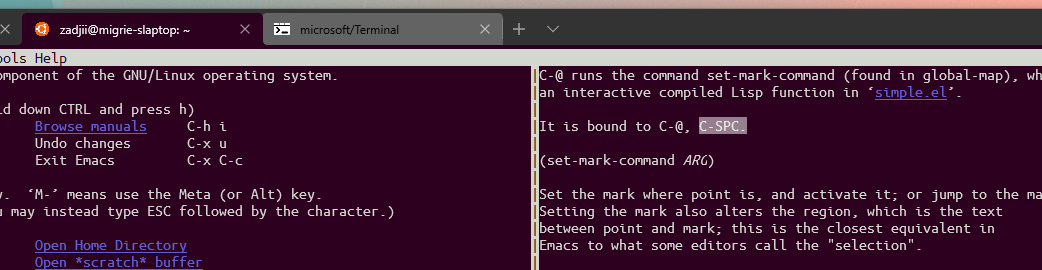
C-h k,C-Spcshows the following:So the NUL is definitely making its way to emacs in WSL. I'd bet that win32-openssh is losing track of the NUL byte somewhere.
@DHowett commented on GitHub (Feb 19, 2021):
Win32-OpenSSH (7.7, which is the version shipped with windows) is using its own implementation for generating VT characters out of human input. They have since stopped, but the broken version is present on a great many machines.
@DHowett commented on GitHub (Feb 19, 2021):
This is where they do not have appropriate handling for
VK_SPACE.8ab565c53f/contrib/win32/win32compat/tncon.c (L271-L844)@hjmus commented on GitHub (Feb 21, 2021):
@zadjii-msft Thank you very much for the info! With the knowledge you shared, I was able to hack a fix. I changed
8ab565c53f/contrib/win32/win32compat/tncon.c (L191)from the following:to the following:
and now my Win32 open-ssh build can forward
ctrl+spaceto tmux!As you said,
ctrl+spaceis justNUL. So wheninputRecord.Event.KeyEvent.uChar.UnicodeChar == L'\0', I just need to check if it is indeedctrl+spacebeing pressed. But I don't know why the VK is50rather thanVK_SPACE, which is32. I highly suspect that somewhere in some code, someone treated32as0x32, which is50... 🤣I don't believe mine is a proper fix, so I'll just keep it to myself. 😉
For those who want this hack, here is how to build your own Win32 open-ssh: https://github.com/PowerShell/Win32-OpenSSH/wiki/Building-OpenSSH-for-Windows-(using-LibreSSL-crypto).
Windows Terminal is nice. I have decided to switch from PuTTY. Keep up with the good work, folks! 👍
@zadjii-msft commented on GitHub (Feb 22, 2021):
Oh that might be because VK 50 is VK 0x32 which is the
2key. And here's another weird thing - Ctrl+@ is also encoded as NUL. And on an en-us keyboard, the key that you need to press to get an@is the 2 key. the-more-you-know.gif.You can see how we deal with this in both conhost and the Terminal around this function:
a158cc81ae/src/terminal/input/terminalInput.cpp (L630-L637)@cwfparsonson commented on GitHub (May 21, 2021):
Has this been fixed? How can we type ctrl+space when ssh'ing via PowerShell?
@zadjii-msft commented on GitHub (May 21, 2021):
@cwfparsonson This should be fixed, but it'd be helpful to know which
sshyou're using, which version, which powershell you're using, what shell you're running on the remote host - there's a lot of factors at play here that all might eat NUL bytes@cwfparsonson commented on GitHub (May 21, 2021):
Powershell version: 5.1.19041.610
I am running bash
OpenSSH_for_Windows_7.7p1, LibreSSL 2.6.5
@zadjii-msft commented on GitHub (May 21, 2021):
Well yep, that'd explain it. The OpenSSH 7.7
ssh.exejust simply won't work with ctrl+space. Unsure if @hjmus ever submitted a PR to fix that upstream, or if it's fixed in a 8.x release of OpenSSH.@latipun7 commented on GitHub (Jun 24, 2021):
Sorry to intrude, since I didn't quite understand, I'll just ask here.
Does my issue is related to this issue?
I remapped key binding in vim
nnoremap <C-/> 5j, it means whenever I press ctrl+/ in normal mode, it should navigate the cursor down 5 times, but it does nothing. Tried alt+/ not work too. Then remap it to alt+\, it's worked.I don't have a chance to try the mapping in another terminal yet.
Thank you.
@heeh commented on GitHub (Jun 25, 2021):
Strange enough, control+space works in wsl.
However, sshing to the linux from powershell using
hvc sshdoes not.Can anyone explain this?
@cwfparsonson commented on GitHub (Jun 25, 2021):
In the end I had to dual boot Linux. I tried many different Windows solutions but nothing worked.
@heeh commented on GitHub (Jun 27, 2021):
For emacs, I finally resolve this issue by remapping
C-SPCtoC-zusing PowerToys.You also have to bind
C-ztoset-mark-commandas follows.(global-set-key (kbd "C-z") 'set-mark-command)@xvzc commented on GitHub (Aug 22, 2021):
In my case, i use Korean keyboard, my hardware keyboard layout was set to something that cannot interpret
Ctrl + Spaceas itself:Ctrl + Spacewas mapped toChinese Characterkey in hardware level. So i went to Windows settings, and changed the layout to something that doesn't remapCtrl + Space, nowCtrl + Spaceworks totally fine in Windows Terminal.environment : Windows 11, Windows Terminal, wsl, tmux, neovim
@DanielGibson commented on GitHub (Sep 7, 2021):
I'm using Git Bash (from Git 2.32.0.2) in Windows Terminal 1.9.1942.0 (installed via Windows Store), on Win10.
I connect to another machine via SSH and use screen there.
In screen I should be able to switch between the "windows" with
Ctrl-A Space.Right now this only works if I don't press Ctrl anymore when pressing Space - I'm pretty sure it wasn't like this before, and it definitely isn't like that with the (Putty-based, AFAIK?) mintty Terminal emulator that comes with Git for Windows (or any terminal emulator I tried on Linux).
So
Ctrl-Arelease keysSpaceworks,Ctrl-A-keep pressing those keysSpacedoes not work (when using Windows Terminal), even though it should (and after almost 20 years of doing this I don't think I can retrain my muscle memory).UPDATE: When I connect to a Linux machine per SSH and run
cat -vand then pressCtrl-Space, it prints^@with mintty (from git) and nothing at all with Windows Terminal.@digash commented on GitHub (Sep 28, 2021):
Similar to this https://github.com/microsoft/terminal/issues/2865#issuecomment-869087333
just using less used sequence and windows terminal key remapping.
And if you use scree on the other side then you only need this in your .screenrc:
@kim-dae-hyun commented on GitHub (Mar 11, 2022):
I had same issue in my development environment.
When I connect to WSL, windows terminal send Ctrl+space exatly, but when I connect to remote linux server via ssh, then Ctrl+Sapce is not sent to linux server.
I confirmed with cat -v command.
In conclusion, open-ssh for windows program does not send ctrl+sapce.
This issues was fixed by below patch
https://github.com/PowerShell/openssh-portable/pull/569
If you use higher version than 8.9 of open-ssh ( 8.9 version does not include this patch)
this issue will be fixed.
@cpbotha commented on GitHub (Jul 19, 2022):
To fix this, you can install this fixed version of the PowerShell openssh-portable project: https://github.com/PowerShell/openssh-portable/pull/569#issuecomment-1130048955
I just did so with
msiexec, then re-connected from Windows with the newly installedc:\Program Files\OpenSSH\ssh.exeand Ctrl-Space was happily recognized by Emacs in tmux on the other side.@mkq commented on GitHub (Jul 26, 2022):
Using Cygwin zsh inside Windows Terminal 1.13.11431.0, Ctrl+Space seems to do nothing, while it shoud do
so I can do Ctrl+Space to start selection, move the cursor, Ctrl+W ⇒ cut, move the cursor, Ctrl+Y ⇒ paste.
Will that be addressed in #1173 (which is much too technical for me)?
@DHowett commented on GitHub (Jul 26, 2022):
That seems like a Cygwin bug to me. Here's what I get in WSL...
@mkq commented on GitHub (Jul 27, 2022):
Thanks. I don't know how to report that to the Cygwin devs, though, since Cygwin zsh inside Cygwin mintty works. I'll just live with this workaround:
bindkey '\e[3;5~' set-mark-command(i.e. Ctrl+Del) in my .zshrc.(Found by pressing Ctrl+V, Ctrl+Del, which prints
^[[3;5~, Ctrl+V being bound to quoted-insert.)@thammegowda commented on GitHub (Nov 19, 2022):
If anyone still facing this issue: This issue seems to be on
ssh, as mentioned in the previous comments.There maybe two
sshclients inside your $PATH.The ssh.exe client from windows does not handle CTRL+Space as the way it should be (atleast as of the latest windows today). Remember to use
sshclient from WSL and CTRL+Space works on emacs as expected!@michael-ts commented on GitHub (Dec 2, 2022):
@thammegowda
Uh... how? Powershell can't see anything in the WSL filesystem. I tried copying /usr/bin/ssh over to the Windows side, but when I try to execute it in Powershell it asks me what application I want to open it with. (Hey, since I can run Windows executables from within WSL I figured why not the reverse?)
Oh, and in case you ask, I can't run ssh within WSL because for some reason it times out trying to connect to the host. Which is in a Hyper-V VM on the same machine.
@thammegowda commented on GitHub (Dec 2, 2022):
@michael-ts I run ssh inside WSL (first,
bashthenssh) and that's the way it works for me.Looks like you have issue with networking setup inside WSL, and your ssh is unable to reach to the remote. Verify that internet works inside WSL by
ping bing.com@michael-ts commented on GitHub (Dec 2, 2022):
@thammegowda Thanks, I can ping the Internet from WSL, but I have had no end to the networking issues with Hyper-V. I used to be able to ssh to it but had more serious issues, namely that networking would completely stop working outside of between the host and the VM at odd intervals. The fix for that apparently which I no longer recall caused this issue. Trying to administer my own machine is too much work sometimes... ;-)
Anyway, I was hoping there was some solution besides running in WSL, but I guess not.
@thammegowda commented on GitHub (Dec 2, 2022):
@michael-ts I think the solution is that somebody has to patch the OpenSSH inside windows dir (
C:\WINDOWS\System32\OpenSSH\ssh.exe) to resolve this issue. I don't know who that somebody is and if they are aware of this issue.@DHowett commented on GitHub (Dec 2, 2022):
For what it's worth, this issue has been fixed in newer versions of Win32-OpenSSH. They are often released to earlier versions of Windows by way of servicing updates.
At my disposal I have v8.9, which does properly record Ctrl+Space
@michael-ts commented on GitHub (Dec 7, 2022):
@DHowett Thanks! I went searching for that and discovered I could update to that version from PowerShell using
winget install "openssh beta".@chiendo97 commented on GitHub (Dec 7, 2022):
For anyone which doesn't have admin rights, you guys can use scoop to install the latest verison of
OpenSSH.Then in any terminal apps (Windows Terminal, Iterms, PowerShell), use the scoop's ssh version to connect to any servers, the
Ctrl-Spacewill work correctly.@fagg commented on GitHub (Jun 2, 2023):
This doesn't appear to be fixed for me, even in a local WSL Ubuntu instance.
cat -vconfirms thatCtrl-<SPACE>is ignored.I am running Terminal version
1.16.10261.0on Windows 1019045.3031.@iHeadway commented on GitHub (Jun 2, 2023):
Windows 11, Terminal 1.17.11461, powershell 7.3.4. ctrl-space isn't working in neovimj (no keycode sent after ctrl-q)
@ChildishhAlbino commented on GitHub (Jun 5, 2023):
Yeah tried setting up my Tmux config on WSL2 and can't get Ctrl+Space prefix key to work
Windows Terminal Preview 1.18.1462.0
@brookst commented on GitHub (Jun 9, 2023):
Same. Regular WSL2 distro running bash inside Windows Terminal Preview Version: 1.18.1462.0.
Control + Space doesn't make it to the Linux shell.
@vinser commented on GitHub (Oct 1, 2023):
git bash, wsl and PuTTY are that work great with Ctrl-Space on Windows
PS and CMD console do not
@brookst commented on GitHub (Oct 1, 2023):
Checking again, there seems to have been a bump to Windows, but nothing else:
Windows Terminal also seems to be the same version:
However now Control + Space reports as ^@:
That's fine for me, but a little weird that this started working without any apparent change to the system.
Edit: Just to note I use a United Kingdom QWERTY layout, so I have a single quote/@ key instead of the US ANSI single/double quote key. I'm not sure how the keys map there.