mirror of
https://github.com/microsoft/terminal.git
synced 2026-09-23 23:45:08 +00:00
MEGATHREAD: Breaking settings changes in version 0.11! #7535
Closed
opened 2026-01-31 01:06:23 +00:00 by claunia
·
72 comments
No Branch/Tag Specified
main
dev/duhowett/fhl-2026/remove-paste-hairpin-handler
dev/duhowett/win7-wpf-termcontrol-squash
dev/lhecker/20226-present-leaks
dev/duhowett/wpf-1-autoscroll-to-interactivity
dev/duhowett/wpf-3-swapchain-handle
dev/duhowett/wpf-2-midi-audio-timer
dev/migrie/overview-for-pr
dev/migrie/b/markdown-paste
dev/duhowett/padding-in-atlas
fix/german-split-pane-tooltip
release-1.25
dev/cazamor/sui-rejuv/fix-spaces
dev/migrie/per-window-final
dev/cazamor/selfhost/2026-08-31
dev/migrie/b/independent-animations
dev/pabhoj/wtcli
dev/cazamor/conhost/bugfix-a11y-find
dev/cazamor/conhost/bugfix-a11y-find-1.24
dev/lhecker/theme-quality-test
dev/lhecker/theme-quality
dev/cazamor/selfhost/sui-rejuv
dev/cazamor/fix/search-selection-off-by-one
dev/duhowett/even-more-builtin-glyphs
dev/crutkas/kitty-pr1
dev/cazamor/toast/activity
release-1.24
users/GitHubPolicyService/d8615b98-f5fa-4462-bf7f-c44a1cc12096
dev/cazamor/selfhost/2026-06-18
dev/migrie/f/new-profile-subcommand
dev/cazamor/sui-rejuv/profiles-v2
dev/duhowett/asan-for-all
dev/cazamor/sui-rejuv/profiles-new
dev/cazamor/sui-rejuv/expander-groups-new
dev/cazamor/auto-save/refresh-settings
feature/llm
dev/cazamor/auto-save/model/json-manager
dev/cazamor/auto-save/settings-model
dev/migrie/s/snippet-params
users/merlinbot/1es-pt-auto-baselining-pr
niels9001/inactive-tab-foreground
dev/cazamor/selfhost/2026-05-20-home
dev/duhowett/fzf-vcxproj
dev/cazamor/selfhost/2026-05-20
dev/cazamor/selfhost/2026-05-19
dev/cazamor/selfhost/2026-05-18
niels9001/fontweight-fixes
niels9001/page-transitions
dev/duhowett/fhl-2026/rewrite-paste-and-dragdrop-handling-writeinputstring
dev/migrie/f/overview-view
dev/cazamor/selfhost/2026-05-13
dev/cazamor/selfhost/2026-05-13-sui
dev/yeelam/f/BuildTest
dev/duhowett/hax/our-own-tabview
dev/cazamor/bugfix/close-scratchpad
dev/cazamor/selfhost/2026-05-05
dev/cazamor/selfhost/2026-05-04-workspaces
dev/cazamor/selfhost/2026-05-04
dev/lhecker/20149-hotfix
dev/lhecker/osc-7-wsl
dev/migrie/workspaces-real
dev/migrie/fhl-spring-2026/quake-4
dev/lhecker/pwsh-5.1
dev/cazamor/sui/dropdown-page
dev/cazamor/selfhost/2026-04-08
dev/cazamor/selfhost/2026-04-06
dev/migrie/fhl-spring-2026/confirmCloseOn
dev/cazamor/confirmCloseOn/dont-ask-me-again
dev/lhecker/inproc-conpty
dev/duhowett/powershell-module-supercharger
dev/cazamor/a11y/vt-seq-prototype
dev/migrie/fhl-spring26/osc777-2
dev/migrie/fhl-spring26/2/notification-infrastructure
dev/migrie/fhl-spring-2026/side-tabs
dev/cazamor/copilot/playground
dev/migrie/fhl-spring-2026/quake-3.5
dev/migrie/fhl-spring26/osc777
dev/migrie/fhl-spring26/unpackaged-notify
dev/migrie/fhl-spring26/bellStyle-notification
dev/migrie/fhl-spring26/activity-notifications
dev/migrie/fhl-spring-2026/x-open
dev/migrie/fhl-spring-2026/quake-5
dev/migrie/fhl-spring26/nextTab-filter
dev/duhowett/atlas-draw-d2d-dots-curlies-consistently
dev/lhecker/14165-conhost-font-size
dev/lhecker/ottosson-by-default
dev/duhowett/hax/unix-pty
dev/duhowett/hax/cmake
dev/lhecker/generate-256-colors
dev/lhecker/dcs-perf
dev/lhecker/1410-large-scrollback
dev/cazamor/selfhost/2026-02-10
dev/lhecker/11509-kitty-keyboard-protocol-wip
dev/cazamor/selfhost/2026-01-29
dev/lhecker/benchcat-fix
dev/duhowett/eoy-25/allow-set-foreground
release-1.23
dev/cazamor/bot/deprecate-area-atlasengine
dev/cazamor/selfhost/2026-01-20
dev/cazamor/selfhost/2026-01-12
dev/cazamor/spec/auto-save
dev/duhowett/fhl-2024/asciicast-recorder
dev/duhowett/eoy-25/underline-colors-in-atlas-bug
dev/duhowett/hax/serial-port-support
dev/duhowett/connection-utf8
dev/lhecker/fused-event
dev/lhecker/18928-wip
dev/duhowett/fhl-2024/clang
dev/duhowett/vt-cache-changes
dev/cazamor/uia-leak
release-1.22
dev/cazamor/selfhost/11-18-v3
dev/cazamor/selfhost/11-18
dev/duhowett/fhl-2025/bitmap-fonts
dev/duhowett/server-2025-vms
dev/duhowett/cant-believe-gotta-do-this-shit
dev/lhecker/dark-mode
dev/cazamor/sui/invert-cursor-color
dev/duhowett/fhl-2025/wt-command-palette-cmdpal-integration
dev/duhowett/fhl-2025/wt-json-relative-icons
dev/lhecker/fucking-service-locator
dev/duhowett/unicode-17
dev/duhowett/multi-blern
dev/lhecker/wellp2-alt
dev/duhowett/wellp2
dev/lhecker/1860-horizontal-scrollbar
dev/lhecker/fix-window-count
dev/cazamor/sui/tab-color-old
dev/duhowett/hax/conhost-icon
dev/duhowett/hax/sui-color-chip-border
dev/duhowett/hax/terminalsettings-as-a-lib-/with-types-merged-into-tsm
dev/pabhoj/page_control_input_cleanup
dev/duhowett/padding-in-atlas-rebase-20250729
dev/lhecker/attach-thread-input
dev/duhowett/portable-shader-members
msbuildcache-reenable
dev/cazamor/selfhost/1.24-2025-06-10
dev/cazamor/upgrade-settings-containers
dev/cazamor/sui/ext-page/powershell-stub
dev/cazamor/selfhost/1.24-2025-05-15
dev/pabhoj/sui_action_overhaul
dev/cazamor/selfhost/1.24-2025-05-06
dev/cazamor/selfhost/1.24-2025-04-29
dev/cazamor/sui/ext-page/lazy-load-objects
dev/cazamor/sui/ext-page/badge
dev/cazamor/selfhost/1.24
dev/lhecker/sdk-26100
dev/duhowett/testing
dev/jadelaga/VS-Pty.Net-1.22
dev/duhowett/fhl-2025/what-if-no-content-ids
dev/lhecker/18584-part2
dev/lhecker/get-lang-id
dev/duhowett/hax/clogs
release-1.21
dev/pabhoj/featurellm_fix_paste
dev/lhecker/grapheme-backup
dev/jadelaga/VS-Pty.netFixes
dev/lhecker/atlas-engine-compute-shader
dev/migrie/s/ai-providers
dev/lhecker/animated-cursor-wip
dev/pabhoj/featurellm_timeout
dev/lhecker/dark-mode-alt
dev/duhowett/osc-strided-table
dev/lhecker/bugbash
dev/pabhoj/featurellm_improve_parsing
dev/duhowett/coast-to-coast
dev/lhecker/curly-improvements
dev/duhowett/net8
dev/duhowett/onebranch-custom-pool
dev/lhecker/renderer-overhaul-2nd-attempt
dev/lhecker/cleanup
dev/cazamor/sui/confirmation-announcements
dev/lhecker/winconpty-cleanup
dev/duhowett/learn/rewrite-highlights
dev/migrie/b/no-nesting-when-searching
release-1.20
dev/duhowett/sel-2-spans
dev/lhecker/7118-cursor-color
dev/lhecker/remove-glyph-width
dev/lhecker/igfw-scroll-region
dev/lhecker/17656-win32im-double-encoding
dev/duhowett/fhl-2024/merge-idls
dev/duhowett/feed-forward-variables
dev/lhecker/remove-chrome-math
dev/duhowett/copylink
dev/duhowett/applicableactions
gh-readonly-queue/main/pr-17566-de50310295b7d92ed3d51f07974a2a945776bf9d
dev/lhecker/atlas-engine-stride-copy
dev/migrie/b/bump-nuget-in-c
dev/migrie/f/992-redux-redux
dev/migrie/f/filter-weight-input-too
dev/migrie/f/disable-nesting
dev/migrie/f/local-snippets-cleaner
dev/migrie/s/1553-mouse-bindings
selfhost-1.22-bugbash-2024-06-04
selfhost/1.22-bugbash-2024-06-04
dev/lhecker/15689-tab-drag-crash-fix
dev/migrie/f/sxnui-font-size-change
dev/migrie/f/local-snippets-on-action-refactor
dev/migrie/f/just-local-snippets
dev/migrie/save-input-patches
dev/migrie/f/md-pane-official
dev/migrie/base-pane
dev/migrie/fhl/tasks-pane
release-1.19
dev/migrie/b/17130-clear-marks-2
dev/migrie/b/17075-its-me-the-killer
dev/duhowett/i-figured-out-why-sometimes-the-publish-build-failed
dev/duhowett/nuget-publication-with-aad-app-id
selfhost-1.20
dev/duhowett/graph
dev/migrie/b/15803-activate-dont-copypasta
dev/duhowett/is-pgo-broken-because-of-sui-being-slower
dev/migrie/b/remove-terminaltab
dev/migrie/fhl/md-pane
dev/migrie/fhl/local-tasks-2024
dev/migrie/fhl/2024-inline-notebook
dev/duhowett/interface-projects
dev/duhowett/dead-loc
release-1.18
dev/migrie/fhl/2024-spring-merge-base
dev/duhowett/hax/l9
inbox
dev/migrie/14073-on-main
dev/duhowett/hax/conhost_dump_replay
user/lhecker/atlas-engine-srgb
dev/migrie/fhl/sxnui-tooltips-3
dev/migrie/7718-notifications-experiments
dev/migrie/fhl/7718-notifications
dev/migrie/fhl/7718-notifications-reboot
dev/lhecker/remove-gsl
dev/lhecker/16575-TerminateProcess
dev/lhecker/window-thread-climate-control
dev/lhecker/client-context-input-output-mode
dev/lhecker/ring-buffer-input-buffer
release-1.17
dev/lhecker/propsheet-fontdlg-refactor
dev/lhecker/renderer-overhaul
dev/pabhoj/test
dev/duhowett/chop
dev/lhecker/til-ulong-cleanup
dev/lhecker/til-env-cleanup
dev/migrie/f/16005-a11y-pane
dev/cazamor/a11y/fastpass
dev/migrie/b/15487-push-cwd
dev/migrie/b/15536-or-15219-idk
dev/duhowett/move-timers-down-into-core-interactivity-etc
dev/migrie/b/15812-broadcast-paste-two
dev/migrie/fhl-fall-2023/11162-quake-III-arena
dev/migrie/fhl-fall-2023/1620-automatic-tab-progress
dev/migrie/fhl-fall-2023/9992-quake-II
dev/migrie/fhl-fall-2023/9992-default-quake-settings
dev/migrie/fhl-fall-2023/9992-window-name-settings
dev/migrie/fhl-fall-2023/oceans
dev/lhecker/ColorScheme-improvements
dev/migrie/search-v2-v3
dev/migrie/pr-15717/its-dangerous-to-go-alone
dev/migrie/f/4768-taskbar-icons
dev/migrie/f/3121-tooltips
dev/duhowett/sticky-control
dev/duhowett/fix-tracing-2
dev/migrie/b/add-support-for-vsc-marks
dev/migrie/f/1860-this-is-literally-what-less-is-for
dev/migrie/s/5916-draft
dev/lhecker/tracy
dev/migrie/s/north-star
dev/cazamor/tag-youre-it
dev/migrie/f/12336-let-it-mellow
dev/migrie/f/now-with-more-compat-settings
dev/migrie/f/compatibility-sui
dev/duhowett/hax/wpf-atlas
dev/duhowett/fgb
dev/migrie/b/15487-relative-paths-are-hard
dev/lhecker/colrv1
loc-update
dev/migrie/fhl/dyndep-csharp
dev/migrie/fhl/dyndep
dev/migrie/fhl-clickable-send-input
dev/migrie/f/cwd-hijinks-5506-15173
dev/lhecker/openconsole-async-start
1.17
dev/migrie/bump-scratch
dev/migrie/f/3726-restartConnection
dev/migrie/b/cxn-restarting-attempt-1-backport
dev/migrie/b/9053-part-3-the-actual-doing-of-the-thing
dev/migrie/b/13388-focus-logger
dev/migrie/b/9053-part-4-i-guess-defterm
dev/migrie/oop/3/of-the-silmarils
of-the-darkening-of-valinor
dev/migrie/fhl/notebook-proto-000
dev/migrie/f/narrator-buddy
dev/migrie/mux-2.8.2-march-2023
dev/migrie/f/roast-mutton
dev/migrie/f/12861-preview-input
dev/lhecker/clang-tidy
dev/migrie/f/3121-wE-dOnT-hAvE-dEv-DaYs
dev/duhowett/compiler-compliance
dev/duhowett/i-have-a-burning-hatred-for-ntstatus-of-later-so-why-not-fix-it
dev/duhowett/shorthand-namespaces
dev/duhowett/rename-all-dlls
dev/duhowett/errordialog
dev/lhecker/gsl-narrow
dev/migrie/b/11522-dumb-idea
release-1.16
dev/miniksa/env
dev/duhowett/hax/embed-everything
dev/migrie/b/13388-attempt-003
dev/migrie/b/14512-test-research
dev/migrie/b/13388-attempt-002
dev/migrie/b/14464-copyOnSelect-moving-text
dev/migrie/s/thema-schema-for-1.16
dev/migrie/s/theme-pair-schema
dev/migrie/b/13388-experiments-1
dev/cazamor/spec/a11y-vt-seq
dev/migrie/b/14557-empty-folder-dropdown
dev/cazamor/spec/a11y-vt-seq-v2
release-1.15
dev/migrie/f/process-model-v3-test-0
dev/lhecker/vsconfig
dev/migrie/s/5000-presentation
dev/lhecker/5907-startup-perf
dev/lhecker/winrt-file-api-benchmark
dev/duhowett/128-bit-compiler
dev/migrie/fhl/more-shell-integration
dev/migrie/b/13388-experiments-0
dev/lhecker/til-to-ulong-improvements
dev/migrie/s/markdown-notebooks
dev/cazamor/a11y/nav-by-page
dev/cazamor/a11y/system-menu-support
dev/duhowett/no-private-registry-keys
dev/cazamor/wpf/uia-expose-enable-events
dev/cazamor/wpf/uia-events
extendAISpec
dev/migrie/fhl/clickSendInput
dev/migrie/fhl/save-command
dev/migrie/b/theme.profile
dev/migrie/b/13943-a-test-for-this
dev/migrie/oop/2/endgame
dev/duhowett/hax/merge_idl
dev/migrie/oop/2/infinity-war
dev/migrie/spellbot-cve
dev/cazamor/a11y-sev3/new-profile-announcement
dev/migrie/fhl/upside-down-mode
release-1.14
dev/migrie/f/9458-startupInfoToTerminal
dev/migrie/fhl/5916-triggers
dev/migrie/b/13523-context-menu
dev/migrie/b/6523-endpaint-outside-lock
dev/migrie/b/12413-OnUnhandledException
dev/lhecker/render-snapshot
dev/cazamor/1.15/scroll-to-point
dev/migrie/mux-2.8-aug-2022
dev/lhecker/lock-console-guard
dev/migrie/f/1504-final
dev/pabhoj/sui_follow_ups
dev/migrie/f/til-winrt.h
dev/cazamor/color-picker-redesign
dev/migrie/fhl/vscode-autocomplete-prototype
dev/migrie/f/1504-prototype
dev/migrie/oop/2/loki
dev/migrie/oop/2/wandavision
dev/migrie/b/8698-YOURE-OUT-OF-ORDER
fabricbot-configuration-migration
dev/migrie/b/12788-did-it-work
dev/migrie/b/localtests-ci-2022
dev/cazamor/1.14/replace-compareInBounds
dev/pabhoj/preview_string
dev/cazamor/ks/switchSelectionEndpoint
dev/migrie/oop/2/COM-ISwapChainProvider-attempt-1
dev/migrie/b/dxd-marker
release-1.13
dev/migrie/b/13066-for-defterm
dev/cazamor/revert-dwm
dev/migrie/b/13066-sw_flash_repeatedly
dev/migrie/b/no-cloaky-cloak
dev/migrie/f/apples-to-oranges
dev/migrie/f/no-custom-caption-btns
dev/migrie/f/10509-mica-and-transparent-titlebars
dev/migrie/b/12911-wpf-focus-fg
dev/migrie/titebar-colors
dev/lhecker/4015-cursor
dev/migrie/fhl/rgb-rainbow-window-frame
dev/migrie/fhl/scroll-marks-prototype
release-1.12
dev/miniksa/compliance
dev/migrie/f/default-icons
dev/migrie/fhl/10175-web-search-for-text
dev/migrie/fhl/menu-complete-prototype
dev/migrie/b/2988-merged-prototypes
dev/migrie/b/2988-niksa-msgs-prototype
dev/migrie/fhl/9583-colorSelection
dev/migrie/b/10609-sui-leak
dev/migrie/b/32-attempt-3
dev/migrie/release-1.12-rejuv-attempt-2
dev/migrie/demo-for-presentation
dev/migrie/b/32-but-im-here-for-12567
dev/duhowett/conpty_first_frame_blug
dev/migrie/b/11092-unfocused-acrylic-settings
dev/migrie/localtests-in-ci
dev/migrie/b/12356-attempt-2
dev/migrie/b/12353-with-null
dev/migrie/b/12387-trim-spaces
dev/migrie/b/5033-bad-start
dev/lhecker/12351-broken-locales
dev/migrie/b/8663-input-to-oem-crash
dev/migrie/b/11743-win10-opacity-is-hard
dev/migrie/f/ctrl-click-elevate
dev/migrie/b/12196-shim-localization
dev/lhecker/issue-4015-til-rect
dev/cazamor/eim/mvvm
dev/migrie/f/--elevate
dev/migrie/b/11668-i-think
dev/migrie/b/11994-wsl-mangline
dev/migrie/eim/3475-action-xmacros
dev/migrie/eim/incremental-build-000
dev/cazamor/a11y/fake-uia-data
dev/migrie/f/non-terminal-content-elevation-warning
dev/migrie/f/632-on-warning-dialog
dev/lhecker/rgba
dev/migrie/b/8480-keybindings-in-tabs
release-1.11
dev/migrie/b/11561-dead-ends
dev/migrie/oct-21-roadmap-update
dev/migrie/fhl/adaptive-card-extension
dev/cazamor/test/11440
dev/migrie/f/warning-dlg-automation
dev/migrie/b/1.12-crash-on-exit
dev/migrie/b/11146-next-tab-in-cmdpal
release-1.10
dev/migrie/5ff9a24-and-75e2b5f
dev/duhowtt/hax/cpal-jumplist-async
dev/lelian/actionid/1
dev/migrie/f/just-elevated-state
dev/lhecker/terminal-settings-cleanup
dev/migrie/gh-10824
dev/pabhoj/cursor_light
dev/migrie/oop/wandavision
dev/migrie/oop/endgame
dev/migrie/oop/infinity-war
dev/lhecker/app-state-actually-hidden
dev/migrie/b/6160-dynamic-default-warning
dev/mgirie/b/more-nchhittest-ideas
dev/migrie/b/9320-interfacial-separation
cinnamon/fhl/find-contextmenu
dev/lhecker/wsl-distro-generator-cleanup
dev/migrie/b/10875-but-more-clever
dev/migrie/b/broken-globalsummon-overloading
dev/duhowett/hax/rle-row
dev/migrie/fhl-2021/cmdpal-select-list
dev/migrie/fhl-2021/differential-pixel-shading
dev/duhowett/hax/no-writable-glyphat
dev/migrie/fhl-2021/more-shader-variables
dev/migrie/titlebar-shenannigans
dev/miniksa/win10_font_matching
dev/lhecker/conhost-oom
dev/migrie/b/10332-less-snappy-scrolling
dev/migrie/b/7422-1px-top-border
release-1.9
dev/cazamor/move-scratch
release-1.8
dev/miniksa/manifest_2
release-1.6
release-1.7
dev/migrie/oop/the-whole-thing
dev/migrie/oop/connection-factory
dev/migrie/f/quake-dropdown-2
dev/miniksa/rle2
dev/migrie/f/quake-toCurrent-experiments-2
dev/migrie/f/quake-toCurrent-experiments
dev/migrie/f/quake-dropdown
dev/cazamor/actions-page/template
dev/duhowett/hax/cursor_stamp_foreground_background
dev/migrie/f/1860-hey-might-was-well-hack-during-a-hackathon
dev/migrie/oop-terminal.control-split-control
dev/duhowett/hax/build-with-wholearchive
dev/cazamor/spec/tsm-actions-temp
dev/migrie/oop-tear-apart-control
dev/migrie/oop-scratch-3
dev/cazamor/sui/bugfix-reload-crash
dev/migrie/f/xmacro
dev/cazamor/sui/proto/profile-nav-view
dev/migrie/f/name-windows
dev/migrie/dol/messing-with-shaders-take-1
release-1.5
dev/cazamor/sui/inheritance-hyperlinks-test
dev/migrie/r/commandline-lib-002
dev/migrie/f/com.fabrikam.toaster
dev/cazamor/adaptive-cards-prototype
dev/migrie/f/commandline-lib
dev/miniksa/zipzoom2
dev/migrie/f/remote-commandlines
dev/migrie/f/632-elevated-profiles
dev/migrie/oop-broker-000
dev/migrie/fix-pr-7015
dev/duhowett/clang
dev/miniksa/input_tests_2
dev/miniksa/input2
dev/migrie/oop-rpc-000
release-1.4
dev/migrie/oop-mixed-elevation-1
dev/migrie/oop-window-content-1
cinnamon/open-json
dev/miniksa/input_tests
dev/duhowett/hax/tsm-graphviz
dev/miniksa/input
dev/duhowett/hax/caption_buttons
release-1.3
dev/cazamor/a11y/expand-line-under-viewport
dev/cazamor/acc/ch/word-nav-perf
dev/cazamor/spec/settings-ui-architecture-draft
dev/duhowett/hax/tap_upgrade
dev/migrie/f/pane-exit-animation
release-1.2
dev/migrie/move-lib-up-and-dll-down
release-1.1
dev/migrie/f/branch-2-backup
dev/migrie/f/settings-getters-only
dev/duhowett/hax/command_palette_search
dev/migrie/f/6856-let-terminalpage-expandcommands
dev/migrie/f/theming-2020
dev/migrie/oop-scratch-4
dev/duhowett/hax/punchout
dev/migrie/s/action-ids
dev/migrie/f/lets-just-generate-these
dev/migrie/oop-scratch-2
dev/miniksa/dcomp
dev/miniksa/gotta_go_fast_spsc
dev/miniksa/gotta_go_fast
dev/miniksa/perf_skip_checks
dev/miniksa/perf_buffer_dig
dev/migrie/s/1203-cursorTextColor
dev/migrie/f/fix-intellisense-i-guess-backup
release-1.0
dev/migrie/f/execute-commandlines
dev/migrie/f/2046-Command-Palette-v2
dev/migrie/b/6421-passthrough-alt
dev/migrie/b/moving-focus-is-hard
dev/miniksa/set
dev/migrie/f/1203-phase-1
dev/migrie/f/get-localtests-in-ci
dev/cazamor/drag-panes
dev/cazamor/tile-background
release-0.11
dev/duhowett/dev/duhowett/hax/appstate_remember
dev/duhowett/hax/wpf_win_8_hax
dev/migrie/b/3088-weird-exact-wrap-resize
release-0.10
dev/migrie/b/4591-custom-scaling-bug
dev/duhowett/hax/attr_smuggling
dev/migrie/b/5161-mingw-vim-fix
dev/miniksa/dx_bitmap
dev/migrie/b/1503-try-messing-with-cooked-read
dev/duhowett/eyebeam
dev/migrie/b/5113-experiments
dev/duhowett/hax-selection-exclusive
dev/migrie/f/more-vt-renderer-tracing
dev/miniksa/bitmap
dev/duhowett/wprp
dev/miniksa/bitmap-mad-with-power
dev/migrie/f/resize-quirk
dev/migrie/f/reflow-buffer-on-resize-002
wpf-renderer-revert
dev/miniksa/draw
release-0.9
dev/miniksa/tabs-color-fix
dev/miniksa/4309
dev/migrie/f/just-wrapping
dev/migrie/b/3490-try-another-resize-algo
release-0.8
dev/migrie/b/3490-a-simpler-resize
dev/migrie/b/3490-resize-down
dev/miniksa/4254
dev/migrie/f/conpty-wrapped-lines-2
dev/migrie/b/be-better-at-hiding
dev/migrie/f/3327-xaml-theming-proto
dev/miniksa/gardening2
release-0.7
dev/duhowett/conpty-flags
dev/migrie/f/603-vintage-opacity
dev/migrie/PR#3181-comments
dev/duhowett/font-64
release-0.5
dev/migrie/b/663-paste-lf-always
dev/migrie/b/2011-reordered-fallthrough-strings
dev/migrie/b/411-init-tab-stops
dev/migrie/b/json-patching-is-hard
dev/migrie/b/2455-try-getting-tests-working
dev/migrie/b/1223-change-256-table
dev/migrie/f/2171-openterm.cmd
dev/migrie/f/drag-panes
dev/migrie/f/2046-command-palette
release-0.3
dev/miniksa/manager
dev/migrie/f/non-terminal-panes
dev/migrie/f/passthrough-2019
dev/miniksa/shared_pch
dev/migrie/f/1897-less-duplicated-work
release-0.2
dev/cazamor/mcs/viewport-selection
dev/duhowett/version_hack
v1.25.1912.0
v1.24.11911.0
v1.25.1322.0
v1.24.11321.0
v1.25.1241.0
v1.25.1171.0
v1.25.923.0
v1.24.10921.0
v1.25.622.0
v1.24.10621.0
v1.24.10212.0
v1.23.20211.0
v1.24.3504.0
v1.23.13503.0
v1.24.2812.0
v1.23.12811.0
v1.24.2682.0
v1.23.12681.0
v1.24.2372.0
v1.23.12371.0
v1.23.12102.0
v1.22.12111.0
v1.23.11752.0
v1.22.11751.0
v1.22.11141.0
v1.23.11132.0
v1.23.10732.0
v1.22.10731.0
v1.21.10351.0
v1.22.10352.0
v1.23.10353.0
v1.22.3232.0
v1.21.3231.0
v1.22.2912.0
v1.21.2911.0
v1.22.2702.0
v1.21.2701.0
v1.22.2362.0
v1.21.2361.0
v1.21.1772.0
v1.20.11781.0
v1.21.1382.0
v1.20.11381.0
v1.21.1272.0
v1.20.11271.0
v1.20.11215.0
v1.19.11213.0
v1.20.10822.0
v1.19.10821.0
v1.20.10572.0
v1.19.10573.0
v1.20.10303.0
v1.19.10302.0
v1.18.10301.0
v1.20.10293.0
v1.19.10292.0
v1.18.10291.0
v1.18.3181.0
v1.19.3172.0
v1.19.2831.0
v1.18.2822.0
v1.19.2682.0
v1.18.2681.0
v1.18.1462.0
v1.17.11461.0
v1.18.1421.0
v1.17.11391.0
v1.17.11043.0
v1.16.10261.0
v1.17.1023
v1.16.10231.0
v1.15.3465.0
v1.16.3463.0
v1.15.2712.0
v1.15.2874.0
v1.16.2641.0
v1.16.2523.0
v1.15.2524.0
v1.15.2282.0
v1.14.2281.0
v1.14.1962.0
v1.15.2002.0
v1.15.2001.0
v1.15.1862.0
v1.14.1861.0
v1.14.1451.0
v1.14.1432.0
v1.13.11431.0
v1.13.10983.0
v1.12.10982.0
v1.13.10733.0
v1.12.10732.0
v1.13.10395.0
v1.12.10393.0
v1.13.10336.0
v1.12.10334.0
v1.12.3472.0
v1.11.3471.0
v1.12.2931.0
v1.12.2922.0
v1.11.2921.0
v1.11.2731.0
v1.10.2714.0
v1.11.2421.0
v1.10.2383.0
v1.10.1933.0
v1.9.1942.0
v1.9.1523.0
v1.8.1521.0
v1.9.1445.0
v1.8.1444.0
v1.8.1092.0
v1.7.1091.0
v1.8.1032.0
v1.7.1033.0
v1.7.572.0
v1.6.10571.0
v1.5.10411.0
v1.6.10412.0
v1.6.10272.0
v1.5.10271.0
v1.5.3242.0
v1.4.3243.0
v1.5.3142.0
v1.4.3141.0
v1.4.2652.0
v1.3.2651.0
v1.3.2382.0
v1.2.2381.0
v1.1.2233.0
v1.2.2234.0
v1.1.2021.0
v1.2.2022.0
v1.1.1812.0
v1.0.1811.0
v1.1.1671.0
v1.0.1401.0
v0.11.1333.0
v0.11.1251.0
v0.11.1191.0
v0.11.1111.0
v0.11.1121.0
v0.10.781.0
v0.10.761.0
v0.9.433.0
v0.8.10261.0
v0.8.10091.0
v0.7.3451.0
v0.7.3382.0
v0.7.3291.0
v0.7.3252.0
v0.6.3181.0
v0.6.2951.0
v0.6.2911.0
v0.5.2762.0
v0.5.2761.0
v0.5.2681.0
v0.5.2661.0
v0.3.2321.0
v0.4.2342.0
v0.4.2382.0
v0.3.2171.0
v0.3.2142.0
v0.2.1831.0
v0.2.1715.0
v0.2.1703.0
v0.1.1621.0
v0.1.1581.0
v0.1.1502.0
v0.1.1431.0
v0.1.1361.0
v0.1.1093.0
v0.1.1161.0
v0.1.1204.0
experiment-master
v0.1.1025.0
experiment-OutsideBuild
broken-tabstops
RS2-final
v0.1.1002.0
experiment-rel-windows-inbox
experiment-f-ServerApp
v0.1.1211.0
1904.29002
1810.02002
1708.14008
Labels
Clear labels
⛺ Reserved
A11yCO
A11yMAS
A11ySev1
A11ySev2
A11ySev3
A11yTTValidated
A11yUsable
A11yVoiceAccess
A11yWCAG
Area-Accessibility
Area-AtlasEngine
Area-AzureShell
Area-Build
Area-Build
Area-Chat
Area-CmdPal
Area-CodeHealth
Area-Commandline
Area-CookedRead
Area-DefApp
Area-Extensibility
Area-Fonts
Area-GroupPolicy
Area-i18n
Area-Input
Area-Interaction
Area-Interop
Area-Localization
Area-Output
Area-Performance
Area-Portable
Area-Quality
Area-Remoting
Area-Rendering
Area-Schema
Area-Server
Area-Settings
Area-SettingsUI
Area-ShellExtension
Area-ShellExtension
Area-ShellExtension
Area-Suggestions
Area-Suggestions
Area-TerminalConnection
Area-TerminalControl
Area-Theming
Area-UserInterface
Area-VT
Area-Windowing
Area-WPFControl
AutoMerge
Blocking-Ingestion
Culprit-Centennial
Culprit-WinUI
Disability-All
Disability-Blind
Disability-LowVision
Disability-Mobility
External-Blocked-WinUI3
Fixed
Gathering-Data
good first issue
HCL-E+D
HCL-WindowsTerminal
Help Wanted
Impact-Compatibility
Impact-Compliance
Impact-Correctness
Impact-Visual
In-PR
InclusionBacklog
InclusionBacklog-Windows TerminalWin32
InclusionCommitted-202206
Issue-Bug
Issue-Docs
Issue-Feature
Issue-Feature
Issue-Question
Issue-Samples
Issue-Scenario
Issue-Task
Needs-Attention
Needs-Author-Feedback
Needs-Bisect
Needs-Discussion
Needs-Repro
Needs-Tag-Fix
Needs-Tag-Fix
Needs-Triage
No-Recent-Activity
Priority-0
Priority-1
Priority-2
Priority-3
Product-Cmd.exe
Product-Colortool
Product-Colortool
Product-Colortool
Product-Conhost
Product-Conpty
Product-Meta
Product-Powershell
Product-Terminal
Product-WSL
pull-request
Resolution-Answered
Resolution-By-Design
Resolution-Duplicate
Resolution-External
Resolution-Fix-Available
Resolution-Fix-Committed
Resolution-No-Repro
Resolution-Won't-Fix
Severity-Blocking
Severity-Crash
Severity-DataLoss
spam
this-will-be-a-breaking-change
Tracking-External
WindowsTerminal_Win32
Work-Item
zAskModeBug
zInbox-Bug
Mirrored from GitHub Pull Request
Milestone
No items
No Milestone
Projects
Clear projects
No project

Notifications
Due Date
No due date set.
Dependencies
No dependencies set.
Reference: starred/terminal#7535
Reference in New Issue
Block a user
Blocking a user prevents them from interacting with repositories, such as opening or commenting on pull requests or issues. Learn more about blocking a user.
Delete Branch "%!s()"
Deleting a branch is permanent. Although the deleted branch may continue to exist for a short time before it actually gets removed, it CANNOT be undone in most cases. Continue?
Originally created by @DHowett-MSFT on GitHub (Apr 22, 2020).
BREAKING SETTINGS CHANGES IN 0.11
globalsdictionary, you'll want to move them out.globalsto the root of your settings file and delete the emptyglobalsobject.defaultProfilerequestedThemehas been renamed totheme(#5265)profiles.jsonhas been renamed tosettings.json. This should be transparent to you as we'll rename it on first launch (#5199)splitPanesplitmode, it'll default toautomatic(#5194)copy's original and poorly-understoodtrimWhitespaceargument is now calledsingleLineto indicate that it will, in fact, copy text as a single line (#5216)Do your settings look like this?
Then change them to look like this:
Or even better, make a backup of your settings file, and delete the contents entirely. We'll re-generate the file with some better formatting and more sane defaults, and you can copy the modifications you want back in.
@mlewand commented on GitHub (Apr 23, 2020):
Out of curiosity, any reason why
settings.json'sglobalvalues weren't moved automatically to the root level after the upgrade? You migrate the config on multiple occasions which is good, but not this time.I myself had this problem and got into #5489 even though I scanned changelog before the upgrade, but haven't picked up that I have actually to change something in my config 🙂
@bmarkovic commented on GitHub (Apr 23, 2020):
You might want to reword that from "move them out" as that really doesn't say nearly enough to anyone. Be specific:
@DHowett-MSFT commented on GitHub (Apr 23, 2020):
@bmarkovic that’s a great suggestion, thank you. I appreciate that you edited your comment.
@bmarkovic commented on GitHub (Apr 23, 2020):
In my particular case this didn't restore functionality of keybindings, did something change about the format (or the JSON key name)?
@DHowett-MSFT commented on GitHub (Apr 23, 2020):
Interesting. If you scroll down, do you happen to have a separate copy of
keybindings? That may be an obnoxious gotcha on top of all this ☹️@bmarkovic commented on GitHub (Apr 23, 2020):
Unfortunately, no.
I see in #3600 that "command" is an object now, is that mandatory (i.e. the old format where "command" is string no longer works)?
Also in my config, "keys" is an array, here it is a string.
E.g.
@DHowett-MSFT commented on GitHub (Apr 23, 2020):
Nah, action+command (the object format) isn’t mandatory, and keys can be either a string or an array... Would you mind sharing a gist of your settings?
@bmarkovic commented on GitHub (Apr 23, 2020):
Off course not.
https://gist.github.com/bmarkovic/485363256672f4be66379c4d9a604c81
Edit: In case someone else comes along with an issue like this, the issue is that A LOT of these settings have changed and are no longer valid. If you are using VS.Code it will respect the new JSON schema, underline the things that are no longer valid, and you will have to refer to:
https://github.com/microsoft/terminal/blob/master/doc/cascadia/SettingsSchema.md
for the format of the new settings.
@DHowett-MSFT commented on GitHub (Apr 23, 2020):
Ah, I'm gonna guess that the key bindings that aren't working are the Ctrl+Shift+# ones. Sorry our documentation failed you here -- those are included in the legacy settings removal from #5190. Right now, I think those old bindings are replacing the default bindings with their no-longer-effective legacy versions and you can just delete them.
Here's a better way out, though:
Judging by all the key bindings, the format, and the profiles containing every config option, it looks like that settings file predates 0.2. I really think it's great that you've been with us that long (since our first public release!) Thanks! Versions of Terminal after 0.5 lay down a cool new settings template that's more streamlined, and is a bit better-documented. There's a set of "default" settings now that live in the terminal package that your settings get applied on top of.
It's not a requirement by any means, but you might be a bit happier in general if you spend a couple minutes migrating.
The settings model change from 0.5 means you don't need to specify every option in every profile, and you don't need to be quite so aggressive in customizing everything.
I took a stab at it -- this should be equivalent to your old settings, but with a whole bunch of the legacy cruft removed.
https://gist.github.com/DHowett-MSFT/ec2d24cf2b84e1555fb56a1192e4fb94
I didn't know if you used alt+N for switching tabs, but those were some of the old key bindings in your settings and I didn't want to go stomp them 😄
A bunch of your "duplicated" settings got moved into the "defaults" group.. cuts down on repetitive lines for sure.
@DHowett-MSFT commented on GitHub (Apr 23, 2020):
The hallmark of an old (version 0.2) settings file is ctrl+w being bound, and being bound to
closeTab(it closes the whole tab, even if there's panes inside it). The modern binding is Ctrl+Shift+W forclosePane, which only closes the active focused pane.@bmarkovic commented on GitHub (Apr 23, 2020):
Hah, I've done it myself too in the meantime (I updated the alt+ tab switches, as I did use them) as well. I will take a look at your take on it too. This machine is not really my day-job driver (contrary to, I guess, most people, the Windows box is a play thing, and I earn my bread and butter on a Linux desktop) so that might be why I've not updated all this before.
Here is a pretty verbatim translation of my settings file to new schema (with a change here and there to make use of some new, previously unavailable settings), from my quick test they all do work after I change the target commands and format. I'll look at the "no-legacy cruft" version you pasted as well (I don't want get attached my non-standard bindings) and probably make some combo for future use.
Thank you for the help, and I do love the program. It has completely replaced ConEmu as the go-to terminal emulator on Windows for me.
@DHowett-MSFT commented on GitHub (Apr 23, 2020):
Happy to hear that, and I'm sorry it's been a bit of a bumpy ride here on the preview train 😅
@Luuk34 commented on GitHub (Apr 23, 2020):
When starting the update it asked 'Close all Windows', i pressed 'Cancel'..
It Closed WT anyway.... 😡😡😒
@DHowett-MSFT commented on GitHub (Apr 23, 2020):
That's unrelated to this issue, but also something I don't think we can avoid. I looked hard for an API to tell the system that we should not be killed for updates ☹️
@Naomi010Sentzke commented on GitHub (Apr 24, 2020):
So, how do I remove Azure Cloud Shell now ? "disabledProfileSources" has been removed.
@ctataryn commented on GitHub (Apr 24, 2020):
I followed this procedure and it worked great, thank you 🙏
P.S. Comments in json files, I HAVE SEEN THE FUTURE!

@onomatopellan commented on GitHub (Apr 24, 2020):
@Naomi010Sentzke
@DHowett-MSFT commented on GitHub (Apr 24, 2020):
Or, just continue to use
disabledProfileSourcesunder the requirements described at the top of this thread.@GrayXu commented on GitHub (Apr 26, 2020):
after this update, my default font was changed and the most importantly I can't use
switchToTab0, switchToTab1...keybindingsI set ctrl+Num to switch tab, but it doesn't work. Only the default setting,
ctrl+alt+Numcan switch tabs...@ctataryn commented on GitHub (Apr 26, 2020):
@GrayXu you just need to open your
settings.jsonand move all your setting under theglobalskey to the top level.@GrayXu commented on GitHub (Apr 26, 2020):
I followed UsingJsonSettings.md#key-bindings, and I think I put
keybindingsunderGlobal Settings.here is my config:
Some keybinding in this config works normally, including
nextTab,closePaneand so on. ButswitchToTab0didn't work.@TeoTN commented on GitHub (Apr 26, 2020):
switchToTab0..switchToTab9in keybinding were broken@zadjii-msft commented on GitHub (Apr 27, 2020):
@TeoTN Sure was - Check this post for more details: https://github.com/microsoft/terminal/issues/3600#issuecomment-608654738
@GrayXu commented on GitHub (Apr 27, 2020):
Thanks! I didn't know the new settings. But when I tried to use
{ "command": { "action": "switchToTab", "index": 1}, "keys": "ctrl+2" }, it didn't work.And it's werid that
{ "command": { "action": "switchToTab", "index": 0}, "keys": "ctrl+1" }works@thinkjrs commented on GitHub (Apr 27, 2020):
Thanks for bringing up.
I too experienced strange behavior with the
switchToTabaction. However, this boiled down to my mistake. I ended up finding a single deprecated key (unrelated to theswitchToTabaction) accidentally copied over (by me). After removing all deprecated settings, everything (incl.switchToTabis good to go on my end. IMO the new command structure is clearer 👍I will say that needing to increment the
NUMBERvalue for the"keys"key versus the"index"key, e.g.is a tad strange, however, I suspect there's a good reason underlying that choice. Documenting here in the event that's not the case.
@zadjii-msft commented on GitHub (Apr 27, 2020):
There is! We wanted 0-indexed arguments because we're not monsters, but we also wanted to use alt+1 as "go to the first tab", because (at least on en-us keyboard layouts) 1 is the first number key on the left. This way, the first tab is on the first number key, the second tab is on the second number key, etc.
@TeoTN commented on GitHub (Apr 27, 2020):
So that's the experience that Windows Terminal promotes? Do you imagine, for instance, iTerm2 on MacOS silently breaking your settings with an autoupdate and saying "yea, we've broken that, off you go"? Why don't you migrate that automatically for users?
@DHowett-MSFT commented on GitHub (Apr 27, 2020):
iTerm2 is not preview software. Windows Terminal (Preview) is.
@TeoTN commented on GitHub (Apr 27, 2020):
So you don't have users trying to get used to that and you can break their environments silently because "that's a preview" and perhaps "you could have found that if you were reading all comments and updates on our GitHub page"?
Even this thread's name... You knew that you will break people's environment, and there was no warning before update, no message to help get onboarded, no effort to auto-migrate. It's just "we break things and deal with it". I think this is a terrible user experience.
@exitdown commented on GitHub (Apr 28, 2020):
just thought id say that whilst my profile hasnt been broken - the behavior of ctrl-shift-v now results in a crash. the wsl keeps running in the background but the terminal crashes and tahts a little annoying hahaha. as a linuxy person ctrl shift v is muscle memory :( lol
@DHowett-MSFT commented on GitHub (Apr 28, 2020):
Wow, that definitely should not happen.
@exitdown commented on GitHub (Apr 28, 2020):
want me to do anything ?
@exitdown commented on GitHub (Apr 28, 2020):
can reproduce it consistently currently (havnt rebooted tho)
@DHowett-MSFT commented on GitHub (Apr 28, 2020):
Please file a separate issue. Thanks! If possible, please include a feedback hub link.
@exitdown commented on GitHub (Apr 28, 2020):
actually nvm - its my bad! i just realised its caused as a result of my unsuported use case. it doesnt do it on first run - it does it as a result of copying and pasting from inside an x session on xming into the console with ctrl shift v. ill hold back on a bug report for now until i have precise info. thanks for your fast reply!
@LeeThompson commented on GitHub (Apr 28, 2020):
@DHowett-MSFT (re: issue title) lol that's exactly how I felt but i found this and got it all sorted. The reorganization seems to be much cleaner.
@Wistral commented on GitHub (Apr 30, 2020):
by ref https://raw.githubusercontent.com/microsoft/terminal/release-0.11/doc/cascadia/profiles.schema.json
following config can start new tab successfully
@epomatti commented on GitHub (Apr 30, 2020):
Any reason why my WSL Ubuntu console theme/colors disappeared?
I deleted the settings file but still:
@DHowett-MSFT commented on GitHub (Apr 30, 2020):
This looks like an issue in your shell configuration. WT hasn't changed how it launches WSL, and WSL hasn't changed how it spawns your shell.
@FraggleR0ck commented on GitHub (May 1, 2020):
See this page for more information... Meanwhile this page doesn't have any documentation on how to fix the warning error.... #3145
@DHowett-MSFT commented on GitHub (May 1, 2020):
Huh?
???@FraggleR0ck commented on GitHub (May 1, 2020):
File location?
@DHowett-MSFT commented on GitHub (May 1, 2020):
The same place you would usually configure your settings -- in the file opened by the
Settingsmenu item, or%LOCALAPPDATA%\Packages\Microsoft.WindowsTerminal_8wekyb3d8bbwe\LocalState\settings.json.We omitted that from the documentation here because we assumed people knew how to get to their settings files.
@FraggleR0ck commented on GitHub (May 1, 2020):
I guess I'm retarded then that I don't know the in's and out's of Windows terminal 0.11.1191.0 or you could just do better documentation.. #justsayin
@wharmsworth commented on GitHub (May 1, 2020):
How can I determine what user settings file that Windows Terminal is trying to load that contains the deprecated global setting? I have searched for Profile.ps1 and Microsoft.PowerShell_profile.ps1 to no avail.
@DHowett-MSFT commented on GitHub (May 1, 2020):
You can get to the terminal settings file by opening up the
+vmenu (by clicking thev)@wharmsworth commented on GitHub (May 1, 2020):
Thank you for the prompt reply. However the settings.json file looks fine. The error prompted with is when I launch Windows Terminal and presented with the following.
The "globals" property is deprecated - your settings might need updating. For more info, see this web page.

@DHowett-MSFT commented on GitHub (May 1, 2020):
So, if you have never edited your settings in Terminal you might be happier just deleting the contents of that file. If you have, and you want to keep your customizations, you can delete the “globals {“ line and the equivalent “}” at the end of the globals. Check out the “if your file looks like this...” section at the top of the page.
@wharmsworth commented on GitHub (May 1, 2020):
Resolved, thank you for your prompt support!
@TomasHubelbauer commented on GitHub (May 1, 2020):
This warning dialog really could have used a direct link to the settings file to make it more seamless to open for editing. Also, a detection of when the only change to the settings file needed to make it valid again was to hoist the stuff from
globalsup could have been implemented and the settings file auto-patched. Not a big deal overall, but feels like a miss in terms of UX/DX.@vallamost commented on GitHub (May 2, 2020):
You can also just access it from the Terminal tab down arrow and click settings.
@JohnPAguirre commented on GitHub (May 3, 2020):
This is the piece that helped me and I wish would be mentioned in the original post. Thank you.
@ksio89 commented on GitHub (May 3, 2020):
I have the Terminal from Microsoft Store and managed to fix this while keeping the console themes by copying the original settings.json content, deleting it and pasting lines from "profiles" block into the new JSON:
@afmsavage commented on GitHub (May 4, 2020):
What a pain. Appreciate the commenting in the new generated
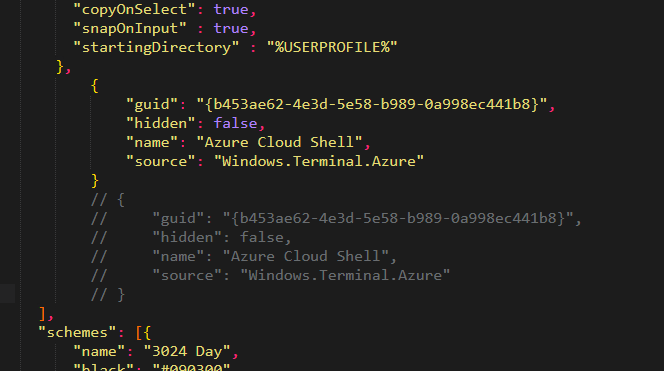
settings.jsonbut a straight copy/paste from the older version doesn't work. Cannot get color schemes working and now they are forcing you to have an enabled Azure Cloud Shell profile enabled. Comment it out, save, and it pops right back in.@zadjii-msft commented on GitHub (May 4, 2020):
From #5611
Thanks!
Maybe try changing
"hidden": false🤔 from #5684:@tomm1e commented on GitHub (May 5, 2020):
Is black the new default? The regenerated settings.json does not contain any color schemes.
@zadjii-msft commented on GitHub (May 5, 2020):
@tomm1e That's entirely intentional. We figured that every user didn't need to see a full copy of every default scheme in their settings file, so we moved them to
defaults.json. You can still use the schemes in that file.@ashemedai commented on GitHub (May 6, 2020):
So upon a fresh install of Terminal the
settings.jsonfile contains a bunch of URL references. However, most of them lead nowhere useful. Can these changes be made for the sake of people actually trying these URLs since 1.0 is approaching? :)@zadjii-msft commented on GitHub (May 6, 2020):
Those links are going to go somewhere useful SoonTM. Please bear with us as we put the finishing touches on the actual docs 😉
@ashemedai commented on GitHub (May 6, 2020):
@zadjii-msft Thanks for that update. Being a technical writer myself I always gets antsy when documentation seems to be forgotten. 😅
@pecigonzalo commented on GitHub (May 12, 2020):
I noticed the blog article talks about using things like
{ "command": { "action": "copy", "singleLine": true ), "keys": "ctrl+alt+c" }to restore the single line copy functionality, but no indication on how to restore it to copy on select as it was previously done bycopyFormatting. Is it possible to copy as single line but leavecopyFormatting: false?eg.
ctrl-shift-vWe should document this as IMO its not clear that
copyFormattingaffects single line paste and if possible, how to fix it.@DHowett-MSFT commented on GitHub (May 12, 2020):
copyFormattingdoesn't impact single-line paste or copy on select.copyOnSelectimpacts copy on select.Text that is broken into newlines due to window size is doing so because of a bug, and the solution isn't to set
singleLineto true.Do you have a specific repro that causes broken multiline text?
@DHowett-MSFT commented on GitHub (May 12, 2020):
(There are three independent copy flags.
copyOnSelectdetermines whether text is copied when you release the left mouse button,copyFormattingdetermines whether text is copied with color information andsingleLinedetermines whether all newlines are deleted, even if they were intentional.)@pecigonzalo commented on GitHub (May 12, 2020):
@DHowett-MSFT I understand that to be the case regarding the different options, but it seems then there is a bug that affect that and its "fixed" by setting
copyFormattingtotrue.Repro for me is really simple for me and I can even dynamically toggle that and have it broken/fixed.
As you can see on that output, the line when pasted is split into multi line and ran as 2 commands.
Type a really long line that breaks to multi-line in your console (or make a smaller console)
Select text
Paste as
ctrl+shif+vorctrl-vorright clickor whatever is your pasteIt runs 2 commands
Toggle
copyFormattingtotrueDo the same
Does not break
Please note im not copying with
ctrl+corctrl+shift+cbut with copy on select.For reference, this is my relevant config:
@pecigonzalo commented on GitHub (May 12, 2020):
Ok, oddly enough while I just did this while creating this comment and it caused the output I pasted (broken line) and it happened multiple times since the update. I just ran it once again after, just to check other cases and it worked correctly, which has me really confused now.
@EverlyScott commented on GitHub (May 17, 2020):
Any reason why we haven't gotten a GUI for changing settings yet?
@DHowett commented on GitHub (May 17, 2020):
@ScribbleNerd because that will take months of work that we couldn't complete until we nailed the basics of actually being a terminal? That work is being tracked in #1564.
@exitdown commented on GitHub (May 17, 2020):
yeah not meaning to sound condescending but its a cli tool for cli competent people, so it makes far more sense to work on the core functionality and cli user features rather than trying to make it easy point and click to make pretty - at least until all the main things are done, upvote for html link handler haha
@ashishpawar517 commented on GitHub (May 22, 2020):
I only changed the default profile to cmd.exe in last version. then today after update it showing me global deprecated error over and over again.
@warpdesign commented on GitHub (Jun 1, 2020):
How about automatically converting the file if older format is detected: seeing the format changes it appears to be possible.
Seeing how full of comments is this issue I think this could solve problems for a lot of people.
@garethj-msft commented on GitHub (Jun 10, 2020):
Got to say, I found this extremely jarring for a product that that is at GA status.
Auto-migrating such things seems a pretty bare minimum for a breaking change release.
@DHowett commented on GitHub (Jun 10, 2020):
Only people who were using the Preview build will encounter breaking changes. The preview build was offered with no warranties (express or implied.)
I’m sorry it was jarring. Settings migration is planned for any updates to the stable channel that require settings model changes.