Bug version 0.28.1: IReader.MoveToNextEntry() is not working with encrypted zip files #446

Open
opened 2026-01-29 22:12:11 +00:00 by claunia · 22 comments
Owner

Originally created by @mbihler on GitHub (Mar 30, 2021).

In Version 0.27.1 IReader.MoveToNextEntry() was working well with encrypted zip files

When project is updated to 0.28.1, the method is only working once and is returning false after first file has been extracted.
The problem seems to be with encrypted zip files only:

Example:

`using Stream stream = File.OpenRead(@"C:\Temp\SharpCompressTest\SharpCompressTest.zip");

var reader = ReaderFactory.Open(stream, new ReaderOptions { Password = "1234" });

// Version 0.28.1: While loop will only extract first file instead of all files
while (reader.MoveToNextEntry())
{
reader.WriteEntryToDirectory(@"C:\Temp\SharpCompressTest", new ExtractionOptions()
{
ExtractFullPath = true,
PreserveFileTime = true
});
}`

Originally created by @mbihler on GitHub (Mar 30, 2021). In Version 0.27.1 IReader.MoveToNextEntry() was working well with encrypted zip files When project is updated to 0.28.1, the method is only working once and is returning false after first file has been extracted. The problem seems to be with encrypted zip files only: Example: `using Stream stream = File.OpenRead(@"C:\Temp\SharpCompressTest\SharpCompressTest.zip"); var reader = ReaderFactory.Open(stream, new ReaderOptions { Password = "1234" }); // Version 0.28.1: While loop will only extract first file instead of all files while (reader.MoveToNextEntry()) { reader.WriteEntryToDirectory(@"C:\Temp\SharpCompressTest\", new ExtractionOptions() { ExtractFullPath = true, PreserveFileTime = true }); }`
claunia added the enhancementup for grabs labels 2026-01-29 22:12:11 +00:00
Author
Owner

@hungyiloo commented on GitHub (Apr 13, 2021):

I think I'm experiencing this issue too. I thought it was #514 so I posted my findings there: https://github.com/adamhathcock/sharpcompress/issues/514#issuecomment-818490327

@hungyiloo commented on GitHub (Apr 13, 2021): I think I'm experiencing this issue too. I thought it was #514 so I posted my findings there: https://github.com/adamhathcock/sharpcompress/issues/514#issuecomment-818490327
Author
Owner

@adamhathcock commented on GitHub (Apr 24, 2021):

This is weird because I have a test that literally tests this. If you could post a sample file, that would be helpful. Here's the test:

[Fact]
      public void Zip_Deflate_WinzipAES_Read()
      {
          using (Stream stream = File.OpenRead(Path.Combine(TEST_ARCHIVES_PATH, "Zip.deflate.WinzipAES.zip")))
          using (var reader = ZipReader.Open(stream, new ReaderOptions()
          {
              Password = "test"
          }))
          {
              while (reader.MoveToNextEntry())
              {
                  if (!reader.Entry.IsDirectory)
                  {
                      Assert.Equal(CompressionType.Unknown, reader.Entry.CompressionType);
                      reader.WriteEntryToDirectory(SCRATCH_FILES_PATH,
                                                  new ExtractionOptions()
                                                  {
                                                      ExtractFullPath = true,
                                                      Overwrite = true
                                                  });
                  }
              }
          }
          VerifyFiles();
      }
    ```
@adamhathcock commented on GitHub (Apr 24, 2021): This is weird because I have a test that literally tests this. If you could post a sample file, that would be helpful. Here's the test: ``` [Fact] public void Zip_Deflate_WinzipAES_Read() { using (Stream stream = File.OpenRead(Path.Combine(TEST_ARCHIVES_PATH, "Zip.deflate.WinzipAES.zip"))) using (var reader = ZipReader.Open(stream, new ReaderOptions() { Password = "test" })) { while (reader.MoveToNextEntry()) { if (!reader.Entry.IsDirectory) { Assert.Equal(CompressionType.Unknown, reader.Entry.CompressionType); reader.WriteEntryToDirectory(SCRATCH_FILES_PATH, new ExtractionOptions() { ExtractFullPath = true, Overwrite = true }); } } } VerifyFiles(); } ```
Author
Owner

@mbihler commented on GitHub (Apr 24, 2021):

I think I have found the constellation where the error occurs:
It only occurs if the ZIP file has been encrypted with ZipCrypto. With AES-256 all is working.
I used the code of your test method: With 0.28.1 just one file will be decrypted - with 0.27.1 all is fine.

@mbihler commented on GitHub (Apr 24, 2021): I think I have found the constellation where the error occurs: It only occurs if the ZIP file has been encrypted with ZipCrypto. With AES-256 all is working. I used the code of your test method: With 0.28.1 just one file will be decrypted - with 0.27.1 all is fine.
Author
Owner

@hungyiloo commented on GitHub (Apr 25, 2021):

I can confirm that zipping the same collection of files with ZipCrypto vs AES-256 and running that unit test does replicate the issue on my side too (i.e. only one file extracted when ZipCrypto, totally fine with AES-256). Further to that, the Assert also fails since reader.Entry.CompressionType returns None instead of Unknown.

I'm guessing some zip tools, namely some versions of Windows, might still use ZipCrypto as the default despite its weakness?

Here are my test zip files, both with password "test". Hope it helps.

aes256.zip
zipcrypto.zip

(Note that you can easily create both types of zip files using 7-zip file manager)

@hungyiloo commented on GitHub (Apr 25, 2021): I can confirm that zipping the same collection of files with ZipCrypto vs AES-256 and running that unit test does replicate the issue on my side too (i.e. only one file extracted when ZipCrypto, totally fine with AES-256). Further to that, the `Assert` also fails since `reader.Entry.CompressionType` returns `None` instead of `Unknown`. I'm guessing some zip tools, namely some versions of Windows, might still use ZipCrypto as the default despite its weakness? Here are my test zip files, both with password "test". Hope it helps. [aes256.zip](https://github.com/adamhathcock/sharpcompress/files/6371412/aes256.zip) [zipcrypto.zip](https://github.com/adamhathcock/sharpcompress/files/6371413/zipcrypto.zip) (Note that you can easily create both types of zip files using 7-zip file manager)
Author
Owner

@adamhathcock commented on GitHub (Apr 25, 2021):

Found the issue which was because of a recent change and fixed it: https://github.com/adamhathcock/sharpcompress/pull/593

@adamhathcock commented on GitHub (Apr 25, 2021): Found the issue which was because of a recent change and fixed it: https://github.com/adamhathcock/sharpcompress/pull/593
Author
Owner

@adamhathcock commented on GitHub (Apr 25, 2021):

fix released in 0.28.2

@adamhathcock commented on GitHub (Apr 25, 2021): fix released in 0.28.2
Author
Owner

@LancerComet commented on GitHub (Dec 18, 2022):

I'm still facing this problem with 0.32.2, AES256-encrypted zip files are fine but not ZipCrypto-encrypted.
I ended up switching back to Archive API from Reader API again.

@LancerComet commented on GitHub (Dec 18, 2022): I'm still facing this problem with 0.32.2, AES256-encrypted zip files are fine but not ZipCrypto-encrypted. I ended up switching back to Archive API from Reader API again.
Author
Owner

@adamhathcock commented on GitHub (Dec 19, 2022):

Odd. The test explicitly tests that. I wonder if I have some type issues so it's still using the Span method

@adamhathcock commented on GitHub (Dec 19, 2022): Odd. The test explicitly tests that. I wonder if I have some type issues so it's still using the Span method
Author
Owner

@LancerComet commented on GitHub (Dec 19, 2022):

Odd. The test explicitly tests that. I wonder if I have some type issues so it's still using the Span method

I'm using SharpCompress in an UWP project, does it matter?

The ZipCrypto arichive is created by Bandizip with default setting.

@LancerComet commented on GitHub (Dec 19, 2022): > Odd. The test explicitly tests that. I wonder if I have some type issues so it's still using the Span method I'm using SharpCompress in an UWP project, does it matter? The ZipCrypto arichive is created by Bandizip with default setting.
Author
Owner

@adamhathcock commented on GitHub (Dec 20, 2022):

UWP is slightly different than other other environments. I'll take a closer look but I'd also see if your code can decrypt the file on the regular .NET runtime.

@adamhathcock commented on GitHub (Dec 20, 2022): UWP is slightly different than other other environments. I'll take a closer look but I'd also see if your code can decrypt the file on the regular .NET runtime.
Author
Owner

@LancerComet commented on GitHub (Dec 20, 2022):

UWP is slightly different than other other environments. I'll take a closer look but I'd also see if your code can decrypt the file on the regular .NET runtime.

I've created a .NET 7 console app and it turned out Reader API doesn't work properly:

Reader API

with Archive API:

Archive API

PS: What's going on with AES256 one:

Reader API with AES256 Zip

@LancerComet commented on GitHub (Dec 20, 2022): > UWP is slightly different than other other environments. I'll take a closer look but I'd also see if your code can decrypt the file on the regular .NET runtime. I've created a .NET 7 console app and it turned out Reader API doesn't work properly: ![Reader API](https://user-images.githubusercontent.com/10321350/208687428-72ff309e-992c-410b-8e49-5fdae82092fb.png) with Archive API: ![Archive API](https://user-images.githubusercontent.com/10321350/208687617-2f8cd2df-d635-4782-91c1-77d92f9afaa1.png) PS: What's going on with AES256 one: ![Reader API with AES256 Zip](https://user-images.githubusercontent.com/10321350/208688383-e1451da2-1f19-4450-a86e-6aaa680eca68.png)
Author
Owner

@adamhathcock commented on GitHub (Dec 20, 2022):

Still should be the same as Zip_Deflate_ZipCrypto_Read

Any chance of sharing the file? Is it this specific one or all?

@adamhathcock commented on GitHub (Dec 20, 2022): Still should be the same as `Zip_Deflate_ZipCrypto_Read` Any chance of sharing the file? Is it this specific one or all?
Author
Owner

@LancerComet commented on GitHub (Dec 20, 2022):

Still should be the same as Zip_Deflate_ZipCrypto_Read

Any chance of sharing the file? Is it this specific one or all?

Sure, the ZipCrypto one is here: 1.ZipCrypto.zip
Password is just "password"

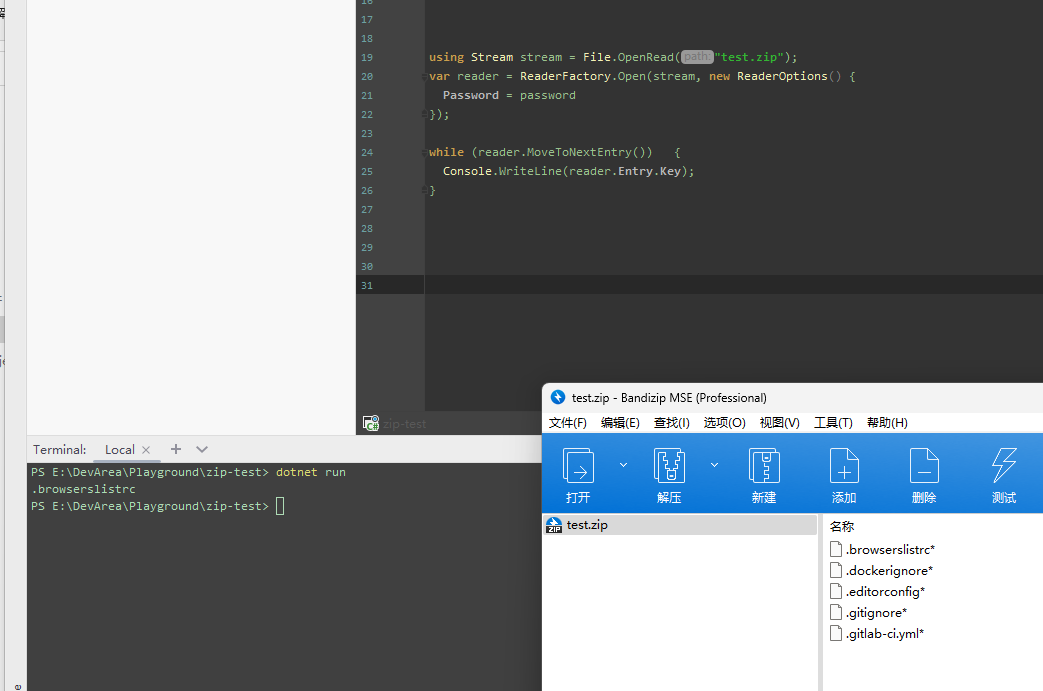
Every single archive I've created using Bandizip with ZipCrypto encryption doesn't work properly, like:
image

@LancerComet commented on GitHub (Dec 20, 2022): > Still should be the same as `Zip_Deflate_ZipCrypto_Read` > > Any chance of sharing the file? Is it this specific one or all? Sure, the ZipCrypto one is here: [1.ZipCrypto.zip](https://github.com/adamhathcock/sharpcompress/files/10271267/1.ZipCrypto.zip) Password is just "password" Every single archive I've created using Bandizip with ZipCrypto encryption doesn't work properly, like: ![image](https://user-images.githubusercontent.com/10321350/208743761-3ad1b518-c064-42af-8249-33bdb708d2a8.png)
Author
Owner

@adamhathcock commented on GitHub (Dec 21, 2022):

Actually, I think Bandizip is creating bad Zip files.

All the entries are flagged as having a post data descripter header even though they do not.

You can see the Flags of headers having UsePostDataDescriptor set but looking at the file there is no header. So the Reader code assumes it exists.

Archive API works because it uses the dictionary at the end of the file to seek to the entries instead of streaming through the file.

@adamhathcock commented on GitHub (Dec 21, 2022): Actually, I think Bandizip is creating bad Zip files. All the entries are flagged as having a post data descripter header even though they do not. You can see the Flags of headers having `UsePostDataDescriptor` set but looking at the file there is no header. So the Reader code assumes it exists. Archive API works because it uses the dictionary at the end of the file to seek to the entries instead of streaming through the file.
Author
Owner

@LancerComet commented on GitHub (Dec 21, 2022):

Actually, I think Bandizip is creating bad Zip files.

All the entries are flagged as having a post data descripter header even though they do not.

You can see the Flags of headers having UsePostDataDescriptor set but looking at the file there is no header. So the Reader code assumes it exists.

Archive API works because it uses the dictionary at the end of the file to seek to the entries instead of streaming through the file.

Indeed. I didn't see there was a UsePostDataDescriptor flag on every single entry from the zip file which was created by 7-Zip, and this file can be decoded by Reader API properly.

Thanks for your hard work, maybe I have to send Bandizip an email.

@LancerComet commented on GitHub (Dec 21, 2022): > Actually, I think Bandizip is creating bad Zip files. > > All the entries are flagged as having a post data descripter header even though they do not. > > You can see the Flags of headers having `UsePostDataDescriptor` set but looking at the file there is no header. So the Reader code assumes it exists. > > Archive API works because it uses the dictionary at the end of the file to seek to the entries instead of streaming through the file. Indeed. I didn't see there was a `UsePostDataDescriptor` flag on every single entry from the zip file which was created by 7-Zip, and this file can be decoded by Reader API properly. Thanks for your hard work, maybe I have to send Bandizip an email.
Author
Owner

@kippler commented on GitHub (Dec 23, 2022):

Hello. I'm a developer of Bandizip.

It's an Info-zip's modification of bit3.

I made a sample zip file with the same problem using this command-line in Ubuntu.

zip -e -X infozip.zip a.txt b.txt
infozip.zip (passwd=aaaa)

This is the comment for the bit3 in 7zip source.

  /* Info-ZIP modification to ZipCrypto format:
       if bit 3 of the general purpose bit flag is set,
       it uses high byte of 16-bit File Time.
     Info-ZIP code probably writes 2 bytes of File Time.
     We check only 1 byte. */
@kippler commented on GitHub (Dec 23, 2022): Hello. I'm a developer of Bandizip. It's an Info-zip's modification of bit3. I made a sample zip file with the same problem using this command-line in Ubuntu. zip -e -X infozip.zip a.txt b.txt [infozip.zip](https://github.com/kippler/Samples/blob/master/sample_files/zip.general-purpose-bit-flag-3/infozip.zip) (passwd=aaaa) This is the comment for the bit3 in 7zip source. /* Info-ZIP modification to ZipCrypto format: if bit 3 of the general purpose bit flag is set, it uses high byte of 16-bit File Time. Info-ZIP code probably writes 2 bytes of File Time. We check only 1 byte. */
Author
Owner

@adamhathcock commented on GitHub (Dec 23, 2022):

that totally breaks streaming zip reading:

        Bit 3: If this bit is set, the fields crc-32, compressed 
               size and uncompressed size are set to zero in the 
               local header.  The correct values are put in the 
               data descriptor immediately following the compressed
               data.  (Note: PKZIP version 2.04g for DOS only 
               recognizes this bit for method 8 compression, newer 
               versions of PKZIP recognize this bit for any 
               compression method.)
  4.3.9.1 This descriptor MUST exist if bit 3 of the general
      purpose bit flag is set (see below).  It is byte aligned
      and immediately follows the last byte of compressed data.
      This descriptor SHOULD be used only when it was not possible to
      seek in the output .ZIP file, e.g., when the output .ZIP file
      was standard output or a non-seekable device.  For ZIP64(tm) format
      archives, the compressed and uncompressed sizes are 8 bytes each.
@adamhathcock commented on GitHub (Dec 23, 2022): that totally breaks streaming zip reading: ``` Bit 3: If this bit is set, the fields crc-32, compressed size and uncompressed size are set to zero in the local header. The correct values are put in the data descriptor immediately following the compressed data. (Note: PKZIP version 2.04g for DOS only recognizes this bit for method 8 compression, newer versions of PKZIP recognize this bit for any compression method.) ``` ``` 4.3.9.1 This descriptor MUST exist if bit 3 of the general purpose bit flag is set (see below). It is byte aligned and immediately follows the last byte of compressed data. This descriptor SHOULD be used only when it was not possible to seek in the output .ZIP file, e.g., when the output .ZIP file was standard output or a non-seekable device. For ZIP64(tm) format archives, the compressed and uncompressed sizes are 8 bytes each. ```
Author
Owner

@kippler commented on GitHub (Dec 24, 2022):

I know it's weird. I was confused too when I faced a sample of such type.
APPNOTE says "MUST exist" but info-zip is a de facto too.

Info-zip's modification has an advantage when you create an encrypted ZIP file.

For example, make a big file ( fsutil file createnew bigfile 100000000000 ) and
compress it using 7zip with a password, the progress bar will stop until getting the CRC of the file.

So, the modification is suitable to create streaming ZIP.

@kippler commented on GitHub (Dec 24, 2022): I know it's weird. I was confused too when I faced a sample of such type. APPNOTE says "MUST exist" but info-zip is a de facto too. Info-zip's modification has an advantage when you create an encrypted ZIP file. For example, make a big file ( fsutil file createnew bigfile 100000000000 ) and compress it using 7zip with a password, the progress bar will stop until getting the CRC of the file. So, the modification is suitable to create streaming ZIP.
Author
Owner

@adamhathcock commented on GitHub (Jan 3, 2023):

@kippler what do you do for streaming zips altogether then? Or does Bandi-zip just not care about the trailer for streaming zips at all?

I'm not sure what to do here. You could say "Reader with Encrypted" isn't supported or add a custom option for these use cases.

It's really silly that info-zip modified an existing, well documented bit flag.

@adamhathcock commented on GitHub (Jan 3, 2023): @kippler what do you do for streaming zips altogether then? Or does Bandi-zip just not care about the trailer for streaming zips at all? I'm not sure what to do here. You could say "Reader with Encrypted" isn't supported or add a custom option for these use cases. It's really silly that info-zip modified an existing, well documented bit flag.
Author
Owner

@kippler commented on GitHub (Jan 3, 2023):

In most cases, Bandizip checks the central header instead of the local header.

Bandizip opens ZIP in streaming mode only when the central header is broken, and here is the rule I use.

bit0:0 bit3:1 -> Data descriptor exists.
bit0:1 bit3:0 -> Encrypted. No data descriptor. Password checker is CRC
bit0:1 bit3:1 -> Encrypted. No data descriptor. Password checker is dostime.

I agree with you. It's so silly, but what can I do?
Linux and macOS use info-zip.

@kippler commented on GitHub (Jan 3, 2023): In most cases, Bandizip checks the central header instead of the local header. Bandizip opens ZIP in streaming mode only when the central header is broken, and here is the rule I use. bit0:0 bit3:1 -> Data descriptor exists. bit0:1 bit3:0 -> Encrypted. No data descriptor. Password checker is CRC bit0:1 bit3:1 -> Encrypted. No data descriptor. Password checker is dostime. I agree with you. It's so silly, but what can I do? Linux and macOS use info-zip.
Author
Owner

@adamhathcock commented on GitHub (Mar 1, 2023):

I'll look into implementing the above. Been out of it for personal reasons.

@adamhathcock commented on GitHub (Mar 1, 2023): I'll look into implementing the above. Been out of it for personal reasons.
Author
Owner

@idan-weiss commented on GitHub (Feb 7, 2024):

I still experience this issue, version 0.35.0

@idan-weiss commented on GitHub (Feb 7, 2024): I still experience this issue, version 0.35.0
Sign in to join this conversation.
1 Participants
Notifications
Due Date
No due date set.
Dependencies

No dependencies set.

Reference: starred/sharpcompress#446