This fixes the issue I had in the last commit. It's a little weird, but gets
  rid of the muckiness of layering. Things that are local to one elevation level
  won't pollute the other, and we don't need to worry about layering or where
  they came from. Just write shared state to `state.json`, and window state to
  `elevated-state`/`user-state`
* [x] delete all state, open terminal elevated - generated profiles go to the correct place, approved commandlines go to the elevated one.
  * [x] delete some dynamic profiles, open the terminal - they don't resurrect in either IL
  * [ ] GAH saving a window layout unelevated, then trying to save one elevated will blow away the unelevated one
<!-- Enter a brief description/summary of your PR here. What does it fix/what does it change/how was it tested (even manually, if necessary)? -->
## Summary of the Pull Request
<!-- Other than the issue solved, is this relevant to any other issues/existing PRs? -->
## References
#11083#11143
<!-- Please review the items on the PR checklist before submitting-->
## PR Checklist
* [ ] Closes #xxx
* [x] CLA signed. If not, go over [here](https://cla.opensource.microsoft.com/microsoft/Terminal) and sign the CLA
* [x] Tests added/passed
* [ ] Documentation updated. If checked, please file a pull request on [our docs repo](https://github.com/MicrosoftDocs/terminal) and link it here: #xxx
* [ ] Schema updated.
* [ ] I've discussed this with core contributors already. If not checked, I'm ready to accept this work might be rejected in favor of a different grand plan. Issue number where discussion took place: #xxx
<!-- Provide a more detailed description of the PR, other things fixed or any additional comments/features here -->
## Detailed Description of the Pull Request / Additional comments
While testing the save/quit features a number of issues were found that were caused by poor synchronization on the monarch, resulting in various unexpected crashes. Because this uses std collections, and I didn't see any builtin winrt multithreaded containers I went with the somewhat heavy-handed mutex approach.
e.g.
- https://github.com/microsoft/terminal/pull/11083#issuecomment-916218353
- https://github.com/microsoft/terminal/pull/11083#issuecomment-916220521
- https://github.com/microsoft/terminal/pull/11143/#discussion_r704738433
This also makes it so that on quit peasants don't try to become the monarch, and the monarch closes their peasant last to prevent elections from happening.
<!-- Describe how you validated the behavior. Add automated tests wherever possible, but list manual validation steps taken as well -->
## Validation Steps Performed
Create many windows (hold down ctrl-shift-n) then use the quit action from peasants/the monarch to make sure everything closes properly.
Process exit code now shows as hex not decimal. Format specification needs length "10" not "8" because the leading '0x' generated by the # symbol counts as part of the length.

## PR Checklist
* [x] Closes annoyance at looking up process exit codes
* [x] I work here.
* [x] Checked manually

## Validation Steps Performed
- [x] Ran it, opened tab, opened another CMD tab, ran `exit <code>` and observed hex pattern
## Summary of the Pull Request
Clears selection render on paste
## PR Checklist
* [x] Closes#11227
* [x] CLA signed. If not, go over [here](https://cla.opensource.microsoft.com/microsoft/Terminal) and sign the CLA
## Detailed Description of the Pull Request / Additional comments
Added ```_renderer->TriggerSelection(); ``` similarly to the copy action few lines up in ```CopySelectionToClipboard``` function
## Validation Steps Performed
Manually tested
* this is the same thing as #10996, but with the fix that caused us to #11031
* This includes https://github.com/microsoft/microsoft-ui-xaml/pull/3769, so we had to make some adjustments to how we handle tab colors. It works the same as before.
* Should enable #11231 to be started
* [x] Closes#10508
* [x] Closes#7133
* [x] Closes#8948
* [ ] I need to finish letting my 19H1 VM boot to make sure unpackaged still works
## Summary of the Pull Request
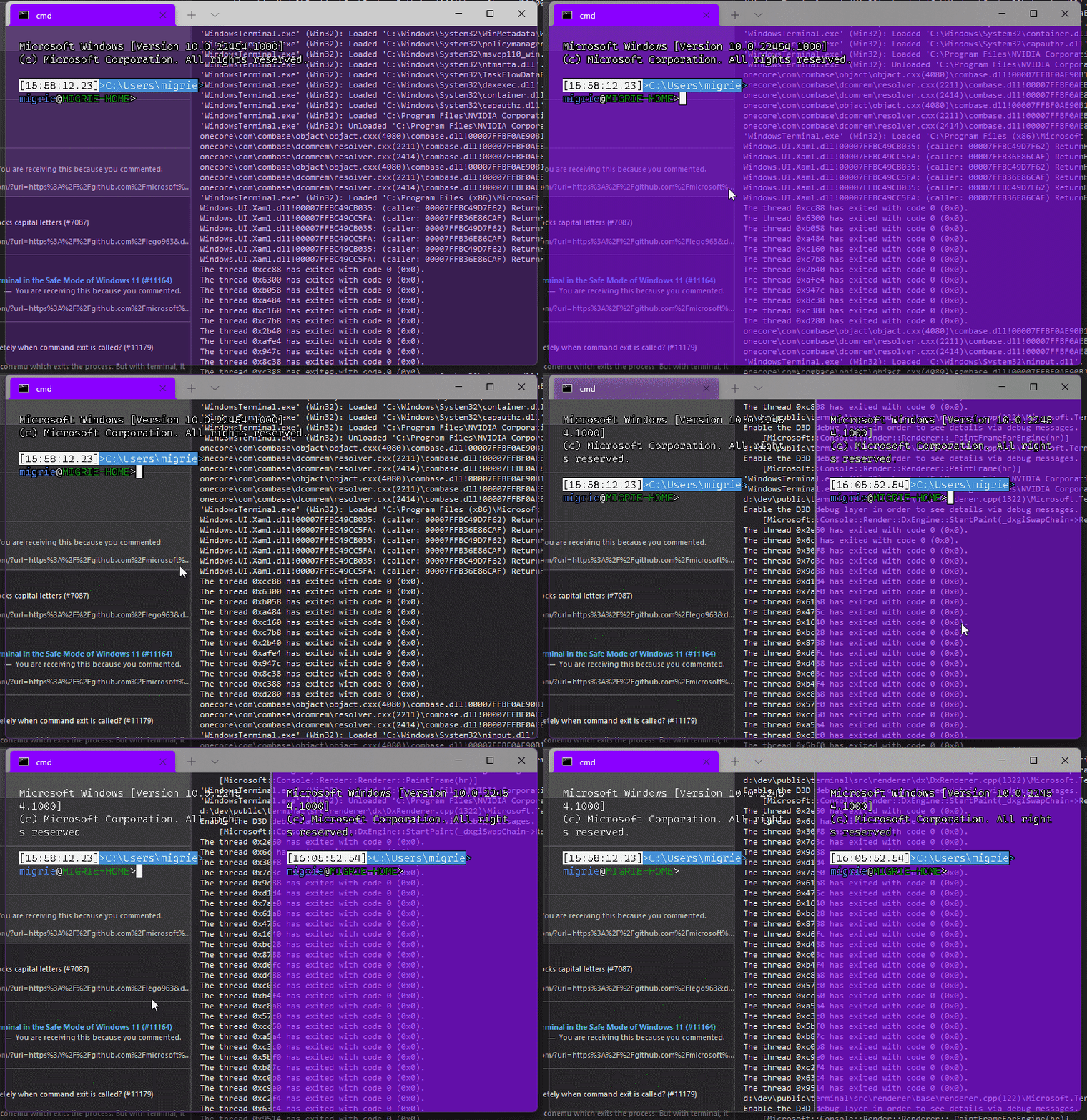
Adds support for vintage style opacity, on Windows 11+. The API we're using for this exists since the time immemorial, but there's a bug in XAML Islands that prevents it from working right until Windows 11 (which we're working on backporting).
Replaces the `acrylicOpacity` setting with `opacity`, which is a uint between 0 and 100 (inclusive), default to 100.
`useAcrylic` now controls whether acrylic is used or not. Setting an opacity < 100 with `"useAcrylic": false` will use vintage style opacity.
Mouse wheeling adjusts opacity. Whether acrylic is used or not is dependent upon `useAcrylic`.
`opacity` will stealthily default to 50 if `useAcrylic:true` is set.
## PR Checklist
* [x] Closes#603
* [x] I work here
* [x] Tests added/passed
* [x] https://github.com/MicrosoftDocs/terminal/pull/416
## Detailed Description of the Pull Request / Additional comments
Opacity was moved to AppearanceConfig. In the future, I have a mind to allow unfocused acrylic, so that'll be important then.
## Validation Steps Performed
_just look at it_
Adjust tools version for folks running on 2022

## PR Checklist
* [x] Closes annoyance that @lhecker and I have selfhosting VS2022
* [x] I work here
* [x] Solution built
* [x] @dhowett said something like "lol sure" in Teams.
## Summary of the Pull Request
Updates our `UiaTextRange` to no longer treat the end of the buffer as the "document end". Instead, we consider the "document end" to be the line beneath the cursor or last legible character (whichever is further down). In the event where the last legible character is on the last line of the buffer, we use the "end exclusive" position (left-most point on a line one past the end of the buffer).
When movement of any kind occurs, we clamp each endpoint to the document end. Since the document end is an actual spot in the buffer (most of the time), this should improve stability because we shouldn't be pointing out-of-bounds anymore.
The biggest benefit is that this significantly improves the performance of word navigation because screen readers no longer have to take into account the whitespace following the end of the prompt.
Word navigation tests were added to the `TestTableWriter` (see #10886). 24 of the 85 tests were failing, however, they don't seem to interact with the document end, so I've marked them as skip and will fix them in a follow-up. This PR is large enough as-is, so I'm hoping I can take time in the follow-up to clean some things on the side (aka `preventBoundary` and `allowBottomExclusive` being used interchangeably).
## References
#7000 - Epic
Closes#6986Closes#10925
## Validation Steps Performed
- [X] Tests pass
- [X] @codeofdusk has been personally testing this build (and others)
When we're elevated, we disable drag/dropping tabs when elevated, because of a platform limitation that causes the app to _crash_ (see #4874). However, if the user has UAC disabled, this actually works alright. So I'm adding it back in that case.
I'm not positive if this is the best way to check if UAC is disabled, but normally, you'll get a [`TokenElevationTypeFull`] when elevated, not `TokenElevationTypeDefault`. If the app is elevated, but there's not a split token, that kinda implies there's no user account separation. If I'm wrong, it's just code, let's replace this with something that does work.
## Validation Steps Performed
Booted up a Win10 VM, set `enableLUA` to `0`, rebooted, and checked if this exploded. It didn't.
References #4874
References #3581
Work done in pursuit of #11096Closes#7754
[`TokenElevationTypeFull`]: https://docs.microsoft.com/en-us/windows/win32/api/winnt/ne-winnt-token_elevation_type
This commit aligns the COM-consuming code in VsSetupInstance with best
practices such as passing COM pointers by pointer when they do not need
to be owning references and not using `const` on members, as well as
cleans up some dead code.

Leonard contributed clang-tidy fixes and some reference passing
changes.

Co-authored-by: Leonard Hecker <lhecker@microsoft.com>
This commit adds dynamic profile generators for Visual Studio Developer
Command Prompt (VS2017+) and Visual Studio Developer PowerShell
(VS2019.2+)
Tested manually by deploying locally. My local environment has four
instances of VS installed, one VS2017 and multiple channels of VS2019.
We're wrapping the COM Visual Studio Setup Configuration API to query
for VS instances and retrieve the relevant properties. Two different
namespaces are used so the end-user can turn off one or the other. For
instance, end user may prefer to always use Developer PowerShell.
## Validation Steps Performed
1. Build locally using Visual Studio 2019
2. Deploy CascadiaPackage
3. Verify entries exist in profiles menu
4. Verify entries exist in settings.json
5. Open each profile
6. Validate start-in directory
7. Validate environment variables are as expected
8. Uninstall Windows Terminal - Dev package
9. Repeat.
Closes#3821
<!-- Enter a brief description/summary of your PR here. What does it fix/what does it change/how was it tested (even manually, if necessary)? -->
## Summary of the Pull Request
Adds directional modifiers for SplitState and convert those to the appropriate horizontal/vertical when splitting a pane.
<!-- Other than the issue solved, is this relevant to any other issues/existing PRs? -->
## References
<!-- Please review the items on the PR checklist before submitting-->
## PR Checklist
* [x] Closes#4340
* [x] CLA signed. If not, go over [here](https://cla.opensource.microsoft.com/microsoft/Terminal) and sign the CLA
* [ ] Tests added/passed
* [x] Documentation updated. If checked, please file a pull request on [our docs repo](https://github.com/MicrosoftDocs/terminal) and link it here: #xxx
* [x] Schema updated.
* [ ] I've discussed this with core contributors already. If not checked, I'm ready to accept this work might be rejected in favor of a different grand plan. Issue number where discussion took place: #xxx
<!-- Provide a more detailed description of the PR, other things fixed or any additional comments/features here -->
## Detailed Description of the Pull Request / Additional comments
"vertical" and "horizontal" splits were removed from `defaults.json`, but code was added to parse those as `right` and `down` respectively. It is also the case that if a user has a custom hotkey for `split: vertical` it will override the default for `split: right`.
<!-- Describe how you validated the behavior. Add automated tests wherever possible, but list manual validation steps taken as well -->
## Validation Steps Performed
Split the pane using each of the new directional movements
## Summary of the Pull Request
Fixes the serialisation of the findMatch action so that the direction is stored.
## PR Checklist
* [x] Closes#11225
* [x] CLA signed. If not, go over [here](https://cla.opensource.microsoft.com/microsoft/Terminal) and sign the CLA
* [x] Tests added/passed
* [ ] Documentation updated. If checked, please file a pull request on [our docs repo](https://github.com/MicrosoftDocs/terminal) and link it here: #xxx
* [ ] Schema updated.
* [ ] I've discussed this with core contributors already. If not checked, I'm ready to accept this work might be rejected in favor of a different grand plan. Issue number where discussion took place: #xxx
## Validation Steps Performed
Added a test and tested manually.
This PR simply replaces all uses of "TrayIcon" and "Tray" with "NotificationIcon" and "NotificationArea" to be more accurate. Originally I kinda wanted to only replace all occurrences of it in settings and user facing things, but I figured I might as well make it consistent throughout all of our code.
Fix infinite loop when trying to summon a window after close.
In #10972 code was added to try to clean up state manually when a window
was closed instead of waiting for it to be detected as a dead peasant.
Unfortunately I didn't know any better and missed cleaning up
`_mruPeasants` as well. The result is there would be an infinite loop
in `_getMostRecentPeasant` since `_getPeasant` will only clean up ids if
it finds a peasant, not if it doesn't find anything. This is the minimal
change to get this working, but it might be a good idea to make
`_getPeasant` be more thorough about cleanup.
## Validation Steps Performed
Tested that before the change we infinitely loop, and after the change
we summon correctly.
Closes#11215
This pull request moves us to Microsoft.Windows.CppWinRT 2.0.210825.3.

Notable improvements from 2.0.210309.3:
* Restored Windows 7 functionality
* C++20 ranges support
* `capture` now works with a raw pointer
* `hstring::starts_with` and `hstring::ends_with` (C++20)

Unit/Functional Tests:
Summary: Total=7728, Passed=7571, Failed=10, Blocked=0, Not Run=0, Skipped=147

Local Tests:
Summary: Total=163, Passed=158, Failed=5, Blocked=0, Not Run=0, Skipped=0

The above failures are (1) in UIA tests for conhost/WT (which do not work here) or
(2) in already known-broken local tests.
## Summary of the Pull Request
Basically undoes #10988 in favour of implementing it as described in #11018
## PR Checklist
* [x] Closes#11018
* [x] CLA signed. If not, go over [here](https://cla.opensource.microsoft.com/microsoft/Terminal) and sign the CLA
* [X] Tests added/passed
* [X] Documentation updated. If checked, please file a pull request on [our docs repo](https://github.com/MicrosoftDocs/terminal) and link it here: #xxx
* [X] Schema updated.
* [x] I work here
## Validation Steps Performed
- alt+space opens the system menu by default
- when alt+space is bound, the keys do not get send to terminal
- right-click on the tab bar didn't break (still opens system menu at the location of the cursor)
## Summary of the Pull Request
* Introduces info bar shown upon session failure,
that guides the user how to configure termination behavior
* Allows this info bar to be dismissed permanently (choice stored in state)
* Allows "keyboard service" info bar to be dismissed permanently
## PR Checklist
* [x] Closes#10798, #8699
* [x] CLA signed.
* [ ] Tests added/passed
* [ ] Documentation updated.
* [ ] Schema updated.
* [ ] I've discussed this with core contributors already.
## Detailed Description of the Pull Request / Additional comments
UI:
* Introduce an additional info bar for "close on exit" configuration tip
* Stack this bar after "keyboard service" bar
* Add "Don't show again" button to both bars
Dismiss Permanently:
* Introduce a set of "dismissed messages" to the Application State
* Add verification the message is not dismissed before showing an info bar
* "Don't show again" persists the choice under "dismissed messages"
Wiring the Info Bar:
* Register `TerminalPage` on `TermControl`'s `ConnectionStateChanged` event
* Once event is triggered check whether the state is failure
* If so and the message was not dismissed permanently, show the info bar