mirror of
https://github.com/microsoft/terminal.git
synced 2026-11-16 09:20:53 +00:00
[Question] Configuring Windows Terminal profile to always launch elevated #897
Closed
opened 2026-01-30 22:08:36 +00:00 by claunia
·
212 comments
No Branch/Tag Specified
main
dev/duhowett/devdrive
dev/lhecker/14165-conhost-font-size
release-1.26
release-1.25
dev/lhecker/llm-localization-test
dev/lhecker/llm-localization
dev/migrie/f/title-variables
crutkas-font-axes-a11y-fix
dev/lhecker/dcs-perf
dev/duhowett/wpf-terminal-2
dev/pabhoj/wtcli
dev/lhecker/20694-resize-overlay
dev/migrie/per-window-final
dev/migrie/f/cursor-blink-timer
dev/migrie/f/4587-pane-drag-drop
dev/migrie/b/11522-keyboard-layout-reload-fix
dev/migrie/b/20749
dev/lhecker/1379-cursor-blink
dev/migrie/f/allow-cursor-blink
crutkas-perf-7-single-scrollbar-throttle
dev/duhowett/fhl-2026/remove-paste-hairpin-handler
dev/lhecker/14165-conhost-font-size-bak
dev/duhowett/remove-xaml-from-tsm
user/migrie/f/start-on-login-headless
dev/migrie/f/build-perf-experiments
dev/duhowett/main-pgo-fix
release-1.24
dev/migrie/overview-for-pr
dev/migrie/b/markdown-paste
dev/duhowett/padding-in-atlas
fix/german-split-pane-tooltip
dev/migrie/f/i-always-hated-these
dev/cazamor/sui-rejuv/fix-spaces
dev/cazamor/selfhost/2026-08-31
dev/migrie/b/independent-animations
dev/cazamor/conhost/bugfix-a11y-find
dev/cazamor/conhost/bugfix-a11y-find-1.24
dev/lhecker/theme-quality-test
dev/lhecker/theme-quality
dev/cazamor/selfhost/sui-rejuv
dev/cazamor/fix/search-selection-off-by-one
dev/duhowett/even-more-builtin-glyphs
dev/crutkas/kitty-pr1
dev/cazamor/toast/activity
users/GitHubPolicyService/d8615b98-f5fa-4462-bf7f-c44a1cc12096
dev/cazamor/selfhost/2026-06-18
dev/migrie/f/new-profile-subcommand
dev/cazamor/sui-rejuv/profiles-v2
dev/duhowett/asan-for-all
dev/cazamor/sui-rejuv/profiles-new
dev/cazamor/sui-rejuv/expander-groups-new
dev/cazamor/auto-save/refresh-settings
feature/llm
dev/cazamor/auto-save/model/json-manager
dev/cazamor/auto-save/settings-model
dev/migrie/s/snippet-params
users/merlinbot/1es-pt-auto-baselining-pr
niels9001/inactive-tab-foreground
dev/cazamor/selfhost/2026-05-20-home
dev/duhowett/fzf-vcxproj
dev/cazamor/selfhost/2026-05-20
dev/cazamor/selfhost/2026-05-19
dev/cazamor/selfhost/2026-05-18
niels9001/fontweight-fixes
niels9001/page-transitions
dev/duhowett/fhl-2026/rewrite-paste-and-dragdrop-handling-writeinputstring
dev/migrie/f/overview-view
dev/cazamor/selfhost/2026-05-13
dev/cazamor/selfhost/2026-05-13-sui
dev/yeelam/f/BuildTest
dev/duhowett/hax/our-own-tabview
dev/cazamor/bugfix/close-scratchpad
dev/cazamor/selfhost/2026-05-05
dev/cazamor/selfhost/2026-05-04-workspaces
dev/cazamor/selfhost/2026-05-04
dev/lhecker/20149-hotfix
dev/lhecker/osc-7-wsl
dev/migrie/workspaces-real
dev/migrie/fhl-spring-2026/quake-4
dev/lhecker/pwsh-5.1
dev/cazamor/sui/dropdown-page
dev/cazamor/selfhost/2026-04-08
dev/cazamor/selfhost/2026-04-06
dev/migrie/fhl-spring-2026/confirmCloseOn
dev/cazamor/confirmCloseOn/dont-ask-me-again
dev/lhecker/inproc-conpty
dev/duhowett/powershell-module-supercharger
dev/cazamor/a11y/vt-seq-prototype
dev/migrie/fhl-spring26/osc777-2
dev/migrie/fhl-spring26/2/notification-infrastructure
dev/migrie/fhl-spring-2026/side-tabs
dev/cazamor/copilot/playground
dev/migrie/fhl-spring-2026/quake-3.5
dev/migrie/fhl-spring26/osc777
dev/migrie/fhl-spring26/unpackaged-notify
dev/migrie/fhl-spring26/bellStyle-notification
dev/migrie/fhl-spring26/activity-notifications
dev/migrie/fhl-spring-2026/x-open
dev/migrie/fhl-spring-2026/quake-5
dev/migrie/fhl-spring26/nextTab-filter
dev/duhowett/atlas-draw-d2d-dots-curlies-consistently
dev/lhecker/ottosson-by-default
dev/duhowett/hax/unix-pty
dev/duhowett/hax/cmake
dev/cazamor/selfhost/2026-02-10
dev/lhecker/11509-kitty-keyboard-protocol-wip
dev/cazamor/selfhost/2026-01-29
dev/lhecker/benchcat-fix
dev/duhowett/eoy-25/allow-set-foreground
release-1.23
dev/cazamor/bot/deprecate-area-atlasengine
dev/cazamor/selfhost/2026-01-20
dev/cazamor/selfhost/2026-01-12
dev/cazamor/spec/auto-save
dev/duhowett/fhl-2024/asciicast-recorder
dev/duhowett/eoy-25/underline-colors-in-atlas-bug
dev/duhowett/hax/serial-port-support
dev/duhowett/connection-utf8
dev/lhecker/fused-event
dev/lhecker/18928-wip
dev/duhowett/fhl-2024/clang
dev/duhowett/vt-cache-changes
dev/cazamor/uia-leak
release-1.22
dev/cazamor/selfhost/11-18-v3
dev/cazamor/selfhost/11-18
dev/duhowett/fhl-2025/bitmap-fonts
dev/duhowett/server-2025-vms
dev/duhowett/cant-believe-gotta-do-this-shit
dev/lhecker/dark-mode
dev/cazamor/sui/invert-cursor-color
dev/duhowett/fhl-2025/wt-command-palette-cmdpal-integration
dev/duhowett/fhl-2025/wt-json-relative-icons
dev/lhecker/fucking-service-locator
dev/duhowett/unicode-17
dev/lhecker/wellp2-alt
dev/duhowett/wellp2
dev/lhecker/1860-horizontal-scrollbar
dev/lhecker/fix-window-count
dev/cazamor/sui/tab-color-old
dev/duhowett/hax/conhost-icon
dev/duhowett/hax/sui-color-chip-border
dev/duhowett/hax/terminalsettings-as-a-lib-/with-types-merged-into-tsm
dev/pabhoj/page_control_input_cleanup
dev/duhowett/padding-in-atlas-rebase-20250729
dev/lhecker/attach-thread-input
dev/duhowett/portable-shader-members
msbuildcache-reenable
dev/cazamor/selfhost/1.24-2025-06-10
dev/cazamor/upgrade-settings-containers
dev/cazamor/sui/ext-page/powershell-stub
dev/cazamor/selfhost/1.24-2025-05-15
dev/pabhoj/sui_action_overhaul
dev/cazamor/selfhost/1.24-2025-05-06
dev/cazamor/selfhost/1.24-2025-04-29
dev/cazamor/sui/ext-page/lazy-load-objects
dev/cazamor/sui/ext-page/badge
dev/cazamor/selfhost/1.24
dev/lhecker/sdk-26100
dev/duhowett/testing
dev/jadelaga/VS-Pty.Net-1.22
dev/duhowett/fhl-2025/what-if-no-content-ids
dev/lhecker/18584-part2
dev/lhecker/get-lang-id
dev/duhowett/hax/clogs
release-1.21
dev/pabhoj/featurellm_fix_paste
dev/lhecker/grapheme-backup
dev/jadelaga/VS-Pty.netFixes
dev/lhecker/atlas-engine-compute-shader
dev/migrie/s/ai-providers
dev/lhecker/animated-cursor-wip
dev/pabhoj/featurellm_timeout
dev/lhecker/dark-mode-alt
dev/duhowett/osc-strided-table
dev/lhecker/bugbash
dev/pabhoj/featurellm_improve_parsing
dev/duhowett/coast-to-coast
dev/lhecker/curly-improvements
dev/duhowett/net8
dev/duhowett/onebranch-custom-pool
dev/lhecker/renderer-overhaul-2nd-attempt
dev/lhecker/cleanup
dev/cazamor/sui/confirmation-announcements
dev/lhecker/winconpty-cleanup
dev/duhowett/learn/rewrite-highlights
dev/migrie/b/no-nesting-when-searching
release-1.20
dev/duhowett/sel-2-spans
dev/lhecker/7118-cursor-color
dev/lhecker/remove-glyph-width
dev/lhecker/igfw-scroll-region
dev/lhecker/17656-win32im-double-encoding
dev/duhowett/fhl-2024/merge-idls
dev/duhowett/feed-forward-variables
dev/lhecker/remove-chrome-math
dev/duhowett/copylink
dev/duhowett/applicableactions
gh-readonly-queue/main/pr-17566-de50310295b7d92ed3d51f07974a2a945776bf9d
dev/lhecker/atlas-engine-stride-copy
dev/migrie/b/bump-nuget-in-c
dev/migrie/f/992-redux-redux
dev/migrie/f/filter-weight-input-too
dev/migrie/f/disable-nesting
dev/migrie/f/local-snippets-cleaner
dev/migrie/s/1553-mouse-bindings
selfhost-1.22-bugbash-2024-06-04
selfhost/1.22-bugbash-2024-06-04
dev/lhecker/15689-tab-drag-crash-fix
dev/migrie/f/sxnui-font-size-change
dev/migrie/f/local-snippets-on-action-refactor
dev/migrie/f/just-local-snippets
dev/migrie/save-input-patches
dev/migrie/f/md-pane-official
dev/migrie/base-pane
dev/migrie/fhl/tasks-pane
release-1.19
dev/migrie/b/17130-clear-marks-2
dev/migrie/b/17075-its-me-the-killer
dev/duhowett/i-figured-out-why-sometimes-the-publish-build-failed
dev/duhowett/nuget-publication-with-aad-app-id
selfhost-1.20
dev/duhowett/graph
dev/migrie/b/15803-activate-dont-copypasta
dev/duhowett/is-pgo-broken-because-of-sui-being-slower
dev/migrie/b/remove-terminaltab
dev/migrie/fhl/md-pane
dev/migrie/fhl/local-tasks-2024
dev/migrie/fhl/2024-inline-notebook
dev/duhowett/interface-projects
dev/duhowett/dead-loc
release-1.18
dev/migrie/fhl/2024-spring-merge-base
dev/duhowett/hax/l9
inbox
dev/migrie/14073-on-main
dev/duhowett/hax/conhost_dump_replay
user/lhecker/atlas-engine-srgb
dev/migrie/fhl/sxnui-tooltips-3
dev/migrie/7718-notifications-experiments
dev/migrie/fhl/7718-notifications
dev/migrie/fhl/7718-notifications-reboot
dev/lhecker/remove-gsl
dev/lhecker/16575-TerminateProcess
dev/lhecker/window-thread-climate-control
dev/lhecker/client-context-input-output-mode
dev/lhecker/ring-buffer-input-buffer
release-1.17
dev/lhecker/propsheet-fontdlg-refactor
dev/lhecker/renderer-overhaul
dev/pabhoj/test
dev/duhowett/chop
dev/lhecker/til-ulong-cleanup
dev/lhecker/til-env-cleanup
dev/migrie/f/16005-a11y-pane
dev/cazamor/a11y/fastpass
dev/migrie/b/15487-push-cwd
dev/migrie/b/15536-or-15219-idk
dev/duhowett/move-timers-down-into-core-interactivity-etc
dev/migrie/b/15812-broadcast-paste-two
dev/migrie/fhl-fall-2023/11162-quake-III-arena
dev/migrie/fhl-fall-2023/1620-automatic-tab-progress
dev/migrie/fhl-fall-2023/9992-quake-II
dev/migrie/fhl-fall-2023/9992-default-quake-settings
dev/migrie/fhl-fall-2023/9992-window-name-settings
dev/migrie/fhl-fall-2023/oceans
dev/lhecker/ColorScheme-improvements
dev/migrie/search-v2-v3
dev/migrie/pr-15717/its-dangerous-to-go-alone
dev/migrie/f/4768-taskbar-icons
dev/migrie/f/3121-tooltips
dev/duhowett/sticky-control
dev/duhowett/fix-tracing-2
dev/migrie/b/add-support-for-vsc-marks
dev/migrie/f/1860-this-is-literally-what-less-is-for
dev/migrie/s/5916-draft
dev/lhecker/tracy
dev/migrie/s/north-star
dev/cazamor/tag-youre-it
dev/migrie/f/12336-let-it-mellow
dev/migrie/f/now-with-more-compat-settings
dev/migrie/f/compatibility-sui
dev/duhowett/hax/wpf-atlas
dev/duhowett/fgb
dev/migrie/b/15487-relative-paths-are-hard
dev/lhecker/colrv1
loc-update
dev/migrie/fhl/dyndep-csharp
dev/migrie/fhl/dyndep
dev/migrie/fhl-clickable-send-input
dev/migrie/f/cwd-hijinks-5506-15173
dev/lhecker/openconsole-async-start
1.17
dev/migrie/bump-scratch
dev/migrie/f/3726-restartConnection
dev/migrie/b/cxn-restarting-attempt-1-backport
dev/migrie/b/9053-part-3-the-actual-doing-of-the-thing
dev/migrie/b/13388-focus-logger
dev/migrie/b/9053-part-4-i-guess-defterm
dev/migrie/oop/3/of-the-silmarils
of-the-darkening-of-valinor
dev/migrie/fhl/notebook-proto-000
dev/migrie/f/narrator-buddy
dev/migrie/mux-2.8.2-march-2023
dev/migrie/f/roast-mutton
dev/migrie/f/12861-preview-input
dev/lhecker/clang-tidy
dev/migrie/f/3121-wE-dOnT-hAvE-dEv-DaYs
dev/duhowett/compiler-compliance
dev/duhowett/i-have-a-burning-hatred-for-ntstatus-of-later-so-why-not-fix-it
dev/duhowett/shorthand-namespaces
dev/duhowett/rename-all-dlls
dev/duhowett/errordialog
dev/lhecker/gsl-narrow
dev/migrie/b/11522-dumb-idea
release-1.16
dev/miniksa/env
dev/duhowett/hax/embed-everything
dev/migrie/b/13388-attempt-003
dev/migrie/b/14512-test-research
dev/migrie/b/13388-attempt-002
dev/migrie/b/14464-copyOnSelect-moving-text
dev/migrie/s/thema-schema-for-1.16
dev/migrie/s/theme-pair-schema
dev/migrie/b/13388-experiments-1
dev/cazamor/spec/a11y-vt-seq
dev/migrie/b/14557-empty-folder-dropdown
dev/cazamor/spec/a11y-vt-seq-v2
release-1.15
dev/migrie/f/process-model-v3-test-0
dev/lhecker/vsconfig
dev/migrie/s/5000-presentation
dev/lhecker/5907-startup-perf
dev/lhecker/winrt-file-api-benchmark
dev/duhowett/128-bit-compiler
dev/migrie/fhl/more-shell-integration
dev/migrie/b/13388-experiments-0
dev/lhecker/til-to-ulong-improvements
dev/migrie/s/markdown-notebooks
dev/cazamor/a11y/nav-by-page
dev/cazamor/a11y/system-menu-support
dev/duhowett/no-private-registry-keys
dev/cazamor/wpf/uia-expose-enable-events
dev/cazamor/wpf/uia-events
extendAISpec
dev/migrie/fhl/clickSendInput
dev/migrie/fhl/save-command
dev/migrie/b/theme.profile
dev/migrie/b/13943-a-test-for-this
dev/migrie/oop/2/endgame
dev/duhowett/hax/merge_idl
dev/migrie/oop/2/infinity-war
dev/migrie/spellbot-cve
dev/cazamor/a11y-sev3/new-profile-announcement
dev/migrie/fhl/upside-down-mode
release-1.14
dev/migrie/f/9458-startupInfoToTerminal
dev/migrie/fhl/5916-triggers
dev/migrie/b/13523-context-menu
dev/migrie/b/6523-endpaint-outside-lock
dev/migrie/b/12413-OnUnhandledException
dev/lhecker/render-snapshot
dev/cazamor/1.15/scroll-to-point
dev/migrie/mux-2.8-aug-2022
dev/lhecker/lock-console-guard
dev/migrie/f/1504-final
dev/pabhoj/sui_follow_ups
dev/migrie/f/til-winrt.h
dev/cazamor/color-picker-redesign
dev/migrie/fhl/vscode-autocomplete-prototype
dev/migrie/f/1504-prototype
dev/migrie/oop/2/loki
dev/migrie/oop/2/wandavision
dev/migrie/b/8698-YOURE-OUT-OF-ORDER
fabricbot-configuration-migration
dev/migrie/b/12788-did-it-work
dev/migrie/b/localtests-ci-2022
dev/cazamor/1.14/replace-compareInBounds
dev/pabhoj/preview_string
dev/cazamor/ks/switchSelectionEndpoint
dev/migrie/oop/2/COM-ISwapChainProvider-attempt-1
dev/migrie/b/dxd-marker
release-1.13
dev/migrie/b/13066-for-defterm
dev/cazamor/revert-dwm
dev/migrie/b/13066-sw_flash_repeatedly
dev/migrie/b/no-cloaky-cloak
dev/migrie/f/apples-to-oranges
dev/migrie/f/no-custom-caption-btns
dev/migrie/f/10509-mica-and-transparent-titlebars
dev/migrie/b/12911-wpf-focus-fg
dev/migrie/titebar-colors
dev/lhecker/4015-cursor
dev/migrie/fhl/rgb-rainbow-window-frame
dev/migrie/fhl/scroll-marks-prototype
release-1.12
dev/miniksa/compliance
dev/migrie/f/default-icons
dev/migrie/fhl/10175-web-search-for-text
dev/migrie/fhl/menu-complete-prototype
dev/migrie/b/2988-merged-prototypes
dev/migrie/b/2988-niksa-msgs-prototype
dev/migrie/fhl/9583-colorSelection
dev/migrie/b/10609-sui-leak
dev/migrie/b/32-attempt-3
dev/migrie/release-1.12-rejuv-attempt-2
dev/migrie/demo-for-presentation
dev/migrie/b/32-but-im-here-for-12567
dev/duhowett/conpty_first_frame_blug
dev/migrie/b/11092-unfocused-acrylic-settings
dev/migrie/localtests-in-ci
dev/migrie/b/12356-attempt-2
dev/migrie/b/12353-with-null
dev/migrie/b/12387-trim-spaces
dev/migrie/b/5033-bad-start
dev/lhecker/12351-broken-locales
dev/migrie/b/8663-input-to-oem-crash
dev/migrie/b/11743-win10-opacity-is-hard
dev/migrie/f/ctrl-click-elevate
dev/migrie/b/12196-shim-localization
dev/lhecker/issue-4015-til-rect
dev/cazamor/eim/mvvm
dev/migrie/f/--elevate
dev/migrie/b/11668-i-think
dev/migrie/b/11994-wsl-mangline
dev/migrie/eim/3475-action-xmacros
dev/migrie/eim/incremental-build-000
dev/cazamor/a11y/fake-uia-data
dev/migrie/f/non-terminal-content-elevation-warning
dev/migrie/f/632-on-warning-dialog
dev/lhecker/rgba
dev/migrie/b/8480-keybindings-in-tabs
release-1.11
dev/migrie/b/11561-dead-ends
dev/migrie/oct-21-roadmap-update
dev/migrie/fhl/adaptive-card-extension
dev/cazamor/test/11440
dev/migrie/f/warning-dlg-automation
dev/migrie/b/1.12-crash-on-exit
dev/migrie/b/11146-next-tab-in-cmdpal
release-1.10
dev/migrie/5ff9a24-and-75e2b5f
dev/duhowtt/hax/cpal-jumplist-async
dev/lelian/actionid/1
dev/migrie/f/just-elevated-state
dev/lhecker/terminal-settings-cleanup
dev/migrie/gh-10824
dev/pabhoj/cursor_light
dev/migrie/oop/wandavision
dev/migrie/oop/endgame
dev/migrie/oop/infinity-war
dev/lhecker/app-state-actually-hidden
dev/migrie/b/6160-dynamic-default-warning
dev/mgirie/b/more-nchhittest-ideas
dev/migrie/b/9320-interfacial-separation
cinnamon/fhl/find-contextmenu
dev/lhecker/wsl-distro-generator-cleanup
dev/migrie/b/10875-but-more-clever
dev/migrie/b/broken-globalsummon-overloading
dev/duhowett/hax/rle-row
dev/migrie/fhl-2021/cmdpal-select-list
dev/migrie/fhl-2021/differential-pixel-shading
dev/duhowett/hax/no-writable-glyphat
dev/migrie/fhl-2021/more-shader-variables
dev/migrie/titlebar-shenannigans
dev/miniksa/win10_font_matching
dev/lhecker/conhost-oom
dev/migrie/b/10332-less-snappy-scrolling
dev/migrie/b/7422-1px-top-border
release-1.9
dev/cazamor/move-scratch
release-1.8
dev/miniksa/manifest_2
release-1.6
release-1.7
dev/migrie/oop/the-whole-thing
dev/migrie/oop/connection-factory
dev/migrie/f/quake-dropdown-2
dev/miniksa/rle2
dev/migrie/f/quake-toCurrent-experiments-2
dev/migrie/f/quake-toCurrent-experiments
dev/migrie/f/quake-dropdown
dev/cazamor/actions-page/template
dev/duhowett/hax/cursor_stamp_foreground_background
dev/migrie/f/1860-hey-might-was-well-hack-during-a-hackathon
dev/migrie/oop-terminal.control-split-control
dev/duhowett/hax/build-with-wholearchive
dev/cazamor/spec/tsm-actions-temp
dev/migrie/oop-tear-apart-control
dev/migrie/oop-scratch-3
dev/cazamor/sui/bugfix-reload-crash
dev/migrie/f/xmacro
dev/cazamor/sui/proto/profile-nav-view
dev/migrie/f/name-windows
dev/migrie/dol/messing-with-shaders-take-1
release-1.5
dev/cazamor/sui/inheritance-hyperlinks-test
dev/migrie/r/commandline-lib-002
dev/migrie/f/com.fabrikam.toaster
dev/cazamor/adaptive-cards-prototype
dev/migrie/f/commandline-lib
dev/miniksa/zipzoom2
dev/migrie/f/remote-commandlines
dev/migrie/f/632-elevated-profiles
dev/migrie/oop-broker-000
dev/migrie/fix-pr-7015
dev/duhowett/clang
dev/miniksa/input_tests_2
dev/miniksa/input2
dev/migrie/oop-rpc-000
release-1.4
dev/migrie/oop-mixed-elevation-1
dev/migrie/oop-window-content-1
cinnamon/open-json
dev/miniksa/input_tests
dev/duhowett/hax/tsm-graphviz
dev/miniksa/input
dev/duhowett/hax/caption_buttons
release-1.3
dev/cazamor/a11y/expand-line-under-viewport
dev/cazamor/acc/ch/word-nav-perf
dev/cazamor/spec/settings-ui-architecture-draft
dev/duhowett/hax/tap_upgrade
dev/migrie/f/pane-exit-animation
release-1.2
dev/migrie/move-lib-up-and-dll-down
release-1.1
dev/migrie/f/branch-2-backup
dev/migrie/f/settings-getters-only
dev/duhowett/hax/command_palette_search
dev/migrie/f/6856-let-terminalpage-expandcommands
dev/migrie/f/theming-2020
dev/migrie/oop-scratch-4
dev/duhowett/hax/punchout
dev/migrie/s/action-ids
dev/migrie/f/lets-just-generate-these
dev/migrie/oop-scratch-2
dev/miniksa/dcomp
dev/miniksa/gotta_go_fast_spsc
dev/miniksa/gotta_go_fast
dev/miniksa/perf_skip_checks
dev/miniksa/perf_buffer_dig
dev/migrie/s/1203-cursorTextColor
dev/migrie/f/fix-intellisense-i-guess-backup
release-1.0
dev/migrie/f/execute-commandlines
dev/migrie/f/2046-Command-Palette-v2
dev/migrie/b/6421-passthrough-alt
dev/migrie/b/moving-focus-is-hard
dev/miniksa/set
dev/migrie/f/1203-phase-1
dev/migrie/f/get-localtests-in-ci
dev/cazamor/drag-panes
dev/cazamor/tile-background
release-0.11
dev/duhowett/dev/duhowett/hax/appstate_remember
dev/duhowett/hax/wpf_win_8_hax
dev/migrie/b/3088-weird-exact-wrap-resize
release-0.10
dev/migrie/b/4591-custom-scaling-bug
dev/duhowett/hax/attr_smuggling
dev/migrie/b/5161-mingw-vim-fix
dev/miniksa/dx_bitmap
dev/migrie/b/1503-try-messing-with-cooked-read
dev/duhowett/eyebeam
dev/migrie/b/5113-experiments
dev/duhowett/hax-selection-exclusive
dev/migrie/f/more-vt-renderer-tracing
dev/miniksa/bitmap
dev/duhowett/wprp
dev/miniksa/bitmap-mad-with-power
dev/migrie/f/resize-quirk
dev/migrie/f/reflow-buffer-on-resize-002
wpf-renderer-revert
dev/miniksa/draw
release-0.9
dev/miniksa/tabs-color-fix
dev/miniksa/4309
dev/migrie/f/just-wrapping
dev/migrie/b/3490-try-another-resize-algo
release-0.8
dev/migrie/b/3490-a-simpler-resize
dev/migrie/b/3490-resize-down
dev/miniksa/4254
dev/migrie/f/conpty-wrapped-lines-2
dev/migrie/b/be-better-at-hiding
dev/migrie/f/3327-xaml-theming-proto
dev/miniksa/gardening2
release-0.7
dev/duhowett/conpty-flags
dev/migrie/f/603-vintage-opacity
dev/migrie/PR#3181-comments
dev/duhowett/font-64
release-0.5
dev/migrie/b/663-paste-lf-always
dev/migrie/b/2011-reordered-fallthrough-strings
dev/migrie/b/411-init-tab-stops
dev/migrie/b/json-patching-is-hard
dev/migrie/b/2455-try-getting-tests-working
dev/migrie/b/1223-change-256-table
dev/migrie/f/2171-openterm.cmd
dev/migrie/f/drag-panes
dev/migrie/f/2046-command-palette
release-0.3
dev/miniksa/manager
dev/migrie/f/non-terminal-panes
dev/migrie/f/passthrough-2019
dev/miniksa/shared_pch
dev/migrie/f/1897-less-duplicated-work
release-0.2
dev/cazamor/mcs/viewport-selection
dev/duhowett/version_hack
v1.25.3131.0
v1.26.3133.0
v1.26.2734.0
v1.25.2733.0
v1.24.12741.0
v1.25.1912.0
v1.24.11911.0
v1.25.1322.0
v1.24.11321.0
v1.25.1241.0
v1.25.1171.0
v1.25.923.0
v1.24.10921.0
v1.25.622.0
v1.24.10621.0
v1.24.10212.0
v1.23.20211.0
v1.24.3504.0
v1.23.13503.0
v1.24.2812.0
v1.23.12811.0
v1.24.2682.0
v1.23.12681.0
v1.24.2372.0
v1.23.12371.0
v1.23.12102.0
v1.22.12111.0
v1.23.11752.0
v1.22.11751.0
v1.22.11141.0
v1.23.11132.0
v1.23.10732.0
v1.22.10731.0
v1.21.10351.0
v1.22.10352.0
v1.23.10353.0
v1.22.3232.0
v1.21.3231.0
v1.22.2912.0
v1.21.2911.0
v1.22.2702.0
v1.21.2701.0
v1.22.2362.0
v1.21.2361.0
v1.21.1772.0
v1.20.11781.0
v1.21.1382.0
v1.20.11381.0
v1.21.1272.0
v1.20.11271.0
v1.20.11215.0
v1.19.11213.0
v1.20.10822.0
v1.19.10821.0
v1.20.10572.0
v1.19.10573.0
v1.20.10303.0
v1.19.10302.0
v1.18.10301.0
v1.20.10293.0
v1.19.10292.0
v1.18.10291.0
v1.18.3181.0
v1.19.3172.0
v1.19.2831.0
v1.18.2822.0
v1.19.2682.0
v1.18.2681.0
v1.18.1462.0
v1.17.11461.0
v1.18.1421.0
v1.17.11391.0
v1.17.11043.0
v1.16.10261.0
v1.17.1023
v1.16.10231.0
v1.15.3465.0
v1.16.3463.0
v1.15.2712.0
v1.15.2874.0
v1.16.2641.0
v1.16.2523.0
v1.15.2524.0
v1.15.2282.0
v1.14.2281.0
v1.14.1962.0
v1.15.2002.0
v1.15.2001.0
v1.15.1862.0
v1.14.1861.0
v1.14.1451.0
v1.14.1432.0
v1.13.11431.0
v1.13.10983.0
v1.12.10982.0
v1.13.10733.0
v1.12.10732.0
v1.13.10395.0
v1.12.10393.0
v1.13.10336.0
v1.12.10334.0
v1.12.3472.0
v1.11.3471.0
v1.12.2931.0
v1.12.2922.0
v1.11.2921.0
v1.11.2731.0
v1.10.2714.0
v1.11.2421.0
v1.10.2383.0
v1.10.1933.0
v1.9.1942.0
v1.9.1523.0
v1.8.1521.0
v1.9.1445.0
v1.8.1444.0
v1.8.1092.0
v1.7.1091.0
v1.8.1032.0
v1.7.1033.0
v1.7.572.0
v1.6.10571.0
v1.5.10411.0
v1.6.10412.0
v1.6.10272.0
v1.5.10271.0
v1.5.3242.0
v1.4.3243.0
v1.5.3142.0
v1.4.3141.0
v1.4.2652.0
v1.3.2651.0
v1.3.2382.0
v1.2.2381.0
v1.1.2233.0
v1.2.2234.0
v1.1.2021.0
v1.2.2022.0
v1.1.1812.0
v1.0.1811.0
v1.1.1671.0
v1.0.1401.0
v0.11.1333.0
v0.11.1251.0
v0.11.1191.0
v0.11.1111.0
v0.11.1121.0
v0.10.781.0
v0.10.761.0
v0.9.433.0
v0.8.10261.0
v0.8.10091.0
v0.7.3451.0
v0.7.3382.0
v0.7.3291.0
v0.7.3252.0
v0.6.3181.0
v0.6.2951.0
v0.6.2911.0
v0.5.2762.0
v0.5.2761.0
v0.5.2681.0
v0.5.2661.0
v0.3.2321.0
v0.4.2342.0
v0.4.2382.0
v0.3.2171.0
v0.3.2142.0
v0.2.1831.0
v0.2.1715.0
v0.2.1703.0
v0.1.1621.0
v0.1.1581.0
v0.1.1502.0
v0.1.1431.0
v0.1.1361.0
v0.1.1093.0
v0.1.1161.0
v0.1.1204.0
experiment-master
v0.1.1025.0
experiment-OutsideBuild
broken-tabstops
RS2-final
v0.1.1002.0
experiment-rel-windows-inbox
experiment-f-ServerApp
v0.1.1211.0
1904.29002
1810.02002
1708.14008
Labels
Clear labels
⛺ Reserved
A11yCO
A11yMAS
A11ySev1
A11ySev2
A11ySev3
A11yTTValidated
A11yUsable
A11yVoiceAccess
A11yWCAG
Area-Accessibility
Area-AtlasEngine
Area-AzureShell
Area-Build
Area-Build
Area-Chat
Area-CmdPal
Area-CodeHealth
Area-Commandline
Area-CookedRead
Area-DefApp
Area-Extensibility
Area-Fonts
Area-GroupPolicy
Area-i18n
Area-Input
Area-Interaction
Area-Interop
Area-Localization
Area-Output
Area-Performance
Area-Portable
Area-Quality
Area-Remoting
Area-Rendering
Area-Schema
Area-Server
Area-Settings
Area-SettingsUI
Area-ShellExtension
Area-ShellExtension
Area-ShellExtension
Area-Suggestions
Area-Suggestions
Area-TerminalConnection
Area-TerminalControl
Area-Theming
Area-UserInterface
Area-VT
Area-Windowing
Area-WPFControl
AutoMerge
Blocking-Ingestion
Culprit-Centennial
Culprit-WinUI
Disability-All
Disability-Blind
Disability-LowVision
Disability-Mobility
External-Blocked-WinUI3
Fixed
Gathering-Data
good first issue
HCL-E+D
HCL-WindowsTerminal
Help Wanted
Impact-Compatibility
Impact-Compliance
Impact-Correctness
Impact-Visual
In-PR
InclusionBacklog
InclusionBacklog-Windows TerminalWin32
InclusionCommitted-202206
Issue-Bug
Issue-Docs
Issue-Feature
Issue-Feature
Issue-Question
Issue-Samples
Issue-Scenario
Issue-Task
Needs-Attention
Needs-Author-Feedback
Needs-Bisect
Needs-Discussion
Needs-Repro
Needs-Tag-Fix
Needs-Tag-Fix
Needs-Triage
No-Recent-Activity
Priority-0
Priority-1
Priority-2
Priority-3
Product-Cmd.exe
Product-Colortool
Product-Colortool
Product-Colortool
Product-Conhost
Product-Conpty
Product-Meta
Product-Powershell
Product-Terminal
Product-WSL
pull-request
Resolution-Answered
Resolution-By-Design
Resolution-Duplicate
Resolution-External
Resolution-Fix-Available
Resolution-Fix-Committed
Resolution-No-Repro
Resolution-Won't-Fix
Severity-Blocking
Severity-Crash
Severity-DataLoss
spam
this-will-be-a-breaking-change
Tracking-External
WindowsTerminal_Win32
Work-Item
zAskModeBug
zInbox-Bug
Mirrored from GitHub Pull Request
Milestone
No items
No Milestone
Projects
Clear projects
No project

Notifications
Due Date
No due date set.
Dependencies
No dependencies set.
Reference: starred/terminal#897
Reference in New Issue
Block a user
Blocking a user prevents them from interacting with repositories, such as opening or commenting on pull requests or issues. Learn more about blocking a user.
Delete Branch "%!s()"
Deleting a branch is permanent. Although the deleted branch may continue to exist for a short time before it actually gets removed, it CANNOT be undone in most cases. Continue?
Originally created by @pingzing on GitHub (May 9, 2019).
Originally assigned to: @zadjii-msft on GitHub.
Hi! Is there a way to configure a profile so that the
commandLineit launches always starts with elevated (admin) permissions?Currently, you can launch the entire application as Administrator, but then every single
commandLineruns as Administrator, which is not ideal.@zadjii-msft commented on GitHub (May 9, 2019):
There is not. I don't think we plan on supporting mixed elevated and unelevated tabs, because it's a bit of a security hole.
Yes I know
sudois a thing, but we've had lots of discussions with the security team about the creation of asudofor Windows. The main problem is due to the fact that any unelevated processes can send keystrokes to any other unelevated windows.If you had an elevated commandline running in an unelevated window, an untrusted bad actor could execute an elevation-of-privilege attack by driving the unelevated windows that's running the elevated commandline.
(as a matter of linking related threads, #146)
EDIT (Feb 14 2020)
Okay, so this comment didn't age super well. Originally, there was no plan to support this, since it wouldn't work with the single
HWNDwe had. We're working on designing a solution that might support this in the future, but we can't commit to anything until we're sure that we can come up with an appropriately secure solution, that ensures that a lower privileged process can't drive a higher privilege terminal.@pingzing commented on GitHub (May 9, 2019):
Seems reasonable. I think having something like a combination of #576 (Open as Admin in the jump list), and maybe some kind of hotkey to launch an Admin session of the Terminal would solve most of my pain here.
@mdtauk commented on GitHub (May 9, 2019):
What about having a standard and elevated Terminal open in a single window but separate tabs?
@zadjii-msft commented on GitHub (May 10, 2019):
@mdtauk I think that unfortunately falls under the same category. Since all the tabs are under the same HWND, the root HWND is what would need to be elevated to prevent non-elevated apps from driving the window.
@sba923 commented on GitHub (May 23, 2019):
From a security standpoint (ignoring Windows Terminal's design, single root HWND etc.), how "less secure" is Terminal running mixed-elevation tabs compared to running, say, one elevated PowerShell instance next to one non-elevated one in the current UX? The fact the console apps are hosted in Terminal tabs doesn't make a difference to me...
@dasMulli commented on GitHub (May 24, 2019):
On a similar note: How is having a non-elevated window more secure even if I open a remote PS session where I may now have admin privileges on a remote server that a non-elevated could now drive. For me this seems much worse than gaining local admin access, so I don't think that running a tab as admin is any different than remoting / ssh-ing into other servers. In both cases, I need to feel comfortable enough with my system to do it. It's an "I'm old enough and I understand the risks" thing.
@LuisCor commented on GitHub (May 30, 2019):
Whenever I try to run the Terminal app with an administrator account, right click -> run as administrator, the UAC pops up twice and an error occurs saying:
"Windows cannot find (path\WindowsTerminal.exe) Make sure you typed ...".
The path exists and the app works correctly for the non admin user that built the app, but the other administrator user is unable to run it.
If I login to the admin user the terminal app is not present in either the settings or the start menu, as if it was never installed on the system.
Is there a way to build the app so that it installs for all users? Or does the root of the project have to be on a non user specific directory?
@mhouston100 commented on GitHub (Jul 9, 2019):
@
I'm seeing the same issue happening also.
Windows version 18922.1000
@cking22001 commented on GitHub (Jul 17, 2019):
Right, so running store apps as admin or different user is not working (by design BTW). Many of us are logged in (to PC) as a normal non-elevated account. We run powershell/cmd/etc as an admin to do certain tasks.
If the final choice is to deploy this app is the Windows store, it is useless to me without some way to open elevated tabs. My 2 cents.
@sba923 commented on GitHub (Jul 17, 2019):
"Useless" is maybe a bit harsh, but indeed we do need a way to use the new terminal both for non-elevated and for elevated console apps / shells. And for me the best UX would be to support a mix of elevated and non-elevated tabs in the same Windows Terminal instance. Less preferable: support zero to many (typically one) elevated instances (each with one to many tabs) alongside zero to many (typically one) non-elevated instances.
@pratnala commented on GitHub (Aug 6, 2019):
ConEmu is able to mix elevated and non-elevated tabs in the same window. Can't something like that be done here?
@shmuelie commented on GitHub (Aug 6, 2019):
Could we have an elevated Terminal launch non-elevated tabs? I still need to launch elevated BUT I can open a new tab that's "protected".
@WSLUser commented on GitHub (Aug 6, 2019):
If we want to go very Windows-specific and ignore other platforms that may eventually see Terminal, perhaps usage of Windows Containers or virtualized processes could help this pain point for some. I personally am just fine with current solution but getting console apps to run as a isolated processes by default wouldn't be such as bad idea from security point of view.
@kort3x commented on GitHub (Aug 6, 2019):
Mixed elevation in one window is a must, for me at least.
Could it be an optional feature to be toggled in settings?
@oising commented on GitHub (Aug 7, 2019):
@pratnala With ConEmu it only looks like it's doing that, but it's not really doing that at all. The elevated and unelevated "tabs" are just views into two completely separate, isolated root windows/processes. It does this by scraping the windows' contents among other things and proxy/broker elevation helpers etc . Sure, it's technically possible, but what ConEmu does is actually kinda unsafe. It's one thing for a third party program to do this and have people opt into the risk by downloading ConEmu, but quite another for Microsoft to officially endorse this by doing this itself. If I want to hide my front door keys under the doormat, then fine - that's my dumb risk to take. But what if every door you bought put a set of keys under the doormat?
@robomac commented on GitHub (Aug 8, 2019):
But see, I develop in C++ (and C#, PowerShell, Ruby, Python, GoLang, pretty much anything that comes my way.) I have ConEmu and TakeCommand installed, along with mingw. I know which way to hold the scissors while I run.
PowerShell is a security hole. A very useful automation tool, allowing all sorts of unexpected access. And what we're asking for (mixed modes) is certainly safer than the alternative (all elevated.) Really this (terminal) is a power tool for power users, most of whom probably understand the security landscape extremely well... and understand pragmatic compromise.
Zero-trust only works when it's not debilitating.
@DHowett-MSFT commented on GitHub (Aug 8, 2019):
@robomac If we could convince the security team (who has told us on multiple occasions to not even venture remotely close to mixed elevation) that only people who know how to hold their scissors the right way and not run with them would use this project, we'd probably do it. I don't know if I believe it myself. Here's why:
Like as not, if Terminal is running in mixed elevation (from a Medium-IL host to a High-IL client), it can still be forced to receive input by anything else running as that user. Even if the person behind the keyboard is a saint and only elevates for the ten seconds she needs to elevate for, any application running under her user account can impersonate the administrator without an additional elevation prompt. Likely entirely undetected, even.
@robomac commented on GitHub (Aug 8, 2019):
@DHowett-MSFT I thank you for responding. You make an assumption that we are allowing malicious processes running anyhow. We restrict permissions out of "Best Practices" mantras we do with our downward-facing-dog pose every morning, but if you really have a concern that a few hours, even, of elevated terminal access puts you at risk on your own system that you're developing on ...
I'll grant you that a (computer) virus researcher shouldn't risk this in a vector path... but even early on we were sandboxing them in VMs. But "Terminal" isn't for your unsavvy relatives; it's a power tool.
There is a standard way of dealing with the risk. Brought to you by the browser world. When you go to the advanced flags, you receive a warning of, roughly, "Here be dragons". (I think it's precisely that in Pale Moon... which is the serious hard-core security browser.) Add the (non-UAC, additional) warning, but let the user decide.
One other question: Would two distinct sessions of Terminal, one elevated, one not, behave as expected? Or would both be vectors for any sessions?
@DHowett-MSFT commented on GitHub (Aug 8, 2019):
I don't disagree that people should be able to opt into something like this. 😄
Oh, yeah, that should absolutely work today -- and not be a vector (the elevated one is fully running on the High-IL side of the world and cannot be driven by any other Medium-IL process)
@pratnala commented on GitHub (Aug 8, 2019):
In the same spirit, can't 2 tabs run in different processes and thus enable mixed elevation in the same window?
@robomac commented on GitHub (Aug 8, 2019):
@DHowett-MSFT So why can't the two distinct sessions be hosted in the over-arching app? It really isn't hard to do.
@sba923 commented on GitHub (Aug 8, 2019):
I think I understand the security implications of having elevated console apps in the first place, but what I can't grasp is why having two types of tabs (elevated and non-elevated) within Windows Terminal would be more risky than what Windows has supported for ages i.e. running elevated and non-elevated CMD's / PowerShell's side-by-side. Can someone shed some light on this?
@DHowett-MSFT commented on GitHub (Aug 8, 2019):
@robomac
[1] It is trivial when you are hosting traditional windows with traditional window handles. That works very well in the conemu case, or in the tabbed shell case, where you can take over a window in an elevated session and re-parent it under a window in a non-elevated session.
When you do that, there's a few security features that I'll touch on in [2]. Because of those, you can parent it but you can't really force it to do anything.
There's a problem, though. The Terminal isn't architected as a collection of re-parentable windows. For example, it's not running a console host and moving its window into a tab. It was designed to support a "connection" -- something that can read and write text. It's a lower-level primitive than a window. We realized the error of our ways and decided that the UNIX model was right the entire time, and pipes and text and streams are where it's at.
Given that we're using Xaml islands to host a modern UI and stitching a DirectX surface into it, we're far beyond the world of standard window handles anyway. Xaml islands are fully composed into a single HWND, much like Chrome and Firefox and the gamut of DirectX/OpenGL/SDL games. We don't have components that can be run in one process (elevated) and hosted in another (non-elevated) that aren't the aforementioned "connections".
Now, the obvious followup question is "why can't you have one elevated connection in a tab next to a non-elevated connection?" This is where @sba923 should pick up reading (😄). I'm probably going to cover some things that you (@robomac) know already.
[2] When you have two windows on the same desktop in the same window station, they can communicate with eachother. I can use
SendKeyseasily throughWScript.Shellto send keyboard input to any window that the shell can see.Running a process elevated severs that connection. The shell can't see the elevated window. No other program at the same integrity level as the shell can see the elevated window. Even if it has its window handle, it can't really interact with it. This is also why you can't drag/drop from explorer into notepad if notepad is running elevated. Only another elevated process can interact with another elevated window.
That "security" feature (call it what you like, it was probably intended to be a security feature at one point) only exists for a few session-global object types. Windows are one of them. Pipes aren't really one of them.
Because of that, it's trivial to break that security. Take the terminal as an example of that. If we start an elevated connection and host it in a non-elevated window, we've suddenly created a conduit through that security boundary. The elevated thing on the other end isn't a window, it's just a text-mode application. It immediately does the bidding of the non-elevated host.
Anybody that can control the non-elevated host (like
WScript.Shell::SendKeys) also gets an instant conduit through the elevation boundary. Suddenly, any medium integrity application on your system can control a high-integrity process. This could be your browser, or the bitcoin miner that got installed with theleft-padpackage from NPM, or really any number of things.It's a small risk, but it is a risk.
Other platforms have accepted that risk in preference for user convenience. They aren't wrong to do so, but I think Microsoft gets less of a "pass" on things like "accepting risk for user convenience". Windows 9x was an unmitigated security disaster, and limited user accounts and elevation prompts and kernel-level security for window management were the answer to those things. They're not locks to be loosened lightly.
@sba923 commented on GitHub (Aug 8, 2019):
@DHowett-MSFT Thank you so much for the clarification. I think we'll have to get used to running one elevated instance of Windows Terminal and one non-elevated instance side-by-side, much like we're doing with console apps these days.
@robomac commented on GitHub (Aug 8, 2019):
Fascinating. Thank you. Terminal being more a connection-renderer than a window does make sense. Does that give PowerShell, already rather pipe/connection focused, any additional control over previously in a windowed console?
Are separate Terminal sessions fully isolated from each-other?
@damnsalvation commented on GitHub (Aug 9, 2019):
I'd be entirely satisfied with just having an indication that I'm in an elevated session. Like "Administrator: <whatever>"
I'm missing that pretty bad right about now.
@DHowett-MSFT commented on GitHub (Aug 9, 2019):
???
@Fisico commented on GitHub (Aug 13, 2019):
"Run as different user" is a thing all windows admins need! This would be very helpful if it is available. The best option would be to have it with a flag in the config for each profile.
@ecki commented on GitHub (Aug 13, 2019):
BTW, speaking of window isolation, let me quote the latest ctfmon vulnerability report
@oising commented on GitHub (Aug 13, 2019):
@ecki That is quite a disturbing piece of news alright. I'm sure Tavis is off partying tonight after that one.
@Fisico commented on GitHub (Aug 14, 2019):
@DHDHowett-MSFT
As many here have written, if the new terminal is not able to start with option "run as different user" than for a big number of users it is not very usable, also it is not compatible with Microsoft’s “Active Directory administrative tier model” if you for example have an AD user with default rights, and run PS Scripts with an Adminuser on a domain controller.
I don’t have many cases where I start a terminal with my currently logged in user… so I ask you, what is the use case of this Terminal than? Ping, nslookup etc,.. if that is the intention than why are you putting so much work into all this?
With “run as Administrator” you have some valid points, but why other Consoles like (PS6/7) still support these functions, if it is that insecure?
I always thought the new Terminal App will replace all the separate cmd/PS/… windows, but as it seems it is not usable in many real world scenarios. This is kind of sad tbh...
@DHowett-MSFT commented on GitHub (Aug 14, 2019):
@Fisico your experience is not universal, and I’d encourage you to consider that when asking somebody to justify their project’s very existence.
@DHowett-MSFT commented on GitHub (Aug 14, 2019):
To your overarching point about "run as different user" not existing/not working: that's a platform limitation that we're trying to get lifted. It's not through malice or incompetence that we do not support it.
As for why other console applications do support it, it is not insecure when they do because they are specifically not hosting different elevation levels in the same window. That's the core issue here. Because they are hosted in standalone processes with standalone windows, they are free from the restriction on cross-integrity-level manipulation.
@Fisico commented on GitHub (Aug 14, 2019):
@DHowett-MSFT
Sorry if I offended you with my post, it was not my intention, I put too much emotion into it.
I think the Terminal is a great idea and has a very big potential and I’m glad you are developing it with the community to get the most out of it.
At this point there is so much confusion on what is implemented and what not.
“Run as Administrator” for the whole app is working at the moment, is this here to stay?
As I understand, “Run as Administrator” for each tab/profile is not something you want to implement. I think this ok for most of us.
“Run as different user” is not possible because Windows does not support it for apps, and you/we have to wait until Windows supports it? If so are we speaking of years?
“Run as different user” per tab/profile is also something you do not want to implement?
@robomac commented on GitHub (Aug 15, 2019):
I don't agree. This is a huge advance over what we had before. Unfortunately, most of us probably have gotten in the habit of running our shells elevated because of lack of a more granular approach... and we still can. We can't mix them... but we never did. Seriously, at the last three companies I've been at, the Developer Wiki has doing all builds/tests in an elevated VS prompt. We implement security through real-time scans, aggressive active firewalls and knowing that our developers seldom screw up. The non-developers never run elevated, because (1) we can't trust them and (2) they don't need to.
So I, for one, am appreciative of this new Terminal. It's not perfect, but neither is Take Command / TCC. At least this is standard.
@Fisico commented on GitHub (Aug 15, 2019):
elevated != run as different user.
I run PowerShell more with other AD users, then with my own one.
I’m with you that you often run a cmd or PS as admin even if you don’t have to, but there are so many cases where you have to run it as admin. Most sysadmin tasks require admin rights or a different user with some sort of privileges.
Sure if you need to run cmd’s in user context it is all ok.
@robomac commented on GitHub (Aug 15, 2019):
I understand that "elevated != run as different user". I just don't believe "run as different user" is nearly as common as you claim.
@Fisico commented on GitHub (Aug 15, 2019):
If you have something to do with the Microsoft universe than you absolutely need it.
It is not the best idea to login to windows machines with domain admin rights for example.
Running PS scripts with a user that has domainadmin rights or some other rights is very common.
@shmuelie commented on GitHub (Aug 15, 2019):
@Fisico why not use the New-PSSession command then?
@WSLUser commented on GitHub (Aug 15, 2019):
Automated scripts that require some type of specific elevation for a service typically require 'run as different user'. Whether that applies to Terminal is a different story. You can always change your login once in a CMD or PS session using the
runascommand. This would not change the elevation state of the tab as it's utilizing the underlying login, which is your regular user. Also any scripts you'd run using Task Scheduler or a cron job won't require Terminal to run unless you're utilizing it to get a functionality that somehow doesn't exist in a normal console session. If that's the case, the utilization of parameters to run that script with Terminal, which launches as a background process would be the solution.Therefore mixed elevation for tabs isn't necessary. We have a workaround and it's easy enough to copy the specific runas commands you need to a txt file that you can copy/paste into the Terminal and then fill out your password (you should never save your password to anything that's unencrypted).
@Fisico commented on GitHub (Aug 15, 2019):
@SamuelEnglard
i don't want to connect to a remote host, to run a script.
@WSLUser yea it is a option to use runas, but it is much more convenient to simply run the terminal or PS as a different user. I don't see why this should be a problem.
@shmuelie commented on GitHub (Aug 15, 2019):
@Fisico
New-PSSessiondoesn't need to connect to a remote computer, see thesecondfirst syntax entry.@jkavanagh58 commented on GitHub (Aug 15, 2019):
It is pretty standard operation for a user to pin PowerShell to taskbar and Right-Click to run as Admin or in some environments RunAs OtherUser as an elevated account is needed to run and enterprise level script. To say not possible for terminal is like the environments that leverage PSLockDown and force RunAs Admin just to load the shell or VSCode
IMHO
@shmuelie commented on GitHub (Aug 15, 2019):
If you really need to have a tab run as a different user you could have a profile that runs
New-PSSession -Credential | Enter-PSSessionat start.DISCLAIMER: I take no responsibility for computers ruined from doing this.
@jkavanagh58 commented on GitHub (Aug 16, 2019):
Sure, or the "security" standing here could be re-considered. Again, I pin PowerShell to my Task bar, from there I can launch PowerShell non-elevated; I can right-click that and choose "Run As Administrator" and if in a corp environment I can Right-Click on the icon, then Shift-Right-Click on "Windows PowerShell" and select "Run as Different User" to launch PowerShell with alternate credentials. No sessions, no RDP'ing to another host to obtain those creds.
@shmuelie commented on GitHub (Aug 16, 2019):
Yes, and I can also do that with Windows Terminal. Agreed. I don't see how that helps those who want to have a mix of tabs that are running as different users (or different elevation).
@cking22001 commented on GitHub (Aug 16, 2019):
"mixed tabs" aside, I just want to clarify, you CANNOT do that with (the released preview) Windows Terminal due to the design of Windows Store apps. You can only run as the user that installed that app and logged in as that same user.
All I want is to be able to do what I do today, log onto the PC as normal user and run elevated shells. If Windows Terminal is released as is, it is little use to me.
@sba923 commented on GitHub (Aug 16, 2019):
Very good point. This limitation doesn't exist with private (non-store) builds of Windows Terminal.
@pratnala commented on GitHub (Aug 16, 2019):
I just opened 2 instances of the store build of Windows Terminal - one elevated, and one not. So I don't know why is it not working for you.
@cking22001 commented on GitHub (Aug 16, 2019):
Ok, I have to believe you are a local admin on your PC. To be clear, maybe I should clarify. I am never a local admin on my workstation. So when I go to 'run as admin' I am prompted for user/password.
The 'admin' account I use is different from my normal malware/email reading account. So technically what I do is run as different user. This is the Windows Store app limitation. The solution (and maybe they will do this) is to release this as a Windows component that won't have those limitations.
@Lummox342 commented on GitHub (Aug 23, 2019):
[URGENT] ALL I HAVE FOUND A SOLUTION TO THIS ISSUE!***
By following this guide
https://www.maketecheasier.com/access-windowsapps-folder-windows-10/
you are able to make the windows app folder your own!
once you've done this you can locate the Microsoft.WindowsTerminal.blahblahYourVersion folder. Once inside, locate WindowsTerminal.exe Shown below

Once you have found it, Create a shortcut of this file and place it wherever you'd like. After doing so, set it to run as administrator. You can do this by right clicking and going to Properties>Advanced>Run as administrator After that click okay and you are all set!
Personally I needed this because I use the shortcut in my taskbar so that I can just hit Windows+1 to launch it as admin. Not the long way of navigating through my start menu to run it correctly.
@DHowett-MSFT commented on GitHub (Aug 23, 2019):
You could also just unzip the bundle we put on the releases page. It’s just a ZIP file. Please note, we do not officially support unpackaged execution!
@sba923 commented on GitHub (Aug 23, 2019):
But this still means there's no supported way to run elevated! I think this is a must-have feature.
@zadjii-msft commented on GitHub (Aug 23, 2019):
@sba923 commented on GitHub (Aug 23, 2019):
Indeed, I stand corrected.
What is missing is the "run as administrator" entry in the taskbar shortcut's right-click menu.
@dasMulli commented on GitHub (Aug 23, 2019):
Talked to a few people yesterday at a meetup and a few people said they mainly launch powershell with Windows+X and would love to have terminal / terminal as admin in there.
@sba923 commented on GitHub (Aug 25, 2019):
Very good point!
@Lummox342 commented on GitHub (Aug 25, 2019):
That's exactly my point! This is the solution for running it from taskbar
with admin privileges!
On Sun, Aug 25, 2019, 1:08 AM Stéphane BARIZIEN notifications@github.com
wrote:
@scottrudy commented on GitHub (Aug 28, 2019):
In the taskbar right-click twice. Once on the icon to make the context menu come up, then a second time on app name. e.g. "Windows Terminal (Preview)" and choose "Run as Administrator"
@sba923 commented on GitHub (Aug 28, 2019):
I feel confused.
Blushing.
Ashamed.
How come I didn't think of this?
Thanks anyway for sharing with us all!
@PhMajerus commented on GitHub (Sep 25, 2019):
Let's look at the problem from the other end...
Windows lets non-elevated processes control other non-elevated processes, sending keystrokes, capturing their UI, etc... but prevents non-elevated process from doing that to a window of an elevated process.
The Windows Terminal is designed to be also used to manage remote servers, through ssh, PowerShell remoting, etc...
This means the Windows Terminal becomes a security hole as soon as it is used for administration, as a local malware could wait for a Windows Terminal session to spy on what the user is doing, and as soon as it detects a remote shell, try to inject commands to infect the server using admin rights.
Preventing the Windows Terminal from being run as admin doesn't seem like a security improvement at all, as running it as admin would instead protect the user from non-elevated processes hijacking their remote shell sessions. Running it as admin should be recommend to the user whenever they use a tool that gives them an elevated command prompt, locally or remotely.
And about sudo for Windows, doesn't running the sshd service and then connecting to localhost from a non-elevated shell exhibit the same security issue?
@shmuelie commented on GitHub (Sep 25, 2019):
While it's true that the remote system could be infected (assuming the remote process has admin rights), that doesn't mean we should also let it infect the local system too.
Nothing is stopping you from running the Windows Terminal with admin rights right now. The issue at hand is about having mixed elevated and non-elevated tabs.
@zadjii-msft commented on GitHub (Sep 25, 2019):
@SamuelEnglard spot on response.
To add, what we're trying to do is avoid adding new security holes. The original console was the same problems w.r.t. remote server management. Nothing we can do about that unfortunately. Users doing remote server management are always running their consoles/terminals elevated, and that will give them some additional security (though I'm no security expert and I wouldn't construe that statement as advice)
@PoolloverNathan commented on GitHub (Sep 26, 2019):
Idea for progress on this issue: Try to run the entire app as elevated, and if that succeeds, add a button next to each "open" button with the icon of a UAC shield, and add a prefix keybind for opening an elevated tab: CtrlShiftE. (I checked and this was unbound.) It only works for the next tab open.
Anyway, the opened tabs have a UAC icon before their regular icon, and are ran as administrator. (Remember, programs can't send this keys anymore. We ran the app as administrator.)
The app should try to auto-elevate, and if that fails, run normally, and ignore this entire thread.
@sba923 commented on GitHub (Sep 29, 2019):
Just noticed that the UAC prompt one gets in that case says "Unknown program."
Rather unexpected if you ask me...
@DHowett-MSFT commented on GitHub (Sep 29, 2019):
@sba923 that's #2289 😄
@sba923 commented on GitHub (Sep 30, 2019):
@DHowett-MSFT thanks for the info; good to know that's (already) tracked.
@shmuelie commented on GitHub (Oct 2, 2019):
The best answer to this I can think of is to have the option to have a profile the must be elevated and if the current windows is not elevate, start a new elevated instance with that profile. (Think how private browsing sessions work)
@sba923 commented on GitHub (Oct 2, 2019):
Very good idea
@EmTschi commented on GitHub (Oct 8, 2019):
I used this way to add the Terminal in the Win+X menu:
Create a new shortcut with the target:
C:\Windows\explorer.exe shell:appsFolder\Microsoft.WindowsTerminal_xxxxxxxxxxxx!Appedit:
Sorry, this won't work if you want to run the App as Admin.
Instead you can use nircmd and create a shortcut with
cmd.exe /q /c nircmd elevate "shell:appsFolder\Microsoft.WindowsTerminal_8wekyb3d8bbwe!App"(the correct path for "Microsoft.WindowsTerminal_xxxxxxxxxxxx" can be find out with the PS command "Get-appxpackage *WindowsTerminal*", use the entry in PackageFamilyName)
This shortcut can be used to start the terminal with administrator privileges with simple an doubleclick and with WinXEditor it can be added in the Win+X menu.
Note: The terminal must be also installed in the administrator account.
@ravensorb commented on GitHub (Oct 8, 2019):
Is the idea to load every profile as Administrator or only certain ones? Ideally I'd like to have it by individual profile. Maybe a property that is the "runas" account and another one as "iselevated"?
@sba923 commented on GitHub (Oct 8, 2019):
As discussed at length in this thread, you can't have a mix of elevated and non-elevated in the same instance of Windows Terminal, and this will not be added.
@aaronsteers commented on GitHub (Oct 10, 2019):
FWIW, I just tested shift-and-right-click which gives the "Run as administrator" option right away - only slightly faster than the two right-clicks option which was previously my go-to.
@Misaka-0x447f commented on GitHub (Oct 10, 2019):
Hey guys did you forgot the UAC? Application cannot click things in safe desktop.
@Jannnnnnnnnnnn commented on GitHub (Oct 11, 2019):
You can also ctrl + shift + left-click on the icon to bring up the UAC instantly.
@sba923 commented on GitHub (Oct 11, 2019):
Terrific, thanks a bunch! How many shortcuts do we have to remember? ;-)
@miketheitguy commented on GitHub (Oct 15, 2019):
Definitely hope running as a different user is something that comes at some point. While not the majority of my day-to-day activity, some powershell cmdlets require elevation (and I run with different users, think a protected user admin).
It's not the end of the world, but will certainly be annoying having to drop back to the legacy shells.
In time, I guess!
@sba923 commented on GitHub (Oct 15, 2019):
There is absolutely no issue / limitation with using Windows Terminal elevated, so no need to stick with the "legacy shells" (or to be more exact: to the legacy console host).
It's just that you can't mix elevated and non-elevated in (different tabs within) the same instance.
@miketheitguy commented on GitHub (Oct 15, 2019):
I guess I may have misinterpreted the above, but there's a platform limitation with running the terminal under a different user context altogether from what I'm reading.
@cking22001 commented on GitHub (Oct 15, 2019):
Yah, this thread has been all over the board on that point. I am not an admin on my workstations so 'run as admin' merely prompts me to enter my 'elevated creds'.
We should probably simply have a new thread about that use case.
To be clear, what I mean (and I think a lot of 'admins' need) is the ability to be logged into our workstation as a normal user. Then run 'some shell' as an elevated user as in say Domain Admin to do AD work.
Right or wrong, that is what some of us do and need. All the tricks about installing the Console from the store as that user and devising clever shortcuts have not really worked for me.
And yes, I can do this in a number of ways and maybe I should be restricting some of these activities to a protected workstation but reality is, as a normal user, I don't need a shell generally.
@sba923 commented on GitHub (Oct 15, 2019):
IMVHO the confusion stems from the fact people are (hold pre-Vista habits dying hard) more or less interchangeably using the terms "elevated" and "as another [domain] [admin] user."
Running as another user is not the same thing as running elevated.
Some of the people on this thread have the need, when logged on as an admin user, to run Windows Terminal workloads with elevation.
Some other people have the need, when logged on as a normal (or non-domain-admin) user, to run Windows Terminal workloads as another, admin user, typically with elevation.
One could also consider the case where people are logged on as normal user A and want to run Windows Terminal workloads as user B without elevation.
In #2 and #3, the Windows Store based deployment makes the story more complex, because Windows Terminal will not run as the logged on user, where the "store apps" are deployed for that user.
Hope I understand the situation correctly. If I do, I hope this clarifies the matter a little bit.
@cking22001 commented on GitHub (Oct 15, 2019):
You got it right exactly.
@JakeMoe commented on GitHub (Oct 15, 2019):
Just FYI, that exact issue, unable to elevate ("Run As Administrator", as opposed to running as another administrative user, "Run As Different User") when the account you are logged in with is not a local administrator on the system, as per best practices), was briefly covered in another issue: https://github.com/microsoft/terminal/issues/1538. That was closed with an explanation of it being a Windows problem, not a Terminal problem, as it seems to be a limitation of Store apps.
Without getting into a debate as to whether this should have been released as an MSI install instead of using the Store, there is a workaround in that thread I've used; log in briefly as your admin account, install the app from the Store, and then log back out again. Run As Administrator then worked for my normal user account (until the next update, when it'll have to be done again).
@sba923 commented on GitHub (Oct 15, 2019):
Yes there should be a MSI available. My new employer disallows (public) Store installs so the only way I'll be able to use Windows Terminal will be to build from source...
@garethmorris78 commented on GitHub (Oct 18, 2019):
Disappointed to see you can't run Windows Terminal "as administrator " without errors and then having to implement a workaround. I'd say a lot of companies implement a separation of privilege approach for identities (with ICT employees having a privileged and non-privileged account). So, being able to accommodate this requirement by providing an optional MSI deployment as per @sba923 suggestion would be a neat approach until such time store bundled apps can cope with privilage seperation ?
@shmuelie commented on GitHub (Oct 18, 2019):
This is a PREVIEW not even 1.0 release...
@aaronsteers commented on GitHub (Oct 21, 2019):
I feel this topic has been fairly well discussed at this point, but there's one perspective I haven't understood yet: why can we not create a Windows shortcut to this app? That's the typical workaround to "always launch as administrator" - the typical workaround is to create a shortcut and change the shortcut to use elevated access as default.
Can someone please explain to me why we can't create a shortcut to this app? This is probably more related to the inner workings of Windows than the inner workings of Terminal, but I feel we are beating around the bush if I don't ask it directly.
Thanks.
@Firehawke commented on GitHub (Oct 23, 2019):
I keep nircmd in my c:\utils folder along with a lot of other commonly used tools.
I added a profile that looks like this:
It brings up a UAC elevation request, then opens up an admin instance of Windows Terminal. It's a decent workaround for the moment.
I'd be fine with the ability to tag sessions as Elevated and have them open in a new window, honestly.
@glooms commented on GitHub (Oct 24, 2019):
I came here looking for a neat solution but as it does not seem to exist so I'll just share my hacky-ish solution. I added a profile for running powershell elevated:
It pops up in a seperate window but it gets the work done.
@DHowett-MSFT commented on GitHub (Oct 30, 2019):
@aaronsteers, you're right that it's more about Windows than it is about Terminal. The main issue here is that we're distributed and installed as a "modern application package." They've got a number of restrictions and accidental limitations compared to native applications, but it's necessary for Terminal because it's also the least difficult way to use components of the "modern Windows API" (WinRT). It's terrifically frustrating to everybody on the team almost all the time. 😄
We're trying to turn that frustration, and the community's frustration, into advancement for the platform. I'll apologize, though, that change isn't quick over here in Windows!
@robomac commented on GitHub (Nov 6, 2019):
@DHowett I'm really trying to understand, because I 2/3 like Terminal, but it's not doing some basics I'm accustomed to with TakeCommand or ConEmu, etc.
I can't mix elevations in the various tabs. If I'm understanding, that's because you're a different kind of app and aren't really hosting the shell?
The scrollback buffer never clears, in any of the three environments (cmd, PowerShell, wsl bash.) It does in my normal shells. Again, because of how it's hosted?
And it would be quite nice to have a context or drop-down menu more accessible. For example, to clear that scrollback, considering even the console escape trick didn't work for me.
The integration of the environments, and how well it picks up WSL Linux shells, is really nice. But it's costing a lot of usability through the elevation and scrollback issues, so I seldom use it.
@zadjii-msft commented on GitHub (Nov 7, 2019):
@robomac There's a great post by @DHowett-MSFT here that explains why we can't mix elevated and unelevated tabs in the same unelevated window.
The tl;dr is: If we allowed users to connect to elevated commandlines from an unelevated Terminal window, then that creates a giant security hole, where other unelevated applications could effectively drive the elevated process, via the Terminal window.
I don't know how ConEmu mitigates this risk, if they do at all. It's entirely possible that it's a security hole that conemu creates which we're not comfortable shipping as a part of the Windows Terminal.
The rest of your concerns are all issues that are tracked elsewhere in this repo, I suggest searching for them to track their progress individually. We'd prefer keep this thread on the single topic of "mixed elevation of tabs"/"having a profile that launches elevated"
On topic: I do want to experiment with the "launch another instance elevated" route for "elevated" profiles. If the user experience isn't too bad, then that's a possible route forward here, at least as an option.
@DJackman123 commented on GitHub (Nov 7, 2019):
ConEmu does not mitigate this risk. They pass that risk onto their users. (I'm not even sure they are documenting this risk.)
On the "launch another instance elevated" topic: I wouldn't mind this behavior as long as it can use the same elevated instance of Terminal for these tabs and not launch a new instance each time I invoke an "elevated" profile.
@agr commented on GitHub (Nov 13, 2019):
In my opinion, the "giantness"of the that security hole is a bit overstated. It is not normal to have a malware on one's computer that sits and waits for a chance to get elevated, so sacrificing convenience for security does not feel right.
On the other hand, if the end goal is to have WT to be shipped with Windows as a default terminal, that would increase the attack surface dramatically. But again, in this case, I personally would mitigate a risk by using an unpopular alternative that is unlikely to be a target for such attack and provides the required convenience (assuming detecting the presence of an elevated tab in a terminal is non-trivial enough to be terminal-specific).
@SeSeKenny commented on GitHub (Nov 18, 2019):
Some of this is tl;dr for me, but if you take and dump the package, you can run wt outside of sandboxing, meaning elevation, and run as different user works without issue. I had talked to MSFT at ignite about this and was told to submit a pull request, but my VS skills are pretty weak. What would be easy enough to do is sign it properly (had to do this with my own internal pki so I could run on applocker) and put it in an MSI or MSIX distributable format. There is the odd bug here or there that may be specific to running it this way but overall it works really nicely. For now I just have a function to extract, sign and replace/update a program files based version from the store based version.
@JWilh commented on GitHub (Dec 9, 2019):
I understand the risk of that feature of "plugging" elevated tabs into an unelevated process, but isn't it possible to go the other way around?
Meening for people how need this, let the Terminal itself also run as Elevated and allow to start unelevated Tabs?
Of course, that have other disadvantages, but for me (and I think for others also) they are acceptable.
(sure, that could be "interesting" as the terminal is a windows store app, not sure if that works)
Ps. Sorry for reopen this issue (also if another person already made that suggestion and I "read over" that).
@nt4f04uNd commented on GitHub (Dec 12, 2019):
Thanks to @EmTschi, I made simple and 100% convenient solution
It uses context menu and acts pretty the same as PowerShell 7 does
https://github.com/nt4f04uNd/wt-contextmenu
There you can find a guide how to implement it and all needed files
@JWilh commented on GitHub (Dec 13, 2019):
Thanks for the tip, I will try out that later.
Currently I'm working with two shortcuts at my desktop, that are mapped to the keys Ctrl+Alt+T and Ctrl+Alt+Shift+T for an elevated terminal, it's also ok as an workaround, but... not as nice as it could be and miles away from something like sudo.
@tbiles commented on GitHub (Dec 19, 2019):
Just installed on Win10 update 1909, and I have the same issue with trying to run as Administrator
@MikaelUmaN commented on GitHub (Jan 9, 2020):
Same problem here. Can't use windows terminal now because I always need to run docker and then I always need to be admin in the terminal...
@fluffynuts commented on GitHub (Jan 16, 2020):
I have a hack-around solution for anyone who wants it:
A lot of this failing seems to come from the convenience of having this as a store app. There's a discussion about this on #1386 and someone there has mentioned perhaps installing with Scoop, which automates the above extraction process.
It would be nice if the following were treated as first-class citizens:
Both are not that tricky to implement from the current build procedure, as evidenced by the Scoop automation. And now that Windows Terminal is getting Really Rather Good, I'd like to be able to use it like I can any other terminal.
@sba923 commented on GitHub (Jan 16, 2020):
While we're at it: unless there are API incompatibilities, it would be great to have the option to install Windows Terminal without the Store (even the "portable" way) on earlier versions of Windows 10 (my employer blocks us at 1809/RS5, and installing from the Store is blocked).
@DHowett-MSFT commented on GitHub (Jan 16, 2020):
@sba923 if we didn’t rely on APIs that only exist in 1903, we would not require 1903.
@sba923 commented on GitHub (Jan 16, 2020):
Sure... was my guess 😜
Will have to lobby for upgrading company-wide, probably will hit a wall...
@hparadiz commented on GitHub (Jan 19, 2020):
This is so stupid.
Guess I'll just keep my cmd.exe and powershell icons preset to run as admin on my taskbar indefinitely then.
Dumb stuff like this is why my main work machine is still a Macbook.
@NickStrupat commented on GitHub (Jan 19, 2020):
I agree in this case. I want a single Windows Terminal window that houses all the terminal tabs I need, where each terminal tab can be one of the multiple installed terminal hosts, and be elevated or not.
It really seems like this mixed elevation feature is being held back by the technical design decision to host all tabs on a single HWND handle.
@shmuelie commented on GitHub (Jan 19, 2020):
Can you run the new terminal as Admin? YES (There are issues doing so depending on how you installed it/launch it but there is no desire for this to not work). (If you do not know how to do this, see multiple posts above on how.
Can you have one tab with elevated while another isn't? No. See https://github.com/microsoft/terminal/issues/632#issuecomment-519375707 for why.
Can people please remember that this issue is about mixed elevation tabs?!? If you want to launch the whole process elevated and cannot please open a new issue.
@DHowett-MSFT Could we rename this issue to be about mixed elevation tabs?
@janilahti commented on GitHub (Jan 20, 2020):
Whatever way this gets handled or not, elevated terminals or tabs should have some kind of indicator. Now if I start new terminal with Run as administrator, there's no way to easily notice my cmd tabs have elevated access compared to ones in the next window.
EDIT after @SamuelEnglard 's comment: Obviously I hastily chose
cmdas a bad example. Yes,cmdshows 'Administrator:' in tab title. But WSL Ubuntu bash on my default tab overwrites whatever there might be in it's tab title. I guessbashdoesn't know (or even care) about the elevation of Windows Terminal, so that info cannot be used when updating title from withinbash(there's of coursesudosituation, but that's a different thing).In Terminal's
profiles.json, there's"showTabsInTitlebar": falsebut with this setting Terminal's title bar doesn't signal the elevation.
@shmuelie commented on GitHub (Jan 20, 2020):
@janilahti do elevated CMD tabs not look like
 for you?
@crystalthoughts commented on GitHub (Feb 4, 2020):
Security is a moot point if no-one wants to use your tool...
@hparadiz commented on GitHub (Feb 6, 2020):
Ya'll should just make a sudo command for windows that works in both cmd.exe and powershell. That would save me the trouble of having a shortcut for both set to run as admin.
@gerardog commented on GitHub (Feb 6, 2020):
FYI, I wrote a
sudo for windows, calledgsudo: https://github.com/gerardog/gsudoIt supports to elevate
cmd/powershell/pwshcommands or the whole shell. It's easy to install and use and should resemble the original *nix sudo. There are otherssudoimplementations in the wild but IMHO,gsudois the most versatile and easy to use.You can use it, for example, to create a WT profile that calls
gsudo cmd/gsudo pwshorgsudo WhateverShellto launch elevated tabs. Installgsudoand add a WT profile:It's a C# client-server app that acts as a client when non-elevated, and launches itself elevated as a server. Both instances communicates via secured named pipes. Other windows sudos in the wild are mostly like PowerShell 'runas' scripts that pop-up a new window, but being a full app allowed me add far more features.
I've read the thread and the security of a sudo command has been discussed and some valid points are made. I've taken all security measures that I could think of and I am open (and planning) to introduce more of them. At this point it should be as secure/insecure as if you open a remote admin PS session or if you do
ssh root@serverfrom a non-elevated console. (eg. vulnerable to keystrokes or screen scrapping, and correct me if I'm wrong but my understanding is that *nix sudo is also vulnerable in this way). There is also the credentials cache, which reduces the amount of UAC popups during a 5 minutes session (inspired in *nix sudo), which clearly is an attack vector, that can be disabled via config. For those worried about security I am planning to add a very easy way to tighten it (by disabling features like the credentials cache) with a simple command or via an enterprise group policy/registry setting.One interesting point made in this comment is that Microsoft cannot afford "accepting risk for user convenience". If that is the final word from MS, then at least this looks like a decent (fully-functional) workaround, and all feedback/issues or ideas on how to improve security are welcomed.
@hparadiz commented on GitHub (Feb 6, 2020):
Can't be something I have to install that isn't official supported. Kills any ability to use it in a corporate environment.
@gerardog commented on GitHub (Feb 6, 2020):
Then @hparadiz you would have to wait until a new version of windows is released with a new security design that allows an official sudo (or mixed elevations tabs) without security risks. Looks like it won't happen soon. Your best shot is to wait until the whole WT can be launched as admin, tracked in #4217, likely to be released sooner.
@SteveGTR commented on GitHub (Feb 6, 2020):
Found a nice hack from a blog:
http://nuts4.net/post/windows-terminal-run-as-admin
@fluffynuts commented on GitHub (Feb 6, 2020):
@gerardog do you have a scoop bucket for
gsudo? or is it in one of the known one? I'm currently on a linux box, so can't check.@gerardog commented on GitHub (Feb 6, 2020):
@fluffynuts It's in scoop's main repo. So just 'scoop install gsudo'. Also other instalation methods are listed in https://github.com/gerardog/gsudo . But lets keep this discussion on the WT topic. 😉
@dadpolice commented on GitHub (Feb 6, 2020):
Open question: if it is a security risk to mix elevated and unelevated tabs, then is that risk present in ConEmu? Because it can do exactly that. Or is ConEmu implementing that feature in a different way than you would in Terminal? And more broadly I would note that many of the features being requested here (in this thread and others) are already extant in other terminals, ConEmu being just one example, so when Terminal devs suggest these features would either never be implemented or not implemented for a very long time, you're implicitly just confirming that we shouldn't use Terminal.
@DHowett-MSFT Is there any public documentation available regarding what APIs these are and why they are necessary? Because as an outside observer, when I see this decision and the decision to use UWP, I don't see the value add. I just see obstacles towards adding what many enterprise users consider to be basic functionality.
@shmuelie commented on GitHub (Feb 6, 2020):
@dadpolice See https://github.com/microsoft/terminal/issues/632#issuecomment-518888895 for what ComEmu does.
@LeoDavidson commented on GitHub (Feb 13, 2020):
I thought "UAC isn't a security barrier" according to Microsoft? It was treated like one in Vista. Then we were told it wasn't one and any issues like this were a joke in Windows 7. Now it is one again today?
Maybe you need to review the design of File Explorer and the UAC whitelist in this case. :)
Or does it just depend on whether or not it's an excuse to take a shortcut in designing something that normal developers aren't allowed to do (File Explorer) or not implement an essential feature (in this case)?
@zadjii-msft commented on GitHub (Feb 13, 2020):
I want to make it clear - we're not trying to not implement this feature. It's certainly an important feature that we want to implement. It's something that I'm running into daily right now - having a second elevated window is okay but it's not good.
It's just going to take a while for us to be able to design an appropriately secure solution, then also do the engineering effort to actually implement it. It's something we whiteboarded for a while this week even.
@kort3x commented on GitHub (Feb 14, 2020):
@zadjii-msft
Weird that people were under the impression the feature will not be implemented. sarcasm sign
@shmuelie commented on GitHub (Feb 14, 2020):
@kort3x There's a difference between "No Plan" (aka we're not promising it) and not wanting to and doing what they can do find a way implement it.
As @zadjii-msft put it:
As long as they don't have a secure solution they won't plan (aka promise) to support mixed elevation tabs. I'm willing to be though that the second that do have a secure solution they will add it to the plan (though I can't promise anything).
@nikbackm commented on GitHub (Feb 14, 2020):
As I understand it's a security barrier if configured as "Always notify", otherwise it's not.
@chadmoore commented on GitHub (Feb 14, 2020):
Well, this is disappointing. I like the terminal (which is saying a lot, as I'm pretty enamored with non-MS tools generally), but the inability to smoothly elevate is a real barrier to me doing more work on this OS.
@zadjii-msft commented on GitHub (Feb 14, 2020):
LOL okay yea, I can see how that's confusing. I originally wrote that comment days after we first announced, when there wasn't a plan. After a few months of discussing, I've certainly come around to the idea this might be possible, with more effort. I'll go update the comment to reflect that. @SamuelEnglard is right though, it's hard to commit to doing this until we know that it's possible to do correctly.
@DJackman123 commented on GitHub (Feb 14, 2020):
This is encouraging to hear. Is it possible to extend this enthusiasm to other teams, so #3581 can actually be fixed?
@rapus95 commented on GitHub (Mar 6, 2020):
It'd be nice if the tabs were allowed to be different processes (similar to how chrome manages it) in the first place because then I wouldn't have to restart all tabs after grouping them nicely just to get an updated environment in a single cmd tab...
Once the Windows Terminal is just a manager it could run in a non-elevated mode while still holding elevated command prompts. That would be nice. (well, having the wt run elevated while holding non-elevated terminals would be ok for me too)
@shmuelie commented on GitHub (Mar 6, 2020):
@rapus95 technically the tabs are, in that the "console" is a different process. Windows Terminal is just a manager already
@tmeckel commented on GitHub (Mar 8, 2020):
Aside some other points, that's the main reason why I'm still using
ConEmu. And I bet I ever will.https://conemu.github.io/ @Maximus5
@tmeckel commented on GitHub (Mar 8, 2020):
@hparadiz Have a look at ConEmu :-D No issues running multiple Shells as tabs in ONE Window; even running elevated Powershell and cmd.exe sessions aside non elevated ones.
@drdamour commented on GitHub (Mar 8, 2020):
@tmeckel are we sure conemu doesn't have the security vulnerabilities that the terminal team is worried about? users often pick less secure software because it does what they want, but at their own peril.
@dadpolice commented on GitHub (Mar 8, 2020):
@drdamour @tmeckel It does. I asked the same question above, it's answered in another thread: https://github.com/microsoft/terminal/issues/632#issuecomment-518888895
I've been pretty critical of Terminal so far, but to be fair, ConEmu and ConsoleZ and other similar tools already exist. There's little value in Microsoft simply copying them, but there's great value in recreating those features in a way that's secure. That said I do still think it's very silly to build a terminal emulator as a Store-only UWP app, especially now that Microsoft seems to be moving away from UWP (e.g. the new Edge is a Win32 app).
@zadjii commented on GitHub (Mar 8, 2020):
To be clear, the Terminal is not Store-only (there are .msix's available here), nor is it a UWP application. It's a Win32 application using UWP XAML as its UI framework.
@rapus95 commented on GitHub (Mar 9, 2020):
Well then, why is it that the environment isn't updated for a new cmd instance? I always need to open a new Windows Terminal which in some sense reduces the overall usability of having multiple tabs...
@shmuelie commented on GitHub (Mar 9, 2020):
@rapus95 while I'm not positive (I'd have to go digging through the code) I'm pretty sure each sub-process is launched with its parent's environment not a new one.
@rapus95 commented on GitHub (Mar 10, 2020):
that doesn't seem like making sense for a terminal manager 🤔
@zadjii-msft commented on GitHub (Mar 10, 2020):
@rapus95 It's actually a bug we're tracking over here: #1125
@dadpolice commented on GitHub (Mar 10, 2020):
That just sounds like UWP with extra steps. Whatever it is that makes it so I can't right click on Terminal and run it as a different user, as I can with any normal Win32 application, that was a strange choice.
@gerardog commented on GitHub (Mar 11, 2020):
It's not a UWP app nor a Store-only app.
It just happens that one of the distribution methods is the Store, which requires a UWP package.
Only those who installed it using the store are not able to
Right click -> Run As Admin.Uninstall and use the
msixor via scoop@mrwensveen commented on GitHub (Mar 11, 2020):
Or
chocolatey.@dadpolice commented on GitHub (Mar 11, 2020):
@gerardog I didn't say run as admin, I said run as different user.
@gerardog commented on GitHub (Mar 11, 2020):
Doesn't

Shift+Right Clickwork for you?(Please note I've installed using
scoop)@dadpolice commented on GitHub (Mar 11, 2020):
No. I've installed using the msix package and that option is not there.
@drdamour commented on GitHub (Mar 11, 2020):
I installed as chocolatey and do not have run as admin either
@47780 commented on GitHub (Mar 13, 2020):
Same here, I have tried both msix and store app. I still don't have the "Run as different user" option.
@NickStrupat commented on GitHub (Mar 18, 2020):
What about making all elevated tabs background color red so it's obvious that it's elevated?
@sba923 commented on GitHub (Mar 18, 2020):
I'd rather has this configurable: background color, tab title...
@dmiller423 commented on GitHub (Mar 21, 2020):
https://github.com/gerardog/gsudo works nicely as a temporary solution
@KindDragon commented on GitHub (Mar 21, 2020):
Maybe implement something like
wt elevatedthat opens a new elevated window with the current shell with the same environment.EDIT: or #3158 but as new window and elevated
@gabsoftware commented on GitHub (Mar 25, 2020):
I don't get why would you do not copy the way Linux does it.
To my understanding or the Linux world (correct me if I'm wrong), the terminal apps (gnome-terminal, mate-terminal...) do not need to be elevated even if you type su or sudo and execute command as the root user. The terminal app's only mission is to run a shell in a different process (bash, ksh...) that is or is not elevated, and to redirect the shell input and output so that we can interact with the shell.
If you type "su" or begin a command with "sudo" in a linux terminal, it does not open a different window.
@mrwensveen commented on GitHub (Mar 25, 2020):
@gabsoftware I am unsure about the security of this even on Linux. It's possible to send keystrokes to X windows in Linux as well, and my guess is that it's possible to send keystrokes to terminal clients running in an X window even if the running terminal is elevated with sudo or su. It may even be possible to send keystrokes to elevated X windows, but I really don't know for sure.
@DonnerVarg commented on GitHub (Mar 27, 2020):
I can't "Run as a different user" by shift-right-clicking the tile in the start menu, but I can if I shift-right-click WindowsTerminal.exe
@mrwensveen commented on GitHub (Mar 28, 2020):
I've done some experiments, and now I am rather sure of the insecurity of this on Linux. I'm not a security expert, so I'm not sure about the implications of this (anyone?). Turns out it's really easy to send keystrokes to X windows that have just run sudo and are open to new sudo commands without asking for a password. Blog post here, sorry for the shameful plug...
My conclusion would be that unless there's a way to disallow sending keystrokes to mixed-elevation windows, this should only be implemented as an option for users willing to accept the risk (big fat warning signs, etc.).
As a side note, how does Windows' on-screen keyboard send keystrokes to elevated windows?
@gerardog commented on GitHub (Apr 15, 2020):
I've released
gsudov0.7 and is relevant to this thread:EDIT: For context:
gsudois a sudo for windows, and allows to elevate a simple command or a shell in the current console. When invoked from a Cmd/Pwsh within WT, it elevates the tab. Also, you can edit your profile, name it 'Elevated Powershell' and your change your command togsudo Powershelland voilá, you got an elevated tab profile. See here.But since gsudo, or any sudo for windows, jumps over the UAC isolation, it has been labeled 'insecure'. What follows is a more complicated workaround that allows you to do mixed elevations of tabs while keeping security. /END EDIT
gsudocan now launch applications with any integrity level. For example we can launchWindows Terminalwith MediumPlus integrity level, this means a 'semi-elevated' mode: no-admin rights but isolated, unreacheable from other regular (Medium Integrity) processes. (a UAC popup will appear)So, first step should be to always launch WT with:
gsudo -i MediumPlus WT(You may change your WT shortcut). This protects WT from malicious processes, screen-scrapping, sendkeys, dll-injection, etc.
(EDIT: if it doesn't work use:
gsudo -n -i MediumPlus cmd /c cmd /c start wt)Then you can use
gsudosafely within WT to elevate commands, or even create an elevated profile with:"commandline": "gsudo cmd.exe"in profiles.jsonDone, and done. (I've added security warnings to gsudo).
Also, since I've learned that if the user is invoking gsudo from a regular/Medium integrity process, then gsudo's credentials cache (the feature to show less UAC popups) can't ever be fully protected... So, now the credentials cache must be explictily enabled via
gsudo cache on/offorgsudo config cachemode auto.@gerardog commented on GitHub (Apr 15, 2020):
Turns out
"Changing your WT shortcut"is not trivial at all: Given the MSIX/AppStore model, you ran into #4217 and #4459.The following powershell script workaround those issues to create a Windows Terminal shortcut on the desktop and associates it with Ctrl+Alt+T hotkey:
Once you've started WT as MediumPlus (i.e. Ctrl+Alt+T), you can use gsudo as mentioned [above] (https://github.com/microsoft/terminal/issues/632#issuecomment-613751789) to elevate commands in what AFAIK should be safe.
@gitolicious commented on GitHub (Apr 19, 2020):
My workaround to this is using Luke Samson's Sudo for Windows. Profile config is:
"commandline": "pwsh.exe -Command sudo.ps1 pwsh.exe",When starting a new tab with that profile, UAC pops up and then you end up in an elevated Powershell Core. Also works with any other terminal.
"commandline": "powershell.exe -Command sudo.ps1 powershell.exe","commandline": "powershell.exe -Command sudo.ps1 cmd.exe",If you don't use scoop, I am sure the concept can be extracted and used independently. Check out the source code here: https://github.com/lukesampson/psutils/blob/master/sudo.ps1
@KMoraz commented on GitHub (Apr 20, 2020):
I'm using the schtasks workaround to run Windows Terminal as Administrator and bypass UAC:
Start Task Scheduler.
Create a new task. Give it a name and check the "Run with highest privileges" checkbox.

On the Actions tab, select to start a program: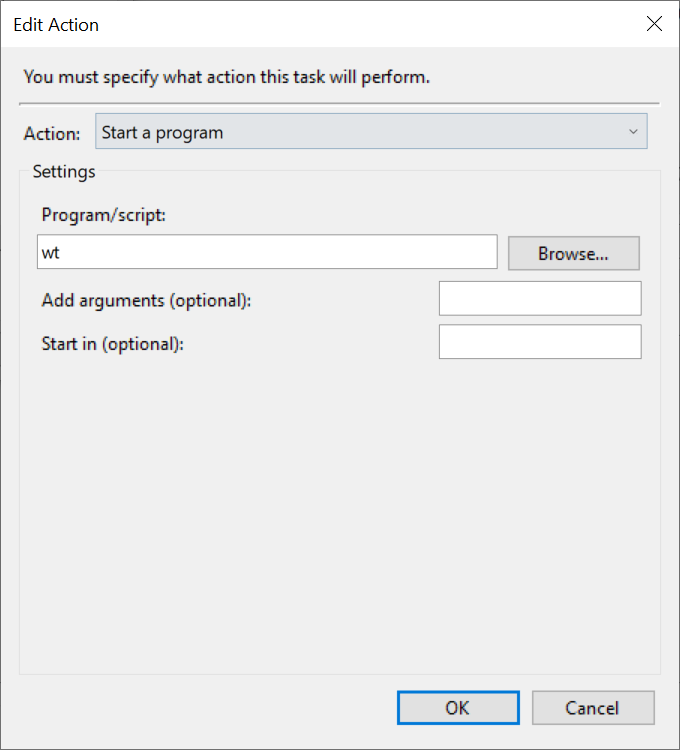
wtOn the Settings tab, make sure "Allow task to be run on demand" is checked and uncheck "Stop the task if running for longer than" checkbox.
Create a shortcut by right clicking the Desktop and select New -> Shortcut and type

schtasks.exe /run /TN "{task name}"Optionally change the shortcut icon and drag it to the taskbar.
@holynakamoto commented on GitHub (Apr 20, 2020):
Looks like I will have to stick to cmder until this is fixed.
@drdamour commented on GitHub (May 6, 2020):
now that there's an inkling of a plan supposedly, can we get the docs
updated to no longer say there's no current plan?
https://github.com/microsoft/terminal/blob/master/doc/user-docs/index.md#starting-a-new-powershell-tab-with-admin-privilege
@zadjii-msft commented on GitHub (May 6, 2020):
@drdamour Once there is a plan, I'd love to remove that section. Right now though, there's only a plan to research a way to make a plan. Once there is a real plan, and a way we can safely do it, I'll remove that section.
@Fell commented on GitHub (May 14, 2020):
The method described by @KMoraz works great as a workaround for now. Thank you for posting this.
@Bigous commented on GitHub (May 14, 2020):
Hi people,
I was using ConsoleZ until I discovered this one yesterday.
ConsoleZ has some features and one is to start a new tab as administrator using UAC (it pops the dialog of UAC).
I find it very useful because you don't need to take of the hands of keyboard to open a new elevated tab.
What if it were a configuration inside profile configuration? That's how it's done in ConsoleZ.
@ghost commented on GitHub (May 14, 2020):
Hi All,
I found another Shortcut workaround that's simple and works great for those who have to enter local admin credentials when running anything As Administrator.
This link explains, but needs a full path for the wt.exe reference:
http://nuts4.net/post/windows-terminal-run-as-admin
My full shortcut string is:
C:\Windows\System32\cmd.exe /c start /b C:\Users\myUserName\AppData\Local\Microsoft\WindowsApps\wt.exeUPDATE 21 May 2020:
The above used to work prior to version 1.0.1401.0.
See this new issue too: https://github.com/microsoft/terminal/issues/6013
Now Crtl-Shift click does NOT work either when you have to elevate with a local admin account.
See the below error screenshot I get after being prompted twice for elevate permissions:

@LordFPL commented on GitHub (May 14, 2020):
For information, imho gsudo is perfect for this, thx https://github.com/microsoft/terminal/issues/632#issuecomment-613751789
My config have only this profile to gain privilege :
@SuperRembo commented on GitHub (May 15, 2020):
For me the easiest way to open Windows Terminal as administrator, is to pin it as the first item on the task bar. Then
Win+Ctrl+Shift+1opens it as admin@sba923 commented on GitHub (May 15, 2020):
Indeed very convenient, but this only works for accounts that are members of the Administrators group.
If you are acting as the admin for someone else, you won't be able to run Windows Terminal as your (admin) user from their account.
@kenmartin-unix commented on GitHub (May 20, 2020):
I think it would be nice to have one tab setup to run cmd as administrator not everything.
@sba923 commented on GitHub (May 20, 2020):
As explained elsewhere here, this is not possible with the current design.
@u84six commented on GitHub (May 20, 2020):
is there a flag that can be used to run as admin? Then we could just create a shortcut for it.
@sba923 commented on GitHub (May 20, 2020):
If you pin Windows Terminal to the taskbar, you can launch it elevated using Ctrl+Shift+click.
This will do the same as right-click on icon, right-click on "Windows Terminal", followed by "Run as administrator."
Note: Windows Terminal being a Store app, you can't run it as another user.
@shem-sargent commented on GitHub (May 22, 2020):
I would love to see the ability to have "mixed-integrity-level tabs" in Windows Terminal, with the integrity level as an option in each profile. This is mostly as a convenience in my normal sysadmin/devops work to minimize workflow interruptions and context switching.
I have found a simple alternative that works for me for now. This doesn't address all the scenarios presented here by other users. It doesn't depend on third party apps, shortcut files, key combinations, or Scheduled Tasks. It doesn't require identifying the location of the Windows Terminal executable. It just makes a separate entry in the Windows Terminal profile list that launches a second Windows Terminal instance elevated. This triggers a UAC prompt once. I only use this if and when I need elevation.
The result is two Windows Terminals. Anything in one is standard and anything in the other is elevated. For me, this an acceptable level of interruption and context switching. The elevated Windows Terminal also prepends each tab title with "Administrator:" which gives good visual confirmation of the difference.
Edit: I have Powershell 7 installed,
@shem-sargent commented on GitHub (May 26, 2020):
@IarwainBen-adar, I seem to recall recently reading in the new docs that you can't use the
commandlineitem and and thesourceitem together. Does it work as expected without thesourceitem?@kenmartin-unix commented on GitHub (May 26, 2020):
I tried his code and can not even get the new item to appear in the pull
down menu.
@IarwainBen-adar commented on GitHub (May 26, 2020):
@shem-sargent sorry about that, I deleted my comment here because the extraneous
sourcedeclaration was indeed the problem. Although, now that I have the menu entry working, unfortunately I still can't launch an elevated instance of Windows Terminal — I'm running into issue #3145 with a failure ofThe file cannot be accessed by the system.@shem-sargent commented on GitHub (May 26, 2020):
@IarwainBen-adar Sorry, I cannot reproduce #3145. Otherwise, I would try troubleshooting on my end.
@jeferwang commented on GitHub (May 28, 2020):
pin to task bar and shift+right click
@Reeceeboii commented on GitHub (May 29, 2020):
Cheers @LordFPL and of course @gerardog , I had never heard of gsudo (https://github.com/gerardog/gsudo for others that are interested) before, but this makes elevated sessions a breeze now. Thanks! Either add it to the profile object in the settings file, or just use the
sudoalias as you would do on a Linux system. Perfect!@smokeintheshell commented on GitHub (Jun 9, 2020):
@zadjii-msft my apologies, but I don't exactly understand what the issue here is. Windows supports token manipulation and impersonation, it's how runas works isn't it? using gsudo from @gerardog i can have a low(er) integrity wt hosting a high(er) integrity shell at the same time as any other level integrity shell, be it powershell, pwsh, cmd, or any wsl shell. From my limited testing, none of the low(er) integrity shells can debug into that higher integrity shell. What is the roadblock here to having this as a builtin terminal, or even more preferable at the OS level, feature?
@DHowett commented on GitHub (Jun 9, 2020):
@smokeintheshell https://github.com/microsoft/terminal/issues/632#issuecomment-519375707
A low(er)-integrity window receiving input and funneling it directly into a high(er)-integrity process opens that high(er)-integrity process up to control by other low(er)-integrity things on the system.
It means a potentially malicious process only needs a lateral move at the same privilege level to gain EoP.
@kbirger commented on GitHub (Jun 29, 2020):
yes, I read that explanation at the beginning of the thread, but I don't understand why it's okay for Linux, and probably Mac, but not OK for Windows? Windows currently protects input to elevated processes from non-elevated processes. In either this issues or a related one, someone suggested that we need a separate process per tab. I would think this is already the case since each tab has its own command to execute (eg: pwsh.exe). Is it because they are all children of the same root process under one HWND?
Does Ubuntu's terminal suffer from the same issue with tabs if I either:
suopensudoalready and don't need to enter my PW again per configuration policy?Or is Ubuntu's architecture somehow hardened against cross-process input injection attacks?
@mrwensveen commented on GitHub (Jun 29, 2020):
If you look at my comment here, I've actually reproduced / exploited the issue on Linux. Both su and sudo are probably equally "vulnerable", in that you can send keystrokes to lower-integrity windows running those commands. The sudo password timeout (not having to enter your password at the next sudo command within 15 minutes), makes this even easier. You can harden Ubuntu by disabling the X extension that is necessary for the attack. Not sure if this is possible in a Wayland environment (the attack and/or the hardening).
I completely understand the decision to not implement mixed-elevation tabs, unless there is some way to disable virtual keyboards and other software input methods.
@yume-chan commented on GitHub (Jun 29, 2020):
@kbirger Yes there are separate processes for each tab, but all your mouse and keyboard inputs are still sent to Windows Terminal's window (which is low-integrity), then routed to each shell processes via standard input streams. That's how all Windows Terminal's keyboard shortcuts work.
I wonder if it's possible to detect if the input is forged, for example using the GetCurrentInputMessageSource API. I can't find much information about this API other than the official example, but from the description it should be able to identify the input source (hardware/from processes with uiAccess, mostly accessibility software/from processes without uiAccess, maybe malicious)
@hexawyz commented on GitHub (Jun 29, 2020):
I'm pretty sure that one of thre reasons is that Microsoft is selling security as a feature to other large corporations, or governements.
There are also a few other resons that come to my mind as to why that might not have been a problem until now:
Now, by introducing the feature naively (as we'd all have done, i'm sure 😄) you'd be introducing a new (huge) flaw in some Windows installations. With the development being done in the open, you can be sure that everyone in need would be aware of the flaw and start coding against it.
The quick countermeasure being to ban Windows Terminal (and likely all other terminal emulators out there now that the flaw is public), you could then kiss goodbye to your dreams of using Windows Terminal in any kind of corporate environment 😟
I'm still very much hoping that a secure version of this feature wil see the light of the day, though 🤞
@kbirger commented on GitHub (Jun 29, 2020):
I see. Thanks for the explanations!
@yume-chan commented on GitHub (Jun 29, 2020):
@mrwensveen AFAIK there are three ways to send inputs to elevated windows:
uiAccessflag, digitally sign your binary, install to a location that's not writeable for current user. It's a "backdoor" for accessibility softwares, allowing them to read/write any other programs (including system processes), and displaying on top of any other windows (including Secure Desktop where UAC popups show and login screen), all without running elevated. See https://docs.microsoft.com/en-us/windows/win32/winauto/uiauto-securityoverview.On-Screen Keyboard (osk.exe), Narrator.exe (, and maybe other screen readers) all uses method 3.
(A screenshot showing the embedded program manifest of osk.exe with
uiAccess=true)Looks like the
uiAccessflag can also protect the program from being accessed by other low-integrity programs (despite from still running unelevated), maybe we can use this "feature" to protect WT?@mrwensveen commented on GitHub (Jun 29, 2020):
@yume-chan Cool, that's very interesting, thanks! Are
uiAccessprograms allowed to send keystrokes to otheruiAccessprograms? We still want OSK to be able to interact with windows terminal, and if this means other programs should at least be signed before it's allowed to send input to windows terminal, is that a high enough barrier?@yume-chan commented on GitHub (Jun 29, 2020):
@mrwensveen Yes, programs with
uiAccessprivilege can access each other.I prefer the
GetCurrentInputMessageSourceAPI way (https://github.com/microsoft/terminal/issues/632#issuecomment-651114562) cause this is notuiAccess's intended usage. Also with the API we may still allow low-integrity programs to send keystrokes to unelevated tabs, while not to elevated ones.@Bigous commented on GitHub (Jun 29, 2020):
Little workaround I've made here:
I've installed PowerToys which has some cool features. One of them is to show the windows shortcuts and I've discovered that when you press Win + number, it opens the app in the windows bar correspondent to the number it appears in the bar.
So, I've putted the terminal in the bar as the first icon
 .
When I press Win + 1, the terminal opens.
When I press Win + Ctrl + Shift + 1, it opens elevated.
I'll put my terminal configuration and powershell profile here too if you wanna get the features of show the git branch and conda environment in the prompt and the user in red if it's an elevated terminal...
@Firehawke commented on GitHub (Jul 1, 2020):
That's existed since at least Windows 7; it's not a PowerToys thing.
@Bigous commented on GitHub (Jul 6, 2020):
@Firehawke Yes, I just discovered because of PowerToys ... it's not needed thow.
@bb010g commented on GitHub (Jul 10, 2020):
Here's a profile for launching elevated that works on Windows Store & has a proper icon:
EDIT: Credit to @glooms, @shem-sargent, @LordFPL, and @Firehawke for different components of this snippet. As this command calls
pwsh.exe, it looks like some people have ran into #4228 (a0x80070002error when launching) with this due to corrupted PATH environment variables or strange binaries in their path namedpowershell.exeorpwsh.exe. @zurkz fixed this by referencingpowershell.exe, but I don't think that's reliable now. #6684 addresses this problem for Windows Terminal, and you'l find a fixed version below, following that solution, which shouldn't have this issue at all.@shem-sargent commented on GitHub (Jul 11, 2020):
@bb010g That works well! Thank you.
@ghost commented on GitHub (Jul 11, 2020):
@bb010g ❤💯
@ghost commented on GitHub (Jul 11, 2020):
@anyone Forgive my ignorance, does this get dropped in the Windows Store config? If so, can someone post the path? If not, where is this bad boy supposed to live?
TYIA!
@shem-sargent commented on GitHub (Jul 11, 2020):
@Kazamario
It goes in the Windows Terminal settings.json file, in the profiles section.
@munael commented on GitHub (Jul 12, 2020):
It causes an error:
0x80070002when launching. pwsh 7.1.@zurkz commented on GitHub (Jul 12, 2020):
I changed it to:
and UAC prompted to elevate permissions.
@faulander commented on GitHub (Jul 13, 2020):
that worked for me quite well. Thank you!
@farag2 commented on GitHub (Jul 23, 2020):
Here is how to start Windows Terminal elevated if it was pinned to Start.
https://github.com/farag2/Utilities/blob/master/Windows%20Terminal/Pin%20to%20Start.ps1
@bb010g commented on GitHub (Jul 24, 2020):
@narfanar It looks like you've ran into #4228, where Windows Terminal emits error
0x80070002upon startup when the PATH environment variable is messed up or other binaries are floating around in the path namedpowershell.exeorpwsh.exe. I don't think @zurkz's snippet really fixes this, as it just shifts potential problems frompwsh.exeover topowershell.exe. #6684 fixed this for WT, so here's a snippet adjusted to that solution:@Benny1007 commented on GitHub (Jul 26, 2020):
console-z does this well
@MikeChristensen commented on GitHub (Aug 6, 2020):
Note that Cmder has this feature, which is incredible useful. Would love to see it implemented in Windows Terminal. Even if it has to launch a separate window for the Admin tabs or something..
@ofsaleem commented on GitHub (Aug 11, 2020):
my default profile is set to bash rather than powershell, and i'd like to keep it that way. the snippet above works great, but id love to be able to make it launch a new elevated terminal with the powershell profile loaded. ive spent like 3 hours trying to figure this out (not a big fan of / have much experience with powershell) and i can't figure it out -- pleaaaase help. it seems like there's some combination of single quotes, double quotes, escaping, spaces, newlines, that might make it work but i cannot get start-process and argumentlist to do what i want. ive boiled it down to :
Start-Process -Verb RunAs cmd.exe '/c start wt.exe -p "Windows PowerShell"'this works in a .ps1 file if i run it myself, i get a new elevated windows terminal with the powershell profile loaded. but it does not work in the commandline parameter of settings.json, no matter how i try to mangle it, explicitly calling argumentlist instead of using cmd /c, various forms of escaping and quote usage, etc.
"commandline": "%SystemRoot%\\System32\\WindowsPowerShell\\v1.0\\powershell.exe -Command Start-Process -Verb RunAs cmd.exe '/c start wt.exe -p \"Windows PowerShell\"'",does not work. the best i can do is get it to launch a weird hybrid of what i want. ill get an "Administrator: Ubuntu" window loaded, that looks like my bash profile but is actually running powershell. wrong font and everything. if i use that window to open a new powershell tab it will be elevated as desired. when its like this i can stick whatever garbage i want into the "Windows PowerShell" part of the profile loading and I get the exact same behavior, so I know it's not really attempting to load the profile i'm passing it.
@iyruk commented on GitHub (Aug 21, 2020):
So I'm having an issue trying to still run this as elevated, i've done every option listed above and i either get the "Can't find the file" error or this.
Anyone else having the issue still or haven't been able to get these to run just fine?
@NoSubstitute commented on GitHub (Aug 30, 2020):
Me too. I run WSL most of the time, but every now and then I need to run PS elevated, and I'd like to do it in a tab of the new WT.
@ayfine commented on GitHub (Aug 30, 2020):
I was also unable to get any of the examples to work - even with correcting my file paths. I found and installed gsudo which can elevate the current tab, or be used as a profile to open an elevated tab in the same window. I am unsure if the solutions above started in a new window (some attempts I made before using
gsudowould only start in a new window). It will open an UAC popup.This is the profile I am using:
I am using
supressApplicationTitleso that the tab title not display Administrator: as its redundant with Elevated.@bb010g commented on GitHub (Aug 30, 2020):
@ayfine If https://github.com/microsoft/terminal/issues/632#issuecomment-663686412 is indeed not working for you, could you send a transcription of the exact errors / unexpected behavior you're getting with that config? (Make sure to add in extra configuration, like
suppressApplicationTitle, in as small as steps as possible, so that if any of your configuration is breaking WT it'll be easier to tell where & when it's happening.)If any other configurations here got slightly further than the linked one for you, details on how those are breaking would also be appreciated.
@ayfine commented on GitHub (Aug 30, 2020):
@bb010g I am not encountering any error messages - my apologies for not being more precise in my reply. When using https://github.com/microsoft/terminal/issues/632#issuecomment-663686412 I ran in to the issue of Windows Terminal loading my WSL Ubuntu shell (my default). I had taken this originally to mean that it was not working correctly but I see now that in that new window, if I start a new (default profile) Powershell tab it is in fact elevated. Regardless, both by opening a new window and having to start a new tab within that, it's not any easier than running an elevated process from my start menu. What I described in my original reply provides with the exact behavior I was imagining.
@NoSubstitute commented on GitHub (Aug 30, 2020):
@ayfine - and I copied your gsudo example. That's a good-enough solution until something built-in is coded. Thanks.
@MikeChristensen commented on GitHub (Sep 1, 2020):
@ayfine I tried the gsudo thing, but it's a pretty awful experience. Any sort of TAB completion seems to break, and Unicode (non-ASCII) characters don't seem to display. I'm guessing it's some sort of process that redirects input and output, and does a terrible job at it. I think the solution with a separate window works better.
@DHowett commented on GitHub (Sep 1, 2020):
If you are having issues with gsudo please report them to @gerardog and not in this thread. Every message on this thread (this one included; sorry!) e-mails hundreds of subscribers.
I am going to lock this thread to further non-maintainer comments, as we are reaching the point where further comments aren’t moving the discussion forward a meaningful amount.
Please file new issues if you have concerns that are not covered here.