mirror of
https://github.com/microsoft/terminal.git
synced 2026-09-24 16:05:21 +00:00
Rendering errors in tmux split panes #9706
Closed
opened 2026-01-31 02:01:23 +00:00 by claunia
·
102 comments
No Branch/Tag Specified
main
dev/duhowett/fhl-2026/remove-paste-hairpin-handler
dev/duhowett/win7-wpf-termcontrol-squash
dev/lhecker/20226-present-leaks
dev/duhowett/wpf-1-autoscroll-to-interactivity
dev/duhowett/wpf-3-swapchain-handle
dev/duhowett/wpf-2-midi-audio-timer
dev/migrie/overview-for-pr
dev/migrie/b/markdown-paste
dev/duhowett/padding-in-atlas
fix/german-split-pane-tooltip
release-1.25
dev/cazamor/sui-rejuv/fix-spaces
dev/migrie/per-window-final
dev/cazamor/selfhost/2026-08-31
dev/migrie/b/independent-animations
dev/pabhoj/wtcli
dev/cazamor/conhost/bugfix-a11y-find
dev/cazamor/conhost/bugfix-a11y-find-1.24
dev/lhecker/theme-quality-test
dev/lhecker/theme-quality
dev/cazamor/selfhost/sui-rejuv
dev/cazamor/fix/search-selection-off-by-one
dev/duhowett/even-more-builtin-glyphs
dev/crutkas/kitty-pr1
dev/cazamor/toast/activity
release-1.24
users/GitHubPolicyService/d8615b98-f5fa-4462-bf7f-c44a1cc12096
dev/cazamor/selfhost/2026-06-18
dev/migrie/f/new-profile-subcommand
dev/cazamor/sui-rejuv/profiles-v2
dev/duhowett/asan-for-all
dev/cazamor/sui-rejuv/profiles-new
dev/cazamor/sui-rejuv/expander-groups-new
dev/cazamor/auto-save/refresh-settings
feature/llm
dev/cazamor/auto-save/model/json-manager
dev/cazamor/auto-save/settings-model
dev/migrie/s/snippet-params
users/merlinbot/1es-pt-auto-baselining-pr
niels9001/inactive-tab-foreground
dev/cazamor/selfhost/2026-05-20-home
dev/duhowett/fzf-vcxproj
dev/cazamor/selfhost/2026-05-20
dev/cazamor/selfhost/2026-05-19
dev/cazamor/selfhost/2026-05-18
niels9001/fontweight-fixes
niels9001/page-transitions
dev/duhowett/fhl-2026/rewrite-paste-and-dragdrop-handling-writeinputstring
dev/migrie/f/overview-view
dev/cazamor/selfhost/2026-05-13
dev/cazamor/selfhost/2026-05-13-sui
dev/yeelam/f/BuildTest
dev/duhowett/hax/our-own-tabview
dev/cazamor/bugfix/close-scratchpad
dev/cazamor/selfhost/2026-05-05
dev/cazamor/selfhost/2026-05-04-workspaces
dev/cazamor/selfhost/2026-05-04
dev/lhecker/20149-hotfix
dev/lhecker/osc-7-wsl
dev/migrie/workspaces-real
dev/migrie/fhl-spring-2026/quake-4
dev/lhecker/pwsh-5.1
dev/cazamor/sui/dropdown-page
dev/cazamor/selfhost/2026-04-08
dev/cazamor/selfhost/2026-04-06
dev/migrie/fhl-spring-2026/confirmCloseOn
dev/cazamor/confirmCloseOn/dont-ask-me-again
dev/lhecker/inproc-conpty
dev/duhowett/powershell-module-supercharger
dev/cazamor/a11y/vt-seq-prototype
dev/migrie/fhl-spring26/osc777-2
dev/migrie/fhl-spring26/2/notification-infrastructure
dev/migrie/fhl-spring-2026/side-tabs
dev/cazamor/copilot/playground
dev/migrie/fhl-spring-2026/quake-3.5
dev/migrie/fhl-spring26/osc777
dev/migrie/fhl-spring26/unpackaged-notify
dev/migrie/fhl-spring26/bellStyle-notification
dev/migrie/fhl-spring26/activity-notifications
dev/migrie/fhl-spring-2026/x-open
dev/migrie/fhl-spring-2026/quake-5
dev/migrie/fhl-spring26/nextTab-filter
dev/duhowett/atlas-draw-d2d-dots-curlies-consistently
dev/lhecker/14165-conhost-font-size
dev/lhecker/ottosson-by-default
dev/duhowett/hax/unix-pty
dev/duhowett/hax/cmake
dev/lhecker/generate-256-colors
dev/lhecker/dcs-perf
dev/lhecker/1410-large-scrollback
dev/cazamor/selfhost/2026-02-10
dev/lhecker/11509-kitty-keyboard-protocol-wip
dev/cazamor/selfhost/2026-01-29
dev/lhecker/benchcat-fix
dev/duhowett/eoy-25/allow-set-foreground
release-1.23
dev/cazamor/bot/deprecate-area-atlasengine
dev/cazamor/selfhost/2026-01-20
dev/cazamor/selfhost/2026-01-12
dev/cazamor/spec/auto-save
dev/duhowett/fhl-2024/asciicast-recorder
dev/duhowett/eoy-25/underline-colors-in-atlas-bug
dev/duhowett/hax/serial-port-support
dev/duhowett/connection-utf8
dev/lhecker/fused-event
dev/lhecker/18928-wip
dev/duhowett/fhl-2024/clang
dev/duhowett/vt-cache-changes
dev/cazamor/uia-leak
release-1.22
dev/cazamor/selfhost/11-18-v3
dev/cazamor/selfhost/11-18
dev/duhowett/fhl-2025/bitmap-fonts
dev/duhowett/server-2025-vms
dev/duhowett/cant-believe-gotta-do-this-shit
dev/lhecker/dark-mode
dev/cazamor/sui/invert-cursor-color
dev/duhowett/fhl-2025/wt-command-palette-cmdpal-integration
dev/duhowett/fhl-2025/wt-json-relative-icons
dev/lhecker/fucking-service-locator
dev/duhowett/unicode-17
dev/duhowett/multi-blern
dev/lhecker/wellp2-alt
dev/duhowett/wellp2
dev/lhecker/1860-horizontal-scrollbar
dev/lhecker/fix-window-count
dev/cazamor/sui/tab-color-old
dev/duhowett/hax/conhost-icon
dev/duhowett/hax/sui-color-chip-border
dev/duhowett/hax/terminalsettings-as-a-lib-/with-types-merged-into-tsm
dev/pabhoj/page_control_input_cleanup
dev/duhowett/padding-in-atlas-rebase-20250729
dev/lhecker/attach-thread-input
dev/duhowett/portable-shader-members
msbuildcache-reenable
dev/cazamor/selfhost/1.24-2025-06-10
dev/cazamor/upgrade-settings-containers
dev/cazamor/sui/ext-page/powershell-stub
dev/cazamor/selfhost/1.24-2025-05-15
dev/pabhoj/sui_action_overhaul
dev/cazamor/selfhost/1.24-2025-05-06
dev/cazamor/selfhost/1.24-2025-04-29
dev/cazamor/sui/ext-page/lazy-load-objects
dev/cazamor/sui/ext-page/badge
dev/cazamor/selfhost/1.24
dev/lhecker/sdk-26100
dev/duhowett/testing
dev/jadelaga/VS-Pty.Net-1.22
dev/duhowett/fhl-2025/what-if-no-content-ids
dev/lhecker/18584-part2
dev/lhecker/get-lang-id
dev/duhowett/hax/clogs
release-1.21
dev/pabhoj/featurellm_fix_paste
dev/lhecker/grapheme-backup
dev/jadelaga/VS-Pty.netFixes
dev/lhecker/atlas-engine-compute-shader
dev/migrie/s/ai-providers
dev/lhecker/animated-cursor-wip
dev/pabhoj/featurellm_timeout
dev/lhecker/dark-mode-alt
dev/duhowett/osc-strided-table
dev/lhecker/bugbash
dev/pabhoj/featurellm_improve_parsing
dev/duhowett/coast-to-coast
dev/lhecker/curly-improvements
dev/duhowett/net8
dev/duhowett/onebranch-custom-pool
dev/lhecker/renderer-overhaul-2nd-attempt
dev/lhecker/cleanup
dev/cazamor/sui/confirmation-announcements
dev/lhecker/winconpty-cleanup
dev/duhowett/learn/rewrite-highlights
dev/migrie/b/no-nesting-when-searching
release-1.20
dev/duhowett/sel-2-spans
dev/lhecker/7118-cursor-color
dev/lhecker/remove-glyph-width
dev/lhecker/igfw-scroll-region
dev/lhecker/17656-win32im-double-encoding
dev/duhowett/fhl-2024/merge-idls
dev/duhowett/feed-forward-variables
dev/lhecker/remove-chrome-math
dev/duhowett/copylink
dev/duhowett/applicableactions
gh-readonly-queue/main/pr-17566-de50310295b7d92ed3d51f07974a2a945776bf9d
dev/lhecker/atlas-engine-stride-copy
dev/migrie/b/bump-nuget-in-c
dev/migrie/f/992-redux-redux
dev/migrie/f/filter-weight-input-too
dev/migrie/f/disable-nesting
dev/migrie/f/local-snippets-cleaner
dev/migrie/s/1553-mouse-bindings
selfhost-1.22-bugbash-2024-06-04
selfhost/1.22-bugbash-2024-06-04
dev/lhecker/15689-tab-drag-crash-fix
dev/migrie/f/sxnui-font-size-change
dev/migrie/f/local-snippets-on-action-refactor
dev/migrie/f/just-local-snippets
dev/migrie/save-input-patches
dev/migrie/f/md-pane-official
dev/migrie/base-pane
dev/migrie/fhl/tasks-pane
release-1.19
dev/migrie/b/17130-clear-marks-2
dev/migrie/b/17075-its-me-the-killer
dev/duhowett/i-figured-out-why-sometimes-the-publish-build-failed
dev/duhowett/nuget-publication-with-aad-app-id
selfhost-1.20
dev/duhowett/graph
dev/migrie/b/15803-activate-dont-copypasta
dev/duhowett/is-pgo-broken-because-of-sui-being-slower
dev/migrie/b/remove-terminaltab
dev/migrie/fhl/md-pane
dev/migrie/fhl/local-tasks-2024
dev/migrie/fhl/2024-inline-notebook
dev/duhowett/interface-projects
dev/duhowett/dead-loc
release-1.18
dev/migrie/fhl/2024-spring-merge-base
dev/duhowett/hax/l9
inbox
dev/migrie/14073-on-main
dev/duhowett/hax/conhost_dump_replay
user/lhecker/atlas-engine-srgb
dev/migrie/fhl/sxnui-tooltips-3
dev/migrie/7718-notifications-experiments
dev/migrie/fhl/7718-notifications
dev/migrie/fhl/7718-notifications-reboot
dev/lhecker/remove-gsl
dev/lhecker/16575-TerminateProcess
dev/lhecker/window-thread-climate-control
dev/lhecker/client-context-input-output-mode
dev/lhecker/ring-buffer-input-buffer
release-1.17
dev/lhecker/propsheet-fontdlg-refactor
dev/lhecker/renderer-overhaul
dev/pabhoj/test
dev/duhowett/chop
dev/lhecker/til-ulong-cleanup
dev/lhecker/til-env-cleanup
dev/migrie/f/16005-a11y-pane
dev/cazamor/a11y/fastpass
dev/migrie/b/15487-push-cwd
dev/migrie/b/15536-or-15219-idk
dev/duhowett/move-timers-down-into-core-interactivity-etc
dev/migrie/b/15812-broadcast-paste-two
dev/migrie/fhl-fall-2023/11162-quake-III-arena
dev/migrie/fhl-fall-2023/1620-automatic-tab-progress
dev/migrie/fhl-fall-2023/9992-quake-II
dev/migrie/fhl-fall-2023/9992-default-quake-settings
dev/migrie/fhl-fall-2023/9992-window-name-settings
dev/migrie/fhl-fall-2023/oceans
dev/lhecker/ColorScheme-improvements
dev/migrie/search-v2-v3
dev/migrie/pr-15717/its-dangerous-to-go-alone
dev/migrie/f/4768-taskbar-icons
dev/migrie/f/3121-tooltips
dev/duhowett/sticky-control
dev/duhowett/fix-tracing-2
dev/migrie/b/add-support-for-vsc-marks
dev/migrie/f/1860-this-is-literally-what-less-is-for
dev/migrie/s/5916-draft
dev/lhecker/tracy
dev/migrie/s/north-star
dev/cazamor/tag-youre-it
dev/migrie/f/12336-let-it-mellow
dev/migrie/f/now-with-more-compat-settings
dev/migrie/f/compatibility-sui
dev/duhowett/hax/wpf-atlas
dev/duhowett/fgb
dev/migrie/b/15487-relative-paths-are-hard
dev/lhecker/colrv1
loc-update
dev/migrie/fhl/dyndep-csharp
dev/migrie/fhl/dyndep
dev/migrie/fhl-clickable-send-input
dev/migrie/f/cwd-hijinks-5506-15173
dev/lhecker/openconsole-async-start
1.17
dev/migrie/bump-scratch
dev/migrie/f/3726-restartConnection
dev/migrie/b/cxn-restarting-attempt-1-backport
dev/migrie/b/9053-part-3-the-actual-doing-of-the-thing
dev/migrie/b/13388-focus-logger
dev/migrie/b/9053-part-4-i-guess-defterm
dev/migrie/oop/3/of-the-silmarils
of-the-darkening-of-valinor
dev/migrie/fhl/notebook-proto-000
dev/migrie/f/narrator-buddy
dev/migrie/mux-2.8.2-march-2023
dev/migrie/f/roast-mutton
dev/migrie/f/12861-preview-input
dev/lhecker/clang-tidy
dev/migrie/f/3121-wE-dOnT-hAvE-dEv-DaYs
dev/duhowett/compiler-compliance
dev/duhowett/i-have-a-burning-hatred-for-ntstatus-of-later-so-why-not-fix-it
dev/duhowett/shorthand-namespaces
dev/duhowett/rename-all-dlls
dev/duhowett/errordialog
dev/lhecker/gsl-narrow
dev/migrie/b/11522-dumb-idea
release-1.16
dev/miniksa/env
dev/duhowett/hax/embed-everything
dev/migrie/b/13388-attempt-003
dev/migrie/b/14512-test-research
dev/migrie/b/13388-attempt-002
dev/migrie/b/14464-copyOnSelect-moving-text
dev/migrie/s/thema-schema-for-1.16
dev/migrie/s/theme-pair-schema
dev/migrie/b/13388-experiments-1
dev/cazamor/spec/a11y-vt-seq
dev/migrie/b/14557-empty-folder-dropdown
dev/cazamor/spec/a11y-vt-seq-v2
release-1.15
dev/migrie/f/process-model-v3-test-0
dev/lhecker/vsconfig
dev/migrie/s/5000-presentation
dev/lhecker/5907-startup-perf
dev/lhecker/winrt-file-api-benchmark
dev/duhowett/128-bit-compiler
dev/migrie/fhl/more-shell-integration
dev/migrie/b/13388-experiments-0
dev/lhecker/til-to-ulong-improvements
dev/migrie/s/markdown-notebooks
dev/cazamor/a11y/nav-by-page
dev/cazamor/a11y/system-menu-support
dev/duhowett/no-private-registry-keys
dev/cazamor/wpf/uia-expose-enable-events
dev/cazamor/wpf/uia-events
extendAISpec
dev/migrie/fhl/clickSendInput
dev/migrie/fhl/save-command
dev/migrie/b/theme.profile
dev/migrie/b/13943-a-test-for-this
dev/migrie/oop/2/endgame
dev/duhowett/hax/merge_idl
dev/migrie/oop/2/infinity-war
dev/migrie/spellbot-cve
dev/cazamor/a11y-sev3/new-profile-announcement
dev/migrie/fhl/upside-down-mode
release-1.14
dev/migrie/f/9458-startupInfoToTerminal
dev/migrie/fhl/5916-triggers
dev/migrie/b/13523-context-menu
dev/migrie/b/6523-endpaint-outside-lock
dev/migrie/b/12413-OnUnhandledException
dev/lhecker/render-snapshot
dev/cazamor/1.15/scroll-to-point
dev/migrie/mux-2.8-aug-2022
dev/lhecker/lock-console-guard
dev/migrie/f/1504-final
dev/pabhoj/sui_follow_ups
dev/migrie/f/til-winrt.h
dev/cazamor/color-picker-redesign
dev/migrie/fhl/vscode-autocomplete-prototype
dev/migrie/f/1504-prototype
dev/migrie/oop/2/loki
dev/migrie/oop/2/wandavision
dev/migrie/b/8698-YOURE-OUT-OF-ORDER
fabricbot-configuration-migration
dev/migrie/b/12788-did-it-work
dev/migrie/b/localtests-ci-2022
dev/cazamor/1.14/replace-compareInBounds
dev/pabhoj/preview_string
dev/cazamor/ks/switchSelectionEndpoint
dev/migrie/oop/2/COM-ISwapChainProvider-attempt-1
dev/migrie/b/dxd-marker
release-1.13
dev/migrie/b/13066-for-defterm
dev/cazamor/revert-dwm
dev/migrie/b/13066-sw_flash_repeatedly
dev/migrie/b/no-cloaky-cloak
dev/migrie/f/apples-to-oranges
dev/migrie/f/no-custom-caption-btns
dev/migrie/f/10509-mica-and-transparent-titlebars
dev/migrie/b/12911-wpf-focus-fg
dev/migrie/titebar-colors
dev/lhecker/4015-cursor
dev/migrie/fhl/rgb-rainbow-window-frame
dev/migrie/fhl/scroll-marks-prototype
release-1.12
dev/miniksa/compliance
dev/migrie/f/default-icons
dev/migrie/fhl/10175-web-search-for-text
dev/migrie/fhl/menu-complete-prototype
dev/migrie/b/2988-merged-prototypes
dev/migrie/b/2988-niksa-msgs-prototype
dev/migrie/fhl/9583-colorSelection
dev/migrie/b/10609-sui-leak
dev/migrie/b/32-attempt-3
dev/migrie/release-1.12-rejuv-attempt-2
dev/migrie/demo-for-presentation
dev/migrie/b/32-but-im-here-for-12567
dev/duhowett/conpty_first_frame_blug
dev/migrie/b/11092-unfocused-acrylic-settings
dev/migrie/localtests-in-ci
dev/migrie/b/12356-attempt-2
dev/migrie/b/12353-with-null
dev/migrie/b/12387-trim-spaces
dev/migrie/b/5033-bad-start
dev/lhecker/12351-broken-locales
dev/migrie/b/8663-input-to-oem-crash
dev/migrie/b/11743-win10-opacity-is-hard
dev/migrie/f/ctrl-click-elevate
dev/migrie/b/12196-shim-localization
dev/lhecker/issue-4015-til-rect
dev/cazamor/eim/mvvm
dev/migrie/f/--elevate
dev/migrie/b/11668-i-think
dev/migrie/b/11994-wsl-mangline
dev/migrie/eim/3475-action-xmacros
dev/migrie/eim/incremental-build-000
dev/cazamor/a11y/fake-uia-data
dev/migrie/f/non-terminal-content-elevation-warning
dev/migrie/f/632-on-warning-dialog
dev/lhecker/rgba
dev/migrie/b/8480-keybindings-in-tabs
release-1.11
dev/migrie/b/11561-dead-ends
dev/migrie/oct-21-roadmap-update
dev/migrie/fhl/adaptive-card-extension
dev/cazamor/test/11440
dev/migrie/f/warning-dlg-automation
dev/migrie/b/1.12-crash-on-exit
dev/migrie/b/11146-next-tab-in-cmdpal
release-1.10
dev/migrie/5ff9a24-and-75e2b5f
dev/duhowtt/hax/cpal-jumplist-async
dev/lelian/actionid/1
dev/migrie/f/just-elevated-state
dev/lhecker/terminal-settings-cleanup
dev/migrie/gh-10824
dev/pabhoj/cursor_light
dev/migrie/oop/wandavision
dev/migrie/oop/endgame
dev/migrie/oop/infinity-war
dev/lhecker/app-state-actually-hidden
dev/migrie/b/6160-dynamic-default-warning
dev/mgirie/b/more-nchhittest-ideas
dev/migrie/b/9320-interfacial-separation
cinnamon/fhl/find-contextmenu
dev/lhecker/wsl-distro-generator-cleanup
dev/migrie/b/10875-but-more-clever
dev/migrie/b/broken-globalsummon-overloading
dev/duhowett/hax/rle-row
dev/migrie/fhl-2021/cmdpal-select-list
dev/migrie/fhl-2021/differential-pixel-shading
dev/duhowett/hax/no-writable-glyphat
dev/migrie/fhl-2021/more-shader-variables
dev/migrie/titlebar-shenannigans
dev/miniksa/win10_font_matching
dev/lhecker/conhost-oom
dev/migrie/b/10332-less-snappy-scrolling
dev/migrie/b/7422-1px-top-border
release-1.9
dev/cazamor/move-scratch
release-1.8
dev/miniksa/manifest_2
release-1.6
release-1.7
dev/migrie/oop/the-whole-thing
dev/migrie/oop/connection-factory
dev/migrie/f/quake-dropdown-2
dev/miniksa/rle2
dev/migrie/f/quake-toCurrent-experiments-2
dev/migrie/f/quake-toCurrent-experiments
dev/migrie/f/quake-dropdown
dev/cazamor/actions-page/template
dev/duhowett/hax/cursor_stamp_foreground_background
dev/migrie/f/1860-hey-might-was-well-hack-during-a-hackathon
dev/migrie/oop-terminal.control-split-control
dev/duhowett/hax/build-with-wholearchive
dev/cazamor/spec/tsm-actions-temp
dev/migrie/oop-tear-apart-control
dev/migrie/oop-scratch-3
dev/cazamor/sui/bugfix-reload-crash
dev/migrie/f/xmacro
dev/cazamor/sui/proto/profile-nav-view
dev/migrie/f/name-windows
dev/migrie/dol/messing-with-shaders-take-1
release-1.5
dev/cazamor/sui/inheritance-hyperlinks-test
dev/migrie/r/commandline-lib-002
dev/migrie/f/com.fabrikam.toaster
dev/cazamor/adaptive-cards-prototype
dev/migrie/f/commandline-lib
dev/miniksa/zipzoom2
dev/migrie/f/remote-commandlines
dev/migrie/f/632-elevated-profiles
dev/migrie/oop-broker-000
dev/migrie/fix-pr-7015
dev/duhowett/clang
dev/miniksa/input_tests_2
dev/miniksa/input2
dev/migrie/oop-rpc-000
release-1.4
dev/migrie/oop-mixed-elevation-1
dev/migrie/oop-window-content-1
cinnamon/open-json
dev/miniksa/input_tests
dev/duhowett/hax/tsm-graphviz
dev/miniksa/input
dev/duhowett/hax/caption_buttons
release-1.3
dev/cazamor/a11y/expand-line-under-viewport
dev/cazamor/acc/ch/word-nav-perf
dev/cazamor/spec/settings-ui-architecture-draft
dev/duhowett/hax/tap_upgrade
dev/migrie/f/pane-exit-animation
release-1.2
dev/migrie/move-lib-up-and-dll-down
release-1.1
dev/migrie/f/branch-2-backup
dev/migrie/f/settings-getters-only
dev/duhowett/hax/command_palette_search
dev/migrie/f/6856-let-terminalpage-expandcommands
dev/migrie/f/theming-2020
dev/migrie/oop-scratch-4
dev/duhowett/hax/punchout
dev/migrie/s/action-ids
dev/migrie/f/lets-just-generate-these
dev/migrie/oop-scratch-2
dev/miniksa/dcomp
dev/miniksa/gotta_go_fast_spsc
dev/miniksa/gotta_go_fast
dev/miniksa/perf_skip_checks
dev/miniksa/perf_buffer_dig
dev/migrie/s/1203-cursorTextColor
dev/migrie/f/fix-intellisense-i-guess-backup
release-1.0
dev/migrie/f/execute-commandlines
dev/migrie/f/2046-Command-Palette-v2
dev/migrie/b/6421-passthrough-alt
dev/migrie/b/moving-focus-is-hard
dev/miniksa/set
dev/migrie/f/1203-phase-1
dev/migrie/f/get-localtests-in-ci
dev/cazamor/drag-panes
dev/cazamor/tile-background
release-0.11
dev/duhowett/dev/duhowett/hax/appstate_remember
dev/duhowett/hax/wpf_win_8_hax
dev/migrie/b/3088-weird-exact-wrap-resize
release-0.10
dev/migrie/b/4591-custom-scaling-bug
dev/duhowett/hax/attr_smuggling
dev/migrie/b/5161-mingw-vim-fix
dev/miniksa/dx_bitmap
dev/migrie/b/1503-try-messing-with-cooked-read
dev/duhowett/eyebeam
dev/migrie/b/5113-experiments
dev/duhowett/hax-selection-exclusive
dev/migrie/f/more-vt-renderer-tracing
dev/miniksa/bitmap
dev/duhowett/wprp
dev/miniksa/bitmap-mad-with-power
dev/migrie/f/resize-quirk
dev/migrie/f/reflow-buffer-on-resize-002
wpf-renderer-revert
dev/miniksa/draw
release-0.9
dev/miniksa/tabs-color-fix
dev/miniksa/4309
dev/migrie/f/just-wrapping
dev/migrie/b/3490-try-another-resize-algo
release-0.8
dev/migrie/b/3490-a-simpler-resize
dev/migrie/b/3490-resize-down
dev/miniksa/4254
dev/migrie/f/conpty-wrapped-lines-2
dev/migrie/b/be-better-at-hiding
dev/migrie/f/3327-xaml-theming-proto
dev/miniksa/gardening2
release-0.7
dev/duhowett/conpty-flags
dev/migrie/f/603-vintage-opacity
dev/migrie/PR#3181-comments
dev/duhowett/font-64
release-0.5
dev/migrie/b/663-paste-lf-always
dev/migrie/b/2011-reordered-fallthrough-strings
dev/migrie/b/411-init-tab-stops
dev/migrie/b/json-patching-is-hard
dev/migrie/b/2455-try-getting-tests-working
dev/migrie/b/1223-change-256-table
dev/migrie/f/2171-openterm.cmd
dev/migrie/f/drag-panes
dev/migrie/f/2046-command-palette
release-0.3
dev/miniksa/manager
dev/migrie/f/non-terminal-panes
dev/migrie/f/passthrough-2019
dev/miniksa/shared_pch
dev/migrie/f/1897-less-duplicated-work
release-0.2
dev/cazamor/mcs/viewport-selection
dev/duhowett/version_hack
v1.25.1912.0
v1.24.11911.0
v1.25.1322.0
v1.24.11321.0
v1.25.1241.0
v1.25.1171.0
v1.25.923.0
v1.24.10921.0
v1.25.622.0
v1.24.10621.0
v1.24.10212.0
v1.23.20211.0
v1.24.3504.0
v1.23.13503.0
v1.24.2812.0
v1.23.12811.0
v1.24.2682.0
v1.23.12681.0
v1.24.2372.0
v1.23.12371.0
v1.23.12102.0
v1.22.12111.0
v1.23.11752.0
v1.22.11751.0
v1.22.11141.0
v1.23.11132.0
v1.23.10732.0
v1.22.10731.0
v1.21.10351.0
v1.22.10352.0
v1.23.10353.0
v1.22.3232.0
v1.21.3231.0
v1.22.2912.0
v1.21.2911.0
v1.22.2702.0
v1.21.2701.0
v1.22.2362.0
v1.21.2361.0
v1.21.1772.0
v1.20.11781.0
v1.21.1382.0
v1.20.11381.0
v1.21.1272.0
v1.20.11271.0
v1.20.11215.0
v1.19.11213.0
v1.20.10822.0
v1.19.10821.0
v1.20.10572.0
v1.19.10573.0
v1.20.10303.0
v1.19.10302.0
v1.18.10301.0
v1.20.10293.0
v1.19.10292.0
v1.18.10291.0
v1.18.3181.0
v1.19.3172.0
v1.19.2831.0
v1.18.2822.0
v1.19.2682.0
v1.18.2681.0
v1.18.1462.0
v1.17.11461.0
v1.18.1421.0
v1.17.11391.0
v1.17.11043.0
v1.16.10261.0
v1.17.1023
v1.16.10231.0
v1.15.3465.0
v1.16.3463.0
v1.15.2712.0
v1.15.2874.0
v1.16.2641.0
v1.16.2523.0
v1.15.2524.0
v1.15.2282.0
v1.14.2281.0
v1.14.1962.0
v1.15.2002.0
v1.15.2001.0
v1.15.1862.0
v1.14.1861.0
v1.14.1451.0
v1.14.1432.0
v1.13.11431.0
v1.13.10983.0
v1.12.10982.0
v1.13.10733.0
v1.12.10732.0
v1.13.10395.0
v1.12.10393.0
v1.13.10336.0
v1.12.10334.0
v1.12.3472.0
v1.11.3471.0
v1.12.2931.0
v1.12.2922.0
v1.11.2921.0
v1.11.2731.0
v1.10.2714.0
v1.11.2421.0
v1.10.2383.0
v1.10.1933.0
v1.9.1942.0
v1.9.1523.0
v1.8.1521.0
v1.9.1445.0
v1.8.1444.0
v1.8.1092.0
v1.7.1091.0
v1.8.1032.0
v1.7.1033.0
v1.7.572.0
v1.6.10571.0
v1.5.10411.0
v1.6.10412.0
v1.6.10272.0
v1.5.10271.0
v1.5.3242.0
v1.4.3243.0
v1.5.3142.0
v1.4.3141.0
v1.4.2652.0
v1.3.2651.0
v1.3.2382.0
v1.2.2381.0
v1.1.2233.0
v1.2.2234.0
v1.1.2021.0
v1.2.2022.0
v1.1.1812.0
v1.0.1811.0
v1.1.1671.0
v1.0.1401.0
v0.11.1333.0
v0.11.1251.0
v0.11.1191.0
v0.11.1111.0
v0.11.1121.0
v0.10.781.0
v0.10.761.0
v0.9.433.0
v0.8.10261.0
v0.8.10091.0
v0.7.3451.0
v0.7.3382.0
v0.7.3291.0
v0.7.3252.0
v0.6.3181.0
v0.6.2951.0
v0.6.2911.0
v0.5.2762.0
v0.5.2761.0
v0.5.2681.0
v0.5.2661.0
v0.3.2321.0
v0.4.2342.0
v0.4.2382.0
v0.3.2171.0
v0.3.2142.0
v0.2.1831.0
v0.2.1715.0
v0.2.1703.0
v0.1.1621.0
v0.1.1581.0
v0.1.1502.0
v0.1.1431.0
v0.1.1361.0
v0.1.1093.0
v0.1.1161.0
v0.1.1204.0
experiment-master
v0.1.1025.0
experiment-OutsideBuild
broken-tabstops
RS2-final
v0.1.1002.0
experiment-rel-windows-inbox
experiment-f-ServerApp
v0.1.1211.0
1904.29002
1810.02002
1708.14008
Labels
Clear labels
⛺ Reserved
A11yCO
A11yMAS
A11ySev1
A11ySev2
A11ySev3
A11yTTValidated
A11yUsable
A11yVoiceAccess
A11yWCAG
Area-Accessibility
Area-AtlasEngine
Area-AzureShell
Area-Build
Area-Build
Area-Chat
Area-CmdPal
Area-CodeHealth
Area-Commandline
Area-CookedRead
Area-DefApp
Area-Extensibility
Area-Fonts
Area-GroupPolicy
Area-i18n
Area-Input
Area-Interaction
Area-Interop
Area-Localization
Area-Output
Area-Performance
Area-Portable
Area-Quality
Area-Remoting
Area-Rendering
Area-Schema
Area-Server
Area-Settings
Area-SettingsUI
Area-ShellExtension
Area-ShellExtension
Area-ShellExtension
Area-Suggestions
Area-Suggestions
Area-TerminalConnection
Area-TerminalControl
Area-Theming
Area-UserInterface
Area-VT
Area-Windowing
Area-WPFControl
AutoMerge
Blocking-Ingestion
Culprit-Centennial
Culprit-WinUI
Disability-All
Disability-Blind
Disability-LowVision
Disability-Mobility
External-Blocked-WinUI3
Fixed
Gathering-Data
good first issue
HCL-E+D
HCL-WindowsTerminal
Help Wanted
Impact-Compatibility
Impact-Compliance
Impact-Correctness
Impact-Visual
In-PR
InclusionBacklog
InclusionBacklog-Windows TerminalWin32
InclusionCommitted-202206
Issue-Bug
Issue-Docs
Issue-Feature
Issue-Feature
Issue-Question
Issue-Samples
Issue-Scenario
Issue-Task
Needs-Attention
Needs-Author-Feedback
Needs-Bisect
Needs-Discussion
Needs-Repro
Needs-Tag-Fix
Needs-Tag-Fix
Needs-Triage
No-Recent-Activity
Priority-0
Priority-1
Priority-2
Priority-3
Product-Cmd.exe
Product-Colortool
Product-Colortool
Product-Colortool
Product-Conhost
Product-Conpty
Product-Meta
Product-Powershell
Product-Terminal
Product-WSL
pull-request
Resolution-Answered
Resolution-By-Design
Resolution-Duplicate
Resolution-External
Resolution-Fix-Available
Resolution-Fix-Committed
Resolution-No-Repro
Resolution-Won't-Fix
Severity-Blocking
Severity-Crash
Severity-DataLoss
spam
this-will-be-a-breaking-change
Tracking-External
WindowsTerminal_Win32
Work-Item
zAskModeBug
zInbox-Bug
Mirrored from GitHub Pull Request
Milestone
No items
No Milestone
Projects
Clear projects
No project

Notifications
Due Date
No due date set.
Dependencies
No dependencies set.
Reference: starred/terminal#9706
Reference in New Issue
Block a user
Blocking a user prevents them from interacting with repositories, such as opening or commenting on pull requests or issues. Learn more about blocking a user.
Delete Branch "%!s()"
Deleting a branch is permanent. Although the deleted branch may continue to exist for a short time before it actually gets removed, it CANNOT be undone in most cases. Continue?
Originally created by @sw00 on GitHub (Jul 21, 2020).
Environment
Steps to reproduce
Run
tmuxin Windows terminal WSL2 (Ubuntu), after a fresh boot into Windows.Create some horizontal split panes in
tmux(works)Create some vertical split panes in
tmuxRun some commands with output (in some panes)
Oddly, the symptom disappears if I close and start Windows terminal again and re-attach to
tmux.Expected behavior
Text output is clear and readable and output in their respective panes.
Actual behavior
The text output from different processes seems to bleed across panes.
This occurs with a vanilla/empty
tmuxconfig too.My
TERMis set toxterm-256coloroutside tmux andtmux-256colorin tmux.This behaviour also seems to happen in Alacritty (0.4.2), which in my understanding shares the same backend (
ConPTY?) as Windows Terminal.@sschlesier commented on GitHub (Jul 24, 2020):
I have observed the same.
It worked well with the first official release and then broke in the first official update.
I installed a preview release in which it was working, but also recently broke with an update.
I was about to try and test all the recent releases to see where it does/does not work. I noticed an odd thing. If I launch WSL2 and get a tmux session running in an old working version of the official terminal, and then attach a broken version of the preview terminal to the same tmux session the display will remain correct in both terminals. However if I close both terminals and
wsl -tto terminate the wsl session, and then launch wsl and tmux again with a broken terminal it will not render correctly. That surprised me and hopefully is a helpful clue.For now I've run out of time to try and track this down.
@sschlesier commented on GitHub (Jul 24, 2020):
Oh, I missed the close and start again comment. Maybe that is the factor that has made me think certain versions were fixed/broken and explains the render keeps working with both the preview and release versions.
@kianryan commented on GitHub (Aug 12, 2020):
Observing identical problems with:
Windows Terminal Version: 1.1.2021.0
Tmux 3.0a
WSL 2 / Ubuntu 20.04
TERM=xterm-256color (outside)
TERM=tmux-256color (inside)
@zadjii-msft commented on GitHub (Aug 19, 2020):
First - very sorry that this got lost in the triage queue.
Second - does this only repro in tmux 3.0a? Maybe they're using something new in 3.0 that we don't support quite yet? I'm sitting here on 18.04 with tmux 2.6 and I just can not repro this. Lemme pull a 20.04 and see if I can't get this to happen with an updated tmux.
@zadjii-msft commented on GitHub (Aug 19, 2020):
Huh. I could not get this to repro with a fresh ubuntu 20.04 and tmux 3.0a, UNTIL I tried installing

fish:I'm not sure if it'll happen again, but I could repro this at least once, so there's something.
EDIT:
tmux-256coloris certainly a weird termcap:@zadjii-msft commented on GitHub (Aug 19, 2020):
Alright other findings here
@zadjii-msft commented on GitHub (Aug 19, 2020):
Alright last update:
This has definitely got something to do with line wrapping. My gut thinks that this is related to #6901/#7028/#7253, but I can't be sure, since I can't get a solid repro right now.
Take a look at this output copied from a broken tmux and a working one. They should both have the same contents in their panes:
Note that the first one has all copied as one single wrapped line.
I've also got the attached tracking of me opening tmux, making a [|] split, and running htop in it:
gh-6987-trace.txt
There's nothing terribly out of the ordinary there. I split the pane around L958, and start htop around 2215.
I'm gonna toss this on V2, and link it up with #5800. If anyone's got a way to more consistently repro this from a fresh WT window, that'd be much appreciated. Thanks all!
@zadjii-msft commented on GitHub (Aug 25, 2020):
Ho boy this looks awfully a lot like
Tmux pane content gets garbled after refreshing tmux client #4029
@altjx commented on GitHub (Jan 16, 2021):
Any updates on this? Having the exact same issue pretty consistently as well. Let me know if I can contribute to the troubleshooting process.
@llinfeng commented on GitHub (Feb 21, 2021):
I am having a slightly different problem, where the status bar for tmux should grow "taller" by duplicating itself. It also inserts a line with

b-21or21at the bottom. Tmux shortcuts are not working as intended as well.This is observed both on tmux sessions running in a local WSL instance, or tmux sessions hosted on remote Linux machines. The
.tmux.configfile for both tmux sessions are identical, as I source from the same Dropbox directory.To note, all these problems go away should I stay with wsltty.
@DHowett commented on GitHub (Feb 22, 2021):
@llinfeng there are so many different variables here. Are you using Windows Terminal or the original windows console? What version of Terminal? What version of Windows?
@llinfeng commented on GitHub (Feb 22, 2021):
Short summary: what I was describing can be a combination of WSL2 + Windows Terminal (version 1.5.10411.0). On a different machine, the same problem does not reproduce with a WSL1 distro. On the same machine, switching to Windows Terminal Preview from Microsoft Store should also fix the problem.
Here are more a few more detailed notes: (I was using Pengwin for WSL on all three machines listed below.)
Apologize for not including all the details. Here are the Windows specifications for the desktop machine where I took the screenshot. I was using Windows Terminal version 1.5.10411.0, downloaded directly from Microsoft Store. I am using WSL2 on this machine.
Also, with the same version of Windows Terminal from Microsoft Store, the problem is reproduced on a T480 laptop with Win 10 Pro Version 1909. (Well, Pengwin is installed as WSL2 here.)
However, on another Lenovo T480 laptop with the following specifications, the Windows Terminal from the Store should work without a problem.
Here is a screenshot from the 2nd T480 laptop with Win 10 Pro Version 20H2. It is clean as it should be.

Note, this is Pengwin installed as WSL1.
Looks like the Windows Termianl Preview (version 1.6.10412.0) does not produce the Tmux problem, though. Glad to find another viable alternative emulator.
@llinfeng commented on GitHub (Feb 22, 2021):
I now attribute the "new variant " of rendering error to vim-prosession, a Vim-plugin. To be more specific, I was including an
E0056character when I askvim-prosessionto update the window name when I entervimfrom the command line. The following settings in.vimrcshall reproduce the problem.Note, on the 2nd line, there was an
E0056char betweenVand-. Inspecting the string"V-@@@"here shall revealE0056.For a good number of months, though, the
E0056char has been rendered properly with wsltty. Looks like Windows Terminal (or Preview) cannot handle theE0056char properly when it is inserted into the status bar for Tmux.@yveslange commented on GitHub (Mar 23, 2021):
Hi, got the same issue recently. Everything was working great all those months.
Terminal: 1.6.10571.0
Tmux: 3.0a
@dz14 commented on GitHub (Mar 24, 2021):
I am running into this issue also. It seems to happen when I start my React applications in a tmux split pane and the start up script would automatically open up the React application in Edge. Switching context back into Windows Terminal and I can see this issue. I can fix it simply by closing the terminal, reopening it and re-attaching the running tmux session.
Windows Terminal
Version: 1.6.10571.0
Tmux: 3.0a
@kruser commented on GitHub (Apr 7, 2021):
I had this same issue on the official Windows Terminal, but it is seemingly fixed in the current Windows Terminal Preview v1.7.572.0.
@simeonoff commented on GitHub (Apr 8, 2021):
Nope, still a problem for me with that version.
@AstralJohn commented on GitHub (Apr 12, 2021):
Still having rendering issues using tmux with nvim on Windows Terminal Preview 1.7.572.0
I generally use tmux to split panes
A temporary work around for my issue was to use Windows Terminal's built in split panes
I remapped most of the command shortcuts to be similar to tmux's with the help of this
https://docs.microsoft.com/en-us/windows/terminal/panes
@kruser commented on GitHub (Apr 14, 2021):
Sorry for the confusion on my comment @simeonoff and @JohnDinhDev. Indeed I am still having issues on 1.7.572.0, just fewer. Using WT's built-in panes doesn't cut it for my workflow since I use vim-slime to send across panes and tmuxinator to quickly reset my environment across many different windows.
@m8ram commented on GitHub (May 19, 2021):
I'm having similar issues.
Windows 10, WSL2
Windows Terminal 1.8.1032.0
Ubuntu 20.04 (fully updated 2021-05-19)
tmux 3.0a
Starting tmux, running commands, clearing the screen (with
clear) works fine until I create a split pane (ctrl+b+%).At that point running
clearwill clear only parts of the screen. The prompt is not or only partially displayed.After closing the split pane the screen is properly refreshed again.
I'm using default tmux configuration (no
~/.tmux.conf).If I ssh into a RHEL8 server first and run tmux (version 2.7) there the same problem occurs.
Note I often notice a similar problem when running
vimdiffbut I haven't nailed down the exact steps to reproduce that reliably yet.@j0eii commented on GitHub (Jul 25, 2021):
I have experience the same issue
the split screen function can only work in horizontal split, not vertical split.
@yveslange commented on GitHub (Aug 2, 2021):
Any solution ? Still have this issue :(
@HUN220 commented on GitHub (Aug 19, 2021):
I have found that
Windows Terminal Previewhas been working better for me thanWindows Terminal. I've seen one instance where the cursor appears to be slightly before where I'm typing but it's only happened once. You can install it through the Microsoft Store.Windows Terminal 1.9.1942.0 (Rendering issues)
Windows Terminal Preview 1.10.1933.0 (No rendering issues)
Windows 10, WSL2
Ubuntu 20.04
tmux 3.0a
@zadjii-msft commented on GitHub (Aug 19, 2021):
FWIW, this would be easier to debug if we had solid repro steps. The repro is flakey (and heck, I couldn't get it to happen again while playing with the Terminal this morning), which is part of the reason this is so hard to fix.
My theory is that it's still related to #6901/#7028/#7253/#10130, and the slew of bugs in #5800. #4029 is also probably the same thing, but the two threads have diverged a decent amount so it's impossible to say for sure.
@j0eii commented on GitHub (Aug 19, 2021):
I think this issue can be closed because I am now working with win terminal flawlessly. :)
big thanks to msft terminal dev team.
@j0eii commented on GitHub (Aug 19, 2021):
This issue is related to missing a redraw method call upon tmux history / size change..
I notice that now the redraw method is called to fix this, so if there is no new issues, I believe it can be closed.
👍
@G-Rath commented on GitHub (Aug 19, 2021):
@zadjii-msft I think some of the more common render errors I've noticed when using tmux have gone away with the latest (non-preview) version of terminal, but I definitely seem to still be having non-perfect rendering with tmux which I'm happy to help try and get reproductions for, though I may need some guidance as I don't have a strong understanding on how terminals actually work 😅
I'm also not sure if the problems I'm seeing are actually with Windows Terminal or something else such as maybe I'm using a font that doesn't support a specific character (I should be using the stock settings but have had issues in the past where programs decided to stick with an older font after updating).
A common render error I can re-produce is with running
bundle exec rails console:The green divider line on the right is broken, which "follows" that section of console output:
While not a major error, often when things are more wild there's usually some spillagee of text as well onto the other side of the pane - my typical layout is having
rails s,docker, andbin/webpack-dev-serverwhich all tend to spit out a lot of colorful logs as I work.@AstralJohn commented on GitHub (Sep 7, 2021):
Still having issues with split panes
All I did was
ctrl-b + %to split panes, and then type ls, then enter@m8ram commented on GitHub (Sep 8, 2021):
Like @JohnDinhDev split panes in tmux still cause rendering issues
Windows Terminal Preview
Version: 1.11.2421.0
Ubuntu 20.04
tmux 3.0a
Simply split the panes using
ctrl-b + %and run e.g. ls or lessRunning
vimdiffinside tmux often causes problems as well but I can't reproduce that on command.@yveslange commented on GitHub (Sep 8, 2021):
NOT WORKING
Strange, got the issue again but doing those steps resolved my issues :O
- Go to the setting and set the windows to 180 columns, press save
- Go to the setting and set the windows to 120 columns back, press save
No more issue... 👯
I have the intuition that changing the columns size fixed my issue
UPDATE: After 5 days, now I have the issue back again :(
@m8ram commented on GitHub (Sep 10, 2021):
Just changing the columns size has no effect for me.
I closed and restarted the shell and even closed and restarted the terminal application completely.
I'm using solarized light as color scheme and Consolas as font in case that matters.
@j4james commented on GitHub (Sep 10, 2021):
This is still easy to break by using a unicode sequence that Windows Terminal doesn't render with the correct width. For example, try something like this:
You'll see the output from the left pane goes straight across into the right pane like this:
If you're using a fancy prompt with emoji in (like the cloud in @G-Rath's screenshot above), I suspect that might be the cause of your tmux rendering problems.
@yveslange commented on GitHub (Sep 13, 2021):
Windows 11
Windows Terminal 1.10.2383.0
Tmux: 3.0a
Ubuntu: 20.04.3 LTS
Still having the issue :(
Sadly without any solution, it is really difficult to develop with Microsoft Terminal and tmux.
I am back to mintty/wsltty
@exodru commented on GitHub (Oct 14, 2021):
Windows 11
Terminal version: 1.10.2714.0
Tmux 3.0a
Ubuntu: 20.04.3 LTS
Same issue, glitchy tmux.
@dries commented on GitHub (Oct 15, 2021):
Windows 10 Pro
Terminal version: 1.10.2714.0
Tmux: 2.8-3
Debian: 10.10 WSL2
Same issue, was gone for a few months and now returned possibly due to some update of something.
Edit: updating tot debian 11/tmux 3.1c didn't help. The issue did reappear (on a fresh tmux session) upon running
yarn startin a tmux pane for acreate-react-appapplication.@m4tt72 commented on GitHub (Oct 24, 2021):
I had the same issue for a year now until I set
LANG=en_US.UTF8usingsudo update-locale LANG=en_US.UTF8as well asexport LANG=en_US.UTF8I also have
set -g default-terminal "xterm-256color"in my.tmux.confand tmux aliased to
alias tmux="TERM=xterm-256color tmux -2"Windows 11 Build 22000.282
Windows Terminal: 1.102714.0
Tmux: tmux 3.0a
OS: Ubuntu 20.04.3 LTS on Windows 10 x86_64
Edit: Nope it doesn't work :/
@yueyingjuesha commented on GitHub (Nov 11, 2021):
Want to report that even with neovim split, still produced the same kind of display artifacts
@yueyingjuesha commented on GitHub (Nov 12, 2021):
I solve it by adding "experimental.rendering.forceFullRepaint": true, to json setting file
@SuperSandro2000 commented on GitHub (Nov 12, 2021):
Thanks! works for me, too.
@m8ram commented on GitHub (Dec 20, 2021):
First test looked promising, but unfortunately I get the same rendering errors today with the option set.
Am I correct to assume that the property
"experimental.rendering.forceFullRepaint": true,needs to be added to the WSL profile item of the"profiles"list?e.g.
@crusoexia commented on GitHub (Dec 27, 2021):
"experimental.rendering.forceFullRepaint": truedoesn't work for me too.Windows 11 build:
22000.376Windows terminal:
1.11.3471.0@zadjii-msft commented on GitHub (Jan 3, 2022):
FWIW, we're pretty confident that
"experimental.rendering.forceFullRepaint": trueshouldn't actually fix this. It might coincidentally fix this, by forcing a reboot of the Terminal, and maybe makes it harder to get into this state. But presumably this is due to a desync between the ConPTY buffer and the Terminal one, and that's not somethingforceFullRepaintwould affect.@bcawrse commented on GitHub (Jan 5, 2022):
This bug occurs sometimes for me. Horizontal splits always work, vertical ones sometimes bomb.
As a temporary workaround I've found that detaching my tmux session, then reattaching to it, resolves the problem for me. Not my favorite, but at least it's something so I can move past the bug.
Windows 10 v21H2 build:
19044.1415Windows Feature Experience Pack:
120.2212.3920.0Windows Terminal:
1.11.3471.0WSL:
Version 2, Ubuntu-18.04, Kernel v5.10.60.1@CodingdAwn commented on GitHub (Jan 11, 2022):
@lsevero commented on GitHub (Jan 26, 2022):
Worked for me as well, thanks a lot.
@rcx commented on GitHub (Feb 2, 2022):
The forceFullRepaint workaround works for me and also fixes weird ghosting issues with in nano as well.
@delucca commented on GitHub (Feb 19, 2022):
No updates on this?
@zadjii-msft commented on GitHub (Feb 24, 2022):
Nope. We'll make sure to update this thread when there is.
I couldn't get a consistent set of repro steps for this the last time I investigated this: https://github.com/microsoft/terminal/issues/6987#issuecomment-676510163. I haven't had a chance to try again since. If someone could find an exact set of "use these settings, this tmux config, run this, that another" to repro this consistently, that would be much appreciated.
I suspect it has something to do with wide/narrow characters like the ones commonly found in nerdfonts powerline setups, but a consistent repro without those should also be possible.
@m8ram commented on GitHub (Mar 11, 2022):
My environment and steps to reproduce
Windows 10 Pro 21H2 (OS build 19044.1526)
Windows Terminal Preview Version: 1.13.10395.0
Ubuntu 20.04 on Windows
I believe I have WSL 2 installed but the following makes me wonder:
I have the Ubuntu profile set to use the Solarized light theme and Consolas as font, font size 14.
tmux version tmux 3.0a
TERM: xterm-256color
To reproduce:
CTRL+B+%ls -lin the left pane (often not even necessary)lesson any text fileThis will garble the display of the left pane almost every time. If not close
lessand start it againtmux config:
I have tried to enable both "Redraw entire screen when display updates" and "Use software rendering" separately and together but the issue remains.
Reproducing in
vimdiffis less consistent. When I try to reproduce it for this case it works fine and while I'm in the middle of actual work it will often trigger the problem.HTH
@zadjii-msft commented on GitHub (Mar 11, 2022):
@m8ram do you have any sort of prompt customization going on? Which shell are you using (bash, zsh, fish)? Part of my only theory is that this is caused by some powerline or other specific character, so knowing what's at the prompt in these tmux panes might also be helpful.
@smerrill commented on GitHub (Mar 11, 2022):
I also have issues with bad rendering bugs when scrolling tmux buffers or editing in vim when there are tmux split panes active. I do currently have a powerline-enabled prompt, but will test without later and report back.
Also, shout out to the excellent suggestion of https://github.com/mintty/wsltty, which has fixed all my tmux rendering woes.
@mohitt commented on GitHub (Mar 25, 2022):
I am also having the same issue.
I have to restart the windows terminal, and I am using the
preversion.When I restart terminal it goes away and after sometime it comes back. Restart terminal it goes away.
Pretty annoying. Let me give wsltty a shot
@chrisl8 commented on GitHub (Apr 5, 2022):
I think that @zadjii-msft is right that at least in some cases this is caused by advanced prompt setups with things such as powerline.
I did some testing today and was unable to reproduce the issue for myself if I set my shell to bash with no customization, but with my normal zsh + loads of nonsense, it is essentially unusable with a vertical split.
I am using zsh with Oh My ZSH!
My guess is that if you just set up the minimal Oh My ZSH! setup, it will replicate the issue.
Let me know if there is anything I can do to help move this along in the way of testing or providing examples of how to reproduce it.
@sandman-battelle commented on GitHub (Apr 25, 2022):
@j4james provided this one liner that consistently breaks tmux on WSL for me
@m8ram commented on GitHub (May 2, 2022):
Apologies for the late reply.
I have no prompt customization.
I do start an ssh agent automatically but even without that I can reproduce the problem with @j4james ' printf command.
For completeness:
Color scheme is Solarized Light, Font is consolas, by I can reproduce with theme Cambell and Font Cascadia Code or Courier New as well.
@zadjii-msft commented on GitHub (May 2, 2022):
How did I not see this before? Maybe GH auto-collapsing bits of the thread? Dang that repro's all the way back to conhost:
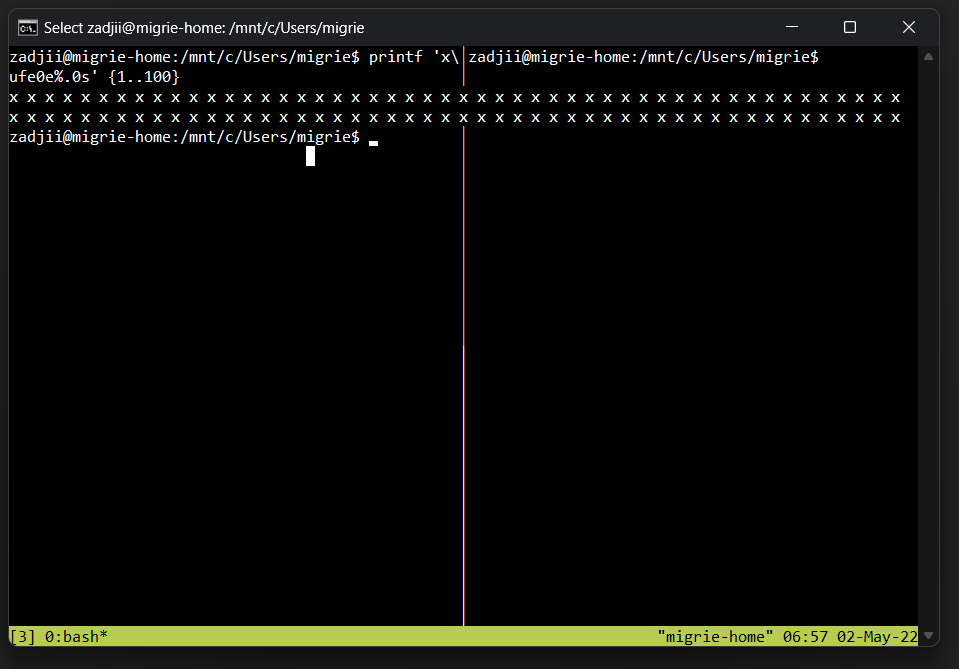
So that's at least the root of the issue. Now how do we reconcile what conhost thinks here with what tmux thinks? That's the hard question.
@j4james commented on GitHub (May 2, 2022):
I've been assuming this would all be resolved by the epic buffer rewrite from issue #8000. Right now we can't handle characters or character combinations that occupy two positions in the buffer, but are only meant to occupy one cell on the screen (zero width joiners are probably one case, surrogate pairs that are meant to render as narrow-width glyphs would be another).
But I've been thinking, if the buffer rewrite isn't going to happen anytime soon, we might be able to hack a quick fix by just not storing those kinds of characters in the first place. Basically if we receive a zero-width joiner, just drop it. Similarly for narrow-width surrogate pairs, we could store a single error glyph instead. It's obviously not going to look right, but at least it won't then break the whole layout of the page.
There may still be other problems that are causing tmux to break, but I think it would help immensely if we could rule out all the obvious buffer-related causes.
@marwan38 commented on GitHub (May 28, 2022):
Nice to see the issue i'm battling with wasn't just me. I see a similar issue within neovim as well. I initially thought it was the terminal overrides in the tmux config.
Alacritty 0.10.1 on Windows 11
@princejoogie commented on GitHub (Jun 2, 2022):
I am experiencing this issue in both windows terminal and alacritty.
Referencing an alacritty issue (https://github.com/alacritty/alacritty/issues/5483) as it says it might be a windows bug not alacritty/terminal
Here is what happens in Alacritty
https://user-images.githubusercontent.com/47204120/171546527-4565676b-f6fa-4dc8-af68-339ab919d0dc.mp4
NOTE: Weirdly enough, the render issue only happens in vertical tmux splits not horizontal (at least in my case)
@3N4N commented on GitHub (Jun 19, 2022):
I am experiencing this bug as well in tmux v3.2a. But have you tried tmux v3.3a, @princejoogie? It appears to not cause that issue. I can't tell if the bug is fixed or if only my repro case is fixed.
@Knapptr commented on GitHub (Jun 20, 2022):
This happens here as well. WSL 2, Ubuntu22.04, Windows Terminal Version: 1.13.11431.0. Tmux 3.2A.
Closing the terminal window or detaching from tmux resolves the issue.something seems to be happening when firefox is launched for the CRA dev server.
Launching firefox directly from the Ubuntu shell does not cause the issue.
Setting the CRA start script to
"start": "BROWSER=none react-scripts startprevents the browser from auto-launching, and prevents the issue.@vitale232 commented on GitHub (Jun 20, 2022):
Reading through this thread, zadjii's comment regarding nerdfonts combined with some other comments about line wrapping struck a chord.
I am using WSL2 Ubuntu 20.04 on Windows 10, and I have Oh My Posh installed to theme my shell. I was consistently running into rendering issues with tmux. Split panes were a mess, and neovim completions were having rendering artifacts too. Quite distracting.
By simply switching my oh my posh theme, I seem to have a lot more predictable rendering within my tmux session. I was previously using the
thecyberdentheme from oh my posh, which renders the command's time right aligned on every command. Now, I'm using a theme that does not have the right-aligned text (e.g.darkblood), and I'm unable to replicate the rendering issues. Hopefully this lasts! And hopefully this helps someone else...Update 6h later: I spent most of the day with the different theme, and things are definitely better, but the bug is very much present
@marwan38 commented on GitHub (Jun 20, 2022):
Just for context: I am writing this at 3:45 AM as I woke up because of how cold it is and I was hungry. I received an email, and as soon as I read your comment, I knew that this was the fix.
I have set up p10k as my zsh theme, and it does include right aligned text. I've disabled it and now the rendering issue has been fixed. I need to give it a little bit more time, but, there's no more weird artifacts with split windows, my neovim is totally fine. Thank you!!
EDIT: Spoke too soon :) Still facing the issue. Going to try to update tmux, currently on 3.0a
@rodrigomartin commented on GitHub (Jul 6, 2022):
This works for me.
The problem appears only after runs npm start
@mlcamilli commented on GitHub (Aug 1, 2022):
@marwan38 did upgrading fix this issue?
@marwan38 commented on GitHub (Aug 2, 2022):
@mlcamilli It did not, anything that renders on the right side of the screen causes this issue. It was partially fixed by changing my zsh theme based on the
Oh my poshrecommendation above. Whenever something decides to render on the right hand side, it comes back :(. I think I am on 3.3a last time I tried.@robertwt7 commented on GitHub (Aug 8, 2022):
this is still happening on tmux 3.3a, with windows terminal preview and oh my zsh powerlevel10k theme
@ghshephard commented on GitHub (Sep 8, 2022):
Microsoft Terminal latest (1.14.2281.0) and tmux latest (3.4) - same issue. I can trigger it with something as trivial as an empty tmux.conf and "\h \u $" PS1 - doing a single horizontal split breaks tmux.
@ghshephard commented on GitHub (Sep 8, 2022):
I have a fix for my issue - disable Windows Scrollback in Ubuntu Terminal - works fine now.
@scallister commented on GitHub (Sep 9, 2022):
If it's now reproducible and you have a fix for it, that gives me hope that this can finally be resolved 🤔. Good find @ghshephard! 😃
@Gee19 commented on GitHub (Sep 9, 2022):
@ghshephard Do you have more information on how to disable the setting you mentioned?
@ghshephard commented on GitHub (Sep 9, 2022):
You can disable your scrollback under Settings/Ubuntu/Advanced/History Size. Note that despite running really well for an hour or two, I eventually managed to confuse things so that we started seeing issues again. So, this is a fix for many, but not all cases.
@sobanieca commented on GitHub (Sep 24, 2022):
I'm facing similar issue with tmux. What I've noticed is that it starts to occur when I run some script via npm in other tab
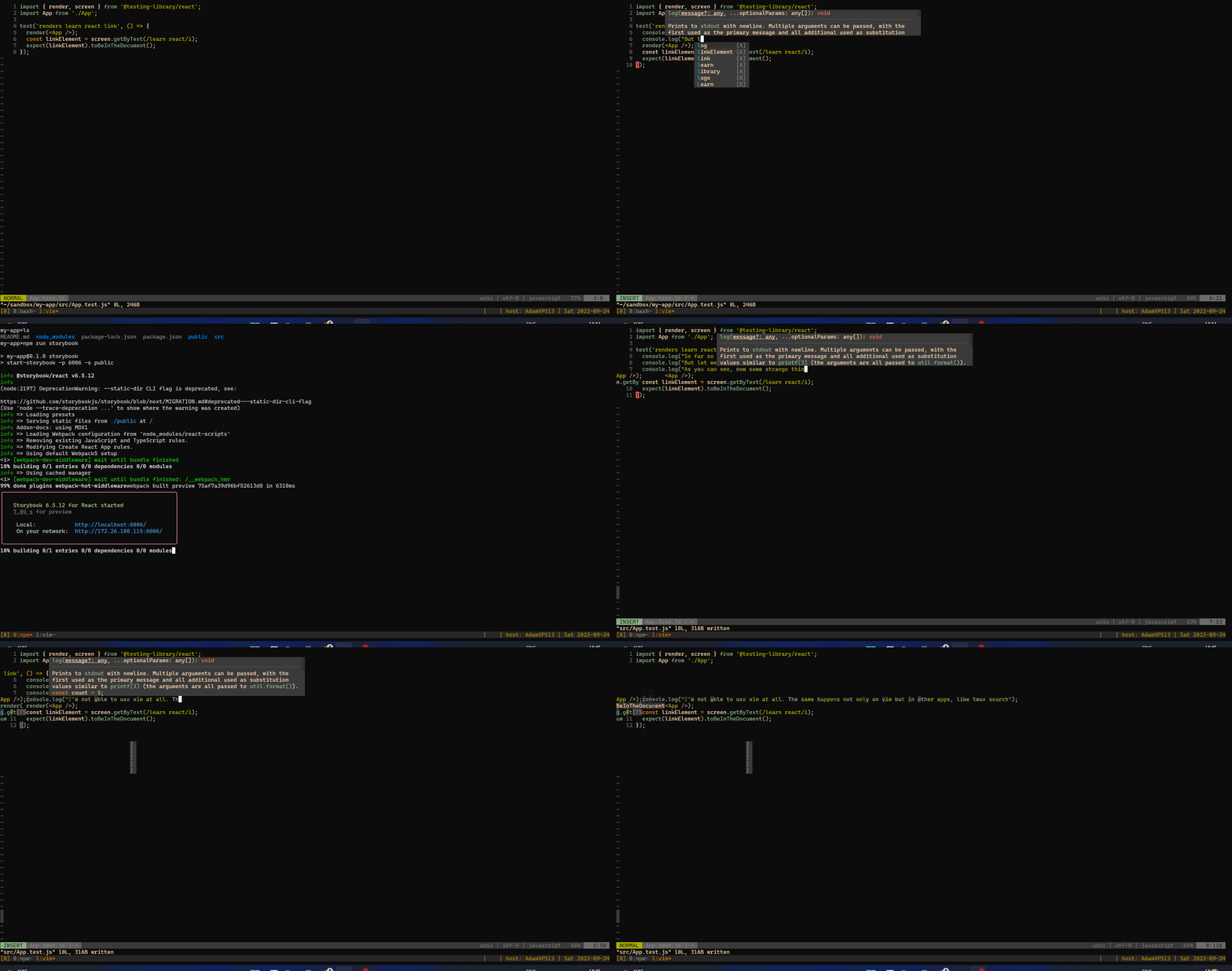
It's very irritating and blocks me from using terminal+tmux+vim. Actually, not only vim is affected, I've issues with tmux scroll as well, so I'm not suspecting it's a vim issue. My assumption is that npm prints some special character that breaks all other things. Are there any logs I can gather to help troubleshoot this issue?
Npm packages used:
@ghshephard commented on GitHub (Sep 24, 2022):
While ~70% of the issues have been fixed by disabling scrollback - I continue to see problems and corruptions - more often on my large 30" monitor - and almost always when I do a vertical split of a window into two tmux panes - Horizontal splits are rarely a problem. I have a (horrible) workaround - which is to kill the tmux-server and restart it (resurrection plugin restores all my panes/scroll back - so not the end of the world). This is definitely a windows terminal issues - I used tmux for 2+ years on a linux system - never once saw a corruption - and I see it daily on windows terminal. What I find surprising is that surely there are a lot of people who (A) use WSL, (B) used tmux, (C) use windows terminal - so there must be a lot of people experiencing this problem every day - Unless splitting a window vertically is just an uncommon thing.?
@chrisl8 commented on GitHub (Sep 24, 2022):
@ghshephard Same. I have used PuTTY and whatever desktop terminal program came with Linux since the 90's, using screen and later tmux, and I've always used vertical splits as part of my daily routine. I've never seen this issue in any other terminal or SSH program. That includes using sh, csh, bash, and zsh, with every kind of fancy font setup.
I'm in my second year of using WSL 2 as my daily driver and I only cope by just having entirely changed my habits. I don't use vertical splits anymore because they NEVER work. At least once a week I try it by accident out of habit, and it always immediately fails. (I should change/delete the vertical split shortcut in my tmux conf file, but I'm stubbornly hoping it will work someday.)
It is shocking to me that this is such an issue, because this is a solved problem. Terminal emulators have had zero issue with this on Linux and Mac for decades, and other Windows terminal emulators like PuTTY have no issue with it. I've never built a terminal emulator before though so I can't really judge why this is such a difficult problem to solve, despite being solved already in many other places.
This is of of the things that I'm waiting to be fixed before I can tell my Linux and Mac friends to try out Windows.
I think the reality is that most Linux power users avoid Windows, and this is one of the things that they would point to as their reason.
Let me close by saying, let me know if there is anything I can do to help. I would love to provide logs or test any ideas anyone has. I really do love and appreciate how the Windows Terminal team is being so open about their process, accepting and responding to bug reports, and making release notes. It is the reason I am a WSL 2 user. My criticism here is out of love, not because I don't respect and admire the work being done here.
@ghshephard commented on GitHub (Sep 25, 2022):
+1 on PuTTY working flawlessly. I worked on site in Dubai for a summer back in 2013 - and had to use a jump host via RDP on windows into a linux (RedHat) server farm. 6-8 hours days for several months using tmux in that combination and there was never a hiccup. I'm right with you that WSL / Windows Terminal are, 99.9% of the time, an absolutely wonderful combination, incredibly performant (particularly when you are pasting several 10s of thousand of lines) and responsive, and if we could only resolve this one issue - it would be perfection in my books. I'm also ready to sign up to work with the developers to capture debug logs, (though hopefully my test above with scroll backs is reproducible - and might offer some guidance), beta-test, whatever is required to help run this down - particularly as I now spend 8-10 hours/day in WSL/Windows Terminal/Tmux - I have some significant skin in this game.
@davidKristiansen commented on GitHub (Sep 26, 2022):
I found a weird workaround that works for me.
opening tmux with a split in one Terminal tab. Here I see the rendering error.
open a new terminal tab and attach to the tmux session. Now the issue has miraculously disappeared
@maxbane commented on GitHub (Sep 26, 2022):
I'm sorry to say, but this bug was such a deal-breaker that it prodded me to investigate alternative terminal emulators for Windows (others have already mentioned PuTTY, of course). I found Alacritty and have since moved all of my WSL workflows over to it rather than Windows Terminal. I highly recommend it -- it's GPU-accelerated and very configurable with a single YAML config file -- you can tweak arbitrary keybindings and even visual minutiae like how many pixels the window borders use, very nice if you have a tiling setup. And of course you can use your daily driver programs like tmux and vim without fear of corrupting the display and having to restart your terminal every 10 minutes lolol.
It's been, what, like 2 years? Time to move on.
@agilesteel commented on GitHub (Sep 26, 2022):
@maxbane yeah I'm also on Alacritty, just wish it had ligatures, stylistic sets and custom backgrounds.
@itachi-19 commented on GitHub (Sep 26, 2022):
This works!!! Thanks a lot. :)
@oieeaaaa commented on GitHub (Oct 15, 2022):
thanks @maxbane for recommending alacritty... I'm gonna check it out. I love using tmux but ever since i moved to WSL this has been a recurring issue to me and i dont seem to find a good solution so...
@jcherven commented on GitHub (Oct 15, 2022):
I was also finding refuge in Alacritty (have been a very happy user of it on Linux and MacOS for years) but in Windows Alacritty still has problems dealing with the system clipboard and NeoVim mouse events (https://github.com/alacritty/alacritty/issues/1663). These days to mitigate the bug in question I just have to run my Nodejs servers in a separate WT tab without Tmux.
I don't feel that a "great" terminal emulator should have this problem, but I have to use it this way at work and consider it just another Windows UX hazard that breaks the Unix immersion of using WSL interactively.
@agilesteel commented on GitHub (Oct 15, 2022):
For those of you who use
byobu- a tmux wrapper maybe hittingF5- refresh will help.@maxbane commented on GitHub (Oct 17, 2022):
@jcherven Fair point about mouse support, although the issue you linked seems to have multiple people indicating that it's fixed in Windows 11. I've also heard good things about wezterm in Windows, though haven't yet tried it myself.
@dhensen commented on GitHub (Nov 4, 2022):
I have this same issue on WSL2. Opening a new terminal tab and attaching to tmux does not help.
Alacritty on windows still gives problems. No it's not related to npm packages, there are days where no js/ts code is being touched, but python, still the same issue. I don't want to give up on my setup: tmux + nvim, but I'm losing it slowly.
What else could it be? I'm on tmux 3.0a (ubuntu 20.04 LTS WSL2)
Not a pane in sight (on this window) but lots of panes open in other windows.
@dhensen commented on GitHub (Nov 4, 2022):
Oh I forgot to mention. I use two tmux sessions, where they share the windows. So I can have two alacritty terminals full screen on two monitors. The right monitor will have my testrunner window on all the time. I have a case where the alacritty+tmux on the left is OK and the one on the right on the same window is not. Hard to explain, but here is a screenshot:
(I have put both terminal windows on one desktop to make the screenshot. you just have to believe that what you are looking at are two tmux sessions that share windows and are visually supposed to be in sync. When putting them both on one monitor, the left now also has weird gaps...)
@mlcamilli commented on GitHub (Jan 3, 2023):
for whoever this helps, I had no luck with any version or even with alacritty, HOWEVER recently came across WezTerm https://wezfurlong.org/wezterm/install/windows.html and it has worked like a charm. Very easy to setup and configure, and no rendering issues.
@theanuragshukla commented on GitHub (Jan 7, 2023):
If Anyone is still having this issue, try installing Windows Terminal Preview from the microsoft store. Hopefully this issue will be resolved in upcoming versions of Terminal.
@avamsi commented on GitHub (Jan 13, 2023):
^ Can confirm I don't have this issue anymore with the Preview version 1.16.3460.0, thanks @theanuragshukla!
@zadjii-msft commented on GitHub (Jan 13, 2023):
I honestly don't really think there's anything in 1.16.3460 that would have fixed this.... I'd be excited to find out that it was fixed by chance.
https://github.com/microsoft/terminal/compare/v1.15.3465.0...v1.16.3463.0
Maybe:
okay 200 commits later and that looks like the only one that might affect this. But I'm pretty sure WSL wouldn't be invoking a
ReadConsoleOutputat any point. Weird. There are some changes in 1.17 that do more to mess with the buffer. Those changes I'd think would be more likely to improve this. That being said, the repro in https://github.com/microsoft/terminal/issues/6987#issuecomment-917256763 is still broken in 1.17, so 🤷@avamsi commented on GitHub (Jan 14, 2023):
Yeah, it wasn't the Preview (unfortunately) but as someone else mentioned above, seems like just connecting from another client (which happened to be Preview) that "fixed" the issue for me.
@ryuheechul commented on GitHub (Jan 21, 2023):
So above works for me too!
And this can be translated to below if you just want to have one terminal at a time:
Steps above are well aligned for my specific Alacritty setup which attaches to tmux when launched - via alias - and that also makes detaching quits the terminal.
And after these steps, it stays fine even after a triggering action that breaks pane in the first place.
A triggering action for me is the use of starship with zsh via toggleterm in neovim and this didn't happen with other platforms like macOS but only with WSL. (starship in tmux directly seems to be fine)
This also happens with Alacritty (Windows native) as well as the windows Terminal app.
Also when I see this issue with Tmux, I don't see that with Zellij (possibly because Zellij doesn't support passthrough yet).
@jradam commented on GitHub (Feb 14, 2023):
Also getting this issue when running any kind of terminal process. Whether using tmux or not. As soon as I have a terminal process running somewhere, glitches start showing up.
The glitches take a while to creep in, but can be triggered instantly by opening a floating window in Vim:
https://user-images.githubusercontent.com/15231996/218722034-0c694b06-9045-4fde-b6c4-fe1852b544da.mp4
@j4james commented on GitHub (Feb 14, 2023):
@jradam If you can reproduce the issue easily, it would be helpful if you could record your vim session using the Linux script command, and then we can see exactly what it's doing that is triggering the problem.
@jradam commented on GitHub (Feb 14, 2023):
@j4james sure thing. Here is a video of a working terminal window becoming "corrupted", as well as the script as requested.
https://user-images.githubusercontent.com/15231996/218750818-d7e8460e-63ee-466b-b5ed-daaf7daf48a6.mp4
typescript.zip
@j4james commented on GitHub (Feb 16, 2023):
@jradam Thanks for that script capture, but you need to run
scriptbefore you start vim. I know almost nothing about vim, so I'm not really sure what you're doing, but it looks to me like you've started a shell from within vim. All that's been captured is the output of that shell - theyarnexecution - and nothing from vim itself.@jradam commented on GitHub (Feb 16, 2023):
@j4james no problem, here's a video and scripts showing the complete flow.
There are two scripts, as I ran it again for the new tmux window. I presume the first script would not capture what was happening in a new window. This was in a different directory, so the first script was not overwritten.
To recreate the issue, you have to use something like tmux (or in the case of my previous video, Neovim's built-in terminal) to run a process. In the video below I use tmux. You can see visual glitches start to appear in the numberline on the left once I start editing a file.
When I do it through tmux, opening windows does not instantly cause glitches like in my previous video. But the glitches seem to be of the same type, and either way they slowly get worse over time and spread all over the window - until your code is illegible and you have to restart Windows Terminal.
Hope this helps!
typescript-files.zip
https://user-images.githubusercontent.com/15231996/219384355-3f2a2bc0-2bc4-4a79-b964-5a63035bc2dc.mp4
@j4james commented on GitHub (Feb 16, 2023):
@jradam That was perfect, thanks. This looks to me like the same problem as #14690. The
DISABLE_NEWLINE_AUTO_RETURNmode has been inadvertently reset, so a line feed forces a carriage return, and when tmux or vim try to move the cursor down a line, it's also mistakenly moved to the leftmost column. This results in things being rendered in the wrong place, e.g. when hilighting the import on the second line, it gets redrawn too far to the left.In your case I'm assuming the mode change was triggered by yarn rather than wslsys (this would be an internal API call, so it's not something I can tell from the script log), but I'm hoping it will also be fixed by PR #14735.
@jradam commented on GitHub (Feb 17, 2023):
@j4james great! Hopefully that will sort it. Thanks James, looking forward to the next release then.
@sw00 commented on GitHub (Mar 16, 2023):
After almost 3 years and exactly 100 comments later, I believe this has finally been fixed in the latest builds:
The new text rendering engine had to be enabled (I think):

Here it is in action:

Though I haven't active in the comments, I've been following it closely as I encounter it daily in my workflow.
I'm happy to declare this issue now resolved and closed. 🖖🏽
@yveslange commented on GitHub (Mar 20, 2023):
"Redraw entire screen when display updates" was causing me a lot of issues with Tmux, Vim and React-Scripts (the start command). Disabled and everything is fine now.
Windows 10 - Version 21H2 - OS Build 19044.2604
Terminal 1.16.10.261.0
Ubuntu - WSL 2
Tmux 3.0a
NVIM v0.4.3
@inigohidalgo commented on GitHub (Jun 22, 2023):
FWIW none of the above worked for me. What ended up doing the trick for me was setting
set -ag terminal-overrides ',*:cud1=\E[1B'in my
.tmux.conf