Compare commits
2 Commits
dev/miniks
...
dev/migrie
| Author | SHA1 | Date | |
|---|---|---|---|

|
da6dc0693c | ||
|
|
311c4e13a5 |
4
.github/ISSUE_TEMPLATE/Bug_Report.md
vendored
@@ -1,7 +1,7 @@
|
||||
---
|
||||
name: "Bug report 🐛"
|
||||
name: Bug report 🐛
|
||||
about: Report errors or unexpected behavior
|
||||
title: ''
|
||||
title: "Bug Report (IF I DO NOT CHANGE THIS THE ISSUE WILL BE AUTO-CLOSED)"
|
||||
labels: ''
|
||||
assignees: ''
|
||||
|
||||
|
||||
@@ -1,7 +1,7 @@
|
||||
---
|
||||
name: "Documentation Issue 📚"
|
||||
name: Documentation Issue 📚
|
||||
about: Report issues in our documentation
|
||||
title: ''
|
||||
title: "Documentation Issue"
|
||||
labels: Issue-Docs
|
||||
assignees: ''
|
||||
|
||||
|
||||
69
.github/ISSUE_TEMPLATE/Feature_Request.md
vendored
@@ -1,35 +1,34 @@
|
||||
---
|
||||
name: "Feature Request/Idea 🚀"
|
||||
about: Suggest a new feature or improvement (this does not mean you have to implement
|
||||
it)
|
||||
title: ''
|
||||
labels: Issue-Feature
|
||||
assignees: ''
|
||||
|
||||
---
|
||||
|
||||
<!--
|
||||
🚨🚨🚨🚨🚨🚨🚨🚨🚨🚨
|
||||
|
||||
I ACKNOWLEDGE THE FOLLOWING BEFORE PROCEEDING:
|
||||
1. If I delete this entire template and go my own path, the core team may close my issue without further explanation or engagement.
|
||||
2. If I list multiple bugs/concerns in this one issue, the core team may close my issue without further explanation or engagement.
|
||||
3. If I write an issue that has many duplicates, the core team may close my issue without further explanation or engagement (and without necessarily spending time to find the exact duplicate ID number).
|
||||
4. If I leave the title incomplete when filing the issue, the core team may close my issue without further explanation or engagement.
|
||||
5. If I file something completely blank in the body, the core team may close my issue without further explanation or engagement.
|
||||
|
||||
All good? Then proceed!
|
||||
-->
|
||||
|
||||
# Description of the new feature/enhancement
|
||||
|
||||
<!--
|
||||
A clear and concise description of what the problem is that the new feature would solve.
|
||||
Describe why and how a user would use this new functionality (if applicable).
|
||||
-->
|
||||
|
||||
# Proposed technical implementation details (optional)
|
||||
|
||||
<!--
|
||||
A clear and concise description of what you want to happen.
|
||||
-->
|
||||
---
|
||||
name: Feature Request/Idea 🚀
|
||||
about: Suggest a new feature or improvement (this does not mean you have to implement it)
|
||||
title: "Feature Request"
|
||||
labels: Issue-Feature
|
||||
assignees: ''
|
||||
|
||||
---
|
||||
|
||||
<!--
|
||||
🚨🚨🚨🚨🚨🚨🚨🚨🚨🚨
|
||||
|
||||
I ACKNOWLEDGE THE FOLLOWING BEFORE PROCEEDING:
|
||||
1. If I delete this entire template and go my own path, the core team may close my issue without further explanation or engagement.
|
||||
2. If I list multiple bugs/concerns in this one issue, the core team may close my issue without further explanation or engagement.
|
||||
3. If I write an issue that has many duplicates, the core team may close my issue without further explanation or engagement (and without necessarily spending time to find the exact duplicate ID number).
|
||||
4. If I leave the title incomplete when filing the issue, the core team may close my issue without further explanation or engagement.
|
||||
5. If I file something completely blank in the body, the core team may close my issue without further explanation or engagement.
|
||||
|
||||
All good? Then proceed!
|
||||
-->
|
||||
|
||||
# Description of the new feature/enhancement
|
||||
|
||||
<!--
|
||||
A clear and concise description of what the problem is that the new feature would solve.
|
||||
Describe why and how a user would use this new functionality (if applicable).
|
||||
-->
|
||||
|
||||
# Proposed technical implementation details (optional)
|
||||
|
||||
<!--
|
||||
A clear and concise description of what you want to happen.
|
||||
-->
|
||||
|
||||
10
.github/ISSUE_TEMPLATE/Guidance_Issue.md
vendored
Normal file
@@ -0,0 +1,10 @@
|
||||
---
|
||||
name: Community Guidance Request ✨
|
||||
about: Suggest somewhere the Windows Terminal Team needs to provide community guidance through new documentation or process.
|
||||
title: "Guidance"
|
||||
labels: Issue-Docs
|
||||
assignees: 'bitcrazed'
|
||||
|
||||
---
|
||||
|
||||
<!-- What needs to change? Who is responsible for it? Why is it an open question? -->
|
||||
5
.gitignore
vendored
@@ -162,7 +162,7 @@ PublishScripts/
|
||||
!**/packages/build/
|
||||
# Uncomment if necessary however generally it will be regenerated when needed
|
||||
#!**/packages/repositories.config
|
||||
# NuGet v3's project.json files produces more ignorable files
|
||||
# NuGet v3's project.json files produces more ignoreable files
|
||||
*.nuget.props
|
||||
*.nuget.targets
|
||||
|
||||
@@ -261,9 +261,6 @@ build*.rec
|
||||
build*.wrn
|
||||
build*.metadata
|
||||
|
||||
# MS Build binary logs
|
||||
*.binlog
|
||||
|
||||
# .razzlerc.cmd file - used by dev environment
|
||||
tools/.razzlerc.*
|
||||
# .PowershellModules - if one needs a powershell module dependency, one
|
||||
|
||||
@@ -1,9 +1,8 @@
|
||||
# Microsoft Open Source Code of Conduct
|
||||
# Code of Conduct
|
||||
|
||||
This project has adopted the [Microsoft Open Source Code of Conduct](https://opensource.microsoft.com/codeofconduct/).
|
||||
This project has adopted the [Microsoft Open Source Code of Conduct][conduct-code].
|
||||
For more information see the [Code of Conduct FAQ][conduct-FAQ] or contact [opencode@microsoft.com][conduct-email] with any additional questions or comments.
|
||||
|
||||
Resources:
|
||||
|
||||
- [Microsoft Open Source Code of Conduct](https://opensource.microsoft.com/codeofconduct/)
|
||||
- [Microsoft Code of Conduct FAQ](https://opensource.microsoft.com/codeofconduct/faq/)
|
||||
- Contact [opencode@microsoft.com](mailto:opencode@microsoft.com) with questions or concerns
|
||||
[conduct-code]: https://opensource.microsoft.com/codeofconduct/
|
||||
[conduct-FAQ]: https://opensource.microsoft.com/codeofconduct/faq/
|
||||
[conduct-email]: mailto:opencode@microsoft.com
|
||||
|
||||
66
NOTICE.md
@@ -47,69 +47,3 @@ ACTION OF CONTRACT, TORT OR OTHERWISE, ARISING FROM, OUT OF OR IN
|
||||
CONNECTION WITH THE SOFTWARE OR THE USE OR OTHER DEALINGS IN THE
|
||||
SOFTWARE.
|
||||
```
|
||||
|
||||
## telnetpp
|
||||
|
||||
**Source**: https://github.com/KazDragon/telnetpp
|
||||
|
||||
### License
|
||||
|
||||
```
|
||||
The MIT License (MIT)
|
||||
|
||||
Copyright (c) 2015-2017 Matthew Chaplain a.k.a KazDragon
|
||||
|
||||
Permission is hereby granted, free of charge, to any person obtaining a copy
|
||||
of this software and associated documentation files (the "Software"), to deal
|
||||
in the Software without restriction, including without limitation the rights
|
||||
to use, copy, modify, merge, publish, distribute, sublicense, and/or sell
|
||||
copies of the Software, and to permit persons to whom the Software is
|
||||
furnished to do so, subject to the following conditions:
|
||||
|
||||
The above copyright notice and this permission notice shall be included in all
|
||||
copies or substantial portions of the Software.
|
||||
|
||||
THE SOFTWARE IS PROVIDED "AS IS", WITHOUT WARRANTY OF ANY KIND, EXPRESS OR
|
||||
IMPLIED, INCLUDING BUT NOT LIMITED TO THE WARRANTIES OF MERCHANTABILITY,
|
||||
FITNESS FOR A PARTICULAR PURPOSE AND NONINFRINGEMENT. IN NO EVENT SHALL THE
|
||||
AUTHORS OR COPYRIGHT HOLDERS BE LIABLE FOR ANY CLAIM, DAMAGES OR OTHER
|
||||
LIABILITY, WHETHER IN AN ACTION OF CONTRACT, TORT OR OTHERWISE, ARISING FROM,
|
||||
OUT OF OR IN CONNECTION WITH THE SOFTWARE OR THE USE OR OTHER DEALINGS IN THE
|
||||
SOFTWARE.
|
||||
```
|
||||
|
||||
## chromium/base/numerics
|
||||
|
||||
**Source**:
|
||||
|
||||
### License
|
||||
|
||||
```
|
||||
Copyright 2015 The Chromium Authors. All rights reserved.
|
||||
|
||||
Redistribution and use in source and binary forms, with or without
|
||||
modification, are permitted provided that the following conditions are
|
||||
met:
|
||||
|
||||
* Redistributions of source code must retain the above copyright
|
||||
notice, this list of conditions and the following disclaimer.
|
||||
* Redistributions in binary form must reproduce the above
|
||||
copyright notice, this list of conditions and the following disclaimer
|
||||
in the documentation and/or other materials provided with the
|
||||
distribution.
|
||||
* Neither the name of Google Inc. nor the names of its
|
||||
contributors may be used to endorse or promote products derived from
|
||||
this software without specific prior written permission.
|
||||
|
||||
THIS SOFTWARE IS PROVIDED BY THE COPYRIGHT HOLDERS AND CONTRIBUTORS
|
||||
"AS IS" AND ANY EXPRESS OR IMPLIED WARRANTIES, INCLUDING, BUT NOT
|
||||
LIMITED TO, THE IMPLIED WARRANTIES OF MERCHANTABILITY AND FITNESS FOR
|
||||
A PARTICULAR PURPOSE ARE DISCLAIMED. IN NO EVENT SHALL THE COPYRIGHT
|
||||
OWNER OR CONTRIBUTORS BE LIABLE FOR ANY DIRECT, INDIRECT, INCIDENTAL,
|
||||
SPECIAL, EXEMPLARY, OR CONSEQUENTIAL DAMAGES (INCLUDING, BUT NOT
|
||||
LIMITED TO, PROCUREMENT OF SUBSTITUTE GOODS OR SERVICES; LOSS OF USE,
|
||||
DATA, OR PROFITS; OR BUSINESS INTERRUPTION) HOWEVER CAUSED AND ON ANY
|
||||
THEORY OF LIABILITY, WHETHER IN CONTRACT, STRICT LIABILITY, OR TORT
|
||||
(INCLUDING NEGLIGENCE OR OTHERWISE) ARISING IN ANY WAY OUT OF THE USE
|
||||
OF THIS SOFTWARE, EVEN IF ADVISED OF THE POSSIBILITY OF SUCH DAMAGE.
|
||||
```
|
||||
556
OpenConsole.sln
215
README.md
@@ -1,175 +1,157 @@
|
||||
# Welcome to the Windows Terminal, Console and Command-Line repo
|
||||
# Welcome\!
|
||||
#### This repository contains the source code for:
|
||||
|
||||
This repository contains the source code for:
|
||||
* [Windows Terminal](https://www.microsoft.com/en-us/p/windows-terminal-preview/9n0dx20hk701)
|
||||
* The Windows console host (`conhost.exe`)
|
||||
* Components shared between the two projects
|
||||
* [ColorTool](https://github.com/Microsoft/Terminal/tree/master/src/tools/ColorTool)
|
||||
* [Sample projects](https://github.com/Microsoft/Terminal/tree/master/samples) that show how to consume the Windows Console APIs
|
||||
|
||||
#### Other related repositories include:
|
||||
* [Console API Documentation](https://github.com/MicrosoftDocs/Console-Docs)
|
||||
|
||||
* [Windows Terminal](https://www.microsoft.com/en-us/p/windows-terminal-preview/9n0dx20hk701)
|
||||
* The Windows console host (`conhost.exe`)
|
||||
* Components shared between the two projects
|
||||
* [ColorTool](https://github.com/Microsoft/Terminal/tree/master/src/tools/ColorTool)
|
||||
* [Sample projects](https://github.com/Microsoft/Terminal/tree/master/samples) that show how to consume the Windows Console APIs
|
||||
## Installation
|
||||
|
||||
Related repositories include:
|
||||
_(Note: in order to run the Windows Terminal, you'll need to be running at least Windows build 18362 or higher.)_
|
||||
|
||||
* [Console API Documentation](https://github.com/MicrosoftDocs/Console-Docs)
|
||||
* [Cascadia Code Font](https://github.com/Microsoft/Cascadia-Code)
|
||||
### Microsoft Store
|
||||
|
||||
## Installing and running Windows Terminal
|
||||
Download the Microsoft Terminal free from the Microsoft Store and it'll be continuously updated. Or, feel free to side-load [releases](https://github.com/microsoft/terminal/releases) from GitHub, but note they won't auto-update.
|
||||
|
||||
> 👉 Note: Windows Terminal requires Windows 10 1903 (build 18362) or later
|
||||
<a href='//www.microsoft.com/store/apps/9n0dx20hk701?cid=storebadge&ocid=badge'><img src='https://assets.windowsphone.com/85864462-9c82-451e-9355-a3d5f874397a/English_get-it-from-MS_InvariantCulture_Default.png' alt='English badge' width="284" height="104" style='width: 284px; height: 104px;'/></a>
|
||||
|
||||
### Microsoft Store [Recommended]
|
||||
### Chocolatey (Unofficial)
|
||||
|
||||
Install the [Windows Terminal from the Microsoft Store][store-install-link]. This allows you to always be on the latest version when we release new builds with automatic upgrades.
|
||||
|
||||
This is our preferred method.
|
||||
|
||||
### Other install methods
|
||||
|
||||
#### Via GitHub
|
||||
|
||||
For users who are unable to install Terminal from the Microsoft Store, Terminal builds can be manually downloaded from this repository's [Releases page](https://github.com/microsoft/terminal/releases).
|
||||
|
||||
> ⚠ Note: If you install Terminal manually:
|
||||
>
|
||||
> * Be sure to install the [Desktop Bridge VC++ v14 Redistributable Package](https://www.microsoft.com/en-us/download/details.aspx?id=53175) otherwise Terminal may not install and/or run and may crash at startup
|
||||
> * Terminal will not auto-update when new builds are released so you will need to regularly install the latest Terminal release to receive all the latest fixes and improvements!
|
||||
|
||||
#### Via Chocolatey (unofficial)
|
||||
|
||||
[Chocolatey](https://chocolatey.org) users can download and install the latest Terminal release by installing the `microsoft-windows-terminal` package:
|
||||
Download and upgrade the Windows Terminal from [Chocolatey](https://chocolatey.org).
|
||||
|
||||
To install Windows Terminal, run the following command from the command line or from PowerShell:
|
||||
```powershell
|
||||
choco install microsoft-windows-terminal
|
||||
```
|
||||
|
||||
To upgrade Windows Terminal using Chocolatey, run the following:
|
||||
|
||||
To upgrade Windows Terminal, run the following command from the command line or from PowerShell:
|
||||
```powershell
|
||||
choco upgrade microsoft-windows-terminal
|
||||
```
|
||||
|
||||
If you have any issues when installing/upgrading the package please go to the [Windows Terminal package page](https://chocolatey.org/packages/microsoft-windows-terminal) and follow the [Chocolatey triage process](https://chocolatey.org/docs/package-triage-process)
|
||||
If you have any issues when installing/upgrading the package please go to the [package page](https://chocolatey.org/packages/microsoft-windows-terminal) and follow the [Chocolatey triage process](https://chocolatey.org/docs/package-triage-process)
|
||||
|
||||
---
|
||||
|
||||
## Project Build Status
|
||||
### Build Status
|
||||
|
||||
Project|Build Status
|
||||
---|---
|
||||
Terminal|[](https://dev.azure.com/ms/Terminal/_build?definitionId=136)
|
||||
ColorTool|
|
||||
|
||||
---
|
||||
|
||||
## Windows Terminal v1.0 Roadmap
|
||||
|
||||
The plan for delivering Windows Terminal v1.0 [is described here](/doc/terminal-v1-roadmap.md), and will be updated as the project proceeds.
|
||||
|
||||
---
|
||||
|
||||
## Terminal & Console Overview
|
||||
# Terminal & Console Overview
|
||||
|
||||
Please take a few minutes to review the overview below before diving into the code:
|
||||
|
||||
### Windows Terminal
|
||||
## Windows Terminal
|
||||
|
||||
Windows Terminal is a new, modern, feature-rich, productive terminal application for command-line users. It includes many of the features most frequently requested by the Windows command-line community including support for tabs, rich text, globalization, configurability, theming & styling, and more.
|
||||
|
||||
The Terminal will also need to meet our goals and measures to ensure it remains fast and efficient, and doesn't consume vast amounts of memory or power.
|
||||
The Terminal will also need to meet our goals and measures to ensure it remains fast, and efficient, and doesn't consume vast amounts of memory or power.
|
||||
|
||||
### The Windows Console Host
|
||||
## The Windows console host
|
||||
|
||||
The Windows Console host, `conhost.exe`, is Windows' original command-line user experience. It also hosts Windows' command-line infrastructure and the Windows Console API server, input engine, rendering engine, user preferences, etc. The console host code in this repository is the actual source from which the `conhost.exe` in Windows itself is built.
|
||||
The Windows console host, `conhost.exe`, is Windows' original command-line user experience. It implements Windows' command-line infrastructure, and is responsible for hosting the Windows Console API, input engine, rendering engine, and user preferences. The console host code in this repository is the actual source from which the `conhost.exe` in Windows itself is built.
|
||||
|
||||
Since taking ownership of the Windows command-line in 2014, the team added several new features to the Console, including background transparency, line-based selection, support for [ANSI / Virtual Terminal sequences](https://en.wikipedia.org/wiki/ANSI_escape_code), [24-bit color](https://devblogs.microsoft.com/commandline/24-bit-color-in-the-windows-console/), a [Pseudoconsole ("ConPTY")](https://devblogs.microsoft.com/commandline/windows-command-line-introducing-the-windows-pseudo-console-conpty/), and more.
|
||||
Console's primary goal is to remain backwards-compatible with existing console subsystem applications.
|
||||
|
||||
However, because Windows Console's primary goal is to maintain backward compatibility, we have been unable to add many of the features the community (and the team) have been wanting for the last several years including tabs, unicode text, and emoji.
|
||||
Since assuming ownership of the Windows command-line in 2014, the team has added several new features to the Console, including window transparency, line-based selection, support for [ANSI / Virtual Terminal sequences](https://en.wikipedia.org/wiki/ANSI_escape_code), [24-bit color](https://devblogs.microsoft.com/commandline/24-bit-color-in-the-windows-console/), a [Pseudoconsole ("ConPTY")](https://devblogs.microsoft.com/commandline/windows-command-line-introducing-the-windows-pseudo-console-conpty/), and more.
|
||||
|
||||
However, because the Console's primary goal is to maintain backward compatibility, we've been unable to add many of the features the community has been asking for, and which we've been wanting to add for the last several years--like tabs!
|
||||
|
||||
These limitations led us to create the new Windows Terminal.
|
||||
|
||||
> You can read more about the evolution of the command-line in general, and the Windows command-line specifically in [this accompanying series of blog posts](https://devblogs.microsoft.com/commandline/windows-command-line-backgrounder/) on the Command-Line team's blog.
|
||||
## Shared Components
|
||||
|
||||
### Shared Components
|
||||
While overhauling the Console, we've modernized its codebase considerably. We've cleanly separated logical entities into modules and classes, introduced some key extensibility points, replaced several old, home-grown collections and containers with safer, more efficient [STL containers](https://docs.microsoft.com/en-us/cpp/standard-library/stl-containers?view=vs-2019), and made the code simpler and safer by using Microsoft's [WIL](https://github.com/Microsoft/wil) header library.
|
||||
|
||||
While overhauling Windows Console, we modernized its codebase considerably, cleanly separating logical entities into modules and classes, introduced some key extensibility points, replaced several old, home-grown collections and containers with safer, more efficient [STL containers](https://docs.microsoft.com/en-us/cpp/standard-library/stl-containers?view=vs-2019), and made the code simpler and safer by using Microsoft's [Windows Implementation Libraries - WIL](https://github.com/Microsoft/wil).
|
||||
This overhaul work resulted in the creation of several key components that would be useful for any terminal implementation on Windows, including a new DirectWrite-based text layout and rendering engine, a text buffer capable of storing both UTF-16 and UTF-8, and a VT parser/emitter.
|
||||
|
||||
This overhaul resulted in several of Console's key components being available for re-use in any terminal implementation on Windows. These components include a new DirectWrite-based text layout and rendering engine, a text buffer capable of storing both UTF-16 and UTF-8, a VT parser/emitter, and more.
|
||||
## Building a new terminal
|
||||
|
||||
### Creating the new Windows Terminal
|
||||
When we started building the new terminal application, we explored and evaluated several approaches and technology stacks. We ultimately decided that our goals would be best met by sticking with C++ and sharing the aforementioned modernized components, placing them atop the modern Windows application platform and UI framework.
|
||||
|
||||
When we started planning the new Windows Terminal application, we explored and evaluated several approaches and technology stacks. We ultimately decided that our goals would be best met by continuing our investment in our C++ codebase, which would allow us to reuse several of the aforementioned modernized components in both the existing Console and the new Terminal. Further, we realized that this would allow us to build much of the Terminal's core itself as a reusable UI control that others can incorporate into their own applications.
|
||||
Further, we realized that this would allow us to build the terminal's renderer and input stack as a reusable Windows UI control that others can incorporate into their applications.
|
||||
|
||||
The result of this work is contained within this repo and delivered as the Windows Terminal application you can download from the Microsoft Store, or [directly from this repo's releases](https://github.com/microsoft/terminal/releases).
|
||||
# FAQ
|
||||
|
||||
---
|
||||
## Where can I download Windows Terminal?
|
||||
|
||||
## Resources
|
||||
### The Windows Terminal preview can be downloaded from the Microsoft Store.
|
||||
|
||||
For more information about Windows Terminal, you may find some of these resources useful and interesting:
|
||||
[https://www.microsoft.com/en-us/p/windows-terminal-preview/9n0dx20hk701](https://www.microsoft.com/en-us/p/windows-terminal-preview/9n0dx20hk701)
|
||||
|
||||
* [Command-Line Blog](https://devblogs.microsoft.com/commandline)
|
||||
* [Command-Line Backgrounder Blog Series](https://devblogs.microsoft.com/commandline/windows-command-line-backgrounder/)
|
||||
* Windows Terminal Launch: [Terminal "Sizzle Video"](https://www.youtube.com/watch?v=8gw0rXPMMPE&list=PLEHMQNlPj-Jzh9DkNpqipDGCZZuOwrQwR&index=2&t=0s)
|
||||
* Windows Terminal Launch: [Build 2019 Session](https://www.youtube.com/watch?v=KMudkRcwjCw)
|
||||
* Run As Radio: [Show 645 - Windows Terminal with Richard Turner](http://www.runasradio.com/Shows/Show/645)
|
||||
* Azure Devops Podcast: [Episode 54 - Kayla Cinnamon and Rich Turner on DevOps on the Windows Terminal](http://azuredevopspodcast.clear-measure.com/kayla-cinnamon-and-rich-turner-on-devops-on-the-windows-terminal-team-episode-54)
|
||||
* Microsoft Ignite 2019 Session: [The Modern Windows Command Line: Windows Terminal - BRK3321](https://myignite.techcommunity.microsoft.com/sessions/81329?source=sessions)
|
||||
## I built and ran the new Terminal, but I just get a blank window app!
|
||||
|
||||
---
|
||||
Make sure you are building for your computer's architecture. If your box has a 64-bit Windows, change your Solution Platform to x64.
|
||||
To check your OS architecture go to Settings -> System -> About (or Win+X -> System) and under `Device specifications` check for the `System type`.
|
||||
|
||||
## FAQ
|
||||
## I built and ran the new Terminal, but it looks just like the old console! What gives?
|
||||
|
||||
### I built and ran the new Terminal, but it looks just like the old console
|
||||
Firstly, make sure you're building & deploying `CascadiaPackage` in Visual Studio, _NOT_ `Host.EXE`. `OpenConsole.exe` is just `conhost.exe`, the same old console you know and love. `opencon.cmd` will launch `openconsole.exe`, and unfortunately, `openterm.cmd` is currently broken.
|
||||
|
||||
Cause: You're launching the incorrect solution in Visual Studio.
|
||||
Secondly, try pressing <kbd>Ctrl</kbd> + <kbd>T</kbd>. The tabs are hidden when you only have one tab by default. In the future, the UI will be dramatically different, but for now, the defaults are _supposed_ to look like the console defaults.
|
||||
|
||||
Solution: Make sure you're building & deploying the `CascadiaPackage` project in Visual Studio.
|
||||
## I tried running WindowsTerminal.exe and it crashes!
|
||||
|
||||
> ⚠ Note: `OpenConsole.exe` is just a locally-built `conhost.exe`, the classic Windows Console that hosts Windows' command-line infrastructure. OpenConsole is used by Windows Terminal to connect to and communicate with command-line applications (via [ConPty](https://devblogs.microsoft.com/commandline/windows-command-line-introducing-the-windows-pseudo-console-conpty/)).
|
||||
* Don't try to run it unpackaged. Make sure to build & deploy `CascadiaPackage` from Visual Studio, and run the Windows Terminal (Dev Build) app.
|
||||
* Make sure you're on the right version of Windows. You'll need to be on Insider's builds, or wait for the 1903 release, as the Windows Terminal **REQUIRES** features from the latest Windows release.
|
||||
|
||||
---
|
||||
# Getting Started
|
||||
|
||||
## Documentation
|
||||
## Debugging
|
||||
|
||||
All project documentation is located in the `./doc` folder. If you would like to contribute to the documentation, please submit a pull request.
|
||||
|
||||
---
|
||||
* To debug in VS, right click on CascadiaPackage (from VS Solution Explorer) and go to properties, in the Debug menu, change "Application process" and "Background task process" to "Native Only".
|
||||
|
||||
## Contributing
|
||||
|
||||
We are excited to work alongside you, our amazing community, to build and enhance Windows Terminal\!
|
||||
|
||||
***BEFORE you start work on a feature/fix***, please read & follow our [Contributor's Guide](https://github.com/microsoft/terminal/blob/master/CONTRIBUTING.md) to help avoid any wasted or duplicate effort.
|
||||
We ask that **before you start work on a feature that you would like to contribute**, please read our [Contributor's Guide](https://github.com/microsoft/terminal/blob/master/doc/contributing.md). We will be happy to work with you to figure out the best approach, provide guidance and mentorship throughout feature development, and help avoid any wasted or duplicate effort.
|
||||
|
||||
> 👉 **Remember\!** Your contributions may be incorporated into future versions of Windows\! Because of this, all pull requests will be subject to the same level of scrutiny for quality, coding standards, performance, globalization, accessibility, and compatibility as those of our internal contributors.
|
||||
|
||||
> ⚠ **Note**: The Command-Line Team is actively working out of this repository and will be periodically re-structuring the code to make it easier to comprehend, navigate, build, test, and contribute to, so **DO expect significant changes to code layout on a regular basis**.
|
||||
|
||||
## Documentation
|
||||
|
||||
All documentation is located in the `./doc` folder. If you would like to contribute to the documentation, please submit a pull request.
|
||||
|
||||
## Communicating with the Team
|
||||
|
||||
The easiest way to communicate with the team is via GitHub issues.
|
||||
The easiest way to communicate with the team is via GitHub issues. Please file new issues, feature requests and suggestions, but **DO search for similar open/closed pre-existing issues before you do**.
|
||||
|
||||
Please file new issues, feature requests and suggestions, but **DO search for similar open/closed pre-existing issues before creating a new issue.**
|
||||
Please help us keep this repository clean, inclusive, and fun\! We will not tolerate any abusive, rude, disrespectful or inappropriate behavior. Read our [Code of Conduct](https://opensource.microsoft.com/codeofconduct/) for more details.
|
||||
|
||||
If you would like to ask a question that you feel doesn't warrant an issue (yet), please reach out to us via Twitter:
|
||||
|
||||
* Kayla Cinnamon, Program Manager: [@cinnamon\_msft](https://twitter.com/cinnamon_msft)
|
||||
* Rich Turner, Program Manager: [@richturn\_ms](https://twitter.com/richturn_ms)
|
||||
* Dustin Howett, Engineering Lead: [@dhowett](https://twitter.com/DHowett)
|
||||
* Michael Niksa, Senior Developer: [@michaelniksa](https://twitter.com/MichaelNiksa)
|
||||
* Mike Griese, Developer: [@zadjii](https://twitter.com/zadjii)
|
||||
* Carlos Zamora, Developer: [@cazamor_msft](https://twitter.com/cazamor_msft)
|
||||
* Leon Liang, Developer: [@leonmsft](https://twitter.com/leonmsft)
|
||||
* Rich Turner, Program Manager: [@richturn\_ms](https://twitter.com/richturn_ms)
|
||||
|
||||
## Developer Guidance
|
||||
* Dustin Howett, Engineering Lead: [@dhowett](https://twitter.com/DHowett)
|
||||
|
||||
* Michael Niksa, Senior Developer: [@michaelniksa](https://twitter.com/MichaelNiksa)
|
||||
|
||||
## Prerequisites
|
||||
* Kayla Cinnamon, Program Manager (especially for UX issues): [@cinnamon\_msft](https://twitter.com/cinnamon_msft)
|
||||
|
||||
# Developer Guidance
|
||||
|
||||
## Build Prerequisites
|
||||
|
||||
* You must be running Windows 1903 (build >= 10.0.18362.0) or above in order to run Windows Terminal.
|
||||
* You must have the [1903 SDK](https://developer.microsoft.com/en-us/windows/downloads/windows-10-sdk) (build 10.0.18362.0) installed.
|
||||
* You must have at least [VS 2019](https://visualstudio.microsoft.com/downloads/) installed.
|
||||
* You must install the following Workloads via the VS Installer. Opening the solution will [prompt you to install missing components automatically](https://devblogs.microsoft.com/setup/configure-visual-studio-across-your-organization-with-vsconfig/).
|
||||
- Desktop Development with C++
|
||||
- Universal Windows Platform Development
|
||||
- **The following Individual Components**
|
||||
- C++ (v142) Universal Windows Platform Tools
|
||||
|
||||
* You must also [enable Developer Mode in the Windows Settings app](https://docs.microsoft.com/en-us/windows/uwp/get-started/enable-your-device-for-development) to locally install and run the Terminal app.
|
||||
|
||||
* You must be running Windows 1903 (build >= 10.0.18362.0) or later to run Windows Terminal
|
||||
* You must [enable Developer Mode in the Windows Settings app](https://docs.microsoft.com/en-us/windows/uwp/get-started/enable-your-device-for-development) to locally install and run Windows Terminal
|
||||
* You must have the [Windows 10 1903 SDK](https://developer.microsoft.com/en-us/windows/downloads/windows-10-sdk) installed
|
||||
* You must have at least [VS 2019](https://visualstudio.microsoft.com/downloads/) installed
|
||||
* You must install the following Workloads via the VS Installer. Note: Opening the solution in VS 2019 will [prompt you to install missing components automatically](https://devblogs.microsoft.com/setup/configure-visual-studio-across-your-organization-with-vsconfig/):
|
||||
* Desktop Development with C++
|
||||
* Universal Windows Platform Development
|
||||
* **The following Individual Components**
|
||||
* C++ (v142) Universal Windows Platform Tools
|
||||
|
||||
## Building the Code
|
||||
|
||||
@@ -179,9 +161,9 @@ This repository uses [git submodules](https://git-scm.com/book/en/v2/Git-Tools-S
|
||||
git submodule update --init --recursive
|
||||
```
|
||||
|
||||
OpenConsole.sln may be built from within Visual Studio or from the command-line using a set of convenience scripts & tools in the **/tools** directory:
|
||||
OpenConsole.sln may be built from within Visual Studio or from the command-line using MSBuild. To build from the command line, find your shell below.
|
||||
|
||||
### Building in PowerShell
|
||||
### PowerShell
|
||||
|
||||
```powershell
|
||||
Import-Module .\tools\OpenConsole.psm1
|
||||
@@ -189,35 +171,27 @@ Set-MsBuildDevEnvironment
|
||||
Invoke-OpenConsoleBuild
|
||||
```
|
||||
|
||||
### Building in Cmd
|
||||
### CMD
|
||||
|
||||
```shell
|
||||
.\tools\razzle.cmd
|
||||
bcz
|
||||
```
|
||||
|
||||
## Running & Debugging
|
||||
We've provided a set of convenience scripts as well as [README](./tools/README.md) in the **/tools** directory to help automate the process of building and running tests.
|
||||
|
||||
To debug the Windows Terminal in VS, right click on `CascadiaPackage` (in the Solution Explorer) and go to properties. In the Debug menu, change "Application process" and "Background task process" to "Native Only".
|
||||
## Coding Guidance
|
||||
|
||||
You should then be able to build & debug the Terminal project by hitting <kbd>F5</kbd>.
|
||||
Please review these brief docs below relating to our coding standards etc.
|
||||
|
||||
> 👉 You will _not_ be able to launch the Terminal directly by running the WindowsTerminal.exe. For more details on why, see [#926](https://github.com/microsoft/terminal/issues/926), [#4043](https://github.com/microsoft/terminal/issues/4043)
|
||||
|
||||
### Coding Guidance
|
||||
|
||||
Please review these brief docs below about our coding practices.
|
||||
|
||||
> 👉 If you find something missing from these docs, feel free to contribute to any of our documentation files anywhere in the repository (or write some new ones!)
|
||||
> 👉 If you find something missing from these docs, feel free to contribute to any of our documentation files anywhere in the repository (or make some new ones\!)
|
||||
|
||||
This is a work in progress as we learn what we'll need to provide people in order to be effective contributors to our project.
|
||||
|
||||
* [Coding Style](https://github.com/Microsoft/Terminal/blob/master/doc/STYLE.md)
|
||||
* [Code Organization](https://github.com/Microsoft/Terminal/blob/master/doc/ORGANIZATION.md)
|
||||
* [Exceptions in our legacy codebase](https://github.com/Microsoft/Terminal/blob/master/doc/EXCEPTIONS.md)
|
||||
* [Helpful smart pointers and macros for interfacing with Windows in WIL](https://github.com/Microsoft/Terminal/blob/master/doc/WIL.md)
|
||||
|
||||
---
|
||||
- [Coding Style](https://github.com/Microsoft/Terminal/blob/master/doc/STYLE.md)
|
||||
- [Code Organization](https://github.com/Microsoft/Terminal/blob/master/doc/ORGANIZATION.md)
|
||||
- [Exceptions in our legacy codebase](https://github.com/Microsoft/Terminal/blob/master/doc/EXCEPTIONS.md)
|
||||
- [Helpful smart pointers and macros for interfacing with Windows in WIL](https://github.com/Microsoft/Terminal/blob/master/doc/WIL.md)
|
||||
|
||||
# Code of Conduct
|
||||
|
||||
@@ -227,4 +201,3 @@ For more information see the [Code of Conduct FAQ][conduct-FAQ] or contact [open
|
||||
[conduct-code]: https://opensource.microsoft.com/codeofconduct/
|
||||
[conduct-FAQ]: https://opensource.microsoft.com/codeofconduct/faq/
|
||||
[conduct-email]: mailto:opencode@microsoft.com
|
||||
[store-install-link]: https://aka.ms/windowsterminal
|
||||
|
||||
@@ -12,7 +12,7 @@ If you believe you have found a security vulnerability in any Microsoft-owned re
|
||||
|
||||
Instead, please report them to the Microsoft Security Response Center (MSRC) at [https://msrc.microsoft.com/create-report](https://msrc.microsoft.com/create-report).
|
||||
|
||||
If you prefer to submit without logging in, send email to [secure@microsoft.com](mailto:secure@microsoft.com). If possible, encrypt your message with our PGP key; please download it from the [Microsoft Security Response Center PGP Key page](https://www.microsoft.com/en-us/msrc/pgp-key-msrc).
|
||||
If you prefer to submit without logging in, send email to [secure@microsoft.com](mailto:secure@microsoft.com). If possible, encrypt your message with our PGP key; please download it from the the [Microsoft Security Response Center PGP Key page](https://www.microsoft.com/en-us/msrc/pgp-key-msrc).
|
||||
|
||||
You should receive a response within 24 hours. If for some reason you do not, please follow up via email to ensure we received your original message. Additional information can be found at [microsoft.com/msrc](https://www.microsoft.com/msrc).
|
||||
|
||||
|
||||
4
build/.nuget/packages.config
Normal file
@@ -0,0 +1,4 @@
|
||||
<?xml version="1.0" encoding="utf-8"?>
|
||||
<packages>
|
||||
<package id="Taef.TestAdapter" version="10.30.180808002" />
|
||||
</packages>
|
||||
9
build/config/NuGet.config
Normal file
@@ -0,0 +1,9 @@
|
||||
<?xml version="1.0" encoding="utf-8"?>
|
||||
<configuration>
|
||||
<packageSources>
|
||||
<add key="TAEF Internal" value="https://microsoft.pkgs.visualstudio.com/_packaging/Taef/nuget/v3/index.json" />
|
||||
</packageSources>
|
||||
<config>
|
||||
<add key="repositorypath" value="..\..\packages" />
|
||||
</config>
|
||||
</configuration>
|
||||
@@ -1,5 +0,0 @@
|
||||
<SignConfigXML>
|
||||
<job platform="" configuration="" dest="__INPATHROOT__" jobname="EngFunSimpleSign" approvers="">
|
||||
<file src="__INPATHROOT__\Microsoft.Terminal*.nupkg" signType="NuGet" />
|
||||
</job>
|
||||
</SignConfigXML>
|
||||
@@ -1,6 +1,5 @@
|
||||
<SignConfigXML>
|
||||
<job platform="" configuration="" certSubject="CN=Microsoft Corporation, O=Microsoft Corporation, L=Redmond, S=Washington, C=US" jobname="EngFunSimpleSign" approvers="">
|
||||
<file src="__INPATHROOT__\Microsoft.WindowsTerminal_8wekyb3d8bbwe.msixbundle" signType="136020001" dest="__OUTPATHROOT__\Microsoft.WindowsTerminal_8wekyb3d8bbwe.msixbundle" />
|
||||
<file src="__INPATHROOT__\Microsoft.WindowsTerminalUniversal_8wekyb3d8bbwe.msixbundle" signType="136020001" dest="__OUTPATHROOT__\Microsoft.WindowsTerminalUniversal_8wekyb3d8bbwe.msixbundle" />
|
||||
</job>
|
||||
</SignConfigXML>
|
||||
|
||||
@@ -19,10 +19,6 @@ pr:
|
||||
- samples/*
|
||||
- tools/*
|
||||
|
||||
variables:
|
||||
- name: runCodesignValidationInjectionBG
|
||||
value: false
|
||||
|
||||
# 0.0.yyMM.dd##
|
||||
# 0.0.1904.0900
|
||||
name: 0.0.$(Date:yyMM).$(Date:dd)$(Rev:rr)
|
||||
|
||||
@@ -31,6 +31,16 @@ jobs:
|
||||
restoreSolution: OpenConsole.sln
|
||||
restoreDirectory: '$(Build.SourcesDirectory)\packages'
|
||||
|
||||
- task: 333b11bd-d341-40d9-afcf-b32d5ce6f23b@2
|
||||
displayName: 'NuGet restore packages for CI'
|
||||
inputs:
|
||||
command: restore
|
||||
restoreSolution: build/.nuget/packages.config
|
||||
feedsToUse: config
|
||||
externalFeedCredentials: 'TAEF NuGet Feed'
|
||||
nugetConfigPath: build/config/NuGet.config
|
||||
restoreDirectory: '$(Build.SourcesDirectory)/packages'
|
||||
|
||||
- task: VSBuild@1
|
||||
displayName: 'Build solution **\OpenConsole.sln'
|
||||
inputs:
|
||||
|
||||
@@ -25,6 +25,16 @@ steps:
|
||||
restoreSolution: OpenConsole.sln
|
||||
restoreDirectory: '$(Build.SourcesDirectory)\packages'
|
||||
|
||||
- task: 333b11bd-d341-40d9-afcf-b32d5ce6f23b@2
|
||||
displayName: 'NuGet restore packages for CI'
|
||||
inputs:
|
||||
command: restore
|
||||
restoreSolution: build/.nuget/packages.config
|
||||
feedsToUse: config
|
||||
externalFeedCredentials: 'TAEF NuGet Feed'
|
||||
nugetConfigPath: build/config/NuGet.config
|
||||
restoreDirectory: '$(Build.SourcesDirectory)/packages'
|
||||
|
||||
- task: VSBuild@1
|
||||
displayName: 'Build solution **\OpenConsole.sln'
|
||||
inputs:
|
||||
@@ -32,7 +42,7 @@ steps:
|
||||
vsVersion: 16.0
|
||||
platform: '$(BuildPlatform)'
|
||||
configuration: '$(BuildConfiguration)'
|
||||
msbuildArgs: "${{ parameters.additionalBuildArguments }}"
|
||||
msbuildArgs: ${{ parameters.additionalBuildArguments }}
|
||||
clean: true
|
||||
maximumCpuCount: true
|
||||
|
||||
@@ -44,37 +54,32 @@ steps:
|
||||
$Package = Get-ChildItem -Recurse -Filter "CascadiaPackage_*.msix"
|
||||
.\build\scripts\Test-WindowsTerminalPackage.ps1 -Verbose -Path $Package.FullName
|
||||
|
||||
- task: powershell@2
|
||||
displayName: 'Source Index PDBs'
|
||||
inputs:
|
||||
targetType: filePath
|
||||
filePath: build\scripts\Index-Pdbs.ps1
|
||||
arguments: -SearchDir '$(Build.SourcesDirectory)' -SourceRoot '$(Build.SourcesDirectory)' -recursive -Verbose -CommitId $(Build.SourceVersion)
|
||||
errorActionPreference: silentlyContinue
|
||||
|
||||
- task: PowerShell@2
|
||||
displayName: 'Rationalize build platform'
|
||||
inputs:
|
||||
targetType: inline
|
||||
script: |
|
||||
$Arch = "$(BuildPlatform)"
|
||||
If ($Arch -Eq "x86") { $Arch = "Win32" }
|
||||
Write-Host "##vso[task.setvariable variable=RationalizedBuildPlatform]${Arch}"
|
||||
|
||||
- task: PowerShell@2
|
||||
- task: VSTest@2
|
||||
displayName: 'Run Unit Tests'
|
||||
inputs:
|
||||
targetType: filePath
|
||||
filePath: build\scripts\Run-Tests.ps1
|
||||
arguments: -MatchPattern '*unit.test*.dll' -Platform '$(RationalizedBuildPlatform)' -Configuration '$(BuildConfiguration)'
|
||||
testAssemblyVer2: |
|
||||
$(BUILD.SOURCESDIRECTORY)\**\*unit.test*.dll
|
||||
!**\obj\**
|
||||
runSettingsFile: '$(BUILD.SOURCESDIRECTORY)\src\unit.tests.$(BuildPlatform).runsettings'
|
||||
codeCoverageEnabled: true
|
||||
runInParallel: False
|
||||
testRunTitle: 'Console Unit Tests'
|
||||
platform: '$(BuildPlatform)'
|
||||
configuration: '$(BuildConfiguration)'
|
||||
condition: and(succeeded(), or(eq(variables['BuildPlatform'], 'x64'), eq(variables['BuildPlatform'], 'x86')))
|
||||
|
||||
- task: PowerShell@2
|
||||
- task: VSTest@2
|
||||
displayName: 'Run Feature Tests (x64 only)'
|
||||
inputs:
|
||||
targetType: filePath
|
||||
filePath: build\scripts\Run-Tests.ps1
|
||||
arguments: -MatchPattern '*feature.test*.dll' -Platform '$(RationalizedBuildPlatform)' -Configuration '$(BuildConfiguration)'
|
||||
testAssemblyVer2: |
|
||||
$(BUILD.SOURCESDIRECTORY)\**\*feature.test*.dll
|
||||
!**\obj\**
|
||||
runSettingsFile: '$(BUILD.SOURCESDIRECTORY)\src\unit.tests.$(BuildPlatform).runsettings'
|
||||
codeCoverageEnabled: true
|
||||
runInParallel: False
|
||||
testRunTitle: 'Console Feature Tests'
|
||||
platform: '$(BuildPlatform)'
|
||||
configuration: '$(BuildConfiguration)'
|
||||
condition: and(succeeded(), eq(variables['BuildPlatform'], 'x64'))
|
||||
|
||||
- task: CopyFiles@2
|
||||
|
||||
@@ -6,7 +6,6 @@ jobs:
|
||||
|
||||
steps:
|
||||
- checkout: self
|
||||
fetchDepth: 1
|
||||
submodules: false
|
||||
clean: true
|
||||
|
||||
|
||||
@@ -10,7 +10,7 @@
|
||||
<Target Name="_ConsoleMapWinmdsToManifestFiles" DependsOnTargets="ResolveAssemblyReferences">
|
||||
<ItemGroup>
|
||||
<!-- For each non-system .winmd file in References, generate a .manifest in IntDir for it. -->
|
||||
<_ConsoleWinmdManifest Include="@(ReferencePath->'$(IntDir)\%(FileName).manifest')" Condition="'%(ReferencePath.IsSystemReference)' != 'true' and '%(ReferencePath.WinMDFile)' == 'true' and '%(ReferencePath.ReferenceSourceTarget)' == 'ResolveAssemblyReference' and '%(ReferencePath.Implementation)' != ''">
|
||||
<_ConsoleWinmdManifest Include="@(ReferencePath->'$(IntDir)\%(FileName).manifest')" Condition="'%(ReferencePath.IsSystemReference)' != 'true' and '%(ReferencePath.WinMDFile)' == 'true' and '%(ReferencePath.ReferenceSourceTarget)' == 'ResolveAssemblyReference'">
|
||||
<WinMDPath>%(ReferencePath.FullPath)</WinMDPath>
|
||||
<Implementation>%(ReferencePath.Implementation)</Implementation>
|
||||
</_ConsoleWinmdManifest>
|
||||
|
||||
@@ -1,85 +0,0 @@
|
||||
[CmdLetBinding()]
|
||||
Param(
|
||||
[Parameter(Mandatory=$true, Position=0)][string]$SearchDir,
|
||||
[Parameter(Mandatory=$true, Position=1)][string]$SourceRoot,
|
||||
[Parameter(Mandatory=$true, Position=2)][string]$CommitId,
|
||||
[string]$Organization = "microsoft",
|
||||
[string]$Repo = "terminal",
|
||||
[switch]$recursive
|
||||
)
|
||||
|
||||
$debuggerPath = (Get-ItemProperty -path "HKLM:\SOFTWARE\WOW6432Node\Microsoft\Windows Kits\Installed Roots" -name WindowsDebuggersRoot10).WindowsDebuggersRoot10
|
||||
$srcsrvPath = Join-Path $debuggerPath "x64\srcsrv"
|
||||
$srctoolExe = Join-Path $srcsrvPath "srctool.exe"
|
||||
$pdbstrExe = Join-Path $srcsrvPath "pdbstr.exe"
|
||||
|
||||
$fileTable = @{}
|
||||
foreach ($gitFile in & git ls-files)
|
||||
{
|
||||
$fileTable[$gitFile] = $gitFile
|
||||
}
|
||||
|
||||
$mappedFiles = New-Object System.Collections.ArrayList
|
||||
|
||||
foreach ($file in (Get-ChildItem -r:$recursive "$SearchDir\*.pdb"))
|
||||
{
|
||||
Write-Verbose "Found $file"
|
||||
|
||||
$ErrorActionPreference = "Continue" # Azure Pipelines defaults to "Stop", continue past errors in this script.
|
||||
|
||||
$allFiles = & $srctoolExe -r "$file"
|
||||
|
||||
# If the pdb didn't have enough files then skip it (the srctool output has a blank line even when there's no info
|
||||
# so check for less than 2 lines)
|
||||
if ($allFiles.Length -lt 2)
|
||||
{
|
||||
continue
|
||||
}
|
||||
|
||||
for ($i = 0; $i -lt $allFiles.Length; $i++)
|
||||
{
|
||||
if ($allFiles[$i].StartsWith($SourceRoot, [StringComparison]::OrdinalIgnoreCase))
|
||||
{
|
||||
$relative = $allFiles[$i].Substring($SourceRoot.Length).TrimStart("\")
|
||||
$relative = $relative.Replace("\", "/")
|
||||
|
||||
# Git urls are case-sensitive but the PDB might contain a lowercased version of the file path.
|
||||
# Look up the relative url in the output of "ls-files". If it's not there then it's not something
|
||||
# in git, so don't index it.
|
||||
$relative = $fileTable[$relative]
|
||||
if ($relative)
|
||||
{
|
||||
$mapping = $allFiles[$i] + "*$relative"
|
||||
$mappedFiles.Add($mapping)
|
||||
|
||||
Write-Verbose "Mapped path $($i): $mapping"
|
||||
}
|
||||
}
|
||||
}
|
||||
|
||||
$pdbstrFile = Join-Path "$env:TEMP" "pdbstr.txt"
|
||||
|
||||
Write-Verbose "pdbstr.txt = $pdbstrFile"
|
||||
|
||||
@"
|
||||
SRCSRV: ini ------------------------------------------------
|
||||
VERSION=2
|
||||
VERCTRL=http
|
||||
SRCSRV: variables ------------------------------------------
|
||||
ORGANIZATION=$Organization
|
||||
REPO=$Repo
|
||||
COMMITID=$CommitId
|
||||
HTTP_ALIAS=https://raw.githubusercontent.com/%ORGANIZATION%/%REPO%/%COMMITID%/
|
||||
HTTP_EXTRACT_TARGET=%HTTP_ALIAS%%var2%
|
||||
SRCSRVTRG=%HTTP_EXTRACT_TARGET%
|
||||
SRC_INDEX=public
|
||||
SRCSRV: source files ---------------------------------------
|
||||
$($mappedFiles -join "`r`n")
|
||||
SRCSRV: end ------------------------------------------------
|
||||
"@ | Set-Content $pdbstrFile
|
||||
|
||||
& $pdbstrExe -p:"$file" -w -s:srcsrv -i:$pdbstrFile
|
||||
}
|
||||
|
||||
# Return with exit 0 to override any weird error code from other tools
|
||||
Exit 0
|
||||
@@ -1,14 +0,0 @@
|
||||
[CmdLetBinding()]
|
||||
Param(
|
||||
[Parameter(Mandatory=$true, Position=0)][string]$MatchPattern,
|
||||
[Parameter(Mandatory=$true, Position=1)][string]$Platform,
|
||||
[Parameter(Mandatory=$true, Position=2)][string]$Configuration
|
||||
)
|
||||
|
||||
$testdlls = Get-ChildItem -Path ".\bin\$Platform\$Configuration" -Recurse -Filter $MatchPattern
|
||||
|
||||
&".\bin\$Platform\$Configuration\te.exe" $testdlls.FullName
|
||||
|
||||
if ($lastexitcode -Ne 0) { Exit $lastexitcode }
|
||||
|
||||
Exit 0
|
||||
@@ -75,11 +75,13 @@ Try {
|
||||
Throw "Failed to find App.xbf (TerminalApp project) in resources.pri"
|
||||
}
|
||||
|
||||
If (($null -eq (Get-Item "$AppxPackageRootPath\cpprest142_2_10.dll" -EA:Ignore)) -And
|
||||
($null -eq (Get-Item "$AppxPackageRootPath\cpprest142_2_10d.dll" -EA:Ignore))) {
|
||||
Throw "Failed to find cpprest142_2_10.dll -- check the WAP packaging project"
|
||||
If ($Manifest.Package.Identity.ProcessorArchitecture -Ne "arm64") {
|
||||
### ARM64 doesn't package cpprest_2_10.
|
||||
If (($null -eq (Get-Item "$AppxPackageRootPath\cpprest_2_10.dll" -EA:Ignore)) -And
|
||||
($null -eq (Get-Item "$AppxPackageRootPath\cpprest_2_10d.dll" -EA:Ignore))) {
|
||||
Throw "Failed to find cpprest_2_10.dll -- check the WAP packaging project"
|
||||
}
|
||||
}
|
||||
|
||||
} Finally {
|
||||
Remove-Item -Recurse -Force $AppxPackageRootPath
|
||||
}
|
||||
|
||||
@@ -17,11 +17,7 @@
|
||||
"/src/winconpty/",
|
||||
"/.nuget/",
|
||||
"/.github/",
|
||||
"/samples/",
|
||||
"/res/terminal/",
|
||||
"/doc/specs/",
|
||||
"/doc/cascadia/",
|
||||
"/doc/user-docs/"
|
||||
"/samples/"
|
||||
],
|
||||
"SuffixFilters": [
|
||||
".dbb",
|
||||
|
||||
11
custom.props
@@ -1,11 +0,0 @@
|
||||
<?xml version="1.0" encoding="utf-8"?>
|
||||
<Project ToolsVersion="4.0" xmlns="http://schemas.microsoft.com/developer/msbuild/2003">
|
||||
<!-- This file is read by XES, which we use in our Release builds. -->
|
||||
<PropertyGroup Label="Version">
|
||||
<XesUseOneStoreVersioning>true</XesUseOneStoreVersioning>
|
||||
<XesBaseYearForStoreVersion>2020</XesBaseYearForStoreVersion>
|
||||
<VersionMajor>0</VersionMajor>
|
||||
<VersionMinor>10</VersionMinor>
|
||||
<VersionInfoProductName>Windows Terminal</VersionInfoProductName>
|
||||
</PropertyGroup>
|
||||
</Project>
|
||||
7821
dep/CLI11/CLI11.hpp
@@ -1,5 +0,0 @@
|
||||
# CLI11
|
||||
|
||||
Taken from [release v1.8.0](https://github.com/CLIUtils/CLI11/releases/tag/v1.8.0), source commit
|
||||
[13becad](https://github.com/CLIUtils/CLI11/commit/13becaddb657eacd090537719a669d66d393b8b2)
|
||||
|
||||
@@ -1,27 +0,0 @@
|
||||
// Copyright 2015 The Chromium Authors. All rights reserved.
|
||||
//
|
||||
// Redistribution and use in source and binary forms, with or without
|
||||
// modification, are permitted provided that the following conditions are
|
||||
// met:
|
||||
//
|
||||
// * Redistributions of source code must retain the above copyright
|
||||
// notice, this list of conditions and the following disclaimer.
|
||||
// * Redistributions in binary form must reproduce the above
|
||||
// copyright notice, this list of conditions and the following disclaimer
|
||||
// in the documentation and/or other materials provided with the
|
||||
// distribution.
|
||||
// * Neither the name of Google Inc. nor the names of its
|
||||
// contributors may be used to endorse or promote products derived from
|
||||
// this software without specific prior written permission.
|
||||
//
|
||||
// THIS SOFTWARE IS PROVIDED BY THE COPYRIGHT HOLDERS AND CONTRIBUTORS
|
||||
// "AS IS" AND ANY EXPRESS OR IMPLIED WARRANTIES, INCLUDING, BUT NOT
|
||||
// LIMITED TO, THE IMPLIED WARRANTIES OF MERCHANTABILITY AND FITNESS FOR
|
||||
// A PARTICULAR PURPOSE ARE DISCLAIMED. IN NO EVENT SHALL THE COPYRIGHT
|
||||
// OWNER OR CONTRIBUTORS BE LIABLE FOR ANY DIRECT, INDIRECT, INCIDENTAL,
|
||||
// SPECIAL, EXEMPLARY, OR CONSEQUENTIAL DAMAGES (INCLUDING, BUT NOT
|
||||
// LIMITED TO, PROCUREMENT OF SUBSTITUTE GOODS OR SERVICES; LOSS OF USE,
|
||||
// DATA, OR PROFITS; OR BUSINESS INTERRUPTION) HOWEVER CAUSED AND ON ANY
|
||||
// THEORY OF LIABILITY, WHETHER IN CONTRACT, STRICT LIABILITY, OR TORT
|
||||
// (INCLUDING NEGLIGENCE OR OTHERWISE) ARISING IN ANY WAY OUT OF THE USE
|
||||
// OF THIS SOFTWARE, EVEN IF ADVISED OF THE POSSIBILITY OF SUCH DAMAGE.
|
||||
@@ -1,17 +0,0 @@
|
||||
### Notes for Future Maintainers
|
||||
|
||||
This was originally imported by @miniksa in January 2020.
|
||||
|
||||
The provenance information (where it came from and which commit) is stored in the file `cgmanifest.json` in the same directory as this readme.
|
||||
Please update the provenance information in that file when ingesting an updated version of the dependent library.
|
||||
That provenance file is automatically read and inventoried by Microsoft systems to ensure compliance with appropiate governance standards.
|
||||
|
||||
## What should be done to update this in the future?
|
||||
|
||||
1. Go to chromium/chromium repository on GitHub.
|
||||
2. Take the entire contents of the base/numerics directory wholesale and drop it in the base/numerics directory here.
|
||||
3. Don't change anything about it.
|
||||
4. Validate that the license in the root of the repository didn't change and update it if so. It is sitting in the same directory as this readme.
|
||||
If it changed dramatically, ensure that it is still compatible with our license scheme. Also update the NOTICE file in the root of our repository to declare the third-party usage.
|
||||
5. Submit the pull.
|
||||
|
||||
@@ -1,28 +0,0 @@
|
||||
# Copyright (c) 2017 The Chromium Authors. All rights reserved.
|
||||
# Use of this source code is governed by a BSD-style license that can be
|
||||
# found in the LICENSE file.
|
||||
|
||||
# This is a dependency-free, header-only, library, and it needs to stay that
|
||||
# way to facilitate pulling it into various third-party projects. So, this
|
||||
# file is here to protect against accidentally introducing external
|
||||
# dependencies or depending on internal implementation details.
|
||||
source_set("base_numerics") {
|
||||
visibility = [ "//base/*" ]
|
||||
sources = [
|
||||
"checked_math_impl.h",
|
||||
"clamped_math_impl.h",
|
||||
"safe_conversions_arm_impl.h",
|
||||
"safe_conversions_impl.h",
|
||||
"safe_math_arm_impl.h",
|
||||
"safe_math_clang_gcc_impl.h",
|
||||
"safe_math_shared_impl.h",
|
||||
]
|
||||
public = [
|
||||
"checked_math.h",
|
||||
"clamped_math.h",
|
||||
"math_constants.h",
|
||||
"ranges.h",
|
||||
"safe_conversions.h",
|
||||
"safe_math.h",
|
||||
]
|
||||
}
|
||||
@@ -1,7 +0,0 @@
|
||||
# This is a dependency-free, header-only, library, and it needs to stay that
|
||||
# way to facilitate pulling it into various third-party projects. So, this
|
||||
# file is here to protect against accidentally introducing dependencies.
|
||||
include_rules = [
|
||||
"-base",
|
||||
"+base/numerics",
|
||||
]
|
||||
@@ -1,5 +0,0 @@
|
||||
jschuh@chromium.org
|
||||
tsepez@chromium.org
|
||||
|
||||
|
||||
# COMPONENT: Internals
|
||||
@@ -1,409 +0,0 @@
|
||||
# `base/numerics`
|
||||
|
||||
This directory contains a dependency-free, header-only library of templates
|
||||
providing well-defined semantics for safely and performantly handling a variety
|
||||
of numeric operations, including most common arithmetic operations and
|
||||
conversions.
|
||||
|
||||
The public API is broken out into the following header files:
|
||||
|
||||
* `checked_math.h` contains the `CheckedNumeric` template class and helper
|
||||
functions for performing arithmetic and conversion operations that detect
|
||||
errors and boundary conditions (e.g. overflow, truncation, etc.).
|
||||
* `clamped_math.h` contains the `ClampedNumeric` template class and
|
||||
helper functions for performing fast, clamped (i.e. [non-sticky](#notsticky)
|
||||
saturating) arithmetic operations and conversions.
|
||||
* `safe_conversions.h` contains the `StrictNumeric` template class and
|
||||
a collection of custom casting templates and helper functions for safely
|
||||
converting between a range of numeric types.
|
||||
* `safe_math.h` includes all of the previously mentioned headers.
|
||||
|
||||
*** aside
|
||||
**Note:** The `Numeric` template types implicitly convert from C numeric types
|
||||
and `Numeric` templates that are convertable to an underlying C numeric type.
|
||||
The conversion priority for `Numeric` type coercions is:
|
||||
|
||||
* `StrictNumeric` coerces to `ClampedNumeric` and `CheckedNumeric`
|
||||
* `ClampedNumeric` coerces to `CheckedNumeric`
|
||||
***
|
||||
|
||||
[TOC]
|
||||
|
||||
## Common patterns and use-cases
|
||||
|
||||
The following covers the preferred style for the most common uses of this
|
||||
library. Please don't cargo-cult from anywhere else. 😉
|
||||
|
||||
### Performing checked arithmetic type conversions
|
||||
|
||||
The `checked_cast` template converts between arbitrary arithmetic types, and is
|
||||
used for cases where a conversion failure should result in program termination:
|
||||
|
||||
```cpp
|
||||
// Crash if signed_value is out of range for buff_size.
|
||||
size_t buff_size = checked_cast<size_t>(signed_value);
|
||||
```
|
||||
|
||||
### Performing saturated (clamped) arithmetic type conversions
|
||||
|
||||
The `saturated_cast` template converts between arbitrary arithmetic types, and
|
||||
is used in cases where an out-of-bounds source value should be saturated to the
|
||||
corresponding maximum or minimum of the destination type:
|
||||
|
||||
```cpp
|
||||
// Convert from float with saturation to INT_MAX, INT_MIN, or 0 for NaN.
|
||||
int int_value = saturated_cast<int>(floating_point_value);
|
||||
```
|
||||
|
||||
### Enforcing arithmetic type conversions at compile-time
|
||||
|
||||
The `strict_cast` emits code that is identical to `static_cast`. However,
|
||||
provides static checks that will cause a compilation failure if the
|
||||
destination type cannot represent the full range of the source type:
|
||||
|
||||
```cpp
|
||||
// Throw a compiler error if byte_value is changed to an out-of-range-type.
|
||||
int int_value = strict_cast<int>(byte_value);
|
||||
```
|
||||
|
||||
You can also enforce these compile-time restrictions on function parameters by
|
||||
using the `StrictNumeric` template:
|
||||
|
||||
```cpp
|
||||
// Throw a compiler error if the size argument cannot be represented by a
|
||||
// size_t (e.g. passing an int will fail to compile).
|
||||
bool AllocateBuffer(void** buffer, StrictCast<size_t> size);
|
||||
```
|
||||
|
||||
### Comparing values between arbitrary arithmetic types
|
||||
|
||||
Both the `StrictNumeric` and `ClampedNumeric` types provide well defined
|
||||
comparisons between arbitrary arithmetic types. This allows you to perform
|
||||
comparisons that are not legal or would trigger compiler warnings or errors
|
||||
under the normal arithmetic promotion rules:
|
||||
|
||||
```cpp
|
||||
bool foo(unsigned value, int upper_bound) {
|
||||
// Converting to StrictNumeric allows this comparison to work correctly.
|
||||
if (MakeStrictNum(value) >= upper_bound)
|
||||
return false;
|
||||
```
|
||||
|
||||
*** note
|
||||
**Warning:** Do not perform manual conversions using the comparison operators.
|
||||
Instead, use the cast templates described in the previous sections, or the
|
||||
constexpr template functions `IsValueInRangeForNumericType` and
|
||||
`IsTypeInRangeForNumericType`, as these templates properly handle the full range
|
||||
of corner cases and employ various optimizations.
|
||||
***
|
||||
|
||||
### Calculating a buffer size (checked arithmetic)
|
||||
|
||||
When making exact calculations—such as for buffer lengths—it's often necessary
|
||||
to know when those calculations trigger an overflow, undefined behavior, or
|
||||
other boundary conditions. The `CheckedNumeric` template does this by storing
|
||||
a bit determining whether or not some arithmetic operation has occured that
|
||||
would put the variable in an "invalid" state. Attempting to extract the value
|
||||
from a variable in an invalid state will trigger a check/trap condition, that
|
||||
by default will result in process termination.
|
||||
|
||||
Here's an example of a buffer calculation using a `CheckedNumeric` type (note:
|
||||
the AssignIfValid method will trigger a compile error if the result is ignored).
|
||||
|
||||
```cpp
|
||||
// Calculate the buffer size and detect if an overflow occurs.
|
||||
size_t size;
|
||||
if (!CheckAdd(kHeaderSize, CheckMul(count, kItemSize)).AssignIfValid(&size)) {
|
||||
// Handle an overflow error...
|
||||
}
|
||||
```
|
||||
|
||||
### Calculating clamped coordinates (non-sticky saturating arithmetic)
|
||||
|
||||
Certain classes of calculations—such as coordinate calculations—require
|
||||
well-defined semantics that always produce a valid result on boundary
|
||||
conditions. The `ClampedNumeric` template addresses this by providing
|
||||
performant, non-sticky saturating arithmetic operations.
|
||||
|
||||
Here's an example of using a `ClampedNumeric` to calculate an operation
|
||||
insetting a rectangle.
|
||||
|
||||
```cpp
|
||||
// Use clamped arithmetic since inset calculations might overflow.
|
||||
void Rect::Inset(int left, int top, int right, int bottom) {
|
||||
origin_ += Vector2d(left, top);
|
||||
set_width(ClampSub(width(), ClampAdd(left, right)));
|
||||
set_height(ClampSub(height(), ClampAdd(top, bottom)));
|
||||
}
|
||||
```
|
||||
|
||||
*** note
|
||||
<a name="notsticky"></a>
|
||||
The `ClampedNumeric` type is not "sticky", which means the saturation is not
|
||||
retained across individual operations. As such, one arithmetic operation may
|
||||
result in a saturated value, while the next operation may then "desaturate"
|
||||
the value. Here's an example:
|
||||
|
||||
```cpp
|
||||
ClampedNumeric<int> value = INT_MAX;
|
||||
++value; // value is still INT_MAX, due to saturation.
|
||||
--value; // value is now (INT_MAX - 1), because saturation is not sticky.
|
||||
```
|
||||
|
||||
***
|
||||
|
||||
## Conversion functions and StrictNumeric<> in safe_conversions.h
|
||||
|
||||
This header includes a collection of helper `constexpr` templates for safely
|
||||
performing a range of conversions, assignments, and tests.
|
||||
|
||||
### Safe casting templates
|
||||
|
||||
* `as_signed()` - Returns the supplied integral value as a signed type of
|
||||
the same width.
|
||||
* `as_unsigned()` - Returns the supplied integral value as an unsigned type
|
||||
of the same width.
|
||||
* `checked_cast<>()` - Analogous to `static_cast<>` for numeric types, except
|
||||
that by default it will trigger a crash on an out-of-bounds conversion (e.g.
|
||||
overflow, underflow, NaN to integral) or a compile error if the conversion
|
||||
error can be detected at compile time. The crash handler can be overridden
|
||||
to perform a behavior other than crashing.
|
||||
* `saturated_cast<>()` - Analogous to `static_cast` for numeric types, except
|
||||
that it returns a saturated result when the specified numeric conversion
|
||||
would otherwise overflow or underflow. An NaN source returns 0 by
|
||||
default, but can be overridden to return a different result.
|
||||
* `strict_cast<>()` - Analogous to `static_cast` for numeric types, except
|
||||
this causes a compile failure if the destination type is not large
|
||||
enough to contain any value in the source type. It performs no runtime
|
||||
checking and thus introduces no runtime overhead.
|
||||
|
||||
### Other helper and conversion functions
|
||||
|
||||
* `IsValueInRangeForNumericType<>()` - A convenience function that returns
|
||||
true if the type supplied as the template parameter can represent the value
|
||||
passed as an argument to the function.
|
||||
* `IsTypeInRangeForNumericType<>()` - A convenience function that evaluates
|
||||
entirely at compile-time and returns true if the destination type (first
|
||||
template parameter) can represent the full range of the source type
|
||||
(second template parameter).
|
||||
* `IsValueNegative()` - A convenience function that will accept any
|
||||
arithmetic type as an argument and will return whether the value is less
|
||||
than zero. Unsigned types always return false.
|
||||
* `SafeUnsignedAbs()` - Returns the absolute value of the supplied integer
|
||||
parameter as an unsigned result (thus avoiding an overflow if the value
|
||||
is the signed, two's complement minimum).
|
||||
|
||||
### StrictNumeric<>
|
||||
|
||||
`StrictNumeric<>` is a wrapper type that performs assignments and copies via
|
||||
the `strict_cast` template, and can perform valid arithmetic comparisons
|
||||
across any range of arithmetic types. `StrictNumeric` is the return type for
|
||||
values extracted from a `CheckedNumeric` class instance. The raw numeric value
|
||||
is extracted via `static_cast` to the underlying type or any type with
|
||||
sufficient range to represent the underlying type.
|
||||
|
||||
* `MakeStrictNum()` - Creates a new `StrictNumeric` from the underlying type
|
||||
of the supplied arithmetic or StrictNumeric type.
|
||||
* `SizeT` - Alias for `StrictNumeric<size_t>`.
|
||||
|
||||
## CheckedNumeric<> in checked_math.h
|
||||
|
||||
`CheckedNumeric<>` implements all the logic and operators for detecting integer
|
||||
boundary conditions such as overflow, underflow, and invalid conversions.
|
||||
The `CheckedNumeric` type implicitly converts from floating point and integer
|
||||
data types, and contains overloads for basic arithmetic operations (i.e.: `+`,
|
||||
`-`, `*`, `/` for all types and `%`, `<<`, `>>`, `&`, `|`, `^` for integers).
|
||||
However, *the [variadic template functions
|
||||
](#CheckedNumeric_in-checked_math_h-Non_member-helper-functions)
|
||||
are the prefered API,* as they remove type ambiguities and help prevent a number
|
||||
of common errors. The variadic functions can also be more performant, as they
|
||||
eliminate redundant expressions that are unavoidable with the with the operator
|
||||
overloads. (Ideally the compiler should optimize those away, but better to avoid
|
||||
them in the first place.)
|
||||
|
||||
Type promotions are a slightly modified version of the [standard C/C++ numeric
|
||||
promotions
|
||||
](http://en.cppreference.com/w/cpp/language/implicit_conversion#Numeric_promotions)
|
||||
with the two differences being that *there is no default promotion to int*
|
||||
and *bitwise logical operations always return an unsigned of the wider type.*
|
||||
|
||||
### Members
|
||||
|
||||
The unary negation, increment, and decrement operators are supported, along
|
||||
with the following unary arithmetic methods, which return a new
|
||||
`CheckedNumeric` as a result of the operation:
|
||||
|
||||
* `Abs()` - Absolute value.
|
||||
* `UnsignedAbs()` - Absolute value as an equal-width unsigned underlying type
|
||||
(valid for only integral types).
|
||||
* `Max()` - Returns whichever is greater of the current instance or argument.
|
||||
The underlying return type is whichever has the greatest magnitude.
|
||||
* `Min()` - Returns whichever is lowest of the current instance or argument.
|
||||
The underlying return type is whichever has can represent the lowest
|
||||
number in the smallest width (e.g. int8_t over unsigned, int over
|
||||
int8_t, and float over int).
|
||||
|
||||
The following are for converting `CheckedNumeric` instances:
|
||||
|
||||
* `type` - The underlying numeric type.
|
||||
* `AssignIfValid()` - Assigns the underlying value to the supplied
|
||||
destination pointer if the value is currently valid and within the
|
||||
range supported by the destination type. Returns true on success.
|
||||
* `Cast<>()` - Instance method returning a `CheckedNumeric` derived from
|
||||
casting the current instance to a `CheckedNumeric` of the supplied
|
||||
destination type.
|
||||
|
||||
*** aside
|
||||
The following member functions return a `StrictNumeric`, which is valid for
|
||||
comparison and assignment operations, but will trigger a compile failure on
|
||||
attempts to assign to a type of insufficient range. The underlying value can
|
||||
be extracted by an explicit `static_cast` to the underlying type or any type
|
||||
with sufficient range to represent the underlying type.
|
||||
***
|
||||
|
||||
* `IsValid()` - Returns true if the underlying numeric value is valid (i.e.
|
||||
has not wrapped or saturated and is not the result of an invalid
|
||||
conversion).
|
||||
* `ValueOrDie()` - Returns the underlying value. If the state is not valid
|
||||
this call will trigger a crash by default (but may be overridden by
|
||||
supplying an alternate handler to the template).
|
||||
* `ValueOrDefault()` - Returns the current value, or the supplied default if
|
||||
the state is not valid (but will not crash).
|
||||
|
||||
**Comparison operators are explicitly not provided** for `CheckedNumeric`
|
||||
types because they could result in a crash if the type is not in a valid state.
|
||||
Patterns like the following should be used instead:
|
||||
|
||||
```cpp
|
||||
// Either input or padding (or both) may be arbitrary sizes.
|
||||
size_t buff_size;
|
||||
if (!CheckAdd(input, padding, kHeaderLength).AssignIfValid(&buff_size) ||
|
||||
buff_size >= kMaxBuffer) {
|
||||
// Handle an error...
|
||||
} else {
|
||||
// Do stuff on success...
|
||||
}
|
||||
```
|
||||
|
||||
### Non-member helper functions
|
||||
|
||||
The following variadic convenience functions, which accept standard arithmetic
|
||||
or `CheckedNumeric` types, perform arithmetic operations, and return a
|
||||
`CheckedNumeric` result. The supported functions are:
|
||||
|
||||
* `CheckAdd()` - Addition.
|
||||
* `CheckSub()` - Subtraction.
|
||||
* `CheckMul()` - Multiplication.
|
||||
* `CheckDiv()` - Division.
|
||||
* `CheckMod()` - Modulus (integer only).
|
||||
* `CheckLsh()` - Left integer shift (integer only).
|
||||
* `CheckRsh()` - Right integer shift (integer only).
|
||||
* `CheckAnd()` - Bitwise AND (integer only with unsigned result).
|
||||
* `CheckOr()` - Bitwise OR (integer only with unsigned result).
|
||||
* `CheckXor()` - Bitwise XOR (integer only with unsigned result).
|
||||
* `CheckMax()` - Maximum of supplied arguments.
|
||||
* `CheckMin()` - Minimum of supplied arguments.
|
||||
|
||||
The following wrapper functions can be used to avoid the template
|
||||
disambiguator syntax when converting a destination type.
|
||||
|
||||
* `IsValidForType<>()` in place of: `a.template IsValid<>()`
|
||||
* `ValueOrDieForType<>()` in place of: `a.template ValueOrDie<>()`
|
||||
* `ValueOrDefaultForType<>()` in place of: `a.template ValueOrDefault<>()`
|
||||
|
||||
The following general utility methods is are useful for converting from
|
||||
arithmetic types to `CheckedNumeric` types:
|
||||
|
||||
* `MakeCheckedNum()` - Creates a new `CheckedNumeric` from the underlying type
|
||||
of the supplied arithmetic or directly convertible type.
|
||||
|
||||
## ClampedNumeric<> in clamped_math.h
|
||||
|
||||
`ClampedNumeric<>` implements all the logic and operators for clamped
|
||||
(non-sticky saturating) arithmetic operations and conversions. The
|
||||
`ClampedNumeric` type implicitly converts back and forth between floating point
|
||||
and integer data types, saturating on assignment as appropriate. It contains
|
||||
overloads for basic arithmetic operations (i.e.: `+`, `-`, `*`, `/` for
|
||||
all types and `%`, `<<`, `>>`, `&`, `|`, `^` for integers) along with comparison
|
||||
operators for arithmetic types of any size. However, *the [variadic template
|
||||
functions
|
||||
](#ClampedNumeric_in-clamped_math_h-Non_member-helper-functions)
|
||||
are the prefered API,* as they remove type ambiguities and help prevent
|
||||
a number of common errors. The variadic functions can also be more performant,
|
||||
as they eliminate redundant expressions that are unavoidable with the operator
|
||||
overloads. (Ideally the compiler should optimize those away, but better to avoid
|
||||
them in the first place.)
|
||||
|
||||
Type promotions are a slightly modified version of the [standard C/C++ numeric
|
||||
promotions
|
||||
](http://en.cppreference.com/w/cpp/language/implicit_conversion#Numeric_promotions)
|
||||
with the two differences being that *there is no default promotion to int*
|
||||
and *bitwise logical operations always return an unsigned of the wider type.*
|
||||
|
||||
*** aside
|
||||
Most arithmetic operations saturate normally, to the numeric limit in the
|
||||
direction of the sign. The potentially unusual cases are:
|
||||
|
||||
* **Division:** Division by zero returns the saturated limit in the direction
|
||||
of sign of the dividend (first argument). The one exception is 0/0, which
|
||||
returns zero (although logically is NaN).
|
||||
* **Modulus:** Division by zero returns the dividend (first argument).
|
||||
* **Left shift:** Non-zero values saturate in the direction of the signed
|
||||
limit (max/min), even for shifts larger than the bit width. 0 shifted any
|
||||
amount results in 0.
|
||||
* **Right shift:** Negative values saturate to -1. Positive or 0 saturates
|
||||
to 0. (Effectively just an unbounded arithmetic-right-shift.)
|
||||
* **Bitwise operations:** No saturation; bit pattern is identical to
|
||||
non-saturated bitwise operations.
|
||||
***
|
||||
|
||||
### Members
|
||||
|
||||
The unary negation, increment, and decrement operators are supported, along
|
||||
with the following unary arithmetic methods, which return a new
|
||||
`ClampedNumeric` as a result of the operation:
|
||||
|
||||
* `Abs()` - Absolute value.
|
||||
* `UnsignedAbs()` - Absolute value as an equal-width unsigned underlying type
|
||||
(valid for only integral types).
|
||||
* `Max()` - Returns whichever is greater of the current instance or argument.
|
||||
The underlying return type is whichever has the greatest magnitude.
|
||||
* `Min()` - Returns whichever is lowest of the current instance or argument.
|
||||
The underlying return type is whichever has can represent the lowest
|
||||
number in the smallest width (e.g. int8_t over unsigned, int over
|
||||
int8_t, and float over int).
|
||||
|
||||
The following are for converting `ClampedNumeric` instances:
|
||||
|
||||
* `type` - The underlying numeric type.
|
||||
* `RawValue()` - Returns the raw value as the underlying arithmetic type. This
|
||||
is useful when e.g. assigning to an auto type or passing as a deduced
|
||||
template parameter.
|
||||
* `Cast<>()` - Instance method returning a `ClampedNumeric` derived from
|
||||
casting the current instance to a `ClampedNumeric` of the supplied
|
||||
destination type.
|
||||
|
||||
### Non-member helper functions
|
||||
|
||||
The following variadic convenience functions, which accept standard arithmetic
|
||||
or `ClampedNumeric` types, perform arithmetic operations, and return a
|
||||
`ClampedNumeric` result. The supported functions are:
|
||||
|
||||
* `ClampAdd()` - Addition.
|
||||
* `ClampSub()` - Subtraction.
|
||||
* `ClampMul()` - Multiplication.
|
||||
* `ClampDiv()` - Division.
|
||||
* `ClampMod()` - Modulus (integer only).
|
||||
* `ClampLsh()` - Left integer shift (integer only).
|
||||
* `ClampRsh()` - Right integer shift (integer only).
|
||||
* `ClampAnd()` - Bitwise AND (integer only with unsigned result).
|
||||
* `ClampOr()` - Bitwise OR (integer only with unsigned result).
|
||||
* `ClampXor()` - Bitwise XOR (integer only with unsigned result).
|
||||
* `ClampMax()` - Maximum of supplied arguments.
|
||||
* `ClampMin()` - Minimum of supplied arguments.
|
||||
|
||||
The following is a general utility method that is useful for converting
|
||||
to a `ClampedNumeric` type:
|
||||
|
||||
* `MakeClampedNum()` - Creates a new `ClampedNumeric` from the underlying type
|
||||
of the supplied arithmetic or directly convertible type.
|
||||
@@ -1,393 +0,0 @@
|
||||
// Copyright 2017 The Chromium Authors. All rights reserved.
|
||||
// Use of this source code is governed by a BSD-style license that can be
|
||||
// found in the LICENSE file.
|
||||
|
||||
#ifndef BASE_NUMERICS_CHECKED_MATH_H_
|
||||
#define BASE_NUMERICS_CHECKED_MATH_H_
|
||||
|
||||
#include <stddef.h>
|
||||
|
||||
#include <limits>
|
||||
#include <type_traits>
|
||||
|
||||
#include "base/numerics/checked_math_impl.h"
|
||||
|
||||
namespace base {
|
||||
namespace internal {
|
||||
|
||||
template <typename T>
|
||||
class CheckedNumeric {
|
||||
static_assert(std::is_arithmetic<T>::value,
|
||||
"CheckedNumeric<T>: T must be a numeric type.");
|
||||
|
||||
public:
|
||||
using type = T;
|
||||
|
||||
constexpr CheckedNumeric() = default;
|
||||
|
||||
// Copy constructor.
|
||||
template <typename Src>
|
||||
constexpr CheckedNumeric(const CheckedNumeric<Src>& rhs)
|
||||
: state_(rhs.state_.value(), rhs.IsValid()) {}
|
||||
|
||||
template <typename Src>
|
||||
friend class CheckedNumeric;
|
||||
|
||||
// This is not an explicit constructor because we implicitly upgrade regular
|
||||
// numerics to CheckedNumerics to make them easier to use.
|
||||
template <typename Src>
|
||||
constexpr CheckedNumeric(Src value) // NOLINT(runtime/explicit)
|
||||
: state_(value) {
|
||||
static_assert(std::is_arithmetic<Src>::value, "Argument must be numeric.");
|
||||
}
|
||||
|
||||
// This is not an explicit constructor because we want a seamless conversion
|
||||
// from StrictNumeric types.
|
||||
template <typename Src>
|
||||
constexpr CheckedNumeric(
|
||||
StrictNumeric<Src> value) // NOLINT(runtime/explicit)
|
||||
: state_(static_cast<Src>(value)) {}
|
||||
|
||||
// IsValid() - The public API to test if a CheckedNumeric is currently valid.
|
||||
// A range checked destination type can be supplied using the Dst template
|
||||
// parameter.
|
||||
template <typename Dst = T>
|
||||
constexpr bool IsValid() const {
|
||||
return state_.is_valid() &&
|
||||
IsValueInRangeForNumericType<Dst>(state_.value());
|
||||
}
|
||||
|
||||
// AssignIfValid(Dst) - Assigns the underlying value if it is currently valid
|
||||
// and is within the range supported by the destination type. Returns true if
|
||||
// successful and false otherwise.
|
||||
template <typename Dst>
|
||||
#if defined(__clang__) || defined(__GNUC__)
|
||||
__attribute__((warn_unused_result))
|
||||
#elif defined(_MSC_VER)
|
||||
_Check_return_
|
||||
#endif
|
||||
constexpr bool
|
||||
AssignIfValid(Dst* result) const {
|
||||
return BASE_NUMERICS_LIKELY(IsValid<Dst>())
|
||||
? ((*result = static_cast<Dst>(state_.value())), true)
|
||||
: false;
|
||||
}
|
||||
|
||||
// ValueOrDie() - The primary accessor for the underlying value. If the
|
||||
// current state is not valid it will CHECK and crash.
|
||||
// A range checked destination type can be supplied using the Dst template
|
||||
// parameter, which will trigger a CHECK if the value is not in bounds for
|
||||
// the destination.
|
||||
// The CHECK behavior can be overridden by supplying a handler as a
|
||||
// template parameter, for test code, etc. However, the handler cannot access
|
||||
// the underlying value, and it is not available through other means.
|
||||
template <typename Dst = T, class CheckHandler = CheckOnFailure>
|
||||
constexpr StrictNumeric<Dst> ValueOrDie() const {
|
||||
return BASE_NUMERICS_LIKELY(IsValid<Dst>())
|
||||
? static_cast<Dst>(state_.value())
|
||||
: CheckHandler::template HandleFailure<Dst>();
|
||||
}
|
||||
|
||||
// ValueOrDefault(T default_value) - A convenience method that returns the
|
||||
// current value if the state is valid, and the supplied default_value for
|
||||
// any other state.
|
||||
// A range checked destination type can be supplied using the Dst template
|
||||
// parameter. WARNING: This function may fail to compile or CHECK at runtime
|
||||
// if the supplied default_value is not within range of the destination type.
|
||||
template <typename Dst = T, typename Src>
|
||||
constexpr StrictNumeric<Dst> ValueOrDefault(const Src default_value) const {
|
||||
return BASE_NUMERICS_LIKELY(IsValid<Dst>())
|
||||
? static_cast<Dst>(state_.value())
|
||||
: checked_cast<Dst>(default_value);
|
||||
}
|
||||
|
||||
// Returns a checked numeric of the specified type, cast from the current
|
||||
// CheckedNumeric. If the current state is invalid or the destination cannot
|
||||
// represent the result then the returned CheckedNumeric will be invalid.
|
||||
template <typename Dst>
|
||||
constexpr CheckedNumeric<typename UnderlyingType<Dst>::type> Cast() const {
|
||||
return *this;
|
||||
}
|
||||
|
||||
// This friend method is available solely for providing more detailed logging
|
||||
// in the the tests. Do not implement it in production code, because the
|
||||
// underlying values may change at any time.
|
||||
template <typename U>
|
||||
friend U GetNumericValueForTest(const CheckedNumeric<U>& src);
|
||||
|
||||
// Prototypes for the supported arithmetic operator overloads.
|
||||
template <typename Src>
|
||||
constexpr CheckedNumeric& operator+=(const Src rhs);
|
||||
template <typename Src>
|
||||
constexpr CheckedNumeric& operator-=(const Src rhs);
|
||||
template <typename Src>
|
||||
constexpr CheckedNumeric& operator*=(const Src rhs);
|
||||
template <typename Src>
|
||||
constexpr CheckedNumeric& operator/=(const Src rhs);
|
||||
template <typename Src>
|
||||
constexpr CheckedNumeric& operator%=(const Src rhs);
|
||||
template <typename Src>
|
||||
constexpr CheckedNumeric& operator<<=(const Src rhs);
|
||||
template <typename Src>
|
||||
constexpr CheckedNumeric& operator>>=(const Src rhs);
|
||||
template <typename Src>
|
||||
constexpr CheckedNumeric& operator&=(const Src rhs);
|
||||
template <typename Src>
|
||||
constexpr CheckedNumeric& operator|=(const Src rhs);
|
||||
template <typename Src>
|
||||
constexpr CheckedNumeric& operator^=(const Src rhs);
|
||||
|
||||
constexpr CheckedNumeric operator-() const {
|
||||
// The negation of two's complement int min is int min, so we simply
|
||||
// check for that in the constexpr case.
|
||||
// We use an optimized code path for a known run-time variable.
|
||||
return MustTreatAsConstexpr(state_.value()) || !std::is_signed<T>::value ||
|
||||
std::is_floating_point<T>::value
|
||||
? CheckedNumeric<T>(
|
||||
NegateWrapper(state_.value()),
|
||||
IsValid() && (!std::is_signed<T>::value ||
|
||||
std::is_floating_point<T>::value ||
|
||||
NegateWrapper(state_.value()) !=
|
||||
std::numeric_limits<T>::lowest()))
|
||||
: FastRuntimeNegate();
|
||||
}
|
||||
|
||||
constexpr CheckedNumeric operator~() const {
|
||||
return CheckedNumeric<decltype(InvertWrapper(T()))>(
|
||||
InvertWrapper(state_.value()), IsValid());
|
||||
}
|
||||
|
||||
constexpr CheckedNumeric Abs() const {
|
||||
return !IsValueNegative(state_.value()) ? *this : -*this;
|
||||
}
|
||||
|
||||
template <typename U>
|
||||
constexpr CheckedNumeric<typename MathWrapper<CheckedMaxOp, T, U>::type> Max(
|
||||
const U rhs) const {
|
||||
using R = typename UnderlyingType<U>::type;
|
||||
using result_type = typename MathWrapper<CheckedMaxOp, T, U>::type;
|
||||
// TODO(jschuh): This can be converted to the MathOp version and remain
|
||||
// constexpr once we have C++14 support.
|
||||
return CheckedNumeric<result_type>(
|
||||
static_cast<result_type>(
|
||||
IsGreater<T, R>::Test(state_.value(), Wrapper<U>::value(rhs))
|
||||
? state_.value()
|
||||
: Wrapper<U>::value(rhs)),
|
||||
state_.is_valid() && Wrapper<U>::is_valid(rhs));
|
||||
}
|
||||
|
||||
template <typename U>
|
||||
constexpr CheckedNumeric<typename MathWrapper<CheckedMinOp, T, U>::type> Min(
|
||||
const U rhs) const {
|
||||
using R = typename UnderlyingType<U>::type;
|
||||
using result_type = typename MathWrapper<CheckedMinOp, T, U>::type;
|
||||
// TODO(jschuh): This can be converted to the MathOp version and remain
|
||||
// constexpr once we have C++14 support.
|
||||
return CheckedNumeric<result_type>(
|
||||
static_cast<result_type>(
|
||||
IsLess<T, R>::Test(state_.value(), Wrapper<U>::value(rhs))
|
||||
? state_.value()
|
||||
: Wrapper<U>::value(rhs)),
|
||||
state_.is_valid() && Wrapper<U>::is_valid(rhs));
|
||||
}
|
||||
|
||||
// This function is available only for integral types. It returns an unsigned
|
||||
// integer of the same width as the source type, containing the absolute value
|
||||
// of the source, and properly handling signed min.
|
||||
constexpr CheckedNumeric<typename UnsignedOrFloatForSize<T>::type>
|
||||
UnsignedAbs() const {
|
||||
return CheckedNumeric<typename UnsignedOrFloatForSize<T>::type>(
|
||||
SafeUnsignedAbs(state_.value()), state_.is_valid());
|
||||
}
|
||||
|
||||
constexpr CheckedNumeric& operator++() {
|
||||
*this += 1;
|
||||
return *this;
|
||||
}
|
||||
|
||||
constexpr CheckedNumeric operator++(int) {
|
||||
CheckedNumeric value = *this;
|
||||
*this += 1;
|
||||
return value;
|
||||
}
|
||||
|
||||
constexpr CheckedNumeric& operator--() {
|
||||
*this -= 1;
|
||||
return *this;
|
||||
}
|
||||
|
||||
constexpr CheckedNumeric operator--(int) {
|
||||
CheckedNumeric value = *this;
|
||||
*this -= 1;
|
||||
return value;
|
||||
}
|
||||
|
||||
// These perform the actual math operations on the CheckedNumerics.
|
||||
// Binary arithmetic operations.
|
||||
template <template <typename, typename, typename> class M,
|
||||
typename L,
|
||||
typename R>
|
||||
static constexpr CheckedNumeric MathOp(const L lhs, const R rhs) {
|
||||
using Math = typename MathWrapper<M, L, R>::math;
|
||||
T result = 0;
|
||||
bool is_valid =
|
||||
Wrapper<L>::is_valid(lhs) && Wrapper<R>::is_valid(rhs) &&
|
||||
Math::Do(Wrapper<L>::value(lhs), Wrapper<R>::value(rhs), &result);
|
||||
return CheckedNumeric<T>(result, is_valid);
|
||||
}
|
||||
|
||||
// Assignment arithmetic operations.
|
||||
template <template <typename, typename, typename> class M, typename R>
|
||||
constexpr CheckedNumeric& MathOp(const R rhs) {
|
||||
using Math = typename MathWrapper<M, T, R>::math;
|
||||
T result = 0; // Using T as the destination saves a range check.
|
||||
bool is_valid = state_.is_valid() && Wrapper<R>::is_valid(rhs) &&
|
||||
Math::Do(state_.value(), Wrapper<R>::value(rhs), &result);
|
||||
*this = CheckedNumeric<T>(result, is_valid);
|
||||
return *this;
|
||||
}
|
||||
|
||||
private:
|
||||
CheckedNumericState<T> state_;
|
||||
|
||||
CheckedNumeric FastRuntimeNegate() const {
|
||||
T result;
|
||||
bool success = CheckedSubOp<T, T>::Do(T(0), state_.value(), &result);
|
||||
return CheckedNumeric<T>(result, IsValid() && success);
|
||||
}
|
||||
|
||||
template <typename Src>
|
||||
constexpr CheckedNumeric(Src value, bool is_valid)
|
||||
: state_(value, is_valid) {}
|
||||
|
||||
// These wrappers allow us to handle state the same way for both
|
||||
// CheckedNumeric and POD arithmetic types.
|
||||
template <typename Src>
|
||||
struct Wrapper {
|
||||
static constexpr bool is_valid(Src) { return true; }
|
||||
static constexpr Src value(Src value) { return value; }
|
||||
};
|
||||
|
||||
template <typename Src>
|
||||
struct Wrapper<CheckedNumeric<Src>> {
|
||||
static constexpr bool is_valid(const CheckedNumeric<Src> v) {
|
||||
return v.IsValid();
|
||||
}
|
||||
static constexpr Src value(const CheckedNumeric<Src> v) {
|
||||
return v.state_.value();
|
||||
}
|
||||
};
|
||||
|
||||
template <typename Src>
|
||||
struct Wrapper<StrictNumeric<Src>> {
|
||||
static constexpr bool is_valid(const StrictNumeric<Src>) { return true; }
|
||||
static constexpr Src value(const StrictNumeric<Src> v) {
|
||||
return static_cast<Src>(v);
|
||||
}
|
||||
};
|
||||
};
|
||||
|
||||
// Convenience functions to avoid the ugly template disambiguator syntax.
|
||||
template <typename Dst, typename Src>
|
||||
constexpr bool IsValidForType(const CheckedNumeric<Src> value) {
|
||||
return value.template IsValid<Dst>();
|
||||
}
|
||||
|
||||
template <typename Dst, typename Src>
|
||||
constexpr StrictNumeric<Dst> ValueOrDieForType(
|
||||
const CheckedNumeric<Src> value) {
|
||||
return value.template ValueOrDie<Dst>();
|
||||
}
|
||||
|
||||
template <typename Dst, typename Src, typename Default>
|
||||
constexpr StrictNumeric<Dst> ValueOrDefaultForType(
|
||||
const CheckedNumeric<Src> value,
|
||||
const Default default_value) {
|
||||
return value.template ValueOrDefault<Dst>(default_value);
|
||||
}
|
||||
|
||||
// Convience wrapper to return a new CheckedNumeric from the provided arithmetic
|
||||
// or CheckedNumericType.
|
||||
template <typename T>
|
||||
constexpr CheckedNumeric<typename UnderlyingType<T>::type> MakeCheckedNum(
|
||||
const T value) {
|
||||
return value;
|
||||
}
|
||||
|
||||
// These implement the variadic wrapper for the math operations.
|
||||
template <template <typename, typename, typename> class M,
|
||||
typename L,
|
||||
typename R>
|
||||
constexpr CheckedNumeric<typename MathWrapper<M, L, R>::type> CheckMathOp(
|
||||
const L lhs,
|
||||
const R rhs) {
|
||||
using Math = typename MathWrapper<M, L, R>::math;
|
||||
return CheckedNumeric<typename Math::result_type>::template MathOp<M>(lhs,
|
||||
rhs);
|
||||
}
|
||||
|
||||
// General purpose wrapper template for arithmetic operations.
|
||||
template <template <typename, typename, typename> class M,
|
||||
typename L,
|
||||
typename R,
|
||||
typename... Args>
|
||||
constexpr CheckedNumeric<typename ResultType<M, L, R, Args...>::type>
|
||||
CheckMathOp(const L lhs, const R rhs, const Args... args) {
|
||||
return CheckMathOp<M>(CheckMathOp<M>(lhs, rhs), args...);
|
||||
}
|
||||
|
||||
BASE_NUMERIC_ARITHMETIC_OPERATORS(Checked, Check, Add, +, +=)
|
||||
BASE_NUMERIC_ARITHMETIC_OPERATORS(Checked, Check, Sub, -, -=)
|
||||
BASE_NUMERIC_ARITHMETIC_OPERATORS(Checked, Check, Mul, *, *=)
|
||||
BASE_NUMERIC_ARITHMETIC_OPERATORS(Checked, Check, Div, /, /=)
|
||||
BASE_NUMERIC_ARITHMETIC_OPERATORS(Checked, Check, Mod, %, %=)
|
||||
BASE_NUMERIC_ARITHMETIC_OPERATORS(Checked, Check, Lsh, <<, <<=)
|
||||
BASE_NUMERIC_ARITHMETIC_OPERATORS(Checked, Check, Rsh, >>, >>=)
|
||||
BASE_NUMERIC_ARITHMETIC_OPERATORS(Checked, Check, And, &, &=)
|
||||
BASE_NUMERIC_ARITHMETIC_OPERATORS(Checked, Check, Or, |, |=)
|
||||
BASE_NUMERIC_ARITHMETIC_OPERATORS(Checked, Check, Xor, ^, ^=)
|
||||
BASE_NUMERIC_ARITHMETIC_VARIADIC(Checked, Check, Max)
|
||||
BASE_NUMERIC_ARITHMETIC_VARIADIC(Checked, Check, Min)
|
||||
|
||||
// These are some extra StrictNumeric operators to support simple pointer
|
||||
// arithmetic with our result types. Since wrapping on a pointer is always
|
||||
// bad, we trigger the CHECK condition here.
|
||||
template <typename L, typename R>
|
||||
L* operator+(L* lhs, const StrictNumeric<R> rhs) {
|
||||
uintptr_t result = CheckAdd(reinterpret_cast<uintptr_t>(lhs),
|
||||
CheckMul(sizeof(L), static_cast<R>(rhs)))
|
||||
.template ValueOrDie<uintptr_t>();
|
||||
return reinterpret_cast<L*>(result);
|
||||
}
|
||||
|
||||
template <typename L, typename R>
|
||||
L* operator-(L* lhs, const StrictNumeric<R> rhs) {
|
||||
uintptr_t result = CheckSub(reinterpret_cast<uintptr_t>(lhs),
|
||||
CheckMul(sizeof(L), static_cast<R>(rhs)))
|
||||
.template ValueOrDie<uintptr_t>();
|
||||
return reinterpret_cast<L*>(result);
|
||||
}
|
||||
|
||||
} // namespace internal
|
||||
|
||||
using internal::CheckedNumeric;
|
||||
using internal::IsValidForType;
|
||||
using internal::ValueOrDieForType;
|
||||
using internal::ValueOrDefaultForType;
|
||||
using internal::MakeCheckedNum;
|
||||
using internal::CheckMax;
|
||||
using internal::CheckMin;
|
||||
using internal::CheckAdd;
|
||||
using internal::CheckSub;
|
||||
using internal::CheckMul;
|
||||
using internal::CheckDiv;
|
||||
using internal::CheckMod;
|
||||
using internal::CheckLsh;
|
||||
using internal::CheckRsh;
|
||||
using internal::CheckAnd;
|
||||
using internal::CheckOr;
|
||||
using internal::CheckXor;
|
||||
|
||||
} // namespace base
|
||||
|
||||
#endif // BASE_NUMERICS_CHECKED_MATH_H_
|
||||
@@ -1,567 +0,0 @@
|
||||
// Copyright 2017 The Chromium Authors. All rights reserved.
|
||||
// Use of this source code is governed by a BSD-style license that can be
|
||||
// found in the LICENSE file.
|
||||
|
||||
#ifndef BASE_NUMERICS_CHECKED_MATH_IMPL_H_
|
||||
#define BASE_NUMERICS_CHECKED_MATH_IMPL_H_
|
||||
|
||||
#include <stddef.h>
|
||||
#include <stdint.h>
|
||||
|
||||
#include <climits>
|
||||
#include <cmath>
|
||||
#include <cstdlib>
|
||||
#include <limits>
|
||||
#include <type_traits>
|
||||
|
||||
#include "base/numerics/safe_conversions.h"
|
||||
#include "base/numerics/safe_math_shared_impl.h"
|
||||
|
||||
namespace base {
|
||||
namespace internal {
|
||||
|
||||
template <typename T>
|
||||
constexpr bool CheckedAddImpl(T x, T y, T* result) {
|
||||
static_assert(std::is_integral<T>::value, "Type must be integral");
|
||||
// Since the value of x+y is undefined if we have a signed type, we compute
|
||||
// it using the unsigned type of the same size.
|
||||
using UnsignedDst = typename std::make_unsigned<T>::type;
|
||||
using SignedDst = typename std::make_signed<T>::type;
|
||||
UnsignedDst ux = static_cast<UnsignedDst>(x);
|
||||
UnsignedDst uy = static_cast<UnsignedDst>(y);
|
||||
UnsignedDst uresult = static_cast<UnsignedDst>(ux + uy);
|
||||
*result = static_cast<T>(uresult);
|
||||
// Addition is valid if the sign of (x + y) is equal to either that of x or
|
||||
// that of y.
|
||||
return (std::is_signed<T>::value)
|
||||
? static_cast<SignedDst>((uresult ^ ux) & (uresult ^ uy)) >= 0
|
||||
: uresult >= uy; // Unsigned is either valid or underflow.
|
||||
}
|
||||
|
||||
template <typename T, typename U, class Enable = void>
|
||||
struct CheckedAddOp {};
|
||||
|
||||
template <typename T, typename U>
|
||||
struct CheckedAddOp<T,
|
||||
U,
|
||||
typename std::enable_if<std::is_integral<T>::value &&
|
||||
std::is_integral<U>::value>::type> {
|
||||
using result_type = typename MaxExponentPromotion<T, U>::type;
|
||||
template <typename V>
|
||||
static constexpr bool Do(T x, U y, V* result) {
|
||||
// TODO(jschuh) Make this "constexpr if" once we're C++17.
|
||||
if (CheckedAddFastOp<T, U>::is_supported)
|
||||
return CheckedAddFastOp<T, U>::Do(x, y, result);
|
||||
|
||||
// Double the underlying type up to a full machine word.
|
||||
using FastPromotion = typename FastIntegerArithmeticPromotion<T, U>::type;
|
||||
using Promotion =
|
||||
typename std::conditional<(IntegerBitsPlusSign<FastPromotion>::value >
|
||||
IntegerBitsPlusSign<intptr_t>::value),
|
||||
typename BigEnoughPromotion<T, U>::type,
|
||||
FastPromotion>::type;
|
||||
// Fail if either operand is out of range for the promoted type.
|
||||
// TODO(jschuh): This could be made to work for a broader range of values.
|
||||
if (BASE_NUMERICS_UNLIKELY(!IsValueInRangeForNumericType<Promotion>(x) ||
|
||||
!IsValueInRangeForNumericType<Promotion>(y))) {
|
||||
return false;
|
||||
}
|
||||
|
||||
Promotion presult = {};
|
||||
bool is_valid = true;
|
||||
if (IsIntegerArithmeticSafe<Promotion, T, U>::value) {
|
||||
presult = static_cast<Promotion>(x) + static_cast<Promotion>(y);
|
||||
} else {
|
||||
is_valid = CheckedAddImpl(static_cast<Promotion>(x),
|
||||
static_cast<Promotion>(y), &presult);
|
||||
}
|
||||
*result = static_cast<V>(presult);
|
||||
return is_valid && IsValueInRangeForNumericType<V>(presult);
|
||||
}
|
||||
};
|
||||
|
||||
template <typename T>
|
||||
constexpr bool CheckedSubImpl(T x, T y, T* result) {
|
||||
static_assert(std::is_integral<T>::value, "Type must be integral");
|
||||
// Since the value of x+y is undefined if we have a signed type, we compute
|
||||
// it using the unsigned type of the same size.
|
||||
using UnsignedDst = typename std::make_unsigned<T>::type;
|
||||
using SignedDst = typename std::make_signed<T>::type;
|
||||
UnsignedDst ux = static_cast<UnsignedDst>(x);
|
||||
UnsignedDst uy = static_cast<UnsignedDst>(y);
|
||||
UnsignedDst uresult = static_cast<UnsignedDst>(ux - uy);
|
||||
*result = static_cast<T>(uresult);
|
||||
// Subtraction is valid if either x and y have same sign, or (x-y) and x have
|
||||
// the same sign.
|
||||
return (std::is_signed<T>::value)
|
||||
? static_cast<SignedDst>((uresult ^ ux) & (ux ^ uy)) >= 0
|
||||
: x >= y;
|
||||
}
|
||||
|
||||
template <typename T, typename U, class Enable = void>
|
||||
struct CheckedSubOp {};
|
||||
|
||||
template <typename T, typename U>
|
||||
struct CheckedSubOp<T,
|
||||
U,
|
||||
typename std::enable_if<std::is_integral<T>::value &&
|
||||
std::is_integral<U>::value>::type> {
|
||||
using result_type = typename MaxExponentPromotion<T, U>::type;
|
||||
template <typename V>
|
||||
static constexpr bool Do(T x, U y, V* result) {
|
||||
// TODO(jschuh) Make this "constexpr if" once we're C++17.
|
||||
if (CheckedSubFastOp<T, U>::is_supported)
|
||||
return CheckedSubFastOp<T, U>::Do(x, y, result);
|
||||
|
||||
// Double the underlying type up to a full machine word.
|
||||
using FastPromotion = typename FastIntegerArithmeticPromotion<T, U>::type;
|
||||
using Promotion =
|
||||
typename std::conditional<(IntegerBitsPlusSign<FastPromotion>::value >
|
||||
IntegerBitsPlusSign<intptr_t>::value),
|
||||
typename BigEnoughPromotion<T, U>::type,
|
||||
FastPromotion>::type;
|
||||
// Fail if either operand is out of range for the promoted type.
|
||||
// TODO(jschuh): This could be made to work for a broader range of values.
|
||||
if (BASE_NUMERICS_UNLIKELY(!IsValueInRangeForNumericType<Promotion>(x) ||
|
||||
!IsValueInRangeForNumericType<Promotion>(y))) {
|
||||
return false;
|
||||
}
|
||||
|
||||
Promotion presult = {};
|
||||
bool is_valid = true;
|
||||
if (IsIntegerArithmeticSafe<Promotion, T, U>::value) {
|
||||
presult = static_cast<Promotion>(x) - static_cast<Promotion>(y);
|
||||
} else {
|
||||
is_valid = CheckedSubImpl(static_cast<Promotion>(x),
|
||||
static_cast<Promotion>(y), &presult);
|
||||
}
|
||||
*result = static_cast<V>(presult);
|
||||
return is_valid && IsValueInRangeForNumericType<V>(presult);
|
||||
}
|
||||
};
|
||||
|
||||
template <typename T>
|
||||
constexpr bool CheckedMulImpl(T x, T y, T* result) {
|
||||
static_assert(std::is_integral<T>::value, "Type must be integral");
|
||||
// Since the value of x*y is potentially undefined if we have a signed type,
|
||||
// we compute it using the unsigned type of the same size.
|
||||
using UnsignedDst = typename std::make_unsigned<T>::type;
|
||||
using SignedDst = typename std::make_signed<T>::type;
|
||||
const UnsignedDst ux = SafeUnsignedAbs(x);
|
||||
const UnsignedDst uy = SafeUnsignedAbs(y);
|
||||
UnsignedDst uresult = static_cast<UnsignedDst>(ux * uy);
|
||||
const bool is_negative =
|
||||
std::is_signed<T>::value && static_cast<SignedDst>(x ^ y) < 0;
|
||||
*result = is_negative ? 0 - uresult : uresult;
|
||||
// We have a fast out for unsigned identity or zero on the second operand.
|
||||
// After that it's an unsigned overflow check on the absolute value, with
|
||||
// a +1 bound for a negative result.
|
||||
return uy <= UnsignedDst(!std::is_signed<T>::value || is_negative) ||
|
||||
ux <= (std::numeric_limits<T>::max() + UnsignedDst(is_negative)) / uy;
|
||||
}
|
||||
|
||||
template <typename T, typename U, class Enable = void>
|
||||
struct CheckedMulOp {};
|
||||
|
||||
template <typename T, typename U>
|
||||
struct CheckedMulOp<T,
|
||||
U,
|
||||
typename std::enable_if<std::is_integral<T>::value &&
|
||||
std::is_integral<U>::value>::type> {
|
||||
using result_type = typename MaxExponentPromotion<T, U>::type;
|
||||
template <typename V>
|
||||
static constexpr bool Do(T x, U y, V* result) {
|
||||
// TODO(jschuh) Make this "constexpr if" once we're C++17.
|
||||
if (CheckedMulFastOp<T, U>::is_supported)
|
||||
return CheckedMulFastOp<T, U>::Do(x, y, result);
|
||||
|
||||
using Promotion = typename FastIntegerArithmeticPromotion<T, U>::type;
|
||||
// Verify the destination type can hold the result (always true for 0).
|
||||
if (BASE_NUMERICS_UNLIKELY((!IsValueInRangeForNumericType<Promotion>(x) ||
|
||||
!IsValueInRangeForNumericType<Promotion>(y)) &&
|
||||
x && y)) {
|
||||
return false;
|
||||
}
|
||||
|
||||
Promotion presult = {};
|
||||
bool is_valid = true;
|
||||
if (CheckedMulFastOp<Promotion, Promotion>::is_supported) {
|
||||
// The fast op may be available with the promoted type.
|
||||
is_valid = CheckedMulFastOp<Promotion, Promotion>::Do(x, y, &presult);
|
||||
} else if (IsIntegerArithmeticSafe<Promotion, T, U>::value) {
|
||||
presult = static_cast<Promotion>(x) * static_cast<Promotion>(y);
|
||||
} else {
|
||||
is_valid = CheckedMulImpl(static_cast<Promotion>(x),
|
||||
static_cast<Promotion>(y), &presult);
|
||||
}
|
||||
*result = static_cast<V>(presult);
|
||||
return is_valid && IsValueInRangeForNumericType<V>(presult);
|
||||
}
|
||||
};
|
||||
|
||||
// Division just requires a check for a zero denominator or an invalid negation
|
||||
// on signed min/-1.
|
||||
template <typename T, typename U, class Enable = void>
|
||||
struct CheckedDivOp {};
|
||||
|
||||
template <typename T, typename U>
|
||||
struct CheckedDivOp<T,
|
||||
U,
|
||||
typename std::enable_if<std::is_integral<T>::value &&
|
||||
std::is_integral<U>::value>::type> {
|
||||
using result_type = typename MaxExponentPromotion<T, U>::type;
|
||||
template <typename V>
|
||||
static constexpr bool Do(T x, U y, V* result) {
|
||||
if (BASE_NUMERICS_UNLIKELY(!y))
|
||||
return false;
|
||||
|
||||
// The overflow check can be compiled away if we don't have the exact
|
||||
// combination of types needed to trigger this case.
|
||||
using Promotion = typename BigEnoughPromotion<T, U>::type;
|
||||
if (BASE_NUMERICS_UNLIKELY(
|
||||
(std::is_signed<T>::value && std::is_signed<U>::value &&
|
||||
IsTypeInRangeForNumericType<T, Promotion>::value &&
|
||||
static_cast<Promotion>(x) ==
|
||||
std::numeric_limits<Promotion>::lowest() &&
|
||||
y == static_cast<U>(-1)))) {
|
||||
return false;
|
||||
}
|
||||
|
||||
// This branch always compiles away if the above branch wasn't removed.
|
||||
if (BASE_NUMERICS_UNLIKELY((!IsValueInRangeForNumericType<Promotion>(x) ||
|
||||
!IsValueInRangeForNumericType<Promotion>(y)) &&
|
||||
x)) {
|
||||
return false;
|
||||
}
|
||||
|
||||
Promotion presult = Promotion(x) / Promotion(y);
|
||||
*result = static_cast<V>(presult);
|
||||
return IsValueInRangeForNumericType<V>(presult);
|
||||
}
|
||||
};
|
||||
|
||||
template <typename T, typename U, class Enable = void>
|
||||
struct CheckedModOp {};
|
||||
|
||||
template <typename T, typename U>
|
||||
struct CheckedModOp<T,
|
||||
U,
|
||||
typename std::enable_if<std::is_integral<T>::value &&
|
||||
std::is_integral<U>::value>::type> {
|
||||
using result_type = typename MaxExponentPromotion<T, U>::type;
|
||||
template <typename V>
|
||||
static constexpr bool Do(T x, U y, V* result) {
|
||||
using Promotion = typename BigEnoughPromotion<T, U>::type;
|
||||
if (BASE_NUMERICS_LIKELY(y)) {
|
||||
Promotion presult = static_cast<Promotion>(x) % static_cast<Promotion>(y);
|
||||
*result = static_cast<Promotion>(presult);
|
||||
return IsValueInRangeForNumericType<V>(presult);
|
||||
}
|
||||
return false;
|
||||
}
|
||||
};
|
||||
|
||||
template <typename T, typename U, class Enable = void>
|
||||
struct CheckedLshOp {};
|
||||
|
||||
// Left shift. Shifts less than 0 or greater than or equal to the number
|
||||
// of bits in the promoted type are undefined. Shifts of negative values
|
||||
// are undefined. Otherwise it is defined when the result fits.
|
||||
template <typename T, typename U>
|
||||
struct CheckedLshOp<T,
|
||||
U,
|
||||
typename std::enable_if<std::is_integral<T>::value &&
|
||||
std::is_integral<U>::value>::type> {
|
||||
using result_type = T;
|
||||
template <typename V>
|
||||
static constexpr bool Do(T x, U shift, V* result) {
|
||||
// Disallow negative numbers and verify the shift is in bounds.
|
||||
if (BASE_NUMERICS_LIKELY(!IsValueNegative(x) &&
|
||||
as_unsigned(shift) <
|
||||
as_unsigned(std::numeric_limits<T>::digits))) {
|
||||
// Shift as unsigned to avoid undefined behavior.
|
||||
*result = static_cast<V>(as_unsigned(x) << shift);
|
||||
// If the shift can be reversed, we know it was valid.
|
||||
return *result >> shift == x;
|
||||
}
|
||||
|
||||
// Handle the legal corner-case of a full-width signed shift of zero.
|
||||
return std::is_signed<T>::value && !x &&
|
||||
as_unsigned(shift) == as_unsigned(std::numeric_limits<T>::digits);
|
||||
}
|
||||
};
|
||||
|
||||
template <typename T, typename U, class Enable = void>
|
||||
struct CheckedRshOp {};
|
||||
|
||||
// Right shift. Shifts less than 0 or greater than or equal to the number
|
||||
// of bits in the promoted type are undefined. Otherwise, it is always defined,
|
||||
// but a right shift of a negative value is implementation-dependent.
|
||||
template <typename T, typename U>
|
||||
struct CheckedRshOp<T,
|
||||
U,
|
||||
typename std::enable_if<std::is_integral<T>::value &&
|
||||
std::is_integral<U>::value>::type> {
|
||||
using result_type = T;
|
||||
template <typename V>
|
||||
static bool Do(T x, U shift, V* result) {
|
||||
// Use the type conversion push negative values out of range.
|
||||
if (BASE_NUMERICS_LIKELY(as_unsigned(shift) <
|
||||
IntegerBitsPlusSign<T>::value)) {
|
||||
T tmp = x >> shift;
|
||||
*result = static_cast<V>(tmp);
|
||||
return IsValueInRangeForNumericType<V>(tmp);
|
||||
}
|
||||
return false;
|
||||
}
|
||||
};
|
||||
|
||||
template <typename T, typename U, class Enable = void>
|
||||
struct CheckedAndOp {};
|
||||
|
||||
// For simplicity we support only unsigned integer results.
|
||||
template <typename T, typename U>
|
||||
struct CheckedAndOp<T,
|
||||
U,
|
||||
typename std::enable_if<std::is_integral<T>::value &&
|
||||
std::is_integral<U>::value>::type> {
|
||||
using result_type = typename std::make_unsigned<
|
||||
typename MaxExponentPromotion<T, U>::type>::type;
|
||||
template <typename V>
|
||||
static constexpr bool Do(T x, U y, V* result) {
|
||||
result_type tmp = static_cast<result_type>(x) & static_cast<result_type>(y);
|
||||
*result = static_cast<V>(tmp);
|
||||
return IsValueInRangeForNumericType<V>(tmp);
|
||||
}
|
||||
};
|
||||
|
||||
template <typename T, typename U, class Enable = void>
|
||||
struct CheckedOrOp {};
|
||||
|
||||
// For simplicity we support only unsigned integers.
|
||||
template <typename T, typename U>
|
||||
struct CheckedOrOp<T,
|
||||
U,
|
||||
typename std::enable_if<std::is_integral<T>::value &&
|
||||
std::is_integral<U>::value>::type> {
|
||||
using result_type = typename std::make_unsigned<
|
||||
typename MaxExponentPromotion<T, U>::type>::type;
|
||||
template <typename V>
|
||||
static constexpr bool Do(T x, U y, V* result) {
|
||||
result_type tmp = static_cast<result_type>(x) | static_cast<result_type>(y);
|
||||
*result = static_cast<V>(tmp);
|
||||
return IsValueInRangeForNumericType<V>(tmp);
|
||||
}
|
||||
};
|
||||
|
||||
template <typename T, typename U, class Enable = void>
|
||||
struct CheckedXorOp {};
|
||||
|
||||
// For simplicity we support only unsigned integers.
|
||||
template <typename T, typename U>
|
||||
struct CheckedXorOp<T,
|
||||
U,
|
||||
typename std::enable_if<std::is_integral<T>::value &&
|
||||
std::is_integral<U>::value>::type> {
|
||||
using result_type = typename std::make_unsigned<
|
||||
typename MaxExponentPromotion<T, U>::type>::type;
|
||||
template <typename V>
|
||||
static constexpr bool Do(T x, U y, V* result) {
|
||||
result_type tmp = static_cast<result_type>(x) ^ static_cast<result_type>(y);
|
||||
*result = static_cast<V>(tmp);
|
||||
return IsValueInRangeForNumericType<V>(tmp);
|
||||
}
|
||||
};
|
||||
|
||||
// Max doesn't really need to be implemented this way because it can't fail,
|
||||
// but it makes the code much cleaner to use the MathOp wrappers.
|
||||
template <typename T, typename U, class Enable = void>
|
||||
struct CheckedMaxOp {};
|
||||
|
||||
template <typename T, typename U>
|
||||
struct CheckedMaxOp<
|
||||
T,
|
||||
U,
|
||||
typename std::enable_if<std::is_arithmetic<T>::value &&
|
||||
std::is_arithmetic<U>::value>::type> {
|
||||
using result_type = typename MaxExponentPromotion<T, U>::type;
|
||||
template <typename V>
|
||||
static constexpr bool Do(T x, U y, V* result) {
|
||||
result_type tmp = IsGreater<T, U>::Test(x, y) ? static_cast<result_type>(x)
|
||||
: static_cast<result_type>(y);
|
||||
*result = static_cast<V>(tmp);
|
||||
return IsValueInRangeForNumericType<V>(tmp);
|
||||
}
|
||||
};
|
||||
|
||||
// Min doesn't really need to be implemented this way because it can't fail,
|
||||
// but it makes the code much cleaner to use the MathOp wrappers.
|
||||
template <typename T, typename U, class Enable = void>
|
||||
struct CheckedMinOp {};
|
||||
|
||||
template <typename T, typename U>
|
||||
struct CheckedMinOp<
|
||||
T,
|
||||
U,
|
||||
typename std::enable_if<std::is_arithmetic<T>::value &&
|
||||
std::is_arithmetic<U>::value>::type> {
|
||||
using result_type = typename LowestValuePromotion<T, U>::type;
|
||||
template <typename V>
|
||||
static constexpr bool Do(T x, U y, V* result) {
|
||||
result_type tmp = IsLess<T, U>::Test(x, y) ? static_cast<result_type>(x)
|
||||
: static_cast<result_type>(y);
|
||||
*result = static_cast<V>(tmp);
|
||||
return IsValueInRangeForNumericType<V>(tmp);
|
||||
}
|
||||
};
|
||||
|
||||
// This is just boilerplate that wraps the standard floating point arithmetic.
|
||||
// A macro isn't the nicest solution, but it beats rewriting these repeatedly.
|
||||
#define BASE_FLOAT_ARITHMETIC_OPS(NAME, OP) \
|
||||
template <typename T, typename U> \
|
||||
struct Checked##NAME##Op< \
|
||||
T, U, \
|
||||
typename std::enable_if<std::is_floating_point<T>::value || \
|
||||
std::is_floating_point<U>::value>::type> { \
|
||||
using result_type = typename MaxExponentPromotion<T, U>::type; \
|
||||
template <typename V> \
|
||||
static constexpr bool Do(T x, U y, V* result) { \
|
||||
using Promotion = typename MaxExponentPromotion<T, U>::type; \
|
||||
Promotion presult = x OP y; \
|
||||
*result = static_cast<V>(presult); \
|
||||
return IsValueInRangeForNumericType<V>(presult); \
|
||||
} \
|
||||
};
|
||||
|
||||
BASE_FLOAT_ARITHMETIC_OPS(Add, +)
|
||||
BASE_FLOAT_ARITHMETIC_OPS(Sub, -)
|
||||
BASE_FLOAT_ARITHMETIC_OPS(Mul, *)
|
||||
BASE_FLOAT_ARITHMETIC_OPS(Div, /)
|
||||
|
||||
#undef BASE_FLOAT_ARITHMETIC_OPS
|
||||
|
||||
// Floats carry around their validity state with them, but integers do not. So,
|
||||
// we wrap the underlying value in a specialization in order to hide that detail
|
||||
// and expose an interface via accessors.
|
||||
enum NumericRepresentation {
|
||||
NUMERIC_INTEGER,
|
||||
NUMERIC_FLOATING,
|
||||
NUMERIC_UNKNOWN
|
||||
};
|
||||
|
||||
template <typename NumericType>
|
||||
struct GetNumericRepresentation {
|
||||
static const NumericRepresentation value =
|
||||
std::is_integral<NumericType>::value
|
||||
? NUMERIC_INTEGER
|
||||
: (std::is_floating_point<NumericType>::value ? NUMERIC_FLOATING
|
||||
: NUMERIC_UNKNOWN);
|
||||
};
|
||||
|
||||
template <typename T,
|
||||
NumericRepresentation type = GetNumericRepresentation<T>::value>
|
||||
class CheckedNumericState {};
|
||||
|
||||
// Integrals require quite a bit of additional housekeeping to manage state.
|
||||
template <typename T>
|
||||
class CheckedNumericState<T, NUMERIC_INTEGER> {
|
||||
private:
|
||||
// is_valid_ precedes value_ because member intializers in the constructors
|
||||
// are evaluated in field order, and is_valid_ must be read when initializing
|
||||
// value_.
|
||||
bool is_valid_;
|
||||
T value_;
|
||||
|
||||
// Ensures that a type conversion does not trigger undefined behavior.
|
||||
template <typename Src>
|
||||
static constexpr T WellDefinedConversionOrZero(const Src value,
|
||||
const bool is_valid) {
|
||||
using SrcType = typename internal::UnderlyingType<Src>::type;
|
||||
return (std::is_integral<SrcType>::value || is_valid)
|
||||
? static_cast<T>(value)
|
||||
: static_cast<T>(0);
|
||||
}
|
||||
|
||||
public:
|
||||
template <typename Src, NumericRepresentation type>
|
||||
friend class CheckedNumericState;
|
||||
|
||||
constexpr CheckedNumericState() : is_valid_(true), value_(0) {}
|
||||
|
||||
template <typename Src>
|
||||
constexpr CheckedNumericState(Src value, bool is_valid)
|
||||
: is_valid_(is_valid && IsValueInRangeForNumericType<T>(value)),
|
||||
value_(WellDefinedConversionOrZero(value, is_valid_)) {
|
||||
static_assert(std::is_arithmetic<Src>::value, "Argument must be numeric.");
|
||||
}
|
||||
|
||||
// Copy constructor.
|
||||
template <typename Src>
|
||||
constexpr CheckedNumericState(const CheckedNumericState<Src>& rhs)
|
||||
: is_valid_(rhs.IsValid()),
|
||||
value_(WellDefinedConversionOrZero(rhs.value(), is_valid_)) {}
|
||||
|
||||
template <typename Src>
|
||||
constexpr explicit CheckedNumericState(Src value)
|
||||
: is_valid_(IsValueInRangeForNumericType<T>(value)),
|
||||
value_(WellDefinedConversionOrZero(value, is_valid_)) {}
|
||||
|
||||
constexpr bool is_valid() const { return is_valid_; }
|
||||
constexpr T value() const { return value_; }
|
||||
};
|
||||
|
||||
// Floating points maintain their own validity, but need translation wrappers.
|
||||
template <typename T>
|
||||
class CheckedNumericState<T, NUMERIC_FLOATING> {
|
||||
private:
|
||||
T value_;
|
||||
|
||||
// Ensures that a type conversion does not trigger undefined behavior.
|
||||
template <typename Src>
|
||||
static constexpr T WellDefinedConversionOrNaN(const Src value,
|
||||
const bool is_valid) {
|
||||
using SrcType = typename internal::UnderlyingType<Src>::type;
|
||||
return (StaticDstRangeRelationToSrcRange<T, SrcType>::value ==
|
||||
NUMERIC_RANGE_CONTAINED ||
|
||||
is_valid)
|
||||
? static_cast<T>(value)
|
||||
: std::numeric_limits<T>::quiet_NaN();
|
||||
}
|
||||
|
||||
public:
|
||||
template <typename Src, NumericRepresentation type>
|
||||
friend class CheckedNumericState;
|
||||
|
||||
constexpr CheckedNumericState() : value_(0.0) {}
|
||||
|
||||
template <typename Src>
|
||||
constexpr CheckedNumericState(Src value, bool is_valid)
|
||||
: value_(WellDefinedConversionOrNaN(value, is_valid)) {}
|
||||
|
||||
template <typename Src>
|
||||
constexpr explicit CheckedNumericState(Src value)
|
||||
: value_(WellDefinedConversionOrNaN(
|
||||
value,
|
||||
IsValueInRangeForNumericType<T>(value))) {}
|
||||
|
||||
// Copy constructor.
|
||||
template <typename Src>
|
||||
constexpr CheckedNumericState(const CheckedNumericState<Src>& rhs)
|
||||
: value_(WellDefinedConversionOrNaN(
|
||||
rhs.value(),
|
||||
rhs.is_valid() && IsValueInRangeForNumericType<T>(rhs.value()))) {}
|
||||
|
||||
constexpr bool is_valid() const {
|
||||
// Written this way because std::isfinite is not reliably constexpr.
|
||||
return MustTreatAsConstexpr(value_)
|
||||
? value_ <= std::numeric_limits<T>::max() &&
|
||||
value_ >= std::numeric_limits<T>::lowest()
|
||||
: std::isfinite(value_);
|
||||
}
|
||||
constexpr T value() const { return value_; }
|
||||
};
|
||||
|
||||
} // namespace internal
|
||||
} // namespace base
|
||||
|
||||
#endif // BASE_NUMERICS_CHECKED_MATH_IMPL_H_
|
||||
@@ -1,264 +0,0 @@
|
||||
// Copyright 2017 The Chromium Authors. All rights reserved.
|
||||
// Use of this source code is governed by a BSD-style license that can be
|
||||
// found in the LICENSE file.
|
||||
|
||||
#ifndef BASE_NUMERICS_CLAMPED_MATH_H_
|
||||
#define BASE_NUMERICS_CLAMPED_MATH_H_
|
||||
|
||||
#include <stddef.h>
|
||||
|
||||
#include <limits>
|
||||
#include <type_traits>
|
||||
|
||||
#include "base/numerics/clamped_math_impl.h"
|
||||
|
||||
namespace base {
|
||||
namespace internal {
|
||||
|
||||
template <typename T>
|
||||
class ClampedNumeric {
|
||||
static_assert(std::is_arithmetic<T>::value,
|
||||
"ClampedNumeric<T>: T must be a numeric type.");
|
||||
|
||||
public:
|
||||
using type = T;
|
||||
|
||||
constexpr ClampedNumeric() : value_(0) {}
|
||||
|
||||
// Copy constructor.
|
||||
template <typename Src>
|
||||
constexpr ClampedNumeric(const ClampedNumeric<Src>& rhs)
|
||||
: value_(saturated_cast<T>(rhs.value_)) {}
|
||||
|
||||
template <typename Src>
|
||||
friend class ClampedNumeric;
|
||||
|
||||
// This is not an explicit constructor because we implicitly upgrade regular
|
||||
// numerics to ClampedNumerics to make them easier to use.
|
||||
template <typename Src>
|
||||
constexpr ClampedNumeric(Src value) // NOLINT(runtime/explicit)
|
||||
: value_(saturated_cast<T>(value)) {
|
||||
static_assert(std::is_arithmetic<Src>::value, "Argument must be numeric.");
|
||||
}
|
||||
|
||||
// This is not an explicit constructor because we want a seamless conversion
|
||||
// from StrictNumeric types.
|
||||
template <typename Src>
|
||||
constexpr ClampedNumeric(
|
||||
StrictNumeric<Src> value) // NOLINT(runtime/explicit)
|
||||
: value_(saturated_cast<T>(static_cast<Src>(value))) {}
|
||||
|
||||
// Returns a ClampedNumeric of the specified type, cast from the current
|
||||
// ClampedNumeric, and saturated to the destination type.
|
||||
template <typename Dst>
|
||||
constexpr ClampedNumeric<typename UnderlyingType<Dst>::type> Cast() const {
|
||||
return *this;
|
||||
}
|
||||
|
||||
// Prototypes for the supported arithmetic operator overloads.
|
||||
template <typename Src>
|
||||
constexpr ClampedNumeric& operator+=(const Src rhs);
|
||||
template <typename Src>
|
||||
constexpr ClampedNumeric& operator-=(const Src rhs);
|
||||
template <typename Src>
|
||||
constexpr ClampedNumeric& operator*=(const Src rhs);
|
||||
template <typename Src>
|
||||
constexpr ClampedNumeric& operator/=(const Src rhs);
|
||||
template <typename Src>
|
||||
constexpr ClampedNumeric& operator%=(const Src rhs);
|
||||
template <typename Src>
|
||||
constexpr ClampedNumeric& operator<<=(const Src rhs);
|
||||
template <typename Src>
|
||||
constexpr ClampedNumeric& operator>>=(const Src rhs);
|
||||
template <typename Src>
|
||||
constexpr ClampedNumeric& operator&=(const Src rhs);
|
||||
template <typename Src>
|
||||
constexpr ClampedNumeric& operator|=(const Src rhs);
|
||||
template <typename Src>
|
||||
constexpr ClampedNumeric& operator^=(const Src rhs);
|
||||
|
||||
constexpr ClampedNumeric operator-() const {
|
||||
// The negation of two's complement int min is int min, so that's the
|
||||
// only overflow case where we will saturate.
|
||||
return ClampedNumeric<T>(SaturatedNegWrapper(value_));
|
||||
}
|
||||
|
||||
constexpr ClampedNumeric operator~() const {
|
||||
return ClampedNumeric<decltype(InvertWrapper(T()))>(InvertWrapper(value_));
|
||||
}
|
||||
|
||||
constexpr ClampedNumeric Abs() const {
|
||||
// The negation of two's complement int min is int min, so that's the
|
||||
// only overflow case where we will saturate.
|
||||
return ClampedNumeric<T>(SaturatedAbsWrapper(value_));
|
||||
}
|
||||
|
||||
template <typename U>
|
||||
constexpr ClampedNumeric<typename MathWrapper<ClampedMaxOp, T, U>::type> Max(
|
||||
const U rhs) const {
|
||||
using result_type = typename MathWrapper<ClampedMaxOp, T, U>::type;
|
||||
return ClampedNumeric<result_type>(
|
||||
ClampedMaxOp<T, U>::Do(value_, Wrapper<U>::value(rhs)));
|
||||
}
|
||||
|
||||
template <typename U>
|
||||
constexpr ClampedNumeric<typename MathWrapper<ClampedMinOp, T, U>::type> Min(
|
||||
const U rhs) const {
|
||||
using result_type = typename MathWrapper<ClampedMinOp, T, U>::type;
|
||||
return ClampedNumeric<result_type>(
|
||||
ClampedMinOp<T, U>::Do(value_, Wrapper<U>::value(rhs)));
|
||||
}
|
||||
|
||||
// This function is available only for integral types. It returns an unsigned
|
||||
// integer of the same width as the source type, containing the absolute value
|
||||
// of the source, and properly handling signed min.
|
||||
constexpr ClampedNumeric<typename UnsignedOrFloatForSize<T>::type>
|
||||
UnsignedAbs() const {
|
||||
return ClampedNumeric<typename UnsignedOrFloatForSize<T>::type>(
|
||||
SafeUnsignedAbs(value_));
|
||||
}
|
||||
|
||||
constexpr ClampedNumeric& operator++() {
|
||||
*this += 1;
|
||||
return *this;
|
||||
}
|
||||
|
||||
constexpr ClampedNumeric operator++(int) {
|
||||
ClampedNumeric value = *this;
|
||||
*this += 1;
|
||||
return value;
|
||||
}
|
||||
|
||||
constexpr ClampedNumeric& operator--() {
|
||||
*this -= 1;
|
||||
return *this;
|
||||
}
|
||||
|
||||
constexpr ClampedNumeric operator--(int) {
|
||||
ClampedNumeric value = *this;
|
||||
*this -= 1;
|
||||
return value;
|
||||
}
|
||||
|
||||
// These perform the actual math operations on the ClampedNumerics.
|
||||
// Binary arithmetic operations.
|
||||
template <template <typename, typename, typename> class M,
|
||||
typename L,
|
||||
typename R>
|
||||
static constexpr ClampedNumeric MathOp(const L lhs, const R rhs) {
|
||||
using Math = typename MathWrapper<M, L, R>::math;
|
||||
return ClampedNumeric<T>(
|
||||
Math::template Do<T>(Wrapper<L>::value(lhs), Wrapper<R>::value(rhs)));
|
||||
}
|
||||
|
||||
// Assignment arithmetic operations.
|
||||
template <template <typename, typename, typename> class M, typename R>
|
||||
constexpr ClampedNumeric& MathOp(const R rhs) {
|
||||
using Math = typename MathWrapper<M, T, R>::math;
|
||||
*this =
|
||||
ClampedNumeric<T>(Math::template Do<T>(value_, Wrapper<R>::value(rhs)));
|
||||
return *this;
|
||||
}
|
||||
|
||||
template <typename Dst>
|
||||
constexpr operator Dst() const {
|
||||
return saturated_cast<typename ArithmeticOrUnderlyingEnum<Dst>::type>(
|
||||
value_);
|
||||
}
|
||||
|
||||
// This method extracts the raw integer value without saturating it to the
|
||||
// destination type as the conversion operator does. This is useful when
|
||||
// e.g. assigning to an auto type or passing as a deduced template parameter.
|
||||
constexpr T RawValue() const { return value_; }
|
||||
|
||||
private:
|
||||
T value_;
|
||||
|
||||
// These wrappers allow us to handle state the same way for both
|
||||
// ClampedNumeric and POD arithmetic types.
|
||||
template <typename Src>
|
||||
struct Wrapper {
|
||||
static constexpr Src value(Src value) {
|
||||
return static_cast<typename UnderlyingType<Src>::type>(value);
|
||||
}
|
||||
};
|
||||
};
|
||||
|
||||
// Convience wrapper to return a new ClampedNumeric from the provided arithmetic
|
||||
// or ClampedNumericType.
|
||||
template <typename T>
|
||||
constexpr ClampedNumeric<typename UnderlyingType<T>::type> MakeClampedNum(
|
||||
const T value) {
|
||||
return value;
|
||||
}
|
||||
|
||||
#if !BASE_NUMERICS_DISABLE_OSTREAM_OPERATORS
|
||||
// Overload the ostream output operator to make logging work nicely.
|
||||
template <typename T>
|
||||
std::ostream& operator<<(std::ostream& os, const ClampedNumeric<T>& value) {
|
||||
os << static_cast<T>(value);
|
||||
return os;
|
||||
}
|
||||
#endif
|
||||
|
||||
// These implement the variadic wrapper for the math operations.
|
||||
template <template <typename, typename, typename> class M,
|
||||
typename L,
|
||||
typename R>
|
||||
constexpr ClampedNumeric<typename MathWrapper<M, L, R>::type> ClampMathOp(
|
||||
const L lhs,
|
||||
const R rhs) {
|
||||
using Math = typename MathWrapper<M, L, R>::math;
|
||||
return ClampedNumeric<typename Math::result_type>::template MathOp<M>(lhs,
|
||||
rhs);
|
||||
}
|
||||
|
||||
// General purpose wrapper template for arithmetic operations.
|
||||
template <template <typename, typename, typename> class M,
|
||||
typename L,
|
||||
typename R,
|
||||
typename... Args>
|
||||
constexpr ClampedNumeric<typename ResultType<M, L, R, Args...>::type>
|
||||
ClampMathOp(const L lhs, const R rhs, const Args... args) {
|
||||
return ClampMathOp<M>(ClampMathOp<M>(lhs, rhs), args...);
|
||||
}
|
||||
|
||||
BASE_NUMERIC_ARITHMETIC_OPERATORS(Clamped, Clamp, Add, +, +=)
|
||||
BASE_NUMERIC_ARITHMETIC_OPERATORS(Clamped, Clamp, Sub, -, -=)
|
||||
BASE_NUMERIC_ARITHMETIC_OPERATORS(Clamped, Clamp, Mul, *, *=)
|
||||
BASE_NUMERIC_ARITHMETIC_OPERATORS(Clamped, Clamp, Div, /, /=)
|
||||
BASE_NUMERIC_ARITHMETIC_OPERATORS(Clamped, Clamp, Mod, %, %=)
|
||||
BASE_NUMERIC_ARITHMETIC_OPERATORS(Clamped, Clamp, Lsh, <<, <<=)
|
||||
BASE_NUMERIC_ARITHMETIC_OPERATORS(Clamped, Clamp, Rsh, >>, >>=)
|
||||
BASE_NUMERIC_ARITHMETIC_OPERATORS(Clamped, Clamp, And, &, &=)
|
||||
BASE_NUMERIC_ARITHMETIC_OPERATORS(Clamped, Clamp, Or, |, |=)
|
||||
BASE_NUMERIC_ARITHMETIC_OPERATORS(Clamped, Clamp, Xor, ^, ^=)
|
||||
BASE_NUMERIC_ARITHMETIC_VARIADIC(Clamped, Clamp, Max)
|
||||
BASE_NUMERIC_ARITHMETIC_VARIADIC(Clamped, Clamp, Min)
|
||||
BASE_NUMERIC_COMPARISON_OPERATORS(Clamped, IsLess, <)
|
||||
BASE_NUMERIC_COMPARISON_OPERATORS(Clamped, IsLessOrEqual, <=)
|
||||
BASE_NUMERIC_COMPARISON_OPERATORS(Clamped, IsGreater, >)
|
||||
BASE_NUMERIC_COMPARISON_OPERATORS(Clamped, IsGreaterOrEqual, >=)
|
||||
BASE_NUMERIC_COMPARISON_OPERATORS(Clamped, IsEqual, ==)
|
||||
BASE_NUMERIC_COMPARISON_OPERATORS(Clamped, IsNotEqual, !=)
|
||||
|
||||
} // namespace internal
|
||||
|
||||
using internal::ClampedNumeric;
|
||||
using internal::MakeClampedNum;
|
||||
using internal::ClampMax;
|
||||
using internal::ClampMin;
|
||||
using internal::ClampAdd;
|
||||
using internal::ClampSub;
|
||||
using internal::ClampMul;
|
||||
using internal::ClampDiv;
|
||||
using internal::ClampMod;
|
||||
using internal::ClampLsh;
|
||||
using internal::ClampRsh;
|
||||
using internal::ClampAnd;
|
||||
using internal::ClampOr;
|
||||
using internal::ClampXor;
|
||||
|
||||
} // namespace base
|
||||
|
||||
#endif // BASE_NUMERICS_CLAMPED_MATH_H_
|
||||
@@ -1,341 +0,0 @@
|
||||
// Copyright 2017 The Chromium Authors. All rights reserved.
|
||||
// Use of this source code is governed by a BSD-style license that can be
|
||||
// found in the LICENSE file.
|
||||
|
||||
#ifndef BASE_NUMERICS_CLAMPED_MATH_IMPL_H_
|
||||
#define BASE_NUMERICS_CLAMPED_MATH_IMPL_H_
|
||||
|
||||
#include <stddef.h>
|
||||
#include <stdint.h>
|
||||
|
||||
#include <climits>
|
||||
#include <cmath>
|
||||
#include <cstdlib>
|
||||
#include <limits>
|
||||
#include <type_traits>
|
||||
|
||||
#include "base/numerics/checked_math.h"
|
||||
#include "base/numerics/safe_conversions.h"
|
||||
#include "base/numerics/safe_math_shared_impl.h"
|
||||
|
||||
namespace base {
|
||||
namespace internal {
|
||||
|
||||
template <typename T,
|
||||
typename std::enable_if<std::is_integral<T>::value &&
|
||||
std::is_signed<T>::value>::type* = nullptr>
|
||||
constexpr T SaturatedNegWrapper(T value) {
|
||||
return MustTreatAsConstexpr(value) || !ClampedNegFastOp<T>::is_supported
|
||||
? (NegateWrapper(value) != std::numeric_limits<T>::lowest()
|
||||
? NegateWrapper(value)
|
||||
: std::numeric_limits<T>::max())
|
||||
: ClampedNegFastOp<T>::Do(value);
|
||||
}
|
||||
|
||||
template <typename T,
|
||||
typename std::enable_if<std::is_integral<T>::value &&
|
||||
!std::is_signed<T>::value>::type* = nullptr>
|
||||
constexpr T SaturatedNegWrapper(T value) {
|
||||
return T(0);
|
||||
}
|
||||
|
||||
template <
|
||||
typename T,
|
||||
typename std::enable_if<std::is_floating_point<T>::value>::type* = nullptr>
|
||||
constexpr T SaturatedNegWrapper(T value) {
|
||||
return -value;
|
||||
}
|
||||
|
||||
template <typename T,
|
||||
typename std::enable_if<std::is_integral<T>::value>::type* = nullptr>
|
||||
constexpr T SaturatedAbsWrapper(T value) {
|
||||
// The calculation below is a static identity for unsigned types, but for
|
||||
// signed integer types it provides a non-branching, saturated absolute value.
|
||||
// This works because SafeUnsignedAbs() returns an unsigned type, which can
|
||||
// represent the absolute value of all negative numbers of an equal-width
|
||||
// integer type. The call to IsValueNegative() then detects overflow in the
|
||||
// special case of numeric_limits<T>::min(), by evaluating the bit pattern as
|
||||
// a signed integer value. If it is the overflow case, we end up subtracting
|
||||
// one from the unsigned result, thus saturating to numeric_limits<T>::max().
|
||||
return static_cast<T>(SafeUnsignedAbs(value) -
|
||||
IsValueNegative<T>(SafeUnsignedAbs(value)));
|
||||
}
|
||||
|
||||
template <
|
||||
typename T,
|
||||
typename std::enable_if<std::is_floating_point<T>::value>::type* = nullptr>
|
||||
constexpr T SaturatedAbsWrapper(T value) {
|
||||
return value < 0 ? -value : value;
|
||||
}
|
||||
|
||||
template <typename T, typename U, class Enable = void>
|
||||
struct ClampedAddOp {};
|
||||
|
||||
template <typename T, typename U>
|
||||
struct ClampedAddOp<T,
|
||||
U,
|
||||
typename std::enable_if<std::is_integral<T>::value &&
|
||||
std::is_integral<U>::value>::type> {
|
||||
using result_type = typename MaxExponentPromotion<T, U>::type;
|
||||
template <typename V = result_type>
|
||||
static constexpr V Do(T x, U y) {
|
||||
if (ClampedAddFastOp<T, U>::is_supported)
|
||||
return ClampedAddFastOp<T, U>::template Do<V>(x, y);
|
||||
|
||||
static_assert(std::is_same<V, result_type>::value ||
|
||||
IsTypeInRangeForNumericType<U, V>::value,
|
||||
"The saturation result cannot be determined from the "
|
||||
"provided types.");
|
||||
const V saturated = CommonMaxOrMin<V>(IsValueNegative(y));
|
||||
V result = {};
|
||||
return BASE_NUMERICS_LIKELY((CheckedAddOp<T, U>::Do(x, y, &result)))
|
||||
? result
|
||||
: saturated;
|
||||
}
|
||||
};
|
||||
|
||||
template <typename T, typename U, class Enable = void>
|
||||
struct ClampedSubOp {};
|
||||
|
||||
template <typename T, typename U>
|
||||
struct ClampedSubOp<T,
|
||||
U,
|
||||
typename std::enable_if<std::is_integral<T>::value &&
|
||||
std::is_integral<U>::value>::type> {
|
||||
using result_type = typename MaxExponentPromotion<T, U>::type;
|
||||
template <typename V = result_type>
|
||||
static constexpr V Do(T x, U y) {
|
||||
// TODO(jschuh) Make this "constexpr if" once we're C++17.
|
||||
if (ClampedSubFastOp<T, U>::is_supported)
|
||||
return ClampedSubFastOp<T, U>::template Do<V>(x, y);
|
||||
|
||||
static_assert(std::is_same<V, result_type>::value ||
|
||||
IsTypeInRangeForNumericType<U, V>::value,
|
||||
"The saturation result cannot be determined from the "
|
||||
"provided types.");
|
||||
const V saturated = CommonMaxOrMin<V>(!IsValueNegative(y));
|
||||
V result = {};
|
||||
return BASE_NUMERICS_LIKELY((CheckedSubOp<T, U>::Do(x, y, &result)))
|
||||
? result
|
||||
: saturated;
|
||||
}
|
||||
};
|
||||
|
||||
template <typename T, typename U, class Enable = void>
|
||||
struct ClampedMulOp {};
|
||||
|
||||
template <typename T, typename U>
|
||||
struct ClampedMulOp<T,
|
||||
U,
|
||||
typename std::enable_if<std::is_integral<T>::value &&
|
||||
std::is_integral<U>::value>::type> {
|
||||
using result_type = typename MaxExponentPromotion<T, U>::type;
|
||||
template <typename V = result_type>
|
||||
static constexpr V Do(T x, U y) {
|
||||
// TODO(jschuh) Make this "constexpr if" once we're C++17.
|
||||
if (ClampedMulFastOp<T, U>::is_supported)
|
||||
return ClampedMulFastOp<T, U>::template Do<V>(x, y);
|
||||
|
||||
V result = {};
|
||||
const V saturated =
|
||||
CommonMaxOrMin<V>(IsValueNegative(x) ^ IsValueNegative(y));
|
||||
return BASE_NUMERICS_LIKELY((CheckedMulOp<T, U>::Do(x, y, &result)))
|
||||
? result
|
||||
: saturated;
|
||||
}
|
||||
};
|
||||
|
||||
template <typename T, typename U, class Enable = void>
|
||||
struct ClampedDivOp {};
|
||||
|
||||
template <typename T, typename U>
|
||||
struct ClampedDivOp<T,
|
||||
U,
|
||||
typename std::enable_if<std::is_integral<T>::value &&
|
||||
std::is_integral<U>::value>::type> {
|
||||
using result_type = typename MaxExponentPromotion<T, U>::type;
|
||||
template <typename V = result_type>
|
||||
static constexpr V Do(T x, U y) {
|
||||
V result = {};
|
||||
if (BASE_NUMERICS_LIKELY((CheckedDivOp<T, U>::Do(x, y, &result))))
|
||||
return result;
|
||||
// Saturation goes to max, min, or NaN (if x is zero).
|
||||
return x ? CommonMaxOrMin<V>(IsValueNegative(x) ^ IsValueNegative(y))
|
||||
: SaturationDefaultLimits<V>::NaN();
|
||||
}
|
||||
};
|
||||
|
||||
template <typename T, typename U, class Enable = void>
|
||||
struct ClampedModOp {};
|
||||
|
||||
template <typename T, typename U>
|
||||
struct ClampedModOp<T,
|
||||
U,
|
||||
typename std::enable_if<std::is_integral<T>::value &&
|
||||
std::is_integral<U>::value>::type> {
|
||||
using result_type = typename MaxExponentPromotion<T, U>::type;
|
||||
template <typename V = result_type>
|
||||
static constexpr V Do(T x, U y) {
|
||||
V result = {};
|
||||
return BASE_NUMERICS_LIKELY((CheckedModOp<T, U>::Do(x, y, &result)))
|
||||
? result
|
||||
: x;
|
||||
}
|
||||
};
|
||||
|
||||
template <typename T, typename U, class Enable = void>
|
||||
struct ClampedLshOp {};
|
||||
|
||||
// Left shift. Non-zero values saturate in the direction of the sign. A zero
|
||||
// shifted by any value always results in zero.
|
||||
template <typename T, typename U>
|
||||
struct ClampedLshOp<T,
|
||||
U,
|
||||
typename std::enable_if<std::is_integral<T>::value &&
|
||||
std::is_integral<U>::value>::type> {
|
||||
using result_type = T;
|
||||
template <typename V = result_type>
|
||||
static constexpr V Do(T x, U shift) {
|
||||
static_assert(!std::is_signed<U>::value, "Shift value must be unsigned.");
|
||||
if (BASE_NUMERICS_LIKELY(shift < std::numeric_limits<T>::digits)) {
|
||||
// Shift as unsigned to avoid undefined behavior.
|
||||
V result = static_cast<V>(as_unsigned(x) << shift);
|
||||
// If the shift can be reversed, we know it was valid.
|
||||
if (BASE_NUMERICS_LIKELY(result >> shift == x))
|
||||
return result;
|
||||
}
|
||||
return x ? CommonMaxOrMin<V>(IsValueNegative(x)) : 0;
|
||||
}
|
||||
};
|
||||
|
||||
template <typename T, typename U, class Enable = void>
|
||||
struct ClampedRshOp {};
|
||||
|
||||
// Right shift. Negative values saturate to -1. Positive or 0 saturates to 0.
|
||||
template <typename T, typename U>
|
||||
struct ClampedRshOp<T,
|
||||
U,
|
||||
typename std::enable_if<std::is_integral<T>::value &&
|
||||
std::is_integral<U>::value>::type> {
|
||||
using result_type = T;
|
||||
template <typename V = result_type>
|
||||
static constexpr V Do(T x, U shift) {
|
||||
static_assert(!std::is_signed<U>::value, "Shift value must be unsigned.");
|
||||
// Signed right shift is odd, because it saturates to -1 or 0.
|
||||
const V saturated = as_unsigned(V(0)) - IsValueNegative(x);
|
||||
return BASE_NUMERICS_LIKELY(shift < IntegerBitsPlusSign<T>::value)
|
||||
? saturated_cast<V>(x >> shift)
|
||||
: saturated;
|
||||
}
|
||||
};
|
||||
|
||||
template <typename T, typename U, class Enable = void>
|
||||
struct ClampedAndOp {};
|
||||
|
||||
template <typename T, typename U>
|
||||
struct ClampedAndOp<T,
|
||||
U,
|
||||
typename std::enable_if<std::is_integral<T>::value &&
|
||||
std::is_integral<U>::value>::type> {
|
||||
using result_type = typename std::make_unsigned<
|
||||
typename MaxExponentPromotion<T, U>::type>::type;
|
||||
template <typename V>
|
||||
static constexpr V Do(T x, U y) {
|
||||
return static_cast<result_type>(x) & static_cast<result_type>(y);
|
||||
}
|
||||
};
|
||||
|
||||
template <typename T, typename U, class Enable = void>
|
||||
struct ClampedOrOp {};
|
||||
|
||||
// For simplicity we promote to unsigned integers.
|
||||
template <typename T, typename U>
|
||||
struct ClampedOrOp<T,
|
||||
U,
|
||||
typename std::enable_if<std::is_integral<T>::value &&
|
||||
std::is_integral<U>::value>::type> {
|
||||
using result_type = typename std::make_unsigned<
|
||||
typename MaxExponentPromotion<T, U>::type>::type;
|
||||
template <typename V>
|
||||
static constexpr V Do(T x, U y) {
|
||||
return static_cast<result_type>(x) | static_cast<result_type>(y);
|
||||
}
|
||||
};
|
||||
|
||||
template <typename T, typename U, class Enable = void>
|
||||
struct ClampedXorOp {};
|
||||
|
||||
// For simplicity we support only unsigned integers.
|
||||
template <typename T, typename U>
|
||||
struct ClampedXorOp<T,
|
||||
U,
|
||||
typename std::enable_if<std::is_integral<T>::value &&
|
||||
std::is_integral<U>::value>::type> {
|
||||
using result_type = typename std::make_unsigned<
|
||||
typename MaxExponentPromotion<T, U>::type>::type;
|
||||
template <typename V>
|
||||
static constexpr V Do(T x, U y) {
|
||||
return static_cast<result_type>(x) ^ static_cast<result_type>(y);
|
||||
}
|
||||
};
|
||||
|
||||
template <typename T, typename U, class Enable = void>
|
||||
struct ClampedMaxOp {};
|
||||
|
||||
template <typename T, typename U>
|
||||
struct ClampedMaxOp<
|
||||
T,
|
||||
U,
|
||||
typename std::enable_if<std::is_arithmetic<T>::value &&
|
||||
std::is_arithmetic<U>::value>::type> {
|
||||
using result_type = typename MaxExponentPromotion<T, U>::type;
|
||||
template <typename V = result_type>
|
||||
static constexpr V Do(T x, U y) {
|
||||
return IsGreater<T, U>::Test(x, y) ? saturated_cast<V>(x)
|
||||
: saturated_cast<V>(y);
|
||||
}
|
||||
};
|
||||
|
||||
template <typename T, typename U, class Enable = void>
|
||||
struct ClampedMinOp {};
|
||||
|
||||
template <typename T, typename U>
|
||||
struct ClampedMinOp<
|
||||
T,
|
||||
U,
|
||||
typename std::enable_if<std::is_arithmetic<T>::value &&
|
||||
std::is_arithmetic<U>::value>::type> {
|
||||
using result_type = typename LowestValuePromotion<T, U>::type;
|
||||
template <typename V = result_type>
|
||||
static constexpr V Do(T x, U y) {
|
||||
return IsLess<T, U>::Test(x, y) ? saturated_cast<V>(x)
|
||||
: saturated_cast<V>(y);
|
||||
}
|
||||
};
|
||||
|
||||
// This is just boilerplate that wraps the standard floating point arithmetic.
|
||||
// A macro isn't the nicest solution, but it beats rewriting these repeatedly.
|
||||
#define BASE_FLOAT_ARITHMETIC_OPS(NAME, OP) \
|
||||
template <typename T, typename U> \
|
||||
struct Clamped##NAME##Op< \
|
||||
T, U, \
|
||||
typename std::enable_if<std::is_floating_point<T>::value || \
|
||||
std::is_floating_point<U>::value>::type> { \
|
||||
using result_type = typename MaxExponentPromotion<T, U>::type; \
|
||||
template <typename V = result_type> \
|
||||
static constexpr V Do(T x, U y) { \
|
||||
return saturated_cast<V>(x OP y); \
|
||||
} \
|
||||
};
|
||||
|
||||
BASE_FLOAT_ARITHMETIC_OPS(Add, +)
|
||||
BASE_FLOAT_ARITHMETIC_OPS(Sub, -)
|
||||
BASE_FLOAT_ARITHMETIC_OPS(Mul, *)
|
||||
BASE_FLOAT_ARITHMETIC_OPS(Div, /)
|
||||
|
||||
#undef BASE_FLOAT_ARITHMETIC_OPS
|
||||
|
||||
} // namespace internal
|
||||
} // namespace base
|
||||
|
||||
#endif // BASE_NUMERICS_CLAMPED_MATH_IMPL_H_
|
||||
@@ -1,19 +0,0 @@
|
||||
// Copyright 2017 The Chromium Authors. All rights reserved.
|
||||
// Use of this source code is governed by a BSD-style license that can be
|
||||
// found in the LICENSE file.
|
||||
|
||||
#ifndef BASE_NUMERICS_MATH_CONSTANTS_H_
|
||||
#define BASE_NUMERICS_MATH_CONSTANTS_H_
|
||||
|
||||
namespace base {
|
||||
|
||||
constexpr double kPiDouble = 3.14159265358979323846;
|
||||
constexpr float kPiFloat = 3.14159265358979323846f;
|
||||
|
||||
// The mean acceleration due to gravity on Earth in m/s^2.
|
||||
constexpr double kMeanGravityDouble = 9.80665;
|
||||
constexpr float kMeanGravityFloat = 9.80665f;
|
||||
|
||||
} // namespace base
|
||||
|
||||
#endif // BASE_NUMERICS_MATH_CONSTANTS_H_
|
||||
@@ -1,27 +0,0 @@
|
||||
// Copyright 2017 The Chromium Authors. All rights reserved.
|
||||
// Use of this source code is governed by a BSD-style license that can be
|
||||
// found in the LICENSE file.
|
||||
|
||||
#ifndef BASE_NUMERICS_RANGES_H_
|
||||
#define BASE_NUMERICS_RANGES_H_
|
||||
|
||||
#include <algorithm>
|
||||
#include <cmath>
|
||||
|
||||
namespace base {
|
||||
|
||||
// To be replaced with std::clamp() from C++17, someday.
|
||||
template <class T>
|
||||
constexpr const T& ClampToRange(const T& value, const T& min, const T& max) {
|
||||
return std::min(std::max(value, min), max);
|
||||
}
|
||||
|
||||
template <typename T>
|
||||
constexpr bool IsApproximatelyEqual(T lhs, T rhs, T tolerance) {
|
||||
static_assert(std::is_arithmetic<T>::value, "Argument must be arithmetic");
|
||||
return std::abs(rhs - lhs) <= tolerance;
|
||||
}
|
||||
|
||||
} // namespace base
|
||||
|
||||
#endif // BASE_NUMERICS_RANGES_H_
|
||||
@@ -1,358 +0,0 @@
|
||||
// Copyright 2014 The Chromium Authors. All rights reserved.
|
||||
// Use of this source code is governed by a BSD-style license that can be
|
||||
// found in the LICENSE file.
|
||||
|
||||
#ifndef BASE_NUMERICS_SAFE_CONVERSIONS_H_
|
||||
#define BASE_NUMERICS_SAFE_CONVERSIONS_H_
|
||||
|
||||
#include <stddef.h>
|
||||
|
||||
#include <limits>
|
||||
#include <type_traits>
|
||||
|
||||
#include "base/numerics/safe_conversions_impl.h"
|
||||
|
||||
#if !defined(__native_client__) && (defined(__ARMEL__) || defined(__arch64__))
|
||||
#include "base/numerics/safe_conversions_arm_impl.h"
|
||||
#define BASE_HAS_OPTIMIZED_SAFE_CONVERSIONS (1)
|
||||
#else
|
||||
#define BASE_HAS_OPTIMIZED_SAFE_CONVERSIONS (0)
|
||||
#endif
|
||||
|
||||
#if !BASE_NUMERICS_DISABLE_OSTREAM_OPERATORS
|
||||
#include <ostream>
|
||||
#endif
|
||||
|
||||
namespace base {
|
||||
namespace internal {
|
||||
|
||||
#if !BASE_HAS_OPTIMIZED_SAFE_CONVERSIONS
|
||||
template <typename Dst, typename Src>
|
||||
struct SaturateFastAsmOp {
|
||||
static const bool is_supported = false;
|
||||
static constexpr Dst Do(Src) {
|
||||
// Force a compile failure if instantiated.
|
||||
return CheckOnFailure::template HandleFailure<Dst>();
|
||||
}
|
||||
};
|
||||
#endif // BASE_HAS_OPTIMIZED_SAFE_CONVERSIONS
|
||||
#undef BASE_HAS_OPTIMIZED_SAFE_CONVERSIONS
|
||||
|
||||
// The following special case a few specific integer conversions where we can
|
||||
// eke out better performance than range checking.
|
||||
template <typename Dst, typename Src, typename Enable = void>
|
||||
struct IsValueInRangeFastOp {
|
||||
static const bool is_supported = false;
|
||||
static constexpr bool Do(Src value) {
|
||||
// Force a compile failure if instantiated.
|
||||
return CheckOnFailure::template HandleFailure<bool>();
|
||||
}
|
||||
};
|
||||
|
||||
// Signed to signed range comparison.
|
||||
template <typename Dst, typename Src>
|
||||
struct IsValueInRangeFastOp<
|
||||
Dst,
|
||||
Src,
|
||||
typename std::enable_if<
|
||||
std::is_integral<Dst>::value && std::is_integral<Src>::value &&
|
||||
std::is_signed<Dst>::value && std::is_signed<Src>::value &&
|
||||
!IsTypeInRangeForNumericType<Dst, Src>::value>::type> {
|
||||
static const bool is_supported = true;
|
||||
|
||||
static constexpr bool Do(Src value) {
|
||||
// Just downcast to the smaller type, sign extend it back to the original
|
||||
// type, and then see if it matches the original value.
|
||||
return value == static_cast<Dst>(value);
|
||||
}
|
||||
};
|
||||
|
||||
// Signed to unsigned range comparison.
|
||||
template <typename Dst, typename Src>
|
||||
struct IsValueInRangeFastOp<
|
||||
Dst,
|
||||
Src,
|
||||
typename std::enable_if<
|
||||
std::is_integral<Dst>::value && std::is_integral<Src>::value &&
|
||||
!std::is_signed<Dst>::value && std::is_signed<Src>::value &&
|
||||
!IsTypeInRangeForNumericType<Dst, Src>::value>::type> {
|
||||
static const bool is_supported = true;
|
||||
|
||||
static constexpr bool Do(Src value) {
|
||||
// We cast a signed as unsigned to overflow negative values to the top,
|
||||
// then compare against whichever maximum is smaller, as our upper bound.
|
||||
return as_unsigned(value) <= as_unsigned(CommonMax<Src, Dst>());
|
||||
}
|
||||
};
|
||||
|
||||
// Convenience function that returns true if the supplied value is in range
|
||||
// for the destination type.
|
||||
template <typename Dst, typename Src>
|
||||
constexpr bool IsValueInRangeForNumericType(Src value) {
|
||||
using SrcType = typename internal::UnderlyingType<Src>::type;
|
||||
return internal::IsValueInRangeFastOp<Dst, SrcType>::is_supported
|
||||
? internal::IsValueInRangeFastOp<Dst, SrcType>::Do(
|
||||
static_cast<SrcType>(value))
|
||||
: internal::DstRangeRelationToSrcRange<Dst>(
|
||||
static_cast<SrcType>(value))
|
||||
.IsValid();
|
||||
}
|
||||
|
||||
// checked_cast<> is analogous to static_cast<> for numeric types,
|
||||
// except that it CHECKs that the specified numeric conversion will not
|
||||
// overflow or underflow. NaN source will always trigger a CHECK.
|
||||
template <typename Dst,
|
||||
class CheckHandler = internal::CheckOnFailure,
|
||||
typename Src>
|
||||
constexpr Dst checked_cast(Src value) {
|
||||
// This throws a compile-time error on evaluating the constexpr if it can be
|
||||
// determined at compile-time as failing, otherwise it will CHECK at runtime.
|
||||
using SrcType = typename internal::UnderlyingType<Src>::type;
|
||||
return BASE_NUMERICS_LIKELY((IsValueInRangeForNumericType<Dst>(value)))
|
||||
? static_cast<Dst>(static_cast<SrcType>(value))
|
||||
: CheckHandler::template HandleFailure<Dst>();
|
||||
}
|
||||
|
||||
// Default boundaries for integral/float: max/infinity, lowest/-infinity, 0/NaN.
|
||||
// You may provide your own limits (e.g. to saturated_cast) so long as you
|
||||
// implement all of the static constexpr member functions in the class below.
|
||||
template <typename T>
|
||||
struct SaturationDefaultLimits : public std::numeric_limits<T> {
|
||||
static constexpr T NaN() {
|
||||
return std::numeric_limits<T>::has_quiet_NaN
|
||||
? std::numeric_limits<T>::quiet_NaN()
|
||||
: T();
|
||||
}
|
||||
using std::numeric_limits<T>::max;
|
||||
static constexpr T Overflow() {
|
||||
return std::numeric_limits<T>::has_infinity
|
||||
? std::numeric_limits<T>::infinity()
|
||||
: std::numeric_limits<T>::max();
|
||||
}
|
||||
using std::numeric_limits<T>::lowest;
|
||||
static constexpr T Underflow() {
|
||||
return std::numeric_limits<T>::has_infinity
|
||||
? std::numeric_limits<T>::infinity() * -1
|
||||
: std::numeric_limits<T>::lowest();
|
||||
}
|
||||
};
|
||||
|
||||
template <typename Dst, template <typename> class S, typename Src>
|
||||
constexpr Dst saturated_cast_impl(Src value, RangeCheck constraint) {
|
||||
// For some reason clang generates much better code when the branch is
|
||||
// structured exactly this way, rather than a sequence of checks.
|
||||
return !constraint.IsOverflowFlagSet()
|
||||
? (!constraint.IsUnderflowFlagSet() ? static_cast<Dst>(value)
|
||||
: S<Dst>::Underflow())
|
||||
// Skip this check for integral Src, which cannot be NaN.
|
||||
: (std::is_integral<Src>::value || !constraint.IsUnderflowFlagSet()
|
||||
? S<Dst>::Overflow()
|
||||
: S<Dst>::NaN());
|
||||
}
|
||||
|
||||
// We can reduce the number of conditions and get slightly better performance
|
||||
// for normal signed and unsigned integer ranges. And in the specific case of
|
||||
// Arm, we can use the optimized saturation instructions.
|
||||
template <typename Dst, typename Src, typename Enable = void>
|
||||
struct SaturateFastOp {
|
||||
static const bool is_supported = false;
|
||||
static constexpr Dst Do(Src value) {
|
||||
// Force a compile failure if instantiated.
|
||||
return CheckOnFailure::template HandleFailure<Dst>();
|
||||
}
|
||||
};
|
||||
|
||||
template <typename Dst, typename Src>
|
||||
struct SaturateFastOp<
|
||||
Dst,
|
||||
Src,
|
||||
typename std::enable_if<std::is_integral<Src>::value &&
|
||||
std::is_integral<Dst>::value &&
|
||||
SaturateFastAsmOp<Dst, Src>::is_supported>::type> {
|
||||
static const bool is_supported = true;
|
||||
static Dst Do(Src value) { return SaturateFastAsmOp<Dst, Src>::Do(value); }
|
||||
};
|
||||
|
||||
template <typename Dst, typename Src>
|
||||
struct SaturateFastOp<
|
||||
Dst,
|
||||
Src,
|
||||
typename std::enable_if<std::is_integral<Src>::value &&
|
||||
std::is_integral<Dst>::value &&
|
||||
!SaturateFastAsmOp<Dst, Src>::is_supported>::type> {
|
||||
static const bool is_supported = true;
|
||||
static Dst Do(Src value) {
|
||||
// The exact order of the following is structured to hit the correct
|
||||
// optimization heuristics across compilers. Do not change without
|
||||
// checking the emitted code.
|
||||
Dst saturated = CommonMaxOrMin<Dst, Src>(
|
||||
IsMaxInRangeForNumericType<Dst, Src>() ||
|
||||
(!IsMinInRangeForNumericType<Dst, Src>() && IsValueNegative(value)));
|
||||
return BASE_NUMERICS_LIKELY(IsValueInRangeForNumericType<Dst>(value))
|
||||
? static_cast<Dst>(value)
|
||||
: saturated;
|
||||
}
|
||||
};
|
||||
|
||||
// saturated_cast<> is analogous to static_cast<> for numeric types, except
|
||||
// that the specified numeric conversion will saturate by default rather than
|
||||
// overflow or underflow, and NaN assignment to an integral will return 0.
|
||||
// All boundary condition behaviors can be overriden with a custom handler.
|
||||
template <typename Dst,
|
||||
template <typename> class SaturationHandler = SaturationDefaultLimits,
|
||||
typename Src>
|
||||
constexpr Dst saturated_cast(Src value) {
|
||||
using SrcType = typename UnderlyingType<Src>::type;
|
||||
return !IsCompileTimeConstant(value) &&
|
||||
SaturateFastOp<Dst, SrcType>::is_supported &&
|
||||
std::is_same<SaturationHandler<Dst>,
|
||||
SaturationDefaultLimits<Dst>>::value
|
||||
? SaturateFastOp<Dst, SrcType>::Do(static_cast<SrcType>(value))
|
||||
: saturated_cast_impl<Dst, SaturationHandler, SrcType>(
|
||||
static_cast<SrcType>(value),
|
||||
DstRangeRelationToSrcRange<Dst, SaturationHandler, SrcType>(
|
||||
static_cast<SrcType>(value)));
|
||||
}
|
||||
|
||||
// strict_cast<> is analogous to static_cast<> for numeric types, except that
|
||||
// it will cause a compile failure if the destination type is not large enough
|
||||
// to contain any value in the source type. It performs no runtime checking.
|
||||
template <typename Dst, typename Src>
|
||||
constexpr Dst strict_cast(Src value) {
|
||||
using SrcType = typename UnderlyingType<Src>::type;
|
||||
static_assert(UnderlyingType<Src>::is_numeric, "Argument must be numeric.");
|
||||
static_assert(std::is_arithmetic<Dst>::value, "Result must be numeric.");
|
||||
|
||||
// If you got here from a compiler error, it's because you tried to assign
|
||||
// from a source type to a destination type that has insufficient range.
|
||||
// The solution may be to change the destination type you're assigning to,
|
||||
// and use one large enough to represent the source.
|
||||
// Alternatively, you may be better served with the checked_cast<> or
|
||||
// saturated_cast<> template functions for your particular use case.
|
||||
static_assert(StaticDstRangeRelationToSrcRange<Dst, SrcType>::value ==
|
||||
NUMERIC_RANGE_CONTAINED,
|
||||
"The source type is out of range for the destination type. "
|
||||
"Please see strict_cast<> comments for more information.");
|
||||
|
||||
return static_cast<Dst>(static_cast<SrcType>(value));
|
||||
}
|
||||
|
||||
// Some wrappers to statically check that a type is in range.
|
||||
template <typename Dst, typename Src, class Enable = void>
|
||||
struct IsNumericRangeContained {
|
||||
static const bool value = false;
|
||||
};
|
||||
|
||||
template <typename Dst, typename Src>
|
||||
struct IsNumericRangeContained<
|
||||
Dst,
|
||||
Src,
|
||||
typename std::enable_if<ArithmeticOrUnderlyingEnum<Dst>::value &&
|
||||
ArithmeticOrUnderlyingEnum<Src>::value>::type> {
|
||||
static const bool value = StaticDstRangeRelationToSrcRange<Dst, Src>::value ==
|
||||
NUMERIC_RANGE_CONTAINED;
|
||||
};
|
||||
|
||||
// StrictNumeric implements compile time range checking between numeric types by
|
||||
// wrapping assignment operations in a strict_cast. This class is intended to be
|
||||
// used for function arguments and return types, to ensure the destination type
|
||||
// can always contain the source type. This is essentially the same as enforcing
|
||||
// -Wconversion in gcc and C4302 warnings on MSVC, but it can be applied
|
||||
// incrementally at API boundaries, making it easier to convert code so that it
|
||||
// compiles cleanly with truncation warnings enabled.
|
||||
// This template should introduce no runtime overhead, but it also provides no
|
||||
// runtime checking of any of the associated mathematical operations. Use
|
||||
// CheckedNumeric for runtime range checks of the actual value being assigned.
|
||||
template <typename T>
|
||||
class StrictNumeric {
|
||||
public:
|
||||
using type = T;
|
||||
|
||||
constexpr StrictNumeric() : value_(0) {}
|
||||
|
||||
// Copy constructor.
|
||||
template <typename Src>
|
||||
constexpr StrictNumeric(const StrictNumeric<Src>& rhs)
|
||||
: value_(strict_cast<T>(rhs.value_)) {}
|
||||
|
||||
// This is not an explicit constructor because we implicitly upgrade regular
|
||||
// numerics to StrictNumerics to make them easier to use.
|
||||
template <typename Src>
|
||||
constexpr StrictNumeric(Src value) // NOLINT(runtime/explicit)
|
||||
: value_(strict_cast<T>(value)) {}
|
||||
|
||||
// If you got here from a compiler error, it's because you tried to assign
|
||||
// from a source type to a destination type that has insufficient range.
|
||||
// The solution may be to change the destination type you're assigning to,
|
||||
// and use one large enough to represent the source.
|
||||
// If you're assigning from a CheckedNumeric<> class, you may be able to use
|
||||
// the AssignIfValid() member function, specify a narrower destination type to
|
||||
// the member value functions (e.g. val.template ValueOrDie<Dst>()), use one
|
||||
// of the value helper functions (e.g. ValueOrDieForType<Dst>(val)).
|
||||
// If you've encountered an _ambiguous overload_ you can use a static_cast<>
|
||||
// to explicitly cast the result to the destination type.
|
||||
// If none of that works, you may be better served with the checked_cast<> or
|
||||
// saturated_cast<> template functions for your particular use case.
|
||||
template <typename Dst,
|
||||
typename std::enable_if<
|
||||
IsNumericRangeContained<Dst, T>::value>::type* = nullptr>
|
||||
constexpr operator Dst() const {
|
||||
return static_cast<typename ArithmeticOrUnderlyingEnum<Dst>::type>(value_);
|
||||
}
|
||||
|
||||
private:
|
||||
const T value_;
|
||||
};
|
||||
|
||||
// Convience wrapper returns a StrictNumeric from the provided arithmetic type.
|
||||
template <typename T>
|
||||
constexpr StrictNumeric<typename UnderlyingType<T>::type> MakeStrictNum(
|
||||
const T value) {
|
||||
return value;
|
||||
}
|
||||
|
||||
#if !BASE_NUMERICS_DISABLE_OSTREAM_OPERATORS
|
||||
// Overload the ostream output operator to make logging work nicely.
|
||||
template <typename T>
|
||||
std::ostream& operator<<(std::ostream& os, const StrictNumeric<T>& value) {
|
||||
os << static_cast<T>(value);
|
||||
return os;
|
||||
}
|
||||
#endif
|
||||
|
||||
#define BASE_NUMERIC_COMPARISON_OPERATORS(CLASS, NAME, OP) \
|
||||
template <typename L, typename R, \
|
||||
typename std::enable_if< \
|
||||
internal::Is##CLASS##Op<L, R>::value>::type* = nullptr> \
|
||||
constexpr bool operator OP(const L lhs, const R rhs) { \
|
||||
return SafeCompare<NAME, typename UnderlyingType<L>::type, \
|
||||
typename UnderlyingType<R>::type>(lhs, rhs); \
|
||||
}
|
||||
|
||||
BASE_NUMERIC_COMPARISON_OPERATORS(Strict, IsLess, <)
|
||||
BASE_NUMERIC_COMPARISON_OPERATORS(Strict, IsLessOrEqual, <=)
|
||||
BASE_NUMERIC_COMPARISON_OPERATORS(Strict, IsGreater, >)
|
||||
BASE_NUMERIC_COMPARISON_OPERATORS(Strict, IsGreaterOrEqual, >=)
|
||||
BASE_NUMERIC_COMPARISON_OPERATORS(Strict, IsEqual, ==)
|
||||
BASE_NUMERIC_COMPARISON_OPERATORS(Strict, IsNotEqual, !=)
|
||||
|
||||
} // namespace internal
|
||||
|
||||
using internal::as_signed;
|
||||
using internal::as_unsigned;
|
||||
using internal::checked_cast;
|
||||
using internal::strict_cast;
|
||||
using internal::saturated_cast;
|
||||
using internal::SafeUnsignedAbs;
|
||||
using internal::StrictNumeric;
|
||||
using internal::MakeStrictNum;
|
||||
using internal::IsValueInRangeForNumericType;
|
||||
using internal::IsTypeInRangeForNumericType;
|
||||
using internal::IsValueNegative;
|
||||
|
||||
// Explicitly make a shorter size_t alias for convenience.
|
||||
using SizeT = StrictNumeric<size_t>;
|
||||
|
||||
} // namespace base
|
||||
|
||||
#endif // BASE_NUMERICS_SAFE_CONVERSIONS_H_
|
||||
@@ -1,51 +0,0 @@
|
||||
// Copyright 2017 The Chromium Authors. All rights reserved.
|
||||
// Use of this source code is governed by a BSD-style license that can be
|
||||
// found in the LICENSE file.
|
||||
|
||||
#ifndef BASE_NUMERICS_SAFE_CONVERSIONS_ARM_IMPL_H_
|
||||
#define BASE_NUMERICS_SAFE_CONVERSIONS_ARM_IMPL_H_
|
||||
|
||||
#include <cassert>
|
||||
#include <limits>
|
||||
#include <type_traits>
|
||||
|
||||
#include "base/numerics/safe_conversions_impl.h"
|
||||
|
||||
namespace base {
|
||||
namespace internal {
|
||||
|
||||
// Fast saturation to a destination type.
|
||||
template <typename Dst, typename Src>
|
||||
struct SaturateFastAsmOp {
|
||||
static constexpr bool is_supported =
|
||||
std::is_signed<Src>::value && std::is_integral<Dst>::value &&
|
||||
std::is_integral<Src>::value &&
|
||||
IntegerBitsPlusSign<Src>::value <= IntegerBitsPlusSign<int32_t>::value &&
|
||||
IntegerBitsPlusSign<Dst>::value <= IntegerBitsPlusSign<int32_t>::value &&
|
||||
!IsTypeInRangeForNumericType<Dst, Src>::value;
|
||||
|
||||
__attribute__((always_inline)) static Dst Do(Src value) {
|
||||
int32_t src = value;
|
||||
typename std::conditional<std::is_signed<Dst>::value, int32_t,
|
||||
uint32_t>::type result;
|
||||
if (std::is_signed<Dst>::value) {
|
||||
asm("ssat %[dst], %[shift], %[src]"
|
||||
: [dst] "=r"(result)
|
||||
: [src] "r"(src), [shift] "n"(IntegerBitsPlusSign<Dst>::value <= 32
|
||||
? IntegerBitsPlusSign<Dst>::value
|
||||
: 32));
|
||||
} else {
|
||||
asm("usat %[dst], %[shift], %[src]"
|
||||
: [dst] "=r"(result)
|
||||
: [src] "r"(src), [shift] "n"(IntegerBitsPlusSign<Dst>::value < 32
|
||||
? IntegerBitsPlusSign<Dst>::value
|
||||
: 31));
|
||||
}
|
||||
return static_cast<Dst>(result);
|
||||
}
|
||||
};
|
||||
|
||||
} // namespace internal
|
||||
} // namespace base
|
||||
|
||||
#endif // BASE_NUMERICS_SAFE_CONVERSIONS_ARM_IMPL_H_
|
||||
@@ -1,850 +0,0 @@
|
||||
// Copyright 2014 The Chromium Authors. All rights reserved.
|
||||
// Use of this source code is governed by a BSD-style license that can be
|
||||
// found in the LICENSE file.
|
||||
|
||||
#ifndef BASE_NUMERICS_SAFE_CONVERSIONS_IMPL_H_
|
||||
#define BASE_NUMERICS_SAFE_CONVERSIONS_IMPL_H_
|
||||
|
||||
#include <stdint.h>
|
||||
|
||||
#include <limits>
|
||||
#include <type_traits>
|
||||
|
||||
#if defined(__GNUC__) || defined(__clang__)
|
||||
#define BASE_NUMERICS_LIKELY(x) __builtin_expect(!!(x), 1)
|
||||
#define BASE_NUMERICS_UNLIKELY(x) __builtin_expect(!!(x), 0)
|
||||
#else
|
||||
#define BASE_NUMERICS_LIKELY(x) (x)
|
||||
#define BASE_NUMERICS_UNLIKELY(x) (x)
|
||||
#endif
|
||||
|
||||
namespace base {
|
||||
namespace internal {
|
||||
|
||||
// The std library doesn't provide a binary max_exponent for integers, however
|
||||
// we can compute an analog using std::numeric_limits<>::digits.
|
||||
template <typename NumericType>
|
||||
struct MaxExponent {
|
||||
static const int value = std::is_floating_point<NumericType>::value
|
||||
? std::numeric_limits<NumericType>::max_exponent
|
||||
: std::numeric_limits<NumericType>::digits + 1;
|
||||
};
|
||||
|
||||
// The number of bits (including the sign) in an integer. Eliminates sizeof
|
||||
// hacks.
|
||||
template <typename NumericType>
|
||||
struct IntegerBitsPlusSign {
|
||||
static const int value = std::numeric_limits<NumericType>::digits +
|
||||
std::is_signed<NumericType>::value;
|
||||
};
|
||||
|
||||
// Helper templates for integer manipulations.
|
||||
|
||||
template <typename Integer>
|
||||
struct PositionOfSignBit {
|
||||
static const size_t value = IntegerBitsPlusSign<Integer>::value - 1;
|
||||
};
|
||||
|
||||
// Determines if a numeric value is negative without throwing compiler
|
||||
// warnings on: unsigned(value) < 0.
|
||||
template <typename T,
|
||||
typename std::enable_if<std::is_signed<T>::value>::type* = nullptr>
|
||||
constexpr bool IsValueNegative(T value) {
|
||||
static_assert(std::is_arithmetic<T>::value, "Argument must be numeric.");
|
||||
return value < 0;
|
||||
}
|
||||
|
||||
template <typename T,
|
||||
typename std::enable_if<!std::is_signed<T>::value>::type* = nullptr>
|
||||
constexpr bool IsValueNegative(T) {
|
||||
static_assert(std::is_arithmetic<T>::value, "Argument must be numeric.");
|
||||
return false;
|
||||
}
|
||||
|
||||
// This performs a fast negation, returning a signed value. It works on unsigned
|
||||
// arguments, but probably doesn't do what you want for any unsigned value
|
||||
// larger than max / 2 + 1 (i.e. signed min cast to unsigned).
|
||||
template <typename T>
|
||||
constexpr typename std::make_signed<T>::type ConditionalNegate(
|
||||
T x,
|
||||
bool is_negative) {
|
||||
static_assert(std::is_integral<T>::value, "Type must be integral");
|
||||
using SignedT = typename std::make_signed<T>::type;
|
||||
using UnsignedT = typename std::make_unsigned<T>::type;
|
||||
return static_cast<SignedT>(
|
||||
(static_cast<UnsignedT>(x) ^ -SignedT(is_negative)) + is_negative);
|
||||
}
|
||||
|
||||
// This performs a safe, absolute value via unsigned overflow.
|
||||
template <typename T>
|
||||
constexpr typename std::make_unsigned<T>::type SafeUnsignedAbs(T value) {
|
||||
static_assert(std::is_integral<T>::value, "Type must be integral");
|
||||
using UnsignedT = typename std::make_unsigned<T>::type;
|
||||
return IsValueNegative(value) ? 0 - static_cast<UnsignedT>(value)
|
||||
: static_cast<UnsignedT>(value);
|
||||
}
|
||||
|
||||
// This allows us to switch paths on known compile-time constants.
|
||||
#if defined(__clang__) || defined(__GNUC__)
|
||||
constexpr bool CanDetectCompileTimeConstant() {
|
||||
return true;
|
||||
}
|
||||
template <typename T>
|
||||
constexpr bool IsCompileTimeConstant(const T v) {
|
||||
return __builtin_constant_p(v);
|
||||
}
|
||||
#else
|
||||
constexpr bool CanDetectCompileTimeConstant() {
|
||||
return false;
|
||||
}
|
||||
template <typename T>
|
||||
constexpr bool IsCompileTimeConstant(const T) {
|
||||
return false;
|
||||
}
|
||||
#endif
|
||||
template <typename T>
|
||||
constexpr bool MustTreatAsConstexpr(const T v) {
|
||||
// Either we can't detect a compile-time constant, and must always use the
|
||||
// constexpr path, or we know we have a compile-time constant.
|
||||
return !CanDetectCompileTimeConstant() || IsCompileTimeConstant(v);
|
||||
}
|
||||
|
||||
// Forces a crash, like a CHECK(false). Used for numeric boundary errors.
|
||||
// Also used in a constexpr template to trigger a compilation failure on
|
||||
// an error condition.
|
||||
struct CheckOnFailure {
|
||||
template <typename T>
|
||||
static T HandleFailure() {
|
||||
#if defined(_MSC_VER)
|
||||
__debugbreak();
|
||||
#elif defined(__GNUC__) || defined(__clang__)
|
||||
__builtin_trap();
|
||||
#else
|
||||
((void)(*(volatile char*)0 = 0));
|
||||
#endif
|
||||
return T();
|
||||
}
|
||||
};
|
||||
|
||||
enum IntegerRepresentation {
|
||||
INTEGER_REPRESENTATION_UNSIGNED,
|
||||
INTEGER_REPRESENTATION_SIGNED
|
||||
};
|
||||
|
||||
// A range for a given nunmeric Src type is contained for a given numeric Dst
|
||||
// type if both numeric_limits<Src>::max() <= numeric_limits<Dst>::max() and
|
||||
// numeric_limits<Src>::lowest() >= numeric_limits<Dst>::lowest() are true.
|
||||
// We implement this as template specializations rather than simple static
|
||||
// comparisons to ensure type correctness in our comparisons.
|
||||
enum NumericRangeRepresentation {
|
||||
NUMERIC_RANGE_NOT_CONTAINED,
|
||||
NUMERIC_RANGE_CONTAINED
|
||||
};
|
||||
|
||||
// Helper templates to statically determine if our destination type can contain
|
||||
// maximum and minimum values represented by the source type.
|
||||
|
||||
template <typename Dst,
|
||||
typename Src,
|
||||
IntegerRepresentation DstSign = std::is_signed<Dst>::value
|
||||
? INTEGER_REPRESENTATION_SIGNED
|
||||
: INTEGER_REPRESENTATION_UNSIGNED,
|
||||
IntegerRepresentation SrcSign = std::is_signed<Src>::value
|
||||
? INTEGER_REPRESENTATION_SIGNED
|
||||
: INTEGER_REPRESENTATION_UNSIGNED>
|
||||
struct StaticDstRangeRelationToSrcRange;
|
||||
|
||||
// Same sign: Dst is guaranteed to contain Src only if its range is equal or
|
||||
// larger.
|
||||
template <typename Dst, typename Src, IntegerRepresentation Sign>
|
||||
struct StaticDstRangeRelationToSrcRange<Dst, Src, Sign, Sign> {
|
||||
static const NumericRangeRepresentation value =
|
||||
MaxExponent<Dst>::value >= MaxExponent<Src>::value
|
||||
? NUMERIC_RANGE_CONTAINED
|
||||
: NUMERIC_RANGE_NOT_CONTAINED;
|
||||
};
|
||||
|
||||
// Unsigned to signed: Dst is guaranteed to contain source only if its range is
|
||||
// larger.
|
||||
template <typename Dst, typename Src>
|
||||
struct StaticDstRangeRelationToSrcRange<Dst,
|
||||
Src,
|
||||
INTEGER_REPRESENTATION_SIGNED,
|
||||
INTEGER_REPRESENTATION_UNSIGNED> {
|
||||
static const NumericRangeRepresentation value =
|
||||
MaxExponent<Dst>::value > MaxExponent<Src>::value
|
||||
? NUMERIC_RANGE_CONTAINED
|
||||
: NUMERIC_RANGE_NOT_CONTAINED;
|
||||
};
|
||||
|
||||
// Signed to unsigned: Dst cannot be statically determined to contain Src.
|
||||
template <typename Dst, typename Src>
|
||||
struct StaticDstRangeRelationToSrcRange<Dst,
|
||||
Src,
|
||||
INTEGER_REPRESENTATION_UNSIGNED,
|
||||
INTEGER_REPRESENTATION_SIGNED> {
|
||||
static const NumericRangeRepresentation value = NUMERIC_RANGE_NOT_CONTAINED;
|
||||
};
|
||||
|
||||
// This class wraps the range constraints as separate booleans so the compiler
|
||||
// can identify constants and eliminate unused code paths.
|
||||
class RangeCheck {
|
||||
public:
|
||||
constexpr RangeCheck(bool is_in_lower_bound, bool is_in_upper_bound)
|
||||
: is_underflow_(!is_in_lower_bound), is_overflow_(!is_in_upper_bound) {}
|
||||
constexpr RangeCheck() : is_underflow_(0), is_overflow_(0) {}
|
||||
constexpr bool IsValid() const { return !is_overflow_ && !is_underflow_; }
|
||||
constexpr bool IsInvalid() const { return is_overflow_ && is_underflow_; }
|
||||
constexpr bool IsOverflow() const { return is_overflow_ && !is_underflow_; }
|
||||
constexpr bool IsUnderflow() const { return !is_overflow_ && is_underflow_; }
|
||||
constexpr bool IsOverflowFlagSet() const { return is_overflow_; }
|
||||
constexpr bool IsUnderflowFlagSet() const { return is_underflow_; }
|
||||
constexpr bool operator==(const RangeCheck rhs) const {
|
||||
return is_underflow_ == rhs.is_underflow_ &&
|
||||
is_overflow_ == rhs.is_overflow_;
|
||||
}
|
||||
constexpr bool operator!=(const RangeCheck rhs) const {
|
||||
return !(*this == rhs);
|
||||
}
|
||||
|
||||
private:
|
||||
// Do not change the order of these member variables. The integral conversion
|
||||
// optimization depends on this exact order.
|
||||
const bool is_underflow_;
|
||||
const bool is_overflow_;
|
||||
};
|
||||
|
||||
// The following helper template addresses a corner case in range checks for
|
||||
// conversion from a floating-point type to an integral type of smaller range
|
||||
// but larger precision (e.g. float -> unsigned). The problem is as follows:
|
||||
// 1. Integral maximum is always one less than a power of two, so it must be
|
||||
// truncated to fit the mantissa of the floating point. The direction of
|
||||
// rounding is implementation defined, but by default it's always IEEE
|
||||
// floats, which round to nearest and thus result in a value of larger
|
||||
// magnitude than the integral value.
|
||||
// Example: float f = UINT_MAX; // f is 4294967296f but UINT_MAX
|
||||
// // is 4294967295u.
|
||||
// 2. If the floating point value is equal to the promoted integral maximum
|
||||
// value, a range check will erroneously pass.
|
||||
// Example: (4294967296f <= 4294967295u) // This is true due to a precision
|
||||
// // loss in rounding up to float.
|
||||
// 3. When the floating point value is then converted to an integral, the
|
||||
// resulting value is out of range for the target integral type and
|
||||
// thus is implementation defined.
|
||||
// Example: unsigned u = (float)INT_MAX; // u will typically overflow to 0.
|
||||
// To fix this bug we manually truncate the maximum value when the destination
|
||||
// type is an integral of larger precision than the source floating-point type,
|
||||
// such that the resulting maximum is represented exactly as a floating point.
|
||||
template <typename Dst, typename Src, template <typename> class Bounds>
|
||||
struct NarrowingRange {
|
||||
using SrcLimits = std::numeric_limits<Src>;
|
||||
using DstLimits = typename std::numeric_limits<Dst>;
|
||||
|
||||
// Computes the mask required to make an accurate comparison between types.
|
||||
static const int kShift =
|
||||
(MaxExponent<Src>::value > MaxExponent<Dst>::value &&
|
||||
SrcLimits::digits < DstLimits::digits)
|
||||
? (DstLimits::digits - SrcLimits::digits)
|
||||
: 0;
|
||||
template <
|
||||
typename T,
|
||||
typename std::enable_if<std::is_integral<T>::value>::type* = nullptr>
|
||||
|
||||
// Masks out the integer bits that are beyond the precision of the
|
||||
// intermediate type used for comparison.
|
||||
static constexpr T Adjust(T value) {
|
||||
static_assert(std::is_same<T, Dst>::value, "");
|
||||
static_assert(kShift < DstLimits::digits, "");
|
||||
return static_cast<T>(
|
||||
ConditionalNegate(SafeUnsignedAbs(value) & ~((T(1) << kShift) - T(1)),
|
||||
IsValueNegative(value)));
|
||||
}
|
||||
|
||||
template <typename T,
|
||||
typename std::enable_if<std::is_floating_point<T>::value>::type* =
|
||||
nullptr>
|
||||
static constexpr T Adjust(T value) {
|
||||
static_assert(std::is_same<T, Dst>::value, "");
|
||||
static_assert(kShift == 0, "");
|
||||
return value;
|
||||
}
|
||||
|
||||
static constexpr Dst max() { return Adjust(Bounds<Dst>::max()); }
|
||||
static constexpr Dst lowest() { return Adjust(Bounds<Dst>::lowest()); }
|
||||
};
|
||||
|
||||
template <typename Dst,
|
||||
typename Src,
|
||||
template <typename> class Bounds,
|
||||
IntegerRepresentation DstSign = std::is_signed<Dst>::value
|
||||
? INTEGER_REPRESENTATION_SIGNED
|
||||
: INTEGER_REPRESENTATION_UNSIGNED,
|
||||
IntegerRepresentation SrcSign = std::is_signed<Src>::value
|
||||
? INTEGER_REPRESENTATION_SIGNED
|
||||
: INTEGER_REPRESENTATION_UNSIGNED,
|
||||
NumericRangeRepresentation DstRange =
|
||||
StaticDstRangeRelationToSrcRange<Dst, Src>::value>
|
||||
struct DstRangeRelationToSrcRangeImpl;
|
||||
|
||||
// The following templates are for ranges that must be verified at runtime. We
|
||||
// split it into checks based on signedness to avoid confusing casts and
|
||||
// compiler warnings on signed an unsigned comparisons.
|
||||
|
||||
// Same sign narrowing: The range is contained for normal limits.
|
||||
template <typename Dst,
|
||||
typename Src,
|
||||
template <typename> class Bounds,
|
||||
IntegerRepresentation DstSign,
|
||||
IntegerRepresentation SrcSign>
|
||||
struct DstRangeRelationToSrcRangeImpl<Dst,
|
||||
Src,
|
||||
Bounds,
|
||||
DstSign,
|
||||
SrcSign,
|
||||
NUMERIC_RANGE_CONTAINED> {
|
||||
static constexpr RangeCheck Check(Src value) {
|
||||
using SrcLimits = std::numeric_limits<Src>;
|
||||
using DstLimits = NarrowingRange<Dst, Src, Bounds>;
|
||||
return RangeCheck(
|
||||
static_cast<Dst>(SrcLimits::lowest()) >= DstLimits::lowest() ||
|
||||
static_cast<Dst>(value) >= DstLimits::lowest(),
|
||||
static_cast<Dst>(SrcLimits::max()) <= DstLimits::max() ||
|
||||
static_cast<Dst>(value) <= DstLimits::max());
|
||||
}
|
||||
};
|
||||
|
||||
// Signed to signed narrowing: Both the upper and lower boundaries may be
|
||||
// exceeded for standard limits.
|
||||
template <typename Dst, typename Src, template <typename> class Bounds>
|
||||
struct DstRangeRelationToSrcRangeImpl<Dst,
|
||||
Src,
|
||||
Bounds,
|
||||
INTEGER_REPRESENTATION_SIGNED,
|
||||
INTEGER_REPRESENTATION_SIGNED,
|
||||
NUMERIC_RANGE_NOT_CONTAINED> {
|
||||
static constexpr RangeCheck Check(Src value) {
|
||||
using DstLimits = NarrowingRange<Dst, Src, Bounds>;
|
||||
return RangeCheck(value >= DstLimits::lowest(), value <= DstLimits::max());
|
||||
}
|
||||
};
|
||||
|
||||
// Unsigned to unsigned narrowing: Only the upper bound can be exceeded for
|
||||
// standard limits.
|
||||
template <typename Dst, typename Src, template <typename> class Bounds>
|
||||
struct DstRangeRelationToSrcRangeImpl<Dst,
|
||||
Src,
|
||||
Bounds,
|
||||
INTEGER_REPRESENTATION_UNSIGNED,
|
||||
INTEGER_REPRESENTATION_UNSIGNED,
|
||||
NUMERIC_RANGE_NOT_CONTAINED> {
|
||||
static constexpr RangeCheck Check(Src value) {
|
||||
using DstLimits = NarrowingRange<Dst, Src, Bounds>;
|
||||
return RangeCheck(
|
||||
DstLimits::lowest() == Dst(0) || value >= DstLimits::lowest(),
|
||||
value <= DstLimits::max());
|
||||
}
|
||||
};
|
||||
|
||||
// Unsigned to signed: Only the upper bound can be exceeded for standard limits.
|
||||
template <typename Dst, typename Src, template <typename> class Bounds>
|
||||
struct DstRangeRelationToSrcRangeImpl<Dst,
|
||||
Src,
|
||||
Bounds,
|
||||
INTEGER_REPRESENTATION_SIGNED,
|
||||
INTEGER_REPRESENTATION_UNSIGNED,
|
||||
NUMERIC_RANGE_NOT_CONTAINED> {
|
||||
static constexpr RangeCheck Check(Src value) {
|
||||
using DstLimits = NarrowingRange<Dst, Src, Bounds>;
|
||||
using Promotion = decltype(Src() + Dst());
|
||||
return RangeCheck(DstLimits::lowest() <= Dst(0) ||
|
||||
static_cast<Promotion>(value) >=
|
||||
static_cast<Promotion>(DstLimits::lowest()),
|
||||
static_cast<Promotion>(value) <=
|
||||
static_cast<Promotion>(DstLimits::max()));
|
||||
}
|
||||
};
|
||||
|
||||
// Signed to unsigned: The upper boundary may be exceeded for a narrower Dst,
|
||||
// and any negative value exceeds the lower boundary for standard limits.
|
||||
template <typename Dst, typename Src, template <typename> class Bounds>
|
||||
struct DstRangeRelationToSrcRangeImpl<Dst,
|
||||
Src,
|
||||
Bounds,
|
||||
INTEGER_REPRESENTATION_UNSIGNED,
|
||||
INTEGER_REPRESENTATION_SIGNED,
|
||||
NUMERIC_RANGE_NOT_CONTAINED> {
|
||||
static constexpr RangeCheck Check(Src value) {
|
||||
using SrcLimits = std::numeric_limits<Src>;
|
||||
using DstLimits = NarrowingRange<Dst, Src, Bounds>;
|
||||
using Promotion = decltype(Src() + Dst());
|
||||
return RangeCheck(
|
||||
value >= Src(0) && (DstLimits::lowest() == 0 ||
|
||||
static_cast<Dst>(value) >= DstLimits::lowest()),
|
||||
static_cast<Promotion>(SrcLimits::max()) <=
|
||||
static_cast<Promotion>(DstLimits::max()) ||
|
||||
static_cast<Promotion>(value) <=
|
||||
static_cast<Promotion>(DstLimits::max()));
|
||||
}
|
||||
};
|
||||
|
||||
// Simple wrapper for statically checking if a type's range is contained.
|
||||
template <typename Dst, typename Src>
|
||||
struct IsTypeInRangeForNumericType {
|
||||
static const bool value = StaticDstRangeRelationToSrcRange<Dst, Src>::value ==
|
||||
NUMERIC_RANGE_CONTAINED;
|
||||
};
|
||||
|
||||
template <typename Dst,
|
||||
template <typename> class Bounds = std::numeric_limits,
|
||||
typename Src>
|
||||
constexpr RangeCheck DstRangeRelationToSrcRange(Src value) {
|
||||
static_assert(std::is_arithmetic<Src>::value, "Argument must be numeric.");
|
||||
static_assert(std::is_arithmetic<Dst>::value, "Result must be numeric.");
|
||||
static_assert(Bounds<Dst>::lowest() < Bounds<Dst>::max(), "");
|
||||
return DstRangeRelationToSrcRangeImpl<Dst, Src, Bounds>::Check(value);
|
||||
}
|
||||
|
||||
// Integer promotion templates used by the portable checked integer arithmetic.
|
||||
template <size_t Size, bool IsSigned>
|
||||
struct IntegerForDigitsAndSign;
|
||||
|
||||
#define INTEGER_FOR_DIGITS_AND_SIGN(I) \
|
||||
template <> \
|
||||
struct IntegerForDigitsAndSign<IntegerBitsPlusSign<I>::value, \
|
||||
std::is_signed<I>::value> { \
|
||||
using type = I; \
|
||||
}
|
||||
|
||||
INTEGER_FOR_DIGITS_AND_SIGN(int8_t);
|
||||
INTEGER_FOR_DIGITS_AND_SIGN(uint8_t);
|
||||
INTEGER_FOR_DIGITS_AND_SIGN(int16_t);
|
||||
INTEGER_FOR_DIGITS_AND_SIGN(uint16_t);
|
||||
INTEGER_FOR_DIGITS_AND_SIGN(int32_t);
|
||||
INTEGER_FOR_DIGITS_AND_SIGN(uint32_t);
|
||||
INTEGER_FOR_DIGITS_AND_SIGN(int64_t);
|
||||
INTEGER_FOR_DIGITS_AND_SIGN(uint64_t);
|
||||
#undef INTEGER_FOR_DIGITS_AND_SIGN
|
||||
|
||||
// WARNING: We have no IntegerForSizeAndSign<16, *>. If we ever add one to
|
||||
// support 128-bit math, then the ArithmeticPromotion template below will need
|
||||
// to be updated (or more likely replaced with a decltype expression).
|
||||
static_assert(IntegerBitsPlusSign<intmax_t>::value == 64,
|
||||
"Max integer size not supported for this toolchain.");
|
||||
|
||||
template <typename Integer, bool IsSigned = std::is_signed<Integer>::value>
|
||||
struct TwiceWiderInteger {
|
||||
using type =
|
||||
typename IntegerForDigitsAndSign<IntegerBitsPlusSign<Integer>::value * 2,
|
||||
IsSigned>::type;
|
||||
};
|
||||
|
||||
enum ArithmeticPromotionCategory {
|
||||
LEFT_PROMOTION, // Use the type of the left-hand argument.
|
||||
RIGHT_PROMOTION // Use the type of the right-hand argument.
|
||||
};
|
||||
|
||||
// Determines the type that can represent the largest positive value.
|
||||
template <typename Lhs,
|
||||
typename Rhs,
|
||||
ArithmeticPromotionCategory Promotion =
|
||||
(MaxExponent<Lhs>::value > MaxExponent<Rhs>::value)
|
||||
? LEFT_PROMOTION
|
||||
: RIGHT_PROMOTION>
|
||||
struct MaxExponentPromotion;
|
||||
|
||||
template <typename Lhs, typename Rhs>
|
||||
struct MaxExponentPromotion<Lhs, Rhs, LEFT_PROMOTION> {
|
||||
using type = Lhs;
|
||||
};
|
||||
|
||||
template <typename Lhs, typename Rhs>
|
||||
struct MaxExponentPromotion<Lhs, Rhs, RIGHT_PROMOTION> {
|
||||
using type = Rhs;
|
||||
};
|
||||
|
||||
// Determines the type that can represent the lowest arithmetic value.
|
||||
template <typename Lhs,
|
||||
typename Rhs,
|
||||
ArithmeticPromotionCategory Promotion =
|
||||
std::is_signed<Lhs>::value
|
||||
? (std::is_signed<Rhs>::value
|
||||
? (MaxExponent<Lhs>::value > MaxExponent<Rhs>::value
|
||||
? LEFT_PROMOTION
|
||||
: RIGHT_PROMOTION)
|
||||
: LEFT_PROMOTION)
|
||||
: (std::is_signed<Rhs>::value
|
||||
? RIGHT_PROMOTION
|
||||
: (MaxExponent<Lhs>::value < MaxExponent<Rhs>::value
|
||||
? LEFT_PROMOTION
|
||||
: RIGHT_PROMOTION))>
|
||||
struct LowestValuePromotion;
|
||||
|
||||
template <typename Lhs, typename Rhs>
|
||||
struct LowestValuePromotion<Lhs, Rhs, LEFT_PROMOTION> {
|
||||
using type = Lhs;
|
||||
};
|
||||
|
||||
template <typename Lhs, typename Rhs>
|
||||
struct LowestValuePromotion<Lhs, Rhs, RIGHT_PROMOTION> {
|
||||
using type = Rhs;
|
||||
};
|
||||
|
||||
// Determines the type that is best able to represent an arithmetic result.
|
||||
template <
|
||||
typename Lhs,
|
||||
typename Rhs = Lhs,
|
||||
bool is_intmax_type =
|
||||
std::is_integral<typename MaxExponentPromotion<Lhs, Rhs>::type>::value&&
|
||||
IntegerBitsPlusSign<typename MaxExponentPromotion<Lhs, Rhs>::type>::
|
||||
value == IntegerBitsPlusSign<intmax_t>::value,
|
||||
bool is_max_exponent =
|
||||
StaticDstRangeRelationToSrcRange<
|
||||
typename MaxExponentPromotion<Lhs, Rhs>::type,
|
||||
Lhs>::value ==
|
||||
NUMERIC_RANGE_CONTAINED&& StaticDstRangeRelationToSrcRange<
|
||||
typename MaxExponentPromotion<Lhs, Rhs>::type,
|
||||
Rhs>::value == NUMERIC_RANGE_CONTAINED>
|
||||
struct BigEnoughPromotion;
|
||||
|
||||
// The side with the max exponent is big enough.
|
||||
template <typename Lhs, typename Rhs, bool is_intmax_type>
|
||||
struct BigEnoughPromotion<Lhs, Rhs, is_intmax_type, true> {
|
||||
using type = typename MaxExponentPromotion<Lhs, Rhs>::type;
|
||||
static const bool is_contained = true;
|
||||
};
|
||||
|
||||
// We can use a twice wider type to fit.
|
||||
template <typename Lhs, typename Rhs>
|
||||
struct BigEnoughPromotion<Lhs, Rhs, false, false> {
|
||||
using type =
|
||||
typename TwiceWiderInteger<typename MaxExponentPromotion<Lhs, Rhs>::type,
|
||||
std::is_signed<Lhs>::value ||
|
||||
std::is_signed<Rhs>::value>::type;
|
||||
static const bool is_contained = true;
|
||||
};
|
||||
|
||||
// No type is large enough.
|
||||
template <typename Lhs, typename Rhs>
|
||||
struct BigEnoughPromotion<Lhs, Rhs, true, false> {
|
||||
using type = typename MaxExponentPromotion<Lhs, Rhs>::type;
|
||||
static const bool is_contained = false;
|
||||
};
|
||||
|
||||
// We can statically check if operations on the provided types can wrap, so we
|
||||
// can skip the checked operations if they're not needed. So, for an integer we
|
||||
// care if the destination type preserves the sign and is twice the width of
|
||||
// the source.
|
||||
template <typename T, typename Lhs, typename Rhs = Lhs>
|
||||
struct IsIntegerArithmeticSafe {
|
||||
static const bool value =
|
||||
!std::is_floating_point<T>::value &&
|
||||
!std::is_floating_point<Lhs>::value &&
|
||||
!std::is_floating_point<Rhs>::value &&
|
||||
std::is_signed<T>::value >= std::is_signed<Lhs>::value &&
|
||||
IntegerBitsPlusSign<T>::value >= (2 * IntegerBitsPlusSign<Lhs>::value) &&
|
||||
std::is_signed<T>::value >= std::is_signed<Rhs>::value &&
|
||||
IntegerBitsPlusSign<T>::value >= (2 * IntegerBitsPlusSign<Rhs>::value);
|
||||
};
|
||||
|
||||
// Promotes to a type that can represent any possible result of a binary
|
||||
// arithmetic operation with the source types.
|
||||
template <typename Lhs,
|
||||
typename Rhs,
|
||||
bool is_promotion_possible = IsIntegerArithmeticSafe<
|
||||
typename std::conditional<std::is_signed<Lhs>::value ||
|
||||
std::is_signed<Rhs>::value,
|
||||
intmax_t,
|
||||
uintmax_t>::type,
|
||||
typename MaxExponentPromotion<Lhs, Rhs>::type>::value>
|
||||
struct FastIntegerArithmeticPromotion;
|
||||
|
||||
template <typename Lhs, typename Rhs>
|
||||
struct FastIntegerArithmeticPromotion<Lhs, Rhs, true> {
|
||||
using type =
|
||||
typename TwiceWiderInteger<typename MaxExponentPromotion<Lhs, Rhs>::type,
|
||||
std::is_signed<Lhs>::value ||
|
||||
std::is_signed<Rhs>::value>::type;
|
||||
static_assert(IsIntegerArithmeticSafe<type, Lhs, Rhs>::value, "");
|
||||
static const bool is_contained = true;
|
||||
};
|
||||
|
||||
template <typename Lhs, typename Rhs>
|
||||
struct FastIntegerArithmeticPromotion<Lhs, Rhs, false> {
|
||||
using type = typename BigEnoughPromotion<Lhs, Rhs>::type;
|
||||
static const bool is_contained = false;
|
||||
};
|
||||
|
||||
// Extracts the underlying type from an enum.
|
||||
template <typename T, bool is_enum = std::is_enum<T>::value>
|
||||
struct ArithmeticOrUnderlyingEnum;
|
||||
|
||||
template <typename T>
|
||||
struct ArithmeticOrUnderlyingEnum<T, true> {
|
||||
using type = typename std::underlying_type<T>::type;
|
||||
static const bool value = std::is_arithmetic<type>::value;
|
||||
};
|
||||
|
||||
template <typename T>
|
||||
struct ArithmeticOrUnderlyingEnum<T, false> {
|
||||
using type = T;
|
||||
static const bool value = std::is_arithmetic<type>::value;
|
||||
};
|
||||
|
||||
// The following are helper templates used in the CheckedNumeric class.
|
||||
template <typename T>
|
||||
class CheckedNumeric;
|
||||
|
||||
template <typename T>
|
||||
class ClampedNumeric;
|
||||
|
||||
template <typename T>
|
||||
class StrictNumeric;
|
||||
|
||||
// Used to treat CheckedNumeric and arithmetic underlying types the same.
|
||||
template <typename T>
|
||||
struct UnderlyingType {
|
||||
using type = typename ArithmeticOrUnderlyingEnum<T>::type;
|
||||
static const bool is_numeric = std::is_arithmetic<type>::value;
|
||||
static const bool is_checked = false;
|
||||
static const bool is_clamped = false;
|
||||
static const bool is_strict = false;
|
||||
};
|
||||
|
||||
template <typename T>
|
||||
struct UnderlyingType<CheckedNumeric<T>> {
|
||||
using type = T;
|
||||
static const bool is_numeric = true;
|
||||
static const bool is_checked = true;
|
||||
static const bool is_clamped = false;
|
||||
static const bool is_strict = false;
|
||||
};
|
||||
|
||||
template <typename T>
|
||||
struct UnderlyingType<ClampedNumeric<T>> {
|
||||
using type = T;
|
||||
static const bool is_numeric = true;
|
||||
static const bool is_checked = false;
|
||||
static const bool is_clamped = true;
|
||||
static const bool is_strict = false;
|
||||
};
|
||||
|
||||
template <typename T>
|
||||
struct UnderlyingType<StrictNumeric<T>> {
|
||||
using type = T;
|
||||
static const bool is_numeric = true;
|
||||
static const bool is_checked = false;
|
||||
static const bool is_clamped = false;
|
||||
static const bool is_strict = true;
|
||||
};
|
||||
|
||||
template <typename L, typename R>
|
||||
struct IsCheckedOp {
|
||||
static const bool value =
|
||||
UnderlyingType<L>::is_numeric && UnderlyingType<R>::is_numeric &&
|
||||
(UnderlyingType<L>::is_checked || UnderlyingType<R>::is_checked);
|
||||
};
|
||||
|
||||
template <typename L, typename R>
|
||||
struct IsClampedOp {
|
||||
static const bool value =
|
||||
UnderlyingType<L>::is_numeric && UnderlyingType<R>::is_numeric &&
|
||||
(UnderlyingType<L>::is_clamped || UnderlyingType<R>::is_clamped) &&
|
||||
!(UnderlyingType<L>::is_checked || UnderlyingType<R>::is_checked);
|
||||
};
|
||||
|
||||
template <typename L, typename R>
|
||||
struct IsStrictOp {
|
||||
static const bool value =
|
||||
UnderlyingType<L>::is_numeric && UnderlyingType<R>::is_numeric &&
|
||||
(UnderlyingType<L>::is_strict || UnderlyingType<R>::is_strict) &&
|
||||
!(UnderlyingType<L>::is_checked || UnderlyingType<R>::is_checked) &&
|
||||
!(UnderlyingType<L>::is_clamped || UnderlyingType<R>::is_clamped);
|
||||
};
|
||||
|
||||
// as_signed<> returns the supplied integral value (or integral castable
|
||||
// Numeric template) cast as a signed integral of equivalent precision.
|
||||
// I.e. it's mostly an alias for: static_cast<std::make_signed<T>::type>(t)
|
||||
template <typename Src>
|
||||
constexpr typename std::make_signed<
|
||||
typename base::internal::UnderlyingType<Src>::type>::type
|
||||
as_signed(const Src value) {
|
||||
static_assert(std::is_integral<decltype(as_signed(value))>::value,
|
||||
"Argument must be a signed or unsigned integer type.");
|
||||
return static_cast<decltype(as_signed(value))>(value);
|
||||
}
|
||||
|
||||
// as_unsigned<> returns the supplied integral value (or integral castable
|
||||
// Numeric template) cast as an unsigned integral of equivalent precision.
|
||||
// I.e. it's mostly an alias for: static_cast<std::make_unsigned<T>::type>(t)
|
||||
template <typename Src>
|
||||
constexpr typename std::make_unsigned<
|
||||
typename base::internal::UnderlyingType<Src>::type>::type
|
||||
as_unsigned(const Src value) {
|
||||
static_assert(std::is_integral<decltype(as_unsigned(value))>::value,
|
||||
"Argument must be a signed or unsigned integer type.");
|
||||
return static_cast<decltype(as_unsigned(value))>(value);
|
||||
}
|
||||
|
||||
template <typename L, typename R>
|
||||
constexpr bool IsLessImpl(const L lhs,
|
||||
const R rhs,
|
||||
const RangeCheck l_range,
|
||||
const RangeCheck r_range) {
|
||||
return l_range.IsUnderflow() || r_range.IsOverflow() ||
|
||||
(l_range == r_range &&
|
||||
static_cast<decltype(lhs + rhs)>(lhs) <
|
||||
static_cast<decltype(lhs + rhs)>(rhs));
|
||||
}
|
||||
|
||||
template <typename L, typename R>
|
||||
struct IsLess {
|
||||
static_assert(std::is_arithmetic<L>::value && std::is_arithmetic<R>::value,
|
||||
"Types must be numeric.");
|
||||
static constexpr bool Test(const L lhs, const R rhs) {
|
||||
return IsLessImpl(lhs, rhs, DstRangeRelationToSrcRange<R>(lhs),
|
||||
DstRangeRelationToSrcRange<L>(rhs));
|
||||
}
|
||||
};
|
||||
|
||||
template <typename L, typename R>
|
||||
constexpr bool IsLessOrEqualImpl(const L lhs,
|
||||
const R rhs,
|
||||
const RangeCheck l_range,
|
||||
const RangeCheck r_range) {
|
||||
return l_range.IsUnderflow() || r_range.IsOverflow() ||
|
||||
(l_range == r_range &&
|
||||
static_cast<decltype(lhs + rhs)>(lhs) <=
|
||||
static_cast<decltype(lhs + rhs)>(rhs));
|
||||
}
|
||||
|
||||
template <typename L, typename R>
|
||||
struct IsLessOrEqual {
|
||||
static_assert(std::is_arithmetic<L>::value && std::is_arithmetic<R>::value,
|
||||
"Types must be numeric.");
|
||||
static constexpr bool Test(const L lhs, const R rhs) {
|
||||
return IsLessOrEqualImpl(lhs, rhs, DstRangeRelationToSrcRange<R>(lhs),
|
||||
DstRangeRelationToSrcRange<L>(rhs));
|
||||
}
|
||||
};
|
||||
|
||||
template <typename L, typename R>
|
||||
constexpr bool IsGreaterImpl(const L lhs,
|
||||
const R rhs,
|
||||
const RangeCheck l_range,
|
||||
const RangeCheck r_range) {
|
||||
return l_range.IsOverflow() || r_range.IsUnderflow() ||
|
||||
(l_range == r_range &&
|
||||
static_cast<decltype(lhs + rhs)>(lhs) >
|
||||
static_cast<decltype(lhs + rhs)>(rhs));
|
||||
}
|
||||
|
||||
template <typename L, typename R>
|
||||
struct IsGreater {
|
||||
static_assert(std::is_arithmetic<L>::value && std::is_arithmetic<R>::value,
|
||||
"Types must be numeric.");
|
||||
static constexpr bool Test(const L lhs, const R rhs) {
|
||||
return IsGreaterImpl(lhs, rhs, DstRangeRelationToSrcRange<R>(lhs),
|
||||
DstRangeRelationToSrcRange<L>(rhs));
|
||||
}
|
||||
};
|
||||
|
||||
template <typename L, typename R>
|
||||
constexpr bool IsGreaterOrEqualImpl(const L lhs,
|
||||
const R rhs,
|
||||
const RangeCheck l_range,
|
||||
const RangeCheck r_range) {
|
||||
return l_range.IsOverflow() || r_range.IsUnderflow() ||
|
||||
(l_range == r_range &&
|
||||
static_cast<decltype(lhs + rhs)>(lhs) >=
|
||||
static_cast<decltype(lhs + rhs)>(rhs));
|
||||
}
|
||||
|
||||
template <typename L, typename R>
|
||||
struct IsGreaterOrEqual {
|
||||
static_assert(std::is_arithmetic<L>::value && std::is_arithmetic<R>::value,
|
||||
"Types must be numeric.");
|
||||
static constexpr bool Test(const L lhs, const R rhs) {
|
||||
return IsGreaterOrEqualImpl(lhs, rhs, DstRangeRelationToSrcRange<R>(lhs),
|
||||
DstRangeRelationToSrcRange<L>(rhs));
|
||||
}
|
||||
};
|
||||
|
||||
template <typename L, typename R>
|
||||
struct IsEqual {
|
||||
static_assert(std::is_arithmetic<L>::value && std::is_arithmetic<R>::value,
|
||||
"Types must be numeric.");
|
||||
static constexpr bool Test(const L lhs, const R rhs) {
|
||||
return DstRangeRelationToSrcRange<R>(lhs) ==
|
||||
DstRangeRelationToSrcRange<L>(rhs) &&
|
||||
static_cast<decltype(lhs + rhs)>(lhs) ==
|
||||
static_cast<decltype(lhs + rhs)>(rhs);
|
||||
}
|
||||
};
|
||||
|
||||
template <typename L, typename R>
|
||||
struct IsNotEqual {
|
||||
static_assert(std::is_arithmetic<L>::value && std::is_arithmetic<R>::value,
|
||||
"Types must be numeric.");
|
||||
static constexpr bool Test(const L lhs, const R rhs) {
|
||||
return DstRangeRelationToSrcRange<R>(lhs) !=
|
||||
DstRangeRelationToSrcRange<L>(rhs) ||
|
||||
static_cast<decltype(lhs + rhs)>(lhs) !=
|
||||
static_cast<decltype(lhs + rhs)>(rhs);
|
||||
}
|
||||
};
|
||||
|
||||
// These perform the actual math operations on the CheckedNumerics.
|
||||
// Binary arithmetic operations.
|
||||
template <template <typename, typename> class C, typename L, typename R>
|
||||
constexpr bool SafeCompare(const L lhs, const R rhs) {
|
||||
static_assert(std::is_arithmetic<L>::value && std::is_arithmetic<R>::value,
|
||||
"Types must be numeric.");
|
||||
using Promotion = BigEnoughPromotion<L, R>;
|
||||
using BigType = typename Promotion::type;
|
||||
return Promotion::is_contained
|
||||
// Force to a larger type for speed if both are contained.
|
||||
? C<BigType, BigType>::Test(
|
||||
static_cast<BigType>(static_cast<L>(lhs)),
|
||||
static_cast<BigType>(static_cast<R>(rhs)))
|
||||
// Let the template functions figure it out for mixed types.
|
||||
: C<L, R>::Test(lhs, rhs);
|
||||
}
|
||||
|
||||
template <typename Dst, typename Src>
|
||||
constexpr bool IsMaxInRangeForNumericType() {
|
||||
return IsGreaterOrEqual<Dst, Src>::Test(std::numeric_limits<Dst>::max(),
|
||||
std::numeric_limits<Src>::max());
|
||||
}
|
||||
|
||||
template <typename Dst, typename Src>
|
||||
constexpr bool IsMinInRangeForNumericType() {
|
||||
return IsLessOrEqual<Dst, Src>::Test(std::numeric_limits<Dst>::lowest(),
|
||||
std::numeric_limits<Src>::lowest());
|
||||
}
|
||||
|
||||
template <typename Dst, typename Src>
|
||||
constexpr Dst CommonMax() {
|
||||
return !IsMaxInRangeForNumericType<Dst, Src>()
|
||||
? Dst(std::numeric_limits<Dst>::max())
|
||||
: Dst(std::numeric_limits<Src>::max());
|
||||
}
|
||||
|
||||
template <typename Dst, typename Src>
|
||||
constexpr Dst CommonMin() {
|
||||
return !IsMinInRangeForNumericType<Dst, Src>()
|
||||
? Dst(std::numeric_limits<Dst>::lowest())
|
||||
: Dst(std::numeric_limits<Src>::lowest());
|
||||
}
|
||||
|
||||
// This is a wrapper to generate return the max or min for a supplied type.
|
||||
// If the argument is false, the returned value is the maximum. If true the
|
||||
// returned value is the minimum.
|
||||
template <typename Dst, typename Src = Dst>
|
||||
constexpr Dst CommonMaxOrMin(bool is_min) {
|
||||
return is_min ? CommonMin<Dst, Src>() : CommonMax<Dst, Src>();
|
||||
}
|
||||
|
||||
} // namespace internal
|
||||
} // namespace base
|
||||
|
||||
#endif // BASE_NUMERICS_SAFE_CONVERSIONS_IMPL_H_
|
||||
@@ -1,12 +0,0 @@
|
||||
// Copyright 2017 The Chromium Authors. All rights reserved.
|
||||
// Use of this source code is governed by a BSD-style license that can be
|
||||
// found in the LICENSE file.
|
||||
|
||||
#ifndef BASE_NUMERICS_SAFE_MATH_H_
|
||||
#define BASE_NUMERICS_SAFE_MATH_H_
|
||||
|
||||
#include "base/numerics/checked_math.h"
|
||||
#include "base/numerics/clamped_math.h"
|
||||
#include "base/numerics/safe_conversions.h"
|
||||
|
||||
#endif // BASE_NUMERICS_SAFE_MATH_H_
|
||||
@@ -1,122 +0,0 @@
|
||||
// Copyright 2017 The Chromium Authors. All rights reserved.
|
||||
// Use of this source code is governed by a BSD-style license that can be
|
||||
// found in the LICENSE file.
|
||||
|
||||
#ifndef BASE_NUMERICS_SAFE_MATH_ARM_IMPL_H_
|
||||
#define BASE_NUMERICS_SAFE_MATH_ARM_IMPL_H_
|
||||
|
||||
#include <cassert>
|
||||
#include <limits>
|
||||
#include <type_traits>
|
||||
|
||||
#include "base/numerics/safe_conversions.h"
|
||||
|
||||
namespace base {
|
||||
namespace internal {
|
||||
|
||||
template <typename T, typename U>
|
||||
struct CheckedMulFastAsmOp {
|
||||
static const bool is_supported =
|
||||
FastIntegerArithmeticPromotion<T, U>::is_contained;
|
||||
|
||||
// The following is much more efficient than the Clang and GCC builtins for
|
||||
// performing overflow-checked multiplication when a twice wider type is
|
||||
// available. The below compiles down to 2-3 instructions, depending on the
|
||||
// width of the types in use.
|
||||
// As an example, an int32_t multiply compiles to:
|
||||
// smull r0, r1, r0, r1
|
||||
// cmp r1, r1, asr #31
|
||||
// And an int16_t multiply compiles to:
|
||||
// smulbb r1, r1, r0
|
||||
// asr r2, r1, #16
|
||||
// cmp r2, r1, asr #15
|
||||
template <typename V>
|
||||
__attribute__((always_inline)) static bool Do(T x, U y, V* result) {
|
||||
using Promotion = typename FastIntegerArithmeticPromotion<T, U>::type;
|
||||
Promotion presult;
|
||||
|
||||
presult = static_cast<Promotion>(x) * static_cast<Promotion>(y);
|
||||
*result = static_cast<V>(presult);
|
||||
return IsValueInRangeForNumericType<V>(presult);
|
||||
}
|
||||
};
|
||||
|
||||
template <typename T, typename U>
|
||||
struct ClampedAddFastAsmOp {
|
||||
static const bool is_supported =
|
||||
BigEnoughPromotion<T, U>::is_contained &&
|
||||
IsTypeInRangeForNumericType<
|
||||
int32_t,
|
||||
typename BigEnoughPromotion<T, U>::type>::value;
|
||||
|
||||
template <typename V>
|
||||
__attribute__((always_inline)) static V Do(T x, U y) {
|
||||
// This will get promoted to an int, so let the compiler do whatever is
|
||||
// clever and rely on the saturated cast to bounds check.
|
||||
if (IsIntegerArithmeticSafe<int, T, U>::value)
|
||||
return saturated_cast<V>(x + y);
|
||||
|
||||
int32_t result;
|
||||
int32_t x_i32 = checked_cast<int32_t>(x);
|
||||
int32_t y_i32 = checked_cast<int32_t>(y);
|
||||
|
||||
asm("qadd %[result], %[first], %[second]"
|
||||
: [result] "=r"(result)
|
||||
: [first] "r"(x_i32), [second] "r"(y_i32));
|
||||
return saturated_cast<V>(result);
|
||||
}
|
||||
};
|
||||
|
||||
template <typename T, typename U>
|
||||
struct ClampedSubFastAsmOp {
|
||||
static const bool is_supported =
|
||||
BigEnoughPromotion<T, U>::is_contained &&
|
||||
IsTypeInRangeForNumericType<
|
||||
int32_t,
|
||||
typename BigEnoughPromotion<T, U>::type>::value;
|
||||
|
||||
template <typename V>
|
||||
__attribute__((always_inline)) static V Do(T x, U y) {
|
||||
// This will get promoted to an int, so let the compiler do whatever is
|
||||
// clever and rely on the saturated cast to bounds check.
|
||||
if (IsIntegerArithmeticSafe<int, T, U>::value)
|
||||
return saturated_cast<V>(x - y);
|
||||
|
||||
int32_t result;
|
||||
int32_t x_i32 = checked_cast<int32_t>(x);
|
||||
int32_t y_i32 = checked_cast<int32_t>(y);
|
||||
|
||||
asm("qsub %[result], %[first], %[second]"
|
||||
: [result] "=r"(result)
|
||||
: [first] "r"(x_i32), [second] "r"(y_i32));
|
||||
return saturated_cast<V>(result);
|
||||
}
|
||||
};
|
||||
|
||||
template <typename T, typename U>
|
||||
struct ClampedMulFastAsmOp {
|
||||
static const bool is_supported = CheckedMulFastAsmOp<T, U>::is_supported;
|
||||
|
||||
template <typename V>
|
||||
__attribute__((always_inline)) static V Do(T x, U y) {
|
||||
// Use the CheckedMulFastAsmOp for full-width 32-bit values, because
|
||||
// it's fewer instructions than promoting and then saturating.
|
||||
if (!IsIntegerArithmeticSafe<int32_t, T, U>::value &&
|
||||
!IsIntegerArithmeticSafe<uint32_t, T, U>::value) {
|
||||
V result;
|
||||
if (CheckedMulFastAsmOp<T, U>::Do(x, y, &result))
|
||||
return result;
|
||||
return CommonMaxOrMin<V>(IsValueNegative(x) ^ IsValueNegative(y));
|
||||
}
|
||||
|
||||
assert((FastIntegerArithmeticPromotion<T, U>::is_contained));
|
||||
using Promotion = typename FastIntegerArithmeticPromotion<T, U>::type;
|
||||
return saturated_cast<V>(static_cast<Promotion>(x) *
|
||||
static_cast<Promotion>(y));
|
||||
}
|
||||
};
|
||||
|
||||
} // namespace internal
|
||||
} // namespace base
|
||||
|
||||
#endif // BASE_NUMERICS_SAFE_MATH_ARM_IMPL_H_
|
||||
@@ -1,157 +0,0 @@
|
||||
// Copyright 2017 The Chromium Authors. All rights reserved.
|
||||
// Use of this source code is governed by a BSD-style license that can be
|
||||
// found in the LICENSE file.
|
||||
|
||||
#ifndef BASE_NUMERICS_SAFE_MATH_CLANG_GCC_IMPL_H_
|
||||
#define BASE_NUMERICS_SAFE_MATH_CLANG_GCC_IMPL_H_
|
||||
|
||||
#include <cassert>
|
||||
#include <limits>
|
||||
#include <type_traits>
|
||||
|
||||
#include "base/numerics/safe_conversions.h"
|
||||
|
||||
#if !defined(__native_client__) && (defined(__ARMEL__) || defined(__arch64__))
|
||||
#include "base/numerics/safe_math_arm_impl.h"
|
||||
#define BASE_HAS_ASSEMBLER_SAFE_MATH (1)
|
||||
#else
|
||||
#define BASE_HAS_ASSEMBLER_SAFE_MATH (0)
|
||||
#endif
|
||||
|
||||
namespace base {
|
||||
namespace internal {
|
||||
|
||||
// These are the non-functioning boilerplate implementations of the optimized
|
||||
// safe math routines.
|
||||
#if !BASE_HAS_ASSEMBLER_SAFE_MATH
|
||||
template <typename T, typename U>
|
||||
struct CheckedMulFastAsmOp {
|
||||
static const bool is_supported = false;
|
||||
template <typename V>
|
||||
static constexpr bool Do(T, U, V*) {
|
||||
// Force a compile failure if instantiated.
|
||||
return CheckOnFailure::template HandleFailure<bool>();
|
||||
}
|
||||
};
|
||||
|
||||
template <typename T, typename U>
|
||||
struct ClampedAddFastAsmOp {
|
||||
static const bool is_supported = false;
|
||||
template <typename V>
|
||||
static constexpr V Do(T, U) {
|
||||
// Force a compile failure if instantiated.
|
||||
return CheckOnFailure::template HandleFailure<V>();
|
||||
}
|
||||
};
|
||||
|
||||
template <typename T, typename U>
|
||||
struct ClampedSubFastAsmOp {
|
||||
static const bool is_supported = false;
|
||||
template <typename V>
|
||||
static constexpr V Do(T, U) {
|
||||
// Force a compile failure if instantiated.
|
||||
return CheckOnFailure::template HandleFailure<V>();
|
||||
}
|
||||
};
|
||||
|
||||
template <typename T, typename U>
|
||||
struct ClampedMulFastAsmOp {
|
||||
static const bool is_supported = false;
|
||||
template <typename V>
|
||||
static constexpr V Do(T, U) {
|
||||
// Force a compile failure if instantiated.
|
||||
return CheckOnFailure::template HandleFailure<V>();
|
||||
}
|
||||
};
|
||||
#endif // BASE_HAS_ASSEMBLER_SAFE_MATH
|
||||
#undef BASE_HAS_ASSEMBLER_SAFE_MATH
|
||||
|
||||
template <typename T, typename U>
|
||||
struct CheckedAddFastOp {
|
||||
static const bool is_supported = true;
|
||||
template <typename V>
|
||||
__attribute__((always_inline)) static constexpr bool Do(T x, U y, V* result) {
|
||||
return !__builtin_add_overflow(x, y, result);
|
||||
}
|
||||
};
|
||||
|
||||
template <typename T, typename U>
|
||||
struct CheckedSubFastOp {
|
||||
static const bool is_supported = true;
|
||||
template <typename V>
|
||||
__attribute__((always_inline)) static constexpr bool Do(T x, U y, V* result) {
|
||||
return !__builtin_sub_overflow(x, y, result);
|
||||
}
|
||||
};
|
||||
|
||||
template <typename T, typename U>
|
||||
struct CheckedMulFastOp {
|
||||
#if defined(__clang__)
|
||||
// TODO(jschuh): Get the Clang runtime library issues sorted out so we can
|
||||
// support full-width, mixed-sign multiply builtins.
|
||||
// https://crbug.com/613003
|
||||
// We can support intptr_t, uintptr_t, or a smaller common type.
|
||||
static const bool is_supported =
|
||||
(IsTypeInRangeForNumericType<intptr_t, T>::value &&
|
||||
IsTypeInRangeForNumericType<intptr_t, U>::value) ||
|
||||
(IsTypeInRangeForNumericType<uintptr_t, T>::value &&
|
||||
IsTypeInRangeForNumericType<uintptr_t, U>::value);
|
||||
#else
|
||||
static const bool is_supported = true;
|
||||
#endif
|
||||
template <typename V>
|
||||
__attribute__((always_inline)) static constexpr bool Do(T x, U y, V* result) {
|
||||
return CheckedMulFastAsmOp<T, U>::is_supported
|
||||
? CheckedMulFastAsmOp<T, U>::Do(x, y, result)
|
||||
: !__builtin_mul_overflow(x, y, result);
|
||||
}
|
||||
};
|
||||
|
||||
template <typename T, typename U>
|
||||
struct ClampedAddFastOp {
|
||||
static const bool is_supported = ClampedAddFastAsmOp<T, U>::is_supported;
|
||||
template <typename V>
|
||||
__attribute__((always_inline)) static V Do(T x, U y) {
|
||||
return ClampedAddFastAsmOp<T, U>::template Do<V>(x, y);
|
||||
}
|
||||
};
|
||||
|
||||
template <typename T, typename U>
|
||||
struct ClampedSubFastOp {
|
||||
static const bool is_supported = ClampedSubFastAsmOp<T, U>::is_supported;
|
||||
template <typename V>
|
||||
__attribute__((always_inline)) static V Do(T x, U y) {
|
||||
return ClampedSubFastAsmOp<T, U>::template Do<V>(x, y);
|
||||
}
|
||||
};
|
||||
|
||||
template <typename T, typename U>
|
||||
struct ClampedMulFastOp {
|
||||
static const bool is_supported = ClampedMulFastAsmOp<T, U>::is_supported;
|
||||
template <typename V>
|
||||
__attribute__((always_inline)) static V Do(T x, U y) {
|
||||
return ClampedMulFastAsmOp<T, U>::template Do<V>(x, y);
|
||||
}
|
||||
};
|
||||
|
||||
template <typename T>
|
||||
struct ClampedNegFastOp {
|
||||
static const bool is_supported = std::is_signed<T>::value;
|
||||
__attribute__((always_inline)) static T Do(T value) {
|
||||
// Use this when there is no assembler path available.
|
||||
if (!ClampedSubFastAsmOp<T, T>::is_supported) {
|
||||
T result;
|
||||
return !__builtin_sub_overflow(T(0), value, &result)
|
||||
? result
|
||||
: std::numeric_limits<T>::max();
|
||||
}
|
||||
|
||||
// Fallback to the normal subtraction path.
|
||||
return ClampedSubFastOp<T, T>::template Do<T>(T(0), value);
|
||||
}
|
||||
};
|
||||
|
||||
} // namespace internal
|
||||
} // namespace base
|
||||
|
||||
#endif // BASE_NUMERICS_SAFE_MATH_CLANG_GCC_IMPL_H_
|
||||
@@ -1,240 +0,0 @@
|
||||
// Copyright 2017 The Chromium Authors. All rights reserved.
|
||||
// Use of this source code is governed by a BSD-style license that can be
|
||||
// found in the LICENSE file.
|
||||
|
||||
#ifndef BASE_NUMERICS_SAFE_MATH_SHARED_IMPL_H_
|
||||
#define BASE_NUMERICS_SAFE_MATH_SHARED_IMPL_H_
|
||||
|
||||
#include <stddef.h>
|
||||
#include <stdint.h>
|
||||
|
||||
#include <cassert>
|
||||
#include <climits>
|
||||
#include <cmath>
|
||||
#include <cstdlib>
|
||||
#include <limits>
|
||||
#include <type_traits>
|
||||
|
||||
#include "base/numerics/safe_conversions.h"
|
||||
|
||||
#ifdef __asmjs__
|
||||
// Optimized safe math instructions are incompatible with asmjs.
|
||||
#define BASE_HAS_OPTIMIZED_SAFE_MATH (0)
|
||||
// Where available use builtin math overflow support on Clang and GCC.
|
||||
#elif !defined(__native_client__) && \
|
||||
((defined(__clang__) && \
|
||||
((__clang_major__ > 3) || \
|
||||
(__clang_major__ == 3 && __clang_minor__ >= 4))) || \
|
||||
(defined(__GNUC__) && __GNUC__ >= 5))
|
||||
#include "base/numerics/safe_math_clang_gcc_impl.h"
|
||||
#define BASE_HAS_OPTIMIZED_SAFE_MATH (1)
|
||||
#else
|
||||
#define BASE_HAS_OPTIMIZED_SAFE_MATH (0)
|
||||
#endif
|
||||
|
||||
namespace base {
|
||||
namespace internal {
|
||||
|
||||
// These are the non-functioning boilerplate implementations of the optimized
|
||||
// safe math routines.
|
||||
#if !BASE_HAS_OPTIMIZED_SAFE_MATH
|
||||
template <typename T, typename U>
|
||||
struct CheckedAddFastOp {
|
||||
static const bool is_supported = false;
|
||||
template <typename V>
|
||||
static constexpr bool Do(T, U, V*) {
|
||||
// Force a compile failure if instantiated.
|
||||
return CheckOnFailure::template HandleFailure<bool>();
|
||||
}
|
||||
};
|
||||
|
||||
template <typename T, typename U>
|
||||
struct CheckedSubFastOp {
|
||||
static const bool is_supported = false;
|
||||
template <typename V>
|
||||
static constexpr bool Do(T, U, V*) {
|
||||
// Force a compile failure if instantiated.
|
||||
return CheckOnFailure::template HandleFailure<bool>();
|
||||
}
|
||||
};
|
||||
|
||||
template <typename T, typename U>
|
||||
struct CheckedMulFastOp {
|
||||
static const bool is_supported = false;
|
||||
template <typename V>
|
||||
static constexpr bool Do(T, U, V*) {
|
||||
// Force a compile failure if instantiated.
|
||||
return CheckOnFailure::template HandleFailure<bool>();
|
||||
}
|
||||
};
|
||||
|
||||
template <typename T, typename U>
|
||||
struct ClampedAddFastOp {
|
||||
static const bool is_supported = false;
|
||||
template <typename V>
|
||||
static constexpr V Do(T, U) {
|
||||
// Force a compile failure if instantiated.
|
||||
return CheckOnFailure::template HandleFailure<V>();
|
||||
}
|
||||
};
|
||||
|
||||
template <typename T, typename U>
|
||||
struct ClampedSubFastOp {
|
||||
static const bool is_supported = false;
|
||||
template <typename V>
|
||||
static constexpr V Do(T, U) {
|
||||
// Force a compile failure if instantiated.
|
||||
return CheckOnFailure::template HandleFailure<V>();
|
||||
}
|
||||
};
|
||||
|
||||
template <typename T, typename U>
|
||||
struct ClampedMulFastOp {
|
||||
static const bool is_supported = false;
|
||||
template <typename V>
|
||||
static constexpr V Do(T, U) {
|
||||
// Force a compile failure if instantiated.
|
||||
return CheckOnFailure::template HandleFailure<V>();
|
||||
}
|
||||
};
|
||||
|
||||
template <typename T>
|
||||
struct ClampedNegFastOp {
|
||||
static const bool is_supported = false;
|
||||
static constexpr T Do(T) {
|
||||
// Force a compile failure if instantiated.
|
||||
return CheckOnFailure::template HandleFailure<T>();
|
||||
}
|
||||
};
|
||||
#endif // BASE_HAS_OPTIMIZED_SAFE_MATH
|
||||
#undef BASE_HAS_OPTIMIZED_SAFE_MATH
|
||||
|
||||
// This is used for UnsignedAbs, where we need to support floating-point
|
||||
// template instantiations even though we don't actually support the operations.
|
||||
// However, there is no corresponding implementation of e.g. SafeUnsignedAbs,
|
||||
// so the float versions will not compile.
|
||||
template <typename Numeric,
|
||||
bool IsInteger = std::is_integral<Numeric>::value,
|
||||
bool IsFloat = std::is_floating_point<Numeric>::value>
|
||||
struct UnsignedOrFloatForSize;
|
||||
|
||||
template <typename Numeric>
|
||||
struct UnsignedOrFloatForSize<Numeric, true, false> {
|
||||
using type = typename std::make_unsigned<Numeric>::type;
|
||||
};
|
||||
|
||||
template <typename Numeric>
|
||||
struct UnsignedOrFloatForSize<Numeric, false, true> {
|
||||
using type = Numeric;
|
||||
};
|
||||
|
||||
// Wrap the unary operations to allow SFINAE when instantiating integrals versus
|
||||
// floating points. These don't perform any overflow checking. Rather, they
|
||||
// exhibit well-defined overflow semantics and rely on the caller to detect
|
||||
// if an overflow occured.
|
||||
|
||||
template <typename T,
|
||||
typename std::enable_if<std::is_integral<T>::value>::type* = nullptr>
|
||||
constexpr T NegateWrapper(T value) {
|
||||
using UnsignedT = typename std::make_unsigned<T>::type;
|
||||
// This will compile to a NEG on Intel, and is normal negation on ARM.
|
||||
return static_cast<T>(UnsignedT(0) - static_cast<UnsignedT>(value));
|
||||
}
|
||||
|
||||
template <
|
||||
typename T,
|
||||
typename std::enable_if<std::is_floating_point<T>::value>::type* = nullptr>
|
||||
constexpr T NegateWrapper(T value) {
|
||||
return -value;
|
||||
}
|
||||
|
||||
template <typename T,
|
||||
typename std::enable_if<std::is_integral<T>::value>::type* = nullptr>
|
||||
constexpr typename std::make_unsigned<T>::type InvertWrapper(T value) {
|
||||
return ~value;
|
||||
}
|
||||
|
||||
template <typename T,
|
||||
typename std::enable_if<std::is_integral<T>::value>::type* = nullptr>
|
||||
constexpr T AbsWrapper(T value) {
|
||||
return static_cast<T>(SafeUnsignedAbs(value));
|
||||
}
|
||||
|
||||
template <
|
||||
typename T,
|
||||
typename std::enable_if<std::is_floating_point<T>::value>::type* = nullptr>
|
||||
constexpr T AbsWrapper(T value) {
|
||||
return value < 0 ? -value : value;
|
||||
}
|
||||
|
||||
template <template <typename, typename, typename> class M,
|
||||
typename L,
|
||||
typename R>
|
||||
struct MathWrapper {
|
||||
using math = M<typename UnderlyingType<L>::type,
|
||||
typename UnderlyingType<R>::type,
|
||||
void>;
|
||||
using type = typename math::result_type;
|
||||
};
|
||||
|
||||
// These variadic templates work out the return types.
|
||||
// TODO(jschuh): Rip all this out once we have C++14 non-trailing auto support.
|
||||
template <template <typename, typename, typename> class M,
|
||||
typename L,
|
||||
typename R,
|
||||
typename... Args>
|
||||
struct ResultType;
|
||||
|
||||
template <template <typename, typename, typename> class M,
|
||||
typename L,
|
||||
typename R>
|
||||
struct ResultType<M, L, R> {
|
||||
using type = typename MathWrapper<M, L, R>::type;
|
||||
};
|
||||
|
||||
template <template <typename, typename, typename> class M,
|
||||
typename L,
|
||||
typename R,
|
||||
typename... Args>
|
||||
struct ResultType {
|
||||
using type =
|
||||
typename ResultType<M, typename ResultType<M, L, R>::type, Args...>::type;
|
||||
};
|
||||
|
||||
// The following macros are just boilerplate for the standard arithmetic
|
||||
// operator overloads and variadic function templates. A macro isn't the nicest
|
||||
// solution, but it beats rewriting these over and over again.
|
||||
#define BASE_NUMERIC_ARITHMETIC_VARIADIC(CLASS, CL_ABBR, OP_NAME) \
|
||||
template <typename L, typename R, typename... Args> \
|
||||
constexpr CLASS##Numeric< \
|
||||
typename ResultType<CLASS##OP_NAME##Op, L, R, Args...>::type> \
|
||||
CL_ABBR##OP_NAME(const L lhs, const R rhs, const Args... args) { \
|
||||
return CL_ABBR##MathOp<CLASS##OP_NAME##Op, L, R, Args...>(lhs, rhs, \
|
||||
args...); \
|
||||
}
|
||||
|
||||
#define BASE_NUMERIC_ARITHMETIC_OPERATORS(CLASS, CL_ABBR, OP_NAME, OP, CMP_OP) \
|
||||
/* Binary arithmetic operator for all CLASS##Numeric operations. */ \
|
||||
template <typename L, typename R, \
|
||||
typename std::enable_if<Is##CLASS##Op<L, R>::value>::type* = \
|
||||
nullptr> \
|
||||
constexpr CLASS##Numeric< \
|
||||
typename MathWrapper<CLASS##OP_NAME##Op, L, R>::type> \
|
||||
operator OP(const L lhs, const R rhs) { \
|
||||
return decltype(lhs OP rhs)::template MathOp<CLASS##OP_NAME##Op>(lhs, \
|
||||
rhs); \
|
||||
} \
|
||||
/* Assignment arithmetic operator implementation from CLASS##Numeric. */ \
|
||||
template <typename L> \
|
||||
template <typename R> \
|
||||
constexpr CLASS##Numeric<L>& CLASS##Numeric<L>::operator CMP_OP( \
|
||||
const R rhs) { \
|
||||
return MathOp<CLASS##OP_NAME##Op>(rhs); \
|
||||
} \
|
||||
/* Variadic arithmetic functions that return CLASS##Numeric. */ \
|
||||
BASE_NUMERIC_ARITHMETIC_VARIADIC(CLASS, CL_ABBR, OP_NAME)
|
||||
|
||||
} // namespace internal
|
||||
} // namespace base
|
||||
|
||||
#endif // BASE_NUMERICS_SAFE_MATH_SHARED_IMPL_H_
|
||||
@@ -1,13 +0,0 @@
|
||||
{"Registrations":[
|
||||
{
|
||||
"component": {
|
||||
"type": "git",
|
||||
"git": {
|
||||
"repositoryUrl": "https://github.com/chromium/chromium",
|
||||
"commitHash": "d8710dd959da8e3be56f20af8cc94fbf560fbb6b"
|
||||
}
|
||||
}
|
||||
}
|
||||
],
|
||||
"Version": 1
|
||||
}
|
||||
@@ -7,31 +7,4 @@ This file contains notes about debugging various items in the repository.
|
||||
If you want to debug code in the Cascadia package via Visual Studio, your breakpoints will not be hit by default. A tweak is required to the *CascadiaPackage* project in order to enable this.
|
||||
|
||||
1. Right-click on *CascadiaPackage* in Solution Explorer and select Properties.
|
||||
2. Change the *Application process* type from *Mixed (Managed and Native)* to *Native Only*.
|
||||
|
||||
## Popping into the Debugger from Running Code
|
||||
|
||||
Sometimes you will encounter a scenario where you need to break into the console or terminal code under the debugger but you cannot, for whatever reason, do so by launching it from the beginning under the debugger. This can be especially useful for debugging tests with TAEF which usually launch through several child processes and modules before hitting your code.
|
||||
|
||||
To accomplish this, add a `DebugBreak()` statement somewhere in the code and ensure you have a Post-Mortem debugger set.
|
||||
|
||||
**NOTE:** `conhost.exe` already has a provision for a conditional `DebugBreak()` very early in the startup code if it was built in debug mode. Set `HKCU\Console` with `DebugLaunch` as a `REG_DWORD` with the value of `1`.
|
||||
|
||||
### Setting Visual Studio as Post Mortem Debugger
|
||||
|
||||
Go to `Tools > Options` and then make sure that `Native` is checked as the `Just-In-Time Debugging` provider. (Checking the box, if it is not checked, will require that Visual Studio is launched as Administrator.)
|
||||
|
||||
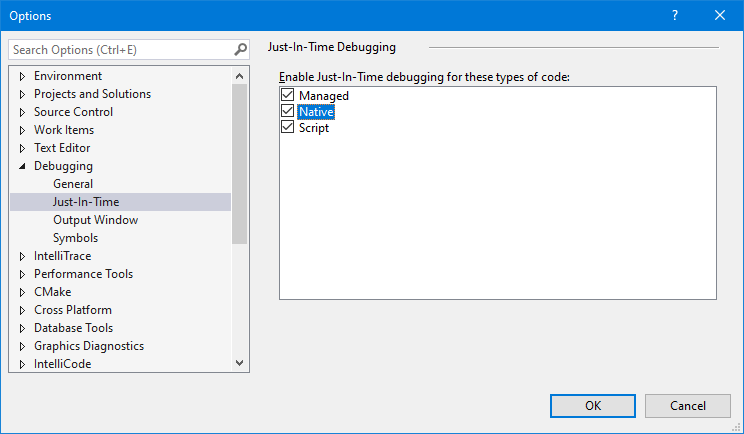
|
||||
|
||||
Then when you run something with `DebugBreak()` in it, you will see this:
|
||||
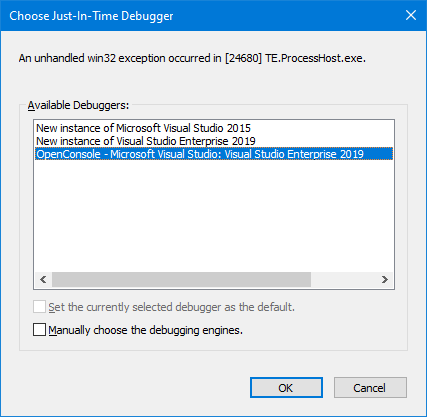
|
||||
|
||||
The top ones will be new instances of the Visual Studios installed on your system. The bottom ones will be the running instances of Visual Studio. You can see in the image that one is open already. If you choose the bottom one, VS will attach straight up as if you F5'd from the solution at the point from the `DebugBreak()`. Step up to get out of the break and back into the code.
|
||||
|
||||
### Setting WinDBG as Post Mortem Debugger
|
||||
|
||||
From an elevated context (a command prompt or whatnot...), run `windbg /I`. This will install the debugger as Post Mortem.
|
||||
|
||||
Then run the thing and it will pop straight into a new WinDBG session. Step up to get out of the break and back into the code.
|
||||
|
||||
**Caveat:** If you are on an x64 system, you may need to do `windbg /I` with both the x64 and x86 versions of the debugger to catch all circumstances (like if you're trying to run x86 code.)
|
||||
2. Change the *Application process* type from *Mixed (Managed and Native)* to *Native Only*.
|
||||
@@ -33,7 +33,7 @@ Also, I'm happy to discuss this with you until you're utterly sick of reading it
|
||||
|
||||
If I had to take an educated guess as to what is making us faster than pretty much any other application on Windows at putting your text on the screen... I would say it is because that is literally our only job! Also probably because we are using darn near the oldest and lowest level APIs that Windows has to accomplish this work.
|
||||
|
||||
Pretty much everything else you've listed has some sort of layer or framework involved, or many, many layers and frameworks, when you start talking about Electron and JavaScript. We don't.
|
||||
Pretty much everything else you've listed has some sort of layer or framework involved, or many, many layers and frameworks, when you start talking about Electron and Javascript. We don't.
|
||||
|
||||
We have one bare, super un-special window with no additional controls attached to it. We get our keys fed into us from just barely above the kernel given that we're processing them from window messages and not from some sort of eventing framework common to pretty much any other more complicated UI framework than ours (WPF, WinForms, UWP, Electron). And we dump our text straight onto the window surface using GDI's [PolyTextOut](https://docs.microsoft.com/en-us/windows/desktop/api/wingdi/nf-wingdi-polytextoutw) with no frills.
|
||||
|
||||
|
||||
@@ -24,16 +24,6 @@
|
||||
* `/ipch` – not checked in is where intellisense data will be generated if you use Visual Studio 2015
|
||||
* `/obj` – not checked in is where objects will be generated by the MSBuild system
|
||||
* `/src` – This is the fun one. In the root is common build system data.
|
||||
* `/src/cascadia` - This directory contains all the code specific to the Windows Terminal
|
||||
* `/src/cascadia/TerminalConnection` - This DLL is responsible for the various different ways a terminal instance can communicate with different terminal backends. Examples include the `ConptyConnection` (for communicating with Windows Console processes), or the `AzureCloudShellConnection` for communicating with Azure.
|
||||
* `/src/cascadia/TerminalSettings` - This is the DLL responsible for abstracting the settings for both the TerminalCore and the TerminalControl. This provides consumers of the TerminalControl a common interface for supplying settings to the Terminal.
|
||||
* `/src/cascadia/TerminalCore` - This LIB is responsible for the core implementation of a terminal instance. This defines one important class `Terminal` which is a complete terminal instance, with buffer, colors table, VT parsing, input handling, etc. It does _not_ prescribe any sort of UI implementation - it should be connected to code that can handle rendering its contents, and provide input to it.
|
||||
* `/src/cascadia/TerminalControl` - This DLL provides the UWP-XAML implementation of a `TermControl`, which can be embedded within an application to provide a terminal instance within the application. It contains a DX renderer for drawing text to the screen, and translates input to send to the core Terminal. It also receives settings to apply to both itself and the core Terminal.
|
||||
* `/src/cascadia/TerminalApp` - This DLL represents the implementation of the Windows Terminal application. This includes parsing settings, hosting tabs & panes with Terminals in them, and displaying other UI elements. This DLL is almost entirely UWP-like code, and shouldn't be doing any Win32-like UI work.
|
||||
* `/src/cascadia/WindowsTerminal` - This EXE provides Win32 hosting for the TerminalApp. It will set up XAML islands, and is responsible for drawing the window, either as a standard window or with content in the titlebar (non-client area).
|
||||
* `/src/cascadia/CascadiaPackage` - This is a project for packaging the Windows Terminal and its dependencies into an .appx/.msix for deploying to the machine.
|
||||
* `/src/cascadia/PublicTerminalCore` - This is a DLL wrapper for the TerminalCore and Renderer, similar to `TermControl`, which exposes some exported functions that so the Terminal can be used from C#.
|
||||
* `/src/cascadia/WpfTerminalControl` - A DLL implementing a WPF version of the Terminal Control.
|
||||
* `/src/host` – The meat of the windows console host. This includes buffer, input, output, windowing, server management, clipboard, and most interactions with the console host window that aren’t stated anywhere else. We’re trying to pull things out that are reusable into other libraries, but it’s a work in progress
|
||||
* `/src/host/lib` – Builds the reusable LIB copy of the host
|
||||
* `/src/host/dll` – Packages LIB into conhostv2.dll to be put into the OS C:\windows\system32\
|
||||
@@ -52,7 +42,7 @@
|
||||
* `/src/renderer/base` – Base interface layer providing non-engine-specific rendering things like choosing the data from the console buffer, deciding how to lay out or transform that data, then dispatching commands to a specific final display engine
|
||||
* `/src/renderer/gdi` – The GDI implementation of rendering to the screen. Takes commands to “draw a line” or “fill the background” or “select a region” from the base and turns them into GDI calls to the screen. Extracted from original console host code.
|
||||
* `/src/renderer/inc` – Interface definitions for all renderer communication
|
||||
* `/src/terminal` – Virtual terminal support for the console. This is the sequences that are found in-band with other text on STDIN/STDOUT that command the display to do things. This is the \*nix way of controlling a console.
|
||||
* `/src/terminal` – Virtual terminal support for the console. This is the sequences that are found in-band with other text on STDIN/STDOUT that command the display to do things. This is the *nix way of controlling a console.
|
||||
* `/src/terminal/parser` – This contains a state machine and sorting engine for feeding in individual characters from STDOUT or STDIN and decoding them into the appropriate verbs that should be performed
|
||||
* `/src/terminal/adapter` – This converts the verbs from the interface into calls on the console API. It doesn’t actually call through the API (for performance reasons since it lives inside the same binary), but it tries to remain as close to an API call as possible. There are some private extensions to the API for behaviors that didn’t exist before this was written that we’ve not made public. We don’t know if we will yet or force people to use VT to get at them.
|
||||
* `/src/tsf` – Text Services Foundation. This provides IME input services to the console. This was historically used for only Chinese, Japanese, and Korean IMEs specifically on OS installations with those as the primary language. It was in the summer of 2016 unrestricted to be able to be used on any OS installation with any IME (whether or not it will display correctly is a different story). It also was unrestricted to allow things like Pen and Touch input (which are routed via IME messages) to display properly inside the console from the TabTip window (the little popup that helps you insert pen/touch writing/keyboard candidates into an application)
|
||||
@@ -100,7 +90,7 @@
|
||||
* Assorted utilities and stuff
|
||||
* `Misc.cpp` (left for us by previous eras of random console devs)
|
||||
* `Util.cpp` (created in our era)
|
||||
* Custom zeroing and non-throwing allocator
|
||||
* Custom zeroing and non-throwing allocator
|
||||
* `Newdelete.cpp`
|
||||
* Related to inserting text into the TextInfo buffer
|
||||
* `Output.cpp`
|
||||
|
||||
@@ -5,4 +5,3 @@
|
||||
1. If it's brand new code or refactoring a complete class or area of the code, please follow as Modern C++ of a style as you can and reference the [C++ Core Guidelines](https://github.com/isocpp/CppCoreGuidelines) as much as you possibly can.
|
||||
1. When working with any Win32 or NT API, please try to use the [Windows Implementation Library](./WIL.md) smart pointers and result handlers.
|
||||
1. The use of NTSTATUS as a result code is discouraged, HRESULT or exceptions are preferred. Functions should not return a status code if they would always return a successful status code. Any function that returns a status code should be marked `noexcept` and have the `nodiscard` attribute.
|
||||
1. When contributing code in `TerminalApp`, be mindful to appropriately use C++/WinRT [strong and weak references](https://docs.microsoft.com/en-us/windows/uwp/cpp-and-winrt-apis/weak-references), and have a good understanding of C++/WinRT [concurrency schemes](https://docs.microsoft.com/en-us/windows/uwp/cpp-and-winrt-apis/concurrency).
|
||||
|
||||
@@ -1,38 +1,13 @@
|
||||
|
||||
# How to build OpenConsole
|
||||
# How to build Openconsole
|
||||
|
||||
This repository uses [git submodules](https://git-scm.com/book/en/v2/Git-Tools-Submodules) for some of its dependencies. To make sure submodules are restored or updated, be sure to run the following prior to building:
|
||||
|
||||
```shell
|
||||
git submodule update --init --recursive
|
||||
```
|
||||
|
||||
OpenConsole.sln may be built from within Visual Studio or from the command-line using a set of convenience scripts & tools in the **/tools** directory:
|
||||
Openconsole can be built with Visual Studio or from the command line. There are build scripts for both cmd and PowerShell in /tools.
|
||||
|
||||
When using Visual Studio, be sure to set up the path for code formatting. This can be done in Visual Studio by going to Tools > Options > Text Editor > C++ > Formatting and checking "Use custom clang-format.exe file" and choosing the clang-format.exe in the repository at /dep/llvm/clang-format.exe by clicking "browse" right under the check box.
|
||||
|
||||
### Building in PowerShell
|
||||
## Building with cmd
|
||||
|
||||
```powershell
|
||||
Import-Module .\tools\OpenConsole.psm1
|
||||
Set-MsBuildDevEnvironment
|
||||
Invoke-OpenConsoleBuild
|
||||
```
|
||||
|
||||
There are a few additional exported functions (look at their documentation for further details):
|
||||
|
||||
- `Invoke-OpenConsoleBuild` - builds the solution. Can be passed msbuild arguments.
|
||||
- `Invoke-OpenConsoleTests` - runs the various tests. Will run the unit tests by default.
|
||||
- `Start-OpenConsole` - starts Openconsole.exe from the output directory. x64 is run by default.
|
||||
- `Debug-OpenConsole` - starts Openconsole.exe and attaches it to the default debugger. x64 is run by default.
|
||||
- `Invoke-CodeFormat` - uses clang-format to format all c++ files to match our coding style.
|
||||
|
||||
### Building in Cmd
|
||||
|
||||
```shell
|
||||
.\tools\razzle.cmd
|
||||
bcz
|
||||
```
|
||||
The cmd scripts are set up to emulate a portion of the OS razzle build environment. razzle.cmd is the first script that should be run. bcz.cmd will build clean and bz.cmd should build incrementally.
|
||||
|
||||
There are also scripts for running the tests:
|
||||
- `runut.cmd` - run the unit tests
|
||||
@@ -40,13 +15,15 @@ There are also scripts for running the tests:
|
||||
- `runuia.cmd` - run the UIA tests
|
||||
- `runformat` - uses clang-format to format all c++ files to match our coding style.
|
||||
|
||||
## Running & Debugging
|
||||
## Build with Powershell
|
||||
|
||||
To debug the Windows Terminal in VS, right click on `CascadiaPackage` (in the Solution Explorer) and go to properties. In the Debug menu, change "Application process" and "Background task process" to "Native Only".
|
||||
Openconsole.psm1 should be loaded with `Import-Module`. From there `Set-MsbuildDevEnvironment` will set up environment variables required to build. There are a few exported functions (look at their documentation for further details):
|
||||
|
||||
You should then be able to build & debug the Terminal project by hitting <kbd>F5</kbd>.
|
||||
|
||||
> 👉 You will _not_ be able to launch the Terminal directly by running the WindowsTerminal.exe. For more details on why, see [#926](https://github.com/microsoft/terminal/issues/926), [#4043](https://github.com/microsoft/terminal/issues/4043)
|
||||
- `Invoke-OpenConsolebuild` - builds the solution. Can be passed msbuild arguments.
|
||||
- `Invoke-OpenConsoleTests` - runs the various tests. Will run the unit tests by default.
|
||||
- `Start-OpenConsole` - starts Openconsole.exe from the output directory. x64 is run by default.
|
||||
- `Debug-OpenConsole` - starts Openconsole.exe and attaches it to the default debugger. x64 is run by default.
|
||||
- `Invoke-CodeFormat` - uses clang-format to format all c++ files to match our coding style.
|
||||
|
||||
## Configuration Types
|
||||
|
||||
|
||||
@@ -6,7 +6,7 @@
|
||||
## Abstract
|
||||
It should be possible to configure the terminal so that it doesn't send certain keystrokes as input to the terminal, and instead triggers certain actions. Examples of these actions could be copy/pasting text, opening a new tab, or changing the font size.
|
||||
|
||||
This spec describes a mechanism by which we could provide a common implementation of handling keyboard shortcuts like these. This common implementation could then be leveraged and extended by the UX implementation as to handle certain callbacks in the UX layer. For example, The TerminalCore doesn't have a concept of what a tab is, but the keymap abstraction could raise an event such that a WPF app could implement creating a new tab in its idiomatic way, and UWP could implement them in their own way.
|
||||
This spec describes a mechanism by which we could provide a common implementation of handling keyboard shortcuts like these. This common implementation could then be leveraged and extended by the UX implementation as to handle certain callbacks in the UX layer. For example, The TerminalCore doesn't have a concept of what a tab is, but the keymap abstraction could raise an event such that a WPF app could implement creating a new tab in its idomatic way, and UWP could implement them in their own way.
|
||||
|
||||
## Terminology
|
||||
* **Key Chord**: This is any possible keystroke that a user can input
|
||||
|
||||
@@ -1,195 +1,181 @@
|
||||
# Profiles.json Documentation
|
||||
|
||||
## Globals
|
||||
Properties listed below affect the entire window, regardless of the profile settings.
|
||||
|
||||
| Property | Necessity | Type | Default | Description |
|
||||
| -------- | --------- | ---- | ------- | ----------- |
|
||||
| `alwaysShowTabs` | _Required_ | Boolean | `true` | When set to `true`, tabs are always displayed. When set to `false` and `showTabsInTitlebar` is set to `false`, tabs only appear after typing <kbd>Ctrl</kbd> + <kbd>T</kbd>. |
|
||||
| `copyOnSelect` | Optional | Boolean | `false` | When set to `true`, a selection is immediately copied to your clipboard upon creation. When set to `false`, the selection persists and awaits further action. |
|
||||
| `defaultProfile` | _Required_ | String | PowerShell guid | Sets the default profile. Opens by typing <kbd>Ctrl</kbd> + <kbd>T</kbd> or by clicking the '+' icon. The guid of the desired default profile is used as the value. |
|
||||
| `initialCols` | _Required_ | Integer | `120` | The number of columns displayed in the window upon first load. |
|
||||
| `initialPosition` | Optional | String | `","` | The position of the top left corner of the window upon first load. On a system with multiple displays, these coordinates are relative to the top left of the primary display. If `launchMode` is set to `"maximized"`, the window will be maximized on the monitor specified by those coordinates. |
|
||||
| `initialRows` | _Required_ | Integer | `30` | The number of rows displayed in the window upon first load. |
|
||||
| `launchMode` | Optional | String | `default` | Defines whether the Terminal will launch as maximized or not. Possible values: `"default"`, `"maximized"` |
|
||||
| `rowsToScroll` | Optional | Integer | `system` | The number of rows to scroll at a time with the mouse wheel. This will override the system setting if the value is not zero or "system". |
|
||||
| `requestedTheme` | _Required_ | String | `system` | Sets the theme of the application. Possible values: `"light"`, `"dark"`, `"system"` |
|
||||
| `showTerminalTitleInTitlebar` | _Required_ | Boolean | `true` | When set to `true`, titlebar displays the title of the selected tab. When set to `false`, titlebar displays "Windows Terminal". |
|
||||
| `showTabsInTitlebar` | Optional | Boolean | `true` | When set to `true`, the tabs are moved into the titlebar and the titlebar disappears. When set to `false`, the titlebar sits above the tabs. |
|
||||
| `snapToGridOnResize` | Optional | Boolean | `false` | When set to `true`, the window will snap to the nearest character boundary on resize. When `false`, the window will resize "smoothly" |
|
||||
| `tabWidthMode` | Optional | String | `equal` | Sets the width of the tabs. Possible values: `"equal"`, `"titleLength"` |
|
||||
| `wordDelimiters` | Optional | String | <code> /\()"'-:,.;<>~!@#$%^&*|+=[]{}~?│</code><br>_(`│` is `U+2502 BOX DRAWINGS LIGHT VERTICAL`)_ | Determines the delimiters used in a double click selection. |
|
||||
| `confirmCloseAllTabs` | Optional | Boolean | `true` | When set to `true` closing a window with multiple tabs open WILL require confirmation. When set to `false` closing a window with multiple tabs open WILL NOT require confirmation. |
|
||||
|
||||
## Profiles
|
||||
Properties listed below are specific to each unique profile.
|
||||
|
||||
| Property | Necessity | Type | Default | Description |
|
||||
| -------- | --------- | ---- | ------- | ----------- |
|
||||
| `guid` | _Required_ | String | | Unique identifier of the profile. Written in registry format: `"{00000000-0000-0000-0000-000000000000}"`. |
|
||||
| `name` | _Required_ | String | | Name of the profile. Displays in the dropdown menu. <br>Additionally, this value will be used as the "title" to pass to the shell on startup. Some shells (like `bash`) may choose to ignore this initial value, while others (`cmd`, `powershell`) may use this value over the lifetime of the application. This "title" behavior can be overridden by using `tabTitle`. |
|
||||
| `acrylicOpacity` | Optional | Number | `0.5` | When `useAcrylic` is set to `true`, it sets the transparency of the window for the profile. Accepts floating point values from 0-1. |
|
||||
| `antialiasingMode` | Optional | String | `"grayscale"` | Controls how text is antialiased in the renderer. Possible values are "grayscale", "cleartype" and "aliased". Note that changing this setting will require starting a new terminal instance. |
|
||||
| `background` | Optional | String | | Sets the background color of the profile. Overrides `background` set in color scheme if `colorscheme` is set. Uses hex color format: `"#rrggbb"`. |
|
||||
| `backgroundImage` | Optional | String | | Sets the file location of the Image to draw over the window background. |
|
||||
| `backgroundImageAlignment` | Optional | String | `center` | Sets how the background image aligns to the boundaries of the window. Possible values: `"center"`, `"left"`, `"top"`, `"right"`, `"bottom"`, `"topLeft"`, `"topRight"`, `"bottomLeft"`, `"bottomRight"` |
|
||||
| `backgroundImageOpacity` | Optional | Number | `1.0` | Sets the transparency of the background image. Accepts floating point values from 0-1. |
|
||||
| `backgroundImageStretchMode` | Optional | String | `uniformToFill` | Sets how the background image is resized to fill the window. Possible values: `"none"`, `"fill"`, `"uniform"`, `"uniformToFill"` |
|
||||
| `closeOnExit` | Optional | String | `graceful` | Sets how the profile reacts to termination or failure to launch. Possible values: `"graceful"` (close when `exit` is typed or the process exits normally), `"always"` (always close) and `"never"` (never close). `true` and `false` are accepted as synonyms for `"graceful"` and `"never"` respectively. |
|
||||
| `colorScheme` | Optional | String | `Campbell` | Name of the terminal color scheme to use. Color schemes are defined under `schemes`. |
|
||||
| `colorTable` | Optional | Array[String] | | Array of colors used in the profile if `colorscheme` is not set. Array follows the format defined in `schemes`. |
|
||||
| `commandline` | Optional | String | | Executable used in the profile. |
|
||||
| `cursorColor` | Optional | String | `#FFFFFF` | Sets the cursor color for the profile. Uses hex color format: `"#rrggbb"`. |
|
||||
| `cursorHeight` | Optional | Integer | | Sets the percentage height of the cursor starting from the bottom. Only works when `cursorShape` is set to `"vintage"`. Accepts values from 25-100. |
|
||||
| `cursorShape` | Optional | String | `bar` | Sets the cursor shape for the profile. Possible values: `"vintage"` ( ▃ ), `"bar"` ( ┃ ), `"underscore"` ( ▁ ), `"filledBox"` ( █ ), `"emptyBox"` ( ▯ ) |
|
||||
| `fontFace` | Optional | String | `Consolas` | Name of the font face used in the profile. We will try to fallback to Consolas if this can't be found or is invalid. |
|
||||
| `fontSize` | Optional | Integer | `12` | Sets the font size. |
|
||||
| `foreground` | Optional | String | | Sets the foreground color of the profile. Overrides `foreground` set in color scheme if `colorscheme` is set. Uses hex color format: `#rgb` or `"#rrggbb"`. |
|
||||
| `hidden` | Optional | Boolean | `false` | If set to true, the profile will not appear in the list of profiles. This can be used to hide default profiles and dynamically generated profiles, while leaving them in your settings file. |
|
||||
| `historySize` | Optional | Integer | `9001` | The number of lines above the ones displayed in the window you can scroll back to. |
|
||||
| `icon` | Optional | String | | Image file location of the icon used in the profile. Displays within the tab and the dropdown menu. |
|
||||
| `padding` | Optional | String | `8, 8, 8, 8` | Sets the padding around the text within the window. Can have three different formats: `"#"` sets the same padding for all sides, `"#, #"` sets the same padding for left-right and top-bottom, and `"#, #, #, #"` sets the padding individually for left, top, right, and bottom. |
|
||||
| `scrollbarState` | Optional | String | | Defines the visibility of the scrollbar. Possible values: `"visible"`, `"hidden"` |
|
||||
| `selectionBackground` | Optional | String | | Sets the selection background color of the profile. Overrides `selectionBackground` set in color scheme if `colorscheme` is set. Uses hex color format: `"#rrggbb"`. |
|
||||
| `snapOnInput` | Optional | Boolean | `true` | When set to `true`, the window will scroll to the command input line when typing. When set to `false`, the window will not scroll when you start typing. |
|
||||
| `source` | Optional | String | | Stores the name of the profile generator that originated this profile. _There are no discoverable values for this field._ |
|
||||
| `startingDirectory` | Optional | String | `%USERPROFILE%` | The directory the shell starts in when it is loaded. |
|
||||
| `suppressApplicationTitle` | Optional | Boolean | | When set to `true`, `tabTitle` overrides the default title of the tab and any title change messages from the application will be suppressed. When set to `false`, `tabTitle` behaves as normal. |
|
||||
| `tabTitle` | Optional | String | | If set, will replace the `name` as the title to pass to the shell on startup. Some shells (like `bash`) may choose to ignore this initial value, while others (`cmd`, `powershell`) may use this value over the lifetime of the application. |
|
||||
| `useAcrylic` | Optional | Boolean | `false` | When set to `true`, the window will have an acrylic background. When set to `false`, the window will have a plain, untextured background. The transparency only applies to focused windows due to OS limitation. |
|
||||
| `experimental.retroTerminalEffect` | Optional | Boolean | `false` | When set to `true`, enable retro terminal effects. This is an experimental feature, and its continued existence is not guaranteed. |
|
||||
|
||||
## Schemes
|
||||
Properties listed below are specific to each color scheme. [ColorTool](https://github.com/microsoft/terminal/tree/master/src/tools/ColorTool) is a great tool you can use to create and explore new color schemes. All colors use hex color format.
|
||||
|
||||
| Property | Necessity | Type | Description |
|
||||
| -------- | ---- | ----------- | ----------- |
|
||||
| `name` | _Required_ | String | Name of the color scheme. |
|
||||
| `foreground` | _Required_ | String | Sets the foreground color of the color scheme. |
|
||||
| `background` | _Required_ | String | Sets the background color of the color scheme. |
|
||||
| `selectionBackground` | Optional | String | Sets the selection background color of the color scheme. |
|
||||
| `black` | _Required_ | String | Sets the color used as ANSI black. |
|
||||
| `blue` | _Required_ | String | Sets the color used as ANSI blue. |
|
||||
| `brightBlack` | _Required_ | String | Sets the color used as ANSI bright black. |
|
||||
| `brightBlue` | _Required_ | String | Sets the color used as ANSI bright blue. |
|
||||
| `brightCyan` | _Required_ | String | Sets the color used as ANSI bright cyan. |
|
||||
| `brightGreen` | _Required_ | String | Sets the color used as ANSI bright green. |
|
||||
| `brightPurple` | _Required_ | String | Sets the color used as ANSI bright purple. |
|
||||
| `brightRed` | _Required_ | String | Sets the color used as ANSI bright red. |
|
||||
| `brightWhite` | _Required_ | String | Sets the color used as ANSI bright white. |
|
||||
| `brightYellow` | _Required_ | String | Sets the color used as ANSI bright yellow. |
|
||||
| `cyan` | _Required_ | String | Sets the color used as ANSI cyan. |
|
||||
| `green` | _Required_ | String | Sets the color used as ANSI green. |
|
||||
| `purple` | _Required_ | String | Sets the color used as ANSI purple. |
|
||||
| `red` | _Required_ | String | Sets the color used as ANSI red. |
|
||||
| `white` | _Required_ | String | Sets the color used as ANSI white. |
|
||||
| `yellow` | _Required_ | String | Sets the color used as ANSI yellow. |
|
||||
|
||||
## Keybindings
|
||||
Properties listed below are specific to each custom key binding.
|
||||
|
||||
| Property | Necessity | Type | Description |
|
||||
| -------- | ---- | ----------- | ----------- |
|
||||
| `command` | _Required_ | String | The command executed when the associated key bindings are pressed. |
|
||||
| `keys` | _Required_ | Array[String] | Defines the key combinations used to call the command. |
|
||||
| `action` | Optional | String | Adds additional functionality to certain commands. |
|
||||
|
||||
### Implemented Commands and Actions
|
||||
|
||||
Commands listed below are per the implementation in [`src/cascadia/TerminalApp/AppKeyBindingsSerialization.cpp`](https://github.com/microsoft/terminal/blob/master/src/cascadia/TerminalApp/AppKeyBindingsSerialization.cpp).
|
||||
|
||||
Keybindings can be structured in the following manners:
|
||||
|
||||
For commands without arguments:
|
||||
<br>
|
||||
`{ "command": "commandName", "keys": [ "modifiers+key" ] }`
|
||||
|
||||
For commands with arguments:
|
||||
<br>
|
||||
`{ "command": { "action": "commandName", "argument": "value" }, "keys": ["modifiers+key"] }`
|
||||
|
||||
| Command | Command Description | Action (*=required) | Action Arguments | Argument Descriptions |
|
||||
| ------- | ------------------- | ------ | ---------------- | ----------------- |
|
||||
| closePane | Close the active pane. | | | |
|
||||
| closeTab | Close the current tab. | | | |
|
||||
| closeWindow | Close the current window and all tabs within it. | | | |
|
||||
| copy | Copy the selected terminal content to your Windows Clipboard. | `trimWhitespace` | boolean | When `true`, newlines persist from the selected text. When `false`, copied content will paste on one line. |
|
||||
| decreaseFontSize | Make the text smaller by one delta. | `delta` | integer | Amount of size decrease per command invocation. |
|
||||
| duplicateTab | Make a copy and open the current tab. | | | |
|
||||
| find | Open the search dialog box. | | | |
|
||||
| increaseFontSize | Make the text larger by one delta. | `delta` | integer | Amount of size increase per command invocation. |
|
||||
| moveFocus | Focus on a different pane depending on direction. | `direction`* | `left`, `right`, `up`, `down` | Direction in which the focus will move. |
|
||||
| newTab | Create a new tab. Without any arguments, this will open the default profile in a new tab. | 1. `commandLine`<br>2. `startingDirectory`<br>3. `tabTitle`<br>4. `index`<br>5. `profile` | 1. string<br>2. string<br>3. string<br>4. integer<br>5. string | 1. Executable run within the tab.<br>2. Directory in which the tab will open.<br>3. Title of the new tab.<br>4. Profile that will open based on its position in the dropdown (starting at 0).<br>5. Profile that will open based on its GUID or name. |
|
||||
| nextTab | Open the tab to the right of the current one. | | | |
|
||||
| openNewTabDropdown | Open the dropdown menu. | | | |
|
||||
| openSettings | Open the settings file. | | | |
|
||||
| paste | Insert the content that was copied onto the clipboard. | | | |
|
||||
| prevTab | Open the tab to the left of the current one. | | | |
|
||||
| resetFontSize | Reset the text size to the default value. | | | |
|
||||
| resizePane | Change the size of the active pane. | `direction`* | `left`, `right`, `up`, `down` | Direction in which the pane will be resized. |
|
||||
| scrollDown | Move the screen down. | | | |
|
||||
| scrollUp | Move the screen up. | | | |
|
||||
| scrollUpPage | Move the screen up a whole page. | | | |
|
||||
| scrollDownPage | Move the screen down a whole page. | | | |
|
||||
| splitPane | Halve the size of the active pane and open another. Without any arguments, this will open the default profile in the new pane. | 1. `split`*<br>2. `commandLine`<br>3. `startingDirectory`<br>4. `tabTitle`<br>5. `index`<br>6. `profile` | 1. `vertical`, `horizontal`, `auto`<br>2. string<br>3. string<br>4. string<br>5. integer<br>6. string | 1. How the pane will split. `auto` will split in the direction that provides the most surface area.<br>2. Executable run within the pane.<br>3. Directory in which the pane will open.<br>4. Title of the tab when the new pane is focused.<br>5. Profile that will open based on its position in the dropdown (starting at 0).<br>6. Profile that will open based on its GUID or name. |
|
||||
| switchToTab | Open a specific tab depending on index. | `index`* | integer | Tab that will open based on its position in the tab bar (starting at 0). |
|
||||
| toggleFullscreen | Switch between fullscreen and default window sizes. | | | |
|
||||
| unbound | Unbind the associated keys from any command. | | | |
|
||||
|
||||
### Accepted Modifiers and Keys
|
||||
|
||||
#### Modifiers
|
||||
`Ctrl+`, `Shift+`, `Alt+`
|
||||
|
||||
#### Keys
|
||||
| Type | Keys |
|
||||
| ---- | ---- |
|
||||
| Function and Alphanumeric Keys | `f1-f24`, `a-z`, `0-9` |
|
||||
| Symbols | ``` ` ```, `-`, `=`, `[`, `]`, `\`, `;`, `'`, `,`, `.`, `/` |
|
||||
| Arrow Keys | `down`, `left`, `right`, `up`, `pagedown`, `pageup`, `pgdn`, `pgup`, `end`, `home`, `plus` |
|
||||
| Action Keys | `tab`, `enter`, `esc`, `escape`, `space`, `backspace`, `delete`, `insert` |
|
||||
| Numpad Keys | `numpad_0-numpad_9`, `numpad0-numpad9`, `numpad_add`, `numpad_plus`, `numpad_decimal`, `numpad_period`, `numpad_divide`, `numpad_minus`, `numpad_subtract`, `numpad_multiply` |
|
||||
|
||||
## Background Images and Icons
|
||||
Some Terminal settings allow you to specify custom background images and icons. It is recommended that custom images and icons are stored in system-provided folders and are referred to using the correct [URI Schemes](https://docs.microsoft.com/en-us/windows/uwp/app-resources/uri-schemes). URI Schemes provide a way to reference files independent of their physical paths (which may change in the future).
|
||||
|
||||
The most useful URI schemes to remember when customizing background images and icons are:
|
||||
|
||||
| URI Scheme | Corresponding Physical Path | Use / description |
|
||||
| --- | --- | ---|
|
||||
| `ms-appdata:///Local/` | `%localappdata%\Packages\Microsoft.WindowsTerminal_8wekyb3d8bbwe\LocalState\` | Per-machine files |
|
||||
| `ms-appdata:///Roaming/` | `%localappdata%\Packages\Microsoft.WindowsTerminal_8wekyb3d8bbwe\RoamingState\` | Common files |
|
||||
|
||||
> ⚠ Note: Do not rely on file references using the `ms-appx` URI Scheme (i.e. icons). These files are considered an internal implementation detail and may change name/location or may be omitted in the future.
|
||||
|
||||
### Icons
|
||||
Terminal displays icons for each of your profiles which Terminal generates for any built-in shells - PowerShell Core, PowerShell, and any installed Linux/WSL distros. Each profile refers to a stock icon via the `ms-appx` URI Scheme.
|
||||
|
||||
> ⚠ Note: Do not rely on the files referenced by the `ms-appx` URI Scheme - they are considered an internal implementation detail and may change name/location or may be omitted in the future.
|
||||
|
||||
You can refer to you own icons if you wish, e.g.:
|
||||
|
||||
```json
|
||||
"icon" : "C:\\Users\\richturn\\OneDrive\\WindowsTerminal\\icon-ubuntu-32.png",
|
||||
```
|
||||
|
||||
> 👉 Tip: Icons should be sized to 32x32px in an appropriate raster image format (e.g. .PNG, .GIF, or .ICO) to avoid having to scale your icons during runtime (causing a noticeable delay and loss of quality.)
|
||||
|
||||
### Custom Background Images
|
||||
You can apply a background image to each of your profiles, allowing you to configure/brand/style each of your profiles independently from one another if you wish.
|
||||
|
||||
To do so, specify your preferred `backgroundImage`, position it using `backgroundImageAlignment`, set its opacity with `backgroundImageOpacity`, and/or specify how your image fill the available space using `backgroundImageStretchMode`.
|
||||
|
||||
For example:
|
||||
```json
|
||||
"backgroundImage": "C:\\Users\\richturn\\OneDrive\\WindowsTerminal\\bg-ubuntu-256.png",
|
||||
"backgroundImageAlignment": "bottomRight",
|
||||
"backgroundImageOpacity": 0.1,
|
||||
"backgroundImageStretchMode": "none"
|
||||
```
|
||||
|
||||
> 👉 Tip: You can easily roam your collection of images and icons across all your machines by storing your icons and images in OneDrive (as shown above).
|
||||
|
||||
With these settings, your Terminal's Ubuntu profile would look similar to this:
|
||||
|
||||

|
||||
# Profiles.json Documentation
|
||||
|
||||
## Globals
|
||||
Properties listed below affect the entire window, regardless of the profile settings.
|
||||
|
||||
| Property | Necessity | Type | Default | Description |
|
||||
| -------- | --------- | ---- | ------- | ----------- |
|
||||
| `alwaysShowTabs` | _Required_ | Boolean | `true` | When set to `true`, tabs are always displayed. When set to `false` and `showTabsInTitlebar` is set to `false`, tabs only appear after typing <kbd>Ctrl</kbd> + <kbd>T</kbd>. |
|
||||
| `copyOnSelect` | Optional | Boolean | `false` | When set to `true`, a selection is immediately copied to your clipboard upon creation. When set to `false`, the selection persists and awaits further action. |
|
||||
| `defaultProfile` | _Required_ | String | PowerShell guid | Sets the default profile. Opens by typing <kbd>Ctrl</kbd> + <kbd>T</kbd> or by clicking the '+' icon. The guid of the desired default profile is used as the value. |
|
||||
| `initialCols` | _Required_ | Integer | `120` | The number of columns displayed in the window upon first load. |
|
||||
| `initialRows` | _Required_ | Integer | `30` | The number of rows displayed in the window upon first load. |
|
||||
| `requestedTheme` | _Required_ | String | `system` | Sets the theme of the application. Possible values: `"light"`, `"dark"`, `"system"` |
|
||||
| `showTerminalTitleInTitlebar` | _Required_ | Boolean | `true` | When set to `true`, titlebar displays the title of the selected tab. When set to `false`, titlebar displays "Windows Terminal". |
|
||||
| `showTabsInTitlebar` | Optional | Boolean | `true` | When set to `true`, the tabs are moved into the titlebar and the titlebar disappears. When set to `false`, the titlebar sits above the tabs. |
|
||||
| `wordDelimiters` | Optional | String | <code> /\()"'-:,.;<>~!@#$%^&*|+=[]{}~?│</code><br>_(`│` is `U+2502 BOX DRAWINGS LIGHT VERTICAL`)_ | Determines the delimiters used in a double click selection. |
|
||||
|
||||
## Profiles
|
||||
Properties listed below are specific to each unique profile.
|
||||
|
||||
| Property | Necessity | Type | Default | Description |
|
||||
| -------- | --------- | ---- | ------- | ----------- |
|
||||
| `acrylicOpacity` | _Required_ | Number | `0.5` | When `useAcrylic` is set to `true`, it sets the transparency of the window for the profile. Accepts floating point values from 0-1. |
|
||||
| `closeOnExit` | _Required_ | Boolean | `true` | When set to `true`, the selected tab closes when `exit` is typed. When set to `false`, the tab will remain open when `exit` is typed. |
|
||||
| `colorScheme` | _Required_ | String | `Campbell` | Name of the terminal color scheme to use. Color schemes are defined under `schemes`. |
|
||||
| `commandline` | _Required_ | String | `powershell.exe` | Executable used in the profile. |
|
||||
| `cursorColor` | _Required_ | String | `#FFFFFF` | Sets the cursor color for the profile. Uses hex color format: `"#rrggbb"`. |
|
||||
| `cursorShape` | _Required_ | String | `bar` | Sets the cursor shape for the profile. Possible values: `"vintage"` ( ▃ ), `"bar"` ( ┃ ), `"underscore"` ( ▁ ), `"filledBox"` ( █ ), `"emptyBox"` ( ▯ ) |
|
||||
| `fontFace` | _Required_ | String | `Consolas` | Name of the font face used in the profile. We will try to fallback to Consolas if this can't be found or is invalid. |
|
||||
| `fontSize` | _Required_ | Integer | `12` | Sets the font size. |
|
||||
| `guid` | _Required_ | String | | Unique identifier of the profile. Written in registry format: `"{00000000-0000-0000-0000-000000000000}"`. |
|
||||
| `hidden` | Optional | Boolean | `false` | If set to true, the profile will not appear in the list of profiles. This can be used to hide default profiles and dynamicially generated profiles, while leaving them in your settings file. |
|
||||
| `historySize` | _Required_ | Integer | `9001` | The number of lines above the ones displayed in the window you can scroll back to. |
|
||||
| `name` | _Required_ | String | `PowerShell Core` | Name of the profile. Displays in the dropdown menu. <br>Additionally, this value will be used as the "title" to pass to the shell on startup. Some shells (like `bash`) may choose to ignore this initial value, while others (`cmd`, `powershell`) may use this value over the lifetime of the application. This "title" behavior can be overriden by using `tabTitle`. |
|
||||
| `padding` | _Required_ | String | `8, 8, 8, 8` | Sets the padding around the text within the window. Can have three different formats: `"#"` sets the same padding for all sides, `"#, #"` sets the same padding for left-right and top-bottom, and `"#, #, #, #"` sets the padding individually for left, top, right, and bottom. |
|
||||
| `snapOnInput` | _Required_ | Boolean | `true` | When set to `true`, the window will scroll to the command input line when typing. When set to `false`, the window will not scroll when you start typing. |
|
||||
| `startingDirectory` | _Required_ | String | `%USERPROFILE%` | The directory the shell starts in when it is loaded. |
|
||||
| `useAcrylic` | _Required_ | Boolean | `false` | When set to `true`, the window will have an acrylic background. When set to `false`, the window will have a plain, untextured background. |
|
||||
| `background` | Optional | String | | Sets the background color of the profile. Overrides `background` set in color scheme if `colorscheme` is set. Uses hex color format: `"#rrggbb"`. |
|
||||
| `backgroundImage` | Optional | String | | Sets the file location of the Image to draw over the window background. |
|
||||
| `backgroundImageAlignment` | Optional | String | `center` | Sets how the background image aligns to the boundaries of the window. Possible values: `"center"`, `"left"`, `"top"`, `"right"`, `"bottom"`, `"topLeft"`, `"topRight"`, `"bottomLeft"`, `"bottomRight"` |
|
||||
| `backgroundImageOpacity` | Optional | Number | `1.0` | Sets the transparency of the background image. Accepts floating point values from 0-1. |
|
||||
| `backgroundImageStretchMode` | Optional | String | `uniformToFill` | Sets how the background image is resized to fill the window. Possible values: `"none"`, `"fill"`, `"uniform"`, `"uniformToFill"` |
|
||||
| `colorTable` | Optional | Array[String] | | Array of colors used in the profile if `colorscheme` is not set. Colors use hex color format: `"#rrggbb"`. Ordering is as follows: `[black, red, green, yellow, blue, magenta, cyan, white, bright black, bright red, bright green, bright yellow, bright blue, bright magenta, bright cyan, bright white]` |
|
||||
| `cursorHeight` | Optional | Integer | | Sets the percentage height of the cursor starting from the bottom. Only works when `cursorShape` is set to `"vintage"`. Accepts values from 25-100. |
|
||||
| `foreground` | Optional | String | | Sets the foreground color of the profile. Overrides `foreground` set in color scheme if `colorscheme` is set. Uses hex color format: `"#rrggbb"`. |
|
||||
| `icon` | Optional | String | | Image file location of the icon used in the profile. Displays within the tab and the dropdown menu. See [Background Images and Icons](./SettingsSchema.md#background-images-and-icons) below for help on specifying your own icons |
|
||||
| `scrollbarState` | Optional | String | | Defines the visibility of the scrollbar. Possible values: `"visible"`, `"hidden"` |
|
||||
| `tabTitle` | Optional | String | | If set, will replace the `name` as the title to pass to the shell on startup. Some shells (like `bash`) may choose to ignore this initial value, while others (`cmd`, `powershell`) may use this value over the lifetime of the application. |
|
||||
|
||||
## Schemes
|
||||
Properties listed below are specific to each color scheme. [ColorTool](https://github.com/microsoft/terminal/tree/master/src/tools/ColorTool) is a great tool you can use to create and explore new color schemes. All colors use hex color format.
|
||||
|
||||
| Property | Necessity | Type | Description |
|
||||
| -------- | ---- | ----------- | ----------- |
|
||||
| `name` | _Required_ | String | Name of the color scheme. |
|
||||
| `foreground` | _Required_ | String | Sets the foreground color of the color scheme. |
|
||||
| `background` | _Required_ | String | Sets the background color of the color scheme. |
|
||||
| `black` | _Required_ | String | Sets the color used as ANSI black. |
|
||||
| `blue` | _Required_ | String | Sets the color used as ANSI blue. |
|
||||
| `brightBlack` | _Required_ | String | Sets the color used as ANSI bright black. |
|
||||
| `brightBlue` | _Required_ | String | Sets the color used as ANSI bright blue. |
|
||||
| `brightCyan` | _Required_ | String | Sets the color used as ANSI bright cyan. |
|
||||
| `brightGreen` | _Required_ | String | Sets the color used as ANSI bright green. |
|
||||
| `brightPurple` | _Required_ | String | Sets the color used as ANSI bright purple. |
|
||||
| `brightRed` | _Required_ | String | Sets the color used as ANSI bright red. |
|
||||
| `brightWhite` | _Required_ | String | Sets the color used as ANSI bright white. |
|
||||
| `brightYellow` | _Required_ | String | Sets the color used as ANSI bright yellow. |
|
||||
| `cyan` | _Required_ | String | Sets the color used as ANSI cyan. |
|
||||
| `green` | _Required_ | String | Sets the color used as ANSI green. |
|
||||
| `purple` | _Required_ | String | Sets the color used as ANSI purple. |
|
||||
| `red` | _Required_ | String | Sets the color used as ANSI red. |
|
||||
| `white` | _Required_ | String | Sets the color used as ANSI white. |
|
||||
| `yellow` | _Required_ | String | Sets the color used as ANSI yellow. |
|
||||
|
||||
## Keybindings
|
||||
Properties listed below are specific to each custom key binding.
|
||||
|
||||
| Property | Necessity | Type | Description |
|
||||
| -------- | ---- | ----------- | ----------- |
|
||||
| `command` | _Required_ | String | The command executed when the associated key bindings are pressed. |
|
||||
| `keys` | _Required_ | Array[String] | Defines the key combinations used to call the command. |
|
||||
|
||||
### Implemented Keybindings
|
||||
|
||||
Bindings listed below are per the implementation in `src/cascadia/TerminalApp/AppKeyBindingsSerialization.cpp`
|
||||
|
||||
- copy
|
||||
- copyTextWithoutNewlines
|
||||
- paste
|
||||
- newTab
|
||||
- openNewTabDropdown
|
||||
- duplicateTab
|
||||
- newTabProfile0
|
||||
- newTabProfile1
|
||||
- newTabProfile2
|
||||
- newTabProfile3
|
||||
- newTabProfile4
|
||||
- newTabProfile5
|
||||
- newTabProfile6
|
||||
- newTabProfile7
|
||||
- newTabProfile8
|
||||
- newWindow
|
||||
- closeWindow
|
||||
- closeTab
|
||||
- closePane
|
||||
- switchToTab
|
||||
- nextTab
|
||||
- prevTab
|
||||
- increaseFontSize
|
||||
- decreaseFontSize
|
||||
- scrollUp
|
||||
- scrollDown
|
||||
- scrollUpPage
|
||||
- scrollDownPage
|
||||
- switchToTab0
|
||||
- switchToTab1
|
||||
- switchToTab2
|
||||
- switchToTab3
|
||||
- switchToTab4
|
||||
- switchToTab5
|
||||
- switchToTab6
|
||||
- switchToTab7
|
||||
- switchToTab8
|
||||
- openSettings
|
||||
- splitHorizontal
|
||||
- splitVertical
|
||||
- resizePaneLeft
|
||||
- resizePaneRight
|
||||
- resizePaneUp
|
||||
- resizePaneDown
|
||||
- moveFocusLeft
|
||||
- moveFocusRight
|
||||
- moveFocusUp
|
||||
- moveFocusDown
|
||||
|
||||
## Background Images and Icons
|
||||
Some Terminal settings allow you to specify custom background images and icons. It is recommended that custom images and icons are stored in system-provided folders and are referred to using the correct [URI Schemes](https://docs.microsoft.com/en-us/windows/uwp/app-resources/uri-schemes). URI Schemes provide a way to reference files independent of their physical paths (which may change in the future).
|
||||
|
||||
The most useful URI schemes to remember when customizing background images and icons are:
|
||||
|
||||
| URI Scheme | Corresponding Physical Path | Use / description |
|
||||
| --- | --- | ---|
|
||||
| `ms-appdata:///Local/` | `%localappdata%\Packages\Microsoft.WindowsTerminal_8wekyb3d8bbwe\LocalState\` | Per-machine files |
|
||||
| `ms-appdata:///Roaming/` | `%localappdata%\Packages\Microsoft.WindowsTerminal_8wekyb3d8bbwe\RoamingState\` | Common files |
|
||||
|
||||
> ⚠ Note: Do not rely on file references using the `ms-appx` URI Scheme (i.e. icons). These files are considered an internal implementation detail and may change name/location or may be omitted in the future.
|
||||
|
||||
### Icons
|
||||
Terminal displays icons for each of your profiles which Terminal generates for any built-in shells - PowerShell Core, PowerShell, and any installed Linux/WSL distros. Each profile refers to a stock icon via the `ms-appx` URI Scheme.
|
||||
|
||||
> ⚠ Note: Do not rely on the files referenced by the `ms-appx` URI Scheme - they are considered an internal implementation detail and may change name/location or may be omitted in the future.
|
||||
|
||||
You can refer to you own icons if you wish, e.g.:
|
||||
|
||||
```json
|
||||
"icon" : "C:\\Users\\richturn\\OneDrive\\WindowsTerminal\\icon-ubuntu-32.png",
|
||||
```
|
||||
|
||||
> 👉 Tip: Icons should be sized to 32x32px in an appropriate raster image format (e.g. .PNG, .GIF, or .ICO) to avoid having to scale your icons during runtime (causing a noticeable delay and loss of quality.)
|
||||
|
||||
### Custom Background Images
|
||||
You can apply a background image to each of your profiles, allowing you to configure/brand/style each of your profiles independently from one another if you wish.
|
||||
|
||||
To do so, specify your preferred `backgroundImage`, position it using `backgroundImageAlignment`, set its opacity with `backgroundImageOpacity`, and/or specify how your image fill the available space using `backgroundImageStretchMode`.
|
||||
|
||||
For example:
|
||||
```json
|
||||
"backgroundImage": "C:\\Users\\richturn\\OneDrive\\WindowsTerminal\\bg-ubuntu-256.png",
|
||||
"backgroundImageAlignment": "bottomRight",
|
||||
"backgroundImageOpacity": 0.1,
|
||||
"backgroundImageStretchMode": "none"
|
||||
```
|
||||
|
||||
> 👉 Tip: You can easily roam your collection of images and icons across all your machines by storing your icons and images in OneDrive (as shown above).
|
||||
|
||||
With these settings, your Terminal's Ubuntu profile would look similar to this:
|
||||
|
||||

|
||||
|
||||
|
||||
|
||||
@@ -33,7 +33,7 @@ This spec will outline how various terminal frontends will be able to interact w
|
||||
5. Visual Studio should be able to persist and edit settings globally, without
|
||||
the need for a globals/profiles structure.
|
||||
6. The Terminal should be able to read information from a settings structure
|
||||
that's independent of how it's persisted / implemented by the Application
|
||||
that's independant of how it's persisted / implemented by the Application
|
||||
7. The Component should be able to have its own settings independent of the
|
||||
application that's embedding it, such as font size and face, scrollbar
|
||||
visibility, etc. These should be settings that are specific to the component,
|
||||
@@ -79,7 +79,7 @@ Shell Commandline |
|
||||
|
||||
### Simple Settings
|
||||
|
||||
An application like VS might not even care about settings profiles. They should be able to persist the settings as just a singular entity, and change those as needed, without the additional overhead. Profiles will be something that's more specific to Project Cascadia.
|
||||
An application like VS might not even care about settings profiles. They should be able to persist the settings as just a singular entity, and change those as needed, without the additional overhead. Profiles will be something that's more specifc to Project Cascadia.
|
||||
|
||||
### Interface Descriptions
|
||||
|
||||
@@ -228,6 +228,6 @@ I don't like that - if we change the font size, we should just recalculate how m
|
||||
## Questions / TODO
|
||||
* How does this interplay with setting properties of the terminal component in XAML?
|
||||
* I would think that the component would load the XAML properties first, and if the controlling application calls `UpdateSettings` on the component, then those in-XAML properties would likely get overwritten.
|
||||
* It's not necessary to create the component with a `IComponentSettings`, nor is it necessary to call `UpdateSettings`. If you wanted to create a trivial settings-less terminal component entirely in XAML, go right ahead.
|
||||
* It's not necessary to create the component with a `IComponentSettings`, nor is it necessary to call `UpdateSettings`. If you wanted to create a trivial settings-less terminal component entriely in XAML, go right ahead.
|
||||
* Any settings that *are* exposed through XAML properties *should* also be exposed in the component's settings implementation as well.
|
||||
* Can that be enforced any way? I doubt it.
|
||||
|
||||
@@ -68,7 +68,7 @@ original files. You could alternatively put all the source in one directory, and
|
||||
have separate `dll/` and `lib/` subdirectories from the source that are solely
|
||||
responsible for building their binary.
|
||||
|
||||
At this point, you might face some difficulty including the right winmd
|
||||
At this point, you might face some difficulty including the right wimnd
|
||||
references, especially from other C++/WinRT dependencies for this project that
|
||||
exist in your solution. I don't know why, but I had a fair amount of difficulty
|
||||
using a `ProjectReference` from a C++/WinRT StaticLibrary to another C++/WinRT
|
||||
@@ -82,7 +82,7 @@ project from our `TerminalAppLib` project:
|
||||
<ItemGroup>
|
||||
<!-- Manually add references to each of our dependent winmds. Mark them as
|
||||
private=false and CopyLocalSatelliteAssemblies=false, so that we don't
|
||||
propagate them upwards (which can make referencing this project result in
|
||||
propogate them upwards (which can make referencing this project result in
|
||||
duplicate type definitions)-->
|
||||
|
||||
<Reference Include="Microsoft.Terminal.Settings">
|
||||
@@ -106,7 +106,7 @@ in the dll project's directory.
|
||||
|
||||
### Update the dll project
|
||||
|
||||
Now that we have a lib that builds all your code, we can go ahead and tear out
|
||||
Now that we havea lib that builds all your code, we can go ahead and tear out
|
||||
most of the dead code from the old dll project. Remove all the source files from
|
||||
the dll's `.vcxproj` file, save for the `pch.h` and `pch.cpp` files. You _may_
|
||||
need to leave the headers for any C++/WinRT types you've authored in this project
|
||||
@@ -301,7 +301,7 @@ you want to use any XAML types, then you'll have to keep reading.
|
||||
|
||||
### Using Xaml Types (with XAML Islands)
|
||||
|
||||
To be able to instantiate XAML types in your unittest, we'll need to make use of
|
||||
To be able to instatiate XAML types in your unittest, we'll need to make use of
|
||||
the [XAML Hosting
|
||||
API](https://docs.microsoft.com/en-us/windows/apps/desktop/modernize/using-the-xaml-hosting-api)
|
||||
(Xaml Islands). This enables you to use XAML APIs from a Win32 context.
|
||||
|
||||
@@ -1,829 +0,0 @@
|
||||
{
|
||||
"$id": "https://github.com/microsoft/terminal/blob/master/doc/cascadia/profiles.schema.json",
|
||||
"$schema": "http://json-schema.org/draft-07/schema#",
|
||||
"title": "Microsoft's Windows Terminal Settings Profile Schema'",
|
||||
"definitions": {
|
||||
"KeyChordSegment": {
|
||||
"pattern": "^(?<modifier>(ctrl|alt|shift)\\+?((ctrl|alt|shift)(?<!\\2)\\+?)?((ctrl|alt|shift)(?<!\\2|\\4))?\\+?)?(?<key>[^+\\s]+?)?(?<=[^+\\s])$",
|
||||
"type": "string"
|
||||
},
|
||||
"Color": {
|
||||
"default": "#",
|
||||
"pattern": "^#([A-Fa-f0-9]{6}|[A-Fa-f0-9]{3})$",
|
||||
"type": "string",
|
||||
"format": "color"
|
||||
},
|
||||
"Coordinates": {
|
||||
"pattern": "^(-?\\d+)?(,\\s?(-?\\d+)?)?$",
|
||||
"type": "string"
|
||||
},
|
||||
"ProfileGuid": {
|
||||
"default": "{}",
|
||||
"pattern": "^\\{[a-fA-F0-9]{8}-[a-fA-F0-9]{4}-[a-fA-F0-9]{4}-[a-fA-F0-9]{4}-[a-fA-F0-9]{12}\\}$",
|
||||
"type": "string"
|
||||
},
|
||||
"ShortcutActionName": {
|
||||
"enum": [
|
||||
"closePane",
|
||||
"closeTab",
|
||||
"closeWindow",
|
||||
"copy",
|
||||
"copyTextWithoutNewlines",
|
||||
"decreaseFontSize",
|
||||
"duplicateTab",
|
||||
"increaseFontSize",
|
||||
"moveFocus",
|
||||
"moveFocusDown",
|
||||
"moveFocusLeft",
|
||||
"moveFocusRight",
|
||||
"moveFocusUp",
|
||||
"newTab",
|
||||
"newTabProfile0",
|
||||
"newTabProfile1",
|
||||
"newTabProfile2",
|
||||
"newTabProfile3",
|
||||
"newTabProfile4",
|
||||
"newTabProfile5",
|
||||
"newTabProfile6",
|
||||
"newTabProfile7",
|
||||
"newTabProfile8",
|
||||
"nextTab",
|
||||
"openNewTabDropdown",
|
||||
"openSettings",
|
||||
"paste",
|
||||
"prevTab",
|
||||
"resetFontSize",
|
||||
"resizePane",
|
||||
"resizePaneDown",
|
||||
"resizePaneLeft",
|
||||
"resizePaneRight",
|
||||
"resizePaneUp",
|
||||
"scrollDown",
|
||||
"scrollDownPage",
|
||||
"scrollUp",
|
||||
"scrollUpPage",
|
||||
"splitHorizontal",
|
||||
"splitVertical",
|
||||
"splitPane",
|
||||
"switchToTab",
|
||||
"switchToTab0",
|
||||
"switchToTab1",
|
||||
"switchToTab2",
|
||||
"switchToTab3",
|
||||
"switchToTab4",
|
||||
"switchToTab5",
|
||||
"switchToTab6",
|
||||
"switchToTab7",
|
||||
"switchToTab8",
|
||||
"toggleFullscreen",
|
||||
"find"
|
||||
],
|
||||
"type": "string"
|
||||
},
|
||||
"Direction": {
|
||||
"enum": [
|
||||
"left",
|
||||
"right",
|
||||
"up",
|
||||
"down"
|
||||
],
|
||||
"type": "string"
|
||||
},
|
||||
"SplitState": {
|
||||
"enum": [
|
||||
"vertical",
|
||||
"horizontal",
|
||||
"auto"
|
||||
],
|
||||
"type": "string"
|
||||
},
|
||||
"NewTerminalArgs": {
|
||||
"properties": {
|
||||
"commandline": {
|
||||
"description": "A commandline to use instead of the profile's",
|
||||
"type": "string"
|
||||
},
|
||||
"tabTitle": {
|
||||
"description": "An initial tabTitle to use instead of the profile's",
|
||||
"type": "string"
|
||||
},
|
||||
"startingDirectory": {
|
||||
"description": "A startingDirectory to use instead of the profile's",
|
||||
"type": "string"
|
||||
},
|
||||
"profile": {
|
||||
"description": "Either the GUID or name of a profile to use, instead of launching the default",
|
||||
"type": "string"
|
||||
},
|
||||
"index": {
|
||||
"type": "integer",
|
||||
"description": "The index of the profile in the new tab dropdown to open"
|
||||
}
|
||||
},
|
||||
"type": "object"
|
||||
},
|
||||
"ShortcutAction": {
|
||||
"properties": {
|
||||
"action": {
|
||||
"description": "The action to execute",
|
||||
"$ref": "#/definitions/ShortcutActionName"
|
||||
}
|
||||
},
|
||||
"required": [
|
||||
"action"
|
||||
],
|
||||
"type": "object"
|
||||
},
|
||||
"CopyAction": {
|
||||
"description": "Arguments corresponding to a Copy Text Action",
|
||||
"allOf": [
|
||||
{ "$ref": "#/definitions/ShortcutAction" },
|
||||
{
|
||||
"properties": {
|
||||
"action": { "type": "string", "pattern": "copy" },
|
||||
"trimWhitespace": {
|
||||
"type": "boolean",
|
||||
"default": true,
|
||||
"description": "If true, whitespace is removed and newlines are maintained. If false, newlines are removed and whitespace is maintained."
|
||||
}
|
||||
}
|
||||
}
|
||||
]
|
||||
},
|
||||
"NewTabAction": {
|
||||
"description": "Arguments corresponding to a New Tab Action",
|
||||
"allOf": [
|
||||
{ "$ref": "#/definitions/ShortcutAction" },
|
||||
{ "$ref": "#/definitions/NewTerminalArgs" },
|
||||
{
|
||||
"properties": {
|
||||
"action": { "type":"string", "pattern": "newTab" }
|
||||
}
|
||||
}
|
||||
]
|
||||
},
|
||||
"SwitchToTabAction": {
|
||||
"description": "Arguments corresponding to a Switch To Tab Action",
|
||||
"allOf": [
|
||||
{ "$ref": "#/definitions/ShortcutAction" },
|
||||
{
|
||||
"properties": {
|
||||
"action": { "type": "string", "pattern": "switchToTab" },
|
||||
"index": {
|
||||
"type": "integer",
|
||||
"default": 0,
|
||||
"description": "Which tab to switch to, with the first being 0"
|
||||
}
|
||||
}
|
||||
}
|
||||
],
|
||||
"required": [ "index" ]
|
||||
},
|
||||
"MoveFocusAction": {
|
||||
"description": "Arguments corresponding to a Move Focus Action",
|
||||
"allOf": [
|
||||
{ "$ref": "#/definitions/ShortcutAction" },
|
||||
{
|
||||
"properties": {
|
||||
"action": { "type": "string", "pattern": "moveFocus" },
|
||||
"direction": {
|
||||
"$ref": "#/definitions/Direction",
|
||||
"default": "left",
|
||||
"description": "The direction to move focus in, between panes"
|
||||
}
|
||||
}
|
||||
}
|
||||
],
|
||||
"required": [ "direction" ]
|
||||
},
|
||||
"ResizePaneAction": {
|
||||
"description": "Arguments corresponding to a Resize Pane Action",
|
||||
"allOf": [
|
||||
{ "$ref": "#/definitions/ShortcutAction" },
|
||||
{
|
||||
"properties": {
|
||||
"action": { "type": "string", "pattern": "resizePane" },
|
||||
"direction": {
|
||||
"$ref": "#/definitions/Direction",
|
||||
"default": "left",
|
||||
"description": "The direction to move the pane separator in"
|
||||
}
|
||||
}
|
||||
}
|
||||
],
|
||||
"required": [ "direction" ]
|
||||
},
|
||||
"SplitPaneAction": {
|
||||
"description": "Arguments corresponding to a Split Pane Action",
|
||||
"allOf": [
|
||||
{ "$ref": "#/definitions/ShortcutAction" },
|
||||
{ "$ref": "#/definitions/NewTerminalArgs" },
|
||||
{
|
||||
"properties": {
|
||||
"action": { "type": "string", "pattern": "splitPane" },
|
||||
"split": {
|
||||
"$ref": "#/definitions/SplitState",
|
||||
"default": "auto",
|
||||
"description": "The orientation to split the pane in, either vertical (think [|]), horizontal (think [-]), or auto (splits pane based on remaining space)"
|
||||
}
|
||||
}
|
||||
}
|
||||
],
|
||||
"required": [ "split" ]
|
||||
},
|
||||
"Keybinding": {
|
||||
"additionalProperties": false,
|
||||
"properties": {
|
||||
"command": {
|
||||
"description": "The action executed when the associated key bindings are pressed.",
|
||||
"oneOf": [
|
||||
{ "$ref": "#/definitions/CopyAction" },
|
||||
{ "$ref": "#/definitions/ShortcutActionName" },
|
||||
{ "$ref": "#/definitions/NewTabAction" },
|
||||
{ "$ref": "#/definitions/SwitchToTabAction" },
|
||||
{ "$ref": "#/definitions/MoveFocusAction" },
|
||||
{ "$ref": "#/definitions/ResizePaneAction" },
|
||||
{ "$ref": "#/definitions/SplitPaneAction" }
|
||||
]
|
||||
},
|
||||
"keys": {
|
||||
"description": "Defines the key combinations used to call the command.",
|
||||
"oneOf": [
|
||||
{
|
||||
"$ref": "#/definitions/KeyChordSegment"
|
||||
},
|
||||
{
|
||||
"items": {
|
||||
"$ref": "#/definitions/KeyChordSegment"
|
||||
},
|
||||
"minItems": 1,
|
||||
"type": "array"
|
||||
}
|
||||
]
|
||||
}
|
||||
},
|
||||
"required": [
|
||||
"command",
|
||||
"keys"
|
||||
],
|
||||
"type": "object"
|
||||
},
|
||||
"Globals": {
|
||||
"additionalProperties": true,
|
||||
"description": "Properties that affect the entire window, regardless of the profile settings.",
|
||||
"properties": {
|
||||
"alwaysShowTabs": {
|
||||
"default": true,
|
||||
"description": "When set to true, tabs are always displayed. When set to false and showTabsInTitlebar is set to false, tabs only appear after opening a new tab.",
|
||||
"type": "boolean"
|
||||
},
|
||||
"copyOnSelect": {
|
||||
"default": false,
|
||||
"description": "When set to true, a selection is immediately copied to your clipboard upon creation. When set to false, the selection persists and awaits further action.",
|
||||
"type": "boolean"
|
||||
},
|
||||
"defaultProfile": {
|
||||
"$ref": "#/definitions/ProfileGuid",
|
||||
"description": "Sets the default profile. Opens by clicking the '+' icon or typing the key binding assigned to 'newTab'. The guid of the desired default profile is used as the value."
|
||||
},
|
||||
"initialCols": {
|
||||
"default": 120,
|
||||
"description": "The number of columns displayed in the window upon first load.",
|
||||
"maximum": 999,
|
||||
"minimum": 1,
|
||||
"type": "integer"
|
||||
},
|
||||
"initialPosition": {
|
||||
"$ref": "#/definitions/Coordinates",
|
||||
"description": "The position of the top left corner of the window upon first load. On a system with multiple displays, these coordinates are relative to the top left of the primary display. If launchMode is set to maximized, the window will be maximized on the monitor specified by those coordinates."
|
||||
},
|
||||
"initialRows": {
|
||||
"default": 30,
|
||||
"description": "The number of rows displayed in the window upon first load.",
|
||||
"maximum": 999,
|
||||
"minimum": 1,
|
||||
"type": "integer"
|
||||
},
|
||||
"launchMode": {
|
||||
"default": "default",
|
||||
"description": "Defines whether the Terminal will launch as maximized or not.",
|
||||
"enum": [
|
||||
"maximized",
|
||||
"default"
|
||||
],
|
||||
"type": "string"
|
||||
},
|
||||
"rowsToScroll": {
|
||||
"default": "system",
|
||||
"description": "The number of rows to scroll at a time with the mouse wheel. This will override the system setting if the value is not zero or 'system'.",
|
||||
"maximum": 999,
|
||||
"minimum": 0,
|
||||
"type": ["integer", "string"]
|
||||
},
|
||||
"keybindings": {
|
||||
"description": "Properties are specific to each custom key binding.",
|
||||
"items": {
|
||||
"$ref": "#/definitions/Keybinding"
|
||||
},
|
||||
"type": "array"
|
||||
},
|
||||
"requestedTheme": {
|
||||
"default": "system",
|
||||
"description": "Sets the theme of the application.",
|
||||
"enum": [
|
||||
"light",
|
||||
"dark",
|
||||
"system"
|
||||
],
|
||||
"type": "string"
|
||||
},
|
||||
"showTabsInTitlebar": {
|
||||
"default": true,
|
||||
"description": "When set to true, the tabs are moved into the titlebar and the titlebar disappears. When set to false, the titlebar sits above the tabs.",
|
||||
"type": "boolean"
|
||||
},
|
||||
"showTerminalTitleInTitlebar": {
|
||||
"default": true,
|
||||
"description": "When set to true, titlebar displays the title of the selected tab. When set to false, titlebar displays 'Windows Terminal'.",
|
||||
"type": "boolean"
|
||||
},
|
||||
"snapToGridOnResize": {
|
||||
"default": false,
|
||||
"description": "When set to true, the window will snap to the nearest character boundary on resize. When false, the window will resize 'smoothly'",
|
||||
"type": "boolean"
|
||||
},
|
||||
"tabWidthMode": {
|
||||
"default": "equal",
|
||||
"description": "Sets the width of the tabs.",
|
||||
"enum": [
|
||||
"equal",
|
||||
"titleLength"
|
||||
],
|
||||
"type": "string"
|
||||
},
|
||||
"wordDelimiters": {
|
||||
"default": " ./\\()\"'-:,.;<>~!@#$%^&*|+=[]{}~?│",
|
||||
"description": "Determines the delimiters used in a double click selection.",
|
||||
"type": "string"
|
||||
},
|
||||
"confirmCloseAllTabs": {
|
||||
"default": true,
|
||||
"description": " When set to `true` closing a window with multiple tabs open WILL require confirmation. When set to `false` closing a window with multiple tabs open WILL NOT require confirmation.",
|
||||
"type":"boolean"
|
||||
}
|
||||
},
|
||||
"required": [
|
||||
"defaultProfile"
|
||||
],
|
||||
"type": "object"
|
||||
},
|
||||
"Profile": {
|
||||
"description": "Properties specific to a unique profile.",
|
||||
"additionalProperties": false,
|
||||
"properties": {
|
||||
"acrylicOpacity": {
|
||||
"default": 0.5,
|
||||
"description": "When useAcrylic is set to true, it sets the transparency of the window for the profile. Accepts floating point values from 0-1 (default 0.5).",
|
||||
"maximum": 1,
|
||||
"minimum": 0,
|
||||
"type": "number"
|
||||
},
|
||||
"antialiasingMode": {
|
||||
"default": "grayscale",
|
||||
"description": "Controls how text is antialiased in the renderer. Possible values are \"grayscale\", \"cleartype\" and \"aliased\". Note that changing this setting will require starting a new terminal instance.",
|
||||
"enum": [
|
||||
"grayscale",
|
||||
"cleartype",
|
||||
"aliased"
|
||||
],
|
||||
"type": "string"
|
||||
},
|
||||
"background": {
|
||||
"$ref": "#/definitions/Color",
|
||||
"default": "#0c0c0c",
|
||||
"description": "Sets the background color of the profile. Overrides background set in color scheme if colorscheme is set. Uses hex color format: \"#rrggbb\".",
|
||||
"type": ["string", "null"]
|
||||
},
|
||||
"backgroundImage": {
|
||||
"description": "Sets the file location of the Image to draw over the window background.",
|
||||
"type": "string"
|
||||
},
|
||||
"backgroundImageAlignment": {
|
||||
"default": "center",
|
||||
"enum": [
|
||||
"bottom",
|
||||
"bottomLeft",
|
||||
"bottomRight",
|
||||
"center",
|
||||
"left",
|
||||
"right",
|
||||
"top",
|
||||
"topLeft",
|
||||
"topRight"
|
||||
],
|
||||
"type": "string"
|
||||
},
|
||||
"backgroundImageOpacity": {
|
||||
"description": "(Not in SettingsSchema.md)",
|
||||
"maximum": 1,
|
||||
"minimum": 0,
|
||||
"type": "number"
|
||||
},
|
||||
"backgroundImageStretchMode": {
|
||||
"default": "uniformToFill",
|
||||
"description": "Sets how the background image is resized to fill the window.",
|
||||
"enum": [
|
||||
"fill",
|
||||
"none",
|
||||
"uniform",
|
||||
"uniformToFill"
|
||||
],
|
||||
"type": "string"
|
||||
},
|
||||
"closeOnExit": {
|
||||
"default": "graceful",
|
||||
"description": "Sets how the profile reacts to termination or failure to launch. Possible values: \"graceful\" (close when exit is typed or the process exits normally), \"always\" (always close) and \"never\" (never close). true and false are accepted as synonyms for \"graceful\" and \"never\" respectively.",
|
||||
"oneOf": [
|
||||
{
|
||||
"enum": [
|
||||
"never",
|
||||
"graceful",
|
||||
"always"
|
||||
],
|
||||
"type": "string"
|
||||
},
|
||||
{
|
||||
"type": "boolean"
|
||||
}
|
||||
]
|
||||
},
|
||||
"colorScheme": {
|
||||
"default": "Campbell",
|
||||
"description": "Name of the terminal color scheme to use. Color schemes are defined under \"schemes\".",
|
||||
"type": "string"
|
||||
},
|
||||
"colorTable": {
|
||||
"description": "Array of colors used in the profile if colorscheme is not set. Colors use hex color format: \"#rrggbb\". Ordering is as follows: [black, red, green, yellow, blue, magenta, cyan, white, bright black, bright red, bright green, bright yellow, bright blue, bright magenta, bright cyan, bright white]",
|
||||
"items": {
|
||||
"additionalProperties": false,
|
||||
"properties": {
|
||||
"background": {
|
||||
"$ref": "#/definitions/Color",
|
||||
"description": "Sets the background color of the color table."
|
||||
},
|
||||
"black": {
|
||||
"$ref": "#/definitions/Color",
|
||||
"description": "Sets the color used as ANSI black."
|
||||
},
|
||||
"blue": {
|
||||
"$ref": "#/definitions/Color",
|
||||
"description": "Sets the color used as ANSI blue."
|
||||
},
|
||||
"brightBlack": {
|
||||
"$ref": "#/definitions/Color",
|
||||
"description": "Sets the color used as ANSI bright black."
|
||||
},
|
||||
"brightBlue": {
|
||||
"$ref": "#/definitions/Color",
|
||||
"description": "Sets the color used as ANSI bright blue."
|
||||
},
|
||||
"brightCyan": {
|
||||
"$ref": "#/definitions/Color",
|
||||
"description": "Sets the color used as ANSI bright cyan."
|
||||
},
|
||||
"brightGreen": {
|
||||
"$ref": "#/definitions/Color",
|
||||
"description": "Sets the color used as ANSI bright green."
|
||||
},
|
||||
"brightPurple": {
|
||||
"$ref": "#/definitions/Color",
|
||||
"description": "Sets the color used as ANSI bright purple."
|
||||
},
|
||||
"brightRed": {
|
||||
"$ref": "#/definitions/Color",
|
||||
"description": "Sets the color used as ANSI bright red."
|
||||
},
|
||||
"brightWhite": {
|
||||
"$ref": "#/definitions/Color",
|
||||
"description": "Sets the color used as ANSI bright white."
|
||||
},
|
||||
"brightYellow": {
|
||||
"$ref": "#/definitions/Color",
|
||||
"description": "Sets the color used as ANSI bright yellow."
|
||||
},
|
||||
"cyan": {
|
||||
"$ref": "#/definitions/Color",
|
||||
"description": "Sets the color used as ANSI cyan."
|
||||
},
|
||||
"foreground": {
|
||||
"$ref": "#/definitions/Color",
|
||||
"description": "Sets the foreground color of the color table."
|
||||
},
|
||||
"green": {
|
||||
"$ref": "#/definitions/Color",
|
||||
"description": "Sets the color used as ANSI green."
|
||||
},
|
||||
"purple": {
|
||||
"$ref": "#/definitions/Color",
|
||||
"description": "Sets the color used as ANSI purple."
|
||||
},
|
||||
"red": {
|
||||
"$ref": "#/definitions/Color",
|
||||
"description": "Sets the color used as ANSI red."
|
||||
},
|
||||
"white": {
|
||||
"$ref": "#/definitions/Color",
|
||||
"description": "Sets the color used as ANSI white."
|
||||
},
|
||||
"yellow": {
|
||||
"$ref": "#/definitions/Color",
|
||||
"description": "Sets the color used as ANSI yellow."
|
||||
}
|
||||
},
|
||||
"type": "object"
|
||||
},
|
||||
"type": "array"
|
||||
},
|
||||
"commandline": {
|
||||
"description": "Executable used in the profile.",
|
||||
"type": "string"
|
||||
},
|
||||
"connectionType": {
|
||||
"$ref": "#/definitions/ProfileGuid",
|
||||
"description": "A GUID reference to a connection type. Currently undocumented as of 0.3, this is used for Azure Cloud Shell"
|
||||
},
|
||||
"cursorColor": {
|
||||
"$ref": "#/definitions/Color",
|
||||
"default": "#FFFFFF",
|
||||
"description": "Sets the cursor color for the profile. Uses hex color format: \"#rrggbb\"."
|
||||
},
|
||||
"cursorHeight": {
|
||||
"description": "Sets the percentage height of the cursor starting from the bottom. Only works when cursorShape is set to \"vintage\". Accepts values from 25-100.",
|
||||
"maximum": 100,
|
||||
"minimum": 25,
|
||||
"type": "integer"
|
||||
},
|
||||
"cursorShape": {
|
||||
"default": "bar",
|
||||
"description": "Sets the cursor shape for the profile. Possible values: \"vintage\" ( ▃ ), \"bar\" ( ┃, default ), \"underscore\" ( ▁ ), \"filledBox\" ( █ ), \"emptyBox\" ( ▯ )",
|
||||
"enum": [
|
||||
"bar",
|
||||
"emptyBox",
|
||||
"filledBox",
|
||||
"underscore",
|
||||
"vintage"
|
||||
],
|
||||
"type": "string"
|
||||
},
|
||||
"experimental.retroTerminalEffect": {
|
||||
"description": "When set to true, enable retro terminal effects. This is an experimental feature, and its continued existence is not guaranteed.",
|
||||
"type": "boolean"
|
||||
},
|
||||
"fontFace": {
|
||||
"default": "Consolas",
|
||||
"description": "Name of the font face used in the profile.",
|
||||
"type": "string"
|
||||
},
|
||||
"fontSize": {
|
||||
"default": 12,
|
||||
"description": "Sets the font size.",
|
||||
"minimum": 1,
|
||||
"type": "integer"
|
||||
},
|
||||
"foreground": {
|
||||
"$ref": "#/definitions/Color",
|
||||
"default": "#cccccc",
|
||||
"description": "Sets the foreground color of the profile. Overrides foreground set in color scheme if colorscheme is set. Uses hex color format: \"#rrggbb\".",
|
||||
"type": ["string", "null"]
|
||||
},
|
||||
"guid": {
|
||||
"$ref": "#/definitions/ProfileGuid",
|
||||
"description": "Unique identifier of the profile. Written in registry format: \"{00000000-0000-0000-0000-000000000000}\"."
|
||||
},
|
||||
"hidden": {
|
||||
"default": false,
|
||||
"description": "If set to true, the profile will not appear in the list of profiles. This can be used to hide default profiles and dynamically generated profiles, while leaving them in your settings file.",
|
||||
"type": "boolean"
|
||||
},
|
||||
"historySize": {
|
||||
"default": 9001,
|
||||
"description": "The number of lines above the ones displayed in the window you can scroll back to.",
|
||||
"minimum": -1,
|
||||
"type": "integer"
|
||||
},
|
||||
"icon": {
|
||||
"description": "Image file location of the icon used in the profile. Displays within the tab and the dropdown menu.",
|
||||
"type": "string"
|
||||
},
|
||||
"name": {
|
||||
"description": "Name of the profile. Displays in the dropdown menu.",
|
||||
"minLength": 1,
|
||||
"type": "string"
|
||||
},
|
||||
"padding": {
|
||||
"default": "8, 8, 8, 8",
|
||||
"description": "Sets the padding around the text within the window. Can have three different formats: \"#\" sets the same padding for all sides, \"#, #\" sets the same padding for left-right and top-bottom, and \"#, #, #, #\" sets the padding individually for left, top, right, and bottom.",
|
||||
"pattern": "^-?[0-9]+(\\.[0-9]+)?( *, *-?[0-9]+(\\.[0-9]+)?|( *, *-?[0-9]+(\\.[0-9]+)?){3})?$",
|
||||
"type": "string"
|
||||
},
|
||||
"scrollbarState": {
|
||||
"default": "visible",
|
||||
"description": "Defines the visibility of the scrollbar.",
|
||||
"enum": [
|
||||
"visible",
|
||||
"hidden"
|
||||
],
|
||||
"type": "string"
|
||||
},
|
||||
"selectionBackground": {
|
||||
"$ref": "#/definitions/Color",
|
||||
"description": "Sets the selection background color of the profile. Overrides selection background set in color scheme if colorscheme is set. Uses hex color format: \"#rrggbb\"."
|
||||
},
|
||||
"snapOnInput": {
|
||||
"default": true,
|
||||
"description": "When set to true, the window will scroll to the command input line when typing. When set to false, the window will not scroll when you start typing.",
|
||||
"type": "boolean"
|
||||
},
|
||||
"source": {
|
||||
"description": "Stores the name of the profile generator that originated this profile.",
|
||||
"type": "string"
|
||||
},
|
||||
"startingDirectory": {
|
||||
"description": "The directory the shell starts in when it is loaded.",
|
||||
"type": "string"
|
||||
},
|
||||
"suppressApplicationTitle": {
|
||||
"description": "When set to true, tabTitle overrides the default title of the tab and any title change messages from the application will be suppressed. When set to false, tabTitle behaves as normal.",
|
||||
"type": "boolean"
|
||||
},
|
||||
"tabTitle": {
|
||||
"description": "If set, will replace the name as the title to pass to the shell on startup. Some shells (like bash) may choose to ignore this initial value, while others (cmd, powershell) may use this value over the lifetime of the application.",
|
||||
"type": "string"
|
||||
},
|
||||
"useAcrylic": {
|
||||
"default": false,
|
||||
"description": "When set to true, the window will have an acrylic background. When set to false, the window will have a plain, untextured background.",
|
||||
"type": "boolean"
|
||||
}
|
||||
},
|
||||
"type": "object"
|
||||
},
|
||||
"ProfileList": {
|
||||
"description": "A list of profiles and the properties specific to each.",
|
||||
"items": {
|
||||
"$ref": "#/definitions/Profile",
|
||||
"required": [
|
||||
"guid",
|
||||
"name"
|
||||
]
|
||||
},
|
||||
"type": "array"
|
||||
},
|
||||
"ProfilesObject": {
|
||||
"description": "A list of profiles and default settings that apply to all of them",
|
||||
"properties": {
|
||||
"list": {
|
||||
"$ref": "#/definitions/ProfileList"
|
||||
},
|
||||
"defaults": {
|
||||
"description": "The default settings that apply to every profile.",
|
||||
"$ref": "#/definitions/Profile"
|
||||
}
|
||||
},
|
||||
"type": "object"
|
||||
},
|
||||
"SchemeList": {
|
||||
"description": "Properties are specific to each color scheme. ColorTool is a great tool you can use to create and explore new color schemes. All colors use hex color format.",
|
||||
"items": {
|
||||
"additionalProperties": false,
|
||||
"properties": {
|
||||
"name": {
|
||||
"description": "Name of the color scheme.",
|
||||
"minLength": 1,
|
||||
"type": "string"
|
||||
},
|
||||
"background": {
|
||||
"$ref": "#/definitions/Color",
|
||||
"description": "Sets the background color of the color scheme."
|
||||
},
|
||||
"black": {
|
||||
"$ref": "#/definitions/Color",
|
||||
"description": "Sets the color used as ANSI black."
|
||||
},
|
||||
"blue": {
|
||||
"$ref": "#/definitions/Color",
|
||||
"description": "Sets the color used as ANSI blue."
|
||||
},
|
||||
"brightBlack": {
|
||||
"$ref": "#/definitions/Color",
|
||||
"description": "Sets the color used as ANSI bright black."
|
||||
},
|
||||
"brightBlue": {
|
||||
"$ref": "#/definitions/Color",
|
||||
"description": "Sets the color used as ANSI bright blue."
|
||||
},
|
||||
"brightCyan": {
|
||||
"$ref": "#/definitions/Color",
|
||||
"description": "Sets the color used as ANSI bright cyan."
|
||||
},
|
||||
"brightGreen": {
|
||||
"$ref": "#/definitions/Color",
|
||||
"description": "Sets the color used as ANSI bright green."
|
||||
},
|
||||
"brightPurple": {
|
||||
"$ref": "#/definitions/Color",
|
||||
"description": "Sets the color used as ANSI bright purple."
|
||||
},
|
||||
"brightRed": {
|
||||
"$ref": "#/definitions/Color",
|
||||
"description": "Sets the color used as ANSI bright red."
|
||||
},
|
||||
"brightWhite": {
|
||||
"$ref": "#/definitions/Color",
|
||||
"description": "Sets the color used as ANSI bright white."
|
||||
},
|
||||
"brightYellow": {
|
||||
"$ref": "#/definitions/Color",
|
||||
"description": "Sets the color used as ANSI bright yellow."
|
||||
},
|
||||
"cyan": {
|
||||
"$ref": "#/definitions/Color",
|
||||
"description": "Sets the color used as ANSI cyan."
|
||||
},
|
||||
"foreground": {
|
||||
"$ref": "#/definitions/Color",
|
||||
"description": "Sets the foreground color of the color scheme."
|
||||
},
|
||||
"green": {
|
||||
"$ref": "#/definitions/Color",
|
||||
"description": "Sets the color used as ANSI green."
|
||||
},
|
||||
"purple": {
|
||||
"$ref": "#/definitions/Color",
|
||||
"description": "Sets the color used as ANSI purple."
|
||||
},
|
||||
"red": {
|
||||
"$ref": "#/definitions/Color",
|
||||
"description": "Sets the color used as ANSI red."
|
||||
},
|
||||
"selectionBackground": {
|
||||
"$ref": "#/definitions/Color",
|
||||
"description": "Sets the selection background color of the color scheme."
|
||||
},
|
||||
"white": {
|
||||
"$ref": "#/definitions/Color",
|
||||
"description": "Sets the color used as ANSI white."
|
||||
},
|
||||
"yellow": {
|
||||
"$ref": "#/definitions/Color",
|
||||
"description": "Sets the color used as ANSI yellow."
|
||||
}
|
||||
},
|
||||
"type": "object"
|
||||
},
|
||||
"type": "array"
|
||||
}
|
||||
},
|
||||
"oneOf": [
|
||||
{
|
||||
"allOf": [
|
||||
{ "$ref": "#/definitions/Globals" },
|
||||
{
|
||||
"additionalItems": true,
|
||||
"properties": {
|
||||
"profiles": {
|
||||
"oneOf": [
|
||||
{ "$ref": "#/definitions/ProfileList" },
|
||||
{ "$ref": "#/definitions/ProfilesObject" }
|
||||
]
|
||||
},
|
||||
"schemes": { "$ref": "#/definitions/SchemeList" }
|
||||
},
|
||||
"required": [
|
||||
"profiles",
|
||||
"schemes",
|
||||
"defaultProfile"
|
||||
]
|
||||
}
|
||||
]
|
||||
},
|
||||
{
|
||||
"additionalItems": false,
|
||||
"properties": {
|
||||
"globals": { "$ref": "#/definitions/Globals" },
|
||||
"profiles": {
|
||||
"oneOf": [
|
||||
{ "$ref": "#/definitions/ProfileList" },
|
||||
{ "$ref": "#/definitions/ProfilesObject" }
|
||||
]
|
||||
},
|
||||
"schemes": { "$ref": "#/definitions/SchemeList" }
|
||||
},
|
||||
"required": [
|
||||
"profiles",
|
||||
"schemes",
|
||||
"globals"
|
||||
]
|
||||
}
|
||||
]
|
||||
}
|
||||
@@ -21,9 +21,6 @@ We drive the bot by tagging issues with specific labels which cause the bot engi
|
||||
Therefore, if you do file issues, or create PRs, please keep an eye on your GitHub notifications. If you do not respond to requests for information, your issues/PRs may be closed automatically.
|
||||
|
||||
---
|
||||
## Reporting Security Issues
|
||||
|
||||
**Please do not report security vulnerabilities through public GitHub issues.** Instead, please report them to the Microsoft Security Response Center (MSRC). See [SECURITY.md](./SECURITY.md) for more information.
|
||||
|
||||
## Before you start, file an issue
|
||||
|
||||

|
Before Width: | Height: | Size: 300 KiB |

|
Before Width: | Height: | Size: 110 KiB |

|
Before Width: | Height: | Size: 28 KiB |

|
Before Width: | Height: | Size: 110 KiB |
@@ -1,100 +0,0 @@
|
||||
---
|
||||
author: Kaiyu Wang KaiyuWang16/kawa@microsoft.com
|
||||
created on: 2019-09-03
|
||||
last updated: 2020-01-02
|
||||
issue id: #1043
|
||||
---
|
||||
|
||||
# Set the initial position for terminal
|
||||
|
||||
## Abstract
|
||||
|
||||
This spec is for task #1043 “Be able to set an initial position for the terminal”. It goes over the details of a new feature that allows users to set the initial position and size of the terminal. Expected behavior and design of this feature is included. Besides, future possible follow-up works are also addressed.
|
||||
|
||||
## Inspiration
|
||||
|
||||
The idea is to allow users to set the initial position of the Terminal when they launch it, prevent the Terminal from appearing on unexpected position (e.g. outside of the screen bounds). We are also going to let users choose to maximize the window when they launch it.
|
||||
|
||||
## Solution Design
|
||||
|
||||
For now, the Terminal window is put on a default initial position. The program uses CW_USEDEFAULT in the screen coordinates for top-left corner. We have two different types of window – client window and non-client window. However, code path for window creation (WM_CREATE message is shared by the two types of windows) are almost the same for the two types of windows, except that there are some differences in calculation of the width and height of the window.
|
||||
|
||||
Two new properties should be added in the json settings file:
|
||||
|
||||
**initialPosition**: string. This sets the initial horizontal and vertical position of the top-left corner of the window. This property follows a structure: "X value, Y value" and has following rules:
|
||||
|
||||
1. All spaces will be ignored.
|
||||
|
||||
2. Both X value and Y values are optional. If anyone of them is missing, or the value is invalid, system default value will be used. Examples:
|
||||
|
||||
", 1000" equals to (default, 1000)
|
||||
"1000, " equals to (1000, default)
|
||||
"," equals to (default, default)
|
||||
"abc, 1000" equals to (default, 1000)
|
||||
|
||||
**launchMode**: string. Determine the launch mode. There are two modes for now
|
||||
|
||||
1. maximize: the window will be maximized when launch.
|
||||
2. default: the window will be initialized with system default size.
|
||||
|
||||
The steps of this process:
|
||||
|
||||
1. Set the top-left origin, width and height to CW_USEDEFAULT.
|
||||
2. Get the dpi of the nearest monitor; Load settings.
|
||||
3. From settings, find the user-defined initial position and launch mode.
|
||||
4. If the user sets custom initial position, calculate the new position considering the current dpi and monitor. If not, use system default value.
|
||||
5. If the user set launch mode as "maximize", calculate the new height and width. If the user choose "default", use system default size.
|
||||
6. SetWindowPos with the new position and dimension of the window.
|
||||
|
||||
Step 2 to 6 should be done in `AppHost::_HandleCreateWindow`, which is consistent to the current code.
|
||||
|
||||
In step 4, we may need to consider the dpi of the current monitor and multi-monitor scenario when calculating the initial position of the window.
|
||||
|
||||
Edge cases:
|
||||
|
||||
1. Multiple monitors. The user should be able to set the initial position to any monitors attached. For the monitors on the left side of the major monitor, the initial position values are negative.
|
||||
2. If the initial position is larger than the screen resolution and the window top left corner is off-screen, we should let user be able to see and drag the window back on screen. One solution is to set the initial position to the top left corner of the nearest monitor if the top left is off-screen.
|
||||
3. If the user wants to launch maximized and provides an initial position, we should launch the maximized window on the top left corner of the monitor where the position is located.
|
||||
4. Launch the Terminal on a monitor with custom dpi. Changing the dpi of the monitor will not affect the initial position of the top left corner. So we do not need to handle this case.
|
||||
5. Launch the Terminal on a monitor with custom resolution. Changing the resolution will change the available point for the initial position. (2) already covers this case.
|
||||
|
||||
## UI/UX Design
|
||||
|
||||
Upon successful implementation, the user is able to add new properties to the json profile file, which is illustrated in the code block below:
|
||||
```json
|
||||
"initialPosition": "500,500",
|
||||
"launchMode": "default"
|
||||
```
|
||||
The rest of the UI will be the same of the current Terminal experience, except that the initial position may be different.
|
||||
|
||||
### Accessibility
|
||||
|
||||
Users can only set the initial position and launch mode in the Json file with keyboard. Thus, this will not affect accessibility.
|
||||
|
||||
### Reliability
|
||||
We need to make sure that whatever the initial position is set, the user can access the Terminal window. This is guaranteed because if the top left corner position of the Terminal Window is out of screen, we put it on the top left corner of the screen.
|
||||
|
||||
### Performance, Power, and Efficiency
|
||||
|
||||
More data reading and calculation will be included in Terminal Launch process, which may inversely influence the launch time. However, the impact is trivial.
|
||||
|
||||
## Potential Issues
|
||||
|
||||
We need to consider multi-monitor scenario. If the user has multiple monitors, we must guarantee that the Terminal could be initialized as expected. We can keep an eye on the feedbacks of this feature from the community.
|
||||
|
||||
## Future considerations
|
||||
|
||||
For now, this feature only allows the user to set initial position and choose whether to maximize the window when launch. In the future, we may consider follow-up features like:
|
||||
|
||||
1. Save the position of the Terminal on exit, and restore the position on the next launch. This could be a true/false feature that users could choose to set.
|
||||
|
||||
2. We may need to consider multiple Terminal windows scenario. If the user opens multiple Terminal windows, then we need to consider how to save and restore the position.
|
||||
|
||||
3. We may also consider more launch modes. Like full screen mode and minimized mode.
|
||||
|
||||
Github issue for future follow-ups: https://github.com/microsoft/terminal/issues/766
|
||||
|
||||
## Resources
|
||||
|
||||
Github issue:
|
||||
https://github.com/microsoft/terminal/issues/1043
|
||||
@@ -340,7 +340,7 @@ N/A
|
||||
For example, by default, <kbd>Alt+<N></kbd> to focuses the
|
||||
Nth tab. Currently, those are 8 separate entries in the keybindings. Should we
|
||||
enable some way for them be combined into a single binding entry, where the
|
||||
binding automatically receives the number pressed as an arg? I couldn't find
|
||||
binding automatically recieves the number pressed as an arg? I couldn't find
|
||||
any prior art of this, so it doesn't seem worth it to try and invent
|
||||
currently. This might be something that we want to loop back on, but for the
|
||||
time being, it remains out of scope of this PR.
|
||||
|
||||
@@ -53,7 +53,7 @@ This feature will not impact reliability of Windows Terminal.
|
||||
|
||||
### Compatibility
|
||||
|
||||
With the implementation being mostly decoupled from the Windows Terminal app itself, no existing code/behaviors should break due to this feature.
|
||||
With the implementation being mostly decoupled from the Windows Terminal app itself, no existing code/behaviours should break due to this feature.
|
||||
|
||||
### Performance, Power, and Efficiency
|
||||
|
||||
|
||||
@@ -1,346 +0,0 @@
|
||||
---
|
||||
author: Mike Griese @zadjii-msft
|
||||
created on: 2019-11-13
|
||||
last updated: 2019-12-05
|
||||
issue id: #2325
|
||||
---
|
||||
|
||||
# Default Profile Settings
|
||||
|
||||
## Abstract
|
||||
|
||||
Oftentimes, users have some common settings that they'd like applied to all of
|
||||
their profiles, without needing to manually edit the settings of each of them.
|
||||
This doc will cover some of the many proposals on how to expose that
|
||||
functionality to the user in our JSON settings model. In this first document,
|
||||
we'll examine a number of proposed solutions, as well as state our finalized
|
||||
design.
|
||||
|
||||
## Inspiration
|
||||
|
||||
During the course of the pull request review on [#3369], the original pull
|
||||
request for this feature's implementation, it became apparent that the entire
|
||||
team has differing opinions on how this feature should be exposed to the user.
|
||||
This doc is born from that discussion.
|
||||
|
||||
## Solution Proposals
|
||||
|
||||
The following are a number of different proposals of different ways to achieve
|
||||
the proposed functionality:
|
||||
|
||||
1. [`defaultSettings` Profile object in the global settings](#proposal-1-defaultsettings-profile-object-in-the-global-settings)
|
||||
2. [`__default__` Profile object in the user's profiles](#proposal-2-__default__-profile-object-in-the-users-profiles)
|
||||
3. [Change `profiles` to an object with a `list` of profiles and a `defaults`](#proposal-3-change-profiles-to-an-object-with-a-list-of-profiles-and-a-defaults-object)
|
||||
object
|
||||
4. [`inheritFrom` in profiles](#proposal-4-inheritfrom-in-profiles)
|
||||
|
||||
### Proposal 1: `defaultSettings` Profile object in the global settings
|
||||
|
||||
```json
|
||||
{
|
||||
"$schema": "https://aka.ms/terminal-profiles-schema",
|
||||
"defaultProfile": "{61c54bbd-c2c6-5271-96e7-009a87ff44bf}",
|
||||
"defaultSettings":
|
||||
{
|
||||
"useAcrylic": true,
|
||||
"acrylicOpacity": 0.1,
|
||||
"fontFace": "Cascadia Code",
|
||||
"fontSize": 10
|
||||
},
|
||||
"requestedTheme" : "dark",
|
||||
"showTabsInTitlebar" : true,
|
||||
"profiles":
|
||||
[
|
||||
{
|
||||
"guid": "{61c54bbd-c2c6-5271-96e7-009a87ff44bf}",
|
||||
"name": "Windows PowerShell",
|
||||
"commandline": "powershell.exe",
|
||||
"hidden": false
|
||||
},
|
||||
{
|
||||
"guid": "{0caa0dad-35be-5f56-a8ff-afceeeaa6101}",
|
||||
"name": "cmd",
|
||||
"commandline": "cmd.exe",
|
||||
"hidden": false
|
||||
}
|
||||
],
|
||||
"schemes": [],
|
||||
"keybindings": []
|
||||
}
|
||||
```
|
||||
#### Benefits
|
||||
|
||||
##### Clearly encapsulates the default profile settings
|
||||
Puts all the default profiles settings in one object. It's immediately obvious
|
||||
when scanning the file where the defaults are.
|
||||
|
||||
##### Simple to understand
|
||||
There's one object that applies to all the subsequent profiles, and that
|
||||
object is the `defaultSettings` object.
|
||||
|
||||
#### Concerns
|
||||
|
||||
##### What do we name this setting?
|
||||
People were concerned about the naming of this property. No one has a name that
|
||||
we're quite happy with:
|
||||
|
||||
* `defaultSettings`: This kinda seems to conflict conceptually with
|
||||
"defaults.json". It's different, but is that obvious?
|
||||
* `defaultProfileSettings`: Implies "settings of the default profile"
|
||||
* `defaults`: This kinda seems to conflict conceptually with "defaults.json"
|
||||
* `baseProfileSettings`: not the worst, but not terribly intuitive
|
||||
* Others considered with less enthusiasm
|
||||
- `profiles.defaults`: people don't love the idea of a `.`, but hey, VsCode does it.
|
||||
- `inheritedSettings`
|
||||
- `rootSettings`
|
||||
- `globalSettings`: again maybe conflicts a bit with other concepts/properties
|
||||
- `profileSettings`
|
||||
- `profilePrototype`
|
||||
|
||||
##### Why is there this random floating profile in the global settings?
|
||||
|
||||
Users may be confused about the purpose of this random `Profile` that's in the
|
||||
globals. What's that profile doing there? Is _it_ the default profile?
|
||||
|
||||
### Proposal 2: `__default__` Profile object in the user's profiles
|
||||
```json
|
||||
{
|
||||
"$schema": "https://aka.ms/terminal-profiles-schema",
|
||||
"defaultProfile": "{61c54bbd-c2c6-5271-96e7-009a87ff44bf}",
|
||||
"requestedTheme" : "dark",
|
||||
"showTabsInTitlebar" : true,
|
||||
"profiles":
|
||||
[
|
||||
{
|
||||
"guid": "__default__",
|
||||
"useAcrylic": true,
|
||||
"acrylicOpacity": 0.1,
|
||||
"fontFace": "Cascadia Code",
|
||||
"fontSize": 10
|
||||
},
|
||||
{
|
||||
"guid": "{61c54bbd-c2c6-5271-96e7-009a87ff44bf}",
|
||||
"name": "Windows PowerShell",
|
||||
"commandline": "powershell.exe",
|
||||
"hidden": false
|
||||
},
|
||||
{
|
||||
"guid": "{0caa0dad-35be-5f56-a8ff-afceeeaa6101}",
|
||||
"name": "cmd",
|
||||
"commandline": "cmd.exe",
|
||||
"hidden": false
|
||||
}
|
||||
],
|
||||
"schemes": [],
|
||||
"keybindings": []
|
||||
}
|
||||
```
|
||||
|
||||
#### Benefits
|
||||
##### Encapsulates the default profile settings
|
||||
Puts all the default profiles settings in one object. Probably not as clear as
|
||||
proposal 1, since it could be _anywhere_ in the list of profiles.
|
||||
|
||||
##### Groups default profile settings with profiles
|
||||
In this proposal, the default profile is grouped into the same list of objects
|
||||
as the other profiles. All the profiles, and the defaults are all under the
|
||||
`"profiles"` object. Makes sense.
|
||||
|
||||
#### Concerns
|
||||
##### Mysterious `__defaults__` GUID
|
||||
The only way to _definitively_ identify that this profile is special is by
|
||||
giving it a constant string. This string is _not_ a guid, which again, would be
|
||||
obvious.
|
||||
|
||||
##### Unintuitive
|
||||
Adding a profile that has a mysterious `guid` value use that profile as the
|
||||
"defaults" is _very_ unintuitive. Nothing aside from documentation would
|
||||
indicate to the user "hey, add this magic profile blob to use as defaults across
|
||||
all your profiles".
|
||||
|
||||
##### Why does this one profile object apply to all the others
|
||||
It might be unintuitive that one profile from the list of profiles affects all
|
||||
the others.
|
||||
|
||||
### Proposal 3: Change `profiles` to an object with a `list` of profiles and a `defaults` object
|
||||
|
||||
```json
|
||||
{
|
||||
"$schema": "https://aka.ms/terminal-profiles-schema",
|
||||
"defaultProfile": "{61c54bbd-c2c6-5271-96e7-009a87ff44bf}",
|
||||
"requestedTheme" : "dark",
|
||||
"showTabsInTitlebar" : true,
|
||||
"profiles":
|
||||
{
|
||||
"defaults": {
|
||||
"useAcrylic": true,
|
||||
"acrylicOpacity": 0.1,
|
||||
"fontFace": "Cascadia Code",
|
||||
"fontSize": 10
|
||||
},
|
||||
"list":[
|
||||
{
|
||||
"guid": "{61c54bbd-c2c6-5271-96e7-009a87ff44bf}",
|
||||
"name": "Windows PowerShell",
|
||||
"commandline": "powershell.exe",
|
||||
"hidden": false
|
||||
},
|
||||
{
|
||||
"guid": "{0caa0dad-35be-5f56-a8ff-afceeeaa6101}",
|
||||
"name": "cmd",
|
||||
"commandline": "cmd.exe",
|
||||
"hidden": false
|
||||
}
|
||||
]
|
||||
},
|
||||
"schemes": [],
|
||||
"keybindings": []
|
||||
}
|
||||
```
|
||||
|
||||
#### Benefits
|
||||
##### Groups default profile settings with profiles
|
||||
In this proposal, the default profile is grouped into the same object as the
|
||||
list of profiles. All the profiles, and the defaults are all under the
|
||||
`"profiles"` object. Makes sense.
|
||||
|
||||
##### Backwards compatible
|
||||
Fortunately, we can add this functionality _without breaking the existing
|
||||
schema_. With Jsoncpp, we can determine at runtime if an object is an _array_ or
|
||||
an _object_. If it's an array, we can fall back to the current behavior, safe in
|
||||
our knowledge that there's no defaults object. If the object is an array
|
||||
however, we can then dig into the object to find the default profile and the
|
||||
list of profiles.
|
||||
|
||||
#### Concerns
|
||||
##### Substantial schema change
|
||||
This is a pretty big delta to the settings schema. Instead of using `profiles`
|
||||
as a list of `Profile` objects, it instead becomes an object, with a list inside
|
||||
it.
|
||||
|
||||
As noted above, we could gracefully upgrade this. If the `profiles` object is a
|
||||
list, then we can assume there's no `defaults`. This ensures that user's current
|
||||
settings files don't break. This is not a major problem.
|
||||
|
||||
##### Adds another level of indentation to all profiles
|
||||
Some people just hate having things indented this much. 4 layers of indentation
|
||||
is quite a lot.
|
||||
|
||||
### Proposal 4: `inheritFrom` in profiles
|
||||
|
||||
```json
|
||||
{
|
||||
"$schema": "https://aka.ms/terminal-profiles-schema",
|
||||
"defaultProfile": "{61c54bbd-c2c6-5271-96e7-009a87ff44bf}",
|
||||
"requestedTheme" : "dark",
|
||||
"showTabsInTitlebar" : true,
|
||||
"profiles":
|
||||
[
|
||||
{
|
||||
"guid": "{11111111-1111-1111-1111-111111111111}",
|
||||
"hidden": true,
|
||||
"useAcrylic": true,
|
||||
"acrylicOpacity": 0.1,
|
||||
"fontFace": "Cascadia Code",
|
||||
"fontSize": 10
|
||||
},
|
||||
{
|
||||
"guid": "{61c54bbd-c2c6-5271-96e7-009a87ff44bf}",
|
||||
"inheritFrom": "{11111111-1111-1111-1111-111111111111}",
|
||||
"name": "Windows PowerShell",
|
||||
"commandline": "powershell.exe",
|
||||
"hidden": false
|
||||
},
|
||||
{
|
||||
"guid": "{0caa0dad-35be-5f56-a8ff-afceeeaa6101}",
|
||||
"inheritFrom": "{11111111-1111-1111-1111-111111111111}",
|
||||
"name": "cmd",
|
||||
"commandline": "cmd.exe",
|
||||
"hidden": false
|
||||
},
|
||||
{
|
||||
"guid": "{0caa0dad-ffff-5f56-a8ff-afceeeaa6101}",
|
||||
"inheritFrom": "{0caa0dad-35be-5f56-a8ff-afceeeaa6101}",
|
||||
"name": "This is another CMD",
|
||||
"commandline": "cmd.exe /c myCoolScript.bat",
|
||||
"hidden": false
|
||||
}
|
||||
],
|
||||
"schemes": [],
|
||||
"keybindings": []
|
||||
}
|
||||
```
|
||||
|
||||
#### Benefits
|
||||
|
||||
##### Matches the existing settings model without major refactoring
|
||||
Simply adding a new property to `Profile` would not majorly alter the structure
|
||||
of the file.
|
||||
|
||||
##### Property name is unique
|
||||
`inheritFrom` is very unique relative to other keys we already have.
|
||||
|
||||
##### Powerful
|
||||
This lets the user have potentially many layers of settings grouping. These
|
||||
layers would let the user separate out common settings however they like,
|
||||
without forcing them to a single "default" profile. They could potentially have
|
||||
many "default" profiles, e.g.
|
||||
* one that's used for all their WSL profiles, with `startingDirectory` set to
|
||||
`~` and `fontFace` set to "Ubuntu Mono"
|
||||
* One that's used for all their powershell profiles
|
||||
|
||||
etc.
|
||||
|
||||
#### Concerns
|
||||
|
||||
##### GUIDs are not human friendly
|
||||
|
||||
Using the guid in the `inheritFrom` field is the only way to be sure we're
|
||||
uniquely identifying profiles. However, guids are notoriously un-friendly. The
|
||||
above example manually uses `"{11111111-1111-1111-1111-111111111111}"` as the
|
||||
guid of the "default" profile, but inheriting from other profiles with "real"
|
||||
GUIDs would be less understandable. Consider the "This is another CMD" case,
|
||||
where it's inheriting from the "cmd" profile. That `"inheritFrom"` value does
|
||||
not mean at a quick glance "cmd".
|
||||
|
||||
##### We have to make sure that there are no cycles as we're layering
|
||||
|
||||
This is mostly a technical challenge, but this does make the implementation a
|
||||
bit trickier.
|
||||
|
||||
##### How does this work with the settings UI?
|
||||
|
||||
When the user edits settings for a profile with the UI, do we only place the
|
||||
changes in the top-most profile?
|
||||
|
||||
How do we communicate in the UI that a profile is inheriting settings from other
|
||||
profiles?
|
||||
|
||||
##### Harder to mentally parse
|
||||
Maybe not as easy to mentally picture how one profile inherits from another. The
|
||||
user would probably need to manually build the tree of profile inheritance in
|
||||
their own head to understand how a profile gets its settings.
|
||||
|
||||
## Conclusions
|
||||
|
||||
After discussion the available options, the team has settled on proposal 3. The
|
||||
major selling points being:
|
||||
* It groups the new "default profile settings" with the rest of the profile
|
||||
settings
|
||||
* While being a schema change, it's not a _breaking_ schema change.
|
||||
* When looking at the settings, it's easy to understand how they're related
|
||||
|
||||
We also like the idea of proposal 4, but felt that it was too heavy-handed of an
|
||||
approach for this relatively simple feature. It's been added to the backlog of
|
||||
terminal features, tracked in [#3818].
|
||||
|
||||
## Resources
|
||||
|
||||
* Default Profile for Common Profile Settings (the original issue) [#2325]
|
||||
* Add support for "User Default" settings (the original PR) [#3369]
|
||||
* Add support for inheriting and overriding another profile's settings [#3818]
|
||||
|
||||
<!-- Footnotes -->
|
||||
[#2325]: https://github.com/microsoft/terminal/issues/2325
|
||||
[#3369]: https://github.com/microsoft/terminal/pull/3369
|
||||
[#3818]: https://github.com/microsoft/terminal/issues/3818
|
||||
@@ -1,107 +0,0 @@
|
||||
---
|
||||
author: Dustin Howett @DHowett-MSFT
|
||||
created on: 2019-07-19
|
||||
last updated: 2019-11-05
|
||||
issue id: "#2563"
|
||||
---
|
||||
|
||||
# Improvements to CloseOnExit
|
||||
|
||||
## Abstract
|
||||
|
||||
This specification describes an improvement to the `closeOnExit` profile feature and the `ITerminalConnection` interface that will offer greater flexibility and allow us to provide saner defaults in the face of unreliable software.
|
||||
|
||||
### Conventions and Terminology
|
||||
|
||||
The key words "MUST", "MUST NOT", "REQUIRED", "SHALL", "SHALL NOT", "SHOULD", "SHOULD NOT", "RECOMMENDED", "MAY", and "OPTIONAL" in this document are to be interpreted as described in [RFC 2119](https://tools.ietf.org/html/rfc2119).
|
||||
|
||||
## Inspiration
|
||||
|
||||
Other terminal emulators like ConEmu have a similar feature.
|
||||
|
||||
## Solution Design
|
||||
|
||||
### `ITerminalConnection` Changes
|
||||
|
||||
* The `TerminalConnection` interface will be augmented with an enumerator and a set of events regarding connection state transitions.
|
||||
* enum `TerminalConnection::ConnectionState`
|
||||
* This enum attempts to encompass all potential connection states, even those which do not make sense for a local terminal.
|
||||
* The wide variety of values will be useful to indicate state changes in a user interface.
|
||||
* `NotConnected`: All new connections will start out in this state
|
||||
* `Connecting`: The connection has been initiated, but has not yet completed connecting.
|
||||
* `Connected`: The connection is active.
|
||||
* `Closing`: The connection is being closed (usually by request).
|
||||
* `Closed`: The connection has been closed, either by request or from the remote end terminating successfully.
|
||||
* `Failed`: The connection was unexpectedly terminated.
|
||||
* event `StateChanged(ITerminalConnection, IInspectable)`
|
||||
* (the `IInspectable` argument is recommended and required for a typed event handler, but it will bear no payload.)
|
||||
* event `TerminalDisconnected` will be removed, as it is replaced by `StateChanged`
|
||||
* **NOTE**: A conforming implementation MUST treat states as a directed acyclic graph. States MUST NOT be transitioned in reverse.
|
||||
* A helper class may be provided for managing state transitions.
|
||||
|
||||
### `TerminalControl` Changes
|
||||
|
||||
* As the decision as to whether to close a terminal control hosting a connection that has transitioned into a terminal state will be made by the application, the unexpressive `Close` event will be removed and replaced with a `ConnectionStateChanged` event.
|
||||
* `event ConnectionStateChanged(TerminalControl, IInspectable)` event will project its connection's `StateChanged` event.
|
||||
* TerminalControl's new `ConnectionState` will project its connection's `State`.
|
||||
* (this is indicated for an eventual data binding; see Future Considerations.)
|
||||
|
||||
### Application and Settings
|
||||
|
||||
1. The existing `closeOnExit` profile key will be replaced with an enumerated string key supporting the following values (behaviors):
|
||||
* `always` - a tab or pane hosting this profile will always be closed when the launched connection reaches a terminal state.
|
||||
* `graceful` - a tab or pane hosting this profile will be closed if and only if the launched connection reaches the `Closed` terminal state.
|
||||
* `never` - a tab or pane hosting this profile will not automatically close.
|
||||
* See the Compatibility section for information on the legacy settings transition.
|
||||
* **The new default value for `closeOnExit` will be `graceful`.**
|
||||
2. `Pane` will remain responsible for making the final determination as to whether it is closed based on the settings of the profile it is hosting.
|
||||
|
||||
## UI/UX Design
|
||||
|
||||
* The existing `ITerminalConnection` implementations will be augmented to print out interesting and useful status information when they transition into a `Closed` or `Failed` state.
|
||||
* Example (ConPTY connection)
|
||||
* The pseudoconsole cannot be opened, or the process fails to launch.<br>`[failed to spawn 'thing': 0x80070002]`, transition to `Failed`.
|
||||
* The process exited unexpectedly.<br>`[process exited with code 300]`, transition to `Failed`.
|
||||
* The process exited normally.<br>`[process exited with code 0]`, transition to `Closed`.
|
||||
* _The final message will always be printed_ regardless of user configuration.
|
||||
* If the user's settings specify `closeOnExit: never/false`, the terminal hosting the connection will never be automatically closed. The message will remain on-screen.
|
||||
* If the user's settings specify `closeOnExit: graceful/true`, the terminal hosting the connection _will_ automatically be closed if the connection's state is `Closed`. A connection in the `Failed` state will not be closed, and the message will remain on-screen.
|
||||
* If the user's settings specify `closeOnExit: always`, the terminal hosting the connection will be closed. The message will not be seen.
|
||||
|
||||
## Capabilities
|
||||
|
||||
### Accessibility
|
||||
|
||||
This will give users of all technologies a way to know when their shell has failed to launch or has exited with an unexpected status code.
|
||||
|
||||
### Security
|
||||
|
||||
There will be no impact to security.
|
||||
|
||||
### Reliability
|
||||
|
||||
Windows Terminal will no longer immediately terminate on startup if the user's shell doesn't exist.
|
||||
|
||||
### Compatibility
|
||||
|
||||
There is an existing `closeOnExit` _boolean_ key that a user may have configured in profiles.json. The boolean values should map as follows:
|
||||
|
||||
* `true` -> `graceful`
|
||||
* `false` -> `never`
|
||||
|
||||
This will make for a clean transition to Windows Terminal's sane new defaults.
|
||||
|
||||
### Performance, Power, and Efficiency
|
||||
|
||||
## Potential Issues
|
||||
|
||||
There will be no impact to Performance, Power or Efficiency.
|
||||
|
||||
## Future considerations
|
||||
|
||||
* Eventually, we may want to implement a feature like "only close on graceful exit if the shell was running for more than X seconds". This puts us in a better position to do that, as we can detect graceful and clumsy exits more readily.
|
||||
* (potential suggestion: `{ "closeOnExit": "10s" }`
|
||||
* The enumerator values for transitioning connection states will be useful for connections that require internet access.
|
||||
* Since the connection states are exposed through `TerminalControl`, they should be able to be data-bound to other Xaml elements. This can be used to provide discrete UI states for terminal controls, panes or tabs _hosting_ terminal controls.
|
||||
* Example: a tab hosting a terminal control whose connection has been broken MAY display a red border.
|
||||
* Example: an inactive tab that reaches the `Connected` state MAY flash to indicate that it is ready.
|
||||
@@ -26,7 +26,7 @@ Windows Terminal.
|
||||
Panes within the context of a single terminal window are not a new idea. The
|
||||
design of the panes for the Windows Terminal was heavily inspired by the
|
||||
application `tmux`, which is a commandline application which acts as a "terminal
|
||||
multiplexer", allowing for the easy management of many terminal sessions from a
|
||||
multiplexer", allowing for the easy managment of many terminal sessions from a
|
||||
single application.
|
||||
|
||||
Other applications that include pane-like functionality include (but are not
|
||||
@@ -53,7 +53,7 @@ When a pane is a parent, its two children are either split vertically or
|
||||
horizontally. Parent nodes don't have a terminal of their own, they merely
|
||||
display the terminals of their children.
|
||||
|
||||
* If a Pane is split vertically, the two panes are separated by a vertical
|
||||
* If a Pane is split vertically, the two panes are seperated by a vertical
|
||||
split, as to appear side-by-side. Think `[|]`
|
||||
* If a Pane is split horizontally, the two panes are split by a horizontal
|
||||
separator, and appear above/below one another. Think `[-]`.
|
||||
@@ -115,7 +115,7 @@ We could also split `A` in horizontally, creating a fourth terminal pane `D`.
|
||||
+---------------+
|
||||
```
|
||||
|
||||
While it may appear that there's a single horizontal separator and a single
|
||||
While it may appear that there's a single horizonal separator and a single
|
||||
vertical separator here, that's not actually the case. Due to the tree-like
|
||||
structure of the pane splitting, the horizontal splits exist only between the
|
||||
two panes they're splitting. So, the user could move each of the horizontal
|
||||
@@ -228,7 +228,7 @@ pane. This could be solved a number of ways. There could be keyboard shortcuts
|
||||
for swapping the positions of tabs, or a shortcut for both "zooming" a tab
|
||||
(temporarily making it the full size) or even popping a pane out to it's own
|
||||
tab. Additionally, a right-click menu option could be added to do the
|
||||
aforementioned actions. Discoverability of these two actions is not as high as
|
||||
aformentioned actions. Discoverability of these two actions is not as high as
|
||||
just dragging a tab from one pane to another; however, it's believed that panes
|
||||
are more of a power-user scenario, and power users will not necessarily be
|
||||
are more of a power-user scenario, and power users will not neccessarily be
|
||||
turned off by the feature's discoverability.
|
||||
|
||||

|
Before Width: | Height: | Size: 41 KiB |

|
Before Width: | Height: | Size: 11 KiB |

|
Before Width: | Height: | Size: 67 KiB |
@@ -1,126 +0,0 @@
|
||||
---
|
||||
author: Kaiyu Wang KaiyuWang16
|
||||
created on: 2019-12-10
|
||||
last updated: 2019-12-10
|
||||
issue id: #605
|
||||
---
|
||||
|
||||
# Search in Terminal
|
||||
|
||||
## Abstract
|
||||
|
||||
This spec is for feature request #605 "Search". It goes over the details of a new feature that allows users to search text in Terminal, within one tab or from all tabs. Expected behavior and design of this feature is included. Besides, future possible follow-up works are also addressed.
|
||||
|
||||
## Inspiration
|
||||
|
||||
One of the superior features of iTerm2 is it's content search. The search comes in two variants: search from active tab and search from all tabs. In almost any editor, there is an roughly equivalent string search. We also want to realize search experience in Terminal. There will be two variants, search within one tab or from multiple tabs. We will start with one-tab search implementation.
|
||||
|
||||
## Solution Design
|
||||
|
||||
Our ultimate goal is to provide both search within one tab and search from all tabs experiences. But we can start with one-tab search. The search experience should have following features:
|
||||
|
||||
1. The search is triggered by KeyBindings. A new setting property named "find" will be enabled in the Json file. The user can set their own key bindings for search. The default is <kbd>ctrl+shift+f</kbd>.
|
||||
2. The user search in a XAML TextBox, which is contained in a custom `SearchBoxControl`. The default position of the search box is the top right corner.
|
||||
3. We can have multiple search methods. The simplest one is exact text match. Other match methods include case-sensitive exact match and regex match. In the first phase, we will focus on case sensitive/insensitive text exact match.
|
||||
4. If currently there is no active selection, the search starts from the last line of the mutableViewport. If there is an active selection, we start from the previous or the next text of the selected text. We automatically go around if we reach the start point of the search.
|
||||
5. The user should be able to fully interact with the terminal when the search box is on screen.
|
||||
6. For accessibility concerns, the user should be able to navigate all the interactive elements on the search box using keyboard tab if the search box is focused. Searchbox could be created and closed with keyboard bindings. Close is usually bound to Esc.
|
||||
|
||||
Conhost already has a module for search. It implements case sensitive or insensitive exact text match search, and it provides methods to select the found word. However, we want to make search as a shared component between Terminal and Console host. Now search module is part of Conhost, and its dependencies include BufferOut and some other types in ConHost such as SCREEN_INFORMATION. In order to make Search a shared component, we need to remove its dependency on ConHost types. BufferOut is already a shared component, but we need to make sure there is no other Conhost dependency.
|
||||
|
||||
We will create a `SearchBoxControl` Xaml `UserControl` element. When a search process begins, a `SearchBoxControl` object will be created and attached to `TermControl` root grid. In other words, one SearchBox is added for each `TermControl`. The reasons for this design is:
|
||||
|
||||
1. Each `TermControl` object is a Terminal Window and has a individual text buffer. In phase 1 we are going to search witin the current terminal text buffer.
|
||||
2. If we put the search box under TerminalApp, then the search can only happen on the current focused Terminal.
|
||||
3. If the community does not like the current design, we can lift SearchBox to a higher level.
|
||||
|
||||
### Search process implementation
|
||||
1. Once the user press <kbd>ctrl+shift+f</kbd> (or user's custom key binding), a new `SearchBoxControl` object will be created and attached as a child of `TermControl`. Focus will move to the TextBox within the `SearchBoxControl`.
|
||||
2. Search is performed on a XAML TextBox. Once the user presses Enter or click up/down arrow button, we start to search from the last line of the current viewport or the current selection, and try to find the exact text in the text buffer. The nearest searched one will be selected. Then the search start point will be set to the selected text. The next search will start before or after the previous searched text.
|
||||
3. We re-use the Search module in conhost. It performs the search in a brute-force approach. Starting from every position in the text buffer, the search algorithm compares the span of the searched string with buffer characters, and if the current buffer text matches the whole string, it will return store the position of the text in the buffer and return. The stored position information will be used for selection.
|
||||
3. The user can choose to search up or down. Search module realizes this, we just need to set a boolean flag. Default is search up.
|
||||
4. The user can choose to do case sensitive or insensitive match. This also realized by Search module by setting a boolean flag. Default is search case-insensitively.
|
||||
5. Tab navigation is realized by XAML. We just need to set TabNavigation="Cycle" in `SearchBoxControl`.
|
||||
6. If the user clicks on the "X" button or press <kbd>Esc</kbd>, the search box will disappear and the object will be destructed and detached from the `TermControl` XAML tree. In phase one we do not store any state.
|
||||
7. We need to guarantee full interaction with the terminal when the search box is open. To achieve this, search box and terminal input should be separated. If the current keyboard focus is on the search box, then keydown events will be handled on "search box level".
|
||||
|
||||
## UI/UX Design
|
||||
|
||||

|
||||
|
||||
Above is the `SearchBoxControl` in dark theme and light theme.
|
||||
- The two buttons with up/down arrows controls the search direction, Each button will be styled to indicate which search direction is currently selected.
|
||||
- The button with a "Aa" icon, if pressed, means that we are searching case-sensitivity.
|
||||
- The current style puts all elements - the `X` button, the text box and the search pattern control buttons on one single line. This ensures that the `SearchBoxControl` won't be too high and block terminal text. This is similar with VSCode. Another possible layout style is to put elements in multiple layers. This will occupy more lines, but the search dialog will narrower. Considering that there is not many elements, we do not need multiple layers.
|
||||
|
||||

|
||||
|
||||
The search box defaults to be on the top right corner of the Terminal window. If the current tab is split into panes, each pane will have a individual searchbox.
|
||||
|
||||
#### Search process
|
||||
1. The user presses <kbd>ctrl+shift+f</kbd> (or user's custom key binding) to open the search box. Focus will move to the TextBox.
|
||||
2. Search is performed on a XAML TextBox. Once the user presses Enter or click up/down arrow button, the search starts and searched text will be selected. Next search will be performed beginning from the current selection and go towards up/down.
|
||||
3. The user can choose to search up or down by selecting up arrow or down arrow buttons. The chosen button will be styled to indicate it is selected. If the user does not click the arrows buttons, the default direction is up.
|
||||
4. The user can choose to do case sensitive or insensitive match by checking a check box. The default is case insensitive.
|
||||
5. If the search box is focused, the user can navigate all the elements on the search box using tab. When selected, press Enter equals to click.
|
||||
6. If the user click the "X" button or press <kbd>Esc</kbd>, the search stopped and the search box disappears and focus will move back to Terminal.
|
||||
7. Once the search box is closed (exiting search mode), the selection will still be there. This coincides with the current VS Code and cmd experience. To get rid of the selection, the user can just click other area of the window.
|
||||
8. If the user clicks on the terminal when the search box is open, it will draw focus back to the terminal from the search box. The search box will still stay open.
|
||||
9. The user can interact with the terminal when the search box is open, which means that the user can scroll the terminal content, or input text when the focus is on the terminal control.
|
||||
10. If the user switches tabs while the search box is open, the focus will be moved back to the terminal.
|
||||
|
||||
## Capabilities
|
||||
|
||||
1. The user can search exact matched text in the text buffer of the Terminal Screen.
|
||||
2. The user can choose to search case sensitively and insensitively.
|
||||
3. The user can search up or down.
|
||||
4. Found text will be selected.
|
||||
5. The search will start from the active selected text (inclusive) if there is one, or the end of the written text.
|
||||
6. The search will automatically go around when it reaches the starting point.
|
||||
7. The user can use Tab to navigate all the elements in the search box.
|
||||
8. The user can search in the opposite direction with <kbd>Shift + Enter</kbd>
|
||||
|
||||
### Accessibility
|
||||
|
||||
The user should be able to use search by keyboard only.
|
||||
Once the searchbox is focused, the user can navigate between elements in the search box using Tab. And "click" using Enter.
|
||||
|
||||
### Security
|
||||
|
||||
This feature should not introduce any new security issues.
|
||||
|
||||
### Reliability
|
||||
|
||||
1. The key input of Terminal command line and the search box should be separated. Search box should not block interaction with the command line when it is open.
|
||||
2. The search box should not block too much text. The search box only occupies one line, so it won't have big impact on the readability of the terminal output.
|
||||
|
||||
### Compatibility
|
||||
|
||||
This feature won't break existing features of Terminal.
|
||||
|
||||
### Performance, Power, and Efficiency
|
||||
|
||||
This feature only launches in need. It does not impact the performance of Terminal.
|
||||
|
||||
## Potential Issues
|
||||
|
||||
1. If the terminal window is not wide enough for the search box to be visible, the buttons on the right of the `TextBox` will become invisible, but the `TextBox` is still visible and the window could not be narrower than the `TextBox`. This is similar to the behavior of other editors. Please see the image below:
|
||||

|
||||
2. If the terminal window is not high enough for the search box to be visible, the whole terminal screen, including the `SearchBoxControl` can disappear. This is similar to the behavior of other editors.
|
||||
|
||||
## Future considerations
|
||||
|
||||
In version 1, we want realize a case sensitive/insensitive exact text match. But we may consider the following features in version 2:
|
||||
|
||||
1. Add "Find" button in dropdown menu to trigger search. This enables the search feature to be operated with mouse only. However, this is not required by Accessibility so we do not cover this in phase one.
|
||||
2. Search from all tabs. For Version 1 we just want to realize search within one tab. However, the community also requests search from all tabs. This may require a big change to the search algorithm, but it is not seen as a popular use scenario, so we put it future phase. To implement multi-tab search, we can let TerminalPage or App own a `SearchBoxControl` object, and provide the text buffer of the current focused terminal. We need to change the search algorithm.
|
||||
3. Regular expression match. This is a useful search pattern and is implemented in some editors. However, this use scenario is not used as much as exact text search, thus, we put it in future phase.
|
||||
4. Search history. Sometimes users would do the same search for several times, thus, storing the search history is useful. This is not realized by VSCode so it would be a good highlighting point in the future.
|
||||
5. High-light while you type. Emphasizing all the other matches in the buffer with an outline or selection with another color. This provides a clearer view of searched text. But we need to change the search and selection algorithm, so we put it in the future phase.
|
||||
6. Add size handle. Some text editors let the user resize the search box, and there is a size handle on the left side of the search box. This helps user when they search for long text. If the community desires it we may add a similar feature.
|
||||
|
||||
This open issue tracks the phase features of Search: https://github.com/microsoft/terminal/issues/3920
|
||||
|
||||
## Resources
|
||||
|
||||
Github Issue: https://github.com/microsoft/terminal/issues/605
|
||||
@@ -1,739 +0,0 @@
|
||||
---
|
||||
author: Mike Griese @zadjii-msft
|
||||
created on: 2019-11-08
|
||||
last updated: 2020-01-15
|
||||
issue id: #607
|
||||
---
|
||||
|
||||
# Commandline Arguments for the Windows Terminal
|
||||
|
||||
## Abstract
|
||||
|
||||
This spec outlines the changes necessary for Windows Terminal to support
|
||||
commandline arguments. These arguments can be used to enable customized launch
|
||||
scenarios for the Terminal, such as booting directly into a specific profile or
|
||||
directory.
|
||||
|
||||
## Inspiration
|
||||
|
||||
Since the addition of the "execution alias" `wt.exe` which enables launching the
|
||||
Windows Terminal from the commandline, we've always wanted to support arguments
|
||||
to enable custom launch scenarios. This need was amplified by requests like:
|
||||
* [#576], which wanted to add jumplist entries for the Windows Terminal, but was
|
||||
blocked because there was no way of communicating to the Terminal _which_
|
||||
profile it wanted to launch
|
||||
* [#1060] - being able to right-click in explorer to "open a Windows Terminal
|
||||
Here" is great, but would be more powerful if it could also provide options to
|
||||
open specific profiles in that directory.
|
||||
* [#2068] - We want the user to be able to (from inside the Terminal) not only
|
||||
open a new window with the default profile, but also open the new window with
|
||||
a specific profile.
|
||||
|
||||
Additionally, the final design for the arguments was heavily inspired by the
|
||||
arguments available to `tmux`, which also enables robust startup configuration
|
||||
through commandline arguments.
|
||||
|
||||
## User Stories
|
||||
|
||||
Lets consider some different ways that a user or developer might want want to
|
||||
use commandline arguments, to help guide the design.
|
||||
|
||||
1. A user wants to open the Windows Terminal with their default profile.
|
||||
- This one is easy, it's already provided with simply `wt`.
|
||||
2. A user wants to open the Windows Terminal with a specific profile from their
|
||||
list of profiles.
|
||||
3. A user wants to open the Windows Terminal with their default profile, but
|
||||
running a different commandline than usual.
|
||||
4. A user wants to know the list of arguments supported by `wt.exe`.
|
||||
5. A user wants to see their list of profiles, so they can open one in
|
||||
particular
|
||||
6. A user wants to open their settings file, without needing to open the
|
||||
Terminal window.
|
||||
7. A user wants to know what version of the Windows Terminal they are running,
|
||||
without needing to open the Terminal window.
|
||||
8. A user wants to open the Windows Terminal at a specific location on the
|
||||
screen
|
||||
9. A user wants to open the Windows Terminal in a specific directory.
|
||||
10. A user wants to open the Windows Terminal with a specific size
|
||||
11. A user wants to open the Windows Terminal with only the default settings,
|
||||
ignoring their user settings.
|
||||
12. A user wants to open the Windows Terminal with multiple tabs open
|
||||
simultaneously, each with different profiles, starting directories, even
|
||||
commandlines
|
||||
13. A user wants to open the Windows Terminal with multiple tabs and panes open
|
||||
simultaneously, each with different profiles, starting directories, even
|
||||
commandlines, and specific split sizes
|
||||
14. A user wants to use a file to provide a reusable startup configuration with
|
||||
many steps, to avoid needing to type the commandline each time.
|
||||
|
||||
## Solution Design
|
||||
|
||||
### Proposal 1 - Parameters
|
||||
|
||||
Initially, I had considered arguments in the following style:
|
||||
|
||||
* `--help`: Display the help message
|
||||
* `--version`: Display version info for the Windows Terminal
|
||||
* `--list-profiles`: Display a list of the available profiles
|
||||
- `--all` to also show "hidden" profiles
|
||||
- `--verbose`? To also display GUIDs?
|
||||
* `--open-settings`: Open the settings file
|
||||
* `--profile <profile name>`: Start with the given profile, by name
|
||||
* `--guid <profile guid>`: Start with the given profile, by GUID
|
||||
* `--startingDirectory <path>`: Start in the given directory
|
||||
* `--initialRows <rows>`, `--initialCols <rows>`: Start with a specific size
|
||||
* `--initialPosition <x,y>`: Start at an initial location on the screen
|
||||
* `-- <commandline>`: Start with this commandline instead
|
||||
|
||||
However, this style of arguments makes it very challenging to start multiple
|
||||
tabs or panes simultaneously. How would a user start multiple panes, each with a
|
||||
different commandline? As configurations become more complex, these commandlines
|
||||
would quickly become hard to parse and understand for the user.
|
||||
|
||||
### Proposal 2 - Commands and Parameters
|
||||
|
||||
Instead, we'll try to seperate these arguments by their responsibilities. Some
|
||||
of these arguments cause something to happen, like `help`, `version`, or
|
||||
`open-settings`. Other arguments act more like modifiers, like for example
|
||||
`--profile` or `--startingDirectory`, which provide additional information to
|
||||
the action of _opening a new tab_. Lets try and define these concepts more
|
||||
clearly.
|
||||
|
||||
**Commands** are arguments that cause something to happen. They're provided in
|
||||
`kebab-case`, and can have some number of optional or required "parameters".
|
||||
|
||||
**Parameters** are arguments that provide additional information to "commands".
|
||||
They can be provided in either a long form or a short form. In the long form,
|
||||
they're provided in `--camelCase`, with two hyphens preceding the argument
|
||||
name. In short form, they're provided as just a single character preceded by a
|
||||
hyphen, like so: `-c`.
|
||||
|
||||
Let's enumerate some possible example commandlines, with explanations, to
|
||||
demonstrate:
|
||||
|
||||
### Sample Commandlines
|
||||
|
||||
```sh
|
||||
|
||||
# Runs the user's "Windows Powershell" profile in a new tab (user story 2)
|
||||
wt new-tab --profile "Windows Powershell"
|
||||
wt --profile "Windows Powershell"
|
||||
wt -p "Windows Powershell"
|
||||
|
||||
# Runs the user's default profile in a new tab, running cmd.exe (user story 3)
|
||||
wt cmd.exe
|
||||
|
||||
# display the help text (user story 4)
|
||||
wt help
|
||||
wt --help
|
||||
wt -h
|
||||
wt -?
|
||||
wt /?
|
||||
|
||||
# output the list of profiles (user story 5)
|
||||
wt list-profiles
|
||||
|
||||
# open the settings file, without opening the Terminal window (user story 6)
|
||||
wt open-settings
|
||||
|
||||
# Display version info for the Windows Terminal (user story 7)
|
||||
wt version
|
||||
wt --version
|
||||
wt -v
|
||||
|
||||
# Start the default profile in directory "c:/Users/Foo/dev/MyProject" (user story 9)
|
||||
wt new-tab --startingDirectory "c:/Users/Foo/dev/MyProject"
|
||||
wt --startingDirectory "c:/Users/Foo/dev/MyProject"
|
||||
wt -d "c:/Users/Foo/dev/MyProject"
|
||||
# Windows-style paths work too
|
||||
wt -d "c:\Users\Foo\dev\MyProject"
|
||||
|
||||
# Runs the user's "Windows Powershell" profile in a new tab in directory
|
||||
# "c:/Users/Foo/dev/MyProject" (user story 2, 9)
|
||||
wt new-tab --profile "Windows Powershell" --startingDirectory "c:/Users/Foo/dev/MyProject"
|
||||
wt --profile "Windows Powershell" --startingDirectory "c:/Users/Foo/dev/MyProject"
|
||||
wt -p "Windows Powershell" -d "c:/Users/Foo/dev/MyProject"
|
||||
|
||||
# open a new tab with the "Windows Powershell" profile, and another with the
|
||||
# "cmd" profile (user story 12)
|
||||
wt new-tab --profile "Windows Powershell" ; new-tab --profile "cmd"
|
||||
wt --profile "Windows Powershell" ; new-tab --profile "cmd"
|
||||
wt --profile "Windows Powershell" ; --profile "cmd"
|
||||
wt --p "Windows Powershell" ; --p "cmd"
|
||||
|
||||
# run "my-commandline.exe with some args" in a new tab
|
||||
wt new-tab my-commandline.exe with some args
|
||||
wt my-commandline.exe with some args
|
||||
|
||||
# run "my-commandline.exe with some args and a ; literal semicolon" in a new
|
||||
# tab, and in another tab, run "another.exe running in a second tab"
|
||||
wt my-commandline.exe with some args and a \; literal semicolon ; new-tab another.exe running in a second tab
|
||||
|
||||
# Start cmd.exe, then split it vertically (with the first taking 70% of it's
|
||||
# space, and the new pane taking 30%), and run wsl.exe in that pane (user story 13)
|
||||
wt cmd.exe ; split-pane --target 0 -V -% 30 wsl.exe
|
||||
wt cmd.exe ; split-pane -% 30 wsl.exe
|
||||
|
||||
# Create a new window with the default profile, create a vertical split with the
|
||||
# default profile, then create a horizontal split in the second pane and run
|
||||
# "media.exe" (user story 13)
|
||||
wt new-tab ; split-pane -V ; split-pane --target 1 -H media.exe
|
||||
wt new-tab ; split-pane -V ; split-pane -t 1 -H media.exe
|
||||
|
||||
```
|
||||
|
||||
## `wt` Syntax
|
||||
|
||||
The `wt` commandline is divided into two main sections: "Options", and "Commands":
|
||||
|
||||
`wt [options] [command ; ]...`
|
||||
|
||||
Options are a list of flags and other parameters that can control the behavior
|
||||
of the `wt` commandline as a whole. Commands are a semicolon-delimited list of
|
||||
commands and arguments for those commands.
|
||||
|
||||
If no command is specified in a `command`, then the command is assumed to be a
|
||||
`new-tab` command by default. So, for example, `wt cmd.exe` is interpreted the
|
||||
same as `wt new-tab cmd.exe`.
|
||||
|
||||
To take this a step further, empty commands surrounded by semicolons will also
|
||||
be interpreted as `new-tab` commands with the default parameters, so `wt ; ; ;`
|
||||
can be used to open the windows terminal with **4** new tabs. Effectively, that
|
||||
commandline expands to `wt new-tab ; new-tab ; new-tab ; new-tab`.
|
||||
|
||||
<!--
|
||||
### Aside: What should the default command be?
|
||||
|
||||
These are notes from my draft intentionally left here to help understand the
|
||||
conclusion that new-tab should be the default command.
|
||||
|
||||
Should the default command be `new-window` or `new-tab`?
|
||||
|
||||
`new-window` makes sense to take params like `--initialPosition`,
|
||||
`--initialRows`/`--initialCols`, and _implies_ `new-tab`. However, chained
|
||||
commands that want to open in the same window _need_ to specify `new-tab`,
|
||||
otherwise they'll all appear in new windows.
|
||||
|
||||
If it's `new-tab`, then how do `--initialRows` (etc) work? `new-tab` generally
|
||||
_doesn't_ accept those parameters, because it's going to be inheriting the
|
||||
parent's window size. Do we just ignore them for subsequent invocations? I
|
||||
suppose that makes sense, once the first tab has set those, then the other tabs
|
||||
can't really change them.
|
||||
|
||||
When dealing with a file full of startup commands, we'll assume all of them are
|
||||
intended for the given window. So the first `new-tab` in the file will create
|
||||
the window, and all subsequent `new-tab` commands will create tabs in that same
|
||||
window.
|
||||
-->
|
||||
|
||||
### Options
|
||||
|
||||
#### `--help,-h,-?,/?,`
|
||||
Runs the `help` command.
|
||||
|
||||
#### `--version,-v`
|
||||
Runs the `version` command.
|
||||
|
||||
#### `--session,-s session-id`
|
||||
Run these commands in the given Windows Terminal session. Enables opening new
|
||||
tabs in already running Windows Terminal windows. This feature is dependent upon
|
||||
other planned work landing, so is only provided as an example, of what it might
|
||||
look like. See [Future Considerations](#Future-Considerations) for more details.
|
||||
|
||||
#### `--file,-f configuration-file`
|
||||
Run these commands in the given Windows Terminal session. Enables opening new
|
||||
tabs in already running Windows Terminal windows. See [Future
|
||||
Considerations](#Future-Considerations) for more details.
|
||||
|
||||
### Commands
|
||||
|
||||
#### `help`
|
||||
|
||||
`help`
|
||||
|
||||
Display the help message.
|
||||
|
||||
#### `version`
|
||||
|
||||
`version`
|
||||
|
||||
Display version info for the Windows Terminal.
|
||||
|
||||
#### `open-settings`
|
||||
|
||||
`open-settings [--defaults,-d]`
|
||||
|
||||
Open the settings file. If this command is provided alone, it does not open the
|
||||
terminal window.
|
||||
|
||||
**Parameters**:
|
||||
* `--defaults,-d`: Open the `defaults.json` file instead of the `profiles.json`
|
||||
file.
|
||||
|
||||
#### `list-profiles`
|
||||
|
||||
`list-profiles [--all,-A] [--showGuids,-g]`
|
||||
|
||||
Displays a list of each of the available profiles. Each profile displays it's
|
||||
name, seperated by newlines.
|
||||
|
||||
**Parameters**:
|
||||
* `--all,-A`: Show all profiles, including profiles marked `"hidden": true`.
|
||||
* `--showGuids,-g`: In addition to showing names, also list each profile's
|
||||
guid. These GUIDs should probably be listed _first_ on each line, to make
|
||||
parsing output easier.
|
||||
|
||||
#### `new-tab`
|
||||
|
||||
`new-tab [--initialPosition x,y]|[--maximized]|[--fullscreen] [--initialRows rows] [--initialCols cols] [terminal_parameters]`
|
||||
|
||||
Opens a new tab with the given customizations. On its _first_ invocation, also
|
||||
opens a new window. Subsequent `new-tab` commands will all open new tabs in the
|
||||
same window.
|
||||
|
||||
**Parameters**:
|
||||
* `--initialPosition x,y`: Create the new Windows Terminal window at the given
|
||||
location on the screen in pixels. This parameter is only used when initially
|
||||
creating the window, and ignored for subsequent `new-tab` commands. When
|
||||
combined with any of `--maximized` or `--fullscreen`, an error message will be
|
||||
displayed to the user, indicating that an invalid combination of arguments was
|
||||
provided.
|
||||
* `--initialRows rows`: Create the terminal window with `rows` rows (in
|
||||
characters). If omitted, uses the value from the user's settings. This
|
||||
parameter is only used when initially creating the window, and ignored for
|
||||
subsequent `new-tab` commands. When combined with any of `--maximized` or
|
||||
`--fullscreen`, an error message will be displayed to the user, indicating
|
||||
that an invalid combination of arguments was provided.
|
||||
* `--initialCols cols`: Create the terminal window with `cols` cols (in
|
||||
characters). If omitted, uses the value from the user's settings. This
|
||||
parameter is only used when initially creating the window, and ignored for
|
||||
subsequent `new-tab` commands. When combined with any of `--maximized` or
|
||||
`--fullscreen`, an error message will be displayed to the user, indicating
|
||||
that an invalid combination of arguments was provided.
|
||||
* `[terminal_parameters]`: See [[terminal_parameters]](#terminal_parameters).
|
||||
|
||||
|
||||
#### `split-pane`
|
||||
|
||||
`split-pane [--target,-t target-pane] [-H]|[-V] [--percent,-% split-percentage] [terminal_parameters]`
|
||||
|
||||
Creates a new pane in the currently focused tab by splitting the given pane
|
||||
vertically or horizontally.
|
||||
|
||||
**Parameters**:
|
||||
* `--target,-t target-pane`: Creates a new split in the given `target-pane`.
|
||||
Each pane has a unique index (per-tab) which can be used to identify them.
|
||||
These indicies are assigned in the order the panes were created. If omitted,
|
||||
defaults to the index of the currently focused pane.
|
||||
* `-H`, `-V`: Used to indicate which direction to split the pane. `-V` is
|
||||
"vertically" (think `[|]`), and `-H` is "horizontally" (think `[-]`). If
|
||||
omitted, defaults to "auto", which splits the current pane in whatever the
|
||||
larger dimension is. If both `-H` and `-V` are provided, defaults to vertical.
|
||||
* `--percent,-% split-percentage`: Designates the amount of space that the new
|
||||
pane should take as a percentage of the parent's space. If omitted, the pane
|
||||
will take 50% by default.
|
||||
* `[terminal_parameters]`: See [[terminal_parameters]](#terminal_parameters).
|
||||
|
||||
#### `focus-tab`
|
||||
|
||||
`focus-tab [--target,-t tab-index]`
|
||||
|
||||
Moves focus to a given tab.
|
||||
|
||||
**Parameters**:
|
||||
|
||||
* `--target,-t tab-index`: moves focus to the tab at index `tab-index`. If omitted,
|
||||
defaults to `0` (the first tab).
|
||||
|
||||
#### `focus-pane`
|
||||
|
||||
`focus-pane [--target,-t target-pane]`
|
||||
|
||||
Moves focus within the currently focused tab to a given pane.
|
||||
|
||||
**Parameters**:
|
||||
|
||||
* `--target,-t target-pane`: moves focus to the given `target-pane`. Each pane
|
||||
has a unique index (per-tab) which can be used to identify them. These
|
||||
indicies are assigned in the order the panes were created. If omitted,
|
||||
defaults to the index of the currently focused pane (which is effectively a
|
||||
no-op).
|
||||
|
||||
#### `move-focus`
|
||||
|
||||
`move-focus [--direction,-d direction]`
|
||||
|
||||
Moves focus within the currently focused tab in the given direction.
|
||||
|
||||
**Parameters**:
|
||||
|
||||
* `--direction,-d direction`: moves focus in the given `direction`. `direction`
|
||||
should be one of [`left`, `right`, `up`, `down`]. If omitted, does not move
|
||||
the focus at all (resulting in a no-op).
|
||||
|
||||
#### `[terminal_parameters]`
|
||||
|
||||
Some of the preceding commands are used to create a new terminal instance.
|
||||
These commands are listed above as accepting `[terminal_parameters]` as a
|
||||
parameter. For these commands, `[terminal_parameters]` can be any of the
|
||||
following:
|
||||
|
||||
`[--profile,-p profile-name] [--startingDirectory,-d starting-directory] [commandline]`
|
||||
|
||||
* `--profile,-p profile-name`: Use the given profile to open the new tab/pane,
|
||||
where `profile-name` is the `name` or `guid` of a profile. If `profile-name`
|
||||
does not match _any_ profiles, uses the default.
|
||||
* `--startingDirectory,-d starting-directory`: Overrides the value of
|
||||
`startingDirectory` of the specified profile, to start in `starting-directory`
|
||||
instead.
|
||||
* `commandline`: A commandline to replace the default commandline of the
|
||||
selected profile. If the user wants to use a `;` in this commandline, it
|
||||
should be escaped as `\;`.
|
||||
|
||||
Fundamentally, there's no reason that _all_ the current profile settings
|
||||
couldn't be overridden by commandline arguments. Practically, it might be
|
||||
unreasonable to create short form arguments for each and every Profile
|
||||
property, but the long form would certainly be reasonable.
|
||||
|
||||
The arguments listed above represent both special cases of the profile settings
|
||||
like `guid` and `name`, as well as high priority properties to add as arguments.
|
||||
* It doesn't really make sense to override `name` or `guid`, so those have been
|
||||
repurposed as arguments for selecting a profile.
|
||||
* `commandline` is a bit of a unique case - we're not explicitly using an
|
||||
argument to identify the start of the commandline here. This is to help avoid
|
||||
the need to parse and escape arguments to the client commandline.
|
||||
* `startingDirectory` is a _highly_ requested commandline argument, so that's
|
||||
been given priority in this spec.
|
||||
|
||||
## Implementation Details
|
||||
|
||||
Following an investigation performed the week of Nov 18th, 2019, I've determined
|
||||
that we should be able to use the [CLI11] open-source library to parse
|
||||
our arguments. We'll need to add some additional logic on top of CLI11 in order
|
||||
to properly seperate commands with `;`, but that's not impossible to achieve.
|
||||
|
||||
CLI11 will allow us to parse commandlines as a series of options, with a
|
||||
possible sub-command that takes its own set of parameters. This functionality
|
||||
will be used to enable our options & commands style of parameters.
|
||||
|
||||
When commands are parsed, each command will build an `ActionAndArgs` that can be
|
||||
used to tell the terminal what steps to perform on startup. The Terminal already
|
||||
uses these `ActionAndArgs` to perform actions like opening new tabs, panes,
|
||||
moving focus, etc.
|
||||
|
||||
In my initial investigation, it seemed as though the Terminal did not initialize
|
||||
the size of child controls initially. This meant that it wasn't possible to
|
||||
immediately create all the splits and tabs for the Terminal as passed on the
|
||||
commandline, because they'd open at a size of 0x0. To mitigate this, we'll
|
||||
handle dispatching these startup actions one at a time, waiting until the
|
||||
Terminal for an action is initialized or the command is otherwise completed
|
||||
before dispatching the next one.
|
||||
|
||||
This is a perhaps fragile way of handling the initialization. Ideally, there
|
||||
should be a way to dispatch all the commands _immediately_, before the Terminal
|
||||
fully initializes, so that the UI pops up in the state as specified in the
|
||||
commandline. This will be an area of active investigation as implementation is
|
||||
developed, to make the initialization of many commands as seamless as possible.
|
||||
|
||||
### Implementation plan
|
||||
|
||||
As this is a very complex feature, there will need to be a number of steps taken
|
||||
in the codebase to enable this functionality in a way that users are expecting.
|
||||
The following is a suggestion of the individual changelists that could be made
|
||||
to iteratively work towards fulling implementing this functionality.
|
||||
|
||||
* [x] Refactor `ShortcutAction` dispatching into its own class
|
||||
- Right now, the `AppKeyBindings` is responsible for triggering all
|
||||
`ActionAndArgs` events, but only based upon keystrokes while the Terminal is
|
||||
running. As we'll be re-using `ActionAndArgs` for handling startup events,
|
||||
we'll need a more generic way of dispatching those events.
|
||||
* [x] Add a `SplitPane` `ShortcutAction`, with a single parameter `split`,
|
||||
which accepts either `vertical`, `horizontal`, or `auto`.
|
||||
- Make sure to convert the legacy `SplitVertical` and `SplitHorizontal` to use
|
||||
`SplitPane` with that arg set appropriately.
|
||||
* [x] Add a `TerminalParameters` winrt object to `NewTabArgs` and `SplitPane`
|
||||
args. `TerminalParameters` will include the following properties:
|
||||
|
||||
```c#
|
||||
runtimeclass TerminalParameters {
|
||||
String ProfileName;
|
||||
String ProfileGuid;
|
||||
String StartingDirectory;
|
||||
String Commandline;
|
||||
}
|
||||
```
|
||||
- These represent the arguments in `[terminal_parameters]`. When set, they'll
|
||||
both `newTab` and `splitPane` will accept [`profile`, `guid`, `commandline`,
|
||||
`startingDirectory`] as optional parameters, and when they're set, they'll
|
||||
override the default values used when creating a new terminal instance.
|
||||
- `profile` and `guid` will be used to look up the profile to create by
|
||||
`name`, `guid`, respectively, as opposed to the default profile.
|
||||
- The others will override their respective properties from the
|
||||
`TerminalSettings` created for that profile.
|
||||
* [x] Add an optional `"percent"` argument to `SplitPane`, that enables a pane
|
||||
to be split with a specified percent of the parent pane.
|
||||
* [x] Add support to `TerminalApp` for parsing commandline arguments, and
|
||||
constructing a list of `ActionAndArgs` based on those commands.
|
||||
- This will include adding tests that validate a particular commandline
|
||||
generates the given sequence of `ActionAndArgs`.
|
||||
- This will _not_ include _performing_ those actions, or passing the
|
||||
commandline from the `WindowsTerminal` executable to the `TerminalApp`
|
||||
library for parsing. This change does not add any user-facing functional
|
||||
behavior, but is self-contained enough that it can be its own changelist,
|
||||
without depending upon other functionality.
|
||||
* [ ] When parsing a `new-tab` command, configure the `TerminalApp::AppLogic` to
|
||||
set some initial state about itself, to handle the `new-tab` arguments
|
||||
[`--initialPosition`, `--maximized`, `--initialRows`, `--initialCols`]. Only
|
||||
set this state for the first `new-tab` parsed. These settings will overwrite
|
||||
the corresponding global properties on launch.
|
||||
* [ ] When parsing a `help` command or a `list-profiles` command, trigger a
|
||||
event on `AppLogic`. This event should be able to be handled by
|
||||
WindowsTerminal (`AppHost`), and used to display a `MessageBox` with the given
|
||||
text. (see [Potential Issues](##subsystemwindows-or-subsystemconsole) for a
|
||||
discussion on this).
|
||||
* [ ] Add support for performing actions passed on the commandline. This
|
||||
includes:
|
||||
- Passing the commandline into the `TerminalApp` for parsing.
|
||||
- Performing `ActionAndArgs` that are parsed by the Terminal.
|
||||
- At this point, the user should be able to pass the following commands to the
|
||||
Terminal:
|
||||
- `new-tab`
|
||||
- `split-pane`
|
||||
- `move-focus`
|
||||
- `focus-tab`
|
||||
- `open-settings`
|
||||
- `help`
|
||||
- `list-profiles`
|
||||
* [ ] Add a `ShortcutAction` for `FocusPane`, which accepts a single parameter
|
||||
`index`.
|
||||
- We'll need to track each `Pane`'s ID as `Pane`s are created, so that we can
|
||||
quickly switch to the i'th `Pane`.
|
||||
- This is in order to support the `-t,--target` parameter of `split-pane`.
|
||||
|
||||
## Capabilities
|
||||
|
||||
### Accessibility
|
||||
|
||||
As a commandline feature, the accessibility of this feature will largely be tied
|
||||
to the ability of the commandline environment to expose accessibility
|
||||
notifications. Both `conhost.exe` and the Windows Terminal already support
|
||||
basic accessibility patterns, so users using this feature from either of those
|
||||
terminals will be reliant upon their accessibility implementations.
|
||||
|
||||
### Security
|
||||
|
||||
As we'll be parsing user input, that's always subject to worries about buffer
|
||||
length, input values, etc. Fortunately, most of this should be handled for us by
|
||||
the operating system, and passed to us as a commandline via `winMain` and
|
||||
`CommandLineToArgvW`. We should still take extra care in parsing these args.
|
||||
|
||||
### Reliability
|
||||
|
||||
This change should not have any particular reliability concerns.
|
||||
|
||||
### Compatibility
|
||||
|
||||
This change should not regress any existing behaviors.
|
||||
|
||||
### Performance, Power, and Efficiency
|
||||
|
||||
This change should not particularly impact startup time or any of these other categories.
|
||||
|
||||
## Potential Issues
|
||||
|
||||
### Commandline escaping
|
||||
|
||||
Escaping commandlines is notoriously tricky to do correctly. Since we're using
|
||||
`;` to delimit commands, which might want to also use `;` in the commandline
|
||||
itself, we'll use `\;` as an escaped `;` within the commandline. This is an area
|
||||
we've been caught in before, so extensive testing will be necessary to make sure
|
||||
this works as expected.
|
||||
|
||||
Painfully, powershell uses `;` as a separator between commands as well. So, if
|
||||
someone wanted to call a `wt` commandline in powershell with multiple commands,
|
||||
the user would need to also escape those semicolons for powershell first. That
|
||||
means a command like ```wt new-tab ; split-pane``` would need to be ```wt new-tab
|
||||
`; split-pane``` in powershell, and ```wt new-tab ; split-pane commandline \; with
|
||||
\; semicolons``` would need to become ```wt new-tab `; split-pane commandline \`;
|
||||
with \`; semicolons```, using ```\`;``` to first escape the semicolon for
|
||||
powershell, then the backslash to escape it for `wt`.
|
||||
|
||||
Alternatively, the user could choose to escape the semicolons with quotes
|
||||
(either single or double), like so: ```wt new-tab ';' split-pane "commandline \;
|
||||
with \; semicolons"```.
|
||||
|
||||
This would get a little ridiculous when using powershell commands that also have
|
||||
semicolons possible escaped within them:
|
||||
|
||||
```powershell
|
||||
wt.exe ";" split-pane "powershell Write-Output 'Hello World' > foo.txt; type foo.txt"
|
||||
```
|
||||
|
||||
We've decided that although this behavior is uncomfortable in powershell, there
|
||||
doesn't seem to be any option out there that's _less_ painful. This is a
|
||||
reasonable option that makes enough logical sense. Users familiar with
|
||||
powershell will understand the need to escape commandlines like this.
|
||||
|
||||
As noted by @jantari:
|
||||
> PowerShell has the --% (stop parsing) operator, which instructs it to stop
|
||||
> interpreting anything after it and just pass it on verbatim. So, the
|
||||
> semicolon-problem could also be addressed by the following syntax:
|
||||
> ```sh
|
||||
> # wt.exe still needs to be interpreted by PowerShell as it's a command in PATH, but nothing after it
|
||||
> wt.exe --% cmd.exe ; split-pane --target-pane 0 -V -% 30 wsl.exe
|
||||
> ```
|
||||
|
||||
### `/SUBSYSTEM:Windows` or `/SUBSYSTEM:Console`?
|
||||
|
||||
When you create an application on Windows, you must link it as either a Windows
|
||||
or a Console application. When the application is launched from a commandline
|
||||
shell as a Windows application, the shell will immediately return to the
|
||||
foreground of the console, which means that any console output emitted by the
|
||||
process will be intermixed with the shell. However, if an application is linked
|
||||
as a Console application, and it's launched from the Start Menu, Run dialog, or
|
||||
any other context that's _not_ a console, then the OS will _automatically_
|
||||
create a console to host the commandline application. That means that briefly, a
|
||||
console window will appear on the screen, even if we decide that we just want to
|
||||
launch our application's window.
|
||||
|
||||
This basically leaves us with two bad scenarios. Either we're a Console
|
||||
application, and a console window always flashes on screen for every
|
||||
non-commandline invocation of the Terminal, or we're a Windows application, and
|
||||
console output we log (including help messages) can get mixed with shell output.
|
||||
Neither of these are particularly good.
|
||||
|
||||
`python` et. al. often ship with _two_ executables, a `python.exe` which is a
|
||||
Console application, and a `pythonw.exe`, which is a Windows application. This
|
||||
however has led to [loads of confusion](https://stackoverflow.com/a/30313091),
|
||||
and even with plentiful documentation, would likely result in users being
|
||||
confused about what does what. For situations like launching the Terminal in the
|
||||
CWD of `explorer.exe`, users would need to use `wtw.exe -d .` to prevent the
|
||||
console window from appearing. However, when calling Windows Terminal from a
|
||||
commandline environment, users who call `wtw.exe /?` would likely get unexpected
|
||||
behavior, because they should have instead called `wt.exe /?`.
|
||||
|
||||
To avoid this confusion, I propose we follow the example of `msiexec /?`. This
|
||||
is a Windows application that uses a `MessageBox` to display its help text.
|
||||
While this is less convenient for users coming exclusively from a commandline
|
||||
environment, it's also the least bad option available to us.
|
||||
* It's less confusing than having control returned to the shell
|
||||
* It's not as bad as forcing the creation of a console window for
|
||||
non-commandline launches.
|
||||
* There's precedent for this kind of dialog (we're not inventing a new pattern
|
||||
here).
|
||||
|
||||
### What happens if `new-tab` isn't the first command?
|
||||
|
||||
Consider the following commandline:
|
||||
|
||||
```sh
|
||||
wt.exe split-pane -V ; new-tab
|
||||
```
|
||||
|
||||
In the future, maybe we could presume in this case that the commands are
|
||||
intended for the current Windows Terminal window, though that's not
|
||||
functionality that will arrive in 1.0. Even when sessions are supported like
|
||||
that, I'm not sure that when we're parsing a commandline, we'll be able to
|
||||
know what session we're currently running in. That might make it challenging to
|
||||
dispatch this kind of command to "the current WT window".
|
||||
|
||||
Additionally, what would happen if this was run in a `conhost` window, that
|
||||
wasn't attached to a Terminal session? We wouldn't be able to tell _the current
|
||||
session_ to `split-pane`, since there wouldn't be one. What would we do then?
|
||||
Display an error message somehow?
|
||||
|
||||
I don't believe that implying the _current Windows Terminal session_ is the
|
||||
correct behavior here. Instead we should either:
|
||||
* Assume that there's an implicit `new-tab` command that's run first, to create
|
||||
the window, _then_ run `split-pane` in that tab.
|
||||
* Immediately display an error that the commandline is invalid, and that a
|
||||
commandline should start with a `new-tab ; `?
|
||||
|
||||
In my initial implementation, I resolved this by assuming there was an implicit
|
||||
`new-tab` command, and that felt right. The team has discussed this, and
|
||||
concluded that's the correct behavior. In the words of @DHowett-MSFT:
|
||||
|
||||
> In favor of "implicit `new-tab`": `wt.exe` without any arguments is _already_
|
||||
> an implicit `new-window` or `new-tab`; we can't claw back the implicitness and
|
||||
> ease of use in that one, so I think in the spirit of keeping that going WT
|
||||
> should automatically do anything necessary to service a command (`wt
|
||||
> split-pane` should operate in a new tab or new window, etc.)
|
||||
|
||||
We should also make sure that when we add support for the `open-settings`
|
||||
command, that command by itself should not imply a `new-tab`. `wt open-settings`
|
||||
should simply open the settings in the user's chosen `.json` editor, without
|
||||
needing to open a terminal window.
|
||||
|
||||
## Future considerations
|
||||
|
||||
* These are some additional argument ideas which are dependent on other features
|
||||
that might not land for a long time. These features were still considered as a
|
||||
part of the design of this solution, though their implementation is purely
|
||||
hypothetical for the time being.
|
||||
* Instead of launching a new Windows Terminal window, attach this new
|
||||
terminal to an existing one. This would require the work outlined in
|
||||
[#2080], so support a "manager" process that could coordinate sessions
|
||||
like this.
|
||||
- This would be something like `wt --session [some-session-id]
|
||||
[commands]`, where `--session [some-session-id]` would tell us that
|
||||
`[more-commands]` are intended for the given other session/window.
|
||||
That way, you could open a new tab in another window with `wt --session
|
||||
0 cmd.exe` (for example).
|
||||
* `list-sessions`: A command to display all the active Windows terminal
|
||||
instances and their session ID's, in a way compatible with the above
|
||||
command. Again, heavily dependent upon the implementation of [#2080].
|
||||
* `--elevated`: Should it be possible for us to request an elevated session
|
||||
of ourselves, this argument could be used to indicate the process should
|
||||
launch in an _elevated_ context. This is considered in pursuit of [#632].
|
||||
* `--file,-f configuration-file`: Used for loading a configuration file to
|
||||
give a list of commands. This file can enable a user to have a re-usable
|
||||
configuration saved somewhere on their machine. When dealing with a file
|
||||
full of startup commands, we'll assume all of them are intended for the
|
||||
given window. So the first `new-tab` in the file will create the window,
|
||||
and all subsequent `new-tab` commands will create tabs in that same
|
||||
window.
|
||||
* In the past we've had requests (like [#756]) for having the terminal start
|
||||
with multiple tabs/panes by default. This might be a path to enabling that
|
||||
scenario. One could imagine the `profiles.json` file including a
|
||||
`defaultConfiguration` property, with a path to a .conf file filled with
|
||||
commands. We'd parse that file on window creation just the same as if it was
|
||||
parsed on the commandline. If the user provides a file on the commandline,
|
||||
we'll just ignore that value from `profiles.json`.
|
||||
* When working on "New Window", we'll want the user to be able to open a new
|
||||
window with not only the default profile, but also a specific profile. This
|
||||
will help us enable that scenario.
|
||||
* We might want to look into `Register‑ArgumentCompleter` in powershell to
|
||||
enable letting the user auto-complete our args in powershell.
|
||||
* If we're careful, we could maybe create short form aliases for all the
|
||||
commands, so the user wouldn't need to type them all out every time. `new-tab`
|
||||
could become `nt`, `split-pane` becomes `sp`, etc. A commandline could look
|
||||
like `wt ; sp less some-log.txt ; fp -t 0` then.
|
||||
|
||||
|
||||
## Resources
|
||||
|
||||
Feature Request: wt.exe supports command line arguments (profile, command, directory, etc.) [#607]
|
||||
Add "open Windows terminal here" into right-click context menu [#1060]
|
||||
|
||||
Feature Request: Task Bar jumplist should show items from profile [#576]
|
||||
Draft spec for adding profiles to the Windows jumplist [#1357]
|
||||
|
||||
Spec for tab tear off and default app [#2080]
|
||||
|
||||
[Question] Configuring Windows Terminal profile to always launch elevated [#632]
|
||||
|
||||
New window key binding not working [#2068]
|
||||
|
||||
Feature Request: Start with multiple tabs open [#756]
|
||||
|
||||
<!-- Footnotes -->
|
||||
|
||||
[#756]: https://github.com/microsoft/terminal/issues/756
|
||||
[#576]: https://github.com/microsoft/terminal/issues/576
|
||||
[#607]: https://github.com/microsoft/terminal/issues/607
|
||||
[#632]: https://github.com/microsoft/terminal/issues/632
|
||||
[#1060]: https://github.com/microsoft/terminal/issues/1060
|
||||
[#1357]: https://github.com/microsoft/terminal/pull/1357
|
||||
[#2068]: https://github.com/microsoft/terminal/issues/2068
|
||||
[#2080]: https://github.com/microsoft/terminal/pull/2080
|
||||
[CLI11]: https://github.com/CLIUtils/CLI11
|
||||
@@ -36,7 +36,7 @@ Largely inspired by the settings model that both VS Code (and Sublime Text) use.
|
||||
### Goal: Minimize Re-Serializing `profiles.json`
|
||||
|
||||
We want to re-serialize the user settings file, `profiles.json`, as little as
|
||||
possible. Each time we serialize the file, there's the possibility that we've
|
||||
possible. Each time we serialize the file, there's the possiblity that we've
|
||||
re-ordered the keys, as `jsoncpp` provides no ordering guarantee of the keys.
|
||||
This isn't great, as each write of the file will randomly re-order the file.
|
||||
|
||||
@@ -241,7 +241,7 @@ Currently, these profiles are only generated when a user first launches the
|
||||
Terminal. If they already have a `profiles.json` file, then we won't run the
|
||||
auto-generation behavior. This is obviously not great - if any new types of
|
||||
dynamic profiles are added, then users that already have the Terminal installed
|
||||
won't get any of these dynamic profiles. Furthermore, if any of the sources of
|
||||
won't get any of these dynamic profiles. Furthemore, if any of the sources of
|
||||
these dynamic profiles are removed, then the app won't auto-remove the
|
||||
associated profile.
|
||||
|
||||
@@ -520,7 +520,7 @@ would `openDefaultSettings`, and we could bind that to
|
||||
### How does this work with the settings UI?
|
||||
|
||||
If we only have one version of the settings models (Globals, Profiles,
|
||||
ColorSchemes, Keybindings) at runtime, and the user changes one of the settings
|
||||
ColorShemes, Keybindings) at runtime, and the user changes one of the settings
|
||||
with the settings UI, how can we tell that settings changed?
|
||||
|
||||
Fortunately, this should be handled cleanly by the algorithm proposed above, in
|
||||
@@ -678,7 +678,7 @@ generators _must_ be enabled to use the dynamic profiles.
|
||||
a WinRT interface that extensions could implement, and be triggered just like
|
||||
other dynamic profile generators.
|
||||
* **Multiple settings files** - This could enable us to place color schemes into
|
||||
a separate file (like `colorschemes.json`) and put keybindings into their own
|
||||
a seperate file (like `colorschemes.json`) and put keybindings into their own
|
||||
file as well, and reduce the number of settings in the user's `profiles.json`.
|
||||
It's unclear if this is something that we need quite yet, but the same
|
||||
layering functionality that enables this scenario could also enable more than
|
||||
@@ -695,7 +695,7 @@ generators _must_ be enabled to use the dynamic profiles.
|
||||
feature spec.
|
||||
- We'll also want to make sure that when we're serializing default/dynamic
|
||||
profiles, we take into account the state from the global defaults, and we
|
||||
don't duplicate that information into the entries for those types of profiles
|
||||
don't duplicate that inormation into the entries for those types of profiles
|
||||
in the user profiles.
|
||||
* **Re-ordering profiles** - Under "Solution Design", we provide an algorithm
|
||||
for decoding the settings. One of the steps mentioned is parsing the user
|
||||
|
||||
@@ -84,7 +84,7 @@ Key | Sequence
|
||||
|
||||
With <kbd>Num Lock</kbd> disabled, most of the keys on the numeric keypad function the same as cursor keys or editing keys, but with the addition of a center <kbd>5</kbd> key. As a described above, the cursor keys generate a simple ESC prefix instead of CSI or SS3, while the editing keys remain unchanged (with the exception of modifiers).
|
||||
|
||||
In V52 mode, most modifiers are ignored, except for <kbd>Shift</kbd>, which is the equivalent of enabling <kbd>Num Lock</kbd> (i.e. the keys just generate their corresponding digit characters or `.`). With <kbd>Num Lock</kbd> enabled, it's the other way around - the digits are generated by default, while <kbd>Shift</kbd> enables the cursor/editing functionality.
|
||||
In V52 mode, most modifiers are ignored, except for <kbd>Shift</kbd>, which is the equivalent of enabling <kbd>Num Lock</kbd> (i.e. the keys just generate their corresponding digit characters or `.`). With <kbd>Num Lock</kbd> enabled, it's the other way arround - the digits are generated by default, while <kbd>Shift</kbd> enables the cursor/editing functionality.
|
||||
|
||||
Key | Alias | ANSI mode | VT52 mode
|
||||
-------------|-------|-----------|-----------
|
||||
@@ -229,7 +229,7 @@ This should not introduce any new reliability issues.
|
||||
|
||||
### Compatibility
|
||||
|
||||
This could be a breaking change for code that relies on the few existing VT52 commands being available without a mode change. However, that functionality is non-standard, and has not been around for that long. There is almost certainly more benefit in being able to implement the missing VT100 functionality than there is in retaining that non-standard behavior.
|
||||
This could be a breaking change for code that relies on the few existing VT52 commands being available without a mode change. However, that functionality is non-standard, and has not been around for that long. There is almost certainly more benefit in being able to implement the missing VT100 functionality than there is in retaining that non-standard behaviour.
|
||||
|
||||
### Performance, Power, and Efficiency
|
||||
|
||||
|
||||
@@ -37,7 +37,7 @@ issue id: <github issue id>
|
||||
|
||||
### Reliability
|
||||
|
||||
[comment]: # Will the proposed change improve reliability? If not, why make the change?
|
||||
[comment]: # Will the proposed change improve reliabilty? If not, why make the change?
|
||||
|
||||
### Compatibility
|
||||
|
||||
|
||||
@@ -1,95 +0,0 @@
|
||||
# Terminal v1.0 Roadmap
|
||||
|
||||
## Overview
|
||||
|
||||
This document outlines our roadmap to delivering Windows Terminal v1.0 by spring 2020.
|
||||
|
||||
## Milestones
|
||||
|
||||
The Windows Terminal project is engineered and delivered as a set of 4-week milestones:
|
||||
|
||||
| Duration | Activity | Releases |
|
||||
| --- | --- | --- |
|
||||
| 2 weeks | Dev Work<br/> <ul><li>Fixes / Features for future Windows Releases</li><li>Fixes / Features for Windows Terminal</li></ul> | Release to Internal Selfhosters at end of week 2 |
|
||||
| 1 week | Quality & Stability<br/> <ul><li>Bug Fixes</li><li>Perf & Stability</li><li>UI Polish</li><li>Tests</li><li>etc.</li></ul>| Push to Microsoft Store at end of week 3 |
|
||||
| 1 week | Release <br/> <ul><li>Available from [Microsoft Store](https://www.microsoft.com/en-us/p/windows-terminal-preview/9n0dx20hk701) & [GitHub Releases](https://github.com/microsoft/terminal/releases) (Tues of 4th week)</li><li>Release Notes & Announcement Blog published</li><li>Engineering System Maintenance</li><li>Community Engagement</li><li>Docs</li><li>Future Milestone Planning</li></ul> | Release available from Microsoft Store & GitHub Releases |
|
||||
|
||||
## Terminal Roadmap / Timeline
|
||||
|
||||
Ultimately, we're aiming for Terminal v1.0 to be feature-complete by Dec 2019, and to declare v1.0 by April 2020:
|
||||
|
||||
> ⚠ Note: Terminal v1.0 will be a quality-oriented release driven in large part by the community. So, ___if you see bugs, find/file them___!
|
||||
|
||||
| Milestone end date | Milestone Name | Key Deliverables |
|
||||
| --- | --- | --- |
|
||||
| 2019-05-07 | [Announcement](https://devblogs.microsoft.com/commandline/introducing-windows-terminal/) | Terminal announced & open-sourced ([Build 2019 Terminal session](https://www.youtube.com/watch?v=KMudkRcwjCw), ["Sizzle" video](https://www.youtube.com/watch?v=8gw0rXPMMPE&list=PLEHMQNlPj-Jzh9DkNpqipDGCZZuOwrQwR&index=2&t=0s)) |
|
||||
| 2019-07-09 | [v0.2 (update)](https://github.com/microsoft/terminal/releases/tag/v0.2.1831.0) | First version of the Terminal released via the Microsoft Store, fundamental features in place, basic tab control, basic UI layout, config & settings via JSON file |
|
||||
| 2019-08-02 | [v0.3](https://github.com/microsoft/terminal/releases/tag/v0.3.2142.0) | Major UI improvements, improved tab bar layout & color, basic a11y support, Azure Cloud Shell connection |
|
||||
| 2019-08-27 | [v0.4](https://github.com/microsoft/terminal/releases/tag/v0.4.2382.0) | HTML Copy, Tab Titles, Double/Triple Click Selection, Local Settings, JSON settings validation, A11y improvements |
|
||||
| 2019-09-24 | [1909]( http://devblogs.microsoft.com/commandline/windows-terminal-preview-1909) | Stability & Quality improvements, installs [Cascadia Code](https://github.com/microsoft/cascadia-code) font, adds JSON schema to `profiles.json` settings file enabling Intellisense in VSCode, etc. |
|
||||
| 2019-10-22 | [1910](https://devblogs.microsoft.com/commandline/windows-terminal-preview-1910-release/) | Cascading Settings, Dynamic Profiles |
|
||||
| 2019-11-19 | 1911 | Final v1.0 feature work |
|
||||
| 2019-12-17 | 1912 | "Feature Complete" - All v1.0 Features in-place |
|
||||
| Winter Vacation | N/A | None planned |
|
||||
| 2020-01-28 | Beta 1 | Pri 0/1/2 Bug fixes & polish |
|
||||
| 2020-02-25 | Beta 2 | Pri 0/1 Bug fixes & polish |
|
||||
| 2020-03-24 | RC | Pri 0 bug fixes |
|
||||
| 2020-05 | v1.0 | Terminal v1.0 Release |
|
||||
|
||||
## GitHub Milestones
|
||||
|
||||
Each milestone above is/will be reflected in our [GitHub milestones](https://github.com/microsoft/terminal/milestones):
|
||||
|
||||
| Milestone | Description |
|
||||
| --- | --- |
|
||||
| [Terminal-1909](https://github.com/microsoft/terminal/milestone/12) | Work planned for 1909 |
|
||||
| [Terminal-1910](https://github.com/microsoft/terminal/milestone/15) | Work planned for 1910 |
|
||||
| [Terminal-1911](https://github.com/microsoft/terminal/milestone/16) | Work planned for 1911 |
|
||||
| [Terminal-1912](https://github.com/microsoft/terminal/milestone/17) | Work planned for 1912 |
|
||||
| <Future Milestones> | <Coming soon> |
|
||||
| [Terminal v1.0](https://github.com/microsoft/terminal/milestone/6) | Work planned for v1.0, but not yet assigned to a milestone |
|
||||
| [Terminal Backlog](https://github.com/microsoft/terminal/milestone/7) | Work not yet assigned to a milestone or release |
|
||||
|
||||
## Issue Triage & Prioritization
|
||||
|
||||
Incoming issues/asks/etc. are triaged several times a week, labelled appropriately, and assigned to a milestone in priority order:
|
||||
|
||||
* P0 (serious crashes, data loss, etc.) issues are scheduled to be dealt with ASAP
|
||||
* P1/2 issues/features/asks assigned to the current or future milestone, or to the [Terminal v1.0 milestone](https://github.com/microsoft/terminal/milestone/6) for future assignment, if required to deliver a v1.0 feature
|
||||
* Issues/features/asks not on our list of v1.0 features is assigned to the [Terminal Backlog](https://github.com/microsoft/terminal/milestone/7) for subsequent triage, prioritization & scheduling.
|
||||
|
||||
## v1.0 Scenarios
|
||||
|
||||
The following are a list of the key scenarios we're aiming to deliver for Terminal v1.0.
|
||||
|
||||
> 👉 Note: There are many other features that don't fit within v1.0, but will be re-assessed and prioritized for v2.0, the plan for which will be published in early in 2020.
|
||||
|
||||
| Release | Priority\* | Scenario | Description/Notes |
|
||||
| --- | --- | --- | --- |
|
||||
| V1 | 0 | Performance & Efficiency | Terminal shall be fast and efficient. Input latency should be eliminated wherever possible. Terminal will be very memory-efficient, and will avoid utilizing unnecessary dependencies to minimize memory consumption and disk footprint |
|
||||
| V1 | 0 | Reliability | Every reasonable step should be taken to ensure that Terminal will not crash unexpectedly. Crashing is considered harmful to the user's well-being & state of mind. Crashing issues are prioritized Pri-0 by default |
|
||||
| V1 | 0 | Code Reuse | Terminal's core engine will reuse & share componentry from within Windows Console wherever feasible to minimize support & maintenance costs for both|
|
||||
| V1 | 0 | Terminal Reuse | Terminal's core will be hostable as a UWP (and perhaps WPF) Control so that apps can host/embed a high quality Terminal. This will satisfy a long-standing ask from many customers and partners for a hostable/embeddable Terminal Control. |
|
||||
| V1 | 0 | Rich, modern text renderer | Terminal must be able to render glyphs from East Asian and Middle Asian languages, inc. Chinese, Hebrew, Arabic, etc. Terminal will also be able to render Emoji - an increasingly important feature considering that several programming languages now support Emoji in method and variable names! To render such glyphs, the Terminal needs a DirectWrite-based layout & rendering system which supports font fallback, customizable text layout, GPU accelerated rendering, and many other features not currently supported by the built-in Windows Console |
|
||||
| V1 | 0 | Solid Unicode & UTF-8 support | Terminal must be able to store data encoded as Unicode UTF-16/UCS-2 and UTF-8, including surrogate pairs. Note: Terminal v1.0 won't be able to support composing characters or grapheme clusters that are not representable with a single unicode codepoint - this will be addressed in a subsequent release |
|
||||
| V1 | 0 | International text rendering | The Terminal will support rendering text for almost every language for which there is a fixed-width font including East Asian languages. Bonus points for RTL languages/scripts. |
|
||||
| V1 | 0 | Multiple instances | Users must be able to launch multiple independent instances of the Terminal in order to run tools side-by-side / independently |
|
||||
| V1 | 0 | Elevation | Terminal can be launched "elevated" with Admin rights if required so that the user can perform operations that affect machine-wide state |
|
||||
| V1 | 0 | Multiple Tabs per instance | Each Terminal instance must support one or more independent tabs. This is the #1 ask from the community! |
|
||||
| V1 | 0 | Configurability & Customization | The new Terminal will have a modern, flexible settings mechanism that persists settings to/from a JSON file stored in the user's app data folders, and/or in files synchronized between machines via OneDrive, etc. There will be no settings UI in Terminal v1 - this is a feature for a future Terminal release. |
|
||||
| V1 | 0 | Accessibility (A11y) | The Terminal will be highly accessible and inclusive. It will expose its contents via [UIA](https://docs.microsoft.com/en-us/dotnet/framework/ui-automation/ui-automation-overview) to support tools such as [Windows Narrator](https://support.microsoft.com/en-us/help/22798/windows-10-complete-guide-to-narrator), and UI automation tools including [WinAppDriver](https://github.com/Microsoft/WinAppDriver) |
|
||||
| V1 | 1 | Color Theming & Styling | The Terminal will honor the user's Windows dark/light theme settings, and/or color accent settings. Also, the Terminal background & text colors will be highly configurable, and importable/exportable via settings files.|
|
||||
| V1 | 1 | Background transparency | Background transparency is a valuable feature for many command-line users. Terminal will (optionally) support transparent backgrounds, but without making the Terminal's text content itself transparent (like the Windows Console currently does due to GDI limitations)|
|
||||
| V1 | 1 | Fluent "Acrylic" blurred backgrounds | While full transparency is valuable to some, clear/full-transparency can be distracting. Some would like blurred transparency similar to Fluent Acrylic |
|
||||
| V1 | 1 | Customizable Key Bindings | Terminal will provide a way for users to customize key bindings, enabling them to configure specific key chords to particular Terminal actions |
|
||||
| V1 | 1 | Mouse Support | Terminal will support mouse input, passing mouse movements and actions to command-line apps |
|
||||
| V1 | 2 | Azure Cloud Shell | Enable users to register their Azure account/subscription, and allow the Terminal to enumerate and automatically configure a connection to the user's Cloud Shell |
|
||||
| V1 | 2 | Multiple panes | Multiple tabs are useful to some, but developers often need to see several files/logs on the same screen at the same time. Windows Terminal should allow a "page" to be split into "panes", each running independent commands/shells/etc. similar to [tmux](https://www.ocf.berkeley.edu/~ckuehl/tmux/) on *NIX/macOS |
|
||||
|
||||
Feature Notes:
|
||||
|
||||
\* Feature Priorities:
|
||||
|
||||
0. Mandatory <br/>
|
||||
1. Optimal <br/>
|
||||
2. Optional / Stretch-goal <br/>
|
||||
@@ -1,80 +0,0 @@
|
||||
# Adding profiles for third-party tools
|
||||
|
||||
This doc will hopefully provide a useful guide for adding profiles for common
|
||||
third-party tools to your
|
||||
[profiles.json](https://github.com/microsoft/terminal/blob/master/doc/user-docs/UsingJsonSettings.md)
|
||||
file.
|
||||
|
||||
All of these profiles are provided _without_ their `guid` set. If you'd like to
|
||||
set any of these profiles as your _default_ profile, you'll need to make sure to
|
||||
[generate a unique guid](https://www.guidgenerator.com/) for them manually.
|
||||
|
||||
## Anaconda
|
||||
|
||||
Assuming that you've installed Anaconda into `%USERPROFILE%\Anaconda3`:
|
||||
|
||||
```json
|
||||
{
|
||||
"commandline" : "cmd.exe /k \"%USERPROFILE%\\Anaconda3\\Scripts\\activate.bat %USERPROFILE%\\Anaconda3\"",
|
||||
"icon" : "%USERPROFILE%/Anaconda3/Menu/anaconda-navigator.ico",
|
||||
"name" : "Anaconda3",
|
||||
"startingDirectory" : "%USERPROFILE%"
|
||||
}
|
||||
```
|
||||
|
||||
## cmder
|
||||
|
||||
Assuming that you've installed cmder into `%CMDER_ROOT%`:
|
||||
|
||||
```json
|
||||
{
|
||||
"commandline" : "cmd.exe /k \"%CMDER_ROOT%\\vendor\\init.bat\"",
|
||||
"name" : "cmder",
|
||||
"startingDirectory" : "%USERPROFILE%"
|
||||
}
|
||||
```
|
||||
|
||||
## Cygwin
|
||||
|
||||
Assuming that you've installed Cygwin into `C:/Cygwin`:
|
||||
|
||||
```json
|
||||
{
|
||||
"name" : "Cygwin",
|
||||
"commandline" : "C:/Cygwin/bin/bash --login -i",
|
||||
"icon" : "C:/Cygwin/Cygwin.ico",
|
||||
"startingDirectory" : "C:/Cygwin/bin"
|
||||
}
|
||||
```
|
||||
|
||||
Note that the starting directory of Cygwin is set as it is to make the path
|
||||
work. The default directory opened when starting Cygwin will be `$HOME` because
|
||||
of the `--login` flag.
|
||||
|
||||
## Far Manager
|
||||
|
||||
Assuming that you've installed Far into `c:\Program Files\Far Manager`:
|
||||
|
||||
```json
|
||||
{
|
||||
"name" : "Far",
|
||||
"commandline" : "\"c:\\program files\\far manager\\far.exe\"",
|
||||
"startingDirectory" : "%USERPROFILE%",
|
||||
"useAcrylic" : false
|
||||
},
|
||||
```
|
||||
|
||||
## Git Bash
|
||||
|
||||
Assuming that you've installed Git Bash into `C:/Program Files/Git`:
|
||||
|
||||
```json
|
||||
{
|
||||
"name" : "Git Bash",
|
||||
"commandline" : "C:/Program Files/Git/bin/bash.exe",
|
||||
"icon" : "C:/Program Files/Git/mingw64/share/git/git-for-windows.ico",
|
||||
"startingDirectory" : "%USERPROFILE%"
|
||||
}
|
||||
````
|
||||
|
||||
<!-- Adding a tool here? Make sure to add it in alphabetical order! -->
|
||||
@@ -1,128 +0,0 @@
|
||||
---
|
||||
author: Mike Griese @zadjii-msft
|
||||
created on: 2020-01-16
|
||||
last updated: 2020-01-17
|
||||
---
|
||||
|
||||
# Using the `wt.exe` Commandline
|
||||
|
||||
As of [#4023], the Windows Terminal now supports accepting arguments on the
|
||||
commandline, to enable launching the Terminal in a non-default configuration.
|
||||
This document serves as a reference for all the parameters you can currently
|
||||
pass, and gives some examples of how to use the `wt` commandline.
|
||||
|
||||
> NOTE: If you're running the Terminal built straight from the repo, you'll need
|
||||
> to use `wtd.exe` and `wtd` instead of `wt.exe` and `wt`.
|
||||
|
||||
1. [Commandline Reference](#Reference)
|
||||
1. [Commandline Examples](#Examples)
|
||||
|
||||
## Reference
|
||||
|
||||
### Options
|
||||
|
||||
#### `--help,-h,-?,/?,`
|
||||
|
||||
Display the help message.
|
||||
|
||||
## Subcommands
|
||||
|
||||
#### `new-tab`
|
||||
|
||||
`new-tab [terminal_parameters]`
|
||||
|
||||
Opens a new tab with the given customizations. On its _first_ invocation, also
|
||||
opens a new window. Subsequent `new-tab` commands will all open new tabs in the
|
||||
same window.
|
||||
|
||||
**Parameters**:
|
||||
|
||||
* `[terminal_parameters]`: See [[terminal_parameters]](#terminal_parameters).
|
||||
|
||||
#### `split-pane`
|
||||
|
||||
`split-pane [-H]|[-V] [terminal_parameters]`
|
||||
|
||||
Creates a new pane in the currently focused tab by splitting the given pane
|
||||
vertically or horizontally.
|
||||
|
||||
**Parameters**:
|
||||
|
||||
* `-H`, `-V`: Used to indicate which direction to split the pane. `-V` is
|
||||
"vertically" (think `[|]`), and `-H` is "horizontally" (think `[-]`). If
|
||||
omitted, defaults to "auto", which splits the current pane in whatever the
|
||||
larger dimension is. If both `-H` and `-V` are provided, defaults to vertical.
|
||||
* `[terminal_parameters]`: See [[terminal_parameters]](#terminal_parameters).
|
||||
|
||||
#### `focus-tab`
|
||||
|
||||
`focus-tab [--target,-t tab-index]|[--next,-n]|[--previous,-p]`
|
||||
|
||||
Moves focus to a given tab.
|
||||
|
||||
**Parameters**:
|
||||
|
||||
* `--target,-t tab-index`: moves focus to the tab at index `tab-index`. If
|
||||
omitted, defaults to `0` (the first tab). Will display an error if combined
|
||||
with either of `--next` or `--previous`.
|
||||
* `-n,--next`: Move focus to the next tab. Will display an error if combined
|
||||
with either of `--previous` or `--target`.
|
||||
* `-p,--previous`: Move focus to the previous tab. Will display an error if
|
||||
combined with either of `--next` or `--target`.
|
||||
|
||||
#### `[terminal_parameters]`
|
||||
|
||||
Some of the preceding commands are used to create a new terminal instance.
|
||||
These commands are listed above as accepting `[terminal_parameters]` as a
|
||||
parameter. For these commands, `[terminal_parameters]` can be any of the
|
||||
following:
|
||||
|
||||
`[--profile,-p profile-name] [--startingDirectory,-d starting-directory] [commandline]`
|
||||
|
||||
* `--profile,-p profile-name`: Use the given profile to open the new tab/pane,
|
||||
where `profile-name` is the `name` or `guid` of a profile. If `profile-name`
|
||||
does not match _any_ profiles, uses the default.
|
||||
* `--startingDirectory,-d starting-directory`: Overrides the value of
|
||||
`startingDirectory` of the specified profile, to start in `starting-directory`
|
||||
instead.
|
||||
* `commandline`: A commandline to replace the default commandline of the
|
||||
selected profile. If the user wants to use a `;` in this commandline, it
|
||||
should be escaped as `\;`.
|
||||
|
||||
## Examples
|
||||
|
||||
### Open Windows Terminal in the current directory
|
||||
|
||||
```powershell
|
||||
wt -d .
|
||||
```
|
||||
|
||||
This will launch a new Windows Terminal window in the current working directory.
|
||||
It will use your default profile, but instead of using the `startingDirectory`
|
||||
property from that it will use the current path. This is especially useful for
|
||||
launching the Windows Terminal in a directory you currently have open in an
|
||||
`explorer.exe` window.
|
||||
|
||||
### Opening with multiple panes
|
||||
|
||||
If you want to open with multiple panes in the same tab all at once, you can use
|
||||
the `split-pane` command to create new panes.
|
||||
|
||||
Consider the following commandline:
|
||||
|
||||
```powershell
|
||||
wt ; split-pane -p "Windows PowerShell" ; split-pane -H wsl.exe
|
||||
```
|
||||
|
||||
This creates a new Windows Terminal window with one tab, and 3 panes:
|
||||
|
||||
* `wt`: Creates the new tab with the default profile
|
||||
* `split-pane -p "Windows PowerShell"`: This will create a new pane, split from
|
||||
the parent with the default profile. This pane will open with the "Windows
|
||||
PowerShell" profile
|
||||
* `split-pane -H wsl.exe`: This will create a third pane, slit _horizontally_
|
||||
from the "Windows PowerShell" pane. It will be running the default profile,
|
||||
and will use `wsl.exe` as the commandline (instead of the default profile's
|
||||
`commandline`).
|
||||
|
||||
[#4023]: https://github.com/microsoft/terminal/pull/4023
|
||||
@@ -4,7 +4,7 @@ One way (currently the only way) to configure Windows Terminal is by editing the
|
||||
`profiles.json` settings file. At the time of writing you can open the settings
|
||||
file in your default editor by selecting `Settings` from the WT pull down menu.
|
||||
|
||||
The settings are stored in the file `$env:LocalAppData\Packages\Microsoft.WindowsTerminal_8wekyb3d8bbwe\LocalState\profiles.json`.
|
||||
The settings are stored in the file `$env:LocalAppData\Packages\Microsoft.WindowsTerminal_<randomString>\RoamingState\profiles.json`.
|
||||
|
||||
As of [#2515](https://github.com/microsoft/terminal/pull/2515), the settings are
|
||||
split into _two_ files: a hardcoded `defaults.json`, and `profiles.json`, which
|
||||
@@ -46,7 +46,7 @@ Example settings include
|
||||
...
|
||||
```
|
||||
|
||||
These global properties can exist either in the root json object, or in an
|
||||
These global properties can exist either in the root json object, or in and
|
||||
object under a root property `"globals"`.
|
||||
|
||||
## Key Bindings
|
||||
@@ -54,8 +54,8 @@ object under a root property `"globals"`.
|
||||
This is an array of key chords and shortcuts to invoke various commands.
|
||||
Each command can have more than one key binding.
|
||||
|
||||
> 👉 **Note**: Key bindings is a subfield of the global settings and
|
||||
> key bindings apply to all profiles in the same manner.
|
||||
NOTE: Key bindings is a subfield of the global settings and
|
||||
key bindings apply to all profiles in the same manner.
|
||||
|
||||
For example, here's a sample of the default keybindings:
|
||||
|
||||
@@ -69,44 +69,9 @@ For example, here's a sample of the default keybindings:
|
||||
// etc.
|
||||
]
|
||||
}
|
||||
|
||||
```
|
||||
|
||||
You can also use a single key chord string as the value of `"keys"`.
|
||||
It will be treated as a chord of length one.
|
||||
This will allow you to simplify the above snippet as follows:
|
||||
|
||||
```json
|
||||
{
|
||||
"keybindings":
|
||||
[
|
||||
{ "command": "closePane", "keys": "ctrl+shift+w" },
|
||||
{ "command": "copy", "keys": "ctrl+shift+c" },
|
||||
{ "command": "newTab", "keys": "ctrl+shift+t" },
|
||||
// etc.
|
||||
]
|
||||
}
|
||||
```
|
||||
|
||||
|
||||
|
||||
### Unbinding keys
|
||||
|
||||
If you ever come across a key binding that you're unhappy with, it's possible to
|
||||
easily change the keybindings. For example, vim uses <kbd>Ctrl+^</kbd> as a
|
||||
binding for "switch to previous buffer", which conflicts with the Terminal's
|
||||
default keybinding for "open a new tab with the sixth profile". If you'd like to
|
||||
unbind that keybinding, and allow the keystroke to fall through to vim, you can
|
||||
add the following to your keybindings:
|
||||
|
||||
```json
|
||||
{
|
||||
"command" : null, "keys" : ["ctrl+shift+6"]
|
||||
},
|
||||
```
|
||||
|
||||
This will _unbind_ <kbd>Ctrl+Shift+6</kbd>, allowing vim to use the keystroke
|
||||
instead of the terminal.
|
||||
|
||||
## Profiles
|
||||
|
||||
A profile contains the settings applied when a new WT tab is opened. Each
|
||||
@@ -121,7 +86,7 @@ profile is identified by a GUID and contains a number of other fields.
|
||||
* Which color scheme to use (see Schemes below)
|
||||
* Font face and size
|
||||
* Various settings to control appearance. E.g. Opacity, icon, cursor appearance, display name etc.
|
||||
* Other behavioral settings. E.g. Close on exit, snap on input, .....
|
||||
* Other behavioural settings. E.g. Close on exit, snap on input, .....
|
||||
|
||||
Example settings include
|
||||
|
||||
@@ -153,7 +118,7 @@ the property `"hidden": true` to the profile's json. This can also be used to
|
||||
remove the default `cmd` and PowerShell profiles, if the user does not wish to
|
||||
see them.
|
||||
|
||||
## Color Schemes
|
||||
## Color Schemes
|
||||
|
||||
Each scheme defines the color values to be used for various terminal escape sequences.
|
||||
Each schema is identified by the name field. Examples include
|
||||
@@ -176,7 +141,6 @@ The schema name can then be referenced in one or more profiles.
|
||||
## Settings layering
|
||||
|
||||
The runtime settings are actually constructed from _three_ sources:
|
||||
|
||||
* The default settings, which are hardcoded into the application, and available
|
||||
in `defaults.json`. This includes the default keybindings, color schemes, and
|
||||
profiles for both Windows PowerShell and Command Prompt (`cmd.exe`).
|
||||
@@ -198,7 +162,7 @@ would like to only change the color scheme of the default `cmd` profile to
|
||||
}
|
||||
```
|
||||
|
||||
Here, we know we're changing the `cmd` profile, because the `guid`
|
||||
Here, we're know we're changing the `cmd` profile, because the `guid`
|
||||
`"{0caa0dad-35be-5f56-a8ff-afceeeaa6101}"` is `cmd`'s unique GUID. Any profiles
|
||||
with that GUID will all be treated as the same object. Any changes in that
|
||||
profile will overwrite those from the defaults.
|
||||
@@ -219,11 +183,6 @@ When dynamic profiles are created at runtime, they'll be added to the
|
||||
a linux distro, then the profile will remain in your `profiles.json` file, but
|
||||
the profile will be hidden.
|
||||
|
||||
The Windows Terminal uses the `guid` property of these dynamically-generated
|
||||
profiles to uniquely identify them. If you try to change the `guid` of a
|
||||
dynamically-generated profile, the Terminal will automatically recreate a new
|
||||
entry for that profile.
|
||||
|
||||
If you'd like to disable a particular dynamic profile source, you can add that
|
||||
`source` to the global `"disabledProfileSources"` array. For example, if you'd
|
||||
like to hide all the WSL profiles, you could add the following setting:
|
||||
@@ -235,145 +194,29 @@ like to hide all the WSL profiles, you could add the following setting:
|
||||
|
||||
```
|
||||
|
||||
### Default settings
|
||||
|
||||
In [#2325](https://github.com/microsoft/terminal/issues/2325), we introduced the
|
||||
concept of "Default Profile Settings". These are settings that will apply to all
|
||||
of your profiles by default. Profiles can still override these settings
|
||||
individually. With default profile settings, you can easily make changes to all
|
||||
your profiles at once. For example, given the following settings:
|
||||
|
||||
```json
|
||||
"defaultProfile": "{61c54bbd-c2c6-5271-96e7-009a87ff44bf}",
|
||||
"profiles":
|
||||
[
|
||||
{
|
||||
"guid": "{61c54bbd-c2c6-5271-96e7-009a87ff44bf}",
|
||||
"name": "Windows PowerShell",
|
||||
"commandline": "powershell.exe",
|
||||
"fontFace": "Cascadia Code",
|
||||
"fontSize": 14
|
||||
},
|
||||
{
|
||||
"guid": "{0caa0dad-35be-5f56-a8ff-afceeeaa6101}",
|
||||
"name": "cmd",
|
||||
"commandline": "cmd.exe",
|
||||
"fontFace": "Cascadia Code",
|
||||
"fontSize": 14
|
||||
},
|
||||
{
|
||||
"commandline" : "cmd.exe /k %CMDER_ROOT%\\vendor\\init.bat",
|
||||
"name" : "cmder",
|
||||
"startingDirectory" : "%USERPROFILE%",
|
||||
"fontFace": "Cascadia Code",
|
||||
"fontSize": 14
|
||||
}
|
||||
],
|
||||
```
|
||||
|
||||
All three of these profiles are using "Cascadia Code" as their `"fontFace"`, and
|
||||
14 as their `fontSize`. With default profile settings, you can easily set these
|
||||
properties for all your profiles, like so:
|
||||
|
||||
```json
|
||||
"defaultProfile": "{61c54bbd-c2c6-5271-96e7-009a87ff44bf}",
|
||||
"profiles": {
|
||||
"defaults":
|
||||
{
|
||||
"fontFace": "Cascadia Code",
|
||||
"fontSize": 14
|
||||
},
|
||||
"list": [
|
||||
{
|
||||
"guid": "{61c54bbd-c2c6-5271-96e7-009a87ff44bf}",
|
||||
"name": "Windows PowerShell",
|
||||
"commandline": "powershell.exe"
|
||||
},
|
||||
{
|
||||
"guid": "{0caa0dad-35be-5f56-a8ff-afceeeaa6101}",
|
||||
"name": "cmd",
|
||||
"commandline": "cmd.exe"
|
||||
},
|
||||
{
|
||||
"commandline" : "cmd.exe /k %CMDER_ROOT%\\vendor\\init.bat",
|
||||
"name" : "cmder",
|
||||
"startingDirectory" : "%USERPROFILE%"
|
||||
}
|
||||
]
|
||||
},
|
||||
```
|
||||
|
||||
Note that the `profiles` property has changed in this example from a _list_ of
|
||||
profiles, to an _object_ with two properties:
|
||||
|
||||
* a `list` that contains the list of all the profiles
|
||||
* the new `defaults` object, which contains all the settings that should apply to
|
||||
every profile.
|
||||
|
||||
What if I wanted a profile to have a different value for a property other than
|
||||
the default? Simply set the property in the profile's entry to override the
|
||||
value from `defaults`. Let's say you want the `cmd` profile to have _"Consolas"_
|
||||
as the font, but the rest of your profiles to still have _"Cascadia Code"_. You
|
||||
could achieve that with the following:
|
||||
|
||||
```json
|
||||
"defaultProfile": "{61c54bbd-c2c6-5271-96e7-009a87ff44bf}",
|
||||
"profiles": {
|
||||
"defaults":
|
||||
{
|
||||
"fontFace": "Cascadia Code",
|
||||
"fontSize": 14
|
||||
},
|
||||
"list": [
|
||||
{
|
||||
"guid": "{61c54bbd-c2c6-5271-96e7-009a87ff44bf}",
|
||||
"name": "Windows PowerShell",
|
||||
"commandline": "powershell.exe"
|
||||
},
|
||||
{
|
||||
"guid": "{0caa0dad-35be-5f56-a8ff-afceeeaa6101}",
|
||||
"name": "cmd",
|
||||
"commandline": "cmd.exe",
|
||||
"fontFace": "Consolas"
|
||||
},
|
||||
{
|
||||
"commandline" : "cmd.exe /k %CMDER_ROOT%\\vendor\\init.bat",
|
||||
"name" : "cmder",
|
||||
"startingDirectory" : "%USERPROFILE%"
|
||||
}
|
||||
]
|
||||
},
|
||||
```
|
||||
|
||||
In the above settings, the `"fontFace"` in the `cmd.exe` profile overrides the
|
||||
`"fontFace"` from the `defaults`.
|
||||
|
||||
## Configuration Examples
|
||||
## Configuration Examples:
|
||||
|
||||
### Add a custom background to the WSL Debian terminal profile
|
||||
|
||||
1. Download the [Debian JPG logo](https://www.debian.org/logos/openlogo-100.jpg)
|
||||
1. Download the Debian JPG logo https://www.debian.org/logos/openlogo-100.jpg
|
||||
2. Put the image in the
|
||||
`$env:LocalAppData\Packages\Microsoft.WindowsTerminal_<randomString>\LocalState\`
|
||||
`$env:LocalAppData\Packages\Microsoft.WindowsTerminal_<randomString>\RoamingState\`
|
||||
directory (same directory as your `profiles.json` file).
|
||||
|
||||
__NOTE__: You can put the image anywhere you like, the above suggestion happens to be convenient.
|
||||
3. Open your WT json properties file.
|
||||
4. Under the Debian Linux profile, add the following fields:
|
||||
|
||||
```json
|
||||
"backgroundImage": "ms-appdata:///Local/openlogo-100.jpg",
|
||||
"backgroundImage": "ms-appdata:///Roaming/openlogo-100.jpg",
|
||||
"backgroundImageOpacity": 1,
|
||||
"backgroundImageStretchMode" : "none",
|
||||
"backgroundImageAlignment" : "topRight",
|
||||
```
|
||||
|
||||
5. Make sure that `useAcrylic` is `false`.
|
||||
6. Save the file.
|
||||
7. Jump over to WT and verify your changes.
|
||||
|
||||
Notes:
|
||||
|
||||
1. You will need to experiment with different color settings
|
||||
and schemes to make your terminal text visible on top of your image
|
||||
2. If you store the image in the UWP directory (the same directory as your profiles.json file),
|
||||
@@ -398,8 +241,6 @@ following objects into your `globals.keybindings` array:
|
||||
{ "command": "paste", "keys": ["ctrl+shift+v"] }
|
||||
```
|
||||
|
||||
> 👉 **Note**: you can also add a keybinding for the `copyTextWithoutNewlines` command. This removes newlines as the text is copied to your clipboard.
|
||||
|
||||
This will add copy and paste on <kbd>ctrl+shift+c</kbd>
|
||||
and <kbd>ctrl+shift+v</kbd> respectively.
|
||||
|
||||
@@ -429,32 +270,8 @@ You can even set multiple keybindings for a single action if you'd like. For exa
|
||||
will bind both <kbd>ctrl+shift+v</kbd> and
|
||||
<kbd>shift+Insert</kbd> to `paste`.
|
||||
|
||||
> 👉 **Note**: If you set your copy keybinding to `"ctrl+c"`, you'll only be able to send
|
||||
Note: If you set your copy keybinding to `"ctrl+c"`, you'll only be able to send
|
||||
an interrupt to the commandline application using <kbd>Ctrl+C</kbd> when there's
|
||||
no text selection. Additionally, if you set `paste` to `"ctrl+v"`, commandline
|
||||
applications won't be able to read a ctrl+v from the input. For these reasons,
|
||||
we suggest `"ctrl+shift+c"` and `"ctrl+shift+v"`
|
||||
|
||||
### Setting the `startingDirectory` of WSL Profiles to `~`
|
||||
|
||||
By default, the `startingDirectory` of a profile is `%USERPROFILE%`
|
||||
(`C:\Users\<YourUsername>`). This is a Windows path. However, for WSL, you might
|
||||
want to use the WSL home path instead. At the time of writing (26decf1 / Nov.
|
||||
1st, 2019), `startingDirectory` only accepts a Windows-style path, so setting it
|
||||
to start within the WSL distro can be a little tricky.
|
||||
|
||||
Fortunately, with Windows 1903, the filesystems of WSL distros can easily be
|
||||
addressed using the `\\wsl$\` prefix. For any WSL distro whose name is
|
||||
`DistroName`, you can use `\\wsl$\DistroName` as a Windows path that points to
|
||||
the root of that distro's filesystem.
|
||||
|
||||
For example, the following works as a profile to launch the "Ubuntu-18.04"
|
||||
distro in it's home path:
|
||||
|
||||
```json
|
||||
{
|
||||
"name": "Ubuntu-18.04",
|
||||
"commandline" : "wsl -d Ubuntu-18.04",
|
||||
"startingDirectory" : "//wsl$/Ubuntu-18.04/home/<Your Ubuntu Username>",
|
||||
}
|
||||
```
|
||||
|
||||
@@ -3,7 +3,7 @@
|
||||
NOTE: At the time of writing Windows Terminal is still under active development and many things will
|
||||
change. If you notice an error in the docs, please raise an issue. Or better yet, please file a PR with an appropriate update!
|
||||
|
||||
## Installing Windows Terminal
|
||||
## Installing Windows Terminal
|
||||
|
||||
### From Source Code
|
||||
|
||||
@@ -18,10 +18,12 @@ To compile Windows Terminal yourself using the source code, follow the instructi
|
||||
|
||||
## Starting Windows Terminal
|
||||
|
||||
1. Locate the _Windows Terminal_ app in your Start menu.
|
||||
2. Click _Windows Terminal_ to launch the app. If you need administrative privileges, right-click the entry and click `Run as administrator`. Alternatively, you can highlight the app and press `Ctrl`+`Shift`+`Enter`.
|
||||
From the Windows Start menu, select Windows Terminal and run the application.
|
||||
|
||||
Note: You can right click on the application item and run with Windows Administrator privilege if required.
|
||||
|
||||
The default shell is PowerShell.
|
||||
|
||||
NOTE: The default shell is PowerShell; you can change this using the _Running a Different Shell_ procedure.
|
||||
|
||||
### Command line options
|
||||
|
||||
@@ -30,7 +32,7 @@ None at this time. See issue [#607](https://github.com/microsoft/terminal/issues
|
||||
## Multiple Tabs
|
||||
|
||||
Additional shells can be started by hitting the `+` button from the tab bar -- a new instance of the
|
||||
default shell is displayed (default shortcut: <kbd>Ctrl</kbd>+<kbd>Shift</kbd>+<kbd>1</kbd>).
|
||||
default shell is displayed (default shortcut `Ctrl+Shift+1`).
|
||||
|
||||
## Running a Different Shell
|
||||
|
||||
@@ -47,17 +49,17 @@ To customize the shell list, see the _Configuring Windows Terminal_ section belo
|
||||
|
||||
There is no current plan to support this feature for security reasons. See issue [#623](https://github.com/microsoft/terminal/issues/632)
|
||||
|
||||
## Selecting and Copying Text in Windows Terminal
|
||||
## Using cut and paste in the Terminal window
|
||||
|
||||
As in ConHost, a selection can be made by left-clicking and dragging the mouse across the terminal. This is a line selection by default, meaning that the selection will wrap to the end of the line and the beginning of the next one. You can select in block mode by holding down the <kbd>Alt</kbd> key when starting a selection.
|
||||
### With PowerShell
|
||||
|
||||
To copy the text to your clipboard, you can right-click the terminal when a selection is active. As of [#1224](https://github.com/microsoft/terminal/pull/1224) (first available in Windows Terminal v0.4), the Windows Terminal now supports HTML copy. The HTML is automatically copied to your clipboard along with the regular text in any copy operation.
|
||||
* Copy - Select the text with mouse (default left button), then right click with mouse
|
||||
* Paste - by default use `<ctrl>+v`>, or right click with mouse
|
||||
|
||||
If there is not an active selection, a right-click will paste the text content from your clipboard to the terminal.
|
||||
### With Bash
|
||||
|
||||
Copy and paste operations can also be keybound. For more information on how to bind keys, see [Using Json Settings](UsingJsonSettings.md#adding-copy-and-paste-keybindings).
|
||||
|
||||
> 👉 **Note**: If you have the `copyOnSelect` global setting enabled, a selection will persist and immediately copy the selected text to your clipboard. Right-clicking will always paste your clipboard data.
|
||||
* Copy - Select the text with mouse (default left button), then right click with mouse
|
||||
* Paste - Right click with mouse
|
||||
|
||||
## Add a "Open Windows Terminal Here" to File Explorer
|
||||
|
||||
@@ -65,26 +67,25 @@ Not currently supported "out of the box". See issue [#1060](https://github.com/m
|
||||
|
||||
## Configuring Windows Terminal
|
||||
|
||||
All Windows Terminal settings are currently managed using the `profiles.json` file, located within `$env:LocalAppData\Packages\Microsoft.WindowsTerminal_8wekyb3d8bbwe/LocalState`.
|
||||
All Windows Terminal settings are currently managed using the `profiles.json` file, located within `$env:LocalAppData\Packages\Microsoft.WindowsTerminal_8wekyb3d8bbwe/RoamingState`.
|
||||
|
||||
To open the settings file from Windows Terminal:
|
||||
|
||||
1. Click the `⌵` button in the top bar.
|
||||
2. From the dropdown list, click `Settings`. You can also use a shortcut: <kbd>Ctrl</kbd>+<kbd>,</kbd>.
|
||||
2. From the dropdown list, click `Settings`. You can also use a shortcut: `Ctrl+,`.
|
||||
3. Your default `json` editor will open the settings file.
|
||||
|
||||
For an introduction to the various settings, see [Using Json Settings](UsingJsonSettings.md). The list of valid settings can be found in the [profiles.json documentation](../cascadia/SettingsSchema.md) section.
|
||||
|
||||
## Tips and Tricks
|
||||
## Tips and Tricks:
|
||||
|
||||
1. In PowerShell you can discover if the Windows Terminal is being used by checking for the existence of the environment variable `WT_SESSION`.
|
||||
|
||||
Under pwsh you can also use
|
||||
`(Get-Process -Id $pid).Parent.ProcessName -eq 'WindowsTerminal'`
|
||||
`(Get-Process -Id $pid).Parent.Parent.ProcessName -eq 'WindowsTerminal'`
|
||||
|
||||
(ref [https://twitter.com/r_keith_hill/status/1142871145852440576](https://twitter.com/r_keith_hill/status/1142871145852440576))
|
||||
(ref https://twitter.com/r_keith_hill/status/1142871145852440576)
|
||||
|
||||
2. Terminal zoom can be changed by holding <kbd>Ctrl</kbd> and scrolling with mouse.
|
||||
3. Background opacity can be changed by holding <kbd>Ctrl</kbd>+<kbd>Shift</kbd> and scrolling with mouse. Note that acrylic transparency is limited by the OS only to focused windows.
|
||||
4. Open Windows Terminal in current directory by typing `wt -d .` in the address bar.
|
||||
5. Please add more Tips and Tricks.
|
||||
2. Terminal zoom can be changed by holding `Ctrl` and scrolling with mouse.
|
||||
3. If `useAcrylic` is enabled in profiles.json, background opacity can be changed by holding `Ctrl+Shift` and scrolling with mouse.
|
||||
4. Please add more Tips and Tricks
|
||||
|
||||
@@ -25,9 +25,9 @@ You may ask yourself, why is the destructor deleted, then later defined to the
|
||||
this, then sometimes on object destruction, the interface's dtor will be
|
||||
called instead of the destructor for the base class. There is other
|
||||
strangeness that can occur as well, the details of which escape my memory from
|
||||
when @austdi and I first investigated this early 2018.
|
||||
when @austdi and I first investigaved this early 2018.
|
||||
|
||||
The end result of not defining your interfaces exactly like this will be that
|
||||
The end result of not defining your interfaces exacly like this will be that
|
||||
occasionally, when destructing objects, you'll get a segfault.
|
||||
|
||||
To check that this behavior works, I direct your attention to the VtIoTests.
|
||||
|
||||
86
pkg/appx/OpenConsolePackage.wapproj
Normal file
@@ -0,0 +1,86 @@
|
||||
<?xml version="1.0" encoding="utf-8"?>
|
||||
<Project ToolsVersion="15.0" DefaultTargets="Build" xmlns="http://schemas.microsoft.com/developer/msbuild/2003">
|
||||
<Import Project="..\..\common.openconsole.props" Condition="'$(OpenConsoleDir)'==''" />
|
||||
<Import Project="$(OpenConsoleDir)src\wap-common.build.pre.props" />
|
||||
|
||||
<PropertyGroup Label="Configuration">
|
||||
<TargetPlatformVersion>10.0.17763.0</TargetPlatformVersion>
|
||||
<TargetPlatformMinVersion>10.0.17134.0</TargetPlatformMinVersion>
|
||||
<!--
|
||||
These two properties are very important!
|
||||
Without them, msbuild will stomp MinVersion and MaxVersionTested in the
|
||||
Package.appxmanifest and replace them with whatever our values for
|
||||
TargetPlatformMinVersion and TargetPlatformVersion are.
|
||||
-->
|
||||
<AppxOSMinVersionReplaceManifestVersion>false</AppxOSMinVersionReplaceManifestVersion>
|
||||
<AppxOSMaxVersionTestedReplaceManifestVersion>false</AppxOSMaxVersionTestedReplaceManifestVersion>
|
||||
|
||||
<!-- In a WAP project, this suppresses a spurious dependency on the non-Desktop VCLibs. -->
|
||||
<IncludeGetResolvedSDKReferences>false</IncludeGetResolvedSDKReferences>
|
||||
|
||||
<!-- Suppress the inclusion of Windows.winmd in the appx. -->
|
||||
<SkipUnionWinmd>true</SkipUnionWinmd>
|
||||
</PropertyGroup>
|
||||
|
||||
<PropertyGroup>
|
||||
<ProjectGuid>2D310963-F3E0-4EE5-8AC6-FBC94DCC3310</ProjectGuid>
|
||||
|
||||
<EntryPointExe>OpenConsole.exe</EntryPointExe>
|
||||
<EntryPointProjectUniqueName>..\..\src\host\exe\Host.EXE.vcxproj</EntryPointProjectUniqueName>
|
||||
</PropertyGroup>
|
||||
|
||||
<PropertyGroup>
|
||||
<GenerateAppInstallerFile>False</GenerateAppInstallerFile>
|
||||
</PropertyGroup>
|
||||
|
||||
<PropertyGroup Condition="!Exists('OpenConsolePackage_TemporaryKey.pfx')">
|
||||
<AppxPackageSigningEnabled>false</AppxPackageSigningEnabled>
|
||||
<AppxBundle>Never</AppxBundle>
|
||||
</PropertyGroup>
|
||||
|
||||
<PropertyGroup Condition="Exists('OpenConsolePackage_TemporaryKey.pfx')">
|
||||
<AppxPackageSigningEnabled>true</AppxPackageSigningEnabled>
|
||||
<AppxAutoIncrementPackageRevision>False</AppxAutoIncrementPackageRevision>
|
||||
<PackageCertificateKeyFile>OpenConsolePackage_TemporaryKey.pfx</PackageCertificateKeyFile>
|
||||
</PropertyGroup>
|
||||
|
||||
<ItemGroup Condition="Exists('OpenConsolePackage_TemporaryKey.pfx')">
|
||||
<None Include="OpenConsolePackage_TemporaryKey.pfx" />
|
||||
</ItemGroup>
|
||||
|
||||
<ItemGroup>
|
||||
<AppxManifest Include="Package.appxmanifest">
|
||||
<SubType>Designer</SubType>
|
||||
</AppxManifest>
|
||||
</ItemGroup>
|
||||
|
||||
<ItemGroup>
|
||||
<Content Include="images\LockScreenLogo.scale-200.png" />
|
||||
<Content Include="images\Square150x150Logo.scale-200.png" />
|
||||
<Content Include="images\Square44x44Logo.scale-200.png" />
|
||||
<Content Include="images\Square44x44Logo.targetsize-16_altform-unplated.png" />
|
||||
<Content Include="images\Square44x44Logo.targetsize-24_altform-unplated.png" />
|
||||
<Content Include="images\Square44x44Logo.targetsize-32_altform-unplated.png" />
|
||||
<Content Include="images\Square44x44Logo.targetsize-48_altform-unplated.png" />
|
||||
<Content Include="images\Square44x44Logo.targetsize-256_altform-unplated.png" />
|
||||
<Content Include="images\StoreLogo.png" />
|
||||
<Content Include="images\Wide310x150Logo.scale-200.png" />
|
||||
</ItemGroup>
|
||||
|
||||
<Import Project="$(OpenConsoleDir)src\wap-common.build.post.props" />
|
||||
|
||||
<ItemGroup>
|
||||
<ProjectReference Include="..\..\src\host\exe\Host.EXE.vcxproj" />
|
||||
<ProjectReference Include="..\..\src\propsheet\propsheet.vcxproj" />
|
||||
</ItemGroup>
|
||||
|
||||
<Target Name="OpenConsoleStompSourceProjectForWapProject" BeforeTargets="_ConvertItems">
|
||||
<ItemGroup>
|
||||
<_TemporaryFilteredWapProjOutput Include="@(_FilteredNonWapProjProjectOutput)" />
|
||||
<_FilteredNonWapProjProjectOutput Remove="@(_FilteredNonWapProjProjectOutput)" />
|
||||
<_FilteredNonWapProjProjectOutput Include="@(_TemporaryFilteredWapProjOutput)">
|
||||
<SourceProject></SourceProject> <!-- Blank SourceProject, which WapProj uses to name subdirectories. -->
|
||||
</_FilteredNonWapProjProjectOutput>
|
||||
</ItemGroup>
|
||||
</Target>
|
||||
</Project>
|
||||
34
pkg/appx/Package.appxmanifest
Normal file
@@ -0,0 +1,34 @@
|
||||
<?xml version="1.0" encoding="utf-8"?>
|
||||
<Package xmlns="http://schemas.microsoft.com/appx/manifest/foundation/windows10" xmlns:mp="http://schemas.microsoft.com/appx/2014/phone/manifest" xmlns:uap="http://schemas.microsoft.com/appx/manifest/uap/windows10" xmlns:rescap="http://schemas.microsoft.com/appx/manifest/foundation/windows10/restrictedcapabilities" xmlns:uap3="http://schemas.microsoft.com/appx/manifest/uap/windows10/3" xmlns:uap5="http://schemas.microsoft.com/appx/manifest/uap/windows10/5" xmlns:desktop="http://schemas.microsoft.com/appx/manifest/desktop/windows10" xmlns:desktop4="http://schemas.microsoft.com/appx/manifest/desktop/windows10/4" IgnorableNamespaces="uap mp rescap">
|
||||
<Identity Name="Microsoft.WindowsConsoleHost" Publisher="CN=Microsoft Corporation, O=Microsoft Corporation, L=Redmond, S=Washington, C=US" Version="0.9.0.0" />
|
||||
<Properties>
|
||||
<DisplayName>Windows Console (Preview)</DisplayName>
|
||||
<PublisherDisplayName>Microsoft Corporation</PublisherDisplayName>
|
||||
<Logo>images\StoreLogo.png</Logo>
|
||||
</Properties>
|
||||
<Dependencies>
|
||||
<TargetDeviceFamily Name="Windows.Desktop" MinVersion="10.0.14393.0" MaxVersionTested="10.0.14393.0" />
|
||||
</Dependencies>
|
||||
<Resources>
|
||||
<Resource Language="x-generate" />
|
||||
</Resources>
|
||||
<Applications>
|
||||
<Application Id="App" Executable="OpenConsole.exe" EntryPoint="$targetentrypoint$">
|
||||
<Extensions>
|
||||
<uap3:Extension Category="windows.appExecutionAlias" EntryPoint="Windows.FullTrustApplication" Executable="OpenConsole.exe">
|
||||
<uap3:AppExecutionAlias>
|
||||
<desktop:ExecutionAlias Alias="OpenConsole.exe" />
|
||||
<desktop:ExecutionAlias Alias="confans.exe" />
|
||||
</uap3:AppExecutionAlias>
|
||||
</uap3:Extension>
|
||||
</Extensions>
|
||||
<uap:VisualElements DisplayName="Windows Console (Preview)" Description="The Windows Console, but actually fun!" BackgroundColor="transparent" Square150x150Logo="images\Square150x150Logo.png" Square44x44Logo="images\Square44x44Logo.png">
|
||||
<uap:DefaultTile Wide310x150Logo="images\Wide310x150Logo.png">
|
||||
</uap:DefaultTile>
|
||||
</uap:VisualElements>
|
||||
</Application>
|
||||
</Applications>
|
||||
<Capabilities>
|
||||
<rescap:Capability Name="runFullTrust" />
|
||||
</Capabilities>
|
||||
</Package>
|
||||
BIN
pkg/appx/images/LockScreenLogo.scale-200.png
Normal file

|
After Width: | Height: | Size: 716 B |
BIN
pkg/appx/images/Square150x150Logo.scale-200.png
Normal file

|
After Width: | Height: | Size: 5.6 KiB |
BIN
pkg/appx/images/Square44x44Logo.png
Normal file

|
After Width: | Height: | Size: 6.9 KiB |
BIN
pkg/appx/images/Square44x44Logo.scale-200.png
Normal file

|
After Width: | Height: | Size: 7.4 KiB |

|
After Width: | Height: | Size: 299 B |

|
After Width: | Height: | Size: 551 B |

|
After Width: | Height: | Size: 5.4 KiB |

|
After Width: | Height: | Size: 697 B |

|
After Width: | Height: | Size: 778 B |
BIN
pkg/appx/images/StoreLogo.png
Normal file

|
After Width: | Height: | Size: 719 B |
BIN
pkg/appx/images/Wide310x150Logo.scale-200.png
Normal file

|
After Width: | Height: | Size: 6.2 KiB |
BIN
res/Cascadia.ttf
@@ -1,21 +1,6 @@
|
||||
# Windows Terminal and Console Assets
|
||||
|
||||
## Images
|
||||
|
||||
The images in this directory do not fall under the same [license](https://raw.githubusercontent.com/microsoft/terminal/master/LICENSE) as the rest
|
||||
The assets in this directory do not fall under the same [license](https://raw.githubusercontent.com/microsoft/terminal/master/LICENSE) as the rest
|
||||
of the Windows Terminal code.
|
||||
|
||||
Please consult the [license](./LICENSE) in this directory for terms applicable to the image assets in this directory.
|
||||
|
||||
## Fonts
|
||||
|
||||
The fonts in this directory do not fall under the same [license](https://raw.githubusercontent.com/microsoft/terminal/master/LICENSE) as the rest
|
||||
of the Windows Terminal code.
|
||||
|
||||
Please consult the [license](https://raw.githubusercontent.com/microsoft/cascadia-code/master/LICENSE) in the
|
||||
[microsoft/cascadia-code](https://github.com/microsoft/cascadia-code) repository for terms applicable to the fonts in this directory.
|
||||
|
||||
### Fonts Included
|
||||
|
||||
* Cascadia Code
|
||||
* from microsoft/cascadia-code@d733599504811e8f3969de20368817d20e162dba
|
||||
Please consult the [license](./LICENSE) in this directory for applicable terms.
|
||||
|
||||

|
Before Width: | Height: | Size: 2.4 KiB After Width: | Height: | Size: 2.4 KiB |

|
Before Width: | Height: | Size: 3.3 KiB After Width: | Height: | Size: 3.3 KiB |

|
Before Width: | Height: | Size: 4.0 KiB After Width: | Height: | Size: 4.0 KiB |

|
Before Width: | Height: | Size: 6.4 KiB After Width: | Height: | Size: 6.4 KiB |