mirror of
https://github.com/microsoft/terminal.git
synced 2026-09-25 00:15:10 +00:00
Feature request: export console history as txt #912
Closed
opened 2026-01-30 22:09:53 +00:00 by claunia
·
70 comments
No Branch/Tag Specified
main
dev/duhowett/stop-using-projection-for-control-innards
dev/duhowett/fhl-2026/remove-paste-hairpin-handler
dev/duhowett/win7-wpf-termcontrol-squash
dev/lhecker/20226-present-leaks
dev/duhowett/wpf-1-autoscroll-to-interactivity
dev/duhowett/wpf-3-swapchain-handle
dev/duhowett/wpf-2-midi-audio-timer
dev/migrie/overview-for-pr
dev/migrie/b/markdown-paste
dev/duhowett/padding-in-atlas
fix/german-split-pane-tooltip
release-1.25
dev/cazamor/sui-rejuv/fix-spaces
dev/migrie/per-window-final
dev/cazamor/selfhost/2026-08-31
dev/migrie/b/independent-animations
dev/pabhoj/wtcli
dev/cazamor/conhost/bugfix-a11y-find
dev/cazamor/conhost/bugfix-a11y-find-1.24
dev/lhecker/theme-quality-test
dev/lhecker/theme-quality
dev/cazamor/selfhost/sui-rejuv
dev/cazamor/fix/search-selection-off-by-one
dev/duhowett/even-more-builtin-glyphs
dev/crutkas/kitty-pr1
dev/cazamor/toast/activity
release-1.24
users/GitHubPolicyService/d8615b98-f5fa-4462-bf7f-c44a1cc12096
dev/cazamor/selfhost/2026-06-18
dev/migrie/f/new-profile-subcommand
dev/cazamor/sui-rejuv/profiles-v2
dev/duhowett/asan-for-all
dev/cazamor/sui-rejuv/profiles-new
dev/cazamor/sui-rejuv/expander-groups-new
dev/cazamor/auto-save/refresh-settings
feature/llm
dev/cazamor/auto-save/model/json-manager
dev/cazamor/auto-save/settings-model
dev/migrie/s/snippet-params
users/merlinbot/1es-pt-auto-baselining-pr
niels9001/inactive-tab-foreground
dev/cazamor/selfhost/2026-05-20-home
dev/duhowett/fzf-vcxproj
dev/cazamor/selfhost/2026-05-20
dev/cazamor/selfhost/2026-05-19
dev/cazamor/selfhost/2026-05-18
niels9001/fontweight-fixes
niels9001/page-transitions
dev/duhowett/fhl-2026/rewrite-paste-and-dragdrop-handling-writeinputstring
dev/migrie/f/overview-view
dev/cazamor/selfhost/2026-05-13
dev/cazamor/selfhost/2026-05-13-sui
dev/yeelam/f/BuildTest
dev/duhowett/hax/our-own-tabview
dev/cazamor/bugfix/close-scratchpad
dev/cazamor/selfhost/2026-05-05
dev/cazamor/selfhost/2026-05-04-workspaces
dev/cazamor/selfhost/2026-05-04
dev/lhecker/20149-hotfix
dev/lhecker/osc-7-wsl
dev/migrie/workspaces-real
dev/migrie/fhl-spring-2026/quake-4
dev/lhecker/pwsh-5.1
dev/cazamor/sui/dropdown-page
dev/cazamor/selfhost/2026-04-08
dev/cazamor/selfhost/2026-04-06
dev/migrie/fhl-spring-2026/confirmCloseOn
dev/cazamor/confirmCloseOn/dont-ask-me-again
dev/lhecker/inproc-conpty
dev/duhowett/powershell-module-supercharger
dev/cazamor/a11y/vt-seq-prototype
dev/migrie/fhl-spring26/osc777-2
dev/migrie/fhl-spring26/2/notification-infrastructure
dev/migrie/fhl-spring-2026/side-tabs
dev/cazamor/copilot/playground
dev/migrie/fhl-spring-2026/quake-3.5
dev/migrie/fhl-spring26/osc777
dev/migrie/fhl-spring26/unpackaged-notify
dev/migrie/fhl-spring26/bellStyle-notification
dev/migrie/fhl-spring26/activity-notifications
dev/migrie/fhl-spring-2026/x-open
dev/migrie/fhl-spring-2026/quake-5
dev/migrie/fhl-spring26/nextTab-filter
dev/duhowett/atlas-draw-d2d-dots-curlies-consistently
dev/lhecker/14165-conhost-font-size
dev/lhecker/ottosson-by-default
dev/duhowett/hax/unix-pty
dev/duhowett/hax/cmake
dev/lhecker/generate-256-colors
dev/lhecker/dcs-perf
dev/lhecker/1410-large-scrollback
dev/cazamor/selfhost/2026-02-10
dev/lhecker/11509-kitty-keyboard-protocol-wip
dev/cazamor/selfhost/2026-01-29
dev/lhecker/benchcat-fix
dev/duhowett/eoy-25/allow-set-foreground
release-1.23
dev/cazamor/bot/deprecate-area-atlasengine
dev/cazamor/selfhost/2026-01-20
dev/cazamor/selfhost/2026-01-12
dev/cazamor/spec/auto-save
dev/duhowett/fhl-2024/asciicast-recorder
dev/duhowett/eoy-25/underline-colors-in-atlas-bug
dev/duhowett/hax/serial-port-support
dev/duhowett/connection-utf8
dev/lhecker/fused-event
dev/lhecker/18928-wip
dev/duhowett/fhl-2024/clang
dev/duhowett/vt-cache-changes
dev/cazamor/uia-leak
release-1.22
dev/cazamor/selfhost/11-18-v3
dev/cazamor/selfhost/11-18
dev/duhowett/fhl-2025/bitmap-fonts
dev/duhowett/server-2025-vms
dev/duhowett/cant-believe-gotta-do-this-shit
dev/lhecker/dark-mode
dev/cazamor/sui/invert-cursor-color
dev/duhowett/fhl-2025/wt-command-palette-cmdpal-integration
dev/duhowett/fhl-2025/wt-json-relative-icons
dev/lhecker/fucking-service-locator
dev/duhowett/unicode-17
dev/duhowett/multi-blern
dev/lhecker/wellp2-alt
dev/duhowett/wellp2
dev/lhecker/1860-horizontal-scrollbar
dev/lhecker/fix-window-count
dev/cazamor/sui/tab-color-old
dev/duhowett/hax/conhost-icon
dev/duhowett/hax/sui-color-chip-border
dev/duhowett/hax/terminalsettings-as-a-lib-/with-types-merged-into-tsm
dev/pabhoj/page_control_input_cleanup
dev/duhowett/padding-in-atlas-rebase-20250729
dev/lhecker/attach-thread-input
dev/duhowett/portable-shader-members
msbuildcache-reenable
dev/cazamor/selfhost/1.24-2025-06-10
dev/cazamor/upgrade-settings-containers
dev/cazamor/sui/ext-page/powershell-stub
dev/cazamor/selfhost/1.24-2025-05-15
dev/pabhoj/sui_action_overhaul
dev/cazamor/selfhost/1.24-2025-05-06
dev/cazamor/selfhost/1.24-2025-04-29
dev/cazamor/sui/ext-page/lazy-load-objects
dev/cazamor/sui/ext-page/badge
dev/cazamor/selfhost/1.24
dev/lhecker/sdk-26100
dev/duhowett/testing
dev/jadelaga/VS-Pty.Net-1.22
dev/duhowett/fhl-2025/what-if-no-content-ids
dev/lhecker/18584-part2
dev/lhecker/get-lang-id
dev/duhowett/hax/clogs
release-1.21
dev/pabhoj/featurellm_fix_paste
dev/lhecker/grapheme-backup
dev/jadelaga/VS-Pty.netFixes
dev/lhecker/atlas-engine-compute-shader
dev/migrie/s/ai-providers
dev/lhecker/animated-cursor-wip
dev/pabhoj/featurellm_timeout
dev/lhecker/dark-mode-alt
dev/duhowett/osc-strided-table
dev/lhecker/bugbash
dev/pabhoj/featurellm_improve_parsing
dev/duhowett/coast-to-coast
dev/lhecker/curly-improvements
dev/duhowett/net8
dev/duhowett/onebranch-custom-pool
dev/lhecker/renderer-overhaul-2nd-attempt
dev/lhecker/cleanup
dev/cazamor/sui/confirmation-announcements
dev/lhecker/winconpty-cleanup
dev/duhowett/learn/rewrite-highlights
dev/migrie/b/no-nesting-when-searching
release-1.20
dev/duhowett/sel-2-spans
dev/lhecker/7118-cursor-color
dev/lhecker/remove-glyph-width
dev/lhecker/igfw-scroll-region
dev/lhecker/17656-win32im-double-encoding
dev/duhowett/fhl-2024/merge-idls
dev/duhowett/feed-forward-variables
dev/lhecker/remove-chrome-math
dev/duhowett/copylink
dev/duhowett/applicableactions
gh-readonly-queue/main/pr-17566-de50310295b7d92ed3d51f07974a2a945776bf9d
dev/lhecker/atlas-engine-stride-copy
dev/migrie/b/bump-nuget-in-c
dev/migrie/f/992-redux-redux
dev/migrie/f/filter-weight-input-too
dev/migrie/f/disable-nesting
dev/migrie/f/local-snippets-cleaner
dev/migrie/s/1553-mouse-bindings
selfhost-1.22-bugbash-2024-06-04
selfhost/1.22-bugbash-2024-06-04
dev/lhecker/15689-tab-drag-crash-fix
dev/migrie/f/sxnui-font-size-change
dev/migrie/f/local-snippets-on-action-refactor
dev/migrie/f/just-local-snippets
dev/migrie/save-input-patches
dev/migrie/f/md-pane-official
dev/migrie/base-pane
dev/migrie/fhl/tasks-pane
release-1.19
dev/migrie/b/17130-clear-marks-2
dev/migrie/b/17075-its-me-the-killer
dev/duhowett/i-figured-out-why-sometimes-the-publish-build-failed
dev/duhowett/nuget-publication-with-aad-app-id
selfhost-1.20
dev/duhowett/graph
dev/migrie/b/15803-activate-dont-copypasta
dev/duhowett/is-pgo-broken-because-of-sui-being-slower
dev/migrie/b/remove-terminaltab
dev/migrie/fhl/md-pane
dev/migrie/fhl/local-tasks-2024
dev/migrie/fhl/2024-inline-notebook
dev/duhowett/interface-projects
dev/duhowett/dead-loc
release-1.18
dev/migrie/fhl/2024-spring-merge-base
dev/duhowett/hax/l9
inbox
dev/migrie/14073-on-main
dev/duhowett/hax/conhost_dump_replay
user/lhecker/atlas-engine-srgb
dev/migrie/fhl/sxnui-tooltips-3
dev/migrie/7718-notifications-experiments
dev/migrie/fhl/7718-notifications
dev/migrie/fhl/7718-notifications-reboot
dev/lhecker/remove-gsl
dev/lhecker/16575-TerminateProcess
dev/lhecker/window-thread-climate-control
dev/lhecker/client-context-input-output-mode
dev/lhecker/ring-buffer-input-buffer
release-1.17
dev/lhecker/propsheet-fontdlg-refactor
dev/lhecker/renderer-overhaul
dev/pabhoj/test
dev/duhowett/chop
dev/lhecker/til-ulong-cleanup
dev/lhecker/til-env-cleanup
dev/migrie/f/16005-a11y-pane
dev/cazamor/a11y/fastpass
dev/migrie/b/15487-push-cwd
dev/migrie/b/15536-or-15219-idk
dev/duhowett/move-timers-down-into-core-interactivity-etc
dev/migrie/b/15812-broadcast-paste-two
dev/migrie/fhl-fall-2023/11162-quake-III-arena
dev/migrie/fhl-fall-2023/1620-automatic-tab-progress
dev/migrie/fhl-fall-2023/9992-quake-II
dev/migrie/fhl-fall-2023/9992-default-quake-settings
dev/migrie/fhl-fall-2023/9992-window-name-settings
dev/migrie/fhl-fall-2023/oceans
dev/lhecker/ColorScheme-improvements
dev/migrie/search-v2-v3
dev/migrie/pr-15717/its-dangerous-to-go-alone
dev/migrie/f/4768-taskbar-icons
dev/migrie/f/3121-tooltips
dev/duhowett/sticky-control
dev/duhowett/fix-tracing-2
dev/migrie/b/add-support-for-vsc-marks
dev/migrie/f/1860-this-is-literally-what-less-is-for
dev/migrie/s/5916-draft
dev/lhecker/tracy
dev/migrie/s/north-star
dev/cazamor/tag-youre-it
dev/migrie/f/12336-let-it-mellow
dev/migrie/f/now-with-more-compat-settings
dev/migrie/f/compatibility-sui
dev/duhowett/hax/wpf-atlas
dev/duhowett/fgb
dev/migrie/b/15487-relative-paths-are-hard
dev/lhecker/colrv1
loc-update
dev/migrie/fhl/dyndep-csharp
dev/migrie/fhl/dyndep
dev/migrie/fhl-clickable-send-input
dev/migrie/f/cwd-hijinks-5506-15173
dev/lhecker/openconsole-async-start
1.17
dev/migrie/bump-scratch
dev/migrie/f/3726-restartConnection
dev/migrie/b/cxn-restarting-attempt-1-backport
dev/migrie/b/9053-part-3-the-actual-doing-of-the-thing
dev/migrie/b/13388-focus-logger
dev/migrie/b/9053-part-4-i-guess-defterm
dev/migrie/oop/3/of-the-silmarils
of-the-darkening-of-valinor
dev/migrie/fhl/notebook-proto-000
dev/migrie/f/narrator-buddy
dev/migrie/mux-2.8.2-march-2023
dev/migrie/f/roast-mutton
dev/migrie/f/12861-preview-input
dev/lhecker/clang-tidy
dev/migrie/f/3121-wE-dOnT-hAvE-dEv-DaYs
dev/duhowett/compiler-compliance
dev/duhowett/i-have-a-burning-hatred-for-ntstatus-of-later-so-why-not-fix-it
dev/duhowett/shorthand-namespaces
dev/duhowett/rename-all-dlls
dev/duhowett/errordialog
dev/lhecker/gsl-narrow
dev/migrie/b/11522-dumb-idea
release-1.16
dev/miniksa/env
dev/duhowett/hax/embed-everything
dev/migrie/b/13388-attempt-003
dev/migrie/b/14512-test-research
dev/migrie/b/13388-attempt-002
dev/migrie/b/14464-copyOnSelect-moving-text
dev/migrie/s/thema-schema-for-1.16
dev/migrie/s/theme-pair-schema
dev/migrie/b/13388-experiments-1
dev/cazamor/spec/a11y-vt-seq
dev/migrie/b/14557-empty-folder-dropdown
dev/cazamor/spec/a11y-vt-seq-v2
release-1.15
dev/migrie/f/process-model-v3-test-0
dev/lhecker/vsconfig
dev/migrie/s/5000-presentation
dev/lhecker/5907-startup-perf
dev/lhecker/winrt-file-api-benchmark
dev/duhowett/128-bit-compiler
dev/migrie/fhl/more-shell-integration
dev/migrie/b/13388-experiments-0
dev/lhecker/til-to-ulong-improvements
dev/migrie/s/markdown-notebooks
dev/cazamor/a11y/nav-by-page
dev/cazamor/a11y/system-menu-support
dev/duhowett/no-private-registry-keys
dev/cazamor/wpf/uia-expose-enable-events
dev/cazamor/wpf/uia-events
extendAISpec
dev/migrie/fhl/clickSendInput
dev/migrie/fhl/save-command
dev/migrie/b/theme.profile
dev/migrie/b/13943-a-test-for-this
dev/migrie/oop/2/endgame
dev/duhowett/hax/merge_idl
dev/migrie/oop/2/infinity-war
dev/migrie/spellbot-cve
dev/cazamor/a11y-sev3/new-profile-announcement
dev/migrie/fhl/upside-down-mode
release-1.14
dev/migrie/f/9458-startupInfoToTerminal
dev/migrie/fhl/5916-triggers
dev/migrie/b/13523-context-menu
dev/migrie/b/6523-endpaint-outside-lock
dev/migrie/b/12413-OnUnhandledException
dev/lhecker/render-snapshot
dev/cazamor/1.15/scroll-to-point
dev/migrie/mux-2.8-aug-2022
dev/lhecker/lock-console-guard
dev/migrie/f/1504-final
dev/pabhoj/sui_follow_ups
dev/migrie/f/til-winrt.h
dev/cazamor/color-picker-redesign
dev/migrie/fhl/vscode-autocomplete-prototype
dev/migrie/f/1504-prototype
dev/migrie/oop/2/loki
dev/migrie/oop/2/wandavision
dev/migrie/b/8698-YOURE-OUT-OF-ORDER
fabricbot-configuration-migration
dev/migrie/b/12788-did-it-work
dev/migrie/b/localtests-ci-2022
dev/cazamor/1.14/replace-compareInBounds
dev/pabhoj/preview_string
dev/cazamor/ks/switchSelectionEndpoint
dev/migrie/oop/2/COM-ISwapChainProvider-attempt-1
dev/migrie/b/dxd-marker
release-1.13
dev/migrie/b/13066-for-defterm
dev/cazamor/revert-dwm
dev/migrie/b/13066-sw_flash_repeatedly
dev/migrie/b/no-cloaky-cloak
dev/migrie/f/apples-to-oranges
dev/migrie/f/no-custom-caption-btns
dev/migrie/f/10509-mica-and-transparent-titlebars
dev/migrie/b/12911-wpf-focus-fg
dev/migrie/titebar-colors
dev/lhecker/4015-cursor
dev/migrie/fhl/rgb-rainbow-window-frame
dev/migrie/fhl/scroll-marks-prototype
release-1.12
dev/miniksa/compliance
dev/migrie/f/default-icons
dev/migrie/fhl/10175-web-search-for-text
dev/migrie/fhl/menu-complete-prototype
dev/migrie/b/2988-merged-prototypes
dev/migrie/b/2988-niksa-msgs-prototype
dev/migrie/fhl/9583-colorSelection
dev/migrie/b/10609-sui-leak
dev/migrie/b/32-attempt-3
dev/migrie/release-1.12-rejuv-attempt-2
dev/migrie/demo-for-presentation
dev/migrie/b/32-but-im-here-for-12567
dev/duhowett/conpty_first_frame_blug
dev/migrie/b/11092-unfocused-acrylic-settings
dev/migrie/localtests-in-ci
dev/migrie/b/12356-attempt-2
dev/migrie/b/12353-with-null
dev/migrie/b/12387-trim-spaces
dev/migrie/b/5033-bad-start
dev/lhecker/12351-broken-locales
dev/migrie/b/8663-input-to-oem-crash
dev/migrie/b/11743-win10-opacity-is-hard
dev/migrie/f/ctrl-click-elevate
dev/migrie/b/12196-shim-localization
dev/lhecker/issue-4015-til-rect
dev/cazamor/eim/mvvm
dev/migrie/f/--elevate
dev/migrie/b/11668-i-think
dev/migrie/b/11994-wsl-mangline
dev/migrie/eim/3475-action-xmacros
dev/migrie/eim/incremental-build-000
dev/cazamor/a11y/fake-uia-data
dev/migrie/f/non-terminal-content-elevation-warning
dev/migrie/f/632-on-warning-dialog
dev/lhecker/rgba
dev/migrie/b/8480-keybindings-in-tabs
release-1.11
dev/migrie/b/11561-dead-ends
dev/migrie/oct-21-roadmap-update
dev/migrie/fhl/adaptive-card-extension
dev/cazamor/test/11440
dev/migrie/f/warning-dlg-automation
dev/migrie/b/1.12-crash-on-exit
dev/migrie/b/11146-next-tab-in-cmdpal
release-1.10
dev/migrie/5ff9a24-and-75e2b5f
dev/duhowtt/hax/cpal-jumplist-async
dev/lelian/actionid/1
dev/migrie/f/just-elevated-state
dev/lhecker/terminal-settings-cleanup
dev/migrie/gh-10824
dev/pabhoj/cursor_light
dev/migrie/oop/wandavision
dev/migrie/oop/endgame
dev/migrie/oop/infinity-war
dev/lhecker/app-state-actually-hidden
dev/migrie/b/6160-dynamic-default-warning
dev/mgirie/b/more-nchhittest-ideas
dev/migrie/b/9320-interfacial-separation
cinnamon/fhl/find-contextmenu
dev/lhecker/wsl-distro-generator-cleanup
dev/migrie/b/10875-but-more-clever
dev/migrie/b/broken-globalsummon-overloading
dev/duhowett/hax/rle-row
dev/migrie/fhl-2021/cmdpal-select-list
dev/migrie/fhl-2021/differential-pixel-shading
dev/duhowett/hax/no-writable-glyphat
dev/migrie/fhl-2021/more-shader-variables
dev/migrie/titlebar-shenannigans
dev/miniksa/win10_font_matching
dev/lhecker/conhost-oom
dev/migrie/b/10332-less-snappy-scrolling
dev/migrie/b/7422-1px-top-border
release-1.9
dev/cazamor/move-scratch
release-1.8
dev/miniksa/manifest_2
release-1.6
release-1.7
dev/migrie/oop/the-whole-thing
dev/migrie/oop/connection-factory
dev/migrie/f/quake-dropdown-2
dev/miniksa/rle2
dev/migrie/f/quake-toCurrent-experiments-2
dev/migrie/f/quake-toCurrent-experiments
dev/migrie/f/quake-dropdown
dev/cazamor/actions-page/template
dev/duhowett/hax/cursor_stamp_foreground_background
dev/migrie/f/1860-hey-might-was-well-hack-during-a-hackathon
dev/migrie/oop-terminal.control-split-control
dev/duhowett/hax/build-with-wholearchive
dev/cazamor/spec/tsm-actions-temp
dev/migrie/oop-tear-apart-control
dev/migrie/oop-scratch-3
dev/cazamor/sui/bugfix-reload-crash
dev/migrie/f/xmacro
dev/cazamor/sui/proto/profile-nav-view
dev/migrie/f/name-windows
dev/migrie/dol/messing-with-shaders-take-1
release-1.5
dev/cazamor/sui/inheritance-hyperlinks-test
dev/migrie/r/commandline-lib-002
dev/migrie/f/com.fabrikam.toaster
dev/cazamor/adaptive-cards-prototype
dev/migrie/f/commandline-lib
dev/miniksa/zipzoom2
dev/migrie/f/remote-commandlines
dev/migrie/f/632-elevated-profiles
dev/migrie/oop-broker-000
dev/migrie/fix-pr-7015
dev/duhowett/clang
dev/miniksa/input_tests_2
dev/miniksa/input2
dev/migrie/oop-rpc-000
release-1.4
dev/migrie/oop-mixed-elevation-1
dev/migrie/oop-window-content-1
cinnamon/open-json
dev/miniksa/input_tests
dev/duhowett/hax/tsm-graphviz
dev/miniksa/input
dev/duhowett/hax/caption_buttons
release-1.3
dev/cazamor/a11y/expand-line-under-viewport
dev/cazamor/acc/ch/word-nav-perf
dev/cazamor/spec/settings-ui-architecture-draft
dev/duhowett/hax/tap_upgrade
dev/migrie/f/pane-exit-animation
release-1.2
dev/migrie/move-lib-up-and-dll-down
release-1.1
dev/migrie/f/branch-2-backup
dev/migrie/f/settings-getters-only
dev/duhowett/hax/command_palette_search
dev/migrie/f/6856-let-terminalpage-expandcommands
dev/migrie/f/theming-2020
dev/migrie/oop-scratch-4
dev/duhowett/hax/punchout
dev/migrie/s/action-ids
dev/migrie/f/lets-just-generate-these
dev/migrie/oop-scratch-2
dev/miniksa/dcomp
dev/miniksa/gotta_go_fast_spsc
dev/miniksa/gotta_go_fast
dev/miniksa/perf_skip_checks
dev/miniksa/perf_buffer_dig
dev/migrie/s/1203-cursorTextColor
dev/migrie/f/fix-intellisense-i-guess-backup
release-1.0
dev/migrie/f/execute-commandlines
dev/migrie/f/2046-Command-Palette-v2
dev/migrie/b/6421-passthrough-alt
dev/migrie/b/moving-focus-is-hard
dev/miniksa/set
dev/migrie/f/1203-phase-1
dev/migrie/f/get-localtests-in-ci
dev/cazamor/drag-panes
dev/cazamor/tile-background
release-0.11
dev/duhowett/dev/duhowett/hax/appstate_remember
dev/duhowett/hax/wpf_win_8_hax
dev/migrie/b/3088-weird-exact-wrap-resize
release-0.10
dev/migrie/b/4591-custom-scaling-bug
dev/duhowett/hax/attr_smuggling
dev/migrie/b/5161-mingw-vim-fix
dev/miniksa/dx_bitmap
dev/migrie/b/1503-try-messing-with-cooked-read
dev/duhowett/eyebeam
dev/migrie/b/5113-experiments
dev/duhowett/hax-selection-exclusive
dev/migrie/f/more-vt-renderer-tracing
dev/miniksa/bitmap
dev/duhowett/wprp
dev/miniksa/bitmap-mad-with-power
dev/migrie/f/resize-quirk
dev/migrie/f/reflow-buffer-on-resize-002
wpf-renderer-revert
dev/miniksa/draw
release-0.9
dev/miniksa/tabs-color-fix
dev/miniksa/4309
dev/migrie/f/just-wrapping
dev/migrie/b/3490-try-another-resize-algo
release-0.8
dev/migrie/b/3490-a-simpler-resize
dev/migrie/b/3490-resize-down
dev/miniksa/4254
dev/migrie/f/conpty-wrapped-lines-2
dev/migrie/b/be-better-at-hiding
dev/migrie/f/3327-xaml-theming-proto
dev/miniksa/gardening2
release-0.7
dev/duhowett/conpty-flags
dev/migrie/f/603-vintage-opacity
dev/migrie/PR#3181-comments
dev/duhowett/font-64
release-0.5
dev/migrie/b/663-paste-lf-always
dev/migrie/b/2011-reordered-fallthrough-strings
dev/migrie/b/411-init-tab-stops
dev/migrie/b/json-patching-is-hard
dev/migrie/b/2455-try-getting-tests-working
dev/migrie/b/1223-change-256-table
dev/migrie/f/2171-openterm.cmd
dev/migrie/f/drag-panes
dev/migrie/f/2046-command-palette
release-0.3
dev/miniksa/manager
dev/migrie/f/non-terminal-panes
dev/migrie/f/passthrough-2019
dev/miniksa/shared_pch
dev/migrie/f/1897-less-duplicated-work
release-0.2
dev/cazamor/mcs/viewport-selection
dev/duhowett/version_hack
v1.25.1912.0
v1.24.11911.0
v1.25.1322.0
v1.24.11321.0
v1.25.1241.0
v1.25.1171.0
v1.25.923.0
v1.24.10921.0
v1.25.622.0
v1.24.10621.0
v1.24.10212.0
v1.23.20211.0
v1.24.3504.0
v1.23.13503.0
v1.24.2812.0
v1.23.12811.0
v1.24.2682.0
v1.23.12681.0
v1.24.2372.0
v1.23.12371.0
v1.23.12102.0
v1.22.12111.0
v1.23.11752.0
v1.22.11751.0
v1.22.11141.0
v1.23.11132.0
v1.23.10732.0
v1.22.10731.0
v1.21.10351.0
v1.22.10352.0
v1.23.10353.0
v1.22.3232.0
v1.21.3231.0
v1.22.2912.0
v1.21.2911.0
v1.22.2702.0
v1.21.2701.0
v1.22.2362.0
v1.21.2361.0
v1.21.1772.0
v1.20.11781.0
v1.21.1382.0
v1.20.11381.0
v1.21.1272.0
v1.20.11271.0
v1.20.11215.0
v1.19.11213.0
v1.20.10822.0
v1.19.10821.0
v1.20.10572.0
v1.19.10573.0
v1.20.10303.0
v1.19.10302.0
v1.18.10301.0
v1.20.10293.0
v1.19.10292.0
v1.18.10291.0
v1.18.3181.0
v1.19.3172.0
v1.19.2831.0
v1.18.2822.0
v1.19.2682.0
v1.18.2681.0
v1.18.1462.0
v1.17.11461.0
v1.18.1421.0
v1.17.11391.0
v1.17.11043.0
v1.16.10261.0
v1.17.1023
v1.16.10231.0
v1.15.3465.0
v1.16.3463.0
v1.15.2712.0
v1.15.2874.0
v1.16.2641.0
v1.16.2523.0
v1.15.2524.0
v1.15.2282.0
v1.14.2281.0
v1.14.1962.0
v1.15.2002.0
v1.15.2001.0
v1.15.1862.0
v1.14.1861.0
v1.14.1451.0
v1.14.1432.0
v1.13.11431.0
v1.13.10983.0
v1.12.10982.0
v1.13.10733.0
v1.12.10732.0
v1.13.10395.0
v1.12.10393.0
v1.13.10336.0
v1.12.10334.0
v1.12.3472.0
v1.11.3471.0
v1.12.2931.0
v1.12.2922.0
v1.11.2921.0
v1.11.2731.0
v1.10.2714.0
v1.11.2421.0
v1.10.2383.0
v1.10.1933.0
v1.9.1942.0
v1.9.1523.0
v1.8.1521.0
v1.9.1445.0
v1.8.1444.0
v1.8.1092.0
v1.7.1091.0
v1.8.1032.0
v1.7.1033.0
v1.7.572.0
v1.6.10571.0
v1.5.10411.0
v1.6.10412.0
v1.6.10272.0
v1.5.10271.0
v1.5.3242.0
v1.4.3243.0
v1.5.3142.0
v1.4.3141.0
v1.4.2652.0
v1.3.2651.0
v1.3.2382.0
v1.2.2381.0
v1.1.2233.0
v1.2.2234.0
v1.1.2021.0
v1.2.2022.0
v1.1.1812.0
v1.0.1811.0
v1.1.1671.0
v1.0.1401.0
v0.11.1333.0
v0.11.1251.0
v0.11.1191.0
v0.11.1111.0
v0.11.1121.0
v0.10.781.0
v0.10.761.0
v0.9.433.0
v0.8.10261.0
v0.8.10091.0
v0.7.3451.0
v0.7.3382.0
v0.7.3291.0
v0.7.3252.0
v0.6.3181.0
v0.6.2951.0
v0.6.2911.0
v0.5.2762.0
v0.5.2761.0
v0.5.2681.0
v0.5.2661.0
v0.3.2321.0
v0.4.2342.0
v0.4.2382.0
v0.3.2171.0
v0.3.2142.0
v0.2.1831.0
v0.2.1715.0
v0.2.1703.0
v0.1.1621.0
v0.1.1581.0
v0.1.1502.0
v0.1.1431.0
v0.1.1361.0
v0.1.1093.0
v0.1.1161.0
v0.1.1204.0
experiment-master
v0.1.1025.0
experiment-OutsideBuild
broken-tabstops
RS2-final
v0.1.1002.0
experiment-rel-windows-inbox
experiment-f-ServerApp
v0.1.1211.0
1904.29002
1810.02002
1708.14008
Labels
Clear labels
⛺ Reserved
A11yCO
A11yMAS
A11ySev1
A11ySev2
A11ySev3
A11yTTValidated
A11yUsable
A11yVoiceAccess
A11yWCAG
Area-Accessibility
Area-AtlasEngine
Area-AzureShell
Area-Build
Area-Build
Area-Chat
Area-CmdPal
Area-CodeHealth
Area-Commandline
Area-CookedRead
Area-DefApp
Area-Extensibility
Area-Fonts
Area-GroupPolicy
Area-i18n
Area-Input
Area-Interaction
Area-Interop
Area-Localization
Area-Output
Area-Performance
Area-Portable
Area-Quality
Area-Remoting
Area-Rendering
Area-Schema
Area-Server
Area-Settings
Area-SettingsUI
Area-ShellExtension
Area-ShellExtension
Area-ShellExtension
Area-Suggestions
Area-Suggestions
Area-TerminalConnection
Area-TerminalControl
Area-Theming
Area-UserInterface
Area-VT
Area-Windowing
Area-WPFControl
AutoMerge
Blocking-Ingestion
Culprit-Centennial
Culprit-WinUI
Disability-All
Disability-Blind
Disability-LowVision
Disability-Mobility
External-Blocked-WinUI3
Fixed
Gathering-Data
good first issue
HCL-E+D
HCL-WindowsTerminal
Help Wanted
Impact-Compatibility
Impact-Compliance
Impact-Correctness
Impact-Visual
In-PR
InclusionBacklog
InclusionBacklog-Windows TerminalWin32
InclusionCommitted-202206
Issue-Bug
Issue-Docs
Issue-Feature
Issue-Feature
Issue-Question
Issue-Samples
Issue-Scenario
Issue-Task
Needs-Attention
Needs-Author-Feedback
Needs-Bisect
Needs-Discussion
Needs-Repro
Needs-Tag-Fix
Needs-Tag-Fix
Needs-Triage
No-Recent-Activity
Priority-0
Priority-1
Priority-2
Priority-3
Product-Cmd.exe
Product-Colortool
Product-Colortool
Product-Colortool
Product-Conhost
Product-Conpty
Product-Meta
Product-Powershell
Product-Terminal
Product-WSL
pull-request
Resolution-Answered
Resolution-By-Design
Resolution-Duplicate
Resolution-External
Resolution-Fix-Available
Resolution-Fix-Committed
Resolution-No-Repro
Resolution-Won't-Fix
Severity-Blocking
Severity-Crash
Severity-DataLoss
spam
this-will-be-a-breaking-change
Tracking-External
WindowsTerminal_Win32
Work-Item
zAskModeBug
zInbox-Bug
Mirrored from GitHub Pull Request
Milestone
No items
No Milestone
Projects
Clear projects
No project

Notifications
Due Date
No due date set.
Dependencies
No dependencies set.
Reference: starred/terminal#912
Reference in New Issue
Block a user
Blocking a user prevents them from interacting with repositories, such as opening or commenting on pull requests or issues. Learn more about blocking a user.
Delete Branch "%!s()"
Deleting a branch is permanent. Although the deleted branch may continue to exist for a short time before it actually gets removed, it CANNOT be undone in most cases. Continue?
Originally created by @mdtauk on GitHub (May 9, 2019).
Perhaps this is a right click option within the console itself, or a setting to save and export on exit/closing tab.
But the option to save/export the console output and input into a txt file
@zadjii-msft commented on GitHub (May 9, 2019):
This is a good idea
@SjoerdNijboer commented on GitHub (May 10, 2019):
There could also be a secondary right click option that only saves the output of the last run command to reduce file size and only capture what is relevant.
@ChristophePichaud commented on GitHub (May 25, 2019):
Two options:
All with a right-click in a popup menu two items choice ?
I would be happy to implement that features.
I am looking at the source code to see where to impl it...
@oising commented on GitHub (May 28, 2019):
@SjoerdNijboer @ChristophePichaud
The terminal can't distinguish between what a command is, nor what is strictly a result of its execution (its output.) All the terminal "sees" is the keys typed (raw input) and the screen buffer (raw output.) The decision as to what comprises a command can only be performed by the application handling it (cmd, bash, powershell etc.) So ultimately all the terminal can do is to save the output buffer for the current session (tab.)
@zadjii-msft commented on GitHub (Oct 3, 2019):
From @19317362 in #3044
@19317362 commented on GitHub (Oct 7, 2019):
This is a snap from SecueCRT. It's very useful for everything.
@19317362 commented on GitHub (Oct 7, 2019):
The menu item to Start/Stop logging in SecueCRT

@19317362 commented on GitHub (Oct 7, 2019):
The similar feature of ConEmu.

@yellow-starburst commented on GitHub (Jan 18, 2020):
Why has this not been pushed out yet as mentioned with conemu or cmder? Terminal would be great once this is fixed :)
@ChristophePichaud commented on GitHub (Jan 23, 2020):
I can handle it if you want.
Let me know if you are interested in.
Chris.
@zadjii-msft commented on GitHub (Jan 23, 2020):
@ChristophePichaud I think we'd love your contribution 😄
I think it'd be important to scope the work here, to try and get a handle on what could be accomplished in 1.0 vs 1.1+. IMO, just exporting the current buffer to a text file seems like something that could be accomplished in the 1.0 timeframe pretty reasonably, but more elaborate logging features like ComEmu might be harder to manage. Automatically logging the output to a file is what might require a more fully fledged spec. But I think it wouldn't be terribly hard to add a "Export to file" keybinding, or possibly even an action to the right click menu that's being added in #3789. That hardest part might be the file picker UI tbh 😝
If you really wanted to work on the more elaborate logging feature too, we'd certainly welcome that, but we'd probably want some sort of spec written up first 😉
As far as implementing the "export to file" action - I'd probably start by copying the Copy keybinding implementation - that's something similar that gets the text content from
TermControland attempts to handle it somehow inTerminalPage. I'd make theTermControlandTerminalfigure out the string of text to report back as "the whole buffer", and then haveTerminalPagefigure out how to save that string of text. I'm happy to help with any questions you might have along the way@ChristophePichaud commented on GitHub (Jan 27, 2020):
Windows Terminal - Save History Spec.docx
Here is a small spec (md file).
Solution Design
Using the Commands History vector, a combination of CTRL^S can open the common file dialog and save the history of commands in a text file.
It’s easy to do. Next, we could use a dialog to put the setting and the format of the logs.
But first, let’s save as raw text the various commands.
The problem of the setting UI is that it should be in XAML and I am not comfortable with that. But I can do the plumbing.
Let me know.
@ChristophePichaud commented on GitHub (Jan 28, 2020):
It could be something like this:
InteractivityWin32 - WindowsIO.cpp
@ChristophePichaud commented on GitHub (Jan 28, 2020):
There is also another solution... Log every time we have a new command:
host - readDataCooked.cpp line 1000 in _handlePostCharInputLoop()
@zadjii-msft commented on GitHub (Jan 28, 2020):
Ah so there might be a bit of a miscommunication here - I think we're each thinking of a different thing as the "console history".
I'm thinking of the entirety of the output that's been emitted to the console. So for a console that looks like:
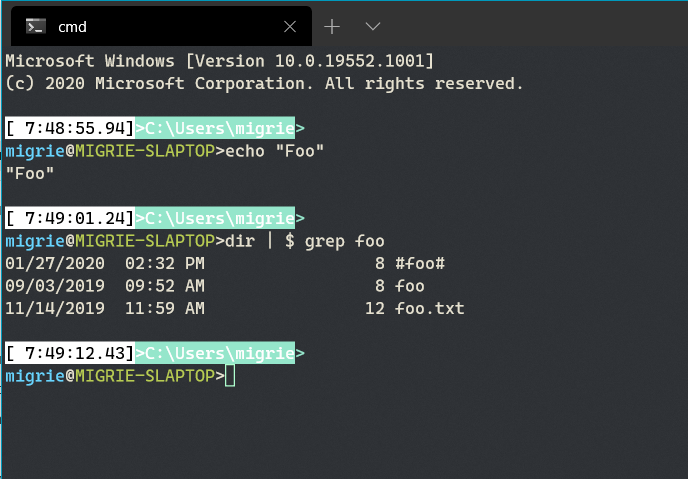
I'm thinking of the entire text:
It sounds to me like you want just the command history. So in the above case, it would be just the following:
I think there might be some challenges in saving just the second one. Windows Terminal is fundamentally just a terminal emulator, it doesn't really know what's going on behind the scenes with whatever client application (
cmd,powershell,bash,vim) that is connected to it. WT doesn't know when the user is typing in commands to the shell, or if the user is just typing in text inemacsor something. There's no way for the terminal to know that. It's typically the client application's responsibility to save it's own command history.bashandpowershellbot do a pretty good job of saving this to another file to restore across sessions, whilecmd.exedoesn't.Of course, Windows is a messy world and this model gets a little tricky here.
cmd.exeisn't actually managing it's own command history at all - as you've noticed,conhostis doing that work on behalf of the client applications. Some long time ago someone thought it would be a good idea to have thereadlinefunctionality baked directly into the console host. Whether that was a good idea or not remains to be seen - it's certainly made things likepython.exe's REPL easier to implement, since they don't need to maintain their own history buffer, but it makes it hard to de-tangle behavior like this from the console itself.I'm not sure how it would be possible to add a keybinding to the Windows Terminal that would be able to save the console's command history. Especially considering the Terminal might not be connected to a console host session at all. If the Windows Terminal were directly running a
wslinstance (something that's not possible today, but something we've considered adding in the future), then there wouldn't be aconhostin the process tree at all, and now requesting the command history from the console wouldn't work mysteriously.I still think that writing the entire buffer history to a file is something that's very possible, since that's something that's entirely known by the Terminal.
@eryksun commented on GitHub (Jan 31, 2020):
It's easy, but it makes the Windows implementation of Python the odd man out. Without support for Python's readline extension module, it can't use the REPL's ".python_history" file. There's a third-party pyreadline package, but it's poorly maintained and based on a ctypes FFI wrapper for the console API.
For saving just the input command history (as opposed to the entire session history of the terminal), it's better to use a Readline library that supports the Windows console. In that regard what I'd really want is for Microsoft to provide a C API for Readline support in console applications. It could support Windows, Emacs, and Vi modies, like PSReadLine in PowerShell.
Barring rewriting a console app to support readline (a la PowerShell), the console API could at least provide a more complete and documented implementation of its command history. It could document the functions for reading and clearing the session command history (i.e.
GetConsoleCommandHistoryLengthW,GetConsoleCommandHistoryW, andExpungeConsoleCommandHistoryW), which doskey.exe has used for almost 30 years. Plus extend the API with the ability to overwrite the command history -- e.g.SetConsoleCommandHistoryW(lpCommands, dwLength, lpExename).@jamesbtate commented on GitHub (Jun 9, 2020):
Has anyone taken on this feature request? Is there anything someone new to the project with no C++ experience can do to help it along?
My use case is mainly system administration with the ability to look back at commands and output from hours/days/weeks ago.
@buscseik commented on GitHub (Jul 4, 2020):
Also, time stamping each logged line in log file would be a very usueful option
@brettus78 commented on GitHub (Jul 8, 2020):
Would be very useful to have sessions always and continuously log - with options for different files per session or per profile list item with the custom options of append, overwrite, new file (with some options for formatting with date/time/profile list item name, etc.), and an ability to not log certain sessions - so per profile list item would swell. Maybe option to start a new file each time the sesssion opens
Something like PuTTY/MobaXTerm/TeraTerm.
@Mayhem93 commented on GitHub (Sep 16, 2020):
I think what most people want is to save the whole console's buffer into a file, I've came across this issue while googling if such a thing is possible (because I had a ton of logs, and scrolling was cumbersome and wanted to open in vscode for processing).
So here's my 👍 for this feature. Instead of having right-click do the paste action we could have a context menu where this paste action and "save terminal output" options would be available (not to mention, the menu can be expanded easily). Other option is to have this request feature as an option in the context menu of the tab (when right-clicking)
@rmutchler commented on GitHub (Oct 2, 2020):
Leaving my vote on here for this feature too. I use this with PuTTY and MobaXterm to automatically log every session to a new file. It is useful when I configure a SAN or switch. I can save the files if there is a dispute on the work performed or go back and review if there is an issue during a session.
@chadministratorwastaken commented on GitHub (Dec 17, 2020):
This is the only feature keeping me from switching to WT. Literally the only one.
Just sayin'
It's the only one.
Just. one.
@ChristophePichaud commented on GitHub (Dec 17, 2020):
It is decided, I run into the study to implement a decent contrition for implementing thios feature.
@miniksa @zadjii-msft Do you agree to give me green light ?
I can do it in less than 1 month or 6 weeks maximum. I have already studied and prototyped it before....
Regards, Christophe | www.windowscpp.com
@zadjii-msft commented on GitHub (Dec 17, 2020):
Sure, go right ahead. I think starting with just an action to export the current buffer contents to a file would be a good enough place to start. We can work on building things like auto-logging to a file, or hooking that action up to the tab context menu, etc. after that.
Also as a heads up, it is about to be the holidays here, so we might not be super responsive until the new year, but I'll try answering any questions you might have. Looking forward to the PR!
@alainza commented on GitHub (Dec 18, 2020):
Right click inside the console window might be assigned to "Paste" like in cmd's window: why not add the "Save" command to the popup menu on the tab header ?
@ChristophePichaud commented on GitHub (Dec 19, 2020):
I tell you all that this feature will be done by me and my young Infeeny Expert Kevin ANSARD, a student working with me. See our blog at blog.infeeny.com... Consulting Services. .NET and Azure... Microsoft ecosystem of Partners. See www.Infeeny.com.
We are in Paris, France.
@chadministratorwastaken commented on GitHub (Jan 7, 2021):
@ChristophePichaud @zadjii-msft I would be very happy to test this new feature when it is available. Thank you very much for working on it!
@fischerdouglas commented on GitHub (Jan 22, 2021):
This is a Mus-Have!
For those who work with IT support, this is a powerful shield against unfair complaints of errors on the operations of systems.
And what is needed is the FULL TEXT of the session, in live mode... Including backspaces and retyping.
And is needed ALSO for the remote sessions like remote Powershell, or remote ssh/telnet.
@ChristophePichaud commented on GitHub (Jan 22, 2021):
Hello Douglas,
Keep calm 😳😎, I implement it on cmd, then we discuss and then, we do a UI for settings and next, last but not last, we do it also for PowerShell and bash....
Every command prompt has a low level filter and a common one for all.
It's not so easy it is supposed to be.
I release on next Friday, the 29 January for testing.
Chris
Get Outlook for Androidhttps://aka.ms/ghei36
Get Outlook for Androidhttps://aka.ms/ghei36
@zadjii-msft commented on GitHub (Jan 22, 2021):
Hey I just wanted to make sure there wasn't a miscommunication here - how exactly are you going about doing this?
IMO, there's probably 4 steps to this PR:
TerminalApp/Terminal.Settings.Model, that will call some function inTermControl. #8522 is a good example of a PR that wires up all the things you'd need for the action, and calls down to the active control. TheCopyaction might be another good example, since that gets some text from the control, and returns it up to the app layer.TermControlquery the buffer for all the lines of text. I believeTextBufferexposes a way to get all the text from a row - should just be a matter of iterating over the entire contents of the buffer.TerminalApplayer.TerminalApp, open up a file picker dialog to chose a file to write those contents to.At that point, the user should be able to execute the "exportHistory" action (either with a keybinding or the command palette), and be prompted with a file picker, which should let them write the buffer contents to a file. We can work on other settings like auto logging, or logging keystrokes, etc. in the future, but this should be good enough for the 90% use case for now.
I don't think this needs to do anything different depending on which shell the user's interacting with, so that gives me pause...
@ChristophePichaud commented on GitHub (Jan 22, 2021):
Ok I understand. No problem about the issue.
Chris.
Get Outlook for Androidhttps://aka.ms/ghei36
@chadministratorwastaken commented on GitHub (Jan 22, 2021):
@zadjii-msft @ChristophePichaud The way I read the request was that automatic logging was a key part of this feature. Manually exporting the history via the command palette is no more easier than manually copying and pasting the text myself. Automatic logging is critical to my use case since I know it captures everything, even if I forget to export, and is not affected by any limitations of printed history.
If a comparison is helpful, I currently use the logging feature in PuTTY, which is the functionality I hope to see in wt.
@zadjii-msft commented on GitHub (Jan 25, 2021):
See, I'm very much a "steady, small incremental improvement" kinda person. I'd much rather work on what I've laid out first, then do keystrokes too, then add auto-logging, rather than try to accomplish all three at once and have it land sometime on the other side of never. Doing this first little bit will make the other parts easier in the future.
One step at a time 😄
@chadministratorwastaken commented on GitHub (Jan 25, 2021):
Fair enough. I'm just glad there's movement! Thanks again for your attention to this :)
@fischerdouglas commented on GitHub (Jan 25, 2021):
I didn't understand the complexity behind the scenes...
But I'm not a developer, so I even try to do it(srsrs).
But to be clear, I don't believe that any type of treatment should be done to the text.
Nothing like splitting what is a command and what is an output of the commando...
Simple real-time piping of all the characters presented on the screen > $LogFile
And when I say Real-time, I do not care about being pretty on the output file...
For example, if you look to and output a file of a session where the "htop" was used, it will be craziness... With characters been rewritten every second...
No issues with that! That's exactly what I need.
Including writing and backspacing characters...
Exactly as it happens on iTerm2 or even on SecureCRT as mentioned by our colleague earlier.
@ChristophePichaud commented on GitHub (Feb 3, 2021):
OK, it seems pretty cool locally OK.
I have worked disconnected since 3 weeks and I have most of the feature that seemz working.
I write "mosté and "seems" because it's not so easy it's look from the outside of the c++ code...
I need to do some additionnal quality and checks before releasing the code online in the PR and doing the code review step check.
Let me some hours/few days before completing the job.
I go online and I ask you for review but I think it's good.
Christophe
@WSLUser commented on GitHub (Feb 8, 2021):
So I should mention that the built-in Hyperterminal from XP had this feature. See this old article from Cisco on how it worked: https://www.cisco.com/c/en/us/support/docs/routers/2500-series-routers/17521-capture-text-hyperterminal.html. When I was still administering network devices, this was such a useful tool. I'm sure the source code still exists somewhere in the Windows repository and could be ported/refactored/modernized to work in conhost and/or Windows Terminal at least.
@miniksa commented on GitHub (Feb 8, 2021):
I'm 95% sure that HyperTerminal was a product that Microsoft licensed to include in previous editions of Windows, not something that is built out of the Windows repository with source code. Kinda like the 3D Pinball thing.
Having a source code example isn't really what's stopping us from getting this done anyway. It's just time, priority, and resources. (And pandemic fatigue.)
@WSLUser commented on GitHub (Feb 8, 2021):
I did see something that made me wonder if that was the case. Still, by now that license should of expired. I haven't seen it used outside of older Windows so it ought to be able to be acquired by Microsoft and/or OSSed. I just would love to see this feature pop up even on conhost appearing similar to how it does in HyperTerminal (because nolstagia and it's conhost). I of course would expect something more prettified for Windows Terminal due to a different UI framework being used.
@ChristophePichaud commented on GitHub (Feb 12, 2021):
I have a question for you @zadjii-msft ... I was releasing my code from offline to connected GitHub and I realized that when I was reading one of your last comment that I made it the wrong way.
Let me explain:
I was dealiong with the CMD command prompt and I was handling string buffer from InteractivityWin32 - WindowsIO.cpp and host - readDataCooked.cpp line 1000 in _handlePostCharInputLoop...
=> THE Problem is that is only handling CMD.
Your last coments told me to handle the string buffer from the XAML Main Window, correct ?
handling events from XAML Foundation Windows stuff ? Correct ???
Christophe
<<
ChristophePichaud commented on Jan 28, 2020
It could be something like this:
InteractivityWin32 - WindowsIO.cpp
AND
ChristophePichaud commented on Jan 28, 2020 •
There is also another solution... Log every time we have a new command:
host - readDataCooked.cpp line 1000 in _handlePostCharInputLoop()
@zadjii-msft commented on GitHub (Feb 12, 2021):
@ChristophePichaud Yea, don't mess with any of that.
readData, interactivity,WindowsIO- all that's conhost-specific code. We don't care about adding this to conhost right now (and that's certainly much harder). We're not trying to log each individual command as they come in, because that's not as useful, and doesn't work for powershell, bash, etc.It's more useful, and easier to start with, just writing the entire buffer contents to a file. I think this can be done in just the Terminal, in TerminalControl, TerminalApp and TerminalSettingsModel. That's where we're generally adding new UX features.
@ChristophePichaud commented on GitHub (Feb 12, 2021):
Yes, thanks for you support.
I have deep dived in TermApp and TermControl 7 days ago and I saw the IDL and winrt/cpp generated code stuff in CPP files.
I looked at some Winrt samples to catch the "Copy" Command. I can't see the light. Can't realize how to declare this kind of Foundation events methods IDL winrt stuff in the code.
I have the code sniper for getting the buffer.
I have got the code for appending the buffer into the rolling daily log file using log4cpp...
But the XAML UI handling with Foundation hurt me.
I search but would be really appreciated to see where to declare the WinUI plumbing to handle this mouse handlers...
@Alain Zanchettamailto:alainza@hotmail.com, you can give me an advice ???
Regards to all..
Chris
Get Outlook for Androidhttps://aka.ms/ghei36
@zadjii-msft commented on GitHub (Feb 12, 2021):
@ChristophePichaud Try taking a look at #8917. That's a PR that has a good example of plumbing an action from TerminalApp down into the TermControl.
@alainza commented on GitHub (Feb 12, 2021):
@ChristophePichaud You don't need to change idl.
Just register your code in
void TerminalTab::_CreateContextMenu()in https://github.com/microsoft/terminal/blob/main/src/cascadia/TerminalApp/TerminalTab.cppi.e. right click in the body of the tab is already used for "paste" => don't mess up with this
right click on a tab header is where you already have a menu and adding "save tab content as text" would make sense.
This is done in
void TerminalTab::_CreateContextMenu()@ChristophePichaud commented on GitHub (Feb 12, 2021):
Thank Alain. I try this asap.
Damn XAML Foundation stuff.....
I hope God bless Frogs. 😳😘😎
Chris, from Paris, France.
Get Outlook for Androidhttps://aka.ms/ghei36
@ChristophePichaud commented on GitHub (Feb 12, 2021):
Thanks Mike.
I will go into this.
I can do it.
Get Outlook for Androidhttps://aka.ms/ghei36
@chadministratorwastaken commented on GitHub (Mar 17, 2021):
Are there any updates on this? Is there anything I can do to assist?
@ChristophePichaud commented on GitHub (Mar 17, 2021):
Hello,
I am busy on track.
It was hard to find the plumbing _CreateCOntext from my friend Alain Zanchetta.
It’s still under development on local branch.
I may be still be busy this coming days few hours but I’am near the end.
The XAML was a problem for me.
Do you want to fix a final deadline to be on track ?
Christophe
De : chadministratorwastaken @.>
Envoyé : Wednesday, March 17, 2021 2:15 PM
À : microsoft/terminal @.>
Cc : Christophe Pichaud @.>; Mention @.>
Objet : Re: [microsoft/terminal] Feature request: export console history as txt (#642)
Are there any updates on this? Is there anything I can do to assist?
@zadjii-msft commented on GitHub (May 19, 2021):
Nope. We'll make sure to update this thread when there is. In the meantime, might I recommend the Subscribe button?

That way you'll be notified of any updates to this thread, without needlessly pinging everyone on this thread ☺️
@kczx3 commented on GitHub (May 24, 2021):
This would be very useful as I work in some apps that produce a lot of output and I can't always direct it to a file on the remote server to then grab via SCP. So being able to start terminal output logging, run a command, and then view that output locally is immensely helpful (and quicker).
@zadjii-msft commented on GitHub (Jun 10, 2021):
@konarx If you'd like to "+1" this feature, the best way to do that is by hitting the 👍 button on this issue
That way, you avoid unnecessarily pinging everyone following this thread. Thanks!
@chadministratorwastaken commented on GitHub (Jul 19, 2021):
Has this request been reduced in priority? It's been four months since we've heard from the last person to agree to take it on.
@zadjii-msft commented on GitHub (Jul 19, 2021):
FWIW @ChristophePichaud is an external contributor - it's entirely reasonable that life happened and they never got around to finishing this.
@Don-Vito commented on GitHub (Aug 26, 2021):
@zadjii-msft - WDYT?
@alainza commented on GitHub (Aug 26, 2021):
Seems cool to me ! When do we get this :) ?
@zadjii-msft commented on GitHub (Aug 26, 2021):
What do I think? I think

ship it
@kczx3 commented on GitHub (Aug 27, 2021):
How does that work with scrollable regions? (I think that’s the proper terminology)
@DHowett commented on GitHub (Aug 27, 2021):
Terrible secret... Terminal itself doesn't know about the scrolling regions. There's an issue tracking that; right now they work because there's a console in the background doing all the translation.
@buscseik commented on GitHub (Aug 27, 2021):
I would like to convince people in this thread, exporting is not the same as logging.
With logging you can introduce new additional options like:
With the export feature:
What happen if scroll back buffer is full?
For example, what will happen if I would like to set up a logging for an entry week, and 10 lines of output is captured every second. whit this "export" solution I will have to check over and over again and save manually the output, and after find the duplicated lines manually, and join the logs manually.
What will happen, if the terminal, or the laptop crash before I can export the log?
@buscseik commented on GitHub (Aug 27, 2021):
Just a small workaround.
You can create a script which will start logging automatically when you open a new terminal window.
Just type $Profile and hit enter to find the profile script which will started automatically when you open a new terminal window.
If the listed script file does not exists, just create it.
Add following content to the file and save it:
Make sure the D:\pslogs\ folder is created before you start to use it.
@Don-Vito commented on GitHub (Aug 27, 2021):
I absolutely agree that we need to add the logging as well. I started with a pull for export as it is a "low hanging fruit" that will hopefully be useful for some (it helps me personally 👼)
I will try to look at logging later on. Everyone else is encouraged as well 😊
@fischerdouglas commented on GitHub (Sep 1, 2021):
First-> I need to say that I'm pretty happy seem some movements ( #11090 ) to solve this demand...
And I Agree with @Don-Vito and @buscseik when they say that "exporting is not the same as logging".
But I also need to reinforce that both are needed...
Just to exemplify, in some tools(like iTerm2) real time logging means that if you type "wrod" and press backspace 3 times end write "ord", is exactly those 10 chars that will be at the log.
And on export you will see only "word"...
This may sound silly, but just with that level of logging will be possible to have registered "CTRL+C" or "CTRL+A" sent to remote terminals...
Another side effect of logging (this one is annoying) is when you access CLI apps that draw on screen and refresh every second. Most apps done with ncurses on linux do that... Examples of what I'm saying are "top" "sngrep" on linux, or the old "edit" from msdos.
When you see that on the log file, it looks a mess... But is an acceptable downside of being safe and having the logs of what you did on some one else server or equipment.
@zadjii-msft commented on GitHub (Sep 1, 2021):
Just to be clear - no one thinks that exporting and logging are the same thing. This is just a nice stepping stone towards full logging. I encourage anyone with thoughts on the matter to go check out #11090.
@oising commented on GitHub (Sep 1, 2021):
Blergh... this is gonna be fun. Personally I believe that exporting is fine, but logging responsibility belongs to the shell, not the terminal. Do I really want to know if someone typo'd 67 times before successfully executing
sudo rm -Rf /? Maybe if I was Sherlock Holmes and wanted hints about the perpetrator... ;)And as far as logging goes, powershell is wayyyy ahead of the curve with respect to that: https://docs.microsoft.com/en-us/powershell/module/microsoft.powershell.core/about/about_logging_windows?view=powershell-7.1
@RokeJulianLockhart commented on GitHub (Sep 6, 2021):
This has been a feature of http://github.com/kde/konsole since many years before now, and is equally important as it is basic, so this should be added soon.
@zadjii-msft commented on GitHub (Sep 6, 2021):
Well great news, #11062 was just merged last week!
@RokeJulianLockhart commented on GitHub (Sep 7, 2021):
Thus, this issue probably should be closed.
@zadjii-msft commented on GitHub (Sep 7, 2021):
In retrospect, this should have been kept two separate issues - one for export, and one for logging. But, we ended up merging a bunch of threads into this one, and now it's all confusing.
Yea, I think we can close this one with #11062, and track the remaining logging work over in #9700. That's roughly the same process we've done with other features like this.
@starhound commented on GitHub (Sep 9, 2021):
As a software dev trying to switch to using Windows Terminal completely, I require full terminal logging for some activities.
I know this feature request was for command history, but this would be a much more effective tool for my team should it have complete logging features.
Other than the lack of said feature above, this terminal has been one of the best I've ever had to interact with.
@ghost commented on GitHub (Oct 20, 2021):
:tada:This issue was addressed in #11062, which has now been successfully released as
Windows Terminal Preview v1.12.2922.0.🎉Handy links: