Compare commits
376 Commits
dev/miniks
...
v0.7.3291.
| Author | SHA1 | Date | |
|---|---|---|---|

|
983f9b5a47 | ||

|
e22487d10b | ||

|
0e36ce4d60 | ||

|
f0f19f9fd0 | ||
|
|
171f00c265 | ||

|
2b1a35a890 | ||
|
|
7ae815ccac | ||
|
|
714d79e2c8 | ||

|
62d7f11b4a | ||

|
99a8337185 | ||

|
2915be5b51 | ||
|
|
71debc158b | ||
|
|
b3ecb7392f | ||

|
6dec0b66d2 | ||
|
|
ffad815f4a | ||
|
|
f00a8ae086 | ||
|
|
663a1bbe6e | ||

|
0c2ae7015f | ||
|
|
d1e9de7882 | ||
|
|
8ab666c5fc | ||
|
|
9ed3da8b3b | ||
|
|
cc8faaf04f | ||

|
efa68abd3d | ||
|
|
a8e352ed87 | ||
|
|
790f49460a | ||
|
|
9d8a82d863 | ||
|
|
eccd55b8b3 | ||

|
ebdcfbd940 | ||
|
|
6a4c737686 | ||

|
d552959378 | ||

|
13406b746b | ||
|
|
a404778271 | ||

|
c9f148c4b6 | ||

|
1177815f81 | ||
|
|
306e751639 | ||
|
|
fe4c80b27d | ||
|
|
d2ca3c1fb0 | ||
|
|
9a84521965 | ||

|
e2994ff890 | ||
|
|
7068b3124d | ||

|
db79758092 | ||
|
|
58b52ef69e | ||
|
|
c274b38dcc | ||
|
|
ddcc06e911 | ||
|
|
4dd476ecbd | ||

|
bd1604a0b5 | ||
|
|
3e8a1a78bc | ||
|
|
d26865f460 | ||
|
|
357e835f5d | ||
|
|
d2dcdef620 | ||
|
|
f0c110593a | ||
|
|
3df292430f | ||

|
fee3fdf322 | ||
|
|
9dc922fc37 | ||
|
|
52d7de38b1 | ||

|
53b6f143b3 | ||
|
|
388b975663 | ||
|
|
94213ad94c | ||

|
5dfc021d8e | ||

|
6f36f8b23f | ||
|
|
a4c24f82e6 | ||
|
|
de9231a88b | ||
|
|
15505337d8 | ||
|
|
a34c47a493 | ||
|
|
64943bd033 | ||
|
|
86e0ea73e2 | ||

|
8c8672c87a | ||
|
|
26decf13d0 | ||
|
|
126d489af9 | ||

|
581d63fa8d | ||
|
|
c0399b2c2e | ||
|
|
46ac1918ec | ||
|
|
891b34de07 | ||

|
c879cd3f97 | ||
|
|
444de5b166 | ||
|
|
634687bae3 | ||
|
|
566ed8ddbb | ||
|
|
f2a99c56c9 | ||

|
5ad1deb696 | ||
|
|
d6790c023f | ||
|
|
06f2706c40 | ||
|
|
18c5fce43d | ||
|
|
9c7e8ce1e3 | ||
|
|
60b94a481e | ||
|
|
926a2e3d80 | ||
|
|
5c55bb8d02 | ||
|
|
4991b9f1b2 | ||

|
73462c3986 | ||
|
|
9e5792ba51 | ||
|
|
a02a5d9986 | ||
|
|
d80500f112 | ||
|
|
6f7ad99d51 | ||
|
|
35d7d20a07 | ||
|
|
b293b2bada | ||
|
|
01c0736843 | ||
|
|
1925173b02 | ||
|
|
12c2819e6a | ||
|
|
df26c677ef | ||
|
|
5d17557edf | ||
|
|
6708556079 | ||
|
|
c9050416f6 | ||

|
b664761c79 | ||
|
|
b9233c03d1 | ||
|
|
7b23d8e66c | ||
|
|
82dd0b978a | ||
|
|
200e90d1c6 | ||
|
|
dd2fbef39d | ||
|
|
cd40faa88f | ||

|
aa682bfd12 | ||
|
|
0691c21876 | ||

|
94fc40ed31 | ||
|
|
dec5c11e19 | ||
|
|
53c81a08f8 | ||

|
505ceaccf6 | ||
|
|
8ae65f5444 | ||
|
|
9756c7c3f7 | ||
|
|
de7a0686b3 | ||
|
|
a82d6b8c69 | ||
|
|
a9f384931e | ||
|
|
b97db63030 | ||
|
|
64c98db024 | ||
|
|
621d841538 | ||
|
|
06bd7e22da | ||
|
|
17495fcda3 | ||
|
|
abf3ee5d6e | ||
|
|
0ce08aff32 | ||
|
|
33361698f7 | ||
|
|
847d6b56ad | ||

|
3294a8f7b1 | ||
|
|
5d906d9f3e | ||
|
|
4dd9f9c180 | ||
|
|
a2f8a943b4 | ||
|
|
5c4e8f52fb | ||
|
|
6831120755 | ||
|
|
52534c94cc | ||

|
083be43700 | ||
|
|
1caece74ab | ||
|
|
23bea9e5b5 | ||
|
|
258c8b407c | ||
|
|
0dc1c5b163 | ||
|
|
0df6415e5b | ||
|
|
6f4b98acb4 | ||
|
|
eafa884fc4 | ||
|
|
86c9e586fe | ||
|
|
6b728cd6d0 | ||
|
|
2c8b3243dc | ||
|
|
1386148191 | ||
|
|
275b651c8f | ||

|
7faf3342e0 | ||

|
9ed9e7c8aa | ||
|
|
60c6a9fb8f | ||
|
|
a862f3196f | ||
|
|
f5071439a3 | ||
|
|
a9d57ef9ea | ||
|
|
a1bd7967e2 | ||
|
|
90a3d99512 | ||
|
|
0c8a4df963 | ||
|
|
1c412d42b3 | ||
|
|
277acc3383 | ||
|
|
8afc5b2f59 | ||

|
b096a57387 | ||
|
|
6b415126fd | ||

|
bfb1484708 | ||
|
|
56c35945b9 | ||
|
|
9102c5d030 | ||
|
|
b84a073464 | ||
|
|
b37d6c03ac | ||
|
|
dfaaa44789 | ||
|
|
7128e873a4 | ||
|
|
a62c6cd22b | ||

|
5705347640 | ||
|
|
5a57c5a6c9 | ||
|
|
4b439cf290 | ||
|
|
95580b5f11 | ||
|
|
7edbbd1ccb | ||
|
|
4217bed9c8 | ||
|
|
7b47f4601d | ||
|
|
c30ef6d30b | ||
|
|
fe6fa04f15 | ||
|
|
5806cdab52 | ||
|
|
2d0608d8c0 | ||
|
|
0df02343f1 | ||
|
|
8ba8f35dc5 | ||
|
|
ed87689c04 | ||
|
|
3d35e396b2 | ||
|
|
b693fd484a | ||
|
|
1fccbc5304 | ||
|
|
537258a60f | ||

|
b5fe4ffd54 | ||
|
|
12d2e170dd | ||

|
2da3b49c9e | ||
|
|
2063197605 | ||
|
|
2ac24979da | ||
|
|
429af0e6fa | ||
|
|
18bacfe973 | ||
|
|
bac69f7cab | ||
|
|
ce34c7320c | ||
|
|
badbbc43a4 | ||
|
|
fecddafad5 | ||
|
|
d8ff47a0d3 | ||
|
|
125e1771ae | ||
|
|
c58033cda2 | ||
|
|
fc81adf32f | ||
|
|
689c21e802 | ||
|
|
96cc7727bc | ||
|
|
886d018bb4 | ||
|
|
d0c207bc9c | ||
|
|
ce3028e12f | ||
|
|
b7c1e05060 | ||
|
|
3bff2a3eb0 | ||
|
|
7c66e66ca1 | ||
|
|
e0762f6bb3 | ||

|
51f53535d1 | ||
|
|
21067a7629 | ||
|
|
7d9534bfa8 | ||
|
|
6735311fc9 | ||
|
|
4204733c34 | ||
|
|
23b4a466f5 | ||
|
|
01bd77003c | ||
|
|
ae25a32913 | ||
|
|
93aa9455e2 | ||
|
|
41f209f6d3 | ||
|
|
244fb72fee | ||
|
|
3a0da64276 | ||
|
|
b2c093fa2f | ||
|
|
87f5852a72 | ||
|
|
e14a59a1b6 | ||
|
|
cd144e98c6 | ||
|
|
c7f0a3439d | ||
|
|
5d60d69e86 | ||
|
|
072bbfd09d | ||
|
|
b87f8f9070 | ||
|
|
b78d9176ae | ||
|
|
3bbd8f4c97 | ||
|
|
2d3f285894 | ||
|
|
49ff36bfc3 | ||
|
|
d8bc94f13c | ||
|
|
dd49c3ed51 | ||
|
|
9678dd894c | ||
|
|
45e599368f | ||
|
|
594dca993b | ||
|
|
c956913a28 | ||
|
|
b180406b07 | ||
|
|
bbdfdf91eb | ||
|
|
d5d7cf420d | ||
|
|
81ab5803aa | ||
|
|
7d4096bbbf | ||
|
|
230e7f43e0 | ||
|
|
cdfbf8f106 | ||
|
|
30e8e7f3a3 | ||
|
|
feb5b18296 | ||
|
|
7ec6bfc01c | ||
|
|
4f1157c044 | ||
|
|
8c3a629b52 | ||
|
|
8579d8905a | ||
|
|
50e2d0c433 | ||
|
|
8ea7401dc9 | ||
|
|
a381f6a042 | ||
|
|
c63289b114 | ||
|
|
b33a59816e | ||
|
|
bd2d5ddb4b | ||
|
|
23897b1bd4 | ||
|
|
65dec36cb1 | ||
|
|
1989eb9d00 | ||
|
|
cb02ca7534 | ||

|
5de63096ac | ||
|
|
f93adb9540 | ||

|
0d12a25b2d | ||
|
|
5e38bcd754 | ||

|
f4294b17d7 | ||
|
|
974e95ebf7 | ||
|
|
cffa033116 | ||
|
|
ebcf8126dc | ||

|
02d8df8431 | ||
|
|
949839fdd8 | ||
|
|
e7c78c8d28 | ||
|
|
1006e98780 | ||
|
|
9ff90ba174 | ||
|
|
5694606aea | ||
|
|
84d19f5348 | ||

|
6d50fb4d31 | ||

|
d1a3e6d2b8 | ||
|
|
be52880620 | ||

|
e92efa5bc0 | ||
|
|
667c0286c1 | ||
|
|
28b767d00b | ||
|
|
8096d7cf2f | ||
|
|
f9752148d0 | ||
|
|
09d79cb422 | ||
|
|
0c454f53e9 | ||
|
|
ff87190823 | ||
|
|
98f77818ff | ||
|
|
71eaf621bc | ||

|
38156311e8 | ||
|
|
bd47dcc898 | ||
|
|
734fc1dcc6 | ||
|
|
c70fb49ab5 | ||
|
|
d55ecae199 | ||
|
|
d7d96f723a | ||
|
|
24ea0866d3 | ||
|
|
fca0cd9879 | ||
|
|
16e1e29a12 | ||
|
|
becdd16008 | ||
|
|
1f41fd35cf | ||
|
|
82de43bce9 | ||
|
|
8999c661b2 | ||
|
|
13d66c9948 | ||
|
|
ac97e5d082 | ||

|
138d3b81c8 | ||

|
0843f3cced | ||
|
|
646d8f91b9 | ||

|
eac29d2c67 | ||
|
|
1e4e12507d | ||
|
|
6c747c565b | ||
|
|
89925ebe44 | ||
|
|
8fa42e09df | ||
|
|
94e5d545aa | ||

|
dfb853644a | ||
|
|
ff7fdbeab4 | ||
|
|
a7877558f2 | ||
|
|
aae938fc33 | ||
|
|
b495ad255f | ||
|
|
4529e46d3e | ||
|
|
3086671bc7 | ||
|
|
1b33d186f3 | ||

|
0d8f2998d6 | ||
|
|
42c1e58966 | ||

|
0da13cdf2d | ||

|
f8f0798826 | ||
|
|
6749ab03b8 | ||
|
|
66044ca605 | ||
|
|
a08666b58e | ||
|
|
1afab788ab | ||
|
|
63df881f31 | ||
|
|
2d3e271a4f | ||
|
|
7abcc35fdf | ||
|
|
c6c51fbb0e | ||
|
|
56589c0aac | ||
|
|
3f62c8b470 | ||
|
|
96496d8154 | ||
|
|
ed18c1e8c1 | ||
|
|
10c599eb17 | ||
|
|
bd5cae1328 | ||
|
|
dd1f8a8245 | ||
|
|
644ac56fdb | ||

|
83a4c22919 | ||
|
|
09e828fa49 | ||
|
|
c97cccb55c | ||
|
|
63347f47fb | ||
|
|
a5746850f9 | ||
|
|
a2744529e6 | ||

|
577da7441e | ||

|
66d46ed8ed | ||
|
|
8ae4f2fc1b | ||
|
|
2febe1fa2b | ||

|
89190c6e6c | ||
|
|
2c3e175f62 | ||

|
9d36b08b82 | ||
|
|
5da2ab1a86 | ||

|
e662277cb0 | ||
|
|
2407828d03 | ||
|
|
69c67f8a8e | ||
|
|
260d095f94 | ||
|
|
a6ab075a62 | ||
|
|
3b96a84261 | ||

|
dca0ffe6dd | ||
|
|
5074335392 | ||
|
|
8ffff8ea37 | ||
|
|
57ad2d57fd | ||
|
|
f1441a589c | ||
|
|
988fe0ba60 | ||
|
|
de1de4425e | ||
|
|
8d52ba0990 | ||
|
|
a0782bfd6c | ||

|
fa5b9b06bd | ||
|
|
7067910862 |
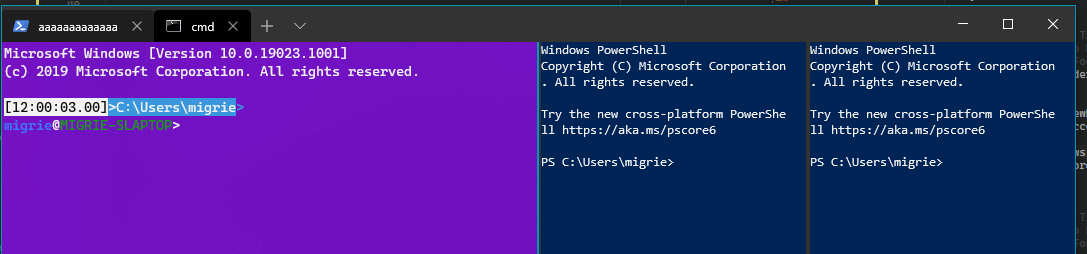



8
.github/ISSUE_TEMPLATE/Bug_Report.md
vendored
@@ -1,7 +1,7 @@
|
||||
---
|
||||
name: Bug report 🐛
|
||||
name: "Bug report 🐛"
|
||||
about: Report errors or unexpected behavior
|
||||
title: "Bug Report (IF I DO NOT CHANGE THIS THE ISSUE WILL BE AUTO-CLOSED)"
|
||||
title: ''
|
||||
labels: ''
|
||||
assignees: ''
|
||||
|
||||
@@ -26,6 +26,8 @@ This bug tracker is monitored by Windows Terminal development team and other tec
|
||||
**Important: When reporting BSODs or security issues, DO NOT attach memory dumps, logs, or traces to Github issues**.
|
||||
Instead, send dumps/traces to secure@microsoft.com, referencing this GitHub issue.
|
||||
|
||||
If this is an application crash, please also provide a Feedback Hub submission link so we can find your diagnostic data on the backend. Use the category "Apps > Windows Terminal (Preview)" and choose "Share My Feedback" after submission to get the link.
|
||||
|
||||
Please use this form and describe your issue, concisely but precisely, with as much detail as possible.
|
||||
|
||||
-->
|
||||
@@ -33,7 +35,7 @@ Please use this form and describe your issue, concisely but precisely, with as m
|
||||
# Environment
|
||||
|
||||
```none
|
||||
Windows build number: [run "ver" at a command prompt]
|
||||
Windows build number: [run `[Environment]::OSVersion` for powershell, or `ver` for cmd]
|
||||
Windows Terminal version (if applicable):
|
||||
|
||||
Any other software?
|
||||
|
||||
@@ -1,7 +1,7 @@
|
||||
---
|
||||
name: Documentation Issue 📚
|
||||
name: "Documentation Issue 📚"
|
||||
about: Report issues in our documentation
|
||||
title: "Documentation Issue"
|
||||
title: ''
|
||||
labels: Issue-Docs
|
||||
assignees: ''
|
||||
|
||||
|
||||
69
.github/ISSUE_TEMPLATE/Feature_Request.md
vendored
@@ -1,34 +1,35 @@
|
||||
---
|
||||
name: Feature Request/Idea 🚀
|
||||
about: Suggest a new feature or improvement (this does not mean you have to implement it)
|
||||
title: "Feature Request"
|
||||
labels: Issue-Feature
|
||||
assignees: ''
|
||||
|
||||
---
|
||||
|
||||
<!--
|
||||
🚨🚨🚨🚨🚨🚨🚨🚨🚨🚨
|
||||
|
||||
I ACKNOWLEDGE THE FOLLOWING BEFORE PROCEEDING:
|
||||
1. If I delete this entire template and go my own path, the core team may close my issue without further explanation or engagement.
|
||||
2. If I list multiple bugs/concerns in this one issue, the core team may close my issue without further explanation or engagement.
|
||||
3. If I write an issue that has many duplicates, the core team may close my issue without further explanation or engagement (and without necessarily spending time to find the exact duplicate ID number).
|
||||
4. If I leave the title incomplete when filing the issue, the core team may close my issue without further explanation or engagement.
|
||||
5. If I file something completely blank in the body, the core team may close my issue without further explanation or engagement.
|
||||
|
||||
All good? Then proceed!
|
||||
-->
|
||||
|
||||
# Summary of the new feature/enhancement
|
||||
|
||||
<!--
|
||||
A clear and concise description of what the problem is that the new feature would solve.
|
||||
Describe why and how a user would use this new functionality (if applicable).
|
||||
-->
|
||||
|
||||
# Proposed technical implementation details (optional)
|
||||
|
||||
<!--
|
||||
A clear and concise description of what you want to happen.
|
||||
-->
|
||||
---
|
||||
name: "Feature Request/Idea 🚀"
|
||||
about: Suggest a new feature or improvement (this does not mean you have to implement
|
||||
it)
|
||||
title: ''
|
||||
labels: Issue-Feature
|
||||
assignees: ''
|
||||
|
||||
---
|
||||
|
||||
<!--
|
||||
🚨🚨🚨🚨🚨🚨🚨🚨🚨🚨
|
||||
|
||||
I ACKNOWLEDGE THE FOLLOWING BEFORE PROCEEDING:
|
||||
1. If I delete this entire template and go my own path, the core team may close my issue without further explanation or engagement.
|
||||
2. If I list multiple bugs/concerns in this one issue, the core team may close my issue without further explanation or engagement.
|
||||
3. If I write an issue that has many duplicates, the core team may close my issue without further explanation or engagement (and without necessarily spending time to find the exact duplicate ID number).
|
||||
4. If I leave the title incomplete when filing the issue, the core team may close my issue without further explanation or engagement.
|
||||
5. If I file something completely blank in the body, the core team may close my issue without further explanation or engagement.
|
||||
|
||||
All good? Then proceed!
|
||||
-->
|
||||
|
||||
# Description of the new feature/enhancement
|
||||
|
||||
<!--
|
||||
A clear and concise description of what the problem is that the new feature would solve.
|
||||
Describe why and how a user would use this new functionality (if applicable).
|
||||
-->
|
||||
|
||||
# Proposed technical implementation details (optional)
|
||||
|
||||
<!--
|
||||
A clear and concise description of what you want to happen.
|
||||
-->
|
||||
|
||||
10
.github/ISSUE_TEMPLATE/Guidance_Issue.md
vendored
@@ -1,10 +0,0 @@
|
||||
---
|
||||
name: Community Guidance Request ✨
|
||||
about: Suggest somewhere the Windows Terminal Team needs to provide community guidance through new documentation or process.
|
||||
title: "Guidance"
|
||||
labels: Issue-Docs
|
||||
assignees: 'bitcrazed'
|
||||
|
||||
---
|
||||
|
||||
<!-- What needs to change? Who is responsible for it? Why is it an open question? -->
|
||||
@@ -25,10 +25,10 @@
|
||||
"Microsoft.VisualStudio.Component.VC.Redist.14.Latest",
|
||||
"Microsoft.VisualStudio.Component.VC.Tools.x86.x64",
|
||||
"Microsoft.VisualStudio.Component.VC.Tools.ARM64",
|
||||
"Microsoft.VisualStudio.Component.VC.v141.x86.x64",
|
||||
"Microsoft.VisualStudio.Component.VC.v141.ARM64",
|
||||
"Microsoft.VisualStudio.Component.VC.v142.x86.x64",
|
||||
"Microsoft.VisualStudio.Component.VC.v142.ARM64",
|
||||
"Microsoft.VisualStudio.ComponentGroup.UWP.VC",
|
||||
"Microsoft.VisualStudio.ComponentGroup.UWP.VC.v141",
|
||||
"Microsoft.VisualStudio.ComponentGroup.UWP.VC.v142",
|
||||
"Microsoft.VisualStudio.Component.UWP.VC.ARM64"
|
||||
]
|
||||
}
|
||||
|
||||
467
OpenConsole.sln
213
README.md
@@ -1,131 +1,166 @@
|
||||
# Welcome\!
|
||||
#### This repository contains the source code for:
|
||||
# Welcome to the Windows Terminal, Console and Command-Line repo
|
||||
|
||||
* Windows Terminal
|
||||
* The Windows console host (`conhost.exe`)
|
||||
* Components shared between the two projects
|
||||
* [ColorTool](https://github.com/Microsoft/Terminal/tree/master/src/tools/ColorTool)
|
||||
* [Sample projects](https://github.com/Microsoft/Terminal/tree/master/samples) that show how to consume the Windows Console APIs
|
||||
|
||||
#### Other related repositories include:
|
||||
* [Console API Documentation](https://github.com/MicrosoftDocs/Console-Docs)
|
||||
This repository contains the source code for:
|
||||
|
||||
### Build Status
|
||||
* [Windows Terminal](https://www.microsoft.com/en-us/p/windows-terminal-preview/9n0dx20hk701)
|
||||
* The Windows console host (`conhost.exe`)
|
||||
* Components shared between the two projects
|
||||
* [ColorTool](https://github.com/Microsoft/Terminal/tree/master/src/tools/ColorTool)
|
||||
* [Sample projects](https://github.com/Microsoft/Terminal/tree/master/samples) that show how to consume the Windows Console APIs
|
||||
|
||||
Related repositories include:
|
||||
|
||||
* [Console API Documentation](https://github.com/MicrosoftDocs/Console-Docs)
|
||||
* [Cascadia Code Font](https://github.com/Microsoft/Cascadia-Code)
|
||||
|
||||
## Installing and running Windows Terminal
|
||||
|
||||
> 👉 Note: Windows Terminal requires Windows 10 1903 (build 18362) or later
|
||||
|
||||
### Manually installing builds from this repository
|
||||
|
||||
For users who are unable to install Terminal from the Microsoft Store, Terminal builds can be manually downloaded from this repository's [Releases page](https://github.com/microsoft/terminal/releases).
|
||||
|
||||
> ⚠ Note: If you install Terminal manually:
|
||||
>
|
||||
> * Be sure to install the [Desktop Bridge VC++ v14 Redistributable Package](https://www.microsoft.com/en-us/download/details.aspx?id=53175) otherwise Terminal may not install and/or run and may crash at startup
|
||||
> * Terminal will not auto-update when new builds are released so you will need to regularly install the latest Terminal release to receive all the latest fixes and improvements!
|
||||
|
||||
### Install via Chocolatey (unofficial)
|
||||
|
||||
[Chocolatey](https://chocolatey.org) users can download and install the latest Terminal release by installing the `microsoft-windows-terminal` package:
|
||||
|
||||
```powershell
|
||||
choco install microsoft-windows-terminal
|
||||
```
|
||||
|
||||
To upgrade Windows Terminal using Chocolatey, run the following:
|
||||
|
||||
```powershell
|
||||
choco upgrade microsoft-windows-terminal
|
||||
```
|
||||
|
||||
If you have any issues when installing/upgrading the package please go to the [Windows Terminal package page](https://chocolatey.org/packages/microsoft-windows-terminal) and follow the [Chocolatey triage process](https://chocolatey.org/docs/package-triage-process)
|
||||
|
||||
---
|
||||
|
||||
## Project Build Status
|
||||
|
||||
Project|Build Status
|
||||
---|---
|
||||
Terminal|[](https://dev.azure.com/ms/Terminal/_build?definitionId=136)
|
||||
ColorTool|
|
||||
|
||||
# Terminal & Console Overview
|
||||
---
|
||||
|
||||
## Windows Terminal v1.0 Roadmap
|
||||
|
||||
The plan for delivering Windows Terminal v1.0 [is described here](/doc/terminal-v1-roadmap.md), and will be updated as the project proceeds.
|
||||
|
||||
---
|
||||
|
||||
## Terminal & Console Overview
|
||||
|
||||
Please take a few minutes to review the overview below before diving into the code:
|
||||
|
||||
## Windows Terminal
|
||||
### Windows Terminal
|
||||
|
||||
Windows Terminal is a new, modern, feature-rich, productive terminal application for command-line users. It includes many of the features most frequently requested by the Windows command-line community including support for tabs, rich text, globalization, configurability, theming & styling, and more.
|
||||
|
||||
The Terminal will also need to meet our goals and measures to ensure it remains fast, and efficient, and doesn't consume vast amounts of memory or power.
|
||||
The Terminal will also need to meet our goals and measures to ensure it remains fast and efficient, and doesn't consume vast amounts of memory or power.
|
||||
|
||||
## The Windows console host
|
||||
### The Windows Console Host
|
||||
|
||||
The Windows console host, `conhost.exe`, is Windows' original command-line user experience. It implements Windows' command-line infrastructure, and is responsible for hosting the Windows Console API, input engine, rendering engine, and user preferences. The console host code in this repository is the actual source from which the `conhost.exe` in Windows itself is built.
|
||||
The Windows Console host, `conhost.exe`, is Windows' original command-line user experience. It also hosts Windows' command-line infrastructure and the Windows Console API server, input engine, rendering engine, user preferences, etc. The console host code in this repository is the actual source from which the `conhost.exe` in Windows itself is built.
|
||||
|
||||
Console's primary goal is to remain backwards-compatible with existing console subsystem applications.
|
||||
Since taking ownership of the Windows command-line in 2014, the team added several new features to the Console, including background transparency, line-based selection, support for [ANSI / Virtual Terminal sequences](https://en.wikipedia.org/wiki/ANSI_escape_code), [24-bit color](https://devblogs.microsoft.com/commandline/24-bit-color-in-the-windows-console/), a [Pseudoconsole ("ConPTY")](https://devblogs.microsoft.com/commandline/windows-command-line-introducing-the-windows-pseudo-console-conpty/), and more.
|
||||
|
||||
Since assuming ownership of the Windows command-line in 2014, the team has added several new features to the Console, including window transparency, line-based selection, support for [ANSI / Virtual Terminal sequences](https://en.wikipedia.org/wiki/ANSI_escape_code), [24-bit color](https://devblogs.microsoft.com/commandline/24-bit-color-in-the-windows-console/), a [Pseudoconsole ("ConPTY")](https://devblogs.microsoft.com/commandline/windows-command-line-introducing-the-windows-pseudo-console-conpty/), and more.
|
||||
|
||||
However, because the Console's primary goal is to maintain backward compatibility, we've been unable to add many of the features the community has been asking for, and which we've been wanting to add for the last several years--like tabs!
|
||||
However, because Windows Console's primary goal is to maintain backward compatibility, we have been unable to add many of the features the community (and the team) have been wanting for the last several years including tabs, unicode text, and emoji.
|
||||
|
||||
These limitations led us to create the new Windows Terminal.
|
||||
|
||||
## Shared Components
|
||||
> You can read more about the evolution of the command-line in general, and the Windows command-line specifically in [this accompanying series of blog posts](https://devblogs.microsoft.com/commandline/windows-command-line-backgrounder/) on the Command-Line team's blog.
|
||||
|
||||
While overhauling the Console, we've modernized its codebase considerably. We've cleanly separated logical entities into modules and classes, introduced some key extensibility points, replaced several old, home-grown collections and containers with safer, more efficient [STL containers](https://docs.microsoft.com/en-us/cpp/standard-library/stl-containers?view=vs-2019), and made the code simpler and safer by using Microsoft's [WIL](https://github.com/Microsoft/wil) header library.
|
||||
### Shared Components
|
||||
|
||||
This overhaul work resulted in the creation of several key components that would be useful for any terminal implementation on Windows, including a new DirectWrite-based text layout and rendering engine, a text buffer capable of storing both UTF-16 and UTF-8, and a VT parser/emitter.
|
||||
While overhauling Windows Console, we modernized its codebase considerably, cleanly separating logical entities into modules and classes, introduced some key extensibility points, replaced several old, home-grown collections and containers with safer, more efficient [STL containers](https://docs.microsoft.com/en-us/cpp/standard-library/stl-containers?view=vs-2019), and made the code simpler and safer by using Microsoft's [Windows Implementation Libraries - WIL](https://github.com/Microsoft/wil).
|
||||
|
||||
## Building a new terminal
|
||||
This overhaul resulted in several of Console's key components being available for re-use in any terminal implementation on Windows. These components include a new DirectWrite-based text layout and rendering engine, a text buffer capable of storing both UTF-16 and UTF-8, a VT parser/emitter, and more.
|
||||
|
||||
When we started building the new terminal application, we explored and evaluated several approaches and technology stacks. We ultimately decided that our goals would be best met by sticking with C++ and sharing the aforementioned modernized components, placing them atop the modern Windows application platform and UI framework.
|
||||
### Creating the new Windows Terminal
|
||||
|
||||
Further, we realized that this would allow us to build the terminal's renderer and input stack as a reusable Windows UI control that others can incorporate into their applications.
|
||||
When we started planning the new Windows Terminal application, we explored and evaluated several approaches and technology stacks. We ultimately decided that our goals would be best met by continuing our investment in our C++ codebase, which would allow us to reuse several of the aforementioned modernized components in both the existing Console and the new Terminal. Further, we realized that this would allow us to build much of the Terminal's core itself as a reusable UI control that others can incorporate into their own applications.
|
||||
|
||||
# FAQ
|
||||
The result of this work is contained within this repo and delivered as the Windows Terminal application you can download from the Microsoft Store, or [directly from this repo's releases](https://github.com/microsoft/terminal/releases).
|
||||
|
||||
## Where can I download Windows Terminal?
|
||||
---
|
||||
|
||||
### The Windows Terminal preview can be downloaded from the Microsoft Store.
|
||||
## Resources
|
||||
|
||||
[https://www.microsoft.com/en-us/p/windows-terminal-preview/9n0dx20hk701](https://www.microsoft.com/en-us/p/windows-terminal-preview/9n0dx20hk701)
|
||||
For more information about Windows Terminal, you may find some of these resources useful and interesting:
|
||||
|
||||
## I built and ran the new Terminal, but I just get a blank window app!
|
||||
* [Command-Line Blog](https://devblogs.microsoft.com/commandline)
|
||||
* [Command-Line Backgrounder Blog Series](https://devblogs.microsoft.com/commandline/windows-command-line-backgrounder/)
|
||||
* Windows Terminal Launch: [Terminal "Sizzle Video"](https://www.youtube.com/watch?v=8gw0rXPMMPE&list=PLEHMQNlPj-Jzh9DkNpqipDGCZZuOwrQwR&index=2&t=0s)
|
||||
* Windows Terminal Launch: [Build 2019 Session](https://www.youtube.com/watch?v=KMudkRcwjCw)
|
||||
* Run As Radio: [Show 645 - Windows Terminal with Richard Turner](http://www.runasradio.com/Shows/Show/645)
|
||||
* Azure Devops Podcast: [Episode 54 - Kayla Cinnamon and Rich Turner on DevOps on the Windows Terminal](http://azuredevopspodcast.clear-measure.com/kayla-cinnamon-and-rich-turner-on-devops-on-the-windows-terminal-team-episode-54)
|
||||
* Microsoft Ignite 2019 Session: [The Modern Windows Command Line: Windows Terminal - BRK3321](https://myignite.techcommunity.microsoft.com/sessions/81329?source=sessions)
|
||||
|
||||
Make sure you are building for your computer's architecture. If your box has a 64-bit Windows, change your Solution Platform to x64.
|
||||
To check your OS architecture go to Settings -> System -> About (or Win+X -> System) and under `Device specifications` check for the `System type`.
|
||||
---
|
||||
|
||||
## I built and ran the new Terminal, but it looks just like the old console! What gives?
|
||||
## FAQ
|
||||
|
||||
Firstly, make sure you're building & deploying `CascadiaPackage` in Visual Studio, _NOT_ `Host.EXE`. `OpenConsole.exe` is just `conhost.exe`, the same old console you know and love. `opencon.cmd` will launch `openconsole.exe`, and unfortunately, `openterm.cmd` is currently broken.
|
||||
### I built and ran the new Terminal, but it looks just like the old console
|
||||
|
||||
Secondly, try pressing <kbd>Ctrl</kbd> + <kbd>T</kbd>. The tabs are hidden when you only have one tab by default. In the future, the UI will be dramatically different, but for now, the defaults are _supposed_ to look like the console defaults.
|
||||
Cause: You're launching the incorrect solution in Visual Studio.
|
||||
|
||||
## I tried running WindowsTerminal.exe and it crashes!
|
||||
Solution: Make sure you're building & deploying the `CascadiaPackage` project in Visual Studio.
|
||||
|
||||
* Don't try to run it unpackaged. Make sure to build & deploy `CascadiaPackage` from Visual Studio, and run the Windows Terminal (Dev Build) app.
|
||||
* Make sure you're on the right version of Windows. You'll need to be on Insider's builds, or wait for the 1903 release, as the Windows Terminal **REQUIRES** features from the latest Windows release.
|
||||
> ⚠ Note: `OpenConsole.exe` is just a locally-built `conhost.exe`, the classic Windows Console that hosts Windows' command-line infrastructure. OpenConsole is used by Windows Terminal to connect to and communicate with command-line applications (via [ConPty](https://devblogs.microsoft.com/commandline/windows-command-line-introducing-the-windows-pseudo-console-conpty/)).
|
||||
|
||||
# Getting Started
|
||||
---
|
||||
|
||||
## Debugging
|
||||
## Documentation
|
||||
|
||||
* To debug in VS, right click on CascadiaPackage (from VS Solution Explorer) and go to properties, in the Debug menu, change "Application process" and "Background task process" to "Native Only".
|
||||
All project documentation is located in the `./doc` folder. If you would like to contribute to the documentation, please submit a pull request.
|
||||
|
||||
---
|
||||
|
||||
## Contributing
|
||||
|
||||
We are excited to work alongside you, our amazing community, to build and enhance Windows Terminal\!
|
||||
|
||||
We ask that **before you start work on a feature that you would like to contribute**, please read our [Contributor's Guide](https://github.com/microsoft/terminal/blob/master/doc/contributing.md). We will be happy to work with you to figure out the best approach, provide guidance and mentorship throughout feature development, and help avoid any wasted or duplicate effort.
|
||||
|
||||
> 👉 **Remember\!** Your contributions may be incorporated into future versions of Windows\! Because of this, all pull requests will be subject to the same level of scrutiny for quality, coding standards, performance, globalization, accessibility, and compatibility as those of our internal contributors.
|
||||
|
||||
> ⚠ **Note**: The Command-Line Team is actively working out of this repository and will be periodically re-structuring the code to make it easier to comprehend, navigate, build, test, and contribute to, so **DO expect significant changes to code layout on a regular basis**.
|
||||
|
||||
## Documentation
|
||||
|
||||
All documentation is located in the `./doc` folder. If you would like to contribute to the documentation, please submit a pull request.
|
||||
***BEFORE you start work on a feature/fix***, please read & follow our [Contributor's Guide](https://github.com/microsoft/terminal/blob/master/contributing.md) to help avoid any wasted or duplicate effort.
|
||||
|
||||
## Communicating with the Team
|
||||
|
||||
The easiest way to communicate with the team is via GitHub issues. Please file new issues, feature requests and suggestions, but **DO search for similar open/closed pre-existing issues before you do**.
|
||||
The easiest way to communicate with the team is via GitHub issues.
|
||||
|
||||
Please help us keep this repository clean, inclusive, and fun\! We will not tolerate any abusive, rude, disrespectful or inappropriate behavior. Read our [Code of Conduct](https://opensource.microsoft.com/codeofconduct/) for more details.
|
||||
Please file new issues, feature requests and suggestions, but **DO search for similar open/closed pre-existing issues before creating a new issue.**
|
||||
|
||||
If you would like to ask a question that you feel doesn't warrant an issue (yet), please reach out to us via Twitter:
|
||||
|
||||
* Rich Turner, Program Manager: [@richturn\_ms](https://twitter.com/richturn_ms)
|
||||
* Kayla Cinnamon, Program Manager: [@cinnamon\_msft](https://twitter.com/cinnamon_msft)
|
||||
* Rich Turner, Program Manager: [@richturn\_ms](https://twitter.com/richturn_ms)
|
||||
* Dustin Howett, Engineering Lead: [@dhowett](https://twitter.com/DHowett)
|
||||
* Michael Niksa, Senior Developer: [@michaelniksa](https://twitter.com/MichaelNiksa)
|
||||
* Mike Griese, Developer: [@zadjii](https://twitter.com/zadjii)
|
||||
* Carlos Zamora, Developer: [@cazamor_msft](https://twitter.com/cazamor_msft)
|
||||
|
||||
* Dustin Howett, Engineering Lead: [@dhowett](https://twitter.com/DHowett)
|
||||
|
||||
* Michael Niksa, Senior Developer: [@michaelniksa](https://twitter.com/MichaelNiksa)
|
||||
## Developer Guidance
|
||||
|
||||
* Kayla Cinnamon, Program Manager (especially for UX issues): [@cinnamon\_msft](https://twitter.com/cinnamon_msft)
|
||||
|
||||
# Developer Guidance
|
||||
|
||||
## Build Prerequisites
|
||||
|
||||
* You must be running Windows 1903 (build >= 10.0.18362.0) or above in order to run Windows Terminal.
|
||||
* You must have the [1903 SDK](https://developer.microsoft.com/en-us/windows/downloads/windows-10-sdk) (build 10.0.18362.0) installed.
|
||||
* You must have at least [VS 2019](https://visualstudio.microsoft.com/downloads/) installed.
|
||||
* You must install the following Workloads via the VS Installer. Opening the solution will [prompt you to install missing components automatically](https://devblogs.microsoft.com/setup/configure-visual-studio-across-your-organization-with-vsconfig/).
|
||||
- Desktop Development with C++
|
||||
- Universal Windows Platform Development
|
||||
- **The following Individual Components**
|
||||
- C++ (v142) Universal Windows Platform Tools
|
||||
|
||||
* You must also [enable Developer Mode in the Windows Settings app](https://docs.microsoft.com/en-us/windows/uwp/get-started/enable-your-device-for-development) to locally install and run the Terminal app.
|
||||
## Prerequisites
|
||||
|
||||
* You must be running Windows 1903 (build >= 10.0.18362.0) or later to run Windows Terminal
|
||||
* You must [enable Developer Mode in the Windows Settings app](https://docs.microsoft.com/en-us/windows/uwp/get-started/enable-your-device-for-development) to locally install and run Windows Terminal
|
||||
* You must have the [Windows 10 1903 SDK](https://developer.microsoft.com/en-us/windows/downloads/windows-10-sdk) installed
|
||||
* You must have at least [VS 2019](https://visualstudio.microsoft.com/downloads/) installed
|
||||
* You must install the following Workloads via the VS Installer. Note: Opening the solution in VS 2019 will [prompt you to install missing components automatically](https://devblogs.microsoft.com/setup/configure-visual-studio-across-your-organization-with-vsconfig/):
|
||||
* Desktop Development with C++
|
||||
* Universal Windows Platform Development
|
||||
* **The following Individual Components**
|
||||
* C++ (v142) Universal Windows Platform Tools
|
||||
|
||||
## Building the Code
|
||||
|
||||
@@ -135,9 +170,9 @@ This repository uses [git submodules](https://git-scm.com/book/en/v2/Git-Tools-S
|
||||
git submodule update --init --recursive
|
||||
```
|
||||
|
||||
OpenConsole.sln may be built from within Visual Studio or from the command-line using MSBuild. To build from the command line, find your shell below.
|
||||
OpenConsole.sln may be built from within Visual Studio or from the command-line using a set of convenience scripts & tools in the **/tools** directory:
|
||||
|
||||
### PowerShell
|
||||
### Building in PowerShell
|
||||
|
||||
```powershell
|
||||
Import-Module .\tools\OpenConsole.psm1
|
||||
@@ -145,27 +180,37 @@ Set-MsBuildDevEnvironment
|
||||
Invoke-OpenConsoleBuild
|
||||
```
|
||||
|
||||
### CMD
|
||||
### Building in Cmd
|
||||
|
||||
```shell
|
||||
.\tools\razzle.cmd
|
||||
bcz
|
||||
```
|
||||
|
||||
We've provided a set of convenience scripts as well as [README](./tools/README.md) in the **/tools** directory to help automate the process of building and running tests.
|
||||
## Debugging Terminal
|
||||
|
||||
## Coding Guidance
|
||||
To debug Terminal in VS, right click on `CascadiaPackage` (in the Solution Explorer) and go to properties. In the Debug menu, change "Application process" and "Background task process" to "Native Only".
|
||||
|
||||
Please review these brief docs below relating to our coding standards etc.
|
||||
You should then be able to build & debug the Terminal project by hitting <kbd>F5</kbd>.
|
||||
|
||||
> 👉 If you find something missing from these docs, feel free to contribute to any of our documentation files anywhere in the repository (or make some new ones\!)
|
||||
### Debugging
|
||||
|
||||
* To debug in VS, right click on CascadiaPackage (from VS Solution Explorer) and go to properties, in the Debug menu, change "Application process" and "Background task process" to "Native Only".
|
||||
|
||||
### Coding Guidance
|
||||
|
||||
Please review these brief docs below about our coding practices.
|
||||
|
||||
> 👉 If you find something missing from these docs, feel free to contribute to any of our documentation files anywhere in the repository (or write some new ones!)
|
||||
|
||||
This is a work in progress as we learn what we'll need to provide people in order to be effective contributors to our project.
|
||||
|
||||
- [Coding Style](https://github.com/Microsoft/Terminal/blob/master/doc/STYLE.md)
|
||||
- [Code Organization](https://github.com/Microsoft/Terminal/blob/master/doc/ORGANIZATION.md)
|
||||
- [Exceptions in our legacy codebase](https://github.com/Microsoft/Terminal/blob/master/doc/EXCEPTIONS.md)
|
||||
- [Helpful smart pointers and macros for interfacing with Windows in WIL](https://github.com/Microsoft/Terminal/blob/master/doc/WIL.md)
|
||||
* [Coding Style](https://github.com/Microsoft/Terminal/blob/master/doc/STYLE.md)
|
||||
* [Code Organization](https://github.com/Microsoft/Terminal/blob/master/doc/ORGANIZATION.md)
|
||||
* [Exceptions in our legacy codebase](https://github.com/Microsoft/Terminal/blob/master/doc/EXCEPTIONS.md)
|
||||
* [Helpful smart pointers and macros for interfacing with Windows in WIL](https://github.com/Microsoft/Terminal/blob/master/doc/WIL.md)
|
||||
|
||||
---
|
||||
|
||||
# Code of Conduct
|
||||
|
||||
|
||||
41
SECURITY.md
Normal file
@@ -0,0 +1,41 @@
|
||||
<!-- BEGIN MICROSOFT SECURITY.MD V0.0.2 BLOCK -->
|
||||
|
||||
## Security
|
||||
|
||||
Microsoft takes the security of our software products and services seriously, which includes all source code repositories managed through our GitHub organizations, which include [Microsoft](https://github.com/Microsoft), [Azure](https://github.com/Azure), [DotNet](https://github.com/dotnet), [AspNet](https://github.com/aspnet), [Xamarin](https://github.com/xamarin), and [many more](https://opensource.microsoft.com/).
|
||||
|
||||
If you believe you have found a security vulnerability in any Microsoft-owned repository that meets Microsoft's [definition](https://docs.microsoft.com/en-us/previous-versions/tn-archive/cc751383(v=technet.10)) of a security vulnerability, please report it to us as described below.
|
||||
|
||||
## Reporting Security Issues
|
||||
|
||||
**Please do not report security vulnerabilities through public GitHub issues.**
|
||||
|
||||
Instead, please report them to the Microsoft Security Response Center (MSRC) at [https://msrc.microsoft.com/create-report](https://msrc.microsoft.com/create-report).
|
||||
|
||||
If you prefer to submit without logging in, send email to [secure@microsoft.com](mailto:secure@microsoft.com). If possible, encrypt your message with our PGP key; please download it from the [Microsoft Security Response Center PGP Key page](https://www.microsoft.com/en-us/msrc/pgp-key-msrc).
|
||||
|
||||
You should receive a response within 24 hours. If for some reason you do not, please follow up via email to ensure we received your original message. Additional information can be found at [microsoft.com/msrc](https://www.microsoft.com/msrc).
|
||||
|
||||
Please include the requested information listed below (as much as you can provide) to help us better understand the nature and scope of the possible issue:
|
||||
|
||||
* Type of issue (e.g. buffer overflow, SQL injection, cross-site scripting, etc.)
|
||||
* Full paths of source file(s) related to the manifestation of the issue
|
||||
* The location of the affected source code (tag/branch/commit or direct URL)
|
||||
* Any special configuration required to reproduce the issue
|
||||
* Step-by-step instructions to reproduce the issue
|
||||
* Proof-of-concept or exploit code (if possible)
|
||||
* Impact of the issue, including how an attacker might exploit the issue
|
||||
|
||||
This information will help us triage your report more quickly.
|
||||
|
||||
If you are reporting for a bug bounty, more complete reports can contribute to a higher bounty award. Please visit our [Microsoft Bug Bounty Program](https://microsoft.com/msrc/bounty) page for more details about our active programs.
|
||||
|
||||
## Preferred Languages
|
||||
|
||||
We prefer all communications to be in English.
|
||||
|
||||
## Policy
|
||||
|
||||
Microsoft follows the principle of [Coordinated Vulnerability Disclosure](https://www.microsoft.com/en-us/msrc/cvd).
|
||||
|
||||
<!-- END MICROSOFT SECURITY.MD BLOCK -->
|
||||
@@ -13,6 +13,11 @@ pr:
|
||||
branches:
|
||||
include:
|
||||
- master
|
||||
paths:
|
||||
exclude:
|
||||
- doc/*
|
||||
- samples/*
|
||||
- tools/*
|
||||
|
||||
# 0.0.yyMM.dd##
|
||||
# 0.0.1904.0900
|
||||
|
||||
@@ -36,16 +36,49 @@ steps:
|
||||
restoreDirectory: '$(Build.SourcesDirectory)/packages'
|
||||
|
||||
- task: VSBuild@1
|
||||
displayName: 'Build solution **\OpenConsole.sln'
|
||||
displayName: 'Build solution **\OpenConsole.sln (no packages)'
|
||||
inputs:
|
||||
solution: '**\OpenConsole.sln'
|
||||
vsVersion: 16.0
|
||||
platform: '$(BuildPlatform)'
|
||||
configuration: '$(BuildConfiguration)'
|
||||
msbuildArgs: ${{ parameters.additionalBuildArguments }}
|
||||
# Until there is a servicing release of Visual Studio 2019 Update 3, we must force the values of:
|
||||
# BuildingInsideVisualStudio
|
||||
# _WapBuildingInsideVisualStudio
|
||||
# GenerateAppxPackageOnBuild
|
||||
# because otherwise, they will cause a build instability where MSBuild considers all projects
|
||||
# to always be out-of-date.
|
||||
msbuildArgs: "${{ parameters.additionalBuildArguments }} /p:BuildingInsideVisualStudio=false;_WapBuildingInsideVisualStudio=false;GenerateAppxPackageOnBuild=false"
|
||||
clean: true
|
||||
maximumCpuCount: true
|
||||
|
||||
- task: VSBuild@1
|
||||
displayName: 'Build solution **\OpenConsole.sln (CascadiaPackage only)'
|
||||
inputs:
|
||||
solution: '**\OpenConsole.sln'
|
||||
vsVersion: 16.0
|
||||
platform: '$(BuildPlatform)'
|
||||
configuration: '$(BuildConfiguration)'
|
||||
msbuildArgs: "${{ parameters.additionalBuildArguments }} /p:BuildingInsideVisualStudio=false;_WapBuildingInsideVisualStudio=false;GenerateAppxPackageOnBuild=true /t:Terminal\\CascadiaPackage"
|
||||
clean: false # we're relying on build output fropm the previous run
|
||||
maximumCpuCount: true
|
||||
|
||||
- task: PowerShell@2
|
||||
displayName: 'Check MSIX for common regressions'
|
||||
inputs:
|
||||
targetType: inline
|
||||
script: |
|
||||
$Package = Get-ChildItem -Recurse -Filter "CascadiaPackage_*.msix"
|
||||
.\build\scripts\Test-WindowsTerminalPackage.ps1 -Verbose -Path $Package.FullName
|
||||
|
||||
- task: powershell@2
|
||||
displayName: 'Source Index PDBs'
|
||||
inputs:
|
||||
targetType: filePath
|
||||
filePath: build\scripts\Index-Pdbs.ps1
|
||||
arguments: -SearchDir '$(Build.SourcesDirectory)' -SourceRoot '$(Build.SourcesDirectory)' -recursive -Verbose -CommitId $(Build.SourceVersion)
|
||||
errorActionPreference: silentlyContinue
|
||||
|
||||
- task: VSTest@2
|
||||
displayName: 'Run Unit Tests'
|
||||
inputs:
|
||||
|
||||
41
build/rules/GenerateSxsManifestsFromWinmds.targets
Normal file
@@ -0,0 +1,41 @@
|
||||
<?xml version="1.0" encoding="utf-8"?>
|
||||
<Project DefaultTargets="Build" ToolsVersion="16.0" xmlns="http://schemas.microsoft.com/developer/msbuild/2003">
|
||||
<PropertyGroup>
|
||||
<BeforeLinkTargets Condition="'$(WindowsTargetPlatformVersion)' >= '10.0.18362.0'">
|
||||
$(BeforeLinkTargets);
|
||||
_ConsoleGenerateAdditionalWinmdManifests;
|
||||
</BeforeLinkTargets>
|
||||
</PropertyGroup>
|
||||
|
||||
<Target Name="_ConsoleMapWinmdsToManifestFiles" DependsOnTargets="ResolveAssemblyReferences">
|
||||
<ItemGroup>
|
||||
<!-- For each non-system .winmd file in References, generate a .manifest in IntDir for it. -->
|
||||
<_ConsoleWinmdManifest Include="@(ReferencePath->'$(IntDir)\%(FileName).manifest')" Condition="'%(ReferencePath.IsSystemReference)' != 'true' and '%(ReferencePath.WinMDFile)' == 'true' and '%(ReferencePath.ReferenceSourceTarget)' == 'ResolveAssemblyReference' and '%(ReferencePath.Implementation)' != ''">
|
||||
<WinMDPath>%(ReferencePath.FullPath)</WinMDPath>
|
||||
<Implementation>%(ReferencePath.Implementation)</Implementation>
|
||||
</_ConsoleWinmdManifest>
|
||||
<!-- For each referenced project that _produces_ a winmd, generate a temporary item that maps to
|
||||
the winmd, and use that temporary item to generate a .manifest in IntDir for it.
|
||||
We don't set Implementation here because it's inherited from the _ResolvedNativeProjectReferencePaths. -->
|
||||
<_ConsoleWinmdProjectReference Condition="'%(_ResolvedNativeProjectReferencePaths.ProjectType)' != 'StaticLibrary'" Include="@(_ResolvedNativeProjectReferencePaths->WithMetadataValue('FileType','winmd')->'%(RootDir)%(Directory)%(TargetPath)')" />
|
||||
<_ConsoleWinmdManifest Include="@(_ConsoleWinmdProjectReference->'$(IntDir)\%(FileName).manifest')">
|
||||
<WinMDPath>%(Identity)</WinMDPath>
|
||||
</_ConsoleWinmdManifest>
|
||||
</ItemGroup>
|
||||
</Target>
|
||||
|
||||
<Target Name="_ConsoleGenerateAdditionalWinmdManifests"
|
||||
Inputs="@(_ConsoleWinmdManifest.WinMDPath)"
|
||||
Outputs="@(_ConsoleWinmdManifest)"
|
||||
DependsOnTargets="_ConsoleMapWinmdsToManifestFiles">
|
||||
|
||||
<!-- This target is batched and a new Exec is spawned for each entry in _ConsoleWinmdManifest. -->
|
||||
<Exec Command="mt.exe -winmd:%(_ConsoleWinmdManifest.WinMDPath) -dll:%(_ConsoleWinmdManifest.Implementation) -out:%(_ConsoleWinmdManifest.Identity)" />
|
||||
|
||||
<ItemGroup>
|
||||
<!-- Emit the generated manifest into the Link inputs. -->
|
||||
<Manifest Include="@(_ConsoleWinmdManifest)" />
|
||||
</ItemGroup>
|
||||
|
||||
</Target>
|
||||
</Project>
|
||||
85
build/scripts/Index-Pdbs.ps1
Normal file
@@ -0,0 +1,85 @@
|
||||
[CmdLetBinding()]
|
||||
Param(
|
||||
[Parameter(Mandatory=$true, Position=0)][string]$SearchDir,
|
||||
[Parameter(Mandatory=$true, Position=1)][string]$SourceRoot,
|
||||
[Parameter(Mandatory=$true, Position=2)][string]$CommitId,
|
||||
[string]$Organization = "microsoft",
|
||||
[string]$Repo = "terminal",
|
||||
[switch]$recursive
|
||||
)
|
||||
|
||||
$debuggerPath = (Get-ItemProperty -path "HKLM:\SOFTWARE\WOW6432Node\Microsoft\Windows Kits\Installed Roots" -name WindowsDebuggersRoot10).WindowsDebuggersRoot10
|
||||
$srcsrvPath = Join-Path $debuggerPath "x64\srcsrv"
|
||||
$srctoolExe = Join-Path $srcsrvPath "srctool.exe"
|
||||
$pdbstrExe = Join-Path $srcsrvPath "pdbstr.exe"
|
||||
|
||||
$fileTable = @{}
|
||||
foreach ($gitFile in & git ls-files)
|
||||
{
|
||||
$fileTable[$gitFile] = $gitFile
|
||||
}
|
||||
|
||||
$mappedFiles = New-Object System.Collections.ArrayList
|
||||
|
||||
foreach ($file in (Get-ChildItem -r:$recursive "$SearchDir\*.pdb"))
|
||||
{
|
||||
Write-Verbose "Found $file"
|
||||
|
||||
$ErrorActionPreference = "Continue" # Azure Pipelines defaults to "Stop", continue past errors in this script.
|
||||
|
||||
$allFiles = & $srctoolExe -r "$file"
|
||||
|
||||
# If the pdb didn't have enough files then skip it (the srctool output has a blank line even when there's no info
|
||||
# so check for less than 2 lines)
|
||||
if ($allFiles.Length -lt 2)
|
||||
{
|
||||
continue
|
||||
}
|
||||
|
||||
for ($i = 0; $i -lt $allFiles.Length; $i++)
|
||||
{
|
||||
if ($allFiles[$i].StartsWith($SourceRoot, [StringComparison]::OrdinalIgnoreCase))
|
||||
{
|
||||
$relative = $allFiles[$i].Substring($SourceRoot.Length).TrimStart("\")
|
||||
$relative = $relative.Replace("\", "/")
|
||||
|
||||
# Git urls are case-sensitive but the PDB might contain a lowercased version of the file path.
|
||||
# Look up the relative url in the output of "ls-files". If it's not there then it's not something
|
||||
# in git, so don't index it.
|
||||
$relative = $fileTable[$relative]
|
||||
if ($relative)
|
||||
{
|
||||
$mapping = $allFiles[$i] + "*$relative"
|
||||
$mappedFiles.Add($mapping)
|
||||
|
||||
Write-Verbose "Mapped path $($i): $mapping"
|
||||
}
|
||||
}
|
||||
}
|
||||
|
||||
$pdbstrFile = Join-Path "$env:TEMP" "pdbstr.txt"
|
||||
|
||||
Write-Verbose "pdbstr.txt = $pdbstrFile"
|
||||
|
||||
@"
|
||||
SRCSRV: ini ------------------------------------------------
|
||||
VERSION=2
|
||||
VERCTRL=http
|
||||
SRCSRV: variables ------------------------------------------
|
||||
ORGANIZATION=$Organization
|
||||
REPO=$Repo
|
||||
COMMITID=$CommitId
|
||||
HTTP_ALIAS=https://raw.githubusercontent.com/%ORGANIZATION%/%REPO%/%COMMITID%/
|
||||
HTTP_EXTRACT_TARGET=%HTTP_ALIAS%%var2%
|
||||
SRCSRVTRG=%HTTP_EXTRACT_TARGET%
|
||||
SRC_INDEX=public
|
||||
SRCSRV: source files ---------------------------------------
|
||||
$($mappedFiles -join "`r`n")
|
||||
SRCSRV: end ------------------------------------------------
|
||||
"@ | Set-Content $pdbstrFile
|
||||
|
||||
& $pdbstrExe -p:"$file" -w -s:srcsrv -i:$pdbstrFile
|
||||
}
|
||||
|
||||
# Return with exit 0 to override any weird error code from other tools
|
||||
Exit 0
|
||||
85
build/scripts/Test-WindowsTerminalPackage.ps1
Normal file
@@ -0,0 +1,85 @@
|
||||
[CmdletBinding()]
|
||||
Param(
|
||||
[Parameter(Mandatory=$true, ValueFromPipeline=$true,
|
||||
HelpMessage="Path to the .appx/.msix to validate")]
|
||||
[string]
|
||||
$Path,
|
||||
|
||||
[Parameter(HelpMessage="Path to Windows Kit")]
|
||||
[ValidateScript({Test-Path $_ -Type Leaf})]
|
||||
[string]
|
||||
$WindowsKitPath = "C:\Program Files (x86)\Windows Kits\10\bin\10.0.18362.0"
|
||||
)
|
||||
|
||||
$ErrorActionPreference = "Stop"
|
||||
|
||||
If ($null -Eq (Get-Item $WindowsKitPath -EA:SilentlyContinue)) {
|
||||
Write-Error "Could not find a windows SDK at at `"$WindowsKitPath`".`nMake sure that WindowsKitPath points to a valid SDK."
|
||||
Exit 1
|
||||
}
|
||||
|
||||
$makeAppx = "$WindowsKitPath\x86\MakeAppx.exe"
|
||||
$makePri = "$WindowsKitPath\x86\MakePri.exe"
|
||||
|
||||
Function Expand-ApplicationPackage {
|
||||
Param(
|
||||
[Parameter(Mandatory, ValueFromPipeline)]
|
||||
[string]
|
||||
$Path
|
||||
)
|
||||
|
||||
$sentinelFile = New-TemporaryFile
|
||||
$directory = New-Item -Type Directory "$($sentinelFile.FullName)_Package"
|
||||
Remove-Item $sentinelFile -Force -EA:Ignore
|
||||
|
||||
& $makeAppx unpack /p $Path /d $directory /nv /o
|
||||
|
||||
If ($LastExitCode -Ne 0) {
|
||||
Throw "Failed to expand AppX"
|
||||
}
|
||||
|
||||
$directory
|
||||
}
|
||||
|
||||
Write-Verbose "Expanding $Path"
|
||||
$AppxPackageRoot = Expand-ApplicationPackage $Path
|
||||
$AppxPackageRootPath = $AppxPackageRoot.FullName
|
||||
|
||||
Write-Verbose "Expanded to $AppxPackageRootPath"
|
||||
|
||||
Try {
|
||||
& $makePri dump /if "$AppxPackageRootPath\resources.pri" /of "$AppxPackageRootPath\resources.pri.xml" /o
|
||||
If ($LastExitCode -Ne 0) {
|
||||
Throw "Failed to dump PRI"
|
||||
}
|
||||
|
||||
$Manifest = [xml](Get-Content "$AppxPackageRootPath\AppxManifest.xml")
|
||||
$PRIFile = [xml](Get-Content "$AppxPackageRootPath\resources.pri.xml")
|
||||
|
||||
### Check the activatable class entries for a few DLLs we need.
|
||||
$inProcServers = $Manifest.Package.Extensions.Extension.InProcessServer.Path
|
||||
$RequiredInProcServers = ("TerminalApp.dll", "TerminalControl.dll", "TerminalConnection.dll")
|
||||
|
||||
Write-Verbose "InProc Servers: $inProcServers"
|
||||
|
||||
ForEach ($req in $RequiredInProcServers) {
|
||||
If ($req -NotIn $inProcServers) {
|
||||
Throw "Failed to find $req in InProcServer list $inProcServers"
|
||||
}
|
||||
}
|
||||
|
||||
### Check that we have an App.xbf (which is a proxy for our resources having been merged)
|
||||
$resourceXpath = '/PriInfo/ResourceMap/ResourceMapSubtree[@name="Files"]/NamedResource[@name="App.xbf"]'
|
||||
$AppXbf = $PRIFile.SelectSingleNode($resourceXpath)
|
||||
If ($null -eq $AppXbf) {
|
||||
Throw "Failed to find App.xbf (TerminalApp project) in resources.pri"
|
||||
}
|
||||
|
||||
If (($null -eq (Get-Item "$AppxPackageRootPath\cpprest142_2_10.dll" -EA:Ignore)) -And
|
||||
($null -eq (Get-Item "$AppxPackageRootPath\cpprest142_2_10d.dll" -EA:Ignore))) {
|
||||
Throw "Failed to find cpprest142_2_10.dll -- check the WAP packaging project"
|
||||
}
|
||||
|
||||
} Finally {
|
||||
Remove-Item -Recurse -Force $AppxPackageRootPath
|
||||
}
|
||||
@@ -14,6 +14,7 @@
|
||||
"/.vs/",
|
||||
"/build/",
|
||||
"/src/cascadia/",
|
||||
"/src/winconpty/",
|
||||
"/.nuget/",
|
||||
"/.github/",
|
||||
"/samples/"
|
||||
|
||||
@@ -21,6 +21,9 @@ We drive the bot by tagging issues with specific labels which cause the bot engi
|
||||
Therefore, if you do file issues, or create PRs, please keep an eye on your GitHub notifications. If you do not respond to requests for information, your issues/PRs may be closed automatically.
|
||||
|
||||
---
|
||||
## Reporting Security Issues
|
||||
|
||||
**Please do not report security vulnerabilities through public GitHub issues.** Instead, please report them to the Microsoft Security Response Center (MSRC). See [Security.md](../SECURITY.md) for more information.
|
||||
|
||||
## Before you start, file an issue
|
||||
|
||||
11
custom.props
Normal file
@@ -0,0 +1,11 @@
|
||||
<?xml version="1.0" encoding="utf-8"?>
|
||||
<Project ToolsVersion="4.0" xmlns="http://schemas.microsoft.com/developer/msbuild/2003">
|
||||
<!-- This file is read by XES, which we use in our Release builds. -->
|
||||
<PropertyGroup Label="Version">
|
||||
<XesUseOneStoreVersioning>true</XesUseOneStoreVersioning>
|
||||
<XesBaseYearForStoreVersion>2019</XesBaseYearForStoreVersion>
|
||||
<VersionMajor>0</VersionMajor>
|
||||
<VersionMinor>7</VersionMinor>
|
||||
<VersionInfoProductName>Windows Terminal</VersionInfoProductName>
|
||||
</PropertyGroup>
|
||||
</Project>
|
||||
2
dep/gsl
2
dep/wil
@@ -8,9 +8,9 @@ Settings in the Windows Console Host can be a bit tricky to understand. This is
|
||||
|---------------------------|-----------------------|--------------------------------------|
|
||||
|`FontSize` |Coordinate (REG_DWORD) |Size of font in pixels |
|
||||
|`FontFamily` |REG_DWORD |GDI Font family |
|
||||
|`ScreenBufferSize` |Coordinate (REG_DWORD) |Size of the screen buffer in WxH characters |
|
||||
|`ScreenBufferSize` |Coordinate (REG_DWORD) |Size of the screen buffer in WxH characters\*\* |
|
||||
|`CursorSize` |REG_DWORD |Cursor height as percentage of a single character |
|
||||
|`WindowSize` |Coordinate (REG_DWORD) |Initial size of the window in WxH characters |
|
||||
|`WindowSize` |Coordinate (REG_DWORD) |Initial size of the window in WxH characters\*\* |
|
||||
|`WindowPosition` |Coordinate (REG_DWORD) |Initial position of the window in WxH pixels (if not set, use auto-positioning) |
|
||||
|`WindowAlpha` |REG_DWORD |Opacity of the window (valid range: 0x4D-0xFF) |
|
||||
|`ScreenColors` |REG_DWORD |Default foreground and background colors |
|
||||
@@ -39,6 +39,10 @@ Settings in the Windows Console Host can be a bit tricky to understand. This is
|
||||
|
||||
*: Only applies to the improved version of the Windows Console Host
|
||||
|
||||
**: WxH stands for Width by Height, it's the fact that things like a Window size
|
||||
store the Width and Height values in the high and low word in the registry's
|
||||
double word values.
|
||||
|
||||
## The Settings Hierarchy
|
||||
|
||||
Settings are persisted to a variety of locations depending on how they are modified and how the Windows Console Host was invoked:
|
||||
|
||||
181
doc/Niksa.md
Normal file
@@ -0,0 +1,181 @@
|
||||
# Niksa's explanations
|
||||
|
||||
Sometimes @miniksa will write a big, long explanatory comment in an issue thread that turns out to be a decent bit of reference material.
|
||||
This document serves as a storage point for those posts.
|
||||
|
||||
- [Why do we avoid changing CMD.exe?](#cmd)
|
||||
- [Why is typing-to-screen performance better than every other app?](#screenPerf)
|
||||
- [How are the Windows graphics/messaging stack assembled?](#gfxMsgStack)
|
||||
- [Output Processing between "Far East" and "Western"](#fesb)
|
||||
- [Why do we not backport things?](#backport)
|
||||
- [Why can't we have mixed elevated and non-elevated tabs in the Terminal?](#elevation)
|
||||
|
||||
## <a name="cmd"></a>Why do we avoid changing CMD.exe?
|
||||
`setlocal` doesn't behave the same way as an environment variable. It's a thing that would have to be put in at the top of the batch script that is `somefile.cmd` as one of its first commands to adjust the way that one specific batch file is processed by the `cmd.exe` engine. That's probably not suitable for your needs, but that's the way we have to go.
|
||||
|
||||
I don't think anyone is disagreeing with you, @mikemaccana, that this would be a five minute development change to read that environment variable and change the behavior of `cmd.exe`. It absolutely would be a tiny development time.
|
||||
|
||||
It's just that from our experience, we know there's going to be a 3-24 month bug tail here where we get massive investigation callbacks by some billion dollar enterprise customer who for whatever reason was already using the environment variable we pick for another purpose. Their script that they give their rank-and-file folks will tell them to press Ctrl+C at some point in the batch script to do whatever happens, it will do something different, those people will notice the script doesn't match the computer anymore. They will then halt the production line and tell their supervisor. The supervisor tells some director. Their director comes screaming at their Microsoft enterprise support contract person that we've introduced a change to the OS that is costing them millions if not billions of dollars in shipments per month. Our directors at Microsoft then come bashing down our doors angry with us and make us fix it ASAP or revert it, we don't get to go home at 5pm to our families or friends because we're fixing it, we get stressed the heck out, we have to spin up servicing potentially for already shipped operating systems which is expensive and headache-causing...etc.
|
||||
|
||||
We can see this story coming a million miles away because it has happened before with other 'tiny' change we've been asked to make to `cmd.exe` in the past few years.
|
||||
|
||||
I would just ask you to understand that `cmd.exe` is very, very much in a maintenance mode and I just want to set expectations here. We maintain it, yes. We have a renewed interest in command-line development, yes. But our focuses are revolving around improving the terminal and platform itself and bringing modern, supported shells to be the best they can be on Windows. Paul will put this on the backlog of things that people want in `cmd.exe`, yes. But it will sink to the bottom of the backlog because changing `cmd.exe` is our worst nightmare as its compatibility story is among the heaviest of any piece of the operating system.
|
||||
|
||||
I would highly recommend that Gulp convert to using PowerShell scripts and that if such an issue exists with PowerShell, that we get their modern, supported, and better-engineered platform to support the scenario. I don't want you to sit around waiting for `cmd.exe` to change this because it's really not going to happen faster than that script could be converted to `ps1` and it fixed in PowerShell Core (if that's even a problem in that world.)
|
||||
|
||||
Original Source: https://github.com/microsoft/terminal/issues/217#issuecomment-404240443
|
||||
|
||||
## <a name="screenPerf"></a>Why is typing-to-screen performance better than every other app?
|
||||
|
||||
I really do not mind when someone comes by and decides to tell us that we're doing a good job at something. We hear so many complaints every day that a post like this is a breath of fresh air. Thanks for your thanks!
|
||||
|
||||
Also, I'm happy to discuss this with you until you're utterly sick of reading it. Please ask any follow-ons you want. I thrive on blathering about my work. :P
|
||||
|
||||
If I had to take an educated guess as to what is making us faster than pretty much any other application on Windows at putting your text on the screen... I would say it is because that is literally our only job! Also probably because we are using darn near the oldest and lowest level APIs that Windows has to accomplish this work.
|
||||
|
||||
Pretty much everything else you've listed has some sort of layer or framework involved, or many, many layers and frameworks, when you start talking about Electron and Javascript. We don't.
|
||||
|
||||
We have one bare, super un-special window with no additional controls attached to it. We get our keys fed into us from just barely above the kernel given that we're processing them from window messages and not from some sort of eventing framework common to pretty much any other more complicated UI framework than ours (WPF, WinForms, UWP, Electron). And we dump our text straight onto the window surface using GDI's [PolyTextOut](https://docs.microsoft.com/en-us/windows/desktop/api/wingdi/nf-wingdi-polytextoutw) with no frills.
|
||||
|
||||
Even `notepad.exe` has multiple controls on its window at the very least and is probably (I haven't looked) using some sort of library framework in the edit control to figure out its text layout (which probably is using another library framework for internationalization support...)
|
||||
|
||||
Of course this also means that we have trade offs. We don't support fully international text like pretty much every other application will. RTL? No go zone right now. Surrogate pairs and emoji? We're getting there but not there yet. Indic scripts? Nope.
|
||||
|
||||
Why are we like this? For one, `conhost.exe` is old as dirt. It has to use the bare metal bottom layer of everything because it was created before most of those other frameworks were created. And also it maintains as low/bottom level as possible because it is pretty much the first thing that one needs to bring up when bringing up a new operating system edition or device before you have all the nice things like frameworks or what those frameworks require to operate. Also it's written in C/C++ which is about as low and bare metal as we can get.
|
||||
|
||||
Will this UI enhancement come to other apps on Windows? Almost certainly not. They have too much going on which is both a good and a bad thing. I'm jealous of their ability to just call one method and layout text in an uncomplicated manner in any language without manually calculating pixels or caring about what styles apply to their font. But my manual pixel calculations, dirty region math, scroll region madness, and more makes it so we go faster than them. I'm also jealous that when someone says "hey can you add a status bar to the bottom of your window" that they can pretty much click and drag that into place with their UI Framework and it will just work where as for us, it's been a backlog item forever and gives me heartburn to think about implementing.
|
||||
|
||||
Will we try to keep it from regressing? Yes! Right now it's sort of a manual process. We identify that something is getting slow and then we go haul out [WPR](https://docs.microsoft.com/en-us/windows-hardware/test/wpt/windows-performance-recorder) and start taking traces. We stare down the hot paths and try to reason out what is going on and then improve them. For instance, in the last cycle or two, we focused on heap allocations as a major area where we could improve our end-to-end performance, changing a ton of our code to use stack-constructed iterator-like facades over the underlying request buffer instead of translating and allocating it into a new heap space for each level of processing.
|
||||
|
||||
As an aside, @bitcrazed wants us to automate performance tests in some conhost specific way, but I haven't quite figured out a controlled environment to do this in yet. The Windows Engineering System runs performance tests each night that give us a coarse grained way of knowing if we messed something up for the whole operating system, and they technically offer a fine grained way for us to insert our own performance tests... but I just haven't got around to that yet. If you have an idea for a way for us to do this in an automated fashion, I'm all ears.
|
||||
|
||||
If there's anything else you'd like to know, let me know. I could go on all day. I deleted like 15 tangents from this reply before posting it....
|
||||
|
||||
Original Source: https://github.com/microsoft/terminal/issues/327#issuecomment-447391705
|
||||
|
||||
## <a name="gfxMsgStack"></a>How are the Windows graphics/messaging stack assembled?
|
||||
|
||||
@stakx, I am referring to USER32 and GDI32.
|
||||
|
||||
I'll give you a cursory overview of what I know off the top of my head without spending hours confirming the details. As such, some of this is subject to handwaving and could be mildly incorrect but is probably in the right direction. Consider every statement to be my personal knowledge on how the world works and subject to opinion or error.
|
||||
|
||||
For the graphics part of the pipeline (GDI32), the user-mode portions of GDI are pretty far down. The app calls GDI32, some work is done in that DLL on the user-mode side, then a kernel call jumps over to the kernel and drawing occurs.
|
||||
|
||||
The portion that you're thinking of regarding "silently converted to sit on top of other stuff" is probably that once we hit the kernel calls, a bunch of the kernel GDI stuff tends to be re-platformed on top of the same stuff as DirectX when it is actually handled by the NVIDIA/AMD/Intel/etc. graphics driver and the GPU at the bottom of the stack. I think this happened with the graphics driver re-architecture that came as a part of WDDM for Windows Vista. There's a document out there somewhere about what calls are still really fast in GDI and which are slower as a result of the re-platforming. Last time I found that document and checked, we were using the fast ones.
|
||||
|
||||
On top of GDI, I believe there are things like Common Controls or comctl32.dll which provided folks reusable sets of buttons and elements to make their UIs before we had nicer declarative frameworks. We don't use those in the console really (except in the property sheet off the right click menu).
|
||||
|
||||
As for DirectWrite and D2D and D3D and DXGI themselves, they're a separate set of commands and paths that are completely off to the side from GDI at all both in user and kernel mode. They're not really related other than that there's some interoperability provisions between the two. Most of our other UI frameworks tend to be built on top of the DirectX stack though. XAML is for sure. I think WPF is. Not sure about WinForms. And I believe the composition stack and the window manager are using DirectX as well.
|
||||
|
||||
As for the input/interaction part of the pipeline (USER32), I tend to find most other newer things (at least for desktop PCs) are built on top of what is already there. USER32's major concept is windows and window handles and everything is sent to a window handle. As long as you're on a desktop machine (or a laptop or whatever... I mean a classic-style Windows-powered machine), there's a window handle involved and messages floating around and that means we're talking USER32.
|
||||
|
||||
The window message queue is just a straight up FIFO (more or less) of whatever input has occurred relevant to that window while it's in the foreground + whatever has been sent to the window by other components in the system.
|
||||
|
||||
The newer technologies and the frameworks like XAML and WPF and WinForms tend to receive the messages from the window message queue one way or another and process them and turn them into event callbacks to various objects that they've provisioned within their world.
|
||||
|
||||
However, the newer technologies that also work on other non-desktop platforms like XAML tend to have the ability to process stuff off of a completely different non-USER32 stack as well. There's a separate parallel stack to USER32 with all of our new innovations and realizations on how input and interaction should occur that doesn't exactly deal with classic messaging queues and window handles the same way. This is the whole Core* family of things like CoreWindow and CoreMessaging. They also have a different concept of "what is a user" that isn't so centric around your butt in rolling chair in front of a screen with a keyboard and mouse on the desk.
|
||||
|
||||
Now, if you're on XAML or one of the other Frameworks... all this intricacy is handled for you. XAML figures out how to draw on DirectX for you and negotiates with the compositor and window manager for cool effects on your behalf. It figures out whether to get your input events from USER32 or Core* or whatever transparently depending on your platform and the input stacks can handle pen, touch, keyboard, mouse, and so on in a unified manner. It has provisions inside it embedded to do all the sorts of globalization, accessibility, input interaction, etc. stuff that make your life easy. But you could choose to go directly to the low-level and handle it yourself or skip handling what you don't care about.
|
||||
|
||||
The trick is that GDI32 and USER32 were designed for a limited world with a limited set of commands. Desktop PCs were the only thing that existed, single user at the keyboard and mouse, simple graphics output to a VGA monitor. So using them directly at the "low level" like conhost does is pretty easy. The new platforms could be used at the "low level" but they're orders of magnitude more complicated because they now account for everything that has happened with personal computing in 20+ years like different form factors, multiple active users, multiple graphics adapters, and on and on and on and on. So you tend to use a framework when using the new stuff so your head doesn't explode. They handle it for you, but they handle more than they ever did before so they're slower to some degree.
|
||||
|
||||
So are GDI32 and USER32 "lower" than the new stuff? Sort of.
|
||||
Can you get that low with the newer stuff? Mostly yes, but you probably shouldn't and don't want to.
|
||||
Does new live on top of old or is old replatformed on the new? Sometimes and/or partially.
|
||||
Basically... it's like the answer to anything software... "it's an unmitigated disaster and if we all stepped back a moment, we should be astounded that it works at all." :P
|
||||
|
||||
Anyway, that's enough ramble for one morning. Hopefully that somewhat answered your questions and gave you a bit more insight.
|
||||
|
||||
Original Source: https://github.com/microsoft/terminal/issues/327#issuecomment-447926388
|
||||
|
||||
## <a name="fesb"></a>Output Processing between "Far East" and "Western"
|
||||
|
||||
>
|
||||
> ```
|
||||
> if (WI_IsFlagSet(CharType, C1_CNTRL))
|
||||
> ```
|
||||
|
||||
In short, this is probably fine to fix.
|
||||
|
||||
However, I would personally feed a few characters through `WriteCharsLegacy` under the debugger and assert that your theory is correct first (that multiple flags coming back are what the problem is) before making the change.
|
||||
|
||||
I am mildly terrified, less than Dustin, because it is freaking `WriteCharsLegacy` which is the spawn of hell and I fear some sort of regression in it.
|
||||
|
||||
In long, why is it fine to fix?
|
||||
|
||||
For reference, this particular segment of code https://github.com/microsoft/terminal/blob/9b92986b49bed8cc41fde4d6ef080921c41e6d9e/src/host/_stream.cpp#L514-L539 appears to only be used when the codepoint is < 0x20 or == 0x7F https://github.com/microsoft/terminal/blob/9b92986b49bed8cc41fde4d6ef080921c41e6d9e/src/host/_stream.cpp#L408 and ENABLE_PROCESSED_OUTPUT is off. https://github.com/microsoft/terminal/blob/9b92986b49bed8cc41fde4d6ef080921c41e6d9e/src/host/_stream.cpp#L320
|
||||
|
||||
I looked back at the console v1 code and this particular section had a divergence for "Western" countries and "Far East" countries (a geopolitically-charged term, but what it was, nonetheless.)
|
||||
|
||||
For "Western" countries, we would unconditionally run all the characters through `MultiByteToWideChar` with `MB_USEGLYPHCHARS` without the `C1_CNTRL` test and move the result into the buffer.
|
||||
|
||||
For "Eastern" countries, we did the `C1_CNTRL` test and then if true, we would run through `MultiByteToWideChar` with `MB_USEGLYPHCHARS`. Otherwise, we would just move the original character into the buffer and call it a day.
|
||||
|
||||
Note in both of these, there is a little bit of indirection before `MultiByteToWideChar` is called through some other helper methods like `ConvertOutputToUnicode`, but that's the effective conversion point, as far as I can tell. And that's where the control characters would turn into acceptable low ASCII symbols.
|
||||
|
||||
When we took over the console codebase, this variation between "Western" and "Eastern" countries was especially painful because `conhost.exe` would choose which one it was in based on the `Codepage for Non-Unicode Applications` set in the Control Panel's Regional > Administrative panel and it could only be changed with a reboot. It wouldn't even change properly when you `chcp` to a different codepage. Heck, `chcp` would deny you from switching into many codepages. There was a block in place to prevent going to an "Eastern" codepage if you booted up in a "Western" codepage. There was also a block preventing you from going between "Eastern" codepages, if I recall correctly.
|
||||
|
||||
In modernizing, I decided a few things:
|
||||
1. What's good for the "Far East" should be good for the rest of the world. CJK languages that encompassed the "Far East" code have to be able to handle "Western" text as well even if the reverse wasn't true.
|
||||
2. We need to scrub all usages of "Far East" from the code. Someone already started that and replaced them with "East Asia" except then they left behind the shorthand of "FE" prefixing dozens of functions which made it hard to follow the code. It took us months to realize "FE" and "East Asia" were the same thing.
|
||||
3. It's obnoxious that the way this was handled was to literally double-define every output function in the code base to have two definitions, compile them both into the conhost, then choose to run down the SB_ versions or the FE_ versions depending on the startup Non-Unicode codepage. It was a massive pile of complex pre-compilation `#ifdef` and `#else`s that would sometimes surround individual lines in the function bodies. Gross.
|
||||
4. The fact that the FE_ versions of the functions were way slower than the SB_ ones was unacceptable even for the same output of Latin-character text.
|
||||
5. Anyone should be free to switch between any codepage they want at any time and restricting it based on a value from OS startup or region/locale is not acceptable in the modern world.
|
||||
6. I concluded by all of the above that I was going to tank/delete/remove the SB_ versions of everything and force the entire world to use the FE_ versions as truth. I would fix the FE_ versions to handle everything correctly, I would fix the performance characteristics of the FE_ versions so they were only slower when things were legitimately more complicated and never otherwise, I would banish all usage of "Far East", "East Asia", "FE_", and "SB_" from the codebase, and codepages would be freely switchable.
|
||||
7. Oh. Also, the conhost used to rewrite its entire backing buffer into whatever your current codepage was whenever you switched codepages. I changed that to always hold it as UTF-16.
|
||||
|
||||
Now, after that backstory. This is where the problem comes in. It looks like the code you're pointing to that didn't check flags and instead checked direct equality... is the way that it was ALWAYS done for the "Eastern" copy of the code. So it was ALWAYS broken for the "Eastern" codepages and country variants of the OS.
|
||||
|
||||
I don't know why the "Eastern" copy was checking `C1_CNTRL` at all in the first place. There is no documentation. I presume it has to do with Shift-JIS or GB-2312 or Unified Hangul or something having a conflict < 0x20 || == 0x7F. Or alternatively, it's because someone wrote the code naively thinking it was a good idea in a hurry and never tested it. Very possible and even probable.
|
||||
|
||||
Presuming CJK codepages have no conflict in this range for their DBCS codepages... we could probably remove the check with `GetStringTypeW` entirely and always run everything through `ConvertOutputToUnicode`. More risky than just the flag test change... but theoretically an option as well.
|
||||
|
||||
|
||||
Original Source: https://github.com/microsoft/terminal/issues/166#issuecomment-510953359
|
||||
|
||||
## <a name="backport"></a>Why do we not backport things?
|
||||
|
||||
Someone has to prove that this is costing millions to billions of dollars of lost productivity or revenue to outweigh the risks of shipping the fix to hundreds of millions of Windows machines and potentially breaking something.
|
||||
|
||||
Our team generally finds it pretty hard to prove that against the developer audience given that they're only a small portion of the total installed market of Windows machines.
|
||||
|
||||
Our only backport successes really come from corporations with massive addressable market (like OEMs shipping PCs) who complain that this is fouling up their manufacturing line (or something of that ilk). Otherwise, our management typically says that the risks don't outweigh the benefits.
|
||||
|
||||
It's also costly in terms of time, effort, and testing for us to validate a modification to a released OS. We have a mindbogglingly massive amount of automated machinery dedicated to processing and validating the things that we check in while developing the current OS builds. But it's a special costly ask to spin up some to all of those activities to validate backported fixes. We do it all the time for Patch Tuesday, but in those patches, they only pass through the minimum number of fixes required to maximize the restoration of productivity/security/revenue/etc. because every additional fix adds additional complexity and additional risk.
|
||||
|
||||
So from our little team working hard to make developers happy, we virtually never make the cut for servicing. We're sorry, but we hope you can understand. It's just the reality of the situation to say "nope" when people ask for a backport. In our team's ideal world, you would all be running the latest console bits everywhere everytime we make a change. But that's just not how it is today.
|
||||
|
||||
Original Source: https://github.com/microsoft/terminal/issues/279#issuecomment-439179675
|
||||
|
||||
## <a name="elevation"></a>Why can't we have mixed elevated and non-elevated tabs in the Terminal?
|
||||
|
||||
_guest speaker @DHowett-MSFT_
|
||||
|
||||
[1] It is trivial when you are _hosting traditional windows_ with traditional window handles. That works very well in the conemu case, or in the tabbed shell case, where you can take over a window in an elevated session and re-parent it under a window in a non-elevated session.
|
||||
|
||||
When you do that, there's a few security features that I'll touch on in [2]. Because of those, you can parent it but you can't really force it to do anything.
|
||||
|
||||
There's a problem, though. The Terminal isn't architected as a collection of re-parentable windows. For example, it's not running a console host and moving its window into a tab. It was designed to support a "connection" -- something that can read and write text. It's a lower-level primitive than a window. We realized the error of our ways and decided that the UNIX model was right the entire time, and pipes and text and streams are _where it's at._
|
||||
|
||||
Given that we're using Xaml islands to host a modern UI and stitching a DirectX surface into it, we're far beyond the world of standard window handles anyway. Xaml islands are fully composed into a single HWND, much like Chrome and Firefox and the gamut of DirectX/OpenGL/SDL games. We don't **have** components that can be run in one process (elevated) and hosted in another (non-elevated) that aren't the aforementioned "connections".
|
||||
|
||||
Now, the obvious followup question is _"why can't you have one elevated connection in a tab next to a non-elevated connection?"_ This is where @sba923 should pick up reading (:smile:). I'm probably going to cover some things that you (@robomac) know already.
|
||||
|
||||
[2] When you have two windows on the same desktop in the same window station, they can communicate with eachother. I can use `SendKeys` easily through `WScript.Shell` to send keyboard input to any window that the shell can see.
|
||||
|
||||
Running a process elevated _severs_ that connection. The shell can't see the elevated window. No other program at the same integrity level as the shell can see the elevated window. Even if it has its window handle, it can't really interact with it. This is also why you can't drag/drop from explorer into notepad if notepad is running elevated. Only another elevated process can interact with another elevated window.
|
||||
|
||||
That "security" feature (call it what you like, it was probably intended to be a security feature at one point) only exists for a few session-global object types. Windows are one of them. Pipes aren't really one of them.
|
||||
|
||||
Because of that, it's trivial to break that security. Take the terminal as an example of that. If we start an elevated connection and host it in a _non-elevated_ window, we've suddenly created a conduit through that security boundary. The elevated thing on the other end isn't a window, it's just a text-mode application. It immediately does the bidding of the non-elevated host.
|
||||
|
||||
Anybody that can _control_ the non-elevated host (like `WScript.Shell::SendKeys`) _also_ gets an instant conduit through the elevation boundary. Suddenly, any medium integrity application on your system can control a high-integrity process. This could be your browser, or the bitcoin miner that got installed with the `left-pad` package from NPM, or really any number of things.
|
||||
|
||||
It's a small risk, but it _is_ a risk.
|
||||
|
||||
---
|
||||
|
||||
Other platforms have accepted that risk in preference for user convenience. They aren't wrong to do so, but I think Microsoft gets less of a "pass" on things like "accepting risk for user convenience". Windows 9x was an unmitigated security disaster, and limited user accounts and elevation prompts and kernel-level security for window management were the answer to those things. They're not locks to be loosened lightly.
|
||||
|
||||
Original Source: https://github.com/microsoft/terminal/issues/632#issuecomment-519375707
|
||||
|
||||
42
doc/bot.md
@@ -8,12 +8,12 @@ We'll be using tags, primarily, to help us understand what needs attention, what
|
||||
### Quick-Guidance to Core Contributors
|
||||
1. Look at `Needs-Attention` as top priority
|
||||
1. Look at `Needs-Triage` during triage meetings to get a handle on what's new and sort it out
|
||||
1. Look at `Needs-Tag-Fix` when you have a few minutes to fix up things tagged impoperly
|
||||
1. Look at `Needs-Tag-Fix` when you have a few minutes to fix up things tagged improperly
|
||||
1. Manually add `Needs-Author-Feedback` when there's something we need the author to follow up on and want attention if they return it or an auto-close for inactivity if it goes stale.
|
||||
|
||||
### Tagging/Process Details
|
||||
1. When new issues arrive, or when issues are not properly tagged... we'll mark them as `Needs-Triage` automatically.
|
||||
- The core contributor team will then come through and mark them up as appropriate. The goal is to have a tag that fits the `Product`, `Area`, and `Issue` category.
|
||||
- The core contributor team will then come through and mark them up as appropriate. The goal is to have a tag that fits the `Product`, `Area`, and `Issue` category.
|
||||
- The `Needs-Triage` tag will be removed manually by the core contributor team during a triage meeting. (Exception, triage may also be done offline by senior team members during high-volume times.)
|
||||
- An issue may or may not be assigned to a contributor during triage. It is not necessary to assign someone to complete it.
|
||||
- We're not focusing on Projects yet.
|
||||
@@ -22,7 +22,7 @@ We'll be using tags, primarily, to help us understand what needs attention, what
|
||||
- When this tag drops off, the bot will apply the `Needs-Attention` tag to get the core contribution team's attention again. If an author cares enough to be active, we will attempt to prioritize engaging with that author.
|
||||
- If the author doesn't come back around in a while, this will become a `No-Recent-Activity` tag.
|
||||
- If there's activity on an issue, the `No-Recent-Activity` tag will automatically drop.
|
||||
- If the `No-Recent-Activity` stays, the issue will be closed as stale.
|
||||
- If the `No-Recent-Activity` stays, the issue will be closed as stale.
|
||||
1. PRs will automatically get a `Needs-Author-Feedback` tag when reviewers wait on the author
|
||||
- This follows a similar decay strategy to issues.
|
||||
- If the author responds, the `Needs-Author-Feedback` tag will drop.
|
||||
@@ -33,11 +33,22 @@ We'll be using tags, primarily, to help us understand what needs attention, what
|
||||
|
||||
## Rules
|
||||
|
||||
### Triage Shorthand
|
||||
- All rules in this category apply to triaging issues. They're shorthand comments that the triage team can use in order to complete the triage process faster.
|
||||
- Only individuals with `Write` or `Admin` privileges on the repository can use these responses.
|
||||
|
||||
#### Duplicate Issues
|
||||
- When a comment on the thread says `/dup #<issue ID>`...
|
||||
1. Reply with a comment explaining that the issue is a duplicate and recommend that the opener and interested parties follow the issue on the listed ID number.
|
||||
1. Close the issue
|
||||
1. Remove all `Needs-*` tags
|
||||
1. Add `Resolution-Duplicate`
|
||||
|
||||
### Issue Management
|
||||
|
||||
#### Mark as Triage Needed
|
||||
- When an issue doesn't meet triage criteria, applies `Needs-Triage` tag. Right now, this is just when it's opened.
|
||||
|
||||
|
||||
#### Author Has Responded
|
||||
- When an issue with `Needs-Author-Feedback` gets an author response, drops that tag in favor of `Needs-Attention` to flag core contributors to drop by.
|
||||
|
||||
@@ -64,6 +75,14 @@ We'll be using tags, primarily, to help us understand what needs attention, what
|
||||
- If an issue is filed matching a pattern that happens all the time (common duplicate phrase, obvious multiple-issues-in-one pattern)...
|
||||
- Then close the issue automatically informing the opener that they can resolve the problem and reopen the issue. (See Bug/Feature templates for example situations.)
|
||||
|
||||
#### Help ask for Feedback Hub
|
||||
- When a comment on the thread says `/feedback`...
|
||||
1. Then reply to the issue with a bit of text on asking the author to send us data with Feedback Hub and give us the link.
|
||||
1. And add the `Needs-Author-Feedback` tag
|
||||
|
||||
#### Remove Help Wanted from In PR issues
|
||||
- If an issue gets the `In-PR` tag when a new PR is created, we will remove the `Help-Wanted` tag to avoid someone trying to work on an issue where another person has already submitted a proposed fix.
|
||||
|
||||
### PR Management
|
||||
|
||||
#### Codeflow Link *(Disabled)*
|
||||
@@ -87,16 +106,25 @@ We'll be using tags, primarily, to help us understand what needs attention, what
|
||||
#### Auto-Merge pull requests
|
||||
- When a pull request has the `AutoMerge` label...
|
||||
- If it has been at least 480 minutes and all the statuses pass, merge it in.
|
||||
- Will use Squash merge stratgy
|
||||
- Will use Squash merge strategy
|
||||
- Will attempt to delete branch after merge, if possible
|
||||
- Will automatically remove the `AutoMerge` label if changes are pushed by someone *without* Write Access.
|
||||
- More information on bot-logic that can be controlled with comments is [here](https://github.com/OfficeDev/office-ui-fabric-react/wiki/Advanced-auto-merge)
|
||||
|
||||
|
||||
#### Mark issues with an active PR
|
||||
- If there is an active PR for an issue, label that issue with the `In-PR` label
|
||||
|
||||
#### Add committed fix tag for completed PRs
|
||||
- When a PR is finished and there's no outstanding work left on a linked issue, add the `Resolution-Fix-Committed` label
|
||||
|
||||
|
||||
#### Remove Needs-Second from completed PRs
|
||||
- If a PR is closed and it has the `Needs-Second` tag, the bot will remove the tag.
|
||||
|
||||
### Release Management
|
||||
|
||||
When a release is created, if the PR ID number is linked inside the release description, the bot will walk through the related PR and all of its related issues and leave a message.
|
||||
- PR message: "🎉{release name} {release version} has been released which incorporates this pull request.🎉
|
||||
- Issue message: 🎉This issue was addressed in #{pull request ID}, which has now been successfully released as {release name} {release version}.🎉"
|
||||
|
||||
## Admin Panel
|
||||
[Here](https://fabric-cp.azurewebsites.net/bot/)
|
||||
|
||||
@@ -1,7 +1,7 @@
|
||||
|
||||
# How to build Openconsole
|
||||
|
||||
Openconsole can be built with Visual Studio or from the command line. There are build scripts for both cmd and powershell in /tools.
|
||||
Openconsole can be built with Visual Studio or from the command line. There are build scripts for both cmd and PowerShell in /tools.
|
||||
|
||||
When using Visual Studio, be sure to set up the path for code formatting. This can be done in Visual Studio by going to Tools > Options > Text Editor > C++ > Formatting and checking "Use custom clang-format.exe file" and choosing the clang-format.exe in the repository at /dep/llvm/clang-format.exe by clicking "browse" right under the check box.
|
||||
|
||||
@@ -33,4 +33,4 @@ Openconsole has three configuration types:
|
||||
- Release
|
||||
- AuditMode
|
||||
|
||||
AuditMode is an experimental mode that enables some additional static analyis from CppCoreCheck.
|
||||
AuditMode is an experimental mode that enables some additional static analysis from CppCoreCheck.
|
||||
|
||||
@@ -6,7 +6,7 @@
|
||||
## Abstract
|
||||
It should be possible to configure the terminal so that it doesn't send certain keystrokes as input to the terminal, and instead triggers certain actions. Examples of these actions could be copy/pasting text, opening a new tab, or changing the font size.
|
||||
|
||||
This spec describes a mechanism by which we could provide a common implementation of handling keyboard shortcuts like these. This common implementation could then be leveraged and extended by the UX implementation as to handle certain callbacks in the UX layer. For example, The TerminalCore doesn't have a concept of what a tab is, but the keymap abstraction could raise an event such that a WPF app could implement creating a new tab in its idomatic way, and UWP could implement them in their own way.
|
||||
This spec describes a mechanism by which we could provide a common implementation of handling keyboard shortcuts like these. This common implementation could then be leveraged and extended by the UX implementation as to handle certain callbacks in the UX layer. For example, The TerminalCore doesn't have a concept of what a tab is, but the keymap abstraction could raise an event such that a WPF app could implement creating a new tab in its idiomatic way, and UWP could implement them in their own way.
|
||||
|
||||
## Terminology
|
||||
* **Key Chord**: This is any possible keystroke that a user can input
|
||||
|
||||
@@ -1,76 +1,184 @@
|
||||
# Profiles.json Documentation
|
||||
|
||||
## Globals
|
||||
Properties listed below affect the entire window, regardless of the profile settings.
|
||||
|
||||
| Property | Necessity | Type | Default | Description |
|
||||
| -------- | --------- | ---- | ------- | ----------- |
|
||||
| `alwaysShowTabs` | _Required_ | Boolean | `true` | When set to `true`, tabs are always displayed. When set to `false` and `showTabsInTitlebar` is set to `false`, tabs only appear after typing <kbd>Ctrl</kbd> + <kbd>T</kbd>. |
|
||||
| `defaultProfile` | _Required_ | String | PowerShell guid | Sets the default profile. Opens by typing <kbd>Ctrl</kbd> + <kbd>T</kbd> or by clicking the '+' icon. The guid of the desired default profile is used as the value. |
|
||||
| `initialCols` | _Required_ | Integer | `120` | The number of columns displayed in the window upon first load. |
|
||||
| `initialRows` | _Required_ | Integer | `30` | The number of rows displayed in the window upon first load. |
|
||||
| `requestedTheme` | _Required_ | String | `system` | Sets the theme of the application. Possible values: `"light"`, `"dark"`, `"system"` |
|
||||
| `showTerminalTitleInTitlebar` | _Required_ | Boolean | `true` | When set to `true`, titlebar displays the title of the selected tab. When set to `false`, titlebar displays "Windows Terminal". |
|
||||
| `showTabsInTitlebar` | Optional | Boolean | `true` | When set to `true`, the tabs are moved into the titlebar and the titlebar disappears. When set to `false`, the titlebar sits above the tabs. |
|
||||
| `wordDelimiters` | Optional | String | ` ./\\()\"'-:,.;<>~!@#$%^&*|+=[]{}~?\u2502` | Determines the delimiters used in a double click selection. |
|
||||
|
||||
## Profiles
|
||||
Properties listed below are specific to each unique profile.
|
||||
|
||||
| Property | Necessity | Type | Default | Description |
|
||||
| -------- | --------- | ---- | ------- | ----------- |
|
||||
| `acrylicOpacity` | _Required_ | Number | `0.5` | When `useAcrylic` is set to `true`, it sets the transparency of the window for the profile. Accepts floating point values from 0-1. |
|
||||
| `closeOnExit` | _Required_ | Boolean | `true` | When set to `true`, the selected tab closes when `exit` is typed. When set to `false`, the tab will remain open when `exit` is typed. |
|
||||
| `colorScheme` | _Required_ | String | `Campbell` | Name of the terminal color scheme to use. Color schemes are defined under `schemes`. |
|
||||
| `commandline` | _Required_ | String | `powershell.exe` | Executable used in the profile. |
|
||||
| `cursorColor` | _Required_ | String | `#FFFFFF` | Sets the cursor color for the profile. Uses hex color format: `"#rrggbb"`. |
|
||||
| `cursorShape` | _Required_ | String | `bar` | Sets the cursor shape for the profile. Possible values: `"vintage"` ( ▃ ), `"bar"` ( ┃ ), `"underscore"` ( ▁ ), `"filledBox"` ( █ ), `"emptyBox"` ( ▯ ) |
|
||||
| `fontFace` | _Required_ | String | `Consolas` | Name of the font face used in the profile. |
|
||||
| `fontSize` | _Required_ | Integer | `10` | Sets the font size. |
|
||||
| `guid` | _Required_ | String | | Unique identifier of the profile. Written in registry format: `"{00000000-0000-0000-0000-000000000000}"`. |
|
||||
| `historySize` | _Required_ | Integer | `9001` | The number of lines above the ones displayed in the window you can scroll back to. |
|
||||
| `name` | _Required_ | String | `PowerShell Core` | Name of the profile. Displays in the dropdown menu. |
|
||||
| `padding` | _Required_ | String | `0, 0, 0, 0` | Sets the padding around the text within the window. Can have three different formats: `"#"` sets the same padding for all sides, `"#, #"` sets the same padding for left-right and top-bottom, and `"#, #, #, #"` sets the padding individually for left, top, right, and bottom. |
|
||||
| `snapOnInput` | _Required_ | Boolean | `true` | When set to `true`, the window will scroll to the command input line when typing. When set to `false`, the window will not scroll when you start typing. |
|
||||
| `startingDirectory` | _Required_ | String | `%USERPROFILE%` | The directory the shell starts in when it is loaded. |
|
||||
| `useAcrylic` | _Required_ | Boolean | `false` | When set to `true`, the window will have an acrylic background. When set to `false`, the window will have a plain, untextured background. |
|
||||
| `background` | Optional | String | | Sets the background color of the profile. Overrides `background` set in color scheme if `colorscheme` is set. Uses hex color format: `"#rrggbb"`. |
|
||||
| `colorTable` | Optional | Array[String] | | Array of colors used in the profile if `colorscheme` is not set. Colors use hex color format: `"#rrggbb"`. Ordering is as follows: `[black, red, green, yellow, blue, magenta, cyan, white, bright black, bright red, bright green, bright yellow, bright blue, bright magenta, bright cyan, bright white]` |
|
||||
| `cursorHeight` | Optional | Integer | | Sets the percentage height of the cursor starting from the bottom. Only works when `cursorShape` is set to `"vintage"`. Accepts values from 25-100. |
|
||||
| `foreground` | Optional | String | | Sets the foreground color of the profile. Overrides `foreground` set in color scheme if `colorscheme` is set. Uses hex color format: `"#rrggbb"`. |
|
||||
| `icon` | Optional | String | | Image file location of the icon used in the profile. Displays within the tab and the dropdown menu. |
|
||||
| `scrollbarState` | Optional | String | | Defines the visibility of the scrollbar. Possible values: `"visible"`, `"hidden"` |
|
||||
| `tabTitle` | Optional | String | | Overrides default title of the tab. |
|
||||
|
||||
## Schemes
|
||||
Properties listed below are specific to each color scheme. [ColorTool](https://github.com/microsoft/terminal/tree/master/src/tools/ColorTool) is a great tool you can use to create and explore new color schemes. All colors use hex color format.
|
||||
|
||||
| Property | Necessity | Type | Description |
|
||||
| -------- | ---- | ----------- | ----------- |
|
||||
| `name` | _Required_ | String | Name of the color scheme. |
|
||||
| `foreground` | _Required_ | String | Sets the foreground color of the color scheme. |
|
||||
| `background` | _Required_ | String | Sets the background color of the color scheme. |
|
||||
| `black` | _Required_ | String | Sets the color used as ANSI black. |
|
||||
| `blue` | _Required_ | String | Sets the color used as ANSI blue. |
|
||||
| `brightBlack` | _Required_ | String | Sets the color used as ANSI bright black. |
|
||||
| `brightBlue` | _Required_ | String | Sets the color used as ANSI bright blue. |
|
||||
| `brightCyan` | _Required_ | String | Sets the color used as ANSI bright cyan. |
|
||||
| `brightGreen` | _Required_ | String | Sets the color used as ANSI bright green. |
|
||||
| `brightPurple` | _Required_ | String | Sets the color used as ANSI bright purple. |
|
||||
| `brightRed` | _Required_ | String | Sets the color used as ANSI bright red. |
|
||||
| `brightWhite` | _Required_ | String | Sets the color used as ANSI bright white. |
|
||||
| `brightYellow` | _Required_ | String | Sets the color used as ANSI bright yellow. |
|
||||
| `cyan` | _Required_ | String | Sets the color used as ANSI cyan. |
|
||||
| `green` | _Required_ | String | Sets the color used as ANSI green. |
|
||||
| `purple` | _Required_ | String | Sets the color used as ANSI purple. |
|
||||
| `red` | _Required_ | String | Sets the color used as ANSI red. |
|
||||
| `white` | _Required_ | String | Sets the color used as ANSI white. |
|
||||
| `yellow` | _Required_ | String | Sets the color used as ANSI yellow. |
|
||||
|
||||
## Keybindings
|
||||
Properties listed below are specific to each custom key binding.
|
||||
|
||||
| Property | Necessity | Type | Description |
|
||||
| -------- | ---- | ----------- | ----------- |
|
||||
| `command` | _Required_ | String | The command executed when the associated key bindings are pressed. |
|
||||
| `keys` | _Required_ | Array[String] | Defines the key combinations used to call the command. |
|
||||
# Profiles.json Documentation
|
||||
|
||||
## Globals
|
||||
Properties listed below affect the entire window, regardless of the profile settings.
|
||||
|
||||
| Property | Necessity | Type | Default | Description |
|
||||
| -------- | --------- | ---- | ------- | ----------- |
|
||||
| `alwaysShowTabs` | _Required_ | Boolean | `true` | When set to `true`, tabs are always displayed. When set to `false` and `showTabsInTitlebar` is set to `false`, tabs only appear after typing <kbd>Ctrl</kbd> + <kbd>T</kbd>. |
|
||||
| `copyOnSelect` | Optional | Boolean | `false` | When set to `true`, a selection is immediately copied to your clipboard upon creation. When set to `false`, the selection persists and awaits further action. |
|
||||
| `defaultProfile` | _Required_ | String | PowerShell guid | Sets the default profile. Opens by typing <kbd>Ctrl</kbd> + <kbd>T</kbd> or by clicking the '+' icon. The guid of the desired default profile is used as the value. |
|
||||
| `initialCols` | _Required_ | Integer | `120` | The number of columns displayed in the window upon first load. |
|
||||
| `initialRows` | _Required_ | Integer | `30` | The number of rows displayed in the window upon first load. |
|
||||
| `requestedTheme` | _Required_ | String | `system` | Sets the theme of the application. Possible values: `"light"`, `"dark"`, `"system"` |
|
||||
| `showTerminalTitleInTitlebar` | _Required_ | Boolean | `true` | When set to `true`, titlebar displays the title of the selected tab. When set to `false`, titlebar displays "Windows Terminal". |
|
||||
| `showTabsInTitlebar` | Optional | Boolean | `true` | When set to `true`, the tabs are moved into the titlebar and the titlebar disappears. When set to `false`, the titlebar sits above the tabs. |
|
||||
| `wordDelimiters` | Optional | String | <code> /\()"'-:,.;<>~!@#$%^&*|+=[]{}~?│</code><br>_(`│` is `U+2502 BOX DRAWINGS LIGHT VERTICAL`)_ | Determines the delimiters used in a double click selection. |
|
||||
|
||||
## Profiles
|
||||
Properties listed below are specific to each unique profile.
|
||||
|
||||
| Property | Necessity | Type | Default | Description |
|
||||
| -------- | --------- | ---- | ------- | ----------- |
|
||||
| `guid` | _Required_ | String | | Unique identifier of the profile. Written in registry format: `"{00000000-0000-0000-0000-000000000000}"`. |
|
||||
| `name` | _Required_ | String | | Name of the profile. Displays in the dropdown menu. <br>Additionally, this value will be used as the "title" to pass to the shell on startup. Some shells (like `bash`) may choose to ignore this initial value, while others (`cmd`, `powershell`) may use this value over the lifetime of the application. This "title" behavior can be overriden by using `tabTitle`. |
|
||||
| `acrylicOpacity` | Optional | Number | `0.5` | When `useAcrylic` is set to `true`, it sets the transparency of the window for the profile. Accepts floating point values from 0-1. |
|
||||
| `background` | Optional | String | | Sets the background color of the profile. Overrides `background` set in color scheme if `colorscheme` is set. Uses hex color format: `"#rrggbb"`. |
|
||||
| `backgroundImage` | Optional | String | | Sets the file location of the Image to draw over the window background. |
|
||||
| `backgroundImageAlignment` | Optional | String | `center` | Sets how the background image aligns to the boundaries of the window. Possible values: `"center"`, `"left"`, `"top"`, `"right"`, `"bottom"`, `"topLeft"`, `"topRight"`, `"bottomLeft"`, `"bottomRight"` |
|
||||
| `backgroundImageOpacity` | Optional | Number | `1.0` | Sets the transparency of the background image. Accepts floating point values from 0-1. |
|
||||
| `backgroundImageStretchMode` | Optional | String | `uniformToFill` | Sets how the background image is resized to fill the window. Possible values: `"none"`, `"fill"`, `"uniform"`, `"uniformToFill"` |
|
||||
| `closeOnExit` | Optional | Boolean | `true` | When set to `true`, the selected tab closes when `exit` is typed. When set to `false`, the tab will remain open when `exit` is typed. |
|
||||
| `colorScheme` | Optional | String | `Campbell` | Name of the terminal color scheme to use. Color schemes are defined under `schemes`. |
|
||||
| `colorTable` | Optional | Array[String] | | Array of colors used in the profile if `colorscheme` is not set. Array follows the format defined in `schemes`. |
|
||||
| `commandline` | Optional | String | | Executable used in the profile. |
|
||||
| `cursorColor` | Optional | String | `#FFFFFF` | Sets the cursor color for the profile. Uses hex color format: `"#rrggbb"`. |
|
||||
| `cursorHeight` | Optional | Integer | | Sets the percentage height of the cursor starting from the bottom. Only works when `cursorShape` is set to `"vintage"`. Accepts values from 25-100. |
|
||||
| `cursorShape` | Optional | String | `bar` | Sets the cursor shape for the profile. Possible values: `"vintage"` ( ▃ ), `"bar"` ( ┃ ), `"underscore"` ( ▁ ), `"filledBox"` ( █ ), `"emptyBox"` ( ▯ ) |
|
||||
| `fontFace` | Optional | String | `Consolas` | Name of the font face used in the profile. We will try to fallback to Consolas if this can't be found or is invalid. |
|
||||
| `fontSize` | Optional | Integer | `12` | Sets the font size. |
|
||||
| `foreground` | Optional | String | | Sets the foreground color of the profile. Overrides `foreground` set in color scheme if `colorscheme` is set. Uses hex color format: `#rgb` or `"#rrggbb"`. |
|
||||
| `hidden` | Optional | Boolean | `false` | If set to true, the profile will not appear in the list of profiles. This can be used to hide default profiles and dynamicially generated profiles, while leaving them in your settings file. |
|
||||
| `historySize` | Optional | Integer | `9001` | The number of lines above the ones displayed in the window you can scroll back to. |
|
||||
| `icon` | Optional | String | | Image file location of the icon used in the profile. Displays within the tab and the dropdown menu. |
|
||||
| `padding` | Optional | String | `8, 8, 8, 8` | Sets the padding around the text within the window. Can have three different formats: `"#"` sets the same padding for all sides, `"#, #"` sets the same padding for left-right and top-bottom, and `"#, #, #, #"` sets the padding individually for left, top, right, and bottom. |
|
||||
| `scrollbarState` | Optional | String | | Defines the visibility of the scrollbar. Possible values: `"visible"`, `"hidden"` |
|
||||
| `selectionBackground` | Optional | String | Sets the selection background color of the profile. Overrides `selectionBackground` set in color scheme if `colorscheme` is set. Uses hex color format: `"#rrggbb"`. |
|
||||
| `snapOnInput` | Optional | Boolean | `true` | When set to `true`, the window will scroll to the command input line when typing. When set to `false`, the window will not scroll when you start typing. |
|
||||
| `source` | Optional | String | | Stores the name of the profile generator that originated this profile. _There are no discoverable values for this field._ |
|
||||
| `startingDirectory` | Optional | String | `%USERPROFILE%` | The directory the shell starts in when it is loaded. |
|
||||
| `suppressApplicationTitle` | Optional | Boolean | | When set to `true`, `tabTitle` overrides the default title of the tab and any title change messages from the application will be suppressed. When set to `false`, `tabTitle` behaves as normal. |
|
||||
| `tabTitle` | Optional | String | | If set, will replace the `name` as the title to pass to the shell on startup. Some shells (like `bash`) may choose to ignore this initial value, while others (`cmd`, `powershell`) may use this value over the lifetime of the application. |
|
||||
| `useAcrylic` | Optional | Boolean | `false` | When set to `true`, the window will have an acrylic background. When set to `false`, the window will have a plain, untextured background. |
|
||||
|
||||
## Schemes
|
||||
Properties listed below are specific to each color scheme. [ColorTool](https://github.com/microsoft/terminal/tree/master/src/tools/ColorTool) is a great tool you can use to create and explore new color schemes. All colors use hex color format.
|
||||
|
||||
| Property | Necessity | Type | Description |
|
||||
| -------- | ---- | ----------- | ----------- |
|
||||
| `name` | _Required_ | String | Name of the color scheme. |
|
||||
| `foreground` | _Required_ | String | Sets the foreground color of the color scheme. |
|
||||
| `background` | _Required_ | String | Sets the background color of the color scheme. |
|
||||
| `selectionBackground` | Optional | String | Sets the selection background color of the color scheme. |
|
||||
| `black` | _Required_ | String | Sets the color used as ANSI black. |
|
||||
| `blue` | _Required_ | String | Sets the color used as ANSI blue. |
|
||||
| `brightBlack` | _Required_ | String | Sets the color used as ANSI bright black. |
|
||||
| `brightBlue` | _Required_ | String | Sets the color used as ANSI bright blue. |
|
||||
| `brightCyan` | _Required_ | String | Sets the color used as ANSI bright cyan. |
|
||||
| `brightGreen` | _Required_ | String | Sets the color used as ANSI bright green. |
|
||||
| `brightPurple` | _Required_ | String | Sets the color used as ANSI bright purple. |
|
||||
| `brightRed` | _Required_ | String | Sets the color used as ANSI bright red. |
|
||||
| `brightWhite` | _Required_ | String | Sets the color used as ANSI bright white. |
|
||||
| `brightYellow` | _Required_ | String | Sets the color used as ANSI bright yellow. |
|
||||
| `cyan` | _Required_ | String | Sets the color used as ANSI cyan. |
|
||||
| `green` | _Required_ | String | Sets the color used as ANSI green. |
|
||||
| `purple` | _Required_ | String | Sets the color used as ANSI purple. |
|
||||
| `red` | _Required_ | String | Sets the color used as ANSI red. |
|
||||
| `white` | _Required_ | String | Sets the color used as ANSI white. |
|
||||
| `yellow` | _Required_ | String | Sets the color used as ANSI yellow. |
|
||||
|
||||
## Keybindings
|
||||
Properties listed below are specific to each custom key binding.
|
||||
|
||||
| Property | Necessity | Type | Description |
|
||||
| -------- | ---- | ----------- | ----------- |
|
||||
| `command` | _Required_ | String | The command executed when the associated key bindings are pressed. |
|
||||
| `keys` | _Required_ | Array[String] | Defines the key combinations used to call the command. |
|
||||
|
||||
### Implemented Keybindings
|
||||
|
||||
Bindings listed below are per the implementation in `src/cascadia/TerminalApp/AppKeyBindingsSerialization.cpp`
|
||||
|
||||
- copy
|
||||
- copyTextWithoutNewlines
|
||||
- paste
|
||||
- newTab
|
||||
- openNewTabDropdown
|
||||
- duplicateTab
|
||||
- newTabProfile0
|
||||
- newTabProfile1
|
||||
- newTabProfile2
|
||||
- newTabProfile3
|
||||
- newTabProfile4
|
||||
- newTabProfile5
|
||||
- newTabProfile6
|
||||
- newTabProfile7
|
||||
- newTabProfile8
|
||||
- closeWindow
|
||||
- closeTab
|
||||
- closePane
|
||||
- switchToTab
|
||||
- nextTab
|
||||
- prevTab
|
||||
- increaseFontSize
|
||||
- decreaseFontSize
|
||||
- resetFontSize
|
||||
- scrollUp
|
||||
- scrollDown
|
||||
- scrollUpPage
|
||||
- scrollDownPage
|
||||
- switchToTab0
|
||||
- switchToTab1
|
||||
- switchToTab2
|
||||
- switchToTab3
|
||||
- switchToTab4
|
||||
- switchToTab5
|
||||
- switchToTab6
|
||||
- switchToTab7
|
||||
- switchToTab8
|
||||
- openSettings
|
||||
- splitHorizontal
|
||||
- splitVertical
|
||||
- resizePaneLeft
|
||||
- resizePaneRight
|
||||
- resizePaneUp
|
||||
- resizePaneDown
|
||||
- moveFocusLeft
|
||||
- moveFocusRight
|
||||
- moveFocusUp
|
||||
- moveFocusDown
|
||||
- toggleFullscreen
|
||||
|
||||
## Background Images and Icons
|
||||
Some Terminal settings allow you to specify custom background images and icons. It is recommended that custom images and icons are stored in system-provided folders and are referred to using the correct [URI Schemes](https://docs.microsoft.com/en-us/windows/uwp/app-resources/uri-schemes). URI Schemes provide a way to reference files independent of their physical paths (which may change in the future).
|
||||
|
||||
The most useful URI schemes to remember when customizing background images and icons are:
|
||||
|
||||
| URI Scheme | Corresponding Physical Path | Use / description |
|
||||
| --- | --- | ---|
|
||||
| `ms-appdata:///Local/` | `%localappdata%\Packages\Microsoft.WindowsTerminal_8wekyb3d8bbwe\LocalState\` | Per-machine files |
|
||||
| `ms-appdata:///Roaming/` | `%localappdata%\Packages\Microsoft.WindowsTerminal_8wekyb3d8bbwe\RoamingState\` | Common files |
|
||||
|
||||
> ⚠ Note: Do not rely on file references using the `ms-appx` URI Scheme (i.e. icons). These files are considered an internal implementation detail and may change name/location or may be omitted in the future.
|
||||
|
||||
### Icons
|
||||
Terminal displays icons for each of your profiles which Terminal generates for any built-in shells - PowerShell Core, PowerShell, and any installed Linux/WSL distros. Each profile refers to a stock icon via the `ms-appx` URI Scheme.
|
||||
|
||||
> ⚠ Note: Do not rely on the files referenced by the `ms-appx` URI Scheme - they are considered an internal implementation detail and may change name/location or may be omitted in the future.
|
||||
|
||||
You can refer to you own icons if you wish, e.g.:
|
||||
|
||||
```json
|
||||
"icon" : "C:\\Users\\richturn\\OneDrive\\WindowsTerminal\\icon-ubuntu-32.png",
|
||||
```
|
||||
|
||||
> 👉 Tip: Icons should be sized to 32x32px in an appropriate raster image format (e.g. .PNG, .GIF, or .ICO) to avoid having to scale your icons during runtime (causing a noticeable delay and loss of quality.)
|
||||
|
||||
### Custom Background Images
|
||||
You can apply a background image to each of your profiles, allowing you to configure/brand/style each of your profiles independently from one another if you wish.
|
||||
|
||||
To do so, specify your preferred `backgroundImage`, position it using `backgroundImageAlignment`, set its opacity with `backgroundImageOpacity`, and/or specify how your image fill the available space using `backgroundImageStretchMode`.
|
||||
|
||||
For example:
|
||||
```json
|
||||
"backgroundImage": "C:\\Users\\richturn\\OneDrive\\WindowsTerminal\\bg-ubuntu-256.png",
|
||||
"backgroundImageAlignment": "bottomRight",
|
||||
"backgroundImageOpacity": 0.1,
|
||||
"backgroundImageStretchMode": "none"
|
||||
```
|
||||
|
||||
> 👉 Tip: You can easily roam your collection of images and icons across all your machines by storing your icons and images in OneDrive (as shown above).
|
||||
|
||||
With these settings, your Terminal's Ubuntu profile would look similar to this:
|
||||
|
||||

|
||||
|
||||
@@ -33,7 +33,7 @@ This spec will outline how various terminal frontends will be able to interact w
|
||||
5. Visual Studio should be able to persist and edit settings globally, without
|
||||
the need for a globals/profiles structure.
|
||||
6. The Terminal should be able to read information from a settings structure
|
||||
that's independant of how it's persisted / implemented by the Application
|
||||
that's independent of how it's persisted / implemented by the Application
|
||||
7. The Component should be able to have its own settings independent of the
|
||||
application that's embedding it, such as font size and face, scrollbar
|
||||
visibility, etc. These should be settings that are specific to the component,
|
||||
@@ -79,7 +79,7 @@ Shell Commandline |
|
||||
|
||||
### Simple Settings
|
||||
|
||||
An application like VS might not even care about settings profiles. They should be able to persist the settings as just a singular entity, and change those as needed, without the additional overhead. Profiles will be something that's more specifc to Project Cascadia.
|
||||
An application like VS might not even care about settings profiles. They should be able to persist the settings as just a singular entity, and change those as needed, without the additional overhead. Profiles will be something that's more specific to Project Cascadia.
|
||||
|
||||
### Interface Descriptions
|
||||
|
||||
@@ -228,6 +228,6 @@ I don't like that - if we change the font size, we should just recalculate how m
|
||||
## Questions / TODO
|
||||
* How does this interplay with setting properties of the terminal component in XAML?
|
||||
* I would think that the component would load the XAML properties first, and if the controlling application calls `UpdateSettings` on the component, then those in-XAML properties would likely get overwritten.
|
||||
* It's not necessary to create the component with a `IComponentSettings`, nor is it necessary to call `UpdateSettings`. If you wanted to create a trivial settings-less terminal component entriely in XAML, go right ahead.
|
||||
* It's not necessary to create the component with a `IComponentSettings`, nor is it necessary to call `UpdateSettings`. If you wanted to create a trivial settings-less terminal component entirely in XAML, go right ahead.
|
||||
* Any settings that *are* exposed through XAML properties *should* also be exposed in the component's settings implementation as well.
|
||||
* Can that be enforced any way? I doubt it.
|
||||
|
||||
@@ -82,7 +82,7 @@ project from our `TerminalAppLib` project:
|
||||
<ItemGroup>
|
||||
<!-- Manually add references to each of our dependent winmds. Mark them as
|
||||
private=false and CopyLocalSatelliteAssemblies=false, so that we don't
|
||||
propogate them upwards (which can make referencing this project result in
|
||||
propagate them upwards (which can make referencing this project result in
|
||||
duplicate type definitions)-->
|
||||
|
||||
<Reference Include="Microsoft.Terminal.Settings">
|
||||
@@ -106,7 +106,7 @@ in the dll project's directory.
|
||||
|
||||
### Update the dll project
|
||||
|
||||
Now that we havea lib that builds all your code, we can go ahead and tear out
|
||||
Now that we have a lib that builds all your code, we can go ahead and tear out
|
||||
most of the dead code from the old dll project. Remove all the source files from
|
||||
the dll's `.vcxproj` file, save for the `pch.h` and `pch.cpp` files. You _may_
|
||||
need to leave the headers for any C++/WinRT types you've authored in this project
|
||||
@@ -301,7 +301,7 @@ you want to use any XAML types, then you'll have to keep reading.
|
||||
|
||||
### Using Xaml Types (with XAML Islands)
|
||||
|
||||
To be able to instatiate XAML types in your unittest, we'll need to make use of
|
||||
To be able to instantiate XAML types in your unittest, we'll need to make use of
|
||||
the [XAML Hosting
|
||||
API](https://docs.microsoft.com/en-us/windows/apps/desktop/modernize/using-the-xaml-hosting-api)
|
||||
(Xaml Islands). This enables you to use XAML APIs from a Win32 context.
|
||||
|
||||
670
doc/cascadia/profiles.schema.json
Normal file
@@ -0,0 +1,670 @@
|
||||
{
|
||||
"$id": "https://github.com/microsoft/terminal/blob/master/doc/cascadia/profiles.schema.json",
|
||||
"$schema": "http://json-schema.org/draft-07/schema#",
|
||||
"title": "Microsoft's Windows Terminal Settings Profile Schema'",
|
||||
"definitions": {
|
||||
"Color": {
|
||||
"default": "#",
|
||||
"pattern": "^#([A-Fa-f0-9]{6}|[A-Fa-f0-9]{3})$",
|
||||
"type": "string",
|
||||
"format": "color"
|
||||
},
|
||||
"ProfileGuid": {
|
||||
"default": "{}",
|
||||
"pattern": "^\\{[a-fA-F0-9]{8}-[a-fA-F0-9]{4}-[a-fA-F0-9]{4}-[a-fA-F0-9]{4}-[a-fA-F0-9]{12}\\}$",
|
||||
"type": "string"
|
||||
},
|
||||
"ShortcutActionName": {
|
||||
"enum": [
|
||||
"closePane",
|
||||
"closeTab",
|
||||
"closeWindow",
|
||||
"copy",
|
||||
"copyTextWithoutNewlines",
|
||||
"decreaseFontSize",
|
||||
"duplicateTab",
|
||||
"increaseFontSize",
|
||||
"moveFocus",
|
||||
"moveFocusDown",
|
||||
"moveFocusLeft",
|
||||
"moveFocusRight",
|
||||
"moveFocusUp",
|
||||
"newTab",
|
||||
"newTabProfile0",
|
||||
"newTabProfile1",
|
||||
"newTabProfile2",
|
||||
"newTabProfile3",
|
||||
"newTabProfile4",
|
||||
"newTabProfile5",
|
||||
"newTabProfile6",
|
||||
"newTabProfile7",
|
||||
"newTabProfile8",
|
||||
"nextTab",
|
||||
"openNewTabDropdown",
|
||||
"openSettings",
|
||||
"paste",
|
||||
"prevTab",
|
||||
"resetFontSize",
|
||||
"resizePane",
|
||||
"resizePaneDown",
|
||||
"resizePaneLeft",
|
||||
"resizePaneRight",
|
||||
"resizePaneUp",
|
||||
"scrollDown",
|
||||
"scrollDownPage",
|
||||
"scrollUp",
|
||||
"scrollUpPage",
|
||||
"splitHorizontal",
|
||||
"splitVertical",
|
||||
"switchToTab",
|
||||
"switchToTab0",
|
||||
"switchToTab1",
|
||||
"switchToTab2",
|
||||
"switchToTab3",
|
||||
"switchToTab4",
|
||||
"switchToTab5",
|
||||
"switchToTab6",
|
||||
"switchToTab7",
|
||||
"switchToTab8",
|
||||
"toggleFullscreen"
|
||||
],
|
||||
"type": "string"
|
||||
},
|
||||
"Direction": {
|
||||
"enum": [
|
||||
"left",
|
||||
"right",
|
||||
"up",
|
||||
"down"
|
||||
],
|
||||
"type": "string"
|
||||
},
|
||||
"ShortcutAction": {
|
||||
"properties": {
|
||||
"action": {
|
||||
"description": "The action to execute",
|
||||
"$ref": "#/definitions/ShortcutActionName"
|
||||
}
|
||||
},
|
||||
"required": [
|
||||
"action"
|
||||
],
|
||||
"type": "object"
|
||||
},
|
||||
"CopyAction": {
|
||||
"description": "Arguments corresponding to a Copy Text Action",
|
||||
"allOf": [
|
||||
{ "$ref": "#/definitions/ShortcutAction" },
|
||||
{
|
||||
"properties": {
|
||||
"action": { "type": "string", "pattern": "copy" },
|
||||
"trimWhitespace": {
|
||||
"type": "boolean",
|
||||
"default": false,
|
||||
"description": "If true, will trim whitespace from the end of the line on copy."
|
||||
}
|
||||
}
|
||||
}
|
||||
]
|
||||
},
|
||||
"NewTabAction": {
|
||||
"description": "Arguments corresponding to a New Tab Action",
|
||||
"allOf": [
|
||||
{ "$ref": "#/definitions/ShortcutAction" },
|
||||
{
|
||||
"properties": {
|
||||
"action": { "type":"string", "pattern": "newTab" },
|
||||
"index": {
|
||||
"type": "integer",
|
||||
"description": "The index in the new tab dropdown to open in a new tab"
|
||||
}
|
||||
}
|
||||
}
|
||||
]
|
||||
},
|
||||
"SwitchToTabAction": {
|
||||
"description": "Arguments corresponding to a Switch To Tab Action",
|
||||
"allOf": [
|
||||
{ "$ref": "#/definitions/ShortcutAction" },
|
||||
{
|
||||
"properties": {
|
||||
"action": { "type": "string", "pattern": "switchToTab" },
|
||||
"index": {
|
||||
"type": "integer",
|
||||
"default": 0,
|
||||
"description": "Which tab to switch to, with the first being 0"
|
||||
}
|
||||
}
|
||||
}
|
||||
],
|
||||
"required": [ "index" ]
|
||||
},
|
||||
"MoveFocusAction": {
|
||||
"description": "Arguments corresponding to a Move Focus Action",
|
||||
"allOf": [
|
||||
{ "$ref": "#/definitions/ShortcutAction" },
|
||||
{
|
||||
"properties": {
|
||||
"action": { "type": "string", "pattern": "moveFocus" },
|
||||
"direction": {
|
||||
"$ref": "#/definitions/Direction",
|
||||
"default": "left",
|
||||
"description": "The direction to move focus in, between panes"
|
||||
}
|
||||
}
|
||||
}
|
||||
],
|
||||
"required": [ "direction" ]
|
||||
},
|
||||
"ResizePaneAction": {
|
||||
"description": "Arguments corresponding to a Resize Pane Action",
|
||||
"allOf": [
|
||||
{ "$ref": "#/definitions/ShortcutAction" },
|
||||
{
|
||||
"properties": {
|
||||
"action": { "type": "string", "pattern": "resizePane" },
|
||||
"direction": {
|
||||
"$ref": "#/definitions/Direction",
|
||||
"default": "left",
|
||||
"description": "The direction to move the pane separator in"
|
||||
}
|
||||
}
|
||||
}
|
||||
],
|
||||
"required": [ "direction" ]
|
||||
},
|
||||
"Keybinding": {
|
||||
"additionalProperties": false,
|
||||
"properties": {
|
||||
"command": {
|
||||
"description": "The action executed when the associated key bindings are pressed.",
|
||||
"oneOf": [
|
||||
{ "$ref": "#/definitions/CopyAction" },
|
||||
{ "$ref": "#/definitions/ShortcutActionName" },
|
||||
{ "$ref": "#/definitions/NewTabAction" },
|
||||
{ "$ref": "#/definitions/SwitchToTabAction" },
|
||||
{ "$ref": "#/definitions/MoveFocusAction" },
|
||||
{ "$ref": "#/definitions/ResizePaneAction" }
|
||||
]
|
||||
},
|
||||
"keys": {
|
||||
"description": "Defines the key combinations used to call the command.",
|
||||
"items": {
|
||||
"pattern": "^(?<modifier>(ctrl|alt|shift)\\+?((ctrl|alt|shift)(?<!\\2)\\+?)?((ctrl|alt|shift)(?<!\\2|\\4))?\\+?)?(?<key>[^+\\s]+?)?(?<=[^+\\s])$",
|
||||
"type": "string"
|
||||
},
|
||||
"minItems": 1,
|
||||
"type": "array"
|
||||
}
|
||||
},
|
||||
"required": [
|
||||
"command",
|
||||
"keys"
|
||||
],
|
||||
"type": "object"
|
||||
},
|
||||
"Globals": {
|
||||
"additionalProperties": true,
|
||||
"description": "Properties that affect the entire window, regardless of the profile settings.",
|
||||
"properties": {
|
||||
"alwaysShowTabs": {
|
||||
"default": true,
|
||||
"description": "When set to true, tabs are always displayed. When set to false and showTabsInTitlebar is set to false, tabs only appear after opening a new tab.",
|
||||
"type": "boolean"
|
||||
},
|
||||
"copyOnSelect": {
|
||||
"default": false,
|
||||
"description": "When set to true, a selection is immediately copied to your clipboard upon creation. When set to false, the selection persists and awaits further action.",
|
||||
"type": "boolean"
|
||||
},
|
||||
"defaultProfile": {
|
||||
"$ref": "#/definitions/ProfileGuid",
|
||||
"description": "Sets the default profile. Opens by clicking the '+' icon or typing the key binding assigned to 'newTab'. The guid of the desired default profile is used as the value."
|
||||
},
|
||||
"initialCols": {
|
||||
"default": 120,
|
||||
"description": "The number of columns displayed in the window upon first load.",
|
||||
"maximum": 999,
|
||||
"minimum": 1,
|
||||
"type": "integer"
|
||||
},
|
||||
"initialRows": {
|
||||
"default": 30,
|
||||
"description": "The number of rows displayed in the window upon first load.",
|
||||
"maximum": 999,
|
||||
"minimum": 1,
|
||||
"type": "integer"
|
||||
},
|
||||
"keybindings": {
|
||||
"description": "Properties are specific to each custom key binding.",
|
||||
"items": {
|
||||
"$ref": "#/definitions/Keybinding"
|
||||
},
|
||||
"type": "array"
|
||||
},
|
||||
"requestedTheme": {
|
||||
"default": "system",
|
||||
"description": "Sets the theme of the application.",
|
||||
"enum": [
|
||||
"light",
|
||||
"dark",
|
||||
"system"
|
||||
],
|
||||
"type": "string"
|
||||
},
|
||||
"showTabsInTitlebar": {
|
||||
"default": true,
|
||||
"description": "When set to true, the tabs are moved into the titlebar and the titlebar disappears. When set to false, the titlebar sits above the tabs.",
|
||||
"type": "boolean"
|
||||
},
|
||||
"showTerminalTitleInTitlebar": {
|
||||
"default": true,
|
||||
"description": "When set to true, titlebar displays the title of the selected tab. When set to false, titlebar displays 'Windows Terminal'.",
|
||||
"type": "boolean"
|
||||
},
|
||||
"wordDelimiters": {
|
||||
"default": " ./\\()\"'-:,.;<>~!@#$%^&*|+=[]{}~?│",
|
||||
"description": "Determines the delimiters used in a double click selection.",
|
||||
"type": "string"
|
||||
}
|
||||
},
|
||||
"required": [
|
||||
"defaultProfile"
|
||||
],
|
||||
"type": "object"
|
||||
},
|
||||
"ProfileList": {
|
||||
"description": "Properties are specific to each unique profile.",
|
||||
"items": {
|
||||
"additionalProperties": false,
|
||||
"properties": {
|
||||
"acrylicOpacity": {
|
||||
"default": 0.5,
|
||||
"description": "When useAcrylic is set to true, it sets the transparency of the window for the profile. Accepts floating point values from 0-1 (default 0.5).",
|
||||
"maximum": 1,
|
||||
"minimum": 0,
|
||||
"type": "number"
|
||||
},
|
||||
"background": {
|
||||
"$ref": "#/definitions/Color",
|
||||
"description": "Sets the background color of the profile. Overrides background set in color scheme if colorscheme is set. Uses hex color format: \"#rrggbb\". Default \"#000000\" (black).",
|
||||
"type": ["string", "null"]
|
||||
},
|
||||
"backgroundImage": {
|
||||
"description": "Sets the file location of the Image to draw over the window background.",
|
||||
"type": "string"
|
||||
},
|
||||
"backgroundImageAlignment": {
|
||||
"default": "center",
|
||||
"enum": [
|
||||
"bottom",
|
||||
"bottomLeft",
|
||||
"bottomRight",
|
||||
"center",
|
||||
"left",
|
||||
"right",
|
||||
"top",
|
||||
"topLeft",
|
||||
"topRight"
|
||||
],
|
||||
"type": "string"
|
||||
},
|
||||
"backgroundImageOpacity": {
|
||||
"description": "(Not in SettingsSchema.md)",
|
||||
"maximum": 1,
|
||||
"minimum": 0,
|
||||
"type": "number"
|
||||
},
|
||||
"backgroundImageStretchMode": {
|
||||
"default": "uniformToFill",
|
||||
"description": "Sets how the background image is resized to fill the window.",
|
||||
"enum": [
|
||||
"fill",
|
||||
"none",
|
||||
"uniform",
|
||||
"uniformToFill"
|
||||
],
|
||||
"type": "string"
|
||||
},
|
||||
"closeOnExit": {
|
||||
"default": true,
|
||||
"description": "When set to true (default), the selected tab closes when the connected application exits. When set to false, the tab will remain open when the connected application exits.",
|
||||
"type": "boolean"
|
||||
},
|
||||
"colorScheme": {
|
||||
"default": "Campbell",
|
||||
"description": "Name of the terminal color scheme to use. Color schemes are defined under \"schemes\".",
|
||||
"type": "string"
|
||||
},
|
||||
"colorTable": {
|
||||
"description": "Array of colors used in the profile if colorscheme is not set. Colors use hex color format: \"#rrggbb\". Ordering is as follows: [black, red, green, yellow, blue, magenta, cyan, white, bright black, bright red, bright green, bright yellow, bright blue, bright magenta, bright cyan, bright white]",
|
||||
"items": {
|
||||
"additionalProperties": false,
|
||||
"properties": {
|
||||
"background": {
|
||||
"$ref": "#/definitions/Color",
|
||||
"description": "Sets the background color of the color table."
|
||||
},
|
||||
"black": {
|
||||
"$ref": "#/definitions/Color",
|
||||
"description": "Sets the color used as ANSI black."
|
||||
},
|
||||
"blue": {
|
||||
"$ref": "#/definitions/Color",
|
||||
"description": "Sets the color used as ANSI blue."
|
||||
},
|
||||
"brightBlack": {
|
||||
"$ref": "#/definitions/Color",
|
||||
"description": "Sets the color used as ANSI bright black."
|
||||
},
|
||||
"brightBlue": {
|
||||
"$ref": "#/definitions/Color",
|
||||
"description": "Sets the color used as ANSI bright blue."
|
||||
},
|
||||
"brightCyan": {
|
||||
"$ref": "#/definitions/Color",
|
||||
"description": "Sets the color used as ANSI bright cyan."
|
||||
},
|
||||
"brightGreen": {
|
||||
"$ref": "#/definitions/Color",
|
||||
"description": "Sets the color used as ANSI bright green."
|
||||
},
|
||||
"brightPurple": {
|
||||
"$ref": "#/definitions/Color",
|
||||
"description": "Sets the color used as ANSI bright purple."
|
||||
},
|
||||
"brightRed": {
|
||||
"$ref": "#/definitions/Color",
|
||||
"description": "Sets the color used as ANSI bright red."
|
||||
},
|
||||
"brightWhite": {
|
||||
"$ref": "#/definitions/Color",
|
||||
"description": "Sets the color used as ANSI bright white."
|
||||
},
|
||||
"brightYellow": {
|
||||
"$ref": "#/definitions/Color",
|
||||
"description": "Sets the color used as ANSI bright yellow."
|
||||
},
|
||||
"cyan": {
|
||||
"$ref": "#/definitions/Color",
|
||||
"description": "Sets the color used as ANSI cyan."
|
||||
},
|
||||
"foreground": {
|
||||
"$ref": "#/definitions/Color",
|
||||
"description": "Sets the foreground color of the color table."
|
||||
},
|
||||
"green": {
|
||||
"$ref": "#/definitions/Color",
|
||||
"description": "Sets the color used as ANSI green."
|
||||
},
|
||||
"purple": {
|
||||
"$ref": "#/definitions/Color",
|
||||
"description": "Sets the color used as ANSI purple."
|
||||
},
|
||||
"red": {
|
||||
"$ref": "#/definitions/Color",
|
||||
"description": "Sets the color used as ANSI red."
|
||||
},
|
||||
"white": {
|
||||
"$ref": "#/definitions/Color",
|
||||
"description": "Sets the color used as ANSI white."
|
||||
},
|
||||
"yellow": {
|
||||
"$ref": "#/definitions/Color",
|
||||
"description": "Sets the color used as ANSI yellow."
|
||||
}
|
||||
},
|
||||
"type": "object"
|
||||
},
|
||||
"type": "array"
|
||||
},
|
||||
"commandline": {
|
||||
"description": "Executable used in the profile.",
|
||||
"type": "string"
|
||||
},
|
||||
"connectionType": {
|
||||
"$ref": "#/definitions/ProfileGuid",
|
||||
"description": "A GUID reference to a connection type. Currently undocumented as of 0.3, this is used for Azure Cloud Shell"
|
||||
},
|
||||
"cursorColor": {
|
||||
"$ref": "#/definitions/Color",
|
||||
"default": "#FFFFFF",
|
||||
"description": "Sets the cursor color for the profile. Uses hex color format: \"#rrggbb\"."
|
||||
},
|
||||
"cursorHeight": {
|
||||
"description": "Sets the percentage height of the cursor starting from the bottom. Only works when cursorShape is set to \"vintage\". Accepts values from 25-100.",
|
||||
"maximum": 100,
|
||||
"minimum": 25,
|
||||
"type": "integer"
|
||||
},
|
||||
"cursorShape": {
|
||||
"default": "bar",
|
||||
"description": "Sets the cursor shape for the profile. Possible values: \"vintage\" ( ▃ ), \"bar\" ( ┃, default ), \"underscore\" ( ▁ ), \"filledBox\" ( █ ), \"emptyBox\" ( ▯ )",
|
||||
"enum": [
|
||||
"bar",
|
||||
"emptyBox",
|
||||
"filledBox",
|
||||
"underscore",
|
||||
"vintage"
|
||||
],
|
||||
"type": "string"
|
||||
},
|
||||
"fontFace": {
|
||||
"default": "Consolas",
|
||||
"description": "Name of the font face used in the profile.",
|
||||
"type": "string"
|
||||
},
|
||||
"fontSize": {
|
||||
"default": 12,
|
||||
"description": "Sets the font size.",
|
||||
"minimum": 1,
|
||||
"type": "integer"
|
||||
},
|
||||
"foreground": {
|
||||
"$ref": "#/definitions/Color",
|
||||
"description": "Sets the foreground color of the profile. Overrides foreground set in color scheme if colorscheme is set. Uses hex color format: \"#rrggbb\". Default \"#ffffff\" (white).",
|
||||
"type": ["string", "null"]
|
||||
},
|
||||
"guid": {
|
||||
"$ref": "#/definitions/ProfileGuid",
|
||||
"description": "Unique identifier of the profile. Written in registry format: \"{00000000-0000-0000-0000-000000000000}\"."
|
||||
},
|
||||
"hidden": {
|
||||
"default": false,
|
||||
"description": "If set to true, the profile will not appear in the list of profiles. This can be used to hide default profiles and dynamicially generated profiles, while leaving them in your settings file.",
|
||||
"type": "boolean"
|
||||
},
|
||||
"historySize": {
|
||||
"default": 9001,
|
||||
"description": "The number of lines above the ones displayed in the window you can scroll back to.",
|
||||
"minimum": -1,
|
||||
"type": "integer"
|
||||
},
|
||||
"icon": {
|
||||
"description": "Image file location of the icon used in the profile. Displays within the tab and the dropdown menu.",
|
||||
"type": "string"
|
||||
},
|
||||
"name": {
|
||||
"description": "Name of the profile. Displays in the dropdown menu.",
|
||||
"minLength": 1,
|
||||
"type": "string"
|
||||
},
|
||||
"padding": {
|
||||
"default": "8, 8, 8, 8",
|
||||
"description": "Sets the padding around the text within the window. Can have three different formats: \"#\" sets the same padding for all sides, \"#, #\" sets the same padding for left-right and top-bottom, and \"#, #, #, #\" sets the padding individually for left, top, right, and bottom.",
|
||||
"pattern": "^-?[0-9]+(\\.[0-9]+)?( *, *-?[0-9]+(\\.[0-9]+)?|( *, *-?[0-9]+(\\.[0-9]+)?){3})?$",
|
||||
"type": "string"
|
||||
},
|
||||
"scrollbarState": {
|
||||
"default": "visible",
|
||||
"description": "Defines the visibility of the scrollbar.",
|
||||
"enum": [
|
||||
"visible",
|
||||
"hidden"
|
||||
],
|
||||
"type": "string"
|
||||
},
|
||||
"selectionBackground": {
|
||||
"$ref": "#/definitions/Color",
|
||||
"description": "Sets the selection background color of the profile. Overrides selection background set in color scheme if colorscheme is set. Uses hex color format: \"#rrggbb\"."
|
||||
},
|
||||
"snapOnInput": {
|
||||
"default": true,
|
||||
"description": "When set to true, the window will scroll to the command input line when typing. When set to false, the window will not scroll when you start typing.",
|
||||
"type": "boolean"
|
||||
},
|
||||
"source": {
|
||||
"description": "Stores the name of the profile generator that originated this profile.",
|
||||
"type": "string"
|
||||
},
|
||||
"startingDirectory": {
|
||||
"description": "The directory the shell starts in when it is loaded.",
|
||||
"type": "string"
|
||||
},
|
||||
"suppressApplicationTitle": {
|
||||
"description": "When set to `true`, `tabTitle` overrides the default title of the tab and any title change messages from the application will be suppressed. When set to `false`, `tabTitle` behaves as normal.",
|
||||
"type": "boolean"
|
||||
},
|
||||
"tabTitle": {
|
||||
"description": "If set, will replace the name as the title to pass to the shell on startup. Some shells (like bash) may choose to ignore this initial value, while others (cmd, powershell) may use this value over the lifetime of the application.",
|
||||
"type": "string"
|
||||
},
|
||||
"useAcrylic": {
|
||||
"default": false,
|
||||
"description": "When set to true, the window will have an acrylic background. When set to false, the window will have a plain, untextured background.",
|
||||
"type": "boolean"
|
||||
}
|
||||
},
|
||||
"required": [
|
||||
"guid",
|
||||
"name"
|
||||
],
|
||||
"type": "object"
|
||||
},
|
||||
"type": "array"
|
||||
},
|
||||
"SchemeList": {
|
||||
"description": "Properties are specific to each color scheme. ColorTool is a great tool you can use to create and explore new color schemes. All colors use hex color format.",
|
||||
"items": {
|
||||
"additionalProperties": false,
|
||||
"properties": {
|
||||
"name": {
|
||||
"description": "Name of the color scheme.",
|
||||
"minLength": 1,
|
||||
"type": "string"
|
||||
},
|
||||
"background": {
|
||||
"$ref": "#/definitions/Color",
|
||||
"description": "Sets the background color of the color scheme."
|
||||
},
|
||||
"black": {
|
||||
"$ref": "#/definitions/Color",
|
||||
"description": "Sets the color used as ANSI black."
|
||||
},
|
||||
"blue": {
|
||||
"$ref": "#/definitions/Color",
|
||||
"description": "Sets the color used as ANSI blue."
|
||||
},
|
||||
"brightBlack": {
|
||||
"$ref": "#/definitions/Color",
|
||||
"description": "Sets the color used as ANSI bright black."
|
||||
},
|
||||
"brightBlue": {
|
||||
"$ref": "#/definitions/Color",
|
||||
"description": "Sets the color used as ANSI bright blue."
|
||||
},
|
||||
"brightCyan": {
|
||||
"$ref": "#/definitions/Color",
|
||||
"description": "Sets the color used as ANSI bright cyan."
|
||||
},
|
||||
"brightGreen": {
|
||||
"$ref": "#/definitions/Color",
|
||||
"description": "Sets the color used as ANSI bright green."
|
||||
},
|
||||
"brightPurple": {
|
||||
"$ref": "#/definitions/Color",
|
||||
"description": "Sets the color used as ANSI bright purple."
|
||||
},
|
||||
"brightRed": {
|
||||
"$ref": "#/definitions/Color",
|
||||
"description": "Sets the color used as ANSI bright red."
|
||||
},
|
||||
"brightWhite": {
|
||||
"$ref": "#/definitions/Color",
|
||||
"description": "Sets the color used as ANSI bright white."
|
||||
},
|
||||
"brightYellow": {
|
||||
"$ref": "#/definitions/Color",
|
||||
"description": "Sets the color used as ANSI bright yellow."
|
||||
},
|
||||
"cyan": {
|
||||
"$ref": "#/definitions/Color",
|
||||
"description": "Sets the color used as ANSI cyan."
|
||||
},
|
||||
"foreground": {
|
||||
"$ref": "#/definitions/Color",
|
||||
"description": "Sets the foreground color of the color scheme."
|
||||
},
|
||||
"green": {
|
||||
"$ref": "#/definitions/Color",
|
||||
"description": "Sets the color used as ANSI green."
|
||||
},
|
||||
"purple": {
|
||||
"$ref": "#/definitions/Color",
|
||||
"description": "Sets the color used as ANSI purple."
|
||||
},
|
||||
"red": {
|
||||
"$ref": "#/definitions/Color",
|
||||
"description": "Sets the color used as ANSI red."
|
||||
},
|
||||
"selectionBackground": {
|
||||
"$ref": "#/definitions/Color",
|
||||
"description": "Sets the selection background color of the color scheme."
|
||||
},
|
||||
"white": {
|
||||
"$ref": "#/definitions/Color",
|
||||
"description": "Sets the color used as ANSI white."
|
||||
},
|
||||
"yellow": {
|
||||
"$ref": "#/definitions/Color",
|
||||
"description": "Sets the color used as ANSI yellow."
|
||||
}
|
||||
},
|
||||
"type": "object"
|
||||
},
|
||||
"type": "array"
|
||||
}
|
||||
},
|
||||
"oneOf": [
|
||||
{
|
||||
"allOf": [
|
||||
{ "$ref": "#/definitions/Globals" },
|
||||
{
|
||||
"additionalItems": true,
|
||||
"properties": {
|
||||
"profiles": { "$ref": "#/definitions/ProfileList" },
|
||||
"schemes": { "$ref": "#/definitions/SchemeList" }
|
||||
},
|
||||
"required": [
|
||||
"profiles",
|
||||
"schemes",
|
||||
"defaultProfile"
|
||||
]
|
||||
}
|
||||
]
|
||||
},
|
||||
{
|
||||
"additionalItems": false,
|
||||
"properties": {
|
||||
"globals": { "$ref": "#/definitions/Globals" },
|
||||
"profiles": { "$ref": "#/definitions/ProfileList" },
|
||||
"schemes": { "$ref": "#/definitions/SchemeList" }
|
||||
},
|
||||
"required": [
|
||||
"profiles",
|
||||
"schemes",
|
||||
"globals"
|
||||
]
|
||||
}
|
||||
]
|
||||
}
|
||||
BIN
doc/images/custom-icon-and-background-image.jpg
Normal file

|
After Width: | Height: | Size: 135 KiB |
BIN
doc/images/panes.png
Normal file

|
After Width: | Height: | Size: 300 KiB |
BIN
doc/images/solution-platform.png
Normal file

|
After Width: | Height: | Size: 110 KiB |
BIN
doc/images/terminal-0.6.png
Normal file

|
After Width: | Height: | Size: 28 KiB |
BIN
doc/images/terminal-mockup.png
Normal file

|
After Width: | Height: | Size: 110 KiB |
362
doc/specs/#1142 - Keybinding Arguments.md
Normal file
@@ -0,0 +1,362 @@
|
||||
---
|
||||
author: Mike Griese @zadjii-msft
|
||||
created on: 2019-06-19
|
||||
last updated: 2019-07-14
|
||||
issue id: 1142
|
||||
---
|
||||
|
||||
# Arbitrary Keybindings Arguments
|
||||
|
||||
## Abstract
|
||||
|
||||
The goal of this change is to both simplify the keybindings, and also enable far
|
||||
more flexibility when editing a user's keybindings.
|
||||
|
||||
Currently, we have many actions that are very similar in implementation - for
|
||||
example, `newTabProfile0`, `newTabProfile1`, `newTabProfile2`, etc. All these
|
||||
actions are _fundamentally_ the same function. However, we've needed to define 9
|
||||
different actions to enable the user to provide different values to the `newTab`
|
||||
function.
|
||||
|
||||
With this change, we'll be able to remove these _essentially_ duplicated events,
|
||||
and allow the user to specify arbitrary arguments to these functions.
|
||||
|
||||
## Inspiration
|
||||
|
||||
Largely inspired by the keybindings in VsCode and Sublime Text. Additionally,
|
||||
much of the content regarding keybinding events being "handled" was designed as
|
||||
a solution for [#2285].
|
||||
|
||||
## Solution Design
|
||||
|
||||
We'll need to introduce args to some actions that we already have defined. These
|
||||
are the actions I'm thinking about when writing this spec:
|
||||
|
||||
```csharp
|
||||
// These events already exist like this:
|
||||
delegate void NewTabWithProfileEventArgs(Int32 profileIndex);
|
||||
delegate void SwitchToTabEventArgs(Int32 profileIndex);
|
||||
delegate void ResizePaneEventArgs(Direction direction);
|
||||
delegate void MoveFocusEventArgs(Direction direction);
|
||||
|
||||
// These events either exist in another form or don't exist.
|
||||
delegate void CopyTextEventArgs(Boolean copyWhitespace);
|
||||
delegate void ScrollEventArgs(Int32 numLines);
|
||||
delegate void SplitProfileEventArgs(Orientation splitOrientation, Int32 profileIndex);
|
||||
```
|
||||
|
||||
Ideally, after this change, the bindings for these actions would look something
|
||||
like the following:
|
||||
|
||||
```js
|
||||
{ "keys": ["ctrl+shift+1"], "command": "newTabProfile", "args": { "profileIndex":0 } },
|
||||
{ "keys": ["ctrl+shift+2"], "command": "newTabProfile", "args": { "profileIndex":1 } },
|
||||
// etc...
|
||||
|
||||
{ "keys": ["alt+1"], "command": "switchToTab", "args": { "index":0 } },
|
||||
{ "keys": ["alt+2"], "command": "switchToTab", "args": { "index":1 } },
|
||||
// etc...
|
||||
|
||||
{ "keys": ["alt+shift+down"], "command": "resizePane", "args": { "direction":"down" } },
|
||||
{ "keys": ["alt+shift+up"], "command": "resizePane", "args": { "direction":"up" } },
|
||||
// etc...
|
||||
|
||||
{ "keys": ["alt+down"], "command": "moveFocus", "args": { "direction":"down" } },
|
||||
{ "keys": ["alt+up"], "command": "moveFocus", "args": { "direction":"up" } },
|
||||
// etc...
|
||||
|
||||
{ "keys": ["ctrl+c"], "command": "copy", "args": { "copyWhitespace":true } },
|
||||
{ "keys": ["ctrl+shift+c"], "command": "copy", "args": { "copyWhitespace":false } },
|
||||
|
||||
{ "keys": ["ctrl+shift+down"], "command": "scroll", "args": { "numLines":1 } },
|
||||
{ "keys": ["ctrl+shift+up"], "command": "scroll", "args": { "numLines":-1 } },
|
||||
|
||||
{ "keys": ["ctrl+alt+1"], "command": "splitProfile", "args": { "orientation":"vertical", "profileIndex": 0 } },
|
||||
{ "keys": ["ctrl+alt+shift+1"], "command": "splitProfile", "args": { "orientation":"horizontal", "profileIndex": 0 } },
|
||||
{ "keys": ["ctrl+alt+2"], "command": "splitProfile", "args": { "orientation":"vertical", "profileIndex": 1 } },
|
||||
{ "keys": ["ctrl+alt+shift+2"], "command": "splitProfile", "args": { "orientation":"horizontal", "profileIndex": 1 } },
|
||||
// etc...
|
||||
```
|
||||
|
||||
Note that instead of having 9 different `newTabProfile<N>` actions, we have a
|
||||
singular `newTabProfile` action, and that action requires a `profileIndex` in
|
||||
the `args` object.
|
||||
|
||||
Also, pay attention to the last set of keybindings, the `splitProfile` ones.
|
||||
This is a function that requires two arguments, both an `orientation` and a
|
||||
`profileIndex`. Before this change we would have needed to create 20 separate
|
||||
actions (10 profile indices * 2 directions) to handle these cases. Now it can
|
||||
be done with a single action that can be much more flexible in its
|
||||
implementation.
|
||||
|
||||
### Parsing KeyBinding Arguments
|
||||
|
||||
We'll add two new interfaces: `IActionArgs` and `IActionEventArgs`. Classes that
|
||||
implement `IActionArgs` will contain all the per-action args, like
|
||||
`CopyWhitespace` or `ProfileIndex`. `IActionArgs` by itself will be an empty
|
||||
interface, but all other arguments will derive from it. `IActionEventArgs` will
|
||||
have a single property `Handled`, which will be used for indicating if a
|
||||
particular event was processed or not. When parsing args, we'll build
|
||||
`IActionArgs` to contain all the parameters. When dispatching events, we'll
|
||||
build `IActionEventArgs` using the `IActionArgs` to set all the parameter values.
|
||||
|
||||
All current keybinding events will be changed from their current types to
|
||||
`TypedEventHandler`s. These `TypedEventHandler`s second param will always be an
|
||||
instance of `IActionEventArgs`. So, for example:
|
||||
|
||||
```csharp
|
||||
|
||||
delegate void CopyTextEventArgs();
|
||||
delegate void NewTabEventArgs();
|
||||
delegate void NewTabWithProfileEventArgs(Int32 profileIndex);
|
||||
// ...
|
||||
|
||||
[default_interface]
|
||||
runtimeclass AppKeyBindings : Microsoft.Terminal.Settings.IKeyBindings
|
||||
{
|
||||
event CopyTextEventArgs CopyText;
|
||||
event NewTabEventArgs NewTab;
|
||||
event NewTabWithProfileEventArgs NewTabWithProfile;
|
||||
```
|
||||
|
||||
Becomes:
|
||||
|
||||
```csharp
|
||||
interface IActionArgs { /* Empty */ }
|
||||
|
||||
runtimeclass ActionEventArgs
|
||||
{
|
||||
Boolean Handled;
|
||||
ActionArgs Args;
|
||||
}
|
||||
|
||||
runtimeclass CopyTextArgs : IActionArgs
|
||||
{
|
||||
Boolean CopyWhitespace;
|
||||
}
|
||||
|
||||
runtimeclass NewTabWithProfileArgs : IActionArgs
|
||||
{
|
||||
Int32 ProfileIndex;
|
||||
}
|
||||
runtimeclass NewTabWithProfileEventArgs : NewTabWithProfileArgs, IActionArgs { }
|
||||
|
||||
[default_interface]
|
||||
runtimeclass AppKeyBindings : Microsoft.Terminal.Settings.IKeyBindings
|
||||
{
|
||||
event Windows.Foundation.TypedEventHandler<AppKeyBindings, ActionEventArgs> CopyText;
|
||||
event Windows.Foundation.TypedEventHandler<AppKeyBindings, ActionEventArgs> NewTab;
|
||||
event Windows.Foundation.TypedEventHandler<AppKeyBindings, ActionEventArgs> NewTabWithProfile;
|
||||
```
|
||||
|
||||
In this above example, the `CopyTextArgs` class actually contains all the
|
||||
potential arguments to the Copy action. `ActionEventArgs` is the class that
|
||||
holds any `ActionArgs`. When we parse the arguments, we'll build a
|
||||
`CopyTextArgs`, and when we're dispatching the event, we'll build a
|
||||
`ActionEventArgs` that holds a `CopyTextArgs` as its `Args` value, and dispatch
|
||||
the `ActionEventArgs` object.
|
||||
|
||||
|
||||
We'll also change our existing map in the `AppKeyBindings` implementation.
|
||||
Currently, it's a `std::unordered_map<KeyChord, ShortcutAction, ...>`, which
|
||||
uses the `KeyChord` to lookup the `ShortcutAction`. We'll need to introduce a
|
||||
new type `ActionAndArgs`:
|
||||
|
||||
```csharp
|
||||
runtimeclass ActionAndArgs
|
||||
{
|
||||
ShortcutAction Action;
|
||||
IActionArgs Args;
|
||||
}
|
||||
```
|
||||
|
||||
and we'll change the map in `AppKeyBindings` to a `std::unordered_map<KeyChord,
|
||||
ActionAndArgs, ...>`.
|
||||
|
||||
When we're parsing keybindings, we'll need to construct args for each of the
|
||||
events to go with each binding. When we find some key chord bound to a given
|
||||
Action, we'll construct the `IActionArgs` for that action. For many actions,
|
||||
these args will be an empty class. However, when we do find an action that needs
|
||||
additional parsing, `AppKeyBindingsSerialization` will do the extra work to
|
||||
parse the args for that action.
|
||||
|
||||
We'll keep a collection of functions that can be used for quickly determining
|
||||
how to parse the args for an action if necessary. This map will be a
|
||||
`std::unordered_map<ShortcutAction, function<IActionArgs(Json::Value)>>`. For
|
||||
most actions which don't require args, the function in this map will be set to
|
||||
nullptr, and we'll know that the action doesn't need to parse any more args.
|
||||
However, for actions that _do_ require args, we'll set up a global function that
|
||||
can be used to parse a json blob into an `IActionArgs`.
|
||||
|
||||
Once the `IActionArgs` is built for the keybinding, we'll set it in
|
||||
`AppKeyBindings` with a updated `AppKeyBindings::SetKeyBinding` call.
|
||||
`SetKeyBinding`'s signature will be updated to take a `ActionAndArgs` instead.
|
||||
Should an action not need arguments, the `Args` member can be left `null` in the
|
||||
`ActionAndArgs`.
|
||||
|
||||
### Executing KeyBinding Actions with Arguments
|
||||
|
||||
When we're handling a keybinding in `AppKeyBindings::_DoAction`, we'll trigger
|
||||
the event handlers with the `IActionArgs` we've stored in the map with the
|
||||
`ShortcutAction`.
|
||||
|
||||
Then, in `App`, we'll handle each of these events. We set up lambdas as event
|
||||
handlers for each event in `App::_HookupKeyBindings`. In each of those
|
||||
functions, we'll inspect the `IActionArgs` parameter, and use args from its
|
||||
implementation to call callbacks in the `App` class. We will update `App` to
|
||||
have methods defined with the actual keybinding function signatures.
|
||||
|
||||
Instead of:
|
||||
|
||||
```c++
|
||||
void App::_HookupKeyBindings(TerminalApp::AppKeyBindings bindings) noexcept
|
||||
{
|
||||
// ...
|
||||
bindings.NewTabWithProfile([this](const auto index) { _OpenNewTab({ index }); });
|
||||
}
|
||||
```
|
||||
|
||||
The code will look like:
|
||||
|
||||
```c++
|
||||
void App::_HookupKeyBindings(TerminalApp::AppKeyBindings bindings) noexcept
|
||||
{
|
||||
// ...
|
||||
bindings.NewTabWithProfile({ this, &App::_OpenNewTab });
|
||||
}
|
||||
// ...
|
||||
void App::_OpenNewTab(const TerminalApp::AppKeyBindings& sender, const NewTabEventArgs& args)
|
||||
{
|
||||
auto profileIndex = args.ProfileIndex();
|
||||
args.Handled(true);
|
||||
// ...
|
||||
}
|
||||
```
|
||||
|
||||
### Handling Keybinding Events
|
||||
|
||||
Common to all implementations of `IActionArgs` is the `Handled` property. This
|
||||
will let the app indicate if it was able to actually process a keybinding event
|
||||
or not. While in the large majority of cases, the events will all be marked
|
||||
handled, there are some scenarios where the Terminal will need to know if the
|
||||
event could not be performed. For example, in the case of the `copy` event, the
|
||||
Terminal is only capable of copying text if there's actually a selection active.
|
||||
If there isn't a selection active, the `App` should make sure to not mark the
|
||||
event as not handled (it will leave `args.Handled(false)`). The App should only
|
||||
mark an event handled if it has actually dispatched the event.
|
||||
|
||||
When an event is handled, we'll make sure to return `true` from
|
||||
`AppKeyBindings::TryKeyChord`, so that the terminal does not actually process
|
||||
that keypress. For events that were not handled by the application, the terminal
|
||||
will get another chance to dispatch the keypress.
|
||||
|
||||
### Serializing KeyBinding Arguments
|
||||
|
||||
Similar to how we parse arguments from the json, we'll need to update the
|
||||
`AppKeyBindingsSerialization` code to be able to serialize the arguments from a
|
||||
particular `IActionArgs`.
|
||||
|
||||
## UI/UX Design
|
||||
|
||||
### Keybindings in the New Tab Dropdown
|
||||
|
||||
Small modifications will need to be made to the code responsible for the new tab
|
||||
dropdown. The new tab dropdown currently also displays the keybindings for each
|
||||
profile in the new tab dropdown. It does this by querying for the keybinding
|
||||
associated with each action. As we'll be removing the old `ShortcutAction`s that
|
||||
this dropdown uses, we'll need a new way to find which key chord corresponds to
|
||||
opening a given profile.
|
||||
|
||||
We'll need to be able to not only lookup a keybinding by `ShortcutAction`, but
|
||||
also by a `ShortcutAction` and `IActionArgs`. We'll need to update the
|
||||
`AppKeyBindings::GetKeyBinding` method to also accept a `IActionArgs`. We'll
|
||||
also probably want each `IActionArgs` implementation to define an
|
||||
`Equals(IActionArgs)` method, so that we can easily check if two different
|
||||
`IActionArgs` are the same in this method.
|
||||
|
||||
## Capabilities
|
||||
### Accessibility
|
||||
|
||||
N/A
|
||||
|
||||
### Security
|
||||
|
||||
This should not introduce any _new_ security concerns. We're relying on the
|
||||
security of jsoncpp for parsing json. Adding new keys to the settings file
|
||||
will rely on jsoncpp's ability to securely parse those json values.
|
||||
|
||||
### Reliability
|
||||
|
||||
We'll need to make sure that invalid keybindings are ignored. Currently, we
|
||||
already gracefully ignore keybindings that have invalid `keys` or invalid
|
||||
`commands`. We'll need to add additional validation on invalid sets of `args`.
|
||||
When we're parsing the args from a Json blob, we'll make sure to only ever look
|
||||
for keys we're expecting and ignore everything else.
|
||||
|
||||
If a keybinding requires certain args, but those args are not provided, we'll
|
||||
need to make sure those args each have reasonable default values to use. If for
|
||||
any reason a reasonable default can't be used for a keybinding argument, then
|
||||
we'll need to make sure to display an error dialog to the user for that
|
||||
scenario.
|
||||
|
||||
When we're re-serializing settings, we'll only know about the keybinding arg
|
||||
keys that were successfully parsed. Other keys will be lost on re-serialization.
|
||||
|
||||
### Compatibility
|
||||
|
||||
This change will need to carefully be crafted to enable upgrading the legacy
|
||||
keybindings seamlessly. For most actions, the upgrade should be seamless. Since
|
||||
they already don't have args, their serializations will remain exactly the same.
|
||||
|
||||
However, for the following actions that we'll be removing in favor of actions
|
||||
with arguments, we'll need to leave legacy deserialization in place to be able
|
||||
to find these old actions, and automatically build the correct `IActionArgs`
|
||||
for them:
|
||||
|
||||
* `newTabProfile<n>`
|
||||
- We'll need to make sure to build args with the right `profileIndex`
|
||||
corresponding to the old action.
|
||||
* `switchToTab<n>`
|
||||
- We'll need to make sure to build args with the right `index` corresponding
|
||||
to the old action.
|
||||
* `resizePane<direction>` and `moveFocus<direction>`
|
||||
- We'll need to make sure to build args with the right `direction`
|
||||
corresponding to the old action.
|
||||
* `scroll<direction>`
|
||||
- We'll need to make sure to build args with the right `amount` value
|
||||
corresponding to the old action. `Up` will be -1, and `Down` will be 1.
|
||||
|
||||
### Performance, Power, and Efficiency
|
||||
|
||||
N/A
|
||||
|
||||
## Potential Issues
|
||||
|
||||
N/A
|
||||
|
||||
## Future considerations
|
||||
|
||||
* Should we support some sort of conversion from num keys to an automatic arg?
|
||||
For example, by default, <kbd>Alt+<N></kbd> to focuses the
|
||||
Nth tab. Currently, those are 8 separate entries in the keybindings. Should we
|
||||
enable some way for them be combined into a single binding entry, where the
|
||||
binding automatically recieves the number pressed as an arg? I couldn't find
|
||||
any prior art of this, so it doesn't seem worth it to try and invent
|
||||
currently. This might be something that we want to loop back on, but for the
|
||||
time being, it remains out of scope of this PR.
|
||||
* When we inevitable support extensions, we'll need to allow extensions to also
|
||||
be able to support their own custom keybindings and args. We'll probably want
|
||||
to pass the settings to the extension to have the extension parse its own
|
||||
settings. We'll want to be able to ask the extension for its own set of
|
||||
`ActionAndArgs`<sup>[1]</sup> that it builds from the `keybindings`. Once we
|
||||
have that set of actions, we'll be able to store them locally, and dispatch
|
||||
them quickly.
|
||||
- [1] We probably won't be able to use the `ActionAndArgs` class directly,
|
||||
since that class is specific to the actions we define. We'll need another
|
||||
way for extensions to be able to uniquely identify their own actions.
|
||||
|
||||
## Resources
|
||||
|
||||
N/A
|
||||
|
||||
[#2285]: https://github.com/microsoft/terminal/issues/2285
|
||||
@@ -0,0 +1,107 @@
|
||||
---
|
||||
author: Dustin Howett @DHowett-MSFT
|
||||
created on: 2019-07-19
|
||||
last updated: 2019-11-05
|
||||
issue id: "#2563"
|
||||
---
|
||||
|
||||
# Improvements to CloseOnExit
|
||||
|
||||
## Abstract
|
||||
|
||||
This specification describes an improvement to the `closeOnExit` profile feature and the `ITerminalConnection` interface that will offer greater flexibility and allow us to provide saner defaults in the face of unreliable software.
|
||||
|
||||
### Conventions and Terminology
|
||||
|
||||
The key words "MUST", "MUST NOT", "REQUIRED", "SHALL", "SHALL NOT", "SHOULD", "SHOULD NOT", "RECOMMENDED", "MAY", and "OPTIONAL" in this document are to be interpreted as described in [RFC 2119](https://tools.ietf.org/html/rfc2119).
|
||||
|
||||
## Inspiration
|
||||
|
||||
Other terminal emulators like ConEmu have a similar feature.
|
||||
|
||||
## Solution Design
|
||||
|
||||
### `ITerminalConnection` Changes
|
||||
|
||||
* The `TerminalConnection` interface will be augmented with an enumerator and a set of events regarding connection state transitions.
|
||||
* enum `TerminalConnection::ConnectionState`
|
||||
* This enum attempts to encompass all potential connection states, even those which do not make sense for a local terminal.
|
||||
* The wide variety of values will be useful to indicate state changes in a user interface.
|
||||
* `NotConnected`: All new connections will start out in this state
|
||||
* `Connecting`: The connection has been initated, but has not yet completed connecting.
|
||||
* `Connected`: The connection is active.
|
||||
* `Closing`: The connection is being closed (usually by request).
|
||||
* `Closed`: The connection has been closed, either by request or from the remote end terminating successfully.
|
||||
* `Failed`: The connection was unexpectedly terminated.
|
||||
* event `StateChanged(ITerminalConnection, IInspectable)`
|
||||
* (the `IInspectable` argument is recommended and required for a typed event handler, but it will bear no payload.)
|
||||
* event `TerminalDisconnected` will be removed, as it is replaced by `StateChanged`
|
||||
* **NOTE**: A conforming implementation MUST treat states as a directed acyclic graph. States MUST NOT be transitioned in reverse.
|
||||
* A helper class may be provided for managing state transitions.
|
||||
|
||||
### `TerminalControl` Changes
|
||||
|
||||
* As the decision as to whether to close a terminal control hosting a connection that has transitioned into a terminal state will be made by the application, the unexpressive `Close` event will be removed and replaced with a `ConnectionStateChanged` event.
|
||||
* `event ConnectionStateChanged(TerminalControl, IInspectable)` event will project its connection's `StateChanged` event.
|
||||
* TerminalControl's new `ConnectionState` will project its connection's `State`.
|
||||
* (this is indicated for an eventual data binding; see Future Considerations.)
|
||||
|
||||
### Application and Settings
|
||||
|
||||
1. The existing `closeOnExit` profile key will be replaced with an enumerated string key supporting the following values (behaviours):
|
||||
* `always` - a tab or pane hosting this profile will always be closed when the launched connection reaches a terminal state.
|
||||
* `graceful` - a tab or pane hosting this profile will be closed if and only if the launched connection reaches the `Closed` terminal state.
|
||||
* `never` - a tab or pane hosting this profile will not automatically close.
|
||||
* See the Compatibility section for information on the legacy settings transition.
|
||||
* **The new default value for `closeOnExit` will be `graceful`.**
|
||||
2. `Pane` will remain responsible for making the final determination as to whether it is closed based on the settings of the profile it is hosting.
|
||||
|
||||
## UI/UX Design
|
||||
|
||||
* The existing `ITerminalConnection` implementations will be augmented to print out interesting and useful status information when they transition into a `Closed` or `Failed` state.
|
||||
* Example (ConPTY connection)
|
||||
* The pseudoconsole cannot be opened, or the process fails to launch.<br>`[failed to spawn 'thing': 0x80070002]`, transition to `Failed`.
|
||||
* The process exited unexpectedly.<br>`[process exited with code 300]`, transition to `Failed`.
|
||||
* The process exited normally.<br>`[process exited with code 0]`, transition to `Closed`.
|
||||
* _The final message will always be printed_ regardless of user configuration.
|
||||
* If the user's settings specify `closeOnExit: never/false`, the terminal hosting the connection will never be automatically closed. The message will remain on-screen.
|
||||
* If the user's settings specify `closeOnExit: graceful/true`, the terminal hosting the connection _will_ automatically be closed if the connection's state is `Closed`. A connection in the `Failed` state will not be closed, and the message will remain on-screen.
|
||||
* If the user's settings specify `closeOnExit: always`, the terminal hosting the connection will be closed. The message will not be seen.
|
||||
|
||||
## Capabilities
|
||||
|
||||
### Accessibility
|
||||
|
||||
This will give users of all technologies a way to know when their shell has failed to launch or has exited with an unexpected status code.
|
||||
|
||||
### Security
|
||||
|
||||
There will be no impact to security.
|
||||
|
||||
### Reliability
|
||||
|
||||
Windows Terminal will no longer immediately terminate on startup if the user's shell doesn't exist.
|
||||
|
||||
### Compatibility
|
||||
|
||||
There is an existing `closeOnExit` _boolean_ key that a user may have configured in profiles.json. The boolean values should map as follows:
|
||||
|
||||
* `true` -> `graceful`
|
||||
* `false` -> `never`
|
||||
|
||||
This will make for a clean transition to Windows Terminal's sane new defaults.
|
||||
|
||||
### Performance, Power, and Efficiency
|
||||
|
||||
## Potential Issues
|
||||
|
||||
There will be no impact to Performance, Power or Efficiency.
|
||||
|
||||
## Future considerations
|
||||
|
||||
* Eventually, we may want to implement a feature like "only close on graceful exit if the shell was running for more than X seconds". This puts us in a better position to do that, as we can detect graceful and clumsy exits more readily.
|
||||
* (potential suggestion: `{ "closeOnExit": "10s" }`
|
||||
* The enumerator values for transitioning connection states will be useful for connections that require internet access.
|
||||
* Since the connection states are exposed through `TerminalControl`, they should be able to be data-bound to other Xaml elements. This can be used to provide discrete UI states for terminal controls, panes or tabs _hosting_ terminal controls.
|
||||
* Example: a tab hosting a terminal control whose connection has been broken MAY display a red border.
|
||||
* Example: an inactive tab that reaches the `Connected` state MAY flash to indicate that it is ready.
|
||||
@@ -1,6 +1,8 @@
|
||||
---
|
||||
author: "Mike Griese @zadjii-msft"
|
||||
created on: 2019-May-16
|
||||
created on: 2019-05-16
|
||||
last updated: 2019-07-07
|
||||
issue id: 523
|
||||
---
|
||||
|
||||
# Panes in the Windows Terminal
|
||||
@@ -24,7 +26,7 @@ Windows Terminal.
|
||||
Panes within the context of a single terminal window are not a new idea. The
|
||||
design of the panes for the Windows Terminal was heavily inspired by the
|
||||
application `tmux`, which is a commandline application which acts as a "terminal
|
||||
multiplexer", allowing for the easy managment of many terminal sessions from a
|
||||
multiplexer", allowing for the easy management of many terminal sessions from a
|
||||
single application.
|
||||
|
||||
Other applications that include pane-like functionality include (but are not
|
||||
@@ -113,7 +115,7 @@ We could also split `A` in horizontally, creating a fourth terminal pane `D`.
|
||||
+---------------+
|
||||
```
|
||||
|
||||
While it may appear that there's a single horizonal separator and a single
|
||||
While it may appear that there's a single horizontal separator and a single
|
||||
vertical separator here, that's not actually the case. Due to the tree-like
|
||||
structure of the pane splitting, the horizontal splits exist only between the
|
||||
two panes they're splitting. So, the user could move each of the horizontal
|
||||
@@ -228,5 +230,5 @@ for swapping the positions of tabs, or a shortcut for both "zooming" a tab
|
||||
tab. Additionally, a right-click menu option could be added to do the
|
||||
aformentioned actions. Discoverability of these two actions is not as high as
|
||||
just dragging a tab from one pane to another; however, it's believed that panes
|
||||
are more of a power-user scenario, and power users will not neccessarily be
|
||||
are more of a power-user scenario, and power users will not necessarily be
|
||||
turned off by the feature's discoverability.
|
||||
717
doc/specs/#754 - Cascading Default Settings.md
Normal file
@@ -0,0 +1,717 @@
|
||||
---
|
||||
author: Mike Griese @zadjii-msft
|
||||
created on: 2019-05-31
|
||||
last updated: 2019-07-31
|
||||
issue id: 754
|
||||
---
|
||||
|
||||
# Cascading Default + User Settings
|
||||
|
||||
## Abstract
|
||||
|
||||
This spec outlines adding support for a cascading settings model. In this model,
|
||||
there are two settings files, instead of one.
|
||||
|
||||
1. The default settings file
|
||||
2. The user's settings file
|
||||
|
||||
The default settings file would be a static, read-only file shipped with the
|
||||
terminal. The user settings file would then contain all the user's chosen
|
||||
customizations to the settings. These two files would then be composed together
|
||||
when the app is launched, so that the runtime settings are the union of both the
|
||||
defaults and whatever modifications the user has chosen. This will enable the
|
||||
app to always use a default schema that it knows will be valid, and minimize the
|
||||
settings that the user needs to customize.
|
||||
|
||||
Should the settings schema ever change, the defaults file will change, without
|
||||
needing to re-write the user's settings file.
|
||||
|
||||
It also outlines a mechanism by which profiles could be dynamically added or
|
||||
hidden from the profiles list, based on some external source.
|
||||
|
||||
## Inspiration
|
||||
|
||||
Largely inspired by the settings model that both VS Code (and Sublime Text) use.
|
||||
|
||||
### Goal: Minimize Re-Serializing `profiles.json`
|
||||
|
||||
We want to re-serialize the user settings file, `profiles.json`, as little as
|
||||
possible. Each time we serialize the file, there's the possibility that we've
|
||||
re-ordered the keys, as `jsoncpp` provides no ordering guarantee of the keys.
|
||||
This isn't great, as each write of the file will randomly re-order the file.
|
||||
|
||||
One of our overarching goals with this change should be to re-serialize the user
|
||||
settings file as little as possible.
|
||||
|
||||
### Goal: Minimize Content in `profiles.json`
|
||||
|
||||
We want the user to only have to make the minimal number of changes possible to
|
||||
the user settings file. Additionally, the user should only have to have the
|
||||
settings that they've changed in that file. If the user wants to change only the
|
||||
`cursorColor` of a profile, they should only need to set that property in the
|
||||
user settings file, and not need an entire copy of the `Profile` object in their
|
||||
user settings file. That would create additional noise that's not relevant to
|
||||
the user.
|
||||
|
||||
### Goal: Remove the Need to Reset Settings Entirely to get New Settings
|
||||
One problem with the current settings design is that we only generate "default"
|
||||
settings for the user when there's no settings file present at all. So, when we
|
||||
want to do things like update the default profiles to have an icon, or add
|
||||
support for generating WSL profiles, it will only apply to users for fresh
|
||||
installs. Otherwise, a user needs to completely delete the settings file to have
|
||||
the terminal re-generate the default settings.
|
||||
|
||||
This is fairly annoying to the end-user, so ideally we'll find a way to be able
|
||||
to prevent this scenario.
|
||||
|
||||
### Goal: Prevent Roaming Settings from Failing
|
||||
Another problem currently is that when settings roam to another machine, it's
|
||||
possible that the second machine doesn't have the same applications installed as
|
||||
the first, and some profiles might be totally invalid on the second machine.
|
||||
Take for example, profiles for WSL distros. If you have and Ubuntu profile on
|
||||
your first machine, and roam that profile to a second machine without Ubuntu
|
||||
installed, then the Ubuntu profile would be totally broken on the second
|
||||
machine.
|
||||
|
||||
While we won't be able to non-destructively prevent all failures of this case,
|
||||
we should be able to catch it in certain scenarios.
|
||||
|
||||
## Solution Design
|
||||
|
||||
The settings are now composed from two files: a "Default" settings file, and a
|
||||
"User" settings file.
|
||||
|
||||
When we load the settings, we'll perform the following steps, each mentioned in
|
||||
greater detail below:
|
||||
1. Load from disk the `defaults.json` (the default settings) -> DefaultsJson
|
||||
1. Load from disk the `profiles.json` (the user settings) -> UserJson
|
||||
1. Parse DefaultsJson to create all the default profiles, schemes, keybindings.
|
||||
1. [Not covered in this spec] Check the UserJson to find the list of dynamic
|
||||
profile sources that should run.
|
||||
1. Run all the _enabled_ dynamic profile generators. Those profiles will be
|
||||
added to the set of profiles.
|
||||
- During this step, check if any of the profiles added here don't exist in
|
||||
UserJson. If they _don't_, the generator created a profile that didn't
|
||||
exist before. Return a value indicating the user settings should be
|
||||
re-saved (with the new profiles added).
|
||||
1. [Not covered in this spec] Layer the UserJson.globals.defaults settings to
|
||||
every profile in the set, both the defaults, and generated profiles.
|
||||
1. Apply the user settings from UserJson. Layer the profiles on top of the
|
||||
existing profiles if possible (if both `guid` and `source` match). If a
|
||||
profile from the user settings does not already exist, make sure to apply the
|
||||
UserJson.globals.defaults settings first. Also layer Color schemes and
|
||||
keybindings.
|
||||
- If a profile has a `source` key, but there is not an existing profile with
|
||||
a matching `guid` and `source`, don't create a new Profile object for it.
|
||||
Either that generator didn't run, or the generator wanted to delete that
|
||||
profile, so we'll effectively hide the profile.
|
||||
1. Re-order the list of profiles, to match the ordering in the UserJson. If a
|
||||
profile doesn't exist in UserJson, it should follow all the profiles in the
|
||||
UserJson. If a profile listed in UserJson doesn't exist, we can skip it
|
||||
safely in this step (the profile will be a dynamic profile that didn't get
|
||||
populated.)
|
||||
1. Validate the settings.
|
||||
1. If requested in step 5, write the modified settings back to `profiles.json`.
|
||||
|
||||
### Default Settings
|
||||
|
||||
We'll have a static version of the "Default" file **hardcoded within the
|
||||
application package**. This `defaults.json` file will live within the
|
||||
application's package, which will prevent users from being able to edit it.
|
||||
|
||||
```json
|
||||
// This is an auto-generated file. Place any modifications to your settings in "profiles.json"
|
||||
```
|
||||
|
||||
This disclaimer will help identify that the file shouldn't be modified. The file
|
||||
won't actually be generated, but because it's shipped with our app, it'll be
|
||||
overridden each time the app is updated. "Auto-generated" should be good enough
|
||||
to indicate to users that it should not be modified.
|
||||
|
||||
Because the `defaults.json` file is hardcoded within our application, we can use
|
||||
its text directly, without loading the file from disk. This should help save
|
||||
some startup time, as we'll only need to load the user settings from disk.
|
||||
|
||||
When we make changes to the default settings, or we make changes to the settings
|
||||
schema, we should make sure that we update the hardcoded `defaults.json` with
|
||||
the new values. That way, the `defaults.json` file will always have the complete
|
||||
set of settings in it.
|
||||
|
||||
### Layering settings
|
||||
|
||||
When we load the settings, we'll do it in three stages. First, we'll deserialize
|
||||
the default settings that we've hardcoded. We'll then generate any profiles that
|
||||
might come from dynamic profile sources. Then, we'll intelligently layer the
|
||||
user's setting upon those we've already loaded. If a user wants to make changes
|
||||
to some objects, like the default profiles, we'll need to make sure to load from
|
||||
the user settings into the existing objects we created from the default
|
||||
settings.
|
||||
|
||||
* We'll need to make sure that any profile in the user settings that has a GUID
|
||||
matching a default profile loads the user settings into the object created
|
||||
from the defaults.
|
||||
* We'll need to make sure that there's only one action bound to each key chord
|
||||
for a keybinding. If there are any key chords in the user settings that match
|
||||
a default key chord, we should bind them to the action from the user settings
|
||||
instead.
|
||||
* For any color schemes whose name matches the name of a default color scheme,
|
||||
we'll need to apply the user settings to the existing color scheme. For
|
||||
example, a user could override the `red` entry of the "Campbell" scheme to be
|
||||
`#ff9900` if they want. This would then apply to all profiles using the
|
||||
"Campbell" scheme.
|
||||
* For profiles that were created from a dynamic profile source, they'll have
|
||||
both a `guid` and `source` guid that must _both_ match. If a user profile with
|
||||
a `source` set does not find a matching profile at load time, the profile will
|
||||
be ignored. See more details in the [Dynamic Profiles](#dynamic-profiles)
|
||||
section.
|
||||
|
||||
### Hiding Default Profiles
|
||||
|
||||
What if a user doesn't want to see one of the profiles that we've included in
|
||||
the default profiles?
|
||||
|
||||
We will add a `hidden` key to each profile, which defaults to false. When we
|
||||
want to mark a profile as hidden, we'd just set that value to `true`, instead of
|
||||
trying to look up the profile's guid.
|
||||
|
||||
So, if someone wanted to hide the default cmd.exe profile, all they'd have to do
|
||||
is add `"hidden": true` to the cmd.exe entry in their user settings, like so:
|
||||
|
||||
```js
|
||||
{
|
||||
"profiles": [
|
||||
{
|
||||
// Make changes here to the cmd.exe profile
|
||||
"guid": "{6239a42c-1de4-49a3-80bd-e8fdd045185c}",
|
||||
"hidden": true
|
||||
}
|
||||
],
|
||||
```
|
||||
|
||||
#### Hidden Profiles and the Open New Tab shortcuts
|
||||
|
||||
Currently, there are keyboard shortcuts for "Open New Tab With Profile
|
||||
<N>". These shortcuts will open up the Nth profile in the new tab
|
||||
dropdown. Considering we're adding the ability to remove profiles from that
|
||||
list, but keep them in the overall list of profiles, we'll need to make sure
|
||||
that the handler for that event still opens the Nth _visible_ profile.
|
||||
|
||||
### Serializing User Settings
|
||||
|
||||
How can we tell that a setting should be written back to the user settings file?
|
||||
|
||||
If the value of the setting isn't the same as the defaults, then it could easily
|
||||
be added to the user's `profiles.json`. We'll have to do a smart serialization
|
||||
of the various settings models. We'll pass in the default version **of that
|
||||
model** during the serialization. If that object finds that a particular setting
|
||||
is the same as a default setting, then we'll skip serializing it.
|
||||
|
||||
What happens if a user has chosen to set the value to _coincidentally_ the same
|
||||
value as the default value? We should keep that key in the user's settings file,
|
||||
even though it is the same.
|
||||
|
||||
In order to facilitate this, we'll need to keep the originally parsed user
|
||||
settings around in memory. When we go to serialize the settings, we'll check if
|
||||
either the setting exists already in the user settings file, or the setting has
|
||||
changed. If either is true, then we'll make sure to write that setting back out.
|
||||
|
||||
For serializing settings for the default profiles, we'll check if the setting is
|
||||
in the user settings file, or if the value of the setting is different from the
|
||||
version of that `Profile` from the default settings. For user-created profiles,
|
||||
we'll compare the value of the setting with the value of the _default
|
||||
constructed_ `Profile` object. This will help ensure that each profile in the
|
||||
user's settings file maintains the minimal amount of info necessary.
|
||||
|
||||
When we're adding profiles due to their generation in a dynamic profile
|
||||
generator, we'll need to serialize them, then insert them back into the
|
||||
originally parsed json object to be serialized. We don't want the automatic
|
||||
creation of a new profile to automatically trigger re-writing the entire user
|
||||
settings file, but we do want newly created dynamic profiles to have an entry
|
||||
the user can easily edit.
|
||||
|
||||
### Dynamic Profiles
|
||||
|
||||
Sometimes, we may want to auto-generate a profile on the user's behalf. Consider
|
||||
the case of WSL distros on their machine, or VMs running in Azure they may want
|
||||
to auto-connect to. These _dynamic_ profiles have a source that might be added
|
||||
or removed after the app is installed, and they will be different from user to
|
||||
user.
|
||||
|
||||
Currently, these profiles are only generated when a user first launches the
|
||||
Terminal. If they already have a `profiles.json` file, then we won't run the
|
||||
auto-generation behavior. This is obviously not great - if any new types of
|
||||
dynamic profiles are added, then users that already have the Terminal installed
|
||||
won't get any of these dynamic profiles. Furthermore, if any of the sources of
|
||||
these dynamic profiles are removed, then the app won't auto-remove the
|
||||
associated profile.
|
||||
|
||||
In the new model, with a combined defaults & user settings, how should these
|
||||
dynamic profiles work?
|
||||
|
||||
I propose we add functionality to automatically search for these profile sources
|
||||
and add/remove them on _every_ Terminal launch. To make this functionality work
|
||||
appropriately, we'll need to introduce a constraint on dynamic profiles.
|
||||
|
||||
**For any dynamic profiles, they must be able to be generated using a stable
|
||||
GUID**. For example, any time we try adding the "Ubuntu" profile, we must be
|
||||
able to generate the same GUID every time. This way, when a dynamic profile
|
||||
generator runs, it can check if that profile source already has a profile
|
||||
associated with it, and do nothing (as to not create many duplicate "Ubuntu"
|
||||
profiles, for example).
|
||||
|
||||
Additionally, each dynamic profile generator **must have a unique source guid**
|
||||
to associate with the profile. When a dynamic profile is generated, the source's
|
||||
guid will be added to the profile, to make sure the profile is correlated with
|
||||
the source it came from.
|
||||
|
||||
We'll generate these dynamic profiles immediately after parsing the default
|
||||
profiles and settings. When a generator runs, it'll be able to create unique
|
||||
profile GUIDs for each source it wants to generate a profile for. It'll hand
|
||||
back a list of Profile objects, with settings set up how the generator likes,
|
||||
with GUIDs set.
|
||||
|
||||
After a dynamic profile generator runs, we will determine what new profiles need
|
||||
to be added to the user settings, so we can append those to the list of
|
||||
profiles. The deserializer will look at the list of generated profiles and check
|
||||
if each and every one already has a entry in the user settings. The generator
|
||||
will just blind hand back a list of profiles, and the deserializer will figure
|
||||
out if any of them need to be added to the user settings. We'll store some sort
|
||||
of result indicating that we want a save operation to occur. After the rest of
|
||||
the deserializing is done, the app will then save the `profiles.json` file,
|
||||
including these new profiles.
|
||||
|
||||
When we're serializing the settings, instead of comparing a dynamic profile to
|
||||
the default-constructed `Profile`, we'll compare it to the state of the
|
||||
`Profile` after the dynamic profile generator created it. It'd then only
|
||||
serialize settings that are different from the auto-generated version. It will
|
||||
also always make sure that the `guid` of the dynamic profile is included in the
|
||||
user settings file, as a point for the user to add customizations to the dynamic
|
||||
profile to. Additionally, we'll also make sure the `source` is always serialized
|
||||
as well, to keep the profile correlated with the generator that created it.
|
||||
|
||||
We'll need to keep the state of these dynamically generated profiles around in
|
||||
memory during runtime to be able to ensure the only state we're serializing is
|
||||
that which is different from the initially generated dynamic profile.
|
||||
|
||||
When the generator is run, and determines that a new profile has been added,
|
||||
we'll need to make sure to add the profile to the user's settings file. This
|
||||
will create an easy point for users to customize the dynamic profiles. When
|
||||
added to the user settings, all that will be added is the `name`, `guid`, and
|
||||
`source`.
|
||||
|
||||
Additionally, a user might not want a dynamic profile generator to always run.
|
||||
They might want to keep their Azure connections visible in the list of profiles,
|
||||
even if its no longer a valid target. Or they might want to not automatically
|
||||
connect to Azure to find new instances every time they launch the terminal. To
|
||||
enable scenarios like this, we'll add an additional setting,
|
||||
`disabledProfileSources`. This is an array of guids. If any guids are in that
|
||||
list, then those dynamic profile generators _won't_ be run, suppressing those
|
||||
profiles from appearing in the profiles list.
|
||||
|
||||
If a dynamic profile generator needs to "delete" a profile, this will also work
|
||||
naturally with the above rules. Lets examine the case where the user has
|
||||
uninstalled the Ubuntu distro. When the WSL generator runs, it won't create the
|
||||
Ubuntu profile. When we get to the Ubuntu profile in the user's settings, it'll
|
||||
have a `source`, but we won't already have a profile with that `guid` and
|
||||
`source`. So we'll just ignore it, because whatever source for that profile
|
||||
doesn't want it anymore. Effectively, this will act like it was "deleted",
|
||||
though the artifacts still remain untouched in the user's json.
|
||||
|
||||
#### What if a dynamic profile is removed, but it's the default?
|
||||
|
||||
I'll direct our attention to [#1348] - Display a specific error for not finding
|
||||
the default profile. When we're done loading, and we determine that the default
|
||||
profile doesn't exist in the finalized list of profiles, we'll display a dialog
|
||||
to the user. This includes both hidden profiles and dynamic profiles that have
|
||||
been "deleted". We'll temporarily use the _first_ profile instead.
|
||||
|
||||
#### Dynamic profile GUID generation
|
||||
|
||||
In order to help facilitate the generation of stable, unique GUIDs for
|
||||
dynamically generated profiles, we'll enforce a few methods on each generator.
|
||||
The Generator should implement a method that returns its _unique_ namespace for
|
||||
profiles it generates:
|
||||
|
||||
```c++
|
||||
class IDynamicProfileGenerator
|
||||
{
|
||||
...
|
||||
virtual std::wstring GetNamespace() = 0;
|
||||
...
|
||||
}
|
||||
```
|
||||
|
||||
For example, the WSL generator would return `Microsoft.Terminal.WSL`. The
|
||||
Powershell Core generator would return `Microsoft.Terminal.PowershellCore`.
|
||||
We'll use these names to be able to generate uuidv5 GUIDs that will be unique
|
||||
(so long as the names are unique).
|
||||
|
||||
The generator should also be able to ask the app for two other pieces of
|
||||
functionality:
|
||||
* The generator should be able to ask the app for the generator's own namespace
|
||||
GUID
|
||||
* The generator should be able to ask the app for a uuidv5 in the generator's
|
||||
namespace, given a specific name key.
|
||||
|
||||
These two functions will be exposed to the generator like so:
|
||||
|
||||
```c++
|
||||
GUID GetNamespaceGuid(IDynamicProfileGenerator& generator);
|
||||
GUID GetGuidForName(IDynamicProfileGenerator& generator, std::wstring& name);
|
||||
```
|
||||
|
||||
The generator does not _need_ to use `GetGuidForName` to generate guids for it's
|
||||
profiles. If the generator can determine another way to generate stable GUIDs
|
||||
for its profiles, it's free to use whatever method it wants. `GetGuidForName` is
|
||||
provided as a convenience.
|
||||
|
||||
It's not the responsibility of the dynamic profile generator to fill in the
|
||||
`source` of the profiles it generates. The deserializer will make sure to go
|
||||
through and fill in the guid for the generated profiles given the generator's
|
||||
namespace GUID.
|
||||
|
||||
### Powershell Core & the Defaults
|
||||
|
||||
How do we handle the potential existence of Powershell Core in this model?
|
||||
Powershell core is unique as far as the default profiles goes - it may or may
|
||||
not exist on the user's system. Not only that, but depending on the user's
|
||||
install of Powershell Core, it might have a path in either `Program Files` or
|
||||
`Program Files(x86)`.
|
||||
|
||||
Additionally, if it _is_ installed, we set it as the default profile instead of
|
||||
Windows Powershell.
|
||||
|
||||
Powershell core acts much like a dynamic profile. It has an installation source
|
||||
that may or not be there. So we'll add a dynamic profile generator for
|
||||
Powershell Core. This will automatically create a profile for Powershell Core if
|
||||
necessary.
|
||||
|
||||
Unlike the other dynamic profiles, if Powershell Core is present on
|
||||
_first_ launch of the terminal, we set that as the default profile. This can
|
||||
still be done - we'll need to do some special-case work when we're loading the
|
||||
user settings and we _don't_ find any existing settings. When that happens,
|
||||
we'll generate all the default user settings. Before we commit them, we'll check
|
||||
if the Powershell Core profile exists, and if it does, we'll set that as the
|
||||
default profile before writing the settings to disk.
|
||||
|
||||
### Unbinding a Keybinding
|
||||
|
||||
How can a user unbind a key that's part of the default keybindings? What if a
|
||||
user really wants <kbd>ctrl</kbd>+<kbd>t</kbd> to fall through to the
|
||||
commandline application attached to the shell, instead of opening a new tab?
|
||||
|
||||
We'll need to introduce a new keybinding command that should indicate that the
|
||||
key is unbound. We'll load the user keybindings and layer them on the defaults
|
||||
as described above. If during the deserializing we find an entry that's bound to
|
||||
the command `"unbound"` or any other string that we don't understand, instead of
|
||||
trying to _set_ the keybinding, we'll _clear_ the keybinding with a new method
|
||||
`AppKeyBindings::ClearKeyBinding(chord)`.
|
||||
|
||||
### Removing the Globals Object
|
||||
|
||||
As a part of #[1005](https://github.com/microsoft/terminal/pull/1005), all the
|
||||
global settings were moved to their own object within the serialized settings.
|
||||
This was to try and make the file easier to parse as a user, considering global
|
||||
settings would be intermingled with profiles, keybindings, color schemes, etc.
|
||||
Since this change will make the user settings dramatically easier to navigate,
|
||||
we should probably remove the `globals` object, and have globals at the root
|
||||
level again.
|
||||
|
||||
### Default `profiles.json`
|
||||
|
||||
Below is an example of what the default user settings file might look like when
|
||||
it's first generated, taking all the above points into consideration.
|
||||
|
||||
```js
|
||||
// To view the default settings, open <path-to-app-package>\defaults.json
|
||||
{
|
||||
"defaultProfile" : "{574e775e-4f2a-5b96-ac1e-a2962a402336}",
|
||||
"profiles": [
|
||||
{
|
||||
// Make changes here to the cmd.exe profile
|
||||
"guid": "{6239a42c-1de4-49a3-80bd-e8fdd045185c}"
|
||||
},
|
||||
{
|
||||
// Make changes here to the Windows Powershell profile
|
||||
"guid": "{086a83cd-e4ef-418b-89b1-3f6523ff9195}",
|
||||
},
|
||||
{
|
||||
"guid": "{574e775e-4f2a-5b96-ac1e-a2962a402336}",
|
||||
"name" : "Powershell Core",
|
||||
"source": "{2bde4a90-d05f-401c-9492-e40884ead1d8}",
|
||||
}
|
||||
],
|
||||
|
||||
// Add custom color schemes to this array
|
||||
"schemes": [],
|
||||
|
||||
// Add any keybinding overrides to this array.
|
||||
// To unbind a default keybinding, set the command to "unbound"
|
||||
"keybindings": []
|
||||
}
|
||||
|
||||
```
|
||||
|
||||
Note the following:
|
||||
* cmd.exe and powershell.exe are both in the file, as to give users an easy
|
||||
point to extend the settings for those default profiles.
|
||||
* Powershell Core is included in the file, and the default profile has been set
|
||||
to its GUID. The `source` has been set, indicating that it came from a dynamic profile source.
|
||||
* There are a few helpful comments scattered throughout the file to help point
|
||||
the user in the right direction.
|
||||
|
||||
### Re-ordering profiles
|
||||
|
||||
Since there are shortcuts to open the Nth profile in the list of profiles, we
|
||||
need to expose a way for the user to change the order of the profiles. This was
|
||||
not a problem when there was only a single list of profiles, but if the defaults
|
||||
are applied _first_ to the list of profiles, then the user wouldn't be able to
|
||||
change the order of the default profiles. Additionally, any profiles they add
|
||||
would _always_ show up after the defaults.
|
||||
|
||||
To remedy this, we could scan the user profiles in the user settings first, and
|
||||
create `Profile` objects for each of those profiles first. These `Profile`s
|
||||
would only be initialized with their GUID temporarily, but they'd be placed into
|
||||
the list of profiles in the order they appear in the user's settings. Then, we'd
|
||||
load all the default settings, overlaying any default profiles on the `Profile`
|
||||
objects that might already exist in the list of profiles. If there are any
|
||||
default profiles that don't appear in the user's settings, they'll appear
|
||||
_after_ any profiles in the user's settings. Then, we'll overlay the full user
|
||||
settings on top of the defaults.
|
||||
|
||||
## UI/UX Design
|
||||
|
||||
### Opening `defaults.json`
|
||||
How do we open both these files to show to the user (for the interim period
|
||||
before a proper Settings UI is created)? Currently, the "Settings" button only
|
||||
opens a single json file, `profiles.json`. We could keep that button doing the
|
||||
same thing, though we want the user to be able to also view the default settings
|
||||
file, to be able to inspect what settings they wish to change.
|
||||
|
||||
We could have the "Settings" button open _both_ files at the same
|
||||
time. I'm not sure that `ShellExecute` (which is used to open these files)
|
||||
provides any ordering guarantees, so it's possible that the `defaults.json`
|
||||
would open in the foreground of the default json editor, while making in unclear
|
||||
that there's another file they should be opening instead. Additionally, if
|
||||
there's _no_ `.json` editor for the user, I believe the shell will attempt
|
||||
_twice_ to ask the user to select a program to open the file with, and it might
|
||||
not be clear that they need to select a program in both dialogs.
|
||||
|
||||
Alternatively, we could make the defaults file totally inaccessible from the
|
||||
Terminal UI, and instead leave a comment in the auto-generated `profiles.json`
|
||||
like so:
|
||||
|
||||
```json
|
||||
// To view the default settings, open the defaults.json file in this directory
|
||||
```
|
||||
|
||||
The "Settings" button would then only open the file the user needs to edit, and
|
||||
provide them instructions on how to open the defaults file.
|
||||
|
||||
There could alternatively be a hidden option for the "Open Settings" button,
|
||||
where holding <kbd>Alt</kbd> while clicking on the button would open the
|
||||
`defaults.json` instead.
|
||||
|
||||
We could additionally add a `ShortcutAction` (to be bound to a keybinding) that
|
||||
would `openDefaultSettings`, and we could bind that to
|
||||
<kbd>ctrl</kbd>+<kbd>alt</kbd>+<kbd>\`</kbd>, similar to `openSettings` on
|
||||
<kbd>ctrl</kbd>+<kbd>\`</kbd>.
|
||||
|
||||
### How does this work with the settings UI?
|
||||
|
||||
If we only have one version of the settings models (Globals, Profiles,
|
||||
ColorShemes, Keybindings) at runtime, and the user changes one of the settings
|
||||
with the settings UI, how can we tell that settings changed?
|
||||
|
||||
Fortunately, this should be handled cleanly by the algorithm proposed above, in
|
||||
the "Serializing User Settings" section. We'll only be serializing settings that
|
||||
have changed from the defaults, so only the actual changes they've made will be
|
||||
persisted back to the user settings file.
|
||||
|
||||
## Capabilities
|
||||
### Security
|
||||
|
||||
I don't think this will introduce any new security issues that weren't already
|
||||
present
|
||||
|
||||
### Reliability
|
||||
I don't think this will introduce any new reliability concerns that weren't
|
||||
already present. We will likely improve our reliability, as dynamic profiles
|
||||
that no longer exist will not cause the terminal to crash on startup anymore.
|
||||
|
||||
### Performance, Power, and Efficiency
|
||||
|
||||
By not writing the defaults to disk, we'll theoretically marginally improve the
|
||||
load and save times for the `profiles.json` file, by simply having a smaller
|
||||
file to load. However we'll also be doing more work to process the layering of
|
||||
defaults and user settings, which will likely slightly increase the load times.
|
||||
Overall, I expect the difference to be negligible due to these factors.
|
||||
|
||||
One potential concern is long-running dynamic profile generators. Because
|
||||
they'll need to run on startup, they could negatively impact startup time. You
|
||||
can read more below, in "Dynamic Profile Generators Need to be Enabled".
|
||||
|
||||
### Accessibility
|
||||
N/A
|
||||
|
||||
## Potential Issues
|
||||
|
||||
### Profiles with the same `guid` as a dynamic profile but not the same `source`
|
||||
|
||||
What happens if the User settings has a profile with a `guid` that matches a
|
||||
dynamic or default profile, but the user profile doesn't have a matching source?
|
||||
This could happen trivially easily if the user deletes the `source` key from a
|
||||
profile that has dynamically generated.
|
||||
|
||||
We could:
|
||||
1. Treat the profile as an entirely separate profile
|
||||
- There's lots of other code that assumes each profile has only a unique GUID,
|
||||
so we'd have to change the GUID of this profile. This would mean writing out
|
||||
the user settings, which we'd like to avoid.
|
||||
- We'll still end up generating the entry for the dynamic profile in the
|
||||
user's settings, so we'll need to write out the user settings anyways.
|
||||
- This other profile will likely not have a commandline set, so it might not
|
||||
work at all.
|
||||
1. Ignore the profile entirely.
|
||||
- When the dynamic profile generator runs, we're not going to find another
|
||||
entry in the user profiles with both a matching `guid` and a matching
|
||||
`source`. So we'll end up creating _another_ entry in the user profiles for
|
||||
the dynamic profile.
|
||||
- How could the user know that the profile is being ignored? There's nothing
|
||||
in the file itself that indicates obviously that this profile is now
|
||||
invalid.
|
||||
1. Treat the user settings as part of the dynamic profile
|
||||
- In this scenario, the user profile continues to exist as part of the dynamic profile.
|
||||
- When the dynamic profile generator runs, we're not going to find another
|
||||
entry in the user profiles with both a matching `guid` and a matching
|
||||
`source`. So we'll end up creating _another_ entry in the user profiles for
|
||||
the dynamic profile.
|
||||
- These two entries will each be layered upon the dynamically generated
|
||||
profile, so the settings in the second profile entry will override
|
||||
settings from the first.
|
||||
- If the user disables the generator, or the profile source is removed, the
|
||||
dynamic profile will cease to exist. However, the profile without the
|
||||
`source` entry will remain, though likely will not work.
|
||||
- How do we order these profiles for the user? When we're parsing the user
|
||||
profiles list to build an ordering of profiles, do we use the first entry as
|
||||
the index for that profile?
|
||||
1. (Variant of the above) Treat the profile as part of the dynamic profile, and
|
||||
re-insert the `source` key.
|
||||
- This will re-connect the user profile to the dynamic one.
|
||||
- We'll need to make sure to do this before determining the new dynamic
|
||||
profiles to add to the user settings.
|
||||
- Given all the scenarios are going to cause a user settings write anyways,
|
||||
this isn't terrible.
|
||||
- If the user _really_ wants to split the profile in their user settings from
|
||||
the dynamic one, they're free to always generate a new guid _and_ delete the
|
||||
`source` key.
|
||||
|
||||
Given the drawbacks associated with options 1-3, I propose we choose option 4 as
|
||||
our solution to this case.
|
||||
|
||||
### Migrating Existing Settings
|
||||
|
||||
I believe that existing `profiles.json` files will smoothly update to this
|
||||
model, without breaking. While in the new model, the `profiles.json` file can be
|
||||
much more sparse, users who have existing `profiles.json` files will have full
|
||||
settings in their user settings. We'll leave their files largely untouched, as
|
||||
we won't touch keys that have the same values as defaults that are currently in
|
||||
the `profiles.json` file. Fortunately though, users should be able to remove
|
||||
much of the boilerplate from their `profiles.json` files, and trim it down just
|
||||
to their modifications.
|
||||
|
||||
#### Migrating Powershell Core
|
||||
|
||||
Right now, default-generated Powershell Core profiles exist with a stable guid
|
||||
we've generated for them. However, when we move Powershell Core to being a
|
||||
dynamically generated profile, we'll have to ensure that we don't create a
|
||||
duplicated "dynamic" entry for that profile. If we want to convert the existing
|
||||
Powershell Core profiles into a dynamic profile, we'll need to make sure to add
|
||||
a `source` key to the profile. Everything else in the profile can remain the
|
||||
same. Once the `source` is added, we'll know to treat it as a dynamic profile,
|
||||
and it'll respond dynamically.
|
||||
|
||||
This is actually something that will automatically be covered by the scenario
|
||||
mentioned above in "Profiles with the same `guid` as a dynamic profile but not
|
||||
the same `source`". When we encounter the existing Powershell Core profiles that
|
||||
don't have a `source`, we'll automatically think they're the dynamically
|
||||
generated ones, and auto-migrate them.
|
||||
|
||||
#### Migrating Existing WSL Profiles
|
||||
|
||||
Similar to the above, so long as we ensure the WSL dynamic profile generator
|
||||
generates the _same_ GUIDs as it does currently, all the existing WSL profiles
|
||||
will automatically be migrated to dynamic profiles.
|
||||
|
||||
### Dynamic Profile Generators Need to be Enabled
|
||||
With the current proposal, profiles that are generated by a dynamic profile
|
||||
generator _need_ that generator to be enabled for the profile to appear in the
|
||||
list of profiles. If the generator isn't enabled, then the important parts of
|
||||
the profile (name, commandline) will never be set, and the profile's settings
|
||||
from the user settings will be ignored at runtime.
|
||||
|
||||
For generators where the generation of profiles might be a lengthy process, this
|
||||
could negatively impact startup time. Take for example, some hypothetical
|
||||
generator that needs to make web requests to generate dynamic profiles. Because
|
||||
we need the finalized settings to be able to launch the terminal, we'll be stuck
|
||||
loading until that generator is complete.
|
||||
|
||||
However, if the user disables that generator entirely, we'll never display that
|
||||
profile to the user, even if they've done that setup before.
|
||||
|
||||
So the trade-off with this design is that non-existent dynamic profiles will
|
||||
never roam to machines where they don't exist and aren't valid, but the
|
||||
generators _must_ be enabled to use the dynamic profiles.
|
||||
|
||||
## Future considerations
|
||||
* It's possible that a very similar layering loading mechanism could be used to
|
||||
layer per-machine settings with roaming settings. Currently, there's only one
|
||||
settings file, and it roams to all your devices. This could be problematic,
|
||||
for example, if one of your machines has a font installed, but another
|
||||
doesn't. A proposed solution to that problem was to have both roaming settings
|
||||
and per-machine settings. The code to layer settings from the defaults and the
|
||||
user settings could be re-used to handle layer the roaming and per-machine
|
||||
settings.
|
||||
* What if an extension wants to generate their own dynamic profiles? We've
|
||||
already outlined a contract that profile generators would have to follow to
|
||||
behave correctly. It's possible that we could abstract our implementation into
|
||||
a WinRT interface that extensions could implement, and be triggered just like
|
||||
other dynamic profile generators.
|
||||
* **Multiple settings files** - This could enable us to place color schemes into
|
||||
a seperate file (like `colorschemes.json`) and put keybindings into their own
|
||||
file as well, and reduce the number of settings in the user's `profiles.json`.
|
||||
It's unclear if this is something that we need quite yet, but the same
|
||||
layering functionality that enables this scenario could also enable more than
|
||||
two sources for settings.
|
||||
* **Global Default Profile Settings** - Say a user wants to override what the
|
||||
defaults for a profile are, so that they can set settings for _all_ their
|
||||
profiles at once? We could maybe introduce a profile in the user settings file
|
||||
with a special guid set to `"default`, that we look for first, and treat
|
||||
specially. We wouldn't include it in the list of profiles. When we're creating
|
||||
profiles, we'll start with that profile as our prototype, instead of using the
|
||||
default-constructed `Profile`. When we're serializing profiles, we'd again use
|
||||
that as the point of comparison to check if a setting's value has changed.
|
||||
There may be more unknowns with this proposal, so I leave it for a future
|
||||
feature spec.
|
||||
- We'll also want to make sure that when we're serializing default/dynamic
|
||||
profiles, we take into account the state from the global defaults, and we
|
||||
don't duplicate that information into the entries for those types of profiles
|
||||
in the user profiles.
|
||||
* **Re-ordering profiles** - Under "Solution Design", we provide an algorithm
|
||||
for decoding the settings. One of the steps mentioned is parsing the user
|
||||
settings to determine the ordering of the profiles. It's possible in the
|
||||
future we may want to give the user more control over this ordering. Maybe
|
||||
we'll want to allow the user to manually index the profiles. Or, as discussed
|
||||
in issues like #1571, we may want to allow the user to further customize the
|
||||
new tab dropdown, beyond just the order of profiles. The re-ordering step
|
||||
would be a great place to add code to support this re-ordering, with whatever
|
||||
algorithm we eventually land on. Determining such an algorithm is outside the
|
||||
scope of this spec, however.
|
||||
|
||||
## Resources
|
||||
N/A
|
||||
|
||||
|
||||
<!-- Footnotes -->
|
||||
|
||||
[#1348]: https://github.com/microsoft/terminal/issues/1348
|
||||
255
doc/specs/#976 - VT52 escape sequences.md
Normal file
@@ -0,0 +1,255 @@
|
||||
---
|
||||
author: James Holderness @j4james
|
||||
created on: 2019-07-17
|
||||
last updated: 2019-07-28
|
||||
issue id: 976
|
||||
---
|
||||
|
||||
# VT52 Escape Sequences
|
||||
|
||||
## Abstract
|
||||
|
||||
This spec outlines the work required to split off the existing VT52 commands from the VT100 implementation, and extend the VT52 support to cover all of the core commands.
|
||||
|
||||
## Inspiration
|
||||
|
||||
The existing VT52 commands aren't currently implemented as a separate mode, so they conflict with sequences defined in the VT100 specification. This is blocking us from adding support for the VT100 Index (IND) escape sequence, which is one of the missing commands required to pass the test of cursor movements in Vttest.
|
||||
|
||||
## Solution Design
|
||||
|
||||
The basic idea is to add support for the [DECANM private mode sequence](https://vt100.net/docs/vt100-ug/chapter3.html#DECANM), which can then be used to switch from the default _ANSI_ mode, to a new _VT52_ mode. Once in _VT52_ mode, there is a separate [_Enter ANSI Mode_ sequence](https://vt100.net/docs/vt100-ug/chapter3.html#VT52ANSI) (`ESC <`) to switch back again.
|
||||
|
||||
In terms of implementation, there are a number of areas of the system that would need to be updated.
|
||||
|
||||
### The State Machine
|
||||
|
||||
In order to implement the VT52 compatibility mode correctly, we'll need to introduce a flag in the `StateMachine` class that indicates the mode that is currently active. When in VT52 mode, certain paths in the state diagram should not be followed - for example, you can't have CSI, OSC, or SS3 escape sequences. There would also need to be an additional state to handle VT52 parameters (for the _Direct Cursor Address_ command). These parameters take a different form to the typical VT100 parameters, as they follow the command character instead of preceding it.
|
||||
|
||||
It would probably be best to introduce a new dispatch method in the `IStateMachineEngine` interface to handle the parsed VT52 sequences, since the existing `ActionEscDispatch` does not support parameters (which are required for the _Direct Cursor Address_ command). I think it would also make for a cleaner implementation to have the VT52 commands separate from the VT100 code, and would likely have less impact on the performance that way.
|
||||
|
||||
### The Terminal Input
|
||||
|
||||
The escape sequences generated by the keyboard for function keys, cursor keys, and the numeric keypad, are not the same in VT52 mode as they are in ANSI mode. So there would need to be a flag in the `TerminalInput` class to keep track of the current mode, and thus be able to generate the appropriate sequences for that mode.
|
||||
|
||||
Technically the VT52 keyboard doesn't map directly to a typical PC keyboard, so we can't always work from the specs in deciding what sequences are required for each key. When in doubt, we should probably be trying to match the key sequences generated by XTerm. The sequences below are based on the default XTerm mappings.
|
||||
|
||||
**Function Keys**
|
||||
|
||||
The functions keys <kbd>F1</kbd> to <kbd>F4</kbd> generate a simple ESC prefix instead of SS3 (or CSI). These correspond with the four function keys on the VT100 keypad. In V52 mode they are not affected by modifiers.
|
||||
|
||||
Key | ANSI mode | VT52 mode
|
||||
---------------|-----------|-----------
|
||||
<kbd>F1</kbd> | `SS3 P` | `ESC P`
|
||||
<kbd>F2</kbd> | `SS3 Q` | `ESC Q`
|
||||
<kbd>F3</kbd> | `SS3 R` | `ESC R`
|
||||
<kbd>F4</kbd> | `SS3 S` | `ESC S`
|
||||
|
||||
The function keys <kbd>F5</kbd> to <kbd>F12</kbd> generate the same sequences as they do in ANSI mode, except that they are not affected by modifiers. These correspond with a subset of the top-row functions keys on the VT220, along with the Windows <kbd>Menu</kbd> key mapping to the VT220 <kbd>DO</kbd> key.
|
||||
|
||||
Key | Sequence
|
||||
----------------|-------------
|
||||
<kbd>F5</kbd> | `CSI 1 5 ~`
|
||||
<kbd>F6</kbd> | `CSI 1 7 ~`
|
||||
<kbd>F7</kbd> | `CSI 1 8 ~`
|
||||
<kbd>F8</kbd> | `CSI 1 9 ~`
|
||||
<kbd>F9</kbd> | `CSI 2 0 ~`
|
||||
<kbd>F10</kbd> | `CSI 2 1 ~`
|
||||
<kbd>F11</kbd> | `CSI 2 3 ~`
|
||||
<kbd>F12</kbd> | `CSI 2 4 ~`
|
||||
<kbd>Menu</kbd> | `CSI 2 9 ~`
|
||||
|
||||
**Cursor and Editing Keys**
|
||||
|
||||
The cursor keys generate a simple ESC prefix instead of CSI or SS3. These correspond with the cursor keys on the VT100, except for <kbd>Home</kbd> and <kbd>End</kbd>, which are XTerm extensions. In V52 mode, they are not affected by modifiers, nor are they affected by the DECCKM _Cursor Keys_ mode.
|
||||
|
||||
Key | ANSI mode | VT52 mode
|
||||
-----------------|-----------|-----------
|
||||
<kbd>Up</kbd> | `CSI A` | `ESC A`
|
||||
<kbd>Down</kbd> | `CSI B` | `ESC B`
|
||||
<kbd>Right</kbd> | `CSI C` | `ESC C`
|
||||
<kbd>Left</kbd> | `CSI D` | `ESC D`
|
||||
<kbd>End</kbd> | `CSI F` | `ESC F`
|
||||
<kbd>Home</kbd> | `CSI H` | `ESC H`
|
||||
|
||||
The "editing" keys generate the same sequences as they do in ANSI mode, except that they are not affected by modifiers. These correspond with a subset of the editing keys on the VT220.
|
||||
|
||||
Key | Sequence
|
||||
----------------|-----------
|
||||
<kbd>Ins</kbd> | `CSI 2 ~`
|
||||
<kbd>Del</kbd> | `CSI 3 ~`
|
||||
<kbd>PgUp</kbd> | `CSI 5 ~`
|
||||
<kbd>PgDn</kbd> | `CSI 6 ~`
|
||||
|
||||
**Numeric Keypad**
|
||||
|
||||
With <kbd>Num Lock</kbd> disabled, most of the keys on the numeric keypad function the same as cursor keys or editing keys, but with the addition of a center <kbd>5</kbd> key. As a described above, the cursor keys generate a simple ESC prefix instead of CSI or SS3, while the editing keys remain unchanged (with the exception of modifiers).
|
||||
|
||||
In V52 mode, most modifiers are ignored, except for <kbd>Shift</kbd>, which is the equivalent of enabling <kbd>Num Lock</kbd> (i.e. the keys just generate their corresponding digit characters or `.`). With <kbd>Num Lock</kbd> enabled, it's the other way around - the digits are generated by default, while <kbd>Shift</kbd> enables the cursor/editing functionality.
|
||||
|
||||
Key | Alias | ANSI mode | VT52 mode
|
||||
-------------|-------|-----------|-----------
|
||||
<kbd>.</kbd> | Del | `CSI 3 ~` | `CSI 3 ~`
|
||||
<kbd>0</kbd> | Ins | `CSI 2 ~` | `CSI 2 ~`
|
||||
<kbd>1</kbd> | End | `CSI F` | `ESC F`
|
||||
<kbd>2</kbd> | Down | `CSI B` | `ESC B`
|
||||
<kbd>3</kbd> | PgDn | `CSI 6 ~` | `CSI 6 ~`
|
||||
<kbd>4</kbd> | Left | `CSI D` | `ESC D`
|
||||
<kbd>4</kbd> | Clear | `CSI E` | `ESC E`
|
||||
<kbd>6</kbd> | Right | `CSI C` | `ESC C`
|
||||
<kbd>7</kbd> | Home | `CSI H` | `ESC H`
|
||||
<kbd>8</kbd> | Up | `CSI A` | `ESC A`
|
||||
<kbd>9</kbd> | PgUp | `CSI 5 ~` | `CSI 5 ~`
|
||||
|
||||
When the DECKPAM _Alternate/Application Keypad Mode_ is set, though, the <kbd>Shift</kbd> modifier has a different affect on the numeric keypad. The sequences generated now correspond with the VT100/V52 numeric keypad keys. In VT52 mode, these sequences are not affected by any other modifiers, and this mode only applies when <kbd>Num Lock</kbd> is disabled.
|
||||
|
||||
Key | Alias | ANSI mode | VT52 mode
|
||||
-------------|-------|-----------|-----------
|
||||
<kbd>.</kbd> | Del | `SS3 2 n` | `ESC ? n`
|
||||
<kbd>0</kbd> | Ins | `SS3 2 p` | `ESC ? p`
|
||||
<kbd>1</kbd> | End | `SS3 2 q` | `ESC ? q `
|
||||
<kbd>2</kbd> | Down | `SS3 2 r` | `ESC ? r`
|
||||
<kbd>3</kbd> | PgDn | `SS3 2 s` | `ESC ? s`
|
||||
<kbd>4</kbd> | Left | `SS3 2 t` | `ESC ? t`
|
||||
<kbd>4</kbd> | Clear | `SS3 2 u` | `ESC ? u`
|
||||
<kbd>6</kbd> | Right | `SS3 2 v` | `ESC ? v`
|
||||
<kbd>7</kbd> | Home | `SS3 2 w` | `ESC ? w`
|
||||
<kbd>8</kbd> | Up | `SS3 2 x` | `ESC ? x`
|
||||
<kbd>9</kbd> | PgUp | `SS3 2 y` | `ESC ? y`
|
||||
|
||||
When the DECKPAM _Alternate/Application Keypad Mode_ is set, the "arithmetic" keys on the numeric keypad are also affected (this includes the <kbd>Enter</kbd> key). The sequences generated again correspond with the VT100/VT52 numeric keys (more or less), but this mapping is active even without the <kbd>Shift</kbd> modifier (and in VT52 mode all other modifiers are ignored too). As above, the mode only applies when <kbd>Num Lock</kbd> is disabled.
|
||||
|
||||
Key | ANSI mode | VT52 mode
|
||||
-----------------|-----------|-----------
|
||||
<kbd>*</kbd> | `SS3 j` | `ESC ? j`
|
||||
<kbd>+</kbd> | `SS3 k` | `ESC ? k`
|
||||
<kbd>-</kbd> | `SS3 m` | `ESC ? m`
|
||||
<kbd>/</kbd> | `SS3 o` | `ESC ? o`
|
||||
<kbd>Enter</kbd> | `SS3 M` | `ESC ? M`
|
||||
|
||||
Note that the DECKPAM _Application Keypad Mode_ is not currently implemented in ANSI mode, so perhaps that needs to be addressed first, before trying to add support for the VT52 _Alternate Keypad Mode_.
|
||||
|
||||
### Changing Modes
|
||||
|
||||
The `_PrivateModeParamsHelper` method in the `AdaptDispatch` class would need to be extended to handle the DECANM mode parameter, and trigger a function to switch to VT52 mode. The typical pattern for this seems to be through a `PrivateXXX` method in the `ConGetSet` interface. Then the `ConhostInternalGetSet` implementation can pass that flag on to the active output buffer's `StateMachine`, and the active input buffer's `TerminalInput` instance.
|
||||
|
||||
Changing back from VT52 mode to ANSI mode would need to be achieved with a separate VT52 command (`ESC <`), since the VT100 CSI mode sequences would no longer be active. This would be handled in the same place as the other VT52 commands, in the `OutputStateMachineEngine`, and then passed on to the mode selection method in the `AdaptDispatch` class described above (essentially the equivalent of the DECANM private mode being set).
|
||||
|
||||
### Additional VT52 Commands
|
||||
|
||||
Most of the missing VT52 functionality can be implemented in terms of existing VT100 methods.
|
||||
|
||||
* The _Cursor Up_ (`ESC A`), _Cursor Down_ (`ESC B`), _Cursor Left_ (`ESC D`), and _Cursor Right_ (`ESC C`) commands are already implemented.
|
||||
* The _Enter Graphics Mode_ (`ESC F`) and _Exit Graphics Mode_ (`ESC G`) commands can probably use the existing `DesignateCharset` method, although this would require a new `VTCharacterSets` option with a corresponding table of characters (see below).
|
||||
* The _Reverse Line Feed_ (`ESC I`) command can use the existing `ReverseLineFeed` method.
|
||||
* The _Erase to End of Display_ (`ESC J`) and _Erase to End of Line_ (`ESC K`) commands can use the existing `EraseInDisplay` and `EraseInLine` methods.
|
||||
* The _Cursor Home_ (`ESC H`) and _Direct Cursor Address_ (`ESC Y`) commands can probably be implemented using the `CursorPosition` method. Technically the _Direct Cursor Address_ has different rules for the boundary conditions (the CUP command clamps out of range coordinates, while the _Direct Cursor Address_ command ignores them, judged individually - one may be ignored while the other is interpreted). Nobody seems to get that right, though, so it's probably not that big a deal.
|
||||
* The _Identify_ (`ESC Z`) command may be the only one that doesn't build on existing functionality, but it should be a fairly trivial addition to the `AdaptDispatch` class. For a terminal emulating VT52, the identifying sequence should be `ESC / Z`.
|
||||
* The _Enter Keypad Mode_ (`ESC =`) and _Exit Keypad Mode_ (`ESC >`) commands can use the existing `SetKeypadMode` method, assuming the `TerminalInput` class already knows to generate different sequences when in VT52 mode (as described in the _Terminal Input_ section above).
|
||||
* The _Enter ANSI Mode_ (`ESC <`) command can just call through to the new mode selection method in the `AdaptDispatch` class as discussed in the _Changing Modes_ section above.
|
||||
|
||||
There are also a few VT52 print commands, but those are not technically part of the core command set, and considering we don't yet support any of the VT102 print commands, I think they can probably be considered out of scope for now. Briefly they are:
|
||||
|
||||
* _Auto Print_ on (`ESC ^`) and off (`ESC _`) commands. In auto print mode, a display line prints after you move the cursor off the line, or during an auto wrap.
|
||||
* _Print Controller_ on (`ESC W`) and off (`ESC X`) commands. When enabled, the terminal transmits received characters to the printer without displaying them.
|
||||
* The _Print Cursor Line_ (`ESC V`) command prints the display line with the cursor.
|
||||
* The _Print Screen_ (`ESC ]`) command prints the screen (or at least the scrolling region).
|
||||
|
||||
I suspect most, if not all of these, would be direct equivalents of the VT102 print commands, if we ever implemented those.
|
||||
|
||||
### Graphic Mode Character Set
|
||||
|
||||
The table below lists suggested mappings for the _Graphics Mode_ character set, based on the descriptions in the [VT102 User Guide](https://vt100.net/docs/vt102-ug/table5-15.html).
|
||||
|
||||
Note that there is only the one _fraction numerator_ character in Unicode, so superscript digits have instead been used for the numerators 3, 5, and 7. There are also not enough _horizontal scan line_ characters (for the _bar at scan x_ characters), so each of them is used twice to cover the full range.
|
||||
|
||||
ASCII Character |Mapped Glyph |Unicode Value |Spec Description
|
||||
----------------|---------------|---------------|----------------
|
||||
_ | |U+0020 |Blank
|
||||
` | |U+0020 |Reserved
|
||||
a |█ |U+2588 |Solid rectangle
|
||||
b |⅟ |U+215F |1/
|
||||
c |³ |U+00B3 |3/
|
||||
d |⁵ |U+2075 |5/
|
||||
e |⁷ |U+2077 |7/
|
||||
f |° |U+00B0 |Degrees
|
||||
g |± |U+00B1 |Plus or minus
|
||||
h |→ |U+2192 |Right arrow
|
||||
i |… |U+2026 |Ellipsis (dots)
|
||||
j |÷ |U+00F7 |Divide by
|
||||
k |↓ |U+2193 |Down arrow
|
||||
l |⎺ |U+23BA |Bar at scan 0
|
||||
m |⎺ |U+23BA |Bar at scan 1
|
||||
n |⎻ |U+23BB |Bar at scan 2
|
||||
o |⎻ |U+23BB |Bar at scan 3
|
||||
p |⎼ |U+23BC |Bar at scan 4
|
||||
q |⎼ |U+23BC |Bar at scan 5
|
||||
r |⎽ |U+23BD |Bar at scan 6
|
||||
s |⎽ |U+23BD |Bar at scan 7
|
||||
t |₀ |U+2080 |Subscript 0
|
||||
u |₁ |U+2081 |Subscript 1
|
||||
v |₂ |U+2082 |Subscript 2
|
||||
w |₃ |U+2083 |Subscript 3
|
||||
x |₄ |U+2084 |Subscript 4
|
||||
y |₅ |U+2085 |Subscript 5
|
||||
z |₆ |U+2086 |Subscript 6
|
||||
{ |₇ |U+2087 |Subscript 7
|
||||
\| |₈ |U+2088 |Subscript 8
|
||||
} |₉ |U+2089 |Subscript 9
|
||||
\~ |¶ |U+00B6 |Paragraph
|
||||
|
||||
### Testing
|
||||
|
||||
A simple unit test will need to be added to the `AdapterTest` class, to confirm that calls to toggle between the ANSI and VT52 modes in the `AdaptDispatch` class are correctly forwarded to the corresponding `PrivateXXX` handler in the `ConGetSet` interface.
|
||||
|
||||
The majority of the testing would be handled in the `StateMachineExternalTest` class though. These tests would confirm that the various VT52 sequences trigger the expected methods in the `ITermDispatch` interface when VT52 Mode is enabled, and also that they don't do anything when in ANSI mode.
|
||||
|
||||
There shouldn't really be any need for additional tests in the `ScreenBufferTests` class, since we're relying on existing VT100 functionality which should already be tested there.
|
||||
|
||||
For fuzzing support, we'll need to add the DECANM option to the `GeneratePrivateModeParamToken` method in the `VTCommandFuzzer` class, and also probably add two additional token generator methods - one specifically for the _Direct Cursor Address_ command, which requires parameters, and another to handle the remaining parameterless commands.
|
||||
|
||||
In terms of manual testing, it can be useful to run the _Test of VT52 mode_ option in Vttest, and confirm that everything looks correct there. It's also worth going through some of the options in the The _Test of keyboard_ section, since those tests aren't only intended for the later VT models - they do cover the VT52 keyboard as well.
|
||||
|
||||
## UI/UX Design
|
||||
|
||||
There is no additional UI associated with this feature.
|
||||
|
||||
## Capabilities
|
||||
|
||||
### Accessibility
|
||||
|
||||
This should not impact accessibility any more than the existing escape sequences.
|
||||
|
||||
### Security
|
||||
|
||||
This should not introduce any new security issues.
|
||||
|
||||
### Reliability
|
||||
|
||||
This should not introduce any new reliability issues.
|
||||
|
||||
### Compatibility
|
||||
|
||||
This could be a breaking change for code that relies on the few existing VT52 commands being available without a mode change. However, that functionality is non-standard, and has not been around for that long. There is almost certainly more benefit in being able to implement the missing VT100 functionality than there is in retaining that non-standard behaviour.
|
||||
|
||||
### Performance, Power, and Efficiency
|
||||
|
||||
The additional mode flags and associated processing in the `StateMachine` and `TerminalInput` classes could have some performance impact, but that is unlikely to be significant.
|
||||
|
||||
## Potential Issues
|
||||
|
||||
The only negative impacts I can think of would be the potential for breaking changes, and the possible impact on performance, as discussed in the _Compatibility_ and _Performance_ sections above. But as with any new code, there is always the possibility of new bugs being introduced as well.
|
||||
|
||||
## Future considerations
|
||||
|
||||
As mentioned in the _Inspiration_ section, having the VT52 functionality isolated with a new mode would enable us to implement the VT100 Index (IND) escape sequence, which currently conflicts with the VT52 _Cursor Left_ command.
|
||||
|
||||
## Resources
|
||||
|
||||
* [VT52 Mode Control Sequences](https://vt100.net/docs/vt100-ug/chapter3.html#S3.3.5)
|
||||
* [VT100 ANSI/VT52 Mode (DECANM)](https://vt100.net/docs/vt100-ug/chapter3.html#DECANM)
|
||||
* [VT100 Index Sequence (IND)](https://vt100.net/docs/vt100-ug/chapter3.html#IND)
|
||||
* [VTTEST Test Utility](https://invisible-island.net/vttest/)
|
||||
* [DEC STD 070 Video Systems Reference Manual](https://archive.org/details/bitsavers_decstandar0VideoSystemsReferenceManualDec91_74264381)
|
||||
|
||||
|
||||
|
||||
@@ -3,7 +3,7 @@
|
||||
|
||||
In Openconsole, `dev/main` is the master branch for the repo.
|
||||
|
||||
Any branch that begins with `dev/` is recognized by our CI system and will automatically run x86 and amd64 builds and run our unit and feature tests. For feature branchs the pattern we use is `dev/<alias>/<whatever you want here>`. ex. `dev/austdi/SomeCoolUnicodeFeature`. The important parts are the dev prefix and your alias.
|
||||
Any branch that begins with `dev/` is recognized by our CI system and will automatically run x86 and amd64 builds and run our unit and feature tests. For feature branches the pattern we use is `dev/<alias>/<whatever you want here>`. ex. `dev/austdi/SomeCoolUnicodeFeature`. The important parts are the dev prefix and your alias.
|
||||
|
||||
`inbox` is a special branch that coordinates Openconsole code to the main OS repo.
|
||||
|
||||
@@ -15,12 +15,12 @@ Because we build outside of the OS repo, we need a way to get code back into it
|
||||
|
||||
## What to do when cherry-picking to inbox fails
|
||||
|
||||
Sometimes VSTS doesn't want to allow a cherry pick to the inbox branch. It might have a valid reason or it might just be finicky. You'll need to complete the merge manually on a local machine. The steps are:
|
||||
Sometimes VSTS doesn't want to allow a cherry pick to the inbox branch. It might have a valid reason, or it might just be finicky. You'll need to complete the merge manually on a local machine. The steps are:
|
||||
|
||||
1. make sure you have pulled the latest commits for the `dev/main` and `inbox` branches
|
||||
2. make a new branch from inbox
|
||||
3. cherry-pick the commits from the PR to the newly created branch (this is easier if you squashed your commits when you merged into `dev/main`
|
||||
4. fix any merge conficts and commit
|
||||
4. fix any merge conflicts and commit
|
||||
5. push the new branch to the remote
|
||||
6. create a new PR of that branch in `inbox`
|
||||
7. complete PR and continue on to completing the auto-created PR in the OS repo
|
||||
|
||||
95
doc/terminal-v1-roadmap.md
Normal file
@@ -0,0 +1,95 @@
|
||||
# Terminal v1.0 Roadmap
|
||||
|
||||
## Overview
|
||||
|
||||
This document outlines our roadmap to delivering Windows Terminal v1.0 by spring 2020.
|
||||
|
||||
## Milestones
|
||||
|
||||
The Windows Terminal project is engineered and delivered as a set of 4-week milestones:
|
||||
|
||||
| Duration | Activity | Releases |
|
||||
| --- | --- | --- |
|
||||
| 2 weeks | Dev Work<br/> <ul><li>Fixes / Features for future Windows Releases</li><li>Fixes / Features for Windows Terminal</li></ul> | Release to Internal Selfhosters at end of week 2 |
|
||||
| 1 week | Quality & Stability<br/> <ul><li>Bug Fixes</li><li>Perf & Stability</li><li>UI Polish</li><li>Tests</li><li>etc.</li></ul>| Push to Microsoft Store at end of week 3 |
|
||||
| 1 week | Release <br/> <ul><li>Available from [Microsoft Store](https://www.microsoft.com/en-us/p/windows-terminal-preview/9n0dx20hk701) & [GitHub Releases](https://github.com/microsoft/terminal/releases) (Tues of 4th week)</li><li>Release Notes & Announcement Blog published</li><li>Engineering System Maintenance</li><li>Community Engagement</li><li>Docs</li><li>Future Milestone Planning</li></ul> | Release available from Microsoft Store & GitHub Releases |
|
||||
|
||||
## Terminal Roadmap / Timeline
|
||||
|
||||
Ultimately, we're aiming for Terminal v1.0 to be feature-complete by Dec 2019, and to declare v1.0 by April 2020:
|
||||
|
||||
> ⚠ Note: Terminal v1.0 will be a quality-oriented release driven in large part by the community. So, ___if you see bugs, find/file them___!
|
||||
|
||||
| Milestone end date | Milestone Name | Key Deliverables |
|
||||
| --- | --- | --- |
|
||||
| 2019-05-07 | [Announcement](https://devblogs.microsoft.com/commandline/introducing-windows-terminal/) | Terminal announced & open-sourced ([Build 2019 Terminal session](https://www.youtube.com/watch?v=KMudkRcwjCw), ["Sizzle" video](https://www.youtube.com/watch?v=8gw0rXPMMPE&list=PLEHMQNlPj-Jzh9DkNpqipDGCZZuOwrQwR&index=2&t=0s)) |
|
||||
| 2019-07-09 | [v0.2 (update)](https://github.com/microsoft/terminal/releases/tag/v0.2.1831.0) | First version of the Terminal released via the Microsoft Store, fundamental features in place, basic tab control, basic UI layout, config & settings via JSON file |
|
||||
| 2019-08-02 | [v0.3](https://github.com/microsoft/terminal/releases/tag/v0.3.2142.0) | Major UI improvements, improved tab bar layout & color, basic a11y support, Azure Cloud Shell connection |
|
||||
| 2019-08-27 | [v0.4](https://github.com/microsoft/terminal/releases/tag/v0.4.2382.0) | HTML Copy, Tab Titles, Double/Triple Click Selection, Local Settings, JSON settings validation, A11y improvements |
|
||||
| 2019-09-24 | [1909]( http://devblogs.microsoft.com/commandline/windows-terminal-preview-1909) | Stability & Quality improvements, installs [Cascadia Code](https://github.com/microsoft/cascadia-code) font, adds JSON schema to `profiles.json` settings file enabling Intellisense in VSCode, etc. |
|
||||
| 2019-10-22 | [1910](https://devblogs.microsoft.com/commandline/windows-terminal-preview-1910-release/) | Cascading Settings, Dynamic Profiles |
|
||||
| 2019-11-19 | 1911 | Final v1.0 feature work |
|
||||
| 2019-12-17 | 1912 | "Feature Complete" - All v1.0 Features in-place |
|
||||
| Winter Vacation | N/A | None planned |
|
||||
| 2020-01-28 | Beta 1 | Pri 0/1/2 Bug fixes & polish |
|
||||
| 2020-02-25 | Beta 2 | Pri 0/1 Bug fixes & polish |
|
||||
| 2020-03-24 | RC | Pri 0 bug fixes |
|
||||
| 2020-04-01 ? | v1.0 | Terminal v1.0 Release |
|
||||
|
||||
## GitHub Milestones
|
||||
|
||||
Each milestone above is/will be reflected in our [GitHub milestones](https://github.com/microsoft/terminal/milestones):
|
||||
|
||||
| Milestone | Description |
|
||||
| --- | --- |
|
||||
| [Terminal-1909](https://github.com/microsoft/terminal/milestone/12) | Work planned for 1909 |
|
||||
| [Terminal-1910](https://github.com/microsoft/terminal/milestone/15) | Work planned for 1910 |
|
||||
| [Terminal-1911](https://github.com/microsoft/terminal/milestone/16) | Work planned for 1911 |
|
||||
| [Terminal-1912](https://github.com/microsoft/terminal/milestone/17) | Work planned for 1912 |
|
||||
| <Future Milestones> | <Coming soon> |
|
||||
| [Terminal v1.0](https://github.com/microsoft/terminal/milestone/6) | Work planned for v1.0, but not yet assigned to a milestone |
|
||||
| [Terminal Backlog](https://github.com/microsoft/terminal/milestone/7) | Work not yet assigned to a milestone or release |
|
||||
|
||||
## Issue Triage & Prioritization
|
||||
|
||||
Incoming issues/asks/etc. are triaged several times a week, labelled appropriately, and assigned to a milestone in priority order:
|
||||
|
||||
* P0 (serious crashes, data loss, etc.) issues are scheduled to be dealt with ASAP
|
||||
* P1/2 issues/features/asks assigned to the current or future milestone, or to the [Terminal v1.0 milestone](https://github.com/microsoft/terminal/milestone/6) for future assignment, if required to deliver a v1.0 feature
|
||||
* Issues/features/asks not on our list of v1.0 features is assigned to the [Terminal Backlog](https://github.com/microsoft/terminal/milestone/7) for subsequent triage, prioritization & scheduling.
|
||||
|
||||
## v1.0 Scenarios
|
||||
|
||||
The following are a list of the key scenarios we're aiming to deliver for Terminal v1.0.
|
||||
|
||||
> 👉 Note: There are many other features that don't fit within v1.0, but will be re-assessed and prioritized for v2.0, the plan for which will be published in early in 2020.
|
||||
|
||||
| Release | Priority\* | Scenario | Description/Notes |
|
||||
| --- | --- | --- | --- |
|
||||
| V1 | 0 | Performance & Efficiency | Terminal shall be fast and efficient. Input latency should be eliminated wherever possible. Terminal will be very memory-efficient, and will avoid utilizing unnecessary dependencies to minimize memory consumption and disk footprint |
|
||||
| V1 | 0 | Reliability | Every reasonable step should be taken to ensure that Terminal will not crash unexpectedly. Crashing is considered harmful to the user's well-being & state of mind. Crashing issues are prioritized Pri-0 by default |
|
||||
| V1 | 0 | Code Reuse | Terminal's core engine will reuse & share componentry from within Windows Console wherever feasible to minimize support & maintenance costs for both|
|
||||
| V1 | 0 | Terminal Reuse | Terminal's core will be hostable as a UWP (and perhaps WPF) Control so that apps can host/embed a high quality Terminal. This will satisfy a long-standing ask from many customers and partners for a hostable/embeddable Terminal Control. |
|
||||
| V1 | 0 | Rich, modern text renderer | Terminal must be able to render glyphs from East Asian and Middle Asian languages, inc. Chinese, Hebrew, Arabic, etc. Terminal will also be able to render Emoji - an increasingly important feature considering that several programming languages now support Emoji in method and variable names! To render such glyphs, the Terminal needs a DirectWrite-based layout & rendering system which supports font fallback, customizable text layout, GPU accelerated rendering, and many other features not currently supported by the built-in Windows Console |
|
||||
| V1 | 0 | Solid Unicode & UTF-8 support | Terminal must be able to store data encoded as Unicode UTF-16/UCS-2 and UTF-8, including surrogate pairs. Note: Terminal v1.0 won't be able to support composing characters or grapheme clusters that are not representable with a single unicode codepoint - this will be addressed in a subsequent release |
|
||||
| V1 | 0 | International text rendering | The Terminal will support rendering text for almost every language for which there is a fixed-width font including East Asian languages. Bonus points for RTL languages/scripts. |
|
||||
| V1 | 0 | Multiple instances | Users must be able to launch multiple independent instances of the Terminal in order to run tools side-by-side / independently |
|
||||
| V1 | 0 | Elevation | Terminal can be launched "elevated" with Admin rights if required so that the user can perform operations that affect machine-wide state |
|
||||
| V1 | 0 | Multiple Tabs per instance | Each Terminal instance must support one or more independent tabs. This is the #1 ask from the community! |
|
||||
| V1 | 0 | Configurability & Customization | The new Terminal will have a modern, flexible settings mechanism that persists settings to/from a JSON file stored in the user's app data folders, and/or in files synchronized between machines via OneDrive, etc. There will be no settings UI in Terminal v1 - this is a feature for a future Terminal release. |
|
||||
| V1 | 0 | Accessibility (A11y) | The Terminal will be highly accessible and inclusive. It will expose its contents via [UIA](https://docs.microsoft.com/en-us/dotnet/framework/ui-automation/ui-automation-overview) to support tools such as [Windows Narrator](https://support.microsoft.com/en-us/help/22798/windows-10-complete-guide-to-narrator), and UI automation tools including [WinAppDriver](https://github.com/Microsoft/WinAppDriver) |
|
||||
| V1 | 1 | Color Theming & Styling | The Terminal will honor the user's Windows dark/light theme settings, and/or color accent settings. Also, the Terminal background & text colors will be highly configurable, and importable/exportable via settings files.|
|
||||
| V1 | 1 | Background transparency | Background transparency is a valuable feature for many command-line users. Terminal will (optionally) support transparent backgrounds, but without making the Terminal's text content itself transparent (like the Windows Console currently does due to GDI limitations)|
|
||||
| V1 | 1 | Fluent "Acrylic" blurred backgrounds | While full transparency is valuable to some, clear/full-transparency can be distracting. Some would like blurred transparency similar to Fluent Acrylic |
|
||||
| V1 | 1 | Customizable Key Bindings | Terminal will provide a way for users to customize key bindings, enabling them to configure specific key chords to particular Terminal actions |
|
||||
| V1 | 1 | Mouse Support | Terminal will support mouse input, passing mouse movements and actions to command-line apps |
|
||||
| V1 | 2 | Azure Cloud Shell | Enable users to register their Azure account/subscription, and allow the Terminal to enumerate and automatically configure a connection to the user's Cloud Shell |
|
||||
| V1 | 2 | Multiple panes | Multiple tabs are useful to some, but developers often need to see several files/logs on the same screen at the same time. Windows Terminal should allow a "page" to be split into "panes", each running independent commands/shells/etc. similar to [tmux](https://www.ocf.berkeley.edu/~ckuehl/tmux/) on *NIX/macOS |
|
||||
|
||||
Feature Notes:
|
||||
|
||||
\* Feature Priorities:
|
||||
|
||||
0. Mandatory <br/>
|
||||
1. Optimal <br/>
|
||||
2. Optional / Stretch-goal <br/>
|
||||
67
doc/user-docs/ThirdPartyToolProfiles.md
Normal file
@@ -0,0 +1,67 @@
|
||||
# Adding profiles for third-party tools
|
||||
|
||||
This doc will hopefully provide a useful guide for adding profiles for common
|
||||
third-party tools to your
|
||||
[profiles.json](https://github.com/microsoft/terminal/blob/master/doc/user-docs/UsingJsonSettings.md)
|
||||
file.
|
||||
|
||||
All of these profiles are provided _without_ their `guid` set. If you'd like to
|
||||
set any of these profiles as your _default_ profile, you'll need to make sure to
|
||||
[generate a unique guid](https://www.guidgenerator.com/) for them manually.
|
||||
|
||||
## Anaconda
|
||||
|
||||
Assuming that you've installed Anaconda into `%USERPROFILE%\Anaconda3`:
|
||||
|
||||
```json
|
||||
{
|
||||
"commandline" : "cmd.exe /K %USERPROFILE%\\Anaconda3\\Scripts\\activate.bat %USERPROFILE%\\Anaconda3",
|
||||
"icon" : "%USERPROFILE%/Anaconda3/Menu/anaconda-navigator.ico",
|
||||
"name" : "Anaconda3",
|
||||
"startingDirectory" : "%USERPROFILE%"
|
||||
}
|
||||
```
|
||||
|
||||
## cmder
|
||||
|
||||
Assuming that you've installed cmder into `%CMDER_ROOT%`:
|
||||
|
||||
```json
|
||||
{
|
||||
"commandline" : "cmd.exe /k %CMDER_ROOT%\\vendor\\init.bat",
|
||||
"name" : "cmder",
|
||||
"startingDirectory" : "%USERPROFILE%"
|
||||
}
|
||||
```
|
||||
|
||||
## Cygwin
|
||||
|
||||
Assuming that you've installed Cygwin into `C:/Cygwin`:
|
||||
|
||||
```json
|
||||
{
|
||||
"name" : "Cygwin",
|
||||
"commandline" : "C:/Cygwin/bin/bash --login -i",
|
||||
"icon" : "C:/Cygwin/Cygwin.ico",
|
||||
"startingDirectory" : "C:/Cygwin/bin"
|
||||
}
|
||||
```
|
||||
|
||||
Note that the starting directory of Cygwin is set as it is to make the path
|
||||
work. The default directory opened when starting Cygwin will be `$HOME` because
|
||||
of the `--login` flag.
|
||||
|
||||
## Git Bash
|
||||
|
||||
Assuming that you've installed Git Bash into `C:/Program Files/Git`:
|
||||
|
||||
```json
|
||||
{
|
||||
"name" : "Git Bash",
|
||||
"commandline" : "C:/Program Files/Git/bin/bash.exe",
|
||||
"icon" : "C:/Program Files/Git/mingw64/share/git/git-for-windows.ico",
|
||||
"startingDirectory" : "%USERPROFILE%"
|
||||
}
|
||||
````
|
||||
|
||||
<!-- Adding a tool here? Make sure to add it in alphabetical order! -->
|
||||
@@ -1,12 +1,22 @@
|
||||
# Editing Windows Terminal JSON Settings
|
||||
|
||||
One way (currently the only way) to configure Windows Terminal is by editing the profiles.json settings file. At
|
||||
the time of writing you can open the settings file in your default editor by selecting
|
||||
`Settings` from the WT pull down menu.
|
||||
One way (currently the only way) to configure Windows Terminal is by editing the
|
||||
`profiles.json` settings file. At the time of writing you can open the settings
|
||||
file in your default editor by selecting `Settings` from the WT pull down menu.
|
||||
|
||||
The settings are stored in the file `$env:LocalAppData\Packages\Microsoft.WindowsTerminal_<randomString>\RoamingState\profiles.json`
|
||||
The settings are stored in the file `$env:LocalAppData\Packages\Microsoft.WindowsTerminal_8wekyb3d8bbwe\LocalState\profiles.json`.
|
||||
|
||||
Details of specific settings can be found [here](../cascadia/SettingsSchema.md). A general introduction is provided below.
|
||||
As of [#2515](https://github.com/microsoft/terminal/pull/2515), the settings are
|
||||
split into _two_ files: a hardcoded `defaults.json`, and `profiles.json`, which
|
||||
contains the user settings. Users should only be concerned with the contents of
|
||||
the `profiles.json`, which contains their customizations. The `defaults.json`
|
||||
file is only provided as a reference of what the default settings are. For more
|
||||
details on how these two files work, see [Settings
|
||||
Layering](#settings-layering). To view the default settings file, click on the
|
||||
"Settings" button while holding the <kbd>Alt</kbd> key.
|
||||
|
||||
Details of specific settings can be found [here](../cascadia/SettingsSchema.md).
|
||||
A general introduction is provided below.
|
||||
|
||||
The settings are grouped under four headings:
|
||||
|
||||
@@ -17,12 +27,13 @@ The settings are grouped under four headings:
|
||||
|
||||
## Global Settings
|
||||
|
||||
These settings define startup defaults.
|
||||
These settings define startup defaults, and application-wide settings that might
|
||||
not affect a particular terminal instance.
|
||||
|
||||
* Theme
|
||||
* Title Bar options
|
||||
* Initial size
|
||||
* Default profile used when WT is started
|
||||
* Default profile used when the Windows Terminal is started
|
||||
|
||||
Example settings include
|
||||
|
||||
@@ -31,10 +42,13 @@ Example settings include
|
||||
"initialCols" : 120,
|
||||
"initialRows" : 50,
|
||||
"requestedTheme" : "system",
|
||||
"keybinding" : []
|
||||
"keybindings" : []
|
||||
...
|
||||
```
|
||||
|
||||
These global properties can exist either in the root json object, or in and
|
||||
object under a root property `"globals"`.
|
||||
|
||||
## Key Bindings
|
||||
|
||||
This is an array of key chords and shortcuts to invoke various commands.
|
||||
@@ -43,10 +57,29 @@ Each command can have more than one key binding.
|
||||
NOTE: Key bindings is a subfield of the global settings and
|
||||
key bindings apply to all profiles in the same manner.
|
||||
|
||||
For example, here's a sample of the default keybindings:
|
||||
|
||||
```json
|
||||
{
|
||||
"keybindings":
|
||||
[
|
||||
{ "command": "closePane", "keys": ["ctrl+shift+w"] },
|
||||
{ "command": "copy", "keys": ["ctrl+shift+c"] },
|
||||
{ "command": "newTab", "keys": ["ctrl+shift+t"] },
|
||||
// etc.
|
||||
]
|
||||
}
|
||||
|
||||
```
|
||||
|
||||
## Profiles
|
||||
|
||||
A profile contains the settings applied when a new WT tab is opened. Each profile is identified by a GUID and contains
|
||||
a number of other fields.
|
||||
A profile contains the settings applied when a new WT tab is opened. Each
|
||||
profile is identified by a GUID and contains a number of other fields.
|
||||
|
||||
> 👉 **Note**: The `guid` property is the unique identifier for a profile. If
|
||||
> multiple profiles all have the same `guid` value, you may see unexpected
|
||||
> behavior.
|
||||
|
||||
* Which command to execute on startup - this can include arguments.
|
||||
* Starting directory
|
||||
@@ -67,14 +100,24 @@ Example settings include
|
||||
"fontSize" : 9,
|
||||
"guid" : "{58ad8b0c-3ef8-5f4d-bc6f-13e4c00f2530}",
|
||||
"name" : "Debian",
|
||||
"startingDirectory" : "%USERPROFILE%/wslhome"
|
||||
"startingDirectory" : "%USERPROFILE%\\wslhome"
|
||||
....
|
||||
```
|
||||
|
||||
> 👉 **Note**: To use backslashes in any path field, you'll need to escape them following JSON escaping rules (like shown above). As an alternative, you can use forward slashes ("%USERPROFILE%/wslhome").
|
||||
|
||||
The profile GUID is used to reference the default profile in the global settings.
|
||||
|
||||
The values for background image stretch mode are documented [here](https://docs.microsoft.com/en-us/uwp/api/windows.ui.xaml.media.stretch)
|
||||
|
||||
### Hiding a profile
|
||||
|
||||
If you want to remove a profile from the list of profiles in the new tab
|
||||
dropdown, but keep the profile around in your `profiles.json` file, you can add
|
||||
the property `"hidden": true` to the profile's json. This can also be used to
|
||||
remove the default `cmd` and PowerShell profiles, if the user does not wish to
|
||||
see them.
|
||||
|
||||
## Color Schemes
|
||||
|
||||
Each scheme defines the color values to be used for various terminal escape sequences.
|
||||
@@ -95,22 +138,84 @@ Each schema is identified by the name field. Examples include
|
||||
|
||||
The schema name can then be referenced in one or more profiles.
|
||||
|
||||
## Settings layering
|
||||
|
||||
The runtime settings are actually constructed from _three_ sources:
|
||||
* The default settings, which are hardcoded into the application, and available
|
||||
in `defaults.json`. This includes the default keybindings, color schemes, and
|
||||
profiles for both Windows PowerShell and Command Prompt (`cmd.exe`).
|
||||
* Dynamic Profiles, which are generated at runtime. These include Powershell
|
||||
Core, the Azure Cloud Shell connector, and profiles for and WSL distros.
|
||||
* The user settings from `profiles.json`.
|
||||
|
||||
Settings from each of these sources are "layered" upon the settings from
|
||||
previous sources. In this manner, the user settings in `profiles.json` can
|
||||
contain _only the changes from the default settings_. For example, if a user
|
||||
would like to only change the color scheme of the default `cmd` profile to
|
||||
"Solarized Dark", you could change your cmd profile to the following:
|
||||
|
||||
```js
|
||||
{
|
||||
// Make changes here to the cmd.exe profile
|
||||
"guid": "{0caa0dad-35be-5f56-a8ff-afceeeaa6101}",
|
||||
"colorScheme": "Solarized Dark"
|
||||
}
|
||||
```
|
||||
|
||||
Here, we're know we're changing the `cmd` profile, because the `guid`
|
||||
`"{0caa0dad-35be-5f56-a8ff-afceeeaa6101}"` is `cmd`'s unique GUID. Any profiles
|
||||
with that GUID will all be treated as the same object. Any changes in that
|
||||
profile will overwrite those from the defaults.
|
||||
|
||||
Similarly, you can overwrite settings from a color scheme by defining a color
|
||||
scheme in `profiles.json` with the same name as a default color scheme.
|
||||
|
||||
If you'd like to unbind a keystroke that's bound to an action in the default
|
||||
keybindings, you can set the `"command"` to `"unbound"` or `null`. This will
|
||||
allow the keystroke to fallthough to the commandline application instead of
|
||||
performing the default action.
|
||||
|
||||
### Dynamic Profiles
|
||||
|
||||
When dynamic profiles are created at runtime, they'll be added to the
|
||||
`profiles.json` file. You can identify these profiles by the presence of a
|
||||
`"source"` property. These profiles are tied to their source - if you uninstall
|
||||
a linux distro, then the profile will remain in your `profiles.json` file, but
|
||||
the profile will be hidden.
|
||||
|
||||
The Windows Terminal uses the `guid` property of these dynamically-generated
|
||||
profiles to uniquely identify them. If you try to change the `guid` of a
|
||||
dynamically-generated profile, the Terminal will automatically recreate a new
|
||||
entry for that profile.
|
||||
|
||||
If you'd like to disable a particular dynamic profile source, you can add that
|
||||
`source` to the global `"disabledProfileSources"` array. For example, if you'd
|
||||
like to hide all the WSL profiles, you could add the following setting:
|
||||
|
||||
```json
|
||||
|
||||
"disabledProfileSources": ["Microsoft.Terminal.WSL"],
|
||||
...
|
||||
|
||||
```
|
||||
|
||||
## Configuration Examples:
|
||||
|
||||
### Add a custom background to the WSL Debian terminal profile
|
||||
|
||||
1. Download the Debian SVG logo https://www.debian.org/logos/openlogo.svg
|
||||
1. Download the Debian JPG logo https://www.debian.org/logos/openlogo-100.jpg
|
||||
2. Put the image in the
|
||||
`$env:LocalAppData\Packages\Microsoft.WindowsTerminal_<randomString>\RoamingState\`
|
||||
`$env:LocalAppData\Packages\Microsoft.WindowsTerminal_<randomString>\LocalState\`
|
||||
directory (same directory as your `profiles.json` file).
|
||||
|
||||
__NOTE__: You can put the image anywhere you like, the above suggestion happens to be convenient.
|
||||
3. Open your WT json properties file.
|
||||
4. Under the Debian Linux profile, add the following fields:
|
||||
```json
|
||||
"backgroundImage": "ms-appdata:///Roaming/openlogo.jpg",
|
||||
"backgroundImageOpacity": 0.3,
|
||||
"backgroundImageStretchMode": "Fill",
|
||||
"backgroundImage": "ms-appdata:///Local/openlogo-100.jpg",
|
||||
"backgroundImageOpacity": 1,
|
||||
"backgroundImageStretchMode" : "none",
|
||||
"backgroundImageAlignment" : "topRight",
|
||||
```
|
||||
5. Make sure that `useAcrylic` is `false`.
|
||||
6. Save the file.
|
||||
@@ -124,5 +229,81 @@ then you should use the URI style path name given in the above example.
|
||||
More information about UWP URI schemes [here](https://docs.microsoft.com/en-us/windows/uwp/app-resources/uri-schemes).
|
||||
3. Instead of using a UWP URI you can use a:
|
||||
1. URL such as
|
||||
`http://open.esa.int/files/2017/03/Mayer_and_Bond_craters_seen_by_SMART-1-350x346.jpg`
|
||||
`http://open.esa.int/files/2017/03/Mayer_and_Bond_craters_seen_by_SMART-1-350x346.jpg`
|
||||
2. Local file location such as `C:\Users\Public\Pictures\openlogo.jpg`
|
||||
|
||||
### Adding Copy and Paste Keybindings
|
||||
|
||||
As of [#1093](https://github.com/microsoft/terminal/pull/1093) (first available
|
||||
in Windows Terminal v0.3), the Windows Terminal now supports copy and paste
|
||||
keyboard shortcuts. However, if you installed and ran the terminal before that,
|
||||
you won't automatically get the new keybindings added to your settings. If you'd
|
||||
like to add shortcuts for copy and paste, you can do so by inserting the
|
||||
following objects into your `globals.keybindings` array:
|
||||
|
||||
```json
|
||||
{ "command": "copy", "keys": ["ctrl+shift+c"] },
|
||||
{ "command": "paste", "keys": ["ctrl+shift+v"] }
|
||||
```
|
||||
|
||||
> 👉 **Note**: you can also add a keybinding for the `copyTextWithoutNewlines` command. This removes newlines as the text is copied to your clipboard.
|
||||
|
||||
This will add copy and paste on <kbd>ctrl+shift+c</kbd>
|
||||
and <kbd>ctrl+shift+v</kbd> respectively.
|
||||
|
||||
You can set the keybindings to whatever you'd like. If you prefer
|
||||
<kbd>ctrl+c</kbd> to copy, then set the `keys` to `"ctrl+c"`.
|
||||
|
||||
You can even set multiple keybindings for a single action if you'd like. For example:
|
||||
|
||||
```json
|
||||
|
||||
{
|
||||
"command" : "paste",
|
||||
"keys" :
|
||||
[
|
||||
"ctrl+shift+v"
|
||||
]
|
||||
},
|
||||
{
|
||||
"command" : "paste",
|
||||
"keys" :
|
||||
[
|
||||
"shift+insert"
|
||||
]
|
||||
}
|
||||
```
|
||||
|
||||
will bind both <kbd>ctrl+shift+v</kbd> and
|
||||
<kbd>shift+Insert</kbd> to `paste`.
|
||||
|
||||
> 👉 **Note**: If you set your copy keybinding to `"ctrl+c"`, you'll only be able to send
|
||||
an interrupt to the commandline application using <kbd>Ctrl+C</kbd> when there's
|
||||
no text selection. Additionally, if you set `paste` to `"ctrl+v"`, commandline
|
||||
applications won't be able to read a ctrl+v from the input. For these reasons,
|
||||
we suggest `"ctrl+shift+c"` and `"ctrl+shift+v"`
|
||||
|
||||
|
||||
### Setting the `startingDirectory` of WSL Profiles to `~`
|
||||
|
||||
By default, the `startingDirectory` of a profile is `%USERPROFILE%`
|
||||
(`C:\Users\<YourUsername>`). This is a Windows path. However, for WSL, you might
|
||||
want to use the WSL home path instead. At the time of writing (26decf1 / Nov.
|
||||
1st, 2019), `startingDirectory` only accepts a Windows-style path, so setting it
|
||||
to start within the WSL distro can be a little tricky.
|
||||
|
||||
Fortunately, with Windows 1903, the filesystems of WSL distros can easily be
|
||||
addressed using the `\\wsl$\` prefix. For any WSL distro whose name is
|
||||
`DistroName`, you can use `\\wsl$\DistroName` as a Windows path that points to
|
||||
the root of that distro's filesystem.
|
||||
|
||||
For example, the following works as a profile to launch the "Ubuntu-18.04"
|
||||
distro in it's home path:
|
||||
|
||||
```json
|
||||
{
|
||||
"name": "Ubuntu-18.04",
|
||||
"commandline" : "wsl -d Ubuntu-18.04",
|
||||
"startingDirectory" : "//wsl$/Ubuntu-18.04/home/<Your Ubuntu Username>",
|
||||
}
|
||||
```
|
||||
|
||||
@@ -3,27 +3,25 @@
|
||||
NOTE: At the time of writing Windows Terminal is still under active development and many things will
|
||||
change. If you notice an error in the docs, please raise an issue. Or better yet, please file a PR with an appropriate update!
|
||||
|
||||
## Installing Windows Terminal
|
||||
## Installing Windows Terminal
|
||||
|
||||
### From Source Code
|
||||
|
||||
Follow the instructions in this repo's [README](/README.md#developer-guidance).
|
||||
To compile Windows Terminal yourself using the source code, follow the instructions in the [README](/README.md#developer-guidance).
|
||||
|
||||
### From the Microsoft Store
|
||||
|
||||
1. Make sure you have upgraded to the current Windows 10 release (at least 1903)
|
||||
2. Search for Windows Terminal in the Store
|
||||
3. Review the minimum system settings to ensure you can successfully install Windows Terminal
|
||||
4. Install in the normal fashion
|
||||
1. Make sure you have upgraded to the current Windows 10 release (at least build `1903`). To determine your build number, see [winver](https://docs.microsoft.com/en-us/windows/client-management/windows-version-search).
|
||||
2. Open the Windows Terminal listing in the [Microsoft Store](https://aka.ms/install-terminal).
|
||||
3. Review the minimum system requirements to confirm you can successfully install Windows Terminal.
|
||||
4. Click `Get` to begin the installation process.
|
||||
|
||||
## Starting Windows Terminal
|
||||
|
||||
From the Windows Start menu, select Windows Terminal and run the application.
|
||||
|
||||
Note: You can right click on the application item and run with Windows Administrator privilege if required.
|
||||
|
||||
The default shell is PowerShell.
|
||||
1. Locate the _Windows Terminal_ app in your Start menu.
|
||||
2. Click _Windows Terminal_ to launch the app. If you need administrative privileges, right-click the entry and click `Run as administrator`. Alternatively, you can highlight the app and press `Ctrl`+`Shift`+`Enter`.
|
||||
|
||||
NOTE: The default shell is PowerShell; you can change this using the _Running a Different Shell_ procedure.
|
||||
|
||||
### Command line options
|
||||
|
||||
@@ -32,32 +30,34 @@ None at this time. See issue [#607](https://github.com/microsoft/terminal/issues
|
||||
## Multiple Tabs
|
||||
|
||||
Additional shells can be started by hitting the `+` button from the tab bar -- a new instance of the
|
||||
default shell is displayed (default shortcut `Ctrl+Shift+1`).
|
||||
default shell is displayed (default shortcut: <kbd>Ctrl</kbd>+<kbd>Shift</kbd>+<kbd>1</kbd>).
|
||||
|
||||
## Running a Different Shell
|
||||
|
||||
Note: The following text assumes you have WSL installed.
|
||||
Note: This section assumes you already have _Windows Subsystem for Linux_ (WSL) installed. For more information, see [the installation guide](https://docs.microsoft.com/en-us/windows/wsl/install-win10).
|
||||
|
||||
To choose a different shell (e.g. `cmd.exe` or WSL `bash`) then
|
||||
Windows Terminal uses PowerShell as its default shell. You can also use Windows Terminal to launch other shells, such as `cmd.exe` or WSL's `bash`:
|
||||
|
||||
1. Select the `down` button next to the `+` in the tab bar
|
||||
2. Choose your new shell from the list (more on how to extend the list in the config section)
|
||||
1. In the tab bar, click the `⌵` button to view the available shells.
|
||||
2. Choose your shell from the dropdown list. The new shell session will open in a new tab.
|
||||
|
||||
To customize the shell list, see the _Configuring Windows Terminal_ section below.
|
||||
|
||||
## Starting a new PowerShell tab with admin privilege
|
||||
|
||||
There is no current plan to support this feature for security reaons. See issue [#623](https://github.com/microsoft/terminal/issues/632)
|
||||
There is no current plan to support this feature for security reasons. See issue [#623](https://github.com/microsoft/terminal/issues/632)
|
||||
|
||||
## Using cut and paste in the Terminal window
|
||||
## Selecting and Copying Text in Windows Terminal
|
||||
|
||||
### With PowerShell
|
||||
As in ConHost, a selection can be made by left-clicking and dragging the mouse across the terminal. This is a line selection by default, meaning that the selection will wrap to the end of the line and the beginning of the next one. You can select in block mode by holding down the <kbd>Alt</kbd> key when starting a selection.
|
||||
|
||||
* Copy - Select the text with mouse (default left button), then right click with mouse
|
||||
* Paste - by default use `<ctrl>+v`>, or right click with mouse
|
||||
To copy the text to your clipboard, you can right-click the terminal when a selection is active. As of [#1224](https://github.com/microsoft/terminal/pull/1224) (first available in Windows Terminal v0.4), the Windows Terminal now supports HTML copy. The HTML is automatically copied to your clipboard along with the regular text in any copy operation.
|
||||
|
||||
### With Bash
|
||||
If there is not an active selection, a right-click will paste the text content from your clipboard to the terminal.
|
||||
|
||||
* Copy - Select the text with mouse (default left button), then right click with mouse
|
||||
* Paste - Right click with mouse
|
||||
Copy and paste operations can also be keybound. For more information on how to bind keys, see [Using Json Settings](UsingJsonSettings.md#adding-copy-and-paste-keybindings).
|
||||
|
||||
> 👉 **Note**: If you have the `copyOnSelect` global setting enabled, a selection will persist and immediately copy the selected text to your clipboard. Right-clicking will always paste your clipboard data.
|
||||
|
||||
## Add a "Open Windows Terminal Here" to File Explorer
|
||||
|
||||
@@ -65,16 +65,15 @@ Not currently supported "out of the box". See issue [#1060](https://github.com/m
|
||||
|
||||
## Configuring Windows Terminal
|
||||
|
||||
At the time of writing all Windows Terminal settings are managed via a json file.
|
||||
All Windows Terminal settings are currently managed using the `profiles.json` file, located within `$env:LocalAppData\Packages\Microsoft.WindowsTerminal_8wekyb3d8bbwe/LocalState`.
|
||||
|
||||
From the `down` button in the top bar select Settings (default shortcut `Ctrl+,`).
|
||||
To open the settings file from Windows Terminal:
|
||||
|
||||
Your default json editor will open up the Terminal settings file. The file can be found
|
||||
at `$env:LocalAppData\Packages\Microsoft.WindowsTerminal_<randomString>/RoamingState`
|
||||
1. Click the `⌵` button in the top bar.
|
||||
2. From the dropdown list, click `Settings`. You can also use a shortcut: <kbd>Ctrl</kbd>+<kbd>,</kbd>.
|
||||
3. Your default `json` editor will open the settings file.
|
||||
|
||||
An introduction to the the various settings can be found [here](UsingJsonSettings.md).
|
||||
|
||||
The list of valid settings can be found in the [Profiles.json Documentation](../cascadia/SettingsSchema.md) doc.
|
||||
For an introduction to the various settings, see [Using Json Settings](UsingJsonSettings.md). The list of valid settings can be found in the [profiles.json documentation](../cascadia/SettingsSchema.md) section.
|
||||
|
||||
## Tips and Tricks:
|
||||
|
||||
@@ -85,6 +84,6 @@ The list of valid settings can be found in the [Profiles.json Documentation](../
|
||||
|
||||
(ref https://twitter.com/r_keith_hill/status/1142871145852440576)
|
||||
|
||||
2. Terminal zoom can be changed by holding `Ctrl` and scrolling with mouse.
|
||||
3. If `useAcrylic` is enabled in profiles.json, background opacity can be changed by holding `Ctrl+Shift` and scrolling with mouse.
|
||||
2. Terminal zoom can be changed by holding <kbd>Ctrl</kbd> and scrolling with mouse.
|
||||
3. If `useAcrylic` is enabled in profiles.json, background opacity can be changed by holding <kbd>Ctrl</kbd>+<kbd>Shift</kbd> and scrolling with mouse.
|
||||
4. Please add more Tips and Tricks
|
||||
|
||||
@@ -27,7 +27,7 @@ You may ask yourself, why is the destructor deleted, then later defined to the
|
||||
strangeness that can occur as well, the details of which escape my memory from
|
||||
when @austdi and I first investigaved this early 2018.
|
||||
|
||||
The end result of not defining your interfaces exacly like this will be that
|
||||
The end result of not defining your interfaces exactly like this will be that
|
||||
occasionally, when destructing objects, you'll get a segfault.
|
||||
|
||||
To check that this behavior works, I direct your attention to the VtIoTests.
|
||||
|
||||
@@ -1,86 +0,0 @@
|
||||
<?xml version="1.0" encoding="utf-8"?>
|
||||
<Project ToolsVersion="15.0" DefaultTargets="Build" xmlns="http://schemas.microsoft.com/developer/msbuild/2003">
|
||||
<Import Project="..\..\common.openconsole.props" Condition="'$(OpenConsoleDir)'==''" />
|
||||
<Import Project="$(OpenConsoleDir)src\wap-common.build.pre.props" />
|
||||
|
||||
<PropertyGroup Label="Configuration">
|
||||
<TargetPlatformVersion>10.0.17763.0</TargetPlatformVersion>
|
||||
<TargetPlatformMinVersion>10.0.17134.0</TargetPlatformMinVersion>
|
||||
<!--
|
||||
These two properties are very important!
|
||||
Without them, msbuild will stomp MinVersion and MaxVersionTested in the
|
||||
Package.appxmanifest and replace them with whatever our values for
|
||||
TargetPlatformMinVersion and TargetPlatformVersion are.
|
||||
-->
|
||||
<AppxOSMinVersionReplaceManifestVersion>false</AppxOSMinVersionReplaceManifestVersion>
|
||||
<AppxOSMaxVersionTestedReplaceManifestVersion>false</AppxOSMaxVersionTestedReplaceManifestVersion>
|
||||
|
||||
<!-- In a WAP project, this suppresses a spurious dependency on the non-Desktop VCLibs. -->
|
||||
<IncludeGetResolvedSDKReferences>false</IncludeGetResolvedSDKReferences>
|
||||
|
||||
<!-- Suppress the inclusion of Windows.winmd in the appx. -->
|
||||
<SkipUnionWinmd>true</SkipUnionWinmd>
|
||||
</PropertyGroup>
|
||||
|
||||
<PropertyGroup>
|
||||
<ProjectGuid>2D310963-F3E0-4EE5-8AC6-FBC94DCC3310</ProjectGuid>
|
||||
|
||||
<EntryPointExe>OpenConsole.exe</EntryPointExe>
|
||||
<EntryPointProjectUniqueName>..\..\src\host\exe\Host.EXE.vcxproj</EntryPointProjectUniqueName>
|
||||
</PropertyGroup>
|
||||
|
||||
<PropertyGroup>
|
||||
<GenerateAppInstallerFile>False</GenerateAppInstallerFile>
|
||||
</PropertyGroup>
|
||||
|
||||
<PropertyGroup Condition="!Exists('OpenConsolePackage_TemporaryKey.pfx')">
|
||||
<AppxPackageSigningEnabled>false</AppxPackageSigningEnabled>
|
||||
<AppxBundle>Never</AppxBundle>
|
||||
</PropertyGroup>
|
||||
|
||||
<PropertyGroup Condition="Exists('OpenConsolePackage_TemporaryKey.pfx')">
|
||||
<AppxPackageSigningEnabled>true</AppxPackageSigningEnabled>
|
||||
<AppxAutoIncrementPackageRevision>False</AppxAutoIncrementPackageRevision>
|
||||
<PackageCertificateKeyFile>OpenConsolePackage_TemporaryKey.pfx</PackageCertificateKeyFile>
|
||||
</PropertyGroup>
|
||||
|
||||
<ItemGroup Condition="Exists('OpenConsolePackage_TemporaryKey.pfx')">
|
||||
<None Include="OpenConsolePackage_TemporaryKey.pfx" />
|
||||
</ItemGroup>
|
||||
|
||||
<ItemGroup>
|
||||
<AppxManifest Include="Package.appxmanifest">
|
||||
<SubType>Designer</SubType>
|
||||
</AppxManifest>
|
||||
</ItemGroup>
|
||||
|
||||
<ItemGroup>
|
||||
<Content Include="images\LockScreenLogo.scale-200.png" />
|
||||
<Content Include="images\Square150x150Logo.scale-200.png" />
|
||||
<Content Include="images\Square44x44Logo.scale-200.png" />
|
||||
<Content Include="images\Square44x44Logo.targetsize-16_altform-unplated.png" />
|
||||
<Content Include="images\Square44x44Logo.targetsize-24_altform-unplated.png" />
|
||||
<Content Include="images\Square44x44Logo.targetsize-32_altform-unplated.png" />
|
||||
<Content Include="images\Square44x44Logo.targetsize-48_altform-unplated.png" />
|
||||
<Content Include="images\Square44x44Logo.targetsize-256_altform-unplated.png" />
|
||||
<Content Include="images\StoreLogo.png" />
|
||||
<Content Include="images\Wide310x150Logo.scale-200.png" />
|
||||
</ItemGroup>
|
||||
|
||||
<Import Project="$(OpenConsoleDir)src\wap-common.build.post.props" />
|
||||
|
||||
<ItemGroup>
|
||||
<ProjectReference Include="..\..\src\host\exe\Host.EXE.vcxproj" />
|
||||
<ProjectReference Include="..\..\src\propsheet\propsheet.vcxproj" />
|
||||
</ItemGroup>
|
||||
|
||||
<Target Name="OpenConsoleStompSourceProjectForWapProject" BeforeTargets="_ConvertItems">
|
||||
<ItemGroup>
|
||||
<_TemporaryFilteredWapProjOutput Include="@(_FilteredNonWapProjProjectOutput)" />
|
||||
<_FilteredNonWapProjProjectOutput Remove="@(_FilteredNonWapProjProjectOutput)" />
|
||||
<_FilteredNonWapProjProjectOutput Include="@(_TemporaryFilteredWapProjOutput)">
|
||||
<SourceProject></SourceProject> <!-- Blank SourceProject, which WapProj uses to name subdirectories. -->
|
||||
</_FilteredNonWapProjProjectOutput>
|
||||
</ItemGroup>
|
||||
</Target>
|
||||
</Project>
|
||||
@@ -1,34 +0,0 @@
|
||||
<?xml version="1.0" encoding="utf-8"?>
|
||||
<Package xmlns="http://schemas.microsoft.com/appx/manifest/foundation/windows10" xmlns:mp="http://schemas.microsoft.com/appx/2014/phone/manifest" xmlns:uap="http://schemas.microsoft.com/appx/manifest/uap/windows10" xmlns:rescap="http://schemas.microsoft.com/appx/manifest/foundation/windows10/restrictedcapabilities" xmlns:uap3="http://schemas.microsoft.com/appx/manifest/uap/windows10/3" xmlns:uap5="http://schemas.microsoft.com/appx/manifest/uap/windows10/5" xmlns:desktop="http://schemas.microsoft.com/appx/manifest/desktop/windows10" xmlns:desktop4="http://schemas.microsoft.com/appx/manifest/desktop/windows10/4" IgnorableNamespaces="uap mp rescap">
|
||||
<Identity Name="Microsoft.WindowsConsoleHost" Publisher="CN=Microsoft Corporation, O=Microsoft Corporation, L=Redmond, S=Washington, C=US" Version="0.9.0.0" />
|
||||
<Properties>
|
||||
<DisplayName>Windows Console (Preview)</DisplayName>
|
||||
<PublisherDisplayName>Microsoft Corporation</PublisherDisplayName>
|
||||
<Logo>images\StoreLogo.png</Logo>
|
||||
</Properties>
|
||||
<Dependencies>
|
||||
<TargetDeviceFamily Name="Windows.Desktop" MinVersion="10.0.14393.0" MaxVersionTested="10.0.14393.0" />
|
||||
</Dependencies>
|
||||
<Resources>
|
||||
<Resource Language="x-generate" />
|
||||
</Resources>
|
||||
<Applications>
|
||||
<Application Id="App" Executable="OpenConsole.exe" EntryPoint="$targetentrypoint$">
|
||||
<Extensions>
|
||||
<uap3:Extension Category="windows.appExecutionAlias" EntryPoint="Windows.FullTrustApplication" Executable="OpenConsole.exe">
|
||||
<uap3:AppExecutionAlias>
|
||||
<desktop:ExecutionAlias Alias="OpenConsole.exe" />
|
||||
<desktop:ExecutionAlias Alias="confans.exe" />
|
||||
</uap3:AppExecutionAlias>
|
||||
</uap3:Extension>
|
||||
</Extensions>
|
||||
<uap:VisualElements DisplayName="Windows Console (Preview)" Description="The Windows Console, but actually fun!" BackgroundColor="transparent" Square150x150Logo="images\Square150x150Logo.png" Square44x44Logo="images\Square44x44Logo.png">
|
||||
<uap:DefaultTile Wide310x150Logo="images\Wide310x150Logo.png">
|
||||
</uap:DefaultTile>
|
||||
</uap:VisualElements>
|
||||
</Application>
|
||||
</Applications>
|
||||
<Capabilities>
|
||||
<rescap:Capability Name="runFullTrust" />
|
||||
</Capabilities>
|
||||
</Package>
|
||||

|
Before Width: | Height: | Size: 716 B |

|
Before Width: | Height: | Size: 5.6 KiB |

|
Before Width: | Height: | Size: 6.9 KiB |

|
Before Width: | Height: | Size: 7.4 KiB |

|
Before Width: | Height: | Size: 299 B |

|
Before Width: | Height: | Size: 551 B |

|
Before Width: | Height: | Size: 5.4 KiB |

|
Before Width: | Height: | Size: 697 B |

|
Before Width: | Height: | Size: 778 B |

|
Before Width: | Height: | Size: 719 B |

|
Before Width: | Height: | Size: 6.2 KiB |
BIN
res/Cascadia.ttf
Normal file
@@ -1,6 +1,21 @@
|
||||
# Windows Terminal and Console Assets
|
||||
|
||||
The assets in this directory do not fall under the same [license](https://raw.githubusercontent.com/microsoft/terminal/master/LICENSE) as the rest
|
||||
## Images
|
||||
|
||||
The images in this directory do not fall under the same [license](https://raw.githubusercontent.com/microsoft/terminal/master/LICENSE) as the rest
|
||||
of the Windows Terminal code.
|
||||
|
||||
Please consult the [license](./LICENSE) in this directory for applicable terms.
|
||||
Please consult the [license](./LICENSE) in this directory for terms applicable to the image assets in this directory.
|
||||
|
||||
## Fonts
|
||||
|
||||
The fonts in this directory do not fall under the same [license](https://raw.githubusercontent.com/microsoft/terminal/master/LICENSE) as the rest
|
||||
of the Windows Terminal code.
|
||||
|
||||
Please consult the [license](https://raw.githubusercontent.com/microsoft/cascadia-code/master/LICENSE) in the
|
||||
[microsoft/cascadia-code](https://github.com/microsoft/cascadia-code) repository for terms applicable to the fonts in this directory.
|
||||
|
||||
### Fonts Included
|
||||
|
||||
* Cascadia Code
|
||||
* from microsoft/cascadia-code@d733599504811e8f3969de20368817d20e162dba
|
||||
|
||||
@@ -18,7 +18,7 @@ namespace MiniTerm
|
||||
internal static Process Start(string command, IntPtr attributes, IntPtr hPC)
|
||||
{
|
||||
var startupInfo = ConfigureProcessThread(hPC, attributes);
|
||||
var processInfo = RunProcess(ref startupInfo, "cmd.exe");
|
||||
var processInfo = RunProcess(ref startupInfo, command);
|
||||
return new Process(startupInfo, processInfo);
|
||||
}
|
||||
|
||||
|
||||
@@ -1,11 +1,17 @@
|
||||
<?xml version="1.0" encoding="utf-8"?>
|
||||
<RuleSet Name="Console Rules" Description="These rules enforce static analysis on console code." ToolsVersion="15.0">
|
||||
|
||||
<Include Path="cppcorecheckrules.ruleset" Action="Default" />
|
||||
<Include Path="cppcorecheckrules.ruleset" Action="Error" />
|
||||
|
||||
<Rules AnalyzerId="Microsoft.Analyzers.NativeCodeAnalysis" RuleNamespace="Microsoft.Rules.Native">
|
||||
<Rule Id="C6001" Action="Error" />
|
||||
<Rule Id="C6011" Action="Error" />
|
||||
<Rules AnalyzerId="Microsoft.Analyzers.NativeCodeAnalysis" RuleNamespace="Microsoft.Rules.Native">
|
||||
<Rule Id="C6001" Action="Error" />
|
||||
<Rule Id="C6011" Action="Error" />
|
||||
<!-- We can't do dynamic cast because RTTI is off. -->
|
||||
<!-- RTTI is off because Windows OS policies believe RTTI has too much binary size impact for the value and is less portable than RTTI-off modules. -->
|
||||
<Rule Id="C26466" Action="None" />
|
||||
<!-- This one has caught us off guard as it suddenly showed up. Re-enablement is going to be in #2941 -->
|
||||
<Rule Id="C26814" Action="None" />
|
||||
</Rules>
|
||||
|
||||
|
||||
</RuleSet>
|
||||
|
||||
@@ -46,7 +46,7 @@ void ATTR_ROW::Resize(const size_t newWidth)
|
||||
{
|
||||
// Get the attribute that covers the final column of old width.
|
||||
const auto runPos = FindAttrIndex(_cchRowWidth - 1, nullptr);
|
||||
auto& run = _list[runPos];
|
||||
auto& run = _list.at(runPos);
|
||||
|
||||
// Extend its length by the additional columns we're adding.
|
||||
run.SetLength(run.GetLength() + newWidth - _cchRowWidth);
|
||||
@@ -60,7 +60,7 @@ void ATTR_ROW::Resize(const size_t newWidth)
|
||||
// Get the attribute that covers the final column of the new width
|
||||
size_t CountOfAttr = 0;
|
||||
const auto runPos = FindAttrIndex(newWidth - 1, &CountOfAttr);
|
||||
auto& run = _list[runPos];
|
||||
auto& run = _list.at(runPos);
|
||||
|
||||
// CountOfAttr was given to us as "how many columns left from this point forward are covered by the returned run"
|
||||
// So if the original run was B5 covering a 5 size OldWidth and we have a NewWidth of 3
|
||||
@@ -108,7 +108,7 @@ TextAttribute ATTR_ROW::GetAttrByColumn(const size_t column,
|
||||
{
|
||||
THROW_HR_IF(E_INVALIDARG, column >= _cchRowWidth);
|
||||
const auto runPos = FindAttrIndex(column, pApplies);
|
||||
return _list[runPos].GetAttributes();
|
||||
return _list.at(runPos).GetAttributes();
|
||||
}
|
||||
|
||||
// Routine Description:
|
||||
@@ -278,31 +278,71 @@ void ATTR_ROW::ReplaceAttrs(const TextAttribute& toBeReplacedAttr, const TextAtt
|
||||
{
|
||||
return S_OK;
|
||||
}
|
||||
// .. otherwise if we internally have a list of 2 and we're about to insert a single color
|
||||
// it's probable that we're just walking left-to-right through the row and changing each
|
||||
// cell one at a time.
|
||||
// e.g.
|
||||
// AAAAABBBBBBB
|
||||
// AAAAAABBBBBB
|
||||
// AAAAAAABBBBB
|
||||
// Check for that circumstance by seeing if we're inserting a single run of the
|
||||
// left side color right at the boundary and just adjust the counts in the existing
|
||||
// two elements in our internal list.
|
||||
else if (_list.size() == 2 && newAttrs.at(0).GetLength() == 1)
|
||||
// .. otherwise if we internally have a list of 2 or more and we're about to insert a single color
|
||||
// it's possible that we just walk left-to-right through the row and find a quick exit.
|
||||
else if (iStart > 0 && iStart == iEnd)
|
||||
{
|
||||
auto left = _list.begin();
|
||||
if (iStart == left->GetLength() && NewAttr == left->GetAttributes())
|
||||
// First we try to find the run where the insertion happens, using lowerBound and upperBound to track
|
||||
// where we are curretly at.
|
||||
size_t lowerBound = 0;
|
||||
size_t upperBound = 0;
|
||||
for (size_t i = 0; i < _list.size(); i++)
|
||||
{
|
||||
auto right = left + 1;
|
||||
left->IncrementLength();
|
||||
right->DecrementLength();
|
||||
|
||||
// If we just reduced the right half to zero, just erase it out of the list.
|
||||
if (right->GetLength() == 0)
|
||||
upperBound += _list.at(i).GetLength();
|
||||
if (iStart >= lowerBound && iStart < upperBound)
|
||||
{
|
||||
_list.erase(right);
|
||||
const auto curr = std::next(_list.begin(), i);
|
||||
|
||||
// The run that we try to insert into has the same color as the new one.
|
||||
// e.g.
|
||||
// AAAAABBBBBBBCCC
|
||||
// ^
|
||||
// AAAAABBBBBBBCCC
|
||||
//
|
||||
// 'B' is the new color and '^' represents where iStart is. We don't have to
|
||||
// do anything.
|
||||
if (curr->GetAttributes() == NewAttr)
|
||||
{
|
||||
return S_OK;
|
||||
}
|
||||
|
||||
// If the insertion happens at current run's lower boundary...
|
||||
if (iStart == lowerBound)
|
||||
{
|
||||
const auto prev = std::prev(curr, 1);
|
||||
// ... and the previous run has the same color as the new one, we can
|
||||
// just adjust the counts in the existing two elements in our internal list.
|
||||
// e.g.
|
||||
// AAAAABBBBBBBCCC
|
||||
// ^
|
||||
// AAAAAABBBBBBCCC
|
||||
//
|
||||
// Here 'A' is the new color.
|
||||
if (NewAttr == prev->GetAttributes())
|
||||
{
|
||||
prev->IncrementLength();
|
||||
curr->DecrementLength();
|
||||
|
||||
// If we just reduced the right half to zero, just erase it out of the list.
|
||||
if (curr->GetLength() == 0)
|
||||
{
|
||||
_list.erase(curr);
|
||||
}
|
||||
|
||||
return S_OK;
|
||||
}
|
||||
}
|
||||
}
|
||||
|
||||
// Advance one run in the _list.
|
||||
lowerBound = upperBound;
|
||||
|
||||
// The lowerBound is larger than iStart, which means we fail to find an early exit at the run
|
||||
// where the insertion happens. We can just break out.
|
||||
if (lowerBound > iStart)
|
||||
{
|
||||
break;
|
||||
}
|
||||
return S_OK;
|
||||
}
|
||||
}
|
||||
}
|
||||
|
||||
@@ -6,21 +6,21 @@
|
||||
#include "AttrRowIterator.hpp"
|
||||
#include "AttrRow.hpp"
|
||||
|
||||
AttrRowIterator AttrRowIterator::CreateEndIterator(const ATTR_ROW* const attrRow)
|
||||
AttrRowIterator AttrRowIterator::CreateEndIterator(const ATTR_ROW* const attrRow) noexcept
|
||||
{
|
||||
AttrRowIterator it{ attrRow };
|
||||
it._setToEnd();
|
||||
return it;
|
||||
}
|
||||
|
||||
AttrRowIterator::AttrRowIterator(const ATTR_ROW* const attrRow) :
|
||||
AttrRowIterator::AttrRowIterator(const ATTR_ROW* const attrRow) noexcept :
|
||||
_pAttrRow{ attrRow },
|
||||
_run{ attrRow->_list.cbegin() },
|
||||
_currentAttributeIndex{ 0 }
|
||||
{
|
||||
}
|
||||
|
||||
AttrRowIterator::operator bool() const noexcept
|
||||
AttrRowIterator::operator bool() const
|
||||
{
|
||||
return _run < _pAttrRow->_list.cend();
|
||||
}
|
||||
@@ -139,7 +139,7 @@ void AttrRowIterator::_decrement(size_t count)
|
||||
|
||||
// Routine Description:
|
||||
// - sets fields on the iterator to describe the end() state of the ATTR_ROW
|
||||
void AttrRowIterator::_setToEnd()
|
||||
void AttrRowIterator::_setToEnd() noexcept
|
||||
{
|
||||
_run = _pAttrRow->_list.cend();
|
||||
_currentAttributeIndex = 0;
|
||||
|
||||
@@ -29,11 +29,11 @@ public:
|
||||
using pointer = TextAttribute*;
|
||||
using reference = TextAttribute&;
|
||||
|
||||
static AttrRowIterator CreateEndIterator(const ATTR_ROW* const attrRow);
|
||||
static AttrRowIterator CreateEndIterator(const ATTR_ROW* const attrRow) noexcept;
|
||||
|
||||
AttrRowIterator(const ATTR_ROW* const attrRow);
|
||||
AttrRowIterator(const ATTR_ROW* const attrRow) noexcept;
|
||||
|
||||
operator bool() const noexcept;
|
||||
operator bool() const;
|
||||
|
||||
bool operator==(const AttrRowIterator& it) const;
|
||||
bool operator!=(const AttrRowIterator& it) const;
|
||||
@@ -57,5 +57,5 @@ private:
|
||||
|
||||
void _increment(size_t count);
|
||||
void _decrement(size_t count);
|
||||
void _setToEnd();
|
||||
void _setToEnd() noexcept;
|
||||
};
|
||||
|
||||
@@ -84,7 +84,7 @@ size_t CharRow::size() const noexcept
|
||||
// - sRowWidth - The width of the row.
|
||||
// Return Value:
|
||||
// - <none>
|
||||
void CharRow::Reset()
|
||||
void CharRow::Reset() noexcept
|
||||
{
|
||||
for (auto& cell : _data)
|
||||
{
|
||||
@@ -209,7 +209,7 @@ const DbcsAttribute& CharRow::DbcsAttrAt(const size_t column) const
|
||||
// Note: will throw exception if column is out of bounds
|
||||
DbcsAttribute& CharRow::DbcsAttrAt(const size_t column)
|
||||
{
|
||||
return const_cast<DbcsAttribute&>(static_cast<const CharRow* const>(this)->DbcsAttrAt(column));
|
||||
return _data.at(column).DbcsAttr();
|
||||
}
|
||||
|
||||
// Routine Description:
|
||||
@@ -250,29 +250,6 @@ CharRow::reference CharRow::GlyphAt(const size_t column)
|
||||
return { *this, column };
|
||||
}
|
||||
|
||||
// Routine Description:
|
||||
// - returns string containing text data exactly how it's stored internally, including doubling of
|
||||
// leading/trailing cells.
|
||||
// Arguments:
|
||||
// - none
|
||||
// Return Value:
|
||||
// - text stored in char row
|
||||
// - Note: will throw exception if out of memory
|
||||
std::wstring CharRow::GetTextRaw() const
|
||||
{
|
||||
std::wstring wstr;
|
||||
wstr.reserve(_data.size());
|
||||
for (size_t i = 0; i < _data.size(); ++i)
|
||||
{
|
||||
auto glyph = GlyphAt(i);
|
||||
for (auto it = glyph.begin(); it != glyph.end(); ++it)
|
||||
{
|
||||
wstr.push_back(*it);
|
||||
}
|
||||
}
|
||||
return wstr;
|
||||
}
|
||||
|
||||
std::wstring CharRow::GetText() const
|
||||
{
|
||||
std::wstring wstr;
|
||||
@@ -280,24 +257,24 @@ std::wstring CharRow::GetText() const
|
||||
|
||||
for (size_t i = 0; i < _data.size(); ++i)
|
||||
{
|
||||
auto glyph = GlyphAt(i);
|
||||
const auto glyph = GlyphAt(i);
|
||||
if (!DbcsAttrAt(i).IsTrailing())
|
||||
{
|
||||
for (auto it = glyph.begin(); it != glyph.end(); ++it)
|
||||
for (const auto wch : glyph)
|
||||
{
|
||||
wstr.push_back(*it);
|
||||
wstr.push_back(wch);
|
||||
}
|
||||
}
|
||||
}
|
||||
return wstr;
|
||||
}
|
||||
|
||||
UnicodeStorage& CharRow::GetUnicodeStorage()
|
||||
UnicodeStorage& CharRow::GetUnicodeStorage() noexcept
|
||||
{
|
||||
return _pParent->GetUnicodeStorage();
|
||||
}
|
||||
|
||||
const UnicodeStorage& CharRow::GetUnicodeStorage() const
|
||||
const UnicodeStorage& CharRow::GetUnicodeStorage() const noexcept
|
||||
{
|
||||
return _pParent->GetUnicodeStorage();
|
||||
}
|
||||
@@ -308,7 +285,7 @@ const UnicodeStorage& CharRow::GetUnicodeStorage() const
|
||||
// - column - the column to generate the key for
|
||||
// Return Value:
|
||||
// - the COORD key for data access from UnicodeStorage for the column
|
||||
COORD CharRow::GetStorageKey(const size_t column) const
|
||||
COORD CharRow::GetStorageKey(const size_t column) const noexcept
|
||||
{
|
||||
return { gsl::narrow<SHORT>(column), _pParent->GetId() };
|
||||
}
|
||||
|
||||
@@ -53,7 +53,7 @@ public:
|
||||
void SetDoubleBytePadded(const bool doubleBytePadded) noexcept;
|
||||
bool WasDoubleBytePadded() const noexcept;
|
||||
size_t size() const noexcept;
|
||||
void Reset();
|
||||
void Reset() noexcept;
|
||||
[[nodiscard]] HRESULT Resize(const size_t newSize) noexcept;
|
||||
size_t MeasureLeft() const;
|
||||
size_t MeasureRight() const noexcept;
|
||||
@@ -64,9 +64,6 @@ public:
|
||||
void ClearGlyph(const size_t column);
|
||||
std::wstring GetText() const;
|
||||
|
||||
// other functions implemented at the template class level
|
||||
std::wstring GetTextRaw() const;
|
||||
|
||||
// working with glyphs
|
||||
const reference GlyphAt(const size_t column) const;
|
||||
reference GlyphAt(const size_t column);
|
||||
@@ -78,9 +75,9 @@ public:
|
||||
iterator end() noexcept;
|
||||
const_iterator cend() const noexcept;
|
||||
|
||||
UnicodeStorage& GetUnicodeStorage();
|
||||
const UnicodeStorage& GetUnicodeStorage() const;
|
||||
COORD GetStorageKey(const size_t column) const;
|
||||
UnicodeStorage& GetUnicodeStorage() noexcept;
|
||||
const UnicodeStorage& GetUnicodeStorage() const noexcept;
|
||||
COORD GetStorageKey(const size_t column) const noexcept;
|
||||
|
||||
void UpdateParent(ROW* const pParent) noexcept;
|
||||
|
||||
|
||||
@@ -8,13 +8,13 @@
|
||||
// default glyph value, used for reseting the character data portion of a cell
|
||||
static constexpr wchar_t DefaultValue = UNICODE_SPACE;
|
||||
|
||||
CharRowCell::CharRowCell() :
|
||||
CharRowCell::CharRowCell() noexcept :
|
||||
_wch{ DefaultValue },
|
||||
_attr{}
|
||||
{
|
||||
}
|
||||
|
||||
CharRowCell::CharRowCell(const wchar_t wch, const DbcsAttribute attr) :
|
||||
CharRowCell::CharRowCell(const wchar_t wch, const DbcsAttribute attr) noexcept :
|
||||
_wch{ wch },
|
||||
_attr{ attr }
|
||||
{
|
||||
@@ -22,7 +22,7 @@ CharRowCell::CharRowCell(const wchar_t wch, const DbcsAttribute attr) :
|
||||
|
||||
// Routine Description:
|
||||
// - "erases" the glyph. really sets it back to the default "empty" value
|
||||
void CharRowCell::EraseChars()
|
||||
void CharRowCell::EraseChars() noexcept
|
||||
{
|
||||
if (_attr.IsGlyphStored())
|
||||
{
|
||||
|
||||
@@ -27,10 +27,10 @@ Author(s):
|
||||
class CharRowCell final
|
||||
{
|
||||
public:
|
||||
CharRowCell();
|
||||
CharRowCell(const wchar_t wch, const DbcsAttribute attr);
|
||||
CharRowCell() noexcept;
|
||||
CharRowCell(const wchar_t wch, const DbcsAttribute attr) noexcept;
|
||||
|
||||
void EraseChars();
|
||||
void EraseChars() noexcept;
|
||||
void Reset() noexcept;
|
||||
|
||||
bool IsSpace() const noexcept;
|
||||
|
||||
@@ -91,6 +91,9 @@ CharRowCellReference::const_iterator CharRowCellReference::begin() const
|
||||
// - get read-only iterator to the end of the glyph data
|
||||
// Return Value:
|
||||
// - end iterator of the glyph data
|
||||
#pragma warning(push)
|
||||
#pragma warning(disable : 26481)
|
||||
// TODO GH 2672: eliminate using pointers raw as begin/end markers in this class
|
||||
CharRowCellReference::const_iterator CharRowCellReference::end() const
|
||||
{
|
||||
if (_cellData().DbcsAttr().IsGlyphStored())
|
||||
@@ -103,6 +106,7 @@ CharRowCellReference::const_iterator CharRowCellReference::end() const
|
||||
return &_cellData().Char() + 1;
|
||||
}
|
||||
}
|
||||
#pragma warning(pop)
|
||||
|
||||
bool operator==(const CharRowCellReference& ref, const std::vector<wchar_t>& glyph)
|
||||
{
|
||||
|
||||
@@ -25,7 +25,7 @@ class CharRowCellReference final
|
||||
public:
|
||||
using const_iterator = const wchar_t*;
|
||||
|
||||
CharRowCellReference(CharRow& parent, const size_t index) :
|
||||
CharRowCellReference(CharRow& parent, const size_t index) noexcept :
|
||||
_parent{ parent },
|
||||
_index{ index }
|
||||
{
|
||||
|
||||
@@ -63,7 +63,7 @@ public:
|
||||
return _glyphStored;
|
||||
}
|
||||
|
||||
void SetGlyphStored(const bool stored)
|
||||
void SetGlyphStored(const bool stored) noexcept
|
||||
{
|
||||
_glyphStored = stored;
|
||||
}
|
||||
|
||||
@@ -11,7 +11,7 @@
|
||||
|
||||
static constexpr TextAttribute InvalidTextAttribute{ INVALID_COLOR, INVALID_COLOR };
|
||||
|
||||
OutputCell::OutputCell() :
|
||||
OutputCell::OutputCell() noexcept :
|
||||
_text{},
|
||||
_dbcsAttribute{},
|
||||
_textAttribute{ InvalidTextAttribute },
|
||||
@@ -111,7 +111,5 @@ void OutputCell::_setFromOutputCellView(const OutputCellView& cell)
|
||||
_dbcsAttribute = cell.DbcsAttr();
|
||||
_textAttribute = cell.TextAttr();
|
||||
_behavior = cell.TextAttrBehavior();
|
||||
|
||||
const auto& view = cell.Chars();
|
||||
_text = view;
|
||||
_text = cell.Chars();
|
||||
}
|
||||
|
||||
@@ -25,7 +25,7 @@ Author:
|
||||
|
||||
class InvalidCharInfoConversionException : public std::exception
|
||||
{
|
||||
const char* what() const noexcept
|
||||
const char* what() const noexcept override
|
||||
{
|
||||
return "Cannot convert to CHAR_INFO without explicit TextAttribute";
|
||||
}
|
||||
@@ -34,7 +34,7 @@ class InvalidCharInfoConversionException : public std::exception
|
||||
class OutputCell final
|
||||
{
|
||||
public:
|
||||
OutputCell();
|
||||
OutputCell() noexcept;
|
||||
|
||||
OutputCell(const std::wstring_view charData,
|
||||
const DbcsAttribute dbcsAttribute,
|
||||
|
||||
@@ -17,7 +17,7 @@ static constexpr TextAttribute InvalidTextAttribute{ INVALID_COLOR, INVALID_COLO
|
||||
// Arguments:
|
||||
// - wch - The character to use for filling
|
||||
// - fillLimit - How many times to allow this value to be viewed/filled. Infinite if 0.
|
||||
OutputCellIterator::OutputCellIterator(const wchar_t& wch, const size_t fillLimit) :
|
||||
OutputCellIterator::OutputCellIterator(const wchar_t& wch, const size_t fillLimit) noexcept :
|
||||
_mode(Mode::Fill),
|
||||
_currentView(s_GenerateView(wch)),
|
||||
_run(),
|
||||
@@ -33,7 +33,7 @@ OutputCellIterator::OutputCellIterator(const wchar_t& wch, const size_t fillLimi
|
||||
// Arguments:
|
||||
// - attr - The color attribute to use for filling
|
||||
// - fillLimit - How many times to allow this value to be viewed/filled. Infinite if 0.
|
||||
OutputCellIterator::OutputCellIterator(const TextAttribute& attr, const size_t fillLimit) :
|
||||
OutputCellIterator::OutputCellIterator(const TextAttribute& attr, const size_t fillLimit) noexcept :
|
||||
_mode(Mode::Fill),
|
||||
_currentView(s_GenerateView(attr)),
|
||||
_run(),
|
||||
@@ -50,7 +50,7 @@ OutputCellIterator::OutputCellIterator(const TextAttribute& attr, const size_t f
|
||||
// - wch - The character to use for filling
|
||||
// - attr - The color attribute to use for filling
|
||||
// - fillLimit - How many times to allow this value to be viewed/filled. Infinite if 0.
|
||||
OutputCellIterator::OutputCellIterator(const wchar_t& wch, const TextAttribute& attr, const size_t fillLimit) :
|
||||
OutputCellIterator::OutputCellIterator(const wchar_t& wch, const TextAttribute& attr, const size_t fillLimit) noexcept :
|
||||
_mode(Mode::Fill),
|
||||
_currentView(s_GenerateView(wch, attr)),
|
||||
_run(),
|
||||
@@ -66,7 +66,7 @@ OutputCellIterator::OutputCellIterator(const wchar_t& wch, const TextAttribute&
|
||||
// Arguments:
|
||||
// - charInfo - The legacy character and color data to use for fililng (uses Unicode portion of text data)
|
||||
// - fillLimit - How many times to allow this value to be viewed/filled. Infinite if 0.
|
||||
OutputCellIterator::OutputCellIterator(const CHAR_INFO& charInfo, const size_t fillLimit) :
|
||||
OutputCellIterator::OutputCellIterator(const CHAR_INFO& charInfo, const size_t fillLimit) noexcept :
|
||||
_mode(Mode::Fill),
|
||||
_currentView(s_GenerateView(charInfo)),
|
||||
_run(),
|
||||
@@ -116,7 +116,12 @@ OutputCellIterator::OutputCellIterator(const std::wstring_view utf16Text, const
|
||||
// razzle cannot distinguish between a std::wstring_view and a std::basic_string_view<WORD>
|
||||
// NOTE: This one internally casts to wchar_t because Razzle sees WORD and wchar_t as the same type
|
||||
// despite that Visual Studio build can tell the difference.
|
||||
OutputCellIterator::OutputCellIterator(const std::basic_string_view<WORD> legacyAttrs, const bool /*unused*/) :
|
||||
#pragma warning(push)
|
||||
#pragma warning(suppress : 26490)
|
||||
// Suppresses reinterpret_cast. We're only doing this because Windows doesn't understand the type difference between wchar_t and DWORD.
|
||||
// It is not worth trying to separate that out further or risking performance over this particular warning here.
|
||||
// TODO GH 2673 - Investigate real wchar_t flag in Windows and resolve this audit issue
|
||||
OutputCellIterator::OutputCellIterator(const std::basic_string_view<WORD> legacyAttrs, const bool /*unused*/) noexcept :
|
||||
_mode(Mode::LegacyAttr),
|
||||
_currentView(s_GenerateViewLegacyAttr(legacyAttrs.at(0))),
|
||||
_run(std::wstring_view(reinterpret_cast<const wchar_t*>(legacyAttrs.data()), legacyAttrs.size())),
|
||||
@@ -126,12 +131,13 @@ OutputCellIterator::OutputCellIterator(const std::basic_string_view<WORD> legacy
|
||||
_fillLimit(0)
|
||||
{
|
||||
}
|
||||
#pragma warning(pop)
|
||||
|
||||
// Routine Description:
|
||||
// - This is an iterator over legacy cell data. We will use the unicode text and the legacy color attribute.
|
||||
// Arguments:
|
||||
// - charInfos - Multiple cell with unicode text and legacy color data.
|
||||
OutputCellIterator::OutputCellIterator(const std::basic_string_view<CHAR_INFO> charInfos) :
|
||||
OutputCellIterator::OutputCellIterator(const std::basic_string_view<CHAR_INFO> charInfos) noexcept :
|
||||
_mode(Mode::CharInfo),
|
||||
_currentView(s_GenerateView(charInfos.at(0))),
|
||||
_run(charInfos),
|
||||
@@ -315,7 +321,7 @@ OutputCellIterator OutputCellIterator::operator++(int)
|
||||
// - Reference the view to fully-formed output cell data representing the underlying data source.
|
||||
// Return Value:
|
||||
// - Reference to the view
|
||||
const OutputCellView& OutputCellIterator::operator*() const
|
||||
const OutputCellView& OutputCellIterator::operator*() const noexcept
|
||||
{
|
||||
return _currentView;
|
||||
}
|
||||
@@ -324,7 +330,7 @@ const OutputCellView& OutputCellIterator::operator*() const
|
||||
// - Get pointer to the view to fully-formed output cell data representing the underlying data source.
|
||||
// Return Value:
|
||||
// - Pointer to the view
|
||||
const OutputCellView* OutputCellIterator::operator->() const
|
||||
const OutputCellView* OutputCellIterator::operator->() const noexcept
|
||||
{
|
||||
return &_currentView;
|
||||
}
|
||||
@@ -338,7 +344,7 @@ const OutputCellView* OutputCellIterator::operator->() const
|
||||
// - True if we just turned a lead half into a trailing half (and caller doesn't
|
||||
// need to further update the view).
|
||||
// - False if this wasn't applicable and the caller should update the view.
|
||||
bool OutputCellIterator::_TryMoveTrailing()
|
||||
bool OutputCellIterator::_TryMoveTrailing() noexcept
|
||||
{
|
||||
if (_currentView.DbcsAttr().IsLeading())
|
||||
{
|
||||
@@ -421,7 +427,7 @@ OutputCellView OutputCellIterator::s_GenerateView(const std::wstring_view view,
|
||||
// - wch - View representing a single UTF-16 character (that can be represented without surrogates)
|
||||
// Return Value:
|
||||
// - Object representing the view into this cell
|
||||
OutputCellView OutputCellIterator::s_GenerateView(const wchar_t& wch)
|
||||
OutputCellView OutputCellIterator::s_GenerateView(const wchar_t& wch) noexcept
|
||||
{
|
||||
const auto glyph = std::wstring_view(&wch, 1);
|
||||
|
||||
@@ -443,7 +449,7 @@ OutputCellView OutputCellIterator::s_GenerateView(const wchar_t& wch)
|
||||
// - attr - View representing a single color
|
||||
// Return Value:
|
||||
// - Object representing the view into this cell
|
||||
OutputCellView OutputCellIterator::s_GenerateView(const TextAttribute& attr)
|
||||
OutputCellView OutputCellIterator::s_GenerateView(const TextAttribute& attr) noexcept
|
||||
{
|
||||
return OutputCellView({}, {}, attr, TextAttributeBehavior::StoredOnly);
|
||||
}
|
||||
@@ -458,7 +464,7 @@ OutputCellView OutputCellIterator::s_GenerateView(const TextAttribute& attr)
|
||||
// - attr - View representing a single color
|
||||
// Return Value:
|
||||
// - Object representing the view into this cell
|
||||
OutputCellView OutputCellIterator::s_GenerateView(const wchar_t& wch, const TextAttribute& attr)
|
||||
OutputCellView OutputCellIterator::s_GenerateView(const wchar_t& wch, const TextAttribute& attr) noexcept
|
||||
{
|
||||
const auto glyph = std::wstring_view(&wch, 1);
|
||||
|
||||
@@ -480,12 +486,12 @@ OutputCellView OutputCellIterator::s_GenerateView(const wchar_t& wch, const Text
|
||||
// - legacyAttr - View representing a single legacy color
|
||||
// Return Value:
|
||||
// - Object representing the view into this cell
|
||||
OutputCellView OutputCellIterator::s_GenerateViewLegacyAttr(const WORD& legacyAttr)
|
||||
OutputCellView OutputCellIterator::s_GenerateViewLegacyAttr(const WORD& legacyAttr) noexcept
|
||||
{
|
||||
WORD cleanAttr = legacyAttr;
|
||||
WI_ClearAllFlags(cleanAttr, COMMON_LVB_SBCSDBCS); // don't use legacy lead/trailing byte flags for colors
|
||||
|
||||
TextAttribute attr(cleanAttr);
|
||||
const TextAttribute attr(cleanAttr);
|
||||
return s_GenerateView(attr);
|
||||
}
|
||||
|
||||
@@ -498,7 +504,7 @@ OutputCellView OutputCellIterator::s_GenerateViewLegacyAttr(const WORD& legacyAt
|
||||
// - charInfo - character and attribute pair representing a single cell
|
||||
// Return Value:
|
||||
// - Object representing the view into this cell
|
||||
OutputCellView OutputCellIterator::s_GenerateView(const CHAR_INFO& charInfo)
|
||||
OutputCellView OutputCellIterator::s_GenerateView(const CHAR_INFO& charInfo) noexcept
|
||||
{
|
||||
const auto glyph = std::wstring_view(&charInfo.Char.UnicodeChar, 1);
|
||||
|
||||
|
||||
@@ -33,14 +33,14 @@ public:
|
||||
using pointer = OutputCellView*;
|
||||
using reference = OutputCellView&;
|
||||
|
||||
OutputCellIterator(const wchar_t& wch, const size_t fillLimit = 0);
|
||||
OutputCellIterator(const TextAttribute& attr, const size_t fillLimit = 0);
|
||||
OutputCellIterator(const wchar_t& wch, const TextAttribute& attr, const size_t fillLimit = 0);
|
||||
OutputCellIterator(const CHAR_INFO& charInfo, const size_t fillLimit = 0);
|
||||
OutputCellIterator(const wchar_t& wch, const size_t fillLimit = 0) noexcept;
|
||||
OutputCellIterator(const TextAttribute& attr, const size_t fillLimit = 0) noexcept;
|
||||
OutputCellIterator(const wchar_t& wch, const TextAttribute& attr, const size_t fillLimit = 0) noexcept;
|
||||
OutputCellIterator(const CHAR_INFO& charInfo, const size_t fillLimit = 0) noexcept;
|
||||
OutputCellIterator(const std::wstring_view utf16Text);
|
||||
OutputCellIterator(const std::wstring_view utf16Text, const TextAttribute attribute);
|
||||
OutputCellIterator(const std::basic_string_view<WORD> legacyAttributes, const bool unused);
|
||||
OutputCellIterator(const std::basic_string_view<CHAR_INFO> charInfos);
|
||||
OutputCellIterator(const std::basic_string_view<WORD> legacyAttributes, const bool unused) noexcept;
|
||||
OutputCellIterator(const std::basic_string_view<CHAR_INFO> charInfos) noexcept;
|
||||
OutputCellIterator(const std::basic_string_view<OutputCell> cells);
|
||||
~OutputCellIterator() = default;
|
||||
|
||||
@@ -55,8 +55,8 @@ public:
|
||||
OutputCellIterator& operator++();
|
||||
OutputCellIterator operator++(int);
|
||||
|
||||
const OutputCellView& operator*() const;
|
||||
const OutputCellView* operator->() const;
|
||||
const OutputCellView& operator*() const noexcept;
|
||||
const OutputCellView* operator->() const noexcept;
|
||||
|
||||
private:
|
||||
enum class Mode
|
||||
@@ -97,7 +97,7 @@ private:
|
||||
|
||||
TextAttribute _attr;
|
||||
|
||||
bool _TryMoveTrailing();
|
||||
bool _TryMoveTrailing() noexcept;
|
||||
|
||||
static OutputCellView s_GenerateView(const std::wstring_view view);
|
||||
|
||||
@@ -108,11 +108,11 @@ private:
|
||||
const TextAttribute attr,
|
||||
const TextAttributeBehavior behavior);
|
||||
|
||||
static OutputCellView s_GenerateView(const wchar_t& wch);
|
||||
static OutputCellView s_GenerateViewLegacyAttr(const WORD& legacyAttr);
|
||||
static OutputCellView s_GenerateView(const TextAttribute& attr);
|
||||
static OutputCellView s_GenerateView(const wchar_t& wch, const TextAttribute& attr);
|
||||
static OutputCellView s_GenerateView(const CHAR_INFO& charInfo);
|
||||
static OutputCellView s_GenerateView(const wchar_t& wch) noexcept;
|
||||
static OutputCellView s_GenerateViewLegacyAttr(const WORD& legacyAttr) noexcept;
|
||||
static OutputCellView s_GenerateView(const TextAttribute& attr) noexcept;
|
||||
static OutputCellView s_GenerateView(const wchar_t& wch, const TextAttribute& attr) noexcept;
|
||||
static OutputCellView s_GenerateView(const CHAR_INFO& charInfo) noexcept;
|
||||
|
||||
static OutputCellView s_GenerateView(const OutputCell& cell);
|
||||
|
||||
|
||||
@@ -7,7 +7,7 @@
|
||||
|
||||
// Routine Description:
|
||||
// - Constucts an empty in-memory region for holding output buffer cell data.
|
||||
OutputCellRect::OutputCellRect() :
|
||||
OutputCellRect::OutputCellRect() noexcept :
|
||||
_rows(0),
|
||||
_cols(0)
|
||||
{
|
||||
@@ -64,7 +64,7 @@ OutputCellIterator OutputCellRect::GetRowIter(const size_t row) const
|
||||
// - Pointer to the location in the rectangle that represents the start of the requested row.
|
||||
OutputCell* OutputCellRect::_FindRowOffset(const size_t row)
|
||||
{
|
||||
return (_storage.data() + (row * _cols));
|
||||
return &_storage.at(row * _cols);
|
||||
}
|
||||
|
||||
// Routine Description:
|
||||
@@ -76,7 +76,7 @@ OutputCell* OutputCellRect::_FindRowOffset(const size_t row)
|
||||
// - Pointer to the location in the rectangle that represents the start of the requested row.
|
||||
const OutputCell* OutputCellRect::_FindRowOffset(const size_t row) const
|
||||
{
|
||||
return (_storage.data() + (row * _cols));
|
||||
return &_storage.at(row * _cols);
|
||||
}
|
||||
|
||||
// Routine Description:
|
||||
|
||||
@@ -29,7 +29,7 @@ Revision History:
|
||||
class OutputCellRect final
|
||||
{
|
||||
public:
|
||||
OutputCellRect();
|
||||
OutputCellRect() noexcept;
|
||||
OutputCellRect(const size_t rows, const size_t cols);
|
||||
|
||||
gsl::span<OutputCell> GetRow(const size_t row);
|
||||
|
||||
@@ -15,7 +15,7 @@
|
||||
OutputCellView::OutputCellView(const std::wstring_view view,
|
||||
const DbcsAttribute dbcsAttr,
|
||||
const TextAttribute textAttr,
|
||||
const TextAttributeBehavior behavior) :
|
||||
const TextAttributeBehavior behavior) noexcept :
|
||||
_view(view),
|
||||
_dbcsAttr(dbcsAttr),
|
||||
_textAttr(textAttr),
|
||||
@@ -27,7 +27,9 @@ OutputCellView::OutputCellView(const std::wstring_view view,
|
||||
// - Returns reference to view over text data
|
||||
// Return Value:
|
||||
// - Reference to UTF-16 character data
|
||||
const std::wstring_view& OutputCellView::Chars() const noexcept
|
||||
// C26445 - suppressed to enable the `TextBufferTextIterator::operator->` method which needs a non-temporary memory location holding the wstring_view.
|
||||
// TODO: GH 2681 - remove this suppression by reconciling the probably bad design of the iterators that leads to this being required.
|
||||
[[gsl::suppress(26445)]] const std::wstring_view& OutputCellView::Chars() const noexcept
|
||||
{
|
||||
return _view;
|
||||
}
|
||||
|
||||
@@ -28,7 +28,7 @@ public:
|
||||
OutputCellView(const std::wstring_view view,
|
||||
const DbcsAttribute dbcsAttr,
|
||||
const TextAttribute textAttr,
|
||||
const TextAttributeBehavior behavior);
|
||||
const TextAttributeBehavior behavior) noexcept;
|
||||
|
||||
const std::wstring_view& Chars() const noexcept;
|
||||
size_t Columns() const noexcept;
|
||||
|
||||
@@ -30,14 +30,14 @@ size_t ROW::size() const noexcept
|
||||
return _rowWidth;
|
||||
}
|
||||
|
||||
const CharRow& ROW::GetCharRow() const
|
||||
const CharRow& ROW::GetCharRow() const noexcept
|
||||
{
|
||||
return _charRow;
|
||||
}
|
||||
|
||||
CharRow& ROW::GetCharRow()
|
||||
CharRow& ROW::GetCharRow() noexcept
|
||||
{
|
||||
return const_cast<CharRow&>(static_cast<const ROW* const>(this)->GetCharRow());
|
||||
return _charRow;
|
||||
}
|
||||
|
||||
const ATTR_ROW& ROW::GetAttrRow() const noexcept
|
||||
@@ -47,7 +47,7 @@ const ATTR_ROW& ROW::GetAttrRow() const noexcept
|
||||
|
||||
ATTR_ROW& ROW::GetAttrRow() noexcept
|
||||
{
|
||||
return const_cast<ATTR_ROW&>(static_cast<const ROW* const>(this)->GetAttrRow());
|
||||
return _attrRow;
|
||||
}
|
||||
|
||||
SHORT ROW::GetId() const noexcept
|
||||
@@ -132,12 +132,12 @@ RowCellIterator ROW::AsCellIter(const size_t startIndex, const size_t count) con
|
||||
return RowCellIterator(*this, startIndex, count);
|
||||
}
|
||||
|
||||
UnicodeStorage& ROW::GetUnicodeStorage()
|
||||
UnicodeStorage& ROW::GetUnicodeStorage() noexcept
|
||||
{
|
||||
return _pParent->GetUnicodeStorage();
|
||||
}
|
||||
|
||||
const UnicodeStorage& ROW::GetUnicodeStorage() const
|
||||
const UnicodeStorage& ROW::GetUnicodeStorage() const noexcept
|
||||
{
|
||||
return _pParent->GetUnicodeStorage();
|
||||
}
|
||||
@@ -147,11 +147,11 @@ const UnicodeStorage& ROW::GetUnicodeStorage() const
|
||||
// Arguments:
|
||||
// - it - custom console iterator to use for seeking input data. bool() false when it becomes invalid while seeking.
|
||||
// - index - column in row to start writing at
|
||||
// - setWrap - set the wrap flags if we hit the end of the row while writing and there's still more data in the iterator.
|
||||
// - wrap - change the wrap flag if we hit the end of the row while writing and there's still more data in the iterator.
|
||||
// - limitRight - right inclusive column ID for the last write in this row. (optional, will just write to the end of row if nullopt)
|
||||
// Return Value:
|
||||
// - iterator to first cell that was not written to this row.
|
||||
OutputCellIterator ROW::WriteCells(OutputCellIterator it, const size_t index, const bool setWrap, std::optional<size_t> limitRight)
|
||||
OutputCellIterator ROW::WriteCells(OutputCellIterator it, const size_t index, const std::optional<bool> wrap, std::optional<size_t> limitRight)
|
||||
{
|
||||
THROW_HR_IF(E_INVALIDARG, index >= _charRow.size());
|
||||
THROW_HR_IF(E_INVALIDARG, limitRight.value_or(0) >= _charRow.size());
|
||||
@@ -202,10 +202,15 @@ OutputCellIterator ROW::WriteCells(OutputCellIterator it, const size_t index, co
|
||||
++it;
|
||||
}
|
||||
|
||||
// If we're asked to set the wrap status and we just filled the last column with some text, set wrap status on the row.
|
||||
if (setWrap && fillingLastColumn)
|
||||
// If we're asked to (un)set the wrap status and we just filled the last column with some text...
|
||||
// NOTE:
|
||||
// - wrap = std::nullopt --> don't change the wrap value
|
||||
// - wrap = true --> we're filling cells as a steam, consider this a wrap
|
||||
// - wrap = false --> we're filling cells as a block, unwrap
|
||||
if (wrap.has_value() && fillingLastColumn)
|
||||
{
|
||||
_charRow.SetWrapForced(true);
|
||||
// set wrap status on the row to parameter's value.
|
||||
_charRow.SetWrapForced(wrap.value());
|
||||
}
|
||||
}
|
||||
else
|
||||
|
||||
@@ -36,8 +36,8 @@ public:
|
||||
|
||||
size_t size() const noexcept;
|
||||
|
||||
const CharRow& GetCharRow() const;
|
||||
CharRow& GetCharRow();
|
||||
const CharRow& GetCharRow() const noexcept;
|
||||
CharRow& GetCharRow() noexcept;
|
||||
|
||||
const ATTR_ROW& GetAttrRow() const noexcept;
|
||||
ATTR_ROW& GetAttrRow() noexcept;
|
||||
@@ -54,10 +54,10 @@ public:
|
||||
RowCellIterator AsCellIter(const size_t startIndex) const;
|
||||
RowCellIterator AsCellIter(const size_t startIndex, const size_t count) const;
|
||||
|
||||
UnicodeStorage& GetUnicodeStorage();
|
||||
const UnicodeStorage& GetUnicodeStorage() const;
|
||||
UnicodeStorage& GetUnicodeStorage() noexcept;
|
||||
const UnicodeStorage& GetUnicodeStorage() const noexcept;
|
||||
|
||||
OutputCellIterator WriteCells(OutputCellIterator it, const size_t index, const bool setWrap, std::optional<size_t> limitRight = std::nullopt);
|
||||
OutputCellIterator WriteCells(OutputCellIterator it, const size_t index, const std::optional<bool> wrap = std::nullopt, std::optional<size_t> limitRight = std::nullopt);
|
||||
|
||||
friend bool operator==(const ROW& a, const ROW& b) noexcept;
|
||||
|
||||
|
||||
@@ -37,38 +37,38 @@ bool RowCellIterator::operator!=(const RowCellIterator& it) const noexcept
|
||||
return !(*this == it);
|
||||
}
|
||||
|
||||
RowCellIterator& RowCellIterator::operator+=(const ptrdiff_t& movement)
|
||||
RowCellIterator& RowCellIterator::operator+=(const ptrdiff_t& movement) noexcept
|
||||
{
|
||||
_pos += movement;
|
||||
|
||||
return (*this);
|
||||
}
|
||||
|
||||
RowCellIterator& RowCellIterator::operator++()
|
||||
RowCellIterator& RowCellIterator::operator++() noexcept
|
||||
{
|
||||
return this->operator+=(1);
|
||||
}
|
||||
|
||||
RowCellIterator RowCellIterator::operator++(int)
|
||||
RowCellIterator RowCellIterator::operator++(int) noexcept
|
||||
{
|
||||
auto temp(*this);
|
||||
operator++();
|
||||
return temp;
|
||||
}
|
||||
|
||||
RowCellIterator RowCellIterator::operator+(const ptrdiff_t& movement)
|
||||
RowCellIterator RowCellIterator::operator+(const ptrdiff_t& movement) noexcept
|
||||
{
|
||||
auto temp(*this);
|
||||
temp += movement;
|
||||
return temp;
|
||||
}
|
||||
|
||||
const OutputCellView& RowCellIterator::operator*() const
|
||||
const OutputCellView& RowCellIterator::operator*() const noexcept
|
||||
{
|
||||
return _view;
|
||||
}
|
||||
|
||||
const OutputCellView* RowCellIterator::operator->() const
|
||||
const OutputCellView* RowCellIterator::operator->() const noexcept
|
||||
{
|
||||
return &_view;
|
||||
}
|
||||
|
||||
@@ -38,13 +38,13 @@ public:
|
||||
bool operator==(const RowCellIterator& it) const noexcept;
|
||||
bool operator!=(const RowCellIterator& it) const noexcept;
|
||||
|
||||
RowCellIterator& operator+=(const ptrdiff_t& movement);
|
||||
RowCellIterator& operator++();
|
||||
RowCellIterator operator++(int);
|
||||
RowCellIterator operator+(const ptrdiff_t& movement);
|
||||
RowCellIterator& operator+=(const ptrdiff_t& movement) noexcept;
|
||||
RowCellIterator& operator++() noexcept;
|
||||
RowCellIterator operator++(int) noexcept;
|
||||
RowCellIterator operator+(const ptrdiff_t& movement) noexcept;
|
||||
|
||||
const OutputCellView& operator*() const;
|
||||
const OutputCellView* operator->() const;
|
||||
const OutputCellView& operator*() const noexcept;
|
||||
const OutputCellView* operator->() const noexcept;
|
||||
|
||||
private:
|
||||
const ROW& _row;
|
||||
|
||||
@@ -16,7 +16,7 @@ bool TextAttribute::IsLegacy() const noexcept
|
||||
// - color that should be displayed as the foreground color
|
||||
COLORREF TextAttribute::CalculateRgbForeground(std::basic_string_view<COLORREF> colorTable,
|
||||
COLORREF defaultFgColor,
|
||||
COLORREF defaultBgColor) const
|
||||
COLORREF defaultBgColor) const noexcept
|
||||
{
|
||||
return _IsReverseVideo() ? _GetRgbBackground(colorTable, defaultBgColor) : _GetRgbForeground(colorTable, defaultFgColor);
|
||||
}
|
||||
@@ -29,7 +29,7 @@ COLORREF TextAttribute::CalculateRgbForeground(std::basic_string_view<COLORREF>
|
||||
// - color that should be displayed as the background color
|
||||
COLORREF TextAttribute::CalculateRgbBackground(std::basic_string_view<COLORREF> colorTable,
|
||||
COLORREF defaultFgColor,
|
||||
COLORREF defaultBgColor) const
|
||||
COLORREF defaultBgColor) const noexcept
|
||||
{
|
||||
return _IsReverseVideo() ? _GetRgbForeground(colorTable, defaultFgColor) : _GetRgbBackground(colorTable, defaultBgColor);
|
||||
}
|
||||
@@ -42,9 +42,9 @@ COLORREF TextAttribute::CalculateRgbBackground(std::basic_string_view<COLORREF>
|
||||
// Return Value:
|
||||
// - color that is stored as the foreground color
|
||||
COLORREF TextAttribute::_GetRgbForeground(std::basic_string_view<COLORREF> colorTable,
|
||||
COLORREF defaultColor) const
|
||||
COLORREF defaultColor) const noexcept
|
||||
{
|
||||
return _foreground.GetColor(colorTable, defaultColor, _isBold);
|
||||
return _foreground.GetColor(colorTable, defaultColor, IsBold());
|
||||
}
|
||||
|
||||
// Routine Description:
|
||||
@@ -55,7 +55,7 @@ COLORREF TextAttribute::_GetRgbForeground(std::basic_string_view<COLORREF> color
|
||||
// Return Value:
|
||||
// - color that is stored as the background color
|
||||
COLORREF TextAttribute::_GetRgbBackground(std::basic_string_view<COLORREF> colorTable,
|
||||
COLORREF defaultColor) const
|
||||
COLORREF defaultColor) const noexcept
|
||||
{
|
||||
return _background.GetColor(colorTable, defaultColor, false);
|
||||
}
|
||||
@@ -75,22 +75,22 @@ WORD TextAttribute::GetMetaAttributes() const noexcept
|
||||
return wMeta;
|
||||
}
|
||||
|
||||
void TextAttribute::SetForeground(const COLORREF rgbForeground)
|
||||
void TextAttribute::SetForeground(const COLORREF rgbForeground) noexcept
|
||||
{
|
||||
_foreground = TextColor(rgbForeground);
|
||||
}
|
||||
|
||||
void TextAttribute::SetBackground(const COLORREF rgbBackground)
|
||||
void TextAttribute::SetBackground(const COLORREF rgbBackground) noexcept
|
||||
{
|
||||
_background = TextColor(rgbBackground);
|
||||
}
|
||||
|
||||
void TextAttribute::SetFromLegacy(const WORD wLegacy) noexcept
|
||||
{
|
||||
_wAttrLegacy = static_cast<WORD>(wLegacy & META_ATTRS);
|
||||
_wAttrLegacy = gsl::narrow_cast<WORD>(wLegacy & META_ATTRS);
|
||||
WI_ClearAllFlags(_wAttrLegacy, COMMON_LVB_SBCSDBCS);
|
||||
BYTE fgIndex = static_cast<BYTE>(wLegacy & FG_ATTRS);
|
||||
BYTE bgIndex = static_cast<BYTE>(wLegacy & BG_ATTRS) >> 4;
|
||||
const BYTE fgIndex = gsl::narrow_cast<BYTE>(wLegacy & FG_ATTRS);
|
||||
const BYTE bgIndex = gsl::narrow_cast<BYTE>(wLegacy & BG_ATTRS) >> 4;
|
||||
_foreground = TextColor(fgIndex);
|
||||
_background = TextColor(bgIndex);
|
||||
}
|
||||
@@ -98,16 +98,16 @@ void TextAttribute::SetFromLegacy(const WORD wLegacy) noexcept
|
||||
void TextAttribute::SetLegacyAttributes(const WORD attrs,
|
||||
const bool setForeground,
|
||||
const bool setBackground,
|
||||
const bool setMeta)
|
||||
const bool setMeta) noexcept
|
||||
{
|
||||
if (setForeground)
|
||||
{
|
||||
BYTE fgIndex = (BYTE)(attrs & FG_ATTRS);
|
||||
const BYTE fgIndex = gsl::narrow_cast<BYTE>(attrs & FG_ATTRS);
|
||||
_foreground = TextColor(fgIndex);
|
||||
}
|
||||
if (setBackground)
|
||||
{
|
||||
BYTE bgIndex = (BYTE)(attrs & BG_ATTRS) >> 4;
|
||||
const BYTE bgIndex = gsl::narrow_cast<BYTE>(attrs & BG_ATTRS) >> 4;
|
||||
_background = TextColor(bgIndex);
|
||||
}
|
||||
if (setMeta)
|
||||
@@ -133,17 +133,17 @@ void TextAttribute::SetIndexedAttributes(const std::optional<const BYTE> foregro
|
||||
{
|
||||
if (foreground)
|
||||
{
|
||||
BYTE fgIndex = (*foreground) & 0xFF;
|
||||
const BYTE fgIndex = (*foreground) & 0xFF;
|
||||
_foreground = TextColor(fgIndex);
|
||||
}
|
||||
if (background)
|
||||
{
|
||||
BYTE bgIndex = (*background) & 0xFF;
|
||||
const BYTE bgIndex = (*background) & 0xFF;
|
||||
_background = TextColor(bgIndex);
|
||||
}
|
||||
}
|
||||
|
||||
void TextAttribute::SetColor(const COLORREF rgbColor, const bool fIsForeground)
|
||||
void TextAttribute::SetColor(const COLORREF rgbColor, const bool fIsForeground) noexcept
|
||||
{
|
||||
if (fIsForeground)
|
||||
{
|
||||
@@ -155,11 +155,6 @@ void TextAttribute::SetColor(const COLORREF rgbColor, const bool fIsForeground)
|
||||
}
|
||||
}
|
||||
|
||||
bool TextAttribute::IsBold() const noexcept
|
||||
{
|
||||
return _isBold;
|
||||
}
|
||||
|
||||
bool TextAttribute::_IsReverseVideo() const noexcept
|
||||
{
|
||||
return WI_IsFlagSet(_wAttrLegacy, COMMON_LVB_REVERSE_VIDEO);
|
||||
@@ -215,6 +210,11 @@ void TextAttribute::Debolden() noexcept
|
||||
_SetBoldness(false);
|
||||
}
|
||||
|
||||
void TextAttribute::SetExtendedAttributes(const ExtendedAttributes attrs) noexcept
|
||||
{
|
||||
_extendedAttrs = attrs;
|
||||
}
|
||||
|
||||
// Routine Description:
|
||||
// - swaps foreground and background color
|
||||
void TextAttribute::Invert() noexcept
|
||||
@@ -224,7 +224,7 @@ void TextAttribute::Invert() noexcept
|
||||
|
||||
void TextAttribute::_SetBoldness(const bool isBold) noexcept
|
||||
{
|
||||
_isBold = isBold;
|
||||
WI_UpdateFlag(_extendedAttrs, ExtendedAttributes::Bold, isBold);
|
||||
}
|
||||
|
||||
void TextAttribute::SetDefaultForeground() noexcept
|
||||
|
||||
@@ -27,6 +27,8 @@ Revision History:
|
||||
#include "WexTestClass.h"
|
||||
#endif
|
||||
|
||||
#pragma pack(push, 1)
|
||||
|
||||
class TextAttribute final
|
||||
{
|
||||
public:
|
||||
@@ -34,15 +36,15 @@ public:
|
||||
_wAttrLegacy{ 0 },
|
||||
_foreground{},
|
||||
_background{},
|
||||
_isBold{ false }
|
||||
_extendedAttrs{ ExtendedAttributes::Normal }
|
||||
{
|
||||
}
|
||||
|
||||
constexpr TextAttribute(const WORD wLegacyAttr) noexcept :
|
||||
_wAttrLegacy{ static_cast<WORD>(wLegacyAttr & META_ATTRS) },
|
||||
_foreground{ static_cast<BYTE>(wLegacyAttr & FG_ATTRS) },
|
||||
_background{ static_cast<BYTE>((wLegacyAttr & BG_ATTRS) >> 4) },
|
||||
_isBold{ false }
|
||||
_wAttrLegacy{ gsl::narrow_cast<WORD>(wLegacyAttr & META_ATTRS) },
|
||||
_foreground{ gsl::narrow_cast<BYTE>(wLegacyAttr & FG_ATTRS) },
|
||||
_background{ gsl::narrow_cast<BYTE>((wLegacyAttr & BG_ATTRS) >> 4) },
|
||||
_extendedAttrs{ ExtendedAttributes::Normal }
|
||||
{
|
||||
// If we're given lead/trailing byte information with the legacy color, strip it.
|
||||
WI_ClearAllFlags(_wAttrLegacy, COMMON_LVB_SBCSDBCS);
|
||||
@@ -53,16 +55,16 @@ public:
|
||||
_wAttrLegacy{ 0 },
|
||||
_foreground{ rgbForeground },
|
||||
_background{ rgbBackground },
|
||||
_isBold{ false }
|
||||
_extendedAttrs{ ExtendedAttributes::Normal }
|
||||
{
|
||||
}
|
||||
|
||||
constexpr WORD GetLegacyAttributes() const noexcept
|
||||
{
|
||||
BYTE fg = (_foreground.GetIndex() & FG_ATTRS);
|
||||
BYTE bg = (_background.GetIndex() << 4) & BG_ATTRS;
|
||||
WORD meta = (_wAttrLegacy & META_ATTRS);
|
||||
return (fg | bg | meta) | (_isBold ? FOREGROUND_INTENSITY : 0);
|
||||
const BYTE fg = (_foreground.GetIndex() & FG_ATTRS);
|
||||
const BYTE bg = (_background.GetIndex() << 4) & BG_ATTRS;
|
||||
const WORD meta = (_wAttrLegacy & META_ATTRS);
|
||||
return (fg | bg | meta) | (IsBold() ? FOREGROUND_INTENSITY : 0);
|
||||
}
|
||||
|
||||
// Method Description:
|
||||
@@ -80,20 +82,20 @@ public:
|
||||
constexpr WORD GetLegacyAttributes(const BYTE defaultFgIndex,
|
||||
const BYTE defaultBgIndex) const noexcept
|
||||
{
|
||||
BYTE fgIndex = _foreground.IsLegacy() ? _foreground.GetIndex() : defaultFgIndex;
|
||||
BYTE bgIndex = _background.IsLegacy() ? _background.GetIndex() : defaultBgIndex;
|
||||
BYTE fg = (fgIndex & FG_ATTRS);
|
||||
BYTE bg = (bgIndex << 4) & BG_ATTRS;
|
||||
WORD meta = (_wAttrLegacy & META_ATTRS);
|
||||
return (fg | bg | meta) | (_isBold ? FOREGROUND_INTENSITY : 0);
|
||||
const BYTE fgIndex = _foreground.IsLegacy() ? _foreground.GetIndex() : defaultFgIndex;
|
||||
const BYTE bgIndex = _background.IsLegacy() ? _background.GetIndex() : defaultBgIndex;
|
||||
const BYTE fg = (fgIndex & FG_ATTRS);
|
||||
const BYTE bg = (bgIndex << 4) & BG_ATTRS;
|
||||
const WORD meta = (_wAttrLegacy & META_ATTRS);
|
||||
return (fg | bg | meta) | (IsBold() ? FOREGROUND_INTENSITY : 0);
|
||||
}
|
||||
|
||||
COLORREF CalculateRgbForeground(std::basic_string_view<COLORREF> colorTable,
|
||||
COLORREF defaultFgColor,
|
||||
COLORREF defaultBgColor) const;
|
||||
COLORREF defaultBgColor) const noexcept;
|
||||
COLORREF CalculateRgbBackground(std::basic_string_view<COLORREF> colorTable,
|
||||
COLORREF defaultFgColor,
|
||||
COLORREF defaultBgColor) const;
|
||||
COLORREF defaultBgColor) const noexcept;
|
||||
|
||||
bool IsLeadingByte() const noexcept;
|
||||
bool IsTrailingByte() const noexcept;
|
||||
@@ -110,7 +112,7 @@ public:
|
||||
void SetLegacyAttributes(const WORD attrs,
|
||||
const bool setForeground,
|
||||
const bool setBackground,
|
||||
const bool setMeta);
|
||||
const bool setMeta) noexcept;
|
||||
|
||||
void SetIndexedAttributes(const std::optional<const BYTE> foreground,
|
||||
const std::optional<const BYTE> background) noexcept;
|
||||
@@ -131,11 +133,22 @@ public:
|
||||
friend constexpr bool operator!=(const WORD& legacyAttr, const TextAttribute& attr) noexcept;
|
||||
|
||||
bool IsLegacy() const noexcept;
|
||||
bool IsBold() const noexcept;
|
||||
|
||||
void SetForeground(const COLORREF rgbForeground);
|
||||
void SetBackground(const COLORREF rgbBackground);
|
||||
void SetColor(const COLORREF rgbColor, const bool fIsForeground);
|
||||
constexpr bool IsBold() const noexcept
|
||||
{
|
||||
return WI_IsFlagSet(_extendedAttrs, ExtendedAttributes::Bold);
|
||||
}
|
||||
|
||||
constexpr ExtendedAttributes GetExtendedAttributes() const noexcept
|
||||
{
|
||||
return _extendedAttrs;
|
||||
}
|
||||
|
||||
void SetExtendedAttributes(const ExtendedAttributes attrs) noexcept;
|
||||
|
||||
void SetForeground(const COLORREF rgbForeground) noexcept;
|
||||
void SetBackground(const COLORREF rgbBackground) noexcept;
|
||||
void SetColor(const COLORREF rgbColor, const bool fIsForeground) noexcept;
|
||||
|
||||
void SetDefaultForeground() noexcept;
|
||||
void SetDefaultBackground() noexcept;
|
||||
@@ -150,16 +163,16 @@ public:
|
||||
|
||||
private:
|
||||
COLORREF _GetRgbForeground(std::basic_string_view<COLORREF> colorTable,
|
||||
COLORREF defaultColor) const;
|
||||
COLORREF defaultColor) const noexcept;
|
||||
COLORREF _GetRgbBackground(std::basic_string_view<COLORREF> colorTable,
|
||||
COLORREF defaultColor) const;
|
||||
COLORREF defaultColor) const noexcept;
|
||||
bool _IsReverseVideo() const noexcept;
|
||||
void _SetBoldness(const bool isBold) noexcept;
|
||||
|
||||
WORD _wAttrLegacy;
|
||||
TextColor _foreground;
|
||||
TextColor _background;
|
||||
bool _isBold;
|
||||
ExtendedAttributes _extendedAttrs;
|
||||
|
||||
#ifdef UNIT_TESTING
|
||||
friend class TextBufferTests;
|
||||
@@ -169,6 +182,13 @@ private:
|
||||
#endif
|
||||
};
|
||||
|
||||
#pragma pack(pop)
|
||||
// 2 for _wAttrLegacy
|
||||
// 4 for _foreground
|
||||
// 4 for _background
|
||||
// 1 for _extendedAttrs
|
||||
static_assert(sizeof(TextAttribute) <= 11 * sizeof(BYTE), "We should only need 11B for an entire TextColor. Any more than that is just waste");
|
||||
|
||||
enum class TextAttributeBehavior
|
||||
{
|
||||
Stored, // use contained text attribute
|
||||
@@ -181,7 +201,7 @@ constexpr bool operator==(const TextAttribute& a, const TextAttribute& b) noexce
|
||||
return a._wAttrLegacy == b._wAttrLegacy &&
|
||||
a._foreground == b._foreground &&
|
||||
a._background == b._background &&
|
||||
a._isBold == b._isBold;
|
||||
a._extendedAttrs == b._extendedAttrs;
|
||||
}
|
||||
|
||||
constexpr bool operator!=(const TextAttribute& a, const TextAttribute& b) noexcept
|
||||
|
||||
@@ -11,7 +11,7 @@
|
||||
// - rgbColor: the COLORREF containing the color information for this TextColor
|
||||
// Return Value:
|
||||
// - <none>
|
||||
void TextColor::SetColor(const COLORREF rgbColor)
|
||||
void TextColor::SetColor(const COLORREF rgbColor) noexcept
|
||||
{
|
||||
_meta = ColorType::IsRgb;
|
||||
_red = GetRValue(rgbColor);
|
||||
@@ -25,7 +25,7 @@ void TextColor::SetColor(const COLORREF rgbColor)
|
||||
// - index: the index of the colortable we should use for this TextColor.
|
||||
// Return Value:
|
||||
// - <none>
|
||||
void TextColor::SetIndex(const BYTE index)
|
||||
void TextColor::SetIndex(const BYTE index) noexcept
|
||||
{
|
||||
_meta = ColorType::IsIndex;
|
||||
_index = index;
|
||||
@@ -38,7 +38,7 @@ void TextColor::SetIndex(const BYTE index)
|
||||
// - <none>
|
||||
// Return Value:
|
||||
// - <none>
|
||||
void TextColor::SetDefault()
|
||||
void TextColor::SetDefault() noexcept
|
||||
{
|
||||
_meta = ColorType::IsDefault;
|
||||
}
|
||||
@@ -63,7 +63,7 @@ void TextColor::SetDefault()
|
||||
// - a COLORREF containing the real value of this TextColor.
|
||||
COLORREF TextColor::GetColor(std::basic_string_view<COLORREF> colorTable,
|
||||
const COLORREF defaultColor,
|
||||
bool brighten) const
|
||||
bool brighten) const noexcept
|
||||
{
|
||||
if (IsDefault())
|
||||
{
|
||||
@@ -81,9 +81,9 @@ COLORREF TextColor::GetColor(std::basic_string_view<COLORREF> colorTable,
|
||||
// If we find a match, return instead the bright version of this color
|
||||
for (size_t i = 0; i < 8; i++)
|
||||
{
|
||||
if (colorTable[i] == defaultColor)
|
||||
if (colorTable.at(i) == defaultColor)
|
||||
{
|
||||
return colorTable[i + 8];
|
||||
return colorTable.at(i + 8);
|
||||
}
|
||||
}
|
||||
}
|
||||
@@ -102,12 +102,12 @@ COLORREF TextColor::GetColor(std::basic_string_view<COLORREF> colorTable,
|
||||
if (brighten && _index < 8)
|
||||
{
|
||||
FAIL_FAST_IF(colorTable.size() < 16);
|
||||
FAIL_FAST_IF((size_t)(_index + 8) > (size_t)(colorTable.size()));
|
||||
return colorTable[_index + 8];
|
||||
FAIL_FAST_IF(gsl::narrow_cast<size_t>(_index) + 8 > colorTable.size());
|
||||
return colorTable.at(gsl::narrow_cast<size_t>(_index) + 8);
|
||||
}
|
||||
else
|
||||
{
|
||||
return colorTable[_index];
|
||||
return colorTable.at(_index);
|
||||
}
|
||||
}
|
||||
}
|
||||
@@ -119,7 +119,7 @@ COLORREF TextColor::GetColor(std::basic_string_view<COLORREF> colorTable,
|
||||
// - <none>
|
||||
// Return Value:
|
||||
// - a COLORREF containing our stored value
|
||||
COLORREF TextColor::_GetRGB() const
|
||||
COLORREF TextColor::_GetRGB() const noexcept
|
||||
{
|
||||
return RGB(_red, _green, _blue);
|
||||
}
|
||||
|
||||
@@ -91,13 +91,13 @@ public:
|
||||
return _meta == ColorType::IsRgb;
|
||||
}
|
||||
|
||||
void SetColor(const COLORREF rgbColor);
|
||||
void SetIndex(const BYTE index);
|
||||
void SetDefault();
|
||||
void SetColor(const COLORREF rgbColor) noexcept;
|
||||
void SetIndex(const BYTE index) noexcept;
|
||||
void SetDefault() noexcept;
|
||||
|
||||
COLORREF GetColor(std::basic_string_view<COLORREF> colorTable,
|
||||
const COLORREF defaultColor,
|
||||
const bool brighten) const;
|
||||
const bool brighten) const noexcept;
|
||||
|
||||
constexpr BYTE GetIndex() const noexcept
|
||||
{
|
||||
@@ -113,7 +113,7 @@ private:
|
||||
BYTE _green;
|
||||
BYTE _blue;
|
||||
|
||||
COLORREF _GetRGB() const;
|
||||
COLORREF _GetRGB() const noexcept;
|
||||
|
||||
#ifdef UNIT_TESTING
|
||||
friend class TextBufferTests;
|
||||
|
||||
@@ -4,7 +4,7 @@
|
||||
#include "precomp.h"
|
||||
#include "UnicodeStorage.hpp"
|
||||
|
||||
UnicodeStorage::UnicodeStorage() :
|
||||
UnicodeStorage::UnicodeStorage() noexcept :
|
||||
_map{}
|
||||
{
|
||||
}
|
||||
@@ -35,7 +35,7 @@ void UnicodeStorage::StoreGlyph(const key_type key, const mapped_type& glyph)
|
||||
// - erases key and its associated data from the storage
|
||||
// Arguments:
|
||||
// - key - the key to remove
|
||||
void UnicodeStorage::Erase(const key_type key) noexcept
|
||||
void UnicodeStorage::Erase(const key_type key)
|
||||
{
|
||||
_map.erase(key);
|
||||
}
|
||||
|
||||
@@ -47,13 +47,13 @@ public:
|
||||
using key_type = typename COORD;
|
||||
using mapped_type = typename std::vector<wchar_t>;
|
||||
|
||||
UnicodeStorage();
|
||||
UnicodeStorage() noexcept;
|
||||
|
||||
const mapped_type& GetText(const key_type key) const;
|
||||
|
||||
void StoreGlyph(const key_type key, const mapped_type& glyph);
|
||||
|
||||
void Erase(const key_type key) noexcept;
|
||||
void Erase(const key_type key);
|
||||
|
||||
void Remap(const std::map<SHORT, SHORT>& rowMap, const std::optional<SHORT> width);
|
||||
|
||||
|
||||
@@ -11,7 +11,7 @@
|
||||
// - Constructor to set default properties for Cursor
|
||||
// Arguments:
|
||||
// - ulSize - The height of the cursor within this buffer
|
||||
Cursor::Cursor(const ULONG ulSize, TextBuffer& parentBuffer) :
|
||||
Cursor::Cursor(const ULONG ulSize, TextBuffer& parentBuffer) noexcept :
|
||||
_parentBuffer{ parentBuffer },
|
||||
_cPosition{ 0 },
|
||||
_fHasMoved(false),
|
||||
@@ -87,36 +87,36 @@ ULONG Cursor::GetSize() const noexcept
|
||||
return _ulSize;
|
||||
}
|
||||
|
||||
void Cursor::SetHasMoved(const bool fHasMoved)
|
||||
void Cursor::SetHasMoved(const bool fHasMoved) noexcept
|
||||
{
|
||||
_fHasMoved = fHasMoved;
|
||||
}
|
||||
|
||||
void Cursor::SetIsVisible(const bool fIsVisible)
|
||||
void Cursor::SetIsVisible(const bool fIsVisible) noexcept
|
||||
{
|
||||
_fIsVisible = fIsVisible;
|
||||
_RedrawCursor();
|
||||
}
|
||||
|
||||
void Cursor::SetIsOn(const bool fIsOn)
|
||||
void Cursor::SetIsOn(const bool fIsOn) noexcept
|
||||
{
|
||||
_fIsOn = fIsOn;
|
||||
_RedrawCursorAlways();
|
||||
}
|
||||
|
||||
void Cursor::SetBlinkingAllowed(const bool fBlinkingAllowed)
|
||||
void Cursor::SetBlinkingAllowed(const bool fBlinkingAllowed) noexcept
|
||||
{
|
||||
_fBlinkingAllowed = fBlinkingAllowed;
|
||||
_RedrawCursorAlways();
|
||||
}
|
||||
|
||||
void Cursor::SetIsDouble(const bool fIsDouble)
|
||||
void Cursor::SetIsDouble(const bool fIsDouble) noexcept
|
||||
{
|
||||
_fIsDouble = fIsDouble;
|
||||
_RedrawCursor();
|
||||
}
|
||||
|
||||
void Cursor::SetIsConversionArea(const bool fIsConversionArea)
|
||||
void Cursor::SetIsConversionArea(const bool fIsConversionArea) noexcept
|
||||
{
|
||||
// Functionally the same as "Hide cursor"
|
||||
// Never called with TRUE, it's only used in the creation of a
|
||||
@@ -125,19 +125,19 @@ void Cursor::SetIsConversionArea(const bool fIsConversionArea)
|
||||
_RedrawCursorAlways();
|
||||
}
|
||||
|
||||
void Cursor::SetIsPopupShown(const bool fIsPopupShown)
|
||||
void Cursor::SetIsPopupShown(const bool fIsPopupShown) noexcept
|
||||
{
|
||||
// Functionally the same as "Hide cursor"
|
||||
_fIsPopupShown = fIsPopupShown;
|
||||
_RedrawCursorAlways();
|
||||
}
|
||||
|
||||
void Cursor::SetDelay(const bool fDelay)
|
||||
void Cursor::SetDelay(const bool fDelay) noexcept
|
||||
{
|
||||
_fDelay = fDelay;
|
||||
}
|
||||
|
||||
void Cursor::SetSize(const ULONG ulSize)
|
||||
void Cursor::SetSize(const ULONG ulSize) noexcept
|
||||
{
|
||||
_ulSize = ulSize;
|
||||
_RedrawCursor();
|
||||
@@ -195,7 +195,7 @@ void Cursor::_RedrawCursorAlways() noexcept
|
||||
CATCH_LOG();
|
||||
}
|
||||
|
||||
void Cursor::SetPosition(const COORD cPosition)
|
||||
void Cursor::SetPosition(const COORD cPosition) noexcept
|
||||
{
|
||||
_RedrawCursor();
|
||||
_cPosition.X = cPosition.X;
|
||||
@@ -204,50 +204,50 @@ void Cursor::SetPosition(const COORD cPosition)
|
||||
ResetDelayEOLWrap();
|
||||
}
|
||||
|
||||
void Cursor::SetXPosition(const int NewX)
|
||||
void Cursor::SetXPosition(const int NewX) noexcept
|
||||
{
|
||||
_RedrawCursor();
|
||||
_cPosition.X = (SHORT)NewX;
|
||||
_cPosition.X = gsl::narrow<SHORT>(NewX);
|
||||
_RedrawCursor();
|
||||
ResetDelayEOLWrap();
|
||||
}
|
||||
|
||||
void Cursor::SetYPosition(const int NewY)
|
||||
void Cursor::SetYPosition(const int NewY) noexcept
|
||||
{
|
||||
_RedrawCursor();
|
||||
_cPosition.Y = (SHORT)NewY;
|
||||
_cPosition.Y = gsl::narrow<SHORT>(NewY);
|
||||
_RedrawCursor();
|
||||
ResetDelayEOLWrap();
|
||||
}
|
||||
|
||||
void Cursor::IncrementXPosition(const int DeltaX)
|
||||
void Cursor::IncrementXPosition(const int DeltaX) noexcept
|
||||
{
|
||||
_RedrawCursor();
|
||||
_cPosition.X += (SHORT)DeltaX;
|
||||
_cPosition.X += gsl::narrow<SHORT>(DeltaX);
|
||||
_RedrawCursor();
|
||||
ResetDelayEOLWrap();
|
||||
}
|
||||
|
||||
void Cursor::IncrementYPosition(const int DeltaY)
|
||||
void Cursor::IncrementYPosition(const int DeltaY) noexcept
|
||||
{
|
||||
_RedrawCursor();
|
||||
_cPosition.Y += (SHORT)DeltaY;
|
||||
_cPosition.Y += gsl::narrow<SHORT>(DeltaY);
|
||||
_RedrawCursor();
|
||||
ResetDelayEOLWrap();
|
||||
}
|
||||
|
||||
void Cursor::DecrementXPosition(const int DeltaX)
|
||||
void Cursor::DecrementXPosition(const int DeltaX) noexcept
|
||||
{
|
||||
_RedrawCursor();
|
||||
_cPosition.X -= (SHORT)DeltaX;
|
||||
_cPosition.X -= gsl::narrow<SHORT>(DeltaX);
|
||||
_RedrawCursor();
|
||||
ResetDelayEOLWrap();
|
||||
}
|
||||
|
||||
void Cursor::DecrementYPosition(const int DeltaY)
|
||||
void Cursor::DecrementYPosition(const int DeltaY) noexcept
|
||||
{
|
||||
_RedrawCursor();
|
||||
_cPosition.Y -= (SHORT)DeltaY;
|
||||
_cPosition.Y -= gsl::narrow<SHORT>(DeltaY);
|
||||
_RedrawCursor();
|
||||
ResetDelayEOLWrap();
|
||||
}
|
||||
@@ -262,7 +262,7 @@ void Cursor::DecrementYPosition(const int DeltaY)
|
||||
// - OtherCursor - The cursor to copy properties from
|
||||
// Return Value:
|
||||
// - <none>
|
||||
void Cursor::CopyProperties(const Cursor& OtherCursor)
|
||||
void Cursor::CopyProperties(const Cursor& OtherCursor) noexcept
|
||||
{
|
||||
// We shouldn't copy the position as it will be already rearranged by the resize operation.
|
||||
//_cPosition = pOtherCursor->_cPosition;
|
||||
@@ -288,34 +288,34 @@ void Cursor::CopyProperties(const Cursor& OtherCursor)
|
||||
_color = OtherCursor._color;
|
||||
}
|
||||
|
||||
void Cursor::DelayEOLWrap(const COORD coordDelayedAt)
|
||||
void Cursor::DelayEOLWrap(const COORD coordDelayedAt) noexcept
|
||||
{
|
||||
_coordDelayedAt = coordDelayedAt;
|
||||
_fDelayedEolWrap = true;
|
||||
}
|
||||
|
||||
void Cursor::ResetDelayEOLWrap()
|
||||
void Cursor::ResetDelayEOLWrap() noexcept
|
||||
{
|
||||
_coordDelayedAt = { 0 };
|
||||
_fDelayedEolWrap = false;
|
||||
}
|
||||
|
||||
COORD Cursor::GetDelayedAtPosition() const
|
||||
COORD Cursor::GetDelayedAtPosition() const noexcept
|
||||
{
|
||||
return _coordDelayedAt;
|
||||
}
|
||||
|
||||
bool Cursor::IsDelayedEOLWrap() const
|
||||
bool Cursor::IsDelayedEOLWrap() const noexcept
|
||||
{
|
||||
return _fDelayedEolWrap;
|
||||
}
|
||||
|
||||
void Cursor::StartDeferDrawing()
|
||||
void Cursor::StartDeferDrawing() noexcept
|
||||
{
|
||||
_fDeferCursorRedraw = true;
|
||||
}
|
||||
|
||||
void Cursor::EndDeferDrawing()
|
||||
void Cursor::EndDeferDrawing() noexcept
|
||||
{
|
||||
if (_fHaveDeferredCursorRedraw)
|
||||
{
|
||||
@@ -325,27 +325,27 @@ void Cursor::EndDeferDrawing()
|
||||
_fDeferCursorRedraw = FALSE;
|
||||
}
|
||||
|
||||
const CursorType Cursor::GetType() const
|
||||
const CursorType Cursor::GetType() const noexcept
|
||||
{
|
||||
return _cursorType;
|
||||
}
|
||||
|
||||
const bool Cursor::IsUsingColor() const
|
||||
const bool Cursor::IsUsingColor() const noexcept
|
||||
{
|
||||
return GetColor() != INVALID_COLOR;
|
||||
}
|
||||
|
||||
const COLORREF Cursor::GetColor() const
|
||||
const COLORREF Cursor::GetColor() const noexcept
|
||||
{
|
||||
return _color;
|
||||
}
|
||||
|
||||
void Cursor::SetColor(const unsigned int color)
|
||||
void Cursor::SetColor(const unsigned int color) noexcept
|
||||
{
|
||||
_color = (COLORREF)color;
|
||||
_color = gsl::narrow_cast<COLORREF>(color);
|
||||
}
|
||||
|
||||
void Cursor::SetType(const CursorType type)
|
||||
void Cursor::SetType(const CursorType type) noexcept
|
||||
{
|
||||
_cursorType = type;
|
||||
}
|
||||
|
||||
@@ -19,16 +19,16 @@ Revision History:
|
||||
|
||||
#include "../inc/conattrs.hpp"
|
||||
|
||||
// the following values are used to create the textmode cursor.
|
||||
#define CURSOR_SMALL_SIZE 25 // large enough to be one pixel on a six pixel font
|
||||
class TextBuffer;
|
||||
|
||||
class Cursor final
|
||||
{
|
||||
public:
|
||||
static const unsigned int s_InvertCursorColor = INVALID_COLOR;
|
||||
// the following values are used to create the textmode cursor.
|
||||
static constexpr unsigned int CURSOR_SMALL_SIZE = 25; // large enough to be one pixel on a six pixel font
|
||||
|
||||
Cursor(const ULONG ulSize, TextBuffer& parentBuffer);
|
||||
Cursor(const ULONG ulSize, TextBuffer& parentBuffer) noexcept;
|
||||
|
||||
~Cursor();
|
||||
|
||||
@@ -50,41 +50,41 @@ public:
|
||||
ULONG GetSize() const noexcept;
|
||||
COORD GetPosition() const noexcept;
|
||||
|
||||
const CursorType GetType() const;
|
||||
const bool IsUsingColor() const;
|
||||
const COLORREF GetColor() const;
|
||||
const CursorType GetType() const noexcept;
|
||||
const bool IsUsingColor() const noexcept;
|
||||
const COLORREF GetColor() const noexcept;
|
||||
|
||||
void StartDeferDrawing();
|
||||
void EndDeferDrawing();
|
||||
void StartDeferDrawing() noexcept;
|
||||
void EndDeferDrawing() noexcept;
|
||||
|
||||
void SetHasMoved(const bool fHasMoved);
|
||||
void SetIsVisible(const bool fIsVisible);
|
||||
void SetIsOn(const bool fIsOn);
|
||||
void SetBlinkingAllowed(const bool fIsOn);
|
||||
void SetIsDouble(const bool fIsDouble);
|
||||
void SetIsConversionArea(const bool fIsConversionArea);
|
||||
void SetIsPopupShown(const bool fIsPopupShown);
|
||||
void SetDelay(const bool fDelay);
|
||||
void SetSize(const ULONG ulSize);
|
||||
void SetHasMoved(const bool fHasMoved) noexcept;
|
||||
void SetIsVisible(const bool fIsVisible) noexcept;
|
||||
void SetIsOn(const bool fIsOn) noexcept;
|
||||
void SetBlinkingAllowed(const bool fIsOn) noexcept;
|
||||
void SetIsDouble(const bool fIsDouble) noexcept;
|
||||
void SetIsConversionArea(const bool fIsConversionArea) noexcept;
|
||||
void SetIsPopupShown(const bool fIsPopupShown) noexcept;
|
||||
void SetDelay(const bool fDelay) noexcept;
|
||||
void SetSize(const ULONG ulSize) noexcept;
|
||||
void SetStyle(const ULONG ulSize, const COLORREF color, const CursorType type) noexcept;
|
||||
|
||||
void SetPosition(const COORD cPosition);
|
||||
void SetXPosition(const int NewX);
|
||||
void SetYPosition(const int NewY);
|
||||
void IncrementXPosition(const int DeltaX);
|
||||
void IncrementYPosition(const int DeltaY);
|
||||
void DecrementXPosition(const int DeltaX);
|
||||
void DecrementYPosition(const int DeltaY);
|
||||
void SetPosition(const COORD cPosition) noexcept;
|
||||
void SetXPosition(const int NewX) noexcept;
|
||||
void SetYPosition(const int NewY) noexcept;
|
||||
void IncrementXPosition(const int DeltaX) noexcept;
|
||||
void IncrementYPosition(const int DeltaY) noexcept;
|
||||
void DecrementXPosition(const int DeltaX) noexcept;
|
||||
void DecrementYPosition(const int DeltaY) noexcept;
|
||||
|
||||
void CopyProperties(const Cursor& OtherCursor);
|
||||
void CopyProperties(const Cursor& OtherCursor) noexcept;
|
||||
|
||||
void DelayEOLWrap(const COORD coordDelayedAt);
|
||||
void ResetDelayEOLWrap();
|
||||
COORD GetDelayedAtPosition() const;
|
||||
bool IsDelayedEOLWrap() const;
|
||||
void DelayEOLWrap(const COORD coordDelayedAt) noexcept;
|
||||
void ResetDelayEOLWrap() noexcept;
|
||||
COORD GetDelayedAtPosition() const noexcept;
|
||||
bool IsDelayedEOLWrap() const noexcept;
|
||||
|
||||
void SetColor(const unsigned int color);
|
||||
void SetType(const CursorType type);
|
||||
void SetColor(const unsigned int color) noexcept;
|
||||
void SetType(const CursorType type) noexcept;
|
||||
|
||||
private:
|
||||
TextBuffer& _parentBuffer;
|
||||
|
||||
@@ -1,5 +1,13 @@
|
||||
<?xml version="1.0" encoding="utf-8"?>
|
||||
<Project DefaultTargets="Build" ToolsVersion="15.0" xmlns="http://schemas.microsoft.com/developer/msbuild/2003">
|
||||
<PropertyGroup>
|
||||
<ProjectGuid>{0CF235BD-2DA0-407E-90EE-C467E8BBC714}</ProjectGuid>
|
||||
<Keyword>Win32Proj</Keyword>
|
||||
<RootNamespace>bufferout</RootNamespace>
|
||||
<ProjectName>BufferOut</ProjectName>
|
||||
<TargetName>ConBufferOut</TargetName>
|
||||
<ConfigurationType>StaticLibrary</ConfigurationType>
|
||||
</PropertyGroup>
|
||||
<Import Project="$(SolutionDir)src\common.build.pre.props" />
|
||||
<ItemGroup>
|
||||
<ClCompile Include="..\AttrRow.cpp" />
|
||||
@@ -11,6 +19,7 @@
|
||||
<ClCompile Include="..\OutputCellView.cpp" />
|
||||
<ClCompile Include="..\Row.cpp" />
|
||||
<ClCompile Include="..\RowCellIterator.cpp" />
|
||||
<ClCompile Include="..\search.cpp" />
|
||||
<ClCompile Include="..\TextColor.cpp" />
|
||||
<ClCompile Include="..\TextAttribute.cpp" />
|
||||
<ClCompile Include="..\TextAttributeRun.cpp" />
|
||||
@@ -37,6 +46,7 @@
|
||||
<ClInclude Include="..\OutputCellView.hpp" />
|
||||
<ClInclude Include="..\Row.hpp" />
|
||||
<ClInclude Include="..\RowCellIterator.hpp" />
|
||||
<ClInclude Include="..\search.h" />
|
||||
<ClInclude Include="..\TextColor.h" />
|
||||
<ClInclude Include="..\TextAttribute.h" />
|
||||
<ClInclude Include="..\TextAttributeRun.h" />
|
||||
@@ -49,19 +59,6 @@
|
||||
<ClInclude Include="..\precomp.h" />
|
||||
<ClInclude Include="..\UnicodeStorage.hpp" />
|
||||
</ItemGroup>
|
||||
<PropertyGroup>
|
||||
<ProjectGuid>{0CF235BD-2DA0-407E-90EE-C467E8BBC714}</ProjectGuid>
|
||||
<Keyword>Win32Proj</Keyword>
|
||||
<RootNamespace>bufferout</RootNamespace>
|
||||
<ProjectName>BufferOut</ProjectName>
|
||||
<TargetName>ConBufferOut</TargetName>
|
||||
</PropertyGroup>
|
||||
<ItemDefinitionGroup>
|
||||
<ClCompile>
|
||||
<AdditionalIncludeDirectories>$(SolutionDir)\dep;$(SolutionDir)\dep\Console;$(SolutionDir)\dep\Win32K;$(SolutionDir)\dep\AppModel;$(SolutionDir)\dep\MinCore;%(AdditionalIncludeDirectories)</AdditionalIncludeDirectories>
|
||||
</ClCompile>
|
||||
</ItemDefinitionGroup>
|
||||
<!-- Careful reordering these. Some default props (contained in these files) are order sensitive. -->
|
||||
<Import Project="$(SolutionDir)src\common.build.lib.props" />
|
||||
<Import Project="$(SolutionDir)src\common.build.post.props" />
|
||||
</Project>
|
||||
</Project>
|
||||
|
||||
@@ -5,29 +5,32 @@
|
||||
|
||||
#include "search.h"
|
||||
|
||||
#include "dbcs.h"
|
||||
#include "../buffer/out/CharRow.hpp"
|
||||
#include "CharRow.hpp"
|
||||
#include "textBuffer.hpp"
|
||||
#include "../types/inc/Utf16Parser.hpp"
|
||||
#include "../types/inc/GlyphWidth.hpp"
|
||||
|
||||
using namespace Microsoft::Console::Types;
|
||||
|
||||
// Routine Description:
|
||||
// - Constructs a Search object.
|
||||
// - Make a Search object then call .FindNext() to locate items.
|
||||
// - Once you've found something, you can perfom actions like .Select() or .Color()
|
||||
// Arguments:
|
||||
// - screenInfo - The screen buffer to search through (the "haystack")
|
||||
// - textBuffer - The screen text buffer to search through (the "haystack")
|
||||
// - uiaData - The IUiaData type reference, it is for providing selection methods
|
||||
// - str - The search term you want to find (the "needle")
|
||||
// - direction - The direction to search (upward or downward)
|
||||
// - sensitivity - Whether or not you care about case
|
||||
Search::Search(const SCREEN_INFORMATION& screenInfo,
|
||||
Search::Search(IUiaData& uiaData,
|
||||
const std::wstring& str,
|
||||
const Direction direction,
|
||||
const Sensitivity sensitivity) :
|
||||
_direction(direction),
|
||||
_sensitivity(sensitivity),
|
||||
_screenInfo(screenInfo),
|
||||
_needle(s_CreateNeedleFromString(str)),
|
||||
_coordAnchor(s_GetInitialAnchor(screenInfo, direction))
|
||||
_uiaData(uiaData),
|
||||
_coordAnchor(s_GetInitialAnchor(uiaData, direction))
|
||||
{
|
||||
_coordNext = _coordAnchor;
|
||||
}
|
||||
@@ -37,21 +40,22 @@ Search::Search(const SCREEN_INFORMATION& screenInfo,
|
||||
// - Make a Search object then call .FindNext() to locate items.
|
||||
// - Once you've found something, you can perfom actions like .Select() or .Color()
|
||||
// Arguments:
|
||||
// - screenInfo - The screen buffer to search through (the "haystack")
|
||||
// - textBuffer - The screen text buffer to search through (the "haystack")
|
||||
// - uiaData - The IUiaData type reference, it is for providing selection methods
|
||||
// - str - The search term you want to find (the "needle")
|
||||
// - direction - The direction to search (upward or downward)
|
||||
// - sensitivity - Whether or not you care about case
|
||||
// - anchor - starting search location in screenInfo
|
||||
Search::Search(const SCREEN_INFORMATION& screenInfo,
|
||||
Search::Search(IUiaData& uiaData,
|
||||
const std::wstring& str,
|
||||
const Direction direction,
|
||||
const Sensitivity sensitivity,
|
||||
const COORD anchor) :
|
||||
_direction(direction),
|
||||
_sensitivity(sensitivity),
|
||||
_screenInfo(screenInfo),
|
||||
_needle(s_CreateNeedleFromString(str)),
|
||||
_coordAnchor(anchor)
|
||||
_coordAnchor(anchor),
|
||||
_uiaData(uiaData)
|
||||
{
|
||||
_coordNext = _coordAnchor;
|
||||
}
|
||||
@@ -96,12 +100,13 @@ void Search::Select() const
|
||||
// Only select if we've found something.
|
||||
if (_coordSelStart != _coordSelEnd)
|
||||
{
|
||||
Selection::Instance().SelectNewRegion(_coordSelStart, _coordSelEnd);
|
||||
_uiaData.SelectNewRegion(_coordSelStart, _coordSelEnd);
|
||||
}
|
||||
}
|
||||
|
||||
// Routine Description:
|
||||
// - Takes the found word and applies the given color to it in the screen buffer
|
||||
// - In console host, we take the found word and apply the given color to it in the screen buffer
|
||||
// - In Windows Terminal, we just select the found word, but we do not modify the buffer
|
||||
// Arguments:
|
||||
// - ulAttr - The legacy color attribute to apply to the word
|
||||
void Search::Color(const TextAttribute attr) const
|
||||
@@ -109,7 +114,7 @@ void Search::Color(const TextAttribute attr) const
|
||||
// Only select if we've found something.
|
||||
if (_coordSelStart != _coordSelEnd)
|
||||
{
|
||||
Selection::Instance().ColorSelection(_coordSelStart, _coordSelEnd, attr);
|
||||
_uiaData.ColorSelection(_coordSelStart, _coordSelEnd, attr);
|
||||
}
|
||||
}
|
||||
|
||||
@@ -130,22 +135,23 @@ std::pair<COORD, COORD> Search::GetFoundLocation() const noexcept
|
||||
// - If the screen buffer given already has a selection in it, it will be used to determine the anchor.
|
||||
// - Otherwise, we will choose one of the ends of the screen buffer depending on direction.
|
||||
// Arguments:
|
||||
// - screenInfo - The screen buffer for determining the anchor
|
||||
// - uiaData - The reference to the IUiaData interface type object
|
||||
// - direction - The intended direction of the search
|
||||
// Return Value:
|
||||
// - Coordinate to start the search from.
|
||||
COORD Search::s_GetInitialAnchor(const SCREEN_INFORMATION& screenInfo, const Direction direction)
|
||||
COORD Search::s_GetInitialAnchor(IUiaData& uiaData, const Direction direction)
|
||||
{
|
||||
if (Selection::Instance().IsInSelectingState())
|
||||
const auto& textBuffer = uiaData.GetTextBuffer();
|
||||
if (uiaData.IsSelectionActive())
|
||||
{
|
||||
auto anchor = Selection::Instance().GetSelectionAnchor();
|
||||
auto anchor = uiaData.GetSelectionAnchor();
|
||||
if (direction == Direction::Forward)
|
||||
{
|
||||
screenInfo.GetBufferSize().IncrementInBoundsCircular(anchor);
|
||||
textBuffer.GetSize().IncrementInBoundsCircular(anchor);
|
||||
}
|
||||
else
|
||||
{
|
||||
screenInfo.GetBufferSize().DecrementInBoundsCircular(anchor);
|
||||
textBuffer.GetSize().DecrementInBoundsCircular(anchor);
|
||||
}
|
||||
return anchor;
|
||||
}
|
||||
@@ -157,7 +163,7 @@ COORD Search::s_GetInitialAnchor(const SCREEN_INFORMATION& screenInfo, const Dir
|
||||
}
|
||||
else
|
||||
{
|
||||
const auto bufferSize = screenInfo.GetBufferSize().Dimensions();
|
||||
const auto bufferSize = textBuffer.GetSize().Dimensions();
|
||||
return { bufferSize.X - 1, bufferSize.Y - 1 };
|
||||
}
|
||||
}
|
||||
@@ -183,7 +189,7 @@ bool Search::_FindNeedleInHaystackAt(const COORD pos, COORD& start, COORD& end)
|
||||
for (const auto& needleCell : _needle)
|
||||
{
|
||||
// Haystack is the buffer. Needle is the string we were given.
|
||||
const auto hayIter = _screenInfo.GetTextDataAt(bufferPos);
|
||||
const auto hayIter = _uiaData.GetTextBuffer().GetTextDataAt(bufferPos);
|
||||
const auto hayChars = *hayIter;
|
||||
const auto needleChars = std::wstring_view(needleCell.data(), needleCell.size());
|
||||
|
||||
@@ -214,7 +220,7 @@ bool Search::_FindNeedleInHaystackAt(const COORD pos, COORD& start, COORD& end)
|
||||
// - two - String view representing the second string of text
|
||||
// Return Value:
|
||||
// - True if they are the same. False otherwise.
|
||||
bool Search::_CompareChars(const std::wstring_view one, const std::wstring_view two) const
|
||||
bool Search::_CompareChars(const std::wstring_view one, const std::wstring_view two) const noexcept
|
||||
{
|
||||
if (one.size() != two.size())
|
||||
{
|
||||
@@ -223,7 +229,7 @@ bool Search::_CompareChars(const std::wstring_view one, const std::wstring_view
|
||||
|
||||
for (size_t i = 0; i < one.size(); i++)
|
||||
{
|
||||
if (_ApplySensitivity(one[i]) != _ApplySensitivity(two[i]))
|
||||
if (_ApplySensitivity(one.at(i)) != _ApplySensitivity(two.at(i)))
|
||||
{
|
||||
return false;
|
||||
}
|
||||
@@ -239,7 +245,7 @@ bool Search::_CompareChars(const std::wstring_view one, const std::wstring_view
|
||||
// - wch - Character to adjust if necessary
|
||||
// Return Value:
|
||||
// - Adjusted value (or not).
|
||||
wchar_t Search::_ApplySensitivity(const wchar_t wch) const
|
||||
wchar_t Search::_ApplySensitivity(const wchar_t wch) const noexcept
|
||||
{
|
||||
if (_sensitivity == Sensitivity::CaseInsensitive)
|
||||
{
|
||||
@@ -257,7 +263,7 @@ wchar_t Search::_ApplySensitivity(const wchar_t wch) const
|
||||
// - coord - Updated by function to increment one position (will wrap X and Y direction)
|
||||
void Search::_IncrementCoord(COORD& coord) const
|
||||
{
|
||||
_screenInfo.GetBufferSize().IncrementInBoundsCircular(coord);
|
||||
_uiaData.GetTextBuffer().GetSize().IncrementInBoundsCircular(coord);
|
||||
}
|
||||
|
||||
// Routine Description:
|
||||
@@ -266,7 +272,7 @@ void Search::_IncrementCoord(COORD& coord) const
|
||||
// - coord - Updated by function to decrement one position (will wrap X and Y direction)
|
||||
void Search::_DecrementCoord(COORD& coord) const
|
||||
{
|
||||
_screenInfo.GetBufferSize().DecrementInBoundsCircular(coord);
|
||||
_uiaData.GetTextBuffer().GetSize().DecrementInBoundsCircular(coord);
|
||||
}
|
||||
|
||||
// Routine Description:
|
||||
@@ -17,6 +17,11 @@ Revision History:
|
||||
|
||||
#pragma once
|
||||
|
||||
#include <WinConTypes.h>
|
||||
#include "TextAttribute.hpp"
|
||||
#include "textBuffer.hpp"
|
||||
#include "../types/IUiaData.h"
|
||||
|
||||
// This used to be in find.h.
|
||||
#define SEARCH_STRING_LENGTH (80)
|
||||
|
||||
@@ -35,12 +40,12 @@ public:
|
||||
CaseSensitive
|
||||
};
|
||||
|
||||
Search(const SCREEN_INFORMATION& ScreenInfo,
|
||||
Search(Microsoft::Console::Types::IUiaData& uiaData,
|
||||
const std::wstring& str,
|
||||
const Direction dir,
|
||||
const Sensitivity sensitivity);
|
||||
|
||||
Search(const SCREEN_INFORMATION& ScreenInfo,
|
||||
Search(Microsoft::Console::Types::IUiaData& uiaData,
|
||||
const std::wstring& str,
|
||||
const Direction dir,
|
||||
const Sensitivity sensitivity,
|
||||
@@ -53,15 +58,16 @@ public:
|
||||
std::pair<COORD, COORD> GetFoundLocation() const noexcept;
|
||||
|
||||
private:
|
||||
wchar_t _ApplySensitivity(const wchar_t wch) const;
|
||||
wchar_t _ApplySensitivity(const wchar_t wch) const noexcept;
|
||||
bool Search::_FindNeedleInHaystackAt(const COORD pos, COORD& start, COORD& end) const;
|
||||
bool _CompareChars(const std::wstring_view one, const std::wstring_view two) const;
|
||||
bool _CompareChars(const std::wstring_view one, const std::wstring_view two) const noexcept;
|
||||
void _UpdateNextPosition();
|
||||
|
||||
void _IncrementCoord(COORD& coord) const;
|
||||
void _DecrementCoord(COORD& coord) const;
|
||||
|
||||
static COORD s_GetInitialAnchor(const SCREEN_INFORMATION& screenInfo, const Direction dir);
|
||||
static COORD s_GetInitialAnchor(Microsoft::Console::Types::IUiaData& uiaData, const Direction dir);
|
||||
|
||||
static std::vector<std::vector<wchar_t>> s_CreateNeedleFromString(const std::wstring& wstr);
|
||||
|
||||
bool _reachedEnd = false;
|
||||
@@ -73,7 +79,7 @@ private:
|
||||
const std::vector<std::vector<wchar_t>> _needle;
|
||||
const Direction _direction;
|
||||
const Sensitivity _sensitivity;
|
||||
const SCREEN_INFORMATION& _screenInfo;
|
||||
Microsoft::Console::Types::IUiaData& _uiaData;
|
||||
|
||||
#ifdef UNIT_TESTING
|
||||
friend class SearchTests;
|
||||
@@ -48,6 +48,7 @@ SOURCES= \
|
||||
..\CharRowCell.cpp \
|
||||
..\CharRowCellReference.cpp \
|
||||
..\UnicodeStorage.cpp \
|
||||
..\search.cpp \
|
||||
|
||||
INCLUDES= \
|
||||
$(INCLUDES); \
|
||||
|
||||
@@ -6,10 +6,12 @@
|
||||
#include "textBuffer.hpp"
|
||||
#include "CharRow.hpp"
|
||||
|
||||
#include "../types/inc/utils.hpp"
|
||||
#include "../types/inc/convert.hpp"
|
||||
|
||||
#pragma hdrstop
|
||||
|
||||
using namespace Microsoft::Console;
|
||||
using namespace Microsoft::Console::Types;
|
||||
|
||||
// Routine Description:
|
||||
@@ -47,7 +49,7 @@ TextBuffer::TextBuffer(const COORD screenBufferSize,
|
||||
// - OtherBuffer - The text buffer to copy properties from
|
||||
// Return Value:
|
||||
// - <none>
|
||||
void TextBuffer::CopyProperties(const TextBuffer& OtherBuffer)
|
||||
void TextBuffer::CopyProperties(const TextBuffer& OtherBuffer) noexcept
|
||||
{
|
||||
GetCursor().CopyProperties(OtherBuffer.GetCursor());
|
||||
}
|
||||
@@ -58,9 +60,9 @@ void TextBuffer::CopyProperties(const TextBuffer& OtherBuffer)
|
||||
// - <none>
|
||||
// Return Value:
|
||||
// - Total number of rows in the buffer
|
||||
UINT TextBuffer::TotalRowCount() const
|
||||
UINT TextBuffer::TotalRowCount() const noexcept
|
||||
{
|
||||
return static_cast<UINT>(_storage.size());
|
||||
return gsl::narrow<UINT>(_storage.size());
|
||||
}
|
||||
|
||||
// Routine Description:
|
||||
@@ -76,7 +78,7 @@ const ROW& TextBuffer::GetRowByOffset(const size_t index) const
|
||||
|
||||
// Rows are stored circularly, so the index you ask for is offset by the start position and mod the total of rows.
|
||||
const size_t offsetIndex = (_firstRow + index) % totalRows;
|
||||
return _storage[offsetIndex];
|
||||
return _storage.at(offsetIndex);
|
||||
}
|
||||
|
||||
// Routine Description:
|
||||
@@ -88,7 +90,11 @@ const ROW& TextBuffer::GetRowByOffset(const size_t index) const
|
||||
// - reference to the requested row. Asserts if out of bounds.
|
||||
ROW& TextBuffer::GetRowByOffset(const size_t index)
|
||||
{
|
||||
return const_cast<ROW&>(static_cast<const TextBuffer*>(this)->GetRowByOffset(index));
|
||||
const size_t totalRows = TotalRowCount();
|
||||
|
||||
// Rows are stored circularly, so the index you ask for is offset by the start position and mod the total of rows.
|
||||
const size_t offsetIndex = (_firstRow + index) % totalRows;
|
||||
return _storage.at(offsetIndex);
|
||||
}
|
||||
|
||||
// Routine Description:
|
||||
@@ -312,10 +318,12 @@ OutputCellIterator TextBuffer::Write(const OutputCellIterator givenIt)
|
||||
// Arguments:
|
||||
// - givenIt - Iterator representing output cell data to write
|
||||
// - target - the row/column to start writing the text to
|
||||
// - wrap - change the wrap flag if we hit the end of the row while writing and there's still more data
|
||||
// Return Value:
|
||||
// - The final position of the iterator
|
||||
OutputCellIterator TextBuffer::Write(const OutputCellIterator givenIt,
|
||||
const COORD target)
|
||||
const COORD target,
|
||||
const std::optional<bool> wrap)
|
||||
{
|
||||
// Make mutable copy so we can walk.
|
||||
auto it = givenIt;
|
||||
@@ -330,7 +338,8 @@ OutputCellIterator TextBuffer::Write(const OutputCellIterator givenIt,
|
||||
while (it && size.IsInBounds(lineTarget))
|
||||
{
|
||||
// Attempt to write as much data as possible onto this line.
|
||||
it = WriteLine(it, lineTarget, true);
|
||||
// NOTE: if wrap = true/false, we want to set the line's wrap to true/false (respectively) if we reach the end of the line
|
||||
it = WriteLine(it, lineTarget, wrap);
|
||||
|
||||
// Move to the next line down.
|
||||
lineTarget.X = 0;
|
||||
@@ -345,13 +354,13 @@ OutputCellIterator TextBuffer::Write(const OutputCellIterator givenIt,
|
||||
// Arguments:
|
||||
// - givenIt - The iterator that will dereference into cell data to insert
|
||||
// - target - Coordinate targeted within output buffer
|
||||
// - setWrap - Whether we should try to set the wrap flag if we write up to the end of the line and have more data
|
||||
// - wrap - change the wrap flag if we hit the end of the row while writing and there's still more data in the iterator.
|
||||
// - limitRight - Optionally restrict the right boundary for writing (e.g. stop writing earlier than the end of line)
|
||||
// Return Value:
|
||||
// - The iterator, but advanced to where we stopped writing. Use to find input consumed length or cells written length.
|
||||
OutputCellIterator TextBuffer::WriteLine(const OutputCellIterator givenIt,
|
||||
const COORD target,
|
||||
const bool setWrap,
|
||||
const std::optional<bool> wrap,
|
||||
std::optional<size_t> limitRight)
|
||||
{
|
||||
// If we're not in bounds, exit early.
|
||||
@@ -362,7 +371,7 @@ OutputCellIterator TextBuffer::WriteLine(const OutputCellIterator givenIt,
|
||||
|
||||
// Get the row and write the cells
|
||||
ROW& row = GetRowByOffset(target.Y);
|
||||
const auto newIt = row.WriteCells(givenIt, target.X, setWrap, limitRight);
|
||||
const auto newIt = row.WriteCells(givenIt, target.X, wrap, limitRight);
|
||||
|
||||
// Take the cell distance written and notify that it needs to be repainted.
|
||||
const auto written = newIt.GetCellDistance(givenIt);
|
||||
@@ -540,7 +549,7 @@ bool TextBuffer::IncrementCircularBuffer()
|
||||
_renderTarget.TriggerCircling();
|
||||
|
||||
// First, clean out the old "first row" as it will become the "last row" of the buffer after the circle is performed.
|
||||
bool fSuccess = _storage.at(_firstRow).Reset(_currentAttributes);
|
||||
const bool fSuccess = _storage.at(_firstRow).Reset(_currentAttributes);
|
||||
if (fSuccess)
|
||||
{
|
||||
// Now proceed to increment.
|
||||
@@ -558,30 +567,45 @@ bool TextBuffer::IncrementCircularBuffer()
|
||||
|
||||
//Routine Description:
|
||||
// - Retrieves the position of the last non-space character on the final line of the text buffer.
|
||||
// - By default, we search the entire buffer to find the last non-space character
|
||||
//Arguments:
|
||||
// - <none>
|
||||
//Return Value:
|
||||
// - Coordinate position in screen coordinates (offset coordinates, not array index coordinates).
|
||||
COORD TextBuffer::GetLastNonSpaceCharacter() const
|
||||
{
|
||||
COORD coordEndOfText;
|
||||
// Always search the whole buffer, by starting at the bottom.
|
||||
coordEndOfText.Y = GetSize().BottomInclusive();
|
||||
return GetLastNonSpaceCharacter(GetSize());
|
||||
}
|
||||
|
||||
const ROW* pCurrRow = &GetRowByOffset(coordEndOfText.Y);
|
||||
//Routine Description:
|
||||
// - Retrieves the position of the last non-space character in the given viewport
|
||||
// - This is basically an optimized version of GetLastNonSpaceCharacter(), and can be called when
|
||||
// - we know the last character is within the given viewport (so we don't need to check the entire buffer)
|
||||
//Arguments:
|
||||
// - The viewport
|
||||
//Return value:
|
||||
// - Coordinate position (relative to the text buffer)
|
||||
COORD TextBuffer::GetLastNonSpaceCharacter(const Microsoft::Console::Types::Viewport viewport) const
|
||||
{
|
||||
COORD coordEndOfText = { 0 };
|
||||
// Search the given viewport by starting at the bottom.
|
||||
coordEndOfText.Y = viewport.BottomInclusive();
|
||||
|
||||
const auto& currRow = GetRowByOffset(coordEndOfText.Y);
|
||||
// The X position of the end of the valid text is the Right draw boundary (which is one beyond the final valid character)
|
||||
coordEndOfText.X = static_cast<short>(pCurrRow->GetCharRow().MeasureRight()) - 1;
|
||||
coordEndOfText.X = gsl::narrow<short>(currRow.GetCharRow().MeasureRight()) - 1;
|
||||
|
||||
// If the X coordinate turns out to be -1, the row was empty, we need to search backwards for the real end of text.
|
||||
bool fDoBackUp = (coordEndOfText.X < 0 && coordEndOfText.Y > 0); // this row is empty, and we're not at the top
|
||||
const auto viewportTop = viewport.Top();
|
||||
bool fDoBackUp = (coordEndOfText.X < 0 && coordEndOfText.Y > viewportTop); // this row is empty, and we're not at the top
|
||||
while (fDoBackUp)
|
||||
{
|
||||
coordEndOfText.Y--;
|
||||
pCurrRow = &GetRowByOffset(coordEndOfText.Y);
|
||||
const auto& backupRow = GetRowByOffset(coordEndOfText.Y);
|
||||
// We need to back up to the previous row if this line is empty, AND there are more rows
|
||||
|
||||
coordEndOfText.X = static_cast<short>(pCurrRow->GetCharRow().MeasureRight()) - 1;
|
||||
fDoBackUp = (coordEndOfText.X < 0 && coordEndOfText.Y > 0);
|
||||
coordEndOfText.X = gsl::narrow<short>(backupRow.GetCharRow().MeasureRight()) - 1;
|
||||
fDoBackUp = (coordEndOfText.X < 0 && coordEndOfText.Y > viewportTop);
|
||||
}
|
||||
|
||||
// don't allow negative results
|
||||
@@ -623,7 +647,7 @@ COORD TextBuffer::_GetPreviousFromCursor() const
|
||||
return coordPosition;
|
||||
}
|
||||
|
||||
const SHORT TextBuffer::GetFirstRowIndex() const
|
||||
const SHORT TextBuffer::GetFirstRowIndex() const noexcept
|
||||
{
|
||||
return _firstRow;
|
||||
}
|
||||
@@ -632,7 +656,7 @@ const Viewport TextBuffer::GetSize() const
|
||||
return Viewport::FromDimensions({ 0, 0 }, { gsl::narrow<SHORT>(_storage.at(0).size()), gsl::narrow<SHORT>(_storage.size()) });
|
||||
}
|
||||
|
||||
void TextBuffer::_SetFirstRowIndex(const SHORT FirstRowIndex)
|
||||
void TextBuffer::_SetFirstRowIndex(const SHORT FirstRowIndex) noexcept
|
||||
{
|
||||
_firstRow = FirstRowIndex;
|
||||
}
|
||||
@@ -738,12 +762,12 @@ void TextBuffer::ScrollRows(const SHORT firstRow, const SHORT size, const SHORT
|
||||
_RefreshRowIDs(std::nullopt);
|
||||
}
|
||||
|
||||
Cursor& TextBuffer::GetCursor()
|
||||
Cursor& TextBuffer::GetCursor() noexcept
|
||||
{
|
||||
return _cursor;
|
||||
}
|
||||
|
||||
const Cursor& TextBuffer::GetCursor() const
|
||||
const Cursor& TextBuffer::GetCursor() const noexcept
|
||||
{
|
||||
return _cursor;
|
||||
}
|
||||
@@ -778,7 +802,7 @@ void TextBuffer::Reset()
|
||||
// - newSize - new size of screen.
|
||||
// Return Value:
|
||||
// - Success if successful. Invalid parameter if screen buffer size is unexpected. No memory if allocation failed.
|
||||
[[nodiscard]] NTSTATUS TextBuffer::ResizeTraditional(const COORD newSize) noexcept
|
||||
[[nodiscard]] NTSTATUS TextBuffer::ResizeTraditional(const COORD newSize)
|
||||
{
|
||||
RETURN_HR_IF(E_INVALIDARG, newSize.X < 0 || newSize.Y < 0);
|
||||
|
||||
@@ -795,7 +819,7 @@ void TextBuffer::Reset()
|
||||
// rotate rows until the top row is at index 0
|
||||
try
|
||||
{
|
||||
const ROW& newTopRow = _storage[TopRowIndex];
|
||||
const ROW& newTopRow = _storage.at(TopRowIndex);
|
||||
while (&newTopRow != &_storage.front())
|
||||
{
|
||||
_storage.push_back(std::move(_storage.front()));
|
||||
@@ -826,12 +850,12 @@ void TextBuffer::Reset()
|
||||
return S_OK;
|
||||
}
|
||||
|
||||
const UnicodeStorage& TextBuffer::GetUnicodeStorage() const
|
||||
const UnicodeStorage& TextBuffer::GetUnicodeStorage() const noexcept
|
||||
{
|
||||
return _unicodeStorage;
|
||||
}
|
||||
|
||||
UnicodeStorage& TextBuffer::GetUnicodeStorage()
|
||||
UnicodeStorage& TextBuffer::GetUnicodeStorage() noexcept
|
||||
{
|
||||
return _unicodeStorage;
|
||||
}
|
||||
@@ -906,7 +930,7 @@ ROW& TextBuffer::_GetPrevRowNoWrap(const ROW& Row)
|
||||
}
|
||||
|
||||
THROW_HR_IF(E_FAIL, Row.GetId() == _firstRow);
|
||||
return _storage[prevRowIndex];
|
||||
return _storage.at(prevRowIndex);
|
||||
}
|
||||
|
||||
// Method Description:
|
||||
@@ -915,7 +939,7 @@ ROW& TextBuffer::_GetPrevRowNoWrap(const ROW& Row)
|
||||
// - <none>
|
||||
// Return Value:
|
||||
// - This buffer's current render target.
|
||||
Microsoft::Console::Render::IRenderTarget& TextBuffer::GetRenderTarget()
|
||||
Microsoft::Console::Render::IRenderTarget& TextBuffer::GetRenderTarget() noexcept
|
||||
{
|
||||
return _renderTarget;
|
||||
}
|
||||
@@ -960,9 +984,9 @@ const TextBuffer::TextAndColor TextBuffer::GetTextForClipboard(const bool lineSe
|
||||
std::vector<COLORREF> selectionBkAttr;
|
||||
|
||||
// preallocate to avoid reallocs
|
||||
selectionText.reserve(highlight.Width() + 2); // + 2 for \r\n if we munged it
|
||||
selectionFgAttr.reserve(highlight.Width() + 2);
|
||||
selectionBkAttr.reserve(highlight.Width() + 2);
|
||||
selectionText.reserve(gsl::narrow<size_t>(highlight.Width()) + 2); // + 2 for \r\n if we munged it
|
||||
selectionFgAttr.reserve(gsl::narrow<size_t>(highlight.Width()) + 2);
|
||||
selectionBkAttr.reserve(gsl::narrow<size_t>(highlight.Width()) + 2);
|
||||
|
||||
// copy char data into the string buffer, skipping trailing bytes
|
||||
while (it)
|
||||
@@ -981,6 +1005,8 @@ const TextBuffer::TextAndColor TextBuffer::GetTextForClipboard(const bool lineSe
|
||||
selectionBkAttr.push_back(CellBkAttr);
|
||||
}
|
||||
}
|
||||
#pragma warning(suppress : 26444)
|
||||
// TODO GH 2675: figure out why there's custom construction/destruction happening here
|
||||
it++;
|
||||
}
|
||||
|
||||
@@ -1028,3 +1054,371 @@ const TextBuffer::TextAndColor TextBuffer::GetTextForClipboard(const bool lineSe
|
||||
|
||||
return data;
|
||||
}
|
||||
|
||||
// Routine Description:
|
||||
// - Generates a CF_HTML compliant structure based on the passed in text and color data
|
||||
// Arguments:
|
||||
// - rows - the text and color data we will format & encapsulate
|
||||
// - backgroundColor - default background color for characters, also used in padding
|
||||
// - fontHeightPoints - the unscaled font height
|
||||
// - fontFaceName - the name of the font used
|
||||
// - htmlTitle - value used in title tag of html header. Used to name the application
|
||||
// Return Value:
|
||||
// - string containing the generated HTML
|
||||
std::string TextBuffer::GenHTML(const TextAndColor& rows, const int fontHeightPoints, const std::wstring_view fontFaceName, const COLORREF backgroundColor, const std::string& htmlTitle)
|
||||
{
|
||||
try
|
||||
{
|
||||
std::ostringstream htmlBuilder;
|
||||
|
||||
// First we have to add some standard
|
||||
// HTML boiler plate required for CF_HTML
|
||||
// as part of the HTML Clipboard format
|
||||
const std::string htmlHeader =
|
||||
"<!DOCTYPE><HTML><HEAD><TITLE>" + htmlTitle + "</TITLE></HEAD><BODY>";
|
||||
htmlBuilder << htmlHeader;
|
||||
|
||||
htmlBuilder << "<!--StartFragment -->";
|
||||
|
||||
// apply global style in div element
|
||||
{
|
||||
htmlBuilder << "<DIV STYLE=\"";
|
||||
htmlBuilder << "display:inline-block;";
|
||||
htmlBuilder << "white-space:pre;";
|
||||
|
||||
htmlBuilder << "background-color:";
|
||||
htmlBuilder << Utils::ColorToHexString(backgroundColor);
|
||||
htmlBuilder << ";";
|
||||
|
||||
htmlBuilder << "font-family:";
|
||||
htmlBuilder << "'";
|
||||
htmlBuilder << ConvertToA(CP_UTF8, fontFaceName);
|
||||
htmlBuilder << "',";
|
||||
// even with different font, add monospace as fallback
|
||||
htmlBuilder << "monospace;";
|
||||
|
||||
htmlBuilder << "font-size:";
|
||||
htmlBuilder << fontHeightPoints;
|
||||
htmlBuilder << "pt;";
|
||||
|
||||
// note: MS Word doesn't support padding (in this way at least)
|
||||
htmlBuilder << "padding:";
|
||||
htmlBuilder << 4; // todo: customizable padding
|
||||
htmlBuilder << "px;";
|
||||
|
||||
htmlBuilder << "\">";
|
||||
}
|
||||
|
||||
// copy text and info color from buffer
|
||||
bool hasWrittenAnyText = false;
|
||||
std::optional<COLORREF> fgColor = std::nullopt;
|
||||
std::optional<COLORREF> bkColor = std::nullopt;
|
||||
for (size_t row = 0; row < rows.text.size(); row++)
|
||||
{
|
||||
size_t startOffset = 0;
|
||||
|
||||
if (row != 0)
|
||||
{
|
||||
htmlBuilder << "<BR>";
|
||||
}
|
||||
|
||||
for (size_t col = 0; col < rows.text.at(row).length(); col++)
|
||||
{
|
||||
// do not include \r nor \n as they don't have attributes
|
||||
// and are not HTML friendly. For line break use '<BR>' instead.
|
||||
const bool isLastCharInRow =
|
||||
col == rows.text.at(row).length() - 1 ||
|
||||
rows.text.at(row).at(col + 1) == '\r' ||
|
||||
rows.text.at(row).at(col + 1) == '\n';
|
||||
|
||||
bool colorChanged = false;
|
||||
if (!fgColor.has_value() || rows.FgAttr.at(row).at(col) != fgColor.value())
|
||||
{
|
||||
fgColor = rows.FgAttr.at(row).at(col);
|
||||
colorChanged = true;
|
||||
}
|
||||
|
||||
if (!bkColor.has_value() || rows.BkAttr.at(row).at(col) != bkColor.value())
|
||||
{
|
||||
bkColor = rows.BkAttr.at(row).at(col);
|
||||
colorChanged = true;
|
||||
}
|
||||
|
||||
const auto writeAccumulatedChars = [&](bool includeCurrent) {
|
||||
if (col >= startOffset)
|
||||
{
|
||||
const auto unescapedText = ConvertToA(CP_UTF8, std::wstring_view(rows.text.at(row)).substr(startOffset, col - startOffset + includeCurrent));
|
||||
for (const auto c : unescapedText)
|
||||
{
|
||||
switch (c)
|
||||
{
|
||||
case '<':
|
||||
htmlBuilder << "<";
|
||||
break;
|
||||
case '>':
|
||||
htmlBuilder << ">";
|
||||
break;
|
||||
case '&':
|
||||
htmlBuilder << "&";
|
||||
break;
|
||||
default:
|
||||
htmlBuilder << c;
|
||||
}
|
||||
}
|
||||
|
||||
startOffset = col;
|
||||
}
|
||||
};
|
||||
|
||||
if (colorChanged)
|
||||
{
|
||||
writeAccumulatedChars(false);
|
||||
|
||||
if (hasWrittenAnyText)
|
||||
{
|
||||
htmlBuilder << "</SPAN>";
|
||||
}
|
||||
|
||||
htmlBuilder << "<SPAN STYLE=\"";
|
||||
htmlBuilder << "color:";
|
||||
htmlBuilder << Utils::ColorToHexString(fgColor.value());
|
||||
htmlBuilder << ";";
|
||||
htmlBuilder << "background-color:";
|
||||
htmlBuilder << Utils::ColorToHexString(bkColor.value());
|
||||
htmlBuilder << ";";
|
||||
htmlBuilder << "\">";
|
||||
}
|
||||
|
||||
hasWrittenAnyText = true;
|
||||
|
||||
if (isLastCharInRow)
|
||||
{
|
||||
writeAccumulatedChars(true);
|
||||
break;
|
||||
}
|
||||
}
|
||||
}
|
||||
|
||||
if (hasWrittenAnyText)
|
||||
{
|
||||
// last opened span wasn't closed in loop above, so close it now
|
||||
htmlBuilder << "</SPAN>";
|
||||
}
|
||||
|
||||
htmlBuilder << "</DIV>";
|
||||
|
||||
htmlBuilder << "<!--EndFragment -->";
|
||||
|
||||
constexpr std::string_view HtmlFooter = "</BODY></HTML>";
|
||||
htmlBuilder << HtmlFooter;
|
||||
|
||||
// once filled with values, there will be exactly 157 bytes in the clipboard header
|
||||
constexpr size_t ClipboardHeaderSize = 157;
|
||||
|
||||
// these values are byte offsets from start of clipboard
|
||||
const size_t htmlStartPos = ClipboardHeaderSize;
|
||||
const size_t htmlEndPos = ClipboardHeaderSize + gsl::narrow<size_t>(htmlBuilder.tellp());
|
||||
const size_t fragStartPos = ClipboardHeaderSize + gsl::narrow<size_t>(htmlHeader.length());
|
||||
const size_t fragEndPos = htmlEndPos - HtmlFooter.length();
|
||||
|
||||
// header required by HTML 0.9 format
|
||||
std::ostringstream clipHeaderBuilder;
|
||||
clipHeaderBuilder << "Version:0.9\r\n";
|
||||
clipHeaderBuilder << std::setfill('0');
|
||||
clipHeaderBuilder << "StartHTML:" << std::setw(10) << htmlStartPos << "\r\n";
|
||||
clipHeaderBuilder << "EndHTML:" << std::setw(10) << htmlEndPos << "\r\n";
|
||||
clipHeaderBuilder << "StartFragment:" << std::setw(10) << fragStartPos << "\r\n";
|
||||
clipHeaderBuilder << "EndFragment:" << std::setw(10) << fragEndPos << "\r\n";
|
||||
clipHeaderBuilder << "StartSelection:" << std::setw(10) << fragStartPos << "\r\n";
|
||||
clipHeaderBuilder << "EndSelection:" << std::setw(10) << fragEndPos << "\r\n";
|
||||
|
||||
return clipHeaderBuilder.str() + htmlBuilder.str();
|
||||
}
|
||||
catch (...)
|
||||
{
|
||||
LOG_HR(wil::ResultFromCaughtException());
|
||||
return {};
|
||||
}
|
||||
}
|
||||
|
||||
// Routine Description:
|
||||
// - Generates an RTF document based on the passed in text and color data
|
||||
// RTF 1.5 Spec: https://www.biblioscape.com/rtf15_spec.htm
|
||||
// Arguments:
|
||||
// - rows - the text and color data we will format & encapsulate
|
||||
// - backgroundColor - default background color for characters, also used in padding
|
||||
// - fontHeightPoints - the unscaled font height
|
||||
// - fontFaceName - the name of the font used
|
||||
// - htmlTitle - value used in title tag of html header. Used to name the application
|
||||
// Return Value:
|
||||
// - string containing the generated RTF
|
||||
std::string TextBuffer::GenRTF(const TextAndColor& rows, const int fontHeightPoints, const std::wstring_view fontFaceName, const COLORREF backgroundColor)
|
||||
{
|
||||
try
|
||||
{
|
||||
std::ostringstream rtfBuilder;
|
||||
|
||||
// start rtf
|
||||
rtfBuilder << "{";
|
||||
|
||||
// Standard RTF header.
|
||||
// This is similar to the header gnerated by WordPad.
|
||||
// \ansi - specifies that the ANSI char set is used in the current doc
|
||||
// \ansicpg1252 - represents the ANSI code page which is used to perform the Unicode to ANSI conversion when writing RTF text
|
||||
// \deff0 - specifes that the default font for the document is the one at index 0 in the font table
|
||||
// \nouicompat - ?
|
||||
rtfBuilder << "\\rtf1\\ansi\\ansicpg1252\\deff0\\nouicompat";
|
||||
|
||||
// font table
|
||||
rtfBuilder << "{\\fonttbl{\\f0\\fmodern\\fcharset0 " << ConvertToA(CP_UTF8, fontFaceName) << ";}}";
|
||||
|
||||
// map to keep track of colors:
|
||||
// keys are colors represented by COLORREF
|
||||
// values are indices of the corresponding colors in the color table
|
||||
std::unordered_map<COLORREF, int> colorMap;
|
||||
int nextColorIndex = 1; // leave 0 for the default color and start from 1.
|
||||
|
||||
// RTF color table
|
||||
std::ostringstream colorTableBuilder;
|
||||
colorTableBuilder << "{\\colortbl ;";
|
||||
colorTableBuilder << "\\red" << static_cast<int>(GetRValue(backgroundColor))
|
||||
<< "\\green" << static_cast<int>(GetGValue(backgroundColor))
|
||||
<< "\\blue" << static_cast<int>(GetBValue(backgroundColor))
|
||||
<< ";";
|
||||
colorMap[backgroundColor] = nextColorIndex++;
|
||||
|
||||
// content
|
||||
std::ostringstream contentBuilder;
|
||||
contentBuilder << "\\viewkind4\\uc4";
|
||||
|
||||
// paragraph styles
|
||||
// \fs specificies font size in half-points i.e. \fs20 results in a font size
|
||||
// of 10 pts. That's why, font size is multiplied by 2 here.
|
||||
contentBuilder << "\\pard\\slmult1\\f0\\fs" << std::to_string(2 * fontHeightPoints)
|
||||
<< "\\highlight1"
|
||||
<< " ";
|
||||
|
||||
std::optional<COLORREF> fgColor = std::nullopt;
|
||||
std::optional<COLORREF> bkColor = std::nullopt;
|
||||
for (size_t row = 0; row < rows.text.size(); ++row)
|
||||
{
|
||||
size_t startOffset = 0;
|
||||
|
||||
if (row != 0)
|
||||
{
|
||||
contentBuilder << "\\line "; // new line
|
||||
}
|
||||
|
||||
for (size_t col = 0; col < rows.text.at(row).length(); ++col)
|
||||
{
|
||||
const bool isLastCharInRow =
|
||||
col == rows.text.at(row).length() - 1 ||
|
||||
rows.text.at(row).at(col + 1) == '\r' ||
|
||||
rows.text.at(row).at(col + 1) == '\n';
|
||||
|
||||
bool colorChanged = false;
|
||||
if (!fgColor.has_value() || rows.FgAttr.at(row).at(col) != fgColor.value())
|
||||
{
|
||||
fgColor = rows.FgAttr.at(row).at(col);
|
||||
colorChanged = true;
|
||||
}
|
||||
|
||||
if (!bkColor.has_value() || rows.BkAttr.at(row).at(col) != bkColor.value())
|
||||
{
|
||||
bkColor = rows.BkAttr.at(row).at(col);
|
||||
colorChanged = true;
|
||||
}
|
||||
|
||||
const auto writeAccumulatedChars = [&](bool includeCurrent) {
|
||||
if (col >= startOffset)
|
||||
{
|
||||
const auto unescapedText = ConvertToA(CP_UTF8, std::wstring_view(rows.text.at(row)).substr(startOffset, col - startOffset + includeCurrent));
|
||||
for (const auto c : unescapedText)
|
||||
{
|
||||
switch (c)
|
||||
{
|
||||
case '\\':
|
||||
case '{':
|
||||
case '}':
|
||||
contentBuilder << "\\" << c;
|
||||
break;
|
||||
default:
|
||||
contentBuilder << c;
|
||||
}
|
||||
}
|
||||
|
||||
startOffset = col;
|
||||
}
|
||||
};
|
||||
|
||||
if (colorChanged)
|
||||
{
|
||||
writeAccumulatedChars(false);
|
||||
|
||||
int bkColorIndex = 0;
|
||||
if (colorMap.find(bkColor.value()) != colorMap.end())
|
||||
{
|
||||
// color already exists in the map, just retrieve the index
|
||||
bkColorIndex = colorMap[bkColor.value()];
|
||||
}
|
||||
else
|
||||
{
|
||||
// color not present in the map, so add it
|
||||
colorTableBuilder << "\\red" << static_cast<int>(GetRValue(bkColor.value()))
|
||||
<< "\\green" << static_cast<int>(GetGValue(bkColor.value()))
|
||||
<< "\\blue" << static_cast<int>(GetBValue(bkColor.value()))
|
||||
<< ";";
|
||||
colorMap[bkColor.value()] = nextColorIndex;
|
||||
bkColorIndex = nextColorIndex++;
|
||||
}
|
||||
|
||||
int fgColorIndex = 0;
|
||||
if (colorMap.find(fgColor.value()) != colorMap.end())
|
||||
{
|
||||
// color already exists in the map, just retrieve the index
|
||||
fgColorIndex = colorMap[fgColor.value()];
|
||||
}
|
||||
else
|
||||
{
|
||||
// color not present in the map, so add it
|
||||
colorTableBuilder << "\\red" << static_cast<int>(GetRValue(fgColor.value()))
|
||||
<< "\\green" << static_cast<int>(GetGValue(fgColor.value()))
|
||||
<< "\\blue" << static_cast<int>(GetBValue(fgColor.value()))
|
||||
<< ";";
|
||||
colorMap[fgColor.value()] = nextColorIndex;
|
||||
fgColorIndex = nextColorIndex++;
|
||||
}
|
||||
|
||||
contentBuilder << "\\highglight" << bkColorIndex
|
||||
<< "\\cf" << fgColorIndex
|
||||
<< " ";
|
||||
}
|
||||
|
||||
if (isLastCharInRow)
|
||||
{
|
||||
writeAccumulatedChars(true);
|
||||
break;
|
||||
}
|
||||
}
|
||||
}
|
||||
|
||||
// end colortbl
|
||||
colorTableBuilder << "}";
|
||||
|
||||
// add color table to the final RTF
|
||||
rtfBuilder << colorTableBuilder.str();
|
||||
|
||||
// add the text content to the final RTF
|
||||
rtfBuilder << contentBuilder.str();
|
||||
|
||||
// end rtf
|
||||
rtfBuilder << "}";
|
||||
|
||||
return rtfBuilder.str();
|
||||
}
|
||||
catch (...)
|
||||
{
|
||||
LOG_HR(wil::ResultFromCaughtException());
|
||||
return {};
|
||||
}
|
||||
}
|
||||
|
||||
@@ -69,10 +69,8 @@ public:
|
||||
Microsoft::Console::Render::IRenderTarget& renderTarget);
|
||||
TextBuffer(const TextBuffer& a) = delete;
|
||||
|
||||
~TextBuffer() = default;
|
||||
|
||||
// Used for duplicating properties to another text buffer
|
||||
void CopyProperties(const TextBuffer& OtherBuffer);
|
||||
void CopyProperties(const TextBuffer& OtherBuffer) noexcept;
|
||||
|
||||
// row manipulation
|
||||
const ROW& GetRowByOffset(const size_t index) const;
|
||||
@@ -89,11 +87,12 @@ public:
|
||||
OutputCellIterator Write(const OutputCellIterator givenIt);
|
||||
|
||||
OutputCellIterator Write(const OutputCellIterator givenIt,
|
||||
const COORD target);
|
||||
const COORD target,
|
||||
const std::optional<bool> wrap = true);
|
||||
|
||||
OutputCellIterator WriteLine(const OutputCellIterator givenIt,
|
||||
const COORD target,
|
||||
const bool setWrap = false,
|
||||
const std::optional<bool> setWrap = std::nullopt,
|
||||
const std::optional<size_t> limitRight = std::nullopt);
|
||||
|
||||
bool InsertCharacter(const wchar_t wch, const DbcsAttribute dbcsAttribute, const TextAttribute attr);
|
||||
@@ -105,17 +104,18 @@ public:
|
||||
bool IncrementCircularBuffer();
|
||||
|
||||
COORD GetLastNonSpaceCharacter() const;
|
||||
COORD GetLastNonSpaceCharacter(const Microsoft::Console::Types::Viewport viewport) const;
|
||||
|
||||
Cursor& GetCursor();
|
||||
const Cursor& GetCursor() const;
|
||||
Cursor& GetCursor() noexcept;
|
||||
const Cursor& GetCursor() const noexcept;
|
||||
|
||||
const SHORT GetFirstRowIndex() const;
|
||||
const SHORT GetFirstRowIndex() const noexcept;
|
||||
|
||||
const Microsoft::Console::Types::Viewport GetSize() const;
|
||||
|
||||
void ScrollRows(const SHORT firstRow, const SHORT size, const SHORT delta);
|
||||
|
||||
UINT TotalRowCount() const;
|
||||
UINT TotalRowCount() const noexcept;
|
||||
|
||||
[[nodiscard]] TextAttribute GetCurrentAttributes() const noexcept;
|
||||
|
||||
@@ -123,12 +123,12 @@ public:
|
||||
|
||||
void Reset();
|
||||
|
||||
[[nodiscard]] HRESULT ResizeTraditional(const COORD newSize) noexcept;
|
||||
[[nodiscard]] HRESULT ResizeTraditional(const COORD newSize);
|
||||
|
||||
const UnicodeStorage& GetUnicodeStorage() const;
|
||||
UnicodeStorage& GetUnicodeStorage();
|
||||
const UnicodeStorage& GetUnicodeStorage() const noexcept;
|
||||
UnicodeStorage& GetUnicodeStorage() noexcept;
|
||||
|
||||
Microsoft::Console::Render::IRenderTarget& GetRenderTarget();
|
||||
Microsoft::Console::Render::IRenderTarget& GetRenderTarget() noexcept;
|
||||
|
||||
class TextAndColor
|
||||
{
|
||||
@@ -144,6 +144,17 @@ public:
|
||||
std::function<COLORREF(TextAttribute&)> GetForegroundColor,
|
||||
std::function<COLORREF(TextAttribute&)> GetBackgroundColor) const;
|
||||
|
||||
static std::string GenHTML(const TextAndColor& rows,
|
||||
const int fontHeightPoints,
|
||||
const std::wstring_view fontFaceName,
|
||||
const COLORREF backgroundColor,
|
||||
const std::string& htmlTitle);
|
||||
|
||||
static std::string GenRTF(const TextAndColor& rows,
|
||||
const int fontHeightPoints,
|
||||
const std::wstring_view fontFaceName,
|
||||
const COLORREF backgroundColor);
|
||||
|
||||
private:
|
||||
std::deque<ROW> _storage;
|
||||
Cursor _cursor;
|
||||
@@ -159,7 +170,7 @@ private:
|
||||
|
||||
Microsoft::Console::Render::IRenderTarget& _renderTarget;
|
||||
|
||||
void _SetFirstRowIndex(const SHORT FirstRowIndex);
|
||||
void _SetFirstRowIndex(const SHORT FirstRowIndex) noexcept;
|
||||
|
||||
COORD _GetPreviousFromCursor() const;
|
||||
|
||||
|
||||
@@ -65,7 +65,7 @@ TextBufferCellIterator::operator bool() const noexcept
|
||||
// - it - The other iterator to compare to this one.
|
||||
// Return Value:
|
||||
// - True if it's the same text buffer and same cell position. False otherwise.
|
||||
bool TextBufferCellIterator::operator==(const TextBufferCellIterator& it) const noexcept
|
||||
bool TextBufferCellIterator::operator==(const TextBufferCellIterator& it) const
|
||||
{
|
||||
return _pos == it._pos &&
|
||||
&_buffer == &it._buffer &&
|
||||
@@ -81,7 +81,7 @@ bool TextBufferCellIterator::operator==(const TextBufferCellIterator& it) const
|
||||
// - it - The other iterator to compare to this one.
|
||||
// Return Value:
|
||||
// - True if it's the same text buffer and different cell position or if they're different buffers. False otherwise.
|
||||
bool TextBufferCellIterator::operator!=(const TextBufferCellIterator& it) const noexcept
|
||||
bool TextBufferCellIterator::operator!=(const TextBufferCellIterator& it) const
|
||||
{
|
||||
return !(*this == it);
|
||||
}
|
||||
@@ -212,7 +212,7 @@ void TextBufferCellIterator::_SetPos(const COORD newPos)
|
||||
|
||||
if (newPos.X != _pos.X)
|
||||
{
|
||||
const ptrdiff_t diff = newPos.X - _pos.X;
|
||||
const auto diff = gsl::narrow_cast<ptrdiff_t>(newPos.X) - gsl::narrow_cast<ptrdiff_t>(_pos.X);
|
||||
_attrIter += diff;
|
||||
}
|
||||
|
||||
|
||||
@@ -28,12 +28,10 @@ public:
|
||||
TextBufferCellIterator(const TextBuffer& buffer, COORD pos);
|
||||
TextBufferCellIterator(const TextBuffer& buffer, COORD pos, const Microsoft::Console::Types::Viewport limits);
|
||||
|
||||
~TextBufferCellIterator() = default;
|
||||
|
||||
operator bool() const noexcept;
|
||||
|
||||
bool operator==(const TextBufferCellIterator& it) const noexcept;
|
||||
bool operator!=(const TextBufferCellIterator& it) const noexcept;
|
||||
bool operator==(const TextBufferCellIterator& it) const;
|
||||
bool operator!=(const TextBufferCellIterator& it) const;
|
||||
|
||||
TextBufferCellIterator& operator+=(const ptrdiff_t& movement);
|
||||
TextBufferCellIterator& operator-=(const ptrdiff_t& movement);
|
||||
|
||||
@@ -16,7 +16,7 @@ using namespace Microsoft::Console::Types;
|
||||
// - Narrows the view of a cell iterator into a text only iterator.
|
||||
// Arguments:
|
||||
// - A cell iterator
|
||||
TextBufferTextIterator::TextBufferTextIterator(const TextBufferCellIterator& cellIt) :
|
||||
TextBufferTextIterator::TextBufferTextIterator(const TextBufferCellIterator& cellIt) noexcept :
|
||||
TextBufferCellIterator(cellIt)
|
||||
{
|
||||
}
|
||||
@@ -25,7 +25,8 @@ TextBufferTextIterator::TextBufferTextIterator(const TextBufferCellIterator& cel
|
||||
// - Returns the text information from the text buffer position addressed by this iterator.
|
||||
// Return Value:
|
||||
// - Read only UTF-16 text data
|
||||
const std::wstring_view TextBufferTextIterator::operator*() const
|
||||
// TODO GH 2682, fix design so this doesn't have to be suppressed.
|
||||
[[gsl::suppress(26434)]] const std::wstring_view TextBufferTextIterator::operator*() const noexcept
|
||||
{
|
||||
return _view.Chars();
|
||||
}
|
||||
@@ -34,7 +35,8 @@ const std::wstring_view TextBufferTextIterator::operator*() const
|
||||
// - Returns the text information from the text buffer position addressed by this iterator.
|
||||
// Return Value:
|
||||
// - Read only UTF-16 text data
|
||||
const std::wstring_view* TextBufferTextIterator::operator->() const
|
||||
// TODO GH 2682, fix design so this doesn't have to be suppressed.
|
||||
[[gsl::suppress(26434)]] const std::wstring_view* TextBufferTextIterator::operator->() const noexcept
|
||||
{
|
||||
return &_view.Chars();
|
||||
}
|
||||
|
||||
@@ -22,10 +22,10 @@ class SCREEN_INFORMATION;
|
||||
class TextBufferTextIterator final : public TextBufferCellIterator
|
||||
{
|
||||
public:
|
||||
TextBufferTextIterator(const TextBufferCellIterator& cellIter);
|
||||
TextBufferTextIterator(const TextBufferCellIterator& cellIter) noexcept;
|
||||
|
||||
const std::wstring_view operator*() const;
|
||||
const std::wstring_view* operator->() const;
|
||||
const std::wstring_view operator*() const noexcept;
|
||||
const std::wstring_view* operator->() const noexcept;
|
||||
|
||||
protected:
|
||||
#if UNIT_TESTING
|
||||
|
||||