## Summary of the Pull Request
I believe this fixes#3861 but I honestly don't know how to test that part of the code. Just from reading the issue description that @dhowett-msft provided.
## References
## PR Checklist
* [x] Closes#3861
* [x] I work here
* [ ] Are there tests for this?
* [n/a] Requires documentation to be updated
## Validation Steps Performed
Really none, I just built it and :fingers_crossed:
(cherry picked from commit fcd210ce00)
<!-- Enter a brief description/summary of your PR here. What does it fix/what does it change/how was it tested (even manually, if necessary)? -->
Every lambda capture in `Tab` and `TerminalPage` has been changed from capturing raw `this` to `std::weak_ptr<Tab>` or `winrt::weak_ref<TerminalPage>`. Lambda bodies have been changed to check the weak reference before use.
Capturing raw `this` in `Tab`'s [title change event handler](https://github.com/microsoft/terminal/blob/master/src/cascadia/TerminalApp/Tab.cpp#L299) was the root cause of #3776, and is fixed in this PR among other instance of raw `this` capture.
The lambda fixes to `TerminalPage` are unrelated to the core issue addressed in the PR checklist. Because I was already editing `TerminalPage`, figured I'd do a [weak_ref pass](https://github.com/microsoft/terminal/issues/3776#issuecomment-560575575).
<!-- Other than the issue solved, is this relevant to any other issues/existing PRs? -->
<!-- Please review the items on the PR checklist before submitting-->
* [x] Closes#3776, potentially #2248, likely closes others
* [x] CLA signed. If not, go over [here](https://cla.opensource.microsoft.com/microsoft/Terminal) and sign the CLA
* [ ] Tests added/passed
* [ ] Requires documentation to be updated
* [x] I've discussed this with core contributors already. If not checked, I'm ready to accept this work might be rejected in favor of a different grand plan. Issue number where discussion took place: #3776
<!-- Provide a more detailed description of the PR, other things fixed or any additional comments/features here -->
`Tab` now inherits from `enable_shared_from_this`, which enable accessing `Tab` objects as `std::weak_ptr<Tab>` objects. All instances of lambdas capturing `this` now capture `std::weak_ptr<Tab>` instead. `TerminalPage` is a WinRT type which supports `winrt::weak_ref<TerminalPage>`. All previous instance of `TerminalPage` lambdas capturing `this` has been replaced to capture `winrt::weak_ref<TerminalPage>`. These weak pointers/references can only be created after object construction necessitating for `Tab` a new function called after construction to bind lambdas.
Any anomalous crash related to the following functionality during closing a tab or WT may be fixed by this PR:
- Tab icon updating
- Tab text updating
- Tab dragging
- Clicking new tab button
- Changing active pane
- Closing an active tab
- Clicking on a tab
- Creating the new tab flyout menu
Sorry about all the commits. Will fix my fork after this PR! 😅
<!-- Describe how you validated the behavior. Add automated tests wherever possible, but list manual validation steps taken as well -->
Attempted to repro the steps indicated in issue #3776 with the new changes and failed. When before the changes, the issue could consistently be reproed.
(cherry picked from commit 7b9728b4a9)
Fixed bug where suppressApplicationTitle didn't suppress initial title from application
Also fixes the Azure Cloud Shell issue.
(cherry picked from commit 54966c374f)
Updates MUX to the latest pre-release version. This prerelease has a fix for a certain `E_LAYOUTCYCLE` bug in the TabView that was causing an untold number of crashes for us.
Thanks again @teaP!
* [x] Closes#3303
* [x] Closes#2277
* [x] I work here
* [n/a] Tests added/passed
* [n/a] Requires documentation to be updated
(cherry picked from commit 2f0abc202a)
<!-- Enter a brief description/summary of your PR here. What does it fix/what does it change/how was it tested (even manually, if necessary)? -->
## Summary of the Pull Request
Replaced a `gsl::narrow` call to `gsl::narrow_cast` call. The `gsl::narrow` call used to throw when the user had custom display scaling due to a bad comparison between floating point values.
<!-- Other than the issue solved, is this relevant to any other issues/existing PRs? -->
## References
Possible other [startup crashes](https://github.com/microsoft/terminal/issues/3749#issuecomment-559900267). I'll update this as they're found.
<!-- Please review the items on the PR checklist before submitting-->
## PR Checklist
* [x] Closes#3749, likely #3747
* [x] CLA signed. If not, go over [here](https://cla.opensource.microsoft.com/microsoft/Terminal) and sign the CLA
* [ ] Tests added/passed
* [ ] Requires documentation to be updated
* [x] I've discussed this with core contributors already. If not checked, I'm ready to accept this work might be rejected in favor of a different grand plan. Issue number where discussion took place: #3749
<!-- Provide a more detailed description of the PR, other things fixed or any additional comments/features here -->
## Detailed Description of the Pull Request / Additional comments
It's a one line fix. If you want more context, here's the [full description](https://github.com/microsoft/terminal/issues/3749#issuecomment-559911062) of the problem.
<!-- Describe how you validated the behavior. Add automated tests wherever possible, but list manual validation steps taken as well -->
## Validation Steps Performed
Set my machine to a custom scaling and opened a fixed build of the WT. My WT started up without crashing and continued to operate without issues (including maximizing, minimizing, and fullscreen toggle).
(cherry picked from commit b17038b98a)
<!-- Enter a brief description/summary of your PR here. What does it fix/what does it change/how was it tested (even manually, if necessary)? -->
## Summary of the Pull Request
This PR updates the TitleBar buttons to be more consistent with other Windows apps.
Current buttons are a tiny bit smaller as compared to Chrome/Credge/Settings:

<!-- Other than the issue solved, is this relevant to any other issues/existing PRs? -->
<!-- Please review the items on the PR checklist before submitting-->
## PR Checklist
* [X] CLA signed
* [ ] Tests added/passed
* [ ] Requires documentation to be updated
* [ ] I've discussed this with core contributors already.
<!-- Provide a more detailed description of the PR, other things fixed or any additional comments/features here -->
## Detailed Description of the Pull Request / Additional comments
This PR changes the PointerHover Background of the close button on the TitleBar to match other Windows apps, from "#ff0000" to "#e81123". Also, the button width has been changed to 46 to be the same as other windows apps.
<!-- Describe how you validated the behavior. Add automated tests wherever possible, but list manual validation steps taken as well -->
------------------------------------------
* Fix Close Button Color
Changed the color of the Close Button on mouse hover from Red to "#e81123" which is the color used by other uwp apps.
* Updated Button Width
Changed the button width to be consistent with other uwp apps.
(cherry picked from commit 7719f8f1b7)
This location and name is practically mandated by PackageES. Sorry ☹️.
This will ensure that all artifacts that we produce are versioned
properly:
| thing | version (ex.) |
|---------|-----------------|
| dll/exe | 0.7.1911.22009 |
| nupkg | 0.7.191122009 |
| appx | 0.7.3269.0 |
For reference, here's the version format:
### EXE, DLL, .NET Assembly
0.7.1911.22009
^ ^ ^ ^ ^ ^
| | | | | `-Build # on that date
| | | | `-Day
| | | `-Month
| | `-Year
| `-Minor
`-Major
### NuGet Package
0.7.191122009
^ ^ ^ ^ ^ ^
| | | | | `-Build # on that date
| | | | `-Day
| | | `-Month
| | `-Year
| `-Minor
`-Major
### AppX Package
0.7.03269.0
^ ^ ^ ^^ ^
| | | || `-Contractually always zero (a waste)
| | | |`-Build # on that date
| | | `-Number of days in [base year]
| | `-Number of years since [base year]
| `-Minor
`-Major
[base year] = $(XesBaseYearForStoreVersion)
It is expected that the base year is changed every time the version
number is changed.
## Summary of the Pull Request
This PR implements resetFontSize keybindings, with default keybindings `ctrl+0`.
## PR Checklist
* [x] Closes#3319
* [x] CLA signed. If not, go over [here](https://cla.opensource.microsoft.com/microsoft/Terminal) and sign the CLA
* [ ] Tests added/passed
* [ ] Requires documentation to be updated
## Validation Steps Performed
Tested manually.
-----------------------------------------
* Add resetFontSize keybindings (#3319)
* update doc files
* Refactor AdjustFontSize & ResetFontSize to use _SetFontSize (#3319)
* Ran clang-format on TermControl
* Fix function usage change
TerminalControl doesn't use any of the built in text input and edit
controls provided by XAML for text input, which means TermianlControl
needs to communicate with the Text Services Framework (TSF) in order to
provide Input Method Editor (IME) support. Just like the rest of
Terminal we get to take advantage of newer APIs (Windows.UI.Text.Core)
namespace to provide support vs. the old TSF 1.0.
Windows.UI.Text.Core handles communication between a text edit control
and the text services primarily through a CoreTextEditContext object.
This change introduces a new UserControl TSFInputControl which is a
custom EditControl similar to the CustomEditControl sample[1].
TSFInputControl is similar (overlay with IME text) to how old console
(conimeinfo) handled IME.
# Details
TSFInputControl is a Windows.UI.Xaml.Controls.UserControl
TSFInputControl contains a Canvas control for absolution positioning a
TextBlock control within its containing control (TerminalControl).
The TextBlock control is used for displaying candidate text from the
IME. When the user makes a choice in the IME the TextBlock is cleared
and the text is written to the Terminal buffer like normal text.
TSFInputControl creates an instance of the CoreTextEditContext and
attaches appropriate event handlers to CoreTextEditContext in order to
interact with the IME.
A good write-up on how to interact with CoreTextEditContext can be found
here[2].
## Text Updates
Text updates from the IME come in on the TextUpdating event handler,
text updates are stored in an internal buffer (_inputBuffer).
## Completed Text
Once a user selects a text in the IME, the CompositionCompleted handler
is invoked. The input buffer (_inputBuffer) is written to the Terminal
buffer, _inputBuffer is cleared and Canvas and TextBlock controls are
hidden until the user starts a composition session again.
## Positioning
Telling the IME where to properly position itself was the hardest part
of this change. The IME expects to know it's location in screen
coordinates as supposed to client coordinates. This is pretty easy if
you are a pure UWP, but since we are hosted inside a XAMLIsland the
client to screen coordinate translation is a little harder.
### Calculating Screen Coordinates
1. Obtaining the Window position in Screen coordinates.
2. Determining the Client coordinate of the cursor.
3. Converting the Client coordinate of the cursor to Screen coordinates.
4. Offsetting the X and Y coordinate of the cursor by the position of
the TerminalControl within the window (tabs if present, margins, etc..).
5. Applying any scale factor of the display.
Once we have the right position in screen coordinates, this is supplied
in the LayoutBounds of the CoreTextLayoutRequestedEventArgs which lets
the IME know where to position itself on the Screen.
## Font Information/Cursor/Writing to Terminal
3 events were added to the TSFInputControl to create a loosely-coupled
implementation between the TerminalControl and the TSFInputControl.
These events are used for obtaining Font information from the
TerminalControl, getting the Cursor position and writing to the terminal
buffer.
## Known Issues
- Width of TextBlock is hardcoded to 200 pixels and most likely should
adjust to the available width of the current input line on the console
(#3640)
- Entering text in the middle of an existing set of text has TextBlock
render under existing text. Current Console behavior here isn't good
experience either (writes over text)
- Text input at edges of window is clipped versus wrapping around to
next line. This isn't any worse than the original command line, but
Terminal should be better (#3657)
## Future Considerations
Ideally, we'd be able to interact with the console buffer directly and
replace characters as the user types.
## Validation
General steps to try functionality
- Open Console
- Switch to Simplified Chinese (Shortcut: Windows+Spacebar)
- Switch to Chinese mode on language bar
Scenarios validated:
- As user types unformatted candidates appear on command line and IME
renders in correct position under unformatted characters.
- User can dismiss IME and text doesn't appear on command line
- Switch back to English mode, functions like normal
- New tab has proper behavior
- Switching between tabs has proper behavior
- Switching away from Terminal Window with IME present causes IME to
disappear
[1]: https://github.com/Microsoft/Windows-universal-samples/tree/master/Samples/CustomEditControl
[2]: https://docs.microsoft.com/en-us/windows/uwp/design/input/custom-text-inputCloses#459Closes#2213Closes#3641
* first take at suppressApplicationTitle rewrite
* Rebased tab title fixes
* updated settings doc
* incomplete - not suppressing where application title is changing
* added original startingTitle functionality back
* moved suppressApplicationTitle to ICoreSettings
* suppression is working, but tab navigation overrides it
* suppression works, but not with panes
* it works!
* code cleanup
* added suppressApplicationTitle to JSON schema
* more code cleanup
* changed starting title from wstring_view to wstring
* Formatting fix
## Summary of the Pull Request
With #3391, I almost certainly regressed the ability for the new tab dropdown to display the keybindings for each profile. This adds them back.
## PR Checklist
* [x] Closes#3603
* [x] I work here
* [ ] Tests added/passed
* [n/a] Requires documentation to be updated
## Detailed Description of the Pull Request / Additional comments
Now, we can lookup keybindings not only for `ShortcutAction`s, but also `ActionAndArgs`s, so we can look up the binding for an action with a particular set of arguments.
---------------------------------------------
* fixes#3603 by searching for ActionAndArgs too
* Apply suggestions from code review
Co-Authored-By: Carlos Zamora <carlos.zamora@microsoft.com>
<!-- Enter a brief description/summary of your PR here. What does it fix/what does it change/how was it tested (even manually, if necessary)? -->
## Summary of the Pull Request
Fixes#3604 where Increase/Decrease font size bindings were not working.
<!-- Please review the items on the PR checklist before submitting-->
## PR Checklist
* [x] Closes#3604
* [x] CLA signed. If not, go over [here](https://cla.opensource.microsoft.com/microsoft/Terminal) and sign the CLA
<!-- Describe how you validated the behavior. Add automated tests wherever possible, but list manual validation steps taken as well -->
## Validation Steps Performed
Increase and decrease font size works once again!
-------------------------------------
* adding FromJson to AdjustFontSizeArgs
* made a legacy function that just allows you to do 1/-1 delta for adjusting font size
* adding test case
* removing extra quotes
* comments lmao
* FORMATTING WHY
## Summary of the Pull Request
Unties the concept of "focused control" from "active control".
Previously, we were exclusively using the "Focused" state of `TermControl`s to determine which one was active. This was fraught with gotchas - if anything else became focused, then suddenly there was _no_ pane focused in the Tab. This happened especially frequently if the user clicked on a tab to focus the window. Furthermore, in experimental branches with more UI added to the Terminal (such as [dev/migrie/f/2046-command-palette](https://github.com/microsoft/terminal/tree/dev/migrie/f/2046-command-palette)), when these UIs were added to the Terminal, they'd take focus, which again meant that there was no focused pane.
This fixes these issue by having each Tab manually track which Pane is active in that tab. The Tab is now the arbiter of who in the tree is "active". Panes still track this state, for them to be able to MoveFocus appropriately.
It also contains a related fix to prevent the tab separator from stealing focus from the TermControl. This required us to set the color of the un-focused Pane border to some color other that Transparent, so I went with the TabViewBackground. Panes now look like the following:
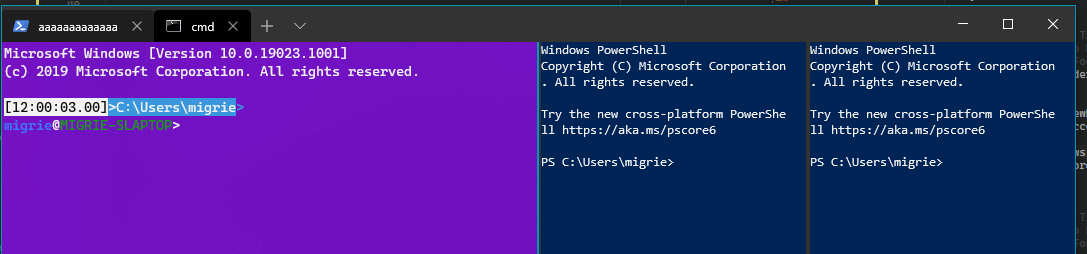
## References
See also: #2046
## PR Checklist
* [x] Closes#1205
* [x] Closes#522
* [x] Closes#999
* [x] I work here
* [😢] Tests added/passed
* [n/a] Requires documentation to be updated
## Validation Steps Performed
Tested manually opening panes, closing panes, clicking around panes, the whole dance.
---------------------------------------------------
* this is janky but is close for some reason?
* This is _almost_ right to solve #1205
If I want to double up and also fix#522 (which I do), then I need to also
* when a tab GetsFocus, send the focus instead to the Pane
* When the border is clicked on, focus that pane's control
And like a lot of cleanup, because this is horrifying
* hey this autorevoker is really nice
* Encapsulate Pane::pfnGotFocus
* Propogate the events back up on close
* Encapsulate Tab::pfnFocusChanged, and clean up TerminalPage a bit
* Mostly just code cleanup, commenting
* This works to hittest on the borders
If the border is `Transparent`, then it can't hittest for Tapped events, and it'll fall through (to someone)
THis at least works, but looks garish
* Match the pane border to the TabViewHeader
* Fix a bit of dead code and a bad copy-pasta
* This _works_ to use a winrt event, but it's dirty
* Clean up everything from the winrt::event debacle.
* This is dead code that shouldn't have been there
* Turn Tab's callback into a winrt::event as well
This commit renames the functions in conpty.lib to Conpty* so that they
can be explicitly linked and introduces a header so they can be located.
It also updates the DEF for conpty.dll to reexport them with their
original names.
The crux of the issue here is that TerminalConnection is consuming the
_import_ symbols for the *PseudoConsole family of APIs, which simply
cannot be supplanted by a static library.
Avenues explored: * Exporting __imp_x from the static library to get all
up in kernel32's business. * Using /ALTERNATENAME:__imp_X=StaticX. It
turns out ALTERNATENAME is only consulted when the symbol isn't found
through traditional means.
This, renaming them, is the straightest path forward.
Fixes#3553.
* Adds HasBackgroundImage() and GetExpandedBackgroundImagePath() to
Profiles.cpp/h
* Fills Terminal Settings with expanded path, rather than path value
from profiles.json
* Adds simple regression tests to detect and fail if this fix is
circumvented in the future
Fixes#2922
* Make search a shared component for conhost and terminal
* Remove inclusion of deprecated interface file
* Code review changes, remove text buffer modification in Terminal
* remove unreferenced objects to fix build errors
* Fix test failure, guarantee uiaData object is correctly initialized in Search
* minor comment typo fix and format fix
* minor PR comments change
* ColorSeclection directly throw and return
* remove coordAnchor initialization
* minor method signature change
## Summary of the Pull Request
Enables the user to provide arbitrary argument values to shortcut actions through a new `args` member of keybindings. For some keybindings, like `NewTabWithProfile<N>`, we previously needed 9 different `ShortcutAction`s, one for each value of `Index`. If a user wanted to have a `NewTabWithProfile11` keybinding, that was simply impossible. Now that the args are in their own separate json object, each binding can accept any number of arbitrary argument values.
So instead of:
```json
{ "command": "newTab", "keys": ["ctrl+shift+t"] },
{ "command": "newTabProfile0", "keys": ["ctrl+shift+1"] },
{ "command": "newTabProfile1", "keys": ["ctrl+shift+2"] },
{ "command": "newTabProfile2", "keys": ["ctrl+shift+3"] },
{ "command": "newTabProfile3", "keys": ["ctrl+shift+4"] },
```
We can now use:
```json
{ "command": "newTab", "keys": ["ctrl+shift+t"] },
{ "command": { "action": "newTab", "index": 0 }, "keys": ["ctrl+shift+1"] },
{ "command": { "action": "newTab", "index": 1 }, "keys": ["ctrl+shift+2"] },
{ "command": { "action": "newTab", "index": 2 }, "keys": ["ctrl+shift+3"] },
```
Initially, this does seem more verbose. However, for cases where there are multiple args, or there's a large range of values for the args, this will quickly become a more powerful system of expressing keybindings.
The "legacy" keybindings are _left in_ in this PR. They have helper methods to generate appropriate `IActionArgs` values. Prior to releasing 1.0, I think we should remove them, if only to remove some code bloat.
## References
See [the spec](https://github.com/microsoft/terminal/blob/master/doc/specs/%231142%20-%20Keybinding%20Arguments.md) for more details.
This is part two of the implementation, part one was #2446
## PR Checklist
* [x] Closes#1142
* [x] I work here
* [x] Tests added/passed
* [x] Schema updated
## Validation Steps Performed
* Ran Tests
* Removed the legacy keybindings from the `defaults.json`, everything still works
* Tried leaving the legacy keybingings in my `profiles.json`, everything still works.
-------------------------------------------------
* this is a start, but there's a weird linker bug if I take the SetKeybinding(ShortcutAction, KeyChord) implementation out, which I don't totally understand
* a good old-fashioned clean will fix that right up
* all these things work
* hey this actually _functionally_ works
* Mostly cleanup and completion of implementation
* Hey I bet we could just make NewTab the handler for NewTabWithProfile
* Start writing tests for Keybinding args
* Add tests
* Revert a bad sln change, and clean out dead code
* Change to include "command" as a single object
This is a change to make @dhowett-msft happy. Changes the args to be a part
of the "command" object, as opposed to an object on their own.
EX:
```jsonc
// Old style
{ "command": "switchToTab0", "keys": ["ctrl+1"] },
{ "command": { "action": "switchToTab", "index": 0 }, "keys": ["ctrl+alt+1"] },
// new style
{ "command": "switchToTab0", "keys": ["ctrl+1"] },
{ "command": "switchToTab", "args": { "index": 0 } "keys": ["ctrl+alt+1"] },
```
* schemas are hard yo
* Fix the build?
* wonder why my -Wall settings are different than CI...
* this makes me hate things
* Comments from PR
* Add a `Direction::None`
* LOAD BEARING
* add some GH ids to TODOs
* add a comment
* PR nits from carlos
* Make ConPTY build as both LIB and DLL.
* Update TerminalConnection reference to LIB version (because Terminal builds both UWP and Centennial, requiring different CRTs each).
* DLL is now available (and against desktop CRT) to be PInvokable from C# for WPF terminal.
Note, DLL MUST BUILD PRECOMP to get the magic pragma linking information to the Desktop CRT.
* don't audit PTY lib. I can't do safe things because the safe things we use don't fit back inside kernelbase.dll.
Closes#3563.
## Summary of the Pull Request
RTF data is now copied to the clipboard. Tested by copy pasting text from terminal to WordPad.
<!-- Please review the items on the PR checklist before submitting-->
## PR Checklist
* [x] Closes#2487
* [x] CLA signed. If not, go over [here](https://cla.opensource.microsoft.com/microsoft/Terminal) and sign the CLA
* [ ] Tests added/passed
* [ ] Requires documentation to be updated
* [x] I've discussed this with core contributors already. If not checked, I'm ready to accept this work might be rejected in favor of a different grand plan. Issue number where discussion took place: #2487
<!-- Provide a more detailed description of the PR, other things fixed or any additional comments/features here -->
## Detailed Description of the Pull Request / Additional comments
Mostly similar to PR #1224. Added a new static method `GenRTF` in `TextBuffer` that is responsible
for generating the RTF representation of a given text. The generated RTF is added to the `DataPackage` that is ultimately passed to the clipboard.
<!-- Describe how you validated the behavior. Add automated tests wherever possible, but list manual validation steps taken as well -->
## Validation Steps Performed
Validated by copy pasting text from the terminal to WordPad. Validated with different colors to make sure that is working. (MS Word seems to prefer HTML data from the clipboard instead of RTF.)
<hr>
* Copy RTF data to the clipboard
* Added comment explaining various parts of the header
* Fixed static code analysis issues and added noexcept to GenRTF()
* Removed noexcept
<!-- Enter a brief description/summary of your PR here. What does it fix/what does it change/how was it tested (even manually, if necessary)? -->
## Summary of the Pull Request
This introduces a setting to both Profiles and ColorSchemes called <code>selectionBackground</code> that allows you to change the selection background color to what's specified. If <code>selectionBackground</code> isn't set in either the profile or color scheme, it'll default to what it was before - white.
<!-- Please review the items on the PR checklist before submitting-->
## PR Checklist
* [x] Closes#3326
* [x] CLA signed. If not, go over [here](https://cla.opensource.microsoft.com/microsoft/Terminal) and sign the CLA
* [x] Tests added/passed
* [x] Requires documentation to be updated
<!-- Describe how you validated the behavior. Add automated tests wherever possible, but list manual validation steps taken as well -->
## Validation Steps Performed
- Added selectionBackground to existing profile and colorscheme tests.
- Verified that the color does change to what I expect it to be when I add "selectionBackground" to either/both a profile and a color scheme.
<hr>
* adding selectionBackground to ColorScheme and TerminalSettings
* Changing PaintSelection inside the renderers to take a SelectionBackground COLORREF
* changes to conhost and terminal renderdata, and to terminal settings and core
* IT WORKS
* modification of unit tests, json schemas, reordering of functions
* more movement
* changed a couple of unit tests to add selectionBackground, added the setting to schemas, also added the optional setting to profiles
* default selection background should be slightly offwhite like the default foreground is
* reverting changes to .sln
* cleaning up
* adding comment
* oops
* added clangformat to my vs hehe
* moving selectionBackground to IControlSettings and removing from ICoreSettings
* trying to figure out why the WHOLE FILE LOOKS LIKE ITS CHANGED
* here it goes again
* pls
* adding default foreground as the default for selection background in dx
## Summary of the Pull Request
This PR potentially fixes#3101.
## PR Checklist
* [x] Closes#3101.
* [x] CLA signed. If not, go over [here](https://cla.opensource.microsoft.com/microsoft/Terminal) and sign the CLA
* [ ] Tests added/passed
* [ ] Requires documentation to be updated
* [ ] I've discussed this with core contributors already. If not checked, I'm ready to accept this work might be rejected in favor of a different grand plan. Issue number where discussion took place: #xxx
## Detailed Description of the Pull Request / Additional comments
This PR fixes#3101 by setting flag 0 in `ToUnicodeEx()` even though the documentation says "If bit 0 is set, a menu is active.". I'm not 100% sure why it works, but it definitely does in this case.
I thought that bit 2, which claims that "keyboard state is not changed" would be sufficient to prevent this from happening, but it seems that's not the case.
I believe this PR should be verified by a developer at Microsoft who's familiar with the internal workings of `ToUnicodeEx()`.
We need this function (or something similar) to translate Alt+Key combinations to proper unicode.
But at the same time it should not send us any additional IBM-style Alt Codes to our character handler if that translation fails (and `ToUnicodeEx()` returns 0).
## Validation Steps Performed
See #3101 for more information. I ensured that Alt+Arrow-Key combinations do not print ◘☻♠♦ anymore.
<!-- Enter a brief description/summary of your PR here. What does it fix/what does it change/how was it tested (even manually, if necessary)? -->
## Summary of the Pull Request
Another tiny performance fix.
<!-- Provide a more detailed description of the PR, other things fixed or any additional comments/features here -->
## Detailed Description of the Pull Request / Additional comments
Correct me if I'm wrong, It doesn't really make sense to update scroll status faster than frame rate limit.
<!-- Describe how you validated the behavior. Add automated tests wherever possible, but list manual validation steps taken as well -->
## Validation Steps Performed
<hr>
* Throttle scroll position update
* Review
This new cpprestsdk package, 2.10.14, switches us to the app CRT.
cpprestsdk turns fof a bunch of boost and openssl dependencies when it's
built for the Windows Store subplatform, so we got a bunch of stuff for
free.
Incidentally, I fixed#2338 the real/correct way -- the build rules in
the package now make sure they're not using the system vcpkg root.
* Change to use App CRT in preparation for universal.
* Try to make project build again by setting winconpty to static lib so it'll use the CRT inside TerminalConnection (or its other consumers) instead of linking its own.
* Remove test for conpty dll, it's a lib now. Add additional commentary on how CRT linking works for future reference. I'm sure this will come up again.
* use the _apiset variant until proven otherwise to match the existing one.
* Clarification in the comments for linking.
This commit deletes ConhostConnection and replaces it with
ConptyConnection. The ConptyConnection uses CreatePseudoConsole and
depends on winconpty to override the one from kernel32.
* winconpty must be packageable, so I've added GetPackagingOutputs.
* To validate this, I added conpty.dll to the MSIX regression script.
* I moved the code from conpty-universal that deals with environment
strings into the types library.
This puts us in a way better place to implement #2563, as we can now
separately detect a failure to launch a pseudoconsole, a failure to
CreateProcess, and an unexpected termination of the launched process.
Fixes#1131.
* Create a doc for adding common third-party tools
Maybe it would be helpful to have a comprehensive guide on adding some common third-party tools as profiles.
* add some additional tools from PR
It's apparently perfectly possible that DWM will just crash or close, and when
it does, `DwmExtendFrameIntoClientArea` will return a failure. If we
THROW_IF_FAILED that call, then we'll also crash when DWM does.
This converts that THROW_IF_FAILED to a LOG_IF_FAILED. When DWM comes back,
we'll hit this codepath again, and all will be right again in the world.
<!-- Enter a brief description/summary of your PR here. What does it fix/what does it change/how was it tested (even manually, if necessary)? -->
## Summary of the Pull Request
<!-- Other than the issue solved, is this relevant to any other issues/existing PRs? -->
## References
#1091#1094#2390#3314
<!-- Please review the items on the PR checklist before submitting-->
## PR Checklist
* [x] Closes#1091
* [x] CLA signed. If not, go over [here](https://cla.opensource.microsoft.com/microsoft/Terminal) and sign the CLA
* [ ] Tests added/passed
* [ ] Requires documentation to be updated
* [x] I've discussed this with core contributors already. If not checked, I'm ready to accept this work might be rejected in favor of a different grand plan. Issue number where discussion took place: #xxx
<!-- Provide a more detailed description of the PR, other things fixed or any additional comments/features here -->
## Detailed Description of the Pull Request / Additional comments
Combination of the PRs #1094, #2390, and #3314, especially as discussed in #3314.
In short, this changes line endings from Windows-space \r\n to the more universal \r.
<!-- Describe how you validated the behavior. Add automated tests wherever possible, but list manual validation steps taken as well -->
## Validation Steps Performed
Copied and pasted text into the terminal without the patch, line endings were doubled.
With the patch, line endings weren't doubled.
--------------------
* Replacing \r\n line endings with \r line endings
* Fixing Formatting
This commit cleans up and deduplicates all of the common build
preamble/postamble across exe, dll, lib and c++/winrt projects.
The following specific changes have been made:
* All projects now define their ConfigurationType
* All projects now set all their properties *before* including a common
build file (or any other build files)
* cppwinrt.pre and cppwinrt.post now delegate most of their
configuration to common.pre and common.post
* (becuase of the above,) all build options are conserved between
console and c++/winrt components, including specific warnings and
preprocessor definitions.
* More properties that are configurable per-project are now
conditioned so the common props don't override them.
* The exe, dll, exe.or.dll, and lib postincludes have been merged into
pre or post and switched based on condition as required
* Shared items (-shared, -common) are now explicitly vcxitems instead of
vcxproj files.
* The link line is now manipulated after Microsoft.Cpp sets it, so the
libraries we specify "win". All console things link first against
onecore_apiset.lib.
* Fix all compilation errors caused by build unification
* Move CascadiaPackage's resources into a separate item file
Fixes#922.
* Ensure rights check and increments pass before assigning an object to a handle (since deallocation of handles will automatically attempt to cleanup).
The current DECSC implementation only saves the cursor position and
origin mode. This PR improves that functionality with additional support
for saving the SGR attributes, as well as the active character set.
It also fixes the way the saved state interacts with the alt buffer
(private mode 1049), triggering a save when switching to the alt buffer,
and a restore when switching back, and tracking the alt buffer state
independently from the main state.
In order to properly save and restore the SGR attributes, we first
needed to add a pair of APIs in the `ConGetSet` interface which could
round-trip the attributes with full 32-bit colors (the existing methods
only work with legacy attributes).
I then added a struct in the `AdaptDispatch` implementation to make it
easier to manage all of the parameters that needed to be saved. This
includes the cursor position and origin mode that we were already
tracking, and now also the SGR text attributes and the active character
set (via the `TermOutput` class).
Two instances of this structure are required, since changes made to the
saved state in the alt buffer need to be tracked separately from changes
in the main buffer. I've added a boolean property that specifies whether
we're in the alt buffer or not, and use that to decide which of the two
instances we're working with.
I also needed to explicitly trigger a save when switching to the alt
buffer, and a restore when switching back, since we weren't already
doing that (the existing implementation gave the impression that the
state was saved, because each buffer has its own cursor position, but
that doesn't properly match the XTerm behaviour).
For the state tracking itself, we've now got two additional properties -
the SGR attributes, which we obtain via the new private API, and the
active character set, which we get from a local `AdaptDispatch` field.
I'm saving the whole `TermOutput` class for the character set, since I'm
hoping that will make it automatically supports future enhancements.
When restoring the cursor position, there is also now a fix to handle
the relative origin mode correctly. If the margins are changed between
the position being saved and restored, it's possible for the cursor to
end up outside of the new margins, which would be illegal. So there is
now an additional step that clamps the Y coordinate within the margin
boundaries if the origin mode is relative.
# Validation
I've added a couple of screen buffer tests which check that the various
parameters are saved and restored as expected, as well as checking that
the Y coordinate is clamped appropriately when the relative origin mode
is set.
I've also tested manually with vttest and confirmed that the
_SAVE/RESTORE CURSOR_ test (the last page of the _Test of screen
features_)) is now working a lot better than it used to.
Closes#148.
## Summary of the Pull Request
Enables the `toggleFullscreen` action to be able to enter fullscreen mode, bound by default to <kbd>alt+enter</kbd>.
The action is bubbled up to the WindowsTerminal (Win32) layer, where the window resizes itself to take the entire size of the monitor.
This largely reuses code from conhost. Conhost already had a fullscreen mode, so I figured I might as well re-use that.
## References
Unfortunately there are still very thin borders around the window when the NonClientIslandWindow is fullscreened. I think I know where the problem is. However, that area of code is about to get a massive overhaul with #3064, so I didn't want to necessarily make it worse right now.
A follow up should be filed to add support for "Always show / reveal / never show tabs in fullscreen mode". Currently, the only mode is "never show tabs".
Additionally, some of this code (particularily re:drawing the nonclient area) could be re-used for #2238.
## PR Checklist
* [x] Closes#531, #3411
* [x] I work here
* [n/a] Tests added/passed 😭
* [x] Requires documentation to be updated
## Validation Steps Performed
* Manually tested both the NonClientIslandWindow and the IslandWindow.
* Cherry-pick commit 8e56bfe
* Don't draw the tab strip when maximized
(cherry picked from commit bac4be7c0f3ed1cdcd4f9ae8980fc98103538613)
* Fix the vista window flash for the NCIW
(cherry picked from commit 7d3a18a893c02bd2ed75026f2aac52e20321a1cf)
* Some code cleanup for review
(cherry picked from commit 9e22b7730bba426adcbfd9e7025f192dbf8efb32)
* A tad bit more notes and cleanup
* Update schema, docs
* Most of the PR comments
* I'm not sure this actually works, so I'm committing it to revert it and check
* Update some comments that were lost.
* Fix a build break?
* oh no
We take the standard window frame except that we remove the top part
(see `NonClientIslandWindow::_OnNcCalcSize`), then we put little 1 pixel
wide top border back in the client area using
`DwmExtendFrameIntoClientArea` and then we put the XAML island and the
drag bar on top.
Most of this PR is comments to explain how the code works and also
removing complex code that was needed to handle the weird cases when the
borders were custom.
I've also refactored a little bit the `NonClientIslandWindow` class.
* Fix DwmExtendFrameIntoClientArea values
* Fix WM_NCHITTEST handling
* Position the XAML island window correctly
* Fix weird colors in drag bar and hide old title bar buttons
* Fix the window's position when maximized
* Add support for dark theme on the frame
* DRY shared code between conhost and new terminal
* Fix drag bar and remove dead code
* Remove dead code and use cached DPI
* Refactor code
* Remove impossible TODO
* Use system metrics instead of hardcoding resize border height
* Use theme from app settings instead of system theme. Improve comments. Remove unused DWM frame on maximize.
* Fix initial position DPI handling bug and apply review changes
* Fix thick borders with DPI > 96
Closes#3064.
Closes#1307.
Closes#3136.
Closes#1897.
Closes#3222.
Closes#1859.
This commit introduces a C++/WinRT utility library and moves
ScopedResourceLoader into it. I decided to get uppity and introduce
something I like to call "checked resources." The idea is that every
resource reference from a library is knowable at compile time, and we
should be able to statically ensure that all resources exist.
This is a system that lets us immediately failfast (on launch) when a
library makes a static reference to a resource that doesn't exist at
runtime.
It exposes two new (preprocessor) APIs:
* `RS_(wchar_t)`: loads a localizable string resource by name.
* `USES_RESOURCE(wchar_t)`: marks a resource key as used, but is intended
for loading images or passing static resource keys as parameters to
functions that will look them up later.
Resource checking relies on diligent use of `USES_RESOURCE()` and `RS_()`
(which uses `USES_RESOURCE`), but can make sure we don't ship something
that'll blow up at runtime.
It works like this:
**IN DEBUG MODE**
- All resource names referenced through `USES_RESOURCE()` are emitted
alongside their referencing filenames and line numbers into a static
section of the binary.
That section is named `.util$res$m`.
- We emit two sentinel values into two different sections, `.util$res$a`
and `.util$res$z`.
- The linker sorts all sections alphabetically before crushing them
together into the final binary.
- When we first construct a library's scoped resource loader, we
iterate over every resource reference between `$a` and `$z` and check
residency.
**IN RELEASE MODE**
- All checked resource code is compiled out.
Fixes#2146.
Macros are the only way to do something this cool, incidentally.
## Validation Steps Performed
Made references to a bunch of bad resources, tried to break it a lot.
It looks like this when it fails:
### App.cpp
```
36 static const std::array<std::wstring_view, 2> settingsLoadErrorsLabels {
37 USES_RESOURCE(L"NoProfilesText"),
38 USES_RESOURCE(L"AllProfilesHiddenText_HA_JUST_KIDDING")
39 };
```
```
WinRTUtils\LibraryResources.cpp(68)\TerminalApp.dll:
FailFast(1) tid(1034) 8000FFFF Catastrophic failure
Msg:[Resource AllProfilesHiddenText_HA_JUST_KIDDING not found in
scope TerminalApp/Resources (App.cpp:38)] [EnsureAllResourcesArePresent]
```
The WAP packaging project in VS <= 16.3.7 produces a couple global
properties as part of its normal operation that cause MSBuild to flag
our projects as out-of-date and requiring a rebuild. By forcing those
properties to match the WAP values, we can get consistent builds.
One of those properties, however, is "GenerateAppxPackageOnBuild", and
WAP sets it to *false*. When we set that, of course, we don't get an
MSIX out of our build pipeline. Therefore, we have to break our build
into two phases -- build, then package.
This required us to change our approach to PCH deletion. A project
without a PCH is *also* considered out-of-date. Now, we keep all PCH
files but truncate them to 0 bytes.
TerminalApp, however, is re-linked during packaging because the Xaml
compiler emits a new generated C++ file on every build. We have to keep
those PCHs around.
* Remove WpfTerminalControl AnyCPU from Arch-specific builds
This removes another source of build nondeterminism: that WpfTerminalControl was propagating TargetFramework into architecture-specific C++ builds. Its "Any CPU" platform has been removed from architecture builds at the solution level.
This also cleans up some new projects that were added and build for "Any
CPU".
## Summary of the Pull Request
Adds a small border with the accent color to indicate a pane is focused
<img src="https://user-images.githubusercontent.com/18356694/66218711-560e4b80-e68f-11e9-85b0-1f387d35bb92.png" width="480">
<img src="https://user-images.githubusercontent.com/18356694/66218757-6f16fc80-e68f-11e9-8d39-db9ab748c4de.png" width="480">
<img src="https://user-images.githubusercontent.com/18356694/66219194-55c28000-e690-11e9-9835-8b5212e70e8a.png" width="480">
## PR Checklist
* [x] Closes#994
* [x] I work here
* [😢] Tests added/passed
* [n/a] Requires documentation to be updated
## Detailed Description of the Pull Request / Additional comments
I've removed the simple Grid we were using as the pane separator, and replaced it with a Border that might appear on any side of a pane.
When we add a split, we'll create each child with one of the `Border` flags set (each child with one of a pair of flags). E.g. creating a horizontal split creates one child with the `Top` border, and another with the `Bottom`.
Then, if one of those panes is split, it will pass it's border flag to is new children, with the additional flag set. So adding another Vertical split to the above scenario would create a set of panes with either (`Top|Left`, `Top|Right`) or (`Bottom|Left`, `Bottom|Right`) borders set, depending on which pane was split.
<hr>
* start work on this by tracking border state
* Colorize the border
* Use the accent color for highlighting
* Cleanup the accent color code
* Don't buy any rural real estate when closing a pane
* Closing panes works well now too
* Cleanup for review
* Update src/cascadia/TerminalApp/Pane.cpp
* try some things that don't work to fix the resizing crash
* Revert "try some things that don't work to fix the resizing crash"
This reverts commit 3fc14da113.
* this _does_ work, but I think it's not semantically correct
* This doesn't seem to work either.
I tried adding the pane seperators to the Pane::_GetMinWidth calculation. That
works for prevent the crash, but the resizing is wonky now. If you add a
Vertical split, then a second, then resize the middle pane really small,
you'll see that the _last_ resize doesn't work properly. The text seems to
overhand into the border.
Additionally, there's really weird behavior resizing panes to be small. They
don't always seem to be resizable to the smallest size.
* Revert "This doesn't seem to work either."
This reverts commit 2fd8323e7b.
* Merge the changes from the "this is the one" branch
Again, no idea what I really did that worked, but it does
* Cleanup from my mess of a commit
This makes so much more sense now
* Other PR feedback from @carlos-zamora
* Fix a typo
* Add support for the HPA escape sequence as an alias for CHA.
* Extend the output engine tests for cursor movement to confirm that HPA is dispatched in the same way as CHA.
The _FindMatchingColorScheme currently iterates through all pairs in the
map to find the matching color scheme for a given JSON.
Improved this by using the name from the JSON to lookup the color scheme
in the map.
As a part of setting up UIA Events, we need to be able to identify WHEN to notify the client. We'll be adopting the RendererEngine model that the VTRenderer and DxRenderer follow to identify when something on the screen is changing and what to alert the automation clients about.
This PR just introduces the UiaRenderer. There's a lot of E_NOTIMPLs and S_FALSEs and a few comments throughout as to my thoughts. This'll make diffing future PRs easier and can make this process more iterative. The code does run with the PR so I plan on merging this into master as normal.
Due to a platform issue, elevated application packages occasionally fail
to find all of their dependencies. The real fix for this is going to
take a lot of time and probably a new build of Windows.
The fix we have here switches us to a non-"release" build of
Microsoft.UI.Xaml. The critical thing about their non-release builds is
that they prefer to embed their DLLs into the hosting package instead of
expressing a platform dependency.
This build of Microsoft.UI.Xaml was produced from the same commit as
the original and official build; the only difference is that it will
embed into our package.
Fixes#3275.
[Git2Git] Git Train: Merge of building/rs_onecore_dep_uxp/191011-1234 into official/rs_onecore_dep_uxp Retrieved from https://microsoft.visualstudio.com os OS official/rs_onecore_dep_uxp b80345479891d1e7a9f7e38b6b5f40083c6a564a
sources changes from 21H1
Merged PR 3896217: [Git2Git] Changes from vb_release_dep_dev1
server init changes from 20H1 (onecore headless mode)
conhost has been leaving the clipboard open for all HTML copies because
StringCchCopyA needs an extra byte for the null terminator and we
haven't been giving it one. We should also make sure that we always
close the clipboard (always).
This PR includes the code changes that enable users to set an initial position
(top left corner) and launch maximized. There are some corner cases:
1. Multiple monitors. The user should be able to set the initial position to
any monitors attached. For the monitors on the left side of the major monitor,
the initial position values are negative.
2. If the initial position is larger than the screen resolution and the window
is off-screen, the current solution is to check if the top left corner of the
window intersect with any monitors. If it is not, we set the initial position
to the top left corner of the nearest monitor.
3. If the user wants to launch maximized and provides an initial position, we
launch the maximized window on the monitor where the position is located.
# Testing
To test:
1. Check-out this branch and build on VS2019
2. Launch Terminal, and open Settings. Then close the terminal.
3. Add the following setting into Json settings file as part of "globals", just
after "initialRows":
"initialPosition": "1000, 1000",
"launchMode": "default"
My test data:
I have already tested with the following variables:
1. showTabsInTitlebar true or false
2. The initial position of the top left corner of the window
3. Whether to launch maximized
4. The DPI of the monitor
Test data combination:
Non-client island window (showTabsInTitlebar true)
1. Three monitors with the same DPI (100%), left, middle and right, with the
middle one as the primary, resolution: 1980 * 1200, 1920 * 1200, 1920 * 1080
launchMode: default
In-Screen test: (0, 0), (1000, 500), (2000, 300), (-1000, 400),
(-100, 200), (-2000, 100), (0, 1119)
out-of-screen:
(200, -200): initialize to (0, 0)
(200, 1500): initialize to (0, 0)
(2000, -200): initialize to (1920, 0)
(2500, 2000): initialize to (1920, 0)
(4000 100): initialize to (1920, 0)
(-1000, -100): initialize to (-1920, 0)
(-3000, 100): initialize to (-1920, 0)
(10000, -10000): initialize to (1920, 0)
(-10000, 10000): initialize to (-1920, 0)
(0, -10000): initialize to (0, 0)
(0, -1): initialize to (0, 0)
(0, 1200): initialize to (0, 0)
launch mode: maximize
(100, 100)
(-1000, 100): On the left monitor
(0, -2000): On the primary monitor
(10000, 10000): On the primary monitor
2. Left monitor 200% DPI, primary monitor 100% DPI
In screen: (-1900, 100), (-3000, 100), (-1000, 100)
our-of-screen: (-8000, 100): initialize at (-1920, 0)
launch Maximized: (-100, 100): launch maximized on the left monitor
correctly
3. Left monitor 100% DPI, primary monitor 200% DPI
In-screen: (-1900, 100), (300, 100), (-800, 100), (-200, 100)
out-of-screen: (-3000, 100): initialize at (-1920, 0)
launch maximized: (100, 100), (-1000, 100)
For client island window, the test data is the same as above.
Issues:
1. If we set the initial position on the monitor with a different DPI as the
primary monitor, and the window "lays" across two monitors, then the window
still renders as it is on the primary monitor. The size of the window is
correct.
Closes#1043
From Egmont Koblinger:
> In terminal emulation, apps have to be able to print something and
keep track of the cursor, whereas they by design have no idea of the
font being used. In many terminals the font can also be changed runtime
and it's absolutely not feasible to then rearrange the cells. In some
other cases there is no font at all (e.g. the libvterm headless terminal
emulation library, or a detached screen/tmux), or there are multiple
fonts at once (a screen/tmux attached from multiple graphical
emulators).
> The only way to do that is via some external agreement on the number
of cells, which is typically the Unicode EastAsianWidth, often accessed
via wcwidth(). It's not perfect (changes through Unicode versions, has
ambiguous characters, etc.) but is still the best we have.
> glibc's wcwidth() reports 1 for ambiguous width characters, so the de
facto standard is that in terminals they are narrow.
> If the glyph is wider then the terminal has to figure out what to do.
It could crop it (newer versions of Konsole, as far as I know), overflow
to the right (VTE), shrink it (Kitty I believe does this), etc.
See Also:
https://bugzilla.gnome.org/show_bug.cgi?id=767529https://gitlab.freedesktop.org/terminal-wg/specifications/issues/9https://www.unicode.org/reports/tr11/tr11-34.html
Salient point from proposed update to Unicode Standard Annex 11:
> Note: The East_Asian_Width property is not intended for use by modern
terminal emulators without appropriate tailoring on a case-by-case
basis.
Fixes#2066Fixes#2375
Related to #900
* We had to move to the final API:
* Items -> TabItems
* Items.VectorChanged -> TabItemsChanged
* TabClose -> TabCloseRequested
* TabViewItem.Icon -> TabViewItem.IconSource
* TabRowControl has been converted to a ContentPresenter, which
simplifies its logic a little bit.
* TerminalPage now differentiates MUX and WUX a little better
* Because of the change from Icon to IconSource in TabViewItem,
Utils::GetColoredIcon needed to be augmented to support MUX IconSources.
It was still necessary to use for WUX, so it's been templatized.
* I moved us from WUX SplitButton to MUX SplitButton and brought the
style in line with the one typically provided by TabView.
* Some of our local controls have had their backgrounds removed so
they're more amenable to being placed on other surfaces.
* I'm suppressing the TabView's padding.
* I removed a number of apparently dead methods from App.
* I've simplified the dragbar's sizing logic and eventing.
* The winmd harvester needed to be taught to not try to copy winmds for
framework packages.
* We now only initialize the terminal once we know the size
Closes#1896.
Closes#444.
Closes#857.
Closes#771.
Closes#760.
Add a warning when the user sets their colorScheme to a scheme that doesn't exist. When that occurs, we'll set their color table to the campbell scheme, to prevent it from being just entirely black.
This commit also switches scheme storage to a map keyed on name.
Closes#2547
We now truncate the font name as it goes out to GDI APIs, in console API
servicing, and in the propsheet.
I attempted to defer truncating the font to as far up the stack as
possible, so as to make FontInfo usable for the broadest set of cases.
There were a couple questions that came up: I know that `Settings` gets
memset (memsat?) by the registry deserializer, and perhaps that's
another place for us to tackle. Right now, this pull request enables
fonts whose names are >= 32 characters _in Windows Terminal only_, but
the underpinnings are there for conhost as well. We'd need to explicitly
break at the API, or perhaps return a failure or log something to
telemetry.
* Should we log truncation at the API boundary to telemetry?
-> Later; followup filed (#3123)
* Should we fix Settings here, or later?
-> Later; followup filed (#3123)
* `TrueTypeFontList` is built out of things in winconp, the private
console header. Concern about interop structures.
-> Not used for interop, followup filed to clean it up (#3123)
* Is `unsigned int` right for codepage? For width?
-> Yes: codepage became UINT (from WORD) when we moved from Win16 to
Win32
This commit also includes a workaround for #3170. Growing
CONSOLE_INFORMATION made us lose the struct layout lottery during
release builds, and this was an expedient fix.
Closes#602.
Related to #3123.
This adds the WPF control to our project, courtesy of the Visual Studio team.
It re-hosts the Terminal Control components inside a reusable WPF adapter so it can be composed onto C# type surfaces like Visual Studio requires.
The VT parser used to be keeping a boolean used to determine whether it
was in bulk or single-character parse mode in a function-level static.
That turned out to not be great.
Fixes#3108; fixes#3073.
## Summary of the Pull Request
Layer the `globals` globals on top of the root globals.
## PR Checklist
* [x] Closes#2906
* [x] I work here
* [x] Tests added/passed
* [n/a] Requires documentation to be updated
## Detailed Description of the Pull Request / Additional comments
We added the ability for the root to be used as the globals object in #2515. However, if you have a globals object, then the settings in the root will get ignored. That's bad. We should layer them.
## Summary of the Pull Request
Adds support for Italics, Blinking, Invisible, CrossedOut text, THROUGH CONPTY. This does **NOT** add support for those styles to conhost or the terminal.
We will store these "Extended Text Attributes" in a `TextAttribute`. When we go to render a line, we'll see if the state has changed from our previous state, and if so, we'll appropriately toggle that state with VT. Boldness has been moved from a `bool` to a single bit in these flags.
Technically, now that these are stored in the buffer, we only need to make changes to the renderers to be able to support them. That's not being done as a part of this PR however.
## References
See also #2915 and #2916, which are some follow-up tasks from this fix. I thought them too risky for 20H1.
## PR Checklist
* [x] Closes#2554
* [x] I work here
* [x] Tests added/passed
* [n/a] Requires documentation to be updated
<hr>
* store text with extended attributes too
* Plumb attributes through all the renderers
* parse extended attrs, though we're not renderering them right
* Render these states correctly
* Add a very extensive test
* Cleanup for PR
* a block of PR feedback
* add 512 test cases
* Fix the build
* Fix @carlos-zamora's suggestions
* @miniksa's PR feedback
## Summary of the Pull Request
The InputStateMachineEngine was incorrectly not returning to the ground state after flushing the last sequence. That means that something like alt+backspace would leave us in the Escape state, not the ground state. This makes sure we return to ground.
Additionally removes the "Parser.UnitTests-common.vcxproj" file, which was originally used for a theoretical time when we only open-sourced the parser. It's unnecessary now, and we can get rid of it.
Also includes a small patch to bcz.cmd, to make sure bx works with projects with a space in their name.
<!-- Please review the items on the PR checklist before submitting-->
## PR Checklist
* [x] Closes#2746
* [x] I work here
* [x] Tests added/passed
* [n/a] Requires documentation to be updated
<hr>
* Return to ground when we flush the last char
The InputStateMachineEngine was incorrectly not returning to the ground state
after flushing the last sequence. That means that something like alt+backspace
would leave us in the Escape state, not the ground state. This makes sure we
return to ground.
Fixes#2746.
Additionally removes the "Parser.UnitTests-common.vcxproj" file, which was
originally used for a theoretical time when we only open-sourced the parser.
It's unnecessary now, and we can get rid of it.
Also includes a small patch to bcz.cmd, to make sure bx works with projects
with a space in their name.
* Update src/terminal/parser/stateMachine.cpp
Co-Authored-By: Dustin L. Howett (MSFT) <duhowett@microsoft.com>
* add the comment @miniksa wanted
* [contributing.md] add how to report security bugs
I think it's a good idea mentioning how to report vulnerabilities in contributing.md, by pointing them to SECURITY.md. This is useful in case people only read contributing.md but not security.md, and incorrectly believe that your team prefers discussing security issues on GitHub.
* Use full name of MSRC
As suggested by miniksa, change "MSRC" to "Microsoft Security Response Center (MSRC)"
* Edits doc section: Starting Windows Terminal
* Proposes using the search function to locate the app.
* Restructures as a procedure.
* Adds misc edits.
* Made step 1 more generic, rather than prescribing the search method.
* Added tip about shortcut for elevated app
[skip ci]
* Potentially fixes#1825
I haven't had a chance to test this fix on my machine with a CentOS VM quite yet, but this _should_ work
Also adds a test
* add a comment
* woah hey this test was wrong
* Revert bx.ps1
* This fixes the registry path
What's happening is the console is writing the Forcev2 setting, then the v1
console is ignoring those settings, then when you check the checkbox to save
the v2 settings, we'll write the zeros out. That's obviously bad. So we'll
only write the v2 settings back to the registry if the propsheet was launched
from a v2 console.
This does not fix the shortcut path. That'll be the next commit.
* Fix the shortcut loading too
fixes#2319
* remove the redundant property I added
* add some notes to the bx.ps1 change
It turns out that our WM_LBUTTONDOWN handler wasn't even necessary, as
our NCHITTEST tells win32 that all of the titlebar is actually
non-client area. This brings the code in line with
NonNonClientIslandWindow.
Fixes#2513
As per prior agreement with WinUI team, disabling acrylic for Cmd (and Windows PowerShell, already complete) by default.
PowerShell Core/7 and WSL distros allowed to have Acrylic enabled by default.
If we're moving the cursor up, its vertical movement should be stopped
at the top margin. It should not magically jump up to the bottom margin.
Similarly, this applies to moving down and the bottom margin.
Furthermore, this constraint should always apply, not just when the
start position is within BOTH margins
Fixes#2929.
* Patch fix for #1360 until WriteStream (#780) can be implemented.
* Add a test that hangs in the broken state and passes in the success stat. Writes a bisecting character to the right most cell in the window.
* Code format! *shakes fist at sky*
* Update src/cascadia/TerminalCore/Terminal.cpp
EraseInLine calls `FillConsoleOutputCharacterW()`. In filling the row with
chars, we were setting the wrap flag. We need to specifically not do this on
ANY _FILL_ operation. Now a fill operation UNSETS the wrap flag if we fill to
the end of the line.
Originally, we had a boolean `setWrap` that would mean...
- **true**: if writing to the end of the row, SET the wrap value to true
- **false**: if writing to the end of the row, DON'T CHANGE the wrap value
Now we're making this bool a std::optional to allow for a ternary state. This
allows for us to handle the following cases completely. Refer to the table
below:
,- current wrap value
| ,- are we filling the last cell in the row?
| | ,- new wrap value
| | | ,- comments
|-- |-- |-- |
| 0 | 0 | 0 |
| 0 | 1 | 0 |
| 0 | 1 | 1 | THIS CASE WAS HANDLED CORRECTLY
| 1 | 0 | 0 | THIS CASE WAS UNHANDLED
| 1 | 0 | 1 |
| 1 | 1 | 1 |
To handle that special case (1-0-0), we need to UNSET the wrap. So now, we have
~setWrap~ `wrap` mean the following:
- **true**: if writing to the end of the row, SET the wrap value to TRUE
- **false**: if writing to the end of the row, SET the wrap value to FALSE
- **nullopt**: leave the wrap value as it is
Closes#1126
It turns out that if you CATCH_LOG without including this file, and you
end up catching a C++/WinRT hresult_exception, IT TURNS IT INTO A
FAILFAST.
Fixes#2591.
Fixes#2881.
Fixes#2807.
* Revert "Add source linking information during the build (#2857)"
This reverts commit 6b728cd6d0.
* Need reference to renderer base inside UnitTests_TerminalCore
* add dependency for TerminalControl to Types project.
* Set build to single threaded as parallel build is broken by 16.3 build toolchain.
* Disable new rule C26814 as it's breaking builds
Wrote a follow up task #2941 to roll it out later.
* Add noexcept to dx header.
fixes#1222
PSReadline calls SetConsoleCursorPosition on each character they emit (go
figure). When that function is called, and we set the cursor position, we'll
try and "snap" the viewport to the location of the cursor, so that the cursor
remains visible.
However, we'd only ever do this with the visible viewport, the viewport
defined by `SCREEN_INFORMATION::_viewport`. When there's a virtual viewport in
Terminal Scrolling mode, we actually need to snap the virtual viewport, so
that this behavior looks more regular.
Copies source linking scripts and processes from Microsoft/Microsoft-UI-XAML. This embeds source information inside the PDBs in two formats: One for WinDBG using a PowerShell script that runs during the build, and one for Visual Studio using the Microsoft.SourceLink.GitHub NuGet pacakge. Sources are automatically pulled from raw.githubusercontent.com when debugging a release build inside either of these utilities as of this change.
* conhost: if we start with invalid terminal colors, reset them to sanity
We've seen a number of cases where the user's settings can get corrupted
and their default foreground/background and cursor color get set to all
black (black on black). This results in a fairly unhappy user and
probably a great number of support incidents.
Let's declare that an invalid state.
* Add some comments to the comments
The `DECSTBM` margins are meant to define the range of lines within which
certain vertical scrolling operations take place. However, we were applying
these margin restrictions in the `ScrollRegion` function, which is also used in
a number of places that shouldn't be affected by `DECSTBM`.
This includes the `ICH` and `DCH` escape sequences (which are only affected by
the horizontal margins, which we don't yet support), the
`ScrollConsoleScreenBuffer` API (which is public Console API, not meant to be
affected by the VT terminal emulation), and the `CSI 3 J` erase scrollback
extension (which isn't really scrolling as such, but uses the `ScrollRegion`
function to manipulate the scrollback buffer).
This commit moves the margin clipping out of the `ScrollRegion` function, so it
can be applied exclusively in the places that need it.
With the margin clipping removed from the `ScrollRegion` function, it now had
to be applied manually in the places it was actually required. This included:
* The `DoSrvPrivateReverseLineFeed` function (for the `RI` control): This was
* just a matter of updating the bottom of the scroll rect to the bottom margin
* (at least when the margins were actually set), since the top of the scroll
* rect would always be the top of the viewport. The
* `DoSrvPrivateModifyLinesImpl` function (for the `IL` and `DL` commands):
* Again this was just a matter of updating the bottom of the scroll rect, since
* the cursor position would always determine the top of the scroll rect. The
* `AdaptDispatch::_ScrollMovement` method (for the `SU` and `SD` commands):
* This required updating both the top and bottom coordinates of the scroll
* rect, and also a simpler destination Y coordinate (the way the `ScrollRegion`
* function worked before, the caller was expected to take the margins into
* account when determining the destination).
On the plus side, there was now no longer a need to override the margins when
calling `ScrollRegion` in the `AdjustCursorPosition` function. In the first
case, the margins had needed to be cleared (_stream.cpp 143-145), but that is
now the default behaviour. In the second case, there had been a more
complicated adjustment of the margins (_stream.cpp 196-209), but that code was
never actually used so could be removed completely (to get to that point either
_fScrollUp_ was true, so _scrollDownAtTop_ couldn't also be true, or
_fScrollDown_ was true, but in that case there is a check to make sure
_scrollDownAtTop_ is false).
While testing, I also noticed that one of the `ScrollRegion` calls in the
`AdjustCursorPosition` function was not setting the horizontal range correctly
- the scrolling should always affect the full buffer width rather than just the
viewport width - so I've fixed that now as well.
## Validation Steps Performed
For commands like `RI`, `IL`, `DL`, etc. where we've changed the implementation
but not the behaviour, there were already unit tests that could confirm that
the new implementation was still producing the correct results.
Where there has been a change in behaviour - namely for the `ICH` and `DCH`
commands, and the `ScrollConsoleScreenBuffer` API - I've extended the existing
unit tests to check that they still function correctly even when the `DECSTBM`
margins are set (which would previously have caused them to fail).
I've also tested manually with the test cases in issues #2543 and #2659, and
confirmed that they now work as expected.
Closes#2543Closes#2659
This change enables VT processing by default for _all_ conpty clients. See #1965 for a discussion on why we believe this is a righteous change.
Also mentioned in the issue was the idea of only checking the `VirtualTerminalLevel` reg key in the conpty startup. I don't think this would be a more difficult change, looks like all we'd need is a simple `reg.LoadGlobalsFromRegistry();` call instead of this change.
# Validation Steps Performed
Manually launched a scratch app in both the terminal and the console. The console launch's output mode was 0x3, and the terminal's was 0x7. 0x4 is the ` ENABLE_VIRTUAL_TERMINAL_PROCESSING` flag, which the client now had by default in the Terminal.
Closes#1965
If _PaintFrameForEngine returns E_PENDING, we'll give it another two
tries to get itself straight. If it continues to fail, we'll take down
the application.
We observed that the DX renderer was failing to present the swap chain
and failfast'ing when it did so; however, there are some errors from
which DXGI guidance suggests we try to recover. We'll now return
E_PENDING (and destroy our device resources) when we hit those errors.
Fixes#2265.
* Bugfix: line selection copy
* Revert clipboard change
Change VT renderer to do erase line instead of a ton of erase chars
* revert TerminalApi change
* Remove WindowUiaProvider entry points
Make TerminalAutomationPeer not crash the app if creation failed.
* code format
* prefer universal initialization
Co-Authored-By: Dustin L. Howett (MSFT) <duhowett@microsoft.com>
Adjusts the startup and shutdown behavior of most threads in the console host to alleviate race conditions that are either exacerbated or introduced by the VT PTY threads.
In the legacy console, it used to be possible to write out characters
from the C0 range of a PC code page (e.g. CP437), and get the actual
glyphs defined for those code points (at least those that weren't
processed as control codes). In the v2 console this stopped working so
you'd get an FFFD replacement glyph (�) for those characters instead.
This PR fixes the issue so the correct glyphs are displayed again.
There was already code in place to achieve this in the
`WriteCharsLegacy` method. It used the `GetStringTypeW` method to
determine the character type of the value being output, and if it was a
`C1_CNTRL` character it performed the appropriate mapping. The problem
was that the test of the character type flag was done as a direct
comparision, when it should have been a bit test, so the condition was
never met.
With this condition fixed, the code also needed to be reordered slightly
to handle the null character. That had a special-case mapping to space,
which was previously performed after the control test, but since a null
character now successfully matches `C1_CNTRL`, it no longer falls
through to that special case. To address that, I've had to move the null
check above the control test.
I've tested this manually, by trying to output all the characters in the
affected range (ASCII values 0 to 31, and 127, excluding the actual
control codes 8,9,10 and 13). In all cases they now match the output
that the legacy console produced.
Note that this only applies to PC code pages that have glyphs defined
for the C0 range, so it won't work with the UTF-8 code page, but that
was to be expected - the legacy console behaved the same way.
Also, note that this only works when the `ENABLE_PROCESSED_OUTPUT`
console mode is set. That seems wrong to me (I'd expect the glyphs to
work in both cases), but that's the way the legacy console behaved as
well, so if that's a bug it's a separate issue.
I haven't added any unit tests, because I expect the behaviour of some
of these characters to change over time (as support is added for more
control codes), which could then cause the tests to fail. But if that's
not a concern, I could probably add something to the ScreenBufferTests
(perhaps with a comment warning that the tests might be expected to fail
in the future).
Closes#166.
* fixes#411
* update this comment to actually match
* run this test in isolation so it doesn't break other tests, @dhowett-msft
* This fixes the test that's broken?
Kinda raises more questions tbh
* Add a test for #2782
* Attempt to do something weird with _GenerateStub
I was thinking maybe we have the stubs have a GUID included. I like that less though I think. That would mean that DPGs would always have the GUID generated for them, even if the DPG doesn't specify a GUID. I guess that's fine though. No DPG's _aren't_ generating names now so this shouldn't change anything.
* Add some more notes on why this was a bad idea
* Actually fix the issue at hand
If the profile doesn't have a guid, it's a name-only profile.
During validation, we'll generate a GUID for the profile, but
validation occurs after this. We should ignore these types of
profiles.
If a dynamic profile was generated _without_ a GUID, we also
don't want it serialized here. The first check in
Profile::ShouldBeLayered checks that the profile hasa guid. For a
dynamic profile without a GUID, that'll _never_ be true, so it
would be impossible to be layered.
* Revert "Add some more notes on why this was a bad idea"
This reverts commit 85b8b8a53c.
* Revert "Attempt to do something weird with _GenerateStub"
This reverts commit f204b98177.
* Little test fixes
* Update src/cascadia/TerminalApp/CascadiaSettingsSerialization.cpp
Co-Authored-By: Dustin L. Howett (MSFT) <duhowett@microsoft.com>
* Edits doc section `Installing Windows Terminal`
* Adds some light edits throughout.
* Adds link to `winver` documentation.
* Adds link to Microsoft Store listing
Updates procedure to link to https://aka.ms/install-terminal
_**This PR targets the #2515 PR**_. It does that for the sake of diffing. When this PR and #2515 are both ready, I'll merge #2515 first, then change the target of this branch, and merge this one.
<!-- Enter a brief description/summary of your PR here. What does it fix/what does it change/how was it tested (even manually, if necessary)? -->
## Summary of the Pull Request
This PR adds support for "dynamic profiles", in accordance with the [Cascading Settings Spec](https://github.com/microsoft/terminal/blob/master/doc/cascadia/Cascading-Default-Settings.md#dynamic-profiles). Currently, we have three types of default profiles that fit the category of dynamic profile generators. These are profiles that we want to create on behalf of the user, but require runtime information to be able to create correctly. Because they require runtime information, we can't ship a static version of these profiles as a part of `defaults.json`. These three profile generators are:
* The Powershell Core generator
* The WSL Distro generator
* The Azure Cloud Shell generator
<!-- Other than the issue solved, is this relevant to any other issues/existing PRs? -->
## References
<!-- Please review the items on the PR checklist before submitting-->
## PR Checklist
* [x] Closes#754
* [x] I work here
* [x] look at all these **Tests**
* [x] Requires documentation to be updated - This is done as part of the parent PR
<!-- Provide a more detailed description of the PR, other things fixed or any additional comments/features here -->
## Detailed Description of the Pull Request / Additional comments
We want to be able to enable the user to edit dynamic profiles that are generated from DPGs. When dynamic profiles are added, we'll add entries for them to the user's `profiles.json`. We do this _without re-serializing_ the settings. Instead, we insert a partial serialization for the profile into the user's settings.
### Remaining TODOs:
* Make sure that dynamic profiles appear in the right place in the order of profiles -> #2722
* [x] don't serialize the `colorTable` key for dynamic profiles.
* [x] re-parse the user settings string if we've changed it.
* Handle changing the default profile to pwsh if it exists on first launch, or file a follow-up issue -> #2721
<!-- Describe how you validated the behavior. Add automated tests wherever possible, but list manual validation steps taken as well -->
## Validation Steps Performed
<hr>
* Create profiles by layering them
* Update test to layer multiple times on the same profile
* Add support for layering an array of profiles, but break a couple tests
* Add a defaults.json to the package
* Layer colorschemes
* Moves tests into individual classes
* adds support for layering a colorscheme on top of another
* Layer an array of color schemes
* oh no, this was missed with #2481
must have committed without staging this change, uh oh. Not like those tests actually work so nbd
* Layer keybindings
* Read settings from defaults.json + profiles.json, layer appropriately
This is like 80% of #754. Needs tests.
* Add tests for keybindings
* add support to unbind a key with `null` or `"unbound"` or `"garbage"`
* Layer or clear optional properties
* Add a helper to get an optional variable for a bunch of different types
In the end, I think we need to ask _was this worth it_
* Do this with the stretch mode too
* Add back in the GUID check for profiles
* Add some tests for global settings layering
* M A D W I T H P O W E R
Add a MsBuild target to auto-generate a header with the defaults.json as a
string in the file. That way, we can _always_ load the defaults. Literally impossible to not.
* When the user's profile.json doesn't exist, create it from a template
* Re-order profiles to match the order set in the user's profiles.json
* Add tests for re-ordering profiles to match user ordering
* Add support for hiding profiles using `"hidden": true`
* Use the hardcoded defaults.json for the exception->"use defaults" case
* Somehow I messed up the git submodules?
* woo documentation
* Fix a Terminal.App.Unit.Tests failure
* signed/unsigned is hard
* Use Alt+Settings button to open the default settings
* Missed a signed/unsigned
* Start dynamically creating profiles
* Give the inbox generators a namespace
and generally hack this a lot less
* Some very preliminary PR feedback
* More PR feedback
Use the wil helper for the exe path
Move jsonutils into their own file
kill some dead code
* Add templates to these bois
* remove some code for generating defaults, reorder defaults.json a tad
* Make guid a std::optional
* Large block of PR feedback
* Remove some dead code
* add some comments
* tag some todos
* stl is love, stl is life
* Serialize the source key
* Make the Azure cloud shell a dynamic profile
* Make the built-in namespaces public
* Add a mechanism for quick-diffing a profile
This will be used to generate the json snippets for dynamically generated profiles.
* Generate partial serializations of dynamic profiles _not_ in the user settings
* Start writing tests for generating dyn profiles
* dyn profiles generate GUIDs based on _source
* we won't run DPGs when they'd disabled?
* Add more DPG tests - TestDontRunDisabledGenerators
* Don't layer profiles with a source that's also different
* Add another test, DoLayerUserProfilesOnDynamicsWhenSourceMatches
* Actually insert new dynamic profiles into the file
* Minor cleanup of `Profile::ShouldBeLayered`
* Migrate legacy profiles gracefully
* using namespace winrt::Windows::UI::Xaml;
* _Only_ layer dynamic profiles from user settings, never create
* Write a test for migrating dynamic profiles
* Comments for dayssssss
* add `-noprofile`
* Fix the crash that dustin found
* -Encoding ASCII
* Set a profile's default scheme to Campbell
* Fix the tests I regressed
* Update UsingJsonSetting.md to reflect that changes from these PRs
* Change how GenerateGuidForProfile works
* Make AppKeyBindings do its own serialization
* Remove leftover dead code from the previous commit
* Fix up an enormous number of PR nits
* Don't layer a profile if the json doesn't have a GUID
* Fix a test I unfixed
* get rid of extraneous bois{};
* Piles of PR feedback
* Collection of PR nits
* PR nits
* Fix a typo; Update the defaults to match #2378
* Tiny nits
* In-den-taition!
* Some typos, PR nits
* Fix this broken defaults case
* Apply suggestions from code review
Co-Authored-By: Carlos Zamora <carlos.zamora@microsoft.com>
* PR nits
This PR represents the start of the work on Cascading User + default settings, #754.
Cascading settings will be done in two parts:
* [ ] Layered Default+User settings (this PR)
* [ ] Dynamic Profile Generation (#2603).
Until _both_ are done, _neither are going in. The dynamic profiles PR will target this PR when it's ready, but will go in as a separate commit into master.
This PR covers adding one primary feature: the settings are now in two separate files:
* a static `defaults.json` that ships with the package (the "default settings")
* a `profiles.json` with the user's customizations (the "user settings)
User settings are _layered_ upon the settings in the defaults settings.
## References
Other things that might be related here:
* #1378 - This seems like it's definitely fixed. The default keybindings are _much_ cleaner, and without the save-on-load behavior, the user's keybindings will be left in a good state
* #1398 - This might have honestly been solved by #2475
## PR Checklist
* [x] Closes#754
* [x] Closes#1378
* [x] Closes#2566
* [x] I work here
* [x] Tests added/passed
* [x] Requires documentation to be updated - it **ABSOLUTELY DOES**
## Detailed Description of the Pull Request / Additional comments
1. We start by taking all of the `FromJson` functions in Profile, ColorScheme, Globals, etc, and converting them to `LayerJson` methods. These are effectively the same, with the change that instead of building a new object, they are simply layering the values on top of `this` object.
2. Next, we add tests for layering properties like that.
3. Now, we add a `defaults.json` to the package. This is the file the users can refer to as our default settings.
4. We then take that `defaults.json` and stamp it into an auto generated `.h` file, so we can use it's data without having to worry about reading it from disk.
5. We then change the `LoadAll` function in `CascadiaSettings`. Now, the function does two loads - one from the defaults, and then a second load from the `profiles.json` file, layering the settings from each source upon the previous values.
6. If the `profiles.json` file doesn't exist, we'll create it from a hardcoded `userDefaults.json`, which is stamped in similar to how `defaults.json` is.
7. We also add support for _unbinding_ keybindings that might exist in the `defaults.json`, but the user doesn't want to be bound to anything.
8. We add support for _hiding_ a profile, which is useful if a user doesn't want one of the default profiles to appear in the list of profiles.
## TODO:
* [x] Still need to make Alt+Click work on the settings button
* [x] Need to write some user documentation on how the new settings model works
* [x] Fix the pair of tests I broke (re: Duplicate profiles)
<hr>
* Create profiles by layering them
* Update test to layer multiple times on the same profile
* Add support for layering an array of profiles, but break a couple tests
* Add a defaults.json to the package
* Layer colorschemes
* Moves tests into individual classes
* adds support for layering a colorscheme on top of another
* Layer an array of color schemes
* oh no, this was missed with #2481
must have committed without staging this change, uh oh. Not like those tests actually work so nbd
* Layer keybindings
* Read settings from defaults.json + profiles.json, layer appropriately
This is like 80% of #754. Needs tests.
* Add tests for keybindings
* add support to unbind a key with `null` or `"unbound"` or `"garbage"`
* Layer or clear optional properties
* Add a helper to get an optional variable for a bunch of different types
In the end, I think we need to ask _was this worth it_
* Do this with the stretch mode too
* Add back in the GUID check for profiles
* Add some tests for global settings layering
* M A D W I T H P O W E R
Add a MsBuild target to auto-generate a header with the defaults.json as a
string in the file. That way, we can _always_ load the defaults. Literally impossible to not.
* When the user's profile.json doesn't exist, create it from a template
* Re-order profiles to match the order set in the user's profiles.json
* Add tests for re-ordering profiles to match user ordering
* Add support for hiding profiles using `"hidden": true`
* Use the hardcoded defaults.json for the exception->"use defaults" case
* Somehow I messed up the git submodules?
* woo documentation
* Fix a Terminal.App.Unit.Tests failure
* signed/unsigned is hard
* Use Alt+Settings button to open the default settings
* Missed a signed/unsigned
* Some very preliminary PR feedback
* More PR feedback
Use the wil helper for the exe path
Move jsonutils into their own file
kill some dead code
* Add templates to these bois
* remove some code for generating defaults, reorder defaults.json a tad
* Make guid a std::optional
* Large block of PR feedback
* Remove some dead code
* add some comments
* tag some todos
* stl is love, stl is life
* add `-noprofile`
* Fix the crash that dustin found
* -Encoding ASCII
* Set a profile's default scheme to Campbell
* Fix the tests I regressed
* Update UsingJsonSetting.md to reflect that changes from these PRs
* Change how GenerateGuidForProfile works
* Make AppKeyBindings do its own serialization
* Remove leftover dead code from the previous commit
* Fix up an enormous number of PR nits
* Fix a typo; Update the defaults to match #2378
* Tiny nits
* Some typos, PR nits
* Fix this broken defaults case
CLS calls two functions:
- `SetConsoleCursorPositionImpl()`
- `ScrollConsoleScreenBufferWImpl()`
Both of these were not checking which buffer to apply to (main vs active buffer).
Now we get the active buffer and apply the changes to that one.
Also, we forgot to switch out of the alt buffer in the previous test. Added that in.
Closes#1189.
* Move cursor position to the left margin after execution of the IL and DL escape sequences.
* Update IL and DL screen buffer tests to account for the cursor moving to the left margin.
* Edits doc section `Configuring Windows Terminal`
* Converts into a procedure.
* Uses `⌵` character to replace the `down` UI element.
* Additional minor edit
Updates formatting, edits for brevity.
* Fixed json path
Added `8wekyb3d8bbwe` to file path.
There are a number of VT escape sequences that rely on the `ScrollRegion`
function to scroll the viewport (RI, DL, IL, SU, SD, ICH, and DCH) , and all of
them have got the clipping rect or scroll boundaries wrong in some way,
resulting in content being scrolled off the screen that should have been
clipped, revealed areas not being correctly filled, or parts of the screen not
being moved that should have been. This PR attempts to fix all of those issues.
The `ScrollRegion` function is what ultimately handles the scrolling, but it's
typically called via the `ApiRoutines::ScrollConsoleScreenBufferWImpl` method,
and it's the callers of that method that have needed correcting.
One "mistake" that many of these operations made, was in setting a clipping
rect that was different from the scrolling rect. This should never have been
necessary, since the area being scrolled is also the boundary into which the
content needs to be clipped, so the easiest thing to do is just use the same
rect for both parameters.
Another common mistake was in clipping the horizontal boundaries to the width
of the viewport. But it's really the buffer width that represents the active
width of the screen - the viewport width and offset are merely a window on that
active area. As such, the viewport should only be used to clip vertically - the
horizontal extent should typically be the full buffer width.
On that note, there is really no need to actually calculate the buffer width
when we want to set any of the scrolling parameters to that width. The
`ScrollRegion` function already takes care of clipping everything within the
buffer boundary, so we can simply set the `Left` of the rect to `0` and the
`Right` to `SHORT_MAX`.
More details on individual commands:
* RI (the `DoSrvPrivateReverseLineFeed` function)
This now uses a single rect for both the scroll region and clipping boundary,
and the width is set to `SHORT_MAX` to cover the full buffer width. Also the
bottom of the scrolling region is now the bottom of the viewport (rather than
bottom-1), otherwise it would be off by one.
* DL and IL (the `DoSrvPrivateModifyLinesImpl` function)
Again this uses a single rect for both the scroll region and clipping
boundary, and the width is set to `SHORT_MAX` to cover the full width. The
most significant change, though, is that the bottom boundary is now the
viewport bottom rather than the buffer bottom. Using the buffer bottom
prevented it clipping the content that scrolled off screen when inserting,
and failed to fill the revealed area when deleting.
* SU and SD (the `AdaptDispatch::_ScrollMovement` method)
This was already using a single rect for both the scroll region and clipping
boundary, but it was previously constrained to the width of the viewport
rather than the buffer width, so some areas of the screen weren't correctly
scrolled. Also, the bottom boundary was off by 1, because it was using an
exclusive rect while the `ScrollRegion` function expects inclusive rects.
* ICH and DCH (the `AdaptDispatch::_InsertDeleteHelper` method)
This method has been considerably simplified, because it was reimplementing a
lot of functionality that was already provided by the `ScrollRegion`
function. And like many of the other cases, it has been updated to use a
single rect for both the scroll region and clipping boundary, and clip to the
full buffer width rather than the viewport width.
I should add that if we were following the specs exactly, then the SU and SD
commands should technically be panning the viewport over the buffer instead of
moving the buffer contents within the viewport boundary. So SU would be the
equivalent of a newline at the bottom of the viewport (assuming no margins).
And SD would assumedly do the opposite, scrolling the back buffer back into
view (an RI at the top of the viewport should do the same).
This doesn't seem to be something that is consistently implemented, though.
Some terminals do implement SU as a viewport pan, but I haven't seen anyone
implement SD or RI as a pan. If we do want to do something about this, I think
it's best addressed as a separate issue.
## Validation Steps Performed
There were already existing tests for the SU, SD, ICH, and DCH commands, but
they were implemented as adapter tests, which weren't effectively testing
anything - the `ScrollConsoleScreenBufferW` method used in those tests was just
a mock (an incomplete reimplementation of the `ScrollRegion` function), so
confirming that the mock produced the correct result told you nothing about the
validity of the real code.
To address that, I've now reimplemented those adapter tests as screen buffer
tests. For the most part I've tried to duplicate the functionality of the
original tests, but there are significant differences to account for the fact
that scrolling region now covers the full width of the buffer rather than just
the viewport width.
I've also extended those tests with additional coverage for the RI, DL, and IL
commands, which are really just a variation of the SU and SD functionality.
Closes#2174
* this actually fixes#1219
* the terminal page should check the checkbox on the options page
* Discard these changes from #2651
* Add comments, pull function out to helper
* Amends user-docs procedure
Amends docs procedure for `Running a Different Shell`:
* Adds an overview sentence.
* Adds some light rephrasing.
* Proposes using the countersink arrow `⌵` to depict the `down` GUI element.
* Adds link to WSL installation guide
We were using a tag to trigger the bot for the verbose feedback hub response.
But...
1. We have run into several instances of the bot aggressively replying multiple times before the tag is removed.
2. We asked for a "comment contains" function in the bot and the Fabric Bot team obliged.
So I've changed it to `/duplicate` from the tag trigger and will remove the tag.
Adds a number of TL events we can use to track startup time better. Adds events for:
* Initial exe start
* Time the window is created
* time we start loading settings
* time we finish loading setings
* time when a connection recieves its first byte
Also updates our `ConnectionCreated` event to include the session GUID, so that we can correlate that with the connection's `RecievedFirstByte` event.
## Summary of the Pull Request
When a user had "Disable Scroll Forward" enabled and switched to the alt buffer and maximized the console, then restored down, we'd crash. Now we don't.
## References
## PR Checklist
* [x] Closes#1206
* [x] I work here
* [x] Tests added/passed
## Detailed Description of the Pull Request / Additional comments
The problem is that we'd previously try to "anchor" the viewport to the virtual bottom when resizing like this. This would also cause us to move the top of the viewport down, into the buffer. However, if the alt buffer is getting smaller, we don't want to do this - if we anchor to the old _virtualBottom, the bottom of the viewport will actually be outside the current buffer.
This could theoretically happen with the main buffer too, but it's much easier to repro with the alt buffer.
* change 1: add settings pointer and some member variables to page
* clean up the boundary between Page and App - First working version
* First CR review change
* Sync and remove declaration of TraceLogger provider
* Code review round 2 - apply missed new changes
* remove useless comment
* CR change round 3
* CR minor changes
* apply changes from Aug 6th to Aug 14th
* Code review changes round 4
* Apply changes on Aug 16
* Cr changes on 8/20
* CR changes on 8-26
* correct syncing mistakes and fix formatting issues
* CR changes on 8-29
* CR changes 9-4
* apply new changes of App
* Format fix
This pull request introduces a copy of the code from kernel32.dll that
implements CreatePseudoConsole, ClosePseudoConsole and
ResizePseudoConsole. Apart from some light modifications to fit into the
infrastructure in this project and support launching OpenConsole.exe, it
is intended to be 1:1 with the code that ships in Windows.
Any guideline violations in this code are likely intentional. Since this
was built into kernel32, it uses the STL only _very sparingly._
Consumers of this library must make sure that conpty.lib lives earlier
in the link line than onecoreuap_apiset, onecoreuap, onecore_apiset,
onecore or kernel32.
Refs #1130.
[Git2Git] Git Train: Merge of building/rs_onecore_dep_uxp/190820-1847 into official/rs_onecore_dep_uxp Retrieved from https://microsoft.visualstudio.com os OS official/rs_onecore_dep_uxp 73e964d4046c37df3030970cae1ae32e83103fb5
(cherry picked from commit 8c63dff982093db1af7e2bb46b49af884dfec0c5)
* Merge pane splitting methods
Having separate Horizontal/Vertical versions made it hard to manage, and App.cpp already made use of Pane::SplitState so it made sense to have that be the descriminator
* Rename Tab::(Can)AddSplit to (Can)SplitPane to align with Pane methods
Split was used as a noun in Tab but a verb in Pane, which felt odd
* Remove unused local variable in Pane::_CanSplit
* Remove redundant 'else' branches in Pane
Improves readibility for all 'low hanging fruit' cases where the 'if' was returning.
When the scrollback buffer is empty, the RIS escape sequence (Reset to Initial
State) will fail to clear the screen, or reset any of the state. And when there
is something in the scrollback, it doesn't get cleared completely, and the
screen may get filled with the wrong background color (it should use the
default color, but it actually uses the previously active background color).
This commit attempts to fix those issues.
The initial failure is caused by the `SCREEN_INFORMATION::WriteRect` method
throwing an exception when passed an empty viewport. And the reason it's passed
an empty viewport is because that's what the `Viewport::Subtract` method
returns when the result of the subtraction is nothing. The PR fixes the
problem by making the `Viewport::Subtract` method actually return nothing in
that situation.
This is a change in the defined behavior that also required the associated
viewport tests to be updated. However, it does seem a sensible change, since
the `Subtract` method never returns empty viewports under any other
circumstances. And the only place the method seems to be used is in the
`ScrollRegion` implementation, where the previous behavior is guaranteed to
throw an exception.
The other issues are fixed simply by changing the order in which things are
reset in the `AdaptDispatch::HardReset` method. The call to `SoftReset` needed
to be made first, so that the SGR attributes would be reset before the screen
was cleared, thus making sure that the default background color would be used.
And the screen needed to be cleared before the scrollback was erased, otherwise
the last view of the screen would be retained in the scrollback buffer.
These changes also required existing adapter tests to be updated, but not
because of a change in the expected behaviour. It's just that certain tests
relied on the `SoftReset` happening later in the order, so weren't expecting it
to be called if say the scrollback erase had failed. It doesn't seem like the
tests were deliberately trying to verify that the SoftReset _hadn't_ been
called.
In addition to the updates to existing tests, this PR also add a new screen
buffer test which verifies the display and scrollback are correctly cleared
under the conditions that were previously failing.
Fixes#2307.
On occasion, in certain delegated access scenarios, we'll fail to read
the name of one or more of the user's Azure tenants. We would summarily
explode (because we're being strict about our incoming JSON, and we
didn't know that this was possible.)
Now we'll substitute in an alternate name and present the ID.
Fixes#2249.
* Update src/cascadia/TerminalConnection/AzureConnection.cpp
When we change the client ID, we're going to need to force people to log
in again.
We can do that either by:
1. Trying to log in and refresh the user's token and failing (displaying
a cryptic message like "you aren't on the internet, please get on the
internet"), **OR** by...
2. Getting out ahead of it, detecting when we would have failed for client
ID (and other) reasons, and _not trying at all._
This is option 2.
Refactors the accessibility providers (ScreenInfoUiaProvider and UiaTextRange) into a better separated model between ConHost and Windows Terminal.
ScreenInfoUiaProviderBase and UiaTextRangeBase are introduced. ConHost and Windows Terminal implement their own versions of ScreenInfoUiaProvider and UiaTextRange that inherit from their respective base classes.
WindowsTerminal's ScreenInfoUiaProvider --> TermControlUiaProvider
Since we're rendering with antialiasing enabled, we need to make sure
we're stroking actual pixels; to do that, we need to adjust all of our
coordinates by the StrokeWidth / 2. We're always using a stroke width of
1, so that means 0.5.
While I was here, I took the opportunity to fix the color of the grid
lines. Fixes#543.
This is more trouble than it's worth. We had code before to re-serialize
settings when they changed, to try and gracefully migrate settings from old
schemas to new ones. This is good in theory, but with #754 coming soon, this
is going to become a minefield. In the future we'll just always be providing a
base schema that's reasonable, so this won't matter so much. Keys that users
have that aren't understood will just be ignored, and that's _fine_.
Fixes a crash that can occur when splitting pane that was so small that the target panes would have a width/height of 0, causing DxRenderer to fail when creating the device resources.
This PR prevents both the call to `App::AddHorizontal/VerticalSplit` and the creation of the `TermControl` if the split would fail.
Closes#2401
## Details
`App::_SplitPane` calls `focusedTab->CanAddHorizontalSplit/CanAddHorizontalSplit` before it initializes the `TermControl` to avoid having to deal with the cleanup. If a split cannot occur, it will simply return.
**Question: Should we beep or something here?**
It then follows the same naming/flow style as the split operation, so: `Tab::CanAddHorizontalSplit -> Pane::CanSplitHorizontal ->Pane::_CanSplit`. The public pane methods will handle leaf/child the same as the current Split methods.
`_CanSplit` reuses existing logic like `_root.GetActualWidth/Height`, `Pane::_GetMinSize`, and the `Half` constant.
## Validation Steps Performed
1. Open a new tab
2. Attempt to split horizontally/vertically more than 6-8 times
Success: Pane will will eventually stop splitting rather than crashing the process.
* Start working on drafting this spec
* Really add a LOT of notes
* More spec updates.
* Remove `hiddenProfiles` in favor of `profile.hidden`
* Add info on how layering will work
* add more powershell core info
* Finish remaining TODO sections
* Apply suggestions from code review
Fix simple typos
Co-Authored-By: Dustin L. Howett (MSFT) <duhowett@microsoft.com>
* Lots of feedback from PR
* Try and make dynamic settings a bit clearer
* more clearly call out serializing only what's different from a default-
constructed `Profile`
* Add more goals
* add a blurb for user-default profile objects
* Add updates concerning dynamic profile generation (#1321)
* Add updates concerning dynamic profile generation
This is based on discussion with @dhowett-msft we had o*line. We're trying to
work through a way to prevent dynamic profiles from roaming to machines the
dynamic profiles might not exist on.
After writing this up, I'm not totally sure that it's a better design.
* Add some initial updates from discussion
* Pushing some updates here. I haven't given it a once over to ensure it's all consistent but it's worth reviewing @dhowett-msft
* Some minor updates from Dustin
* Fix a bunch of slightly more minor points in the spec
* Move "Profile Ordering" to "Future considerations"
* Add some notes on migrating profiles, GUID generation, de-duping profiles, and O R A N G E
* Fix the indenting here
* Update powershell core to be a dynamic profile, don't even mention other options.
* Remaining PR feedback
* Apply suggestions from code review
Co-Authored-By: Michael Niksa <miniksa@microsoft.com>
* remove a dead comment
* Move Clipboard::GenHTML to TextBuffer (add params)
Refactor RetrieveSelectedTextFromBuffer
Modify CopyToClipboardEventArgs to include HTML data
* minor code format fix
* PR Changes
NOTE: refactoring text buffer code is a separate task. New issue to be created.
* Refactor TextBuffer::GenHTML (#2038)
Fixes#1846.
* nit change
* x86 build fix
* nit changes
This commit also transitions our keybinding events and event handlers to a
TypedEventHandler model with an "event args" class, as specified in the
keybinding arguments specification (#1349). In short, every event can be marked
Handled independently, and a Handled event will stop bubbling out to the
terminal. An unhandled event will be passed off to the terminal as a standard
keypress.
This unifies our keybinding event model and provides a convenient place for
binding arguments to live.
Fixes#2285.
Related to #1349, #1142.
* Add a spec draft for Keybindings Arguments.
Specs #1142.
Just read the spec :)
* Apply suggestions from code review
Co-Authored-By: Carlos Zamora <carlos.zamora@microsoft.com>
* Include notes on reliability, security, and `Handle`ing Keybinding Args
* Add some extra details from review
* Split up ActionArgs and ActionEventArgs
* Clarify _not_ handling an action
* Add some notes on parsing args
* Add some future considerations on extensions
* Updating spec to remove the bulk of the `IActionArgs` and `IActionEventArgs` implementations, as they're redundant.
* Warn the user when their settings are bad
The start of work on #1348
* Display an error dialog for errors during validation
* Polish for PR
* Add a ton of tests
* Polish the _GetMessageText bits
* Add code to check for duplicate profiles
* Verify that many warnings work at the same time
* comments y'all
* Apply fixes for dustin's thoughts from PR
* Add a proper exception type, use an array instead of a map
* PR Fixes
* Fix x86 build break
* Add a bit on "using the defaults" when we encountering an exception
* remove a redundant variable
* guid->GUID
* Address Michael's PR comments
* Clean up this error text, and catch exceptions better
* Update src/cascadia/TerminalApp/Resources/en-US/Resources.resw
This commit replaces CodepointWidthDetector's
dynamically-generated map with a static constexpr one that's compiled
into the binary.
It also almost totally removes the notion of an `Invalid` width. We
definitely had gaps in our character coverage where we'd report a
character as invalid, but we'd then flatten that down to `Narrow` when
asked. By combining the not-present state and the narrow state, we get
to save a significant chunk of data.
I've tested this by feeding it all 0x10FFFF codepoints (and then some)
and making sure they 100% match the old code's outputs.
|------------------------------|---------------|----------------|
| Metric | Then | Now |
|------------------------------|---------------|----------------|
| disk space | 56k (`.text`) | 3k (`.rdata`) |
| runtime memory (allocations) | 1088 | 0 |
| runtime memory (bytes) | 51k | ~0 |
| memory behavior | not shared | fully shared |
| lookup time | ~31ns | ~9ns |
| first hit penalty | ~170000ns | 0ns |
| lines of code | 1088 | 285 |
| clarity | extreme | slightly worse |
|------------------------------|---------------|----------------|
I also took a moment and cleaned up a stray boolean that we didn't need.
This seemed like it fit the style & depth of the other Niksa posts, so I'm proposing we add it here. We could always make a `Howett.md` if that seems more reasonable
Double/Triple click create a selection expanding beyond one cell. This PR makes it so that when you're dragging your mouse to expand the selection, you expand to the next delimiter defined by double/triple click.
So, double click expands by doubleClickDelimiter ranges. Triple click expands by line.
When you double/triple click, a word/line is selected. When you drag, that word/line will remain selected after the expansion occurs.
Closes#1933
## Details
Rather than resizing the selection when the mouse event occurs, I figured I'd do what I did with wide glyph selection: expand at render time.
We needed an enum `multiClickSelectionMode` to keep track of which expansion mode we're in.
Minor modifications to `_ExpandDoubleClickSelection*(COORD)` had to be made so that we can re-use them.
Actual expansion occurs in `_GetSelectionRects()`
## Validation Steps Performed
- generic double click test
- `dir` or `ls`
- double click a word
- drag up
- Works! ✔
- double click on delimiter test
- `dir` or `ls`
- double click a word delimiter (i.e.: space between words)
- drag up
- Works! ✔
- generic triple click test
- `dir` or `ls`
- triple click a line
- drag up
- Works! ✔
- ALT + double click test
- `dir` or `ls`
- hold ALT
- double click a word
- drag up
- Works! ✔
repeat above tests in following scenarios:
- when at top of scrollback
- drag down instead of up
### User Stories:
1. A user wants to be able to use the executable path as their starting title
- Does anyone want this?
2. A user wants to be able to set a custom starting title, but have that title be overridable
3. A user wants to be able to set an overridable starting title, different from the profile name
- Presumably someone will want this
4. A user totally wants to ignore the VT title and use something else
- This will make more sense in the post [#1320] "Support runtime variables in the custom user title" settings
### Solutions:
1. `name`, `startingTitle`, `tabTitle`
* a. `name` is only ever used as the profile name.
* b. If `startingTitle` isn't set, then the executable path is used
* c. If `startingTitle` is set, it's used as the initial title
* d. If `tabTitle` is set, it overrides the title from the terminal
* e. Current users of `tabTitle` need to manually update to the new behavior.
2. `name` as starting title, `tabTitle` as a different starting title
* a. `name` is used as the starting title and the profile name in the dropdown
* b. If `tabTitle` is set, we'll use that as the overridable starting title instead.
* c. In the future, `dynamicTabTitle` or `tabTitleOverride` could be added to support [#1320]
* d. Current users of `tabTitle` automatically get the new (different!) behavior.
* e. User Story 1 is impossible
- Does anyone want the behavior _ever_? Perhaps making that scenario impossible is good?
3. `name` unchanged, `tabTitle` as the starting title
* a. `name` is only ever used as the profile name.
* b. If `tabTitle` is set, we'll use that as the overridable starting title.
* c. In the future, `dynamicTabTitle` or `tabTitleOverride` could be added to support [#1320]
* d. Current users of `tabTitle` automatically get the new (different!) behavior.
4. `name` as starting title, `tabTitle` as different starting title, `suppressApplicationTitle` Boolean to force it to override
* a. `name`, `tabTitle` work as in Solution 2.
* b. When someone wants to be able to statically totally override that title (story 4), they can use `suppressApplicationTitle`
* c. `suppressApplicationTitle` name is WIP
* d. We'll add `suppressApplicationTitle` when someone complains
* e. If you really want story 1, use `tabTitle: c:\path\to\foo.exe` and `suppressApplicationTitle`.
[#1320]: https://github.com/microsoft/terminal/issues/1320
We've decided to pursue path 4.
In #1164 we learned that our CI doesn't support WinRT testing. This made us all sad. Since that merged, we haven't really added any TerminalApp tests, because it's a little too hard. You'd have to uncomment the entire file, and if the list of types changed you'd have to manually update the sxs manifest and appxmanifest.
Since that was all insane, I created a new Terminal App unittesting project without those problems.
1. The project is not named *Unit*Test*, so the CI won't run it, but it will run locally.
2. The project will auto-generate its SxS manifest, using the work from #1987.
3. We'll use the SxS manifest from step 2 to generate an AppxManifest for running packaged tests.
* This is the start of me trying to enable local unittesting again
* We've got a new unittests project that isn't named *unit*test*
* We're manually generating the SxS manifest for it. B/C we need to use it at runtime, we need to manually combine it into one manifest file
* the runas:UAP thing still doesn't work. We'll investigate.
* This shockingly works
but I'm still stuck with:
```
Summary of Errors Outside of Tests:
Error: TAEF: [HRESULT: 0x80270254] Failed to create the test host process for
out of process test execution. (The
IApplicationActivationManager::ActivateApplication call failed while using a
default host. TAEF's ETW logs which are gathered with the /enableEtwLogging
switch should contain events from relevant providers that may help to diagnose
the failure.)
```
* Cleaning this all up for review.
Frankly just pushing to see if it'll work in CI
* Couple things I noticed in the diff from master
* Apply @dhowett-msft's suggestions from code review
* Stop Roaming settings
Also migrate existing settings from RoamingState to LocalState.
Fixes#1770.
* * de-dupe these functions
* const a pair of things
* This should be in the previous commit
* use `unique_hfile`'s
* Make some of these wil things cleaner
* - moving string parameter into data member instead of copying it.
- removing noexcept from methods where an exception could be raised.
If std::terminate() call is desired instead, I guess those should be
left and std::move_if_noexcept() used to document the fact that it's
on purpose.
- std::moving local variable into argument when possible.
- change maxversiontested XML element to maxVersionTested.
- used of gsl::narrow_cast where appropriate to prevent warnings.
- fixed bug in TerminalSettings::SetColorTableEntry()
Fixes#1844
* Cleanup PCHs as the build rolls along to leave enough space on CI agents.
* Attempt to restrict pch cleanup to only CI agents.
* Write message when objects are deleted.
* Try createing a script to only build the current working directory
Inspired by #2078.
I wanted to use this for WindowsTerminal, but I can't generate the
resources.pri from just building WindowsTerminal. Maybe @dhowett-msft has
some ideas.
* Cleanup for PR
* fix some bugs with building outside a project directory.
* PR nits
This moves the detection of AltGr keypresses in front of the shortcut
handling. This allows one to have Ctrl+Alt shortcuts, while
simultaneously being able to use the AltGr key for special characters.
The default azure connector profile only shows up if a) its a release build and b) its non-ARM64
Co-Authored-By: Dustin L. Howett (MSFT) <duhowett@microsoft.com>
* First draft of a spec for splitting off the existing VT52 escape sequences, and extending the VT52 support.
* Make the issue ID visible on GitHub.
* Added suggested mappings for the Graphics Mode character set.
* Add escape sequences for all the commands and clarify the use of the ESC < sequence when switching back to ANSI mode.
* Add details about the differing boundary rules of the VT100 CUP command and the VT52 Direct Cursor Address command.
* Specify the identifying sequence that the Identify command should return.
* Add details of the print commands.
* Add a list of keyboard sequences that are different in the VT52 mode, and make the description of the Keypad Mode commands a little clearer.
* Add a section describing the testing needed to cover the new functionality.
* Attempt to remove all test and utility projects from audit mode (and turn it back on) to see if that keeps it within the disk space boundaries.
* drop x86 and arm configs for the test projects too.
Builds on the work of #1691 and #1915
Let's start with the easy change:
- `TermControl`'s `controlRoot` was removed. `TermControl` is a `UserControl`
now.
Ok. Now we've got a story to tell here....
### TermControlAP - the Automation Peer
Here's an in-depth guide on custom automation peers:
https://docs.microsoft.com/en-us/windows/uwp/design/accessibility/custom-automation-peers
We have a custom XAML element (TermControl). So XAML can't really hold our
hands and determine an accessible behavior for us. So this automation peer is
responsible for enabling that interaction.
We made it a FrameworkElementAutomationPeer to get as much accessibility as
possible from it just being a XAML element (i.e.: where are we on the screen?
what are my dimensions?). This is recommended. Any functions with "Core" at the
end, are overwritten here to tweak this automation peer into what we really
need.
But what kind of interactions can a user expect from this XAML element?
Introducing ControlPatterns! There's a ton of interfaces that just define "what
can I do". Thankfully, we already know that we're supposed to be
`ScreenInfoUiaProvider` and that was an `ITextProvider`, so let's just make the
TermControlAP an `ITextProvider` too.
So now we have a way to define what accessible actions can be performed on us,
but what should those actions do? Well let's just use the automation providers
from ConHost that are now in a shared space! (Note: this is a great place to
stop and get some coffee. We're about to hop into the .cpp file in the next
section)
### Wrapping our shared Automation Providers
Unfortunately, we can't just use the automation providers from ConHost. Or, at
least not just hook them up as easily as we wish. ConHost's UIA Providers were
written using UIAutomationCore and ITextRangeProiuder. XAML's interfaces
ITextProvider and ITextRangeProvider are lined up to be exactly the same.
So we need to wrap our ConHost UIA Providers (UIAutomationCore) with the XAML
ones. We had two providers, so that means we have two wrappers.
#### TermControlAP (XAML) <----> ScreenInfoUiaProvider (UIAutomationCore)
Each of the functions in the pragma region `ITextProvider` for
TermControlAP.cpp is just wrapping what we do in `ScreenInfoUiaProvider`, and
returning an acceptable version of it.
Most of `ScreenInfoUiaProvider`'s functions return `UiaTextRange`s. So we need
to wrap that too. That's this next section...
#### XamlUiaTextRange (XAML) <----> UiaTextRange (UIAutomationCore)
Same idea. We're wrapping everything that we could do with `UiaTextRange` and
putting it inside of `XamlUiaTextRange`.
### Additional changes to `UiaTextRange` and `ScreenInfoUiaProvider`
If you don't know what I just said, please read this background:
- #1691: how accessibility works and the general responsibility of these two
classes
- #1915: how we pulled these Accessibility Providers into a shared area
TL;DR: `ScreenInfoUiaProvider` lets you interact with the displayed text.
`UiaTextRange` is specific ranges of text in the display and navigate the text.
Thankfully, we didn't do many changes here. I feel like some of it is hacked
together but now that we have a somewhat working system, making changes
shouldn't be too hard...I hope.
#### UiaTextRange
We don't have access to the window handle. We really only need it to draw the
bounding rects using WinUser's `ScreenToClient()` and `ClientToScreen()`. I
need to figure out how to get around this.
In the meantime, I made the window handle optional. And if we don't have
one....well, we need to figure that out. But other than that, we have a
`UiaTextRange`.
#### ScreenInfoUiaProvider
At some point, we need to hook up this automation provider to the
WindowUiaProvider. This should help with navigation of the UIA Tree and make
everything just look waaaay better. For now, let's just do the same approach
and make the pUiaParent optional.
This one's the one I'm not that proud of, but it works. We need the parent to
get a bounding rect of the terminal. While we figure out how to attach the
WindowUiaProvider, we should at the very least be able to get a bunch of info
from our xaml automation peer. So, I've added a _getBoundingRect optional
function. This is what's called when we don't have a WindowUiaProvider as our
parent.
## Validation Steps Performed
I've been using inspect.exe to see the UIA tree.
I was able to interact with the terminal mostly fine. A few known issues below.
Unfortunately, I tried running Narrator on this and it didn't seem to like it
(by that I mean WT crashed). Then again, I don't really know how to use
narrator other than "click on object" --> "listen voice". I feel like there's a
way to get the other interactions with narrator, but I'll be looking into more
of that soon. I bet if I fix the two issues below, Narrator will be happy.
## Miscellaneous Known Issues
- `GetSelection()` and `GetVisibleRanges()` crashes. I need to debug through
these. I want to include them in this PR.
Fixes#1353.
When we snap across a DPI boundary, we'll get the DPI changed message _after_ the resize message. So when we try to calculate the new terminal position, we'll use the _old_ DPI to calculate the size. When snapping to a lower DPI, this means the terminal will be smaller, with "padding" all around the actual app.
Instead, when we get a new DPI, force us to update out UI layout for the new DPI.
Closes#2057
* Don't trigger a frame due to circling when in the middle of a resize operation
This fixes#1795, and shined quite a bit of light on the whole conpty resize process.
* Move the Begin/End to ResizeScreenBuffer, to catch more cases.
* Stop the crash with fonts by trying a few fallback/backup fonts if we can't find what was selected.
* Create fallback pattern for finding a font. Resolve and pass the locale name. Retrieve the font name while retrieving the font object. Use retrieved data in the _GetProposedFont methods instead of re-resolving it.
* Add details to schema about fallback. Finish comment explaining fallback pattern to doc comment on method.
This commit adds some tracelogging (and telemetry) to answer the following questions:
* Do people use padding? If so, what is the common range of values?
* Are people turning off showTabsInTitlebar?
* How many different profiles are in use, and how do they break down between custom and default?
* Are people manually launching specific profiles, or using "default" fairly often?
* Are people using the Azure Cloud Shell connection?
* Are people leveraging the feature added in #2108 (autogenerating GUIDs)?
**The Basics of Accessibility**
- [What is a User Interaction Automation (UIA) Tree?](https://docs.microsoft.com/en-us/dotnet/framework/ui-automation/ui-automation-tree-overview)
- Other projects (i.e.: Narrator) can take advantage of this UIA tree and are used to present information within it.
- Some things like XAML already have a UIA Tree. So some UIA tree navigation and features are already there. It's just a matter of getting them hooked up and looking right.
**Accessibility in our Project**
There's a few important classes...
regarding Accessibility...
- **WindowUiaProvider**: This sets up the UIA tree for a window. So this is the top-level for the UIA tree.
- **ScreenInfoUiaProvider**: This sets up the UIA tree for a terminal buffer.
- **UiaTextRange**: This is essential to interacting with the UIA tree for the terminal buffer. Actually gets portions of the buffer and presents them.
regarding the Windows Terminal window...
- **BaseWindow**: The foundation to a window. Deals with HWNDs and that kind of stuff.
- **IslandWindow**: This extends `BaseWindow` and is actually what holds our Windows Terminal
- **NonClientIslandWindow**: An extension of the `IslandWindow`
regarding ConHost...
- **IConsoleWindow**: This is an interface for the console window.
- **Window**: This is the actual window for ConHost. Extends `IConsoleWindow`
- `IConsoleWindow` changes:
- move into `Microsoft::Console::Types` (a shared space)
- Have `IslandWindow` extend it
- `WindowUiaProvider` changes:
- move into `Microsoft::Console::Types` (a shared space)
- Hook up `WindowUiaProvider` to IslandWindow (yay! we now have a tree)
### Changes to the WindowUiaProvider
As mentioned earlier, the WindowUiaProvider is the top-level UIA provider for our projects. To reuse as much code as possible, I created `Microsoft::Console::Types::WindowUiaProviderBase`. Any existing functions that reference a `ScreenInfoUiaProvider` were virtual-ized.
In each project, a `WindowUiaProvider : WindowUiaProviderBase` was created to define those virtual functions. Note that that will be the main difference between ConHost and Windows Terminal moving forward: how many TextBuffers are on the screen.
So, ConHost should be the same as before, with only one `ScreenInfoUiaProvider`, whereas Windows Terminal needs to (1) update which one is on the screen and (2) may have multiple on the screen.
🚨 Windows Terminal doesn't have the `ScreenInfoUiaProvider` hooked up yet. We'll have all the XAML elements in the UIA tree. But, since `TermControl` is a custom XAML Control, I need to hook up the `ScreenInfoUiaProvider` to it. This work will be done in a new PR and resolve GitHub Issue #1352.
### Moved to `Microsoft::Console::Types`
These files got moved to a shared area so that they can be used by both ConHost and Windows Terminal.
This means that any references to the `ServiceLocator` had to be removed.
- `IConsoleWindow`
- Windows Terminal: `IslandWindow : IConsoleWindow`
- `ScreenInfoUiaProvider`
- all references to `ServiceLocator` and `SCREEN_INFORMATION` were removed. `IRenderData` was used to accomplish this. Refer to next section for more details.
- `UiaTextRange`
- all references to `ServiceLocator` and `SCREEN_INFORMATION` were removed. `IRenderData` was used to accomplish this. Refer to next section for more details.
- since most of the functions were `static`, that means that an `IRenderData` had to be added into most of them.
### Changes to IRenderData
Since `IRenderData` is now being used to abstract out `ServiceLocator` and `SCREEN_INFORMATION`, I had to add a few functions here:
- `bool IsAreaSelected()`
- `void ClearSelection()`
- `void SelectNewRegion(...)`
- `HRESULT SearchForText(...)`
`SearchForText()` is a problem here. The overall new design is great! But Windows Terminal doesn't have a way to search for text in the buffer yet, whereas ConHost does. So I'm punting on this issue for now. It looks nasty, but just look at all the other pretty things here. :)
Fixes#1913.
_AplyTheme raises an event for the IslandWindow to handle and actually apply
the theme, so we don't _really_ need to worry about it, but we do need to
worry for ContentDialogs.
First, I tried reusing the existing ExpandEnvironmentVariableStrings()
helper in TerminalApp/CascadiaSettings.cpp, but then I realized that
WIL already provides its own wrapper for ExpandEnvironmentStrings(),
so instead I deleted ExpandEnvironmentVariableStrings() and replaced
its usages with wil::ExpandEnvironmentStringsW().
I then used wil::ExpandEnvironmentStringsW() when resolving the
icon path as well. In addition, to allow empty strings,
I made changes to treat empty strings for "icon" the same
as JSON `null` or not setting the property at all.
Co-Authored-By: Michael Niksa <miniksa@microsoft.com>
* Map the code point 0x5F to a blank glyph in the Special Graphics character set.
* Map code point 0x60 in the Special Graphics character set to the Unicode "black diamond suite", rather than the "black diamond", since the latter is currently rendered as a double width glyph.
* Correct a couple of the comments on the Special Graphics translation table to match the DEC documentation.
* Make hex values consistently lowercase for the Unicode characters in the Special Graphics translation table.
* Implement base background image alignment settings
TerminalSettings now has two new properties:
* BackgroundImageHorizontalAlignment
* BackgroundImageVerticalAlignment
These properties are used in TermControl::_InitializeBackgroundBrush to specify the alignment for TermControl::_bgImageLayer.
This is a base commit that will split into two possible branches:
* Use one setting in profiles.json: "backgroundImageAlignment"
* Use two settings in profiles.json: "backgroundImageHorizontal/VerticalAlignment"
* Implement background image alignment profile setting
Implement background image alignment as one profile setting.
* This has the benefit of acting as a single setting when the user would likely want to change both horizontal and vertical alignment.
* HorizontalAlignment and VerticalAlignment are still stored as a tuple in Profile because they are an optional field. And thus, it would not make sense for one of the alignments to be left unused while the other is not.
* Cons are that the tuple signature is quite long, but it is only used in a small number of locations. The Serialize method is also a little mishapen with the nested switch statements. Empty lines have been added between base-level cases to improve readability.
* Fix capitalization typo for BackgroundImageStretchModeKey
In Profiles.cpp, the key for the image stretch mode json property had a lowercase 'i' in "Backgroundimage", not following proper UpperCamelCase.
The "i" has been capitalized and the two usages of the constant have been updated as well.
* Document Background Image settings
* Adds entries SettingsSchema.md for the original 3 backgroundImage settings in addition to the new backgroundImageAlignment setting.
* Fix setting capitalization error in UsingJsonSettings.md
* The background image example in UsingJsonSettings.md listing a backgroundImageStretchMode of "Fill" has been corrected to "fill".
Fixes#1949.
* Doc of stuff I've explained.
* add a few more
* archive fulltext of comments and link back to originals, attempt to make relative anchor links for jumping.
* If IDWriteTextFormat1 does not exist, return directly
* We use DXGI_SCALING_NONE create SwapChain first, if failed switch to DXGI_SCALING_STRETCH
Co-Authored-By: Michael Niksa <miniksa@microsoft.com>
Co-Authored-By: Dustin L. Howett (MSFT) <duhowett@microsoft.com>
This commit introduces support for key bindings containing keys
traditionally classified as "OEM" keys. It uses VkKeyScanW and
MapVirtualKeyW, and translates the modifiers that come out of
VkKeyScanW to key chord modifiers.
The net result of this is that you can use bindings like "ctrl+|" in
your settings. That one in particular will be reserialized (and
displayed in any menus) as "ctrl+shift+\". Admittedly, this is not
clear, but it _is_ the truest representation of the key.
This commit also moves the Xaml key chord name override generator into
App as a static function, *AND* it forces its use for all modifier
names. This will present a localization issue, which will be helped in
part by #1972. This is required to work around
microsoft/microsoft-ui-xaml#708. I've kept the original code around
guarded by a puzzling ifdef, because it absolutely has value.
Fixes#1212.
* Move TerminalApp's resources into the TerminalApp project
This commit also introduces a scoped resource accessor, lightly taken
from microsoft-ui-xaml. It also moves all static UI strings out of
App.cpp and into localizable resources.
Fixes#792.
Since ColorTool shares the same Release page as Windows Terminal, it is more difficult to navigate to it. So whenever ColorTool is updated with a new release, we will update the link to the latest release. The link I changed to is the latest available from April 2019.
Closes#993
When the last pane in a tab is closed, the tab will close.
Bound to Ctrl+Shift+W by default. See #1417 for discussion on the default
keybindings. The Ctrl+W->CloseTab keybinding is being removed in favor of
ClosePane.
* This definitely works for getting shadow, pointy corners back
Don't do anything in NCPAINT. If you do, you have to do everything. But the
whole point of DwmExtendFrameIntoClientArea is to let you paint the NC area in
your normal paint. So just do that dummy.
* This doesn't transition across monitors.
* This has a window style change I think is wrong.
* I'm not sure the margins change is important.
* The window style was _not_ important
* Still getting a black xaml islands area (the HRGN) when we switch to high DPI
* I don't know if this affects anything.
* heyo this works.
I'm not entirely sure why. But if we only update the titlebar drag region when
that actually changes, it's a _lot_ smoother. I'm not super happy with the
duplicated work in _UpdateDragRegion and OnSize, but checking this in in case
I can't figure that out.
* Add more comments and cleanup
* Try making the button RightCustomContent
* * Make the MinMaxClose's drag bar's min size the same as a caption button
* Make the new tab button transparent, to see how that looks
* Make sure the TabView doesn't push the MMC off the window
* Create a TitlebarControl
* The TitlebarControl is owned by the NCIW. It consists of a Content, DragBar,
and MMCControl.
* The App instatntiates a TabRowControl at runtime, and either places it in
the UI (for tabs below titlebar) or hangs on to it, and gives it to the NCIW
when the NCIW creates its UI.
* When the NCIW is created, it creates a grid with two rows, one for the
titlebar and one for the app content.
* The MMCControl is only responsible for Min Max Close now, and is closer to
the window implementation.
* The drag bar takes up all the space from the right of the TabRow to the left
of the MMC
* Things that **DON'T** work:
- When you add tabs, the drag bar doesn't update it's size. It only updates
OnSize
- The MMCControl's Min and Max buttons don't seem to work anymore.
- They should probably just expose their OnMinimizeClick and
OnMaximizeClick events for the Titlebar to handle minimizing and
maximizing.
- The drag bar is Magenta (#ff00ff) currently.
- I'm not _sure_ we need a TabRowControl. We could probably get away with
removing it from the UI tree, I was just being dumb before.
* Fix the MMC buttons not working
I forgot to plumb the window handle through
* Make the titlebar less magenta
* Resize the drag region as we add/remove tabs
* Move the actual MMC handling to the TitlebarControl
* Some PR nits, fix the titlebar painting on maximize
* Put the TabRow in our XAML
* Remove dead code in preparation for review
* Horrifyingly try Gdi Plus as a solution, that is _wrong_ though
* Revert "Horrifyingly try Gdi Plus as a solution, that is _wrong_ though"
This reverts commit e038b5d921.
* This fixes the bottom border but breaks the titlebar painting
* Fix the NC bottom border
* A bunch of the more minor PR nits
* Add a MinimizeClick event to the MMCControl
This works for Minimize. This is what I wanted to do originally.
* Add events for _all_ of the buttons, not just the Minimize btn
* Change hoe setting the titlebar content works
Now the app triggers a callcack on the host to set the content, instead of the host querying the app.
* Move the tab row to the bottom of it's available space
* Fix the theme reloading
* PR nits from @miniksa
* Update src/cascadia/WindowsTerminal/NonClientIslandWindow.cpp
Co-Authored-By: Michael Niksa <miniksa@microsoft.com>
* This needed to be fixed, was missed in other PR nits
* runformat
wait _what_
* Does this fix the CI build?
In commit 0905140955 (PR #1164),
we updated the version of the Taef.Redist.Wlk NuGet package
for the TAEF test harness and framework. However, the helper commands
to run the various test cases hard-code the path to the TAEF executable,
which because of NuGet's design includes the TAEF NuGet package version.
These commands weren't updated to reflect the new TAEF version
and so have been broken since then.
This commit fixes the issue and makes running tests possible again.
This commit addresses some lingering issues in UTF8OutPipeReader and cleans up its termination logic. It also fixes some issues exposed in the test.
Fixes#1997.
This commit introduces a GetPackagingOutputs override to WindowsTerminal that
rolls up its child projects' outputs.
It also introduces an atrocity that fixes a new regression in VS 16.2/16.3.
Enables the user to set keybindings to move focus between panes with the keyboard.
This is highly based off the work done for resizing panes. Same logic applies -
moving focus will move up the panes tree until we find a pane to move the focus to.
* Fix for UTF-8 partials in functions `ConhostConnection::_OutputThread` and `ApiRoutines::WriteConsoleOutputCharacterAImpl`
The implementation needs to check whether or not the buffer ends with a partial character. If so, only convert the code points which are complete, and save the partial code units in a cache that gets prepended to the next chunk of text.
* Utf8OutPipeReader class added
* Unit Test added
* use specific macros and WIL classes
* avoid possible deadlock caused by unclosed pipe handle
* Fixed a minor build warning
* Removed an unimplemented method declaration
* Added Microsoft::Terminal::Core::ControlKeyStates
// This class will act as a safe wrapper for the ControlKeyState enum,
// found in the NT console subsystem (<um/wincon.h>).
* Refactors TerminalApp into two projects:
- TerminalAppLib, which builds a .lib, and includes all the code
- TerminalApp, which builds a dll by linking the lib
* Adds a TerminalApp.Unit.Tests project
- Includes the ability to test cppwinrt types we've authored using a SxS manifest for unpackaged winrt activation
- includes the ability to test types with XAML content using an appxmanifest
* Adds a giant doc explaining how this was all done. Really, just go read that doc, it'll really help you understand what's going on in this PR.
-------------------------
These are some previous commit messages. They may be helpful to future readers.
* Start adding unittests for json parsing, end up creating a TerminalAppLib project to make a lib. See #1042
* VS automatically did this for me
* This is a dead end
I tried including the idl-y things into the lib, but that way leads insanity
If you want to make a StaticLibrary, then suddenly the winrt toolchain forgets
that ProjectReferences can have winmd's in them, so it won't be able to
compile any types from the referenced projects. If you instead try to manually
reference the types, you'll get duplicate types up the wazoo, which of course
is insane, since we're referencing them the _one_ time
* Yea just follow #1042 on github for status
So current state:
1. If you try to add a `Reference` to all of MUX.Markup, TerminalControl and
TerminalSettings, then mdmerge will complain about all the types from
TerminalSettings being defined twice. In this magic scenario, the
dependencies of TerminalControl are used directly for some reason:
```
12> Load input metadata file ...OpenConsole\x64\Debug\TerminalSettings\Microsoft.Terminal.Settings.winmd.
12> Load input metadata file ...OpenConsole\x64\Debug\TerminalControl\Microsoft.Terminal.Settings.winmd.
12> Load input metadata file ...OpenConsole\x64\Debug\TerminalControl\Microsoft.Terminal.TerminalConnection.winmd.
12> Load input metadata file ...OpenConsole\x64\Debug\TerminalControl\Microsoft.Terminal.TerminalControl.winmd.
12> Load input metadata file ...OpenConsole\x64\Debug\Microsoft.UI.Xaml.Markup\Microsoft.UI.Xaml.Markup.winmd.
```
2. If you don't add a `Reference` TerminalControl, then it'll complain about
being unable to find the type TitleChangedEventArgs, which is defined in
TerminalControl.
3. If you don't add a `Reference` TerminalSettings, then it'll complain about
being unable to find the type KeyChord and other types from
TerminalSettings. In this scenario, it doesn't recurse on the other
dependencies from TerminalControl for whatever reason.
4. If you instead try to add all 3 as a `ProjectReference`, then it'll
complain about being unable to find TitleChangedEventArgs, as in 2.
Presumably, it;ll have troubles with the other types too, as none of the 3
are actually included in the midlrt.rsp file.
5. If you add all 3 as a `ProjectReference`, then also add TerminalControl as
a `Reference`, you'll get a `MIDL2011: [msg] unresolved type declaration
Microsoft.UI.Xaml.Markup.XamlApplication`
6. If you add all 3 as a `ProjectReference`, then also add TerminalControl AND
MUX.Markup as a `Reference`, you'll get the same result as 3.
* what if we just don't idl
This seems to compile
* This compiles but I broke the MUX resources
look at the App.xaml change. in this changelist. That's what's broken right now. Lets fix that!
* lets do this
If I leave the MUX nuget out of the project, I'll get a compile error in
App.xaml:
```
...OpenConsole\src\cascadia\TerminalApp\App.xaml(21,40): XamlCompiler error WMC0001: Unknown type 'XamlControlsResources' in XML namespace 'using:Microsoft.UI.Xaml.Controls'
```
If I add it back to the project, it works
* Some cleanup from the previous commit
* This is busted again.
Doing a clean build didn't work.
A clean rebuild of the project, paired with some removal of dead code
revealed a problem with what I have so far.
TerminalAppLib depends on the generation of two headers,
`AppKeyBindings.g.h` and `App.g.h`, as those define some of bits of the
winrt types. They're needed to be able to compile the implementations.
Presumably that's not getting generated by the lib project, because the dll
project is the one to generate that file.
So we need to move the idl's to the lib project. This created maddness,
because of course the Duplicate Type thing. The solution to that is to
actually mark the winrt DLLs that we're chaining up through us as
```
<Private>false</Private>
<CopyLocalSatelliteAssemblies>false</CopyLocalSatelliteAssemblies>
```
This will prevent them from getting double-included.
This still doesn't work however, since
```
app.cpp(40): error C2039: 'XamlMetaDataProvider': is not a member of 'winrt::TerminalApp'
error C3861: 'XamlMetaDataProvider': identifier not found
```
So we need to figure that out. The dll project is still generating the right
header, so lets look there.
* Move the xaml stuff to the lib
This compiles, but when we launch, we fail to load the tabviewcontrol
resources again. So that's not what you want. Why is it not included?
* It works again!
* Use the pri, xbf files from TerminalAppLib, not TerminalApp
* Manually make TerminalApp include a reference to TerminalAppLib's
TerminalApp.winmd. This will force the build to copy TerminalApp.winmd to
TerminalApp/, which WindowsTerminal needs to be able to ProjectReference the
TerminalApp project (it's expecting it to have a winmd)
* Remove the module.g.cpp from TerminalApp, and move to TerminalAppLib. The
dll doesn't do any codegen anymore.
* Agressively clean up these files
* Clean up unnecessary includes in the dll pch.h
* This does NOT work.
The WindowsxamlManager call crashes. I'm thinking it has to do with activation
of winrt types from a dll.
Email out to @Austin-Lamb to see if he can assist
* This gets our cppwinrt types working, but xaml islands is still broken
* Split the tests apart, so they aren't insane
* These are the magic words to make xaml islands work
* All this witchcraft is necessary to make XAML+MUX work right
* Clean this up a bit and add comments
* Create an enormous doc explaining this madness
* Unsure how this got changed.
* Trying to get the CI build to work again.
This resolves the MUX issue. We need to manually include it, because their package's target doesn't mark it as CopyLocalSatelliteAssemblies=false, Private=false.
However, the TerminalApp project is still able to magically reason that the TerminalAppLib project should be included in the MdMerge step, because it think's it's a `GetCppWinRTStaticProjectReferences` reference.
* Update cppwinrt to the latest version - this fixes the MSBuild
* I still need to re-add the KeyModifiers checks from TermControl. I think
this update broke `operator&` for that enum.
* There needs to be some cleanup obviously
* The doc should be updated as well
* Clean up changes from cppwinrt update
* Try doing this, even though it seems wrong
* Lets try this (press x to doubt)
* Clean up vcxproj file, and remove appxmanifest change from previous commit
* Update to the latest TAEF release, maybe that'll work
* Let's try a prerelease version, shall we?
* Add notes about TAEF package, comment out tests
* Format the code
* Hopefully fix the arm64 and x86 builds
also a typo
* Fix PR nits
* Fix some bad merge conflicts
* Some cleanup from the merge
* Well I was close to getting the merge right
* I believe this will fix CI
* Apply suggestions from code review
Co-Authored-By: Carlos Zamora <carlos.zamora@microsoft.com>
* These definitely need to be fixed
* Try version detecting in the test
IDK if this will build, I'm letting the CI try while I clean rebuild locally
* Try blindly updating to the newest nuget version
* Revert "Try blindly updating to the newest nuget version"
This reverts commit b72bd9eb73.
* We're just going to see if these work in CI with this change
* Comment the tests back out. Windows Server 2019 is 10.0.17763.557
* Remove the nuget package
We don't need this package anymore now that we're hosting it
* Okay this _was_ important
* Fix the WAP packaging project
This commits fixes the centennial package by:
* Forcing XBF (XAML binary format) files to be embedded in project
PRI files.
* Moving package content generation to before PRI generation
* Collecting all of the package's PRI files to merge into resources.pri
* Fixing the hardcoded resource paths to reflect the new reality.
It also includes a magic value that fixes the bug where the project is
autodetected as a Mixed (CLR + Native) project.
Fixes#1816.
* This definitely works for getting shadow, pointy corners back
Don't do anything in NCPAINT. If you do, you have to do everything. But the
whole point of DwmExtendFrameIntoClientArea is to let you paint the NC area in
your normal paint. So just do that dummy.
* This doesn't transition across monitors.
* This has a window style change I think is wrong.
* I'm not sure the margins change is important.
* The window style was _not_ important
* Still getting a black xaml islands area (the HRGN) when we switch to high DPI
* I don't know if this affects anything.
* heyo this works.
I'm not entirely sure why. But if we only update the titlebar drag region when
that actually changes, it's a _lot_ smoother. I'm not super happy with the
duplicated work in _UpdateDragRegion and OnSize, but checking this in in case
I can't figure that out.
* Add more comments and cleanup
* Some PR nits, fix the titlebar painting on maximize
Certain DirectX features are unavailable on windows 7. The important ones as they are used in the DX renderer are color font rendering and fallback font support. Color fonts did not exist at all on windows 7 so running basic glyphrun rendering should work just fine.
Fallback font support was not exposed to the user in windows 7, making dealing with them difficult. Rather than try to get some workarounds to properly enable it I have opted to just conditionally disable the support on windows 7.
The overhang of a maximized window is currently calculated with this:
```cpp
auto offset = 0;
if (rcMaximum.left == 0)
{
offset = windowPos->x;
}
else if (rcMaximum.top == 0)
{
offset = windowPos->y;
}
```
This always works on the primary monitor but on a non primary monitor, it isn't always the case that `left` or `top` can be 0. Examples are when you offset a monitor. In those cases, `offset` will be 0 and the window will be cut off.
Instead I've changed the calculation to calculate the width of the windows frame which is how much it would overhang. Admittedly, the old calculation could be kept and take into consideration the current monitor.
* Obstruct the user when they try to run under WOW
* Move strings to resource file, add comments to methods, remove extraneous wil include.
* remove excess newline
* output of formatter.
* Fix DECSTBM parameter interpretation to ignore invalid ranges, and clear the margins on all full screen ranges.
* Add additional scroll margin adapter tests to verify the parameter configurations that were previously incorrect.
* Fix scroll margin adapter tests that weren't actually verifying the conditions that they claimed to be testing.
* Fix margin boundary tests in the RI, DL, and IL sequences.
* Refactor the margin boundary tests into a reusable SCREEN_INFORMATION method.
* Add screen buffer unit tests for the RI, DL, and IL sequences.
Testing done: All manual tests:
- Deleted profiles.json, started Terminal.
- Verified that the output "Vintage" color scheme existed.
- Verified that "Vintage" diffed equal to the "Classic" scheme
in the issue, apart from the name and the addition of
"background" and "foreground" colors, which I made equal
to the "black" and "white" ones respectively.
- Verified that I could set a profile to use Vintage
and that the colors changed accordingly.
Adds the ability to resize panes with the keyboard.
This is accomplished by making the Column/RowDefinitions for a Pane use `GridLengthHelper::FromPixels` to set their size. We store a pair of floats that represents the relative amount that each pane takes out of the parent pane. When the window is resized, we use that percentage to figure out the new size of each child in pixels, and manually size each column.
Then, when the user presses the keybindings for resizePane{Left/Right/Up/Down}, we'll adjust those percentages, and resize the rows/cols as appropriate.
Currently, each pane adjusts the width/height by 5% of the total size at a time. I am not in love with this, but it works for now. I think when we get support for keybindings with arbitrary arg blobs, then we could do either a percent movement, or a number of characters at a time. The number of characters one would be trickier, because we'd have to get the focused control, and get the number of pixels per character, as adjacent panes might not have the same font sizes.
* Added fontSize and acrylicOpacity changing tip
Added Terminal tip about changing the font size and acrylic opacity using keyboard shortcuts.
* Update index.md
* Make opening the settings file more robust
This fixes two issues.
* Opens the assigned default application regardless of its configuration.
Gvim for example only reacts to the "edit" verb so when selected as default application won't open.
Using nullptr results in using the first specified application.
This fixes#1789
* If no application is assigned for json files fall back to notepad
See https://docs.microsoft.com/en-us/windows/win32/api/shellapi/nf-shellapi-shellexecutea for more details
especially why the result code checking is so horrific.
* Fix c-style cast
* Propose banner at top of issue templates
Getting tired of obvious low quality issues and I want to provide the warning that we may start closing things without further explanation as our volume is too high to deal with junk issues.
* Add bot rule information too.
* Add support for origin mode (DECOM).
* Added a state machine unit test for the origin mode.
* Prevent the cursor position moving below the bottom margin of the scrolling region if the origin mode is relative.
* Only adjust the relative cursor position for origin mode if the scrolling region is actually set.
* Add some screenbuffer unit tests for the origin mode.
* Enhance the soft reset screenbuffer tests to verify the origin mode is reset.
* Move the origin mode flag constructor assignments into the intializer list.
* Implement XTerm's private mode escape sequence for enabling DECCOLM support.
* Add output engine and screen buffer units test for the private mode 40 escape sequence.
* Add a new console target that writes the color scheme to stdout in JSON format for copying into a Windows Terminal profiles.json file.
* Update src/tools/ColorTool/ColorTool/ConsoleTargets/TerminalSchemeConsoleTarget.cs
Co-Authored-By: Michael Niksa <miniksa@microsoft.com>
* Create a base class for scheme parsers for common code and helpers. Fix string formatting according to review comments.
* Use a region to cut off the dragable region
* Use proper measurements for the draggable area
* Working better, paint works most of the time
* Fix a bug where paint is incomplete when double clicking the dragbar
* Remove old fork on XamlApplication
* Upgrade to XamlApp preview6.2
* Add Microsoft.VCRTForwarders to make it easy to dogfood
Co-Authored-By: Michael Niksa <miniksa@microsoft.com>
Co-Authored-By: Mike Griese <migrie@microsoft.com>
* Connects clipboard functionality to their keybindings.
* Cleaning up comments and whitespace.
* Added "copyTextWithoutNewlines" keybinding.
* Fixing tabs in idl file
* Fixing merge conflicts
* Adding default keybindings for copy and paste to ctrl-shift-c and ctrl-shift-v, respectively.
* Complying with refactoring
* Fixing formatting issues
This commit enables a software rendering fallback for the DX renderer in the case that hardware acceleration fails. This is primarily useful for Hyper-V environments where hardware acceleration is not guaranteed to exist.
This will be useful for future work to enable the DX renderer to run on windows 7 since win7 virtual machines do not/cannot have hardware acceleration unlike windows 10 machines
This commit does two things:
- Fallback to `D3D_DRIVER_TYPE_WARP` if `D3D_DRIVER_TYPE_HARDWARE` fails.
- pass `NULL` as the adapter instead of creating the default adapter ourselves.
Visual Studio defaults the startup project to the first project listed in the solution. Set the default to CascadiaPackage, which launches the packaged terminal. This required moving both its solution folder and the project itself to the top of the solution.
The other moves in the file is "VS" fixing the ordering based on the move. This prevents the solution from being automatically changed by VS when other folks open it.
1. If I delete this entire template and go my own path, the core team may close my issue without further explanation or engagement.
2. If I list multiple bugs/concerns in this one issue, the core team may close my issue without further explanation or engagement.
3. If I write an issue that has many duplicates, the core team may close my issue without further explanation or engagement (and without necessarily spending time to find the exact duplicate ID number).
4. If I leave the title incomplete when filing the issue, the core team may close my issue without further explanation or engagement.
5. If I file something completely blank in the body, the core team may close my issue without further explanation or engagement.
All good? Then proceed!
-->
<!--
This bug tracker is monitored by Windows Terminal development team and other technical folks.
**Important: When reporting BSODs or security issues, DO NOT attach memory dumps, logs, or traces to Github issues**.
Instead, send dumps/traces to secure@microsoft.com, referencing this GitHub issue.
If this is an application crash, please also provide a Feedback Hub submission link so we can find your diagnostic data on the backend. Use the category "Apps > Windows Terminal (Preview)" and choose "Share My Feedback" after submission to get the link.
Please use this form and describe your issue, concisely but precisely, with as much detail as possible.
-->
@@ -20,7 +35,7 @@ Please use this form and describe your issue, concisely but precisely, with as m
# Environment
```none
Windows build number: [run "ver" at a command prompt]
Windows build number: [run `[Environment]::OSVersion` for powershell, or `ver` for cmd]
A clear and concise description of what you want to happen.
-->
---
name: "Feature Request/Idea 🚀"
about: Suggest a new feature or improvement (this does not mean you have to implement
it)
title: ''
labels: Issue-Feature
assignees: ''
---
<!--
🚨🚨🚨🚨🚨🚨🚨🚨🚨🚨
I ACKNOWLEDGE THE FOLLOWING BEFORE PROCEEDING:
1. If I delete this entire template and go my own path, the core team may close my issue without further explanation or engagement.
2. If I list multiple bugs/concerns in this one issue, the core team may close my issue without further explanation or engagement.
3. If I write an issue that has many duplicates, the core team may close my issue without further explanation or engagement (and without necessarily spending time to find the exact duplicate ID number).
4. If I leave the title incomplete when filing the issue, the core team may close my issue without further explanation or engagement.
5. If I file something completely blank in the body, the core team may close my issue without further explanation or engagement.
All good? Then proceed!
-->
# Description of the new feature/enhancement
<!--
A clear and concise description of what the problem is that the new feature would solve.
Describe why and how a user would use this new functionality (if applicable).
> 👉 Note: Windows Terminal requires Windows 10 1903 (build 18362) or later
### Manually installing builds from this repository
For users who are unable to install Terminal from the Microsoft Store, Terminal builds can be manually downloaded from this repository's [Releases page](https://github.com/microsoft/terminal/releases).
> ⚠ Note: If you install Terminal manually:
>
> * Be sure to install the [Desktop Bridge VC++ v14 Redistributable Package](https://www.microsoft.com/en-us/download/details.aspx?id=53175) otherwise Terminal may not install and/or run and may crash at startup
> * Terminal will not auto-update when new builds are released so you will need to regularly install the latest Terminal release to receive all the latest fixes and improvements!
### Install via Chocolatey (unofficial)
[Chocolatey](https://chocolatey.org) users can download and install the latest Terminal release by installing the `microsoft-windows-terminal` package:
```powershell
chocoinstallmicrosoft-windows-terminal
```
To upgrade Windows Terminal using Chocolatey, run the following:
```powershell
chocoupgrademicrosoft-windows-terminal
```
If you have any issues when installing/upgrading the package please go to the [Windows Terminal package page](https://chocolatey.org/packages/microsoft-windows-terminal) and follow the [Chocolatey triage process](https://chocolatey.org/docs/package-triage-process)
The plan for delivering Windows Terminal v1.0 [is described here](/doc/terminal-v1-roadmap.md), and will be updated as the project proceeds.
---
## Terminal & Console Overview
Please take a few minutes to review the overview below before diving into the code:
## Windows Terminal
### Windows Terminal
Windows Terminal is a new, modern, feature-rich, productive terminal application for command-line users. It includes many of the features most frequently requested by the Windows command-line community including support for tabs, rich text, globalization, configurability, theming & styling, and more.
The Terminal will also need to meet our goals and measures to ensure it remains fast, and efficient, and doesn't consume vast amounts of memory or power.
The Terminal will also need to meet our goals and measures to ensure it remains fast and efficient, and doesn't consume vast amounts of memory or power.
## The Windows console host
### The Windows Console Host
The Windows console host, `conhost.exe`, is Windows' original command-line user experience. It implements Windows' command-line infrastructure, and is responsible for hosting the Windows Console API, input engine, rendering engine, and user preferences. The console host code in this repository is the actual source from which the `conhost.exe` in Windows itself is built.
The Windows Console host, `conhost.exe`, is Windows' original command-line user experience. It also hosts Windows' command-line infrastructure and the Windows Console API server, input engine, rendering engine, user preferences, etc. The console host code in this repository is the actual source from which the `conhost.exe` in Windows itself is built.
Console's primary goal is to remain backwards-compatible with existing console subsystem applications.
Since taking ownership of the Windows command-line in 2014, the team added several new features to the Console, including background transparency, line-based selection, support for [ANSI / Virtual Terminal sequences](https://en.wikipedia.org/wiki/ANSI_escape_code), [24-bit color](https://devblogs.microsoft.com/commandline/24-bit-color-in-the-windows-console/), a [Pseudoconsole ("ConPTY")](https://devblogs.microsoft.com/commandline/windows-command-line-introducing-the-windows-pseudo-console-conpty/), and more.
Since assuming ownership of the Windows command-line in 2014, the team has added several new features to the Console, including window transparency, line-based selection, support for [ANSI / Virtual Terminal sequences](https://en.wikipedia.org/wiki/ANSI_escape_code), [24-bit color](https://devblogs.microsoft.com/commandline/24-bit-color-in-the-windows-console/), a [Pseudoconsole ("ConPTY")](https://devblogs.microsoft.com/commandline/windows-command-line-introducing-the-windows-pseudo-console-conpty/), and more.
However, because the Console's primary goal is to maintain backward compatibility, we've been unable to add many of the features the community has been asking for, and which we've been wanting to add for the last several years--like tabs!
However, because Windows Console's primary goal is to maintain backward compatibility, we have been unable to add many of the features the community (and the team) have been wanting for the last several years including tabs, unicode text, and emoji.
These limitations led us to create the new Windows Terminal.
## Shared Components
> You can read more about the evolution of the command-line in general, and the Windows command-line specifically in [this accompanying series of blog posts](https://devblogs.microsoft.com/commandline/windows-command-line-backgrounder/) on the Command-Line team's blog.
While overhauling the Console, we've modernized its codebase considerably. We've cleanly separated logical entities into modules and classes, introduced some key extensibility points, replaced several old, home-grown collections and containers with safer, more efficient [STL containers](https://docs.microsoft.com/en-us/cpp/standard-library/stl-containers?view=vs-2019), and made the code simpler and safer by using Microsoft's [WIL](https://github.com/Microsoft/wil) header library.
### Shared Components
This overhaul work resulted in the creation of several key components that would be useful for any terminal implementation on Windows, including a new DirectWrite-based text layout and rendering engine, a text buffer capable of storing both UTF-16 and UTF-8, and a VT parser/emitter.
While overhauling Windows Console, we modernized its codebase considerably, cleanly separating logical entities into modules and classes, introduced some key extensibility points, replaced several old, home-grown collections and containers with safer, more efficient [STL containers](https://docs.microsoft.com/en-us/cpp/standard-library/stl-containers?view=vs-2019), and made the code simpler and safer by using Microsoft's [Windows Implementation Libraries - WIL](https://github.com/Microsoft/wil).
## Building a new terminal
This overhaul resulted in several of Console's key components being available for re-use in any terminal implementation on Windows. These components include a new DirectWrite-based text layout and rendering engine, a text buffer capable of storing both UTF-16 and UTF-8, a VT parser/emitter, and more.
When we started building the new terminal application, we explored and evaluated several approaches and technology stacks. We ultimately decided that our goals would be best met by sticking with C++ and sharing the aforementioned modernized components, placing them atop the modern Windows application platform and UI framework.
### Creating the new Windows Terminal
Further, we realized that this would allow us to build the terminal's renderer and input stack as a reusable Windows UI control that others can incorporate into their applications.
When we started planning the new Windows Terminal application, we explored and evaluated several approaches and technology stacks. We ultimately decided that our goals would be best met by continuing our investment in our C++ codebase, which would allow us to reuse several of the aforementioned modernized components in both the existing Console and the new Terminal. Further, we realized that this would allow us to build much of the Terminal's core itself as a reusable UI control that others can incorporate into their own applications.
# FAQ
The result of this work is contained within this repo and delivered as the Windows Terminal application you can download from the Microsoft Store, or [directly from this repo's releases](https://github.com/microsoft/terminal/releases).
## Where can I download Windows Terminal?
---
### There are no binaries to download quite yet.
## Resources
The Windows Terminal is in the _very early_ alpha stage, and not ready for the general public quite yet. If you want to jump in early, you can try building it yourself from source.
For more information about Windows Terminal, you may find some of these resources useful and interesting:
Otherwise, you'll need to wait until Mid-June for an official preview build to drop.
* [Command-Line Backgrounder Blog Series](https://devblogs.microsoft.com/commandline/windows-command-line-backgrounder/)
* Windows Terminal Launch: [Terminal "Sizzle Video"](https://www.youtube.com/watch?v=8gw0rXPMMPE&list=PLEHMQNlPj-Jzh9DkNpqipDGCZZuOwrQwR&index=2&t=0s)
* Windows Terminal Launch: [Build 2019 Session](https://www.youtube.com/watch?v=KMudkRcwjCw)
* Run As Radio: [Show 645 - Windows Terminal with Richard Turner](http://www.runasradio.com/Shows/Show/645)
* Azure Devops Podcast: [Episode 54 - Kayla Cinnamon and Rich Turner on DevOps on the Windows Terminal](http://azuredevopspodcast.clear-measure.com/kayla-cinnamon-and-rich-turner-on-devops-on-the-windows-terminal-team-episode-54)
* Microsoft Ignite 2019 Session: [The Modern Windows Command Line: Windows Terminal - BRK3321](https://myignite.techcommunity.microsoft.com/sessions/81329?source=sessions)
## I built and ran the new Terminal, but I just get a blank window app!
---
Make sure you are building for your computer's architecture. If your box has a 64-bit Windows change your Solution Platform to x64.
To check your OS architecture go to Settings -> System -> About (or Win+X -> System) and under `Device specifications` check for the `System type`
## FAQ
## I built and ran the new Terminal, but it looks just like the old console! What gives?
### I built and ran the new Terminal, but it looks just like the old console
Firstly, make sure you're building & deploying `CascadiaPackage` in Visual Studio, _NOT_`Host.EXE`. `OpenConsole.exe` is just `conhost.exe`, the same old console you know and love. `opencon.cmd` will launch `openconsole.exe`, and unfortunately, `openterm.cmd` is currently broken.
Cause: You're launching the incorrect solution in Visual Studio.
Secondly, try pressing <kbd>Ctrl</kbd> + <kbd>T</kbd>. The tabs are hidden when you only have one tab by default. In the future, the UI will be dramatically different, but for now, the defaults are _supposed_ to look like the console defaults.
Solution: Make sure you're building & deploying the `CascadiaPackage` project in Visual Studio.
## I tried running WindowsTerminal.exe and it crashes!
> ⚠ Note: `OpenConsole.exe` is just a locally-built `conhost.exe`, the classic Windows Console that hosts Windows' command-line infrastructure. OpenConsole is used by WindowsTerminal to connect to and communicate with command-line applications (via [ConPty](https://devblogs.microsoft.com/commandline/windows-command-line-introducing-the-windows-pseudo-console-conpty/)).
* Don't try to run it unpackaged. Make sure to build & deploy `CascadiaPackage` from Visual Studio, and run the Windows Terminal (Dev Build) app.
* Make sure you're on the right version of Windows. You'll need to be on Insider's builds, or wait for the 1903 release, as the Windows Terminal **REQUIRES** features from the latest Windows release.
---
# Getting Started
## Documentation
## Debugging
All project documentation is located in the `./doc` folder. If you would like to contribute to the documentation, please submit a pull request.
* To debug in VS, right click on CascadiaPackage (from VS Solution Explorer) and go to properties, in the Debug menu, change "Application process" and "Background task process" to "Native Only"
---
## Contributing
We are excited to work alongside you, our amazing community, to build and enhance Windows Terminal\!
We ask that **before you start work on a feature that you would like to contribute**, please read our [Contributor's Guide](https://github.com/microsoft/terminal/blob/master/doc/contributing.md). We will be happy to work with you to figure out the best approach, provide guidance and mentorship throughout feature development, and help avoid any wasted or duplicate effort.
> 👉 **Remember\!** Your contributions may be incorporated into future versions of Windows\! Because of this, all pull requests will be subject to the same level of scrutiny for quality, coding standards, performance, globalization, accessibility, and compatibility as those of our internal contributors.
> ⚠ **Note**: The Command-Line Team is actively working out of this repository and will be periodically re-structuring the code to make it easier to comprehend, navigate, build, test, and contribute to, so **DO expect significant changes to code layout on a regular basis**.
## Documentation
All documentation is located in the `./doc` folder. If you would like to contribute to the documentation, please submit a pull request.
***BEFORE you start work on a feature/fix***, please read & follow our [Contributor's Guide](https://github.com/microsoft/terminal/blob/master/contributing.md) to help avoid any wasted or duplicate effort.
## Communicating with the Team
The easiest way to communicate with the team is via GitHub issues. Please file new issues, feature requests and suggestions, but **DO search for similar open/closed pre-existing issues before you do**.
The easiest way to communicate with the team is via GitHub issues.
Please help us keep this repository clean, inclusive, and fun\! We will not tolerate any abusive, rude, disrespectful or inappropriate behavior. Read our [Code of Conduct](https://opensource.microsoft.com/codeofconduct/) for more details.
Please file new issues, feature requests and suggestions, but **DO search for similar open/closed pre-existing issues before creating a new issue.**
If you would like to ask a question that you feel doesn't warrant an issue (yet), please reach out to us via Twitter:
*Rich Turner, Program Manager: [@richturn\_ms](https://twitter.com/richturn_ms)
*Kayla Cinnamon, Program Manager: [@cinnamon\_msft](https://twitter.com/cinnamon_msft)
* Rich Turner, Program Manager: [@richturn\_ms](https://twitter.com/richturn_ms)
* Michael Niksa, Senior Developer: [@michaelniksa](https://twitter.com/MichaelNiksa)
## Developer Guidance
* Kayla Cinnamon, Program Manager (especially for UX issues): [@cinnamon\_msft](https://twitter.com/cinnamon_msft)
# Developer Guidance
## Build Prerequisites
* You must be running Windows 1903 (build >= 10.0.18362.0) or above in order to run Windows Terminal
* You must have the [1903 SDK](https://developer.microsoft.com/en-us/windows/downloads/windows-10-sdk) (build 10.0.18362.0) installed
* You must have at least [VS 2017](https://visualstudio.microsoft.com/downloads/) installed.
* You must install the following Workloads via the VS Installer. If you're running VS 2019, opening the solution will [prompt you to install missing components automatically](https://devblogs.microsoft.com/setup/configure-visual-studio-across-your-organization-with-vsconfig/).
- Desktop Development with C++
- Universal Windows Platform Development
- Also install the following Individual Component:
- C++ (v141) Universal Windows Platform Tools
* You must also [enable Developer Mode in the Windows Settings app](https://docs.microsoft.com/en-us/windows/uwp/get-started/enable-your-device-for-development) to locally install and run the Terminal app.
## Prerequisites
* You must be running Windows 1903 (build >= 10.0.18362.0) or later to run Windows Terminal
* You must [enable Developer Mode in the Windows Settings app](https://docs.microsoft.com/en-us/windows/uwp/get-started/enable-your-device-for-development) to locally install and run Windows Terminal
* You must have the [Windows 10 1903 SDK](https://developer.microsoft.com/en-us/windows/downloads/windows-10-sdk) installed
* You must have at least [VS 2019](https://visualstudio.microsoft.com/downloads/) installed
* You must install the following Workloads via the VS Installer. Note: Opening the solution in VS 2019 will [prompt you to install missing components automatically](https://devblogs.microsoft.com/setup/configure-visual-studio-across-your-organization-with-vsconfig/):
* Desktop Development with C++
* Universal Windows Platform Development
* **The following Individual Components**
* C++ (v142) Universal Windows Platform Tools
## Building the Code
@@ -137,9 +170,9 @@ This repository uses [git submodules](https://git-scm.com/book/en/v2/Git-Tools-S
git submodule update --init --recursive
```
OpenConsole.sln may be built from within Visual Studio or from the command-line using MSBuild. To build from the command line, find your shell below.
OpenConsole.sln may be built from within Visual Studio or from the command-line using a set of convenience scripts & tools in the **/tools** directory:
### PowerShell
### Building in PowerShell
```powershell
Import-Module.\tools\OpenConsole.psm1
@@ -147,27 +180,37 @@ Set-MsBuildDevEnvironment
Invoke-OpenConsoleBuild
```
### CMD
### Building in Cmd
```shell
.\tools\razzle.cmd
bcz
```
We've provided a set of convenience scripts as well as [README](./tools/README.md) in the **/tools** directory to help automate the process of building and running tests.
## Debugging Terminal
## Coding Guidance
To debug Terminal in VS, right click on `CascadiaPackage` (in the Solution Explorer) and go to properties. In the Debug menu, change "Application process" and "Background task process" to "Native Only".
Please review these brief docs below relating to our coding standards etc.
You should then be able to build & debug the Terminal project by hitting <kbd>F5</kbd>.
> 👉 If you find something missing from these docs, feel free to contribute to any of our documentation files anywhere in the repository (or make some new ones\!)
### Debugging
* To debug in VS, right click on CascadiaPackage (from VS Solution Explorer) and go to properties, in the Debug menu, change "Application process" and "Background task process" to "Native Only".
### Coding Guidance
Please review these brief docs below about our coding practices.
> 👉 If you find something missing from these docs, feel free to contribute to any of our documentation files anywhere in the repository (or write some new ones!)
This is a work in progress as we learn what we'll need to provide people in order to be effective contributors to our project.
Microsoft takes the security of our software products and services seriously, which includes all source code repositories managed through our GitHub organizations, which include [Microsoft](https://github.com/Microsoft), [Azure](https://github.com/Azure), [DotNet](https://github.com/dotnet), [AspNet](https://github.com/aspnet), [Xamarin](https://github.com/xamarin), and [many more](https://opensource.microsoft.com/).
If you believe you have found a security vulnerability in any Microsoft-owned repository that meets Microsoft's [definition](https://docs.microsoft.com/en-us/previous-versions/tn-archive/cc751383(v=technet.10)) of a security vulnerability, please report it to us as described below.
## Reporting Security Issues
**Please do not report security vulnerabilities through public GitHub issues.**
Instead, please report them to the Microsoft Security Response Center (MSRC) at [https://msrc.microsoft.com/create-report](https://msrc.microsoft.com/create-report).
If you prefer to submit without logging in, send email to [secure@microsoft.com](mailto:secure@microsoft.com). If possible, encrypt your message with our PGP key; please download it from the [Microsoft Security Response Center PGP Key page](https://www.microsoft.com/en-us/msrc/pgp-key-msrc).
You should receive a response within 24 hours. If for some reason you do not, please follow up via email to ensure we received your original message. Additional information can be found at [microsoft.com/msrc](https://www.microsoft.com/msrc).
Please include the requested information listed below (as much as you can provide) to help us better understand the nature and scope of the possible issue:
* Type of issue (e.g. buffer overflow, SQL injection, cross-site scripting, etc.)
* Full paths of source file(s) related to the manifestation of the issue
* The location of the affected source code (tag/branch/commit or direct URL)
* Any special configuration required to reproduce the issue
* Step-by-step instructions to reproduce the issue
* Proof-of-concept or exploit code (if possible)
* Impact of the issue, including how an attacker might exploit the issue
This information will help us triage your report more quickly.
If you are reporting for a bug bounty, more complete reports can contribute to a higher bounty award. Please visit our [Microsoft Bug Bounty Program](https://microsoft.com/msrc/bounty) page for more details about our active programs.
## Preferred Languages
We prefer all communications to be in English.
## Policy
Microsoft follows the principle of [Coordinated Vulnerability Disclosure](https://www.microsoft.com/en-us/msrc/cvd).
@@ -21,6 +21,9 @@ We drive the bot by tagging issues with specific labels which cause the bot engi
Therefore, if you do file issues, or create PRs, please keep an eye on your GitHub notifications. If you do not respond to requests for information, your issues/PRs may be closed automatically.
---
## Reporting Security Issues
**Please do not report security vulnerabilities through public GitHub issues.** Instead, please report them to the Microsoft Security Response Center (MSRC). See [Security.md](../SECURITY.md) for more information.
These packages are redistributed inside this folder because they are not yet available on a public NuGet feed.
## Microsoft.UI.XAML
This package is a custom development build fork to help us light up tab support. It will eventually go onto the same public feed as the existing `Microsoft.UI.XAML` package that's currently available on NuGet.org
## TAEF.Redist.WLK
This package is vetted for public redistribution and release, but the TAEF team hasn't set up a public feed to consume it yet. If/when they do, we'll move to that.
Sometimes @miniksa will write a big, long explanatory comment in an issue thread that turns out to be a decent bit of reference material.
This document serves as a storage point for those posts.
- [Why do we avoid changing CMD.exe?](#cmd)
- [Why is typing-to-screen performance better than every other app?](#screenPerf)
- [How are the Windows graphics/messaging stack assembled?](#gfxMsgStack)
- [Output Processing between "Far East" and "Western"](#fesb)
- [Why do we not backport things?](#backport)
- [Why can't we have mixed elevated and non-elevated tabs in the Terminal?](#elevation)
## <a name="cmd"></a>Why do we avoid changing CMD.exe?
`setlocal` doesn't behave the same way as an environment variable. It's a thing that would have to be put in at the top of the batch script that is `somefile.cmd` as one of its first commands to adjust the way that one specific batch file is processed by the `cmd.exe` engine. That's probably not suitable for your needs, but that's the way we have to go.
I don't think anyone is disagreeing with you, @mikemaccana, that this would be a five minute development change to read that environment variable and change the behavior of `cmd.exe`. It absolutely would be a tiny development time.
It's just that from our experience, we know there's going to be a 3-24 month bug tail here where we get massive investigation callbacks by some billion dollar enterprise customer who for whatever reason was already using the environment variable we pick for another purpose. Their script that they give their rank-and-file folks will tell them to press Ctrl+C at some point in the batch script to do whatever happens, it will do something different, those people will notice the script doesn't match the computer anymore. They will then halt the production line and tell their supervisor. The supervisor tells some director. Their director comes screaming at their Microsoft enterprise support contract person that we've introduced a change to the OS that is costing them millions if not billions of dollars in shipments per month. Our directors at Microsoft then come bashing down our doors angry with us and make us fix it ASAP or revert it, we don't get to go home at 5pm to our families or friends because we're fixing it, we get stressed the heck out, we have to spin up servicing potentially for already shipped operating systems which is expensive and headache-causing...etc.
We can see this story coming a million miles away because it has happened before with other 'tiny' change we've been asked to make to `cmd.exe` in the past few years.
I would just ask you to understand that `cmd.exe` is very, very much in a maintenance mode and I just want to set expectations here. We maintain it, yes. We have a renewed interest in command-line development, yes. But our focuses are revolving around improving the terminal and platform itself and bringing modern, supported shells to be the best they can be on Windows. Paul will put this on the backlog of things that people want in `cmd.exe`, yes. But it will sink to the bottom of the backlog because changing `cmd.exe` is our worst nightmare as its compatibility story is among the heaviest of any piece of the operating system.
I would highly recommend that Gulp convert to using PowerShell scripts and that if such an issue exists with PowerShell, that we get their modern, supported, and better-engineered platform to support the scenario. I don't want you to sit around waiting for `cmd.exe` to change this because it's really not going to happen faster than that script could be converted to `ps1` and it fixed in PowerShell Core (if that's even a problem in that world.)
Original Source: https://github.com/microsoft/terminal/issues/217#issuecomment-404240443
## <a name="screenPerf"></a>Why is typing-to-screen performance better than every other app?
I really do not mind when someone comes by and decides to tell us that we're doing a good job at something. We hear so many complaints every day that a post like this is a breath of fresh air. Thanks for your thanks!
Also, I'm happy to discuss this with you until you're utterly sick of reading it. Please ask any follow-ons you want. I thrive on blathering about my work. :P
If I had to take an educated guess as to what is making us faster than pretty much any other application on Windows at putting your text on the screen... I would say it is because that is literally our only job! Also probably because we are using darn near the oldest and lowest level APIs that Windows has to accomplish this work.
Pretty much everything else you've listed has some sort of layer or framework involved, or many, many layers and frameworks, when you start talking about Electron and Javascript. We don't.
We have one bare, super un-special window with no additional controls attached to it. We get our keys fed into us from just barely above the kernel given that we're processing them from window messages and not from some sort of eventing framework common to pretty much any other more complicated UI framework than ours (WPF, WinForms, UWP, Electron). And we dump our text straight onto the window surface using GDI's [PolyTextOut](https://docs.microsoft.com/en-us/windows/desktop/api/wingdi/nf-wingdi-polytextoutw) with no frills.
Even `notepad.exe` has multiple controls on its window at the very least and is probably (I haven't looked) using some sort of library framework in the edit control to figure out its text layout (which probably is using another library framework for internationalization support...)
Of course this also means that we have trade offs. We don't support fully international text like pretty much every other application will. RTL? No go zone right now. Surrogate pairs and emoji? We're getting there but not there yet. Indic scripts? Nope.
Why are we like this? For one, `conhost.exe` is old as dirt. It has to use the bare metal bottom layer of everything because it was created before most of those other frameworks were created. And also it maintains as low/bottom level as possible because it is pretty much the first thing that one needs to bring up when bringing up a new operating system edition or device before you have all the nice things like frameworks or what those frameworks require to operate. Also it's written in C/C++ which is about as low and bare metal as we can get.
Will this UI enhancement come to other apps on Windows? Almost certainly not. They have too much going on which is both a good and a bad thing. I'm jealous of their ability to just call one method and layout text in an uncomplicated manner in any language without manually calculating pixels or caring about what styles apply to their font. But my manual pixel calculations, dirty region math, scroll region madness, and more makes it so we go faster than them. I'm also jealous that when someone says "hey can you add a status bar to the bottom of your window" that they can pretty much click and drag that into place with their UI Framework and it will just work where as for us, it's been a backlog item forever and gives me heartburn to think about implementing.
Will we try to keep it from regressing? Yes! Right now it's sort of a manual process. We identify that something is getting slow and then we go haul out [WPR](https://docs.microsoft.com/en-us/windows-hardware/test/wpt/windows-performance-recorder) and start taking traces. We stare down the hot paths and try to reason out what is going on and then improve them. For instance, in the last cycle or two, we focused on heap allocations as a major area where we could improve our end-to-end performance, changing a ton of our code to use stack-constructed iterator-like facades over the underlying request buffer instead of translating and allocating it into a new heap space for each level of processing.
As an aside, @bitcrazed wants us to automate performance tests in some conhost specific way, but I haven't quite figured out a controlled environment to do this in yet. The Windows Engineering System runs performance tests each night that give us a coarse grained way of knowing if we messed something up for the whole operating system, and they technically offer a fine grained way for us to insert our own performance tests... but I just haven't got around to that yet. If you have an idea for a way for us to do this in an automated fashion, I'm all ears.
If there's anything else you'd like to know, let me know. I could go on all day. I deleted like 15 tangents from this reply before posting it....
Original Source: https://github.com/microsoft/terminal/issues/327#issuecomment-447391705
## <a name="gfxMsgStack"></a>How are the Windows graphics/messaging stack assembled?
@stakx, I am referring to USER32 and GDI32.
I'll give you a cursory overview of what I know off the top of my head without spending hours confirming the details. As such, some of this is subject to handwaving and could be mildly incorrect but is probably in the right direction. Consider every statement to be my personal knowledge on how the world works and subject to opinion or error.
For the graphics part of the pipeline (GDI32), the user-mode portions of GDI are pretty far down. The app calls GDI32, some work is done in that DLL on the user-mode side, then a kernel call jumps over to the kernel and drawing occurs.
The portion that you're thinking of regarding "silently converted to sit on top of other stuff" is probably that once we hit the kernel calls, a bunch of the kernel GDI stuff tends to be re-platformed on top of the same stuff as DirectX when it is actually handled by the NVIDIA/AMD/Intel/etc. graphics driver and the GPU at the bottom of the stack. I think this happened with the graphics driver re-architecture that came as a part of WDDM for Windows Vista. There's a document out there somewhere about what calls are still really fast in GDI and which are slower as a result of the re-platforming. Last time I found that document and checked, we were using the fast ones.
On top of GDI, I believe there are things like Common Controls or comctl32.dll which provided folks reusable sets of buttons and elements to make their UIs before we had nicer declarative frameworks. We don't use those in the console really (except in the property sheet off the right click menu).
As for DirectWrite and D2D and D3D and DXGI themselves, they're a separate set of commands and paths that are completely off to the side from GDI at all both in user and kernel mode. They're not really related other than that there's some interoperability provisions between the two. Most of our other UI frameworks tend to be built on top of the DirectX stack though. XAML is for sure. I think WPF is. Not sure about WinForms. And I believe the composition stack and the window manager are using DirectX as well.
As for the input/interaction part of the pipeline (USER32), I tend to find most other newer things (at least for desktop PCs) are built on top of what is already there. USER32's major concept is windows and window handles and everything is sent to a window handle. As long as you're on a desktop machine (or a laptop or whatever... I mean a classic-style Windows-powered machine), there's a window handle involved and messages floating around and that means we're talking USER32.
The window message queue is just a straight up FIFO (more or less) of whatever input has occurred relevant to that window while it's in the foreground + whatever has been sent to the window by other components in the system.
The newer technologies and the frameworks like XAML and WPF and WinForms tend to receive the messages from the window message queue one way or another and process them and turn them into event callbacks to various objects that they've provisioned within their world.
However, the newer technologies that also work on other non-desktop platforms like XAML tend to have the ability to process stuff off of a completely different non-USER32 stack as well. There's a separate parallel stack to USER32 with all of our new innovations and realizations on how input and interaction should occur that doesn't exactly deal with classic messaging queues and window handles the same way. This is the whole Core* family of things like CoreWindow and CoreMessaging. They also have a different concept of "what is a user" that isn't so centric around your butt in rolling chair in front of a screen with a keyboard and mouse on the desk.
Now, if you're on XAML or one of the other Frameworks... all this intricacy is handled for you. XAML figures out how to draw on DirectX for you and negotiates with the compositor and window manager for cool effects on your behalf. It figures out whether to get your input events from USER32 or Core* or whatever transparently depending on your platform and the input stacks can handle pen, touch, keyboard, mouse, and so on in a unified manner. It has provisions inside it embedded to do all the sorts of globalization, accessibility, input interaction, etc. stuff that make your life easy. But you could choose to go directly to the low-level and handle it yourself or skip handling what you don't care about.
The trick is that GDI32 and USER32 were designed for a limited world with a limited set of commands. Desktop PCs were the only thing that existed, single user at the keyboard and mouse, simple graphics output to a VGA monitor. So using them directly at the "low level" like conhost does is pretty easy. The new platforms could be used at the "low level" but they're orders of magnitude more complicated because they now account for everything that has happened with personal computing in 20+ years like different form factors, multiple active users, multiple graphics adapters, and on and on and on and on. So you tend to use a framework when using the new stuff so your head doesn't explode. They handle it for you, but they handle more than they ever did before so they're slower to some degree.
So are GDI32 and USER32 "lower" than the new stuff? Sort of.
Can you get that low with the newer stuff? Mostly yes, but you probably shouldn't and don't want to.
Does new live on top of old or is old replatformed on the new? Sometimes and/or partially.
Basically... it's like the answer to anything software... "it's an unmitigated disaster and if we all stepped back a moment, we should be astounded that it works at all." :P
Anyway, that's enough ramble for one morning. Hopefully that somewhat answered your questions and gave you a bit more insight.
Original Source: https://github.com/microsoft/terminal/issues/327#issuecomment-447926388
## <a name="fesb"></a>Output Processing between "Far East" and "Western"
>
> ```
> if (WI_IsFlagSet(CharType, C1_CNTRL))
> ```
In short, this is probably fine to fix.
However, I would personally feed a few characters through `WriteCharsLegacy` under the debugger and assert that your theory is correct first (that multiple flags coming back are what the problem is) before making the change.
I am mildly terrified, less than Dustin, because it is freaking `WriteCharsLegacy` which is the spawn of hell and I fear some sort of regression in it.
In long, why is it fine to fix?
For reference, this particular segment of code https://github.com/microsoft/terminal/blob/9b92986b49bed8cc41fde4d6ef080921c41e6d9e/src/host/_stream.cpp#L514-L539 appears to only be used when the codepoint is < 0x20 or == 0x7F https://github.com/microsoft/terminal/blob/9b92986b49bed8cc41fde4d6ef080921c41e6d9e/src/host/_stream.cpp#L408 and ENABLE_PROCESSED_OUTPUT is off. https://github.com/microsoft/terminal/blob/9b92986b49bed8cc41fde4d6ef080921c41e6d9e/src/host/_stream.cpp#L320
I looked back at the console v1 code and this particular section had a divergence for "Western" countries and "Far East" countries (a geopolitically-charged term, but what it was, nonetheless.)
For "Western" countries, we would unconditionally run all the characters through `MultiByteToWideChar` with `MB_USEGLYPHCHARS` without the `C1_CNTRL` test and move the result into the buffer.
For "Eastern" countries, we did the `C1_CNTRL` test and then if true, we would run through `MultiByteToWideChar` with `MB_USEGLYPHCHARS`. Otherwise, we would just move the original character into the buffer and call it a day.
Note in both of these, there is a little bit of indirection before `MultiByteToWideChar` is called through some other helper methods like `ConvertOutputToUnicode`, but that's the effective conversion point, as far as I can tell. And that's where the control characters would turn into acceptable low ASCII symbols.
When we took over the console codebase, this variation between "Western" and "Eastern" countries was especially painful because `conhost.exe` would choose which one it was in based on the `Codepage for Non-Unicode Applications` set in the Control Panel's Regional > Administrative panel and it could only be changed with a reboot. It wouldn't even change properly when you `chcp` to a different codepage. Heck, `chcp` would deny you from switching into many codepages. There was a block in place to prevent going to an "Eastern" codepage if you booted up in a "Western" codepage. There was also a block preventing you from going between "Eastern" codepages, if I recall correctly.
In modernizing, I decided a few things:
1. What's good for the "Far East" should be good for the rest of the world. CJK languages that encompassed the "Far East" code have to be able to handle "Western" text as well even if the reverse wasn't true.
2. We need to scrub all usages of "Far East" from the code. Someone already started that and replaced them with "East Asia" except then they left behind the shorthand of "FE" prefixing dozens of functions which made it hard to follow the code. It took us months to realize "FE" and "East Asia" were the same thing.
3. It's obnoxious that the way this was handled was to literally double-define every output function in the code base to have two definitions, compile them both into the conhost, then choose to run down the SB_ versions or the FE_ versions depending on the startup Non-Unicode codepage. It was a massive pile of complex pre-compilation `#ifdef` and `#else`s that would sometimes surround individual lines in the function bodies. Gross.
4. The fact that the FE_ versions of the functions were way slower than the SB_ ones was unacceptable even for the same output of Latin-character text.
5. Anyone should be free to switch between any codepage they want at any time and restricting it based on a value from OS startup or region/locale is not acceptable in the modern world.
6. I concluded by all of the above that I was going to tank/delete/remove the SB_ versions of everything and force the entire world to use the FE_ versions as truth. I would fix the FE_ versions to handle everything correctly, I would fix the performance characteristics of the FE_ versions so they were only slower when things were legitimately more complicated and never otherwise, I would banish all usage of "Far East", "East Asia", "FE_", and "SB_" from the codebase, and codepages would be freely switchable.
7. Oh. Also, the conhost used to rewrite its entire backing buffer into whatever your current codepage was whenever you switched codepages. I changed that to always hold it as UTF-16.
Now, after that backstory. This is where the problem comes in. It looks like the code you're pointing to that didn't check flags and instead checked direct equality... is the way that it was ALWAYS done for the "Eastern" copy of the code. So it was ALWAYS broken for the "Eastern" codepages and country variants of the OS.
I don't know why the "Eastern" copy was checking `C1_CNTRL` at all in the first place. There is no documentation. I presume it has to do with Shift-JIS or GB-2312 or Unified Hangul or something having a conflict < 0x20 || == 0x7F. Or alternatively, it's because someone wrote the code naively thinking it was a good idea in a hurry and never tested it. Very possible and even probable.
Presuming CJK codepages have no conflict in this range for their DBCS codepages... we could probably remove the check with `GetStringTypeW` entirely and always run everything through `ConvertOutputToUnicode`. More risky than just the flag test change... but theoretically an option as well.
Original Source: https://github.com/microsoft/terminal/issues/166#issuecomment-510953359
## <a name="backport"></a>Why do we not backport things?
Someone has to prove that this is costing millions to billions of dollars of lost productivity or revenue to outweigh the risks of shipping the fix to hundreds of millions of Windows machines and potentially breaking something.
Our team generally finds it pretty hard to prove that against the developer audience given that they're only a small portion of the total installed market of Windows machines.
Our only backport successes really come from corporations with massive addressable market (like OEMs shipping PCs) who complain that this is fouling up their manufacturing line (or something of that ilk). Otherwise, our management typically says that the risks don't outweigh the benefits.
It's also costly in terms of time, effort, and testing for us to validate a modification to a released OS. We have a mindbogglingly massive amount of automated machinery dedicated to processing and validating the things that we check in while developing the current OS builds. But it's a special costly ask to spin up some to all of those activities to validate backported fixes. We do it all the time for Patch Tuesday, but in those patches, they only pass through the minimum number of fixes required to maximize the restoration of productivity/security/revenue/etc. because every additional fix adds additional complexity and additional risk.
So from our little team working hard to make developers happy, we virtually never make the cut for servicing. We're sorry, but we hope you can understand. It's just the reality of the situation to say "nope" when people ask for a backport. In our team's ideal world, you would all be running the latest console bits everywhere everytime we make a change. But that's just not how it is today.
Original Source: https://github.com/microsoft/terminal/issues/279#issuecomment-439179675
## <a name="elevation"></a>Why can't we have mixed elevated and non-elevated tabs in the Terminal?
_guest speaker @DHowett-MSFT_
[1] It is trivial when you are _hosting traditional windows_ with traditional window handles. That works very well in the conemu case, or in the tabbed shell case, where you can take over a window in an elevated session and re-parent it under a window in a non-elevated session.
When you do that, there's a few security features that I'll touch on in [2]. Because of those, you can parent it but you can't really force it to do anything.
There's a problem, though. The Terminal isn't architected as a collection of re-parentable windows. For example, it's not running a console host and moving its window into a tab. It was designed to support a "connection" -- something that can read and write text. It's a lower-level primitive than a window. We realized the error of our ways and decided that the UNIX model was right the entire time, and pipes and text and streams are _where it's at._
Given that we're using Xaml islands to host a modern UI and stitching a DirectX surface into it, we're far beyond the world of standard window handles anyway. Xaml islands are fully composed into a single HWND, much like Chrome and Firefox and the gamut of DirectX/OpenGL/SDL games. We don't **have** components that can be run in one process (elevated) and hosted in another (non-elevated) that aren't the aforementioned "connections".
Now, the obvious followup question is _"why can't you have one elevated connection in a tab next to a non-elevated connection?"_ This is where @sba923 should pick up reading (:smile:). I'm probably going to cover some things that you (@robomac) know already.
[2] When you have two windows on the same desktop in the same window station, they can communicate with eachother. I can use `SendKeys` easily through `WScript.Shell` to send keyboard input to any window that the shell can see.
Running a process elevated _severs_ that connection. The shell can't see the elevated window. No other program at the same integrity level as the shell can see the elevated window. Even if it has its window handle, it can't really interact with it. This is also why you can't drag/drop from explorer into notepad if notepad is running elevated. Only another elevated process can interact with another elevated window.
That "security" feature (call it what you like, it was probably intended to be a security feature at one point) only exists for a few session-global object types. Windows are one of them. Pipes aren't really one of them.
Because of that, it's trivial to break that security. Take the terminal as an example of that. If we start an elevated connection and host it in a _non-elevated_ window, we've suddenly created a conduit through that security boundary. The elevated thing on the other end isn't a window, it's just a text-mode application. It immediately does the bidding of the non-elevated host.
Anybody that can _control_ the non-elevated host (like `WScript.Shell::SendKeys`) _also_ gets an instant conduit through the elevation boundary. Suddenly, any medium integrity application on your system can control a high-integrity process. This could be your browser, or the bitcoin miner that got installed with the `left-pad` package from NPM, or really any number of things.
It's a small risk, but it _is_ a risk.
---
Other platforms have accepted that risk in preference for user convenience. They aren't wrong to do so, but I think Microsoft gets less of a "pass" on things like "accepting risk for user convenience". Windows 9x was an unmitigated security disaster, and limited user accounts and elevation prompts and kernel-level security for window management were the answer to those things. They're not locks to be loosened lightly.
Original Source: https://github.com/microsoft/terminal/issues/632#issuecomment-519375707
@@ -8,12 +8,12 @@ We'll be using tags, primarily, to help us understand what needs attention, what
### Quick-Guidance to Core Contributors
1. Look at `Needs-Attention` as top priority
1. Look at `Needs-Triage` during triage meetings to get a handle on what's new and sort it out
1. Look at `Needs-Tag-Fix` when you have a few minutes to fix up things tagged impoperly
1. Look at `Needs-Tag-Fix` when you have a few minutes to fix up things tagged improperly
1. Manually add `Needs-Author-Feedback` when there's something we need the author to follow up on and want attention if they return it or an auto-close for inactivity if it goes stale.
### Tagging/Process Details
1. When new issues arrive, or when issues are not properly tagged... we'll mark them as `Needs-Triage` automatically.
- The core contributor team will then come through and mark them up as appropriate. The goal is to have a tag that fits the `Product`, `Area`, and `Issue` category.
- The core contributor team will then come through and mark them up as appropriate. The goal is to have a tag that fits the `Product`, `Area`, and `Issue` category.
- The `Needs-Triage` tag will be removed manually by the core contributor team during a triage meeting. (Exception, triage may also be done offline by senior team members during high-volume times.)
- An issue may or may not be assigned to a contributor during triage. It is not necessary to assign someone to complete it.
- We're not focusing on Projects yet.
@@ -22,7 +22,7 @@ We'll be using tags, primarily, to help us understand what needs attention, what
- When this tag drops off, the bot will apply the `Needs-Attention` tag to get the core contribution team's attention again. If an author cares enough to be active, we will attempt to prioritize engaging with that author.
- If the author doesn't come back around in a while, this will become a `No-Recent-Activity` tag.
- If there's activity on an issue, the `No-Recent-Activity` tag will automatically drop.
- If the `No-Recent-Activity` stays, the issue will be closed as stale.
- If the `No-Recent-Activity` stays, the issue will be closed as stale.
1. PRs will automatically get a `Needs-Author-Feedback` tag when reviewers wait on the author
- This follows a similar decay strategy to issues.
- If the author responds, the `Needs-Author-Feedback` tag will drop.
@@ -33,11 +33,22 @@ We'll be using tags, primarily, to help us understand what needs attention, what
## Rules
### Triage Shorthand
- All rules in this category apply to triaging issues. They're shorthand comments that the triage team can use in order to complete the triage process faster.
- Only individuals with `Write` or `Admin` privileges on the repository can use these responses.
#### Duplicate Issues
- When a comment on the thread says `/dup #<issue ID>`...
1. Reply with a comment explaining that the issue is a duplicate and recommend that the opener and interested parties follow the issue on the listed ID number.
1. Close the issue
1. Remove all `Needs-*` tags
1. Add `Resolution-Duplicate`
### Issue Management
#### Mark as Triage Needed
- When an issue doesn't meet triage criteria, applies `Needs-Triage` tag. Right now, this is just when it's opened.
#### Author Has Responded
- When an issue with `Needs-Author-Feedback` gets an author response, drops that tag in favor of `Needs-Attention` to flag core contributors to drop by.
@@ -56,6 +67,21 @@ We'll be using tags, primarily, to help us understand what needs attention, what
#### Enforce tag system
- When an issue is opened or labels are changed in any way, we will check if the tagging matches the system. If not, it will get `Needs-Tag-Fix`. The system is to have an `Area-`, `Issue-`, and `Product-` tag for all open things, and also a `Resolution-` for closed ones.
- When the tags from appropriate categories are applied, it will auto-remove the `Needs-Tag-Fix` tag.
-`Resolution-Duplicate` is sufficient to fix all tagging. (`Area-`, `Issue-`, and `Product-` are not needed for a duplicate.)
#### Clean-up low quality issues
- If an issue is filed with an incomplete title...
- If an issue is filed with nothing in the body...
- If an issue is filed matching a pattern that happens all the time (common duplicate phrase, obvious multiple-issues-in-one pattern)...
- Then close the issue automatically informing the opener that they can resolve the problem and reopen the issue. (See Bug/Feature templates for example situations.)
#### Help ask for Feedback Hub
- When a comment on the thread says `/feedback`...
1. Then reply to the issue with a bit of text on asking the author to send us data with Feedback Hub and give us the link.
1. And add the `Needs-Author-Feedback` tag
#### Remove Help Wanted from In PR issues
- If an issue gets the `In-PR` tag when a new PR is created, we will remove the `Help-Wanted` tag to avoid someone trying to work on an issue where another person has already submitted a proposed fix.
### PR Management
@@ -80,10 +106,25 @@ We'll be using tags, primarily, to help us understand what needs attention, what
#### Auto-Merge pull requests
- When a pull request has the `AutoMerge` label...
- If it has been at least 480 minutes and all the statuses pass, merge it in.
- Will use Squash merge stratgy
- Will use Squash merge strategy
- Will attempt to delete branch after merge, if possible
- Will automatically remove the `AutoMerge` label if changes are pushed by someone *without* Write Access.
- More information on bot-logic that can be controlled with comments is [here](https://github.com/OfficeDev/office-ui-fabric-react/wiki/Advanced-auto-merge)
#### Mark issues with an active PR
- If there is an active PR for an issue, label that issue with the `In-PR` label
#### Add committed fix tag for completed PRs
- When a PR is finished and there's no outstanding work left on a linked issue, add the `Resolution-Fix-Committed` label
#### Remove Needs-Second from completed PRs
- If a PR is closed and it has the `Needs-Second` tag, the bot will remove the tag.
### Release Management
When a release is created, if the PR ID number is linked inside the release description, the bot will walk through the related PR and all of its related issues and leave a message.
- PR message: "🎉{release name} {release version} has been released which incorporates this pull request.🎉
- Issue message: 🎉This issue was addressed in #{pull request ID}, which has now been successfully released as {release name} {release version}.🎉"
Openconsole can be built with Visual Studio or from the command line. There are build scripts for both cmd and powershell in /tools.
Openconsole can be built with Visual Studio or from the command line. There are build scripts for both cmd and PowerShell in /tools.
When using Visual Studio, be sure to set up the path for code formatting. This can be done in Visual Studio by going to Tools > Options > Text Editor > C++ > Formatting and checking "Use custom clang-format.exe file" and choosing the clang-format.exe in the repository at /dep/llvm/clang-format.exe by clicking "browse" right under the check box.
@@ -33,4 +33,4 @@ Openconsole has three configuration types:
- Release
- AuditMode
AuditMode is an experimental mode that enables some additional static analyis from CppCoreCheck.
AuditMode is an experimental mode that enables some additional static analysis from CppCoreCheck.
It should be possible to configure the terminal so that it doesn't send certain keystrokes as input to the terminal, and instead triggers certain actions. Examples of these actions could be copy/pasting text, opening a new tab, or changing the font size.
This spec describes a mechanism by which we could provide a common implementation of handling keyboard shortcuts like these. This common implementation could then be leveraged and extended by the UX implementation as to handle certain callbacks in the UX layer. For example, The TerminalCore doesn't have a concept of what a tab is, but the keymap abstraction could raise an event such that a WPF app could implement creating a new tab in its idomatic way, and UWP could implement them in their own way.
This spec describes a mechanism by which we could provide a common implementation of handling keyboard shortcuts like these. This common implementation could then be leveraged and extended by the UX implementation as to handle certain callbacks in the UX layer. For example, The TerminalCore doesn't have a concept of what a tab is, but the keymap abstraction could raise an event such that a WPF app could implement creating a new tab in its idiomatic way, and UWP could implement them in their own way.
## Terminology
* **Key Chord**: This is any possible keystroke that a user can input
Properties listed below affect the entire window, regardless of the profile settings.
| Property | Necessity | Type | Description |
| -------- | ---- | ----------- | ----------- |
| `alwaysShowTabs` | _Required_ | Boolean | When set to `true`, tabs are always displayed. When set to `false` and `showTabsInTitlebar` is set to `false`, tabs only appear after typing <kbd>Ctrl</kbd> + <kbd>T</kbd>. |
| `defaultProfile` | _Required_ | String | Sets the default profile. Opens by typing <kbd>Ctrl</kbd> + <kbd>T</kbd> or by clicking the '+' icon. The guid of the desired default profile is used as the value. |
| `initialCols` | _Required_ | Integer | The number of columns displayed in the window upon first load. |
| `initialRows` | _Required_ | Integer | The number of rows displayed in the window upon first load. |
| `requestedTheme` | _Required_ | String | Sets the theme of the application. Possible values: `"light"`, `"dark"`, `"system"` |
| `showTerminalTitleInTitlebar` | _Required_ | Boolean | When set to `true`, titlebar displays the title of the selected tab. When set to `false`, titlebar displays "Windows Terminal". |
| `showTabsInTitlebar` | Optional | Boolean | When set to `true`, the tabs are moved into the titlebar and the titlebar disappears. When set to `false`, the titlebar sits above the tabs. |
## Profiles
Properties listed below are specific to each unique profile.
| Property | Necessity | Type | Description |
| -------- | ---- | ----------- | ----------- |
| `acrylicOpacity` | _Required_ | Number | When `useAcrylic` is set to `true`, it sets the transparency of the window for the profile. Accepts floating point values from 0-1. |
| `background` | _Required_ | String | Sets the background color of the profile. Overrides `background` set in color scheme if `colorscheme` is set. Uses hex color format: `"#rrggbb"`. |
| `closeOnExit` | _Required_ | Boolean | When set to `true`, the selected tab closes when `exit` is typed. When set to `false`, the tab will remain open when `exit` is typed. |
| `colorScheme` | _Required_ | String | Name of the terminal color scheme to use. Color schemes are defined under `schemes`. |
| `commandline` | _Required_ | String | Executable used in the profile. |
| `cursorColor` | _Required_ | String | Sets the cursor color for the profile. Uses hex color format: `"#rrggbb"`. |
| `cursorShape` | _Required_ | String | Sets the cursor shape for the profile. Possible values: `"vintage"` ( ▃ ), `"bar"` ( ┃ ), `"underscore"` ( ▁ ), `"filledBox"` ( █ ), `"emptyBox"` ( ▯ ) |
| `fontFace` | _Required_ | String | Name of the font face used in the profile. |
| `fontSize` | _Required_ | Integer | Sets the font size. |
| `guid` | _Required_ | String | Unique identifier of the profile. Written in registry format: `"{00000000-0000-0000-0000-000000000000}"`. |
| `historySize` | _Required_ | Integer | The number of lines above the ones displayed in the window you can scroll back to. |
| `name` | _Required_ | String | Name of the profile. Displays in the dropdown menu. |
| `padding` | _Required_ | String | Sets the padding around the text within the window. Can have three different formats: `"#"` sets the same padding for all sides, `"#, #"` sets the same padding for left-right and top-bottom, and `"#, #, #, #"` sets the padding individually for left, top, right, and bottom. |
| `snapOnInput` | _Required_ | Boolean | When set to `true`, the window will scroll to the command input line when typing. When set to `false`, the window will not scroll when you start typing. |
| `startingDirectory` | _Required_ | String | The directory the shell starts in when it is loaded. |
| `useAcrylic` | _Required_ | Boolean | When set to `true`, the window will have an acrylic background. When set to `false`, the window will have a plain, untextured background. |
| `colorTable` | Optional | Array[String] | Array of colors used in the profile if `colorscheme` is not set. Colors use hex color format: `"#rrggbb"`. Ordering is as follows: `[black, red, green, yellow, blue, magenta, cyan, white, bright black, bright red, bright green, bright yellow, bright blue, bright magenta, bright cyan, bright white]` |
| `cursorHeight` | Optional | Integer | Sets the percentage height of the cursor starting from the bottom. Only works when `cursorShape` is set to `"vintage"`. Accepts values from 25-100. |
| `foreground` | Optional | String | Sets the foreground color of the profile. Overrides `foreground` set in color scheme if `colorscheme` is set. Uses hex color format: `"#rrggbb"`. |
| `icon` | Optional | String | Image file location of the icon used in the profile. Displays within the tab and the dropdown menu. |
| `scrollbarState` | Optional | String | Defines the visibility of the scrollbar. Possible values: `"visible"`, `"hidden"` |
## Schemes
Properties listed below are specific to each color scheme. ColorTool is a great tool you can use to create and explore new color schemes. All colors use hex color format.
| Property | Necessity | Type | Description |
| -------- | ---- | ----------- | ----------- |
| `name` | _Required_ | String | Name of the color scheme. |
| `foreground` | _Required_ | String | Sets the foreground color of the color scheme. |
| `background` | _Required_ | String | Sets the background color of the color scheme. |
| `black` | _Required_ | String | Sets the color used as ANSI black. |
| `blue` | _Required_ | String | Sets the color used as ANSI blue. |
| `brightBlack` | _Required_ | String | Sets the color used as ANSI bright black. |
| `brightBlue` | _Required_ | String | Sets the color used as ANSI bright blue. |
| `brightCyan` | _Required_ | String | Sets the color used as ANSI bright cyan. |
| `brightGreen` | _Required_ | String | Sets the color used as ANSI bright green. |
| `brightPurple` | _Required_ | String | Sets the color used as ANSI bright purple. |
| `brightRed` | _Required_ | String | Sets the color used as ANSI bright red. |
| `brightWhite` | _Required_ | String | Sets the color used as ANSI bright white. |
| `brightYellow` | _Required_ | String | Sets the color used as ANSI bright yellow. |
| `cyan` | _Required_ | String | Sets the color used as ANSI cyan. |
| `green` | _Required_ | String | Sets the color used as ANSI green. |
| `purple` | _Required_ | String | Sets the color used as ANSI purple. |
| `red` | _Required_ | String | Sets the color used as ANSI red. |
| `white` | _Required_ | String | Sets the color used as ANSI white. |
| `yellow` | _Required_ | String | Sets the color used as ANSI yellow. |
## Keybindings
Properties listed below are specific to each custom key binding.
| Property | Necessity | Type | Description |
| -------- | ---- | ----------- | ----------- |
| `command` | _Required_ | String | The command executed when the associated key bindings are pressed. |
| `keys` | _Required_ | Array[String] | Defines the key combinations used to call the command. |
# Profiles.json Documentation
## Globals
Properties listed below affect the entire window, regardless of the profile settings.
| `alwaysShowTabs` | _Required_ | Boolean |`true` | When set to `true`, tabs are always displayed. When set to `false` and `showTabsInTitlebar` is set to `false`, tabs only appear after typing <kbd>Ctrl</kbd> + <kbd>T</kbd>. |
| `copyOnSelect` | Optional | Boolean | `false` | When set to `true`, a selection is immediately copied to your clipboard upon creation. When set to `false`, the selection persists and awaits further action. |
| `defaultProfile` | _Required_ | String | PowerShell guid | Sets the default profile. Opens by typing <kbd>Ctrl</kbd> + <kbd>T</kbd> or by clicking the '+' icon. The guid of the desired default profile is used as the value. |
| `initialCols` | _Required_ | Integer |`120` | The number of columns displayed in the window upon first load. |
| `initialRows` | _Required_ | Integer | `30` | The number of rows displayed in the window upon first load. |
| `requestedTheme` | _Required_ | String | `system` | Sets the theme of the application. Possible values: `"light"`, `"dark"`, `"system"` |
| `showTerminalTitleInTitlebar` | _Required_ | Boolean |`true` | When set to `true`, titlebar displays the title of the selected tab. When set to `false`, titlebar displays "Windows Terminal". |
| `showTabsInTitlebar` | Optional | Boolean | `true` | When set to `true`, the tabs are moved into the titlebar and the titlebar disappears. When set to `false`, the titlebar sits above the tabs. |
| `wordDelimiters` | Optional | String | <code> /\()"'-:,.;<>~!@#$%^&*|+=[]{}~?│</code><br>_(`│` is `U+2502 BOX DRAWINGS LIGHT VERTICAL`)_ | Determines the delimiters used in a double click selection. |
## Profiles
Properties listed below are specific to each unique profile.
| `guid` | _Required_ | String | | Unique identifier of the profile. Written in registry format: `"{00000000-0000-0000-0000-000000000000}"`. |
| `name` | _Required_ | String | | Name of the profile. Displays in the dropdown menu. <br>Additionally, this value will be used as the "title" to pass to the shell on startup. Some shells (like `bash`) may choose to ignore this initial value, while others (`cmd`, `powershell`) may use this value over the lifetime of the application. This "title" behavior can be overriden by using `tabTitle`. |
| `acrylicOpacity` | Optional | Number | `0.5` | When `useAcrylic` is set to `true`, it sets the transparency of the window for the profile. Accepts floating point values from 0-1. |
| `background` | Optional | String | | Sets the background color of the profile. Overrides `background` set in color scheme if `colorscheme` is set. Uses hex color format: `"#rrggbb"`. |
| `backgroundImage` | Optional | String | | Sets the file location of the Image to draw over the window background. |
| `backgroundImageAlignment` | Optional | String | `center` | Sets how the background image aligns to the boundaries of the window. Possible values: `"center"`, `"left"`, `"top"`, `"right"`, `"bottom"`, `"topLeft"`, `"topRight"`, `"bottomLeft"`, `"bottomRight"` |
| `backgroundImageOpacity` | Optional | Number | `1.0` | Sets the transparency of the background image. Accepts floating point values from 0-1. |
| `backgroundImageStretchMode` | Optional | String | `uniformToFill` | Sets how the background image is resized to fill the window. Possible values: `"none"`, `"fill"`, `"uniform"`, `"uniformToFill"` |
| `closeOnExit` | Optional | Boolean | `true` | When set to `true`, the selected tab closes when `exit` is typed. When set to `false`, the tab will remain open when `exit` is typed. |
| `colorScheme` | Optional | String | `Campbell` | Name of the terminal color scheme to use. Color schemes are defined under `schemes`. |
| `colorTable` | Optional | Array[String] | | Array of colors used in the profile if `colorscheme` is not set. Array follows the format defined in `schemes`. |
| `commandline` | Optional | String | | Executable used in the profile. |
| `cursorColor` | Optional | String | `#FFFFFF` | Sets the cursor color for the profile. Uses hex color format: `"#rrggbb"`. |
| `cursorHeight` | Optional | Integer | | Sets the percentage height of the cursor starting from the bottom. Only works when `cursorShape` is set to `"vintage"`. Accepts values from 25-100. |
| `cursorShape` | Optional | String | `bar` | Sets the cursor shape for the profile. Possible values: `"vintage"` ( ▃ ), `"bar"` ( ┃ ), `"underscore"` ( ▁ ), `"filledBox"` ( █ ), `"emptyBox"` ( ▯ ) |
| `fontFace` | Optional | String | `Consolas` | Name of the font face used in the profile. We will try to fallback to Consolas if this can't be found or is invalid. |
| `fontSize` | Optional | Integer | `12` | Sets the font size. |
| `foreground` | Optional | String | | Sets the foreground color of the profile. Overrides `foreground` set in color scheme if `colorscheme` is set. Uses hex color format: `#rgb` or `"#rrggbb"`. |
| `hidden` | Optional | Boolean | `false` | If set to true, the profile will not appear in the list of profiles. This can be used to hide default profiles and dynamicially generated profiles, while leaving them in your settings file. |
| `historySize` | Optional | Integer | `9001` | The number of lines above the ones displayed in the window you can scroll back to. |
| `icon` | Optional | String | | Image file location of the icon used in the profile. Displays within the tab and the dropdown menu. |
| `padding` | Optional | String | `8, 8, 8, 8` | Sets the padding around the text within the window. Can have three different formats: `"#"` sets the same padding for all sides, `"#, #"` sets the same padding for left-right and top-bottom, and `"#, #, #, #"` sets the padding individually for left, top, right, and bottom. |
| `scrollbarState` | Optional | String | | Defines the visibility of the scrollbar. Possible values: `"visible"`, `"hidden"` |
| `selectionBackground` | Optional | String | Sets the selection background color of the profile. Overrides `selectionBackground` set in color scheme if `colorscheme` is set. Uses hex color format: `"#rrggbb"`. |
| `snapOnInput` | Optional | Boolean | `true` | When set to `true`, the window will scroll to the command input line when typing. When set to `false`, the window will not scroll when you start typing. |
| `source` | Optional | String | | Stores the name of the profile generator that originated this profile. _There are no discoverable values for this field._ |
| `startingDirectory` | Optional | String | `%USERPROFILE%` | The directory the shell starts in when it is loaded. |
| `suppressApplicationTitle` | Optional | Boolean | | When set to `true`, `tabTitle` overrides the default title of the tab and any title change messages from the application will be suppressed. When set to `false`, `tabTitle` behaves as normal. |
| `tabTitle` | Optional | String | | If set, will replace the `name` as the title to pass to the shell on startup. Some shells (like `bash`) may choose to ignore this initial value, while others (`cmd`, `powershell`) may use this value over the lifetime of the application. |
| `useAcrylic` | Optional | Boolean | `false` | When set to `true`, the window will have an acrylic background. When set to `false`, the window will have a plain, untextured background. |
## Schemes
Properties listed below are specific to each color scheme. [ColorTool](https://github.com/microsoft/terminal/tree/master/src/tools/ColorTool) is a great tool you can use to create and explore new color schemes. All colors use hex color format.
| Property | Necessity | Type | Description |
| -------- | ---- | ----------- | ----------- |
| `name` | _Required_ | String | Name of the color scheme. |
| `foreground` | _Required_ | String | Sets the foreground color of the color scheme. |
| `background` | _Required_ | String | Sets the background color of the color scheme. |
| `selectionBackground` | Optional | String | Sets the selection background color of the color scheme. |
| `black` | _Required_ | String | Sets the color used as ANSI black. |
| `blue` | _Required_ | String | Sets the color used as ANSI blue. |
| `brightBlack` | _Required_ | String | Sets the color used as ANSI bright black. |
| `brightBlue` | _Required_ | String | Sets the color used as ANSI bright blue. |
| `brightCyan` | _Required_ | String | Sets the color used as ANSI bright cyan. |
| `brightGreen` | _Required_ | String | Sets the color used as ANSI bright green. |
| `brightPurple` | _Required_ | String | Sets the color used as ANSI bright purple. |
| `brightRed` | _Required_ | String | Sets the color used as ANSI bright red. |
| `brightWhite` | _Required_ | String | Sets the color used as ANSI bright white. |
| `brightYellow` | _Required_ | String | Sets the color used as ANSI bright yellow. |
| `cyan` | _Required_ | String | Sets the color used as ANSI cyan. |
| `green` | _Required_ | String | Sets the color used as ANSI green. |
| `purple` | _Required_ | String | Sets the color used as ANSI purple. |
| `red` | _Required_ | String | Sets the color used as ANSI red. |
| `white` | _Required_ | String | Sets the color used as ANSI white. |
| `yellow` | _Required_ | String | Sets the color used as ANSI yellow. |
## Keybindings
Properties listed below are specific to each custom key binding.
| Property | Necessity | Type | Description |
| -------- | ---- | ----------- | ----------- |
| `command` | _Required_ | String | The command executed when the associated key bindings are pressed. |
| `keys` | _Required_ | Array[String] | Defines the key combinations used to call the command. |
### Implemented Keybindings
Bindings listed below are per the implementation in `src/cascadia/TerminalApp/AppKeyBindingsSerialization.cpp`
- copy
- copyTextWithoutNewlines
- paste
- newTab
- openNewTabDropdown
- duplicateTab
- newTabProfile0
- newTabProfile1
- newTabProfile2
- newTabProfile3
- newTabProfile4
- newTabProfile5
- newTabProfile6
- newTabProfile7
- newTabProfile8
- closeWindow
- closeTab
- closePane
- switchToTab
- nextTab
- prevTab
- increaseFontSize
- decreaseFontSize
- resetFontSize
- scrollUp
- scrollDown
- scrollUpPage
- scrollDownPage
- switchToTab0
- switchToTab1
- switchToTab2
- switchToTab3
- switchToTab4
- switchToTab5
- switchToTab6
- switchToTab7
- switchToTab8
- openSettings
- splitHorizontal
- splitVertical
- resizePaneLeft
- resizePaneRight
- resizePaneUp
- resizePaneDown
- moveFocusLeft
- moveFocusRight
- moveFocusUp
- moveFocusDown
- toggleFullscreen
## Background Images and Icons
Some Terminal settings allow you to specify custom background images and icons. It is recommended that custom images and icons are stored in system-provided folders and are referred to using the correct [URI Schemes](https://docs.microsoft.com/en-us/windows/uwp/app-resources/uri-schemes). URI Schemes provide a way to reference files independent of their physical paths (which may change in the future).
The most useful URI schemes to remember when customizing background images and icons are:
| URI Scheme | Corresponding Physical Path | Use / description |
| `ms-appdata:///Roaming/` | `%localappdata%\Packages\Microsoft.WindowsTerminal_8wekyb3d8bbwe\RoamingState\` | Common files |
> ⚠ Note: Do not rely on file references using the `ms-appx` URI Scheme (i.e. icons). These files are considered an internal implementation detail and may change name/location or may be omitted in the future.
### Icons
Terminal displays icons for each of your profiles which Terminal generates for any built-in shells - PowerShell Core, PowerShell, and any installed Linux/WSL distros. Each profile refers to a stock icon via the `ms-appx` URI Scheme.
> ⚠ Note: Do not rely on the files referenced by the `ms-appx` URI Scheme - they are considered an internal implementation detail and may change name/location or may be omitted in the future.
> 👉 Tip: Icons should be sized to 32x32px in an appropriate raster image format (e.g. .PNG, .GIF, or .ICO) to avoid having to scale your icons during runtime (causing a noticeable delay and loss of quality.)
### Custom Background Images
You can apply a background image to each of your profiles, allowing you to configure/brand/style each of your profiles independently from one another if you wish.
To do so, specify your preferred `backgroundImage`, position it using `backgroundImageAlignment`, set its opacity with `backgroundImageOpacity`, and/or specify how your image fill the available space using `backgroundImageStretchMode`.
> 👉 Tip: You can easily roam your collection of images and icons across all your machines by storing your icons and images in OneDrive (as shown above).
With these settings, your Terminal's Ubuntu profile would look similar to this:

@@ -33,7 +33,7 @@ This spec will outline how various terminal frontends will be able to interact w
5. Visual Studio should be able to persist and edit settings globally, without
the need for a globals/profiles structure.
6. The Terminal should be able to read information from a settings structure
that's independant of how it's persisted / implemented by the Application
that's independent of how it's persisted / implemented by the Application
7. The Component should be able to have its own settings independent of the
application that's embedding it, such as font size and face, scrollbar
visibility, etc. These should be settings that are specific to the component,
@@ -79,7 +79,7 @@ Shell Commandline |
### Simple Settings
An application like VS might not even care about settings profiles. They should be able to persist the settings as just a singular entity, and change those as needed, without the additional overhead. Profiles will be something that's more specifc to Project Cascadia.
An application like VS might not even care about settings profiles. They should be able to persist the settings as just a singular entity, and change those as needed, without the additional overhead. Profiles will be something that's more specific to Project Cascadia.
### Interface Descriptions
@@ -228,6 +228,6 @@ I don't like that - if we change the font size, we should just recalculate how m
## Questions / TODO
* How does this interplay with setting properties of the terminal component in XAML?
* I would think that the component would load the XAML properties first, and if the controlling application calls `UpdateSettings` on the component, then those in-XAML properties would likely get overwritten.
* It's not necessary to create the component with a `IComponentSettings`, nor is it necessary to call `UpdateSettings`. If you wanted to create a trivial settings-less terminal component entriely in XAML, go right ahead.
* It's not necessary to create the component with a `IComponentSettings`, nor is it necessary to call `UpdateSettings`. If you wanted to create a trivial settings-less terminal component entirely in XAML, go right ahead.
* Any settings that *are* exposed through XAML properties *should* also be exposed in the component's settings implementation as well.
If you hit a compile warning that refers to `GetCurrentTime`, you'll probably
also need the following, after you've `#include`'d `Windows.h`:
```c++
#ifdef GetCurrentTime
#undef GetCurrentTime
#endif
```
Then, somewhere in your test code, you'll need to start up Xaml Islands. I've done this in my `TEST_CLASS_SETUP`, so that I only create it once, and re-use it for each method.
"description":"Properties that affect the entire window, regardless of the profile settings.",
"properties":{
"alwaysShowTabs":{
"default":true,
"description":"When set to true, tabs are always displayed. When set to false and showTabsInTitlebar is set to false, tabs only appear after opening a new tab.",
"type":"boolean"
},
"copyOnSelect":{
"default":false,
"description":"When set to true, a selection is immediately copied to your clipboard upon creation. When set to false, the selection persists and awaits further action.",
"type":"boolean"
},
"defaultProfile":{
"$ref":"#/definitions/ProfileGuid",
"description":"Sets the default profile. Opens by clicking the '+' icon or typing the key binding assigned to 'newTab'. The guid of the desired default profile is used as the value."
},
"initialCols":{
"default":120,
"description":"The number of columns displayed in the window upon first load.",
"maximum":999,
"minimum":1,
"type":"integer"
},
"initialRows":{
"default":30,
"description":"The number of rows displayed in the window upon first load.",
"maximum":999,
"minimum":1,
"type":"integer"
},
"keybindings":{
"description":"Properties are specific to each custom key binding.",
"items":{
"$ref":"#/definitions/Keybinding"
},
"type":"array"
},
"requestedTheme":{
"default":"system",
"description":"Sets the theme of the application.",
"enum":[
"light",
"dark",
"system"
],
"type":"string"
},
"showTabsInTitlebar":{
"default":true,
"description":"When set to true, the tabs are moved into the titlebar and the titlebar disappears. When set to false, the titlebar sits above the tabs.",
"type":"boolean"
},
"showTerminalTitleInTitlebar":{
"default":true,
"description":"When set to true, titlebar displays the title of the selected tab. When set to false, titlebar displays 'Windows Terminal'.",
"type":"boolean"
},
"wordDelimiters":{
"default":" ./\\()\"'-:,.;<>~!@#$%^&*|+=[]{}~?│",
"description":"Determines the delimiters used in a double click selection.",
"type":"string"
}
},
"required":[
"defaultProfile"
],
"type":"object"
},
"ProfileList":{
"description":"Properties are specific to each unique profile.",
"items":{
"additionalProperties":false,
"properties":{
"acrylicOpacity":{
"default":0.5,
"description":"When useAcrylic is set to true, it sets the transparency of the window for the profile. Accepts floating point values from 0-1 (default 0.5).",
"maximum":1,
"minimum":0,
"type":"number"
},
"background":{
"$ref":"#/definitions/Color",
"description":"Sets the background color of the profile. Overrides background set in color scheme if colorscheme is set. Uses hex color format: \"#rrggbb\". Default \"#000000\" (black).",
"type":["string","null"]
},
"backgroundImage":{
"description":"Sets the file location of the Image to draw over the window background.",
"type":"string"
},
"backgroundImageAlignment":{
"default":"center",
"enum":[
"bottom",
"bottomLeft",
"bottomRight",
"center",
"left",
"right",
"top",
"topLeft",
"topRight"
],
"type":"string"
},
"backgroundImageOpacity":{
"description":"(Not in SettingsSchema.md)",
"maximum":1,
"minimum":0,
"type":"number"
},
"backgroundImageStretchMode":{
"default":"uniformToFill",
"description":"Sets how the background image is resized to fill the window.",
"enum":[
"fill",
"none",
"uniform",
"uniformToFill"
],
"type":"string"
},
"closeOnExit":{
"default":true,
"description":"When set to true (default), the selected tab closes when the connected application exits. When set to false, the tab will remain open when the connected application exits.",
"type":"boolean"
},
"colorScheme":{
"default":"Campbell",
"description":"Name of the terminal color scheme to use. Color schemes are defined under \"schemes\".",
"type":"string"
},
"colorTable":{
"description":"Array of colors used in the profile if colorscheme is not set. Colors use hex color format: \"#rrggbb\". Ordering is as follows: [black, red, green, yellow, blue, magenta, cyan, white, bright black, bright red, bright green, bright yellow, bright blue, bright magenta, bright cyan, bright white]",
"items":{
"additionalProperties":false,
"properties":{
"background":{
"$ref":"#/definitions/Color",
"description":"Sets the background color of the color table."
},
"black":{
"$ref":"#/definitions/Color",
"description":"Sets the color used as ANSI black."
},
"blue":{
"$ref":"#/definitions/Color",
"description":"Sets the color used as ANSI blue."
},
"brightBlack":{
"$ref":"#/definitions/Color",
"description":"Sets the color used as ANSI bright black."
},
"brightBlue":{
"$ref":"#/definitions/Color",
"description":"Sets the color used as ANSI bright blue."
},
"brightCyan":{
"$ref":"#/definitions/Color",
"description":"Sets the color used as ANSI bright cyan."
},
"brightGreen":{
"$ref":"#/definitions/Color",
"description":"Sets the color used as ANSI bright green."
},
"brightPurple":{
"$ref":"#/definitions/Color",
"description":"Sets the color used as ANSI bright purple."
},
"brightRed":{
"$ref":"#/definitions/Color",
"description":"Sets the color used as ANSI bright red."
},
"brightWhite":{
"$ref":"#/definitions/Color",
"description":"Sets the color used as ANSI bright white."
},
"brightYellow":{
"$ref":"#/definitions/Color",
"description":"Sets the color used as ANSI bright yellow."
},
"cyan":{
"$ref":"#/definitions/Color",
"description":"Sets the color used as ANSI cyan."
},
"foreground":{
"$ref":"#/definitions/Color",
"description":"Sets the foreground color of the color table."
},
"green":{
"$ref":"#/definitions/Color",
"description":"Sets the color used as ANSI green."
},
"purple":{
"$ref":"#/definitions/Color",
"description":"Sets the color used as ANSI purple."
},
"red":{
"$ref":"#/definitions/Color",
"description":"Sets the color used as ANSI red."
},
"white":{
"$ref":"#/definitions/Color",
"description":"Sets the color used as ANSI white."
},
"yellow":{
"$ref":"#/definitions/Color",
"description":"Sets the color used as ANSI yellow."
}
},
"type":"object"
},
"type":"array"
},
"commandline":{
"description":"Executable used in the profile.",
"type":"string"
},
"connectionType":{
"$ref":"#/definitions/ProfileGuid",
"description":"A GUID reference to a connection type. Currently undocumented as of 0.3, this is used for Azure Cloud Shell"
},
"cursorColor":{
"$ref":"#/definitions/Color",
"default":"#FFFFFF",
"description":"Sets the cursor color for the profile. Uses hex color format: \"#rrggbb\"."
},
"cursorHeight":{
"description":"Sets the percentage height of the cursor starting from the bottom. Only works when cursorShape is set to \"vintage\". Accepts values from 25-100.",
"maximum":100,
"minimum":25,
"type":"integer"
},
"cursorShape":{
"default":"bar",
"description":"Sets the cursor shape for the profile. Possible values: \"vintage\" ( ▃ ), \"bar\" ( ┃, default ), \"underscore\" ( ▁ ), \"filledBox\" ( █ ), \"emptyBox\" ( ▯ )",
"enum":[
"bar",
"emptyBox",
"filledBox",
"underscore",
"vintage"
],
"type":"string"
},
"fontFace":{
"default":"Consolas",
"description":"Name of the font face used in the profile.",
"type":"string"
},
"fontSize":{
"default":12,
"description":"Sets the font size.",
"minimum":1,
"type":"integer"
},
"foreground":{
"$ref":"#/definitions/Color",
"description":"Sets the foreground color of the profile. Overrides foreground set in color scheme if colorscheme is set. Uses hex color format: \"#rrggbb\". Default \"#ffffff\" (white).",
"type":["string","null"]
},
"guid":{
"$ref":"#/definitions/ProfileGuid",
"description":"Unique identifier of the profile. Written in registry format: \"{00000000-0000-0000-0000-000000000000}\"."
},
"hidden":{
"default":false,
"description":"If set to true, the profile will not appear in the list of profiles. This can be used to hide default profiles and dynamicially generated profiles, while leaving them in your settings file.",
"type":"boolean"
},
"historySize":{
"default":9001,
"description":"The number of lines above the ones displayed in the window you can scroll back to.",
"minimum":-1,
"type":"integer"
},
"icon":{
"description":"Image file location of the icon used in the profile. Displays within the tab and the dropdown menu.",
"type":"string"
},
"name":{
"description":"Name of the profile. Displays in the dropdown menu.",
"minLength":1,
"type":"string"
},
"padding":{
"default":"8, 8, 8, 8",
"description":"Sets the padding around the text within the window. Can have three different formats: \"#\" sets the same padding for all sides, \"#, #\" sets the same padding for left-right and top-bottom, and \"#, #, #, #\" sets the padding individually for left, top, right, and bottom.",
"description":"Defines the visibility of the scrollbar.",
"enum":[
"visible",
"hidden"
],
"type":"string"
},
"selectionBackground":{
"$ref":"#/definitions/Color",
"description":"Sets the selection background color of the profile. Overrides selection background set in color scheme if colorscheme is set. Uses hex color format: \"#rrggbb\"."
},
"snapOnInput":{
"default":true,
"description":"When set to true, the window will scroll to the command input line when typing. When set to false, the window will not scroll when you start typing.",
"type":"boolean"
},
"source":{
"description":"Stores the name of the profile generator that originated this profile.",
"type":"string"
},
"startingDirectory":{
"description":"The directory the shell starts in when it is loaded.",
"type":"string"
},
"suppressApplicationTitle":{
"description":"When set to `true`, `tabTitle` overrides the default title of the tab and any title change messages from the application will be suppressed. When set to `false`, `tabTitle` behaves as normal.",
"type":"boolean"
},
"tabTitle":{
"description":"If set, will replace the name as the title to pass to the shell on startup. Some shells (like bash) may choose to ignore this initial value, while others (cmd, powershell) may use this value over the lifetime of the application.",
"type":"string"
},
"useAcrylic":{
"default":false,
"description":"When set to true, the window will have an acrylic background. When set to false, the window will have a plain, untextured background.",
"type":"boolean"
}
},
"required":[
"guid",
"name"
],
"type":"object"
},
"type":"array"
},
"SchemeList":{
"description":"Properties are specific to each color scheme. ColorTool is a great tool you can use to create and explore new color schemes. All colors use hex color format.",
"items":{
"additionalProperties":false,
"properties":{
"name":{
"description":"Name of the color scheme.",
"minLength":1,
"type":"string"
},
"background":{
"$ref":"#/definitions/Color",
"description":"Sets the background color of the color scheme."
},
"black":{
"$ref":"#/definitions/Color",
"description":"Sets the color used as ANSI black."
},
"blue":{
"$ref":"#/definitions/Color",
"description":"Sets the color used as ANSI blue."
},
"brightBlack":{
"$ref":"#/definitions/Color",
"description":"Sets the color used as ANSI bright black."
},
"brightBlue":{
"$ref":"#/definitions/Color",
"description":"Sets the color used as ANSI bright blue."
},
"brightCyan":{
"$ref":"#/definitions/Color",
"description":"Sets the color used as ANSI bright cyan."
},
"brightGreen":{
"$ref":"#/definitions/Color",
"description":"Sets the color used as ANSI bright green."
},
"brightPurple":{
"$ref":"#/definitions/Color",
"description":"Sets the color used as ANSI bright purple."
},
"brightRed":{
"$ref":"#/definitions/Color",
"description":"Sets the color used as ANSI bright red."
},
"brightWhite":{
"$ref":"#/definitions/Color",
"description":"Sets the color used as ANSI bright white."
},
"brightYellow":{
"$ref":"#/definitions/Color",
"description":"Sets the color used as ANSI bright yellow."
},
"cyan":{
"$ref":"#/definitions/Color",
"description":"Sets the color used as ANSI cyan."
},
"foreground":{
"$ref":"#/definitions/Color",
"description":"Sets the foreground color of the color scheme."
},
"green":{
"$ref":"#/definitions/Color",
"description":"Sets the color used as ANSI green."
},
"purple":{
"$ref":"#/definitions/Color",
"description":"Sets the color used as ANSI purple."
},
"red":{
"$ref":"#/definitions/Color",
"description":"Sets the color used as ANSI red."
},
"selectionBackground":{
"$ref":"#/definitions/Color",
"description":"Sets the selection background color of the color scheme."
},
"white":{
"$ref":"#/definitions/Color",
"description":"Sets the color used as ANSI white."
},
"yellow":{
"$ref":"#/definitions/Color",
"description":"Sets the color used as ANSI yellow."
This spec goes over the details of how a feature enabling Windows Terminal users to connect to the Azure cloud shell should behave. It includes implementation and design considerations.
## Inspiration
The idea is to give developers access to their Azure services smoothly within the Windows Terminal app, letting them engage with Azure technologies in a convenient manner. By integrating the Azure cloud shell into Windows Terminal, we can do just that.
## Solution Design
The flowchart below shows the process by which the Azure cloud shell will be integrated into Windows Terminal.

The first three steps - authenticating the user, requesting a cloud shell and requesting a terminal - will be done via http requests. These requests will use the [cpprestsdk](https://github.com/Microsoft/cpprestsdk) library as that library is also owned by Microsoft, making it easy to resolve issues should any arise.
Authenticating the user will use [device code flow](https://github.com/AzureAD/microsoft-authentication-library-for-dotnet/wiki/Device-Code-Flow) since Windows Terminal does not support browser access (yet). As for the authentication endpoint, Azure AD v1.0 will be used because Azure AD v2.0 (also known as Microsoft Identity Platform) [does not support login to personal accounts with device code flow](https://github.com/AzureAD/microsoft-authentication-library-for-dotnet/wiki/Device-Code-Flow#constraints) at this time. Furthermore, upon successful authentication, the login/token information will be stored so that users will not need to repeatedly go through device code flow for future logins. Since this is sensitive information, the tokens will be stored with [Windows Storage](https://docs.microsoft.com/en-us/uwp/api/windows.storage) and encrypted with [Windows Security Data Protection](https://docs.microsoft.com/en-us/uwp/api/windows.security.cryptography.dataprotection.dataprotectionprovider).
The last step - connecting to the terminal - will be done via a websocket connection to allow easier communication between the app and the server.
The entire feature will be implemented in an isolated manner - i.e. it should have little to no dependency on the Windows Terminal app itself. This will allow the feature to become a plugin/extension once Windows Terminal supports plugins. More specifically, the connector will ascribe to the existing ITerminalConnection interface, making this simply another type of connection that Windows Terminal can make.
## UI/UX Design
Upon successful implementation, a new profile option will appear for users as illustrated in the picture below (the profile will have its own unique icon when implemented).

As for the rest of the UI, the implementation will adopt the user's preferences from the Windows Terminal app.
## Capabilities
### Accessibility
This feature will not impact accessibility of Windows Terminal.
### Security
Any feature that connects to a network introduces some security risks. However, with proper usage of Azure AD v1.0 and careful storage of tokens received from the server, these risks will be mitigated.
### Reliability
This feature will not impact reliability of Windows Terminal.
### Compatibility
With the implementation being mostly decoupled from the Windows Terminal app itself, no existing code/behaviours should break due to this feature.
### Performance, Power, and Efficiency
This feature will not impact performance, power or efficiency of Windows Terminal.
## Potential Issues
1. This implementation depends on another open source project, [cpprestsdk](https://github.com/Microsoft/cpprestsdk). Thus, any issues with their code will affect this feature. However, given that cpprestsdk is a Microsoft project, we can expect a level of reliability and also solve issues internally if needed.
2. The proposed authentication endpoint is Azure AD v1.0 instead of Azure AD v2.0 (also known as Microsoft Identity Platform). Azure AD v1.0 is still supported for now, but there is a risk of it becoming deprecated at some point in the future. However, given that it is once again another Microsoft-owned project, we can request support for it through an internal channel. In the worst case, our implementation can switch to Microsoft Identity Platform (which would only requires some minor edits to the http requests).
3. The Azure cloud shell API is not public, meaning that implementing this feature in an official capacity would require app permissions from the Azure cloud shell team. This brings about another dependency, but once again issues can be resolved through internal Microsoft channels.
## Future considerations
This could potentially be the first plugin for Windows Terminal once the app allows for plugins/extensions!
## Resources
* [Azure AD v1.0](https://docs.microsoft.com/en-us/azure/active-directory/develop/v1-overview)
This specification describes an improvement to the `closeOnExit` profile feature and the `ITerminalConnection` interface that will offer greater flexibility and allow us to provide saner defaults in the face of unreliable software.
### Conventions and Terminology
The key words "MUST", "MUST NOT", "REQUIRED", "SHALL", "SHALL NOT", "SHOULD", "SHOULD NOT", "RECOMMENDED", "MAY", and "OPTIONAL" in this document are to be interpreted as described in [RFC 2119](https://tools.ietf.org/html/rfc2119).
## Inspiration
Other terminal emulators like ConEmu have a similar feature.
## Solution Design
### `ITerminalConnection` Changes
* The `TerminalConnection` interface will be augmented with an enumerator and a set of events regarding connection state transitions.
* enum `TerminalConnection::ConnectionState`
* This enum attempts to encompass all potential connection states, even those which do not make sense for a local terminal.
* The wide variety of values will be useful to indicate state changes in a user interface.
*`NotConnected`: All new connections will start out in this state
*`Connecting`: The connection has been initated, but has not yet completed connecting.
*`Connected`: The connection is active.
*`Closing`: The connection is being closed (usually by request).
*`Closed`: The connection has been closed, either by request or from the remote end terminating successfully.
*`Failed`: The connection was unexpectedly terminated.
* (the `IInspectable` argument is recommended and required for a typed event handler, but it will bear no payload.)
* event `TerminalDisconnected` will be removed, as it is replaced by `StateChanged`
* **NOTE**: A conforming implementation MUST treat states as a directed acyclic graph. States MUST NOT be transitioned in reverse.
* A helper class may be provided for managing state transitions.
### `TerminalControl` Changes
* As the decision as to whether to close a terminal control hosting a connection that has transitioned into a terminal state will be made by the application, the unexpressive `Close` event will be removed and replaced with a `ConnectionStateChanged` event.
*`event ConnectionStateChanged(TerminalControl, IInspectable)` event will project its connection's `StateChanged` event.
* TerminalControl's new `ConnectionState` will project its connection's `State`.
* (this is indicated for an eventual data binding; see Future Considerations.)
### Application and Settings
1. The existing `closeOnExit` profile key will be replaced with an enumerated string key supporting the following values (behaviours):
*`always` - a tab or pane hosting this profile will always be closed when the launched connection reaches a terminal state.
*`graceful` - a tab or pane hosting this profile will be closed if and only if the launched connection reaches the `Closed` terminal state.
*`never` - a tab or pane hosting this profile will not automatically close.
* See the Compatibility section for information on the legacy settings transition.
* **The new default value for `closeOnExit` will be `graceful`.**
2.`Pane` will remain responsible for making the final determination as to whether it is closed based on the settings of the profile it is hosting.
## UI/UX Design
* The existing `ITerminalConnection` implementations will be augmented to print out interesting and useful status information when they transition into a `Closed` or `Failed` state.
* Example (ConPTY connection)
* The pseudoconsole cannot be opened, or the process fails to launch.<br>`[failed to spawn 'thing': 0x80070002]`, transition to `Failed`.
* The process exited unexpectedly.<br>`[process exited with code 300]`, transition to `Failed`.
* The process exited normally.<br>`[process exited with code 0]`, transition to `Closed`.
* _The final message will always be printed_ regardless of user configuration.
* If the user's settings specify `closeOnExit: never/false`, the terminal hosting the connection will never be automatically closed. The message will remain on-screen.
* If the user's settings specify `closeOnExit: graceful/true`, the terminal hosting the connection _will_ automatically be closed if the connection's state is `Closed`. A connection in the `Failed` state will not be closed, and the message will remain on-screen.
* If the user's settings specify `closeOnExit: always`, the terminal hosting the connection will be closed. The message will not be seen.
## Capabilities
### Accessibility
This will give users of all technologies a way to know when their shell has failed to launch or has exited with an unexpected status code.
### Security
There will be no impact to security.
### Reliability
Windows Terminal will no longer immediately terminate on startup if the user's shell doesn't exist.
### Compatibility
There is an existing `closeOnExit`_boolean_ key that a user may have configured in profiles.json. The boolean values should map as follows:
*`true` -> `graceful`
*`false` -> `never`
This will make for a clean transition to Windows Terminal's sane new defaults.
### Performance, Power, and Efficiency
## Potential Issues
There will be no impact to Performance, Power or Efficiency.
## Future considerations
* Eventually, we may want to implement a feature like "only close on graceful exit if the shell was running for more than X seconds". This puts us in a better position to do that, as we can detect graceful and clumsy exits more readily.
* The enumerator values for transitioning connection states will be useful for connections that require internet access.
* Since the connection states are exposed through `TerminalControl`, they should be able to be data-bound to other Xaml elements. This can be used to provide discrete UI states for terminal controls, panes or tabs _hosting_ terminal controls.
* Example: a tab hosting a terminal control whose connection has been broken MAY display a red border.
* Example: an inactive tab that reaches the `Connected` state MAY flash to indicate that it is ready.
This spec outlines the work required to split off the existing VT52 commands from the VT100 implementation, and extend the VT52 support to cover all of the core commands.
## Inspiration
The existing VT52 commands aren't currently implemented as a separate mode, so they conflict with sequences defined in the VT100 specification. This is blocking us from adding support for the VT100 Index (IND) escape sequence, which is one of the missing commands required to pass the test of cursor movements in Vttest.
## Solution Design
The basic idea is to add support for the [DECANM private mode sequence](https://vt100.net/docs/vt100-ug/chapter3.html#DECANM), which can then be used to switch from the default _ANSI_ mode, to a new _VT52_ mode. Once in _VT52_ mode, there is a separate [_Enter ANSI Mode_ sequence](https://vt100.net/docs/vt100-ug/chapter3.html#VT52ANSI) (`ESC <`) to switch back again.
In terms of implementation, there are a number of areas of the system that would need to be updated.
### The State Machine
In order to implement the VT52 compatibility mode correctly, we'll need to introduce a flag in the `StateMachine` class that indicates the mode that is currently active. When in VT52 mode, certain paths in the state diagram should not be followed - for example, you can't have CSI, OSC, or SS3 escape sequences. There would also need to be an additional state to handle VT52 parameters (for the _Direct Cursor Address_ command). These parameters take a different form to the typical VT100 parameters, as they follow the command character instead of preceding it.
It would probably be best to introduce a new dispatch method in the `IStateMachineEngine` interface to handle the parsed VT52 sequences, since the existing `ActionEscDispatch` does not support parameters (which are required for the _Direct Cursor Address_ command). I think it would also make for a cleaner implementation to have the VT52 commands separate from the VT100 code, and would likely have less impact on the performance that way.
### The Terminal Input
The escape sequences generated by the keyboard for function keys, cursor keys, and the numeric keypad, are not the same in VT52 mode as they are in ANSI mode. So there would need to be a flag in the `TerminalInput` class to keep track of the current mode, and thus be able to generate the appropriate sequences for that mode.
Technically the VT52 keyboard doesn't map directly to a typical PC keyboard, so we can't always work from the specs in deciding what sequences are required for each key. When in doubt, we should probably be trying to match the key sequences generated by XTerm. The sequences below are based on the default XTerm mappings.
**Function Keys**
The functions keys <kbd>F1</kbd> to <kbd>F4</kbd> generate a simple ESC prefix instead of SS3 (or CSI). These correspond with the four function keys on the VT100 keypad. In V52 mode they are not affected by modifiers.
Key | ANSI mode | VT52 mode
---------------|-----------|-----------
<kbd>F1</kbd> | `SS3 P` | `ESC P`
<kbd>F2</kbd> | `SS3 Q` | `ESC Q`
<kbd>F3</kbd> | `SS3 R` | `ESC R`
<kbd>F4</kbd> | `SS3 S` | `ESC S`
The function keys <kbd>F5</kbd> to <kbd>F12</kbd> generate the same sequences as they do in ANSI mode, except that they are not affected by modifiers. These correspond with a subset of the top-row functions keys on the VT220, along with the Windows <kbd>Menu</kbd> key mapping to the VT220 <kbd>DO</kbd> key.
Key | Sequence
----------------|-------------
<kbd>F5</kbd> | `CSI 1 5 ~`
<kbd>F6</kbd> | `CSI 1 7 ~`
<kbd>F7</kbd> | `CSI 1 8 ~`
<kbd>F8</kbd> | `CSI 1 9 ~`
<kbd>F9</kbd> | `CSI 2 0 ~`
<kbd>F10</kbd> | `CSI 2 1 ~`
<kbd>F11</kbd> | `CSI 2 3 ~`
<kbd>F12</kbd> | `CSI 2 4 ~`
<kbd>Menu</kbd> | `CSI 2 9 ~`
**Cursor and Editing Keys**
The cursor keys generate a simple ESC prefix instead of CSI or SS3. These correspond with the cursor keys on the VT100, except for <kbd>Home</kbd> and <kbd>End</kbd>, which are XTerm extensions. In V52 mode, they are not affected by modifiers, nor are they affected by the DECCKM _Cursor Keys_ mode.
Key | ANSI mode | VT52 mode
-----------------|-----------|-----------
<kbd>Up</kbd> | `CSI A` | `ESC A`
<kbd>Down</kbd> | `CSI B` | `ESC B`
<kbd>Right</kbd> | `CSI C` | `ESC C`
<kbd>Left</kbd> | `CSI D` | `ESC D`
<kbd>End</kbd> | `CSI F` | `ESC F`
<kbd>Home</kbd> | `CSI H` | `ESC H`
The "editing" keys generate the same sequences as they do in ANSI mode, except that they are not affected by modifiers. These correspond with a subset of the editing keys on the VT220.
Key | Sequence
----------------|-----------
<kbd>Ins</kbd> | `CSI 2 ~`
<kbd>Del</kbd> | `CSI 3 ~`
<kbd>PgUp</kbd> | `CSI 5 ~`
<kbd>PgDn</kbd> | `CSI 6 ~`
**Numeric Keypad**
With <kbd>Num Lock</kbd> disabled, most of the keys on the numeric keypad function the same as cursor keys or editing keys, but with the addition of a center <kbd>5</kbd> key. As a described above, the cursor keys generate a simple ESC prefix instead of CSI or SS3, while the editing keys remain unchanged (with the exception of modifiers).
In V52 mode, most modifiers are ignored, except for <kbd>Shift</kbd>, which is the equivalent of enabling <kbd>Num Lock</kbd> (i.e. the keys just generate their corresponding digit characters or `.`). With <kbd>Num Lock</kbd> enabled, it's the other way around - the digits are generated by default, while <kbd>Shift</kbd> enables the cursor/editing functionality.
Key | Alias | ANSI mode | VT52 mode
-------------|-------|-----------|-----------
<kbd>.</kbd> | Del | `CSI 3 ~` | `CSI 3 ~`
<kbd>0</kbd> | Ins | `CSI 2 ~` | `CSI 2 ~`
<kbd>1</kbd> | End | `CSI F` | `ESC F`
<kbd>2</kbd> | Down | `CSI B` | `ESC B`
<kbd>3</kbd> | PgDn | `CSI 6 ~` | `CSI 6 ~`
<kbd>4</kbd> | Left | `CSI D` | `ESC D`
<kbd>4</kbd> | Clear | `CSI E` | `ESC E`
<kbd>6</kbd> | Right | `CSI C` | `ESC C`
<kbd>7</kbd> | Home | `CSI H` | `ESC H`
<kbd>8</kbd> | Up | `CSI A` | `ESC A`
<kbd>9</kbd> | PgUp | `CSI 5 ~` | `CSI 5 ~`
When the DECKPAM _Alternate/Application Keypad Mode_ is set, though, the <kbd>Shift</kbd> modifier has a different affect on the numeric keypad. The sequences generated now correspond with the VT100/V52 numeric keypad keys. In VT52 mode, these sequences are not affected by any other modifiers, and this mode only applies when <kbd>Num Lock</kbd> is disabled.
Key | Alias | ANSI mode | VT52 mode
-------------|-------|-----------|-----------
<kbd>.</kbd> | Del | `SS3 2 n` | `ESC ? n`
<kbd>0</kbd> | Ins | `SS3 2 p` | `ESC ? p`
<kbd>1</kbd> | End | `SS3 2 q` | `ESC ? q `
<kbd>2</kbd> | Down | `SS3 2 r` | `ESC ? r`
<kbd>3</kbd> | PgDn | `SS3 2 s` | `ESC ? s`
<kbd>4</kbd> | Left | `SS3 2 t` | `ESC ? t`
<kbd>4</kbd> | Clear | `SS3 2 u` | `ESC ? u`
<kbd>6</kbd> | Right | `SS3 2 v` | `ESC ? v`
<kbd>7</kbd> | Home | `SS3 2 w` | `ESC ? w`
<kbd>8</kbd> | Up | `SS3 2 x` | `ESC ? x`
<kbd>9</kbd> | PgUp | `SS3 2 y` | `ESC ? y`
When the DECKPAM _Alternate/Application Keypad Mode_ is set, the "arithmetic" keys on the numeric keypad are also affected (this includes the <kbd>Enter</kbd> key). The sequences generated again correspond with the VT100/VT52 numeric keys (more or less), but this mapping is active even without the <kbd>Shift</kbd> modifier (and in VT52 mode all other modifiers are ignored too). As above, the mode only applies when <kbd>Num Lock</kbd> is disabled.
Key | ANSI mode | VT52 mode
-----------------|-----------|-----------
<kbd>*</kbd> | `SS3 j` | `ESC ? j`
<kbd>+</kbd> | `SS3 k` | `ESC ? k`
<kbd>-</kbd> | `SS3 m` | `ESC ? m`
<kbd>/</kbd> | `SS3 o` | `ESC ? o`
<kbd>Enter</kbd> | `SS3 M` | `ESC ? M`
Note that the DECKPAM _Application Keypad Mode_ is not currently implemented in ANSI mode, so perhaps that needs to be addressed first, before trying to add support for the VT52 _Alternate Keypad Mode_.
### Changing Modes
The `_PrivateModeParamsHelper` method in the `AdaptDispatch` class would need to be extended to handle the DECANM mode parameter, and trigger a function to switch to VT52 mode. The typical pattern for this seems to be through a `PrivateXXX` method in the `ConGetSet` interface. Then the `ConhostInternalGetSet` implementation can pass that flag on to the active output buffer's `StateMachine`, and the active input buffer's `TerminalInput` instance.
Changing back from VT52 mode to ANSI mode would need to be achieved with a separate VT52 command (`ESC <`), since the VT100 CSI mode sequences would no longer be active. This would be handled in the same place as the other VT52 commands, in the `OutputStateMachineEngine`, and then passed on to the mode selection method in the `AdaptDispatch` class described above (essentially the equivalent of the DECANM private mode being set).
### Additional VT52 Commands
Most of the missing VT52 functionality can be implemented in terms of existing VT100 methods.
* The _Cursor Up_ (`ESC A`), _Cursor Down_ (`ESC B`), _Cursor Left_ (`ESC D`), and _Cursor Right_ (`ESC C`) commands are already implemented.
* The _Enter Graphics Mode_ (`ESC F`) and _Exit Graphics Mode_ (`ESC G`) commands can probably use the existing `DesignateCharset` method, although this would require a new `VTCharacterSets` option with a corresponding table of characters (see below).
* The _Reverse Line Feed_ (`ESC I`) command can use the existing `ReverseLineFeed` method.
* The _Erase to End of Display_ (`ESC J`) and _Erase to End of Line_ (`ESC K`) commands can use the existing `EraseInDisplay` and `EraseInLine` methods.
* The _Cursor Home_ (`ESC H`) and _Direct Cursor Address_ (`ESC Y`) commands can probably be implemented using the `CursorPosition` method. Technically the _Direct Cursor Address_ has different rules for the boundary conditions (the CUP command clamps out of range coordinates, while the _Direct Cursor Address_ command ignores them, judged individually - one may be ignored while the other is interpreted). Nobody seems to get that right, though, so it's probably not that big a deal.
* The _Identify_ (`ESC Z`) command may be the only one that doesn't build on existing functionality, but it should be a fairly trivial addition to the `AdaptDispatch` class. For a terminal emulating VT52, the identifying sequence should be `ESC / Z`.
* The _Enter Keypad Mode_ (`ESC =`) and _Exit Keypad Mode_ (`ESC >`) commands can use the existing `SetKeypadMode` method, assuming the `TerminalInput` class already knows to generate different sequences when in VT52 mode (as described in the _Terminal Input_ section above).
* The _Enter ANSI Mode_ (`ESC <`) command can just call through to the new mode selection method in the `AdaptDispatch` class as discussed in the _Changing Modes_ section above.
There are also a few VT52 print commands, but those are not technically part of the core command set, and considering we don't yet support any of the VT102 print commands, I think they can probably be considered out of scope for now. Briefly they are:
* _Auto Print_ on (`ESC ^`) and off (`ESC _`) commands. In auto print mode, a display line prints after you move the cursor off the line, or during an auto wrap.
* _Print Controller_ on (`ESC W`) and off (`ESC X`) commands. When enabled, the terminal transmits received characters to the printer without displaying them.
* The _Print Cursor Line_ (`ESC V`) command prints the display line with the cursor.
* The _Print Screen_ (`ESC ]`) command prints the screen (or at least the scrolling region).
I suspect most, if not all of these, would be direct equivalents of the VT102 print commands, if we ever implemented those.
### Graphic Mode Character Set
The table below lists suggested mappings for the _Graphics Mode_ character set, based on the descriptions in the [VT102 User Guide](https://vt100.net/docs/vt102-ug/table5-15.html).
Note that there is only the one _fraction numerator_ character in Unicode, so superscript digits have instead been used for the numerators 3, 5, and 7. There are also not enough _horizontal scan line_ characters (for the _bar at scan x_ characters), so each of them is used twice to cover the full range.
ASCII Character |Mapped Glyph |Unicode Value |Spec Description
A simple unit test will need to be added to the `AdapterTest` class, to confirm that calls to toggle between the ANSI and VT52 modes in the `AdaptDispatch` class are correctly forwarded to the corresponding `PrivateXXX` handler in the `ConGetSet` interface.
The majority of the testing would be handled in the `StateMachineExternalTest` class though. These tests would confirm that the various VT52 sequences trigger the expected methods in the `ITermDispatch` interface when VT52 Mode is enabled, and also that they don't do anything when in ANSI mode.
There shouldn't really be any need for additional tests in the `ScreenBufferTests` class, since we're relying on existing VT100 functionality which should already be tested there.
For fuzzing support, we'll need to add the DECANM option to the `GeneratePrivateModeParamToken` method in the `VTCommandFuzzer` class, and also probably add two additional token generator methods - one specifically for the _Direct Cursor Address_ command, which requires parameters, and another to handle the remaining parameterless commands.
In terms of manual testing, it can be useful to run the _Test of VT52 mode_ option in Vttest, and confirm that everything looks correct there. It's also worth going through some of the options in the The _Test of keyboard_ section, since those tests aren't only intended for the later VT models - they do cover the VT52 keyboard as well.
## UI/UX Design
There is no additional UI associated with this feature.
## Capabilities
### Accessibility
This should not impact accessibility any more than the existing escape sequences.
### Security
This should not introduce any new security issues.
### Reliability
This should not introduce any new reliability issues.
### Compatibility
This could be a breaking change for code that relies on the few existing VT52 commands being available without a mode change. However, that functionality is non-standard, and has not been around for that long. There is almost certainly more benefit in being able to implement the missing VT100 functionality than there is in retaining that non-standard behaviour.
### Performance, Power, and Efficiency
The additional mode flags and associated processing in the `StateMachine` and `TerminalInput` classes could have some performance impact, but that is unlikely to be significant.
## Potential Issues
The only negative impacts I can think of would be the potential for breaking changes, and the possible impact on performance, as discussed in the _Compatibility_ and _Performance_ sections above. But as with any new code, there is always the possibility of new bugs being introduced as well.
## Future considerations
As mentioned in the _Inspiration_ section, having the VT52 functionality isolated with a new mode would enable us to implement the VT100 Index (IND) escape sequence, which currently conflicts with the VT52 _Cursor Left_ command.
## Resources
* [VT52 Mode Control Sequences](https://vt100.net/docs/vt100-ug/chapter3.html#S3.3.5)
In Openconsole, `dev/main` is the master branch for the repo.
Any branch that begins with `dev/` is recognized by our CI system and will automatically run x86 and amd64 builds and run our unit and feature tests. For feature branchs the pattern we use is `dev/<alias>/<whatever you want here>`. ex. `dev/austdi/SomeCoolUnicodeFeature`. The important parts are the dev prefix and your alias.
Any branch that begins with `dev/` is recognized by our CI system and will automatically run x86 and amd64 builds and run our unit and feature tests. For feature branches the pattern we use is `dev/<alias>/<whatever you want here>`. ex. `dev/austdi/SomeCoolUnicodeFeature`. The important parts are the dev prefix and your alias.
`inbox` is a special branch that coordinates Openconsole code to the main OS repo.
@@ -15,12 +15,12 @@ Because we build outside of the OS repo, we need a way to get code back into it
## What to do when cherry-picking to inbox fails
Sometimes VSTS doesn't want to allow a cherry pick to the inbox branch. It might have a valid reason or it might just be finicky. You'll need to complete the merge manually on a local machine. The steps are:
Sometimes VSTS doesn't want to allow a cherry pick to the inbox branch. It might have a valid reason, or it might just be finicky. You'll need to complete the merge manually on a local machine. The steps are:
1. make sure you have pulled the latest commits for the `dev/main` and `inbox` branches
2. make a new branch from inbox
3. cherry-pick the commits from the PR to the newly created branch (this is easier if you squashed your commits when you merged into `dev/main`
4. fix any merge conficts and commit
4. fix any merge conflicts and commit
5. push the new branch to the remote
6. create a new PR of that branch in `inbox`
7. complete PR and continue on to completing the auto-created PR in the OS repo
This document outlines our roadmap to delivering Windows Terminal v1.0 by spring 2020.
## Milestones
The Windows Terminal project is engineered and delivered as a set of 4-week milestones:
| Duration | Activity | Releases |
| --- | --- | --- |
| 2 weeks | Dev Work<br/> <ul><li>Fixes / Features for future Windows Releases</li><li>Fixes / Features for Windows Terminal</li></ul> | Release to Internal Selfhosters at end of week 2 |
| 1 week | Quality & Stability<br/> <ul><li>Bug Fixes</li><li>Perf & Stability</li><li>UI Polish</li><li>Tests</li><li>etc.</li></ul>| Push to Microsoft Store at end of week 3 |
| 1 week | Release <br/> <ul><li>Available from [Microsoft Store](https://www.microsoft.com/en-us/p/windows-terminal-preview/9n0dx20hk701) & [GitHub Releases](https://github.com/microsoft/terminal/releases) (Tues of 4th week)</li><li>Release Notes & Announcement Blog published</li><li>Engineering System Maintenance</li><li>Community Engagement</li><li>Docs</li><li>Future Milestone Planning</li></ul> | Release available from Microsoft Store & GitHub Releases |
## Terminal Roadmap / Timeline
Ultimately, we're aiming for Terminal v1.0 to be feature-complete by Dec 2019, and to declare v1.0 by April 2020:
> ⚠ Note: Terminal v1.0 will be a quality-oriented release driven in large part by the community. So, ___if you see bugs, find/file them___!
| Milestone end date | Milestone Name | Key Deliverables |
| 2019-07-09 | [v0.2 (update)](https://github.com/microsoft/terminal/releases/tag/v0.2.1831.0) | First version of the Terminal released via the Microsoft Store, fundamental features in place, basic tab control, basic UI layout, config & settings via JSON file |
| [Terminal v1.0](https://github.com/microsoft/terminal/milestone/6) | Work planned for v1.0, but not yet assigned to a milestone |
| [Terminal Backlog](https://github.com/microsoft/terminal/milestone/7) | Work not yet assigned to a milestone or release |
## Issue Triage & Prioritization
Incoming issues/asks/etc. are triaged several times a week, labelled appropriately, and assigned to a milestone in priority order:
* P0 (serious crashes, data loss, etc.) issues are scheduled to be dealt with ASAP
* P1/2 issues/features/asks assigned to the current or future milestone, or to the [Terminal v1.0 milestone](https://github.com/microsoft/terminal/milestone/6) for future assignment, if required to deliver a v1.0 feature
* Issues/features/asks not on our list of v1.0 features is assigned to the [Terminal Backlog](https://github.com/microsoft/terminal/milestone/7) for subsequent triage, prioritization & scheduling.
## v1.0 Scenarios
The following are a list of the key scenarios we're aiming to deliver for Terminal v1.0.
> 👉 Note: There are many other features that don't fit within v1.0, but will be re-assessed and prioritized for v2.0, the plan for which will be published in early in 2020.
| V1 | 0 | Performance & Efficiency | Terminal shall be fast and efficient. Input latency should be eliminated wherever possible. Terminal will be very memory-efficient, and will avoid utilizing unnecessary dependencies to minimize memory consumption and disk footprint |
| V1 | 0 | Reliability | Every reasonable step should be taken to ensure that Terminal will not crash unexpectedly. Crashing is considered harmful to the user's well-being & state of mind. Crashing issues are prioritized Pri-0 by default |
| V1 | 0 | Code Reuse | Terminal's core engine will reuse & share componentry from within Windows Console wherever feasible to minimize support & maintenance costs for both|
| V1 | 0 | Terminal Reuse | Terminal's core will be hostable as a UWP (and perhaps WPF) Control so that apps can host/embed a high quality Terminal. This will satisfy a long-standing ask from many customers and partners for a hostable/embeddable Terminal Control. |
| V1 | 0 | Rich, modern text renderer | Terminal must be able to render glyphs from East Asian and Middle Asian languages, inc. Chinese, Hebrew, Arabic, etc. Terminal will also be able to render Emoji - an increasingly important feature considering that several programming languages now support Emoji in method and variable names! To render such glyphs, the Terminal needs a DirectWrite-based layout & rendering system which supports font fallback, customizable text layout, GPU accelerated rendering, and many other features not currently supported by the built-in Windows Console |
| V1 | 0 | Solid Unicode & UTF-8 support | Terminal must be able to store data encoded as Unicode UTF-16/UCS-2 and UTF-8, including surrogate pairs. Note: Terminal v1.0 won't be able to support composing characters or grapheme clusters that are not representable with a single unicode codepoint - this will be addressed in a subsequent release |
| V1 | 0 | International text rendering | The Terminal will support rendering text for almost every language for which there is a fixed-width font including East Asian languages. Bonus points for RTL languages/scripts. |
| V1 | 0 | Multiple instances | Users must be able to launch multiple independent instances of the Terminal in order to run tools side-by-side / independently |
| V1 | 0 | Elevation | Terminal can be launched "elevated" with Admin rights if required so that the user can perform operations that affect machine-wide state |
| V1 | 0 | Multiple Tabs per instance | Each Terminal instance must support one or more independent tabs. This is the #1 ask from the community! |
| V1 | 0 | Configurability & Customization | The new Terminal will have a modern, flexible settings mechanism that persists settings to/from a JSON file stored in the user's app data folders, and/or in files synchronized between machines via OneDrive, etc. There will be no settings UI in Terminal v1 - this is a feature for a future Terminal release. |
| V1 | 0 | Accessibility (A11y) | The Terminal will be highly accessible and inclusive. It will expose its contents via [UIA](https://docs.microsoft.com/en-us/dotnet/framework/ui-automation/ui-automation-overview) to support tools such as [Windows Narrator](https://support.microsoft.com/en-us/help/22798/windows-10-complete-guide-to-narrator), and UI automation tools including [WinAppDriver](https://github.com/Microsoft/WinAppDriver) |
| V1 | 1 | Color Theming & Styling | The Terminal will honor the user's Windows dark/light theme settings, and/or color accent settings. Also, the Terminal background & text colors will be highly configurable, and importable/exportable via settings files.|
| V1 | 1 | Background transparency | Background transparency is a valuable feature for many command-line users. Terminal will (optionally) support transparent backgrounds, but without making the Terminal's text content itself transparent (like the Windows Console currently does due to GDI limitations)|
| V1 | 1 | Fluent "Acrylic" blurred backgrounds | While full transparency is valuable to some, clear/full-transparency can be distracting. Some would like blurred transparency similar to Fluent Acrylic |
| V1 | 1 | Customizable Key Bindings | Terminal will provide a way for users to customize key bindings, enabling them to configure specific key chords to particular Terminal actions |
| V1 | 1 | Mouse Support | Terminal will support mouse input, passing mouse movements and actions to command-line apps |
| V1 | 2 | Azure Cloud Shell | Enable users to register their Azure account/subscription, and allow the Terminal to enumerate and automatically configure a connection to the user's Cloud Shell |
| V1 | 2 | Multiple panes | Multiple tabs are useful to some, but developers often need to see several files/logs on the same screen at the same time. Windows Terminal should allow a "page" to be split into "panes", each running independent commands/shells/etc. similar to [tmux](https://www.ocf.berkeley.edu/~ckuehl/tmux/) on *NIX/macOS |
These global properties can exist either in the root json object, or in and
object under a root property `"globals"`.
## Key Bindings
This is an array of key chords and shortcuts to invoke various commands.
Each command can have more than one key binding.
NOTE: Key bindings is a subfield of the global settings and
key bindings apply to all profiles in the same manner.
For example, here's a sample of the default keybindings:
```json
{
"keybindings":
[
{"command":"closePane","keys":["ctrl+shift+w"]},
{"command":"copy","keys":["ctrl+shift+c"]},
{"command":"newTab","keys":["ctrl+shift+t"]},
// etc.
]
}
```
## Profiles
A profile contains the settings applied when a new WT tab is opened. Each
profile is identified by a GUID and contains a number of other fields.
> 👉 **Note**: The `guid` property is the unique identifier for a profile. If
> multiple profiles all have the same `guid` value, you may see unexpected
> behavior.
* Which command to execute on startup - this can include arguments.
* Starting directory
* Which color scheme to use (see Schemes below)
* Font face and size
* Various settings to control appearance. E.g. Opacity, icon, cursor appearance, display name etc.
* Other behavioural settings. E.g. Close on exit, snap on input, .....
Example settings include
```json
"closeOnExit":true,
"colorScheme":"Campbell",
"commandline":"wsl.exe -d Debian",
"cursorColor":"#FFFFFF",
"cursorShape":"bar",
"fontFace":"Hack",
"fontSize":9,
"guid":"{58ad8b0c-3ef8-5f4d-bc6f-13e4c00f2530}",
"name":"Debian",
"startingDirectory":"%USERPROFILE%\\wslhome"
....
```
> 👉 **Note**: To use backslashes in any path field, you'll need to escape them following JSON escaping rules (like shown above). As an alternative, you can use forward slashes ("%USERPROFILE%/wslhome").
The profile GUID is used to reference the default profile in the global settings.
The values for background image stretch mode are documented [here](https://docs.microsoft.com/en-us/uwp/api/windows.ui.xaml.media.stretch)
### Hiding a profile
If you want to remove a profile from the list of profiles in the new tab
dropdown, but keep the profile around in your `profiles.json` file, you can add
the property `"hidden": true` to the profile's json. This can also be used to
remove the default `cmd` and PowerShell profiles, if the user does not wish to
see them.
## Color Schemes
Each scheme defines the color values to be used for various terminal escape sequences.
Each schema is identified by the name field. Examples include
```json
"name":"Campbell",
"background":"#0C0C0C",
"black":"#0C0C0C",
"blue":"#0037DA",
"foreground":"#F2F2F2",
"green":"#13A10E",
"red":"#C50F1F",
"white":"#CCCCCC",
"yellow":"#C19C00"
...
```
The schema name can then be referenced in one or more profiles.
## Settings layering
The runtime settings are actually constructed from _three_ sources:
* The default settings, which are hardcoded into the application, and available
in `defaults.json`. This includes the default keybindings, color schemes, and
profiles for both Windows PowerShell and Command Prompt (`cmd.exe`).
* Dynamic Profiles, which are generated at runtime. These include Powershell
Core, the Azure Cloud Shell connector, and profiles for and WSL distros.
* The user settings from `profiles.json`.
Settings from each of these sources are "layered" upon the settings from
previous sources. In this manner, the user settings in `profiles.json` can
contain _only the changes from the default settings_. For example, if a user
would like to only change the color scheme of the default `cmd` profile to
"Solarized Dark", you could change your cmd profile to the following:
```js
{
// Make changes here to the cmd.exe profile
"guid":"{0caa0dad-35be-5f56-a8ff-afceeeaa6101}",
"colorScheme":"Solarized Dark"
}
```
Here, we're know we're changing the `cmd` profile, because the `guid`
`"{0caa0dad-35be-5f56-a8ff-afceeeaa6101}"` is `cmd`'s unique GUID. Any profiles
with that GUID will all be treated as the same object. Any changes in that
profile will overwrite those from the defaults.
Similarly, you can overwrite settings from a color scheme by defining a color
scheme in `profiles.json` with the same name as a default color scheme.
If you'd like to unbind a keystroke that's bound to an action in the default
keybindings, you can set the `"command"` to `"unbound"` or `null`. This will
allow the keystroke to fallthough to the commandline application instead of
performing the default action.
### Dynamic Profiles
When dynamic profiles are created at runtime, they'll be added to the
`profiles.json` file. You can identify these profiles by the presence of a
`"source"` property. These profiles are tied to their source - if you uninstall
a linux distro, then the profile will remain in your `profiles.json` file, but
the profile will be hidden.
The Windows Terminal uses the `guid` property of these dynamically-generated
profiles to uniquely identify them. If you try to change the `guid` of a
dynamically-generated profile, the Terminal will automatically recreate a new
entry for that profile.
If you'd like to disable a particular dynamic profile source, you can add that
`source` to the global `"disabledProfileSources"` array. For example, if you'd
like to hide all the WSL profiles, you could add the following setting:
NOTE: At the time of writing Windows Terminal is still under active development and many things will
change. If you notice an error in the docs, please raise an issue. Or better yet, please file a PR with an appropriate update!
## Installing Windows Terminal
### From Source Code
To compile Windows Terminal yourself using the source code, follow the instructions in the [README](/README.md#developer-guidance).
### From the Microsoft Store
1. Make sure you have upgraded to the current Windows 10 release (at least build `1903`). To determine your build number, see [winver](https://docs.microsoft.com/en-us/windows/client-management/windows-version-search).
2. Open the Windows Terminal listing in the [Microsoft Store](https://aka.ms/install-terminal).
3. Review the minimum system requirements to confirm you can successfully install Windows Terminal.
4. Click `Get` to begin the installation process.
## Starting Windows Terminal
1. Locate the _Windows Terminal_ app in your Start menu.
2. Click _Windows Terminal_ to launch the app. If you need administrative privileges, right-click the entry and click `Run as administrator`. Alternatively, you can highlight the app and press `Ctrl`+`Shift`+`Enter`.
NOTE: The default shell is PowerShell; you can change this using the _Running a Different Shell_ procedure.
### Command line options
None at this time. See issue [#607](https://github.com/microsoft/terminal/issues/607)
## Multiple Tabs
Additional shells can be started by hitting the `+` button from the tab bar -- a new instance of the
default shell is displayed (default shortcut: <kbd>Ctrl</kbd>+<kbd>Shift</kbd>+<kbd>1</kbd>).
## Running a Different Shell
Note: This section assumes you already have _Windows Subsystem for Linux_ (WSL) installed. For more information, see [the installation guide](https://docs.microsoft.com/en-us/windows/wsl/install-win10).
Windows Terminal uses PowerShell as its default shell. You can also use Windows Terminal to launch other shells, such as `cmd.exe` or WSL's `bash`:
1. In the tab bar, click the `⌵` button to view the available shells.
2. Choose your shell from the dropdown list. The new shell session will open in a new tab.
To customize the shell list, see the _Configuring Windows Terminal_ section below.
## Starting a new PowerShell tab with admin privilege
There is no current plan to support this feature for security reasons. See issue [#623](https://github.com/microsoft/terminal/issues/632)
## Selecting and Copying Text in Windows Terminal
As in ConHost, a selection can be made by left-clicking and dragging the mouse across the terminal. This is a line selection by default, meaning that the selection will wrap to the end of the line and the beginning of the next one. You can select in block mode by holding down the <kbd>Alt</kbd> key when starting a selection.
To copy the text to your clipboard, you can right-click the terminal when a selection is active. As of [#1224](https://github.com/microsoft/terminal/pull/1224) (first available in Windows Terminal v0.4), the Windows Terminal now supports HTML copy. The HTML is automatically copied to your clipboard along with the regular text in any copy operation.
If there is not an active selection, a right-click will paste the text content from your clipboard to the terminal.
Copy and paste operations can also be keybound. For more information on how to bind keys, see [Using Json Settings](UsingJsonSettings.md#adding-copy-and-paste-keybindings).
> 👉 **Note**: If you have the `copyOnSelect` global setting enabled, a selection will persist and immediately copy the selected text to your clipboard. Right-clicking will always paste your clipboard data.
## Add a "Open Windows Terminal Here" to File Explorer
Not currently supported "out of the box". See issue [#1060](https://github.com/microsoft/terminal/issues/1060)
## Configuring Windows Terminal
All Windows Terminal settings are currently managed using the `profiles.json` file, located within `$env:LocalAppData\Packages\Microsoft.WindowsTerminal_8wekyb3d8bbwe/LocalState`.
To open the settings file from Windows Terminal:
1. Click the `⌵` button in the top bar.
2. From the dropdown list, click `Settings`. You can also use a shortcut: <kbd>Ctrl</kbd>+<kbd>,</kbd>.
3. Your default `json` editor will open the settings file.
For an introduction to the various settings, see [Using Json Settings](UsingJsonSettings.md). The list of valid settings can be found in the [profiles.json documentation](../cascadia/SettingsSchema.md) section.
## Tips and Tricks:
1. In PowerShell you can discover if the Windows Terminal is being used by checking for the existence of the environment variable `WT_SESSION`.
2. Terminal zoom can be changed by holding <kbd>Ctrl</kbd> and scrolling with mouse.
3. If `useAcrylic` is enabled in profiles.json, background opacity can be changed by holding <kbd>Ctrl</kbd>+<kbd>Shift</kbd> and scrolling with mouse.
<!-- We can't do dynamic cast because RTTI is off. -->
<!-- RTTI is off because Windows OS policies believe RTTI has too much binary size impact for the value and is less portable than RTTI-off modules. -->
<Rule Id="C26466" Action="None" />
<!-- This one has caught us off guard as it suddenly showed up. Re-enablement is going to be in #2941 -->
Some files were not shown because too many files have changed in this diff
Show More
Reference in New Issue
Block a user
Blocking a user prevents them from interacting with repositories, such as opening or commenting on pull requests or issues. Learn more about blocking a user.